Successfully managing hybrid and remote teams involves moving away from old-fashioned management models that focus on hours worked toward new models that emphasize results and outcome-based management, aligning with centralized digital record management and purposeful asynchronous communication. Organizations can focus on transparency and task ownership to ensure sustained productivity regardless of employee location. The workplace has undergone a permanent transformation. For the next several years and beyond, going to work will not mean commuting to an office, but it will mean entering a digital workspace.
Setting an employee up with a laptop and a video conferencing tool is not enough to keep the business running. Managing a remote team requires a purposeful 'Playbook' to outline the rules and processes that will replace the unplanned, day-to-day, spontaneous interactions of an office.
Teams that do not have the necessary playbook, structure, and processes in place often end up with a dial-up of 'digital chaos' wherein information is trapped in an unmanageable backlog of digital communication strings and the workforce is disconnected from the organization's mission. This guide discusses how to create a strong operational structure that gives every employee the ability to do great work from any location.
Understanding hybrid and remote work models
What is a hybrid work model?
A Hybrid Work Model is where employees alternate between working at the office and working from home. At this moment, this option is the most popular with companies because it offers them the most flexibility. Teams also have the ability to coordinate workdays as a team and have the benefits of working from home as a team.
However, the biggest challenge the Hybrid Work Model presents to companies is the operational challenges of managing a split workforce.
What is a fully remote team?
A fully remote team is a team that does not have a main office. All processes, from hiring and onboarding to daily meetings and holiday parties, are done virtually. These teams are typically location-independent and hire employees based on their skills instead of where they live.
For a fully remote team to work, impeccable documentation is essential.
You can no longer walk over to a colleague's desk to ask a quick question, and so each process needs to be documented in a shared 'Wiki' or knowledge base that everybody can see at any time of day or night.
Benefits and challenges of distributed teams
The benefits of distributed work have been around for a while now, like having lower office expenses, higher retention of employees, and a wider range of recruitment possibilities. The challenges, however, can be just as influential.
- The Invisible Employee: Remote employees sometimes get overlooked for promotions or important work compared to their in-office colleagues.
- Information Silos: When a few people discuss something in private messages, the rest of the group loses the background and context of that discussion, confusing.
- Time Zone Friction: When you have to schedule a meeting with people in Lahore, London, and Los Angeles, you really have to work hard to stick to a schedule.
Master seamless team tasks effortlessly with Lark
Constructing a strong operational framework
1. Defining roles and responsibilities clearly
If you work in a physical office, you can often sense who does what because you can see who is involved in discussions. In a remote context, this kind of visibility disappears.
Operational success begins with a well-articulated Responsibility Matrix. Every single team member needs to know what they are an 'Owner' of. This way, no tasks can slip through the cracks, and it is ensured that when a problem surfaces, everyone is clear about who the 'Point Person' is. Clarity is the greatest gift a leader can give a remote team.
2. Setting communication protocols
If your team is using five different communication apps, they will spend twenty percent of their day simply searching for messages. Therefore, a “Communication Hierarchy” needs to be established:
- Urgent (Immediate response): for emergencies and immediate blockers
- Non-Urgent (Within a 4-hour window): for general updates and questions related to a project
- Documentation (Permanent): for decisions, project outlines, and SOPs
“In high-stakes environments like medical transport, clear communication protocols are essential. Teams must immediately know what requires urgent action and what can wait, or critical decisions can be delayed,” says Sharon Amos, Director at .
3. Establishing team workflows and processes
A workflow represents a map of how tasks are completed. Consider, for example, a content creation workflow that resembles the following:
Drafting > Peer Review > Manager Approval > Publishing.
“Structured workflows are essential for remote marketing and SEO teams. When each stage, from research to publishing, is documented in one system, teams reduce confusion and move projects forward faster,” says Brandy Hastings, SEO Strategist at .
In remote working scenarios, these workflows should not only be captured but also easily visible and automated. This is where project management boards (i.e., Trello) come in: they enable team members to self-update.
Take the example of a graphic design team. When a designer finishes a new logo, they drag the task over to review. The client manager is sent an automated notification. That simple bit of automation reduces the need for a manual email, making the workflow more efficient and reducing the chances of human error in the process.
Communication strategies for distributed teams
1. Synchronous vs. asynchronous communication
The most crucial remote operation concept is asynchronicity. Synchronous communication occurs in real-time (i.e., phone calls, Zoom meetings, live chats, etc.), while asynchronous communication occurs over time (i.e., emails, video messages, shared documents, etc.).
A remote team that prioritizes asynchronous communication is an ‘Asynch-First’ team. These teams understand that the countless repetitive meetings (i.e., stand-up meetings) disrupt ‘deep work’ (i.e, work that requires a person’s full attention for hours).
For instance, video messages or thorough comments on a project management tool permit team members to respond during their productive time without any interruptions.
“Distributed teams work best when communication creates a record that people can return to later. Written updates reduce unnecessary meetings and give teams clarity without interrupting deep work,” says Tyler Denk, CEO of .
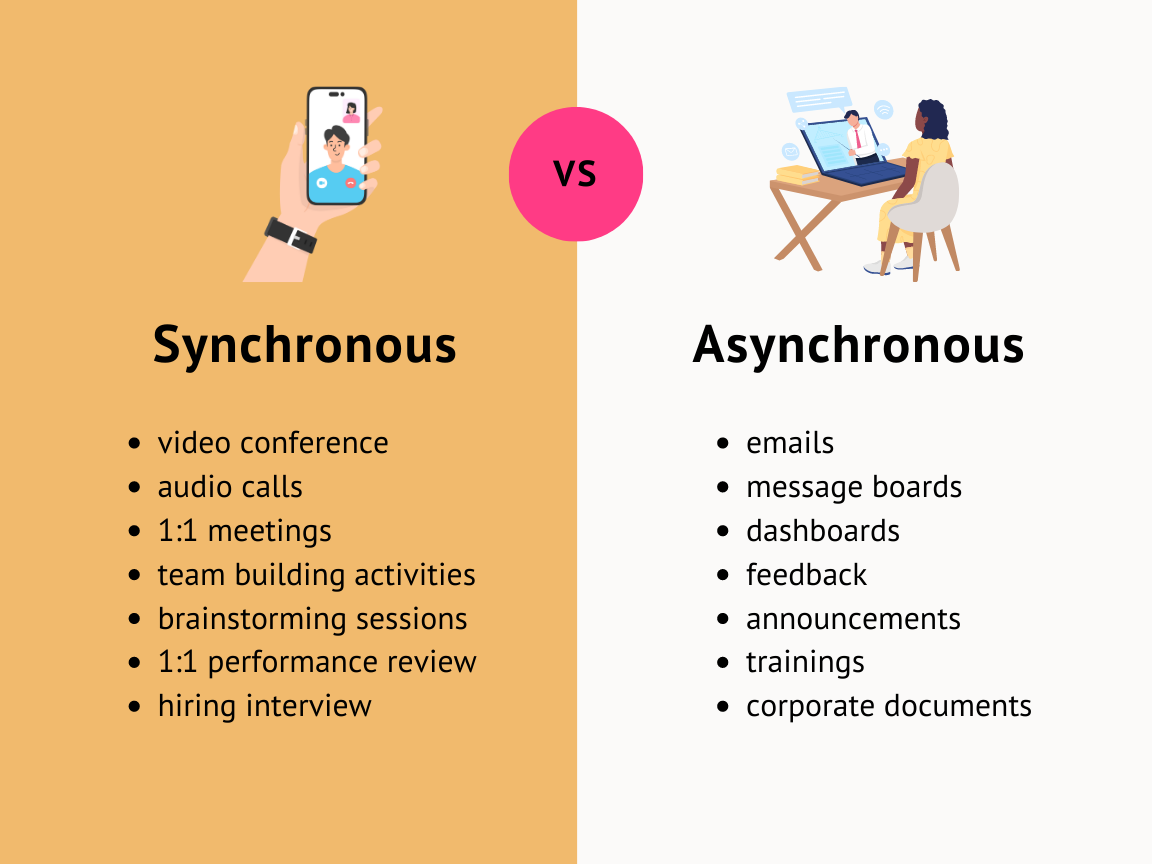
Image source: StoryPrompt
2. Selecting the appropriate communication avenues
Channel fatigue is a common phenomenon that occurs when people begin to feel overwhelmed and stressed by the various communications channels and tools used in remote work.
To avoid this, communication playbooks should clearly detail the communication tools that should be used for each type of communication.
For example, what goes in the project management tool is the work, and all comments, statuses, and updates on specific tasks should be focused on that specific task card. The chat app is used for informal and social engagement, while video calls are used for complex brainstorming and sensitive meetings.
The most successful teams are those that treat their chat app like a breakroom and their project board like a laboratory. One is for connection, the other is for precision.
This ‘why’ is the heart of accountability, and is the transparency that accompanies good accountability. It moves it all to a new level.
If a manager changes a project deadline, this should be communicated to the team in a public space, along with a short reason for why this occurred. This promotes trust.
Accountability goes both ways. It's not about spying on employees, but establishing solid benchmarks and milestones. When team members have a dashboard displaying their progress, they're more likely to feel a sense of achievement and pride about meeting their goals.
Productivity and performance management
1. Setting measurable goals and KPIs
In 2026, we’ve officially moved away from hours worked being a tracked metric. Instead, operations managers start to look at the KPIs that actually drive goals for the business.
For example, when we look at a Customer Support Representative, a KPI is not “sit at your computer for 8 hours”. Instead, a KPI is “maintain a 4.8/5 star satisfaction rating and complete ticket resolution in under 2 hours”.
This provides the employee with the opportunity to manage their own time as they see fit, as long as the standard for ticket resolution is met.
2. Monitoring performance without micromanaging
Micromanagement defeats the purpose of remote work. If you're checking when employees are Last Seen on their chat, you're doing it wrong. Instead, use Progress Dashboards. These provide a bird 's-eye view of the overall team output.
Managers don't need to check in if employee dashboards show completed tasks and high-quality work. With the time saved from check-ins, they take the approach of Management by Exception and trust employees.
Trust is the operating system of the remote world. If you don’t trust your people to work when you aren’t looking, you haven’t made a remote work problem; you’ve made a hiring problem.
3. Encouraging ownership and accountability
When employees can make decisions, they take ownership. In a remote environment, "Bottom-Up" reporting is encouraged.
Instead of a manager asking the employee for an update, the employee is expected to "push" updates to the team.
Let's say a software developer completed a new functionality. Instead of waiting for the weekly meeting, they make a 2-minute Loom video to demonstrate the new functionality and share it in the team channel. That person has ownership.
The faster the project moves, the more you communicate your own project.
Boost your team's productivity with an all-in-one tool
Achieving operational playbook value
Building these systems requires time, but the Return on Investment is massive. A well-run remote operation is a frictionless machine.
It makes growing the company easier since there is no need for additional management, and it helps build a positive company culture because it encourages the value of employee contributions over the value of employee attendance.
Continuous learning also plays a critical role in sustaining long-term performance for distributed teams.
“For remote teams, long-term performance depends on continuous learning. When employees have access to structured training and professional development resources, they can improve their skills without disrupting daily workflows,” says Tim Cassidy, Co-founder of .
By implementing these core strategies, such as establishing and communicating clear expectations and managing by results, you can reframe the difficulties of remote working into the greatest opportunities for the organization.
Tech stack for remote operations
If your business were set up in an office space, your physical infrastructure would include things like desks, chairs, and high-speed internet. In remote or hybrid situations, your infrastructure is your tech stack.
A fragmented stack leads to context switching, and employees spend up to 40% of their time switching between unrelated applications. This is how much your employees could potentially lose because of poor remote tech stack management.
Tooling up your tech stack
The days of static spreadsheets are gone. Modern project management has shifted to utilize dynamic, relational databases. You want a system where a task can be viewed as a list for a developer, a calendar for a marketer, and, at a high level, a Gantt chart for an executive.
“Remote operations succeed when the tech stack behaves like a single ecosystem rather than a collection of disconnected tools. When product, design, and operations teams share one digital workspace, context is preserved, decisions move faster,” explains Kos Chekanov, CEO of .
You want a single source of truth where the history of every decision made is attached to the task, to prevent the “Who said what?” debate, and maintain alignment. This is how most project management solutions have been set up.
Collaboration and communication platforms
A chat box is not a good collaboration platform, and a true collaboration platform is a unified space where messaging, document editing, and video conferencing all occur in one flow.
If your chat app can “talk” to a document editor, you can tag your teammate in a paragraph, and that notification will appear in their chat window. This creates a seamless loop of work that simulates sitting next to someone in a physical office.
Security and data protection tools
Remote work extends your security perimeter to the living room of every employee. This is why operations must prioritize “Zero Trust” security. In practical terms, this means using tools that provide end-to-end encryption, multi-factor authentication (MFA), and centralized permission management.
Protecting company data also means ensuring important files are stored in secure digital formats rather than fragile physical media.
“Digitising legacy files isn’t just about convenience; it’s about protecting information that may exist in only one fragile format. Once media is converted and securely stored in modern digital systems, it becomes easier to protect, back up, and access from anywhere,” says Logan Peranavan, CEO of .
Creating a strong remote work culture
Culture is the vibe of your company, and with a distributed team, it needs to be built with intention. You can’t use “Friday Drinks” to create a bond when half the team is in a different time zone, let alone a different country.
Building trust in distributed teams
Increased trust leads to more successful remote operations. Trust cannot be built by surveillance software or active status trackers. Trust is built through reliability. When people do what they say they will do, trust is built.
The shift from ‘I see you working’ to ‘I see your results’ is the most profound cultural change a manager can make. Once you stop monitoring activity and start celebrating achievements, the team feels empowered rather than watched.
Encouraging team engagement and inclusion
Hybrid teams make inclusion more difficult. There can be what is called Proximity Bias. This is a name for the phenomenon that people in the office often get the most important projects, just because they are physically there.
This can be countered by making sure that all major meetings and social interactions are done in the digital space for the first time. That way, the remote worker in Lahore feels just in the loop with the people in the headquarters.
Promoting employee well-being
Many employees working remotely experience digital exhaustion, which is caused by endless work days without a set schedule. Since there is no commute to define when the workday ends, employees are working late into the evening.
Operations must encourage "Work-Life Harmony," or it can lead to a disengaged and burned-out workforce. The promotion of this shift can be done by giving employees "No Meeting Friday" or by giving employees the autonomy to schedule "Deep Work" time on their calendars and set themselves to "Do Not Disturb" for a period of time.
Managing meetings in the remote work world
Time zones are an essential consideration in remote work. Under the right set of circumstances, a 24-hr "follow the sun" approach to work becomes possible.
Time zone management is crucial to the success of virtual teams. It is important to identify the “Golden Hour” of the team and then utilize this time for any interactive tasks. Other tasks should be done asynchronously.
“Global sourcing teams work across multiple time zones every day, so structured communication windows are essential. Identifying shared hours for key decisions helps teams stay aligned without slowing down international operations,” says Beni Avni, Founder of .
Strategies for Increasing Meeting Efficiency
It is important to acknowledge the carrying cost of a virtual meeting. A 30-minute meeting with 8 attendees incurs a cost to the company of 4 hours. To make the meeting more cost-effective, implement the following suggestions:
- No Agenda, No Meeting: If the purpose of the meeting is unclear, cancel it.
- Collaborative Notes: Utilize a shared document to capture real-time notes.
- Action Items: For each meeting, assign actionable items with specific deadlines, which are to be tracked in your project management tool.
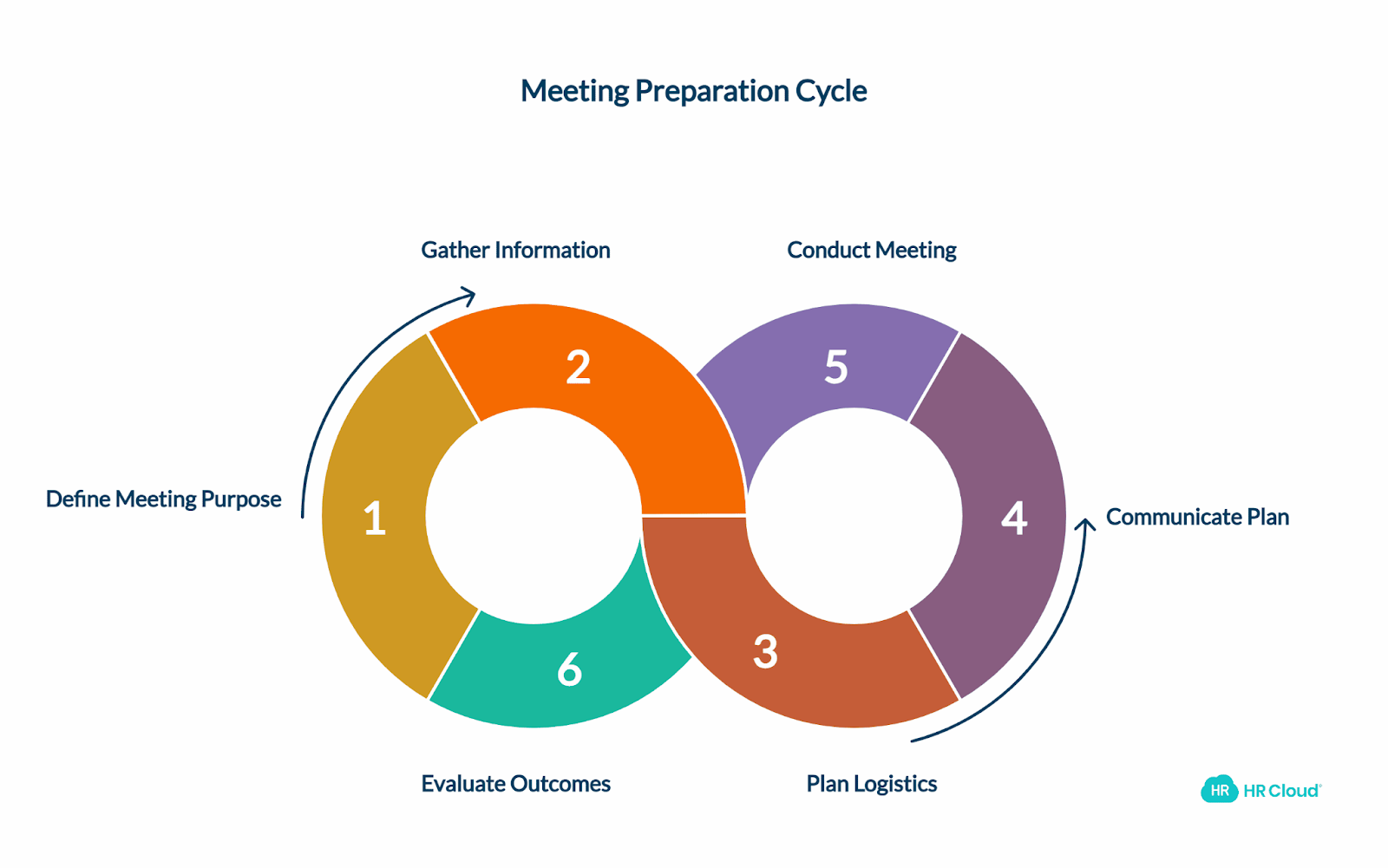
Image source: HR Cloud
Reducing meeting fatigue
The cognitive effort needed to look at each individual in a meeting and track their video and audio feed is exhausting. This is referred to as Zoom Fatigue.
A meeting can often be replaced by a good document. If you articulate your idea in 500 words, people can comment in their own time, and you've just saved an hour of fatigue for everyone, as well as creating a permanent record of the thought process.
Onboarding and training remote employees
Your operational excellence is depicted by your onboarding process. Losing the momentum of a new hire who is waiting for software passwords for 3 days is inexcusable.
Structuring a remote onboarding process
The process should be a "Self-Service Journey." Create a "New Hire Wiki" to answer questions like "How do I use chat?" or "How do I request time off?" Include a "30-60-90 Day Plan" to help them understand how they can achieve success in their first three months. Incorporate a to deliver structured, interactive learning experiences that guide new hires through essential processes.
Training and learning on the job
Since the team won't be together, the team needs to be more deliberate about sharing knowledge. Create a team video on how to do a repetitive task to keep a reference library/knowledge base. This knowledge library will remain with the company even if employees leave.
“For remote teams, learning has to be intentional. When training materials and knowledge are documented in shared systems, employees can build skills independently without waiting for real-time support,” says David Lee, Managing Director at .
Mentorship and sharing knowledge
When a new employee joins the company, they are assigned a "Culture Buddy" from a different division. This buddy helps the new employee learn the unwritten rules.
Mentorship in a remote setting isn't about formal sit-downs; it's about creating a safe space in the remote world where a junior person can ask a silly question and not be judged in a public forum.
Connect and align all team members with Lark
Working through common issues
1. Closing communication loopholes
When gaps exist, people make decisions in private group chats.
Solution: a Public-By-Default policy. If a decision is made in a private meeting/call, a summary is posted in the project group chat. This way, the reason is never lost.
“For marketing teams, lost context can derail campaigns quickly. When decisions stay in private messages, teams miss critical information. Documenting updates in shared channels ensures everyone understands the strategy and can execute consistently,” says Tal Holtzer, CEO of .
2. Overcoming isolation and burnout
Isolation is the biggest threat to remote productivity.
Solution: Create "water cooler" channels. It can be for sharing pet pics or threads for "What are you having for lunch?" type of chats. These little moments humanize the team and make it less about a job and more about a team.
3. Keeping a work-life balance
From 2026 onwards, the "Always-On" culture will cost you the business.
From a manager’s perspective, A job is to conserve the team’s mental resources. If someone is messaging work-related things at 10 PM, it is not a recognition of work ethic. Showing the team that there is a problem in their workload, and that it needs to be streamlined and resolved.
Why Lark is the ultimate digital HQ for hybrid and remote teams
Hybrid and remote work shouldn't mean scattered information and app fatigue. When your team is spread across living rooms, coffee shops, and different time zones, you need more than just a chat app—you need a unified digital workspace. By bringing communication, project management, and content creation into one seamless ecosystem, ensures your team stays connected, productive, and aligned, no matter where they log in from.
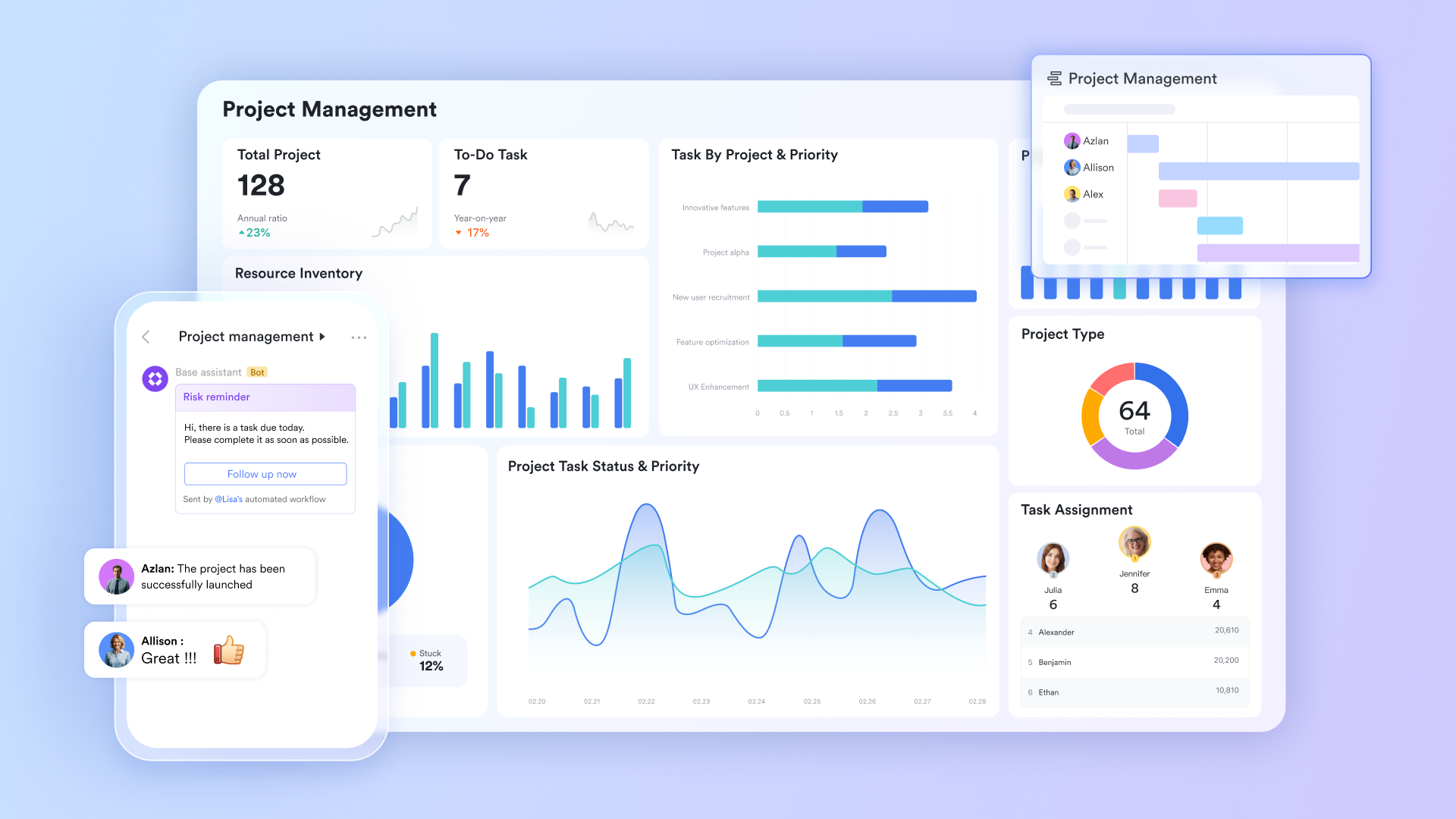
At the heart of this ecosystem is , a powerful, highly customizable relational database that acts as the single source of truth for your distributed workforce. Instead of hunting down status updates across different siloed apps, remote teams can build customized workflows, automate repetitive processes, and centralize project data. It empowers team leaders to maintain high-level visibility and track resources in real-time, drastically reducing the need for constant "check-in" meetings.
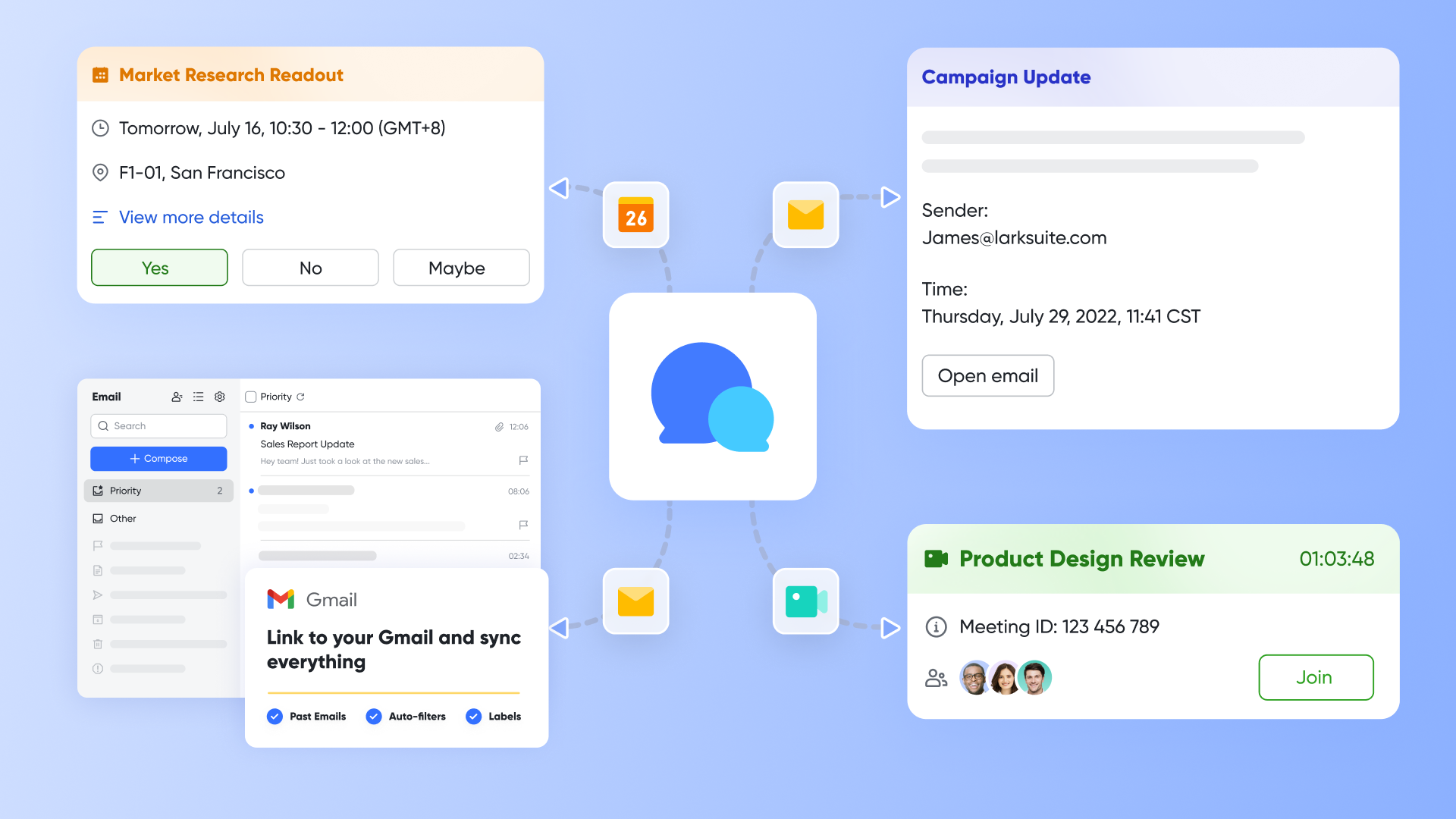
is built for the realities of asynchronous communication. It goes far beyond standard instant messaging by integrating deeply with your actual work. Distributed teams can share rich media, organize complex discussions using threaded replies, and even auto-translate messages in real-time—a game-changer for global teams. Because it's connected to everything else in Lark, you can turn a passing chat message into a trackable task or a collaborative document with a single click, ensuring no context is ever lost.、
Keeping everyone accountable when they aren't in the same room can be challenging, but Lark Tasks makes progress visible to everyone. Teams can create, assign, and track action items directly within their workflow—whether during a chat, inside a document, or after a meeting. This ensures complete transparency, allowing remote workers to prioritize their day and managers to track milestones without micromanaging. 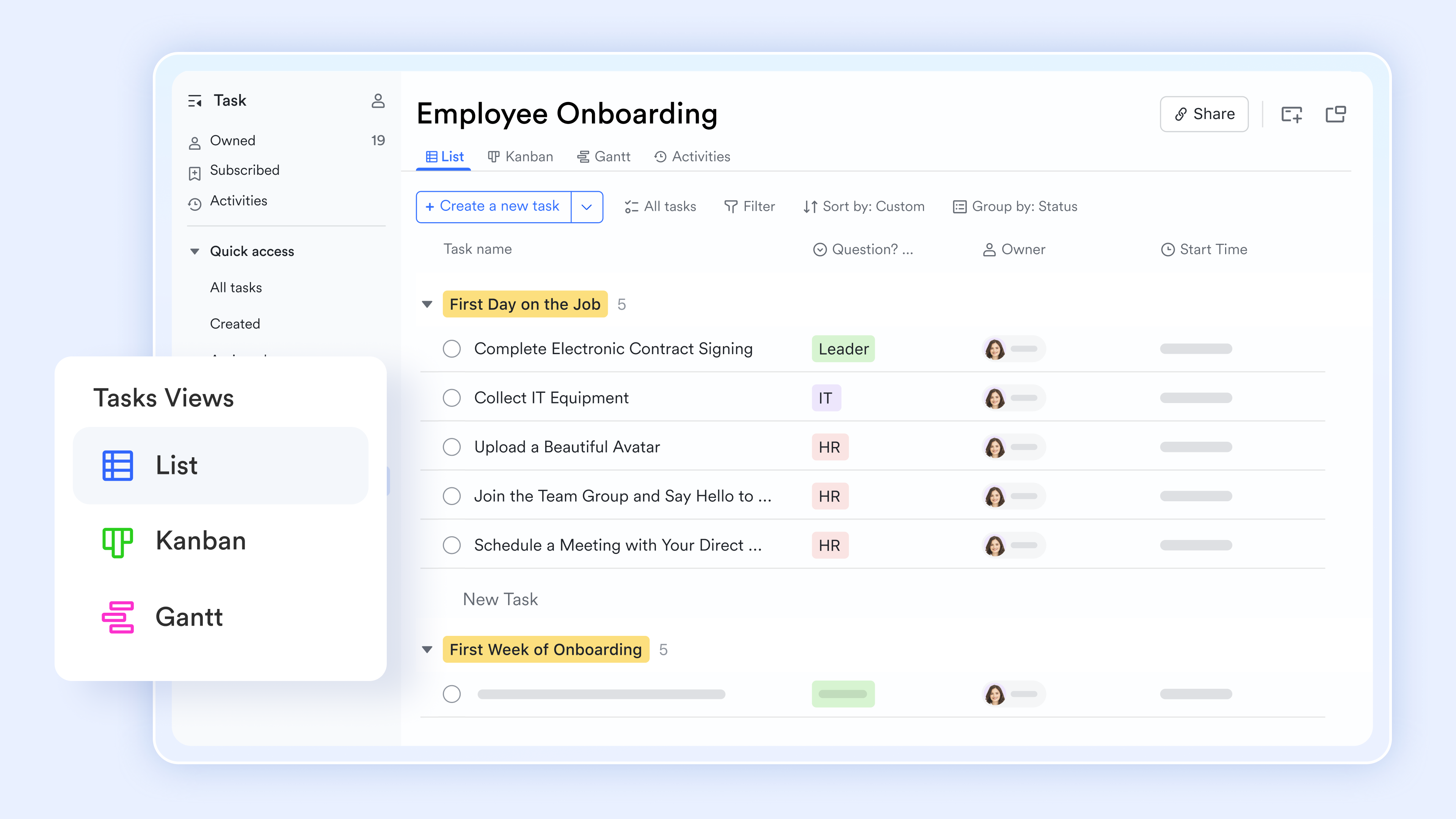
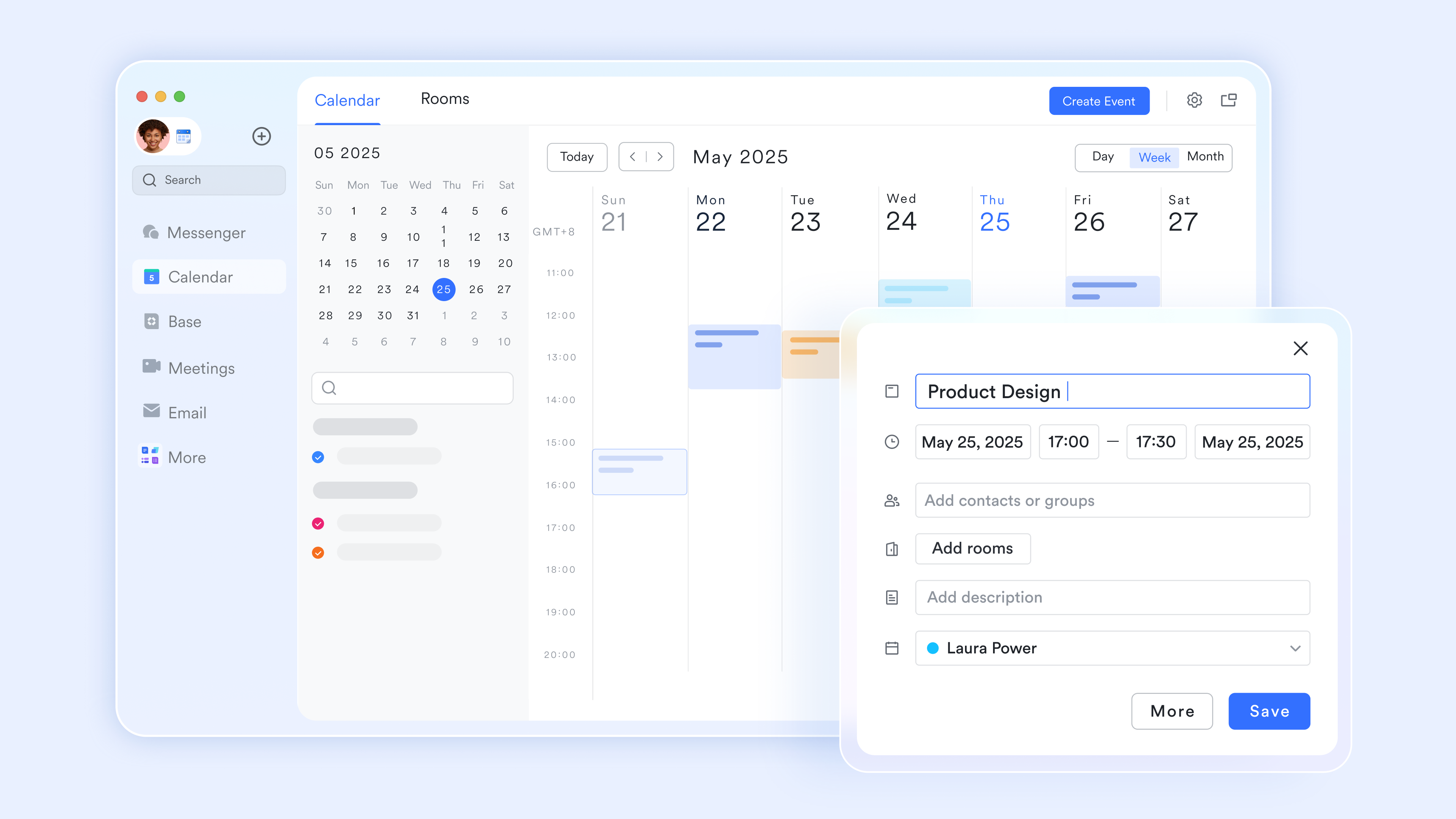
Scheduling across time zones is a notorious headache for remote teams, but i takes the math out of the equation. It natively integrates scheduling across individuals and departments, automatically displaying multiple time zones and instantly surfacing the best overlapping times for a quick sync. You can easily subscribe to team calendars, manage your working hours, and protect focus time, ensuring everyone stays aligned on deadlines while respecting personal boundaries.
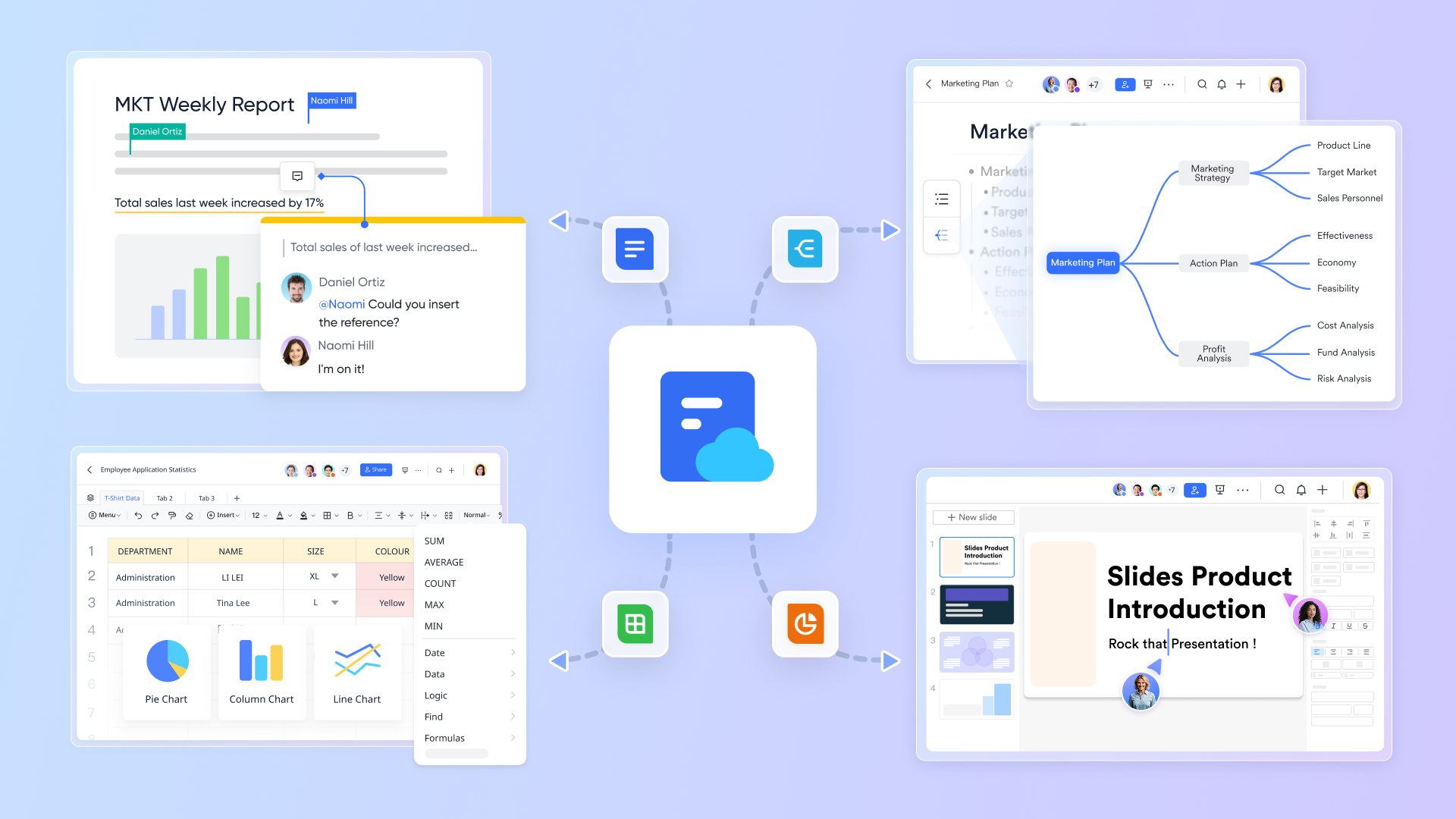
For asynchronous collaboration, redefines what a document can be. These cloud-native canvases go beyond text, allowing you to embed task lists, polls, flowcharts, and even Lark Base tables directly into the page. Remote teams can engage in real-time co-authoring or leave contextual inline comments for colleagues to review when they wake up in another time zone. This dynamic, transparent approach means less time spent in status meetings and more time executing high-value work.
When synchronous alignment is absolutely necessary, delivers a fatigue-free video conferencing experience tailored for hybrid setups. Its standout feature, Magic Share, allows participants to scroll through shared documents and presentations at their own pace directly within the meeting window, boosting engagement for remote attendees. For those who can't attend due to schedule conflicts, provides searchable, translated transcripts, while Lark's instantly generate actionable summaries and next steps. This ensures that every remote employee stays in the loop, whether they attended live or caught up asynchronously on their own time. 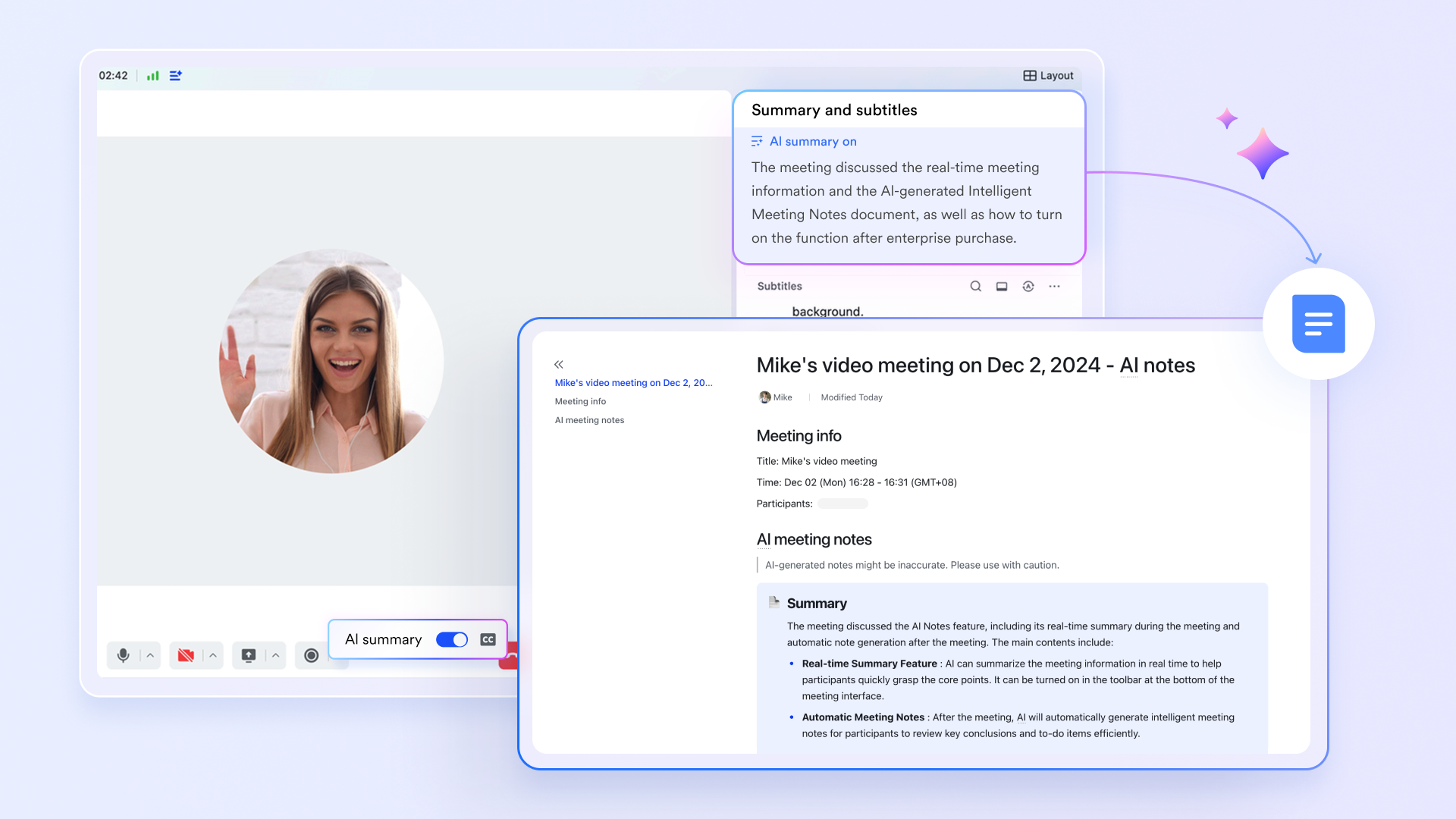
This holistic approach helps hybrid and remote teams reduce tool fragmentation, enhance team collaboration, and maintain productivity no matter where they work.
:
- Starter plan: that includes 11 powerful tools for up to 20 users. It also comes with 100GB of storage space, 1000 automation runs, AI translations, and more. No credit card needed.
- Pro plan: (billed annually) for up to 500 users. It includes everything in Starter plus group calling for up to 500 attendees, 15TB of storage space, 50,000 automation runs, and more.
- Enterprise plan: for custom pricing. Supports unlimited users and includes even more automation runs and advanced security, compliance, and management features.
For small teams with simple communication needs

18 months message history
1000 Base automation runs/month
2000 rows per table in Base
Most POPULAR
For companies with comprehensive collaboration and management needs
Unlimited message history
500-participant video meetings
50k Base automation runs/month
20k rows per table in Base
For large companies with advanced security and organizational management needs
Get a personalized demo and pricing
Unlimited message history
500-participant video meetings
15 TB storage + 30 GB storage/user
500k Base automation runs/month
50k Base automation runs/month
Most POPULAR
For companies with comprehensive collaboration and management needs
Unlimited message history
500-participant video meetings
50k Base automation runs/month
20k rows per table in Base
Conclusion
For hybrid and remote teams, a unified platform that combines messaging, task management, calendar scheduling, document collaboration, and advanced meeting features into one unified workspace can definitely reduce communication gaps and boost team performance. Lark addresses the unique challenges of distributed work, and its flexible tools and automation capabilities help teams streamline operations, improve communication, and maintain alignment across projects and goals. For organizations looking to enhance productivity and foster collaboration in a hybrid or remote environment, Lark is a comprehensive and scalable solution worth considering.
FAQs
What makes Lark different from other collaboration tools for remote teams?
Lark combines multiple essential productivity tools—messaging, tasks, calendar, docs, and meetings—into a single unified platform, reducing the need to switch between apps. Its real-time collaboration features and AI-powered meeting notes uniquely support hybrid and remote work dynamics.
Can Lark support large teams and complex workflows?
Yes, Lark Base allows teams to customize workflows, automate routine tasks, and centralize project data, making it suitable for both growing SMEs and large enterprises managing multiple projects and cross-functional teams.
How does Lark Meeting enhance virtual meetings?
Lark Meeting includes features like Magic Share for interactive content sharing, Lark Minutes to record key discussion points, and AI Meeting Notes that automatically generate summaries, helping teams stay engaged and ensuring no important detail is missed.
Is Lark suitable for teams new to remote collaboration?
Absolutely. Lark’s intuitive interface, integrated tools, and seamless onboarding make it accessible for new users while providing powerful features that scale with team needs and complexity.
Related reading







![What Is a 2-2-3 Work Schedule? Explanation and More [2024]](https://framerusercontent.com/images/uKHRfkp4v7y4azRNTYUmuteNQz8.png)