


Lead Tracking: Best Tools, Systems, and Techniques

Ryan Tanner
Product Marketing Specialist
Aug 5, 2026
Ryan Tanner
Aug 5, 2026

16 min read


Tracking leads effectively is the foundation of every successful sales strategy. A well-built lead tracking system captures every interaction, helping teams identify high-value prospects and move them efficiently through the sales pipeline. Modern lead tracking software integrates CRM workflows, automation, and analytics to keep opportunities visible and actionable. In this guide, we'll explore the best lead tracking tools and systems available today, from HubSpot and Salesforce to Zoho, Pipedrive, and Lark, and show how they help businesses of all sizes improve visibility, streamline follow-ups, and boost overall conversion performance.
1. Lark: Unified lead tracking, CRM workflows, and automation.
2. HubSpot Sales Hub: End-to-end CRM and marketing automation.
3. Pipedrive: Visual sales pipeline and lead scoring.
4. ActiveCampaign: Email and customer journey tracking.
5. Zoho CRM: Affordable CRM with lead tracking features.
6. Salesforce Sales Cloud: Enterprise-level lead tracking and analytics.
7. Freshsales: AI-based lead scoring and activity tracking.
8. Insightly: CRM with integrated lead and project management.
9. Copper CRM: Lead tracking designed for Google Workspace users.
10. Nimble: Lightweight CRM for SMBs with social lead tracking.

Quick snapshot: Best lead tracking software and pricing
Choosing the right lead tracking software is essential for improving pipeline visibility and streamlining sales processes. Today's top CRM lead tracking systems offer features like automated workflows, analytics, and deal scoring to help teams prioritize high-value leads. In this section, we provide a snapshot of the leading sales lead tracking tools, their key features, pricing, and free plan availability to help businesses make informed decisions.
What is lead tracking?
Lead tracking is the process of capturing, organizing, and managing potential customers as they move through your sales funnel. Using a lead tracking system or CRM lead tracking software, teams can record every interaction from website visits and campaign clicks to calls, emails, and meetings, and analyze which activities drive conversions.
A strong sales lead tracking process helps businesses understand where leads come from, how they engage, and what actions move them closer to purchase. Modern lead tracking tools centralize this data in one place, allowing teams to score prospects, assign ownership, and automate follow-ups. With features like real-time dashboards, automated notifications, and analytics, lead tracking software provides full visibility into the pipeline. By connecting marketing and sales insights, lead tracking systems empower businesses to focus on high-value leads, forecast revenue accurately, and improve overall sales efficiency.
Image source: unsplash.com
How the lead tracking process works
An efficient lead tracking process helps teams manage every stage of the customer journey from capturing interest to closing deals. By combining automation, analytics, and collaboration, modern CRM lead tracking systems make it easier to monitor performance and act quickly on opportunities.
- Lead capture: The process begins with lead capture, where data from website forms, landing pages, ads, or events is automatically recorded in a lead tracking tool. This ensures no potential contact is lost and allows teams to segment leads by source, campaign, or region for targeted outreach.
- Lead qualification: Once captured, leads are evaluated through sales lead tracking software that assigns scores based on behavior, demographics, or intent. This step helps sales teams focus their efforts on high-quality prospects most likely to convert, improving efficiency and conversion rates.
- Lead distribution: A lead tracking system can automatically assign leads to sales representatives based on territory, product line, or workload. Smart routing ensures faster responses, balanced workloads, and accountability at every stage of the pipeline.
- Lead follow-up: Timely and personalized communication is critical in CRM lead tracking. Automation tools send follow-up emails, schedule calls, or create reminders, keeping prospects engaged and ensuring consistent touchpoints without manual effort.
- Lead analysis: Finally, analytics and dashboards within lead tracking software reveal which sources, reps, and campaigns deliver the best results. These insights help optimize strategy, forecast revenue, and continuously refine the sales lead tracking process for higher CRM KPIs.
Full list: Top lead tracking tools and platforms
1. Lark: Unified lead tracking, CRM workflows, and automation
Lark is a comprehensive lead tracking tool designed to help teams manage prospects, automate workflows, CRM database, and centralize project management in one workspace. With features like Base for lead management, Forms for capture, and Messenger & Calendar for follow-ups, Lark streamlines every step of the sales pipeline. It empowers teams to track leads efficiently, collaborate in real time, and make data-driven decisions for better conversion outcomes.
Lark Base: Build a structured client database and visualize pipelines
Create a dedicated client or lead table in Lark Base with custom fields for stage, owner, deal value, source, last contact, priority, and more. Each lead record can store docs, messages, meeting links, and attachments, so the full context lives with the record. Base records are live, so updates are immediate and visible to everyone across different views, ensuring the pipeline is always current.
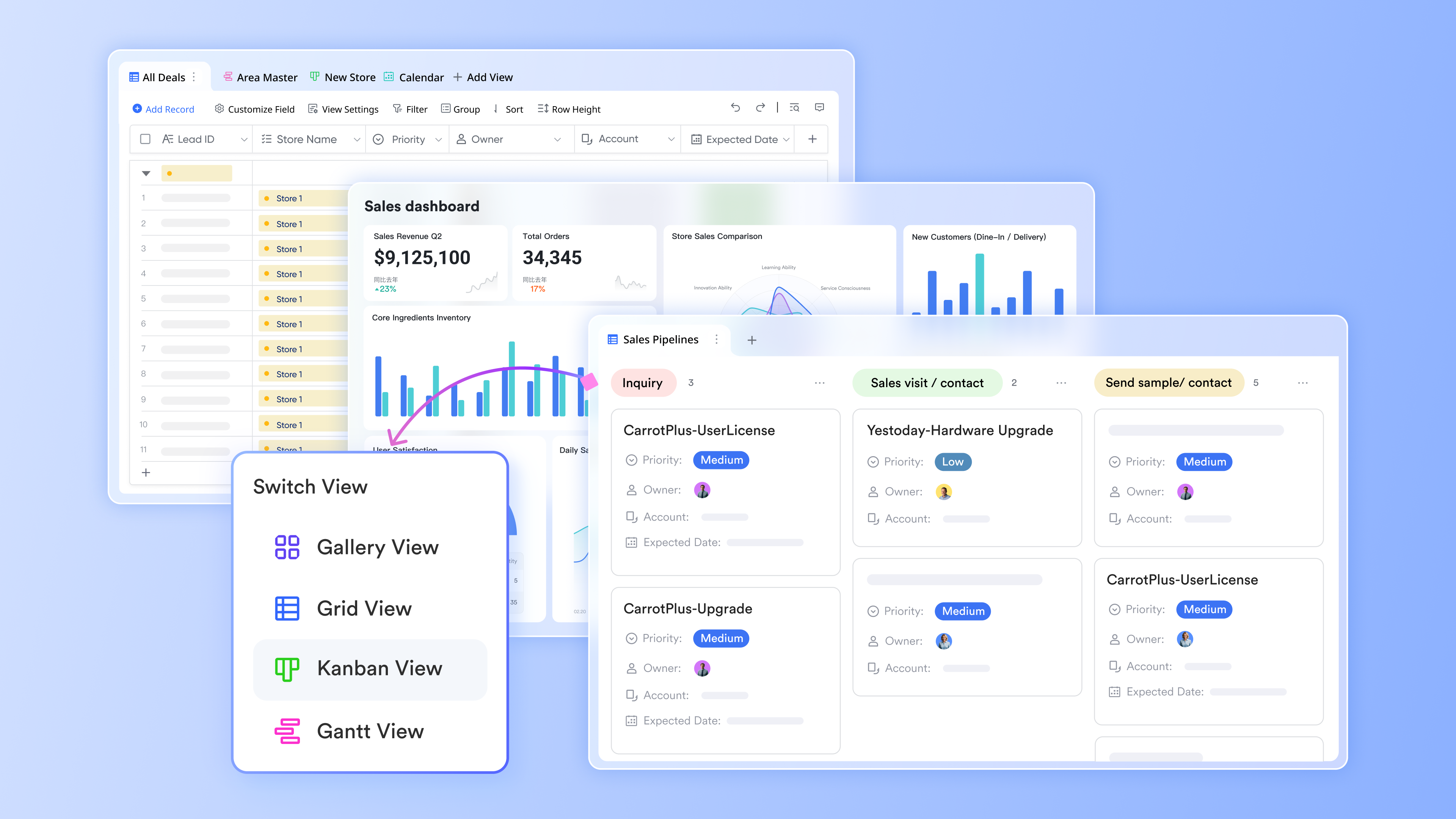
Views in Lark Base: Data visualization for smooth pipeline management
Kanban view turns pipeline status into draggable cards so reps and managers can spot bottlenecks at a glance and reassign or escalate work quickly. Filters and groupings let teams focus: show only high-value deals, a specific region, or leads due this week. Switching to Grid or Gantt preserves all the same fields, so changing a card's status in Kanban updates schedules and dashboards automatically. This visual flexibility speeds decisions and reduces reconciliation work.
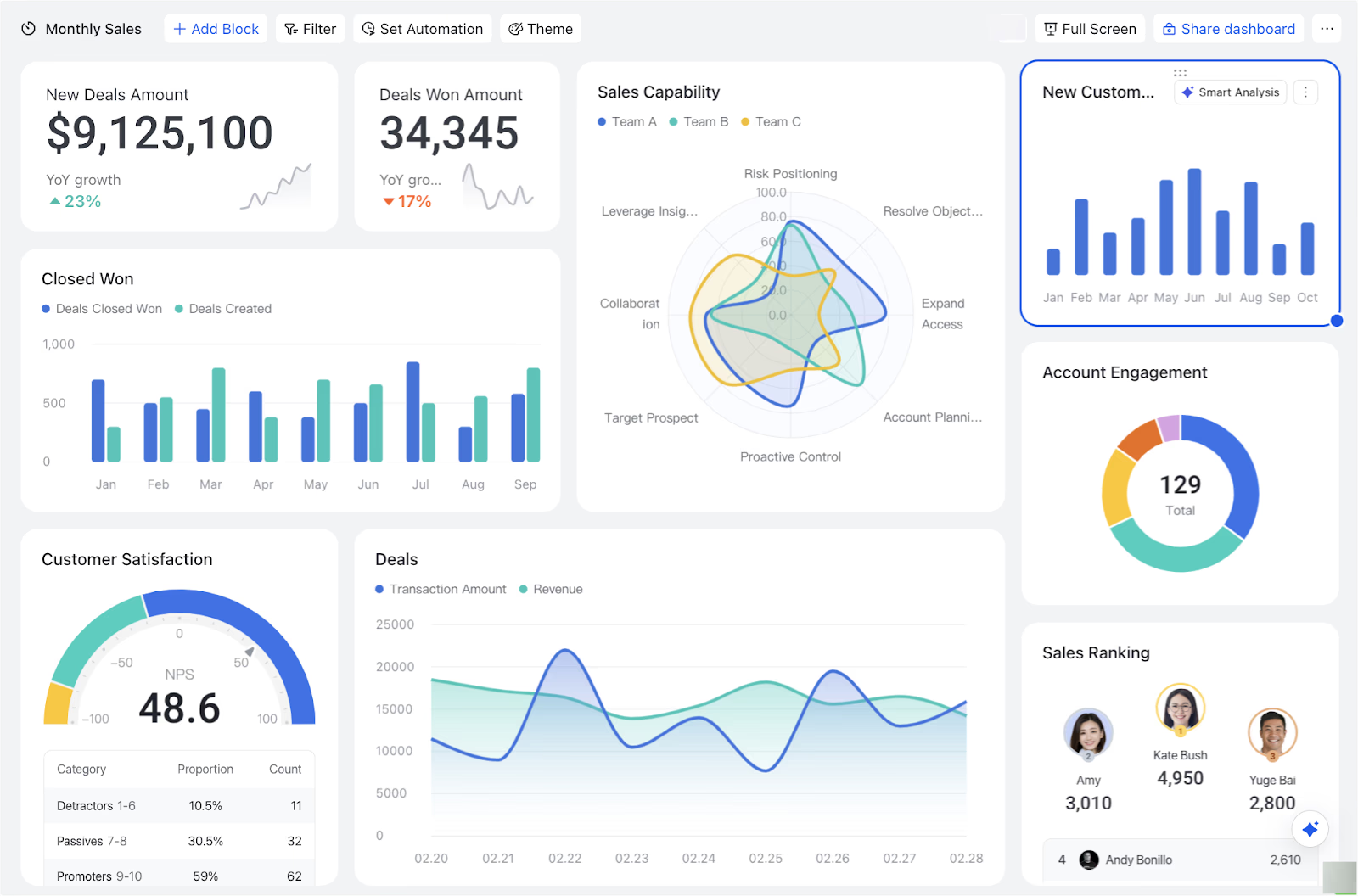
Dashboard in Lark Base: real-time visibility for reps and leadership
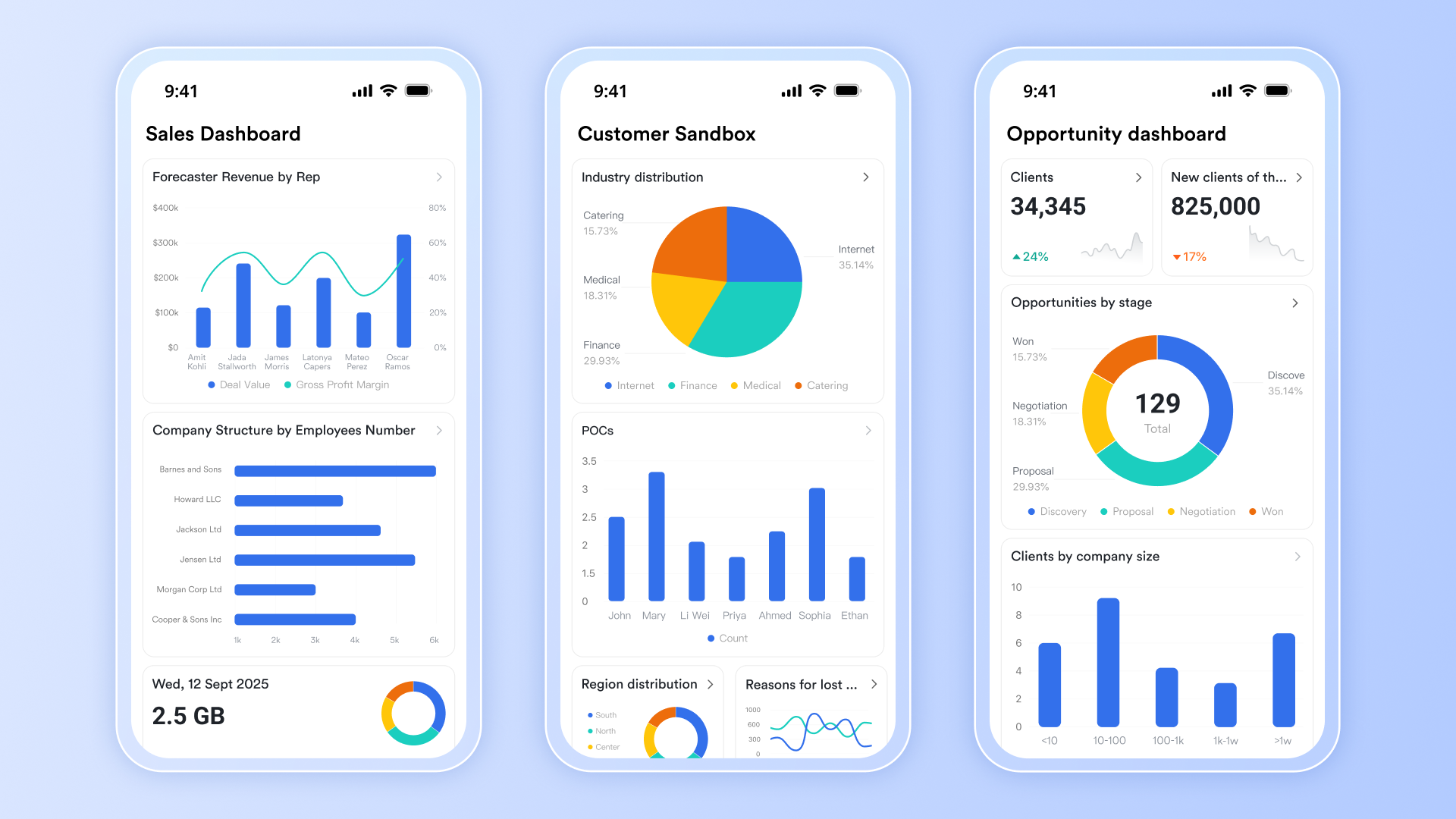
Turn base data into visual dashboards that show conversion rates, deal velocity, pipeline by owner, and lead source performance. Dashboards can be shared separately from the base and sent as automated reports to recipients as images. With multiple tables, you can also filter dashboard data to analyze specific metrics, such as pipeline by owner or lead source performance.
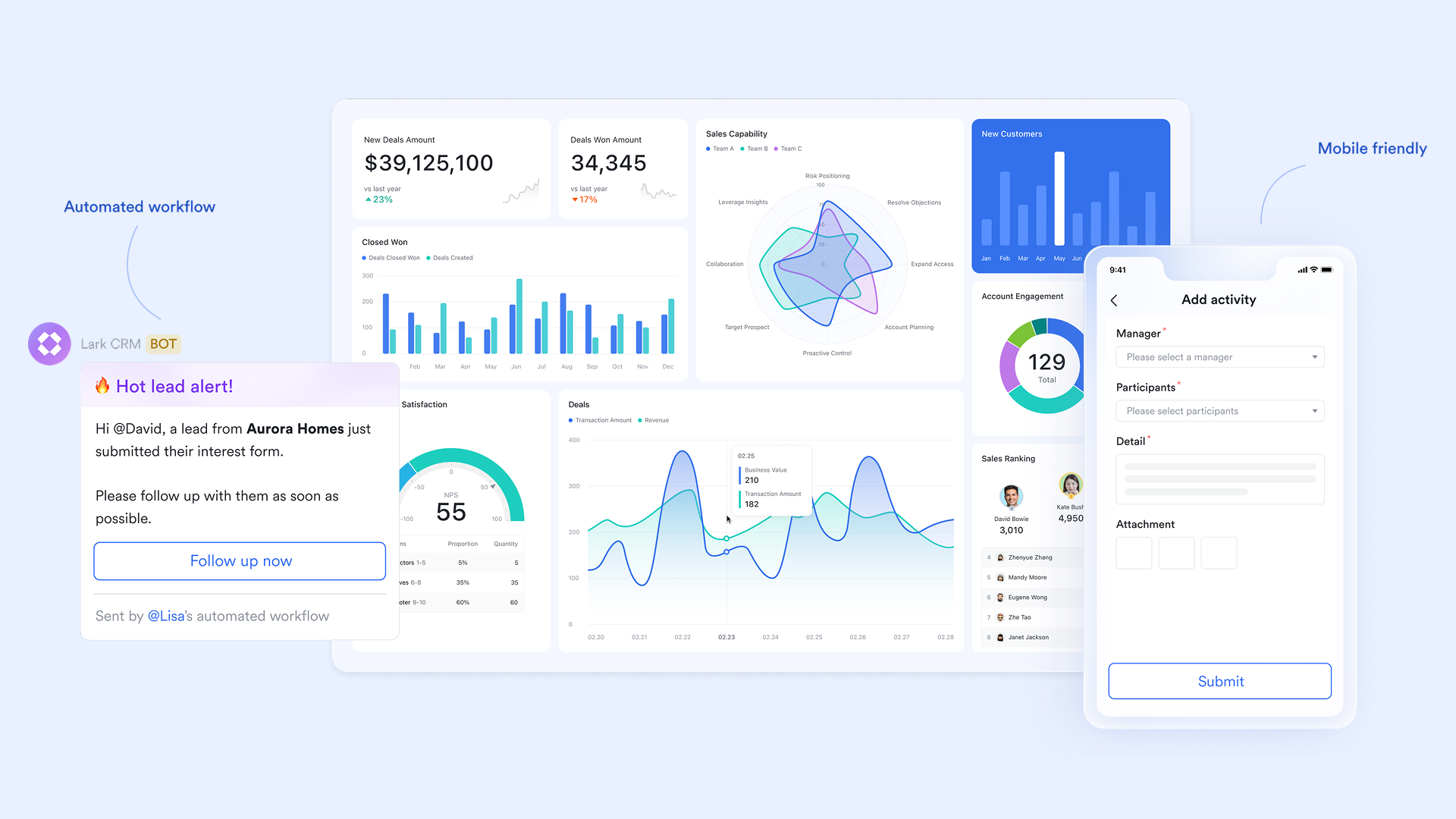
Automations in Lark Base: Route, notify, and move work forward
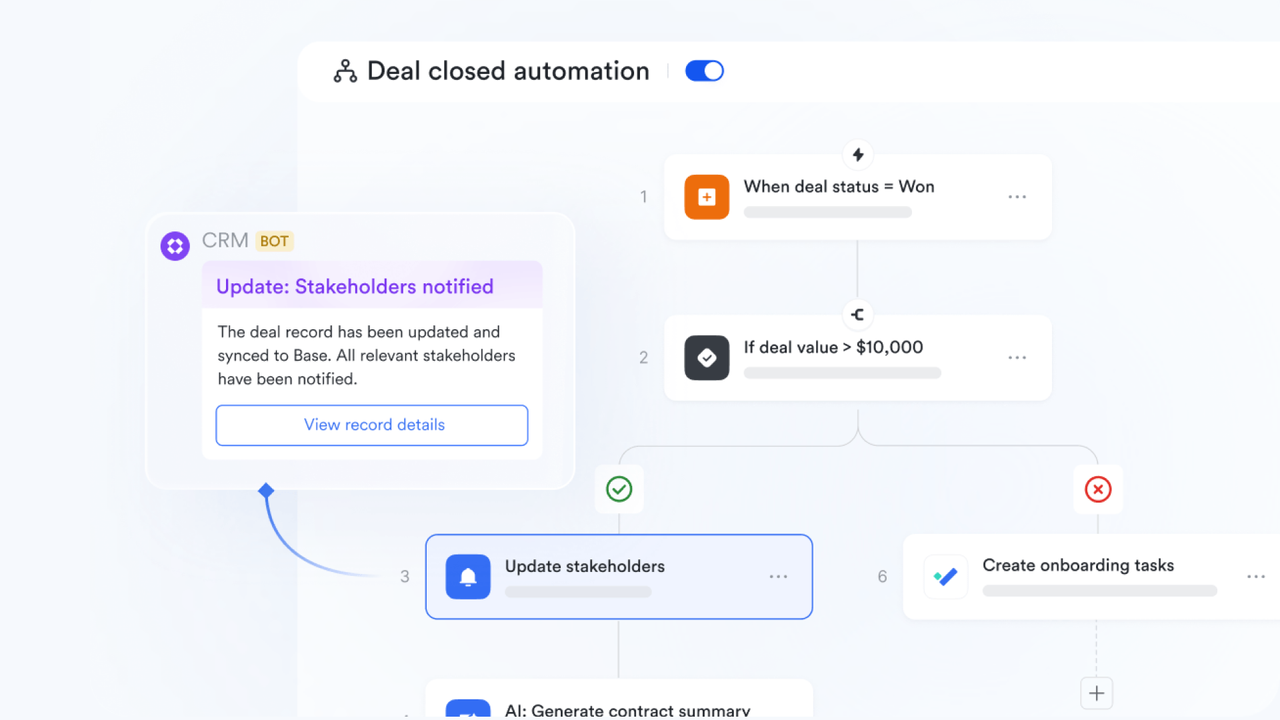
Set up multi-step workflows in Base so routine actions happen without manual handoffs: for example, when a lead hits "Qualified," automatically assign an owner, create a follow-up task, and post a summary to the sales channel. Use conditional logic (if/then rules) and formulas to evaluate fields (e.g., deal size or lead score) and trigger different paths for high-priority leads. Automations reduce dropped leads, standardize follow-ups, and keep response time consistent across the team.
Lark Approval: streamline contract sign-offs and follow-ups
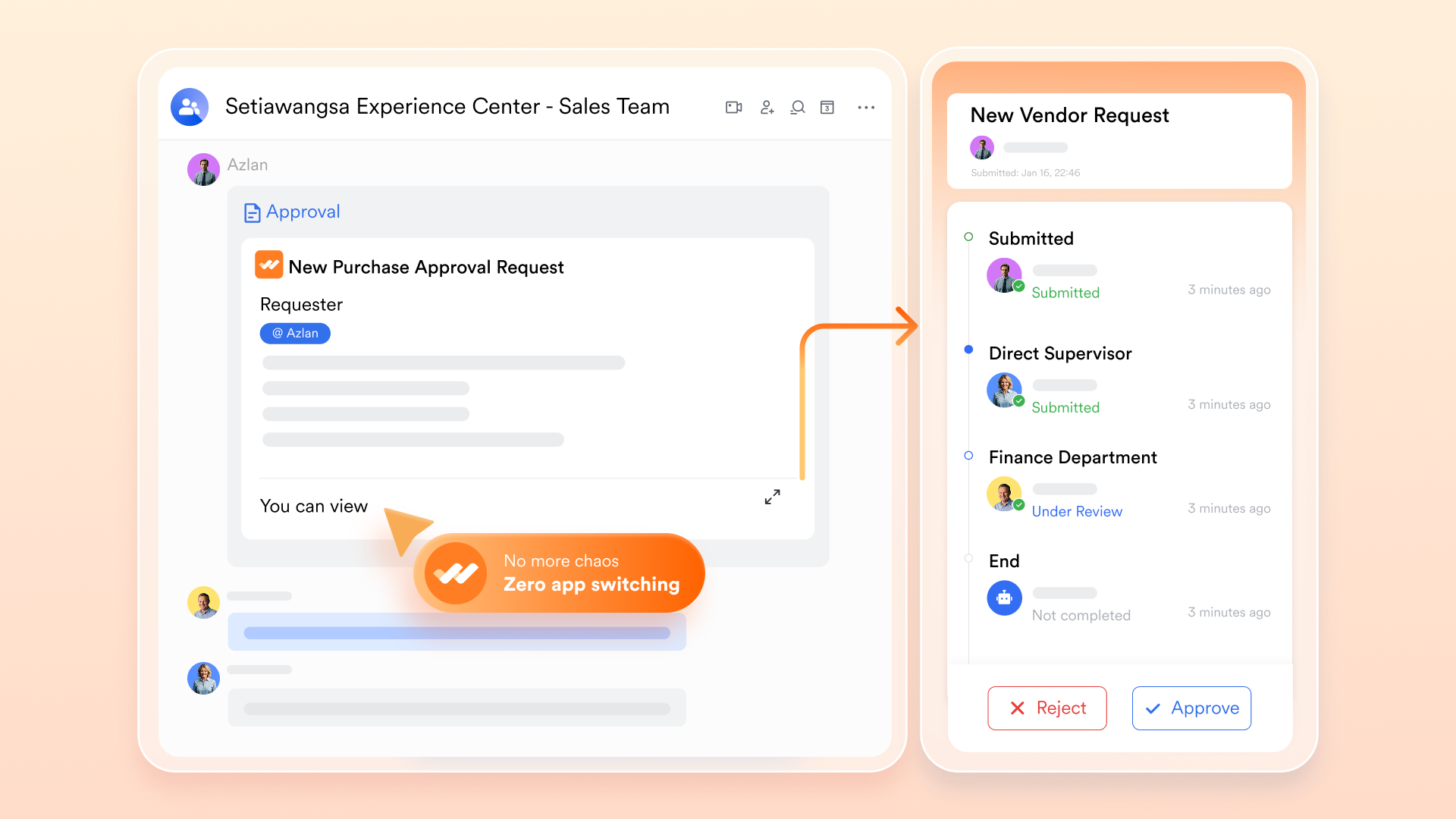
Use Lark Approval to capture signed agreements, internal approvals, or discount authorizations and have the result flow back into the lead record. When an approval completes, workflows can update the deal stage, notify finance or fulfillment, and create fulfillment tasks, all automatically. This keeps contract status transparent, shortens post-sale handoffs, and makes it easy to audit who approved what and when.
Permissions and role-based workflows: protect sensitive steps
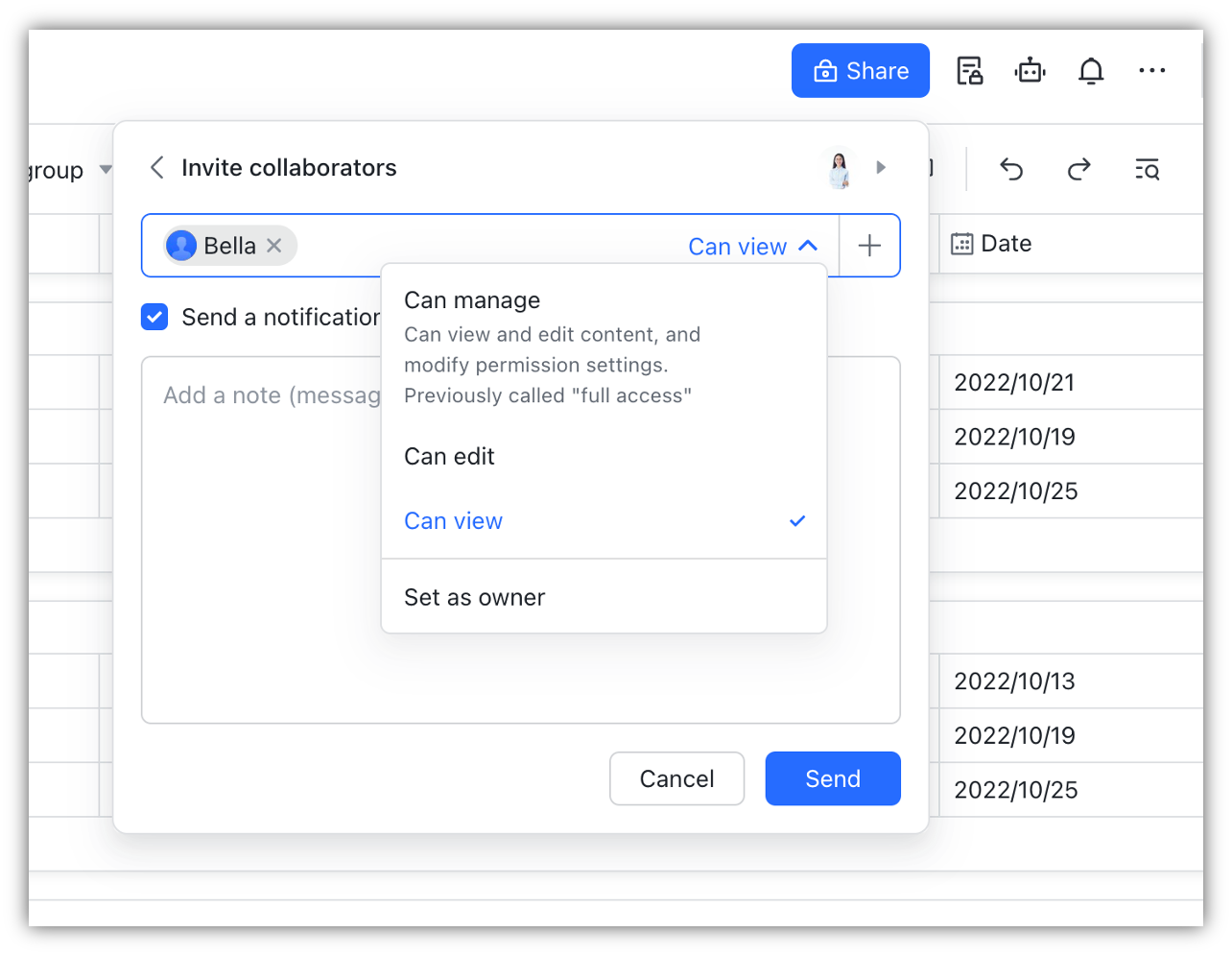
Control who can view, edit, or move leads through stages, ensuring that sensitive actions (such as pricing approvals and contract edits) are only performed by authorized roles. Role-based workflows can require a manager's approval before changing a stage or closing a deal, ensuring governance without the need for manual policing. Clear ownership fields and activity logs improve accountability and simplify audits.
Collaboration and mobile access for faster response
Because lead records, messages, and documents live in the same workspace, reps can discuss a lead in Lark Messenger and link directly to the Base record or Docs without losing context. Mobile syncing ensures that field teams and on-call representatives can update statuses, scan contracts, or approve requests from their phones, keeping the pipeline fresh and actionable wherever people are working.
- Starter plan: Free forever plan that includes 11 powerful tools for up to 20 users. It also comes with 100GB of storage, 1000 automation runs, AI translations, and more.
- Basic plan: $6/user/month (billed annually) for up to 500 users. It includes everything in Starter plus group calling for up to 500 attendees, 5TB of storage, 1000 automation runs, and more.
- Pro plan: $12/user/month (billed annually) for up to 500 users. It includes everything in Starter plus group calling for up to 500 attendees, 15TB of storage, 50,000 automation runs, and more.
- Enterprise plan: Contact sales for custom pricing. Supports unlimited users and includes even more automation runs and advanced security, compliance, and management features.
2. HubSpot Sales Hub: End-to-end CRM and marketing automation
HubSpot Sales Hub is a complete CRM and marketing automation platform built to manage every stage of the sales funnel. It gives teams full visibility into customer interactions—emails, calls, meetings, and campaigns—all in one connected dashboard. With its powerful automation tools, HubSpot helps businesses nurture leads, shorten sales cycles, and boost conversion rates. It's designed for teams that want smarter workflows and data-driven insights. Whether you're a startup or an enterprise, HubSpot scales with your growth.
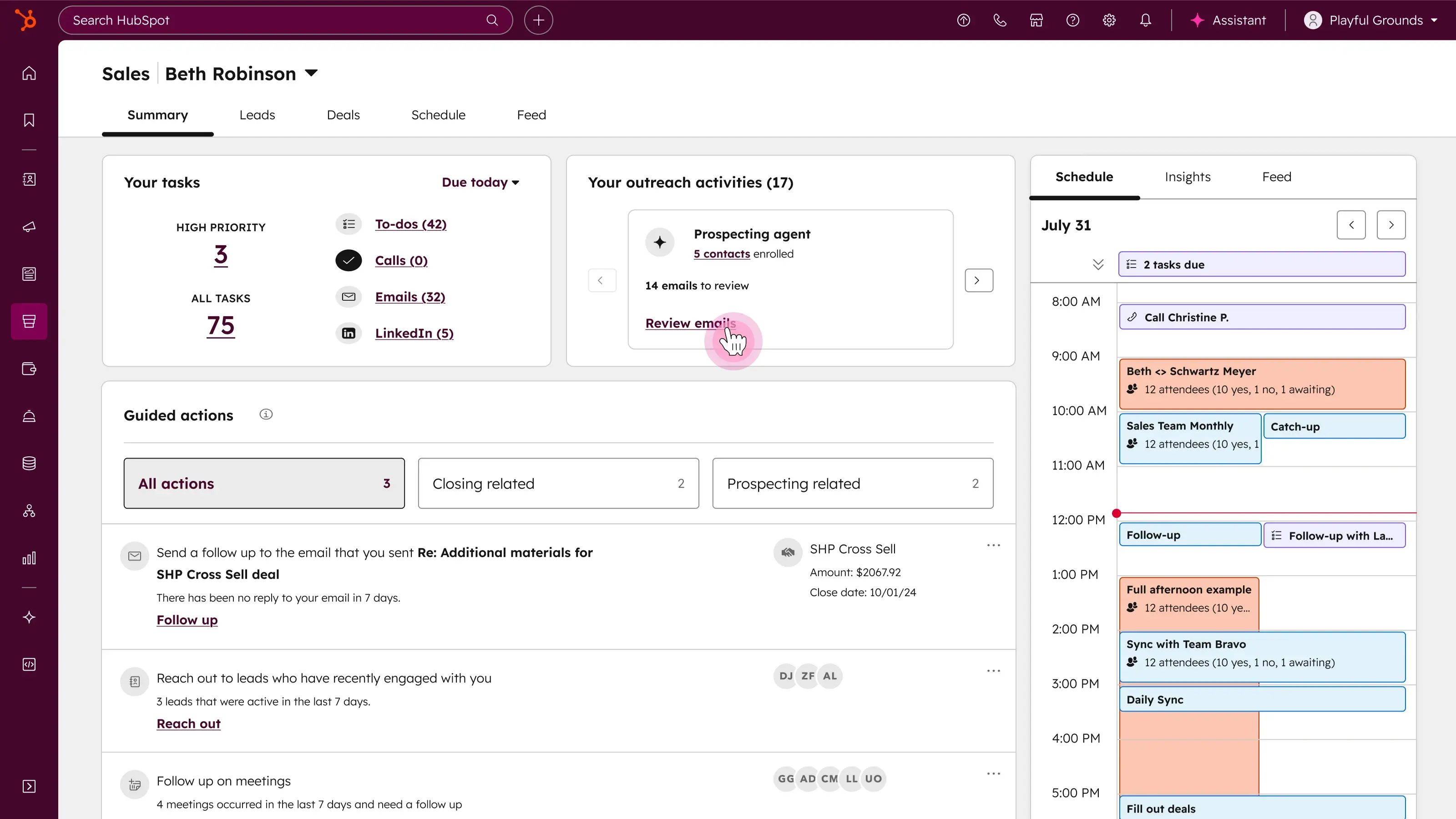
Image source: hubspot.com
Key features:
- Unified CRM: Centralized contact management with deal tracking and communication history.
- Marketing automation: Create custom workflows, lead scoring, and campaign journeys.
- Analytics & reports: Real-time insights into marketing, sales, and revenue performance.
- Email and chat tools: Connect with leads through email, live chat, or sequences.
- Integrations: Works seamlessly with popular apps for marketing, support, and billing.
Strengths:
- Excellent inbound marketing and automation capabilities
- Free CRM with robust starter features
- Expansive integration ecosystem
- Suitable for both small and large teams
Limitations:
- Pricing scales quickly as contacts and tools increase
- Can feel complex for smaller businesses initially
Pricing:
- Free CRM available
- Paid Sales Hub plans from $20/user/month
- Advanced tiers from $890–$3,000/month depending on usage
3. Pipedrive: Visual sales pipeline and lead scoring
Pipedrive is a sales-driven CRM designed for simplicity, clarity, and speed. Its visual pipeline helps teams focus on active deals and see exactly where prospects stand. The drag-and-drop interface minimizes clutter while maximizing visibility into every sales stage. Pipedrive also uses automation and scoring to help prioritize hot leads and reduce manual updates. Ideal for SMBs and sales teams who want a lightweight yet data-rich CRM to close deals faster.
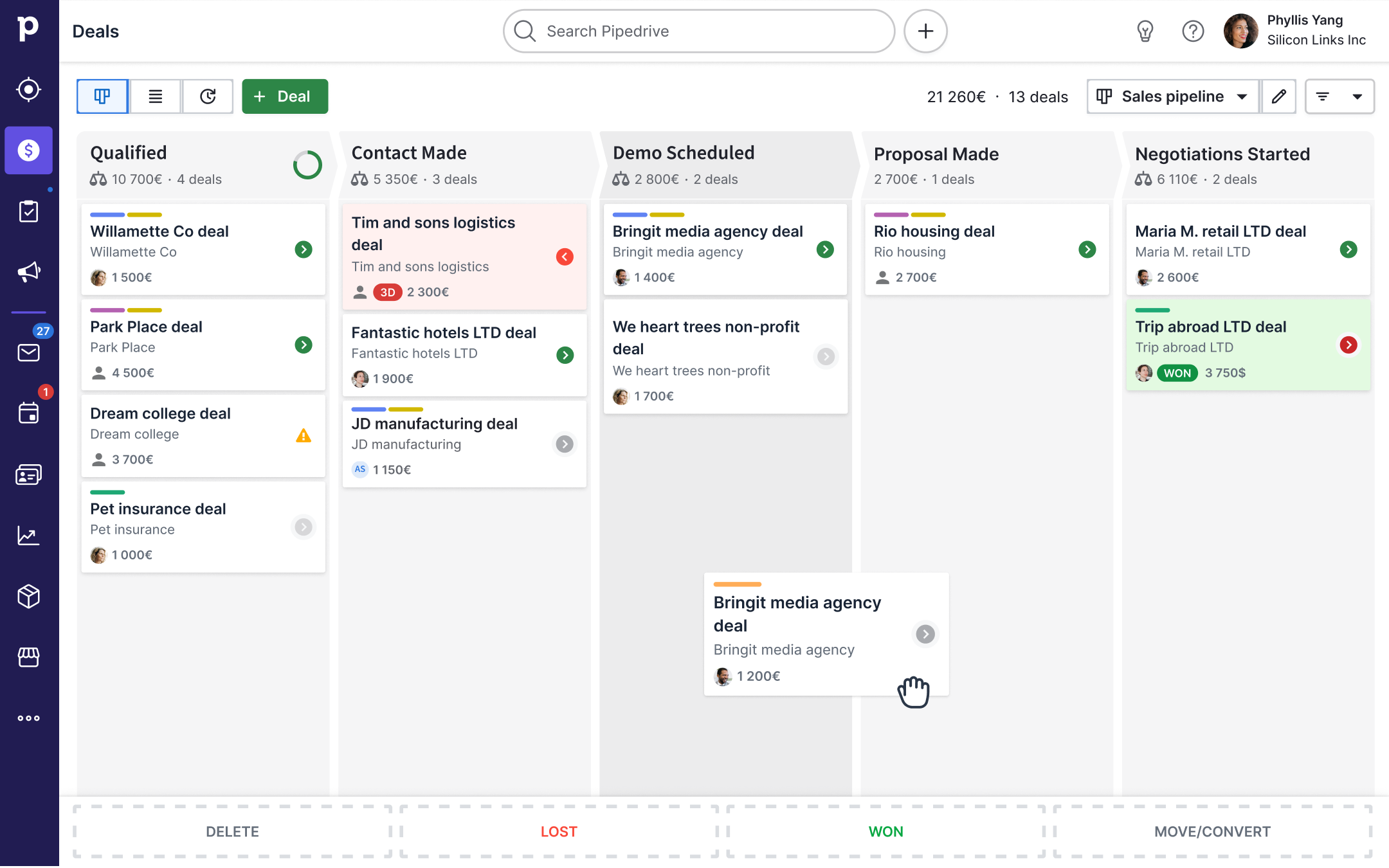
Image source: pipedrive.com
Key features:
- Visual pipeline management: Drag-and-drop deals through each stage.
- Lead scoring: Highlight high-value prospects based on engagement and behavior.
- Email sync: Track opens, replies, and schedules directly from the CRM.
- Workflow automation: Automate tasks like follow-ups and reminders.
- Analytics dashboard: Real-time reports for activity tracking and forecasting.
Strengths:
- Simple, intuitive user experience
- Quick setup for sales-focused teams
- Great reporting and forecasting tools
- Highly customizable pipelines
Limitations:
- Limited marketing automation features
- Fewer advanced customization options
Pricing:
- Plans start at $14.90/user/month
- Advanced tiers up to $99/user/month
4. ActiveCampaign: Email and customer journey tracking
ActiveCampaign is a powerful CRM and email automation tool designed to help businesses personalize communication and build smarter customer journeys. It brings together email marketing, sales tracking, and behavioral automation in one unified workspace. Teams can design automated campaigns that adapt to customer actions in real time. With visual journey mapping and advanced segmentation, ActiveCampaign ensures every message reaches the right person at the right moment. Ideal for growing teams focused on engagement and retention.
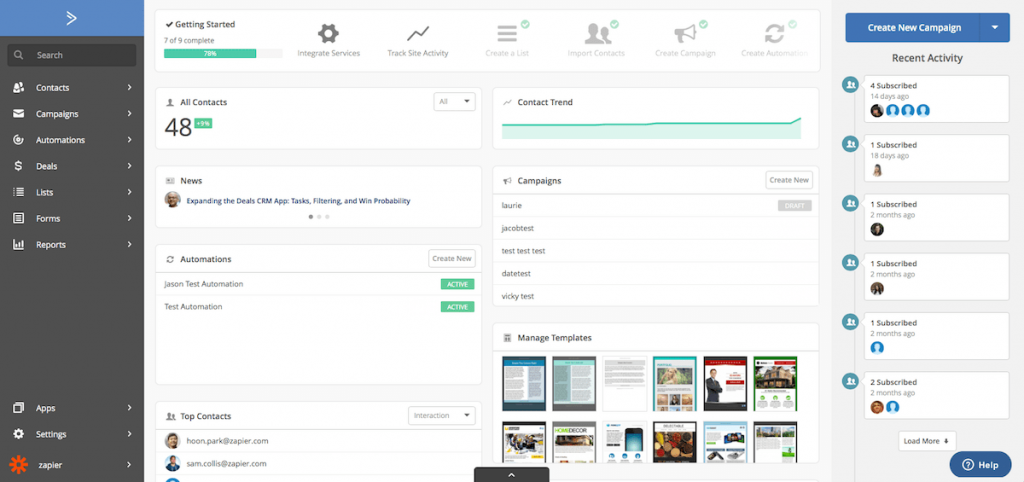
Image source: activecampaign.com
Key features:
- Email automation: Create personalized drip sequences and trigger-based campaigns.
- Customer journey mapping: Visualize paths from first contact to conversion.
- CRM tracking: Manage deals, contacts, and pipelines efficiently.
- Lead scoring: Identify and prioritize high-potential leads automatically.
- Segmentation: Group audiences based on behavior, demographics, or engagement.
Strengths:
- Excellent automation and personalization tools
- Powerful analytics for campaign optimization
- Smooth integration with major CRMs and e-commerce platforms
- Great email deliverability rates
Limitations:
- Learning curve for complex automations
- CRM features are less advanced than standalone systems
Pricing:
- Starts at $19/month (2 users)
- Advanced plans up to $149/month with full automation suite
5. Zoho CRM: Affordable CRM with lead tracking features
Zoho CRM is a cost-effective, full-featured CRM built for small and medium-sized businesses. It combines lead management, workflow automation, and analytics in a simple, customizable dashboard. Teams can capture leads from multiple channels, automate follow-ups, and monitor performance—all without the heavy cost of enterprise tools. Its flexibility and affordability make it a top choice for startups and SMBs looking for structure and insight.
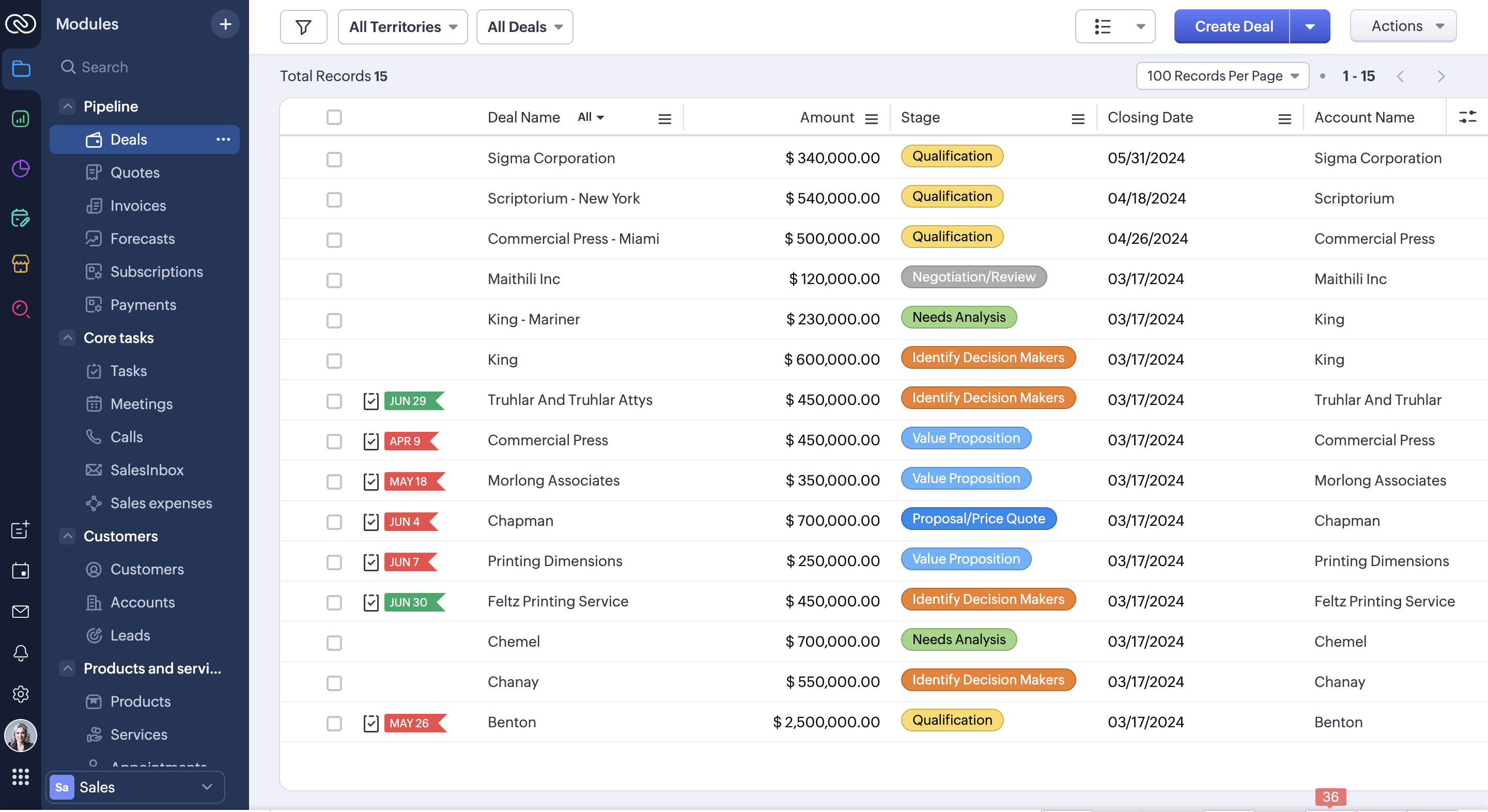
Image source: zoho.com
Key features:
- Lead management: Capture, qualify, and convert leads efficiently.
- Automation workflows: Trigger actions like follow-ups or reminders automatically.
- Email and telephony integration: Communicate directly from the CRM.
- Pipeline visualization: Track deals through each stage with ease.
- Reporting tools: Access visual dashboards for sales and performance analytics.
Strengths:
- Budget-friendly plans for growing businesses
- Easy to customize and implement
- Strong mobile CRM app
- Integration with the Zoho ecosystem
Limitations:
- Interface feels dated compared to modern CRMs
- Advanced automation limited to higher plans
Pricing:
- Free plan for up to 3 users
- Paid plans from $14/user/month
6. Salesforce Sales Cloud: Enterprise-level lead tracking and analytics
Salesforce Sales Cloud is the gold standard of enterprise CRMs, built for scalability, customization, and deep analytics. It empowers large organizations to manage complex sales operations and customer data effortlessly. With AI-driven forecasting, real-time dashboards, and advanced reporting, Salesforce provides unmatched insight into performance. It's ideal for enterprises seeking complete control over their CRM ecosystem and customer lifecycle.
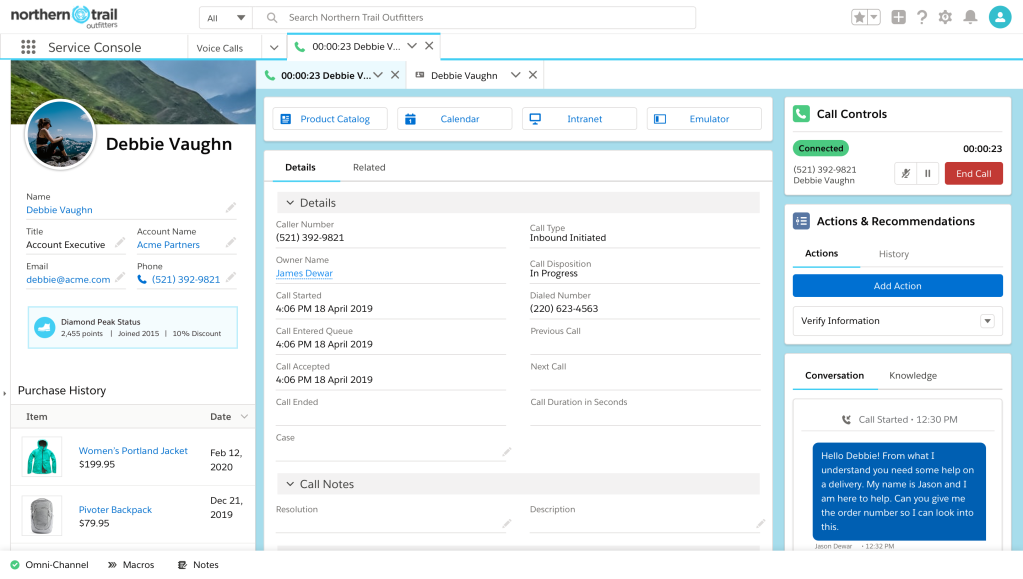
Image source: salesforce.com
Key features:
- Lead and opportunity tracking: Manage every customer touchpoint and deal.
- Einstein AI insights: Predict trends and highlight high-value opportunities.
- Custom dashboards: Tailor analytics views for any metric or team.
- Mobile CRM: Access deals and data from anywhere securely.
- AppExchange marketplace: Extend functionality with thousands of add-ons.
Strengths:
- Deep customization and scalability
- Advanced reporting and AI forecasting
- Enterprise-grade data security
- Global customer support ecosystem
Limitations:
- Expensive implementation and maintenance
- Requires admin or technical setup for customization
Pricing:
- Starts at $25/user/month
- Enterprise plans up to $330/user/month
7. Freshsales: AI-based lead scoring and activity tracking
Freshsales, part of the Freshworks suite, is an AI-powered CRM built to simplify lead management and engagement. It helps sales teams communicate with prospects through email, chat, and phone—all in one place. Freshsales uses its AI assistant, Freddy, to identify top deals and suggest next actions. With intuitive design and automation, it's perfect for teams that want a smart yet user-friendly CRM experience.
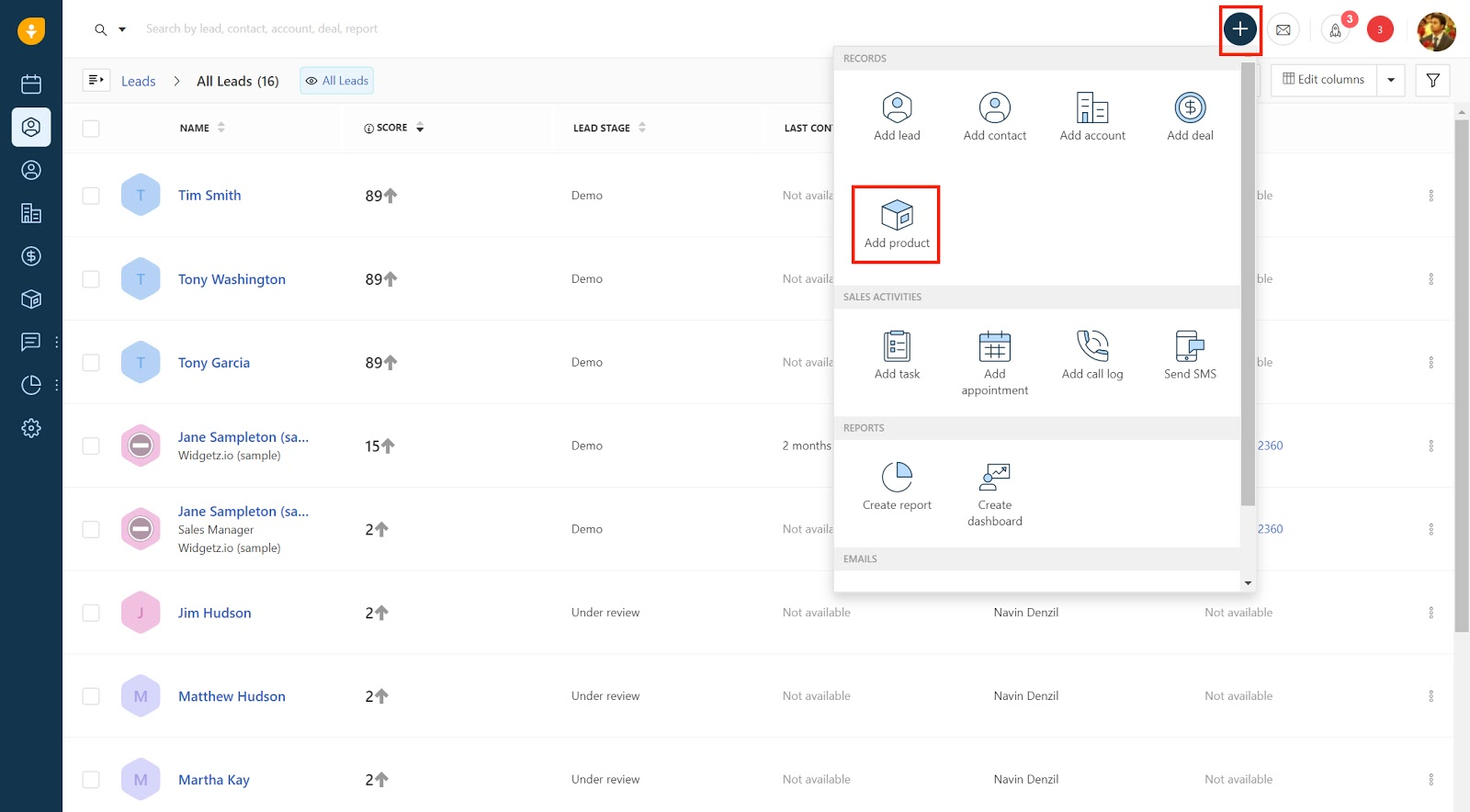
Image source: freshworks.com
Key features:
- Freddy AI: Provides lead scoring, recommendations, and trend insights.
- Omnichannel view: Manage calls, chats, and emails seamlessly.
- Automation: Auto-assigns leads, triggers tasks, and tracks activity.
- Deal management: Visual pipeline for tracking and prioritizing opportunities.
- Reporting: Real-time metrics for team and revenue performance.
Strengths:
- User-friendly interface
- Built-in calling and chat tools
- AI insights for smarter sales decisions
- Great for SMBs and mid-market teams
Limitations:
- Advanced analytics in higher-tier plans only
- Fewer third-party app integrations than larger CRMs
Pricing:
- Free plan available
- Paid plans from $15/user/month
8. Insightly: CRM with integrated lead and project management
Insightly combines CRM and project management to create a seamless flow from lead capture to delivery. It's perfect for service-based businesses like agencies and consultants who manage both client relationships and project execution. Teams can link deals to projects, automate workflows, and track progress all in one interface. Insightly bridges the gap between sales and post-sale fulfillment beautifully.
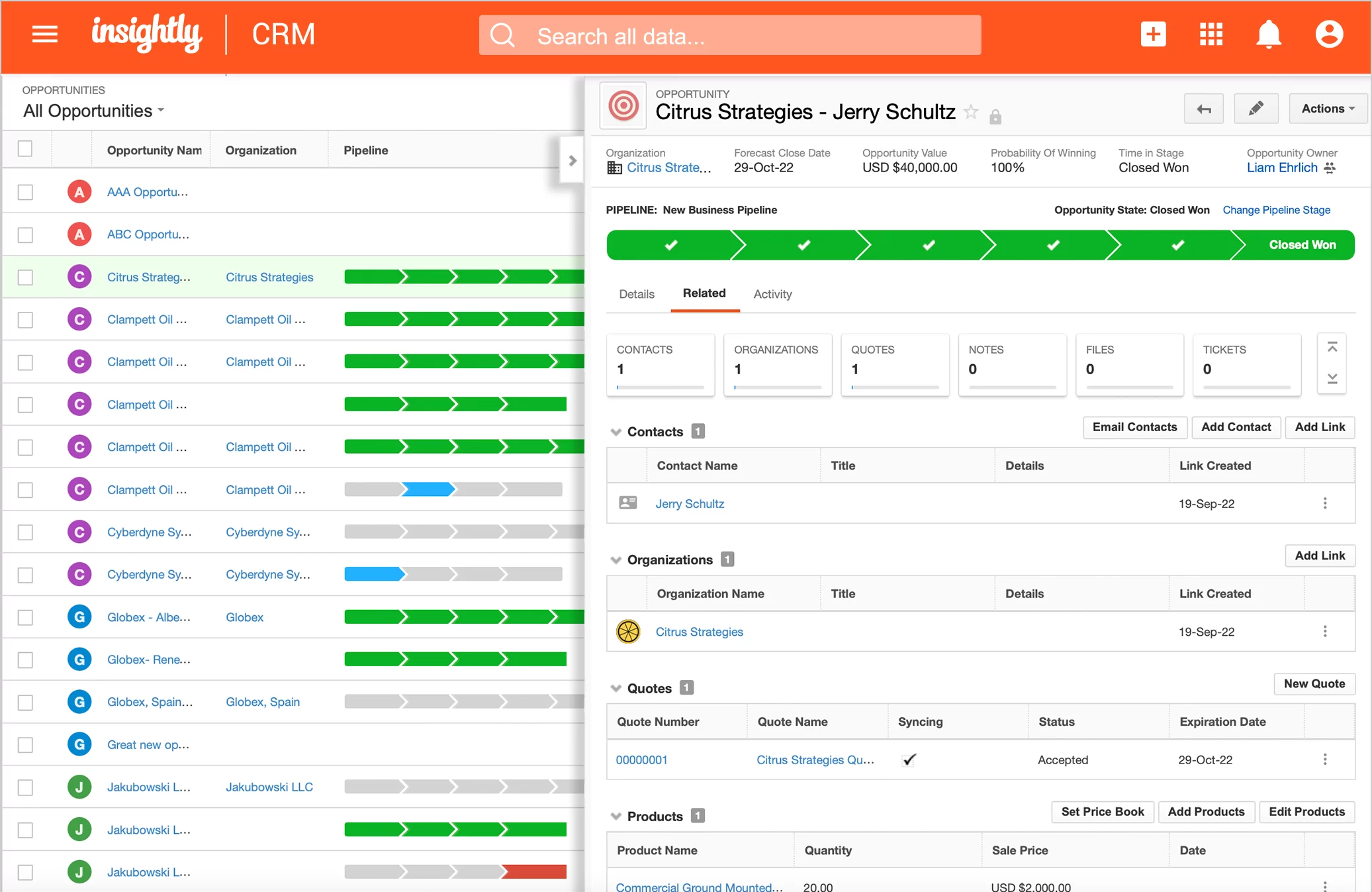
Image source: insightly.com
Key features:
- Lead tracking: Manage contacts, opportunities, and activities.
- Project management: Convert closed deals directly into projects.
- Automation: Simplify recurring sales and task workflows.
- Custom fields: Adapt CRM structure to your business model.
- Reporting: Visual dashboards for progress and performance.
Strengths:
- Combines sales and project tracking
- Easy-to-use interface
- Great for professional service teams
- Streamlined workflows for client delivery
Limitations:
- Fewer marketing automation tools
- Limited customization flexibility
Pricing:
- Paid plans from $29–$99/user/month
- No free plan
9. Copper CRM: Lead tracking designed for Google Workspace users
Copper CRM is a Google Workspace-native CRM that integrates directly with Gmail, Calendar, and Drive. It helps sales teams manage leads, track communications, and automate tasks without leaving their inbox. Designed for simplicity, Copper automatically captures contact details and syncs activity data—reducing manual entry and improving productivity. Ideal for teams already deep in Google's ecosystem.
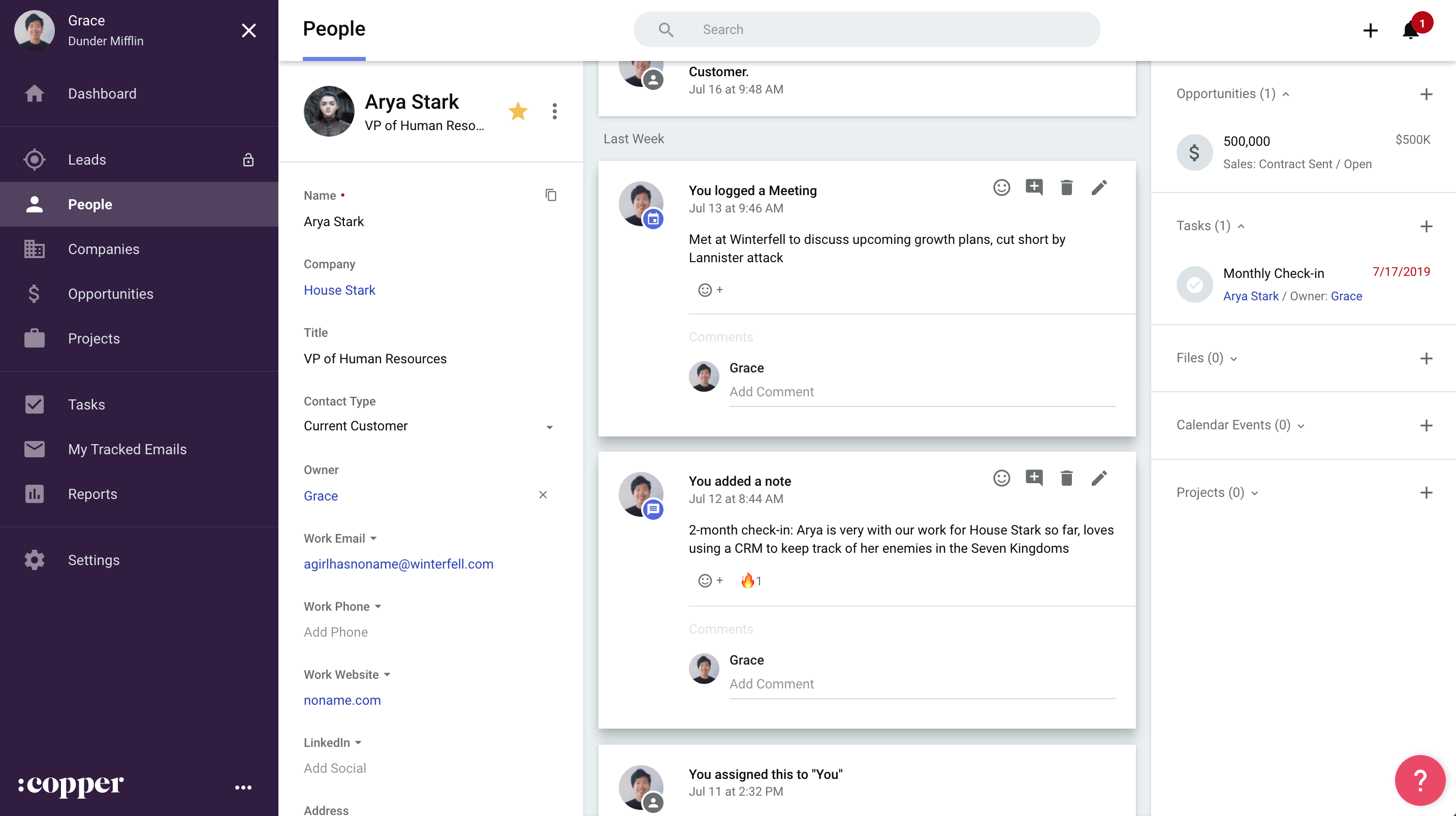
Image source: copper.com
Key features:
- Gmail and Calendar sync: Manage deals and tasks within Google apps.
- Pipeline tracking: Visual view of all deals by stage.
- Contact enrichment: Auto-populates records with company and social data.
- Automation: Triggers follow-ups and reminders automatically.
- Reporting: Real-time insights on performance and revenue.
Strengths:
- Deep Google Workspace integration
- Clean, intuitive design
- Great for small to mid-sized teams
- Low learning curve for new users
Limitations:
- Limited customization options
- Lacks advanced analytics
Pricing:
- Starts at $29/user/month
- Advanced plans up to $134/user/month
10. Nimble: Lightweight CRM for SMBs with social lead tracking
Nimble is a social CRM that blends contact management with insights from social media. It automatically gathers contact details and engagement history from platforms like LinkedIn, X (Twitter), and email. This gives teams a full view of each lead's context and interests, enabling personalized outreach. Nimble is ideal for small teams, consultants, and SMBs looking to build authentic connections.
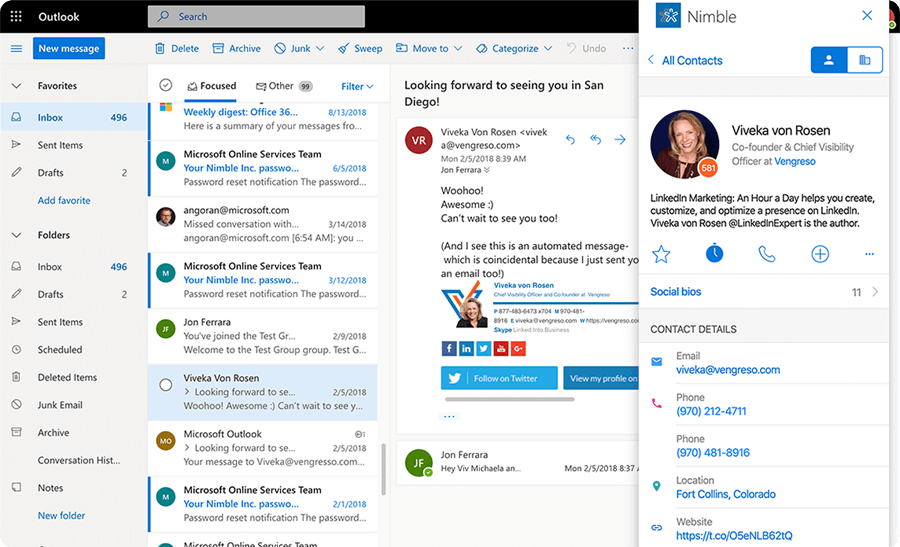
Image source: nimble.com
Key features:
- Social data enrichment: Pulls profiles and updates from social channels.
- Pipeline tracking: Visualize deals and tasks easily.
- Contact management: Organizes leads by behavior and communication.
- Email integration: Track messages and engagement in one place.
- Activity reminders: Stay on top of daily outreach and follow-ups.
Strengths:
- Ideal for small businesses and social selling
- Fast setup and intuitive design
- Combines email and social insights
- Affordable and lightweight
Limitations:
- Limited scalability for large organizations
- Lacks advanced reporting tools
Pricing:
- Single plan at $29.90/user/month
- No free version
Best practices for effective lead tracking
To get the most out of your lead tracking software, teams need structured processes and consistent data management. Whether you're using a spreadsheet or a full CRM lead tracking system, these best practices help improve accuracy, accountability, and overall conversion performance.
- Standardize lead data fields for consistency: Maintaining standardized data fields across your lead tracking system ensures that every record is easy to compare and analyze. When contact details, lead sources, and deal stages follow the same format, reporting becomes more reliable, and duplicate entries are minimized.
- Automate repetitive actions (assignments, reminders): Automation is essential for scaling sales lead tracking. By setting up workflows that automatically assign leads, send reminders, or trigger follow-up actions, teams can focus on relationship-building instead of administrative work.
- Segment leads by source, stage, or priority: Effective segmentation in CRM lead tracking tools helps tailor engagement strategies. Teams can group leads based on campaign source, deal stage, or priority level, allowing for targeted communication and higher response rates.
- Integrate communication channels (email, chat, calendar): Bringing all communication into one lead tracking tool, including email, chat, and calendar, keeps context visible and reduces delays. Centralized communication ensures that every interaction is logged automatically, creating a complete record of lead activity.
- Review analytics weekly to refine strategies: Regularly reviewing reports and dashboards in your lead tracking software reveals patterns in lead behavior and campaign effectiveness. Weekly insights help managers identify what's working, adjust tactics quickly, and forecast sales with greater accuracy.
Why lead tracking is important
Lead tracking is essential for aligning teams, improving conversion rates, and ensuring no opportunity is missed. A well-implemented lead tracking system gives businesses visibility across the entire customer journey from first touchpoint to closed deal, enabling smarter, faster decisions.
- Aligns sales and marketing goals by showing the full lead journey: A connected CRM lead tracking software ensures both teams work from the same data. Marketing can see how campaigns generate qualified leads, while sales gain context on every touchpoint. This shared visibility strengthens collaboration and improves conversion handoffs.
- Helps identify high-value prospects and campaign ROI: With sales lead tracking tools, teams can evaluate which sources bring the most valuable leads. Analytics highlight top-performing campaigns, helping allocate budgets effectively and focus on channels that deliver measurable ROI.
- Prevents lost leads by automating follow-ups: Automation in lead tracking systems ensures timely reminders and responses. When a lead engages, automated workflows assign an owner or trigger follow-up actions, reducing delays, human error, and missed opportunities.
- Supports data-driven decision-making for pipeline forecasting: Advanced lead tracking software provides dashboards and reports that visualize deal velocity, conversion rates, and revenue trends. This data empowers leaders to forecast accurately, optimize performance, and refine sales strategies based on real-time insights.
Common challenges and how to overcome them
Even the best lead tracking systems can face operational hurdles if data and processes aren't aligned. From missed follow-ups to fragmented reporting, these challenges often reduce visibility and slow down conversions. The good news is that most issues can be resolved through automation, centralized data, and better collaboration. Here's how teams can overcome the most common lead tracking obstacles effectively.
Challenge | Solution |
Leads not being followed up | Use automation to send reminders or assign owners |
Duplicate or inconsistent data | Use centralized systems like Lark Base |
Poor visibility across teams | Combine CRM, chat, and analytics in one workspace |
Difficulty in tracking ROI | Use dashboards and campaign attribution tracking |
Conclusion
Effective lead tracking is more than just recording contact details. It's about understanding customer behavior, improving collaboration, and turning data into actionable insights. The right lead tracking system empowers teams to stay organized, automate workflows, and focus on the prospects that truly matter. From lead capture to conversion analysis, every step contributes to stronger relationships and measurable growth. For teams seeking a connected, data-driven approach to sales lead tracking, Lark offers an all-in-one workspace that unites CRM workflows, communication, and analytics, helping businesses track, manage, and close leads more efficiently.
FAQs
What's the difference between lead tracking and CRM?
Lead tracking focuses specifically on capturing, monitoring, and managing potential customers throughout the sales pipeline. A CRM lead tracking system goes further, combining these insights with broader customer relationship management :including post-sale interactions, account history, and long-term engagement :providing a complete view of both leads and existing clients.
How can automation improve lead tracking efficiency?
Automation within lead tracking software streamlines repetitive tasks like assigning leads, sending follow-ups, and updating records. By reducing manual effort, teams respond faster, avoid missed opportunities, and maintain consistency. Automated workflows also allow managers to monitor performance in real time, making CRM lead tracking more accurate, scalable, and actionable.
Which industries benefit most from lead tracking software?
Industries with high-volume or complex sales cycles benefit the most from sales lead tracking tools. This includes B2B services, SaaS, retail, real estate, finance, and marketing agencies. Any organization that relies on tracking interactions, scoring prospects, and analyzing pipeline performance can improve efficiency, reduce lost opportunities, and optimize ROI using a CRM lead tracking system.
Can I track leads manually using spreadsheets?
While spreadsheets can record basic lead information, they are limited in automation, analytics, and collaboration. A dedicated lead tracking system or CRM lead tracking software ensures accurate scoring, timely follow-ups, and pipeline visibility. Using spreadsheets often results in inconsistent data, missed leads, and reduced team efficiency compared to purpose-built sales lead tracking tools.
How does Lark ensure real-time visibility for lead tracking?
Lark provides live updates across all views in its CRM lead tracking system, ensuring team members always see the latest pipeline status. Every interaction, task, or approval is synced instantly, while dashboards and automated notifications give managers and reps a clear, real-time picture of leads, engagement, and performance—keeping sales efforts aligned and actionable.
Related reading
Table of contents
Start using Lark today

Manage all your work in one place
Boost team efficiency by 10x
Save up to 70% on software costs
Table of contents
Start using Lark today
Manage all your work in one place
Boost team efficiency by 10x
Save up to 70% on software costs
Keep reading









2026 Lark Technologies Pte. Ltd.
Headquartered in Singapore with offices worldwide.






Explore: