


The Ultimate Guide to OpenClaw (ClawdBot) + Lark Integration
Lark Team
Aug 5, 2026
Lark Team
Aug 5, 2026

13 min read


As generative AI evolves from simple chatbots into autonomous agents capable of complex tasks, data privacy and local environment control have become critical challenges. Mainstream cloud-based solutions often struggle with fragmented memory and restricted local access. Enter OpenClaw (formerly ClawdBot or Moltbot)—an open-source, local-first AI agent gateway that is reshaping human-AI interaction.
Unlike standard SaaS tools, OpenClaw utilizes a unique "Bring Your Own Device" (BYOD) architecture. It runs entirely on your private hardware (like a Mac Mini or Linux server) while leveraging the reasoning power of advanced LLMs like Claude Opus or GPT-4 via API. For teams looking to streamline their enterprise workflows, the OpenClaw Lark integration seamlessly connects these advanced AI capabilities directly to your primary messaging platform.
This setup not only ensures complete control over your private data but also grants the AI deep access to local file systems, shells, and browsers, making it a true digital copilot. In this guide, we will explore how this powerful ecosystem shifts AI from basic information retrieval to advanced, secure task execution.
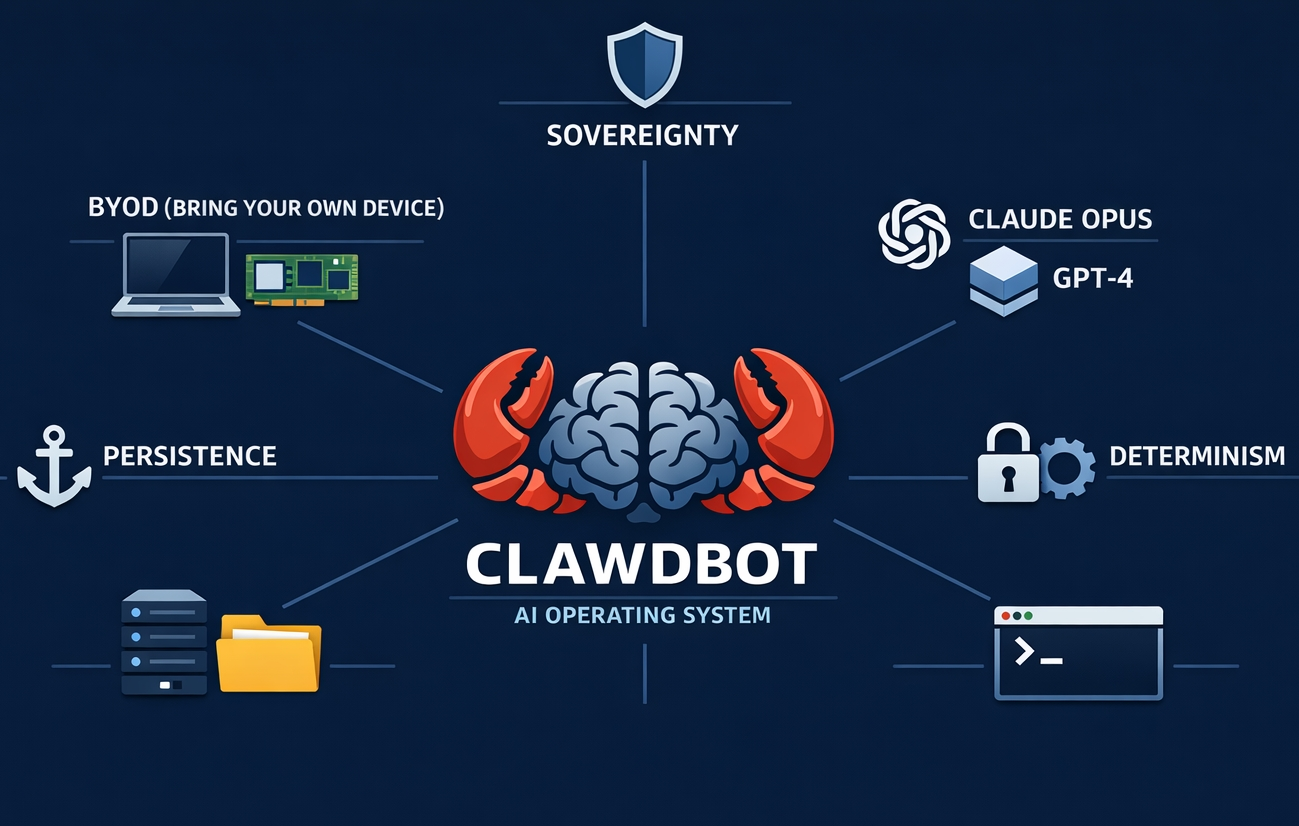
Imagine these scenarios:
- Morning: Before you wake up, OpenClaw has already prepared a morning briefing containing your daily schedule, important email summaries, and industry news, sending it as an image to your Lark mobile app.
- Commute: You send a voice message via Lark, asking your home-based OpenClaw to run a complex code test, and it reports the results back to you before you reach the office.
- Late night: A casual mention of "need to organize project docs next week" is remembered by OpenClaw. A few days later, while you are resting, it proactively drafts the Lark Doc and waits for your review.
🦞 This is exactly the paradigm shift spearheaded by OpenClaw: evolving from a "passively responding" tool to a "proactively executing" partner. It returns AI control from distant cloud servers back to the users, allowing you to deploy it on your trusted local devices—whether you prefer an OpenClaw Mac deployment, an OpenClaw Windows setup, or a VPS. By utilizing various OpenClaw tools, it returns AI control from distant cloud servers back to the user.

How does OpenClaw work? Core architecture and principles
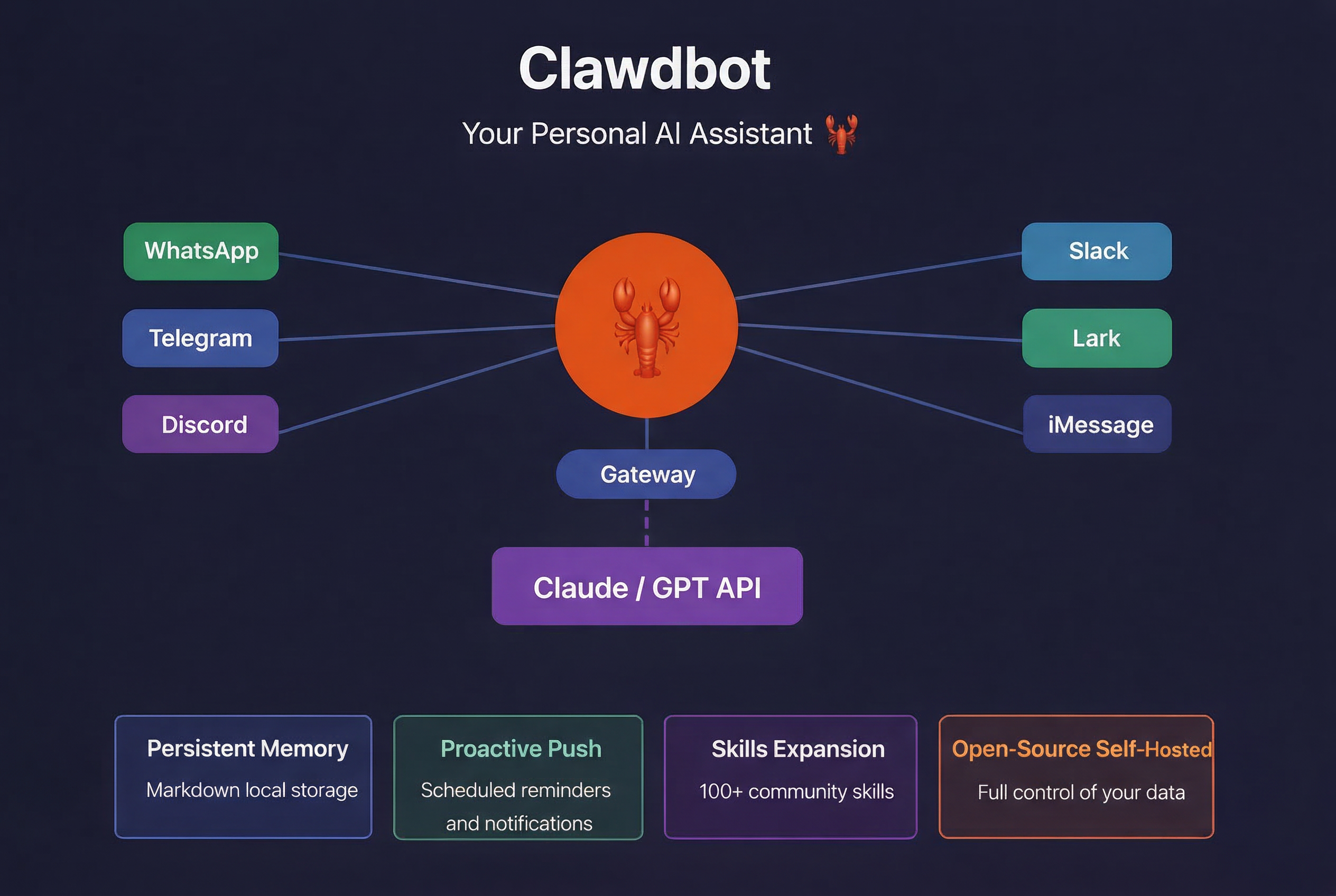
What is OpenClaw? A one-sentence summary
OpenClaw is an open-source personal AI assistant project developed by Peter Steinberger (Founder of PSPDFKit). Unlike traditional web-based AI (like ChatGPT or Claude), OpenClaw runs directly in your everyday chat software—you send a message in Lark, it replies in Lark; you ask a question in Discord, it answers in Discord; you request a task in Lark, it returns the execution results right there.
Key takeaway: OpenClaw is not an AI model, but an "AI Gateway"—it connects your chat software to AI LLM APIs, seamlessly integrating AI capabilities into your daily communication tools.
Core architecture: Synergy between gateway and nodes
OpenClaw adopts a Gateway-Centric distributed microservices architecture. This design decouples communication channels from agent logic and unifies the management of multi-modal inputs and outputs. It is divided into three main parts:
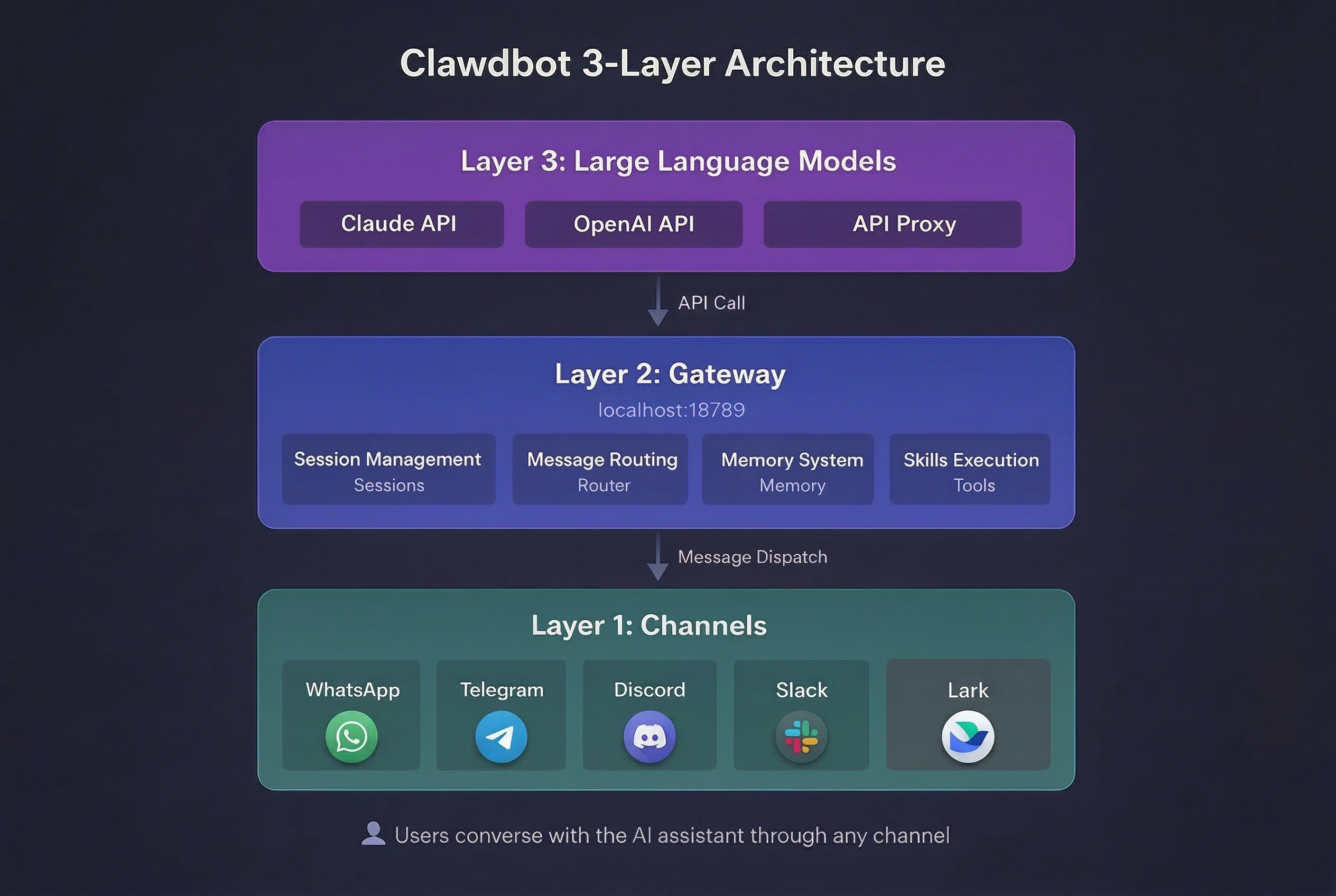
The nervous system: Gateway
Serving as the main OpenClaw gateway, this core component is the beating heart of the system. It enables your OpenClaw agent to act as the central bus between all external communications and internal logic.
- Single source of truth: By design, the Gateway is the single control plane of the system. It exclusively manages all Channel connections (e.g., Lark WebSocket connections, Telegram Bot API polling). This Singleton pattern is crucial because many IM protocols do not allow concurrent sessions.
- Loopback-first network model: Security is paramount for a local Agent. The Gateway binds to the local loopback address (127.0.0.1:18789) by default, meaning it exposes no ports to the public internet. All external access must go through secure tunneling technologies (like SSH Tunnels or Tailscale).
🧠 Protocol and Control Plane:
The Gateway exposes a typed WebSocket API for handling Request/Response (Req/Resp) and Server Push Events.
- Control clients: CLI tools, native macOS apps, and the web Dashboard all connect to the Gateway as WebSocket clients.
- Event bus: The Gateway is responsible for dispatching core events such as agent (agent state), chat (messages), presence (online status), health (system health), heartbeat, and cron (scheduled tasks). This event-driven architecture enables the system to respond to environmental changes in real time—for example, immediately sensing when a user comes online via mobile and adjusting the message routing strategy accordingly.
The sensory tentacles: Nodes
If the Gateway is the brain, Nodes are the hands, feet, and senses. A Node is a lightweight client program running on end-user devices (iOS, Android, macOS) that connects back to the Gateway via WebSocket, virtualizing the device's physical capabilities into tools the Agent can call.
- Capability virtualization: The Agent doesn't need to run on your phone to use its hardware:
- Vision (camera.*): The Agent can trigger Android/iOS Nodes to take photos or record videos.
- Geolocation (location.get): The Node can fetch GPS coordinates for Location-Based Services (LBS).
- Screen interaction (screen.record): Lays the groundwork for future UI automation.
- Connection mechanism: Nodes maintain persistent WebSocket connections to the Gateway, heavily integrating with Tailscale for secure, end-to-end encrypted mesh networking.
The interactive interface: Canvas
To break through the limitations of pure text interaction, OpenClaw introduces the Canvas concept—a dynamic visual interface driven by the Agent.
- Technical implementation: The Gateway features a built-in HTTP file server to serve Canvas content, essentially an HTML/JavaScript app generated by the Agent.
- Dynamic interaction paradigm: While traditional RAG only returns text or static images, OpenClaw's Canvas allows the Agent to write code to render interactive charts, real-time maps, or complex forms.
💡 In summary, the OpenClaw workflow is:
The user sends a command via a Chat App → The Gateway receives and routes it to the Agent → The Agent uses its Memory and Skills to think and decide which Tool to call → The Tool executes the action on the local device (e.g., running a script, accessing the web) → The execution result is returned to the Agent → The Agent organizes the language to generate a reply → The Gateway sends the reply back to the user's Chat App.
It is exactly this closed-loop architecture of "Gateway-Brain-Skills-Memory" that allows OpenClaw to break through the limitations of traditional chatbots and become a truly "hands-on" intelligent assistant.
What can OpenClaw actually do? Core capabilities
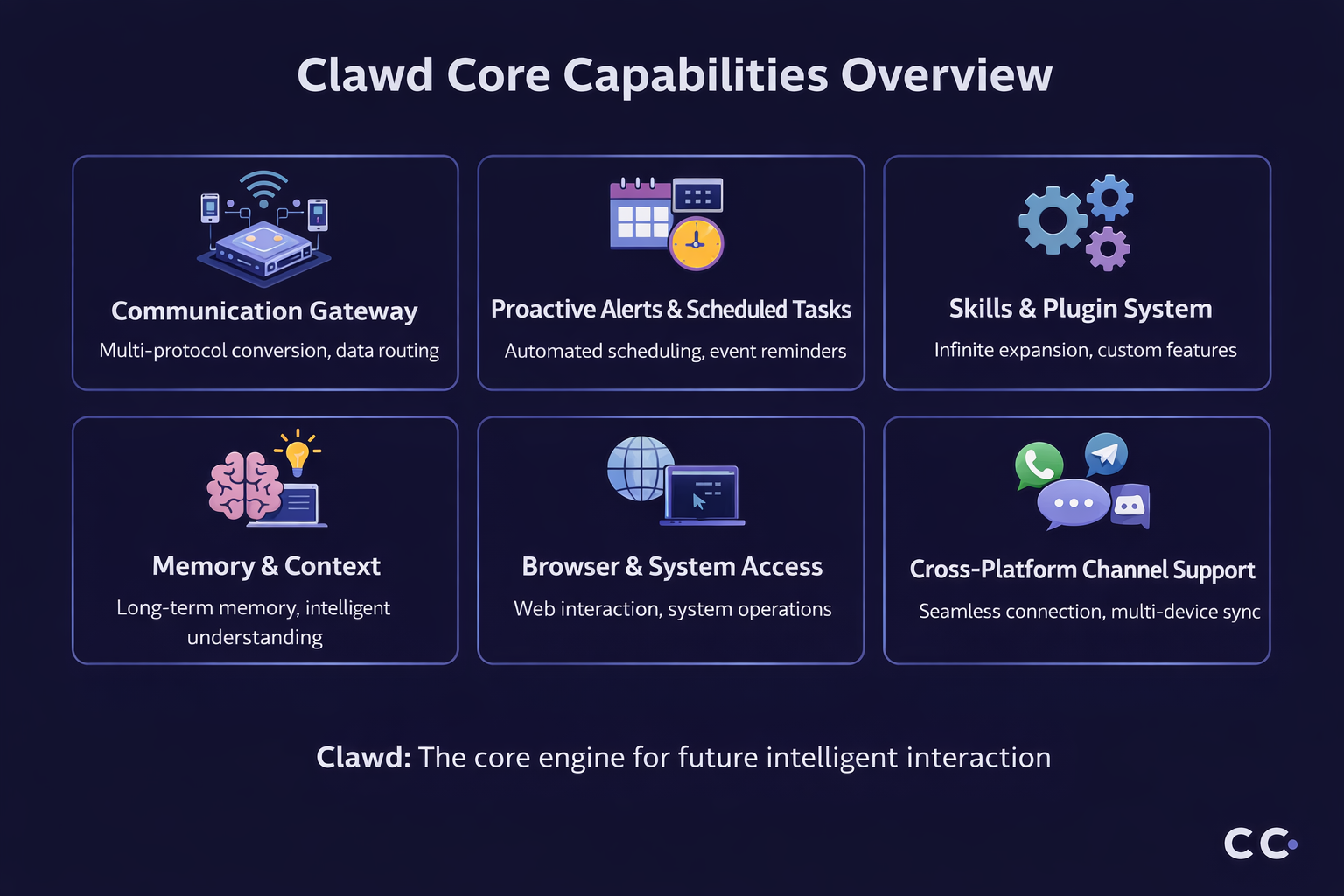
Cross-platform communication gateway
OpenClaw breaks down platform barriers. It natively supports over a dozen mainstream IM tools including Lark (as well as its Chinese counterpart, Feishu), Telegram, Discord, iMessage, and Slack. It maintains a unified conversational context and identity across all platforms, supporting text, images, documents, and even audio (via Whisper/ElevenLabs integration).
Proactive reminders & scheduled tasks
- Heartbeat mechanism: OpenClaw "wakes up" at preset intervals to check instructions in the HEARTBEAT.md file.
- Cron jobs: You can create scheduled tasks using natural language or Cron expressions.
- External webhooks: OpenClaw can receive event notifications from apps like GitHub or Zapier to trigger automated workflows.
Full system & browser access
- Shell access: OpenClaw can execute arbitrary Shell commands, managing files, running scripts, and installing software.
- System & Web Interoperability: Through the built-in OpenClaw browser capabilities, the agent can navigate pages and scrape data like a human. Furthermore, by adopting the latest standards, an OpenClaw MCP (Model Context Protocol) integration allows it to seamlessly read local context and data safely.
- File system I/O: Complete read/write permissions to its workspace to manage projects and notes.
Extensible skills & plugin system
- Extensible Skill System: Create any custom OpenClaw skill through OpenClawHub, a community-driven marketplace to adapt the AI to your specific Jira or Calendar tracking needs.
- AI-assisted skill development: OpenClaw can help you create new skills. Just describe what you want in natural language, and it generates the SKILL.md and scripts.
- Multi-agent collaboration: Configure multiple Agents with different roles and permissions to collaborate on complex tasks.
⭐ The Convergence of core advantages: Context-aware proactive intelligence
When these capabilities are combined, OpenClaw reveals its most fundamental advantage: context-aware proactive intelligence.
- Persistent Cognition: The robust OpenClaw memory mechanism ensures it remembers project deadlines you mentioned last week and proactively reminds you this week, attaching the relevant file list.
- Communication + system access: It can read meeting invitations in your emails, automatically check your calendar for conflicts, and ask you via Telegram if you want to accept.
- Browser + skills: Upon receiving a technical image, it can use browser automation skills to search and summarize relevant technical content for your quick understanding.
This ability to combine Memory (knowing what to do), Proactivity (knowing when to do it), and Actionability (knowing how to do it) is what truly distinguishes OpenClaw from all other AI products.
Deployment options & cost analysis
Deployment is highly flexible. Hardware requirements are surprisingly low: a single-core CPU, 1GB RAM, and 500MB disk space are sufficient.
- Hardware/Server costs:
- VPS: Entry-level OpenClaw VPS (Hostinger, AWS, DigitalOcean, Alibaba Cloud) costs around $20-$80/year.
- Local hardware: Raspberry Pi or old PCs run with virtually zero ongoing hardware cost.
- AI model API costs:
- Entry-level: Claude Pro/GPT-4o mini APIs for light tasks usually cost between $5 - $20/month, depending on usage.
- Heavy usage: Complex coding or multi-agent tasks will consume more tokens.
- Free/Local models: Supports local models via LM Studio or Ollama, eliminating API costs entirely (though reasoning capabilities may be weaker).
💡 Cost Optimization Tips:
- Start with a VPS: For most new users, renting a standard-configuration VPS is the most cost-effective and stable way to get started.
- Choose models on demand: In OpenClaw's configuration files, you can set different models for different tasks or agents. For example, use a cheaper model for daily chats, and call a more powerful model for coding tasks, thereby balancing cost and performance.
- Monitor token consumption: OpenClaw provides usage tracking features. Regularly check your Token consumption to avoid exceeding your budget.
- Leverage local models: For less complex, privacy-sensitive automation tasks, try configuring local models to save on API call fees.
Security model & risk considerations
Official documentation states: "Perfect security is impossible when running frontier AI models with Shell access." Unrestricted AI with shell privileges is akin to a backdoor. Understanding the security model and isolating the environment—such as deploying an OpenClaw Docker container—is mandatory for keeping your local network secure.
☁️ Security balance in practice
Living with OpenClaw is more like living in a "gated community" rather than a "fortress." You cannot expect 100% absolute security, but through reasonable configuration, you can control risks within an acceptable range.
- Principle of least privilege: Only grant OpenClaw the minimum permissions required to complete its tasks. Start with a strictly limited sandbox environment, and gradually and cautiously open up permissions as you need it to perform more complex tasks.
- Isolate dedicated accounts: Use dedicated phone numbers, email accounts, and cloud service accounts for OpenClaw, rather than your primary personal accounts. This way, even if an accident occurs, the blast radius is controllable.
- Be wary of untrusted content: Always remember that any external input (web pages, emails, document attachments) can be a potential source of prompt injection. Before letting OpenClaw process these, it's best to have a lower-privilege "Reading" Agent summarize and sanitize them first.
- Choose safer models: Newer, more powerful models generally perform better at understanding complex instructions and resisting prompt injections. Prioritize the safest models for agents executing high-risk tasks.
In short, using OpenClaw is an ongoing practice in trust, authorization, and risk management. By understanding its security mechanisms and following best practices, you can maximize the protection of your digital assets while enjoying its powerful automation capabilities.
Practical tips for beginners
- Start with the onboard wizard: OpenClaw provides an extremely user-friendly CLI wizard via openclaw onboard. This is the highly recommended starting point for a fast OpenClaw install. It guides you through the entire process from model selection and channel configuration to background service installation. Put aside any fear of the command line; follow the wizard step-by-step, and the whole process usually takes under 15-30 minutes.
- Choose a VPS as your first "host": While using an idle computer is tempting, to experience 24/7 stable online availability, it is strongly recommended that beginners start with a standard VPS. This lets you focus on experiencing OpenClaw's core features without worrying about local network drops or device sleep states.
- Make good use of official docs and the community: The OpenClaw documentation (available at docs.openclaw.bot) and the main OpenClaw GitHub repository are highly detailed, covering everything from quick starts to security configurations. It should be your primary reference when you hit a snag. Additionally, OpenClaw has a very active Discord community, complete with an AI bot answering questions 24/7. When you're stuck, asking the community usually yields a quick solution.
- Start with simple automation tasks: Don't attempt overly complex tasks right out of the gate. Build your confidence gradually with these classic scenarios:
- Set up a morning briefing: The best way to experience OpenClaw's proactivity.
- URL Summarization: Send a web link to OpenClaw and have it summarize the article content for you.
- File Management: Ask it to clean up your downloads folder or automatically categorize files based on their names.
- Security first, authorize gradually: Strictly adhere to the "Principle of Least Privilege." By default, keep your Agent running in a sandbox. Only lift restrictions when you fully understand the behavior and genuinely need higher privileges. Running an OpenClaw security audit regularly is a great habit.
- Turn your "memory" into a Git repository: Initialize your ~/openclaw workspace directory as a private Git repository and commit changes regularly. This not only backs up your assistant's precious memories but also gives you a clear view of its "growth" trajectory.
Why Lark is the best home for OpenClaw?
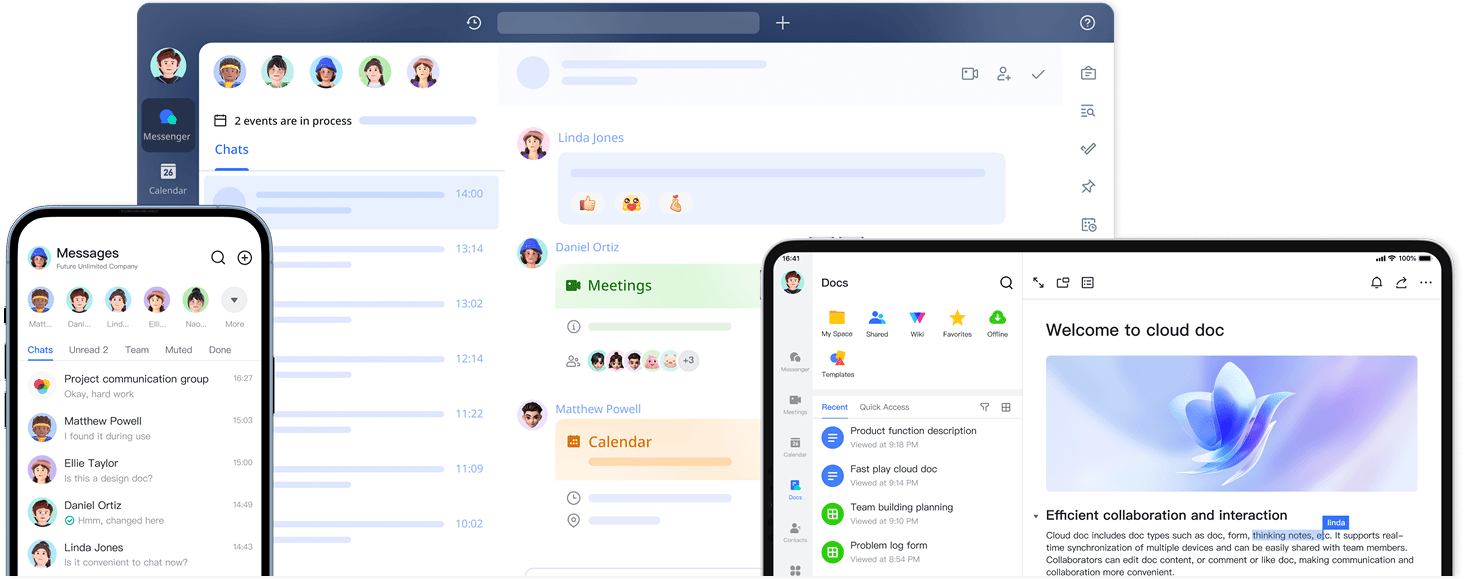
Currently, there isn't an official standalone OpenClaw client application available on the market. Therefore, integrating it with existing enterprise office software is the current best practice. As an all-in-one digital workspace, Lark seamlessly integrates instant messaging, document collaboration, project management, and automated workflows within a single platform. Through Lark, you can securely integrate OpenClaw with your productivity tools.
If you want to boost team productivity with AI, register and install Lark now to start building your exclusive automated workflows.
When deciding where to host OpenClaw, it's tempting to default to familiar platforms like Notion, Slack, or Teams. However, the comparison below makes it clear why Lark is truly the perfect habitat for the OpenClaw 'lobster'.
As the chart shows, Lark eliminates the need for complex workarounds and third-party adapters. Its all-in-one architecture provides OpenClaw with direct, secure access to your entire workflow.
How to quickly enable OpenClaw with Lark
After downloading and registering for Lark, there are two convenient and efficient ways to quickly activate OpenClaw and start using it. You only need to choose one of them to proceed.
Method 1: Get your all-powerful "OpenClaw" assistant via AnyGen
For users looking for a straightforward, quick setup, integrating OpenClaw via the AnyGen AI Assistant on Lark is an excellent option. AnyGen simplifies the process, allowing you to deploy an AI assistant with minimal effort and no coding required. This method leverages the existing AnyGen infrastructure to bring OpenClaw's functionalities directly into your Lark workspace.
If you already have a Lark account, here's how to set up AnyGen AI Assistant for Lark:
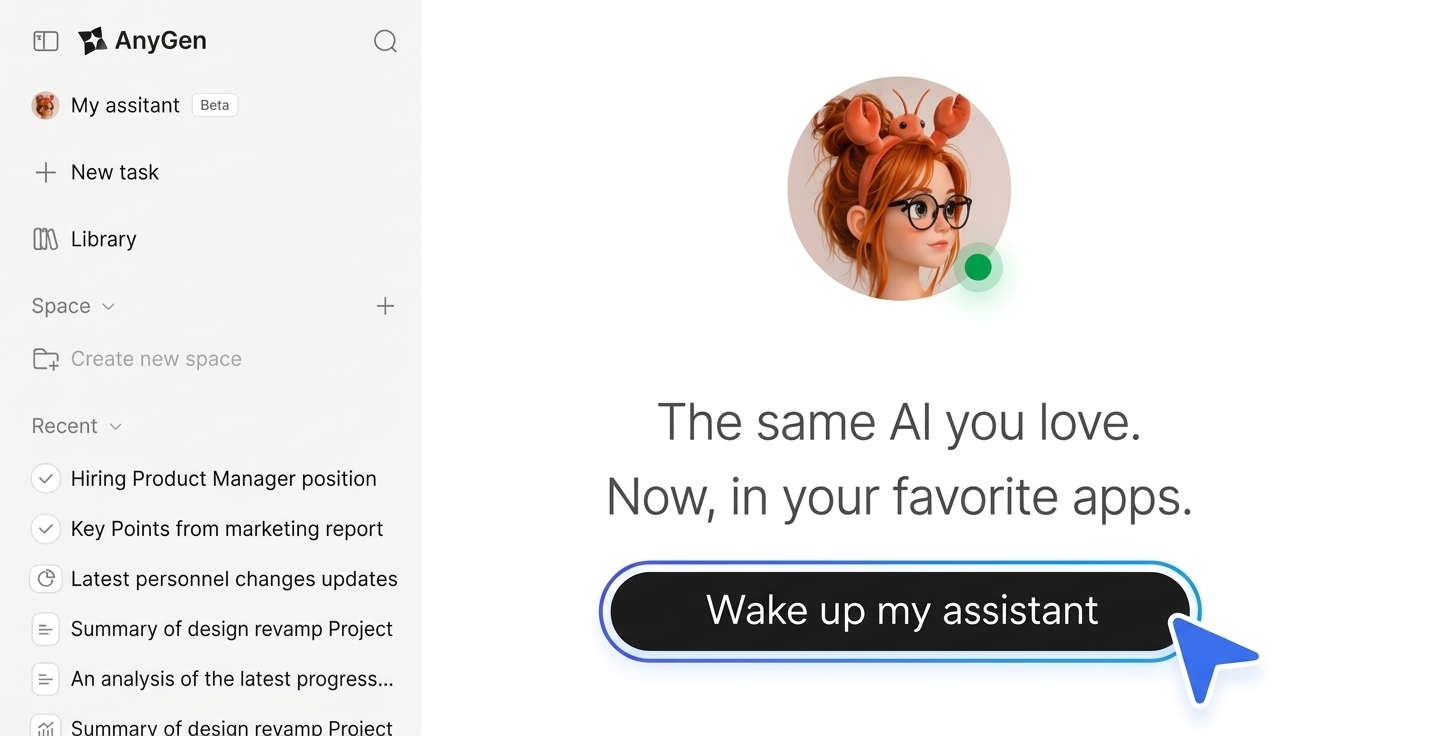
Step 1: Visit the AnyGen AI Assistant page, click "Wake up my assistant", and sign in with your Lark account.
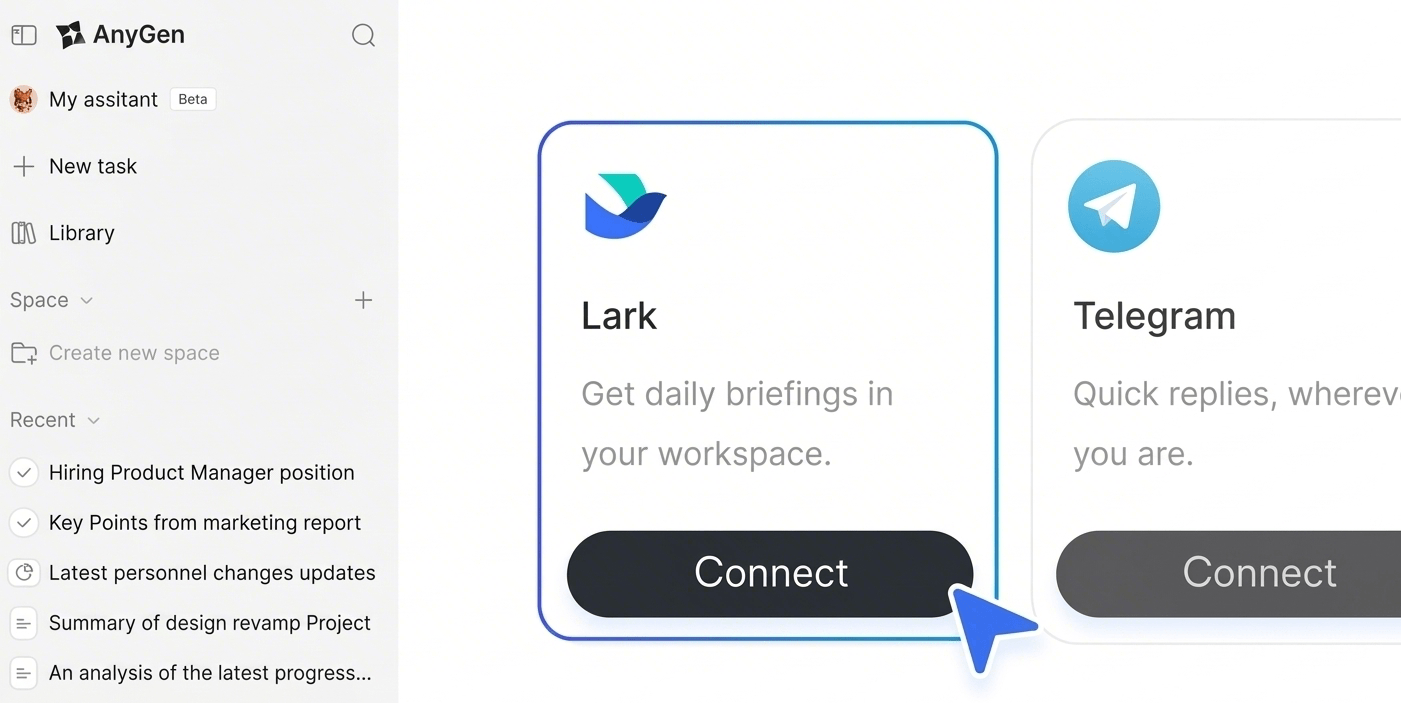
Step 2: Click "Connect" under Lark to start the setup.
Step 3: Once setup is complete, use AnyGen AI Assistant in Lark.
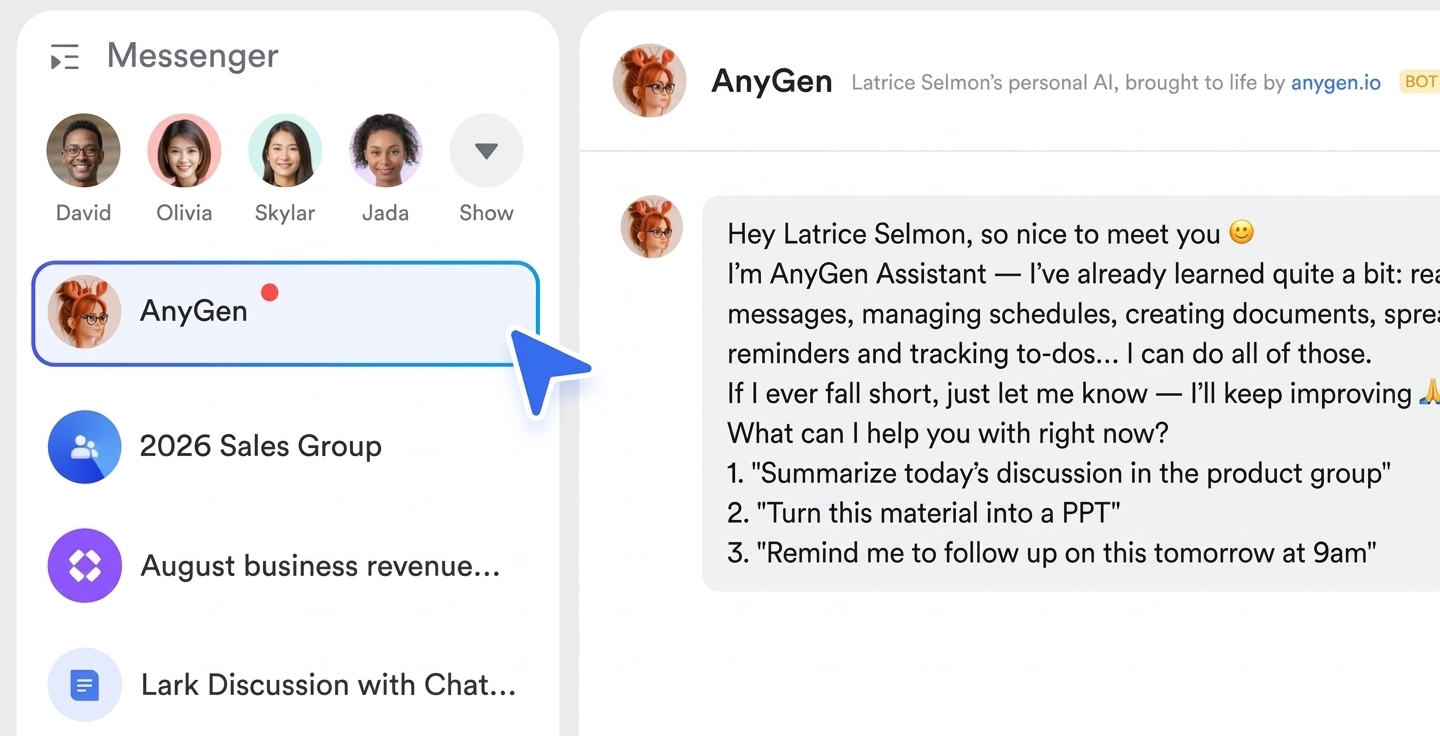
This method ensures rapid deployment, allowing you to quickly benefit from OpenClaw's features within your daily Lark operations.
Method 2: Install the official plugin for native OpenClaw integration
If you are looking for OpenClaw's native features or deeper custom integration, and are familiar with command-line operations, then deploying via the official plugin is a good option. This allows you to have an all-powerful AI assistant directly within Lark, capable of executing various complex tasks.
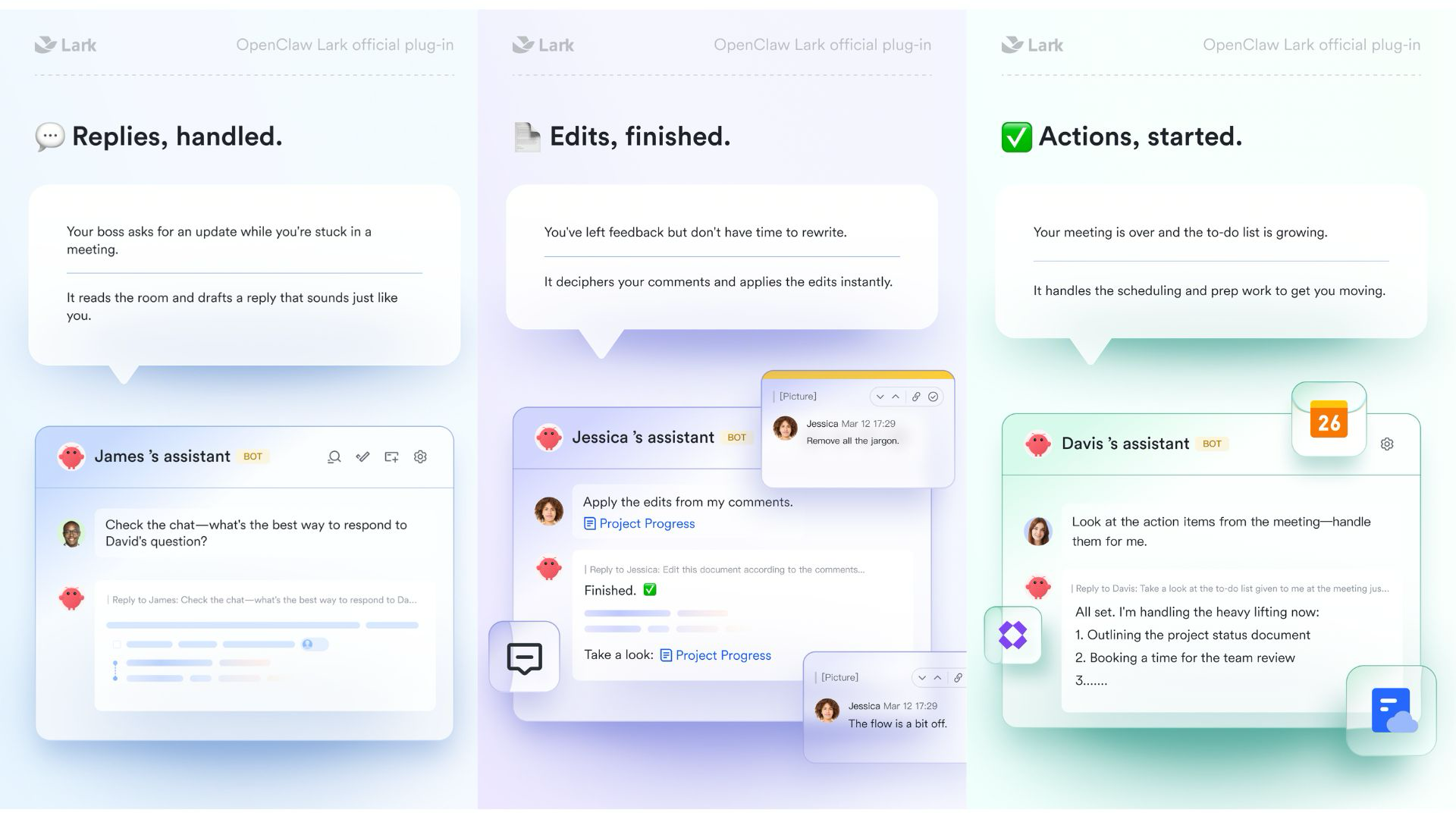
Step 1: Install and configure OpenClaw. Follow the official guide and your system to run one of the installation commands, supporting Linux/macOS and Windows.
Step 2: Install the Lark plugin, create or associate a Lark bot, and integrate OpenClaw into Lark. You can also perform advanced operations such as plugin updates and configuring streaming output.
Step 3: Open your bot in Lark and send /feishu start to verify the installation. Upon success, your OpenClaw AI assistant will be ready."
For detailed, step-by-step instructions and code examples on how to install OpenClaw and its official Lark plugin, please refer to our dedicated blog post on OpenClaw installation. This resource provides comprehensive guidance to help you through the process, ensuring a successful and tailored integration.
Conclusion
OpenClaw's rapid growth hits the core pain point of current AI applications: bridging the "last mile" from a "cloud brain" to "local hands and feet." It previews a future where the AI Agent is the core interface, driving hardware, OS, and software based on natural language intent.
As an AI work platform built for organizational collaboration, Lark believes the true value of AI lies in accessibility and productivity. We are building a new ecosystem that integrates collaboration, automation, and intelligent partners, making human-AI synergy the norm, not just a novelty.
FAQs
What is OpenClaw?
OpenClaw, affectionately called “Little Lobster” by the community, is an open-source AI agent framework built for everyday users. Unlike traditional text-only large language models, its core advantage is the ability to call external tools (such as web search, code execution, etc.) by configuring different “Skills”, and support collaboration between multiple Agents to automatically complete complex real-world tasks.
How to install OpenClaw?
Deploying OpenClaw locally requires basic technical skills. The basic workflow is: first, go to the official GitHub repository and clone the latest source code; second, make sure the matching runtime environment (usually Node.js) is installed on your computer or server; finally — the step where users most often run into issues — correctly configure the .env environment variable file in the project folder, and fill in the LLM API key (such as OpenAI) and external tool keys (such as Tavily Search) needed to run OpenClaw. Once properly configured, you can start the local service using command-line instructions. If you are a Chinese user, we strongly recommend using OpenClaw through Lark. OpenClaw also provides detailed official documentation to help you get started quickly.
How to use OpenClaw?
After installation, the key mindset for using OpenClaw shifts from “asking questions” to “giving goals”. You can assign it a high-level task, such as “Research and compare the pricing of mainstream collaboration software on the market”. To help it run smoothly, you'll need to equip it with suitable Skills (such as web browsing and chart generation). For advanced use cases, you can even visit the Clawhub community to download pre-made configuration files, build a Multi-Agent virtual team, and let the retrieval Agent and summarization Agent work together to finish the job.
How can regular users try OpenClaw right now?
At the current stage, OpenClaw still requires basic setup skills. You can go directly to its official GitHub repository for the source code, set up a Python or Node.js environment locally, and prepare the required model API Key (such as OpenAI). To lower the barrier, you can also visit the Clawhub ecosystem community and download ready-to-use Skill plugins made and tested by other developers, then assemble your own custom “Little Lobster” agent like building blocks.
Will OpenClaw become a closed-source commercial product of OpenAI?
No. Although founder Peter Steinberger officially announced joining OpenAI in February 2026, he clearly stated in a public announcement that the OpenClaw project will be transferred to and managed by an open-source foundation. This means it will remain fully open and independent. OpenAI has also pledged sponsorship and support, so developers can safely build ecosystems on top of it.
What is the difference between OpenClaw and traditional ChatGPT?
Traditional ChatGPT is a type of conversational AI—it responds to questions one by one and passively provides information. In contrast, OpenClaw is an AI agent framework that can gain access to operating systems and applications. It not only thinks independently but also proactively executes specific tasks in the background on your behalf, such as sending emails, scheduling, and organizing data.
Do I need to write code to install the Mac version of OpenClaw?
You don't need to write complex code from scratch, but you must have basic terminal operation skills. You'll need to set up a Node.js environment and complete installation and environment parameter configuration by entering command-line instructions (e.g., npm install). For users with absolutely no technical background, the initial setup still presents a certain learning curve.
Can enterprises directly use OpenClaw for customer service?
It is strongly not recommended to use it for unattended core customer service. While you can integrate it via APIs to automate message replies, AI still carries the risk of "hallucinations," and open-source extensions may introduce cybersecurity and privacy vulnerabilities. Rashly letting it independently handle customer orders or confidential complaints could lead to serious PR or legal crises. Enterprises are advised to use a one-stop collaboration platform with strict access control and compliance for automation needs.
Why did Moltbot change to OpenClaw?
Moltbot was an early stage of the project before its official renaming in late January 2026. The name change to OpenClaw was to better reflect its core positioning as an open-source AI agent framework, making its purpose more recognizable and aligning with its evolution from a simple tool to a mature, community-driven project. The core open-source nature and functional logic remained unchanged.
How much does OpenClaw cost?
OpenClaw is completely free and open-source. Users can clone its source code from the official GitHub repository, deploy it locally, and use all its features without any commercial charges. The only potential costs come from third-party services, such as API keys for LLMs (e.g., OpenAI) or external tools, which are not directly related to OpenClaw itself.
Who is behind OpenClaw?
OpenClaw was founded by Peter Steinberger. In February 2026, after he officially joined OpenAI, he transferred the project to an open-source foundation to ensure its independence from any single commercial company. OpenAI provides sponsorship and support, while the project is jointly maintained by the open-source community and the foundation.
Related reading
Table of contents
Start using Lark today

Manage all your work in one place
Boost team efficiency by 10x
Save up to 70% on software costs
Table of contents
Start using Lark today
Manage all your work in one place
Boost team efficiency by 10x
Save up to 70% on software costs
Keep reading







2026 Lark Technologies Pte. Ltd.
Headquartered in Singapore with offices worldwide.






Explore: