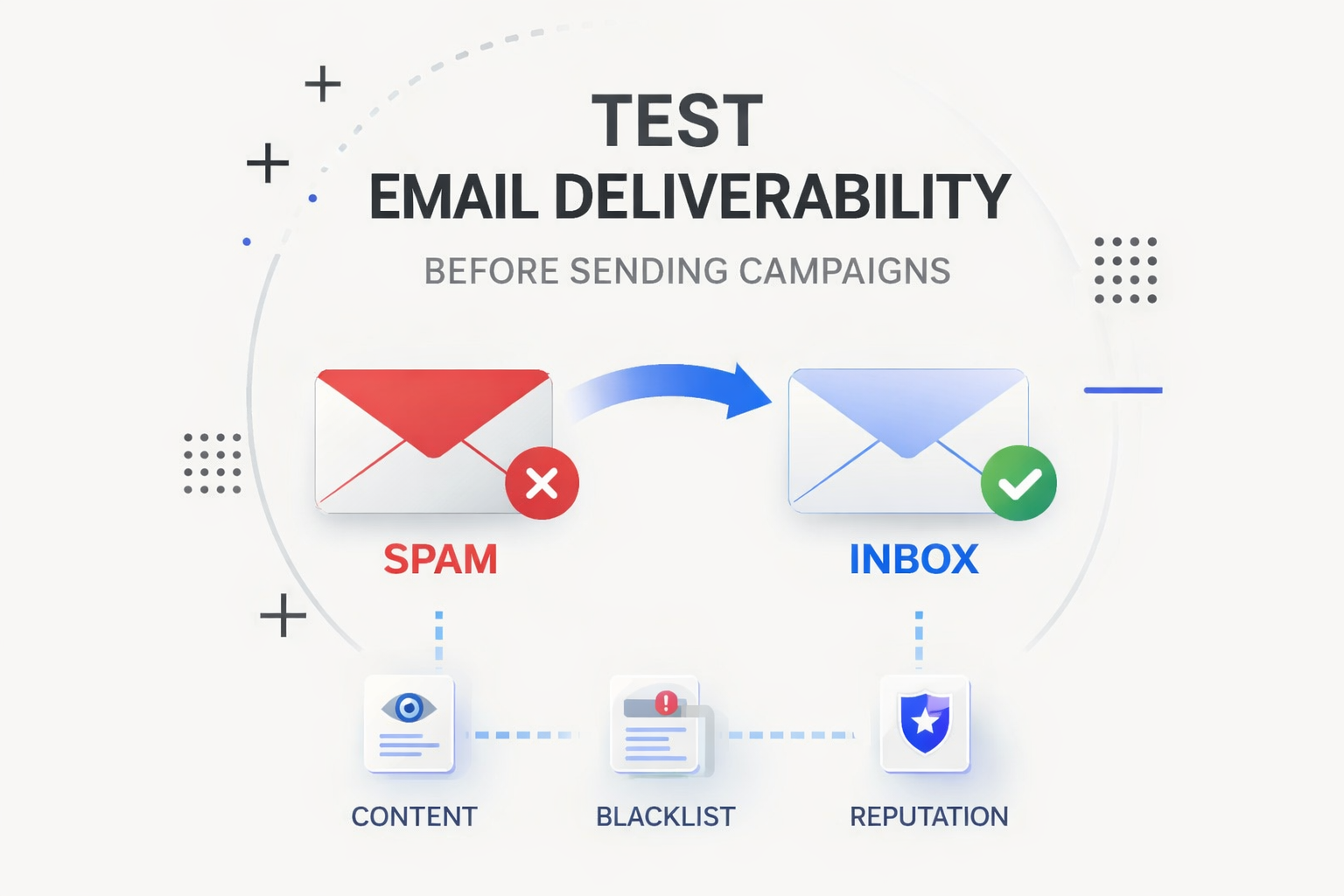
Email deliverability determines whether your emails reach the inbox, land in spam, or get blocked entirely. Even well-written campaigns can fail if mailbox providers like Gmail, Outlook, or Yahoo detect spam signals, poor sender reputation, or blacklist issues.
Testing email deliverability before sending a campaign helps marketers identify problems early, protect sender reputation, and maximize inbox placement. By checking your email content, verifying blacklist status, and monitoring domain reputation, you can significantly reduce the risk of emails going to spam.
In this guide, you'll learn how to test email deliverability step-by-step and which tools help ensure your emails consistently reach the inbox.
What is email deliverability?
Email deliverability refers to the ability of an email message to successfully reach a recipient’s inbox rather than being filtered into spam or rejected by email servers.
Mailbox providers evaluate multiple factors before accepting an email, including:
- Domain and IP reputation
- Spam trigger words in the email content
- Email authentication (SPF, DKIM, DMARC)
- Engagement signals such as replies and opens
If one of these signals looks suspicious, your email may fail deliverability tests and end up in the spam folder.
That’s why marketers run an email deliverability test before launching cold outreach campaigns, newsletters, or transactional emails.
Manage marketing campaigns with the right tool
How to test email deliverability before sending campaigns
Testing deliverability usually involves checking three key elements:
- Domain or IP blacklist status
- Sender reputation signals
Below are the most effective ways to check each of these areas.
1. Check email content for spam triggers
Spam filters analyze the content of every email message. Certain phrases, formatting patterns, and excessive promotional language can increase the risk of triggering spam filters.
Examples of common spam signals include:
- Overuse of promotional words like “Free”, “Guaranteed,” or “Act now.”
- Excessive capitalization or exclamation marks
- Suspicious links or shortened URLs
- Poor formatting or unusual HTML structures
Before sending a campaign, it’s recommended to run your message through a to detect risky phrases and formatting issues.
Several tools can help analyze email content before sending, including Mailwarm Spam Checker, Mail-Tester, and GlockApps spam testing tools.
Mailwarm’s Free Spam Checker analyzes your email content in real time and highlights spam trigger words that may reduce deliverability. This allows you to rewrite problematic phrases and improve your email’s spam score before sending.
Running a quick email spam test can significantly increase the chances that your email reaches the inbox.
2. Check if your domain or IP is blacklisted
Another critical step in testing email deliverability is verifying that your domain or sending IP is not listed on spam blacklists.
Email blacklists are databases used by mailbox providers and spam filters to block suspicious senders. If your domain or IP appears on a blacklist, your emails may be automatically rejected or filtered into spam folders.
To perform an email blacklist check, you can use tools that scan multiple spam databases simultaneously.
Several tools allow marketers to run an email blacklist check, including Mailwarm Email , MXToolbox, and Spamhaus lookup tools.
The Mailwarm Email Blacklist Checker quickly scans multiple spam databases such as Spamhaus, Barracuda, and SpamCop to detect blacklist listings.
If a listing is detected, you can investigate the cause and request removal before sending your next campaign.
Regular blacklist monitoring helps protect your sender reputation and email deliverability.
3. Test inbox placement with real inboxes
Another way to test email deliverability is by sending your email to multiple inbox providers (Gmail, Outlook, Yahoo) and monitoring where it lands.
This process helps answer an important question:
Will your email reach the inbox or the spam folder?
Inbox placement testing typically involves:
- Sending test emails to different providers
- Checking whether the email lands in inbox or spam
- Analyzing spam filter signals
- Reviewing authentication and reputation indicators
If emails consistently land in spam, it may indicate problems with domain reputation, email content, or sending behavior.
Many marketers regularly check email deliverability before sending campaigns to ensure their emails reach the inbox instead of spam folders.
4. Warm up your domain before sending campaigns
New domains and email accounts often struggle with deliverability because mailbox providers do not yet trust the sender.
This is why many marketers use before sending campaigns.
Email warmup gradually builds sender reputation by generating natural email activity such as replies, opens, and interactions between real inboxes. Over time, this signals to mailbox providers that your domain is trustworthy.
Email warmup tools such as , Mailwarm, Lemwarm, and Warmbox help build sender reputation and improve inbox placement before launching campaigns.
Tools like Mailwarm automate the email warmup process and help maintain a strong sender reputation, which significantly improves inbox placement for cold outreach and marketing campaigns.
Combining email warmup with deliverability testing creates a much safer sending strategy.
Manage the marketing team effortlessly with Lark
Best tools and practices to improve email deliverability
Several tools can help marketers run a complete email deliverability test and identify issues affecting inbox placement. These tools typically fall into three main categories:
- Spam checker tools: Used to detect spam trigger words and formatting issues in email content.
Examples include , Mail-Tester, and GlockApps.
- Blacklist checkers: Used to verify whether your domain or IP is listed in spam databases.
Examples include , MXToolbox, , and Spamhaus lookup tools.
- Email warmup platforms: Used to build sender reputation and improve inbox placement before sending campaigns.
Examples include Mailwarm, Lemwarm, and Warmbox.
Using a combination of spam checkers, blacklist monitoring tools, and email warmup platforms helps detect deliverability issues early and prevent emails from being filtered as spam.
Email deliverability checklist before sending a campaign
Before launching any email campaign, go through this quick deliverability checklist:
✔ Check your email content for spam trigger words
✔ Run an email spam test to detect risky phrasing
✔ Perform an email blacklist check for your domain and IP
✔ Verify SPF, DKIM, and DMARC authentication
✔ Warm up new domains or email accounts
✔ Test inbox placement across Gmail, Outlook, and Yahoo
Following this checklist helps prevent spam filtering and improves overall inbox placement.
Introducing Lark: The project management solution for email-heavy teams
Teams that manage massive volumes of external and internal emails—especially marketing departments juggling client requests, agency pitches, and vendor approvals—often find themselves trapped in chaotic inboxes. When campaign details are buried in endless threads, critical information gets siloed, and collaboration slows to a crawl. Lark offers a powerful, unified platform designed specifically to bridge the gap between traditional email and modern .
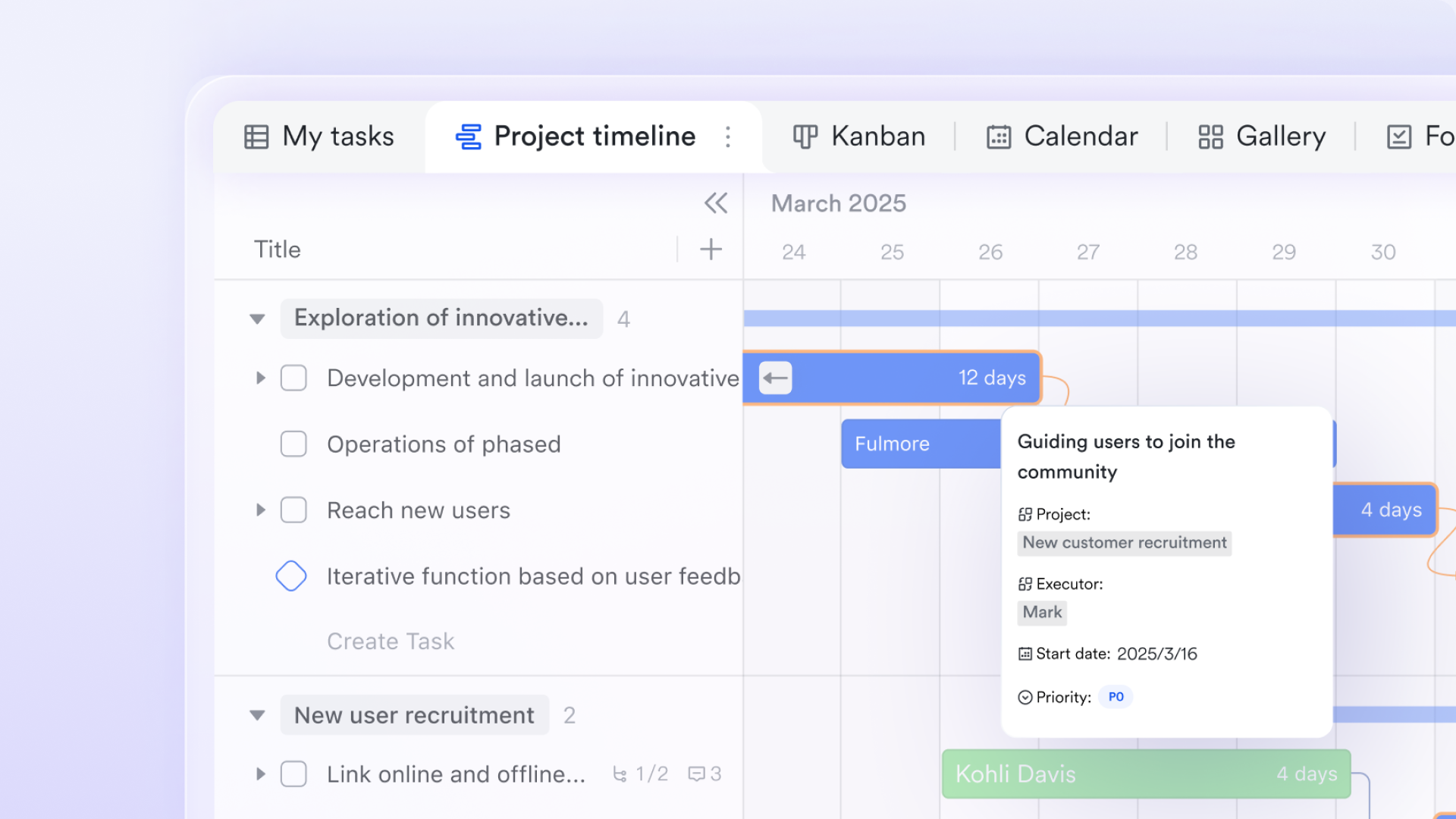
At the core of Lark’s project management ecosystem is , a highly customizable no-code database that transforms how marketing teams track their work. Instead of sending weekly status updates via email or passing around static spreadsheets, teams can consolidate all campaign data, project timelines, and deliverables into a single, dynamic workspace. With built-in Kanban boards, Gantt charts, and automated workflow triggers, Base ensures that everyone has real-time visibility into a project's health, eliminating the need for "just checking in" emails.
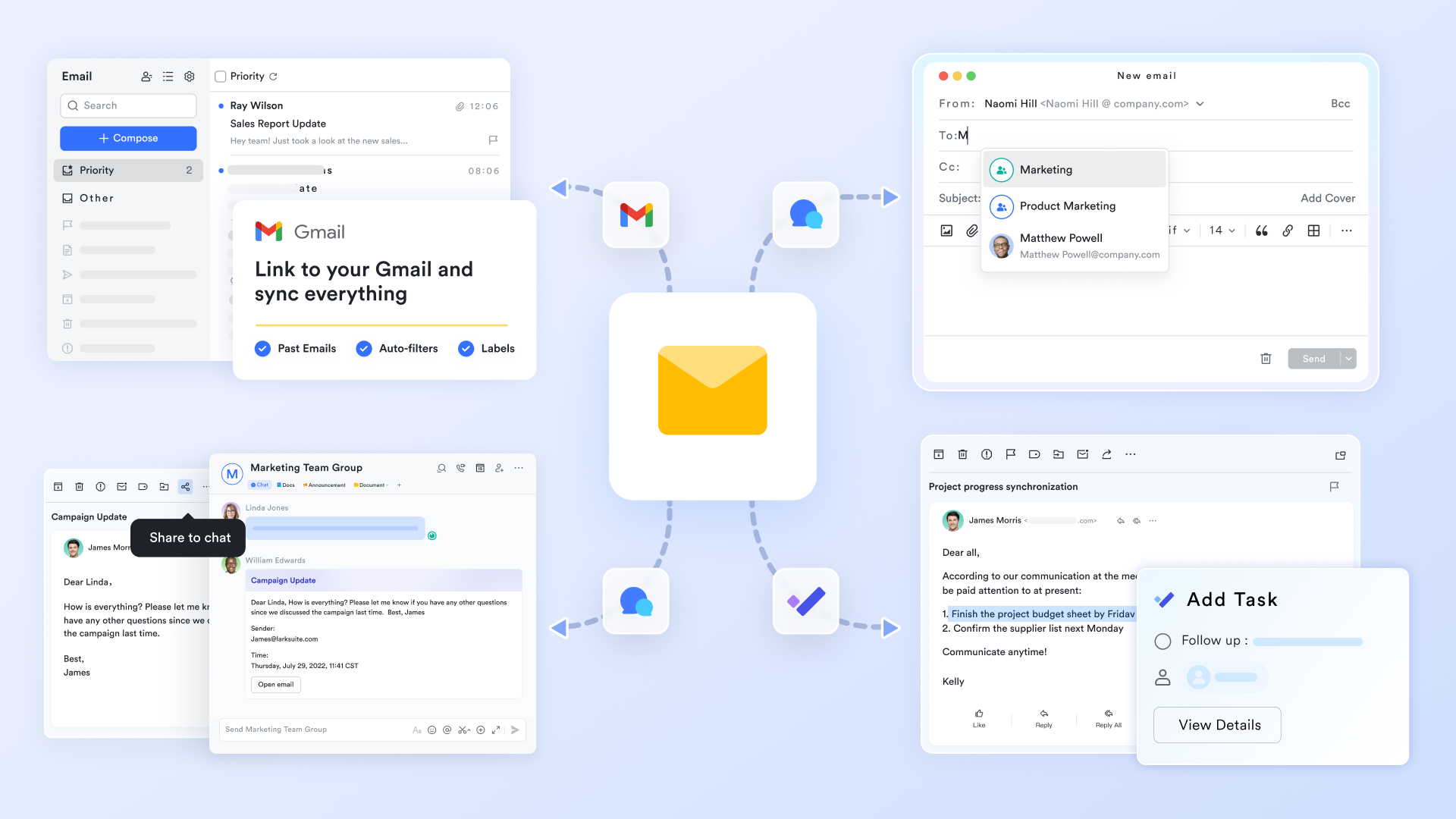
To tackle the inbox directly, redefines how teams interact with their correspondence by integrating it deeply into the broader project ecosystem. Rather than copying and pasting email text into a separate task manager, users can instantly convert an important client email into an actionable task or share it directly into a team chat with just one click. This ensures that crucial external communications—like vendor quotes or client feedback—stay permanently connected to the relevant internal projects, providing full context without the clutter of forwarded messages.
The endless cycle of emailing file attachments (and the inevitable "v2_FINAL_revised" version control nightmare) is solved by . Marketing teams can create, share, and seamlessly co-edit dynamic documents and spreadsheets in real time. Because Lark Docs acts as a living canvas, teams can embed Lark Base tables, task lists, and multimedia files directly into campaign briefs. Instead of sending a document back and forth for approval, stakeholders can leave inline comments and tag team members, keeping the collaborative process transparent and entirely out of the inbox.

For internal alignment, provides an agile alternative to the dreaded internal "reply-all" chain. When a time-sensitive issue arises, team members can hash it out in focused, threaded group chats. Messenger allows teams to share rich media, pin critical campaign assets, and even approve workflows directly within the chat interface. By shifting internal discussions to Messenger, the inbox is preserved for formal, high-value communications with external clients and partners.

When a complex issue cannot be resolved via chat or email, offers high-quality video conferencing built seamlessly into the platform. You can schedule and join a meeting directly from a shared calendar or group chat without ever switching apps or sending a "what time works for you?" email. With features like Magic Share, marketing teams can collaboratively review creative assets or campaign metrics natively within the meeting window, ensuring that syncs are highly interactive and strictly focused on execution. 
Together, these integrated tools empower email-heavy teams to break free from inbox fatigue. By transforming emails into actionable workflows and centralizing collaboration, Lark allows marketing departments to manage campaigns, track deliverables, and communicate effortlessly—all within a single, streamlined platform.
:
- Starter plan: that includes 11 powerful tools for up to 20 users. It also comes with 100GB of storage space, 1000 automation runs, AI translations, and more. No credit card needed.
- Pro plan: (billed annually) for up to 500 users. It includes everything in Starter plus group calling for up to 500 attendees, 15TB of storage space, 50,000 automation runs, and more.
- Enterprise plan: for custom pricing. Supports unlimited users and includes even more automation runs and advanced security, compliance, and management features.
For small teams with simple communication needs

18 months message history
1000 Base automation runs/month
2000 rows per table in Base
Most POPULAR
For companies with comprehensive collaboration and management needs
Unlimited message history
500-participant video meetings
50k Base automation runs/month
20k rows per table in Base
For large companies with advanced security and organizational management needs
Get a personalized demo and pricing
Unlimited message history
500-participant video meetings
15 TB storage + 30 GB storage/user
500k Base automation runs/month
50k Base automation runs/month
Most POPULAR
For companies with comprehensive collaboration and management needs
Unlimited message history
500-participant video meetings
50k Base automation runs/month
20k rows per table in Base
Conclusion
Email deliverability testing isn’t a single tool—it’s a repeatable process. Before sending any campaign, you want to confirm three things: your content won’t trigger filters, your domain or IP isn’t blocked, and real inboxes will actually place your email in the inbox. For new domains, adding a proper warm-up plan is often the difference between success and instant spam placement. In practice, this means running a spam content check and rewriting any risky copy or HTML patterns, verifying blacklist status for both your domain and sending IP (and resolving any listings before you scale volume), testing inbox placement across major providers like Gmail, Outlook, and Yahoo using real seed inboxes, and warming up new domains or accounts gradually to build reputation and protect long-term inbox placement. When you combine these steps with consistent monitoring and a clear internal SOP, you don’t just “avoid spam” for one send—you build a sending program that stays deliverable over time.
FAQ
How do I test email deliverability?
You can test email deliverability by analyzing email content for spam triggers, checking whether your domain or IP is blacklisted, and monitoring inbox placement across major providers like Gmail and Outlook.
How do I know if my email will go to spam?
Running an email spam test with a spam checker can help detect risky phrases, formatting patterns, or spam signals that may cause your email to land in the spam folder.
Why do emails go to spam?
Emails may go to spam due to poor sender reputation, spam trigger words, blacklist listings, missing authentication (SPF, DKIM, DMARC), or sudden increases in sending volume.
What is a good email deliverability rate?
A healthy deliverability rate typically exceeds 95% inbox placement. Lower rates may indicate issues with sender reputation or email infrastructure.
What tools help improve email deliverability?
To improve email deliverability, verify domain authentication, check email content for spam triggers, monitor blacklist status, and warm up your sending domain before launching campaigns.
Testing email deliverability before sending campaigns helps protect your sender reputation and maximize inbox placement. By combining spam analysis, blacklist monitoring, and email warmup, marketers can significantly reduce the risk of emails landing in spam folders.
Related reading












