














15 Best Email Management Software and Solutions

Ryan Tanner
Product Marketing Specialist
Sep 18, 2026
Ryan Tanner
Sep 18, 2026


- Lark: Smart email with team chat, calendar, and automated workflows
- Front: Shared inbox collaboration with assignments, notes, and rules
- Missive: Team email with chat inside threads and roles/permissions
- Zendesk Support: Ticketing, SLAs, macros, knowledge base, and omnichannel
- Desk365: Email-to-ticket, Teams integration, automations, and AI Copilot
- Freshdesk: Email-to-ticket, automations, collision detection, and reporting
- Help Scout: Shared inbox with Docs, Beacon, saved replies, and workflows
- Zoho Desk: Contextual email ticketing with Zoho suite integrations
- Outlook: Enterprise email with rules, add-ins, categories, and shared mailboxes
- Gmail (Google Workspace): Labels, filters, templates, add-ons, and admin controls
- Superhuman: Productivity workflows (shortcuts, triage, split inbox, reminders)
- Spark: Smart inbox, snooze, delegation, shared drafts, send later
- Thunderbird: Open-source client with filters, add-ons, and encryption support
- HubSpot Service Hub: Conversations inbox, automation, knowledge base, and CRM
- Hiver: AI-powered customer service with omnichannel support, team accountability, and automated workflows

What is email management software and why does it matter
Types of email management systems
- Shared inbox and collaboration tools: Platforms like Front, Missive, or Hiver let teams manage group inboxes together. Features such as assignments, internal notes, and collision detection prevent duplicate replies and ensure accountability.
- Help desk and ticketing platforms: Project management tools like Zendesk or Freshdesk turn incoming emails into tickets, track SLAs, and provide analytics, knowledge bases, and omnichannel support for customer service teams.
- Email clients and productivity apps: Programs like Superhuman or Spark focus on individual productivity with features such as priority inboxes, snooze, shortcuts, and AI triage for faster processing.
- Outlook/Gmail add-ins and rules engines: Native options in Outlook or Gmail provide filters, categories, labels, and automation rules. Add-ins extend these email management programs with advanced workflows or sequences.
- Contact center email management: Enterprise-grade systems route high volumes of customer messages using workforce management, QA, and compliance controls, making them ideal for regulated industries or large contact centers.
At a glance: 15 email management solutions
15 best email management programs for 2025
1. Lark: Smart email with team chat, calendar, and automated workflows
- Comprehensive email capabilities: Lark Mail delivers full-featured email without forcing users to change established habits. It supports multi-device sync, offline access, instant notifications, and a smooth experience for sending, receiving, and organizing messages.
- Email migration and sync: Users can easily connect Gmail or other accounts to Lark, ensuring seamless synchronization across email, messaging, and file storage in one place.
- Seamless collaboration: Emails can be shared into chats or group announcements, enabling fast discussions and decisions without losing context. Teams can handle both internal and external communications in a single flow.
- Smart email management: Features like Smart Inbox, advanced search, event invitation handling, and customizable filters make it easy to prioritize important emails and automate routine actions such as sorting or archiving.
- Templates and formatting tools: Save frequently used email templates to maintain consistency and speed up responses. The format painter ensures emails look polished and professional across teams.
- Flexible customization: Lark Mail settings can be tailored to personal or team needs, from notifications to inbox views, giving every user control over their email environment.
- Lark Messenger: Real-time chat with file sharing and @mentions to keep conversations flowing.
- Lark Base: Build customizable databases to track projects, requests, or goals within the same platform.
- Lark Docs: Work together on documents with live editing, templates, and version control.
- Lark Meetings: Host video calls with screen sharing and recording for seamless virtual collaboration.
- Lark Calendar: Coordinate schedules, set reminders, and check availability to plan efficiently.
- Shared triage for ops/support: route inbox items, add internal notes in chat, and track completion in Base without leaving context.
- Customer escalations: move exceptions into Approvals, attach evidence in Docs, and record outcomes to Base for reviews.
- Project communications: convert stakeholder emails into Tasks for simple tracking or into Base for complex workflows and dependencies.
- Executive announcements and compliance: draft in Docs, run Approval, schedule in Calendar, and archive in Wiki.
- Unified hub combining email, CRM-like tracking, and collaboration tools.
- Free plan available with strong features for small teams.
- Mobile support ensures email, tasks, and chat stay connected in the field.
- Advanced automation features may require onboarding support.
- Some third-party integrations are still being expanded.
- Starter plan: Free forever plan that includes Sheets, Docs, Base, and 8 other powerful tools for up to 20 users. It also comes with 100GB of cloud storage, 1000 automation runs, AI translations, and more.
- Basic plan: $6/user/month (billed annually) for up to 500 users. It includes everything in Starter and unlimited message history, 5TB of storage space, 1,000 automation runs, and more. Some users may need to contact sales to purchase this plan.
- Pro plan: $12/user/month (billed annually) for up to 500 users. It includes everything in Basic plus group calling for up to 500 attendees, 15TB of storage, 50,000 automation runs, and more.
- Enterprise plan: Contact sales for custom pricing. Supports unlimited users and includes even more automation runs and advanced security, compliance, and management features.
Starter
For small teams with simple communication needs
$0
/ user / month

Pro
For companies with comprehensive collaboration and management needs
$12
/ user / month
Enterprise
For large companies with advanced security and organizational management needs
Get a personalized demo and pricing
Pro
For companies with comprehensive collaboration and management needs
$12
/ user / month
2. Front: Shared inbox collaboration with assignments, notes, and rules
- Shared inbox with collision detection to avoid duplicate responses
- Conversation assignments and tagging for accountability
- Internal comments and @mentions for real-time collaboration
- Automation rules for routing, reminders, and escalations
- Analytics to track response times, workloads, and customer satisfaction
- Strong collaboration features (notes, mentions, assignments)
- Easy adoption with a familiar email-like interface
- Detailed analytics and performance tracking
- Higher pricing compared to basic email management apps
- Limited customization in automation compared to help desk tools
3. Missive: Team email with chat inside threads and roles/permissions
- Team chat inside email threads for contextual discussions
- Shared inboxes with assignments, roles, and permissions
- Task management built into email conversations
- Rules and automation for routing, archiving, or snoozing messages
- Multi-channel support, including SMS, WhatsApp, and social media integrations
- Unique email + chat hybrid approach
- Built-in task management linked to conversations
- Strong multi-channel communication support
- Interface can feel busy for those who prefer a simple inbox
- Advanced features require higher-tier plans
4. Zendesk Support: Ticketing, SLAs, macros, knowledge base, and omnichannel
- Email-to-ticket conversion with tracking and prioritization
- SLA management with escalations and reporting
- Macros and templates for faster, consistent replies
- Integrated knowledge base for self-service support
- Omnichannel support across email, chat, voice, and social media
- Enterprise-grade ticketing with powerful automations
- Strong knowledge base and self-service features
- Scales easily for large customer service operations
- Can feel complex for small teams with simple needs
- Higher cost compared to shared inbox or lightweight tools
5. Desk365: Email-to-ticket, Teams integration, automations, and AI Copilot
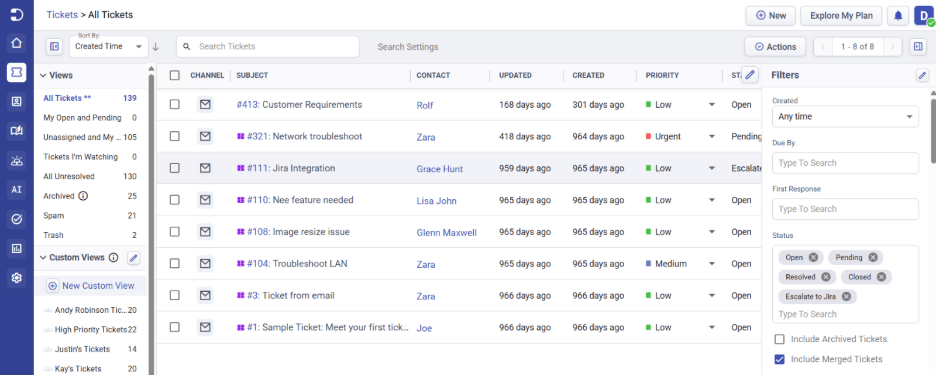
- Shared inbox with email-to-ticket conversion
- Omnichannel support (Email, Microsoft Teams, Web Forms, Live Chat, Support Portal)
- SLA management and workflow automation
- Round-robin ticket assignment
- AI Copilot and knowledge base
- Customer self-service portal
- Reports and analytics
- Native Microsoft Teams integration
- Easy-to-use interface with quick setup
- Strong automation and SLA capabilities
- Affordable pricing with a free plan
- Omnichannel customer support
- Limited out-of the box integrations
- Free: Up to 3 agents
- Standard: Starts at $12/agent/month (billed annually)
- Plus: Starts at $22/agent/month (billed annually)
- Premium: Starts at $22/agent/month (billed annually)
6. Freshdesk: Email-to-ticket, automations, collision detection, and reporting
- Email-to-ticket conversion with automated categorization and assignment
- Collision detection to prevent duplicate responses from multiple agents
- SLA management with automated escalations and reminders
- Reporting and analytics dashboards for performance tracking
- Multi-channel support (chat, phone, social) in higher-tier plans
- Easy to set up and user-friendly interface
- Collision detection improves team coordination
- Affordable pricing with strong core features
- Advanced automation and analytics limited to higher-tier plans
- Customization options are less flexible than enterprise tools like Zendesk
7. Help Scout: Shared inbox with Docs, Beacon, saved replies, and workflows
- Shared inbox with assignments, tags, and collision detection
- Docs: integrated knowledge base for customer self-service
- Beacon: lightweight in-app widget for chat and instant answers
- Saved replies and workflows for consistent, automated responses
- Reporting dashboards for tracking response time and customer satisfaction
- Easy-to-use and lightweight compared to enterprise help desks
- Integrated Docs and Beacon improve customer experience
- Affordable pricing for growing support teams
- Reporting and analytics not as deep as Zendesk or Freshdesk
- Limited integrations compared to broader suites like Zoho Desk
8. Zoho Desk: Contextual email ticketing with Zoho suite integrations
- Email-to-ticket system with categorization, tagging, and priority settings
- Contextual views that show customer history from Zoho CRM and other apps
- Automation rules for routing, escalations, and follow-ups
- SLA management with time-based triggers and alerts
- Multi-channel support (chat, phone, social) in advanced tiers
- Deep integration with Zoho CRM and other Zoho apps
- Affordable pricing with strong automation features
- Customizable workflows for diverse team needs
- Interface can feel complex compared to lightweight shared inbox tools
- Advanced reporting requires higher-tier plans
9. Outlook: Enterprise email with rules, add‑ins, categories, and shared mailboxes
- Rules and filters for automated sorting, categorization, and responses
- Shared mailboxes and delegated access for team collaboration
- Categories, flags, and conditional formatting to prioritize emails
- Integration with Microsoft 365 apps like Teams, OneDrive, and SharePoint
- Add-ins marketplace for extending Outlook with third-party apps
- Deep integration with the Microsoft ecosystem
- Powerful rules engine for automation
- Enterprise-grade security, compliance, and governance features
- Can feel overwhelming with its range of features
- Advanced automation requires setup and IT support
10. Gmail (Google Workspace): Labels, filters, templates, add‑ons, and admin controls
- Labels and filters for organizing and automatically routing emails
- Email templates and smart replies to save time on repetitive messages
- Add-ons and integrations with apps like Docs, Drive, and Meet
- Priority inbox and snooze for productivity-focused workflows
- Centralized admin controls for security, retention, and access management
- Intuitive and easy to use across devices
- Seamless integration with Google Workspace apps
- Strong security and admin controls for businesses
- Limited advanced automation compared to help desk email management software
- Offline functionality is weaker than Outlook or desktop email clients
11. Superhuman: Productivity workflows (shortcuts, triage, split inbox, reminders)
- Keyboard shortcuts for ultra-fast navigation and actions
- Split inboxes to prioritize important conversations
- Reminders and follow-up tracking for managing commitments
- AI-powered triage for categorizing and surfacing key emails
- Read status indicators and scheduling for better communication control
- Extremely fast and optimized for productivity
- Intuitive design with strong triage capabilities
- Personalized onboarding and coaching for new users
- Expensive compared to mainstream email clients
- Limited team collaboration features compared to shared inbox or help desk tools
12. Spark: Smart inbox, snooze, delegation, shared drafts, send later
- Smart inbox that prioritizes important emails automatically
- Snooze and reminders for better inbox control
- Delegation to assign emails as tasks to team members
- Shared drafts for real-time collaboration on responses
- Send later scheduling to optimize communication timing
- Smart inbox reduces clutter and surfaces important messages
- Strong collaboration with delegation and shared drafts
- Free plan available with core features
- Collaboration features less robust than shared inbox platforms like Front
- Some advanced features require higher-tier plans
13. Thunderbird: Open-source client with filters, add‑ons, and encryption support
- Advanced filters and rules for organizing incoming mail
- Add-ons and extensions to expand functionality
- Built-in support for multiple accounts and protocols (IMAP, POP3)
- Encryption and strong privacy controls for secure communication
- Offline email access and local storage options
- Completely free and open-source
- Highly customizable with add-ons
- Strong security and encryption features
- Outdated interface compared to modern email apps
- No native mobile app, desktop-only solution
14. HubSpot: Conversations inbox, automation, knowledge base, and CRM
- Conversations inbox for managing team email, chat, and forms in one place
- Workflow automation for routing, follow-ups, and escalations
- Integrated knowledge base for customer self-service
- Built-in CRM for 360-degree customer insights
- Reporting dashboards to measure response times, SLAs, and customer satisfaction
- Unified inbox with automation and CRM connectivity
- Knowledge base and reporting are included in the same system
- Scales easily across service, sales, and marketing teams
- Pricing can be high for small businesses
- Advanced features locked in higher-tier plans
15. Hiver: AI-powered customer service with omnichannel support, team accountability, and automated workflows
- Shared inbox with collision detection: Prevents duplicate responses by showing who is currently replying to a thread.
- AI-driven automation: Automates "busy work" by drafting responses, summarizing long threads, and routing conversations based on intent.
- Omnichannel support: Centralizes conversations from email, live chat, voice, WhatsApp, and social media into one interface.
- Internal collaboration: Enables teams to leave internal notes and @mention colleagues within conversation threads to share context without forwarding emails.
- Detailed analytics & SLAs: Tracks response times, agent productivity, and service-level agreement compliance to ensure quality standards.
- Fast adoption: Offers a "refreshing alternative" to legacy helpdesks with an intuitive interface that is simple for teams to learn.
- Powerful AI engine: Significantly reduces manual effort by providing context-rich AI replies and automating entire support lifecycles.
- Team accountability: Provides clear visibility into ownership and status of every request, preventing the "hot mess" of missed or delayed emails.
- Platform Dependency: While Hiver Omni exists, the platform’s unique strength is most optimized for teams working within the Gmail and Outlook ecosystems.
- Feature Tiering: Advanced AI capabilities and full omnichannel features are typically reserved for higher-priced plans.
What to look for in email management software
- Core: Look for shared inbox functionality with routing, assignment, templates, tagging, and collision detection. These ensure consistent replies and prevent duplicate work.
- Automation: Rules, SLAs, and AI-driven categorization help reduce backlog, enforce response times, and streamline escalations with minimal manual effort.
- Collaboration: Features like internal notes, @mentions, file sharing, and approvals keep discussions in context so teams don’t need to switch between apps.
- Intelligence: Dashboards and analytics reveal response metrics, backlog trends, and CSAT performance, giving managers insight to improve workflows.
- Governance: Roles, permissions, audit logs, and encryption protect sensitive communication while ensuring compliance with enterprise standards.
- Integrations: Seamless connections with CRM, chat, knowledge bases, contact center software, and calendars keep workflows unified.
- Scale and cost: Evaluate pricing, seats, channels, and storage against long-term needs. The right system should scale without hidden costs or workflow gaps.
Common mistakes and how to avoid them
- Using individual inboxes for team workflows: Relying on personal inboxes creates silos and missed follow-ups. Adopt shared inboxes, routing rules, and templates to keep work visible and consistent.
- No SLA or escalation guardrails: Without defined response times, issues slip through. Set clear SLAs, automate escalations, and review weekly reports to maintain accountability.
- Tool sprawl: Switching between multiple apps causes delays and confusion. Consolidate core workflows—email, tasks, approvals—into one hub to keep context and reduce handoffs.
- Poor documentation: Lack of templates and knowledge resources forces teams to reinvent answers. Maintain standardized templates, knowledge entries, and playbooks for faster, more reliable responses.
Conclusion
FAQs
What is the best email management software for teams?
How can email management for customer service be achieved?
Which Outlook email management tools help the most?
Is there free email management software?
What's the difference between business email management and email customer service software?
Related reading

Start using Lark today

Manage all your work in one place
Boost team efficiency by 10x
Save up to 70% on software costs
Start using Lark today
Manage all your work in one place
Boost team efficiency by 10x
Save up to 70% on software costs
Keep reading







2026 Lark Technologies Pte. Ltd.
Headquartered in Singapore with offices worldwide.





