


Process Mapping: Definition, Examples, and Tools

Ryan Tanner
Product Marketing Specialist
Aug 5, 2026
Ryan Tanner
Aug 5, 2026

18 min read


Processes drive every organization—but without visibility, they often become confusing and inefficient. Process mapping is the practice of visually representing workflows, tasks, and ownership so teams can clearly understand how work flows from start to finish.
From standardizing operations and identifying inefficiencies to improving collaboration, process mapping gives teams a blueprint for efficiency. In this guide, we’ll explain what process mapping is, its benefits, and examples of how teams use it effectively. We’ll also explore modern platforms—like Lark—that make process maps interactive, collaborative, and easy to update as workflows evolve.

What is process mapping?
At its core, process mapping is the visual representation of how tasks, decisions, and stakeholders interact within a workflow. A process map outlines steps, inputs, outputs, and ownership so everyone understands how work should be executed.
It differs from workflow mapping: process mapping shows the big picture (roles, decisions, handoffs), while workflow mapping often focuses on detailed task-level execution. Together, they provide both clarity and control.
Benefits of process mapping
Effective business process mapping gives organizations visibility into how work gets done and reveals opportunities to improve. Beyond simple documentation, it drives efficiency, accountability, and long-term scalability.
- Improves clarity and transparency: A process map provides a visual reference that breaks down complex workflows into clear steps. Teams and stakeholders can quickly see how tasks connect, who is responsible, and where handoffs occur.
- Identifies bottlenecks and redundancies: By mapping every stage, inefficiencies become visible. Teams can spot duplicate efforts, long wait times, or unnecessary steps, and then streamline processes to reduce delays and costs.
- Enhances compliance and accountability: Regulated industries benefit from process mapping tools because they clearly assign ownership and document decision points. This creates a reliable audit trail and ensures compliance with internal and external standards.
- Supports training and onboarding: New employees often struggle with complex procedures. Process maps act as visual guides, making it easier for new hires to understand workflows, shorten their learning curve, and perform tasks consistently.
- Enables automation and optimization: Once a process is mapped, organizations can apply workflow process mapping in tools like Lark Base to automate repetitive tasks. This transforms static diagrams into dynamic, optimized workflows that improve productivity.
Types of process maps
Different process mapping tools use distinct formats to capture workflows, from simple visual guides to highly detailed diagrams. Choosing the right type depends on your goals—whether it's clarity, compliance, or optimization.
- Basic flowchart: A simple, linear diagram that shows each step in sequence. Best for straightforward workflows where clarity matters more than complexity.
- Swimlane diagram: Organizes steps into “lanes” based on departments or roles. This makes responsibilities clear and highlights where cross-team handoffs occur.
- SIPOC diagram: Summarizes Suppliers, Inputs, Process, Outputs, and Customers at a high level. Ideal for understanding scope before diving into detailed mapping.
- BPMN (Business Process Model and Notation): Employs standardized symbols for complex business mapping, making it easier for teams and stakeholders to interpret processes consistently.
- Workflow diagram: Provides a detailed, task-level view with dependencies and decision points. Useful when teams need to see exactly how execution unfolds.
Process mapping examples
Seeing business process mapping examples in action makes it easier to understand how teams can apply this approach to real-world workflows. Below are five scenarios where process maps provide structure, accountability, and efficiency.
- HR onboarding process map – hiring → orientation → training.
The onboarding journey typically includes hiring, contract signing, orientation, IT setup, and initial training. A process map ensures no steps are missed, helping HR provide a consistent new-hire experience. It also clarifies responsibilities between HR, IT, and managers, reducing delays during employee ramp-up.
- Sales process mapping – lead gen → qualification → deal closure.
Sales workflows often involve lead generation, qualification, nurturing, negotiation, and closing. A mapped process gives sales teams a standardized playbook, ensuring consistent follow-ups and reducing leakage in the funnel. It also helps managers identify bottlenecks, like stalled negotiations or slow responses, and optimize for higher conversion rates.
- Customer support workflow – ticket intake → escalation → resolution.
Support processes usually follow ticket intake, categorization, escalation (if needed), and resolution. Mapping this flow helps teams set clear SLAs, streamline escalation paths, and ensure customer queries don't get lost. It also improves visibility across teams, so managers can track response times and customer satisfaction more effectively.
- Product development process map – ideation → prototyping → release.
From ideation and market research through prototyping, testing, and release, product development involves many moving parts. A process map aligns product, engineering, and QA teams on what comes next and who owns it. This structure reduces miscommunication, keeps projects on schedule, and ensures features are delivered to market with quality checks in place.
- Finance/invoice approval process – request → approval → payment.
A typical invoice approval process moves from request submission to manager sign-off, finance validation, and final payment. Mapping this flow reduces delays by clarifying approval ownership and setting deadlines. It also strengthens compliance by creating a clear audit trail, ensuring approvals are tracked and payments are processed consistently.
Process mapping tools & software
1. Lark: Collaborative, dynamic process mapping tool
Lark is an all-in-one collaboration platform that combines messaging, meetings, documents, project management, and workflow automation in a single hub. Unlike standalone project management tools, Lark connects maps directly with execution so teams don't just design workflows—they run them. With features like Lark Base, Docs, Wiki, Tasks, Approvals, and Messenger, it brings clarity and accountability to every step. Teams gain real-time visibility into processes, while keeping communication and actions in the same workspace. This makes Lark especially powerful for organizations that want process mapping to lead seamlessly into results.
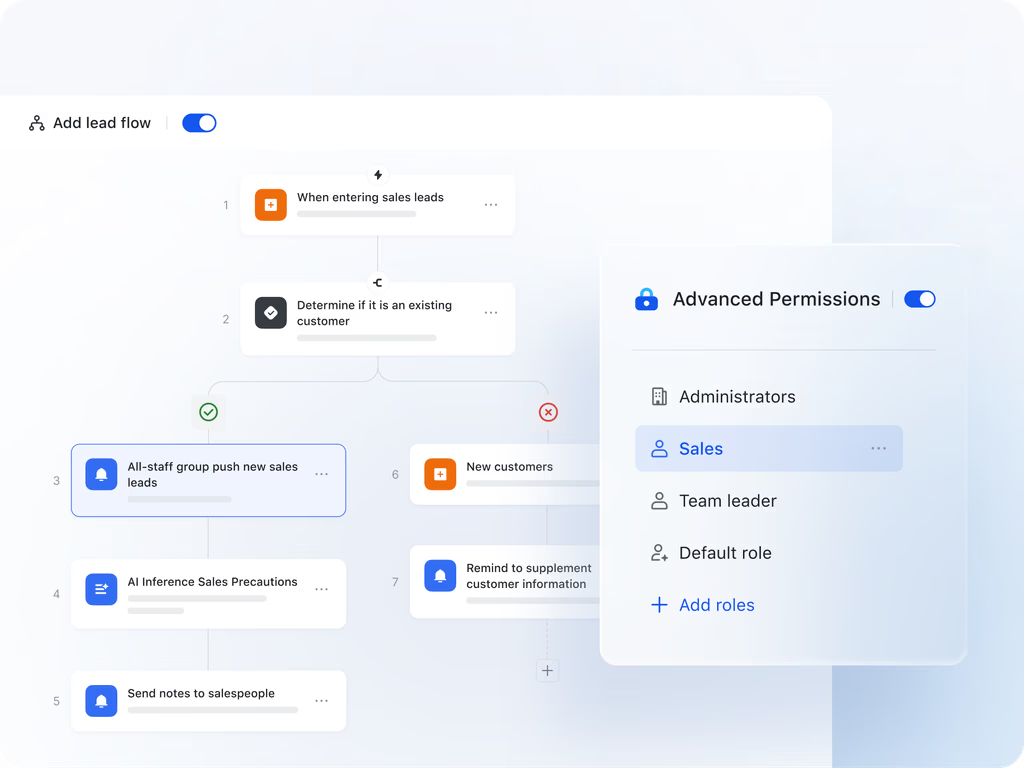
Best for: Teams that want process mapping tied directly to execution.
Strength:
- Built for collaboration-first process mapping, ensuring teams don't just design workflows but also act on them.
- With Lark Base, teams can visualize processes in tables, Kanban, or Gantt views, complete with dependencies and ownership.
- Lark Docs and Wiki let you document mapped workflows, embed visuals, and create accessible process guides.
- Lark Tasks turns mapped steps into clear assignments with deadlines, while Lark Approvals adds structure to finance, HR, or project sign-offs.
- Messenger, Calendar, and Meetings keep every discussion, review, and schedule connected directly to the mapped process.
- Instead of static diagrams, Lark delivers a living workspace where process mapping flows seamlessly into execution and optimization.
Limitation:
- Lark shines when processes evolve and need real-time updates, so it may feel like extra overhead for organizations with fixed, unchanging workflows.
- Starter plan: Free forever plan that includes 11 powerful tools for up to 20 users. It also comes with 100GB of storage, 1000 automation runs, AI translations, and more.
- Pro plan: $12/user/month (billed annually) for up to 500 users. It includes everything in Starter plus group calling for up to 500 attendees, 15TB of storage, 50,000 automation runs, and more.
- Enterprise plan: Contact sales for custom pricing. Supports unlimited users and includes even more automation runs and advanced security, compliance, and management features.
2. Microsoft Visio: Traditional diagramming
Microsoft Visio is one of the most established process mapping tools for enterprises that require professional, detailed diagrams. It allows users to create flowcharts, BPMN diagrams, and organizational charts with precise process mapping symbols. Visio is often used in compliance-heavy industries where standardization is crucial. As part of the Microsoft ecosystem, it connects well with Office and Teams, making it a go-to for companies already invested in Microsoft solutions. While powerful, it is less suited for agile collaboration and real-time updates.
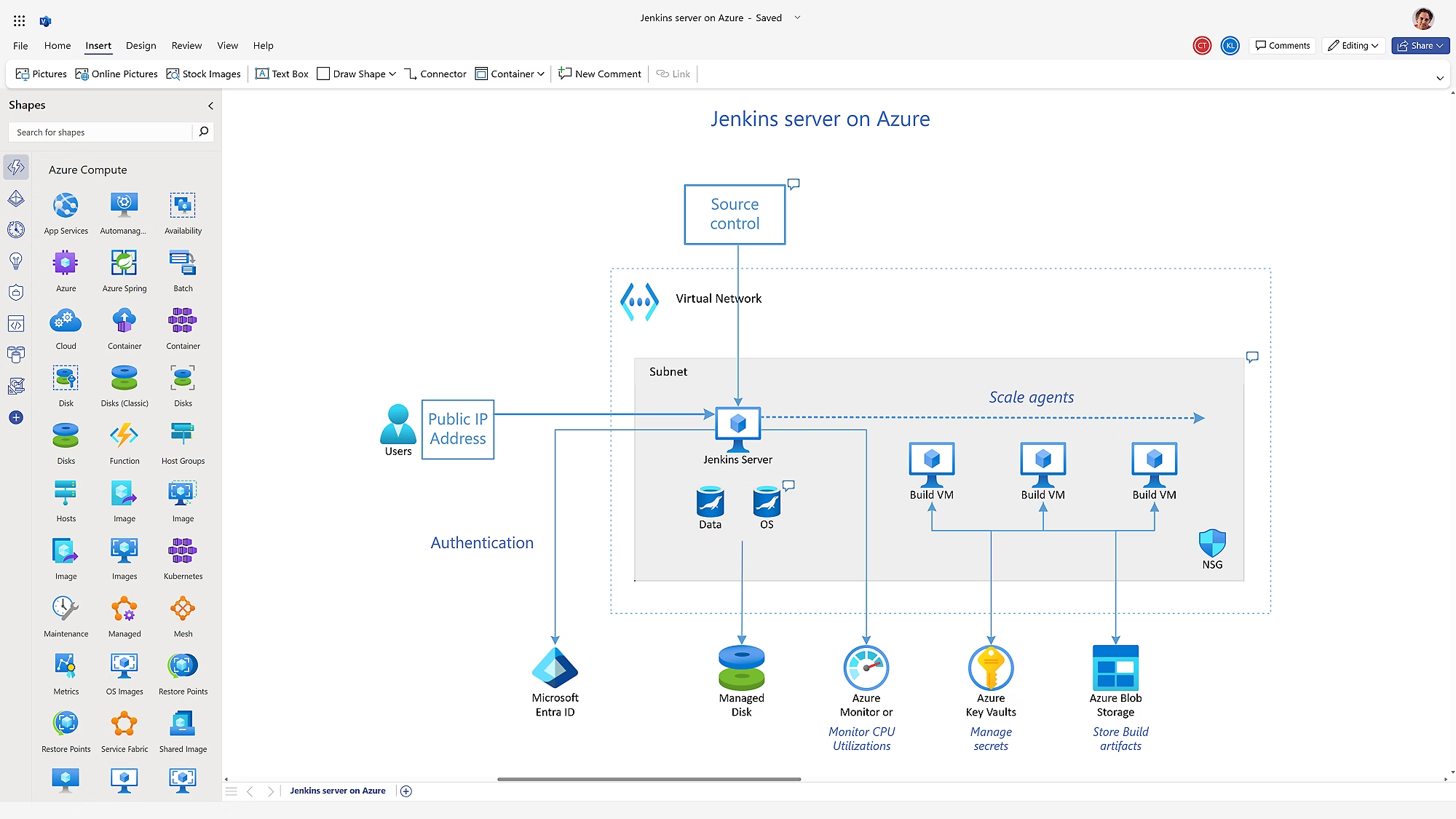
Image source: microsoft.com
Best for: Detailed process diagrams with standardized symbols.
Strength:
- Extensive libraries of standardized process mapping symbols.
- Highly customizable for complex business process mapping examples.
- Integrates seamlessly with Microsoft Office apps.
- Supports Visio-specific templates for professional diagramming.
- Strong for static documentation of detailed workflows.
Limitation:
- Steeper learning curve for beginners.
- Not designed for collaborative workflow process mapping in real time.
Pricing:
- Plan 1: $5.00 per user/month (billed annually): web version for diagram creation and collaboration.
- Plan 2: $15.00 per user/month (billed annually): includes desktop app and advanced capabilities.
- One-time purchase (desktop): Visio Standard 2024 ~ $309.99; Visio Professional 2024 ~ $579.99.
3. Lucidchart: Online process mapping
Lucidchart is a browser-based business process mapping software designed for simplicity and ease of collaboration. It is widely used by remote and hybrid teams who need fast, visual process mapping templates without installing desktop apps. Lucidchart allows users to drag and drop shapes, create flowcharts, and share diagrams instantly via links. Its cloud-first approach makes it popular with teams that value accessibility across devices. However, it is more suited for designing diagrams than managing execution.
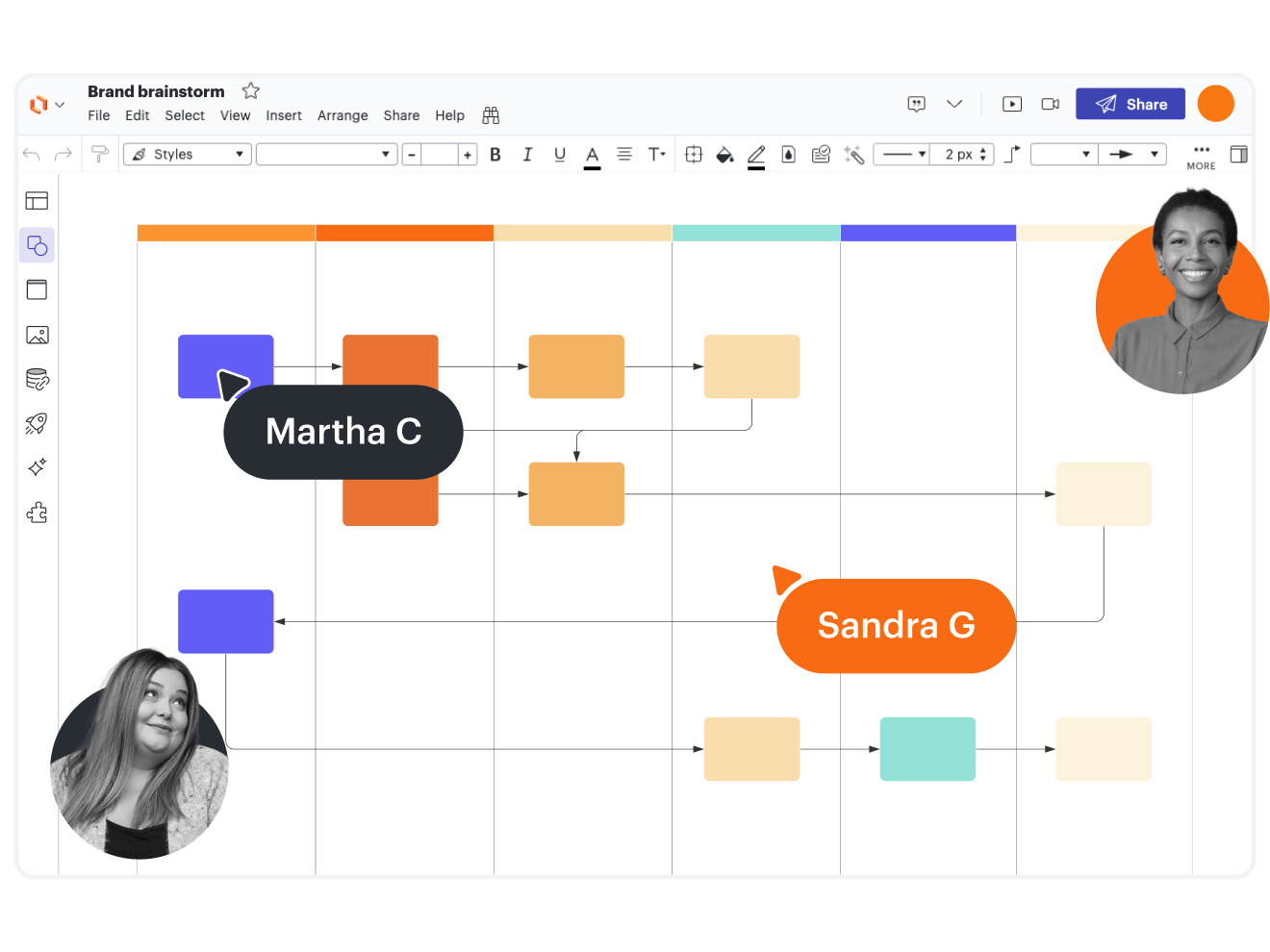
Image source: lucidchart.com
Best for: Teams who need a web-based diagramming tool.
Strength:
- Intuitive drag-and-drop diagramming interface.
- Cloud-based and accessible across devices.
- Offers ready-to-use process mapping templates.
- Strong real-time co-editing for distributed teams.
- Easy integration with apps like Slack and Google Drive.
Limitation:
- Limited project management or execution features.
- Less effective for handling complex process flow mapping.
Pricing:
- Free plan: Basic access, limited features.
- Individual (paid): $9/month (billed annually) for unlimited documents and shapes.
- Team / Enterprise: Higher tiers (custom pricing) for full collaboration, security, integrations, etc.
4. Asana: Workflow-based mapping
Asana is best known as a project management platform but also doubles as a workflow process mapping solution. Teams can create visual boards and timelines that map work from start to finish. This makes it useful for sales process mapping, where leads move through stages of qualification and closure. Asana connects mapped workflows directly with task assignments, giving teams both visibility and accountability. While great for structured projects, it lacks flexibility for freeform process diagrams.
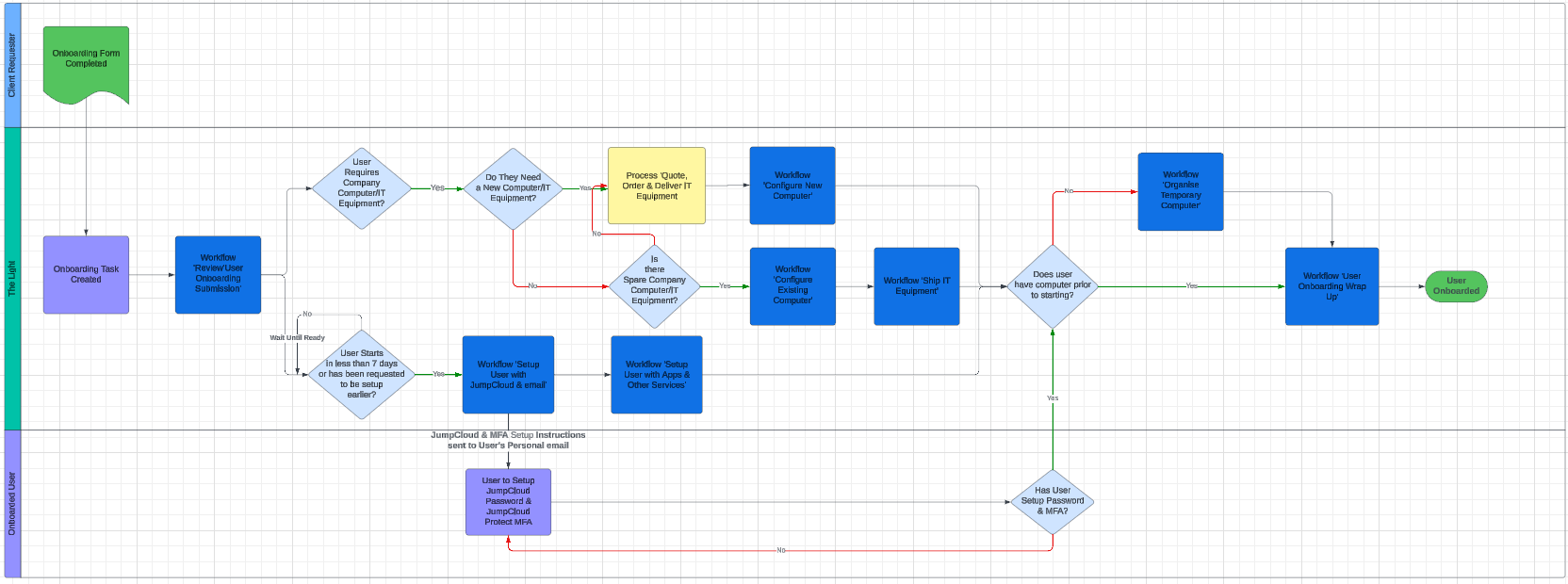
Image source: asana.com
Best for: Teams already using Asana for project management.
Strength:
- Built-in task management tied to workflows.
- Visual boards, lists, and Gantt timelines.
- Ideal for structured processes like sales process mapping.
- Strong accountability through ownership and deadlines.
- Integrates with Slack, Google Workspace, and other tools.
Limitation:
- Limited flexibility for freeform process mapping examples.
- Focused on project tasks rather than standalone process documentation.
Pricing:
- Free / Basic: Free for up to 10 users.
- Premium (Starter): $10.99/user/month (billed annually) or $13.49/month (month-to-month).
- Business / Advanced: $24.99/user/month when billed annually (or $30.49 monthly).
5. Miro: Collaborative whiteboard mapping
Miro is a digital whiteboard platform often used for brainstorming and customer journey mapping process. It provides an open canvas where teams can visualize ideas, map processes, and collaborate in real time. Miro is especially popular for workshops and early-stage design sessions, where structure is less important than free expression. With templates for flowcharts, retrospectives, and HR process mapping, it helps teams align visually. However, it's not designed for structured process execution.
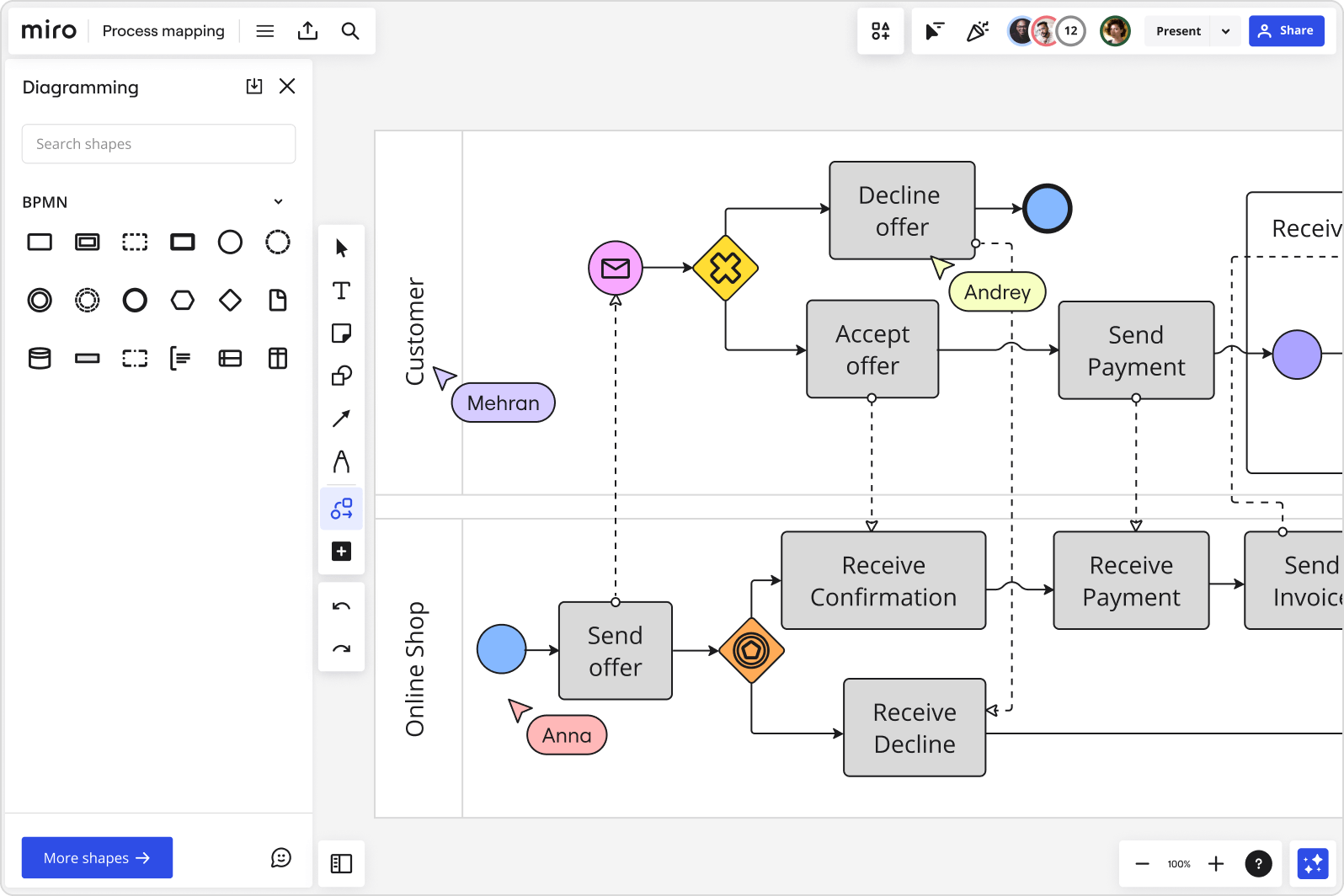
Image source: miro.com
Best for: Brainstorming and early-stage workflow design.
Strength:
- Highly interactive and engaging whiteboard experience.
- Excellent for real-time workshops and brainstorming.
- Supports HR process mapping and journey maps with templates.
- Flexible canvas for creative input from multiple stakeholders.
- Encourages collaboration across departments and roles.
Limitation:
- Can quickly become cluttered with too much content.
- Lacks structured features for formal business process mapping.
Pricing:
- Free plan: Includes limited boards and features.
- Starter / Team: $8 per user/month (billed annually) or $10/month (billed monthly).
- Business: $16 per user/month (billed annually).
- Enterprise: Custom pricing for large organizations.
6. Figma: Visual and creative mapping
Figma, though primarily a design tool, is increasingly used as a business process mapping tool for creative teams. Its collaborative canvas allows designers and non-designers to map workflows visually. Figma is especially helpful for process mapping templates that need to look polished and professional. Its browser-based approach makes it easy to share and co-edit in real time, much like Google Docs but for design. However, it lacks features for formal process documentation or compliance-heavy industries.
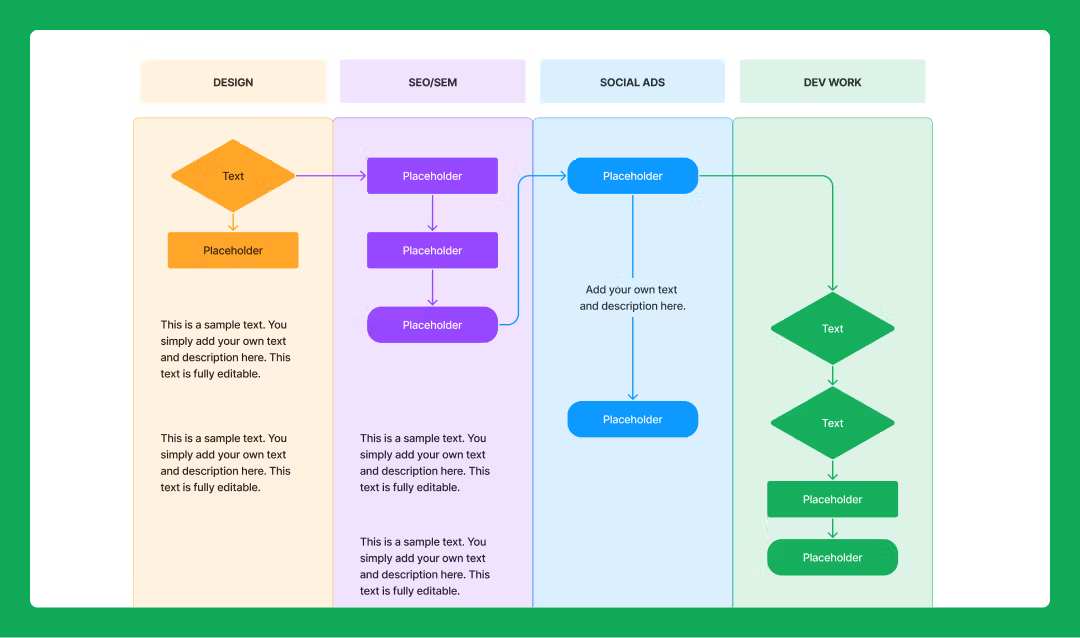
Image source: figma.com
Best for: Design teams who want to map processes visually.
Strength:
- Intuitive and familiar for design-oriented users.
- Strong real-time collaboration in the browser.
- Can create custom process mapping templates for visual workflows.
- Easy to share links with teams for feedback.
- Great for polished, creative process mapping examples.
Limitation:
- Not suitable for formal, compliance-driven process documentation.
- Lacks advanced workflow or automation features.
Pricing:
- Free / Starter: Free plan for individuals with limited features.
- Professional: ~$15 per user/month (typical for small teams).
- Organization / Enterprise: ~$45 per user/month or higher for advanced features and controls.
How Lark supports process mapping
Below, we explain how each Lark capability helps you move from a static process map to a living, executable workflow — with practical examples and quick tips you can apply right away.
Lark Base: Map processes in tables, Kanban, or Gantt views
Lark Base is where a visual map becomes structured data. Build a “Process Map” base (table) with fields like Step name, Owner, SLA, Inputs, Outputs, Dependency (lookup), Status, and Estimated effort. Switch between table, Kanban and Gantt views to see the same process as a checklist (table), handoff board (Kanban), or timeline (Gantt).
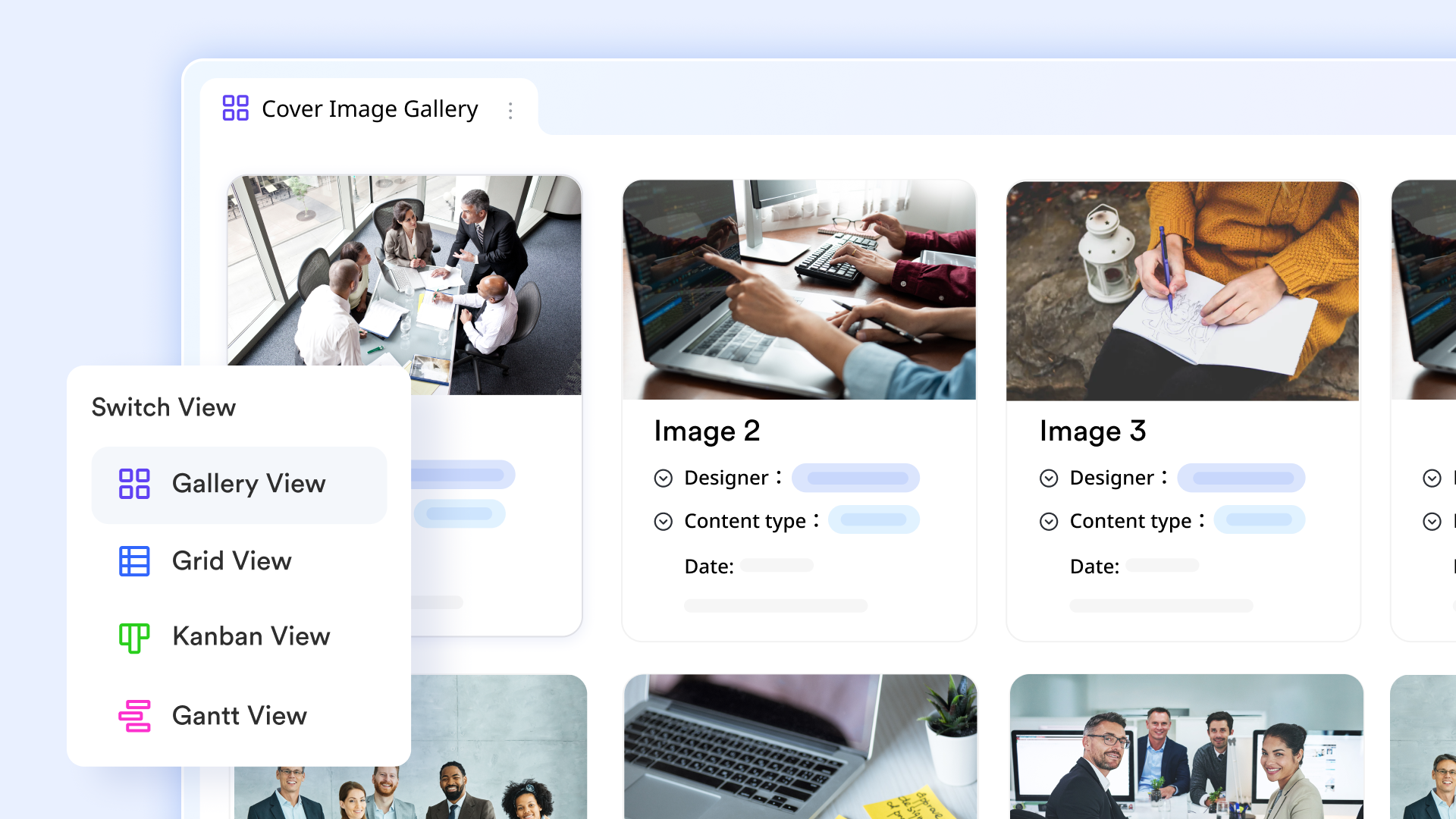
Example: For an HR onboarding map, create rows for “Offer,” “Contract,” “IT setup,” “Orientation,” each with an owner and SLA; use Gantt to validate sequencing and Kanban to manage handoffs between HR, IT, and Hiring Manager.
Lark Docs & Wiki: Capture, explain, and embed mapped workflows
Lark Docs and Lark Wiki hold the narrative, rules, and visuals that explain your map. Paste diagrams, embed screenshots or live Sheets, and write the SOPs, decision criteria, and exception rules next to the map so anyone reading knows the context and the “why.” Version history and comments keep a clear audit trail of who changed the process documentation and when.

Example: Create a Wiki page for the invoice-approval process containing a SIPOC image, the step-by-step flow, the list of approvers, and links to the Base table where current invoices are tracked.
Lark Tasks: Turn mapped steps into assignable, trackable work
Lark Tasks closes the gap between knowing and doing. From a mapped step you can create Tasks (and sub-tasks), assign owners, set due dates, add attachments (specs, forms), and use recurring tasks for repeatable steps. Tasks includes status and progress so execution is visible and auditable.
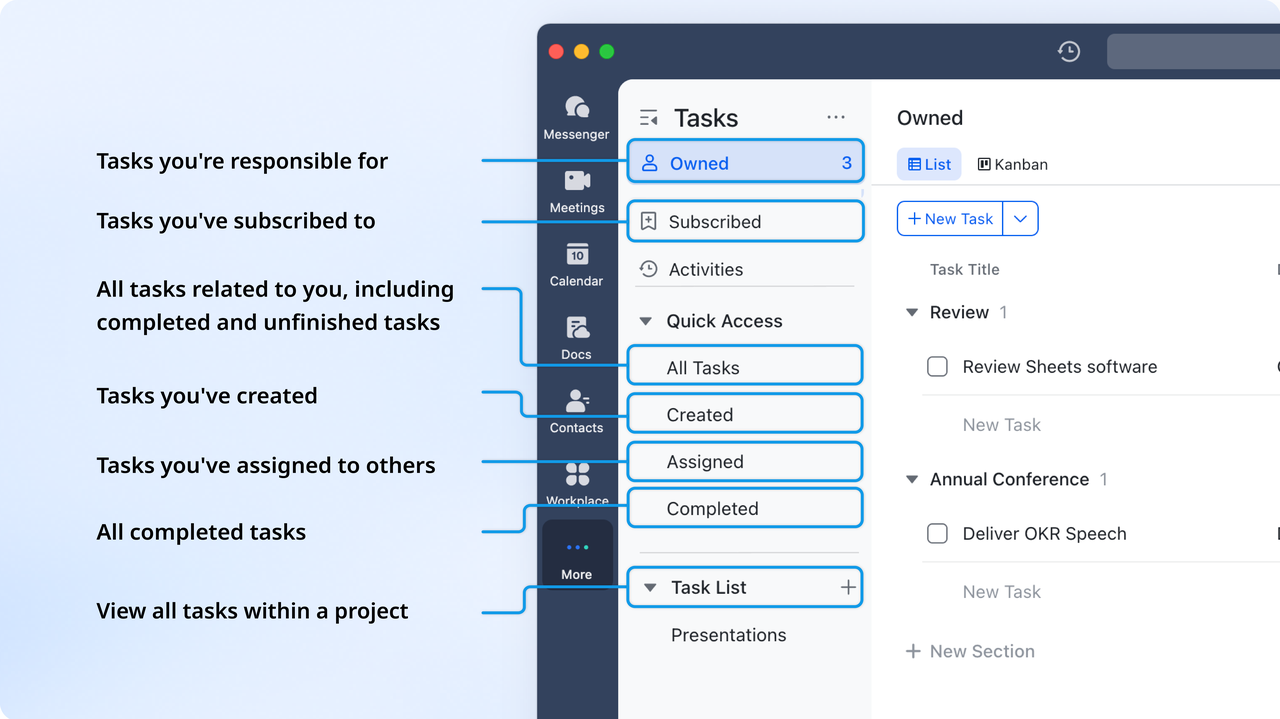
Example: In a product release map, each verification step (QA sign-off, security review, release checklist) becomes a Task with checklists and a responsible owner; failed checks spawn follow-up tasks automatically.
Lark Approval: Enforce sign-offs and create an auditable trail
Lark Approval ensures no process moves forward without formal authorization. You can create templates for budget requests, HR hires, or vendor onboarding and configure routing rules for approvers. Each approval is tracked and time-stamped, providing an audit trail for compliance.
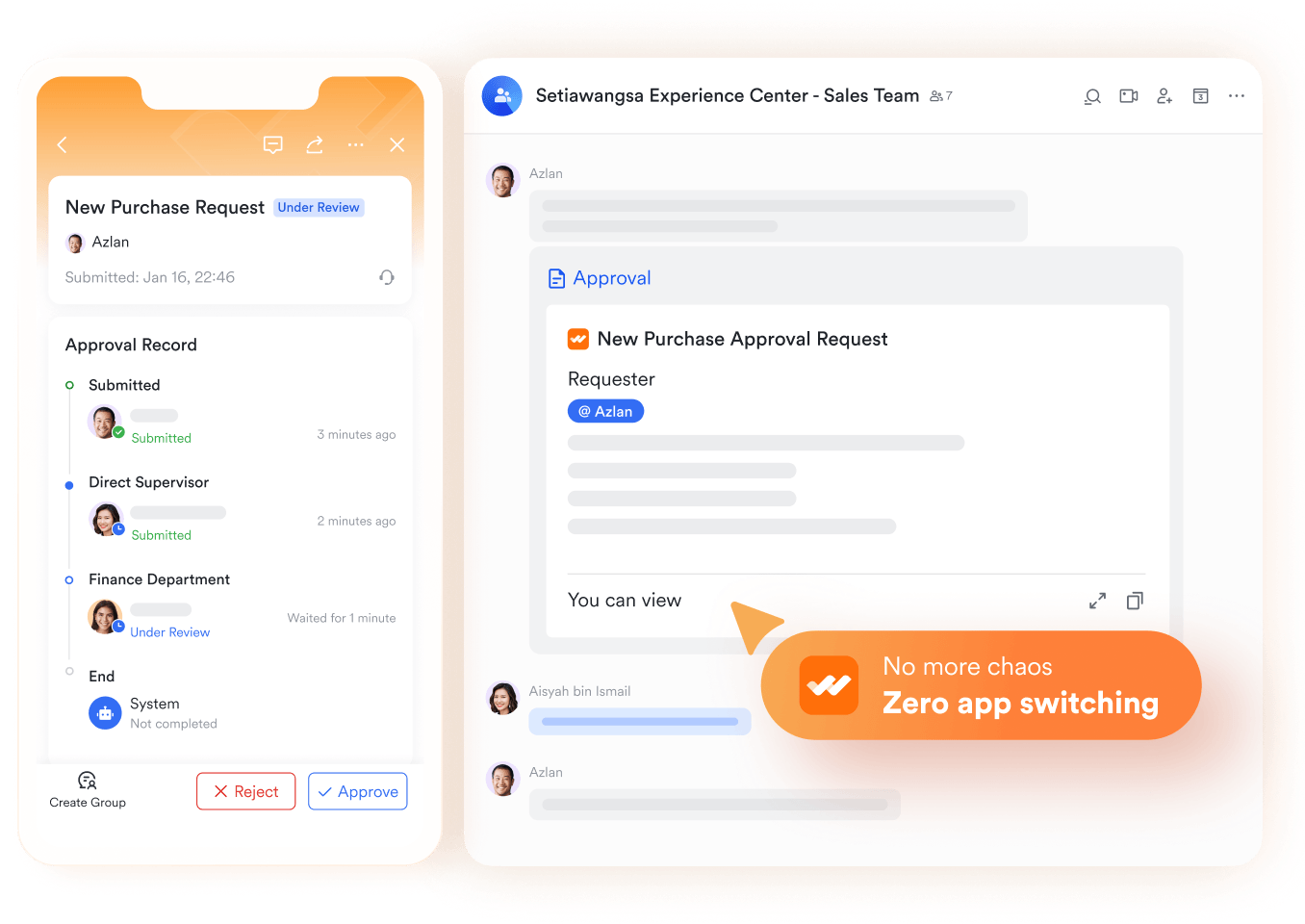
Example: In a capital expenditure map, a request over $50,000 automatically routes to finance and executives in Lark Approval. Once signed off, Base can trigger a purchase Tasks and Lark Calendar reminder.
Collaboration-first approach: Keep communication tied to the process
Keeping conversation and scheduling next to the map prevents context loss. Use in Sheets/Docs for cell- or paragraph-level discussions, or start a Lark Messenger thread about a specific Lark Base record, so back-and-forth stays linked to the step it concerns. Schedule review meetings from the map, attach the relevant Lark Docs or Lark Sheets, and use Lark Mail when you must communicate with a team — all while keeping links back to the live process.
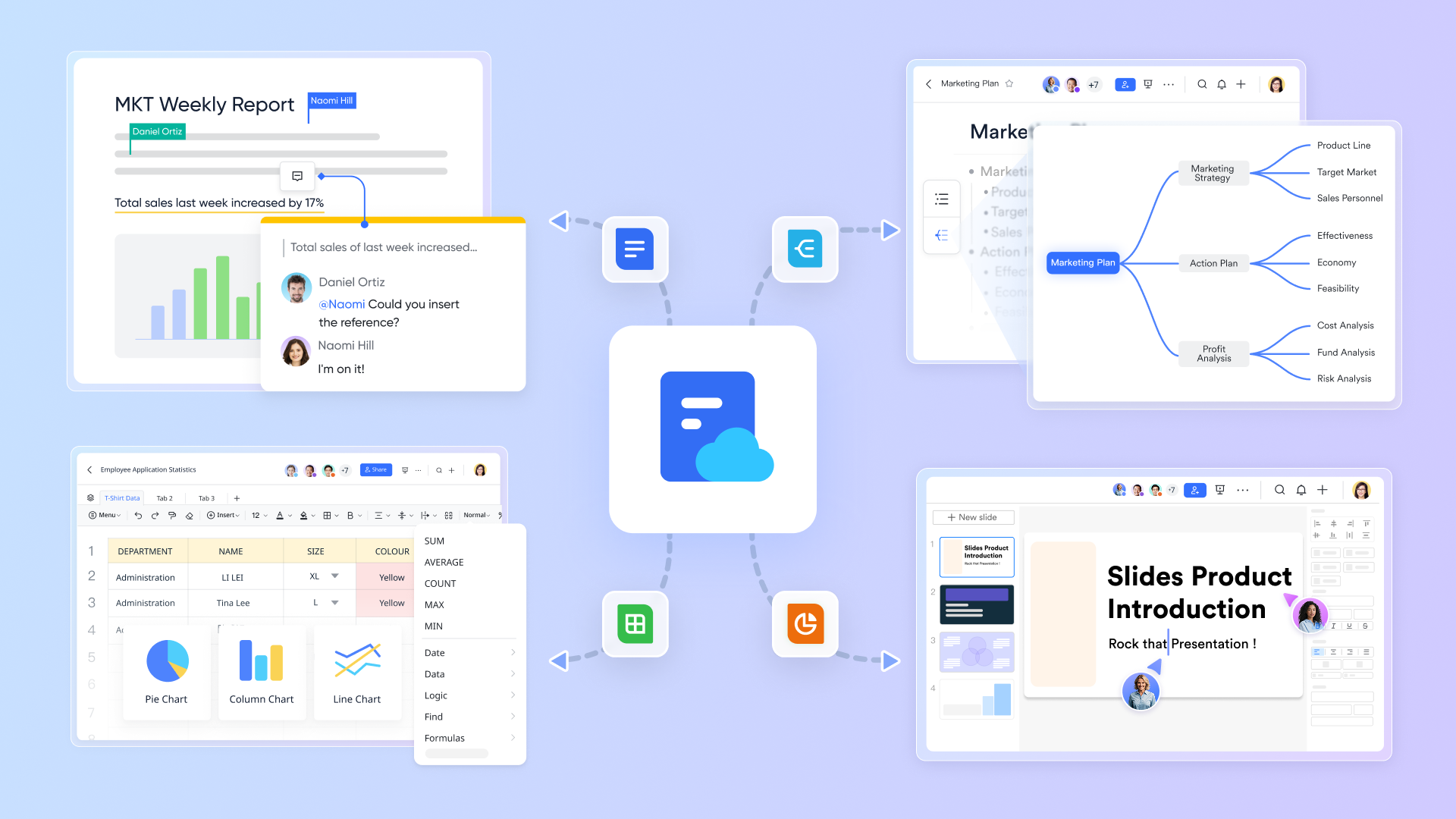
Example: During a release, the product manager pins the release checklist in Messenger, triages issues in a thread (linked to Base tasks), schedules a pre-release review via Lark Calendar, and emails external vendors with the approved rollout plan — everyone can trace decisions back to the mapped steps.
Best practices for process mapping
Creating a process map is only the first step—its real value comes when the map guides execution. Following these best practices ensures your maps stay clear, effective, and actionable with the help of modern tools like Lark.
- Define clear objectives: Before drawing a map, clarify what you want to achieve—whether it's speeding up approvals, reducing costs, or improving collaboration. In Lark, you can set these goals in Lark Docs and link them to Base dashboards for tracking.
- Involve the right stakeholders: Process maps are most accurate when they include input from the people who execute the work. With Lark Messenger and Meetings, you can gather feedback in real time and ensure alignment across teams.
- Keep maps simple and readable: Overly complex diagrams are hard to follow. Focus on essential steps, handoffs, and decisions. Lark Base helps simplify by showing processes in tables, Kanban, or Gantt views depending on audience needs.
- Use standard symbols consistently: If you're using flowcharts or BPMN, stick to agreed-upon symbols so maps are easy to understand. You can embed visual references in Lark Docs or Wiki so everyone follows the same mapping language.
- Review and refine maps regularly: Processes evolve, and maps should too. Schedule recurring reviews in Lark Calendar and update workflows in Base to reflect changes. This keeps your maps relevant and your team aligned with reality.
- Connect maps to execution tools: The best process maps don't just sit in documents—they guide action. By linking steps to Lark Tasks or Approvals, you ensure mapped workflows become real, trackable outcomes.
Conclusion
Process mapping is more than just drawing diagrams—it's about creating clarity, uncovering inefficiencies, and enabling better collaboration across teams. When done right, it brings visibility into who does what, when, and why, turning confusion into efficiency. But static maps alone aren't enough; they risk becoming outdated or ignored if not tied to execution.
That's where Lark makes the difference. With Base, Docs, Wiki, Tasks, and Approvals, process maps move seamlessly from design to execution, supported by Messenger and Calendar for collaboration. Whether it's HR onboarding, finance approvals, or product launches, Lark ensures your mapped processes are always actionable, auditable, and easy to adapt.
FAQs
What are the 5 types of process maps?
The five common types are flowcharts, swimlane diagrams, value stream maps, SIPOC diagrams, and BPMN models. These vary from simple to highly detailed. With Lark Docs and Wiki, you can capture and embed whichever type you use and link it directly to Base for execution.
Can I create a process map in Excel or Visio?
Yes. Excel and Visio allow you to draw process flowcharts or BPMN diagrams, but they are often static. In Lark Base, your process map is dynamic—you can switch between tables, Kanban, and Gantt views, ensuring your map doesn't just sit in a file but drives action.
What's the difference between process mapping and workflow mapping?
Process mapping shows the big picture (steps, roles, decisions), while workflow mapping often drills into task-level execution. In Lark, you can capture the process overview in Docs, then manage the detailed workflow execution in Base and Tasks.
How does Lark compare to traditional process mapping tools?
Traditional tools like Visio or Lucidchart focus on static diagrams. Lark combines mapping with execution—Docs to visualize, Base to track, Tasks to assign, and Approvals to enforce sign-offs—so your map becomes a living workflow instead of a one-off diagram.
Are there free process mapping templates available?
Yes, many tools offer free templates, including Microsoft and Lucidchart. But with Lark Docs and Base, you also get customizable process mapping templates that can be immediately tied to real tasks and workflows, saving setup time.
How do I choose the right process mapping tool?
If you only need static diagrams, tools like Visio or Lucidchart work well. But if you want collaboration, automation, and real-time execution, Lark is the smarter choice—it combines process design, documentation, and task management in one hub.
Related reading
Table of contents
Start using Lark today

Manage all your work in one place
Boost team efficiency by 10x
Save up to 70% on software costs
Table of contents
Start using Lark today
Manage all your work in one place
Boost team efficiency by 10x
Save up to 70% on software costs



2026 Lark Technologies Pte. Ltd.
Headquartered in Singapore with offices worldwide.






Explore: