Managing client work today is no longer just about "getting projects done." You're juggling timelines, budgets, and client expectations while trying to keep sales, delivery, and account teams aligned. When your project management tools and CRM sit in separate silos, you often end up with duplicated updates, messy handovers, and limited visibility into profitability.
Over the past few years, I've tested a range of CRMs and collaboration platforms to see how well they really support project-based teams. One of the tools I looked at closely is Teamwork CRM and its integration with Teamwork.com. By linking deals in Teamwork CRM directly to projects in Teamwork.com, it aims to create a clearer flow from opportunity to delivery in a single ecosystem.
In this guide, I'll walk through how Teamwork CRM is positioned for project-centric teams, what it does well, where the trade-offs are, and how it compares to other CRM and collaboration options on the market. If you're running client projects and evaluating CRM tools that claim to "connect sales and delivery," this breakdown will help you understand where Teamwork CRM fits—and where alternative solutions might be a better match.
Understanding Teamwork CRM
What is Teamwork & Teamwork CRM?
Teamwork.com is the AI-powered project management and resource management platform that keeps your client projects on track, makes managing resources a breeze, and ensures your profits remain on point. Teamwork CRM is a cloud-based system that creates a unified portal for sales, marketing, and business operations. This platform allows users to create and automate workflows, expedite project turnover, and manage clients from start to finish. The system is simple yet powerful enough to handle dozens of projects simultaneously. As the name suggests, this is enhanced with collaboration tools for both teams and clients.
Within Teamwork.com, you can view a deal that has been linked from Teamwork CRM to a project. Once a project has been created from a lead or an opportunity, the associated deal can be viewed from the project's Dashboard area. In the project details pane on the left of the Dashboard, you will see a note indicating that the project was created from Teamwork CRM. This integration allows for seamless collaboration between project management and , making Teamwork CRM an essential tool for optimizing team processes.
Key features of Teamwork CRM
- Collaboration tools: The platform offers features such as comments, file sharing, and real-time updates, facilitating seamless communication among team members and clients, no matter where they are located. This ensures that everyone stays informed and engaged throughout the project lifecycle.
- Customizable pipelines: Users can create and tailor their sales workflows with custom stages, ensuring clarity and accountability at every step of the sales process. This flexibility allows teams to adapt their workflows to meet specific business needs effectively.
- Robust reporting capabilities: Teamwork CRM provides powerful analytics and reporting tools that enable teams to track performance metrics and gain insights into sales forecasting, probability scores, deals, and marketing efforts. These reports allow teams to adjust their strategies based on data-driven feedback. Additionally, customizable reports help track targets, uncover capacity issues, and enable users to monitor project profitability from inception to completion.
- Integrations with other tools: The platform integrates seamlessly with a variety of applications, including Google Calendar and popular project management tools like , , and. This ensures that tasks and schedules are synchronized effectively, promoting a cohesive workflow across different tools.
- User-friendly interface: Teamwork CRM features an intuitive design that makes it easy for both new and experienced users to navigate the system. This promotes efficient onboarding and enhances usage across teams, allowing users to get up to speed quickly and maximize their productivity.
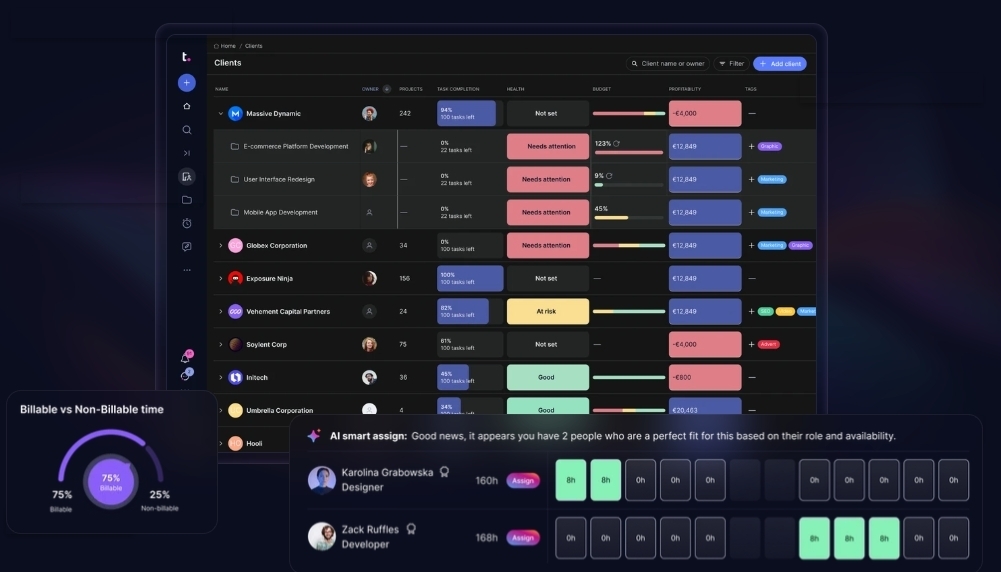
Image source: teamwork.com
Teamwork CRM pricing
Teamwork offers various pricing plans tailored to different team sizes and project management needs. Businesses comparing collaboration platforms often review and before making a final decision. While allowing for a free 30-day trial, the Teamwork pricing model typically includes several tiers that unlock different features and user capacities. Below are the main pricing options available for Teamwork:
- Free: $0 (up to 5 users) – includes TeamworkAI, project management essentials, client work foundations, key integrations, up to 5 projects, 100 automations/month
- Deliver: $10.99/user/month (billed annually) – everything in Free plus Teams, intake forms, project status & health reports, planned vs actual reports, 20 project templates, 5,000 automations/month, 100 GB storage
- Grow: $19.99/user/month (billed annually) – everything in Deliver plus Budgeting, Time & Financials, HubSpot integration, Workload Resource Planner, Powerful Reports, 50 project templates, 20,000 automations/month, 250 GB storage, 600 projects
- Scale: Custom pricing – everything in Grow plus unlimited premium features, profitability reports, resource scheduling, custom & scheduled reporting, retainer management (beta), budget expenses & tasklist budget, 100,000 automations/month, 500 GB storage
- Enterprise: Custom pricing – everything in Scale plus advanced security (including SSO), premium support add-on, dedicated infrastructure, increased API limit, 1,000 GB storage, dedicated account manager, and up to 10 hours of tech services
As for Teamwork CRM pricing, specific pricing details may not be explicitly listed on the official website. For the latest pricing and available features for Teamwork CRM, it is recommended to visit the official website at Teamwork.com or contact their sales team for personalized quotes based on your organization's needs.
Advantages of using Teamwork CRM
- Collaboration at its core: A defining aspect of Teamwork CRM is its strong emphasis on collaboration. Teams can work together efficiently, share ideas, and provide feedback in real-time, leading to faster decision-making and improved project outcomes. This collaborative environment fosters a positive workplace culture where productivity thrives. Teamwork CRM helps teams be more productive by streamlining workflows and reducing manual work, allowing support teams to focus on high-value tasks. AI-Driven Insights in collaborative CRMs can suggest the next best action or summarize lengthy communication threads, further enhancing team efficiency. Automated Handoffs facilitate seamless transitions between departments and can trigger notifications or approval chains, ensuring nothing falls through the cracks.
- Customizable pipeline management: The flexibility in pipeline management allows organizations to tailor their systems based on unique workflows. For instance, while a sales team may require straightforward stages, a project management team could need more complex setups. This adaptability ensures that all facets of project and client management are comprehensively addressed.
- Strong reporting tools: Effective project management relies heavily on the ability to analyze data and generate reports. Teamwork CRM's extensive reporting features allow users to create detailed metrics that reflect their performance over time, enabling teams to identify areas of improvement and work towards their objectives. Teamwork allows users to track project profitability from start to finish, including tracking billable hours, which improves project profitability, resource allocation, and operational efficiency.
Limitations and challenges of Teamwork CRM
While Teamwork CRM offers a robust set of features that enhance collaboration and project management, it's important to acknowledge some limitations and challenges that users may encounter:
- Integration limitations: One of the notable challenges is that Teamwork CRM has a limited number of native integrations with external applications compared to some competitors. Although it does integrate with platforms like Zapier, users may find it necessary to use third-party integration tools to connect with other commonly used software, which can add complexity to workflows and increase setup time.
- Learning curve: Despite its user-friendly interface, new users may experience a learning curve when adapting to the platform, especially if they are transitioning from a different CRM or project management tool. Teams need to invest time in training to fully leverage the platform's capabilities and features.
- Customization complexity: While the flexibility in pipeline management and customization options is beneficial, it may also lead to complexity. Organizations with specific or intricate workflows might require extensive configuration, which could be time-consuming and may necessitate expert knowledge of the platform.
- Cost considerations: Depending on the size of the team and the required features, the pricing structure might become a concern for smaller businesses. While Teamwork CRM offers various plans, businesses need to evaluate the costs against the features they truly need, ensuring they are not paying for capabilities that will not be utilized.
- Performance issues: Some users have reported occasional performance issues, particularly when handling large volumes of data or projects. This can affect the user experience and overall productivity. It's essential for teams to monitor and optimize their use of the platform to mitigate potential slowdowns.
By being aware of these limitations and challenges, organizations can better prepare for successful implementation and ongoing use of Teamwork CRM. However, for those seeking alternatives that may offer different advantages, platforms like Lark present an attractive option. Lark's integration capabilities, user-friendly design, and enhanced collaboration features could address some of the concerns outlined, providing teams with a more seamless and efficient project management experience.
Experience a better CRM tool without these limitations
Alternatives to Teamwork CRM
Alternative list
In addition to Teamwork CRM, there are several other collaborative CRM tools worth considering on the market, each with its own strengths and suited to different team needs and budgets. Below is an overview of several mainstream alternatives for your evaluation:
Teamwork CRM is known for features such as project integration, custom views, workflow automation, management tools, client collaboration, and visual analytics. It is user-friendly, scalable, and receives regular updates, though it offers relatively limited third-party integrations. Pricing for Teamwork CRM is not explicitly listed on the official website; it is recommended to contact their sales team for a customized quote.
emphasizes automation and streamlining, AI-powered assistance, data integration, customizable dashboards, mobile accessibility, and activity tracking, all within a lightweight and flexible design. Its pricing is competitive, offering a free forever plan for up to 20 users, with paid plans starting at $6 per user per month.
stands out for its strong automation capabilities, highly rated mobile app, easy integration with project tools, and overall ease of use. Pricing starts at $12 per user per month when billed annually.
provides a unified customer view, reporting and insights, deal management, extensive integrations, and lead generation tools, making it a comprehensive CRM platform. Its pricing begins at $15 per seat per month.
Each tool has its own focus, and the choice should be based on your team's specific workflows, integration requirements, and budget. Next, we'll explore why Lark stands out among these alternatives.
Why Lark is the best alternative
As one of the best , Lark reimagines customer relationship management (CRM) by integrating it into a powerful all-in-one platform designed for modern teams. Unlike traditional CRMs, Lark provides a seamless experience across customer interactions, allowing teams to manage every stage of the customer journey—from lead capture to closing deals—all within a single, unified workspace. This eliminates the need for juggling multiple tools and enhances productivity by keeping everything organized in one place. Here are the key features:
No-code workspace for CRM: is an AI-powered, flexible and mobile friendly no-code platform to streamline CRM processes for teams. It facilitates lead generation, qualification, handoffs, fulfillment, and renewals using relational tables, forms, customizable views, and AI-driven automation—all in one platform. Teams can manage pipelines, accounts, contacts, and custom entities without coding. With , users can create tailored lead management CRM software that matches their sales processes. Customizable fields help track lead source, stage, owner, region, and next steps, displayed in flexible views like tables and Kanban boards. Permissions control access to data for team members. Alerts can be sent via chat when records are updated, enabling discussions, adjustments, and follow-up scheduling within Lark. Over time, this platform serves as a reliable source for managing leads and handoffs across the revenue team.
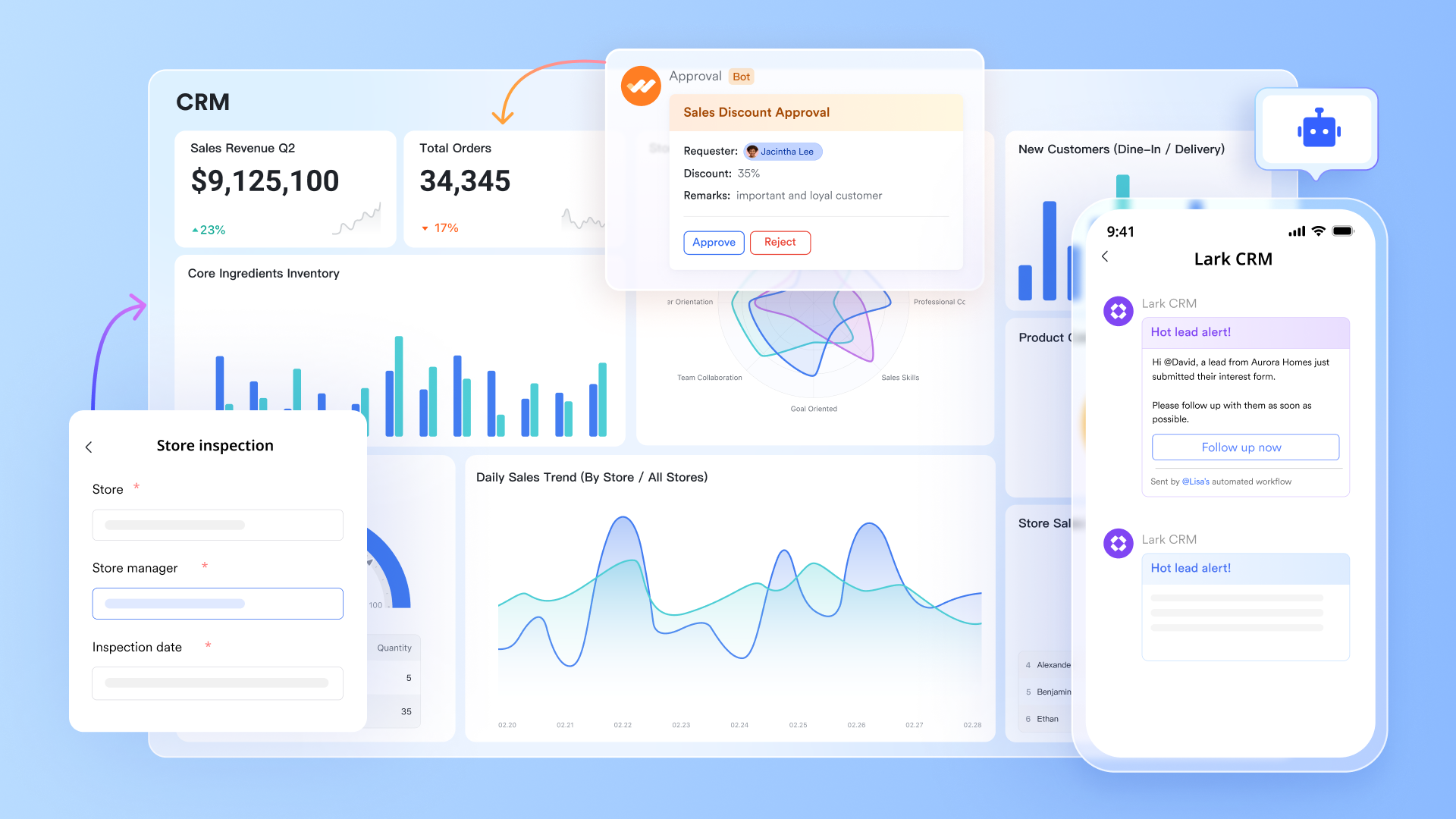
Real-time collaboration: When a significant opportunity arises, Lark automatically creates a for the sales team to share updates, notifications, and context instantly. Use Lark's integrated tools to schedule or start a . With chat, email, calendar, and meetings all in one place, representatives can message teammates, send emails, book demos, and join calls. Additionally, you can set up meetings and generate AI-enhanced meeting notes, which summarize sales calls, extract action items, and attach notes automatically to the appropriate deal or account. 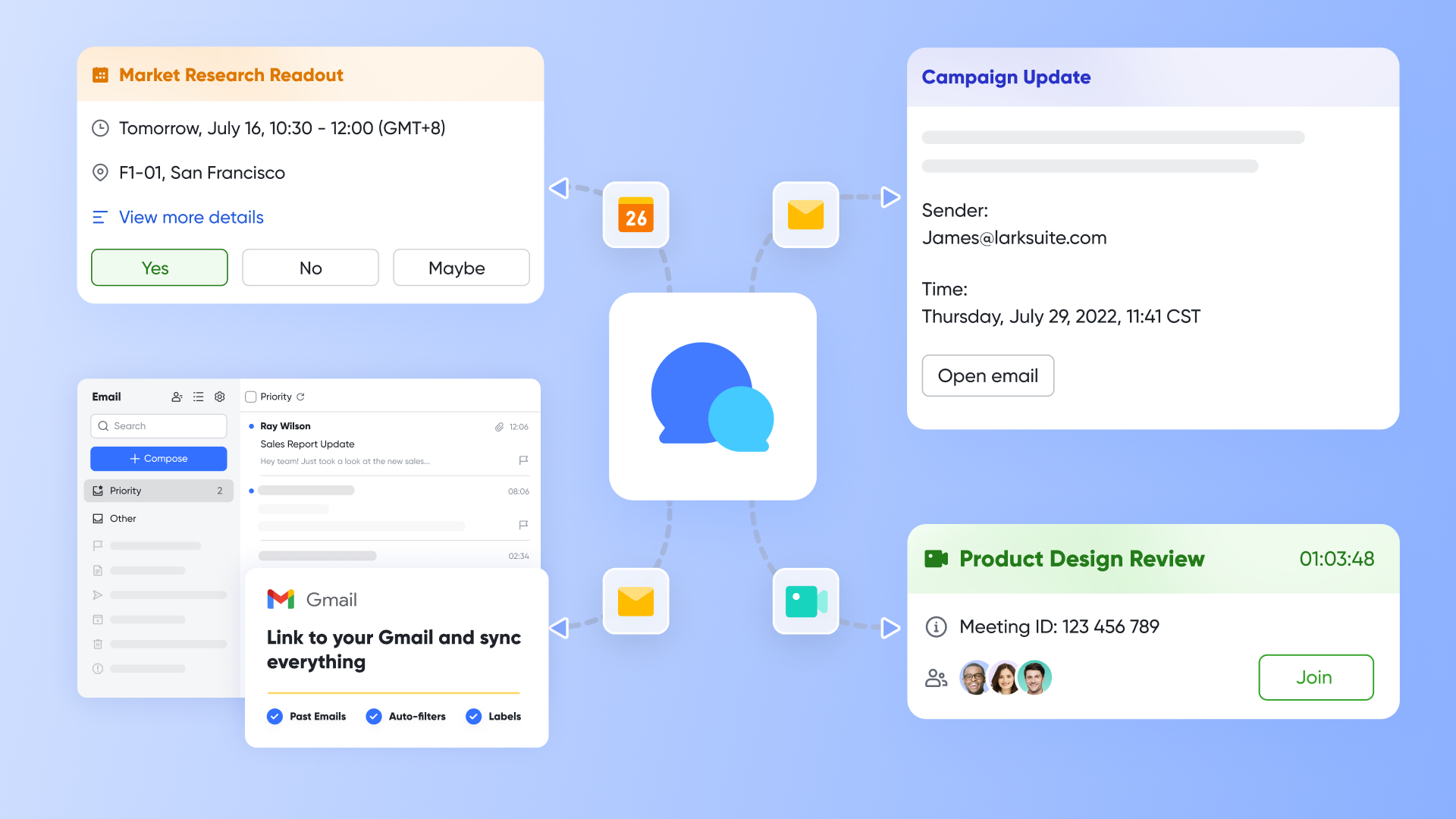
to streamline tasks: Lark allows users to set up workflows that activate with form submissions, record updates, or changes in deal stages to automatically assign team members, establish SLAs, direct requests, and create follow-up tasks. Smart alerts for meetings and follow-ups eliminate the need for manual reminders. When a lead's status changes in Base, Lark can automatically notify the appropriate owner, generate tasks, or initiate approval requests via . Managers can quickly review and approve special cases like discounts or territory adjustments from mobile or desktop, ensuring efficient and visible decision-making.
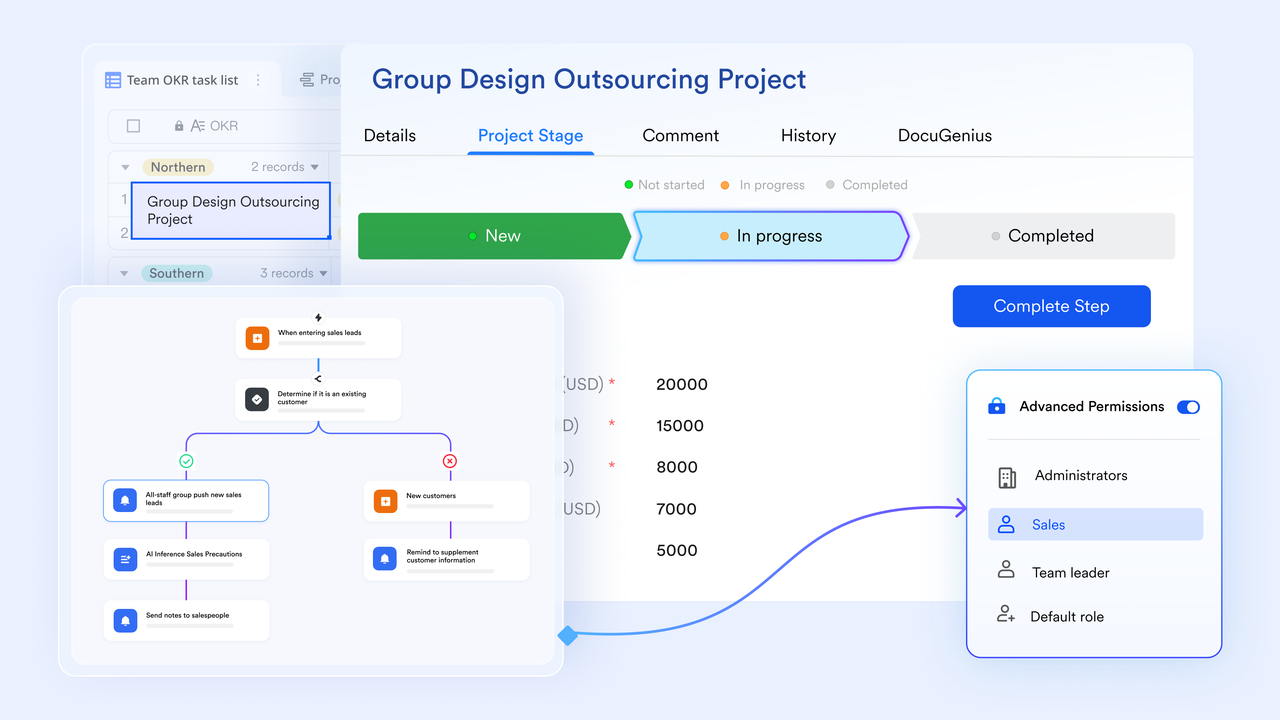
AI-enhanced : Create templates for CRM proposals, checklists for discovery calls, and handoff playbooks within Lark Docs. Collaborate with sales, marketing, and legal teams while managing permissions. Embed live views from Base to ensure documents reflect the most current CRM data, fostering collaboration rarely seen in standalone tools. Utilize AI Classify to automatically enrich and categorize leads by attributes like company size and industry, simplifying segmentation and reporting. Use AI formula generators in sheets to develop complex formulas without mastering intricate syntax, accelerating your analysis and reporting processes. 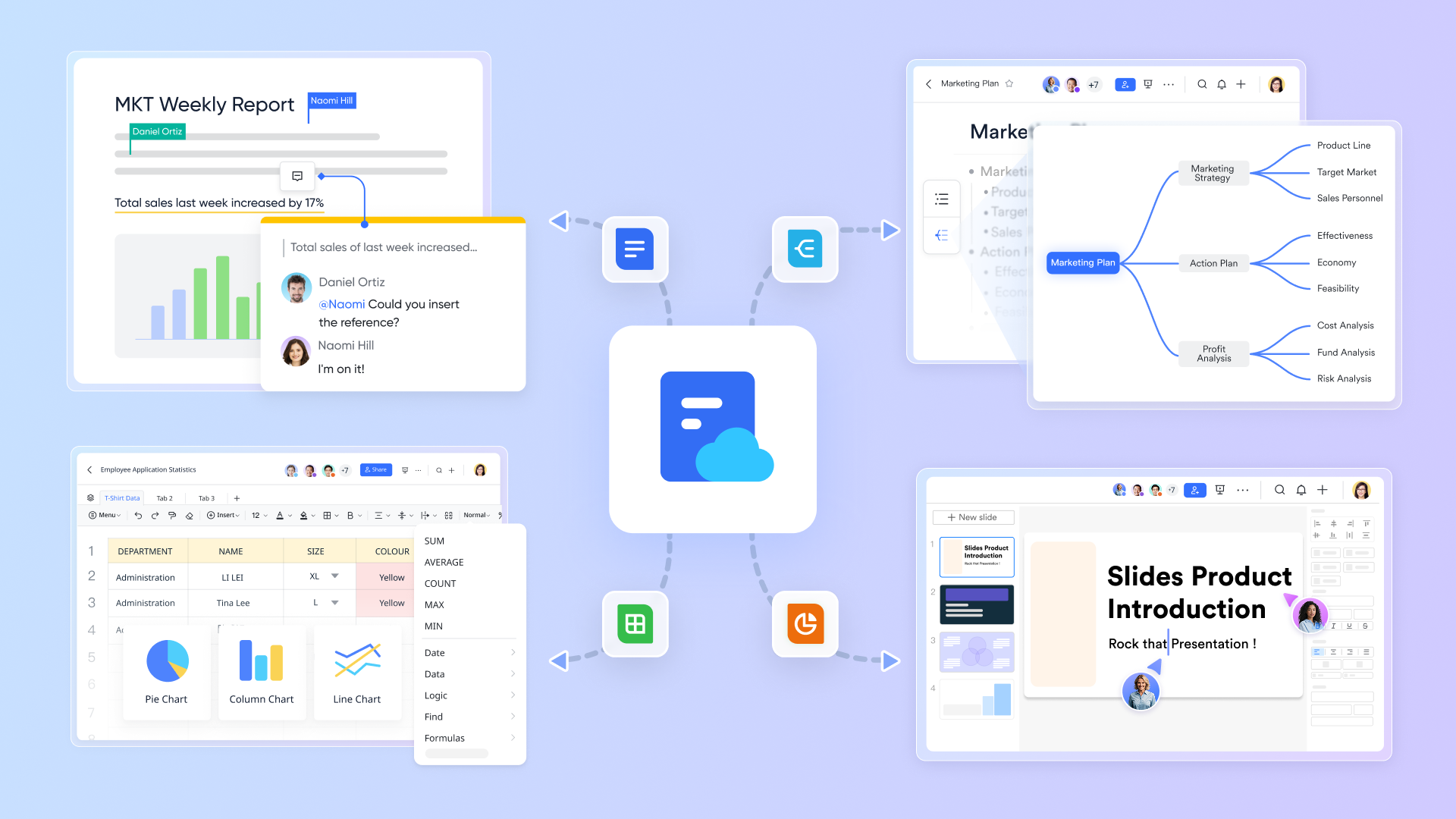
Templates for CRM proposals, discovery call checklists, and handoff playbooks can enhance productivity within Lark Docs. Teams from sales, marketing, and legal collaborate while efficiently managing permissions. By embedding live views from Base, documents reflect the most current CRM data, promoting collaboration that is often lacking in standalone tools. AI Classify enriches and categorizes leads by attributes like company size and industry, which simplifies segmentation and reporting. Furthermore, AI formula generators in sheets enable users to develop complex formulas without needing to master intricate syntax, thus accelerating analysis and reporting processes. Pricing
For small teams with simple communication needs

18 months message history
1000 Base automation runs/month
2000 rows per table in Base
Most POPULAR
For companies with comprehensive collaboration and management needs
Unlimited message history
500-participant video meetings
50k Base automation runs/month
20k rows per table in Base
For large companies with advanced security and organizational management needs
Get a personalized demo and pricing
Unlimited message history
500-participant video meetings
15 TB storage + 30 GB storage/user
500k Base automation runs/month
50k Base automation runs/month
Most POPULAR
For companies with comprehensive collaboration and management needs
Unlimited message history
500-participant video meetings
50k Base automation runs/month
20k rows per table in Base
Best practices for CRM tools
To maximize the benefits of any CRM platform, consider the following best practices:
- Regular training and onboarding: Conduct comprehensive training sessions and onboarding programs to ensure that all team members fully understand the platform's features and functionalities. This ongoing educational approach empowers users to leverage CRM's capabilities effectively, leading to enhanced productivity and user confidence.
- Customize features for your needs: Take the time to tailor the CRM to fit your specific workflows and business processes. By customizing fields, layouts, and functionalities, you can create a system that aligns with your team's unique requirements. This personalization not only streamlines operations but also ensures that users are equipped with the tools they need to work efficiently.
- Utilize customer feedback: Establish a system for regularly collecting and analyzing customer feedback. This data can provide valuable insights into customer preferences and pain points, allowing you to refine and enhance your CRM strategies continually. Engaging with customers in this way demonstrates that their opinions matter and helps adapt your approach to meet their evolving needs.
- Integration with existing tools: Take advantage of API integrations and ensure seamless connectivity with your existing tools such as Teamwork CRM API and Teamwork CRM's Google Calendar integration. These integrations facilitate a cohesive workflow, allowing data to flow effortlessly between platforms. By creating a unified ecosystem of tools, your team can work more efficiently, reduce manual data entry, and maintain a centralized source of information.
Master CRM effortlessly with Lark
Conclusion
As we've explored, Teamwork CRM is an excellent choice for businesses looking to enhance collaboration and project management. Its unique features, such as customizable pipeline management and strong reporting tools, set it apart from other tools in the market. However, Lark also presents a valid alternative with its emphasis on integrated communication and collaborative tools. I believe both platforms can significantly improve your team's productivity and project execution. Remember, your choice should be based on your specific needs, workflows, and team dynamics. I encourage you to try both tools and see which one aligns best with your business goals.
FAQs
Is Teamwork a CRM?
Yes, Teamwork CRM is a cloud-based customer relationship management system that integrates with Teamwork.com, a project management platform. It allows users to manage client relationships, sales processes, and project management in a unified system. This integration creates a smooth transition from sales opportunities to project delivery within a single ecosystem.
How much does Teamwork cost?
Teamwork offers various pricing plans tailored to different team sizes and project management needs:
- Free: $0 (up to 5 users) – includes TeamworkAI, project management essentials, client work foundations, key integrations, up to 5 projects, 100 automations/month
- Deliver: $10.99/user/month (billed annually) – everything in Free plus Teams, intake forms, project status & health reports, planned vs actual reports, 20 project templates, 5,000 automations/month, 100 GB storage
- Grow: $19.99/user/month (billed annually) – everything in Deliver plus Budgeting, Time & Financials, HubSpot integration, Workload Resource Planner, Powerful Reports, 50 project templates, 20,000 automations/month, 250 GB storage, 600 projects
- Scale: Custom pricing – everything in Grow plus unlimited premium features, profitability reports, resource scheduling, custom & scheduled reporting, retainer management (beta), budget expenses & tasklist budget, 100,000 automations/month, 500 GB storage
- Enterprise: Custom pricing – everything in Scale plus advanced security (including SSO), premium support add-on, dedicated infrastructure, increased API limit, 1,000 GB storage, dedicated account manager, and up to 10 hours of tech services
Does Microsoft Teams have a CRM tool?
Microsoft Teams does not have a built-in CRM tool, but it integrates with various CRM applications like Microsoft Dynamics 365, Salesforce, and Zoho CRM. This allows users to access CRM data directly within Teams for improved collaboration. Additionally, you can find CRM-related apps in the Teams app marketplace or create custom solutions using Power Apps.
Is Excel a CRM software?
Excel can be used as a CRM solution, allowing you to create and manage data, perform calculations, and log findings. There are many reasons why businesses opt for an Excel spreadsheet system rather than purpose-built CRM software to track and manage their performance metrics.
How can Lark enhance the capabilities of existing CRM systems?
Lark enhances CRM systems by streamlining team communication and collaboration, allowing CRM users to share updates, discuss client needs, and coordinate sales strategies in real-time within the same platform.
Related reading




















