


20 Essential Time Management Tools to Transform Your Productivity in 2026

Owyn Thomas Kerr
Lark Content Manager
Aug 5, 2026
Owyn Thomas Kerr
Aug 5, 2026


25 min read


Time is the one thing we all wish we had more of. If you’re like most working professionals, your days may feel like a blur of uneventful meetings, endless searches for information, and constant task-switching—even between apps.
That’s where time management tools come in. Designed to help people like you and me, these tools give us the structure and support we need to be more productive—not by working harder, but by working smarter. They help ensure we meet deadlines without the last-minute scramble and deliver on our commitments with confidence instead of chaos.
In this guide, we’ll uncover the must-have features, explore the top platforms, and share proven strategies to help you reclaim your time and take control of your productivity in 2025. Let this be the year you finally master your time.

Why using a time management tool is important
Let’s be honest—it’s a lot easier to grab your laptop or phone than writing things with a pen and paper. Traditional planning methods, like paper planners and handwritten notes, just don’t cut it anymore. Today’s teams need smart, intuitive tools to manage complex projects, deadlines, and communication across different channels. Time management tools centralize tasks, deadlines, and team coordination in one place. Rather than juggling separate systems for emails, calendars, and tracking progress, these platforms offer a unified workspace to capture tasks, monitor progress, and maintain clear oversight of your workload and team projects.
Beyond individual productivity, these tools help prevent burnout through intelligent capacity planning. By visualizing workloads and tracking time, teams can spot bottlenecks early and make data-driven decisions to optimize workflow, ensuring efforts are focused on high-impact tasks rather than busy work. Modern time management platforms also eliminate the endless cycle of back and forth emails that plague many organizations. When project information, task updates, and team communication happen within integrated collaboration tools, everyone stays on the same page without drowning in message threads.
Key features of time management tools
Selecting the best time management tool requires understanding which features will actually improve your workflow rather than add complexity. While not all time management tools are the same, the most effective platforms share several core characteristics that distinguish them from basic apps:
User-friendly, intuitive interface
A user-friendly interface minimizes the learning curve, ensuring that team members can easily navigate the platform without extensive training, boosting adoption and productivity.
Seamless integration with other tools
Effective time management tools seamlessly integrate with existing software like email systems, Google Calendar, and cloud storage. This ensures smooth data flow across platforms, reducing manual entry and streamlining workflows.
Collaboration features
These tools support real-time updates, comment threads, file attachments, and visibility into task progress, enabling efficient collaboration. They reduce the need for status meetings and eliminate confusion about project status.
Works perfect on all devices
Cross-platform synchronization allows users to update tasks and check project progress from anywhere—whether on the go, during meetings, or on client sites.
Reporting and analytics
Advanced reporting features like time tracking, productivity trend analysis, and workload distribution reports provide insights to optimize workflows. These tools help identify patterns and highlight areas for improvement.
Customization options
Time management tools that offer customization—such as custom fields, automated workflows, and personalized to do list views—allow users to tailor the platform to their specific needs, ensuring it supports their unique workflow.
How we evaluate time management tools
Choosing the right time management tool is important, and our team is committed to providing you with the most reliable insights. As experienced software testers, we prioritize thorough research to help you make informed decisions. Our review process is transparent and structured, focusing on:
- Performance benchmarks
- Feature comparisons
- Pricing plans
By sharing our findings, we aim to empower you to navigate your options and choose the best one for your needs.
Types of time management tools
Time management tools come in various forms, each designed to meet different work styles and needs. While some focus more on tracking time, others help manage time through features that improve organization and efficiency. Here’s an overview of how each type contributes:
- Project management platforms: These tools help teams plan, collaborate, and track project progress, improving time management by providing clear timelines, responsibilities, and deadlines.
- Task management apps: These apps allow individuals or teams to prioritize, organize, and monitor tasks, helping users stay focused on important tasks and track progress effectively.
- Time tracking software: Tools for monitoring how time is spent on tasks, often used for productivity and billing.
Best project management platforms
Project management platforms are essential for teams looking to optimize their time and productivity. By providing tools for task tracking, scheduling, and resource allocation, these platforms help ensure that projects stay on track and deadlines are met.
Lark
Lark, one of the most versatile project management tools, redefines what it means to manage time, projects and tasks effectively, combining everything you need into one seamless superapp. It’s so versatile, in fact, that it’s difficult to place Lark into any one category—because it excels across so many scenarios for different types of users.
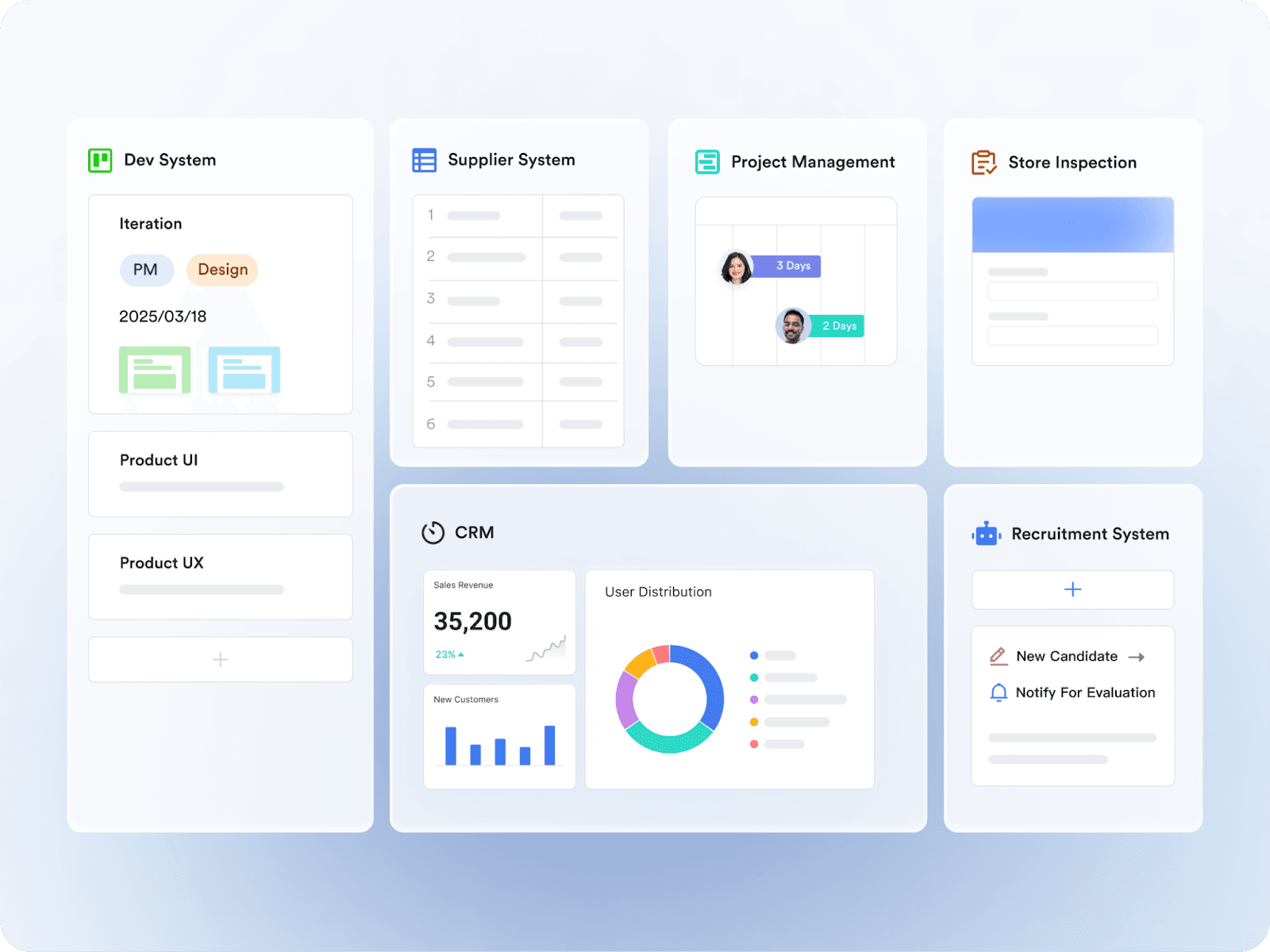 Whether you need to manage projects, collaborate with remote teams, or are a small business just starting out, Lark adapts to meet your needs, making it the ultimate tool for optimizing your time and boosting productivity.
Whether you need to manage projects, collaborate with remote teams, or are a small business just starting out, Lark adapts to meet your needs, making it the ultimate tool for optimizing your time and boosting productivity.Key Features:
- Collaboration tools: Instant messaging, video calls, calendars, document management and real-time editing keep everyone aligned.
- Project management features: Track tasks, set deadlines, and manage resources in a centralized space known as Lark Base.
- Mobile access: Stay connected and productive with seamless access on your phone, tablet, or desktop.
- Customizable workflows: Adapt Lark to your unique needs with customizable fields, automated workflows, and personalized views.
- Advanced analytics: Get actionable insights with reports on time tracking, productivity trends, and workload distribution.
Pricing:
Lark's pricing starts at $12 per user/month. There is a free plan available, giving you access to 11 features including project management, messaging, calendars, performance management and more, perfect for small teams or personal use.
Asana
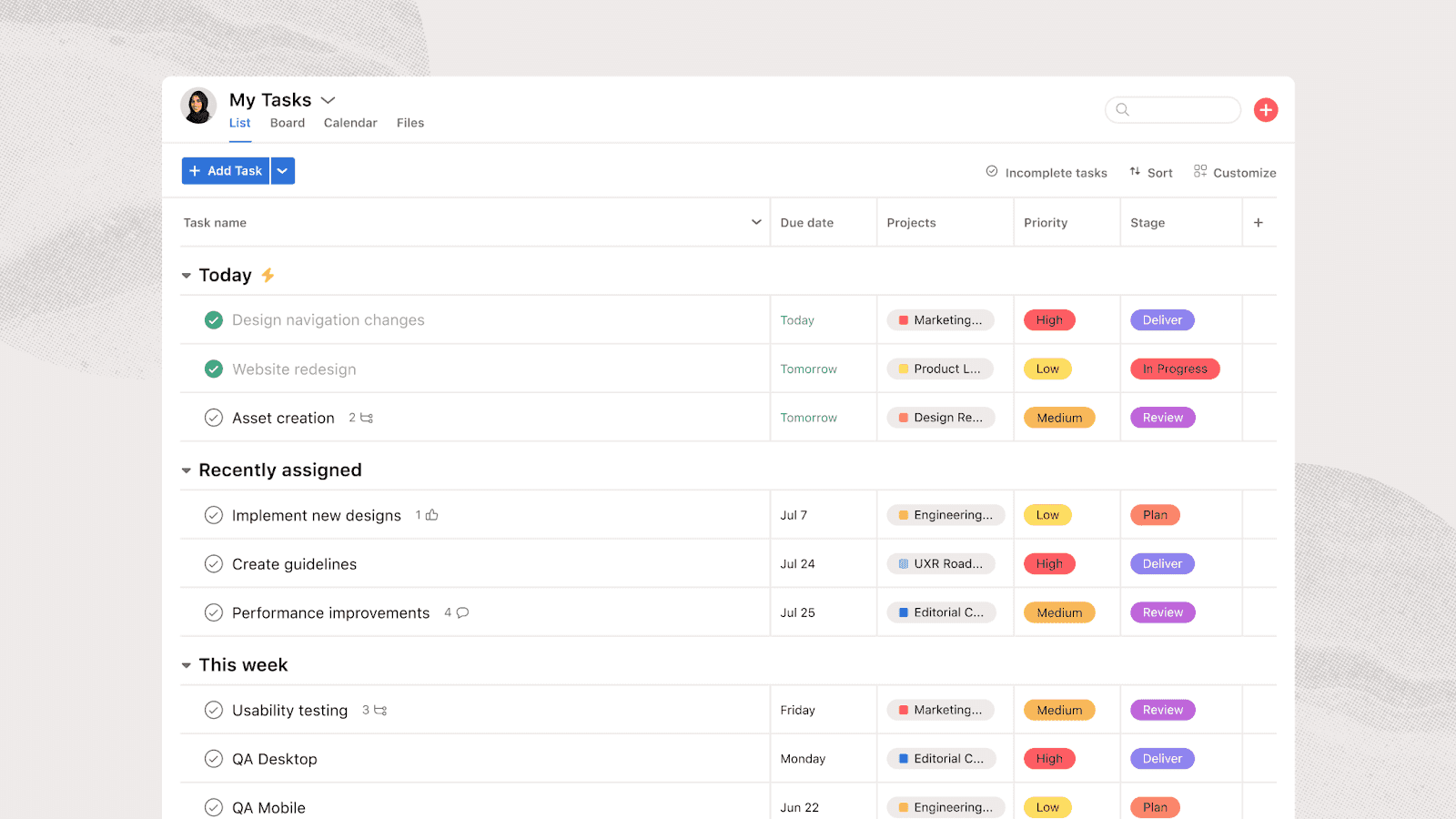
With Asana, you can easily manage every aspect of a project, from setting clear goals to tracking progress in real time. Through creating boards, setting reminders, and tracking project timeline dependencies, Asana helps you break down complex projects into manageable tasks.
Key Features:
- Task & project views: Choose from List, Board, Calendar, or Timeline views to manage project tasks the way that works best for your team.
- Dependencies & milestones: Set task dependencies for specific tasks to ensure critical tasks are completed before others, and track milestones to stay focused on key goals.
- Automation: Automate repetitive tasks and workflows, saving time and reducing the chance for errors.
Pricing:
Asana pricing starts at $10.99 per user/month. There is a free plan available for small teams and individual use.
Monday.com
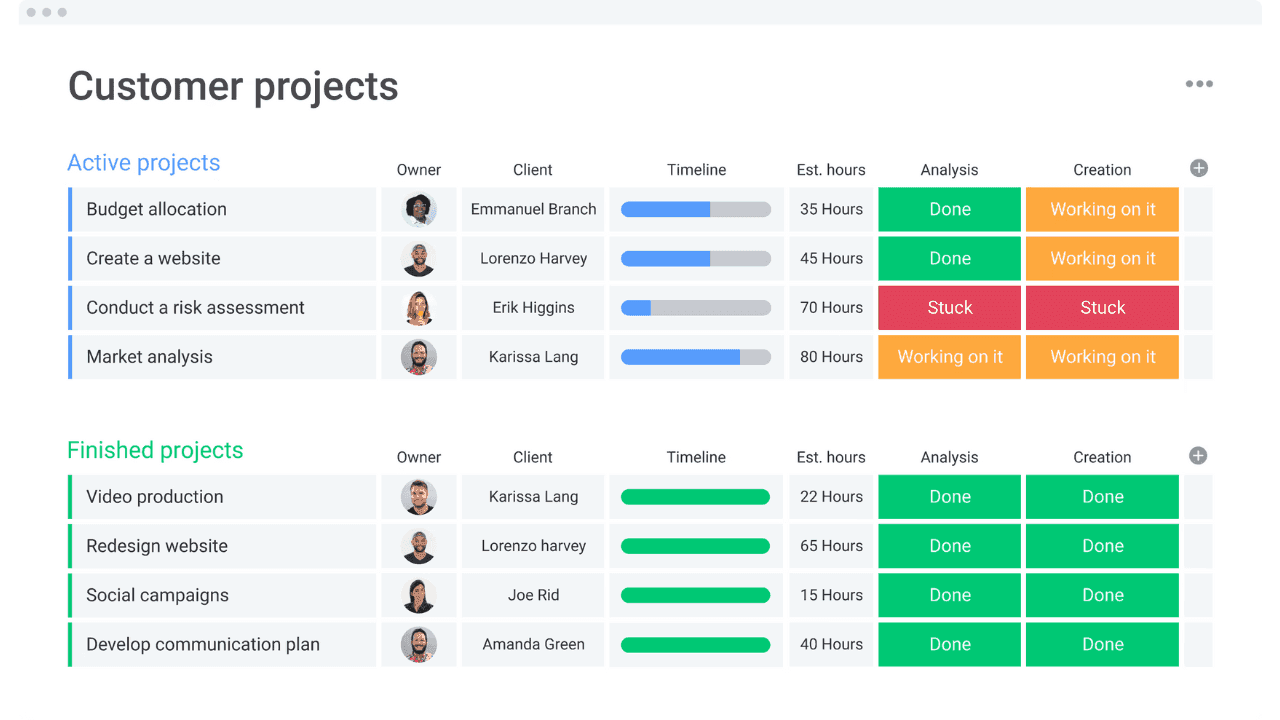
Monday.com is an easy-to-use work operating system that helps teams manage projects and workflows in a visually organized way. Whether you're coordinating a team of 5 or 500, Monday.com simplifies time management by ensuring collaboration is seamless and tasks are always tracked.
Key Features:
- Custom Workflows: Personalize each project with custom columns, labels, due dates, and dependencies to reflect your team's unique processes.
- Integrations: Connect with a wide variety of tools like Slack, Google Drive, Microsoft Teams, and Zoom to create a unified workspace.
- Reports and Analytics: Gain insights into project performance with powerful reporting tools that help track team productivity and project status.
Pricing:
Honorable mentions
- ClickUp: All-in-one productivity platform that streamlines project management, task tracking, and team collaboration in a single workspace.
- Jira: Powerful project management tool tailored for agile teams, offering customizable workflows to track issues, bugs, and project progress.
- Zoho Projects: Cloud-based project management software that helps teams plan, track, and collaborate on tasks while ensuring timely project delivery.
Best task management apps
Individual productivity requires different tools than team coordination. Task management apps focus on helping individual users organize personal workflows, manage daily routines, and maintain focus on important tasks.
Trello
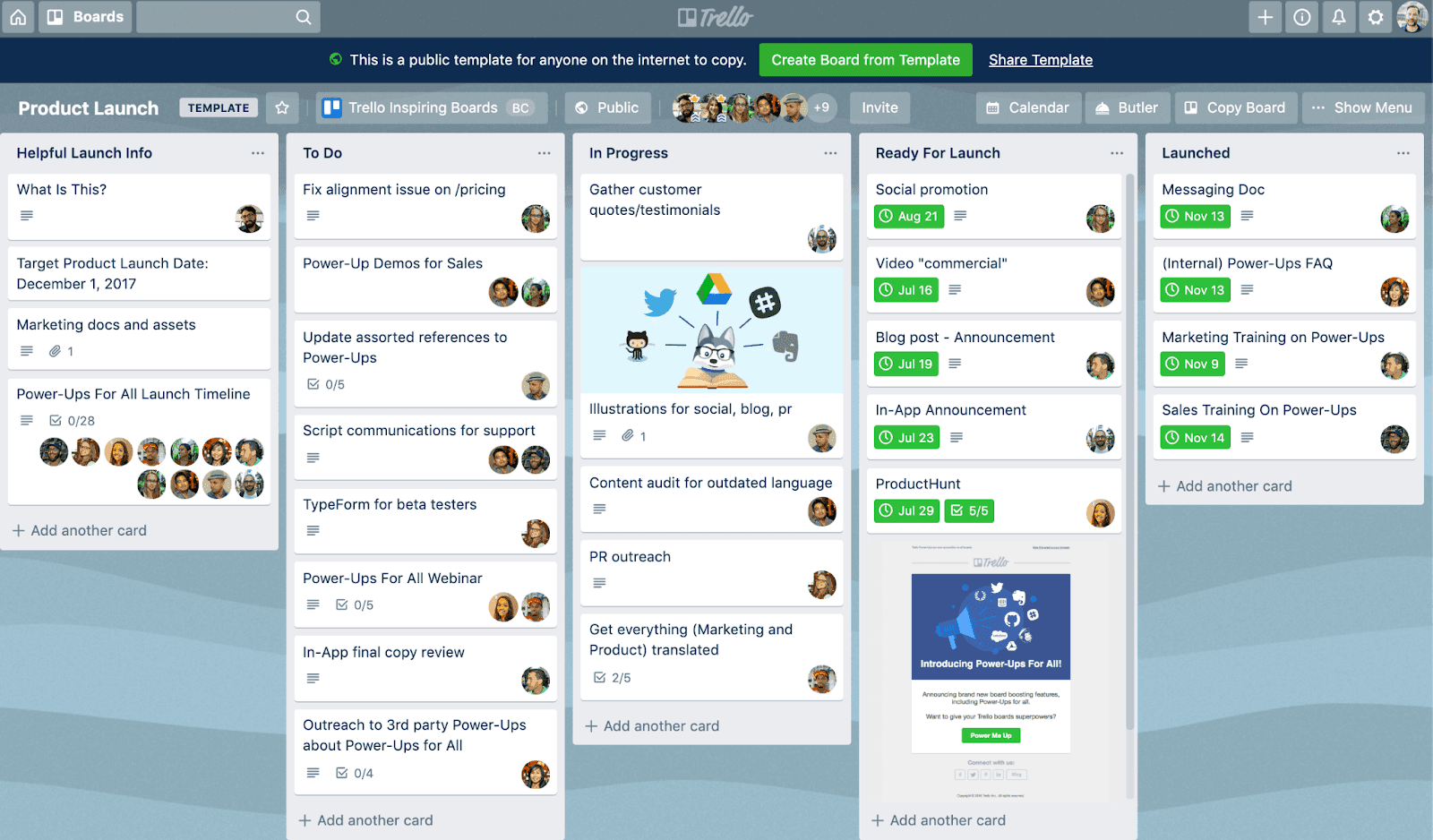
Trello simplifies task management with its intuitive board-and-card system. Whether you're managing a team or working solo, Trello allows you to organize tasks, track progress, and collaborate in real time.
Key Features:
- Boards, Lists, and Cards: Organize tasks and projects visually with boards, lists, and cards, offering a flexible and intuitive way to manage work.
- Customizable Workflows: Use labels, due dates, checklists, and attachments to customize each card and make tracking tasks as detailed as you need.
- Power-Ups (Integrations): Add extra functionality with Power-Ups like calendar views, time tracking, and integrations with other apps like Trello’s automation and Slack.
Pricing:
Todoist
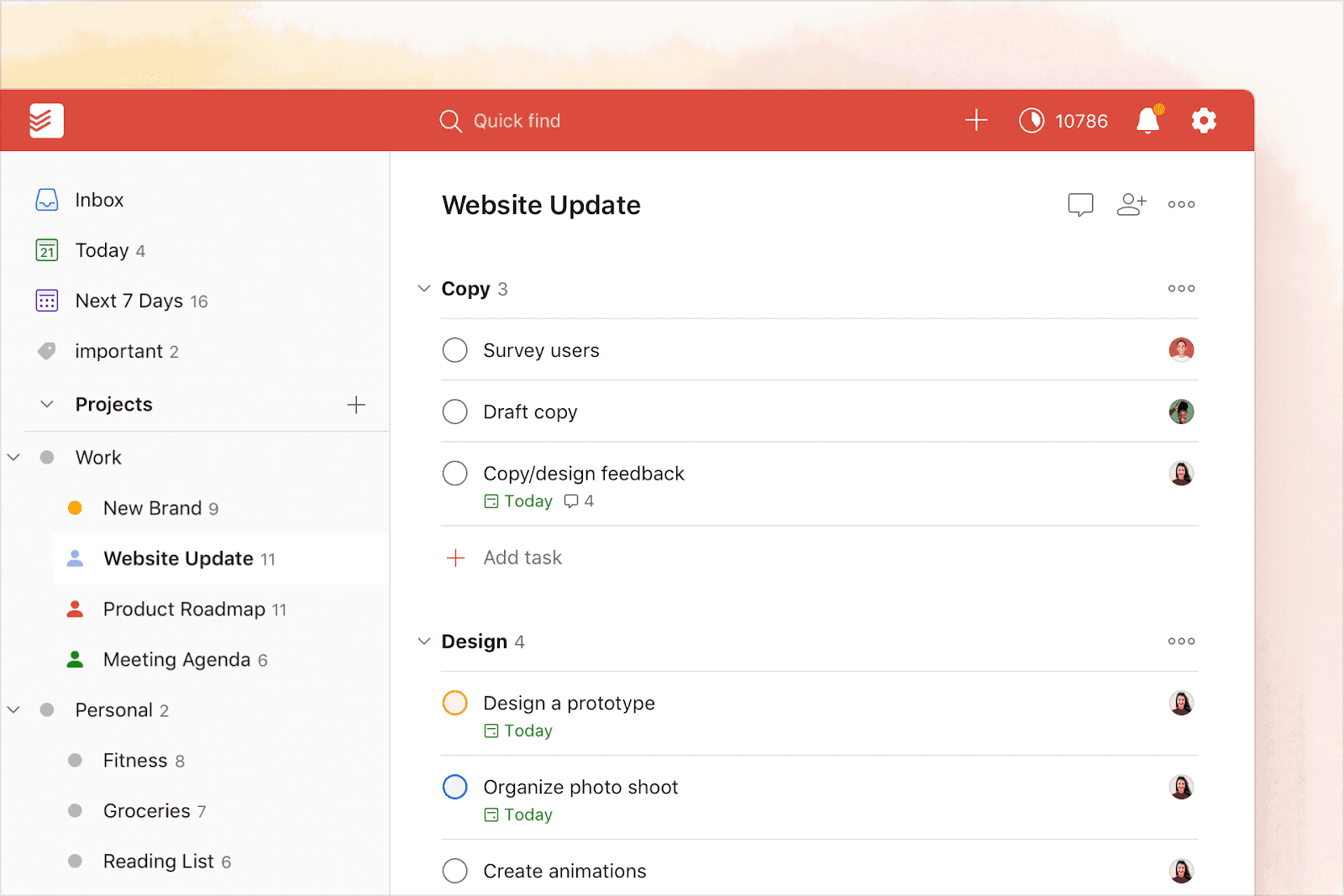
Todoist strikes a perfect balance between simplicity and power, making it ideal for individuals and small teams. Its clean, intuitive interface offers everything you need to manage tasks efficiently, without being overwhelming.
Key features:
- Task organization & prioritization: Easily create, organize, and prioritize tasks with customizable labels, due dates, and priority levels, helping you stay on track.
- Seamless sync across devices: Syncs your tasks and projects across all devices in real time, so you can stay productive no matter where you are or what device you're using.
- Collaboration & Sharing: Enables task sharing, assigning tasks to others, and providing real-time updates, making it perfect for small teams or personal use.
Pricing:
Paid plans start at $4 per month. A free plan is available.
Microsoft To Do
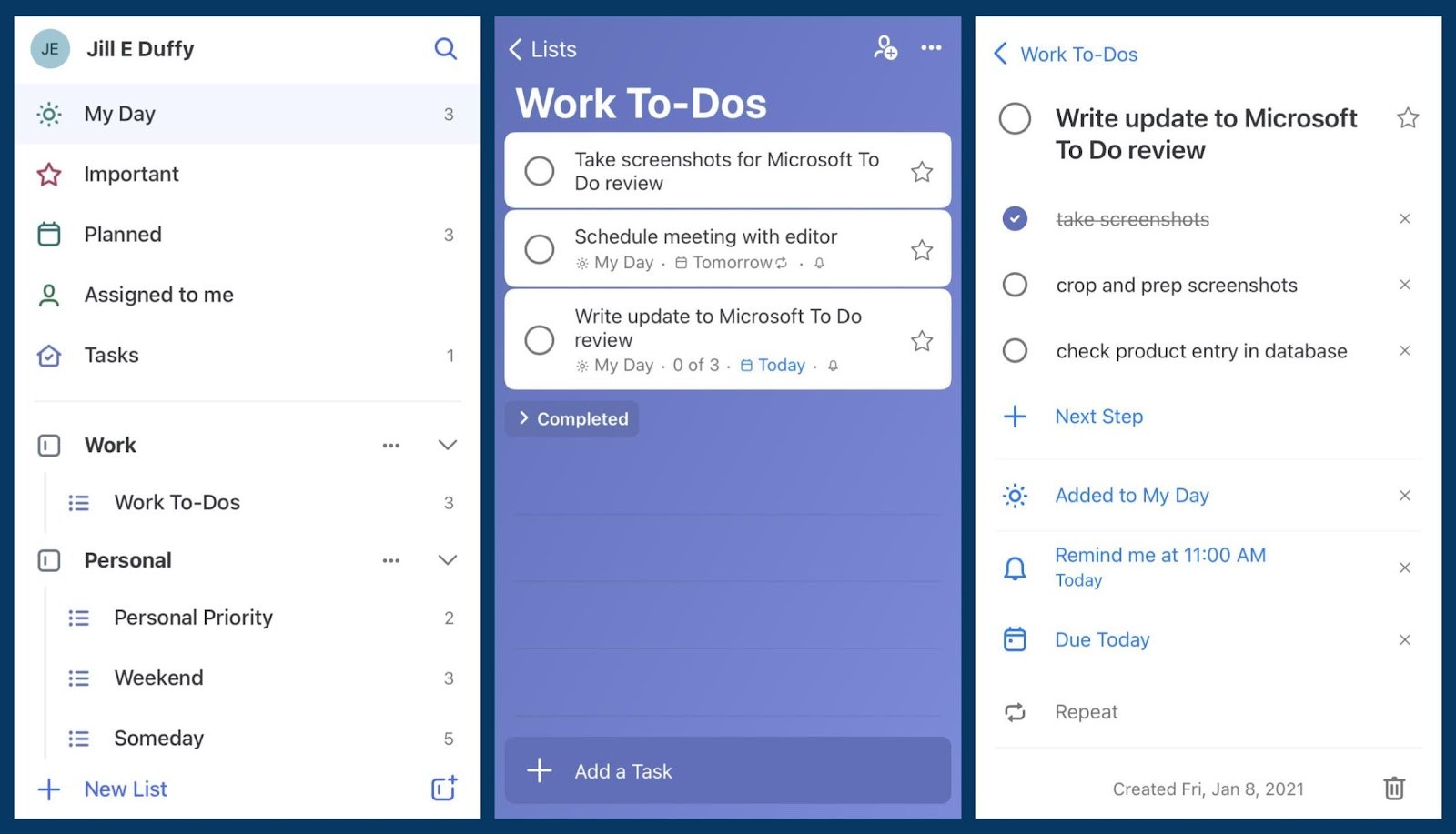
Microsoft To Do is a simple yet powerful task management app perfect for individuals and small teams who want an easy way to stay organized. With its clean, user-friendly interface and seamless integration with Microsoft 365, it’s the go-to tool for anyone already using Microsoft Teams.
Key features:
- My Day: A daily-focused feature that allows you to add tasks from any list to a personalized "My Day" view, helping you prioritize and focus on today’s tasks.
- Integration with Microsoft Teams & Outlook: Seamlessly sync tasks across Outlook, Teams, and other Microsoft 365 apps, so you can manage tasks and stay organized without leaving the Microsoft ecosystem.
- Cross-Platform Syncing: Whether you're on a phone, tablet, or computer, your tasks automatically sync across all devices, keeping you organized wherever you are.
Pricing:
Available with Microsoft 365 subscriptions (starting at $6.99/month). A free version is available.
Honorable mentions
- Anydo: Task management app that helps users organize their day with to-do lists, reminders, and collaboration features.
- Things 3: Task manager that focuses on simplicity and ease of use, offering powerful features for organizing personal and professional tasks.
- Google Tasks: Straightforward task management app that integrates seamlessly with Google Workspace, helping you keep track of tasks and to-dos across devices.
Best time tracking software
Understanding how you actually spend time provides the foundation for meaningful productivity improvements. Time tracking apps range from passive monitoring to active project-based tracking, each serving different needs and privacy preferences.
RescueTime
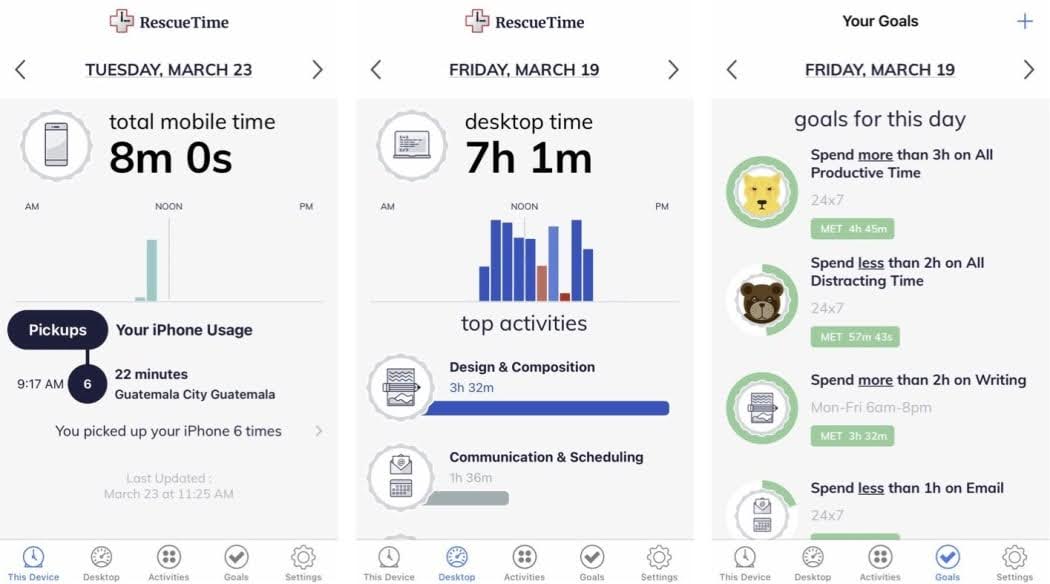
RescueTime is a time-tracking tool that automatically monitors how you spend time on apps and websites. It provides insights into your productivity, helps identify time-wasters, and allows you to set goals or block distractions. It’s useful for improving personal or team efficiency.
Key features:
- Time analytics reports: View personalized reports on how you spend your time across URLs and apps.
- Easy timesheet monitoring: Monitor personal and team-level timesheets to see work hours and billable amounts.
- Simple "offline time" adding: Manually add time you've spent offline to your timesheets and time analytics so nothing gets missed.
Pricing:
Paid plans start at $9 per user/month. There is a free plan available.
Clockify
Clockify is a web-based time tracking tool that helps individuals and teams log their work hours across different projects. It lets you analyze productivity, stay on top of tasks, and manage your time more effectively.
 Image source: clockify.me
Image source: clockify.meKey features:
- Simple team management: Clockify enables teams to track their time, manage work capacity, and view timesheets.
- Billing and invoicing: Track billable hours, set hourly rates, and generate invoices based on tracked time.
- Customization options: Clockify allows customization of reports, time formats, and user permissions to suit specific needs.
Pricing:
Paid plans start at $5.49 per user/month. There is a free plan available.
Time Doctor
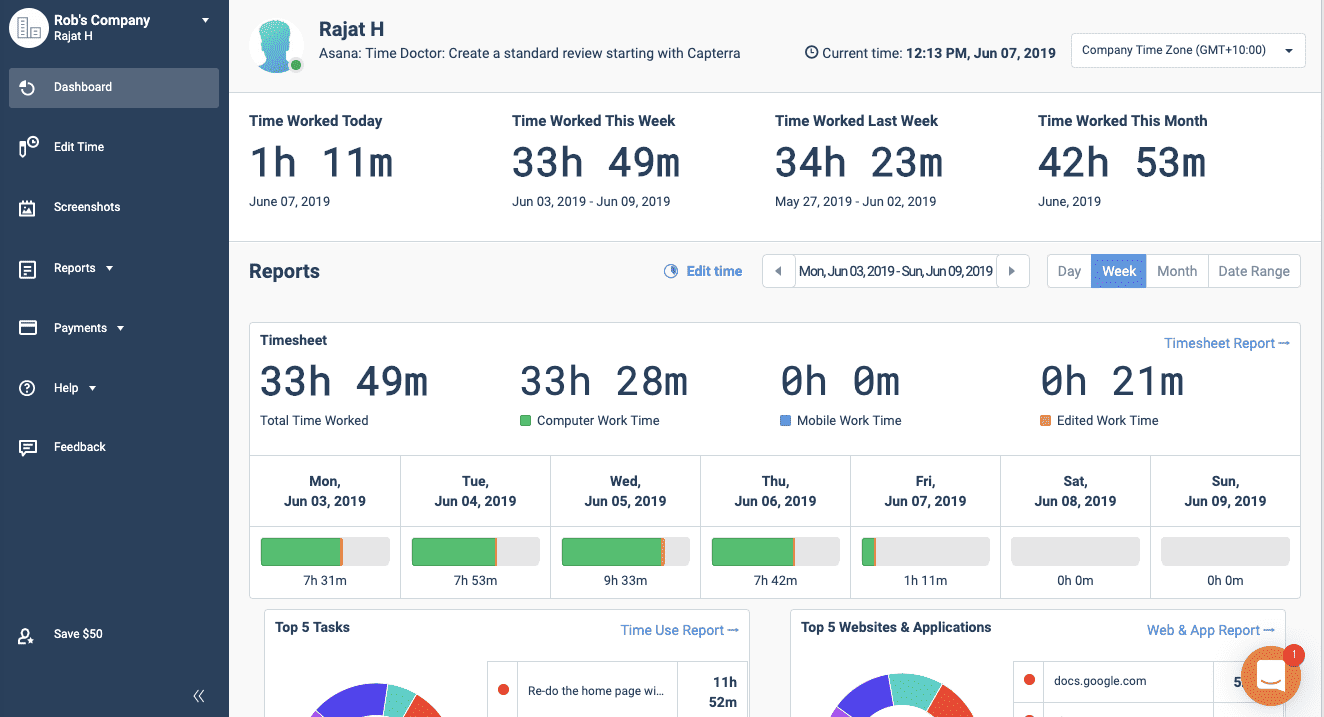
Time Doctor is a time tracking and productivity tool tailored for businesses with hybrid or in-office setups. It helps track time spent on tasks and projects, analyze work habits, and boost overall productivity.
Key features:
- Time tracking: Keeps track of how much time is spent on various tasks and projects, giving you a clear picture of where your time goes.
- Productivity analysis: Offers insights into your work habits, including which apps and websites you’re using, so you can spot areas to improve.
- Website and app tracking: Monitors the websites and apps used during work hours, helping you identify distractions and streamline your workflow.
Pricing:
Paid plans start at $6.70 per user/month. There is no free plan available.
Honorable mentions:
- Paymo: Time-tracking tool designed to help teams and freelancers manage tasks, track time, and streamline workflows.
- Toggl Track: Simple, user-friendly time tracking software that helps individuals and teams measure productivity and gain insights into their work habits.
- Timely: Automatic time-tracking tool that helps users track time spent on tasks and projects while offering insights to improve productivity.
- Everhour: Time tracking and project management tool that helps teams stay on top of their tasks, track billable hours, and manage resources efficiently.
- Brain focus productivity timer: Helps you stay on track by breaking work into focused intervals with short breaks, using proven techniques like the Pomodoro Method to boost productivity.
Best time management techniques and frameworks
Effective time management tools become exponentially more powerful when combined with proven organizational frameworks. These methodologies provide the structure that transforms scattered tasks into organized, actionable workflows.
The Eisenhower Matrix
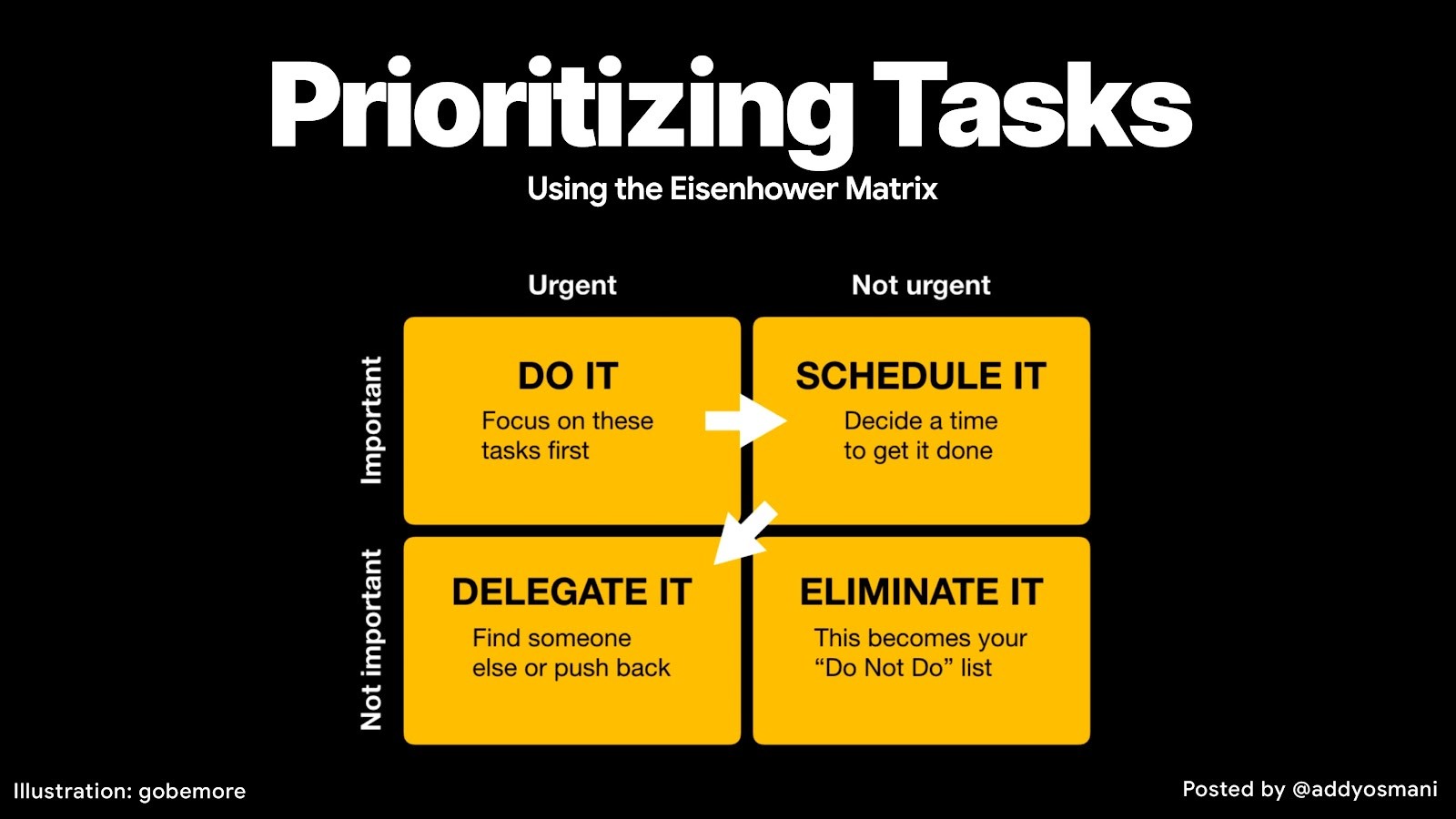
The Eisenhower Matrix provides a decision-making framework that helps users distinguish between urgent busywork and truly important activities. This four-quadrant system categorizes tasks based on their urgency and importance, creating clarity about prioritizing tasks in complex workflows.
Quadrant 1: Do
Contains tasks that are both urgent and important—crisis situations, emergency deadlines, and critical issues requiring immediate attention. These tasks demand immediate action but shouldn’t dominate your schedule if you’re managing your time effectively.
Quadrant 2: Schedule
Includes important but not urgent activities—strategic planning, skill development, relationship building, and preventive maintenance. This quadrant represents the highest-impact work that drives long-term success. Most productivity experts recommend spending the majority of your time in this quadrant.
Quadrant 3: Delegate
covers urgent but not important tasks—interruptions, some emails, non-essential meetings, and other people’s emergencies. These activities feel important due to their urgency but don’t advance your core objectives. Delegation or elimination often provides the best approach.
Quadrant 4: Delete
Encompasses activities that are neither urgent nor important—excessive social media, meaningless busywork, time-wasting activities, and other distractions. These tasks offer no value and should be eliminated from your schedule entirely.
Many time management tools now include Eisenhower Matrix templates or allow users to create custom labels that align with this prioritization framework, making it easy to categorize tasks as you capture them.
Pomodoro Technique
The Pomodoro Technique, developed by Francesco Cirillo in the 1980s, is a time management method that uses a simple yet effective approach to productivity. Cirillo famously used a tomato-shaped kitchen timer (hence the name "Pomodoro") to break work into focused 25-minute intervals, each followed by a 5-minute break. This cycle leverages the brain's natural rhythm, helping maintain concentration while avoiding mental burnout.
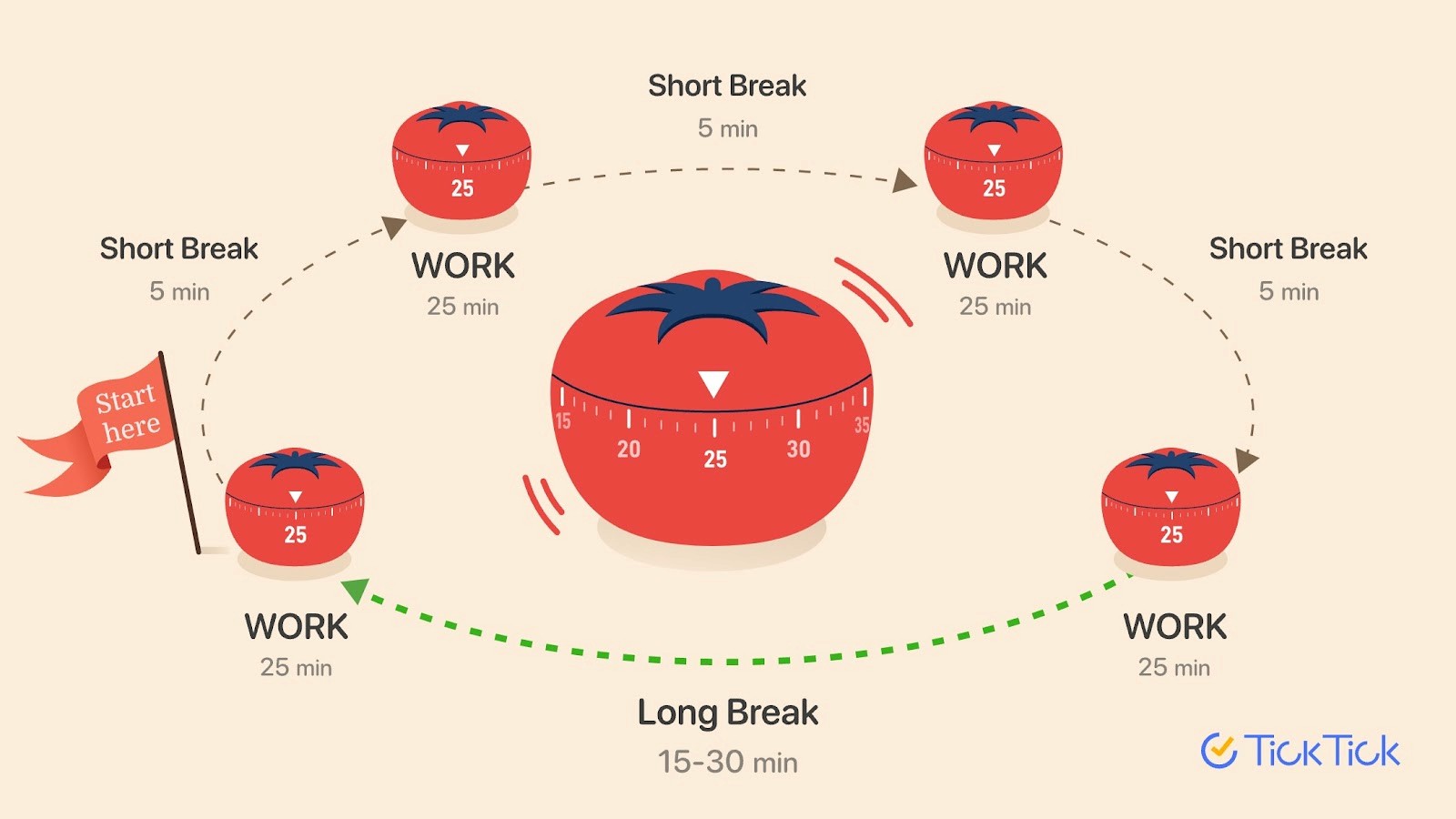 Image source: ticktick.com
Image source: ticktick.comWhat makes Pomodoro so effective is its balance between focused work and regular rest. By setting clear time boundaries, it helps you stay focused on a single task without getting sidetracked by other priorities. The breaks are essential—they recharge your mind, preventing cognitive fatigue and ensuring higher quality work with fewer mistakes.
Today, Pomodoro has evolved beyond just a timer. Many task management apps have built in Pomodoro features, automatically tracking sessions and offering insights into your focus patterns. Some even analyze your productivity and suggest optimal tasks for your next session, helping you make the most of each time block. For students, the Pomodoro technique is ideal for studying, which is why so many time study apps include features built around this technique.
While it's especially useful for creative tasks, studying, or deep concentration, Pomodoro may not be ideal for work that requires long stretches of uninterrupted focus or for collaborative activities that don't fit neatly into 25-minute chunks. Nonetheless, for many, it's a powerful way to stay productive and energized throughout the day.
Time blocking method
Time blocking is a method of scheduling specific time slots for different tasks throughout your day, turning your calendar into a powerful productivity tool rather than just a meeting tracker. Unlike simple to-do lists that leave timing unclear, time blocking provides accountability by assigning fixed hours to important tasks, ensuring you stay on track.
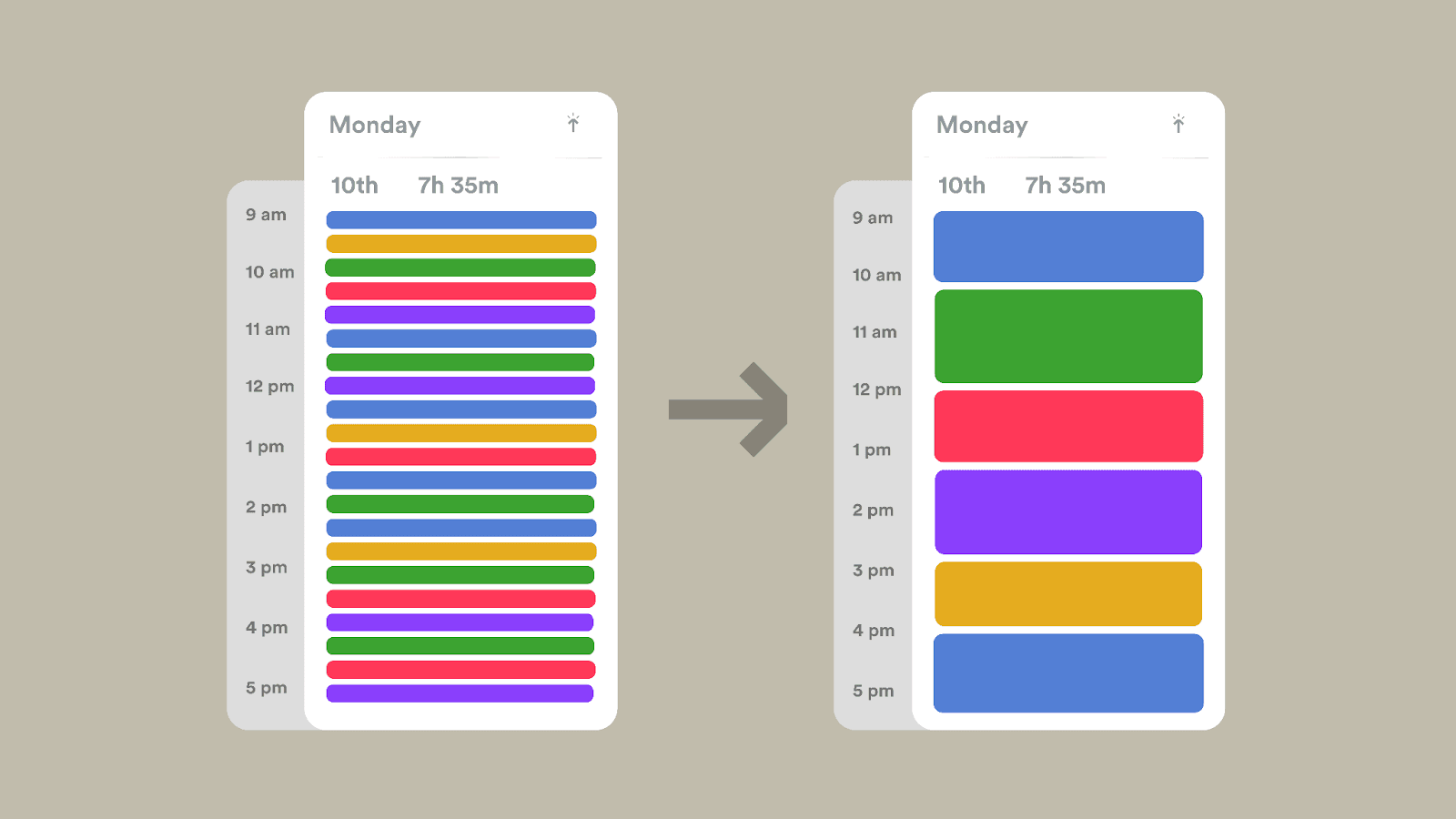 Image source: timely.com
Image source: timely.comFor time blocking to be effective, it’s important to realistically estimate how long each task will take and build in some buffer time for unexpected interruptions. Begin by identifying your peak productivity hours and scheduling your most important tasks during these times. Group similar tasks together—like responding to emails or making phone calls—into designated time slots to reduce the mental energy wasted by constant context switching.
Time blocking differs from timeboxing in its structured nature. While time blocking involves detailed planning, with tasks assigned to specific hours, timeboxing is more flexible, allowing tasks to be completed within set durations without predetermined times. Both approaches boost focus and accountability, but time blocking is ideal for predictable, structured schedules, while timeboxing adapts to shifting priorities.
Digital calendars make time blocking even more effective by offering easy ways to adjust and reschedule as priorities change. Many professionals use color coding to visually distinguish between different types of work—such as creative tasks, meetings, or personal time—creating clarity on how their energy is being allocated throughout the day.
Getting Things Done (GTD)
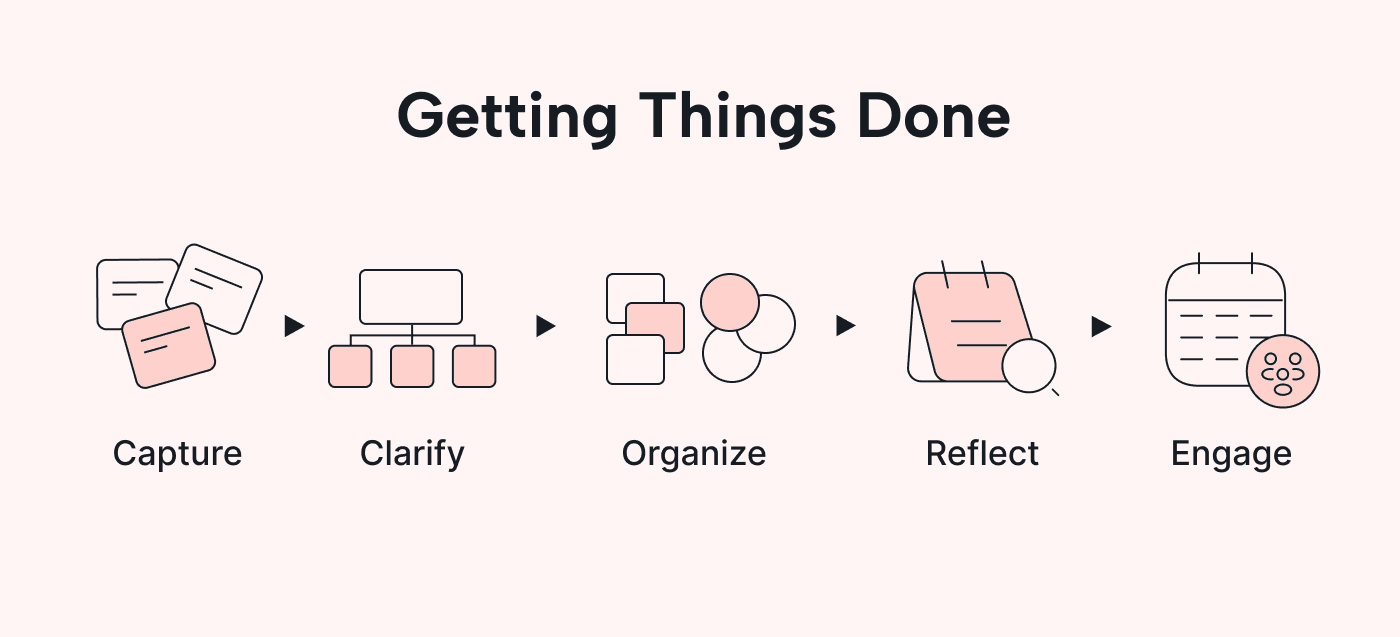
David Allen’s Getting Things Done (GTD) methodology provides a straightforward system for capturing, organizing, and tackling new tasks without the mental overload. Its five-step process—Capture, Clarify, Organize, Reflect, Engage—helps you create a reliable system that clears mental clutter and ensures nothing gets missed.
Capture
Is all about getting everything out of your head and into a trusted system. Instead of juggling tasks and ideas mentally, you write them down or record them somewhere consistent. This habit takes the pressure off remembering everything and frees up mental space.
Clarify
Where you turn what you've captured into actionable tasks. Each item is reviewed and you decide: Is it something you can act on? If yes, what’s the next concrete step? If not, is it something to keep for reference, schedule for later, or toss out? It’s about transforming chaos into clear next actions.
Organize
Where you categorize your clarified tasks—whether they’re immediate actions, tasks you’re waiting on, things you’d like to do someday, or simple reference materials. This structure helps you see exactly what you need to do, depending on where you’re at in the day or week.
Reflect
This is all about regularly checking in with your system to make sure it’s up-to-date and relevant. Weekly reviews keep your task list fresh and in sync with your priorities, while daily reviews help you choose what to tackle based on your current energy and time available.
Engage
Confidently diving into your tasks, knowing exactly what needs to be done and when. You trust that the next action is the right one for the moment.
How to choose the best tool for time management
Selecting the optional time management tool requires honest assessment of your current challenges, workflow requirements, and growth trajectory. The best time management tool for your situation depends on factors that extend beyond feature lists and pricing comparisons:
Identify your challenges
Focus on your specific pain points rather than popular or feature-rich tools:
- Struggling with task prioritization? Look for tools with strong categorization and filtering capabilities.
- Facing team coordination bottlenecks? Identify tools for managing smaller tasks as well as complex projects, depending on your needs.
- Losing track of project deadlines? Choose tools with robust project management and timeline visualization.
Check your team size and growth plans
Evaluate tools based on your current team size and future growth plans.
- Individual-focused tools may lack collaboration features needed for team coordination.
- Enterprise tools may introduce unnecessary complexity for small teams or individuals.
- Ensure scalable pricing options without compromising core functionality.
Assess your budget
Don’t rule out premium tools if they offer substantial productivity improvements.
- Estimate the return on investment by calculating time savings and quality improvements.
- Avoid paying for advanced features you won't use—many excellent tools are free or low-cost. In addition, are there additional features that you will need which come as pricey add-ons.
Test tools using free trials
Test tools with real workflows during trial periods or freemium tiers. Commit to at least two weeks of testing to evaluate how the tool fits your actual work patterns.
What are users and review sites saying?
Seek reviews from users in similar roles on sites such as G2 and Capterra for insights beyond marketing materials.
- Pay attention to long-term usage, customer support experiences, and platform reliability. This will help you get a clear overview of how people truly feel about the tool.
- Case studies from similar organizations can provide valuable insights into implementation challenges and success factors.
Common time management mistakes to avoid
Avoiding common pitfalls in time management implementation can save you time, energy, and frustration. Many of these mistakes arise from unrealistic expectations or a misunderstanding of how lasting behavioral change happens. Here’s a refined breakdown to help you steer clear of them:
Tool hopping
Switching between platforms too frequently is one of the most counterproductive mistakes. Jumping from one tool to another every few weeks prevents you from mastering any single solution.
Over-complicating things
Using too many overlapping tools can create unnecessary complexity. Specialized apps for every function—email for communication, separate time trackers, multiple project management platforms—lead to cognitive overload and constant context switching. This fragmentation makes it harder to stay focused and retrieve information. Instead, aim for simplicity by consolidating tools whenever possible.
Neglecting customization
Many users miss out on powerful productivity gains by failing to customize their tools. Default settings are designed for general use, but meaningful improvements come from aligning tools with your specific workflow. Take time to configure views, notifications, and automations so the platform works for you, not the other way around.
Inconsistent usage
Even the best tools are ineffective without consistent use. Sporadic engagement—like updating tasks occasionally, skipping daily reviews, or ignoring notifications—disrupts the habits that make time management tools effective. Consistency matters more than perfection, so focus on building regular routines to maximize your tool’s potential.
Ignoring team input
Involving your team during tool selection is critical for adoption and success. Different individuals have varying preferences for interfaces, features, and complexity. A tool that works well for managers might frustrate frontline contributors, and platforms that appeal to technical users might overwhelm others. Including everyone in the decision-making process ensures better buy-in and smoother transitions.
Time management tools are only as effective as the habits and systems behind them. Avoid these common mistakes by focusing on consistency, simplicity, customization, and collaboration. A thoughtful approach will help you build a system that supports your productivity rather than complicates it.
The future of time management tools
Time management technology is evolving rapidly, driven by advancements in artificial intelligence (AI), mobile computing, and shifting work patterns. By understanding where these innovations are headed, you can select tools that remain relevant and impactful for years to come.
AI-powered automation
Artificial intelligence is transforming how time management tools function. Modern platforms now offer:
- Intelligent task prioritization based on deadlines, dependencies, and historical data using a time blocking productivity tool.
- Automated scheduling that optimizes meeting times, flags calendar conflicts, and suggests task sequencing tailored to energy levels or specific contexts.
These features allow users to spend less time organizing and more time executing.
Predictive analytics
Predictive capabilities are helping users identify and address productivity bottlenecks before they escalate. Advanced platforms can:
- Analyze work patterns to suggest process improvements.
- Recommend task delegation to balance workloads.
- Predict project timelines with greater accuracy.
These tools shift workflows from reactive problem-solving to proactive optimization.
Voice-activated interfaces and mobile-first designs
Mobile professionals are benefiting from hands-free time management. Innovations include:
- Voice commands powered by natural language processing for creating tasks, scheduling meetings, or updating projects on the go.
- Mobile-first designs that ensure seamless usability across devices, enabling efficiency from virtually anywhere.
Enhanced integration capabilities
Modern tools are increasingly designed as hubs that connect seamlessly with a growing ecosystem of business apps. Instead of attempting to replace every specialized function, these platforms:
- Coordinate data flow between tools.
- Allow users to integrate their preferred apps while maintaining a streamlined workflow.
Advanced analytics and reporting
Sophisticated analytics are giving users deeper insights into their productivity and team performance. These tools:
- Highlight trends and patterns in workflows.
- Identify areas for improvement.
- Provide actionable insights that help users work smarter, not harder.
Unified productivity platforms
Fragmented workflows are becoming a thing of the past, thanks to unified platforms that integrate email, calendars, project management, and communication tools into a single dashboard. This consolidation:
- Reduces context switching.
- Makes information more accessible.
- Simplifies workflows by centralizing everything in one place.
Tools such as Lark are taking the lead over Microsoft, Google, Asana, and others in this area by combining all essential tools into one single platform.
The future of time management tools lies in intelligent automation, seamless integration, and actionable insights. By embracing platforms that leverage AI, predictive analytics, and unified designs, you’ll stay ahead of evolving work demands while building a more efficient, effective approach to managing your time.
Conclusion
The shift from chaotic, reactive work habits to a more organized and intentional approach to productivity doesn’t happen by chance—it requires the right tools, applied thoughtfully and consistently. Fortunately, time management tools have come a long way, evolving into powerful platforms that can truly transform how you manage your daily tasks, long-term goals, and even team collaboration.
Start where you are. Take an honest look at your biggest challenges and pick one tool that addresses your most urgent needs. Remember, the best time management tool isn’t the one with the fanciest features—it’s the one you’ll actually use, day in and day out.
FAQs
How can audio tools help readers with time management?
Audio tools like voice assistants and productivity podcasts allow users to multitask, set reminders, and manage schedules hands-free, making them perfect for on-the-go time management.
Which is the best time management tool?
The best time management app or tool depends on your needs. Tools like Asana or Trello are great for task management, while Todoist is great time management helper for personal use. For an all-in-one solution that combines everything, Lark is your best choice.
What are the best AI tools for time management?
Tools like Lark and Clockwise offer features AI features to help with task prioritization and streamlining workflows to save time and reduce effort.
What are the 5'Ps of time management?
The 5 P’s are Prioritize, Plan, Perform, Pause, and Perfect—key steps to organize tasks, stay efficient, and improve over time.
What is the best free time management app?
While there are many options out there, Lark stands out thanks to its generous free plan that includes more than 11 free tools, all designed to help you track time, tasks and manage projects the way you want. While Lark wasn't designed solely as a time management tool for work, it has all productivity tools for time management plus collaboration as a whole. If you're solely looking for a free time management application, then RescueTime is a good option.
Which software offers project and task management with time tracking?
Tools like monday.com, Asana, and Lark combine project and task management with built-in time tracking features.
Can I use collaboration tools like Notion for time management?
Yes, Notion can be used as a time management tool. While not specifically designed for this purpose, its customizable features like task lists, calendars, note taking, and reminders make it effective for organizing tasks, setting deadlines, and tracking progress.
Can I use communication tools like Slack for time management?
Yes, Slack can be used for time management with features like reminders, scheduling integrations, and task-oriented channels to streamline workflows. While it wasn't designed to be time management app, with its set of features and endless integrations it can easily be used for managing time at work.
Table of contents
Start using Lark today

Manage all your work in one place
Boost team efficiency by 10x
Save up to 70% on software costs
Table of contents
Start using Lark today
Manage all your work in one place
Boost team efficiency by 10x
Save up to 70% on software costs
Keep reading







2026 Lark Technologies Pte. Ltd.
Headquartered in Singapore with offices worldwide.






Explore: