


Monday Project Management: Features, Pricing, and Review Copy

Ryan Tanner
Product Marketing Specialist
Aug 5, 2026
Ryan Tanner
Aug 5, 2026

16 min read


Monday project management software is one of the most popular tools used by teams to plan, organize, and monitor their work more efficiently. Its visual dashboards, automation features, and task-tracking options help simplify workflow management across teams of different sizes. This article will explore monday project management software in depth, covering its core characteristics, strengths, and limitations when used for project management, along with an overview of pricing and practical suitability for different team structures. Readers will also find alternative platforms that offer a more connected and comprehensive workspace experience.

Monday.com overview
Monday is a project management software. It is a cloud-based tool designed to help teams plan, organize, and manage their work in a visual and collaborative way. It replaces static spreadsheets with customizable boards that track every stage of a project, from planning to execution. Users can choose from ready-made Monday project management templates or create their own workflows to suit different projects such as marketing campaigns, client deliverables, or product launches.
Each board includes items and columns that define tasks, owners, priorities, and timelines, allowing teams to monitor progress in real time. Monday project management tools also support multiple views like Kanban, Gantt, and calendar, helping teams visualize workloads and deadlines easily. With built-in automations, it reduces repetitive manual work by triggering updates or notifications automatically. Overall, monday project management software gives teams a clear, organized, and efficient way to collaborate and achieve project goals faster.
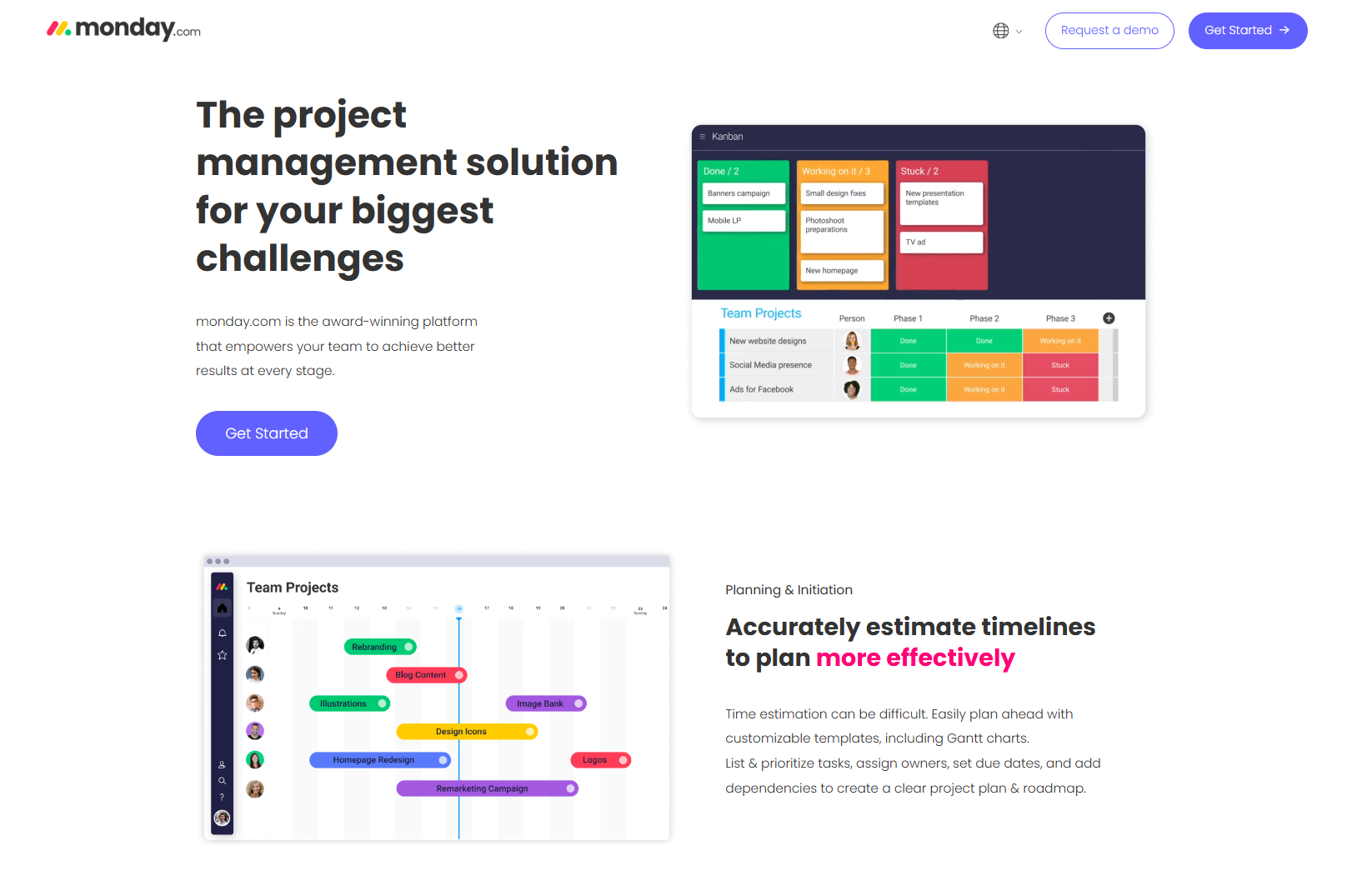
Image source: monday.com (verified November 2025)
How Monday works for project management
Monday's project management tool functions around visual boards, each representing a workflow or project. These boards consist of items (tasks) and columns (attributes) that define task details, priorities, and statuses.
- Create a project board: You can choose from project management templates on Monday.com or start from scratch. Each board can represent a campaign, client project, or internal process. Templates help beginners set up workflows faster without deep configuration.
- Add items and columns: Each task can include details like owner, priority, status, and due date. Columns can also hold formulas, time tracking, or progress indicators. This flexibility helps teams visualize data across projects.
- Visualize workflows: Monday project management software allows switching between Kanban, Gantt, calendar, and timeline views to suit different work styles. Teams can track dependencies, milestones, and progress in real time.
- Automate updates: Repetitive tasks, such as notifications or assignments, can be automated using the "When–Then" rules. For example, you can set an alert when a task moves to "Completed."
- Report progress: Monday's dashboards help visualize KPIs, workloads, and timelines. Data from multiple boards can be combined to get a full project overview.
Key features of Monday project management
Monday project management software includes several robust features that make it useful for structured project tracking. However, understanding how these features work in real situations helps teams decide whether it's right for them.
Dashboard reporting
Dashboards on monday project management act as the control center for managers and team leaders. They provide a consolidated view of multiple boards, making reporting easier and more visual.
- Dashboards show timelines, workloads, and project health using interactive widgets and charts. This makes it easy to detect delays or bottlenecks before they escalate.
- Managers can combine data from several projects into one unified view, giving them a snapshot of overall team performance.
- Metrics such as task completion rate and workload distribution can be customized for different departments or clients.
- The reporting system helps align project outcomes with company KPIs but is limited in detail to lower-tier pricing plans.
Automation and workflow management
Automation is one of monday project management software's strongest capabilities. It reduces manual work by setting automatic triggers for specific actions.
- Simple "When–Then" automations can notify team members, update statuses, or move tasks automatically when conditions are met. This eliminates repetitive admin work.
- For example: when a task changes to "Completed": an email can automatically notify the client or manager.
- Automations improve coordination between cross-functional teams by ensuring consistent communication.
- Advanced automation workflows are only available in higher-tier plans, making them less accessible to smaller teams.
Templates and customization
Monday project management templates help teams begin faster without extensive setup. They are designed for different industries and departments.
- Users can select from prebuilt templates such as marketing campaigns, client onboarding, or product launches. These templates include predefined columns and structures.
- Teams can customize boards by adding fields for formulas, dependencies, or tags. This flexibility makes monday project management software adaptable across industries.
- Customization enables each department to maintain its preferred structure: whether for finance, HR, or operations.
- However, heavy customization may lead to cluttered boards if not standardized.
Collaboration and communication
Collaboration within monday project management tools is built around task-based conversations and updates.
- Each item includes a comment section where team members can discuss progress, upload attachments, or tag others.
- Integrations with Slack or Microsoft Teams extend communication beyond the monday platform.
- While this structure improves transparency: monday lacks a native messaging system for real-time discussions.
- As a result, teams may depend on third-party tools to maintain daily communication.
Time tracking and resource allocation
Time tracking allows teams to monitor hours spent on each task or project. It's essential for understanding efficiency and balancing workloads.
- Team members can log hours directly within monday project management software for accurate reporting.
- Managers use visual workload indicators to ensure no one is overburdened.
- The resource view displays who is free or overloaded, making planning easier.
- Detailed tracking and advanced workload analysis are available only on Pro or Enterprise plans.
Monday's project management software pricing
Monday pricing offers several tiers depending on the team's needs and scale. The structure is straightforward but costs can escalate as you add users or advanced features.
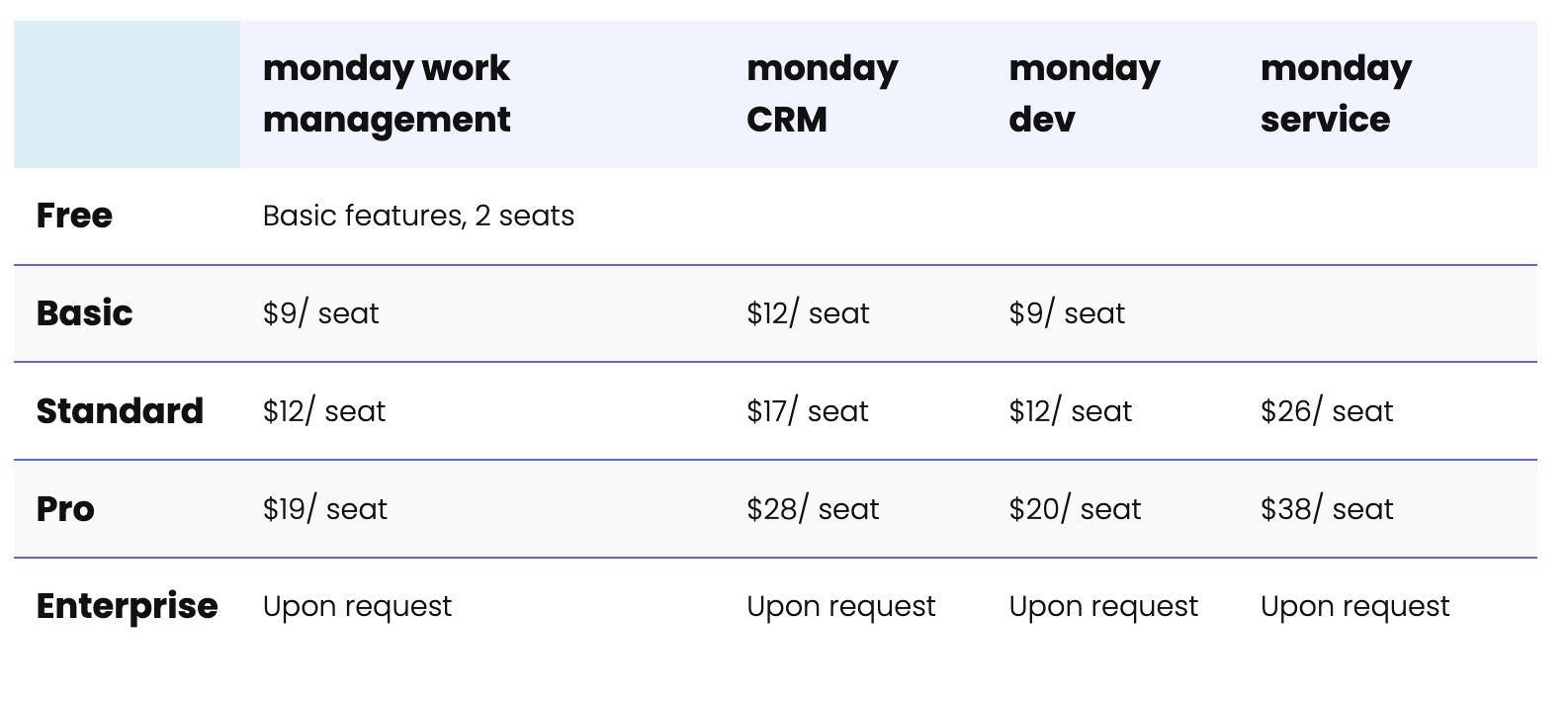
Image source: monday.com (verified November 2025)
Pricing plans breakdown
- Free plan is limited and only available for Monday work management with basic features and 2 seats, making it suitable for personal or very small project use.
- Basic plan starts at $9 per seat for work management and dev use cases, while CRM and service use cases cost more due to advanced capabilities.
- Standard plan increases access to collaborative features, automations, and integrations, but pricing varies significantly depending on workflow category.
- Pro plan introduces advanced automation, analytics, and scaling capabilities, but at a much higher cost, especially for CRM and service teams.
- Enterprise plan requires contacting sales and is designed for teams needing advanced governance, control, and security.
While monday project management pricing is straightforward at first, costs can rise quickly as teams scale or need advanced automation and reporting features. For most small and mid-sized teams, the Standard plan provides the right balance of cost and functionality. However, as automations, dashboards, and integrations scale, costs can increase significantly.
Limitations of Monday project management
Despite its flexibility, monday project management software has some challenges that affect scalability and user efficiency.
- Limited communication tools: Monday lacks integrated chat or document collaboration. Users must switch to Slack or Docs for communication and file sharing.
- Restricted automation and reporting: Advanced automations and reports are locked behind premium plans, limiting smaller teams.
- Complex board management: Managing multiple boards across projects can create confusion and duplication of effort.
- Rising costs: Pricing scales rapidly with user count and add-ons. This may be impractical for startups or nonprofit teams.
For teams looking for a connected platform where communication, documents, and tasks exist together, monday may feel fragmented compared to Lark.
New Monday alternative: Lark all-in-one project management hub
Lark is a complete digital workspace that helps teams plan, execute, and collaborate without switching between tools. Unlike Monday project management software, which often depends on third-party integrations for messaging or documentation, Lark connects everything in one place. Teams can organize data in Lark Base, manage execution through Lark Tasks, communicate in Lark Messenger, co-edit documents in Lark Docs, and coordinate schedules with Lark Calendar. This unified structure keeps information accessible, updates synchronized, and collaboration effortless.
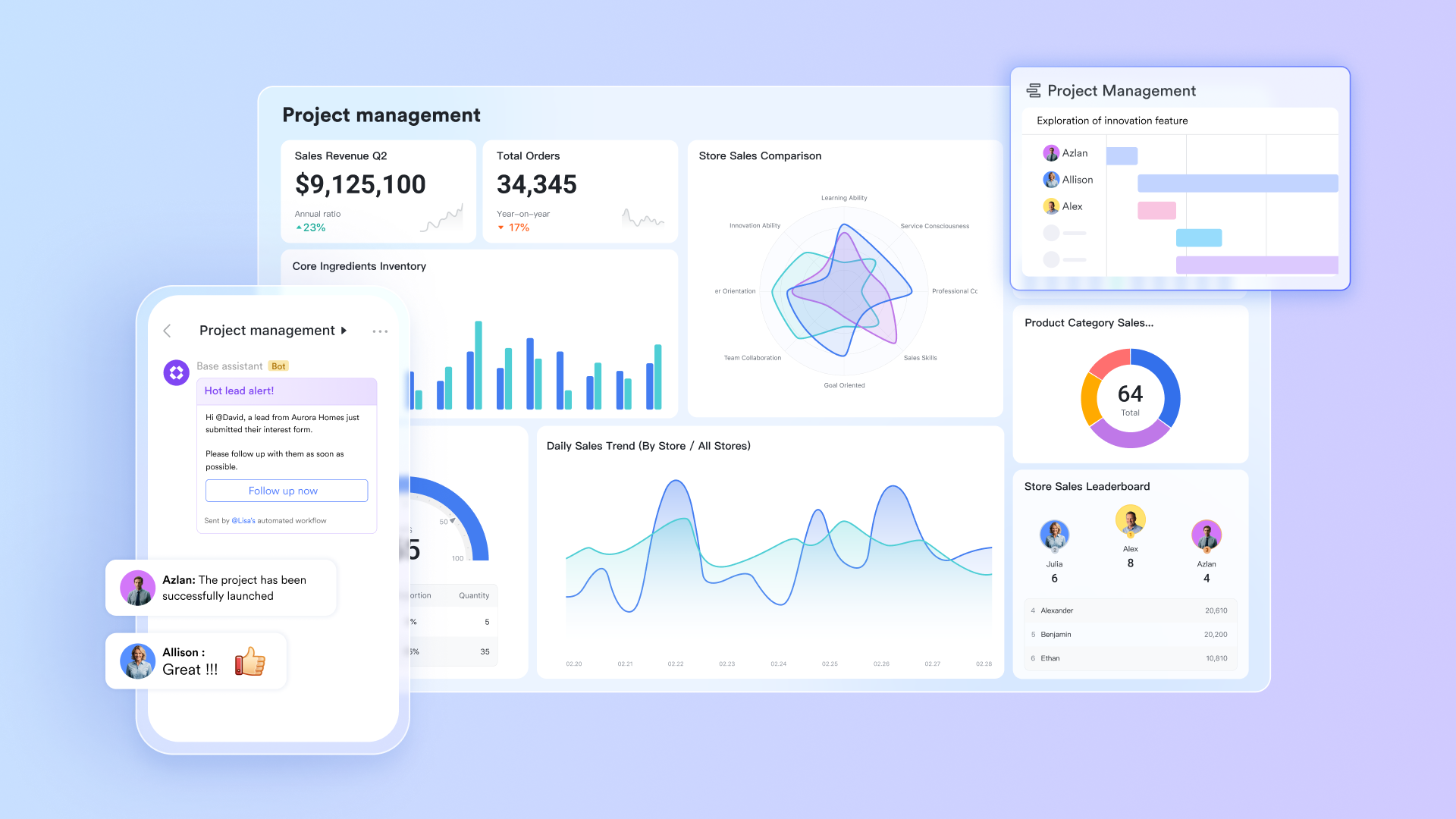
Table in Lark Base: Model your project as structured data
Lark Base enables teams to organize projects through multiple connected tables rather than one long sheet. Each table can represent a specific category such as Projects, Tasks, Milestones, or Budgets. Every table stores purpose-specific data fields like dates, owners, and status, which keep information consistent and easy to maintain. By separating data logically, teams avoid column clutter and unnecessary duplication. Access permissions can be customized for roles, ensuring both visibility and security across departments.
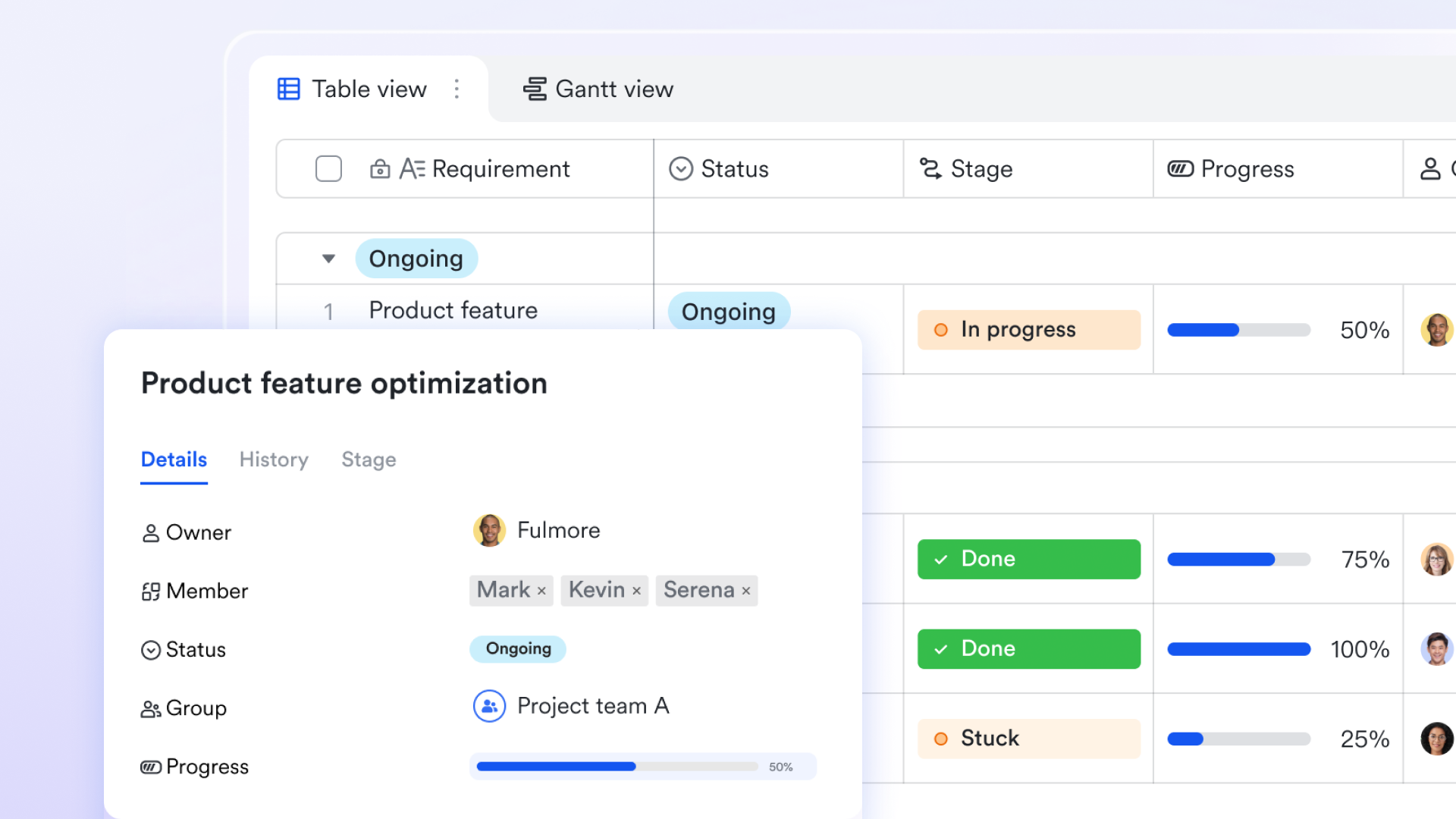
Multiple views: See data the way you need it
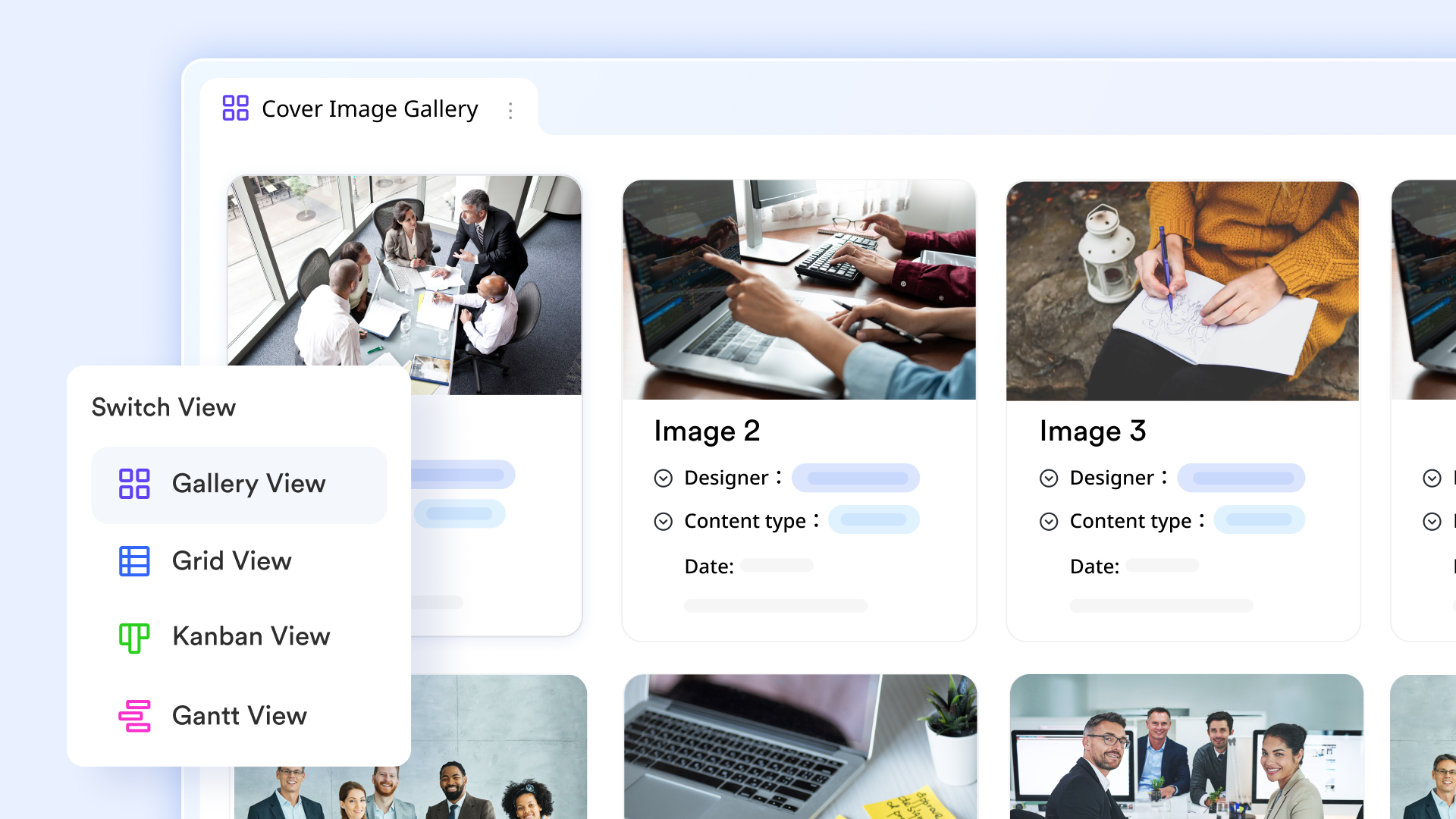
Lark Base keeps one data source but allows teams to visualize it through multiple views. Project managers can use Gantt charts to track timelines and dependencies, while teams prefer Kanban boards to monitor daily workflows. Calendar view provides a date-focused perspective for aligning deliverables, and Grid view supports quick edits and reviews. Because every view is synchronized in real time, planners, contributors, and stakeholders always work from the same live dataset without losing context.
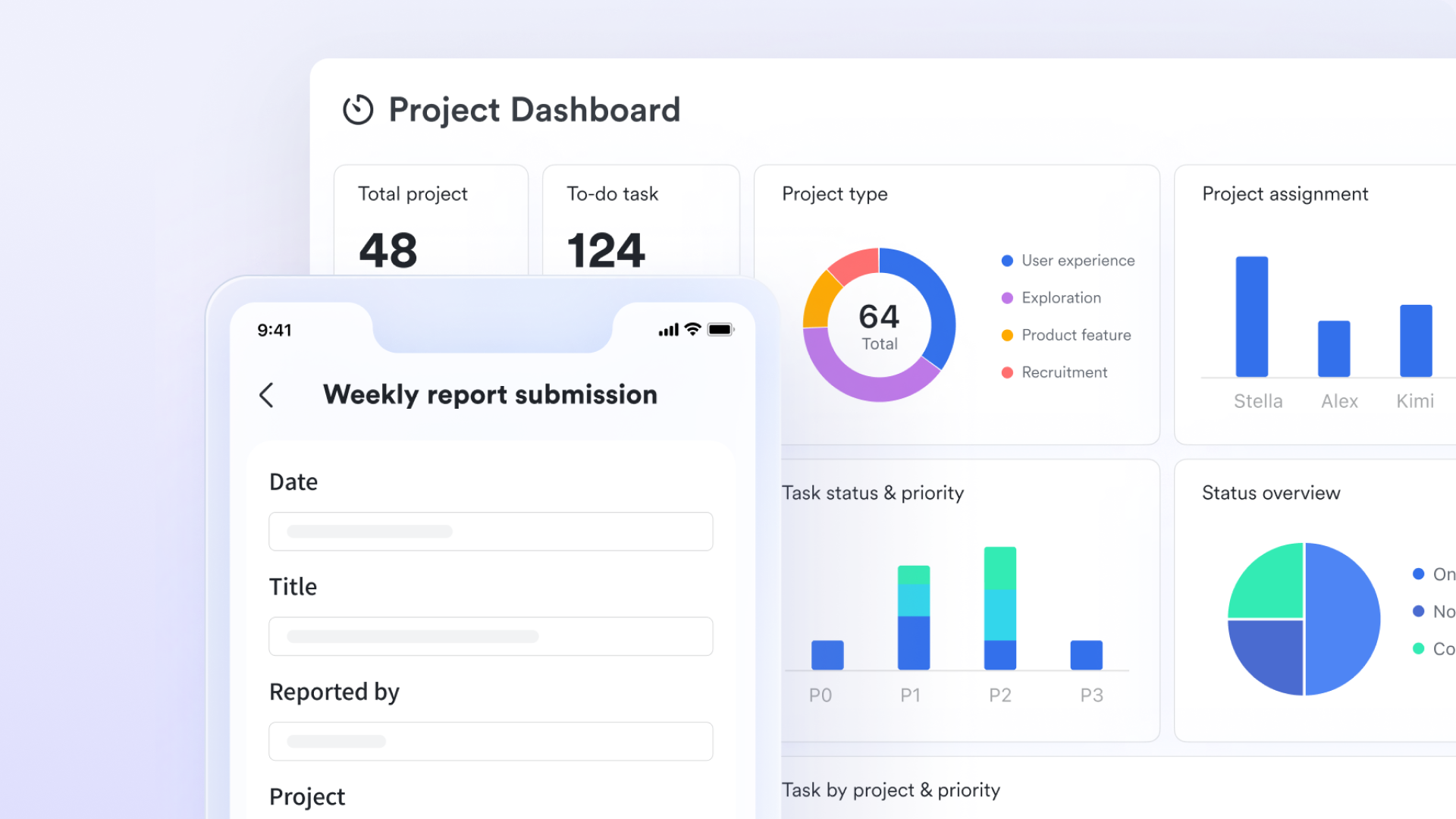
Dashboard & Smart Analysis: Instant judgment & AI insights
Dashboards in Lark Base provide a visual overview of project progress, task categories, member assignments, and rankings, making it easier to monitor and manage work. Real-time charts and graphs deliver instant updates, allowing project managers to quickly spot issues and adjust plans. Smart analysis leverages AI to interpret data, highlighting trends, risks, and insights automatically. Dashboards are customizable and shareable, with permissions ensuring team members see only relevant information, keeping the team aligned and informed.
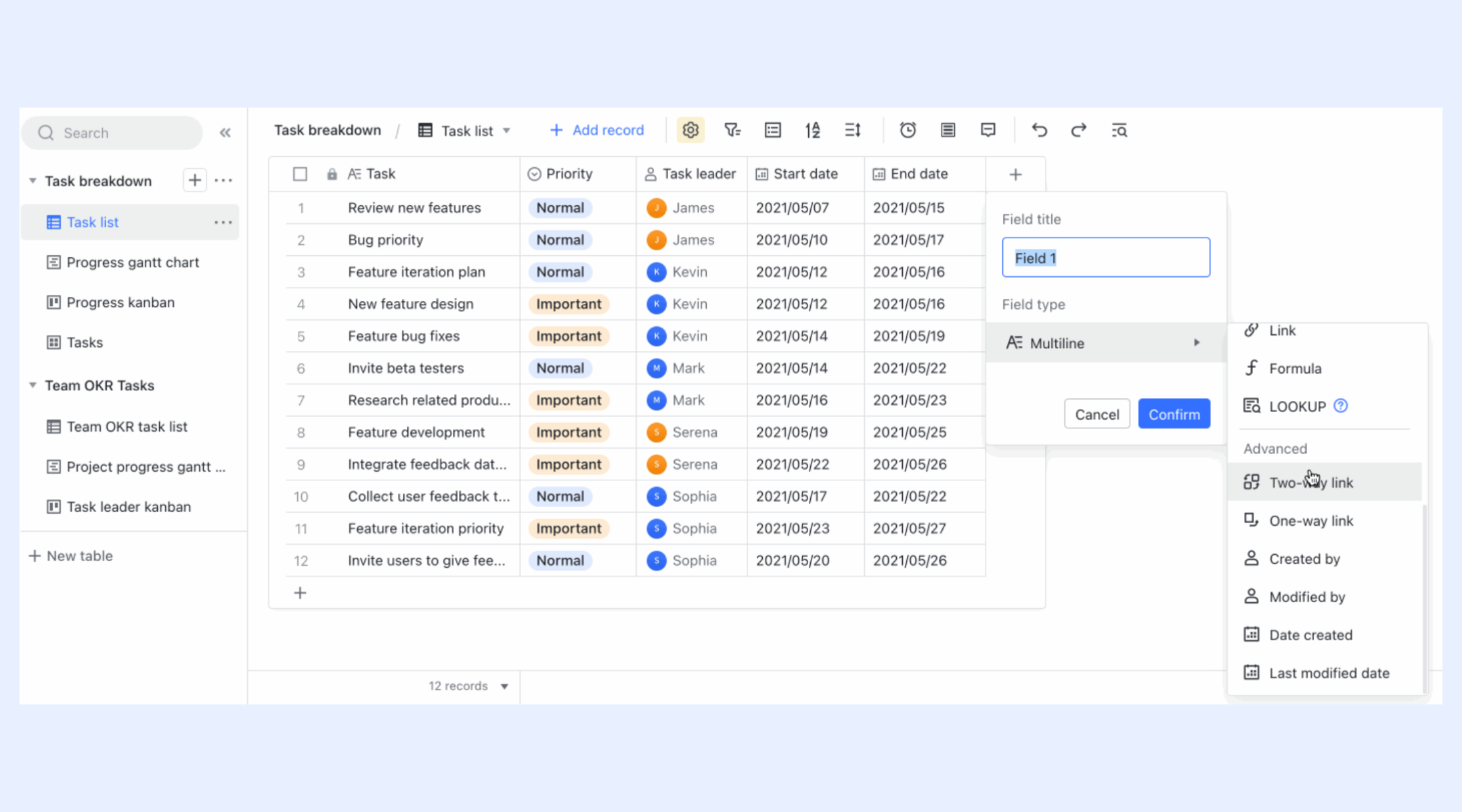
Two-way links: Keep data connected and accurate
Two-way linking in Lark Base ensures that data relationships remain consistent across different tables. When a task is linked to a project, updates on one side automatically reflect on the other. This means project progress, budgets, or milestone metrics update instantly without manual entry. The feature eliminates errors caused by stale data and provides an accurate, real-time overview of project performance. Teams save hours that would otherwise be spent reconciling multiple spreadsheets or reports.
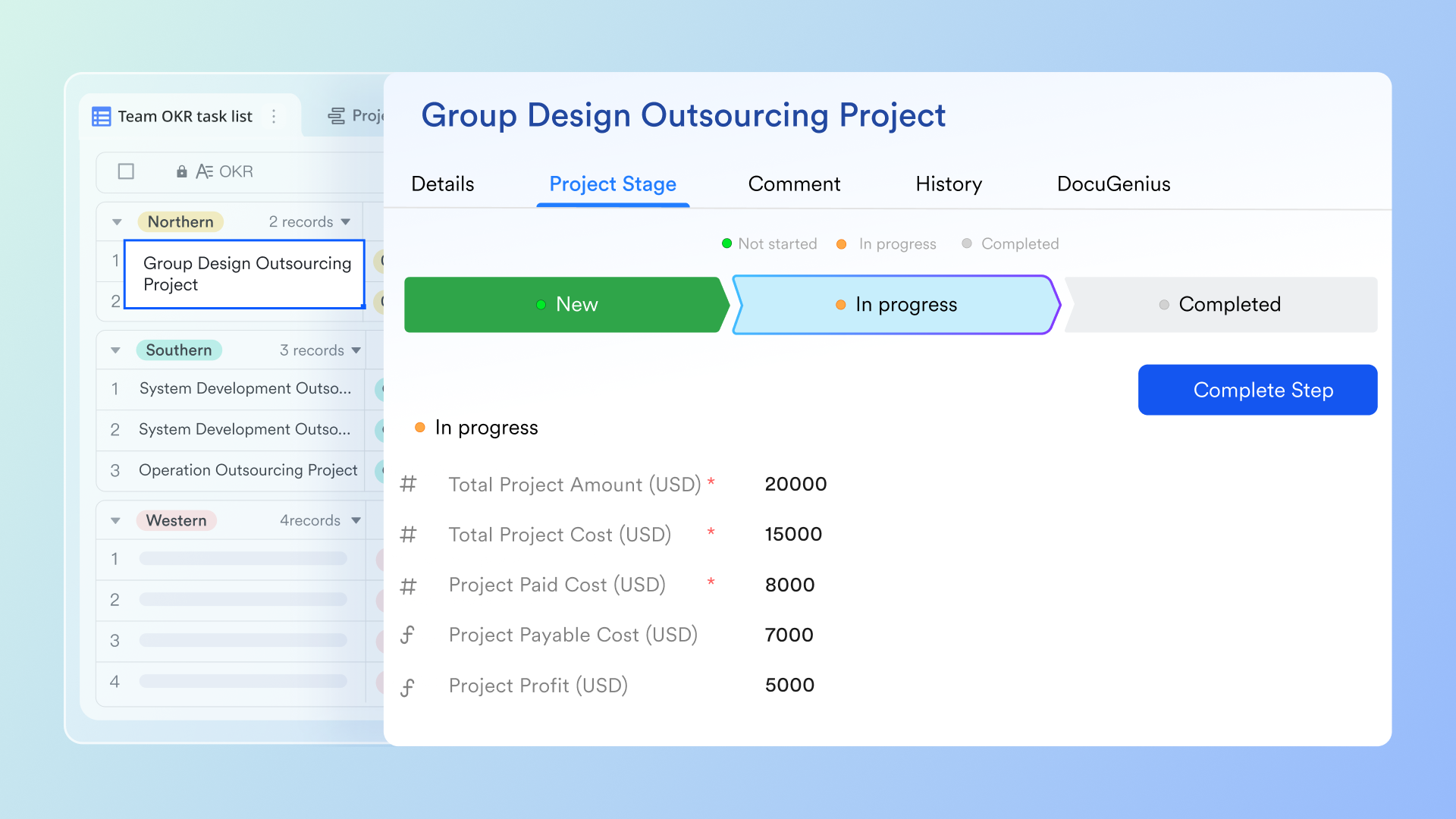
Automations: Keep work on track automatically
Automation in Lark Base allows teams to maintain progress without constant manual oversight. Users can create no-code rules that trigger notifications, status changes, or assignments when certain conditions are met. For example, the system can alert an owner two days before a milestone deadline or automatically assign a reviewer once a task reaches completion. Reminders appear directly in Lark Messenger or within the relevant Base record. This setup helps teams stay accountable and ensures no important update is missed.
Lark Tasks: Turn goals into actionable steps
Lark Tasks turns project goals into structured, trackable actions that can be assigned and monitored in real time. Tasks can be created directly from chats, documents, or Base tables, maintaining full context. Each task includes fields for priority, due date, and dependencies, making it easy to organize and prioritize work. Subtasks allow teams to break down complex deliverables into manageable components. Because Lark Tasks connects directly with other Lark tools, collaboration stays streamlined from planning to execution.
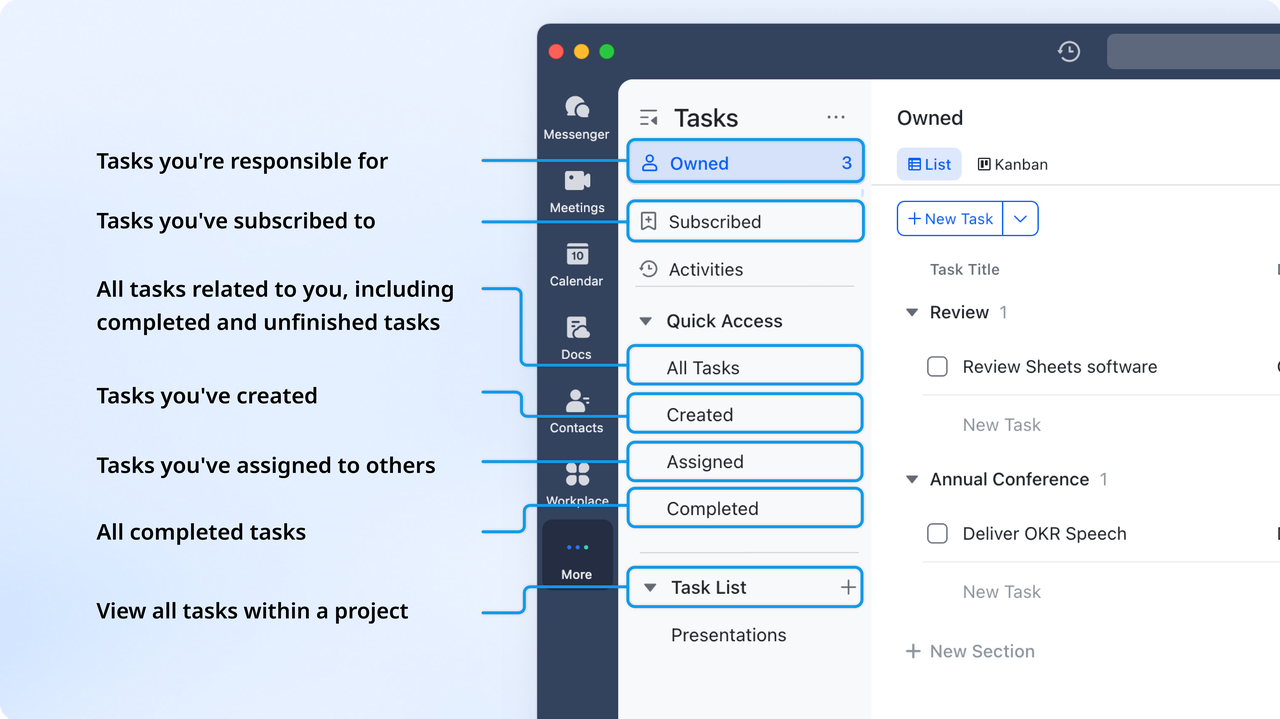
All-in-one platform: Keep everything in one place
Lark combines communication, documentation, and meetings into a single environment so that collaboration never leaves context. Team members can discuss project updates in Lark Messenger, co-edit reports in Lark Docs, and schedule reviews through Lark Calendar without switching platforms. By clicking "Add Task" in Messenger, chat can directly generate actionable tasks, and meeting notes automatically link back to relevant records if someone creates meeting notes or links an existing document in the Calendar event. This connected approach ensures that every conversation, document, and decision remains visible to everyone involved, keeping execution tightly aligned with planning.
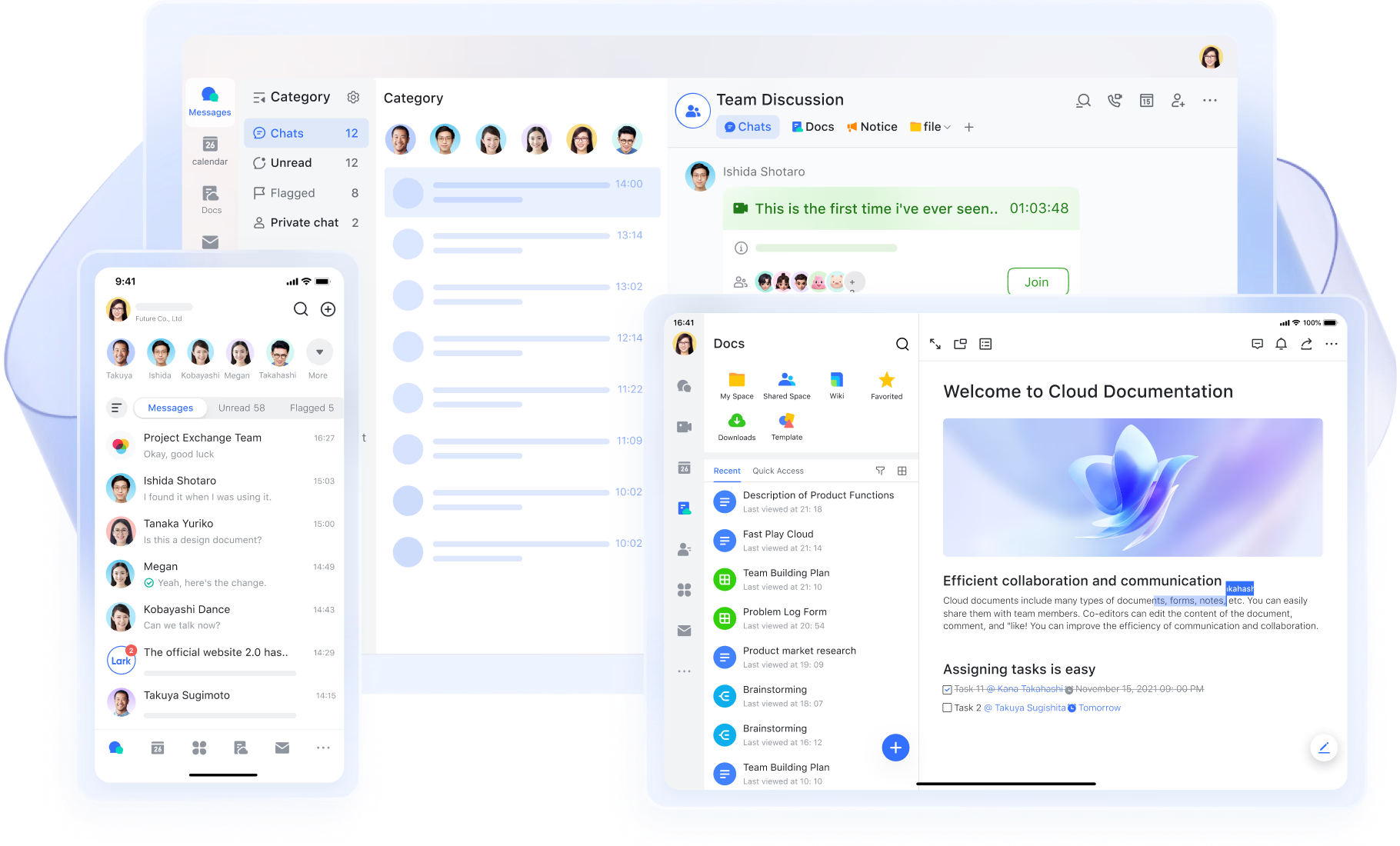
- Starter plan: Free forever plan that includes 11 powerful tools for up to 20 users. It also comes with 100GB of storage, 1000 automation runs, AI translations, and more.
- Basic plan: $6/user/month (billed annually) for up to 500 users. It includes everything in Starter plus group calling for up to 500 attendees, 5TB of storage, 1000 automation runs, and more. Contact sales for more information regarding this plan.
- Pro plan: $12/user/month (billed annually) for up to 500 users. It includes everything in Basic plus group calling for up to 500 attendees, 15TB of storage, 50,000 automation runs, and more.
- Enterprise plan: Contact sales for custom pricing. Supports unlimited users and includes even more automation runs and advanced security, compliance, and management features.
Lark vs Monday project management: Quick comparison
When selecting a project management platform, teams typically consider functionality, ease of use, and cost. Both Monday and Lark cover essential project management functions like task tracking and visual planning, but they differ in communication, document collaboration, and workflow automation. This comparison highlights where each platform excels, helping teams make a more informed decision based on their needs and budget.
Conclusion
This Monday project management review highlights that Monday project management software remains a reliable choice for teams that need visual tracking, flexible templates, and structured workflows. While using monday for project management can improve clarity through boards and dashboards, the platform's reliance on separate tools for communication, documentation, and automation may create fragmentation over time. As teams expand or handle more complex projects, switching across multiple apps can affect workflow speed, alignment, and accountability.
Lark offers a modern alternative by bringing all essential tools into one unified workspace. With Lark Base for structured data, Lark Tasks for execution, Lark Docs for documentation, and Lark Messenger for communication, teams can manage every aspect of their projects seamlessly. This unified environment keeps information synchronized and collaboration effortless. Designed for scalability and cost efficiency, Lark enables teams to plan, communicate, and automate without leaving the platform, making it a smarter monday project management alternative for organizations focused on productivity and connected teamwork.
FAQs
Is Monday a good project management tool for small teams?
Yes, monday project management is a great option for small teams that need visual organization and clear task ownership. Its drag-and-drop boards and ready-made templates help new users start quickly without deep configuration. However, smaller teams may find that certain advanced features like automation or time tracking require upgrading to paid plans. It's best suited for teams that want structure but can manage communication through external tools.
How does Monday compare to Lark for team collaboration?
Monday project management software focuses primarily on task tracking and workflow visualization, while Lark creates a more connected experience. In Lark, messaging, documents, and project data coexist in one workspace, eliminating the need for external chat or file-sharing platforms. Teams using Lark spend less time switching between tools and more time aligning goals and deliverables. The result is faster communication and smoother collaboration across departments.
What are some free alternatives to Monday Project Management?
Free project management tools monday users can consider include Lark, Trello, and ClickUp. Each offers a different mix of task organization and automation. Lark's free plan stands out because it includes chat, docs, video meetings, and workflow automation all within one system. This means teams can manage projects, communicate, and document updates without any additional subscriptions. For startups or small agencies, it's a cost-effective choice.
Can Monday replace traditional project management software?
Yes, monday project management tool can replace spreadsheets and manual trackers by offering customizable boards, automations, and timeline views. It provides visual clarity and structure that traditional tools lack. However, monday still depends on integrations for chat, file management, and document sharing, which may create workflow gaps. For organizations seeking a single ecosystem for all project needs, monday alone might not be sufficient.
How can Lark help manage complex projects across departments?
Lark helps large or distributed teams manage complex projects by connecting data across tables, views, and automation workflows. Departments can maintain separate project boards while still feeding updates into one shared overview. Changes in one table instantly reflect linked records: keeping the overall project status accurate in real time. This structure allows program managers to coordinate multiple teams without losing context or duplicating data.
Related reading
Table of contents
Start using Lark today

Manage all your work in one place
Boost team efficiency by 10x
Save up to 70% on software costs
Table of contents
Start using Lark today
Manage all your work in one place
Boost team efficiency by 10x
Save up to 70% on software costs
Keep reading







2026 Lark Technologies Pte. Ltd.
Headquartered in Singapore with offices worldwide.






Explore: