














What Is the Best Monday Project Management Alternative for Your Team in 2026?

Lance Carter
Technical Product Marketing Specialist
Sep 18, 2026
Lance Carter
Sep 18, 2026


15 min read


Looking for a Monday.com alternative? We’re here to help!
Monday.com is a powerful tool for project management. However, it’s not the best software for every team or project. Just because it’s a well-known tool doesn’t mean it’s the best software available in 2025.
Expensive plans, limited features, and a less-than-friendly mobile experience are just a few reasons why many businesses are looking for alternatives.
In this guide, we’ll break down the best Monday project management alternatives for your team.
Why teams leave monday.com? The main pain points driving teams away include:
- Cost escalation: Starting at $9/seat/month (minimum 3 seats), with Pro plans at $19/seat/month, plus additional fees for advanced features
- Missing collaboration features: No built-in chat, documents, email, or video, forcing teams to stack multiple tools
- Limited project depth: The board-centric approach struggles with complex workflows like OKRs, approvals, and CRM management
- Automation/connection constraints: Lower-tier plans restrict automation runs and connections, creating bottlenecks at scale
- Weak mobile experience: Remote and field teams need stronger mobile-first capabilities
What is Monday.com?
Monday.com is a cloud-based platform to improve team collaboration and streamline project management. It is a centralized hub where tasks are organized, progress is tracked, and teams can collaborate efficiently.
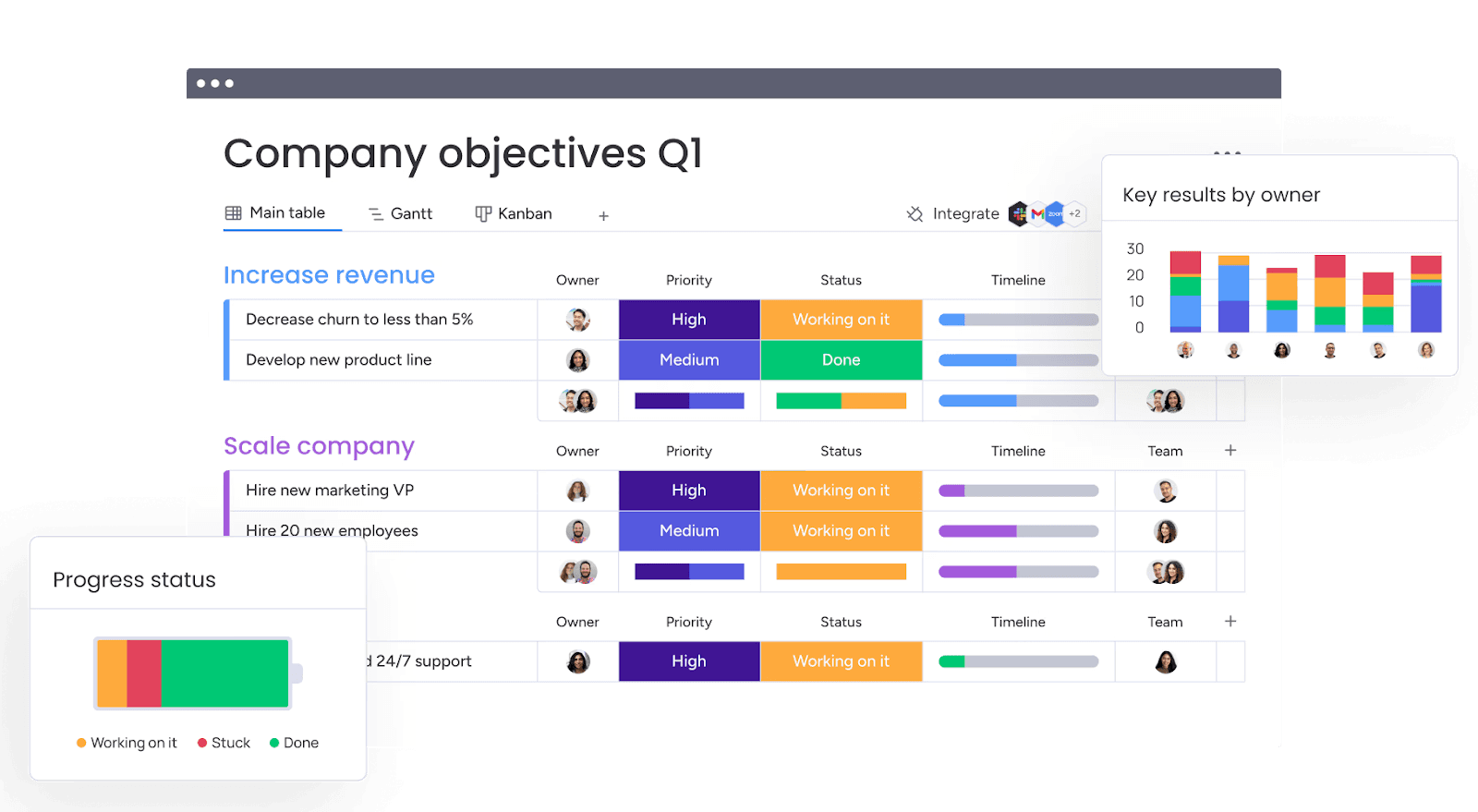
Key features
- Customizable boards: Monday.com offers fully customizable boards that allow teams to organize projects, track progress, and visualize workflows.
- Automation: Save time by automating repetitive tasks such as status updates, notifications, and deadline reminders, enabling your team to focus on more critical work.
- Multiple views and dashboards: Visualize your work with various views like Kanban, Gantt, Calendar, and more, allowing you to monitor projects in the format that suits your workflow.
- Collaboration tools: Centralize communication with features that allow for updates, comments, and file sharing directly on tasks, reducing the need for endless email threads.
- Integrations: Connect Monday.com with popular tools, including Slack, Zoom, and Google Workspace, to streamline processes and create a unified workflow.
- Templates: Get started quickly with pre-built templates for a variety of use cases, including marketing, sales, HR, and product development.

Why businesses look for Monday project management alternatives
Monday.com is a great project management tool, but despite its fantastic features, it may not work for all teams. Common challenges users mention on review sites such as Capterra and G2 include:
- Lack of flexibility: Teams with unique workflows may struggle with Monday.com’s rigid structures.
- Complex pricing: Monday’s pricing structure can be difficult for growing teams with specific needs to navigate.
- Limited customization: Many users find it hard to align the platform with their processes.
- Steep learning curve: New users often need help navigating the platform, which can slow productivity.
These challenges make it essential to explore alternatives. Tools like Lark offer better flexibility, affordability, and ease of use for more efficient project management.
Monday project management alternatives at a glance
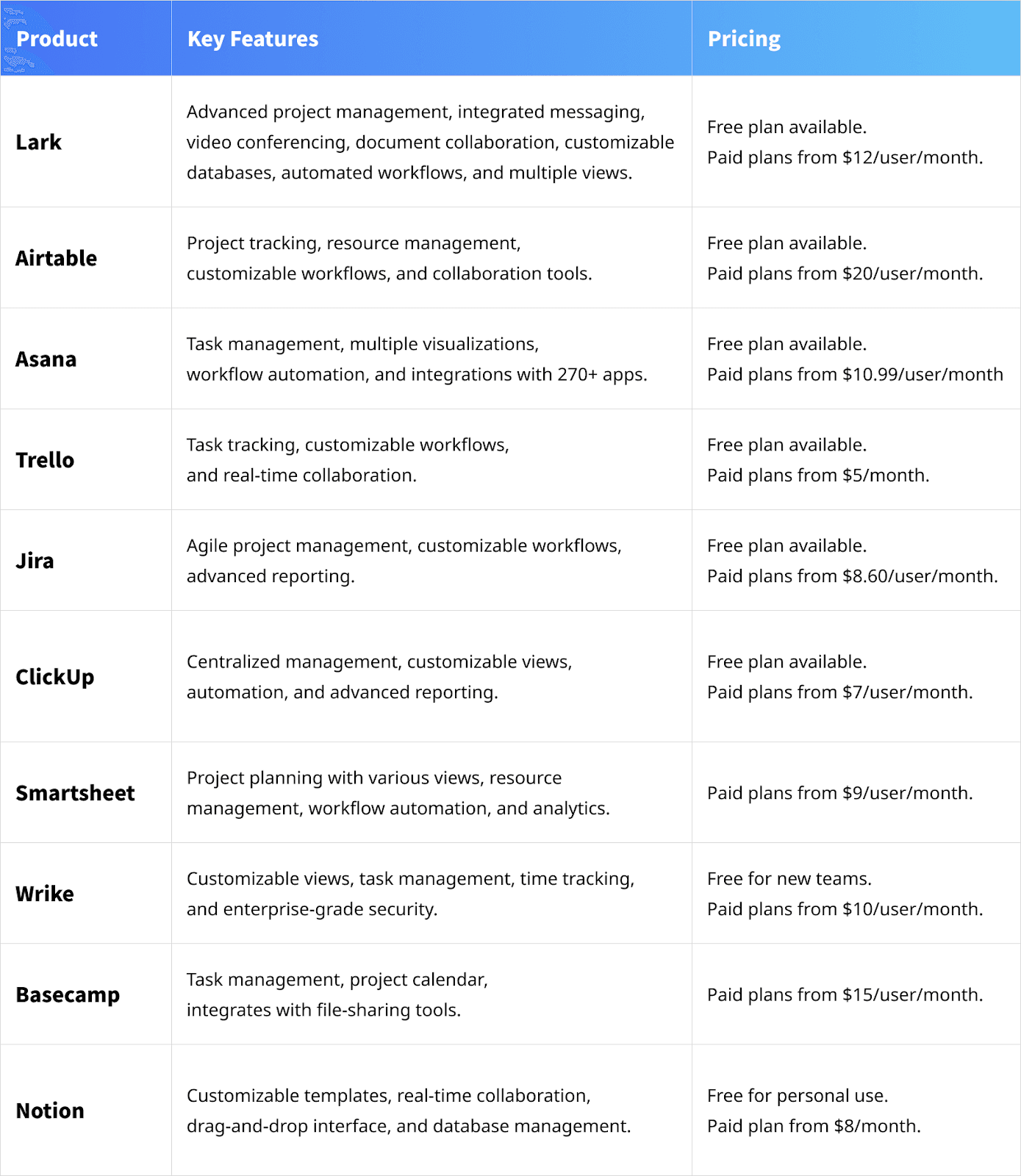
Top 10 Monday project management alternatives for 2026
Lark - Best overall Monday alternative
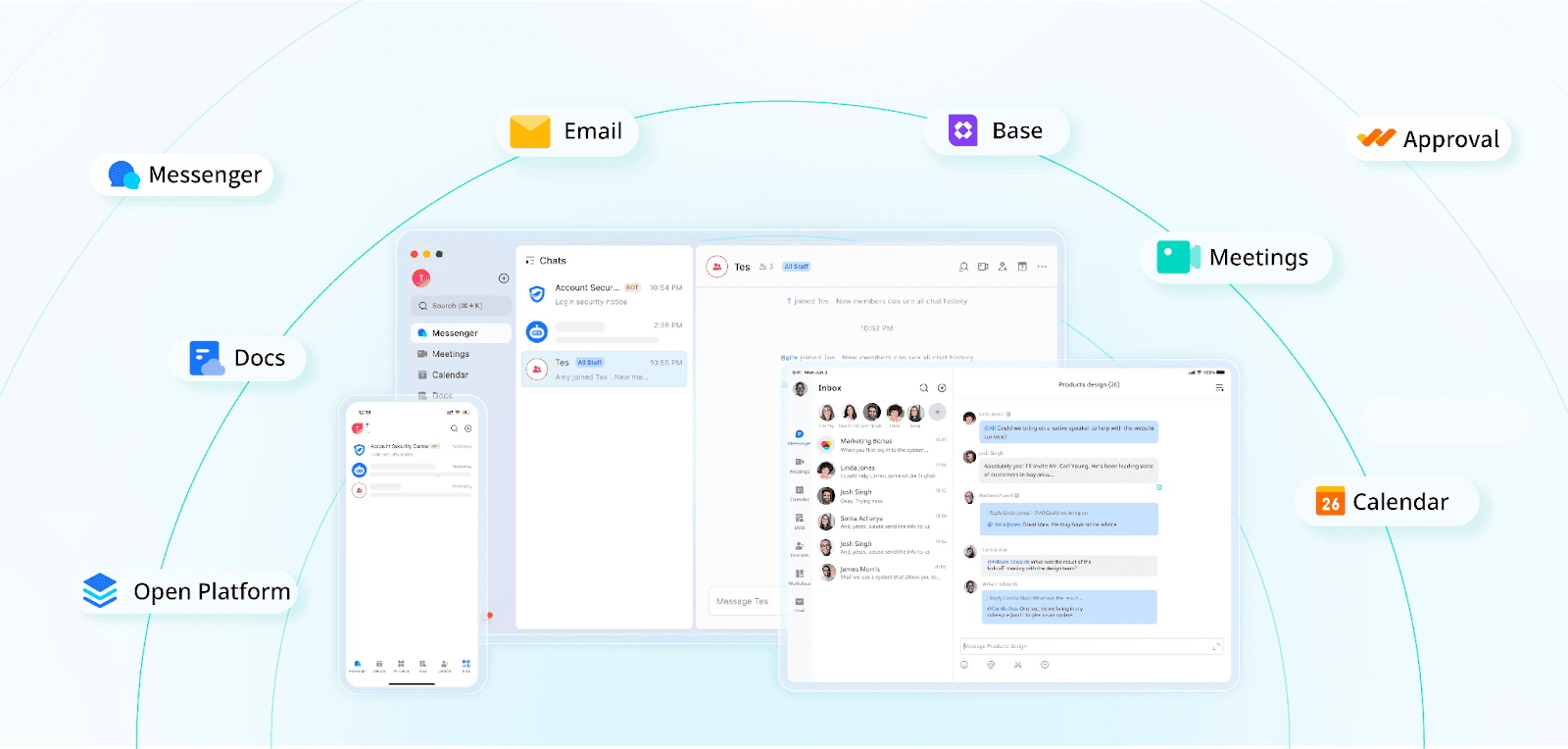 Lark is an all-in-one platform designed to simplify teamwork and communication. It combines messaging, video conferencing, document collaboration, and scheduling into one workspace.
Lark is an all-in-one platform designed to simplify teamwork and communication. It combines messaging, video conferencing, document collaboration, and scheduling into one workspace. Within the Lark ecosystem lies Lark Base, a versatile project management platform designed to help teams plan, execute, and track projects with precision. It is also built to streamline workflows, enhance collaboration, and deliver actionable insights.
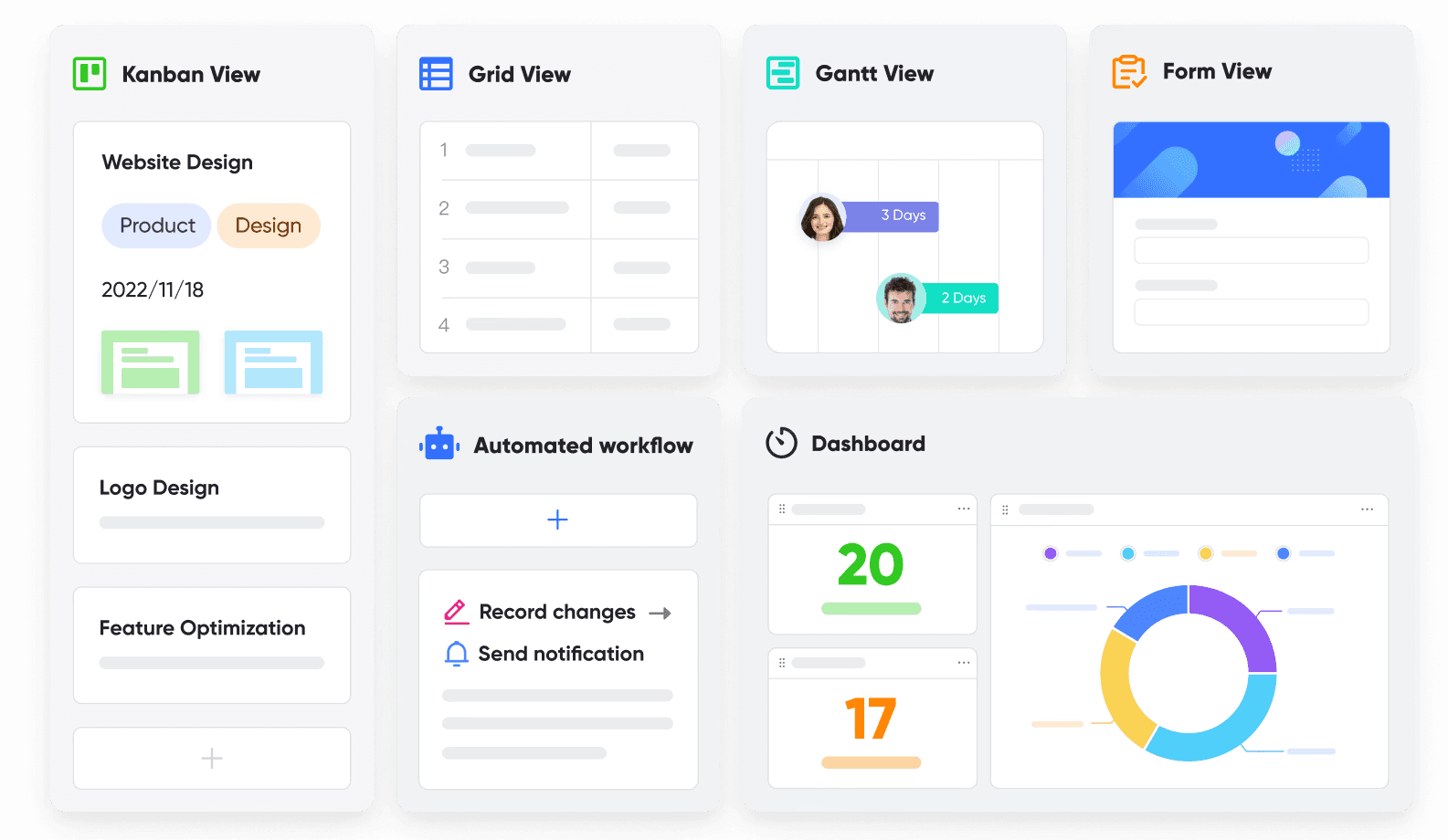 Key features:
Key features:- Build and organize flexible databases to match specific project needs, using advanced permissions to control access to sensitive project data.
- Convert project tables into forms to gather input from stakeholders or teams and sync multiple project tables into a single view for cross-project insights.
- Use the Base X OpenAI integration to simplify project documentation. With a single prompt, you can easily generate status updates, meeting minutes, and other deliverables.
- Instantly convert project metrics into actionable insights with easy-to-read graphs and charts. Visual dashboards allow teams to track KPIs, resource utilization, and team performance.
- Automate task assignments and status updates to keep projects moving forward and schedule automated notifications and reminders to ensure deadlines are met.
- Import project data from Microsoft Excel in one click and transform it into intuitive dashboards.
- Easily switch between views such as Kanban, Gantt, and Grid to match your workflow and project requirements.
Other features of Lark Base
- Share data, dashboards, and updates effortlessly within and across teams.
- Manage both small tasks and large-scale projects within the same platform.
- Use Lark Base on desktop or mobile for on-the-go project management.
- Seamlessly integrates with other Lark features to create a unified project management solution:
- Lark Messenger is used to communicate and coordinate with teams.
- Lark Calendar is used to plan project milestones and set deadlines.
- Lark OKR for tracking the company’s objectives and key results.
- Approval to simplify the approval process for project deliverables.
Pros:
- Improved communication and collaboration with integrated messaging, scheduling, and file-sharing tools.
- Reduces manual work with automated workflows and task reminders.
- Flexible database structures adapt to a wide range of project needs.
- It helps businesses enhance productivity and organize workflows with a range of streamlined features.
- Secure and scalable for businesses of various sizes.
Cons:
- Advanced features and customizability may require time to master.
Pricing:
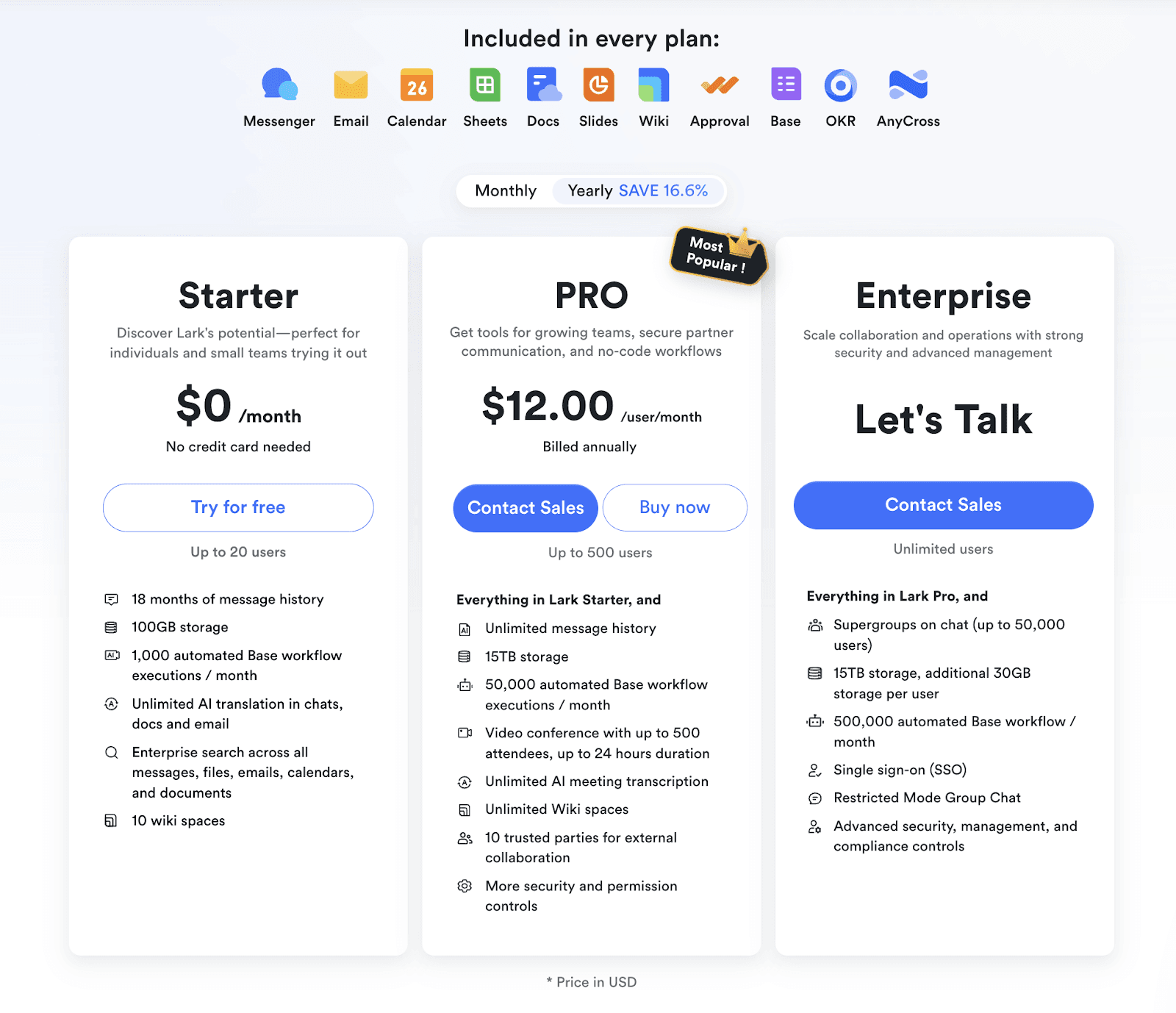
- Free with paid plans starting at $12/user/month.
Use case:
Lark is ideal for:
- Large businesses that require real-time communication to share documents and coordinate tasks efficiently.
- Startups and small to mid-sized teams aiming to boost collaboration and communication.
- Organizations focused on operational excellence look to organize workflows and ensure seamless execution of plans.
- Frontline and retail teams that need to access project information on the go.
- Diverse teams that benefit from automatic translation features, ensuring smooth communication across language barriers.
Airtable - Best alternative for creating databases
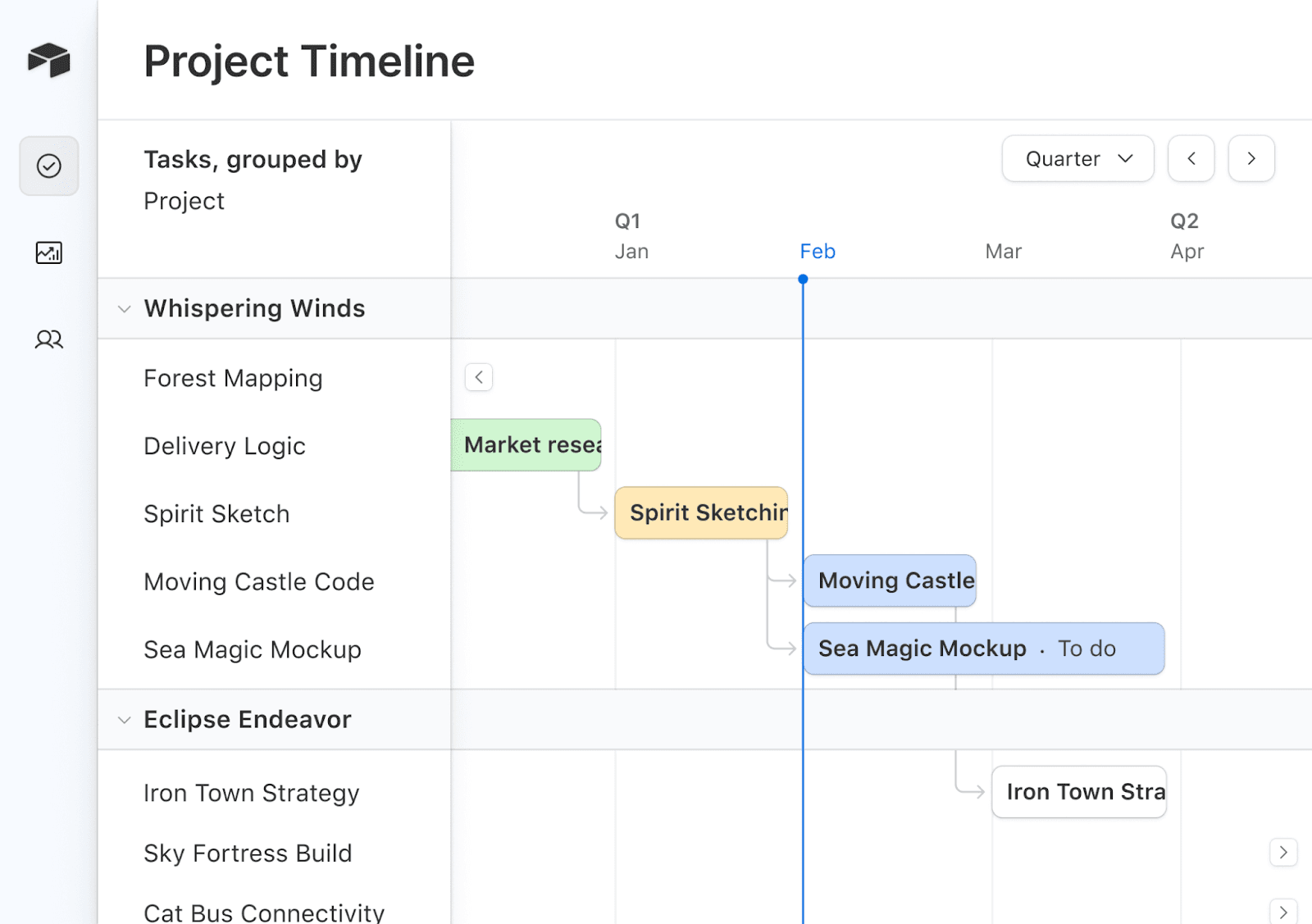
Airtable blends project management with business processes, enabling teams to track progress, allocate resources, and standardize workflows efficiently.
Key features:
- Project tracking to monitor tasks, projects, and programs seamlessly.
- Resource management to gain insights into resource allocation to prevent burnout and maximize productivity.
- Customizable workflows to create repeatable processes and tailor them to your business needs.
- Collaboration tools to keep teams aligned, even across global operations.
Pros:
- Customizable templates for various functions.
- Intuitive interface and easy integration with existing workflows.
- Facilitates collaboration across diverse teams.
Cons:
- Pricing may be steep for small teams.
Pricing
- Free for basic features, with paid plans starting at $20/user/month.
Use case:
Airtable is best suited for the following types of teams:
- Marketing to design and track campaigns effectively.
- Product development to streamline product launches.
- Operations to organize workflows for operational excellence.
- HR & Finance for simplifying hiring, payroll, and financial planning processes.
Asana - Best for simplified project management
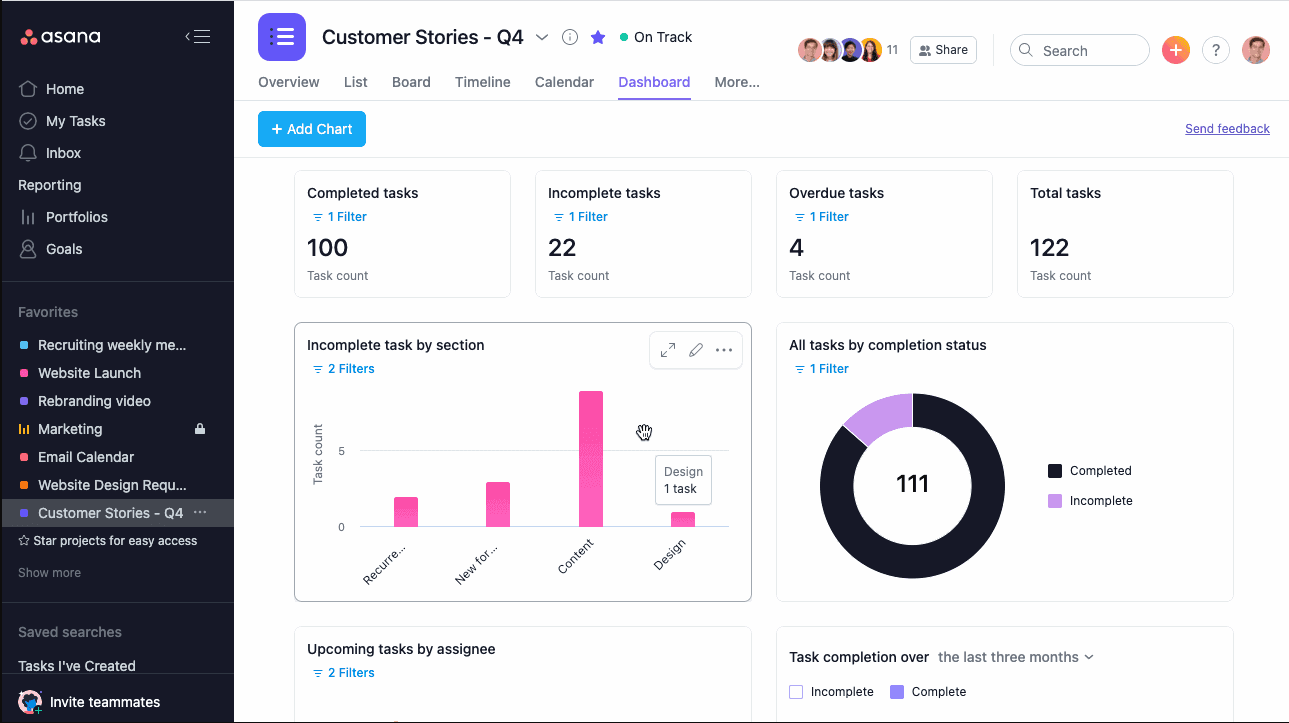
Asana is a versatile project management platform designed to streamline workflows, enhance collaboration, and improve team productivity. It enables teams to organize tasks, monitor progress, and meet deadlines effectively.
Key features:
- Break work into manageable tasks with clear owners and deadlines.
- You can access multiple visualizations, including lists, calendars, timelines, Kanban boards, and Gantt charts.
- Add labels for sorting, filtering, and automating reports.
- Automate workflows to save time and focus on strategic tasks.
- Connect with 270+ apps, including Slack, Zoom, Gmail, and Google Calendar.
- Seamlessly manage work across devices.
Pros:
- Ease of use for beginners and professionals.
- Effective task and project management tools.
- It promotes team collaboration and organization.
Cons:
- Missing advanced features in lower-tier plans.
- Some features are limited or not intuitive.
Pricing:
- Free for basic features, with paid plans starting at $10.99/user/month.
Use case:
Asana supports various industries and workflows like:
- Project management and goal planning for streamlined workflows.
- Marketing campaigns and content calendars for creative teams.
- Product development and sprint planning for engineering teams.
- Employee onboarding and candidate tracking for HR teams.
Trello - Best for Kanban-style task management
Trello is a collaborative project management tool trusted by millions of teams worldwide. It helps manage projects and tasks in flexible and visually appealing presentations, using boards, lists, and cards.
Key features:
- Templates for HR and operations (e.g., Recruiting Pipeline, Employee Manual).
- Task tracking and project management.
- Customizable workflows with databases.
- Real-time collaboration and sharing.
- Integrates with tools like Slack and Google Calendar.
Pros:
- Highly customizable and flexible.
- All-in-one solution for note-taking and project management.
- Strong focus on collaboration with team members.
- User-friendly interface, suitable for a range of tasks (e.g., HR, operations).
Cons:
- It can be overwhelming for beginners.
- Limited advanced project management features.
- Performance may lag with larger datasets or complex pages.
Pricing:
- It is free for individual use, and the paid plan starts at $5/user/month.
Use case:
Popular in HR, software development, marketing, and other industries that need efficient tracking and communication.
Jira - Best for agile software development projects
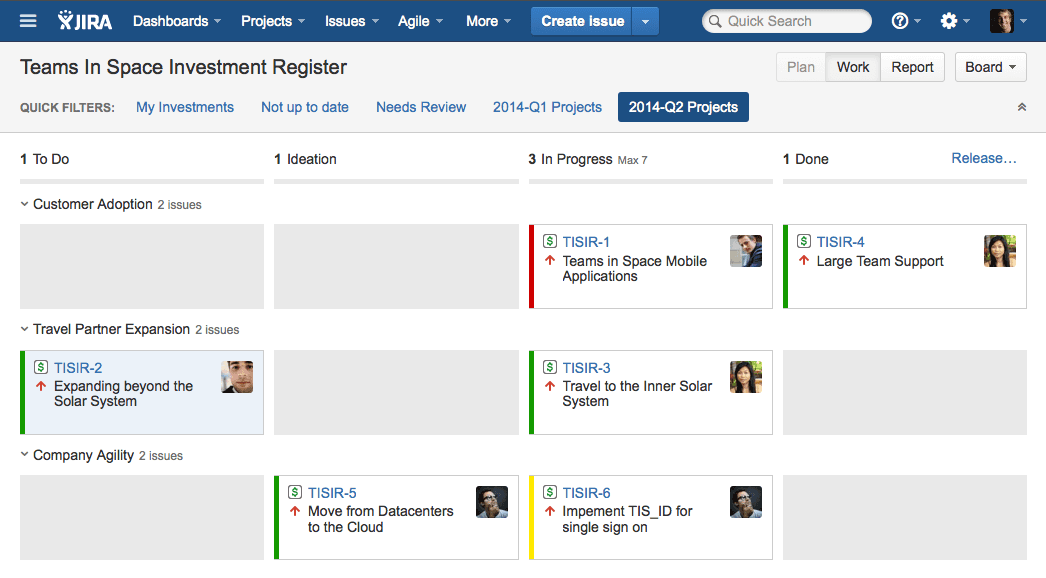
Jira is an agile project management tool that helps teams manage, track, and release software. It incorporates various agile methodologies, including Scrum, Kanban, and hybrid frameworks. Jira allows teams to plan, track, and manage all aspects of their development process from a single platform.
Key features:
- Sprint planning to prioritize and adjust backlog in real-time.
- Scrum board to track and visualize sprint progress.
- Set limits to prevent bottlenecks.
- Coordinate and manage multiple teams effectively.
Pros:
- Highly customizable workflows, issue types, and permissions to fit team needs.
- Seamlessly integrates with many other tools, such as Confluence, Slack, and GitHub.
- Advanced reporting features (Burndown charts, Velocity charts) to track team performance and identify bottlenecks.
- Suitable for both small teams and large organizations, with features supporting scaling Agile practices.
Cons:
- It can overwhelm new users due to its extensive features and configuration options.
- It can become expensive for larger teams, with a subscription model based on the number of users.
- It may require dedicated resources to maintain and configure, particularly for larger teams.
Pricing:
- Paid plans start at $8.60 per user/month.
Use case:
Jira is ideal for agile teams managing complex projects that require robust tracking, reporting, and collaboration. It is widely used in software development, IT, and product management environments, where teams need to manage backlogs, sprints, and deliverables across multiple projects or teams.
ClickUp - Best for customizable workflows
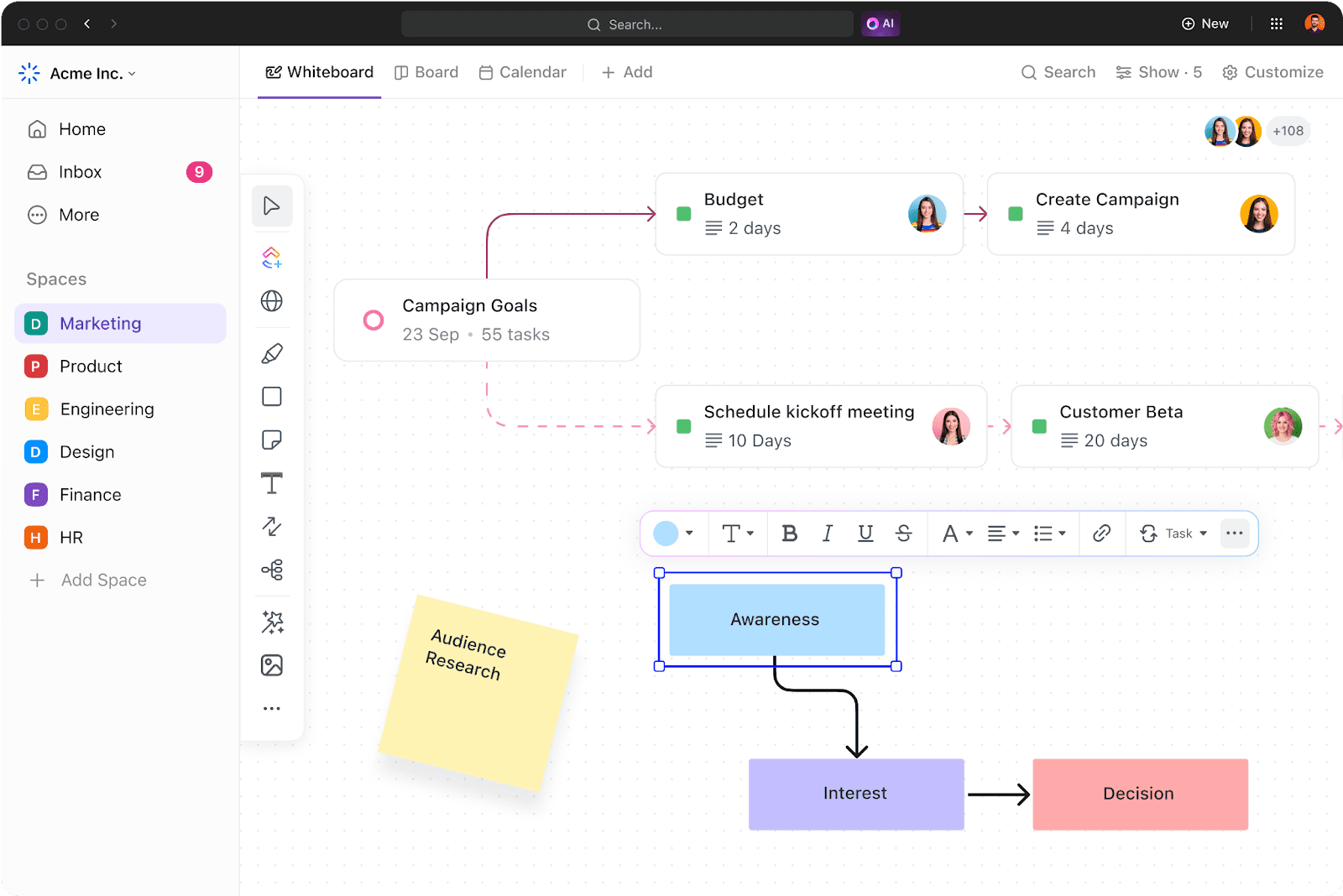
Similar to Lark but with fewer features, ClickUp is an all-in-one platform designed for project management, offering connected workflows, real-time dashboards, tailored views, and automation to help teams work smarter, faster, and more efficiently.
Key features:
- Centralized knowledge and work management.
- Customizable views for cross-functional projects.
- Automation and advanced reporting.
- Scalable project management best practices.
Pros:
- Versatile and feature-rich.
- User-friendly interface.
- Strong automation capabilities.
Cons:
- It can feel overwhelming for beginners.
- Advanced features may require a learning curve.
Pricing:
- Free for basic features, with paid plans starting at $7/user/month.
Use case:
ClickUp is ideal for:
- Digital agencies for streamlining workflows and managing client projects efficiently.
- Marketing teams to support planning campaigns, tracking performance, and collaborating on creative tasks.
- Software teams managing product roadmaps, sprint planning, and bug tracking.
Smartsheet - Best for advanced project spreadsheets
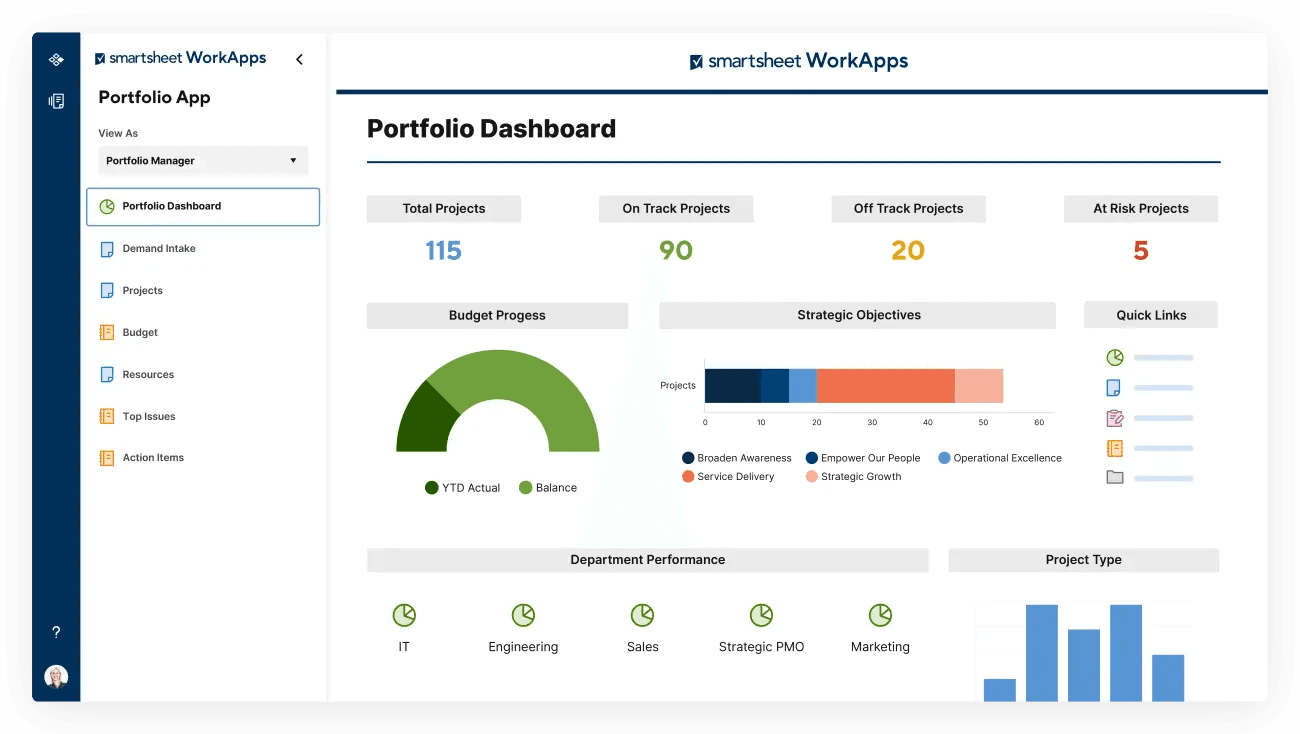
Smartsheet is a project management platform that connects people, processes, and information. It empowers teams to collaborate, automate tasks, and deliver projects efficiently.
Key features:
- Project planning with Gantt, Kanban, and Grid views.
- Resource and budget management.
- Workflow automation.
- Analytics and real-time reporting.
- Seamless integrations with platforms like Slack, Google Workspace, and Microsoft Teams.
Pros:
- Easy project management with different views (Gantt, Grid, Board, Calendar).
- Unlimited viewers and team collaboration.
- Helpful automation and formulas.
- Real-time reporting and customizable templates.
Cons:
- It can be expensive for small teams.
- Some features like AI formulas and SSO are only available in the Enterprise plan.
Pricing:
- The plan starts at $9/member/month.
Use case:
Smartsheet is ideal for project management, resource planning, budget tracking, and automating workflows in technology, marketing, and healthcare industries.
Wrike - Best for project planning and collaboration
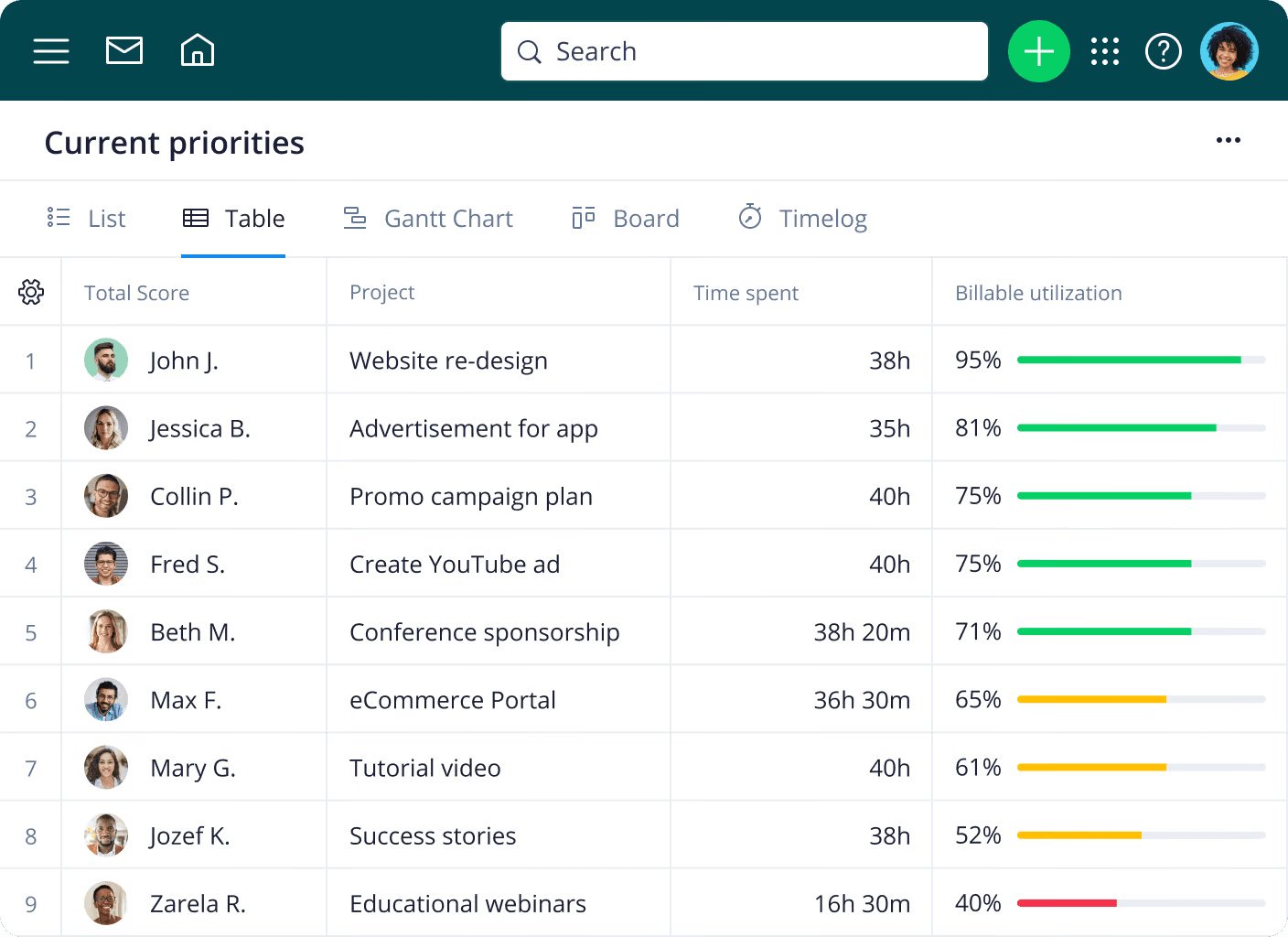
Wrike is a work management platform designed to streamline workflows, enhance team collaboration, and improve visibility across projects, with features for project planning, task management, automation, and reporting.
Key features:
- Customizable views (Gantt charts, Kanban boards).
- Task and project management.
- Time-tracking and reporting.
- Automation for routine tasks.
- Enterprise-grade security and 24/7 support.
Pros:
- Wrike offers an intuitive interface, quick onboarding, and customization options, making it ideal for teams of all sizes.
- Provides 360° visibility into workflows, improving team collaboration and aligning strategies with execution.
- Automates routine tasks, like approvals and request forms, helping teams save time and improve efficiency.
- Offers enterprise-grade security, 24/7 global support, and powerful tools for complex work management.
Cons:
- The free version has limited features, particularly task management and team collaboration.
- Some users may face a learning curve due to its extensive features.
Pricing:
- Wrike is free for new teams, and the paid plan starts at $10 per user per month.
Use case:
Wrike is ideal for teams and organizations seeking to streamline workflows, enhance collaboration, and manage complex projects efficiently. It is instrumental in industries requiring high visibility, security, and automation, such as media, tech, and enterprise environments.
Basecamp - Best for remote collaboration
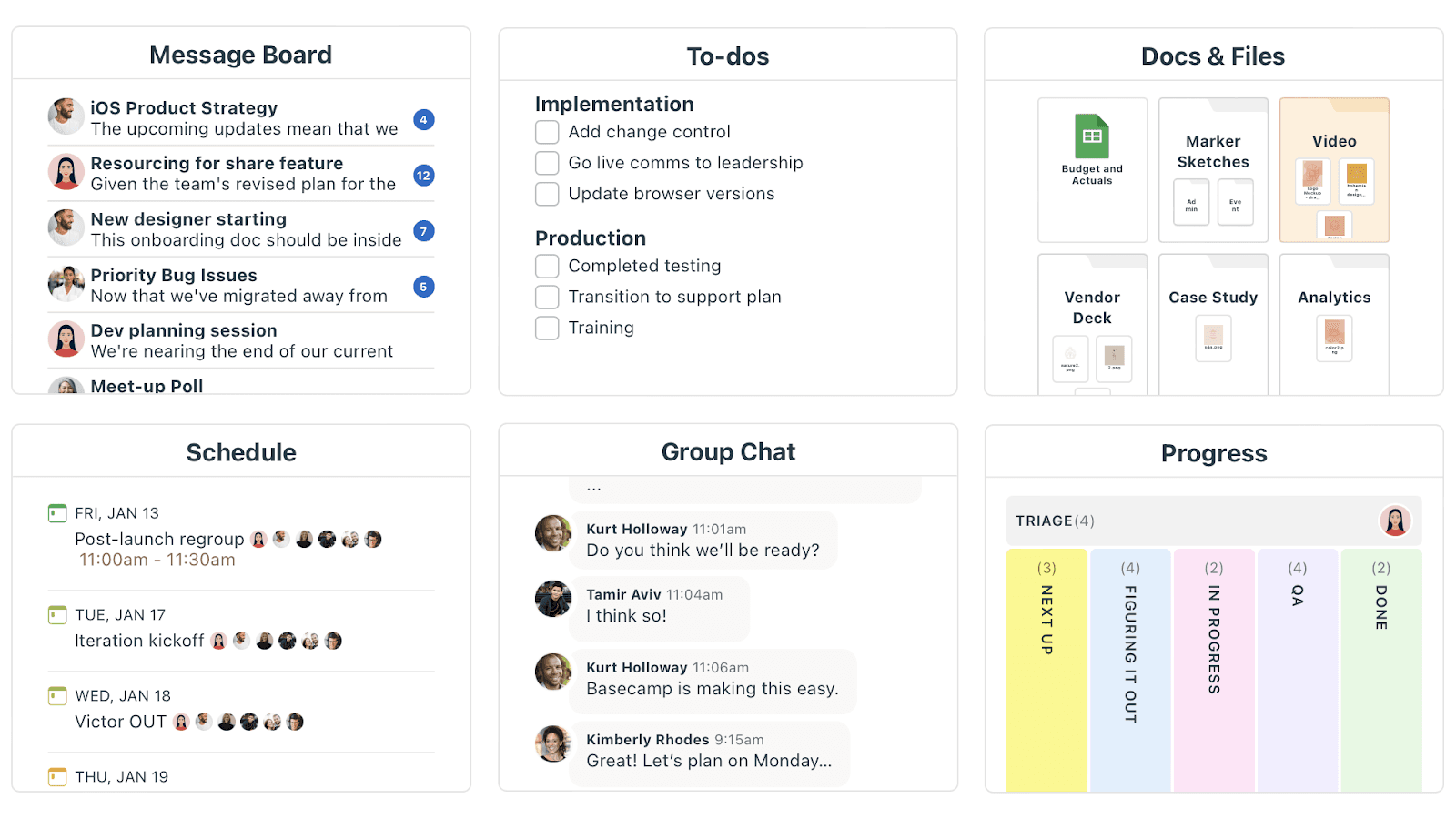
Basecamp is a project management and team collaboration tool that simplifies team workflows, communication, and tracking. It offers a single, organized platform where teams can manage tasks, schedules, documents, discussions, and more. Basecamp is known for its simplicity, user-friendly interface, and ability to consolidate all project-related activities in one place, reducing the need for multiple tools.
Key features:
- Includes features for managing to-dos, tracking progress, and assigning responsibilities.
- Integrates a project calendar to track deadlines, milestones, and events.
- Works well with tools like Google Drive, Dropbox, and Adobe for seamless file sharing.
Pros:
- Simple, one-page project organization with everything in one place.
- Unlimited guest invites (for Basecamp).
- Easy integration with tools like Google Drive and Dropbox.
- Great for freelancers, startups, and small to medium teams.
Cons:
- Limited storage (500 GB) for the regular Basecamp plan.
- There are no advanced customization options compared to other platforms.
Pricing:
- Basecamp offers two plans, each with a 30-day free trial and no credit card required. Pricing starts at $15 per user per month.
User case:
Basecamp is ideal for freelancers, small teams, startups, and businesses looking for an easy-to-use platform that simplifies project management and team collaboration.
Notion - Best for organization and note-taking
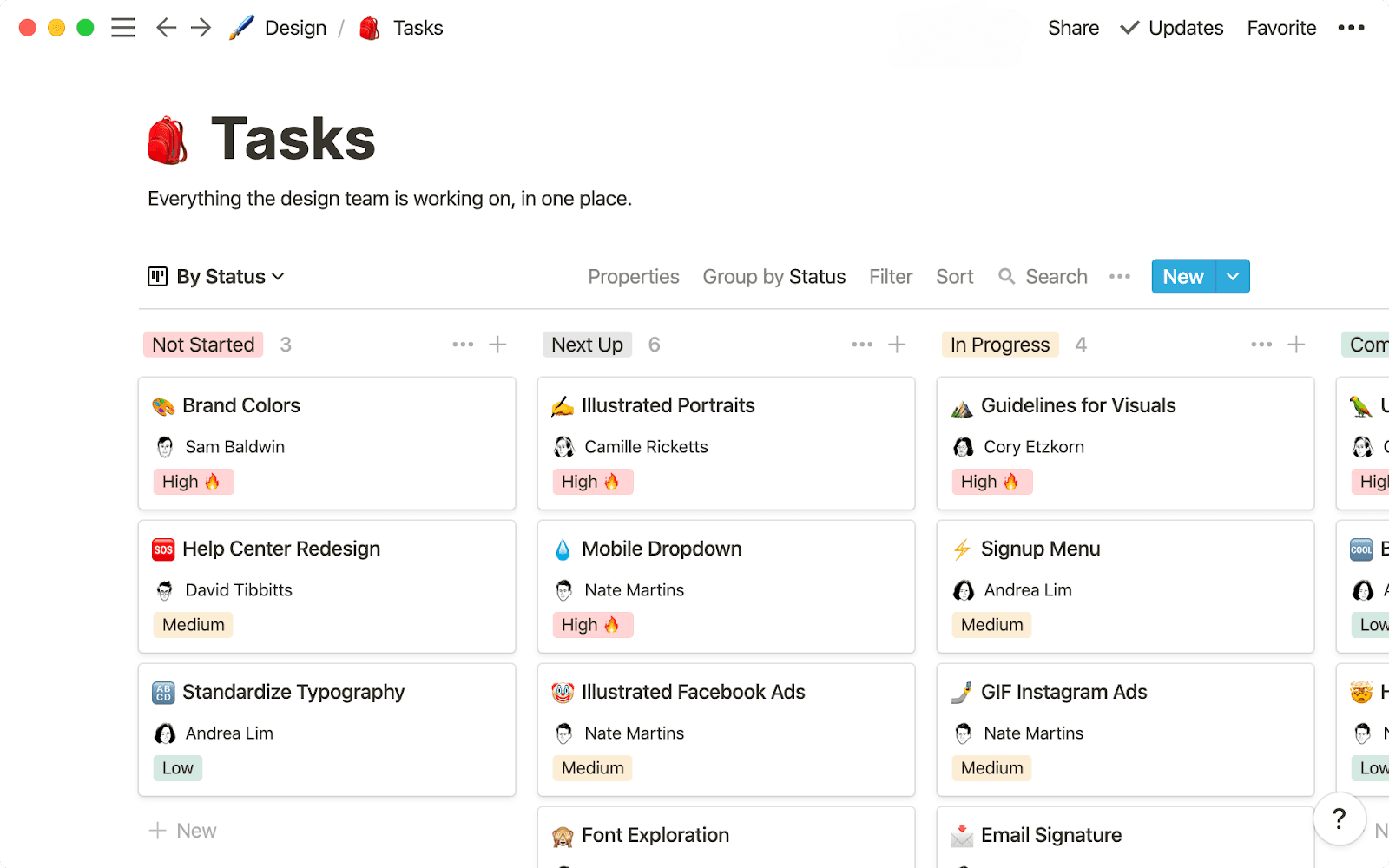
Notion is a workspace that combines project management, note-taking, and collaboration features to help teams and individuals stay organized.
Key features:
- Customizable templates for task management.
- Real-time collaboration.
- Drag-and-drop interface for organizing tasks.
- Database management for project tracking.
- Integration with tools like Google Calendar and Slack.
Pros:
- Highly customizable interface.
- Great for small teams and individual use.
- All-in-one workspace (notes, tasks, databases).
- Free tier available.
Cons:
- Its user interface can get overwhelming for new users
- Lacks advanced project management features like Gantt charts
- Performance can slow down with large datasets
Pricing:
- Free for personal use with a paid plan starting at $8/month.
Use case:
Great for individuals, small teams, and startups needing a simple, customizable tool for task management, knowledge sharing, and collaboration. Suitable for managing projects, tracking goals, and organizing workflows.
How to choose a Monday project management alternative for your team
Choosing the best project management software requires considering several criteria to ensure it meets the needs of your project and team. Here’s a breakdown of the key factors:
- Ease of use: Your choice of software should be easy to use and not too complicated. A tool that’s hard to navigate can slow down the team and reduce productivity. Look for a simple, clean interface with easy-to-find features. Lark is a good example, offering a simple interface where team members can easily create tasks, update progress, and communicate with each other.
- Price: Remember that effective project management software should fit your budget, especially when managing many projects or large teams. The price should match the features it offers.
- Functionality: An efficient project management software should have the essential tools for your projects, like task tracking, timelines, Gantt charts, collaboration tools, and reporting.
- Security: Security is important, especially when dealing with sensitive data. Find software that has strong protection to prevent unauthorized access and data breaches.
- Integration: The software should integrate well with your existing tools, such as email, calendars, communication apps, and file-sharing tools. It should also support custom integrations if you need them.
- Customer support: Good customer support is key, especially when encountering issues. Your software should offer responsive customer support through multiple channels and have a helpful help center, user guides, and community forums to assist with any questions or problems.
Why Lark is the best Monday alternative
When it comes to project management software, Monday.com has been the go-to option for many organizations. But if you're looking for a smarter, more affordable solution, Lark is the ultimate replacement. Let’s take a look at why Lark is the best alternative to Monday.com.
Seamless all-in-one platform
Lark combines messaging, video calls, file sharing, cloud storage, and project management into one powerful super app. Unlike Monday.com, which requires multiple integrations, Lark keeps everything connected in a single platform, streamlining your workflow. With Lark’s fully integrated project management software, Lark Base, you can create flexible databases and set advanced permissions to protect sensitive information—making it the ideal solution for project management, CRM, performance management, and more.
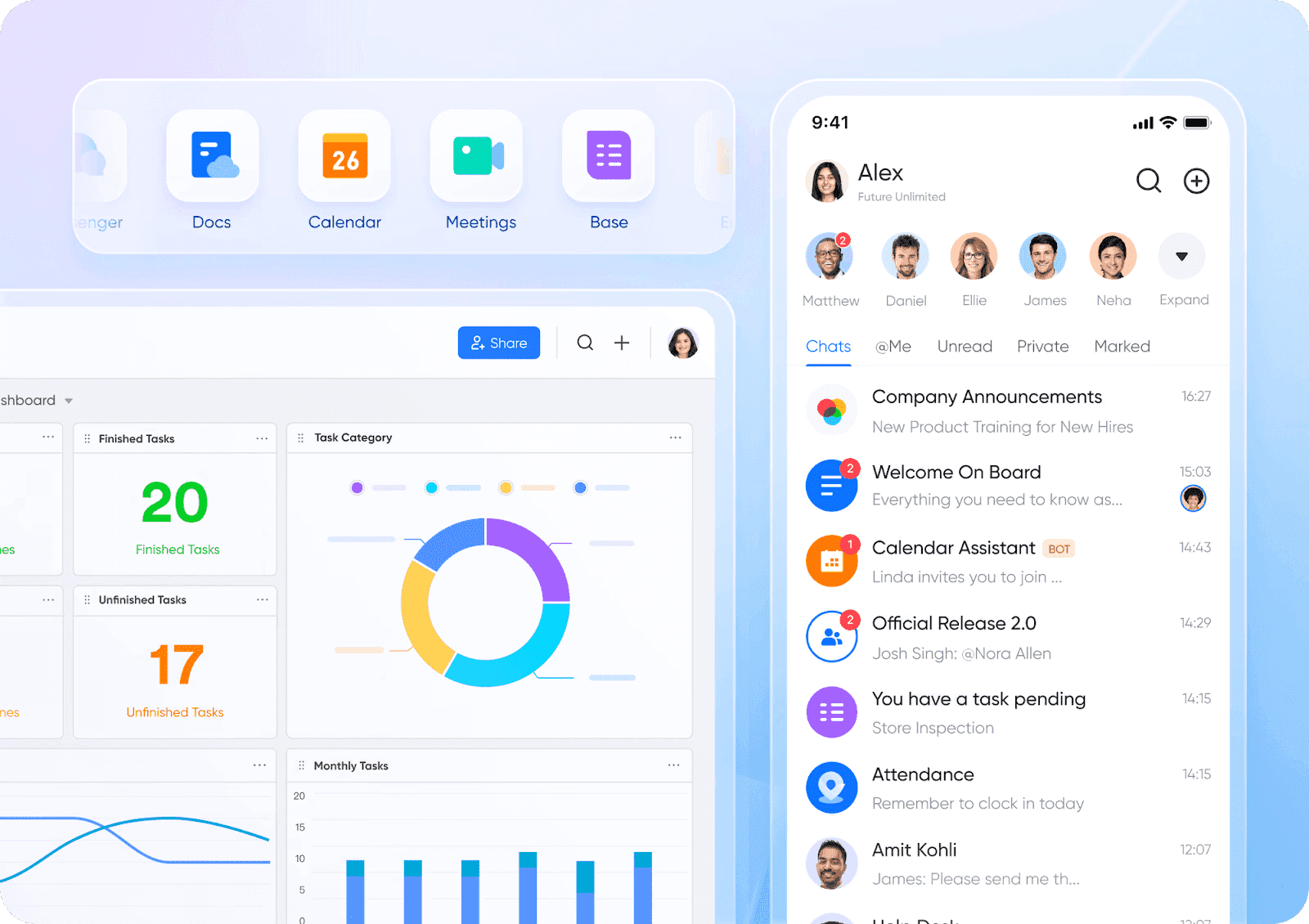
Transparent pricing with superior value
Lark features a clear and straightforward pricing model, including a free plan that significantly outperforms Monday.com’s offerings. While Monday.com may hide costs that can rise as your business expands, Lark provides a fully functional free plan ideal for small businesses and startups. This allows you to manage expenses without compromising on capabilities, such as easily importing data from Excel and transforming it into intuitive dashboards, all without incurring extra costs.
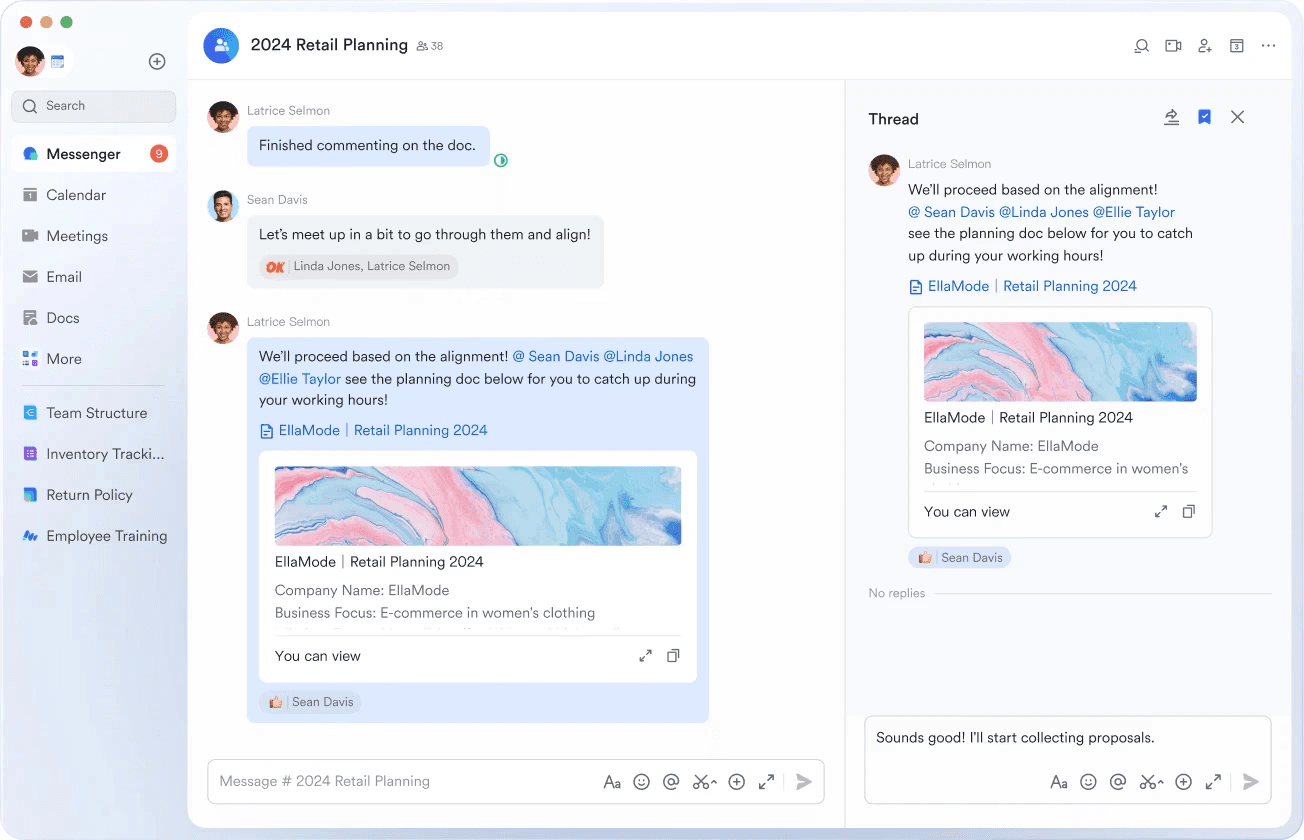
Enhanced communication and collaboration
With Lark Messenger, communication is elevated through the integration of various tools within the chat feed. You can share emails, schedule meetings, and handle approvals all in one conversation, which keeps your team synchronized and productive.
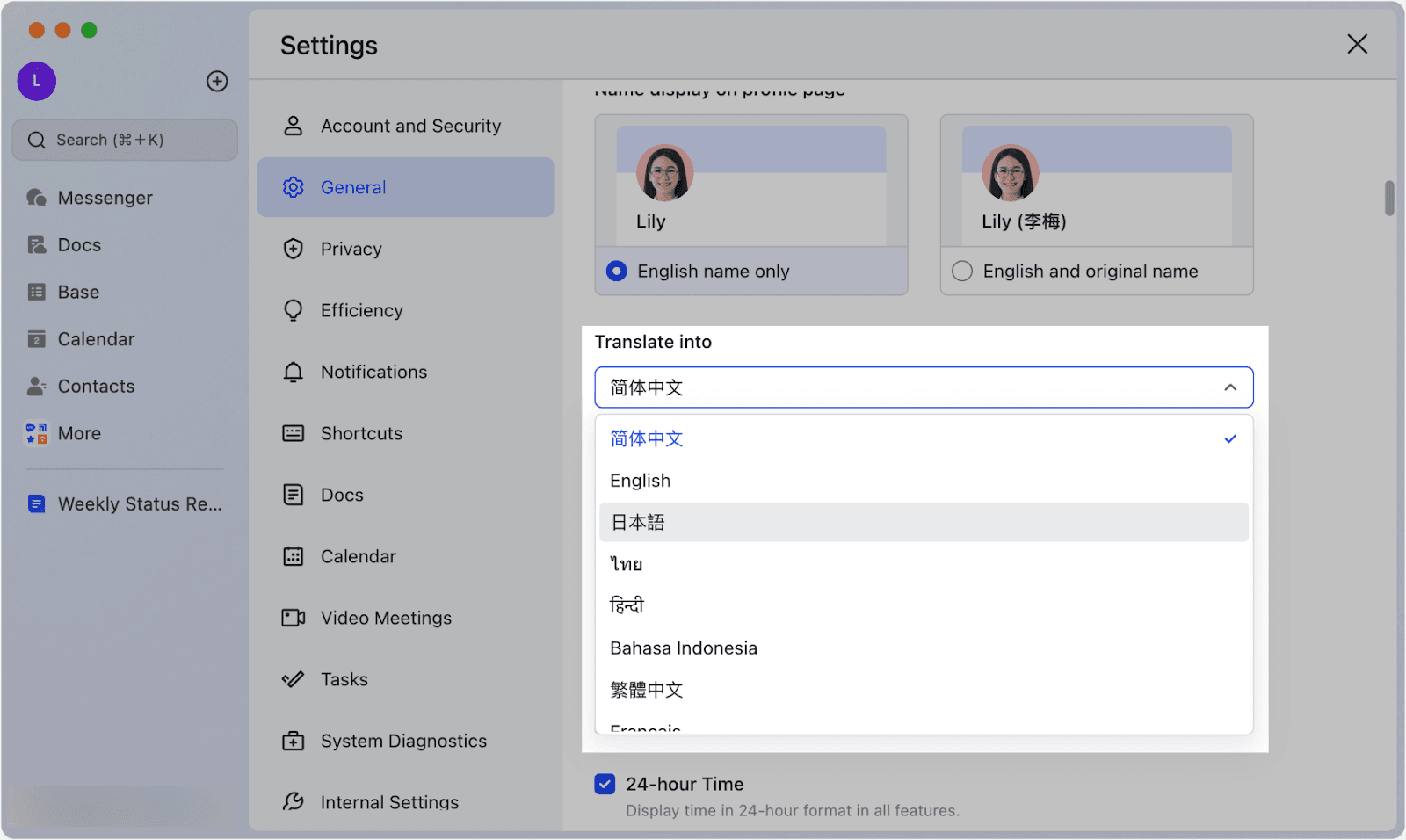
Designed for global teams handling projects
For teams that operate across different time zones and languages, Lark is engineered for effective global collaboration. Its multi-language support and auto-translation features eliminate communication barriers, making it easier for diverse teams to work together. Lark can translate over 100 languages into 24 target languages, which exceeds the capabilities of Monday.
Optimized for mobile use
Lark is designed to enhance productivity on the go, providing a consistent experience on desktop, mobile, and tablet devices. While Monday.com offers mobile functionality, Lark’s mobile-first approach improves usability, allowing you to manage projects and participate in meetings effortlessly. Whether you're tracking project metrics or editing documents, Lark ensures you have access to vital features whenever you need them.
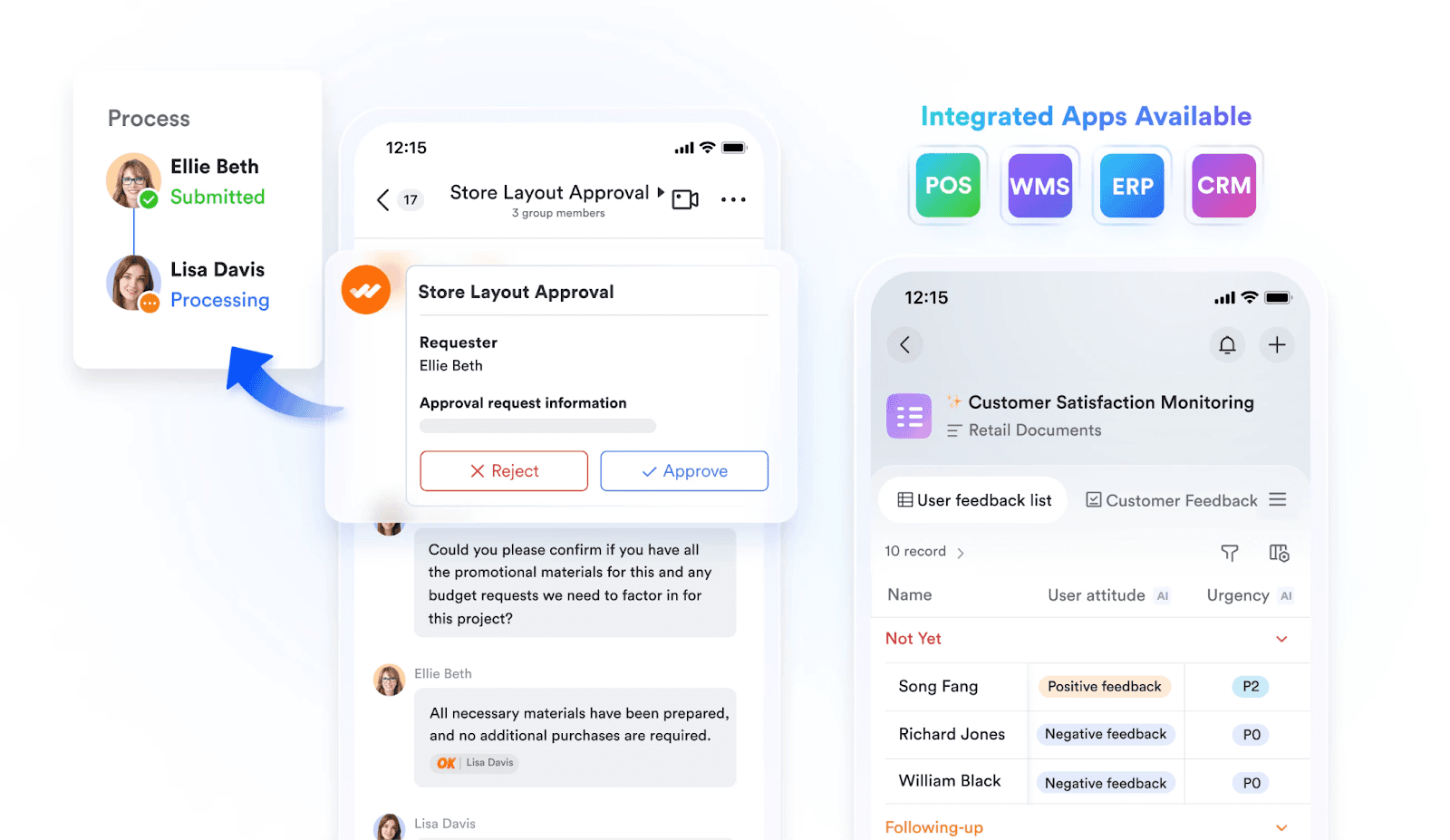 Lark doesn’t just compete with Monday.com—it excels. With better integration, global collaboration tools, and transparent pricing, Lark is the smarter, more cost-effective choice for teams looking to grow and stay productive.
Lark doesn’t just compete with Monday.com—it excels. With better integration, global collaboration tools, and transparent pricing, Lark is the smarter, more cost-effective choice for teams looking to grow and stay productive.This flawless consolidation is exactly why growing organizations are abandoning fragmented software suites. As digital platform uWave discovered during their search for the perfect workspace:

"Lark has become an essential tool for uWave. It has everything we need, in one single package. After trying a variety of other tools available in the market, we feel that Lark best exemplifies what uWave is currently looking for in a digital collaboration tool."

Ding Ren Quek
Co-Founder of uWave
By putting everything under one roof, Lark ensures that teams can execute projects without the friction of toggling apps or paying extra for premium integrations.
FAQ about Monday project management alternatives
What are the best free alternatives to Monday.com?
While there are many affordable alternatives, the best free Monday.com alternatives are Lark and Trello, depending on your needs. For simple task management, Trello is a great choice due to its intuitive Kanban-style interface. If you're a small business, startup, or entrepreneur, Lark is ideal, as its free plan includes 11 integrated products, including the advanced project management tool Lark Base.
Are there any open-source alternatives to Monday.com?
Yes, there are several open-source alternatives to Monday.com, including Taiga, OpenProject, and Wekan. These platforms offer customizable project management features that can be tailored to your team's needs.
Does Google have something similar to Monday.com?
Yes, Google offers Google Workspace tools like Google Sheets and Google Tasks for project management.
Note: For more information, you can refer to Google Workspace Pricing and Google Workspace alternatives.
Does Microsoft have something similar to Monday.com?
Yes, Microsoft provides Microsoft Planner and Microsoft Project as alternatives to Monday.com.
Which monday.com alternative fits my team?
Different team profiles map to different tools:
- Startups and SMBs (under 20 people): Lark provides a free plan covering project management, chat, documents, and meetings in one workspace.
- Software and engineering teams: Jira offers sprint planning, backlogs, and deep connections with developer tools.
- Marketing and ops teams needing lightweight tracking: Asana or Trello deliver easy onboarding and simple automations.
- Data and spreadsheet-heavy teams: Smartsheet or Airtable provide strong formula support and relational databases.
- Microsoft 365 shops: Microsoft Planner comes included in most Business and Enterprise plans.
- Fully remote and async teams: Basecamp or Lark focus on message boards, shared documents, and reducing ping fatigue.
- Cross-functional teams needing CRM and project management: Lark handles both effectively without requiring extra software.
How hard is it to migrate away from monday.com, and how long does it take?
For most small to mid-sized teams, a monday.com migration takes one to three weeks from start to finish. The data export itself is rarely the difficult part; rebuilding the surrounding workflows takes the most effort. I recommend planning for the following phases:
- Data export (1 to 2 days): Use the built-in board export feature in monday.com to pull your data into Excel or CSV files. Paid plans also allow for account-wide exports that include activity logs.
- Board and column mapping (2 to 5 days): Decide which boards to merge, archive, or rebuild. Map your existing monday.com columns like status, people, and timeline to the new platform's specific field types.
- Importing into the new tool: ClickUp and Jira offer native monday.com importers. Platforms like Lark, Asana, Smartsheet, Trello, and Notion rely on CSV imports or third-party connection tools such as Unito and Zapier.
- Automations and external apps (3 to 7 days): Rebuild your previous automations as native rules in the new workspace, and re-authorize third-party connections for tools like Slack, Google Drive, or Zoom.
- Change management (ongoing): Run a one-week parallel period, host a short live demo, and pin a quick-start guide so your teammates can self-serve.
For larger or highly regulated organizations, expect four to eight weeks and consider a phased rollout by department.
Final thoughts on Monday project management alternatives
Managing projects without clear communication, priorities, and workflows often leads to missed deadlines and team confusion. Tasks slip through the cracks, and tracking progress feels like chasing a moving target.
Lark tackles these challenges head-on. As the top alternative to Monday.com, Lark goes beyond basic project management—it’s a fully integrated platform designed for seamless collaboration. With Lark Base for flexible databases, real-time task updates, and effortless document sharing, your team stays connected and organized. No more scattered files or endless email threads—just a smooth, unified workflow.
Why settle for "good enough" when Lark empowers your team to work smarter, not harder? Assign tasks, set deadlines, and track progress—all within one platform. Let Lark streamline your workflow, reduce confusion, and keep your projects moving forward with ease.
Table of contents
Start using Lark today

Manage all your work in one place
Boost team efficiency by 10x
Save up to 70% on software costs
Table of contents
Start using Lark today
Manage all your work in one place
Boost team efficiency by 10x
Save up to 70% on software costs
Keep reading



Lark recognized in 2023 Gartner® Collaborative Content Workspaces and Meeting Solutions reports
Lark, the global superapp for productivity, is delighted to announce it receives recognition in the Gartner's 2023 Innovation Insight for Collaborative Content Workspaces and Market Guide for Meeting Solutions.





2026 Lark Technologies Pte. Ltd.
Headquartered in Singapore with offices worldwide.






Explore: