Businesses today need to innovate faster than traditional software development allows. That's why low-code development platforms have become so popular. These tools let teams build apps with minimal coding, making it easier to streamline workflows, automate processes, and launch customer-facing solutions quickly.
In this guide, we review the top 15 low-code development platforms, covering the leading options for both business teams and enterprise IT. You'll learn about key features, pricing, and the best use cases for each tool, so you can choose the right platform to support your digital transformation goals.
Key takeaways: 5 platforms driving low-code development
Low-code platforms vary widely, from simple workflow tools to enterprise-grade app builders. Here are five of the best low-code development platforms in 2026, each suited for different business and automation needs.
1. Lark: Best for workflow-driven business apps and operations teams.
2. OutSystems: Best for enterprise-grade application development.
3. Mendix: Best for rapid enterprise app delivery.
4. Microsoft Power Apps: Best for business automation within the Microsoft ecosystem.
5. Appian: Best for process automation and enterprise ops teams.
Snapshot of 5 platforms used in low-code development
This snapshot gives you a quick comparison of the top low-code development platforms, highlighting what each tool is best suited for and who benefits most from using it. Next, we'll explore each platform in more detail to help you choose the right fit based on your business goals, technical needs, and scalability requirements.
Information source: Official vendor sites
Update time: 2026-02-15
Note: Pricing and plan details reflect publicly available data as of the update date and may vary based on region, billing cycle, and number of agents.
Build applications easily with the #1 tool today
What are low-code development platforms?
Low-code development platforms are software tools that enable users to create applications through graphical user interfaces and configuration rather than traditional hand-coded programming. They provide a where developers and non-technical users alike can drag and drop components, connect data sources, and define logic to build functional apps. This approach democratizes software development, enabling "citizen developers", business users without formal coding training, to build solutions for their specific needs. By abstracting away the complexity of coding, these platforms significantly reduce the time and cost of .
These platforms are not just about speed; they are about bridging the gap between business requirements and IT delivery. They often come with pre-built templates, connectors to popular services, and built-in security features that ensure the apps are robust and scalable. For organizations managing complex tasks or extensive work management systems, low-code platforms offer a way to customize solutions without waiting for scarce engineering resources. They serve as a critical bridge, allowing business ideas to be prototyped and deployed rapidly while maintaining the governance standards required by enterprise IT.
Low-code app development platforms vs. traditional ones
Low-code app development platforms and traditional development follow fundamentally different approaches to building software. Understanding these differences helps organizations choose the right model based on speed, complexity, and long-term scalability needs.
Low-code app development platforms prioritize speed, accessibility, and operational efficiency by enabling teams to build applications using visual tools and prebuilt components. Traditional development offers deeper customization and architectural control but requires specialized skills, longer timelines, and higher maintenance overhead.
In practice, low-code platforms are ideal for rapidly building internal tools, , and business applications, while traditional development remains the better fit for highly complex, performance-critical, or large-scale custom systems.
Top 15 platforms used in low-code development in 2026
1. Lark: Workflow-driven low-code application development platforms
distinguishes itself as a collaboration platform that bridges the gap between communication and application development. It is designed for operations and cross-functional teams who need to build custom workflow-driven apps without stepping outside their daily communication environment. This makes it an ideal choice for organizations aiming to improve their and streamline processes.
Unified data & development hub
simplifies low-code development by replacing manual coding with intuitive, visual tools. Structured tables with drag-and-drop fields allow you to instantly turn raw data into functional front-end applications, such as Kanban boards or . To further lower the technical barrier, the built-in AI can generate complex formulas from natural language and automate data extraction and summarization. 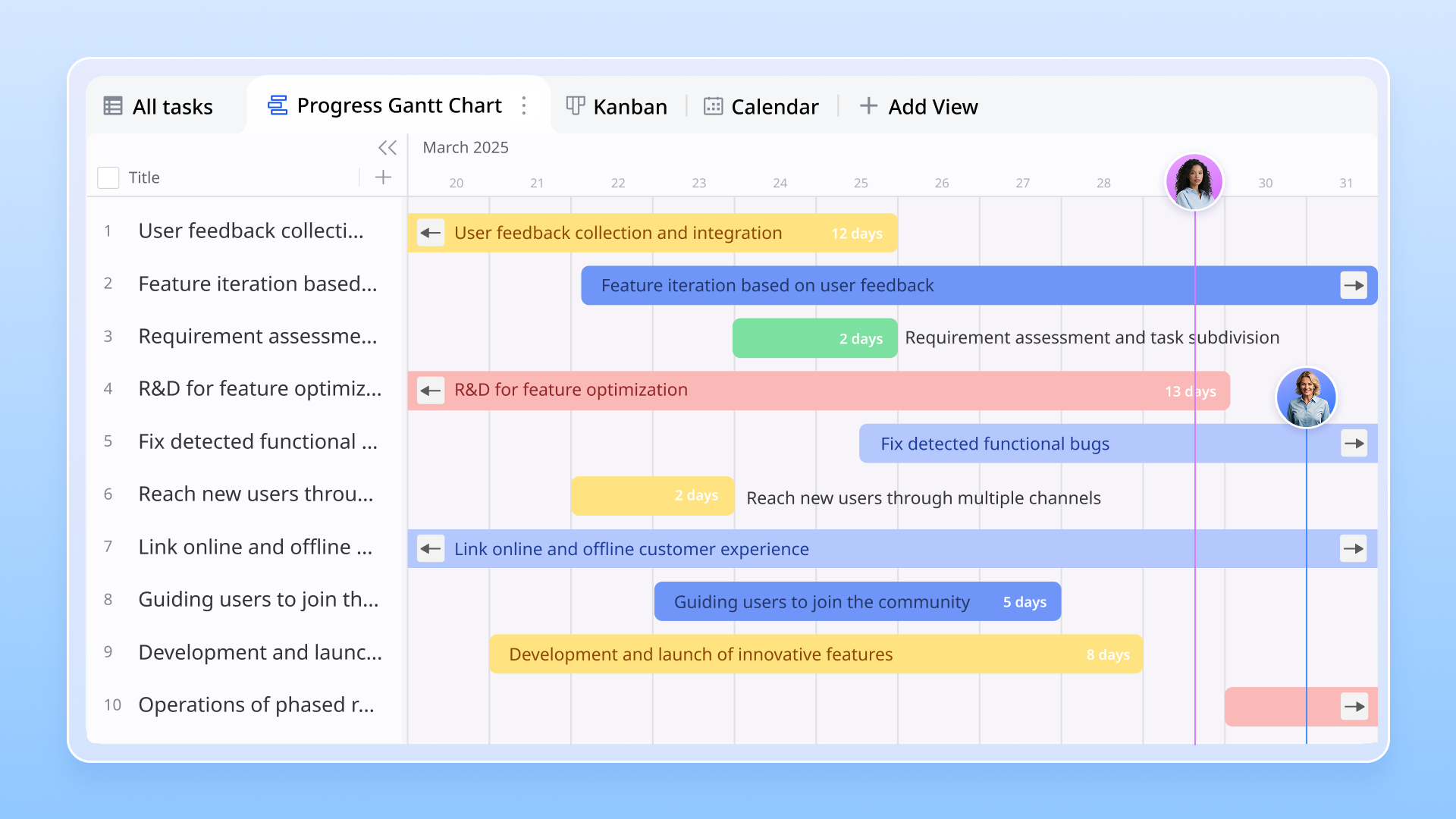
Zero-code app building
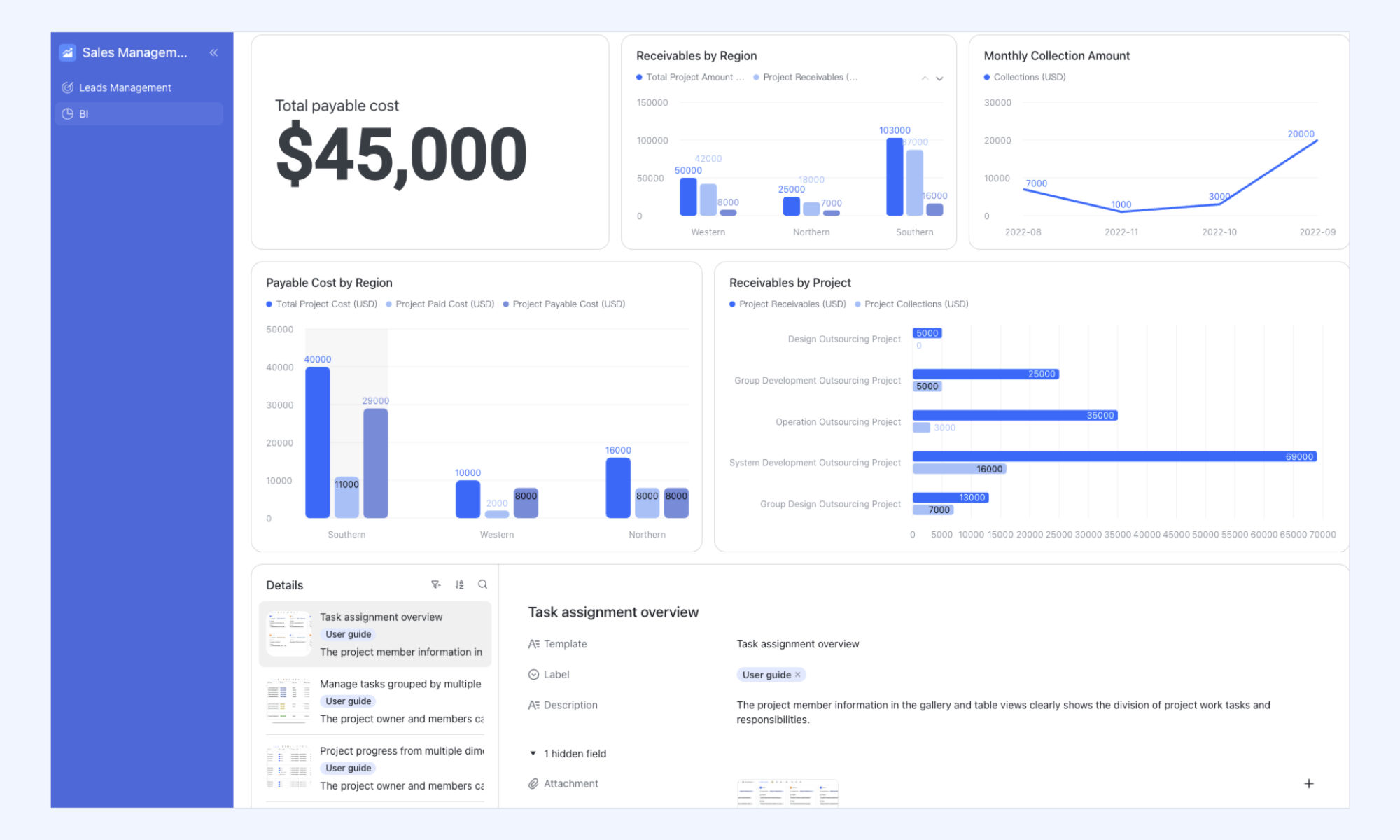
Lark democratizes software development by allowing non-technical staff in HR, marketing, or operations to build sophisticated internal tools. The platform utilizes , which feature an intuitive interface builder. This tool allows "citizen developers" to drag and drop functional blocks—such as gallery views, submission forms, and charts—onto a canvas to create a custom mobile or desktop UI.
Low-code workflow automation
Instead of merely automating data entry, Lark focuses on automating human interactions and decision-making. The platform provides a visual, drag-and-drop workflow designer that lets users build complex "If/Else" logic and multi-step sequences. These flows can trigger automatically based on specific data changes or user actions, assigning tasks to different conditional branches to ensure the right stakeholders are engaged at the right time. 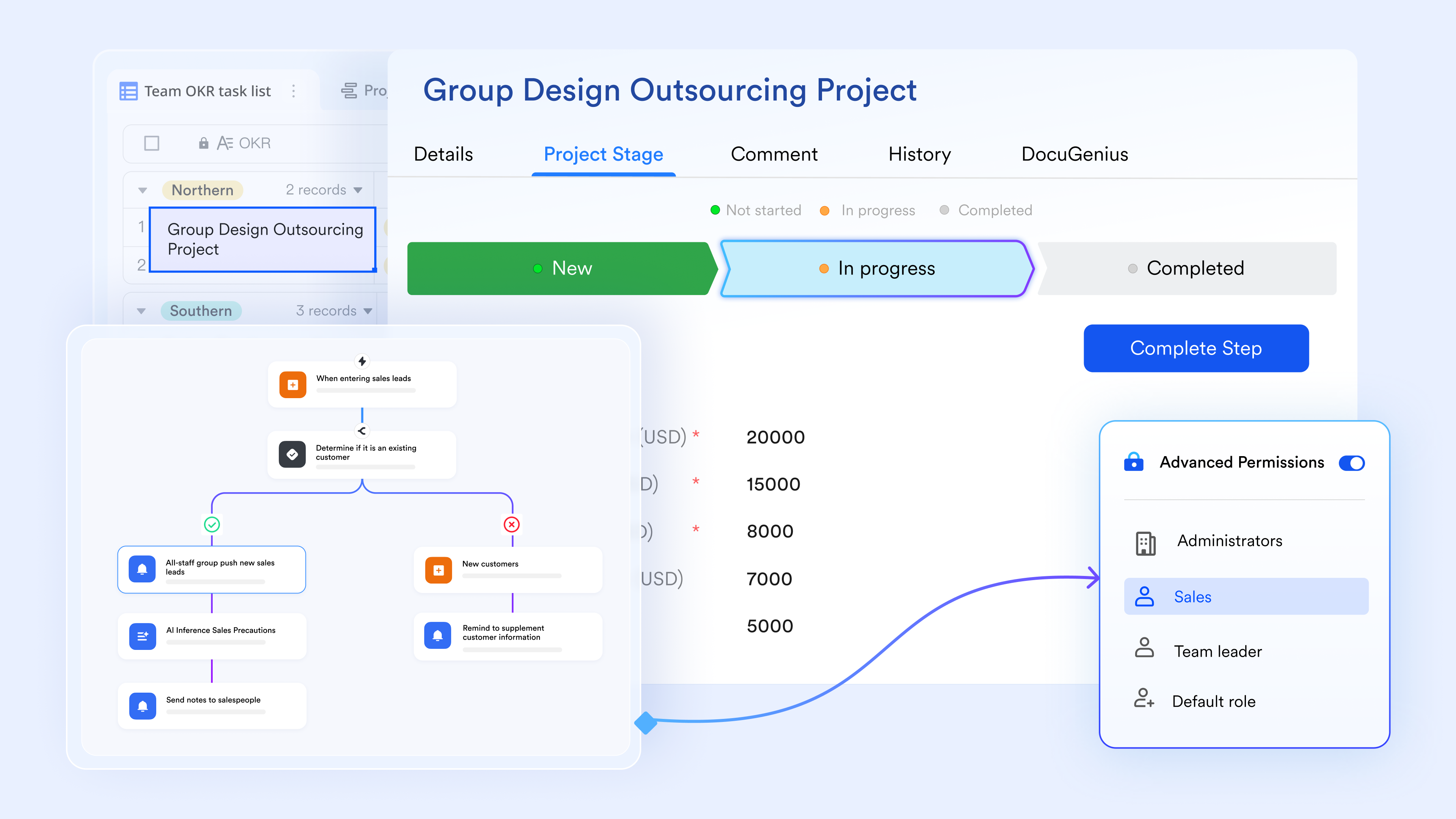
Unification of fragmented enterprise systems
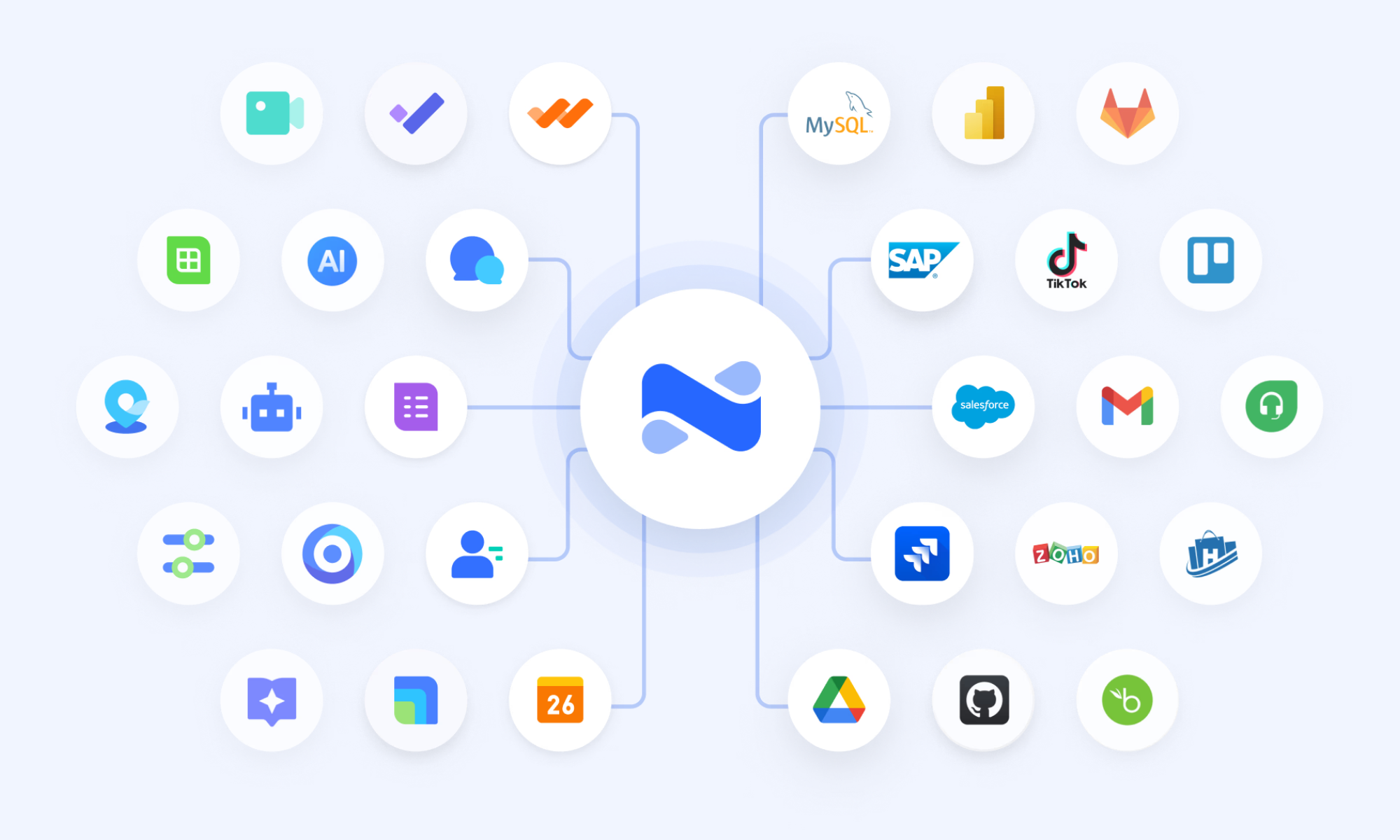
Lark serves as a powerful integration hub that prevents "Shadow IT" by connecting custom-built applications with existing enterprise software. This is achieved through , a low-code integration engine that provides standardized connectors to external systems, including Salesforce, Jira, SAP, and Google Drive. By using AnyCross, teams can ensure that the data living in their custom Lark applications is automatically synchronized with the broader corporate tech stack, reducing manual data migration and fragmented reporting.
Pros:
- Combines app building with communication tools, reducing the need for separate software.
- Empowers non-technical users to build useful apps with drag-and-drop simplicity.
- Real-time collaboration ensures teams stay aligned without context switching.
- Built-in governance and security controls make it suitable for larger organizations.
Cons:
- Advanced automation and integrations may require a learning curve for new users.
:
- Starter plan: Free forever plan that includes 11 powerful tools for up to 20 users. It also comes with 100GB of storage, 1000 automation runs, AI translations, and more.
- Basic plan: $6/user/month (billed annually) for up to 500 users. It includes everything in Starter plus group calling for up to 500 attendees, 5TB of storage, 1000 automation runs, and more. For more details, please .
- Pro plan: $12/user/month (billed annually) for up to 500 users. It includes everything in Basic plus group calling for up to 500 attendees, 15TB of storage, 50,000 automation runs, and more.
- Enterprise plan: for custom pricing. Supports unlimited users and includes even more automation runs and advanced security, compliance, and management features.
For small teams with simple communication needs

18 months message history
1000 Base automation runs/month
2000 rows per table in Base
Most POPULAR
For companies with comprehensive collaboration and management needs
Unlimited message history
500-participant video meetings
50k Base automation runs/month
20k rows per table in Base
For large companies with advanced security and organizational management needs
Get a personalized demo and pricing
Unlimited message history
500-participant video meetings
15 TB storage + 30 GB storage/user
500k Base automation runs/month
50k Base automation runs/month
Most POPULAR
For companies with comprehensive collaboration and management needs
Unlimited message history
500-participant video meetings
50k Base automation runs/month
20k rows per table in Base
2. OutSystems: Enterprise-grade low-code application platform
OutSystems is a powerhouse in the low-code market, specifically designed for high-performance enterprise applications. It provides a comprehensive suite of tools that enable developers to build scalable, secure web and mobile apps. OutSystems is particularly well-suited for organizations that need to modernize legacy systems or build high-performance consumer-facing applications. The platform offers full-stack capabilities, allowing developers to manage everything from the UI to database logic within a single environment.
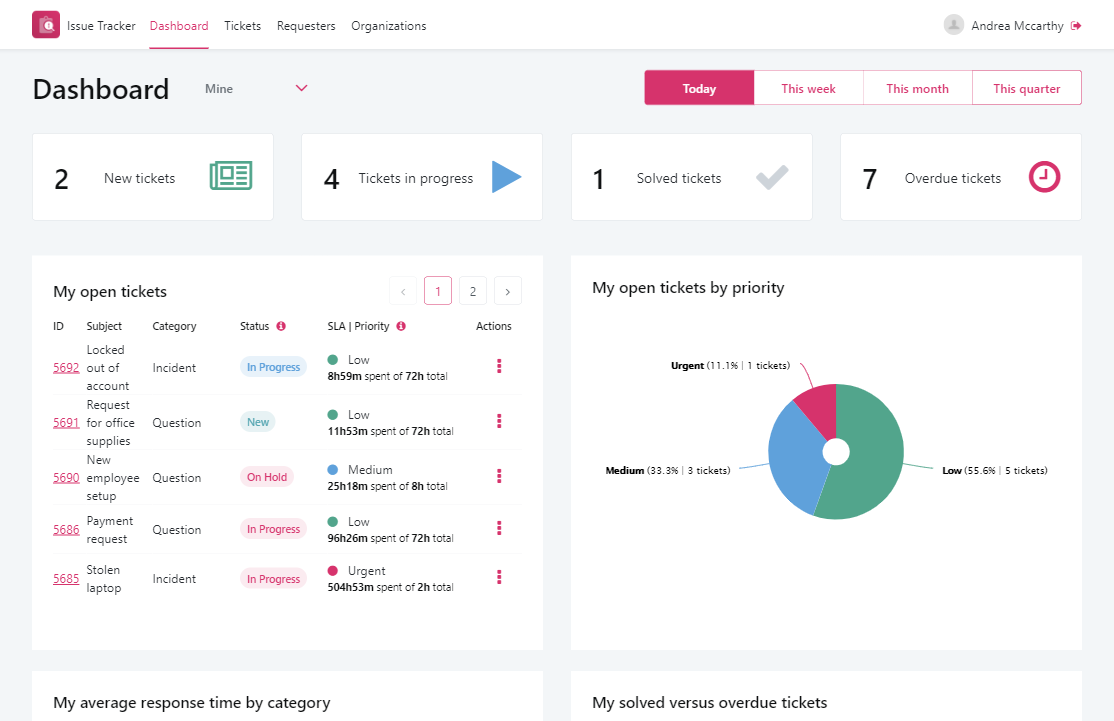
Image source: outsystems.com
Key features:
- Full-stack visual development.
- AI-assisted development tools to speed up coding.
- One-click deployment to cloud or on-premises.
- Strong capabilities for with offline support.
Pros:
- Excellent for building complex, mission-critical apps.
- High scalability for enterprise demands.
- Strong security and compliance features.
Cons:
- Higher price points compared to some competitors.
- Steeper learning curve for non-technical users.
Pricing:
- Contact sales for pricing details.
3. Mendix: Low-code platforms for web development
Mendix is renowned for its collaboration-centric approach, bridging the gap between business and IT. It is a cloud-native platform that supports the entire application lifecycle, from ideation to deployment and operations. Mendix is often chosen by large enterprises for its ability to handle complex integrations and its support for both simple departmental apps and large-scale enterprise systems. The platform emphasizes "collaborative development," allowing business analysts and developers to work together seamlessly on the same projects.
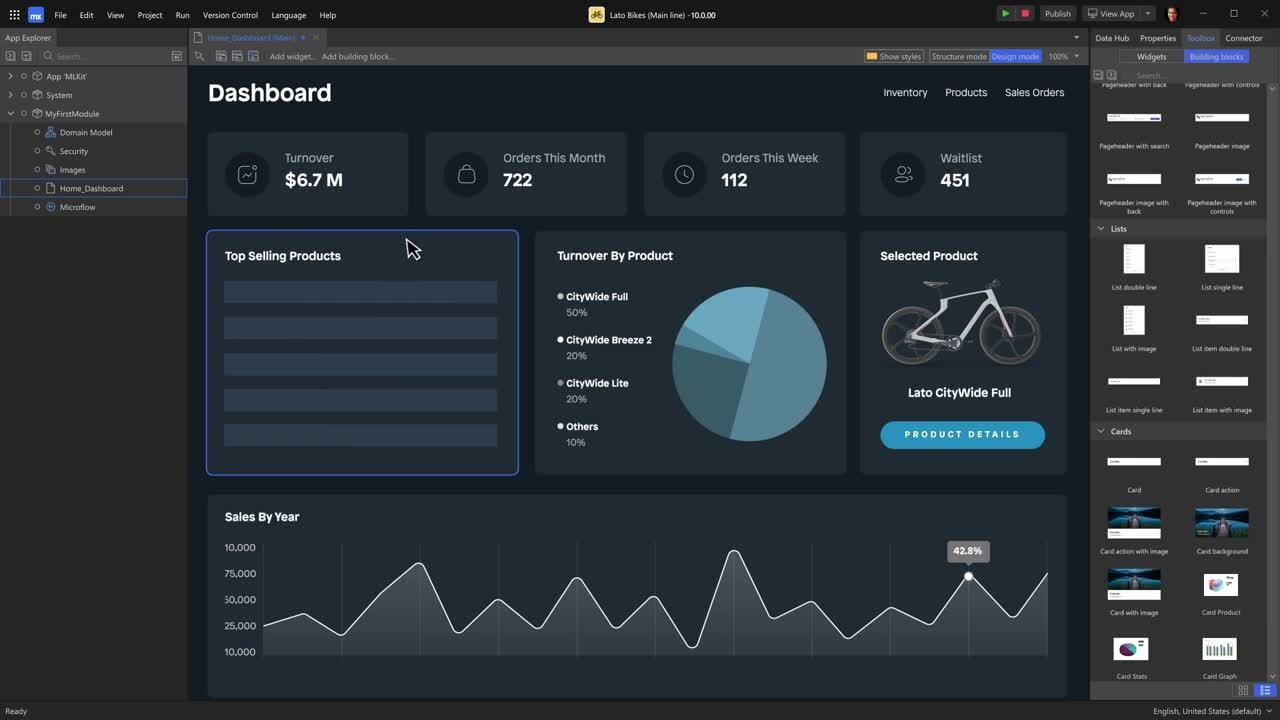
Image source: mendix.com
Key features:
- Integrated development environment for web and mobile.
- App store for reusable components and templates.
- Multi-cloud deployment options (AWS, Azure, SAP, etc.).
- Strong community support and marketplace.
Pros:
- Excellent collaboration tools between business and IT.
- Highly scalable and flexible for various use cases.
- Good support for enterprise legacy system integration.
Cons:
- It can be complex for very small teams or simple projects.
- Pricing can be high for small businesses.
Pricing:
- Free tier for individual developers.
- Contact sales for pricing details.
4. Microsoft Power Apps: Business-focused low-code app builder
Microsoft Power Apps is a key component of the Microsoft Power Platform and is deeply integrated with the Microsoft 365 ecosystem. It is an excellent choice for organizations already heavily invested in Microsoft technologies like Excel, SharePoint, and Teams. Power Apps allows users to quickly create canvas apps or model-driven apps that leverage data stored in the Common Data Service. It is designed to improve productivity by replacing manual processes with custom apps that connect to existing data sources.
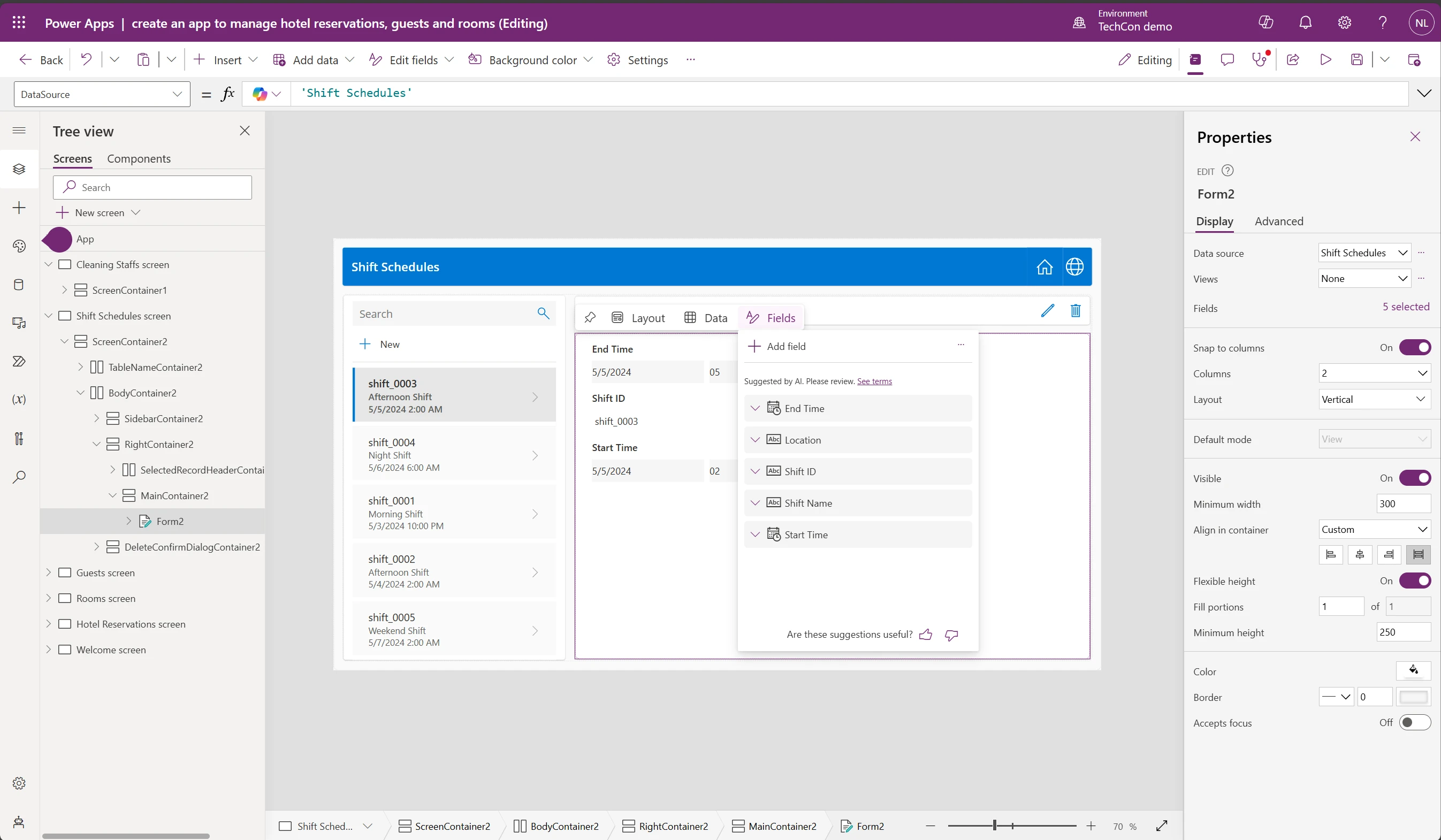
Image source: microsoft.com
Key features:
- Pre-built templates and connectors for Microsoft services.
- Canvas apps for custom UI design and model-driven apps for data-focused apps.
- Integration with Power Automate for workflow automation.
- AI Builder capabilities for adding AI components to apps.
Pros:
- Seamless integration with Microsoft 365 and Dynamics 365.
- Familiar interface for Excel and SharePoint users.
- Strong community and extensive documentation.
Cons:
- Best performance and features are locked within the Microsoft ecosystem.
- Licensing costs can add up with premium connectors.
Pricing:
- Power Apps Developer plan: Free.
- Power Apps Premium: $20.00 user/month, paid yearly.
5. Appian: Process-centric low-code automation platform
Appian focuses heavily on business process management (BPM) and automation. It is designed to help companies automate complex, data-intensive processes quickly. The platform unifies data, processes, and users into a single interface, making it easier to manage workflows from start to finish. Appian is particularly strong in industries like finance, government, and healthcare, where compliance and process efficiency are paramount. Its low-code interface allows for rapid development while maintaining strict governance.
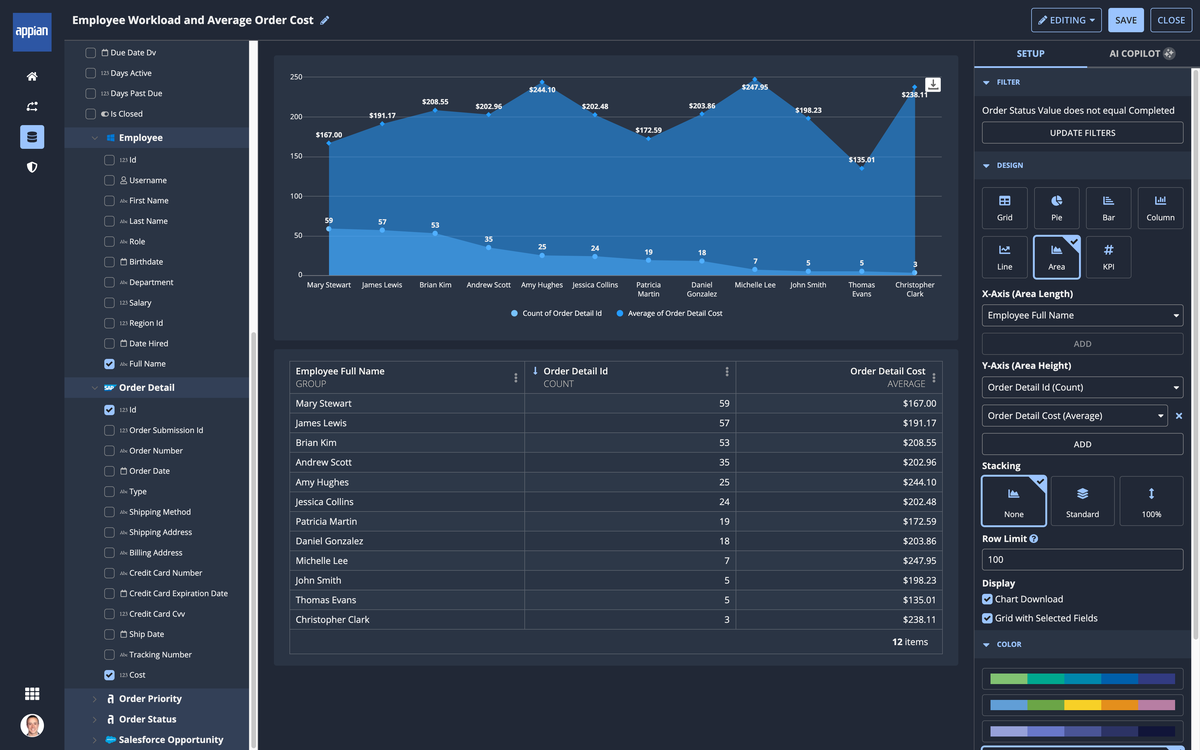
Image source: appian.com
Key features:
- Low-code process modeling with a drag-and-drop interface.
- Unified data architecture for easy data integration.
- Robust security and compliance features.
- AI and RPA (Robotic Process Automation) capabilities.
Pros:
- Excellent for automating complex business processes.
- Strong focus on security and compliance.
- Good mobile capabilities for on-the-go process management.
Cons:
- Less focus on building consumer-facing mobile apps.
- It can be expensive for smaller organizations.
Pricing:
- Contact sales for pricing details.
6. Salesforce Lightning: CRM-based low-code app builder
Salesforce Lightning is the app development platform built directly into the Salesforce ecosystem. It is the go-to choice for businesses that want to extend the functionality of their Salesforce CRM. Lightning allows users to build custom components, pages, and applications that live natively within Salesforce. This ensures a consistent user experience and deep integration with customer data. It is highly effective for sales, service, and marketing teams looking to customize their CRM workflows.
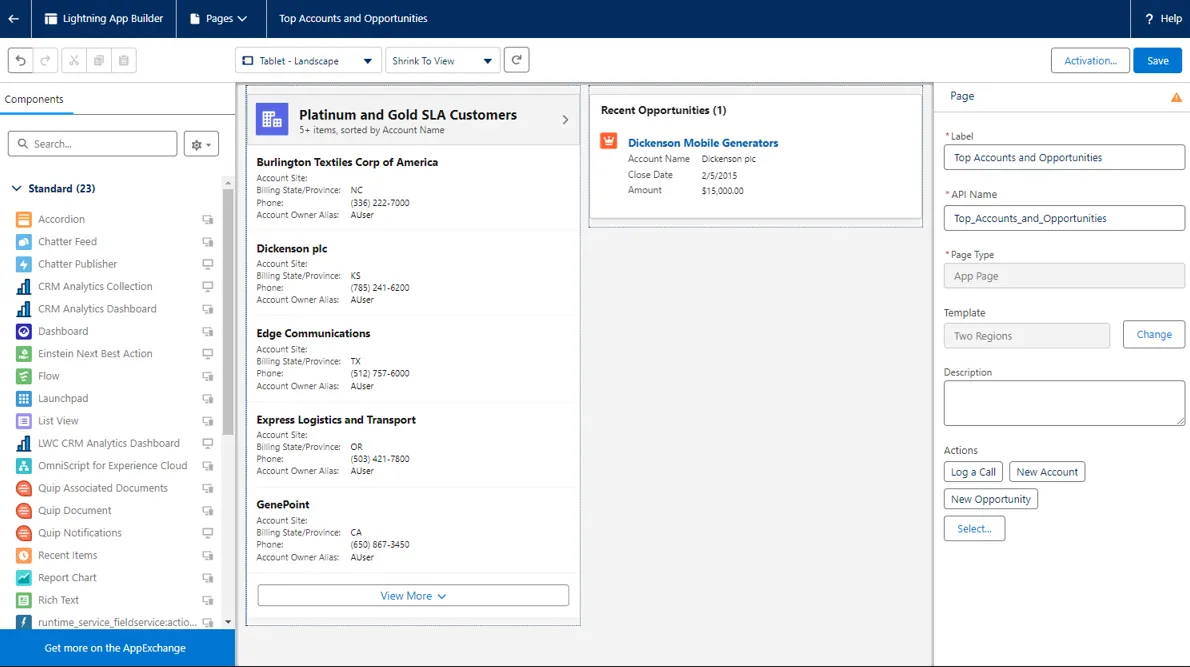
Image source: salesforce.com
Key features:
- Drag-and-drop app builder for Salesforce components.
- Pre-built components and templates specific to CRM functions.
- Deep integration with Salesforce data and AppExchange.
- Lightning Web Components for advanced custom development.
Pros:
- Perfect for organizations already using Salesforce.
- Enhances CRM functionality without leaving the platform.
- Large ecosystem of third-party apps on AppExchange.
Cons:
- Limited utility outside of the Salesforce ecosystem.
- Requires a Salesforce subscription to use effectively.
Pricing:
- Included in Salesforce user licenses (varies by edition).
7. Zoho Creator: SMB-friendly low-code app platform
Zoho Creator is part of the Zoho suite of business applications and is tailored for small to medium-sized businesses (SMBs). It allows users to create custom applications for various business needs, from inventory management to HR leave tracking. The platform is known for its ease of use and affordability. It integrates well with other Zoho products, making it a compelling choice for businesses that operate within the Zoho ecosystem but need custom solutions that off-the-shelf software doesn't provide.
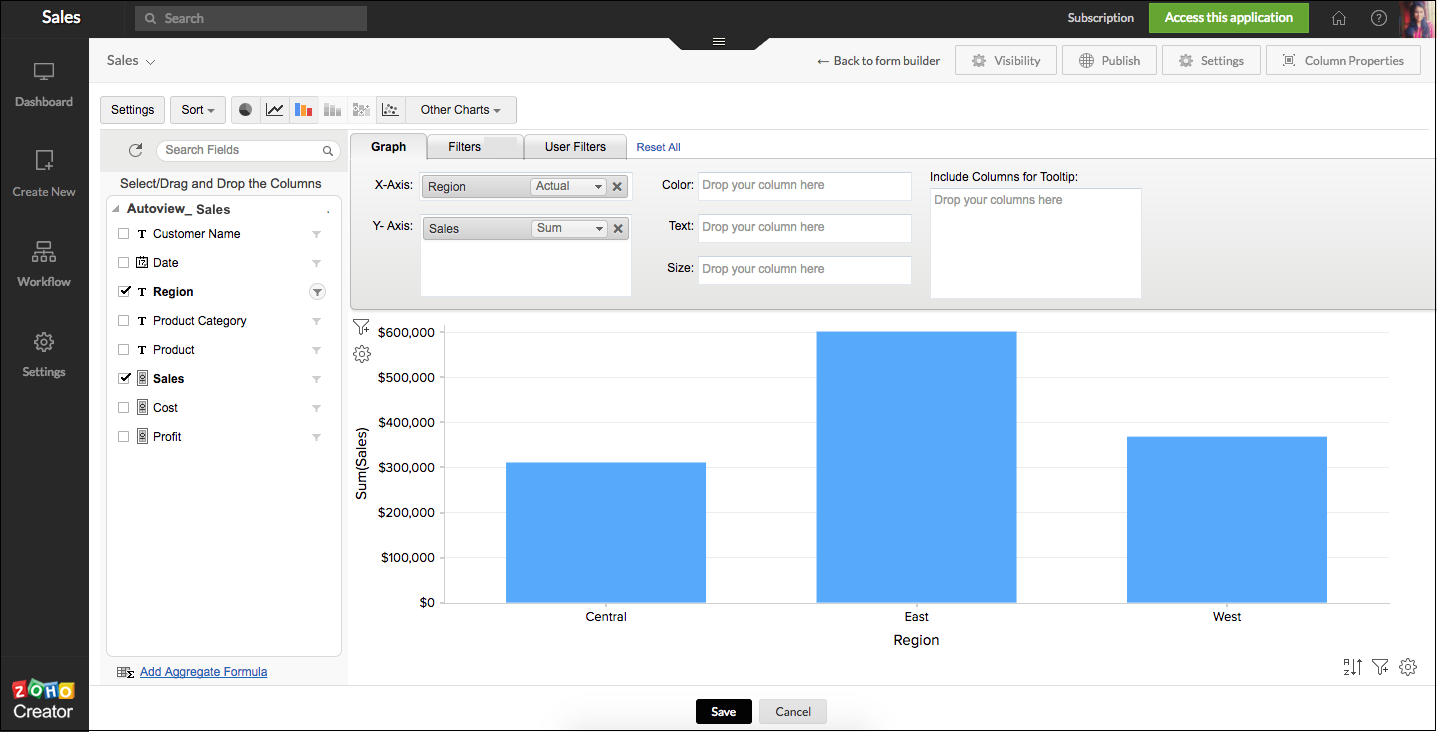
Image source: zoho.com
Key features:
- Visual drag-and-drop interface.
- Pre-built application templates for common business tasks.
- Integration with Zoho Suite and third-party apps.
- Scripting capabilities for advanced logic.
Pros:
- Cost-effective pricing for SMBs.
- Easy to learn and use for non-developers.
- Good integration with Zoho's business tools.
Cons:
- May lack advanced features needed for complex enterprise apps.
- Customization options can be limiting compared to enterprise platforms.
Pricing:
- Standard: $5.30 per user/month billed annually.
- Professional: $13.24 per user/month billed annually.
- Enterprise: $16.55 per user/month billed annually.
- Flex: Contact for custom quote.
8. Airtable: Database-driven low-code app platform
Airtable blurs the line between a spreadsheet and a database, offering a user-friendly interface for building custom applications. It is highly visual and intuitive, making it popular among teams that need to organize data and create simple workflows without deep technical knowledge. Airtable uses a "block" system that allows users to add features like kanban boards, calendars, and forms to their data grids. It is ideal for project management, content calendars, and lightweight CRM systems.
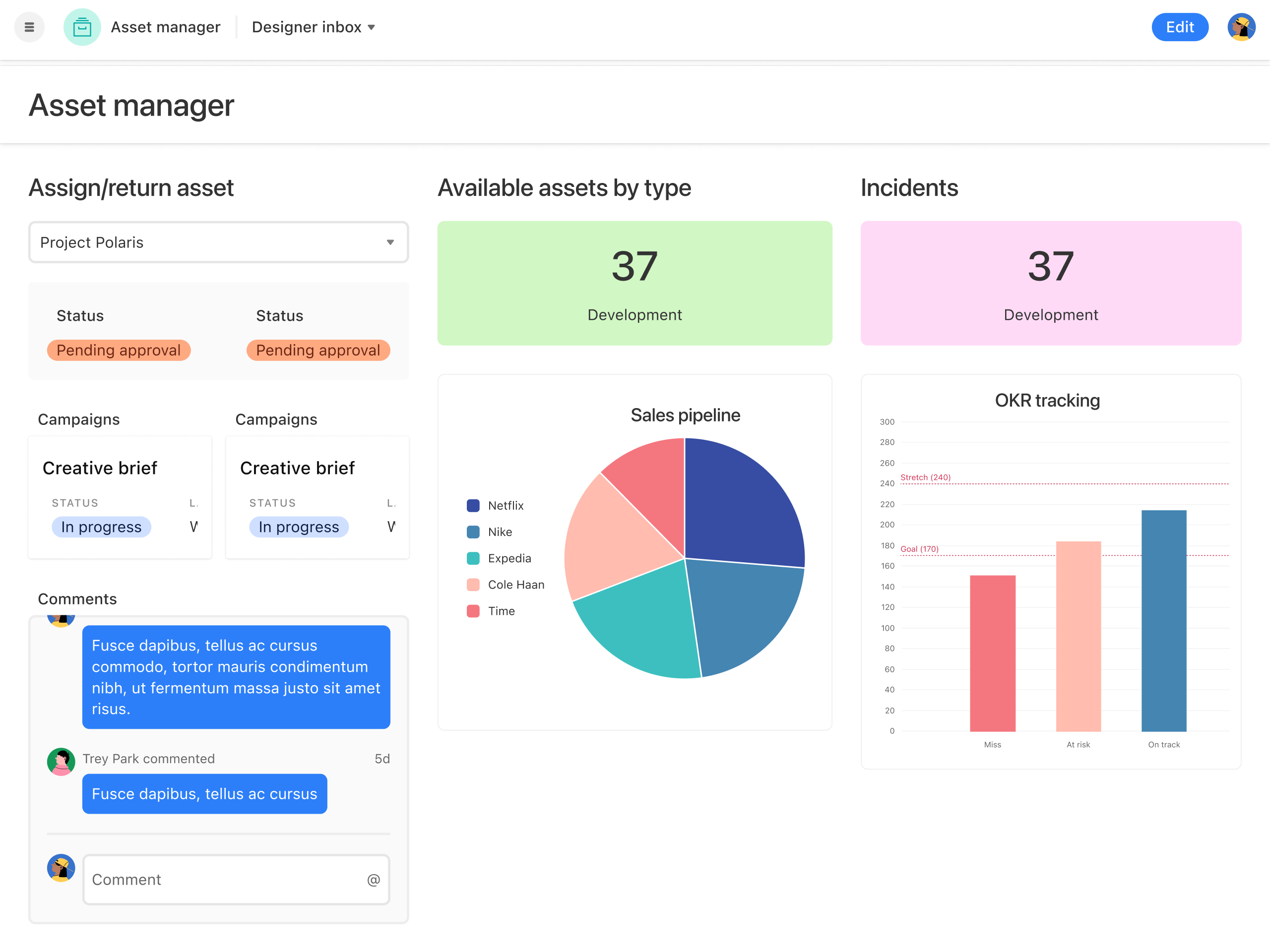
Image source: airtable.com
Key features:
- Spreadsheet-like interface with database power.
- Views like grid, kanban, calendar, and gallery.
- Automations for triggering actions based on record changes.
- Marketplace for extensions and integrations.
Pros:
- Extremely user-friendly and quick to set up.
- Highly flexible for data visualization.
- Strong collaboration features.
Cons:
- Not suitable for building complex, public-facing apps.
- It can become slow with very large datasets.
- Advanced features require higher-tier plans.
Pricing:
- Free: $0 for individuals or small teams.
- Team: $20 per seat/month billed annually.
- Business: $45 per seat/month billed annually.
- Enterprise scale: Custom pricing.
9. Quickbase: Workflow automation, low-code software
Quickbase is designed to help operational teams turn manual processes into automated digital workflows. It is a no-code/low-code platform that excels at connecting people, data, and processes across different departments. Quickbase is often used for project management, reporting, and resource planning. It provides a robust set of tools for building relational databases and automating the flow of information between them, which is crucial for breaking down data silos in an organization.
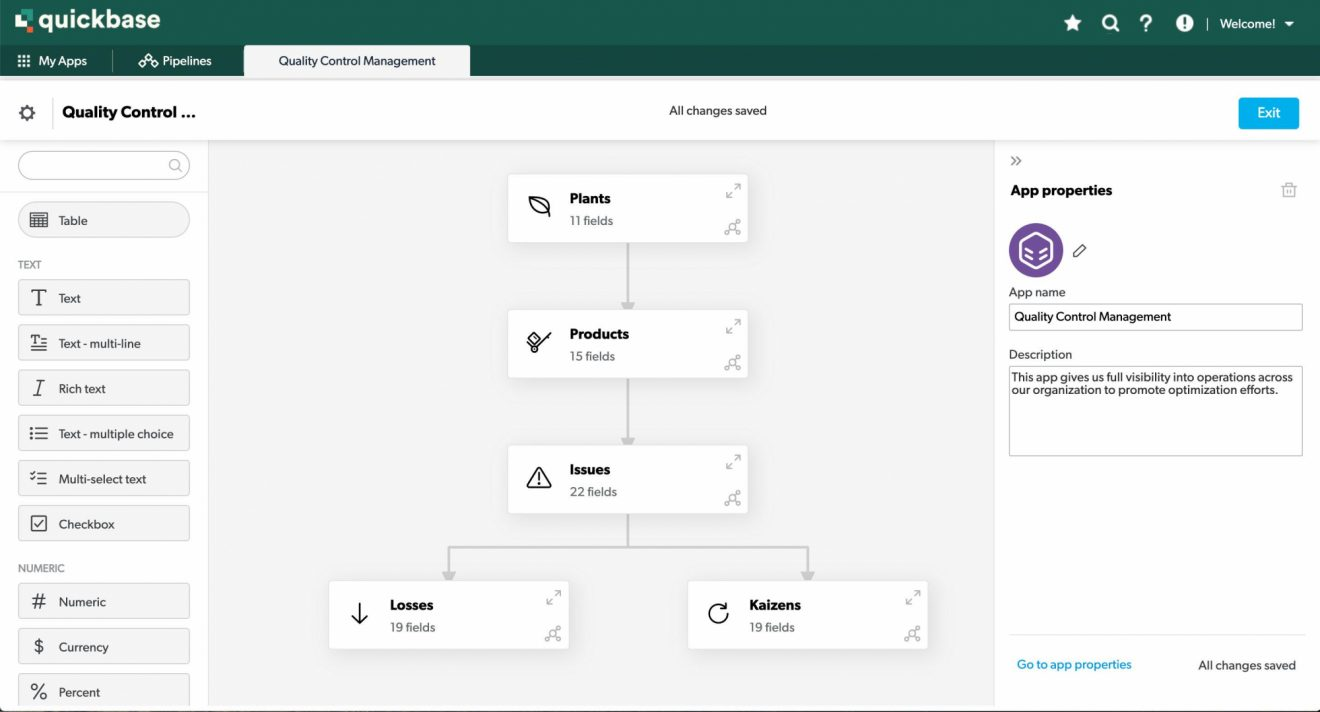
Image source: quickbase.com
Key features:
- Relational database capabilities for complex data relationships.
- Automated workflows and notifications.
- Customizable reporting and dashboards.
- Role-based permissions for data security.
Pros:
- Strong capabilities for process automation and reporting.
- Good for connecting disparate data sources.
- Enterprise-grade security and governance.
Cons:
- Interface can feel dated compared to newer platforms.
- Learning curve for building complex relational databases.
Pricing:
- Free trial: $0 free for 30 days.
- Team: $35 per user, per month, priced annually.
- Business: $55 per user, per month, priced annually.
- Enterprise: Fully customizable.
10. Retool: Developer-centric low-code tool
Retool is specifically built for developers who need to build internal tools quickly. It focuses on connecting to any database or API and generating a UI based on that data. Unlike many low-code platforms aimed at citizen developers, Retool is optimized for engineers who want to skip the frontend boilerplate and focus on logic. It is widely used for building admin panels, dashboards, and command centers. It allows for extensive customization using JavaScript, giving developers full control when needed.
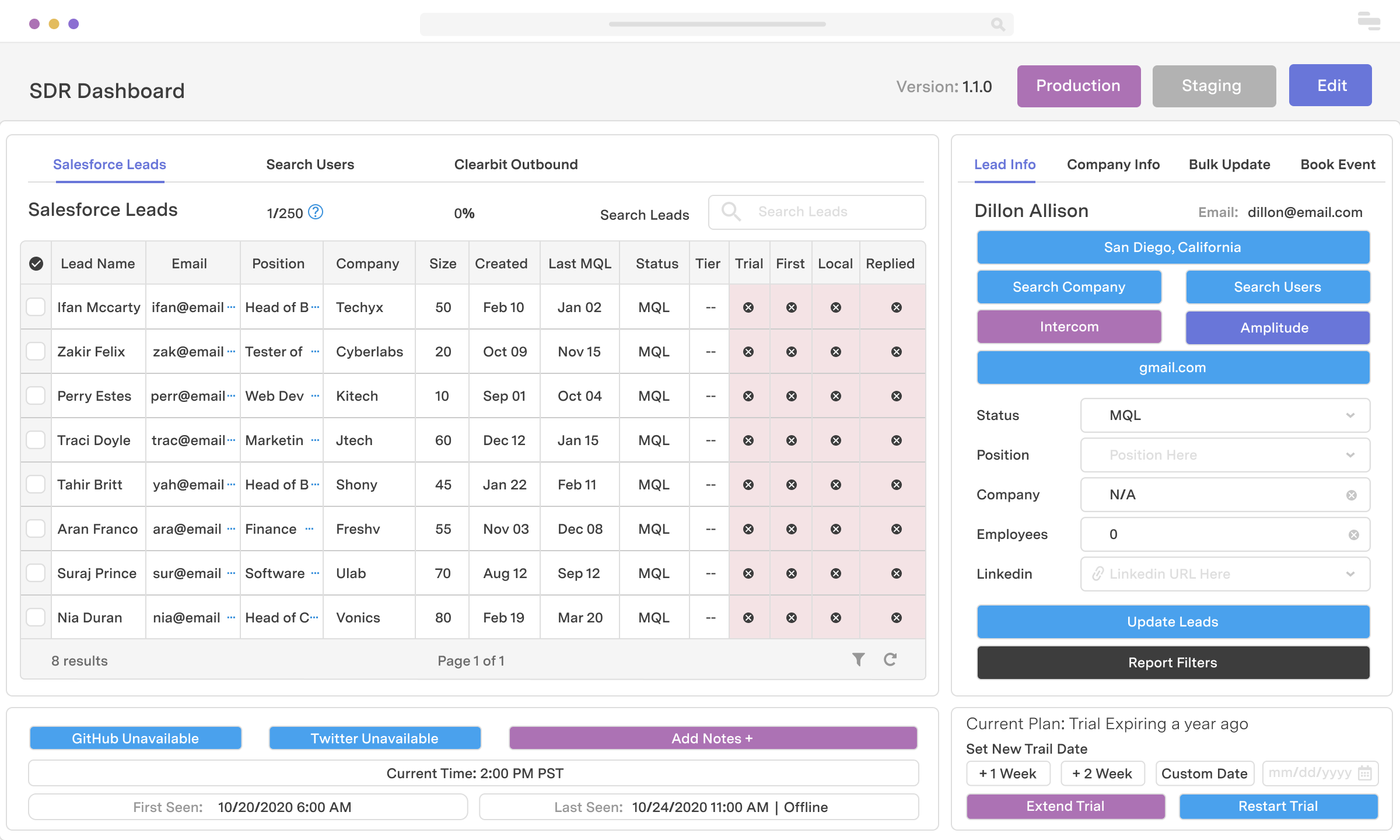
Image source: retool.com
Key features:
- Connect to any SQL or NoSQL database and REST or GraphQL API.
- Pre-built UI components for rapid development.
- JavaScript-based logic for custom behavior.
- Version control and deployment features similar to traditional dev environments.
Pros:
- Extremely fast for developers to build internal tools.
- High degree of flexibility and customization.
- Strong support for complex data visualizations.
Cons:
- Not aimed at non-technical business users.
- Not designed for building customer-facing apps.
Pricing:
- Free: $0/month per builder + $0/month per internal user.
- Team: $10/month per builder + $5/month per internal user.
- Business: $50/month per builder + $15/month per internal user.
- Enterprise: Contact pricing.
11. Bubble: No-code web app development platform
Bubble is a leading no-code platform that empowers users to build web applications without writing code. It provides a visual programming interface that is powerful enough to create complex, database-driven applications like marketplaces or social networks. Bubble handles both frontend design and backend logic, including database setup and API workflows. It is a favorite among startups and entrepreneurs who want to validate their ideas and launch an MVP (Minimum Viable Product) without hiring a development team.
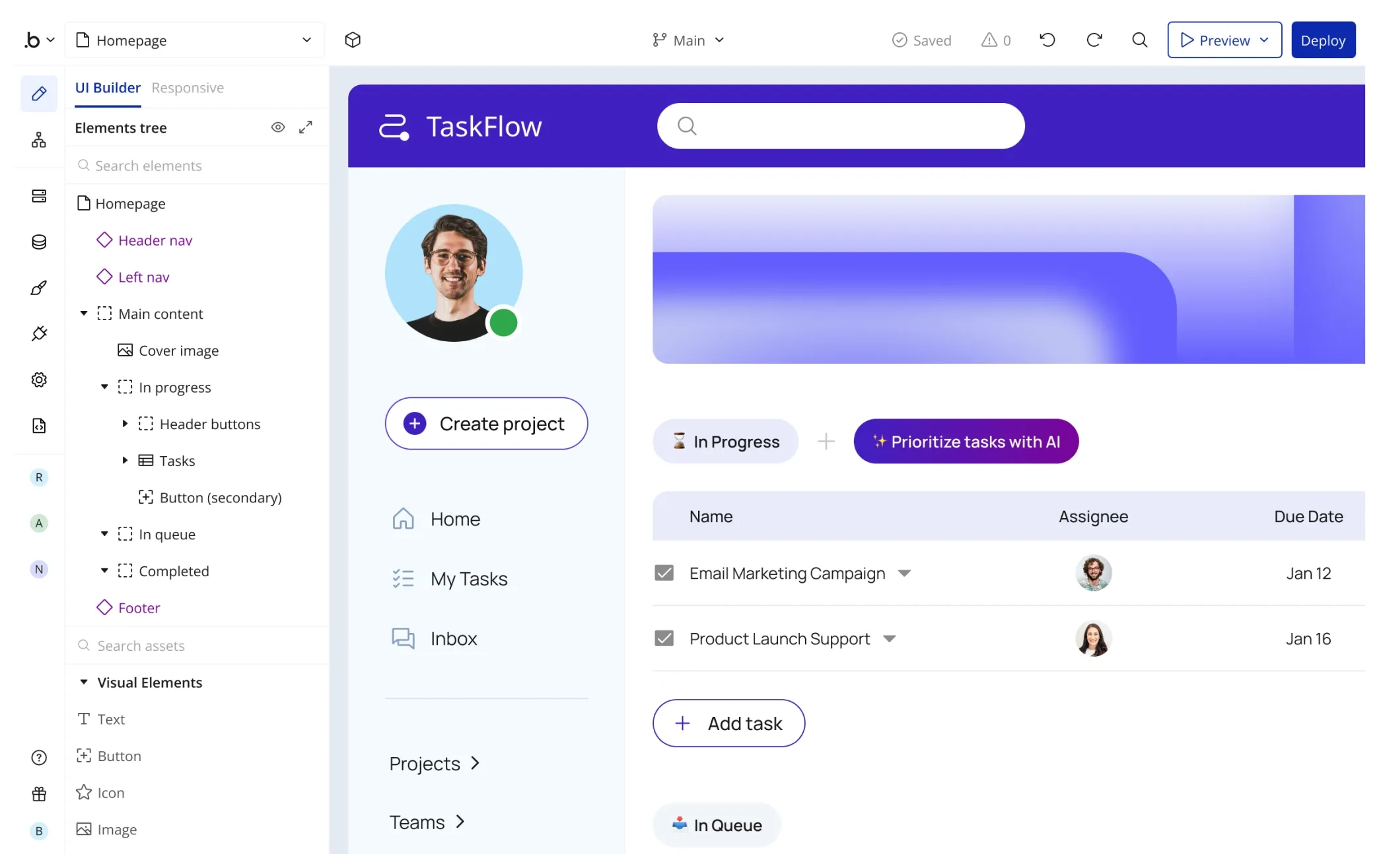
Image source: bubble.io
Key features:
- Visual programming language for logic and workflows.
- Built-in database and API connector.
- Responsive design editor.
- Plugin marketplace for extending functionality.
Pros:
- Very powerful for building complex web apps without code.
- Large and active community forum.
- Cost-effective for early-stage startups.
Cons:
- Steep learning curve to master visual logic.
- Performance can be an issue for very high-traffic apps without optimization.
Pricing:
- Starter: $59/month billed annually.
- Growth: $209/month billed annually.
- Team: $549/month billed annually.
- Enterprise: Contact the sales team for the price.
12. Nintex: Process automation low-code software
Nintex is a leader in process automation and workflow management. The platform provides tools to automate document-driven processes and forms. It is widely used for digitizing paper-based workflows, such as employee onboarding, contract management, and expense approvals. Nintex integrates deeply with Microsoft SharePoint and Office 365, making it a popular choice for enterprises looking to modernize their document-centric processes. It offers a combination of cloud and on-premises solutions to fit various IT requirements.
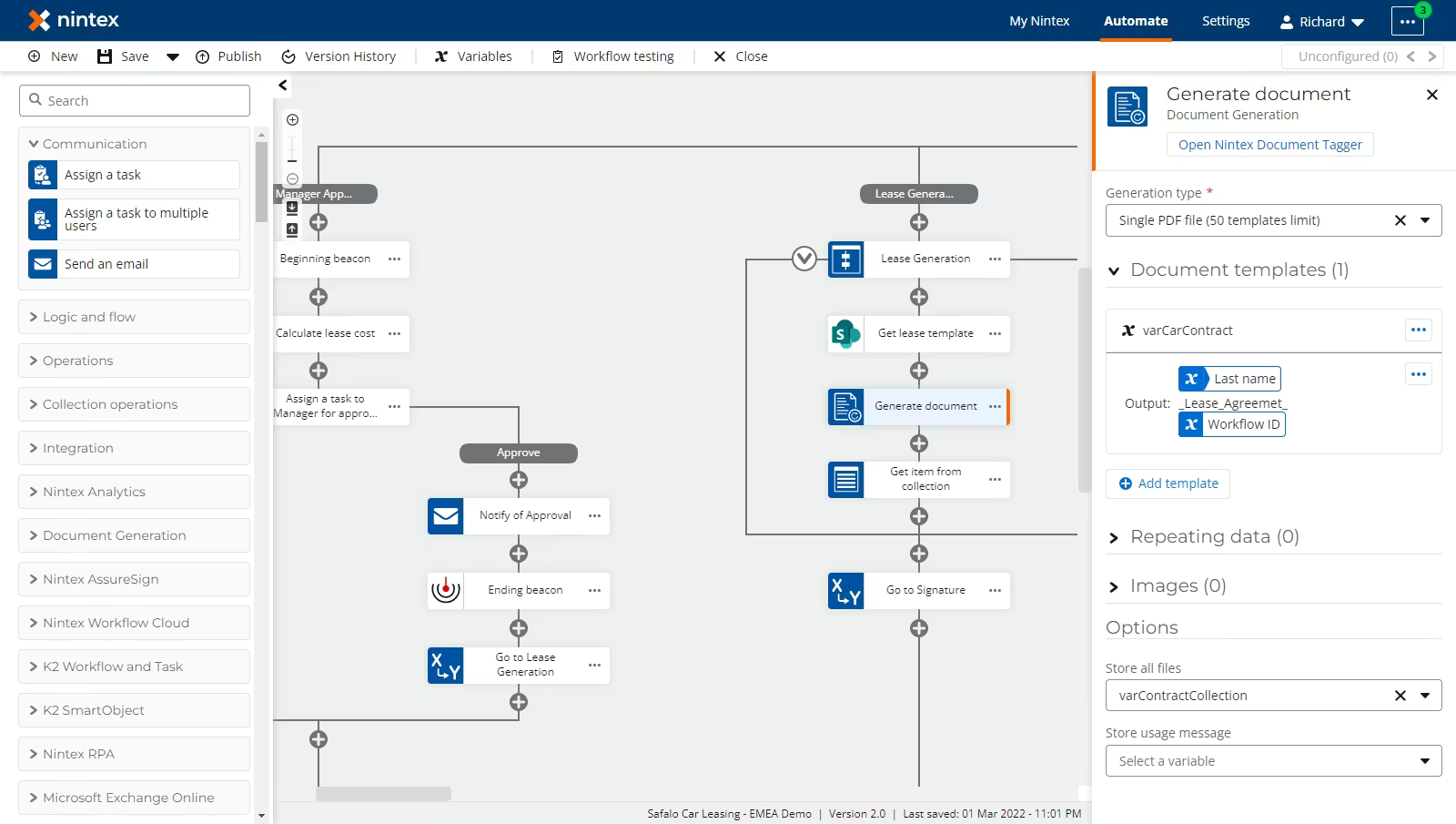
Image source: nintex.com
Key features:
- Drag-and-drop workflow designer.
- Electronic signature capabilities.
- Forms designer for data collection.
- Robotic Process Automation (RPA) features.
Pros:
- Excellent for automating documents and forming workflows.
- Strong integration with the Microsoft ecosystem.
- Good mobile app for approving tasks on the go.
Cons:
- Less flexible for building non-process-centric apps.
- Pricing can be high for the full suite of features.
Pricing:
- Contact sales for pricing.
13. ServiceNow App Engine: Enterprise workflow app builder
ServiceNow App Engine is part of the broader ServiceNow platform, which is a dominant player in IT Service Management (ITSM). App Engine allows organizations to build custom applications on top of ServiceNow architecture. It is highly effective for creating enterprise workflows that span multiple departments, such as HR, customer service, and IT operations. The platform provides a low-code environment that leverages the existing data and security models of ServiceNow, ensuring consistency and compliance across the enterprise.
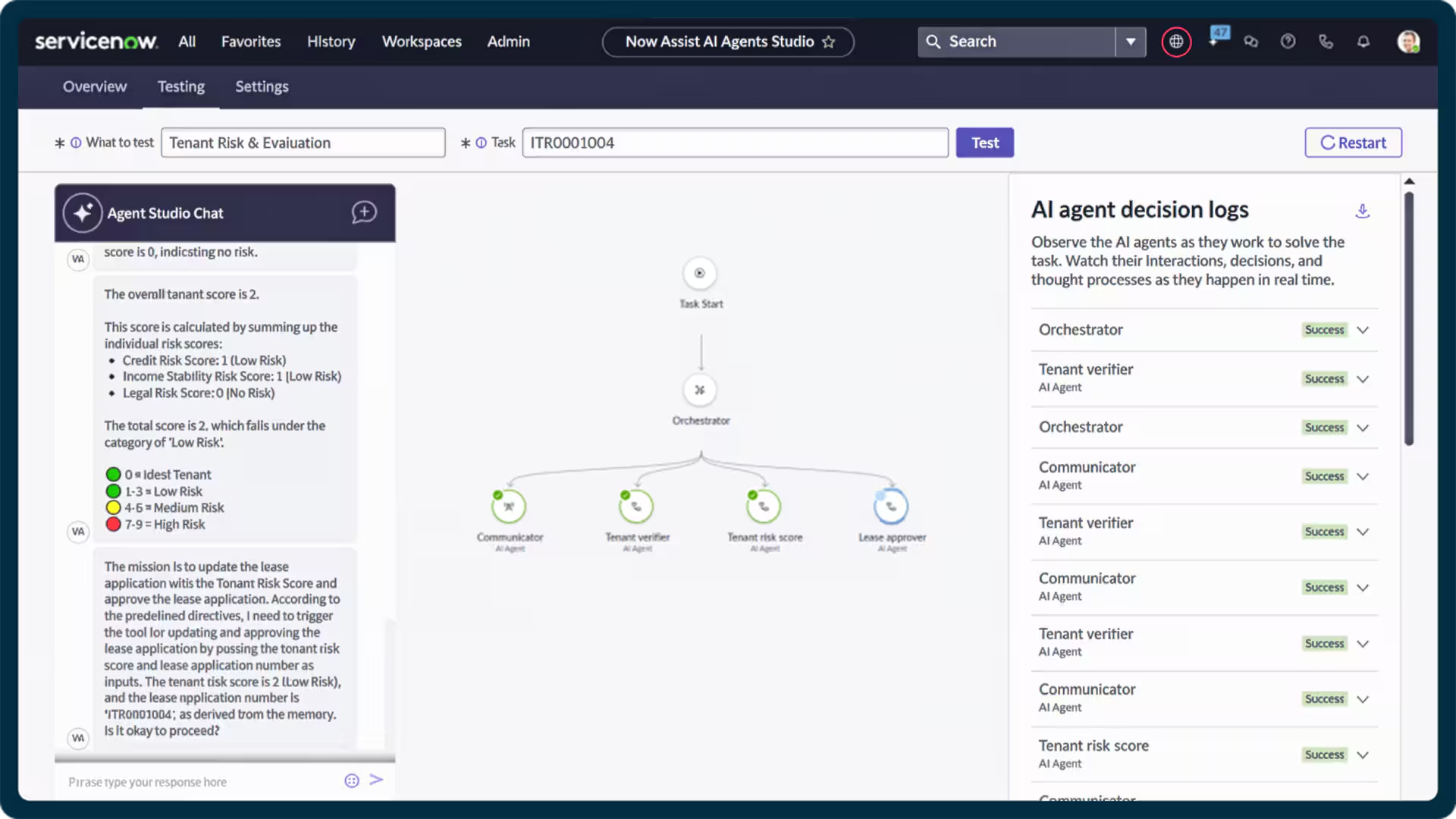
Image source: servicenow.com
Key features:
- Builds on the ServiceNow single data model.
- Visual app builder with scripting options for advanced logic.
- Pre-built templates for common enterprise workflows.
- Mobile-friendly app development.
Pros:
- Deep integration with ServiceNow modules (ITSM, HR, etc.).
- Enterprise-grade security and scalability.
- Good for extending existing ServiceNow capabilities.
Cons:
- Requires a ServiceNow subscription, which can be costly.
- Overkill for simple, standalone apps outside the ServiceNow ecosystem.
Pricing:
- Contact sales for pricing details.
14. Pega Platform: AI-powered low-code system
Pega Platform is a high-end low-code solution that combines BPM, CRM, and case management capabilities. It is known for its strong AI and decisioning engine, which helps organizations optimize customer journeys and operational efficiency. Pega is designed for large enterprises with complex, mission-critical applications. The platform emphasizes "Build for Change," allowing applications to be easily modified as business needs evolve. It provides a visual development environment but also supports robust coding for complex scenarios.
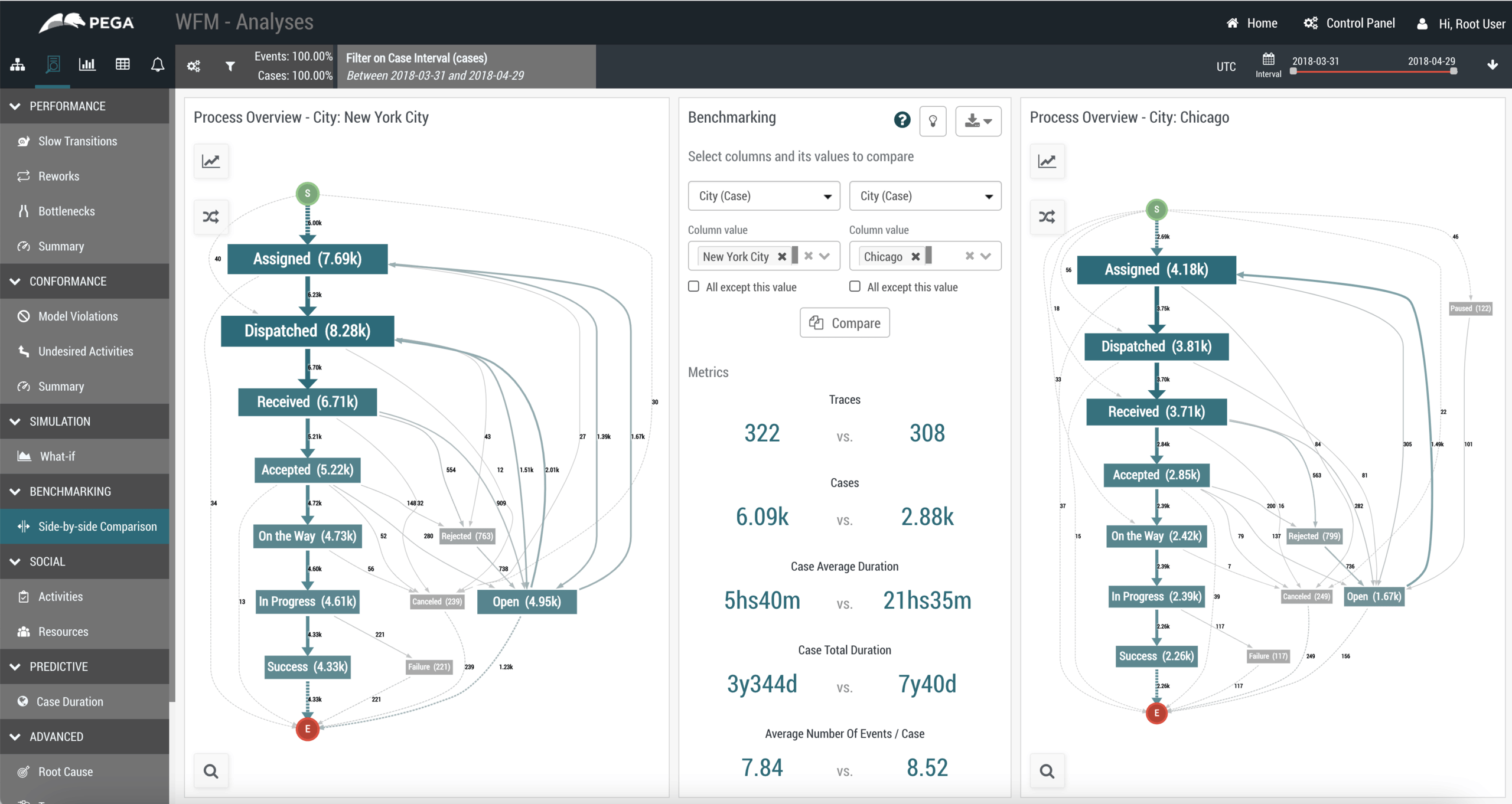
Image source: pega.com
Key features:
- AI and real-time decisioning capabilities.
- Case management for handling complex work.
- Omnichannel deployment (web, mobile, chat).
- Robust DevOps and testing tools.
Pros:
- Very powerful for large-scale, complex enterprise apps.
- Strong AI features for personalization and optimization.
- Excellent scalability and performance.
Cons:
- High cost and complexity.
- Requires significant training and expertise to implement effectively.
Pricing:
- Contact sales for pricing details.
15. Betty Blocks: Citizen developer low-code platform
Betty Blocks positions itself as the "no-code" platform for citizen developers, aiming to empower business users to build applications entirely independently of IT. It provides a highly intuitive visual interface that abstracts away all technical complexities. The platform is designed for speed and agility, allowing users to go from idea to working prototype in a very short time. It is particularly suited for building internal business tools and data-driven applications. Despite its no-code focus, it offers enough power to handle complex business logic and integration.
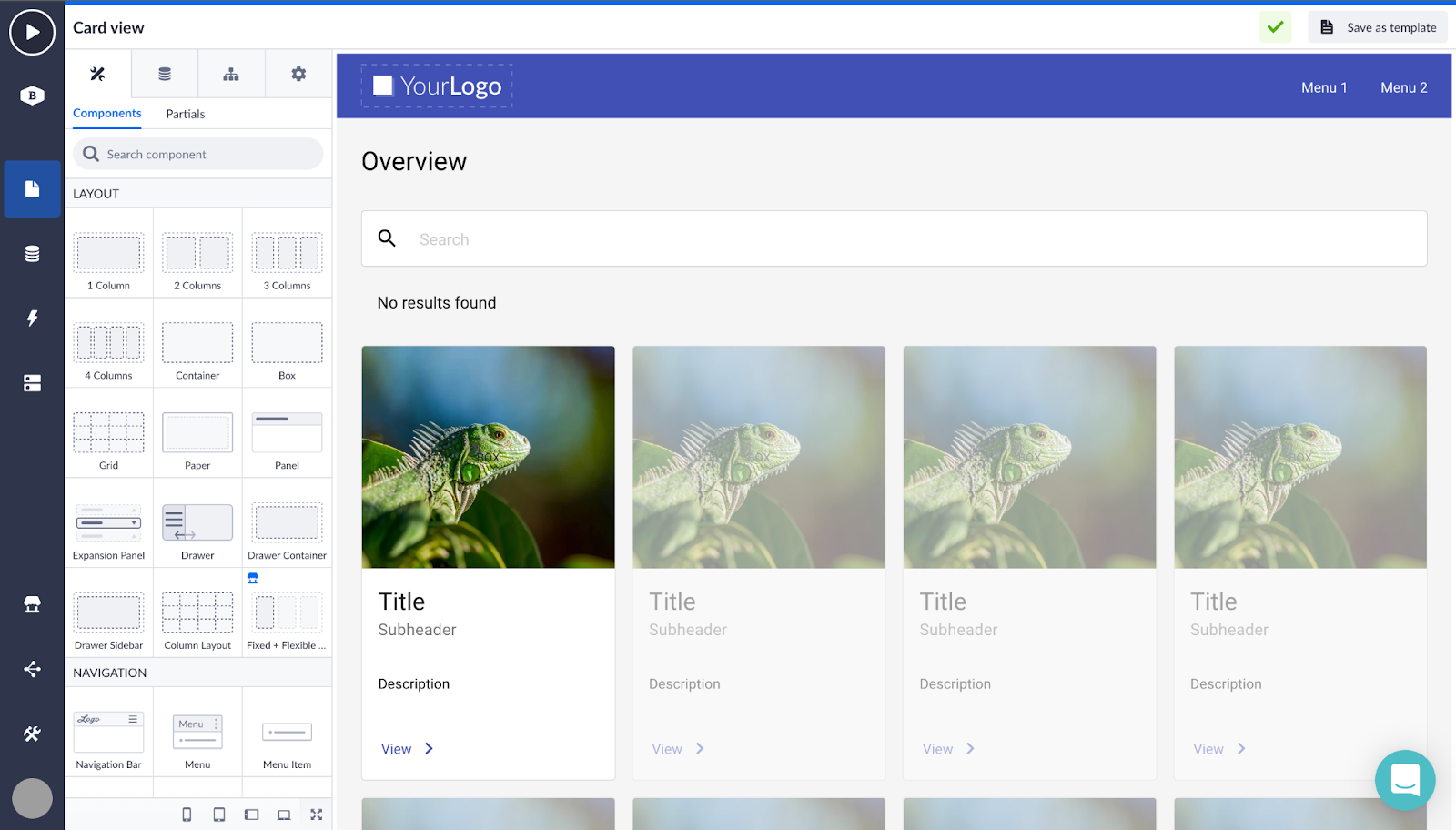
Image source: bettyblocks.com
Key features:
- True no-code interface for business users.
- Visual modeling of data and logic.
- Integration capabilities with various external systems.
- Focus on rapid application development (RAD).
Pros:
- Very accessible for non-technical users.
- Good support and training for citizen developers.
Cons:
- It may not offer the granular control developers need.
- Scaling to very complex enterprise architectures can be challenging.
Pricing:
- Enterprise: Contact sales.
How to choose the best low-code development platforms
Selecting the right low-code platform requires careful evaluation of your specific needs and constraints. Consider these key factors during your decision process:
- Business Complexity: Assess the complexity of the applications you need to build. Simple data collection apps have very different requirements than multi-step workflow systems or customer-facing portals. Match the platform's capabilities to your most complex anticipated use case, not just your immediate needs. Platforms like Lark excel when applications need to integrate deeply with daily collaboration and communication workflows. If your apps need to support scenarios, prioritize platforms with strong real-time features.
- IT Governance Requirements: Consider how the platform fits into your existing IT governance structure. Some organizations need strict control over who can build what, while others prioritize speed and accessibility. Evaluate admin consoles, permission systems, and audit capabilities, especially if your organization follows established .
- App Scalability Needs: Think about where your applications will be in three to five years. A platform that works for a prototype with ten users may struggle with thousands of concurrent users. Understand performance benchmarks and scaling costs before committing.
- Compliance and Security: Regulated industries must prioritize platforms with appropriate certifications and security features. Evaluate data residency options, encryption standards, and compliance certifications relevant to your industry.
- Total Cost of Ownership: Look beyond list pricing to understand the true cost. Factor in training, implementation services, integration development, ongoing maintenance, and potential scaling costs. The cheapest platform upfront may become expensive as your usage grows.
Conclusion
Low-code development platforms are reshaping how businesses build software, offering solutions for everything from simple internal tools to complex enterprise applications. By selecting a platform that fits their needs for scalability, security, and workflow efficiency, organizations can unlock greater productivity and innovation. The right tool can also help reduce errors in key processes like and improve overall operational performance.
Still, success depends on more than technology alone. Strong governance, clear adoption strategies, and empowered teams are essential for long-term impact. Starting with a pilot project is a smart way to test value before scaling. As low-code becomes more accessible, platforms like Lark demonstrate how app development can integrate seamlessly into daily work and enhance .
Create and launch your first application with Lark
FAQs
What industries benefit most from low-code platforms?
Low-code platforms are versatile and benefit a wide range of industries. However, industries with high process volumes and stringent compliance requirements, such as financial services, healthcare, and government, see significant returns. These platforms allow them to quickly build compliant applications to replace paper-based processes. Additionally, retail and manufacturing sectors benefit from the ability to create custom inventory and supply chain management tools without waiting for long development cycles.
Are low-code platforms secure for enterprise use?
Yes, modern low-code platforms are designed with enterprise security in mind. Leading vendors offer features such as data encryption at rest and in transit, role-based access control, and compliance with major security standards, such as SOC 2 and . The key is for IT departments to actively manage governance and configure the security settings correctly. When used in accordance with the vendor's guidelines, low-code platforms can be just as secure as traditionally developed applications. Can low-code replace traditional development entirely?
While low-code is powerful, it is unlikely to replace traditional development entirely. It is best suited for a specific set of use cases—typically business applications, internal tools, and process automation. For building highly specialized algorithms, system-level software, or graphics-intensive games, traditional coding remains superior. The future is likely a hybrid model in which low-code handles standard business needs, freeing professional developers to focus on complex, custom engineering challenges.
How do low-code platforms handle scalability?
Most enterprise-grade low-code platforms are built on cloud-native architectures designed for scalability. They handle scaling through load balancing, auto-scaling resources, and efficient database management. When evaluating a platform, it is important to review its performance benchmarks and case studies from businesses with similar user loads. This ensures that as your application grows in popularity, the platform can handle increased traffic and data volume without performance degradation.
What is the difference between low-code and rapid application development?
Rapid Application Development (RAD) is a methodology that emphasizes iterative development and quick prototyping. Low-code technology enables the RAD approach. While RAD is about how you build (the process), low-code is about what you use to build (the tool). Low-code platforms inherently support RAD by providing visual builders and pre-built components that drastically reduce the time needed to create prototypes and functional applications. Therefore, low-code can be seen as a modern enabler of the traditional RAD philosophy.
Related reading