














Gantt Chart Examples & Templates to Inspire Your Projects

Prathyusha
Freelance Content Creator
Nov 3, 2026
Prathyusha
Nov 3, 2026

20 min read
Add to preferred sources


Gantt charts are visual timelines that map out tasks, deadlines, and dependencies, making complex projects easier to manage and track. Widely used in project management, they provide clarity, improve scheduling, and help teams track progress with precision. Whether you're planning a marketing campaign, launching a product, or coordinating team tasks, Gantt chart examples offer practical inspiration for structuring work efficiently.
In this guide, we'll explore Gantt chart examples for project management, including ready-to-use templates and best practices for creating effective Gantt charts. Additionally, you'll discover how Lark takes traditional Gantt charts a step further by enabling seamless collaboration, real-time updates, and smarter project planning.

What is a Gantt chart?
Gantt charts are project management tools that provide a visual timeline of tasks, milestones, and dependencies. Unlike simple task lists, it shows how activities overlap, when deadlines are due, and where critical dependencies exist. This makes it easier to allocate resources and track progress in real time. According to the Association for Project Management (APM) and Project Manager guides, Gantt charts are essential for maintaining clarity and efficiency in complex projects. By reviewing practical Gantt chart examples, teams can gain a better understanding of how to apply them effectively. Templates or examples of Gantt charts are visual tools that inspire more structured planning and management.
Why use a Gantt chart for project management?
- Visualize project timelines: Gantt charts give a clear overview of start and end dates, helping teams anticipate deadlines and stay on track. These Gantt chart examples for project management showcase how timelines create structure and accountability.
- Manage dependencies between tasks: By mapping dependencies, teams can see which tasks must be completed first and prevent bottlenecks. Reviewing examples of a Gantt chart highlights how dependencies strengthen project flow.
- Track progress and adjust schedules: Managers can instantly see task completion rates and reschedule delays as needed. Many Gantt chart examples with milestones illustrate how progress tracking improves adaptability.
- Keep stakeholders aligned: A project management Gantt chart example ensures that everyone, from team members to clients, has a shared understanding of priorities and deadlines.
- Highlight milestones: Key project milestones, such as product launches or reviews, are easily marked and monitored. MS Project gantt chart examples demonstrate how milestones keep long-term goals visible and measurable.
Project management Gantt chart examples
Lark has transformed project planning with its smart, collaborative Gantt charts that bring clarity, flexibility, and real-time tracking into one platform. Unlike static spreadsheets, Lark Gantt charts update automatically, making them ideal for managing tasks, dependencies, and milestones across teams. Whether you need a quick project overview or a detailed timeline, Lark offers intuitive templates that cater to a diverse range of workflows. From content calendars to R&D planning, these Gantt chart examples for project management demonstrate how projects can be easily structured and executed. Below are some of the most practical Gantt chart examples and templates available in Lark.
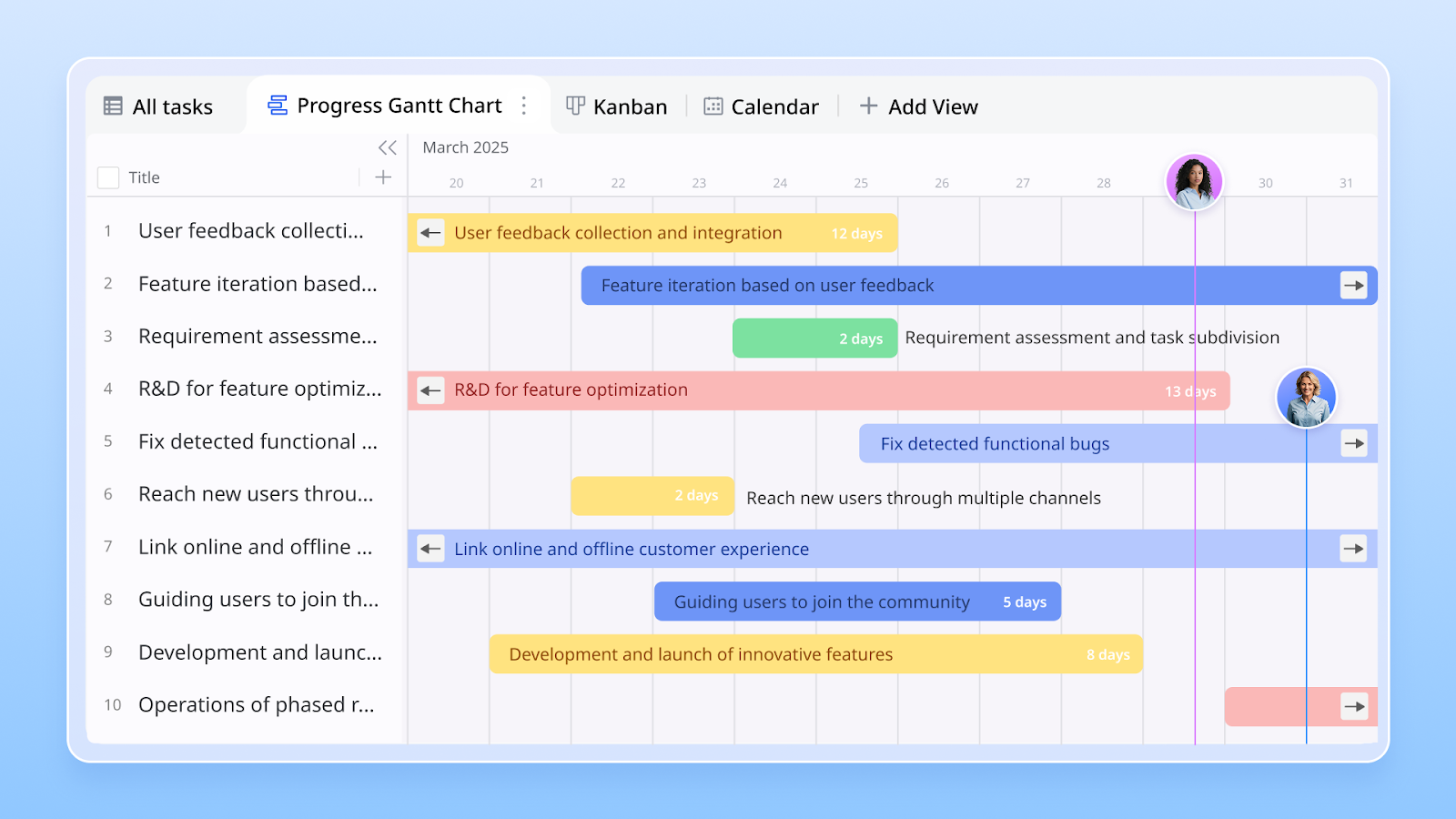
1. Basic Gantt chart template for Lark Sheets
This template provides a straightforward and structured approach to organizing project tasks and deadlines in Lark Sheets. It's a perfect starting point for teams that need quick visibility into project phases without extra complexity. By using this example of a Gantt chart, managers can keep track of priorities, dependencies, and timelines all in one place.
2. Content calendar Gantt
For marketing and communications teams, a Gantt-style content calendar helps visualize campaigns, social posts, and publishing schedules. It ensures deadlines are met while avoiding content overlaps. As one of the most practical Gantt chart examples with milestones, it keeps campaigns aligned across multiple platforms.
3. Recruitment & onboarding Gantt template
HR professionals benefit from mapping the entire hiring journey, from job postings to interviews and onboarding. This template highlights candidate stages, training modules, and integration milestones. Among many project management Gantt chart examples, this one ensures hiring processes run smoothly and new employees are welcomed effectively.
4. Website design & development Gantt template
Building a website requires coordination across design, content, and technical teams. This template maps out wireframes, mockups, coding phases, testing, and final launch dates. Unlike static MS Project Gantt chart examples, Lark's version updates in real-time, keeping developers, designers, and stakeholders on the same page.
5. OKR template for Lark Base
Strategic planning becomes actionable with an OKR (Objectives & Key Results) Gantt chart template. It visualizes company goals, departmental targets, and timelines for achieving measurable outcomes. This Gantt chart example for a project ensures that goals are not just defined but actively tracked against deadlines.
6. Employee task tracker template for Lark Base
This template assigns tasks to individuals while showing project timelines and workload distribution. It's a practical tool for managers to monitor progress without micromanaging. As one of the most efficient Gantt chart examples for project management, it enhances accountability and keeps tasks aligned with broader objectives.
7. Project roadmap Gantt chart
When stakeholders need a high-level view, the roadmap Gantt chart provides clarity on deliverables, milestones, and dependencies across multiple teams. It's particularly valuable for cross-departmental collaboration. This is one of the most widely recognized examples of a Gantt chart, especially for long-term business planning.
8. R&D personnel Gantt chart
Research and development projects often require detailed planning around experiments, testing, and personnel assignments. This template visualizes workload distribution, progress stages, and review cycles. As one of the most specialized Gantt chart examples, it helps R&D teams strike a balance between innovation and structure, ensuring timely outcomes.
How Lark makes Gantt charts smarter
- Lark Base Gantt View: Transform your project data into visual timelines that clearly display tasks, dependencies, and milestones. These Gantt chart examples for project management help teams see the big picture at a glance.
- Built-in dashboards for performance tracking: Lark provides dashboards that monitor task completion, milestones, and overall project performance. These insights help managers make informed decisions without relying on static charts.
- Collaborative, dynamic, and mobile-friendly: Unlike Excel sheets or MS Project Gantt chart examples, Lark Gantt charts are interactive, accessible on mobile devices, and designed for team collaboration, enabling efficient project planning anytime, anywhere.
- Starter plan: Free forever plan that includes 11 powerful tools for up to 20 users. It also comes with 100GB of storage, 1000 automation runs, AI translations, and more.
- Pro plan: $12/user/month (billed annually) for up to 500 users. It includes everything in Starter plus a group calling for up to 500 attendees, 15TB of storage, 50,000 automation runs, and more.
- Enterprise plan: Contact sales for custom pricing. Supports unlimited users and includes even more automation runs and advanced security, compliance, and management features.
Best practices for creating a Gantt chart
- Define clear tasks and milestones: Start by breaking projects into actionable tasks and marking key milestones. Using Gantt chart examples with milestones helps teams understand priorities and visualize progress across the timeline.
- Assign ownership and deadlines: Clearly assign each task to a responsible team member and set realistic deadlines. This ensures accountability and makes your Gantt chart examples for the project actionable and easy to follow.
- Set dependencies to avoid bottlenecks: Identify which tasks rely on others and establish dependencies within the Gantt chart to ensure smooth workflow. Many project management Gantt chart examples demonstrate how dependencies prevent workflow delays and streamline project execution.
- Keep the chart updated regularly: Update tasks, milestones, and deadlines consistently to reflect actual progress. Regular maintenance ensures that your Gantt chart examples for project management remain accurate and useful for planning.
- Review progress in team standups: Use your Gantt chart during daily or weekly team meetings to discuss completed tasks, blockers, and next steps. This approach, shown in practical examples of a Gantt chart, keeps the team aligned and focused on priorities.
Conclusion
Gantt charts are a powerful tool for visualizing tasks, deadlines, and dependencies, making project planning more efficient across industries. Traditional templates and static charts can provide structure, but they often lack flexibility and real-time collaboration. Platforms like Lark Base elevate this by turning Gantt chart examples for project management into dynamic, interactive workflows. Teams can link Gantt charts to tasks and Approvals, track milestones, and update timelines in real-time, ensuring alignment across all stakeholders. Lark provides examples of a Gantt chart, which makes project planning more innovative, more collaborative, and accessible on any device, helping teams execute projects faster and more effectively.
FAQs
What is an example of a Gantt chart in project management?
A Gantt chart displays tasks across a timeline, enabling teams to visualize who’s working on what and when. For instance, a marketing campaign can include tasks such as content creation, design, and publishing, all plotted with specific deadlines. Using Lark, you can create similar Gantt chart examples for project management with interactive timelines, dependencies, and real-time updates for the whole team.
Can I create a Gantt chart in Excel or Google Sheets?
Yes, Excel and Google Sheets allow you to create basic Gantt charts using bars and formulas, which can be effective for small projects. However, these static charts lack collaboration features. Lark Gantt charts take it further by allowing teams to update tasks in real-time, link them to approvals, and track progress across multiple projects seamlessly.
What projects are best managed with Gantt charts?
Projects with multiple tasks, dependencies, or strict deadlines benefit the most, such as product launches, website development, or events. Gantt charts make it easy to visualize timelines and assign ownership. With Lark, you can adapt Gantt chart examples for any project type while keeping everyone aligned and tasks clearly tracked in one workspace.
How do Gantt charts handle dependencies and milestones?
Dependencies show which tasks rely on others, while milestones mark important deadlines or achievements. This prevents delays and keeps projects on track. Lark Gantt charts enable you to automatically link tasks and approvals, highlight milestones, and adjust schedules in real-time, making planning dynamic and transparent.
How does Lark compare to MS Project for Gantt charts?
MS Project is powerful but often complex and not very collaborative, especially for remote teams. Lark offers similar Gantt functionalities but with live updates, mobile access, and easy collaboration. These Gantt chart examples for project management in Lark are interactive, user-friendly, and built for modern team workflows.
Related reading
Table of contents
Start using Lark today

Manage all your work in one place
Boost team efficiency by 10x
Save up to 70% on software costs
Table of contents
Start using Lark today
Manage all your work in one place
Boost team efficiency by 10x
Save up to 70% on software costs
Keep reading








2026 Lark Technologies Pte. Ltd.
Headquartered in Singapore with offices worldwide.






Explore: