


Simple CRM: The Ultimate Guide for Streamlined Success

Alex Miller
Technical Product Marketing Specialist
Aug 5, 2026
Alex Miller
Aug 5, 2026


16 min read


Are you tired of wrestling with complicated software just to keep track of your customers? A CRM tool is critical to organize your contacts, tracking leads, managing your sales pipeline, and ultimately, building stronger, more profitable customer relationships.
But here's the problem: far too many CRM systems are… well, a mess. They're bloated with features you'll never use, require weeks of training to master, and end up feeling like a monumental waste of time and resources. That's where simple CRM comes in. It's the antidote to CRM complexity. A simple CRM prioritizes user-friendliness, ease of implementation, and focuses on the essential functionalities that drive results.
In this guide, I'll explore the world of simple CRMs, helping you understand their benefits, identify whether a simple CRM is the right fit for your business, and provide a curated list of the top simple CRM tools available today. Prepare to discover how a streamlined approach to CRM can unlock the true potential of your business!

Understanding simple CRM: What it is and why it matters
So, what exactly is a simple CRM software? It's more than just a stripped-down version of a traditional CRM. It's a fundamentally different approach to customer relationship management, one that prioritizes ease of use and rapid adoption. Imagine a CRM system that your team can start using effectively within hours, not weeks. That's the power of a simple CRM.
Unlike traditional, enterprise-level CRM systems, which are often packed with advanced features designed to cater to large corporations with complex sales processes, simple CRMs are built for small to medium-sized businesses (SMBs) that need a streamlined solution without the overwhelming complexity. While enterprise CRMs might offer advanced analytics, intricate automation workflows, and extensive customization options, simple CRMs focus on the core essentials.
Typically, a simple CRM will include these core features:
- Contact management: The ability to organize and manage all your customer and prospect information in one central location. This includes contact details, communication history, notes, and custom fields. Think of it as your digital rolodex, but with superpowers.
- Lead tracking: A system for tracking leads as they move through your sales pipeline. This allows you to identify promising leads, prioritize your efforts, and ensure that no opportunities fall through the cracks.
- Sales pipeline management: A visual representation of your sales process, showing you where each deal stands. This helps you identify bottlenecks, forecast revenue, and optimize your sales strategy.
- Task management: Tools for assigning and tracking tasks related to your customer interactions. This ensures that follow-ups are completed on time, and that nothing gets forgotten.
- Basic reporting: Simple, easy-to-understand reports that give you insights into your sales performance, customer behavior, and overall business health.
The advantages of a simple CRM
Choosing a simple CRM can unlock a wealth of benefits for your business, especially if you're a small to medium-sized company without a dedicated IT department or the resources to manage a complex system.
Improved user adoption: This is arguably the biggest advantage. Let's be honest: no matter how powerful a CRM system is, it's useless if your team doesn't actually use it. Simpler interfaces and intuitive workflows lead to significantly higher user adoption rates. The data entry, lead follow-up, and other tasks that the CRM helps with become second nature.
Faster implementation: Forget about lengthy implementation processes that drag on for weeks or even months. Simple CRMs are designed to be quick and easy to set up and deploy. You can typically get up and running in a matter of hours, allowing you to start seeing results almost immediately. This fast onboarding is invaluable.
Reduced training costs: With intuitive designs and minimal complexity, simple CRMs require significantly less training than their enterprise counterparts. Your team can quickly learn the ropes without needing extensive training sessions or ongoing support, saving you time and money.
Increased productivity: Streamlined workflows and easy access to information boost productivity across the board. Your sales team can spend less time on administrative tasks and more time on building relationships and closing deals.
Cost-effectiveness: Simple CRMs are typically much more affordable than enterprise-level solutions, making them an ideal choice for small businesses with limited budgets.
Laser focus on core functionality: By focusing on essential features, simple CRMs allow your team to concentrate on what matters most: building customer relationships, nurturing leads, and closing deals.
Is a simple CRM right for you?
A simple CRM excels in scenarios where core CRM functionality is paramount and extensive customization isn't necessary. Consider these categories:
- Small businesses: Startups and smaller enterprises often operate with limited budgets and technical proficiency. Simple CRMs offer an accessible and affordable entry point to effective customer management, providing essential features without a steep learning curve or hefty price tag.
- Teams within larger organizations: While the entire company may utilize a comprehensive CRM, individual departments, such as sales or customer service, can benefit from a dedicated simple CRM. This allows them to focus on specific tasks and tailor the system to their unique workflows, bypassing the complexities of a larger, more generalized platform.
- Freelancers and solopreneurs: Individual professionals managing their own client base find simple CRMs invaluable. These systems facilitate efficient contact management, task tracking, and communication, ensuring a seamless and professional client experience.
If your organization falls into one of these categories, a simple CRM might be the ideal solution to streamline your customer relationships and boost your bottom line.
Key indicators you need a simple CRM
- You're currently using spreadsheets or manual methods to manage customer data.
- Your existing CRM is too complex or underutilized.
- You need a CRM solution that can be implemented quickly and easily.
- You have a limited budget for CRM software.
- You prioritize user-friendliness and ease of adoption.
Questions to ask yourself before choosing a simple CRM
- What are your specific CRM needs and goals?
- What is your budget for CRM software?
- How many users will be using the CRM?
- What integrations do you require?
- What level of customer support do you need?
Compare the best simple CRM softwares
- Lark: a unified communication platform for patient-centered care
- Hubspot CRM: a marketing and patient acquisition-focused CRM for clinics
- Zoho CRM: a customizable and scalable CRM for healthcare providers
- Pipedrive: streamlined patient journey management for efficiency
- Freshsales: an AI-driven platform for personalized patient engagement
- Capsule CRM: simple and secure patient management for small practices
- Bitrix 24: a collaboration suite for healthcare team communication
- Streak: seamless patient management integrated within Gmail
- Less Annoying CRM: an easy-to-use patient management tool for small clinics
- Apptivo: an integrated suite of apps for comprehensive practice management
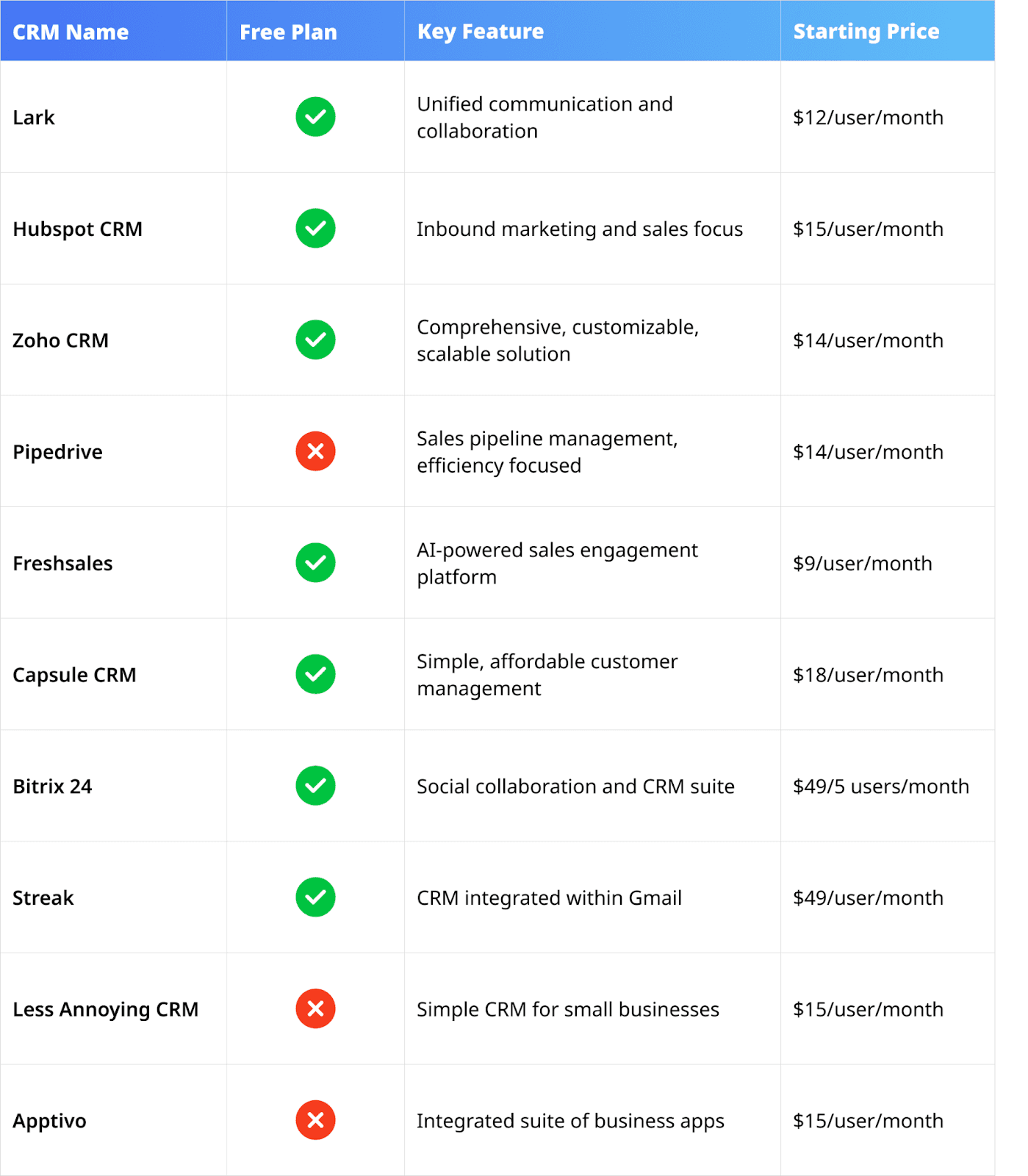
Top 10 simple CRM software solutions
1. Lark
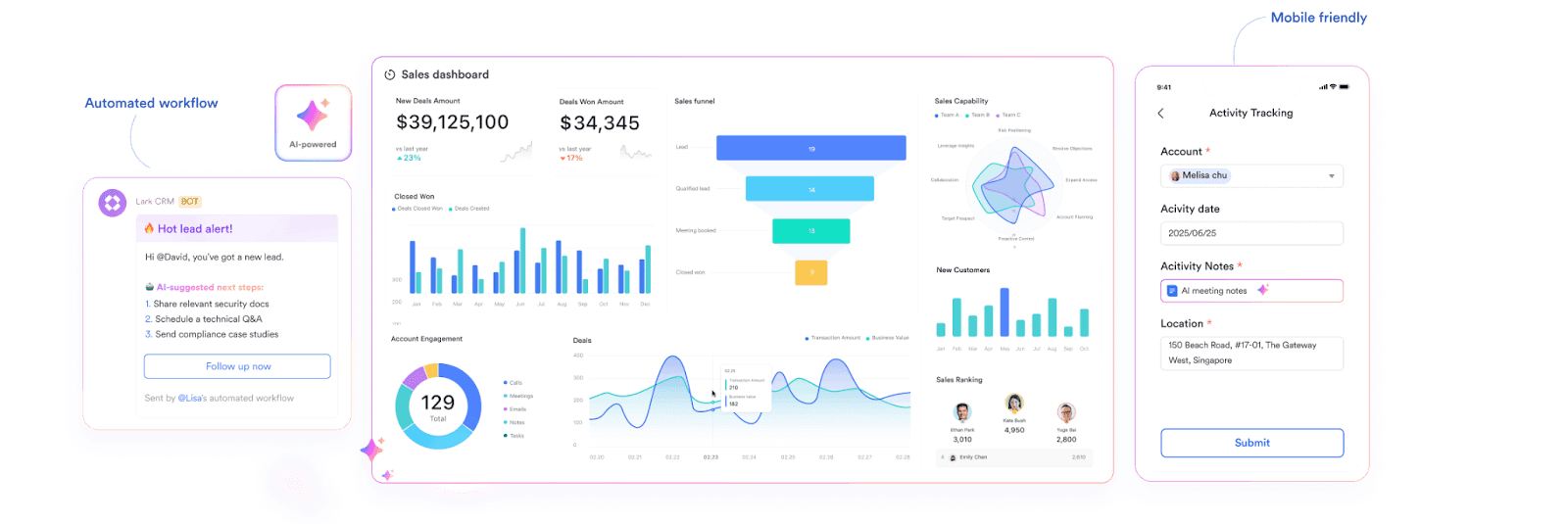 Lark is a comprehensive collaboration platform that also boasts impressive CRM capabilities, providing a unified workspace for communication, project management, and customer relationship management.
Lark is a comprehensive collaboration platform that also boasts impressive CRM capabilities, providing a unified workspace for communication, project management, and customer relationship management.Key features
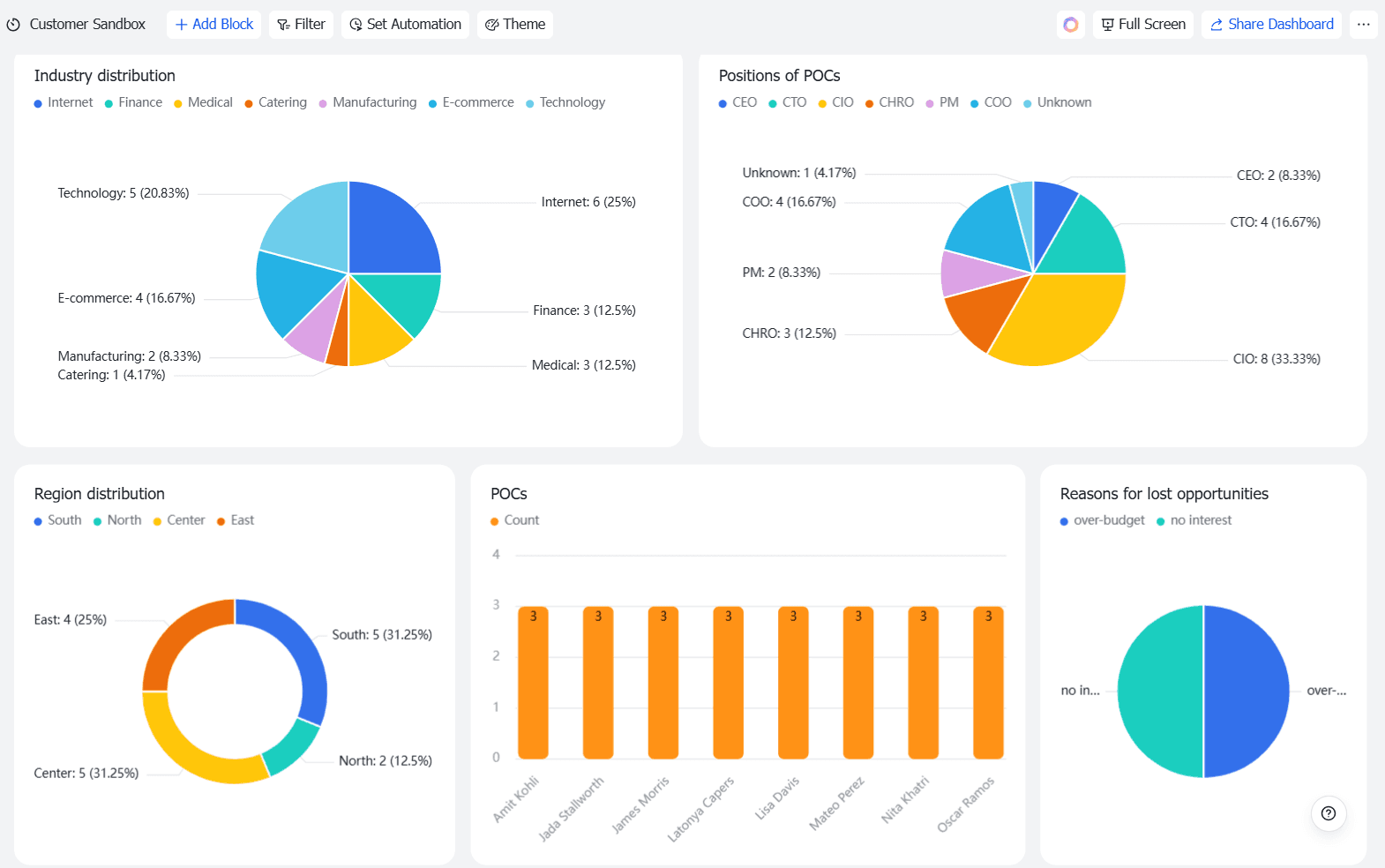
Customizable dashboards for full sales visibility
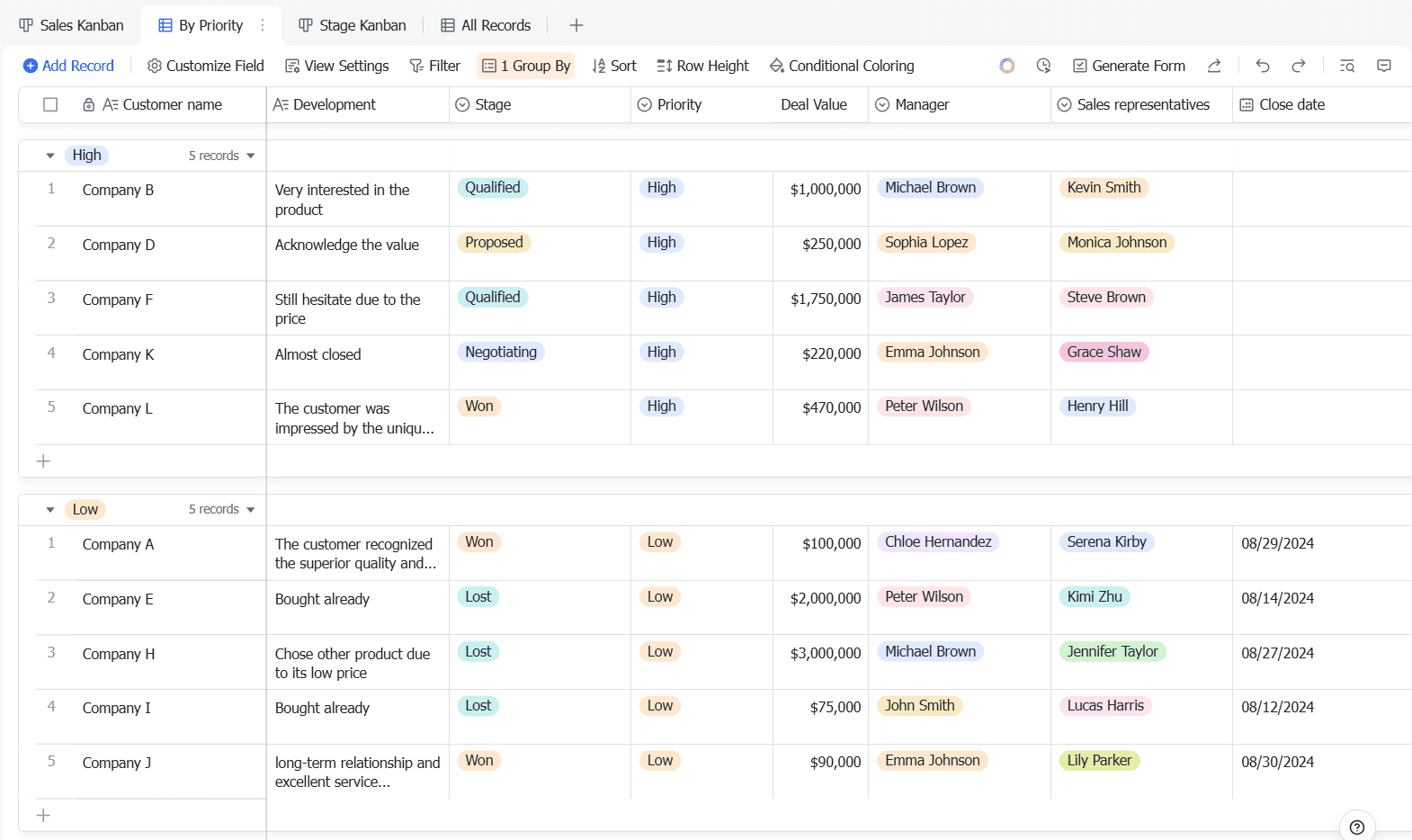
Lark Base puts your sales data front and center with customizable dashboards in a simple CRM setup. Visualize key metrics such as customer lifetime value, average deal size, and revenue updates in one place. This simple CRM approach helps you gain insights into client relationships, team performance, automated approval, and deal progress. With real‑time visibility, your team stays aligned, focused, and on track to close deals faster.
AI-powered automation to save time
Lark Base eliminates manual work with intelligent automation features, making it a simple CRM that streamlines sales tasks:
- Trigger actions based on email interactions
- Automatically assign and prioritize tasks as leads move through the pipeline
- Update contact statuses dynamically
- Send reminders for key sales milestones
- Sync contact details automatically
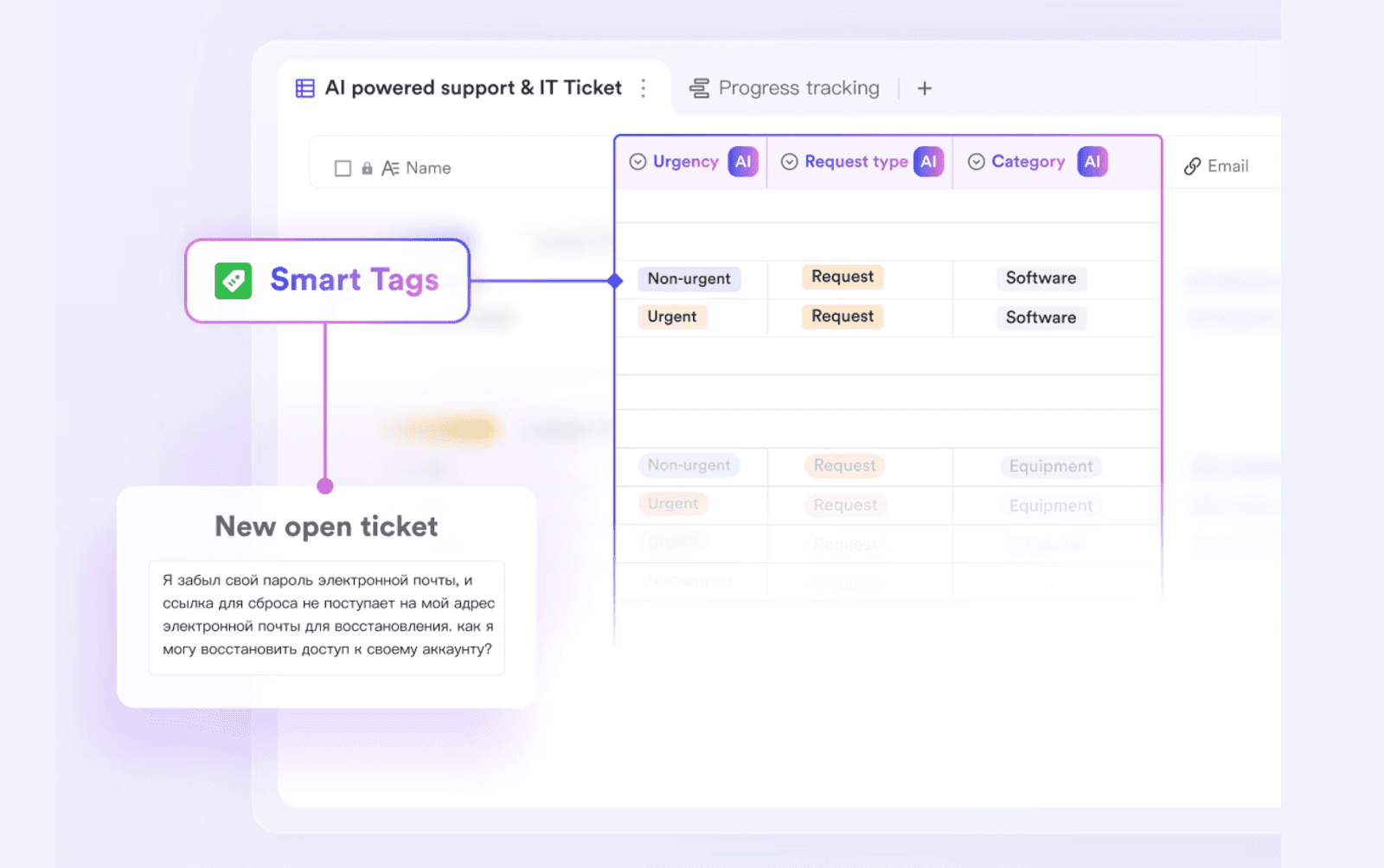 These smart automations free up your team’s time so they can focus on high‑value, strategic work—exactly what a simple CRM should do.
These smart automations free up your team’s time so they can focus on high‑value, strategic work—exactly what a simple CRM should do.Stay organized to close deals faster
Tracking leads shouldn’t be a hassle. Lark Base makes pipeline management simple with customizable views that fit a simple CRM workflow, so you can:
- Track lead progress and opportunities with a structured, visual approach
- Create a calendar to stay on top of scheduled sales activities and follow‑ups
- Organize accounts, leads, and contacts in a way that fits your sales workflow
With customizable fields, teams can track critical sales data—from revenue and industry details to invoice status and lead scores—helping a simple CRM deliver faster, data‑driven decisions.
Smarter messaging and seamless collaboration
Lark brings smarter messaging into a simple CRM by integrating powerful tools directly into the chat feed. With Lark Messenger, you can:
- Chat with teammates and share emails effortlessly for sales and email marketing
- Schedule meetings, reply to approvals, and access dashboards and documents without switching apps
Built for global teams, this simple CRM ensures smooth collaboration anywhere:
- Multi‑language support with auto‑translation and translate‑as‑you‑type
- Time‑zone friendly scheduling for global coordination
- 16 interface languages and translation across 100+ languages into 24 target languages
By integrating collaboration into a simple CRM, Lark keeps communication organized and actionable for teams of any size.
Flexible CRM data management
- Custom fields: Track company revenue, invoice status, or lead scores
- Formula fields: Automate lead scoring or calculate order costs
- Customizable forms: Capture new leads with tailored forms or questionnaires
This flexibility lets a simple CRM mirror your unique process without complex setup.
Mobile-first experience
Lark is designed with a mobile‑first approach, making it a top choice for teams seeking a simple CRM on the go. Whether you're in the office, remote, or traveling, Lark delivers a seamless experience across desktop, mobile, and tablet. With Lark, your team can:
- Update leads, manage projects, and track pipelines from any device
- Edit documents and collaborate in real time to keep work moving
- Attend virtual meetings and stay connected to your simple CRM tools
Lark’s mobile‑friendly design keeps teams aligned, productive, and ready to manage customer relationships anytime, anywhere.
Price
- Starter plan: Free forever plan that includes 11 powerful tools for up to 20 users. It also comes with 100GB of storage, 1000 automation runs, AI translations, and more.
- Pro plan: $12/user/month (billed annually) for up to 500 users. It includes everything in Starter plus group calling for up to 500 attendees, 15TB of storage, 50,000 automation runs, and more.
- Enterprise plan: Contact sales for custom pricing. Supports unlimited users and includes even more automation runs and advanced security, compliance, and management features.














How many employees work at your company?
By number of people
1
20
500
5000+
1000
Which tools do you use?

Estimates are for reference only, contact us for an official quote
Calculate savings

👉Try Lark’s Savings Calculator: Switching to Lark’s Pro plan can lead to significant cost savings— for example, a 100-employee company using Slack, Google Workspace, and Airtable could save approximately $25,200 annually by consolidating their tools with Lark.
2. HubSpot CRM
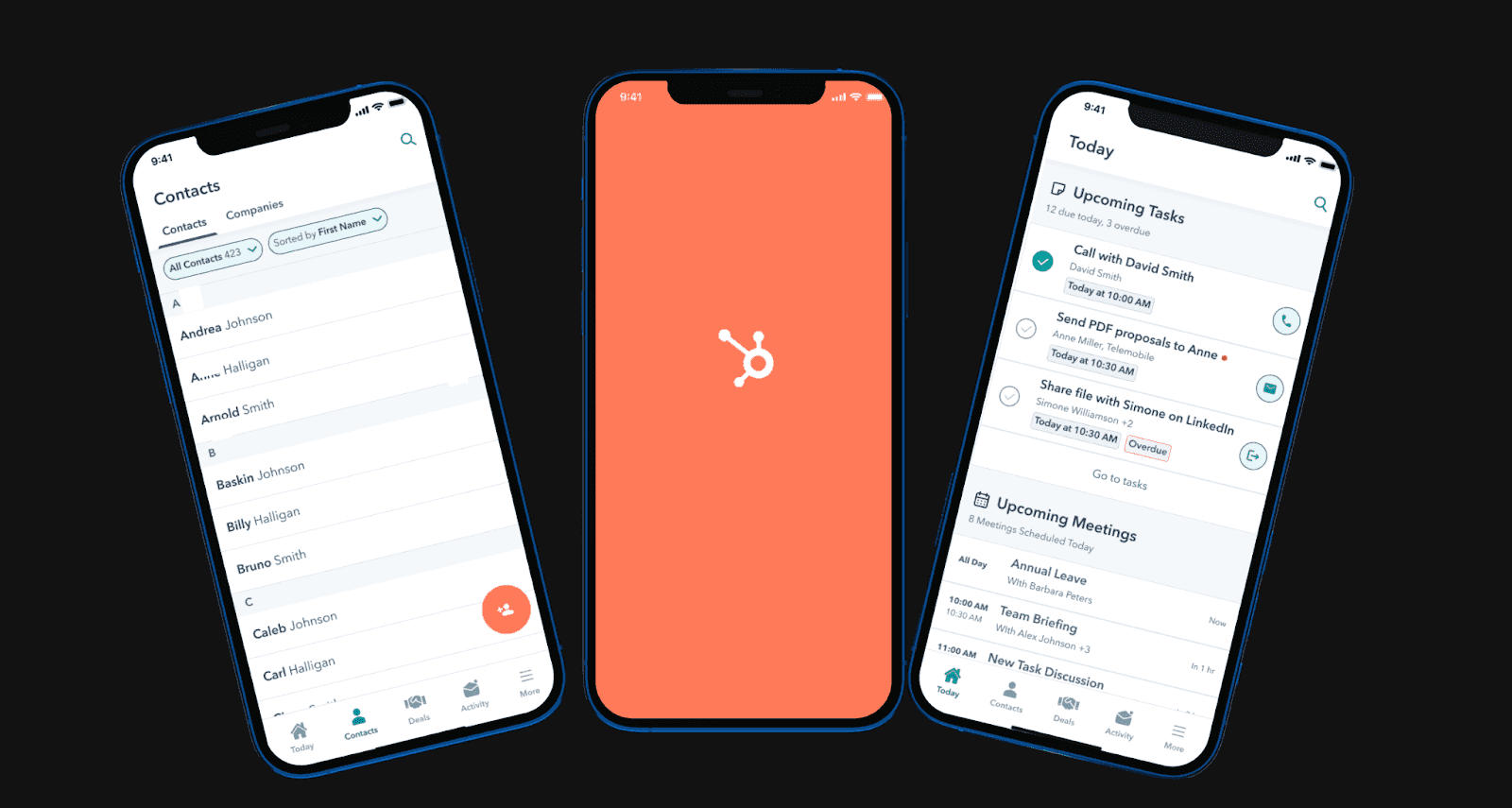 Image source: hubspot.com
Image source: hubspot.comHubSpot CRM is a popular, free CRM platform designed for simplicity and scalability. It's part of the larger HubSpot suite, offering marketing, sales, and service hubs that integrate seamlessly.
Key features
- Contact management: Store and organize contact information, track interactions, and segment your audience.
- Deal tracking: Monitor the progress of deals, forecast revenue, and manage your sales pipeline.
- Task management: Assign tasks to team members, set deadlines, and track progress to ensure timely follow-up.
- Email tracking: Track email opens and clicks to understand engagement and optimize your outreach.
- Meeting scheduling: Integrate with Google Calendar or Outlook to schedule meetings effortlessly.
Advantages
- Easy to use: Intuitive interface and user-friendly design make it easy to learn and use.
- Integrates with HubSpot suite: Seamlessly integrates with other HubSpot tools for marketing, sales, and service automation.
- Automatic data enrichment: Automatically enriches contact profiles with publicly available information.
Pricing: Free plan available. Paid plan starts at $15/user/month.
3. Zoho CRM
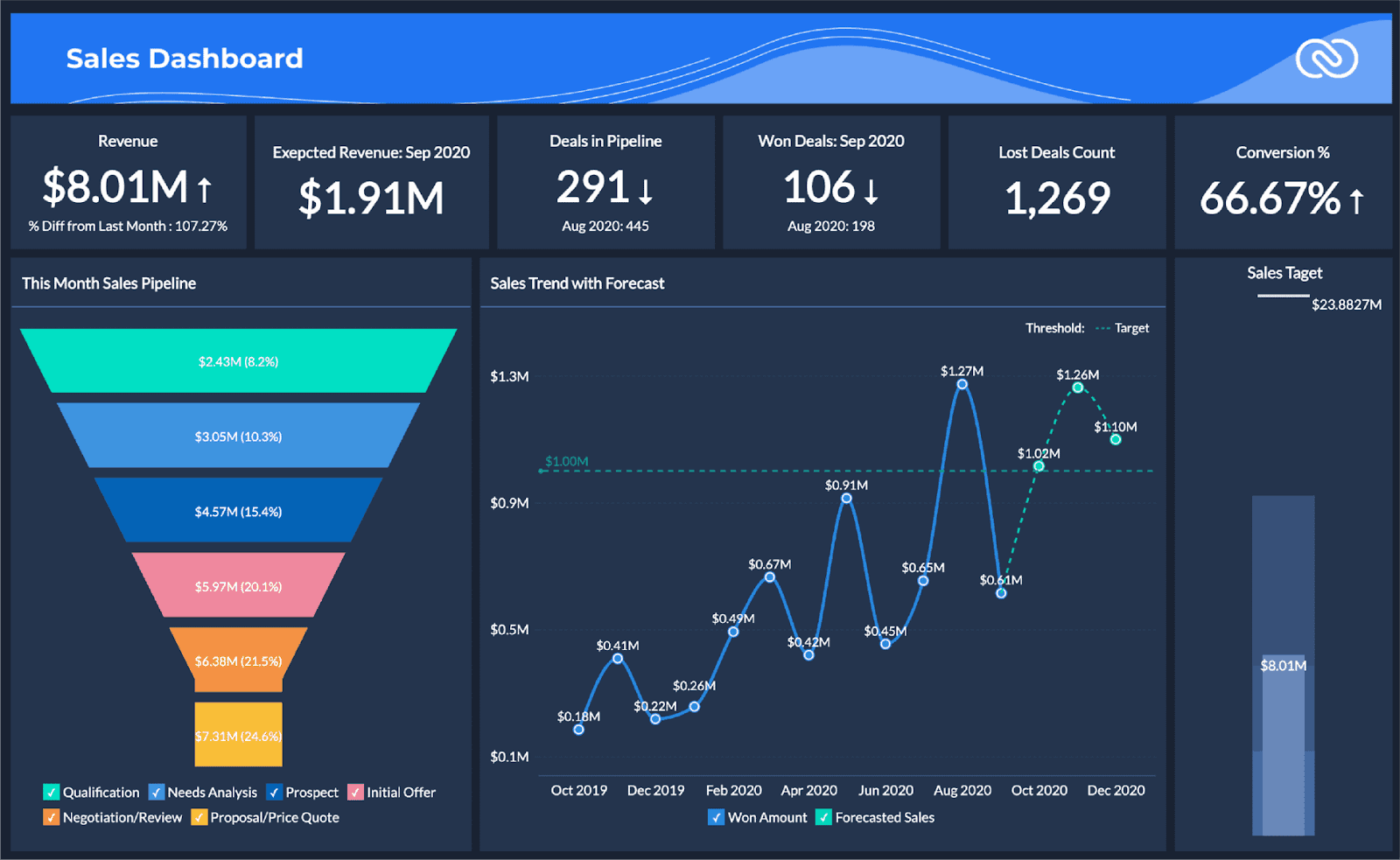 Image source: projectmanagers.net
Image source: projectmanagers.netZoho CRM is a comprehensive CRM solution with a focus on affordability and customization. It offers a wide range of features and integrations, making it suitable for businesses of all sizes.
Key features
- Lead management: Capture and qualify leads, track their progress, and convert them into customers.
- Contact management: Store and organize contact information, track interactions, and segment your audience.
- Sales automation: Automate repetitive tasks, such as sending emails, creating tasks, and updating records.
- Reporting and analytics: Track key metrics, analyze sales performance, and make data-driven decisions.
Advantages
- Affordable pricing: Offers a variety of plans to fit different budgets, making it accessible to small and medium-sized businesses.
- Highly customizable: Allows you to customize the platform to fit your specific business needs.
- Extensive integration options: Integrates with a wide range of third-party tools, including Zoho's own suite of business applications.
- AI-powered features: Offers AI-powered features, such as lead scoring and sales forecasting.
Pricing: Free plan available. Paid plan starts at $14/user/month (billed annually).
4. Pipedrive
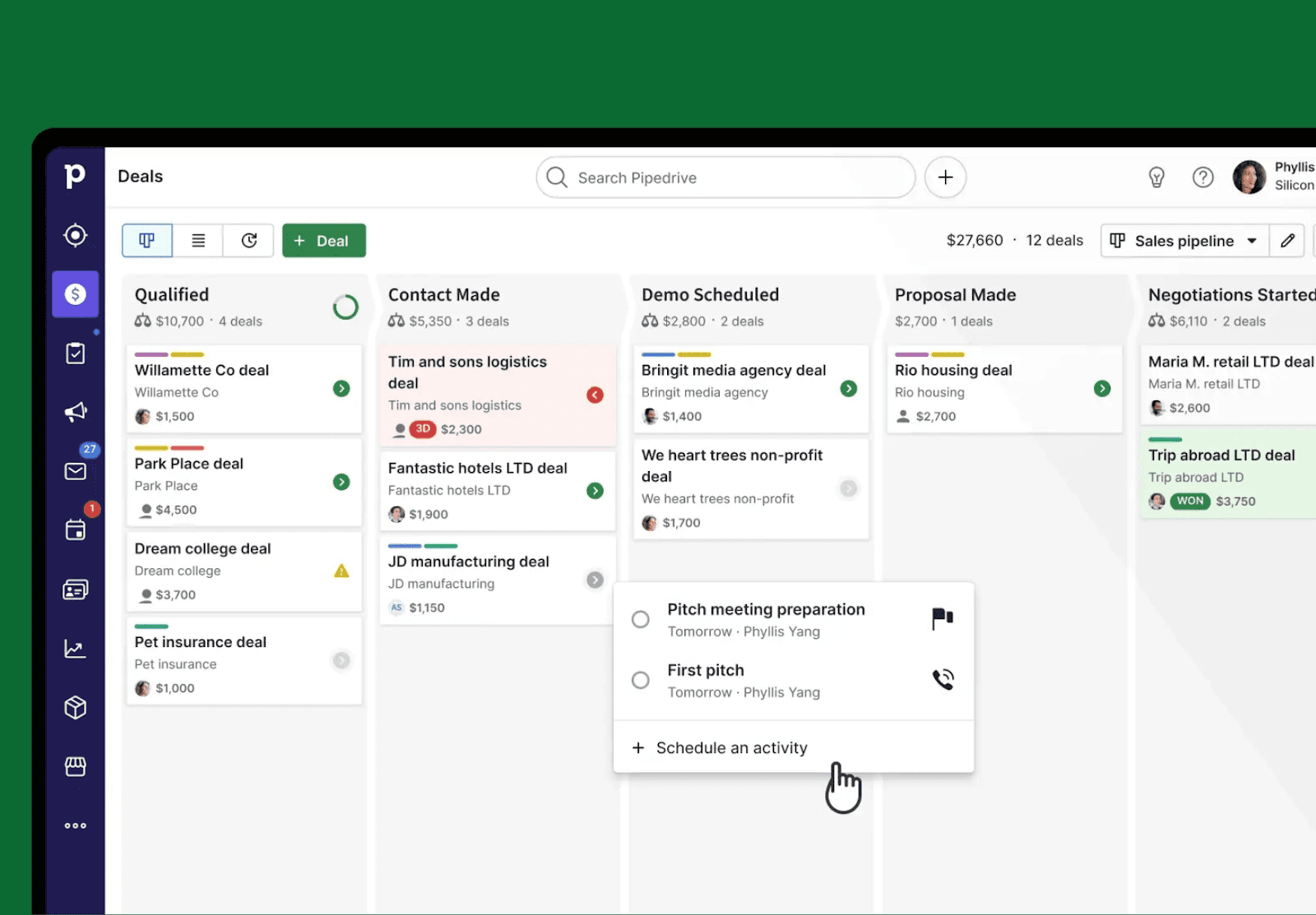 Image source: pipedrive.com
Image source: pipedrive.comPipedrive is a sales-focused CRM designed to help sales teams visualize their pipeline and close more deals. It emphasizes activity-based selling and offers a clear, intuitive interface.
Key features
- Visual pipeline: Drag and drop deals through your sales pipeline to track progress and identify bottlenecks.
- Activity-based selling: Focus on scheduling and completing activities to move deals forward.
- Email integration: Integrates with popular email providers to track email communications and automate follow-ups.
- Sales reporting: Track key sales metrics, such as deal velocity and conversion rates.
- Mobile app: Access your CRM on the go with the Pipedrive mobile app.
Advantages
- Sales-focused design: Built specifically for sales teams, with features that support activity-based selling.
- Easy to use: Intuitive interface and visual pipeline make it easy to learn and use.
- Strong e-mail integration: Integrates seamlessly with popular email providers to track email communications and automate follow-ups.
- Affordable pricing: Offers a range of plans to fit different budgets.
Pricing: Free trial available. Paid plan starts at $14/user/month (billed annually).
5. Freshsales (Freshworks CRM)
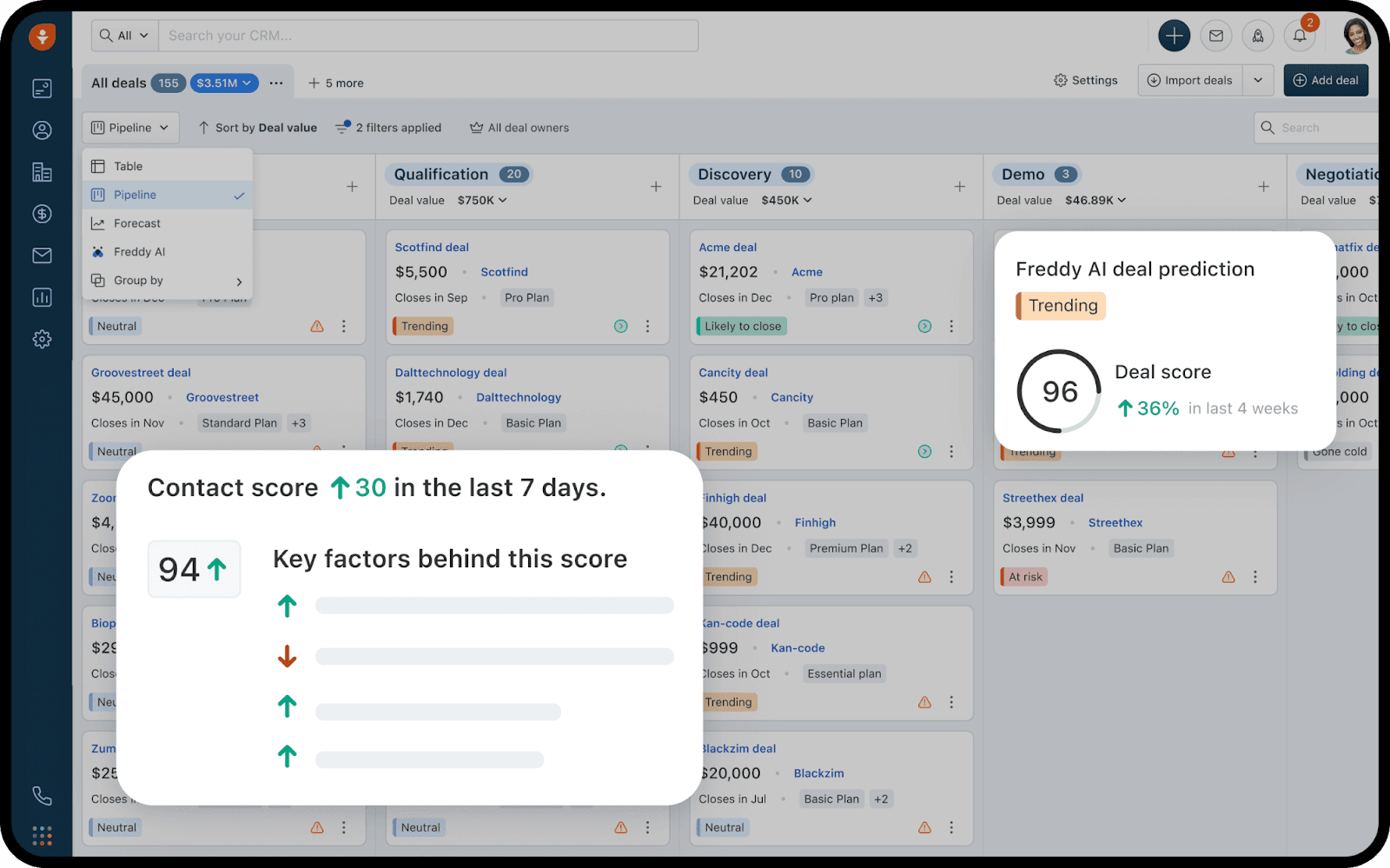 Image source: freshworks.com
Image source: freshworks.comFreshsales, part of the Freshworks CRM suite, is designed to be an all-in-one sales CRM, offering features for lead generation, sales automation, and customer engagement.
Key features
- Lead scoring: Automatically score leads based on their behavior and engagement.
- Sales automation: Automate repetitive tasks, such as sending emails, creating tasks, and updating records.
- Built-in phone and e-mail: Communicate with customers directly from the CRM.
- Sales reporting: Track key sales metrics, such as conversion rates and revenue.
- AI-powered insights: Get insights into your sales performance and identify areas for improvement.
Advantages
- All-in-one solution: Offers a wide range of features for lead generation, sales automation, and customer engagement.
- Easy to use: Intuitive interface and user-friendly design make it easy to learn and use.
- AI-powered features: Leverages AI to provide insights into your sales performance and identify opportunities.
- Affordable pricing: Offers a range of plans to fit different budgets.
Pricing: Free trial available. Paid plan starts at $9/user/month (billed annually).
6. Capsule CRM
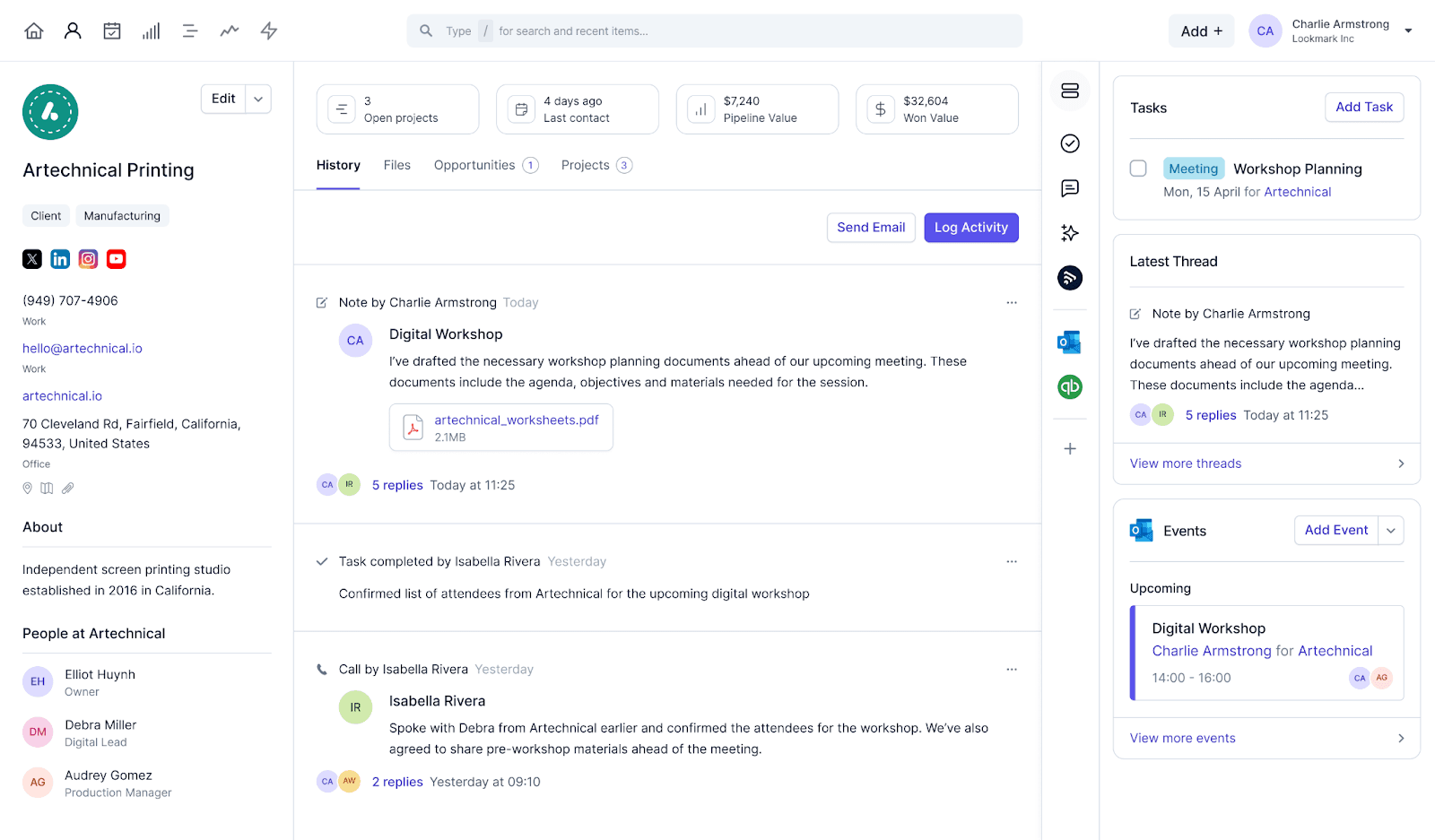 Image source: capsulecrm.com
Image source: capsulecrm.comCapsule CRM focuses on simplicity and ease of use, making it a great choice for small businesses and teams that need a straightforward CRM solution.
Key features
- Contact management: Store and organize contact information, track interactions, and segment your audience.
- Sales pipeline management: Track deals through your sales pipeline, set milestones, and manage activities.
- Task management: Assign tasks to team members, set deadlines, and track progress.
- Reporting: Track key metrics, such as sales performance and lead conversion rates.
- Integrations: Integrates with popular tools, such as Google Workspace, Mailchimp, and Xero.
Advantages
- Simple and easy to use: Focuses on core CRM features, making it easy to learn and use.
- Affordable pricing: Offers a range of plans to fit different budgets.
- Integrations: Integrates with popular tools to streamline your workflow.
- Mobile app: Access your CRM on the go with the Capsule CRM mobile app.
Pricing: Paid plan starts at $18/user/month (billed annually).
7. Bitrix24
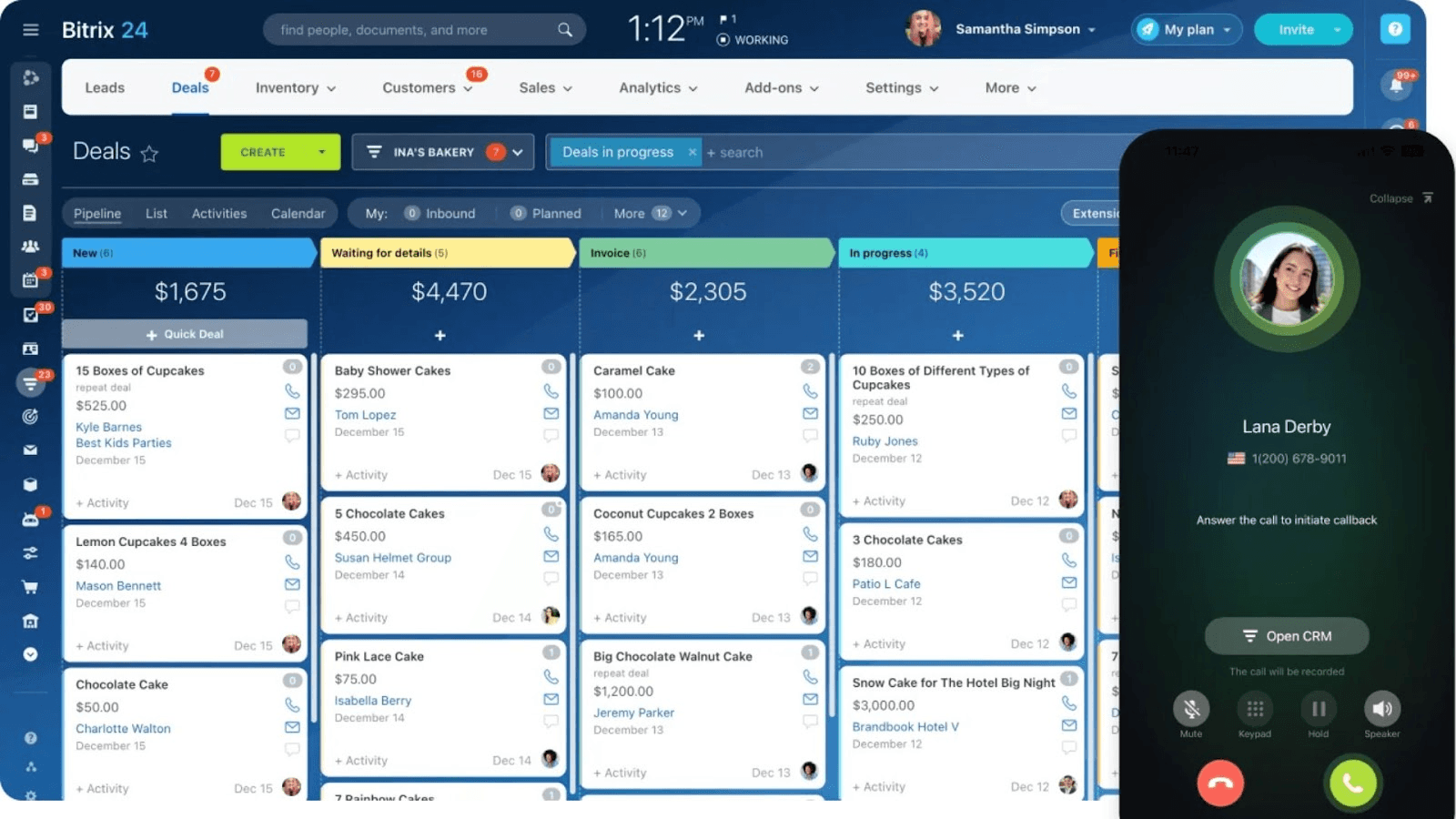 Image source: bitrix24.com
Image source: bitrix24.comBitrix24 is a free CRM and collaboration platform offering a wide range of features, including CRM, project management, website building, and communication tools.
Key features:
- Project Management: Task management, Gantt charts, and collaboration tools for managing projects.
- Website Building: Create landing pages and websites with the built-in website builder.
- Communication: Instant messaging, video conferencing, and team collaboration features.
- Automation: Automate repetitive tasks and workflows.
Advantages
- All-in-one platform: Combines CRM, project management, website building, and communication tools.
- Customizable: Allows you to customize the platform to fit your specific business needs.
- Mobile App: Access your CRM on the go with the Bitrix24 mobile app.
Pricing: Paid plan starts at $49/5 users/month (billed annually).
8. Streak
 Image source: chromewebstore.google.com
Image source: chromewebstore.google.comStreak is a CRM built directly into Gmail, making it a convenient option for businesses that rely heavily on email communication.
Key features
- Gmail integration: Manage your CRM directly from your Gmail inbox.
- Email tracking: Track email opens and clicks to understand engagement.
- Sales pipeline management: Track deals through your sales pipeline and manage activities.
- Contact management: Store and organize contact information.
- Mail merge: Send personalized emails to multiple contacts at once.
Advantages
- Seamless Gmail integration: Manage your CRM directly from your Gmail inbox.
- Easy to use: Intuitive interface and user-friendly design make it easy to learn and use.
Pricing: Paid plan starts at $49/user/month (billed annually).
9. LessAnnoying CRM (LACRM)
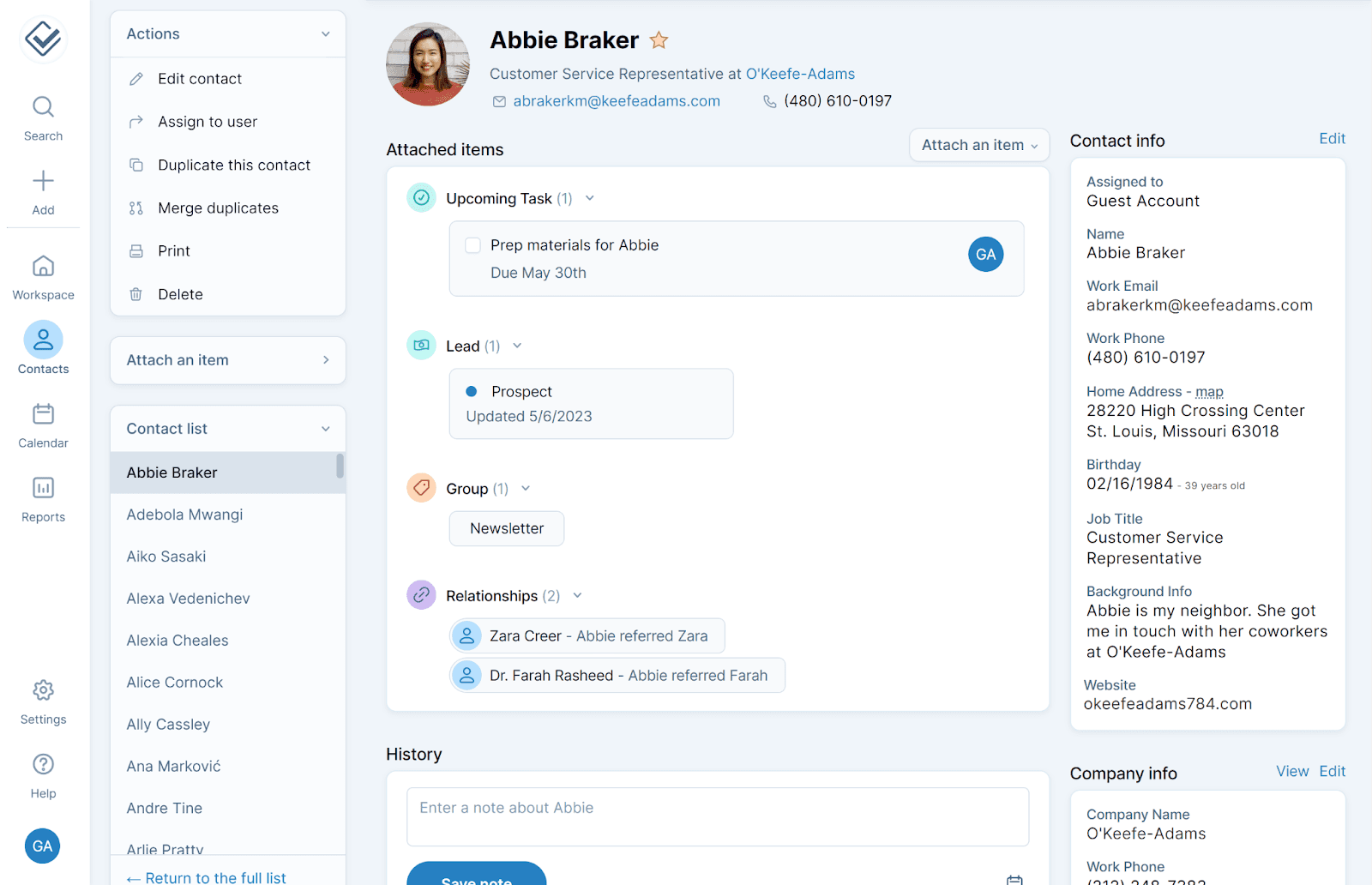 Image source: softwareworld.co
Image source: softwareworld.coLess Annoying CRM (LACRM) lives up to its name by offering a simple, straightforward, and affordable CRM solution without unnecessary features.
Key features
- Contact management: Store and organize contact information, track interactions, and segment your audience.
- Task management: Assign tasks to team members, set deadlines, and track progress.
- Calendar integration: Integrate with Google Calendar or Outlook to schedule meetings and manage your calendar.
- Reporting: Track key metrics, such as sales performance and lead conversion rates.
Advantages
- Simple and easy to use: Focuses on core CRM features, making it easy to learn and use.
- Affordable pricing: Offers a flat monthly rate for all users.
- Excellent customer support: Known for its responsive and helpful customer support team.
Pricing: Paid plan starts at $15/user/month (includes all features).
10. Apptivo
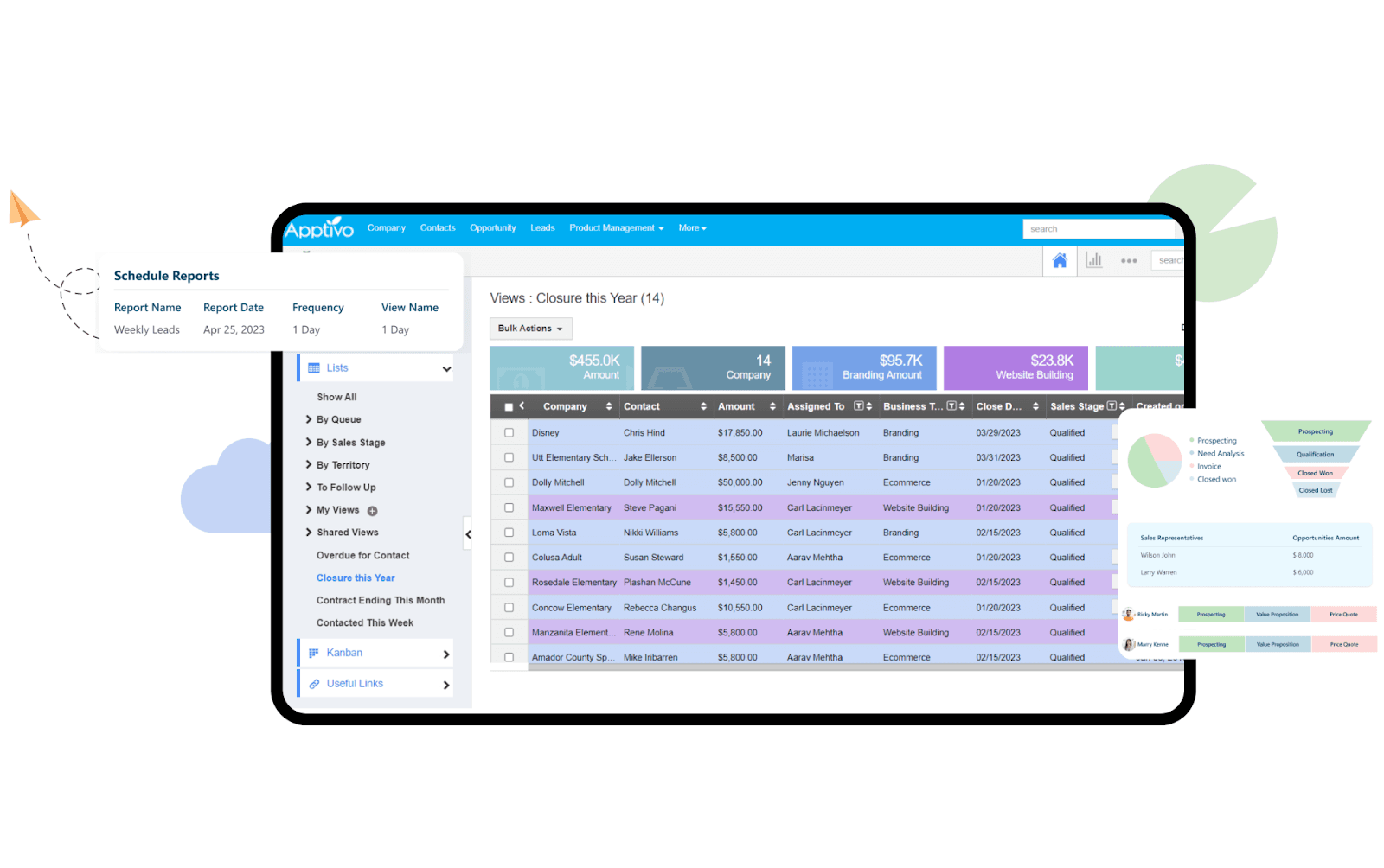 Image source: sharedcontactsmanager.com
Image source: sharedcontactsmanager.comApptivo is a suite of integrated business apps, including a powerful CRM. It offers comprehensive features for managing customer relationships, projects, and finances.
Key features
- Project management: Task management, Gantt charts, and collaboration tools for managing projects.
- Invoicing: Create and send invoices, track payments, and manage your finances.
- Inventory management: Track inventory levels, manage orders, and control your supply chain.
- Email marketing: Create and send email campaigns, track results, and manage your email list.
Advantages
- All-in-one solution: Combines CRM, project management, invoicing, and inventory management.
- Customizable: Allows you to customize the platform to fit your specific business needs.
- Affordable pricing: Offers a range of plans to fit different budgets.
Pricing: Paid plan starts at $15/user/month (billed annually).
Choosing the right simple CRM: Key considerations
When opting for a simple CRM solution, several key considerations should guide your decision-making process.
Prioritize your needs
Before even looking at CRM platforms, meticulously define your specific requirements.
- What sales processes need streamlining?
- What customer data needs tracking?
A clear understanding of your priorities will narrow your search significantly.
Consider integrations
A CRM operating in isolation is often inefficient. Ensure the CRM seamlessly integrates with your existing business tools, such as email marketing software, accounting systems, and project management platforms. This interconnectedness will improve data flow and operational efficiency.
Read reviews and testimonials
Don't rely solely on marketing materials. Research user reviews and testimonials on reputable websites. Understanding the experiences of other users can provide invaluable insights into the CRM's strengths, weaknesses, and potential pitfalls.
Take advantage of free trials
Most reputable CRM providers offer free trials. Leverage these opportunities to thoroughly test the software with your own data and workflows. This hands-on experience is crucial for determining if the CRM is truly a good fit.
Think long-term scalability
While a simple CRM might suffice initially, consider its potential for future growth. Can it accommodate increasing data volumes and evolving business needs? Choose a solution that offers the flexibility to scale alongside your business trajectory.
Conclusions: Streamlining your business with simple CRM
Integrating a simple CRM solution into your business operations offers significant advantages in terms of customer relationship management, data organization, and overall efficiency. By choosing the right platform, you can empower your team to provide superior customer service and drive sustainable growth.
Considering the importance of seamless collaboration and communication alongside your CRM, explore the power of Lark to further optimize your workflow and enhance team productivity. Discover how Lark can complement your CRM efforts to create a truly connected and efficient business ecosystem today.
FAQs
What is the simplest CRM to use?
A simple CRM is intuitive, quick to set up, and covers contacts, pipelines, and basic automation without bloat. Lark fits well as a simple CRM: its Lark Base offers spreadsheet‑style tables, templates, and no‑code workflows that teams can use in minutes.
Is there a 100% free CRM?
Yes—options like HubSpot’s free tier and Zoho CRM’s free plan exist, but features and limits apply. Lark also has a generous free plan with Base, chat, docs, and automation—often enough for small teams needing a simple CRM.
Does Google have a CRM tool?
Google doesn’t offer a standalone CRM. You can assemble a basic setup with Sheets, Gmail, and Calendar, but a simple CRM like Lark provides built‑in pipelines, contacts, and automation without DIY integrations.
For more Google Workspace's information, you can refer to Google Workspace Pricing and Google Workspace alternatives.
What are the 4 types of CRM?
Operational, Analytical, Collaborative, and Strategic. For a simple CRM, prioritize operational (day‑to‑day pipelines) and collaborative (team coordination); Lark combines both with a lightweight setup.
Related reading
Table of contents
Start using Lark today

Manage all your work in one place
Boost team efficiency by 10x
Save up to 70% on software costs
Table of contents
Start using Lark today
Manage all your work in one place
Boost team efficiency by 10x
Save up to 70% on software costs



2026 Lark Technologies Pte. Ltd.
Headquartered in Singapore with offices worldwide.






Explore: