A campaign planner template helps teams organize goals, tasks, channels, budgets, and KPIs into one structured workflow. It brings consistency to planning, reduces errors, and improves alignment across marketing, sales, and CRM teams. Most organizations begin with simple spreadsheets or static documents, but these formats become harder to manage when campaigns expand across teams and channels. Lark enters naturally at this stage because it provides an online workspace where planning, task execution, communication, and reporting come together without forcing teams to change their habits. This gradual shift helps marketers build more reliable and predictable campaigns at scale.
Create a structured workflow for your upcoming campaigns
What is a campaign planner?
A campaign planner is a structured tool that maps your objectives, audience insights, messaging, channels, budgets, and tasks into a single unified system. It prevents teams from improvising campaigns with scattered notes or disconnected documents. A strong planner also helps ensure that campaign goals match organizational priorities and that progress remains transparent across contributors. Using a campaign planner template creates consistency across projects and reduces confusion caused by fragmented planning.
A planner also serves as a reference point throughout the campaign lifecycle. It helps marketers , performance metrics, approvals, and dependencies, often integrating smoothly with to keep workflows efficient. This organized structure becomes essential when teams run multiple campaigns simultaneously. Whether it is a dnd campaign planner template, a marketing campaign planner template, or a facebook campaign planner template, the foundation remains the same: alignment, clarity, and accountability.
Why use a campaign planner instead of planning manually?
As campaigns grow more complex, relying on scattered tools increases errors and slows execution. A planner centralizes information and ensures all contributors work with the correct data. This is particularly helpful for remote teams, cross-department workflows, and agencies managing multiple clients.
- Common problems in unstructured planning: Teams that plan manually often miss key steps because information lives in different places. Files are duplicated, timelines fall out of sync, and goals are easily forgotten. Without a campaign planner template, details such as KPIs, audience segments, or messaging pillars are rarely tracked consistently. This reduces the quality of campaigns and creates extra work during reporting. Manual planning also leads to miscommunication between design, sales, CRM, and marketing teams.
- Benefits for remote teams and cross-department coordination: rely heavily on clarity, visibility, and organized workflows. A structured planner keeps updates, deadlines, and tasks visible to everyone. Teams working across time zones do not need repeated meetings to stay aligned. A marketing campaign planner template helps centralize discussion points, briefs, and resource links. It ensures all teams follow the same process and prevents version conflicts when many contributors work together.
- Why online workspaces are better than spreadsheets or static docs: Online workspaces give teams a collaborative environment with shared editing, comments, tracking, and automation. Static docs and spreadsheets lack context, do not support real-time updates, and often break when multiple users modify them. Using dynamic workspaces reduces errors and keeps content organized. This is one reason marketers prefer tools that centralize collaboration instead of using disconnected apps. Gradually, Lark fits into this workflow because teams can manage planning, tasks, sheets, and discussion in one place.
Essential components of an effective marketing campaign planner
A structured campaign planner template ensures each component is filled consistently across campaigns. This eliminates guesswork and makes both planning and reporting easier. Each component plays a specific role in improving campaign quality and execution speed.
- Campaign goals: Clear goals help teams align on what the campaign must achieve. These goals guide channel selection, creative direction, and . A good planner makes these goals visible from the start. This structure reduces confusion and supports better strategic choices. Goals must be specific and linked to business outcomes.
- Audience and personas: Audience profiles determine message direction, creative tone, and targeting strategy. Including personas in the planner helps unify communication across marketing, design, and sales teams. It keeps the campaign focused on user motivations instead of assumptions. Accurate personal data leads to better targeting and improved conversion rates.
- Messaging pillars: Messaging pillars ensure content remains consistent across channels. These pillars outline the main points the campaign must communicate. A campaign planner template helps teams document and refine these messages early. This prevents mismatched creative assets or off-brand communication. Strong messaging alignment improves recognition and engagement.
- Channels: Selecting the correct channels shapes campaign reach and impact. Planners list channels such as email, social media, influencers, search ads, or offline placements. Teams assign budgets, timelines, and creative needs to each channel. This makes execution more predictable and reduces last-minute changes.
- Budgets: Budgets help teams allocate funds wisely across channels and assets. A planner centralizes budget information, so teams stay aware of spending limits. It also improves accountability during reporting. Budget tracking supports smarter optimization decisions later.
- KPIs: KPIs provide measurable indicators of campaign success. Standard KPIs include traffic, leads, conversions, cost per acquisition, and engagement metrics. A marketing campaign planner template structures these KPIs to ensure consistency across campaigns. Clarity in KPIs helps avoid debates during performance reviews.
- Timeline: Timelines create predictability and help sequence tasks logically. Campaigns require content production, design review, asset approval, and channel setup. A structured timeline makes these steps manageable. Timelines reduce stress and keep execution smooth.
- Task ownership: Assigning responsibility ensures each task has a clear owner. The planner documents who is accountable for messaging, design, channel activation, tracking setup, and reporting. This prevents delays and improves transparency across the team. Ownership is essential for remote or cross-functional teams.
- Collaboration notes: summarize meeting outcomes, role assignments, and dependencies. These notes help teams reduce back-and-forth messages and confusion. Having a central place for notes streamlines handoffs and keeps teams aligned. This is one reason planners work well in centralized workspaces, where collaboration feels more natural.
Ready-to-use planning campaigns templates
1. Marketing campaign management template
This template helps teams organize campaign objectives, audience insights, timelines, and deliverables in a structured layout. It centralizes creative briefs, tasks, and channel activations, so teams work from one shared plan. The format improves coordination for cross-functional groups managing multi-stage campaigns. It is ideal for teams wanting a predictable planning workflow.
Marketing managers running integrated campaigns across content, paid media, and social channels can use this template to align stakeholders early. Each team member sees campaign goals, deadlines, and ownership in one place, reducing follow-up meetings and missed handoffs. It works especially well for mid to large campaigns with multiple contributors.
2. Annual campaign planning template
This template maps out long-term marketing plans for the full year across themes, product cycles, and budgets. It helps teams visualize workload across months and supports early preparation for seasonal campaigns. Managers can align priorities and distribute resources more effectively. This structure prevents last-minute rushes and maintains strategic continuity.
Marketing leaders and heads of growth can use this template during annual or quarterly planning sessions. It helps leadership balance campaign intensity across the year, identify overlapping initiatives, and secure resources early. Teams gain a clear roadmap that guides execution month by month.
3. Marketing campaign template
Marketing campaign template helps teams plan goals, messaging, timelines, and channel activities in a structured and collaborative format. It keeps strategy, tasks, and assets connected, so teams stay aligned throughout the campaign lifecycle. Real-time updates reduce miscommunication and make progress easier to track. This organized workflow supports smoother execution across marketing, sales, and creative teams.
Campaign owners launching short-term initiatives such as promotions or feature announcements can use this template to move quickly from planning to execution. It works well when timelines are tight and alignment across teams is critical. Everyone stays focused on the same campaign narrative and milestones.
4. Product launch campaign template
This template helps teams prepare launch messaging, teasers, landing pages, influencer outreach, and announcements in a coordinated manner. It provides a structured sequence for pre-launch, launch day, and post-launch activities. Teams benefit from clear ownership across product, marketing, and sales. The format ensures every launch step is captured and tracked.
Product marketing teams managing coordinated launches across regions or channels can rely on this template to avoid missed steps. It supports collaboration between product, design, PR, and sales teams. Launch timelines stay visible, and dependencies are easier to manage.
5. Paid media budget tracking for digital campaigns
Lark paid media budget tracking for digital campaigns helps teams monitor spend, pacing, and performance in one organized workspace. It brings clarity to daily budget allocation across channels and reduces the risk of overspending or under pacing. Real-time updates help marketers adjust bids, creatives, and targeting with confidence. This structure supports smoother decision-making throughout the campaign lifecycle.
Performance marketing teams running ads across multiple platforms can use this template to track spend against targets daily. Media buyers and managers gain shared visibility into budget health. This helps teams react faster to performance changes without relying on scattered spreadsheets.
6. Social media campaign calendar template
This template organizes posts, themes, asset requests, and platform schedules in a clean calendar view. It helps content teams stay consistent across social channels. It also tracks copy drafts, creative approvals, and platform timing. Teams managing high-frequency posting cycles benefit from clear visibility and planning discipline.
Social media managers coordinating daily or weekly posting can use this template to avoid gaps or overlaps. Designers, writers, and approvers can see what is scheduled and what is still pending. This keeps social execution smooth even with frequent content changes.
7. Action plan for creative template
Action plan for creative helps teams organize briefs, asset requests, production steps, and review cycles in one structured workflow. It keeps writers, designers, and stakeholders aligned on priorities and deadlines. Real-time collaboration reduces feedback delays and prevents version confusion. This organized approach supports faster and more consistent creative delivery.
Creative leads managing multiple requests from marketing, sales, or product teams can use this template to standardize intake and execution. It clarifies ownership at each stage and reduces back-and-forth. Teams deliver assets faster with fewer revisions.
8. Marketing sales promotion calendar template
Marketing sales promotion calendar helps teams organize seasonal offers, product pushes, and channel activities in a unified schedule. It keeps deadlines, creative requirements, and launch dates visible to everyone involved. Teams can coordinate promotions across marketing and sales without juggling separate files. This structure reduces confusion and supports smoother campaign execution.
Marketing and sales teams planning coordinated promotions can use this template to stay aligned on timing and messaging. It helps prevent last-minute changes and miscommunication. Campaigns launch on schedule with clearer ownership.
9. Promotional and seasonal campaign planner template
This template supports time-bound campaigns that rely on precise timing and coordinated messaging. It organizes campaign offers, creative variations, channel schedules, and promotional assets. Teams can prepare well ahead of seasonal peaks. This improves quality and prevents chaotic last-minute execution.
Retail, e-commerce, or regional marketing teams planning holiday or seasonal campaigns can use this template to coordinate early. It ensures creative, inventory, and messaging are aligned before peak periods. Teams enter high-demand seasons with confidence.
10. Email marketing campaign planner template
This template helps teams plan sequences, segmentation, subject lines, creative elements, and delivery timing. It supports drip campaigns, announcements, promotions, and onboarding flows. Teams can map content logic before building automation rules. This improves consistency across emails and strengthens the overall user experience.
Lifecycle and CRM marketers designing multi-email journeys can use this template to plan content flow before execution. Stakeholders can review messaging logic and timing in advance. This reduces errors and improves campaign performance.
Plan with ease: Use Lark to design your campaign with smart workflows
offers a unified workspace where campaign planning, task execution, collaboration, and data tracking happen in one connected environment. Instead of juggling spreadsheets, chats, and separate planning tools, teams can keep goals, , assets, and approvals aligned in a single hub. This reduces confusion and helps cross-functional teams stay coordinated throughout the entire campaign lifecycle. With everything organized in one place, marketers can plan smarter and execute faster.
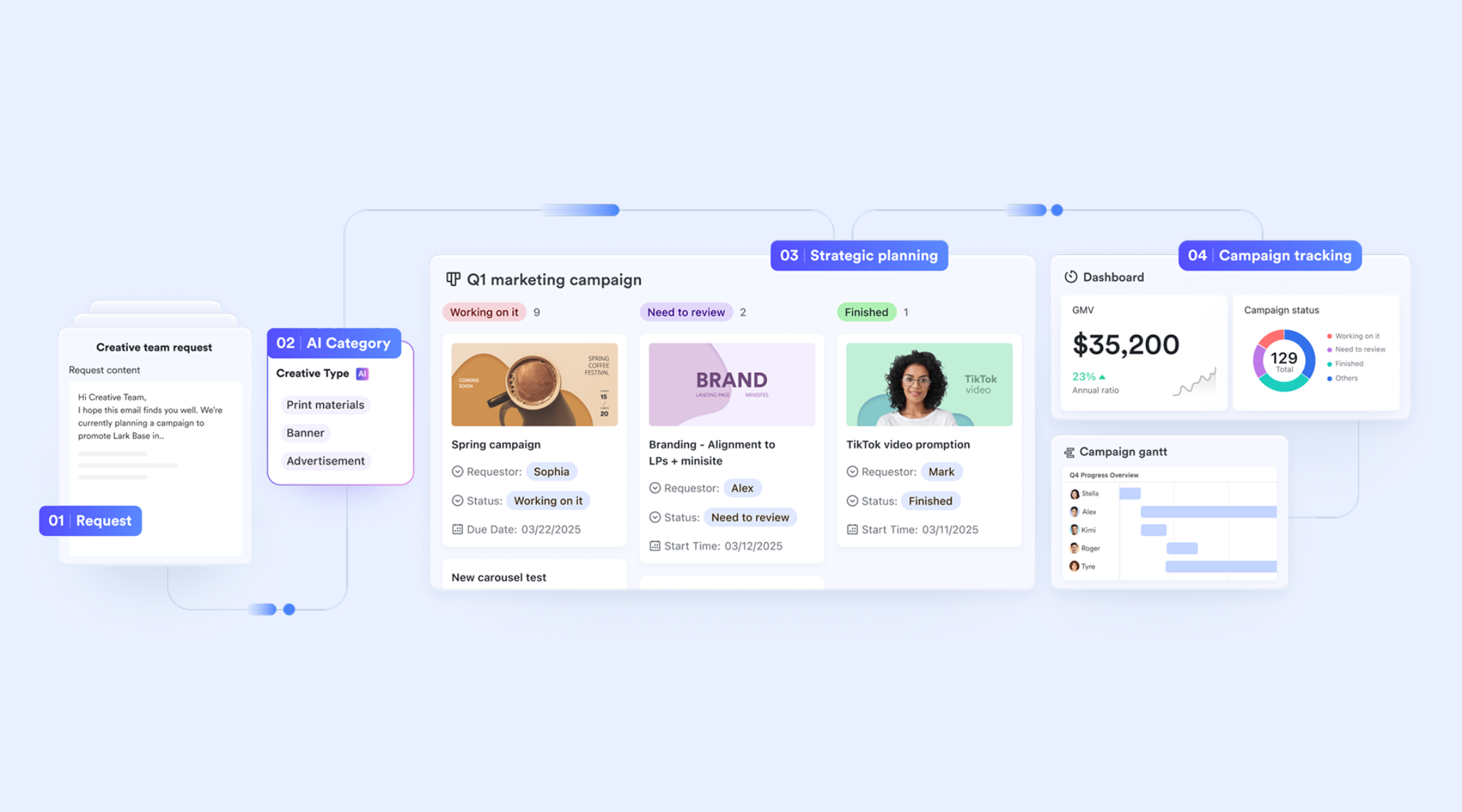
Structured campaign planning and process monitoring
With , teams can build a fully customizable campaign planning system that stores goals, audience insights, messaging pillars, budgets, assets, and KPIs in structured fields. Base supports multiple views such as Grid view, Kanban boards, and Gallery view, allowing teams to switch between strategy, content, and execution modes without losing context. Records can be linked across tables and tied to Docs, Tasks, or Calendars, giving teams a unified workspace instead of fragmented spreadsheets. Also, for data analysis and real-time operational monitoring, Lark Base dashboard supports over 36 block types, including various chart types (column, line, pie, radar) and key performance blocks like Metrics, Ranking, and Funnel charts. This allows marketing teams to visualize the progress of campaign execution, track key performance indicators (KPIs) against goals 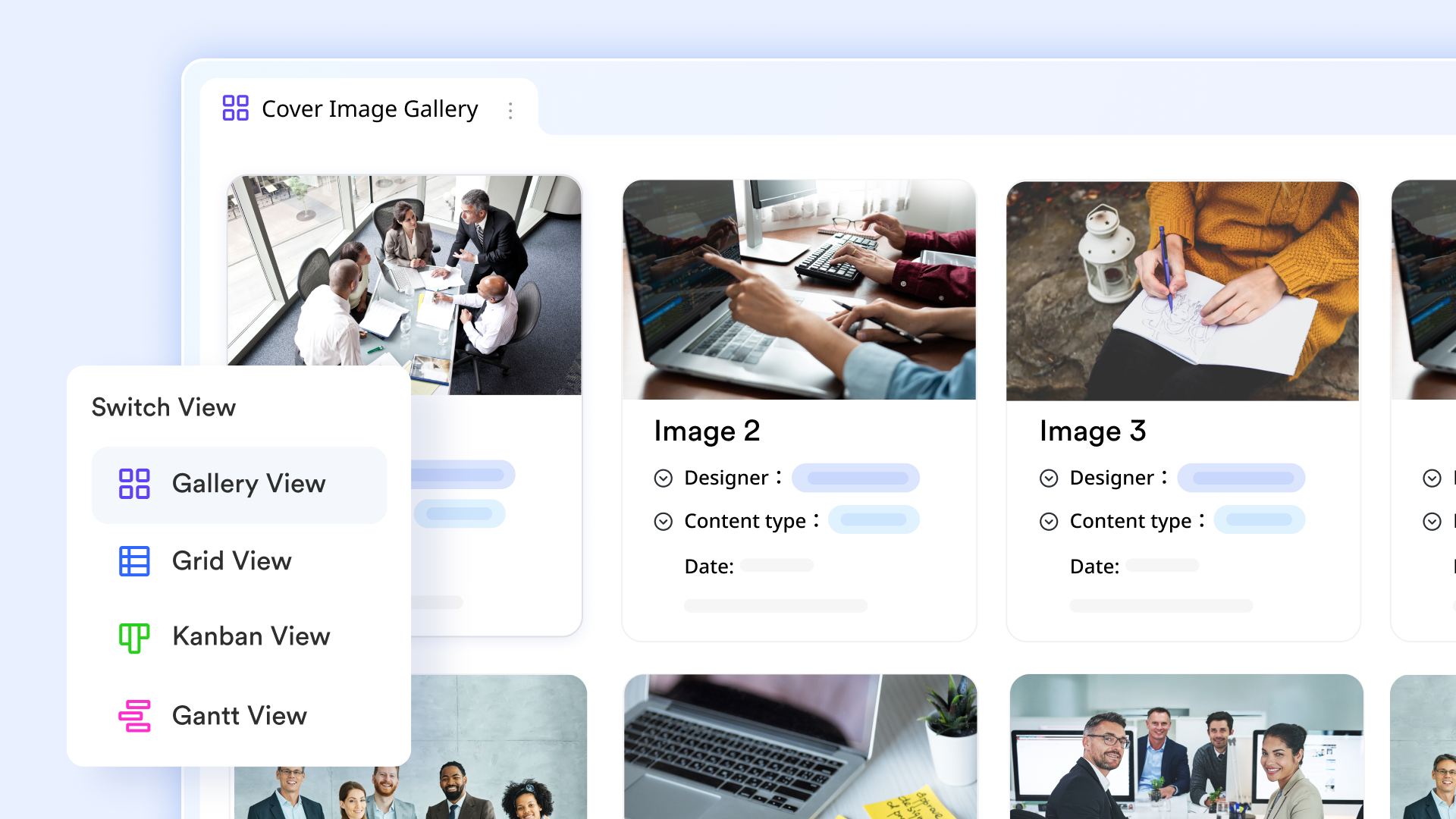
Milestone and execution tracking
Lark Tasks provides a clear structure for assigning responsibilities, setting deadlines, and managing workloads across campaign phases. Team members can add priorities, subtasks, and dependencies while connecting each task directly to relevant docs or Base records. Tasks and project task views in Lark help contributors stay organized by allowing users to view tasks by role (Owned, Subscribed, Created, Assigned) and by project. You can group, sort, and filter tasks, and add custom fields for more details. Real-time updates are ensured—when changes are made to tasks or fields, all collaborators see the updates immediately. You can also view all task changes in reverse order via the Activities section. 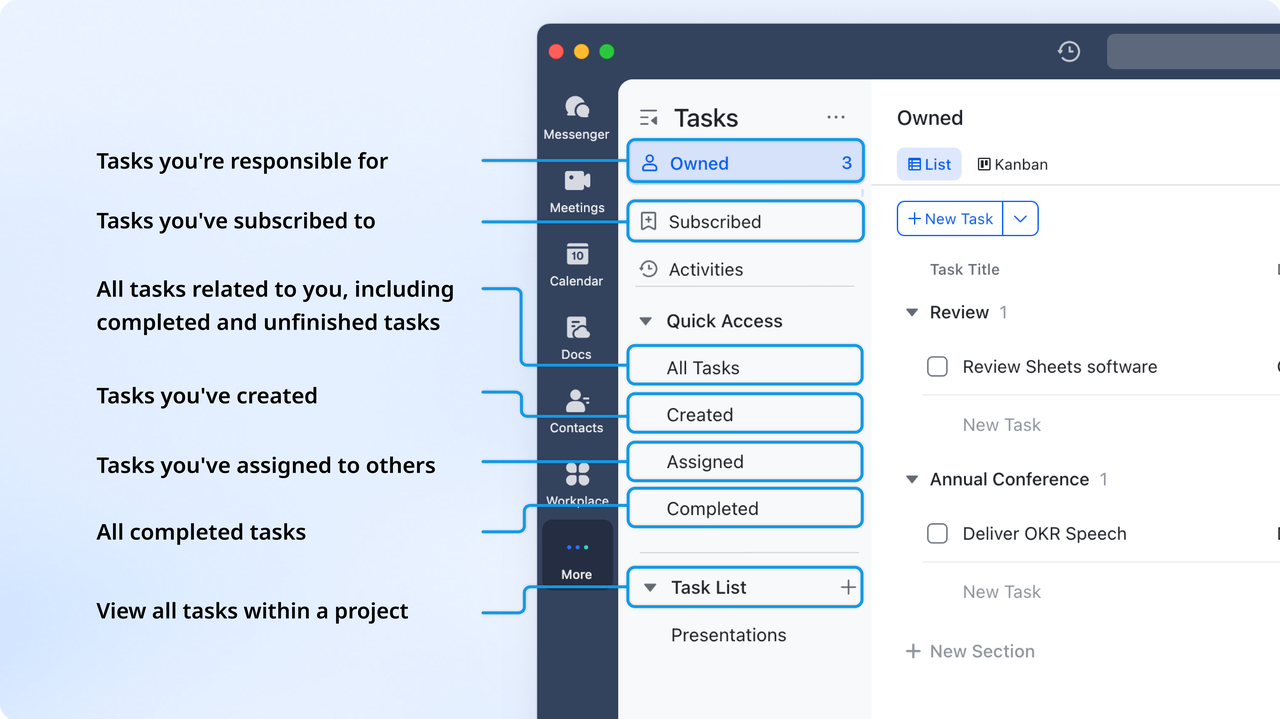
Collaborative briefs, messaging guides, and content plans
Features in enhance collaboration by allowing teams to work together in real time with clear context and control. Inline comments and @mentions help teammates discuss specific sections of campaign briefs, messaging frameworks, calendars, or creative notes without leaving the document. Version history provides a transparent record of changes so teams can review edits or restore previous versions when needed. Permissions settings let document owners define who can view, edit, or comment, ensuring the right level of access for every collaborator.
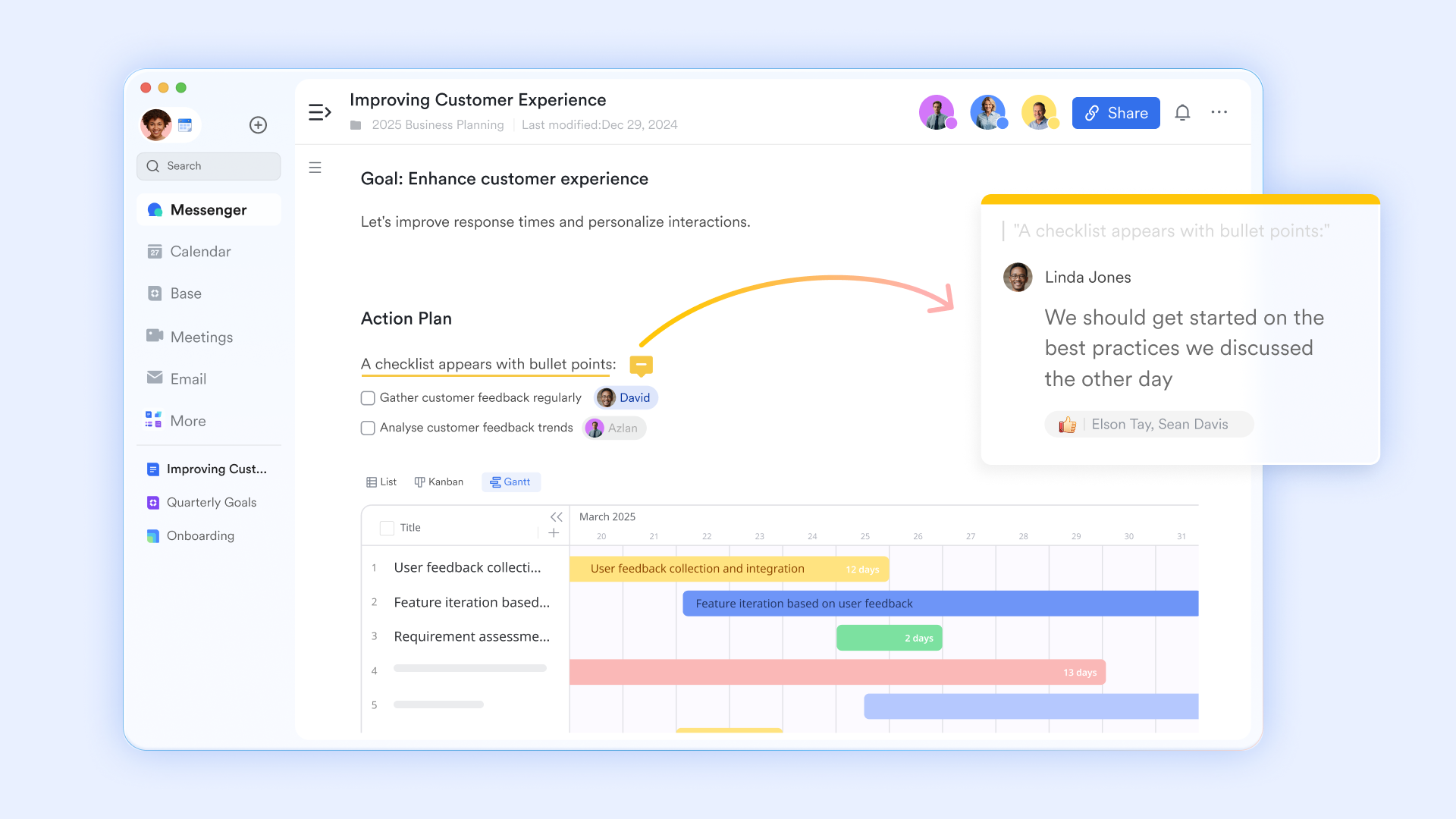
Campaign timing and channel scheduling
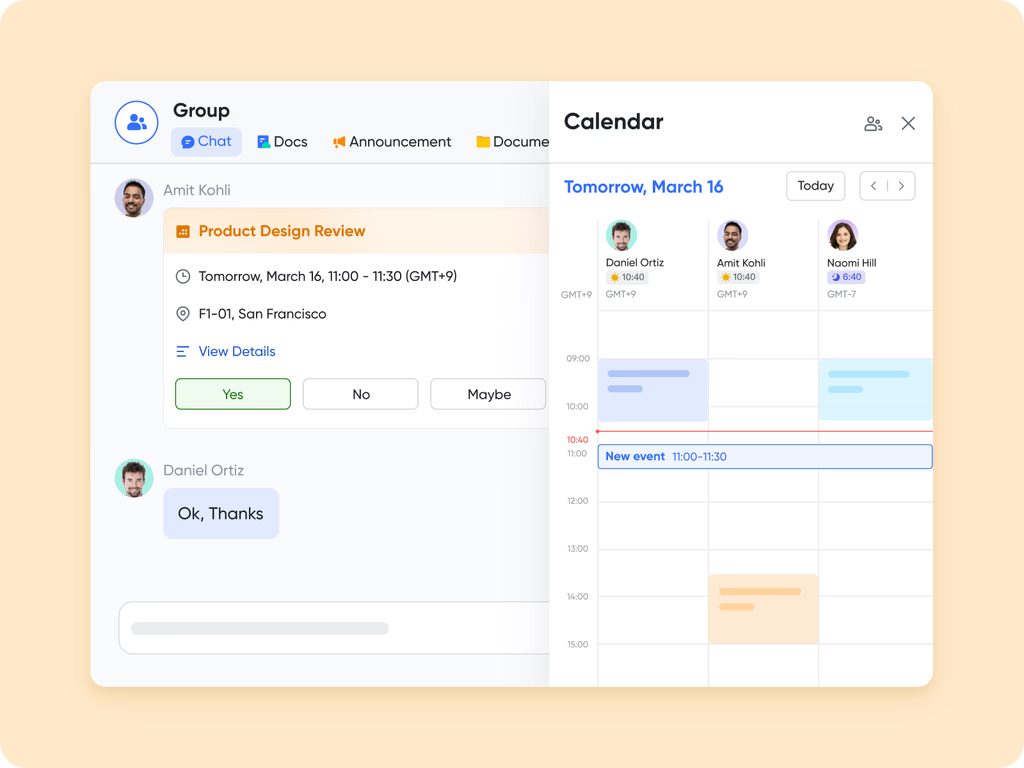
gives teams a shared view of all campaign milestones, content publishing dates, review cycles, and launch schedules. Events can include attachments, task links, or brief references from Lark Docs. Team availability, reminder settings, and cross-calendar visibility help marketing, creative, and CRM teams coordinate without juggling separate calendars. This makes campaign timing more predictable and ensures deadlines remain visible across departments.
Automated workflow for approvals and multi-step coordination
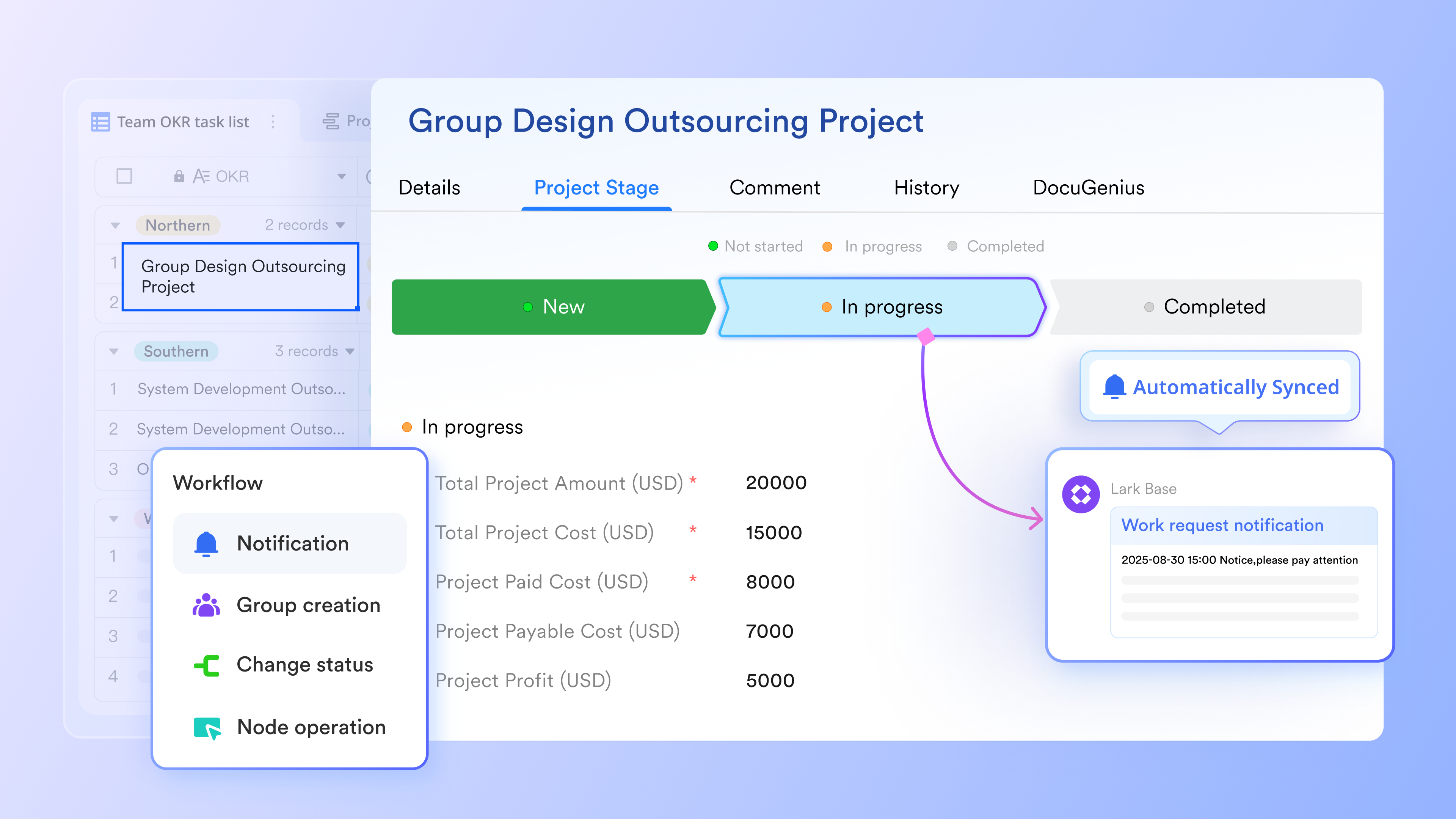
Using inside Lark Base, teams can route creative approvals, assign review responsibilities, trigger follow-up tasks, send reminders, or update campaign records automatically. This supports multi-step processes such as content QA, budget approval, channel setup, or final launch checks—helping teams eliminate manual follow-ups and reduce delays. automated workflow ensures every stage moves smoothly from planning to execution with clear accountability.
:
- Starter plan: Free forever plan that includes 11 powerful tools for up to 20 users. It also comes with 100GB of storage, 1000 automation runs, AI translations, and more.
- Pro plan: $12/user/month (billed annually) for up to 500 users. It includes everything in Starter plus group calling for up to 500 attendees, 15TB of storage, 50,000 automation runs, and more.
- Enterprise plan: for custom pricing. Supports unlimited users and includes even more automation runs and advanced security, compliance, and management features.
For small teams with simple communication needs

18 months message history
1000 Base automation runs/month
2000 rows per table in Base
Most POPULAR
For companies with comprehensive collaboration and management needs
Unlimited message history
500-participant video meetings
50k Base automation runs/month
20k rows per table in Base
For large companies with advanced security and organizational management needs
Get a personalized demo and pricing
Unlimited message history
500-participant video meetings
15 TB storage + 30 GB storage/user
500k Base automation runs/month
50k Base automation runs/month
Most POPULAR
For companies with comprehensive collaboration and management needs
Unlimited message history
500-participant video meetings
50k Base automation runs/month
20k rows per table in Base
Mistakes to avoid when planning campaigns
This section highlights common planning gaps that reduce performance or delay execution. Avoiding these mistakes will improve campaign quality and reduce miscommunication. A campaign planner template helps teams stay consistent and avoid missing critical steps.
- No defined KPIs make measuring success difficult and lead to subjective evaluation. ensure teams work toward measurable targets. Setting them early improves clarity and reporting accuracy. Without KPIs, optimization becomes guesswork and reduces campaign impact.
- Vague target audience leads to ineffective messaging and wasted budget. A planner requires teams to define personas clearly before creating assets. This keeps campaigns aligned with user needs. Detailed audience information improves targeting across channels.
- Poor collaboration leads to duplicated tasks, mismatched creative assets, and incomplete workflows. Structured planning helps teams document responsibilities and communicate clearly. This maintains quality and consistency across channels. Collaboration becomes easier with a shared planner.
- No timeline owner causes delays and misalignment across teams. Timelines need accountability to stay on track. A planner clearly identifies responsible owners for each step. This improves execution flow and prevents last-minute rushes.
- Using separate apps instead of one platform creates fragmented workflows, lost files, and inconsistent updates. A centralized campaign planner template reduces confusion. It also improves speed because teams are not switching tools frequently. Unified platforms provide more reliable coordination.
Conclusion
A campaign planner template gives marketing teams, agencies, and a structured way to manage goals, messaging, timelines, roles, and KPIs. It reduces fragmentation caused by planning scattered across spreadsheets, slides, and messaging channels. As campaigns grow more complex, the need for a consistent and predictable planning system becomes more important. A strong planner not only improves workflow quality but also strengthens reporting, team alignment, and long-term learning.
supports this evolution by centralizing planning, collaboration, tasks, and data analysis into one workspace. This helps teams reduce errors, maintain clear ownership, and strengthen execution across every stage of the campaign. The gradual shift into a unified system allows marketers to keep their familiar workflows while gaining the structure they need for scale. With a connected environment for planning and execution, teams can operate with higher efficiency and more confidence.
Start planning smarter with a structured workflow
FAQs
Can I use a single template for multiple campaigns?
Yes, you can reuse a single template across different campaigns as long as the structure is flexible. Many teams use one template for seasonal, product, and performance-based initiatives to keep planning consistent. Reuse also helps teams compare results and refine processes over time. As planning becomes more complex, some teams start organizing their templates inside collaborative tools so everything stays easy to update.
How often should campaign templates be updated?
Templates should be reviewed regularly to reflect new channels, goals, and team processes. Many teams update their campaign planner template after each major campaign to incorporate lessons learned. This improves planning quality and keeps the structure from becoming outdated. Over time, teams may store their templates in shared workspaces to simplify version control and collaborative editing.
Do campaign templates work for small businesses or startups?
Yes, campaign templates are extremely helpful for small teams because they bring clarity and reduce unnecessary rework. Small businesses often juggle many tasks, so having a structured plan prevents confusion. Templates also help teams adopt more consistent workflows even with limited resources. As collaboration needs increase, some teams gradually move their templates into tools that support shared editing and tracking.
What is the difference between campaign tracking and campaign planning?
Campaign planning focuses on defining goals, messaging, timelines, and responsibilities before the campaign begins. Campaign tracking monitors results, spend, and performance once the campaign is active. Both processes benefit from having information organized in one place. Using a unified planner makes it easier for teams to shift from planning to reporting without losing context, especially as campaigns grow.
How do I measure if my template actually improved campaign performance?
You can evaluate improvement by comparing execution speed, content readiness, coordination quality, and results before and after using the template. Many teams notice fewer delays and clearer responsibilities once a structured plan is in place. Better organization often leads to stronger outcomes across channels. As planning becomes more consistent, teams may gradually adopt shared digital workspaces to review performance more easily.
Related reading












