














11 Top Campaign Management Tools to Boost Productivity and ROI

Ryan Tanner
Product Marketing Specialist
Sep 18, 2026
Ryan Tanner
Sep 18, 2026

23 min read


In modern marketing, managing campaigns across channels is both a challenge and an opportunity. Teams need to plan, execute, and measure performance efficiently. That's where campaign management tools like Lark, Asana, HubSpot, and Marketo come in. These platforms help marketers plan, execute, and track campaigns efficiently across social media, CRM, email, and PPC channels. From scheduling and automation to analytics and reporting, they provide the structure needed to improve collaboration and boost ROI.
In this guide, we’ll explore the top campaign management tools that empower marketing teams to simplify workflows, gain actionable insights, and drive measurable success across every campaign.
- Lark: Complete campaign management for social, PPC, and CRM
- Asana: Structured campaign planning made simple
- Hive: Simplify campaign workflows and data insights
- Zapier: Automation for smarter campaign workflows
- Teamwork: Project and campaign tracking software
- Creatio: CRM-focused campaign management solution
- HubSpot: Marketing and campaign management platform
- Monday.com: Visual campaign management for teams
- Trello: Flexible boards for campaign planning
- Marketo: Enterprise campaign management software
- Writer: AI-native campaign management for marketing teams

What are campaign management tools?
The purpose of campaign management tools is to help marketing teams plan, organize, and monitor every phase of a campaign — from concept to completion. These tools streamline processes by consolidating planning, scheduling, execution, tracking, and reporting into one unified workspace.
They allow marketers to coordinate timelines, assign tasks, automate repetitive work, and evaluate campaign performance using real-time analytics and dashboards. By offering centralized visibility, teams can ensure that every channel and message aligns with business objectives.
There are several types of marketing campaign management tools, each designed for specific needs:
- Social media campaign management tools for scheduling posts, monitoring engagement, and analyzing audience growth across platforms.
- PPC campaign management tools for optimizing ad spend, tracking conversions, and improving return on investment.
- Email campaign management tools for creating, automating, and measuring email marketing performance.
- CRM campaign management tools for managing leads, nurturing customer relationships, and tracking sales outcomes.
- Cross-channel campaign management tools for unifying multiple marketing channels — from social media to email and paid ads — into one comprehensive dashboard.
Together, these tools empower marketers to deliver more organized, data-driven, and measurable campaigns that improve productivity and ROI.
What to look for in a winning campaign tool
Choosing the right campaign management tool can make the difference between a well-executed strategy and a scattered effort. The best platforms combine automation, collaboration, and analytics to help marketing teams work smarter, not harder.
- Workflow automation: Automation is the backbone of modern marketing campaign management tools. It eliminates repetitive tasks such as sending updates, assigning approvals, and reporting progress — allowing teams to focus on strategy and creativity. With automated workflows, campaigns move faster and with fewer errors.
- Cross-channel scheduling and analytics: A powerful cross-channel campaign management tool enables marketers to plan and analyze campaigns across multiple platforms — from social media and email to PPC and CRM systems. Real-time analytics provide a single view of performance, helping teams adjust tactics quickly and improve ROI.
- Collaboration and team management: Successful campaigns rely on seamless teamwork. The best tools offer shared dashboards, task assignments, and in-app communication features that ensure alignment between marketing, sales, and creative teams. This transparency accelerates campaign execution and prevents information silos.
- CRM and lead management: Integrated CRM campaign management tools help capture leads, track their journey, and nurture them through targeted communication. A clean CRM integration is what keeps that journey intact when leads arrive from multiple channels and touchpoints. They give marketers deeper insight into customer behavior, enabling more personalized and conversion-focused campaigns.
- Reporting and insights: Comprehensive reporting is essential for measuring what works and what doesn’t. Advanced tools deliver visual dashboards, performance summaries, and trend insights, turning raw data into actionable strategies that refine future campaigns.
- Budget tracking and ROI measurement: Every marketer needs to justify campaign spending. The best campaign management tools include budget-tracking features that compare costs with outcomes, calculate ROI automatically, and highlight areas where marketing investments yield the highest returns.
Top 10 campaign management tools to take your marketing to the next level
1. Lark: Complete campaign management for social, PPC, and CRM
Lark is a comprehensive campaign management platform designed to help marketing teams streamline workflows across social media, PPC, and CRM campaigns. With an all-in-one suite that includes Base, Tasks, Calendar, Messenger, Forms, Sheets, Docs, Approval, and OKR tools, teams can plan, execute, and analyze campaigns seamlessly.
Lark centralizes data, automates repetitive tasks, and enables real-time collaboration, ensuring campaigns stay on schedule and deliver measurable results. Ideal for cross-channel campaign management, Lark empowers teams to make data-driven decisions and optimize performance at every stage of the marketing process.
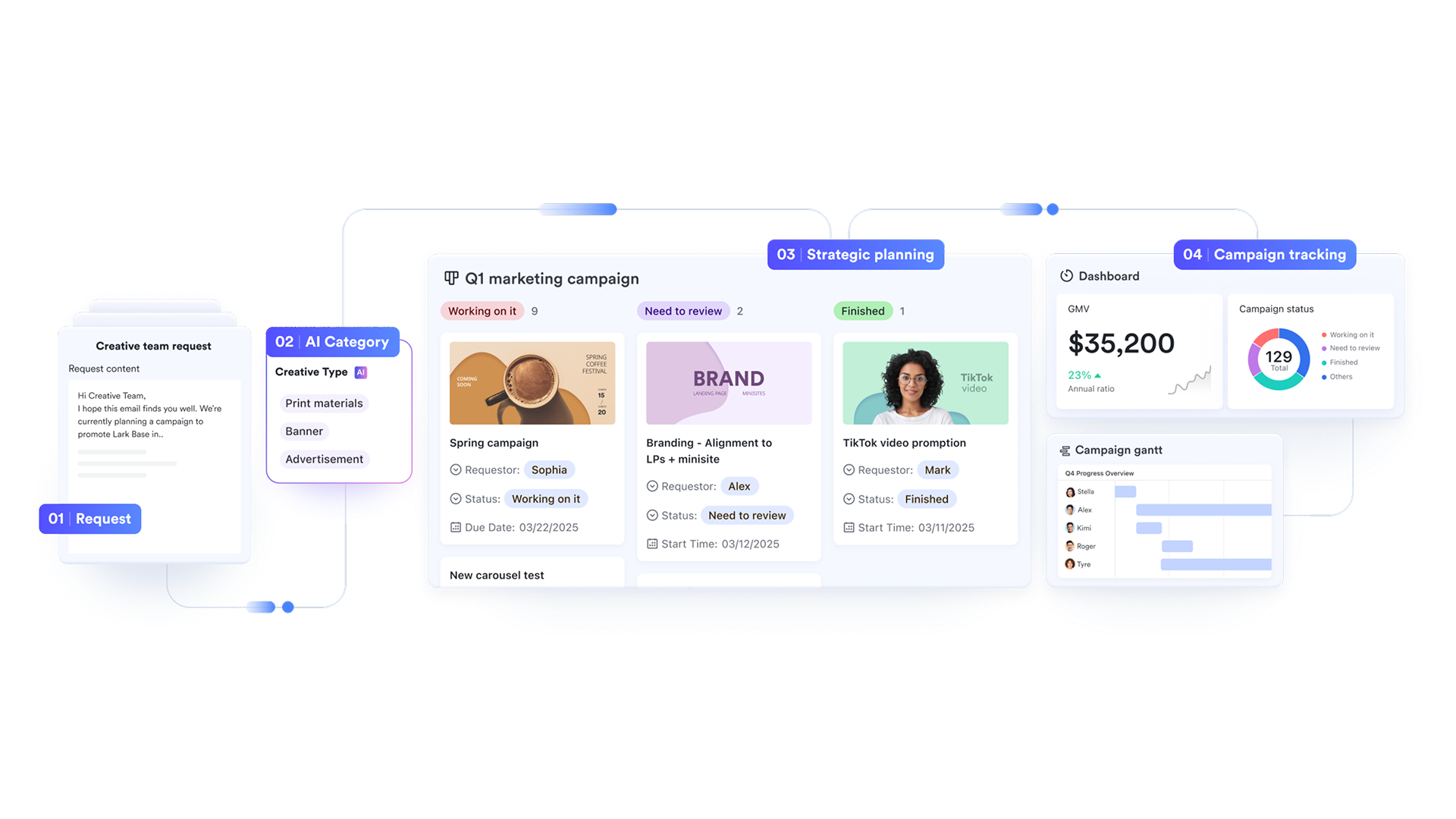
Centralize your data for smarter insights with Lark Base
With Lark Base, teams can create structured campaign databases that store objectives, timelines, budgets, channels, and ownership — all in one view.
- How it works: A campaign manager sets up a Base table with columns for "Campaign Name," "Channel," "Budget," "Owner," and "Status." Team members can update progress, attach creative assets, or comment directly on each item.
- Example: During a product launch, the social media team uploads ad creatives while the email marketing team updates campaign drafts. All stakeholders see updates instantly, keeping everyone aligned.
- Additional features: Custom views, filtering, automation rules, AI-driven insights, and conditional coloring for campaign optimization.
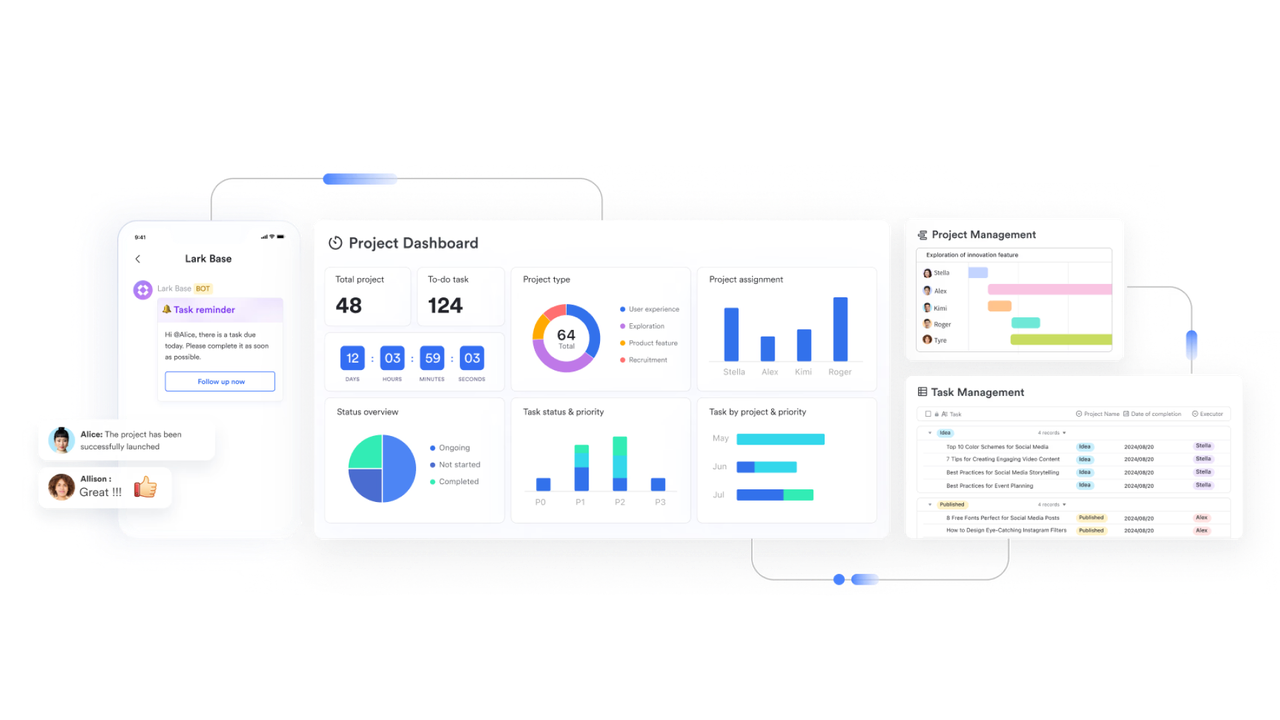
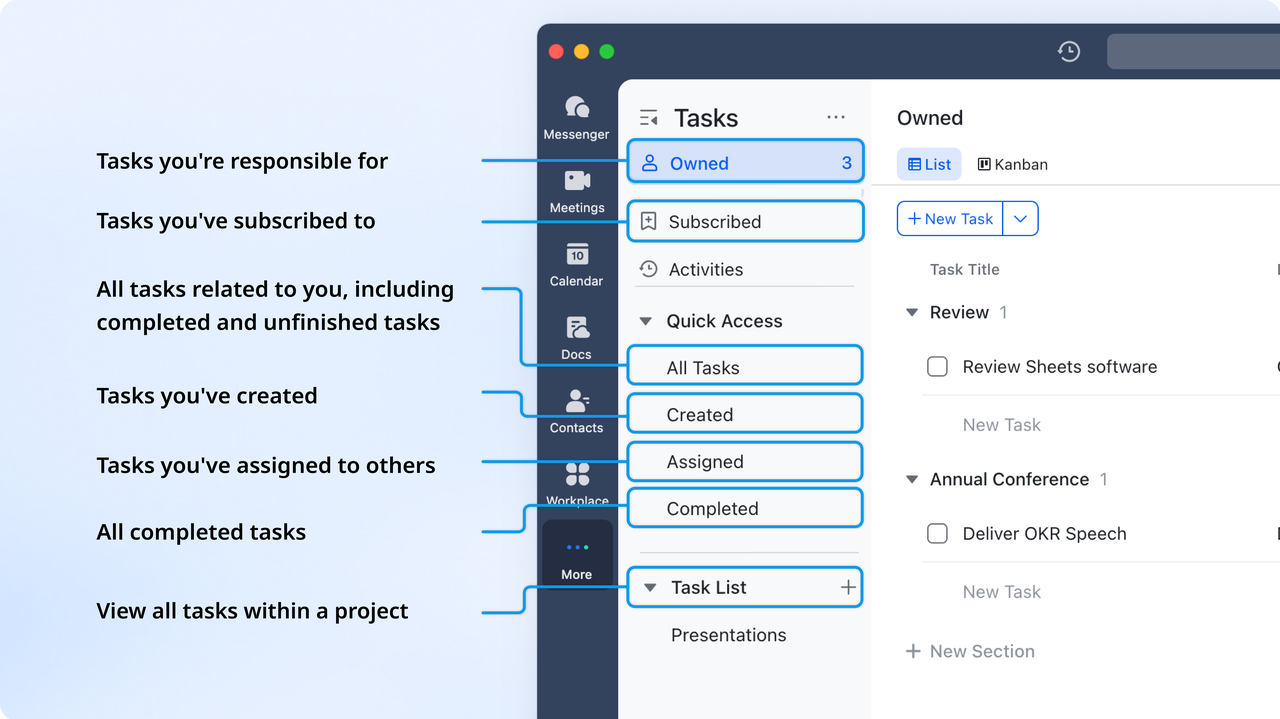
Track team productivity with Lark Tasks
With Lark Tasks, teams can assign, monitor, and prioritize all campaign-related tasks across multiple channels.
- How it works: Tasks can be assigned to individuals, linked to campaign stages, and tracked with deadlines and priorities. Automated reminders notify team members of approaching deadlines.
- Example: A designer and copywriter are assigned tasks for a social media post. Lark Tasks automatically notifies them of deadlines and tracks progress until completion.
- Additional features: Recurring tasks, task dependencies, workload views, progress dashboards.
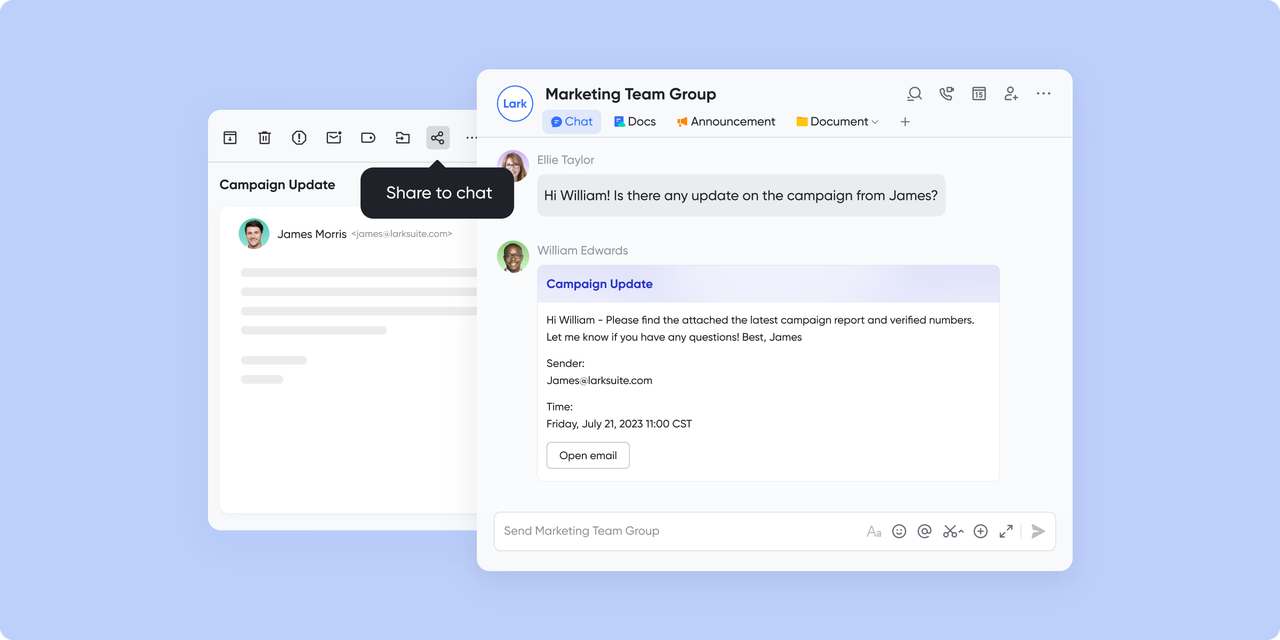
Unlock communication trends with Lark Messenger
Lark Messenger centralizes all campaign communication in one platform, including threaded conversations, group chats, and mentions.
- How it works: Team members can discuss campaigns in channels, reply to threads, tag relevant stakeholders, and share files instantly.
- Example: The marketing team reviews a new ad copy draft via Messenger, giving real-time feedback that updates the campaign schedule immediately.
- Additional features: Analytics on team interactions, push notifications, mobile access, chat search, and file sharing.
Capture client behavior with Lark Forms
With Lark Forms, teams can collect audience data, registrations, survey responses, and feedback directly linked to campaigns.
- How it works: Forms can include conditional logic, file uploads, and automated notifications. Data feeds directly into Base or Sheets for analysis.
- Example: Webinar registrations are automatically logged into Base, allowing the marketing team to track attendee engagement and follow-ups.
- Additional features: Custom branding, automated workflows, real-time analytics.
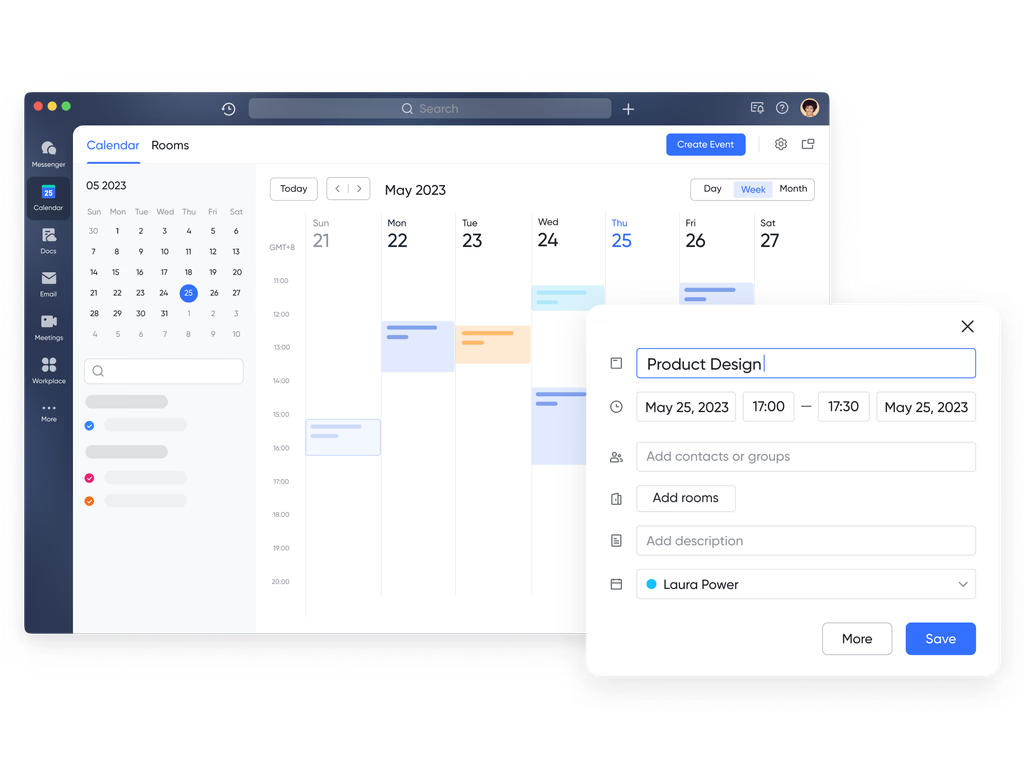
Visualize schedules and optimize timing with Lark Calendar
Lark Calendar lets teams coordinate campaign timelines, deadlines, and launches across channels in one view.
- How it works: Campaign tasks and milestones are scheduled visually. Drag-and-drop functionality allows easy rescheduling, while reminders keep teams on track.
- Example: Social posts, email campaigns, and PPC launches are mapped on a single calendar to prevent conflicts and optimize timing.
- Additional features: Multiple calendar views, cross-team scheduling, conflict detection, and AI-based suggestions for optimal posting times.
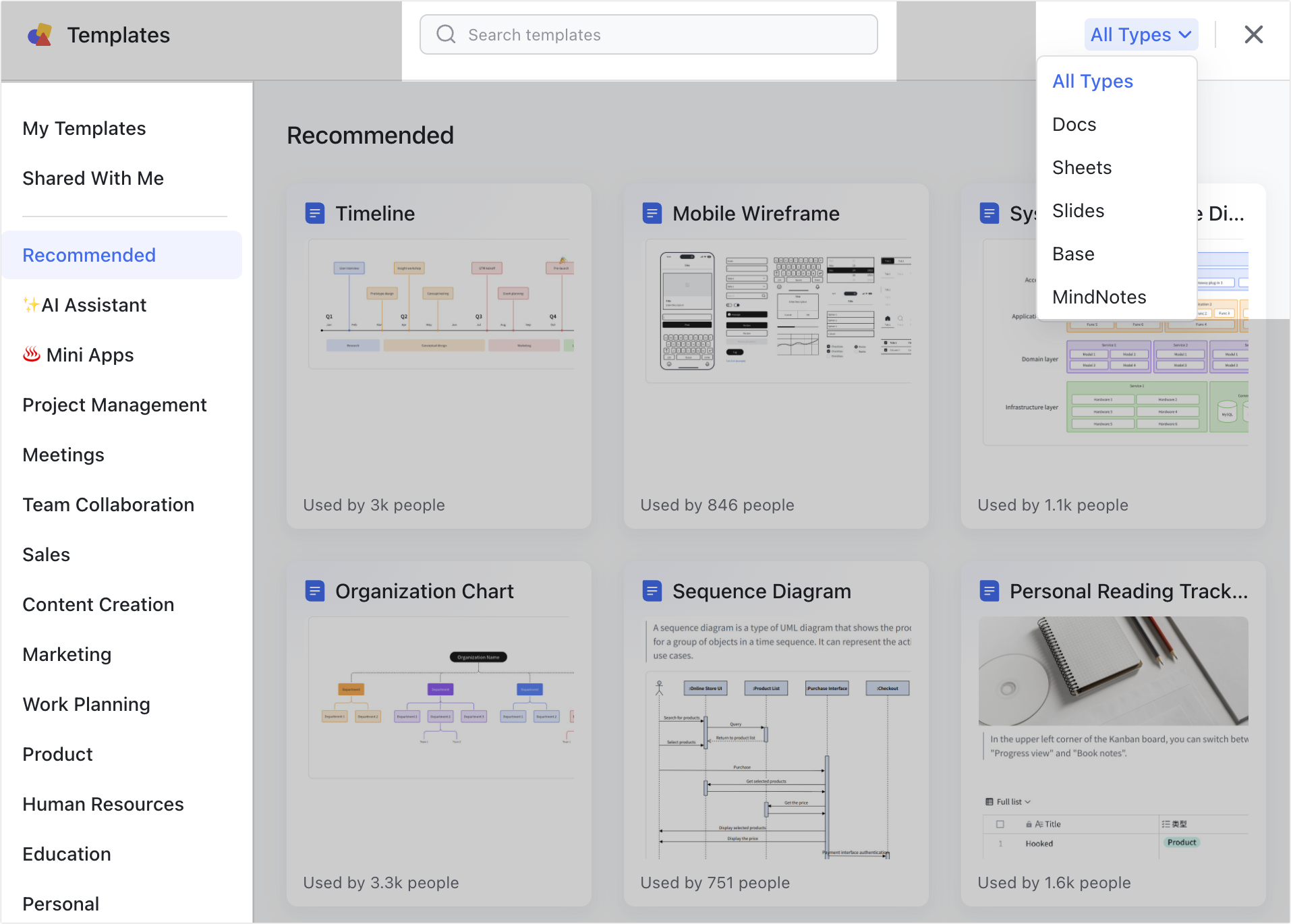
Analyze revenue and documentation with Lark Docs
With Lark Docs, teams can store, edit, and collaborate on all campaign documents, including reports, contracts, and creative assets.
- How it works: Files can be linked directly to Base records. Teams can comment, tag, and collaborate in real time while maintaining version control.
- Example: During a quarterly review, managers access campaign briefs, ad creatives, and performance reports from Docs without searching multiple drives.
- Additional features: Templates, workflow automation, collaborative editing, comment tracking, and performance tracking.
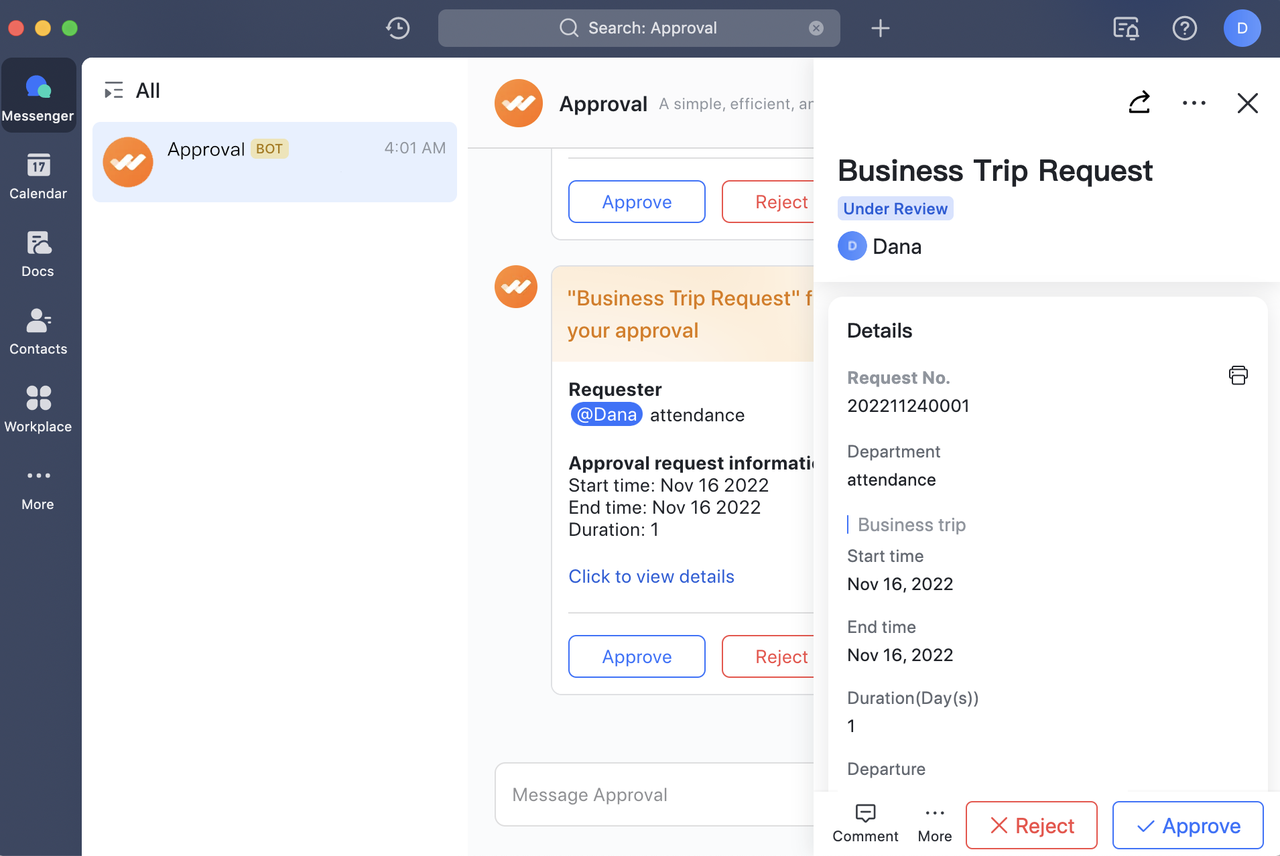
Streamline approvals with Lark Approval
With Lark Approval, teams can automate multi-step approval workflows for budgets, content, or campaign changes.
- How it works: Requests are submitted in Base, and notifications are sent to stakeholders via Messenger. Approvals, rejections, and feedback are time-stamped and stored automatically.
- Example: A cross-channel ad schedule is approved by creative, finance, and marketing managers in minutes, accelerating campaign execution.
- Additional features: Conditional approval paths, mobile approval, and automated reminders.
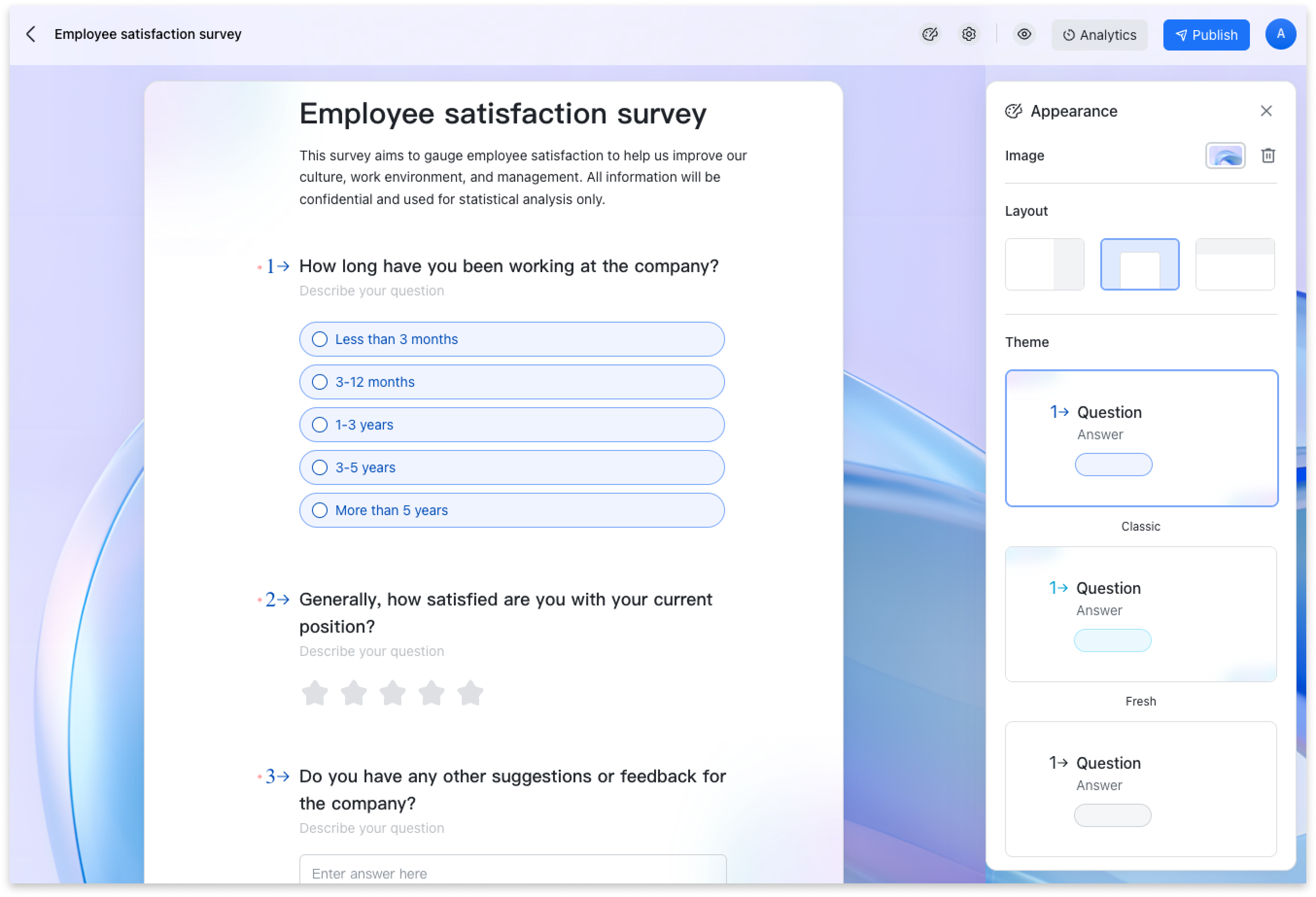
Align goals and monitor team KPIs with Lark OKR
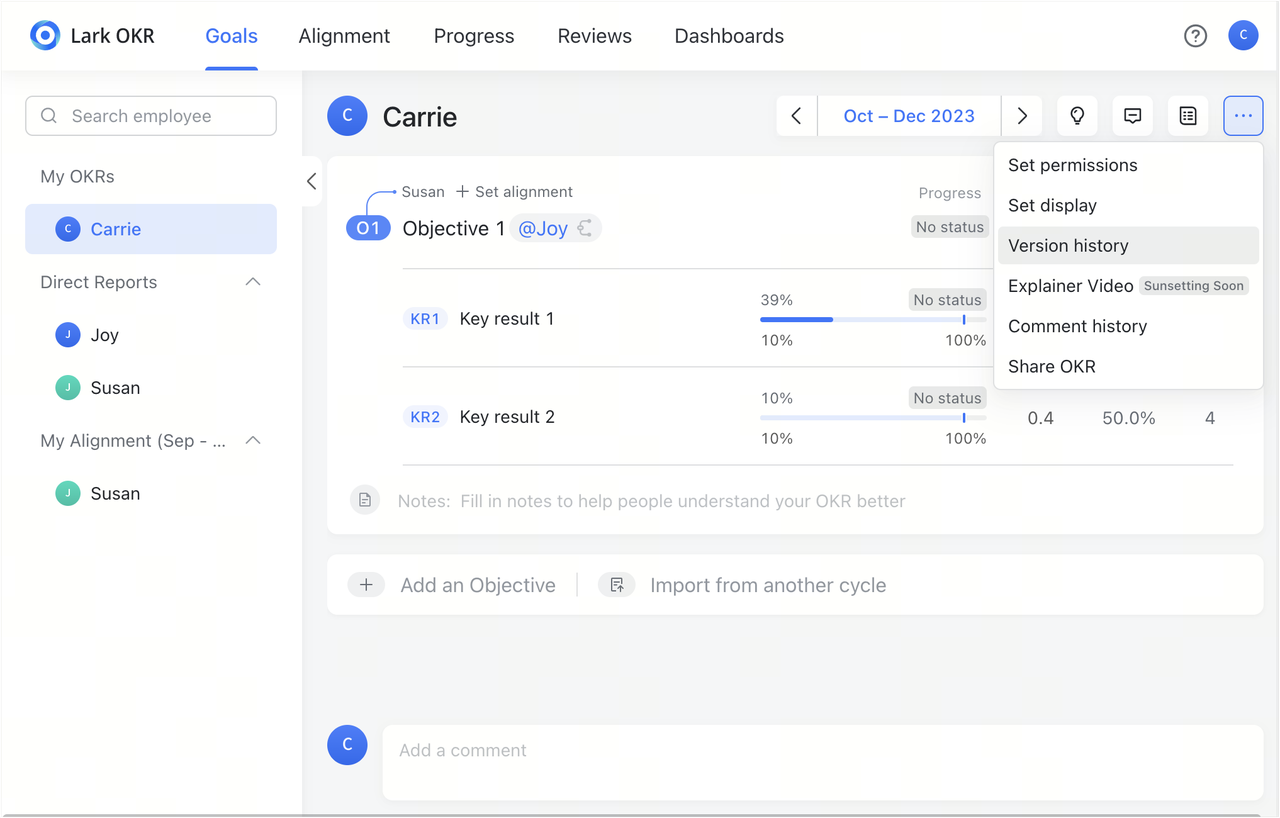
With Lark OKR, teams can set objectives, define key results, and track progress across campaigns to ensure alignment with business goals.
- How it works: Campaign goals are linked to team and organizational OKRs. Progress dashboards show which objectives are on track or require adjustment.
- Example: Social media engagement targets feed into overall marketing OKRs, helping leadership evaluate campaign strategy effectiveness.
- Additional features: Progress heatmaps, automated reminders, and alignment tracking across departments.
- Starter plan: Free forever plan that includes 11 powerful tools for up to 20 users. It also comes with 100GB of storage, 1000 automation runs, AI translations, and more.
- Pro plan: $12/user/month (billed annually) for up to 500 users. It includes everything in Starter plus group calling for up to 500 attendees, 15TB of storage, 50,000 automation runs, and more.
- Enterprise plan: Contact sales for custom pricing. Supports unlimited users and includes even more automation runs and advanced security, compliance, and management features.
2. Asana: Structured campaign planning made simple
Asana is a flexible project and campaign management tool that helps teams plan, track, and execute marketing campaigns efficiently. With features like timelines, boards, task dependencies, and automated reminders, teams can visualize workflows and prevent delays. Asana also supports cross-channel reporting, asset attachment, and real-time collaboration, making it a strong option for marketing campaign management tools and multi-channel teams. Additional capabilities include goal tracking, workload management, and customizable dashboards for better campaign oversight.
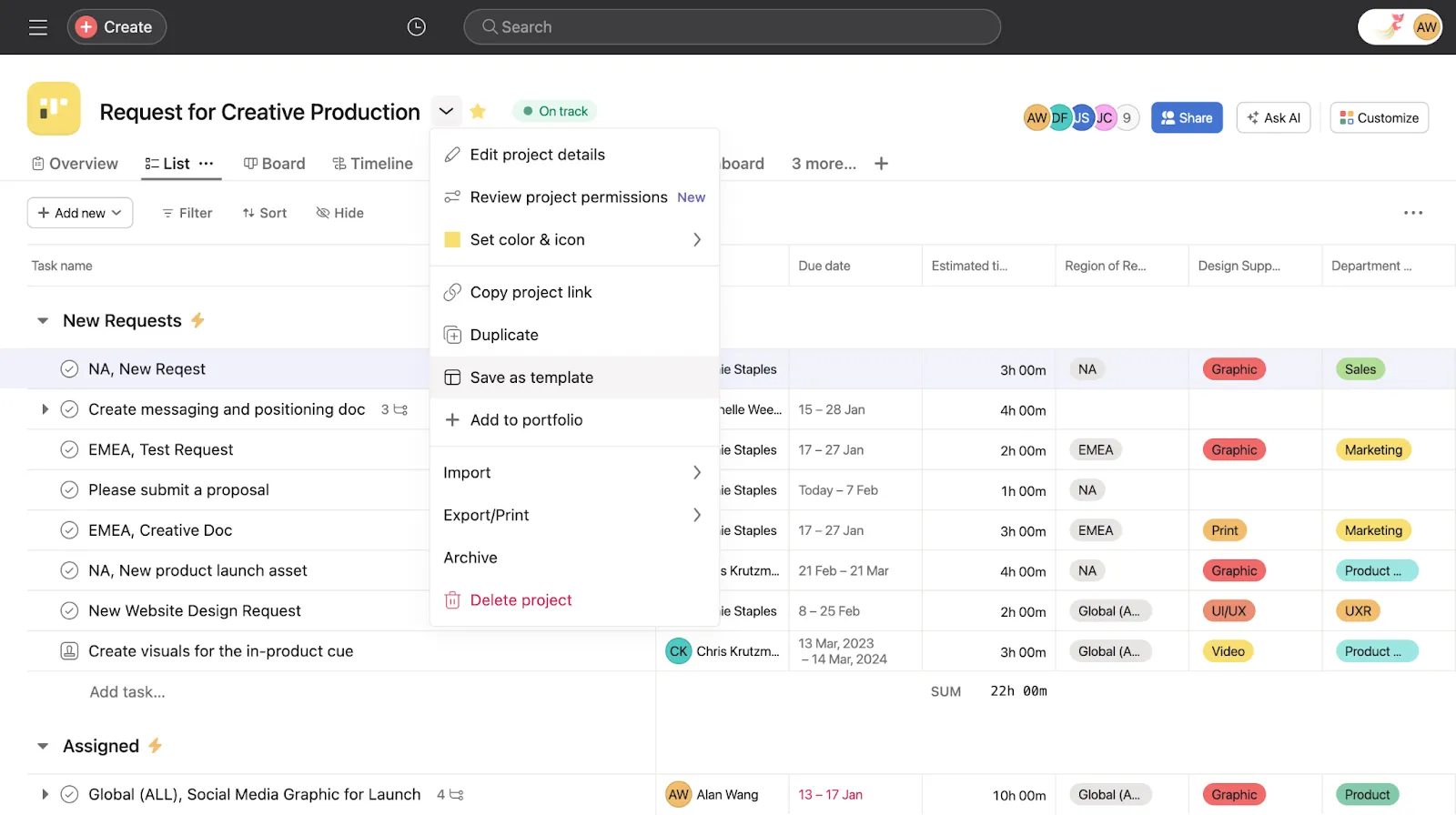
Image source: asana.com
Key features:
- Timelines and boards: Visualize campaign stages, deadlines, and task dependencies.
- Task automation and reminders: Automate recurring tasks and keep teams on schedule.
- Cross-channel reporting: Track campaigns across social, email, and PPC channels.
- Collaboration tools: Real-time comments, file attachments, and notifications for seamless teamwork.
- Goal tracking and workload management: Assign priorities, monitor progress, and balance team capacity.
- Custom dashboards: Create visual dashboards to track KPIs, timelines, and campaign metrics.
What you’ll love:
- Flexible and intuitive interface suitable for teams of all sizes.
- Powerful automation reduces manual work and helps campaigns stay on track.
- Strong visibility across multiple campaigns and channels.
- Scalable dashboards and reporting that can adapt to team needs.
What to keep in mind:
- It can become complex for very large campaigns without careful planning.
- Advanced analytics and features require premium subscriptions.
- Some customization options may require time to set up effectively.
3. Hive: Simplify campaign workflows and data insights
Hive provides a powerful platform for managing campaigns, tasks, and team communication in one place. Marketing teams can create custom project views, automate workflows, and track KPIs across channels. Hive’s AI-driven analytics offer actionable insights for campaign optimization, while collaborative features like chat, approvals, and file management keep teams aligned. Hive is perfect for teams needing cross-channel campaign management tools and supports advanced reporting, Gantt charts, and performance dashboards for measurable results.
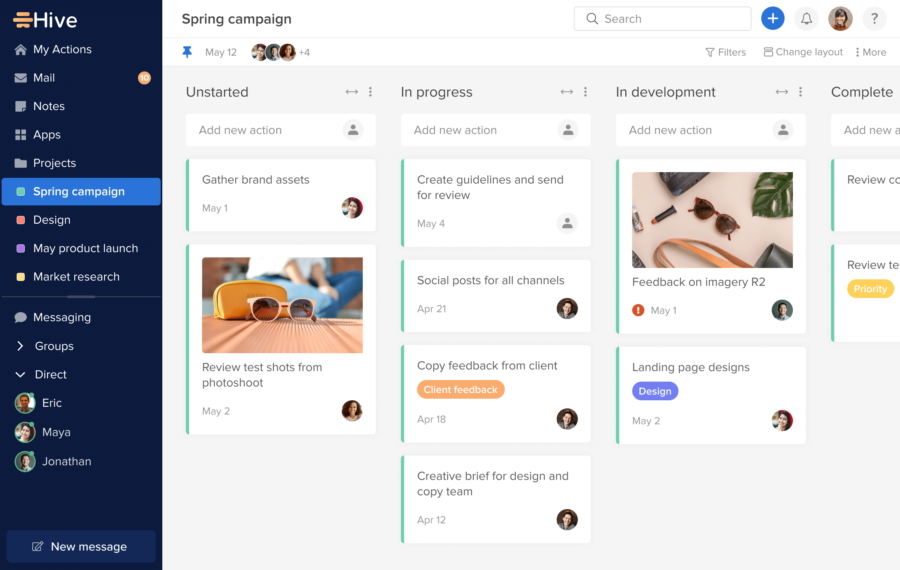
Image source: hive.com
Key features:
- Custom project views: Kanban, Gantt, table, and calendar views for flexible campaign planning.
- AI-powered analytics: Predict campaign performance, optimize strategies, and identify trends.
- Workflow automation: Automate repetitive tasks, approvals, and notifications across campaigns.
- Collaboration tools: Chat, file sharing, and comment threads for seamless team communication.
- Advanced reporting: Track KPIs, budgets, and campaign ROI in real time.
- Multi-channel support: Manage social media, email, and PPC campaigns in a single dashboard.
What you’ll love:
- AI-driven insights help optimize campaigns efficiently.
- Flexible project views for teams with different workflow preferences.
- Combines task management, reporting, and collaboration in one platform.
What to keep in mind:
- It can feel complex for smaller marketing teams.
- Some advanced reporting features require higher-tier plans.
4. Zapier: Automation for smarter campaign workflows
Zapier is an automation-first tool that connects your marketing apps to simplify repetitive campaign tasks. It allows teams to automate lead capture, social posting, email triggers, and reporting without coding. While not a full-fledged campaign platform, Zapier boosts productivity by connecting social media campaign management tools, CRM platforms, and email software, reducing manual work. Advanced features include multi-step workflows, conditional logic, and cross-channel automation, making campaigns faster and more reliable.
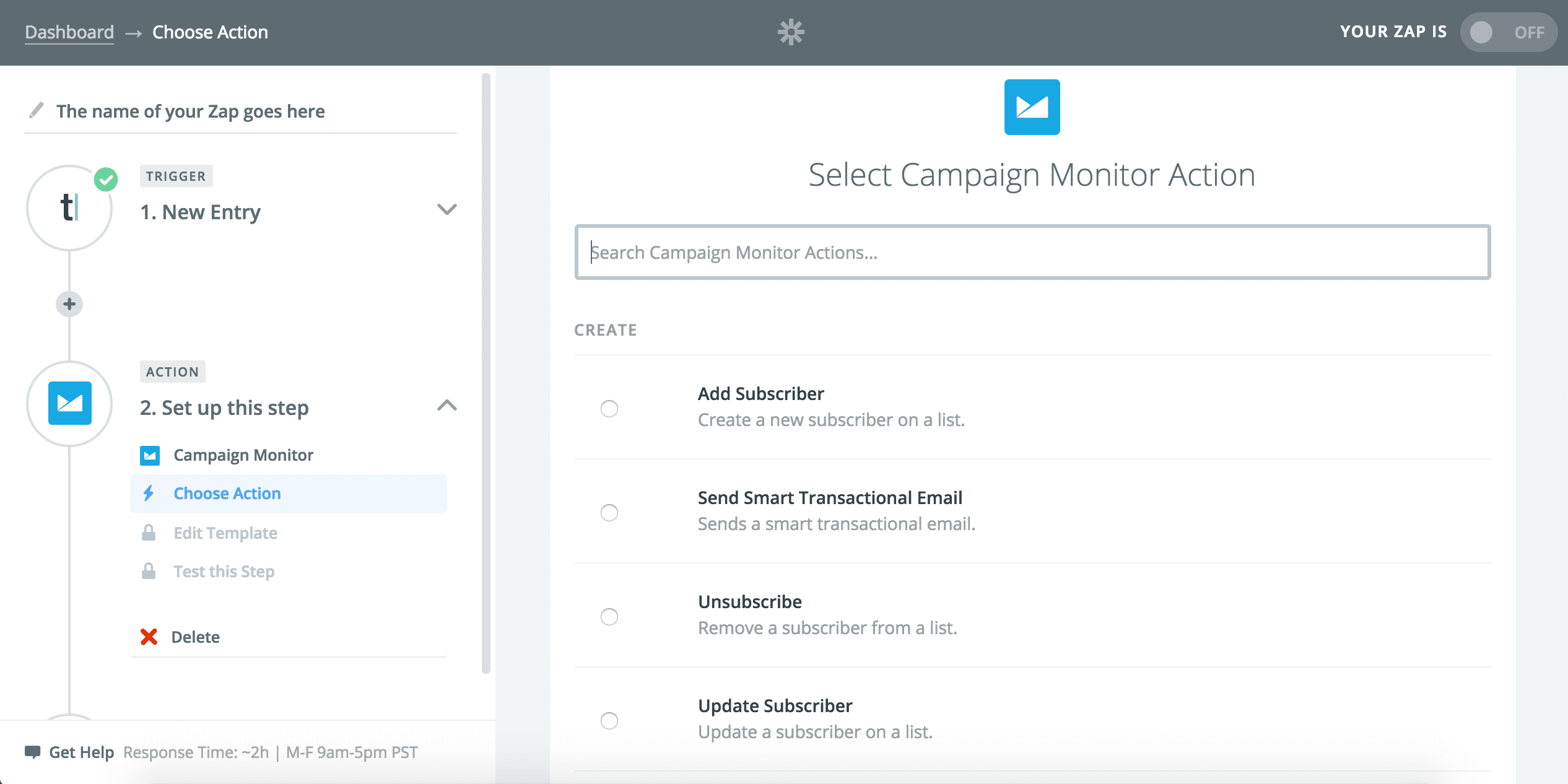
Image source: zapier.com
Key features:
- App automation: Connects thousands of marketing apps to streamline workflows.
- Multi-step workflows: Automate sequences for email, social media, and CRM campaigns.
- Conditional logic: Trigger actions based on user behavior, leads, or campaign data.
- Cross-channel automation: Sync leads, contacts, and metrics across platforms.
- No-code setup: Create workflows without programming skills.
- Real-time notifications: Receive alerts when workflows are complete or encounter errors.
What you’ll love:
- Saves time by automating repetitive campaign tasks.
- Works with nearly all marketing platforms.
- Ideal for teams managing multiple channels efficiently.
What to keep in mind:
- Not a complete campaign management platform on its own.
- Complex workflows may require planning and testing.
5. Teamwork: Project and campaign tracking software
Teamwork is designed for task-focused marketing teams managing campaigns across multiple channels. It offers milestones, time tracking, Gantt charts, and workload management, providing visibility into each campaign’s progress. Teams can attach files, communicate in-app, and generate reports on performance and budget usage. Teamwork’s flexibility supports PPC campaign management tools and CRM campaigns, while additional features like billing, client access, and automated reminders enhance operational efficiency.
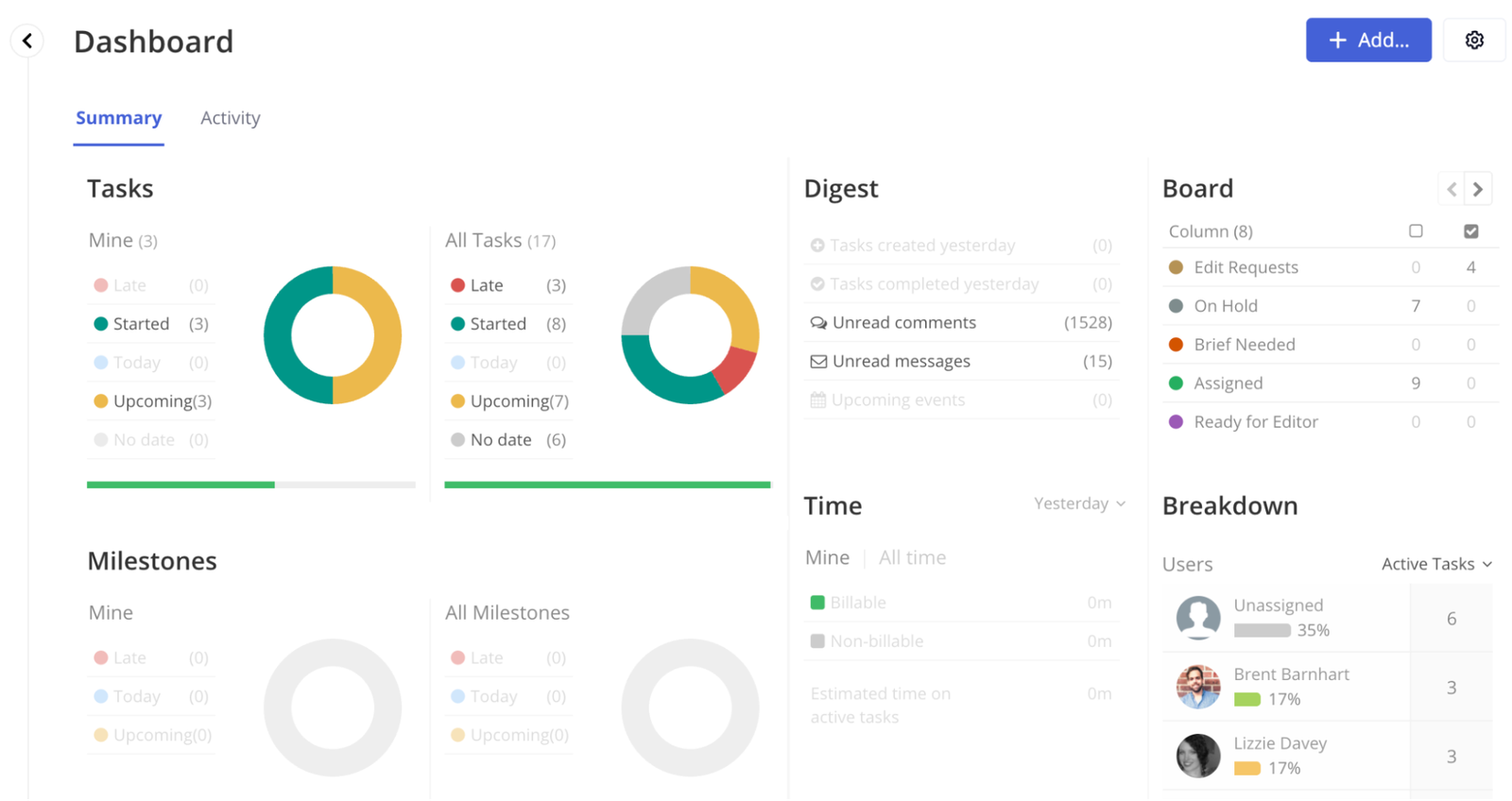
Image source: teamwork.com
Key features:
- Task and project tracking: Milestones, time tracking, and Gantt charts for precise campaign management.
- Workload management: Monitor team capacity and balance tasks across campaigns.
- File and communication management: Attach assets and chat in-app for seamless collaboration.
- Reporting and analytics: Measure campaign performance, budgets, and ROI.
- Client access: Provide transparency for client-facing campaigns.
- Automated reminders: Ensure deadlines and approvals are met.
What you’ll love:
- Strong task and milestone tracking for marketing teams.
- Flexible reporting and tracking for multiple campaigns.
- Supports PPC and CRM-based campaigns.
What to keep in mind:
- It can be too complex for small teams.
- Some features require premium plans.
6. Creatio: CRM-focused campaign management solution
Creatio is a robust platform combining CRM and campaign management in one suite. Teams can segment audiences, create personalized marketing journeys, and track multi-channel campaigns with real-time analytics. Additional features include lead scoring, automated approvals, AI recommendations, and dynamic reporting. Creatio is particularly strong for businesses looking for CRM campaign management tools, offering integration with sales pipelines and customer databases for end-to-end marketing visibility.
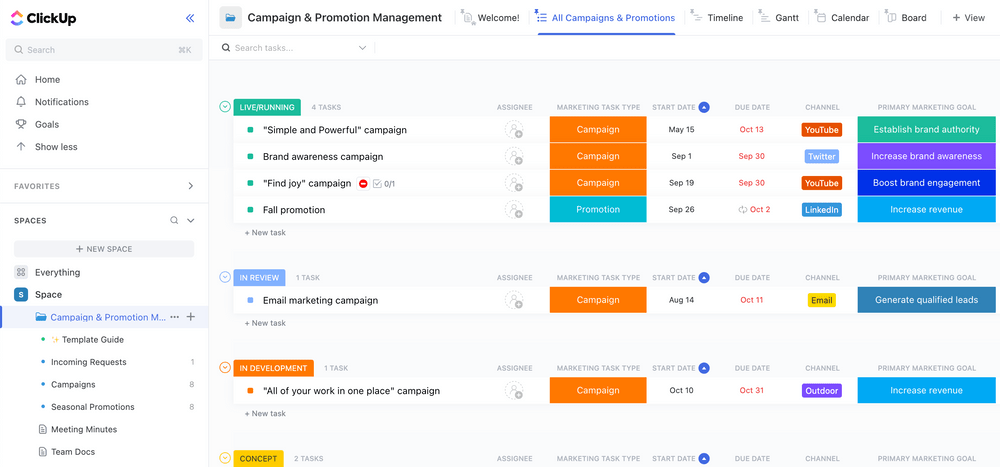
Image source: creatio.com
Key features:
- CRM and campaign management: Manage audiences, campaigns, and customer relationships together.
- Lead scoring and nurturing: Prioritize high-value prospects automatically.
- Automated approvals and workflows: Streamline campaign operations.
- AI-driven recommendations: Optimize targeting and engagement.
- Real-time analytics: Monitor engagement, conversions, and ROI.
- Sales pipeline integration: Connect campaigns directly to CRM for full visibility.
What you’ll love:
- Excellent for CRM-centric marketing teams.
- Strong automation and AI-powered insights.
- Provides end-to-end visibility from leads to campaign performance.
What to keep in mind:
- Setup can be complex for small teams.
- Advanced features may require premium plans.
7. HubSpot: Marketing and campaign management platform
HubSpot is an all-in-one marketing platform for planning, executing, and analyzing campaigns. Teams can manage email, social, PPC, and CRM campaigns from one dashboard. HubSpot’s additional features include AI-driven content suggestions, workflow automation, lead scoring, and reporting dashboards for ROI measurement. It is ideal for cross-channel campaign management tools, allowing marketers to centralize campaign insights, track performance, and optimize strategies in real time.
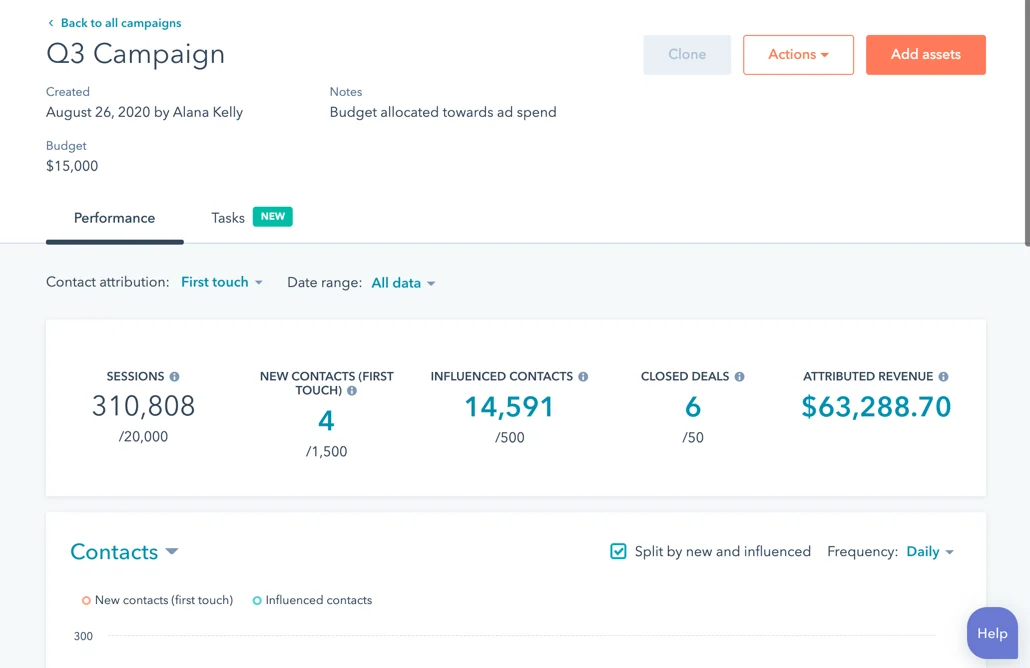
Image source: hubspot.com
Key features:
- Multi-channel campaign management: Email, social, PPC, and CRM campaigns in one platform.
- Workflow automation: Automate sequences, lead nurturing, and approvals.
- AI-powered content suggestions: Improve engagement with predictive insights.
- Lead scoring and segmentation: Prioritize high-potential prospects.
- Reporting dashboards: Monitor ROI, KPIs, and performance metrics.
- Cross-channel analytics: Centralize insights across all marketing campaigns.
What you’ll love:
- Comprehensive all-in-one marketing platform.
- AI insights enhance strategy and optimization.
- Real-time visibility and analytics across campaigns.
What to keep in mind:
- It can be expensive for smaller teams.
- Some advanced features require paid tiers.
8. Monday.com: Visual campaign management for teams
Monday.com provides a highly visual, flexible platform for organizing campaigns, tasks, and timelines. Teams can track project stages with boards, timelines, and dashboards, while automations reduce repetitive work. Additional features include asset management, team collaboration, performance analytics, and budget tracking. Monday.com works well for social media and multi-channel campaign management tools, helping teams monitor progress, optimize workflows, and align campaigns with business goals.
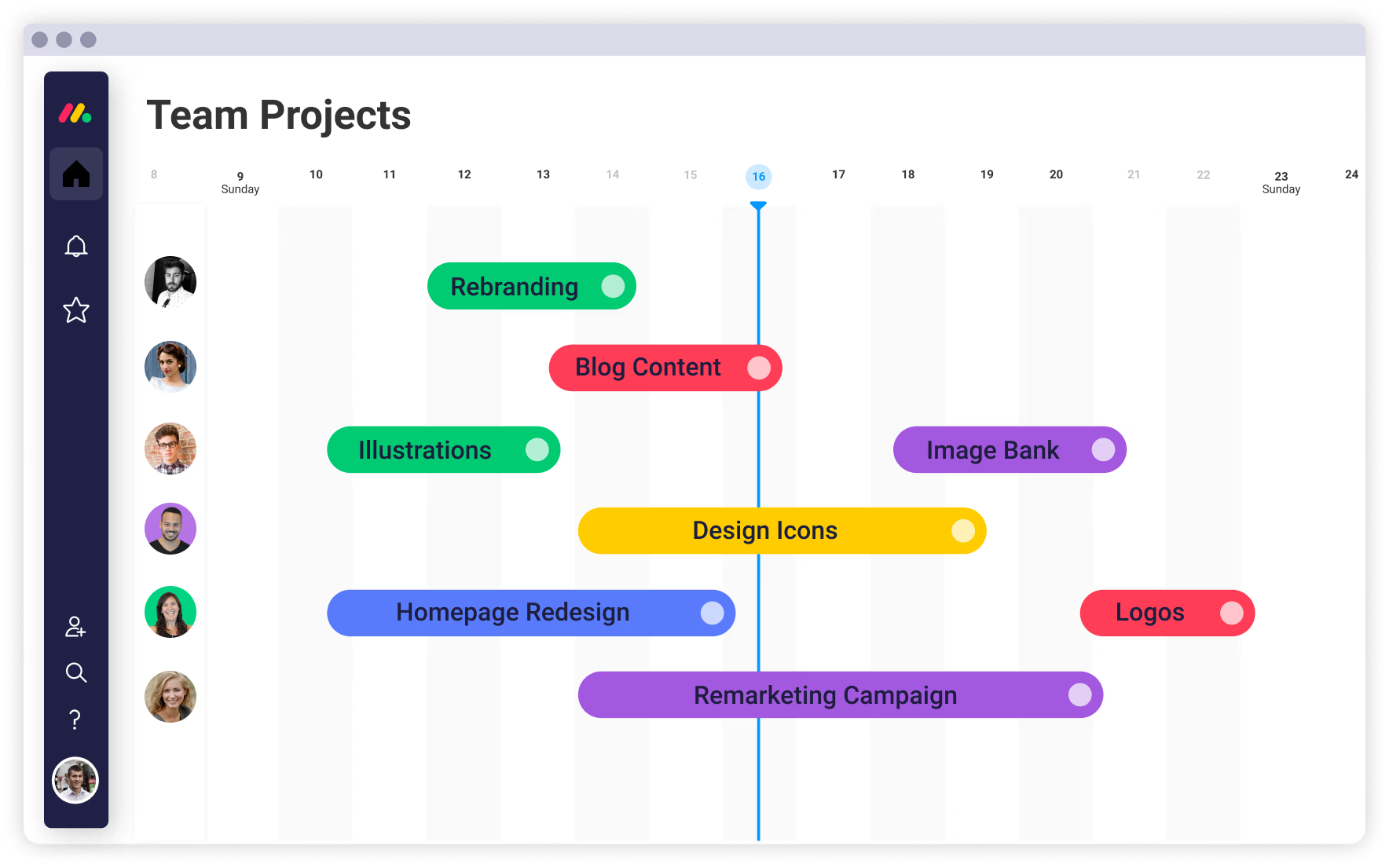
Image source: monday.com
Key features:
- Visual boards and dashboards: Track campaigns, tasks, and timelines easily.
- Workflow automation: Reduce repetitive work and ensure deadlines are met.
- Asset management: Centralize creative assets and campaign documents.
- Performance analytics and budget tracking: Monitor KPIs and ROI.
- Cross-team collaboration: Assign tasks, share updates, and communicate effectively.
- Custom reporting: Create dashboards tailored to campaign and team needs.
What you’ll love:
- Highly visual and intuitive for marketing teams.
- Automation reduces manual effort.
- Scalable for multiple campaigns and teams.
What to keep in mind:
- Advanced reporting requires higher-tier plans.
- It may feel overwhelming for new users.
9. Trello: Flexible boards for campaign planning
Trello is a simple yet effective campaign planning tool that uses boards, lists, and cards to organize marketing workflows. It supports task assignments, deadlines, attachments, and checklists. Advanced features include Power-Ups for automation, calendar views, reporting, and integrations with other marketing apps. Trello is ideal for teams looking for lightweight campaign management tools and small-to-medium projects, providing clarity, collaboration, and visual tracking of campaigns.
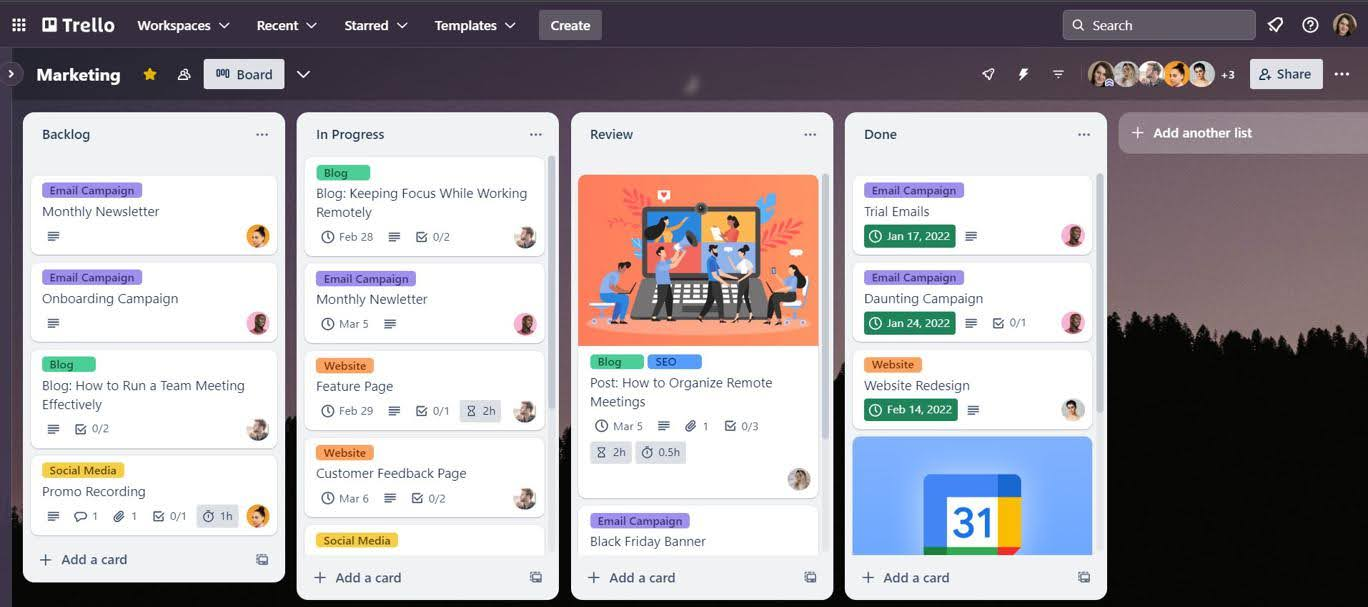
Image source: trello.com
Key features:
- Visual boards, lists, and cards: Organize campaigns visually.
- Task assignments and checklists: Track progress and responsibilities.
- Power-Ups and automation: Add reporting, integrations, and workflow automations.
- Calendar views: Visualize timelines and deadlines.
- Collaboration tools: Comment, tag teammates, and attach files.
- Integrations: Connect with Slack, Gmail, and social media tools.
What you’ll love:
- Simple and intuitive for small-to-medium teams.
- Visual organization improves clarity.
- Lightweight campaign management without complex setups.
What to keep in mind:
- Limited analytics without Power-Ups.
- Not ideal for large, multi-channel campaigns.
10. Marketo: Enterprise campaign management software
Marketo is an enterprise-grade platform for complex, multi-channel campaigns. Teams can automate marketing workflows, track engagement, and measure ROI across email, social, PPC, and CRM channels. Its additional capabilities include lead nurturing, predictive analytics, A/B testing, and AI-powered recommendations. Marketo is perfect for organizations needing cross-channel campaign management tools, providing detailed insights, scalable automation, and end-to-end campaign control.
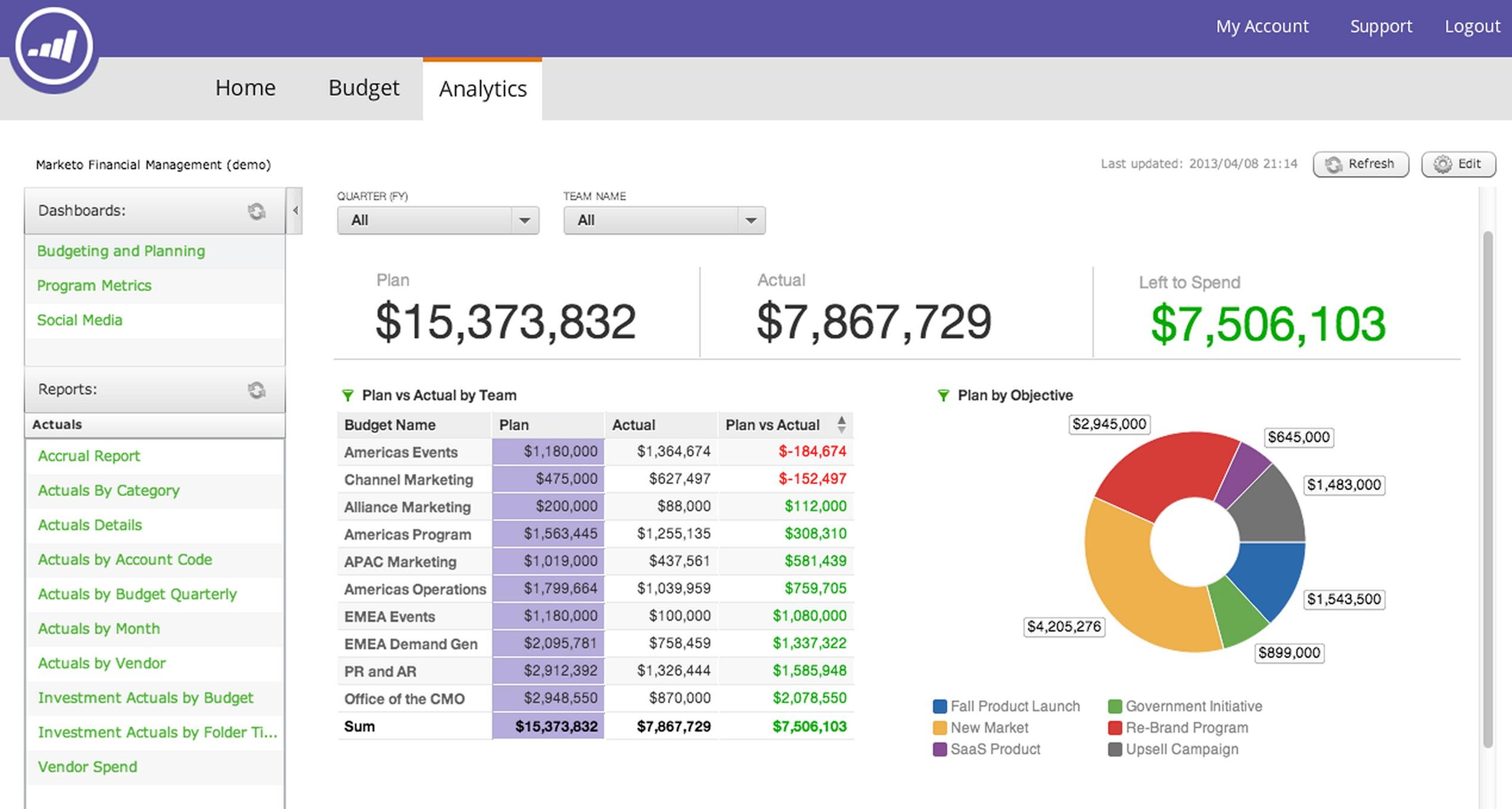
Image source: business.abode.com
Key features:
- Multi-channel campaign automation: Email, social, PPC, and CRM campaigns.
- Workflow automation: Lead nurturing, triggers, and approvals.
- Predictive analytics and AI recommendations: Optimize campaigns with data-driven insights.
- A/B testing: Test and improve campaign performance.
- Reporting dashboards: Monitor ROI, engagement, and KPIs.
- Lead scoring and segmentation: Personalize outreach and prioritize prospects.
What you’ll love:
- Enterprise-ready for large-scale, multi-channel campaigns.
- Advanced automation and AI-powered insights.
- End-to-end campaign monitoring and control.
What to keep in mind:
- Expensive for small-to-medium teams.
- A complex setup requires training.
11. Writer: AI-native campaign management for marketing teams
Writer is an enterprise AI platform that helps marketing teams plan, execute, and optimize campaigns across social media, email, PPC, and CRM channels. AI agents handle multi-step workflows — from research and brief creation through content production and cross-channel activation — while built-in brand and compliance guardrails ensure every output meets organizational standards. Writer connects to existing MarTech stacks and grounds outputs in company data, making it a strong fit for enterprise marketing teams that need to scale campaign execution without scaling headcount.

Image source: writer.com
Key features:
- AI agents for end-to-end workflows: Automate multi-step campaign processes across channels without engineering support.
- Playbooks for repeatable execution: Build shareable, automated workflows that run consistently across campaigns, channels, and regions.
- Built-in brand and compliance guardrails: Enforce brand standards and legal requirements at every step, reducing review cycles.
- Cross-channel campaign management: Manage social, email, PPC, and CRM campaigns from a single connected environment.
- Knowledge Graph and organizational memory: Ground every AI output in company data, strategy, and brand voice.
- Reporting and performance optimization: Synthesize cross-channel data to surface optimization recommendations and track ROI.
What you'll love:
- Playbooks scale proven campaign workflows team-wide without requiring AI expertise.
- Compliance guardrails reduce legal review cycles, speeding time from brief to launch.
- MarTech integrations eliminate siloed data and tool-switching across campaign stages.
What to keep in mind:
- Built for enterprise marketing teams; may exceed the needs of smaller or single-channel teams.
- Realizing full value requires upfront setup of playbooks, knowledge sources, and integrations.
How to find a campaign management tool that works for you
Selecting the right campaign management tool is critical to running efficient, data-driven marketing campaigns. The ideal platform should align with your team’s needs, support multiple channels, and scale as your campaigns grow.
- Match features with business needs: Evaluate whether the tool offers capabilities that directly support your marketing objectives. For example, social media-heavy teams may prioritize scheduling and analytics, while B2B teams may need strong CRM and lead management functionality. Choosing the right features ensures the platform drives tangible results.
- Ease of use vs. complexity: A tool should be intuitive enough for your team to adopt quickly while offering advanced features for more complex campaigns. Overly complicated systems can slow down execution, while overly simple tools may limit analytics and automation capabilities. Balance usability with functionality.
- Scalability for different team sizes: Consider whether the tool can grow with your organization. Some platforms work well for small teams but struggle to handle enterprise-level campaigns, whereas others provide flexible user limits, role management, and enterprise-grade workflows.
- Compatibility with multiple marketing channels: Ensure the platform supports all the channels you use, such as social media, email, PPC, and CRM systems. Tools that allow cross-channel scheduling and reporting help unify campaign management, giving a complete view of performance across platforms.
- Budget and pricing considerations: Marketing budgets vary widely, so choose a tool that offers the right balance of features and cost. Many platforms provide scalable pricing plans, from free or starter versions to enterprise solutions, allowing teams to pay for what they truly need without overspending.
Tips top marketers swear by
Even with the best campaign management tools, successful execution requires smart processes and disciplined workflows. Top marketing teams follow proven practices to maximize efficiency, collaboration, and ROI.
- Standardize campaign templates: Create reusable templates for recurring campaigns, including schedules, content formats, and reporting structures. Standardization saves time, reduces errors, and ensures consistency across social media, email, and PPC campaigns.
- Assign ownership for each task: Clearly designate responsibilities for every task within the campaign. Assigning ownership increases accountability, accelerates task completion, and ensures nothing falls through the cracks in cross-functional teams.
- Monitor metrics and optimize campaigns: Track KPIs in real time, such as engagement, lead conversions, and ROI. Use the insights to adjust content, timing, or targeting, ensuring campaigns remain data-driven and continuously improve performance.
- Keep communication transparent within the team: Maintain open communication channels for updates, feedback, and approvals. Transparent collaboration ensures everyone is aligned, reduces misunderstandings, and allows teams to respond quickly to changing campaign needs.
Conclusion
Effective marketing campaigns require more than creativity — they demand organization, collaboration, and data-driven decision-making. Campaign management tools help teams plan, execute, and track multi-channel campaigns with precision, whether through social media, email, PPC, or CRM-focused workflows.
Among these tools, Lark stands out as a comprehensive solution that unifies task management, communication, analytics, and automation in one platform. At the same time, platforms like Asana, HubSpot, Marketo, and Hive offer specialized features that cater to different team sizes and campaign types. By choosing the right tool and following best practices — from standardizing templates to monitoring metrics — marketing teams can improve efficiency, enhance collaboration, and achieve measurable ROI across every campaign.
FAQs
What is the average ROI increase when using campaign management tools?
Using campaign management tools can improve ROI by 20–40% on average, depending on campaign complexity, team efficiency, and cross-channel execution. Tools that combine automation and analytics, like Lark, tend to deliver higher gains.
Can small businesses benefit from enterprise-level campaign management tools?
Yes. Many enterprise-level tools offer scalable plans or modular features suitable for small teams. Tools like Lark, Asana, and HubSpot allow smaller teams to start with essential features and expand as campaigns grow.
How do campaign management tools handle multi-channel campaigns?
Most modern tools provide cross-channel tracking, reporting, and scheduling. Lark, for instance, allows teams to monitor social media, email, and PPC campaigns in one dashboard, giving real-time insights for faster optimization.
Are there AI-powered features in campaign management tools?
Yes. Many tools now include AI for predictive analytics, task automation, and content optimization. Lark and HubSpot, for example, use AI to prioritize tasks, suggest optimal posting times, and provide insights from campaign data.
How secure is the data stored in campaign management tools?
Most reputable tools follow industry-standard encryption, access controls, and compliance measures (like GDPR and SOC 2). Lark, Asana, and Creatio provide multi-layered security to ensure campaign data and client information remain safe.
Related reading
Table of contents
Start using Lark today

Manage all your work in one place
Boost team efficiency by 10x
Save up to 70% on software costs
Table of contents
Start using Lark today
Manage all your work in one place
Boost team efficiency by 10x
Save up to 70% on software costs
Keep reading








2026 Lark Technologies Pte. Ltd.
Headquartered in Singapore with offices worldwide.






Explore: