


CRM Consultants Guide: What They Do and the Best Tools to Use

Ryan Tanner
Product Marketing Specialist
Aug 5, 2026
Ryan Tanner
Aug 5, 2026

16 min read


Every growing business eventually reaches a stage where managing customer relationships through spreadsheets or disconnected tools becomes inefficient. That's where CRM consultants play a vital role. They help companies assess their needs, choose the right CRM platform, such as Salesforce, HubSpot, or Zoho, and customize it for smarter workflows and better customer visibility. From improving data quality to building automation, CRM consultants ensure teams stay organized and client-focused.
In this guide, we'll explore what CRM consultants do, why businesses hire them, and the best CRM tools consultants can use to manage clients, data, and projects more effectively.
1. Lark: Best for consultants who want a unified workspace
2. Salesforce: Best for large consulting workflows
3. HubSpot CRM: Best all-rounder for consultants and agencies
4. Zoho CRM: Best affordable CRM for consultants
5. Pipedrive: Best pipeline-focused CRM for individual consultants
6. Copper: Best CRM for Google Workspace users
7. Freshsales: Best AI-supported CRM for consultants
8. Capsule CRM: Best simple and lightweight CRM for consultants
Information source: Official vendor sites
Update time: 2025-11-13
Note: Pricing and plan details reflect publicly available data as of the update date and may vary based on region, billing cycle, and number of agents.

What are CRM consultants?
CRM consultants are professionals who help businesses plan, implement, and manage customer relationship management (CRM) systems effectively. Their main goal is to align CRM technology with business strategy, ensuring teams can track leads, manage client data, and optimize sales and marketing workflows. A skilled consultant evaluates existing processes, recommends the best CRM software for consultants, such as Salesforce, HubSpot, or Zoho, and customizes it to meet unique business needs.
Not all CRM consultants serve the same purpose. Different businesses require different types of expertise. Some specialize in specific CRM platforms, while others focus on industry use cases, data quality, or process automation. Below are the main types of CRM consultants and what each brings to the table.
They also handle CRM data quality and database cleanup, ensuring information is accurate, consistent, and ready for automation. Whether it's setting up dashboards, training teams, or building workflows, CRM consultants bridge the gap between technical setup and real-world use. Businesses often hire specialists like Dynamics CRM consultants, Zoho CRM consultants, or CRM software consultants to ensure smooth implementation and long-term success. In short, CRM consultants help organizations turn data into actionable insights and stronger customer relationships.
What does a CRM consultant do?
A CRM consultant's role goes far beyond software setup. They guide businesses through every stage of CRM adoption, from strategy and customization to data migration and performance tracking. Here's a closer look at each phase of their work:
CRM strategy and needs assessment
Every successful CRM implementation starts with a clear strategy. CRM consultants begin by understanding the client's business model, processes, and customer journey. They evaluate how leads are generated, how data flows between departments, and where inefficiencies exist. This needs assessment helps identify gaps and opportunities that a CRM can address, such as improving response time, enhancing client visibility, or automating repetitive tasks.
CRM selection and customization
Once the strategy is set, consultants help select the most suitable CRM platform, whether that's Salesforce, HubSpot, Zoho CRM, or Lark. This choice depends on factors like team size, workflow complexity, and budget. After selection, the consultant customizes the CRM to match specific business needs, creating modules for sales, service, or marketing; setting up pipelines; and configuring dashboards or automation rules. The goal is to make the CRM fit the business, not the other way around.
Data migration and CRM cleanup
Migrating existing data into a new CRM can be one of the toughest parts of implementation. CRM database cleanup consultants ensure that contacts, deals, and historical records are transferred accurately. They remove duplicates, fix outdated information, and improve overall CRM data quality, so the new system starts clean and reliable. This step often involves mapping old data fields to new ones and testing for accuracy before going live.
Training and onboarding
Even the best CRM system fails without user adoption. CRM consultants conduct team training sessions, create onboarding guides, and walk users through day-to-day functions like adding leads, tracking deals, or viewing reports. They also help managers interpret dashboards and performance analytics. By focusing on usability and confidence, consultants ensure teams fully embrace the CRM rather than reverting to manual methods.
Workflow design and automation
CRM consultants excel at turning routine processes into automated workflows. They design systems that trigger follow-up emails after meetings, schedule reminders for renewals, or alert teams when a deal moves stages. They also build dashboards and reports that visualize key metrics, such as conversion rates, revenue forecasts, or client engagement trends. This automation not only saves time but also ensures consistency across every client interaction.
Ongoing improvements
A CRM isn't a one-time project; it evolves with the business. Consultants provide post-implementation support through regular audits, performance tracking, and feature optimization. They review analytics to identify bottlenecks, update workflows as processes change, and recommend new CRM features to improve efficiency. Continuous improvement ensures the system remains aligned with company goals and industry trends.
Platform-specific CRM consultants
These consultants are experts in one particular CRM ecosystem and help businesses unlock its full potential.
- Dynamics CRM consultants specialize in Microsoft's ecosystem, helping enterprises integrate CRM with tools like Outlook, Power BI, and Teams for a unified workflow.
- Zoho CRM consultants work with small and mid-sized businesses to set up cost-effective systems with automation, AI insights, and lead-scoring models.
- HubSpot CRM consultants are ideal for marketing-driven companies looking to unify campaigns, sales, and customer support under one inbound platform.
- Salesforce CRM specialists handle large-scale, complex implementations where customization, integrations, and reporting need enterprise-grade precision.
- Pipedrive specialists focus on simple yet effective pipeline management, perfect for consultants and sales teams that value clarity and speed over complexity.
These platform-specific consultants ensure businesses get maximum ROI from the CRM they've chosen by tailoring configurations and workflows to fit operational goals.
Industry-specific CRM consultants
Every industry manages customer relationships differently, and these consultants design CRM solutions aligned with that reality.
- Consultants for IT services build CRMs that track support tickets, manage contracts, and measure project delivery timelines.
- CRM for education consultants focuses on student lifecycle management, handling admissions, communication, and alumni relations efficiently, often integrating with dedicated alumni software to maintain long-term engagement after graduation.
- CRM for agencies and service-based firms emphasizes project tracking, client retention, and recurring billing cycles to streamline account management.
By understanding industry-specific needs, these consultants ensure CRM systems mirror real-world operations, improving adoption and impact from day one.
Data quality and database cleanup consultants
Data is the foundation of every CRM, but it's often messy or outdated. CRM database cleanup consultants focus on improving CRM data quality by identifying duplicates, correcting errors, and enriching incomplete records. They use specialized tools to cleanse, validate, and standardize customer data before migration or system upgrades.
This ensures teams have reliable, accurate insights to guide decisions. Clean data also enhances automation accuracy, improves reporting, and supports stronger customer engagement.
CRM process and workflow consultants
While some consultants focus on setup or data, workflow consultants focus on optimization. They map out how leads, deals, and client communications should move across teams and then automate those steps inside the CRM.
These specialists design pipelines, dashboards, and approval systems that reflect how the business actually operates. Whether it's automating client follow-ups, scheduling reminders, or building approval chains, they make CRMs work smarter, not harder.
How to choose the right CRM consultant
Selecting the right CRM consultant can determine how smoothly your CRM strategy succeeds, from implementation to long-term adoption. Beyond technical skill, it's about finding someone who understands your industry, your workflows, and your growth goals. Here are the key factors to consider:
- Industry experience: A consultant with proven industry experience can tailor CRM workflows to match your specific business processes. They understand your customer lifecycle, sales challenges, and reporting needs, ensuring the CRM supports real operations rather than generic setups. This expertise leads to faster adoption and better results.
- Platform expertise: Not every CRM works the same way. Consultants with platform expertise, like Lark, Salesforce, HubSpot, or Zoho, can customize systems efficiently and avoid costly errors. Their familiarity with features, automation tools, and data models ensures smoother setup and higher long-term ROI.
- Cost and engagement model: CRM consulting costs vary widely based on scope and project type. Some consultants charge hourly, while others offer fixed or retainer-based pricing. Choosing the right engagement model helps you balance budget with flexibility, ensuring predictable costs without sacrificing quality. Organizations evaluating enterprise collaboration tools frequently compare costs with Google Workspace pricing.
- Certifications and track record: Look for consultants with official CRM certifications and a solid implementation history. Credentials from platforms like Salesforce or HubSpot validate their technical competence, while client testimonials and case studies highlight their ability to deliver measurable business outcomes.
- Ability to align CRM workflows with your business model: The best consultants don't just install software; they align CRM workflows with how your teams actually work. They map your sales, marketing, and service processes into the CRM, ensuring it enhances collaboration, visibility, and customer experience rather than disrupting existing operations.
- Post-implementation support: A great CRM strategy doesn't end at go-live. Consultants who provide post-implementation support help with continuous optimization, new feature rollouts, and periodic audits. This ensures your CRM evolves alongside your business and continues driving productivity and customer satisfaction.
Full list: 8 best CRM tools for consultants
1. Lark: Best for consultants who want a unified workspace
Lark provides consultants with an all-in-one workspace that functions as a lightweight yet powerful CRM. With Lark Base for client databases, automated workflows for follow-ups and approvals, and built-in messaging for real-time communication, consultants can manage leads, client updates, project documents, and timelines without switching tools. Its build-in Docs, dashboards, and automation features give consultants a unified view of client activity—making it easier to track deliverables, maintain relationships, and streamline operations end-to-end.
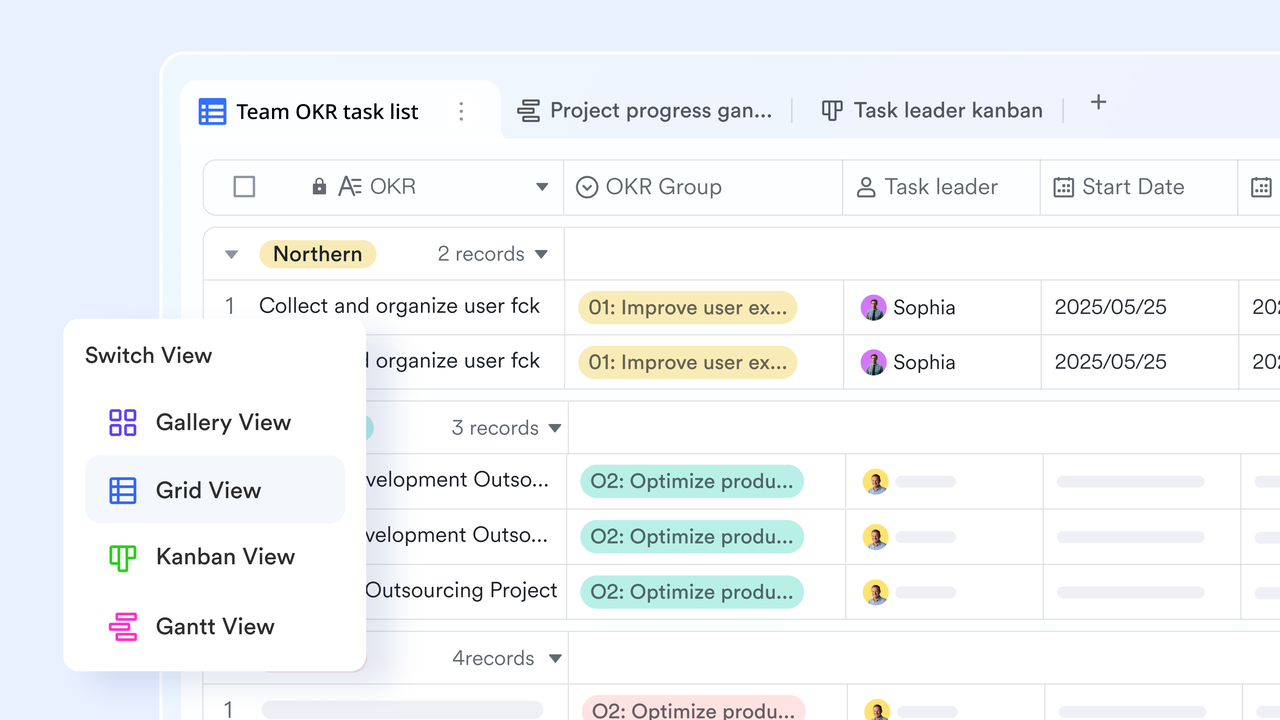
Grid view for building and managing a client database
The grid view in Lark Base gives consultants a clean, spreadsheet-like workspace where they can store all client information in one organized place. Each row becomes a client record, and columns can include fields such as company size, industry, project stage, contract value, or last contacted date. Consultants can sort, filter, and group entries to instantly find the clients that matter most, whether they're reviewing leads, updating account statuses, or prepping for meetings. This structure also makes it easier to maintain consistent data hygiene, reducing the chance of duplicate or outdated entries. As the database grows, teams still maintain clarity and control because the grid view scales smoothly to support large client lists.
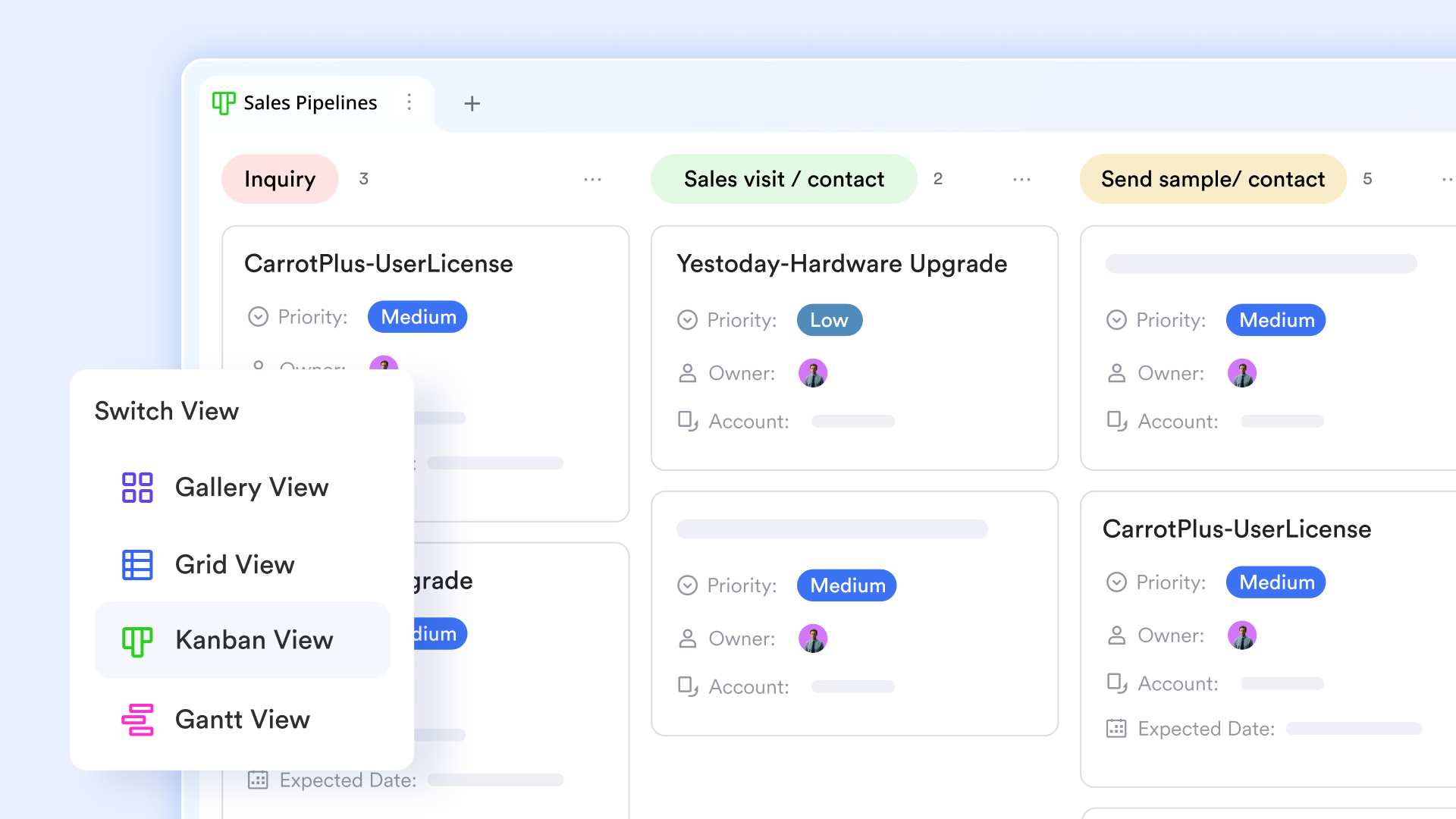
Kanban view for visualizing the sales pipeline
The Kanban view transforms client journeys into a clear visual board, making it easier for consultants to monitor how prospects move through each pre-sale stage. Cards can represent leads, clients, or ongoing engagements, and consultants can simply drag them between stages such as "Contacted," "Discovery Call," "Proposal Sent," "Negotiation," and "Signed." This setup lets teams identify bottlenecks instantly, such as too many prospects stuck in the early stages, and adjust their strategies accordingly. Kanban also works well during weekly pipeline reviews, helping consultants discuss progress at a glance. By visualizing the full flow, consultants stay aligned on priorities and next steps with minimal effort.
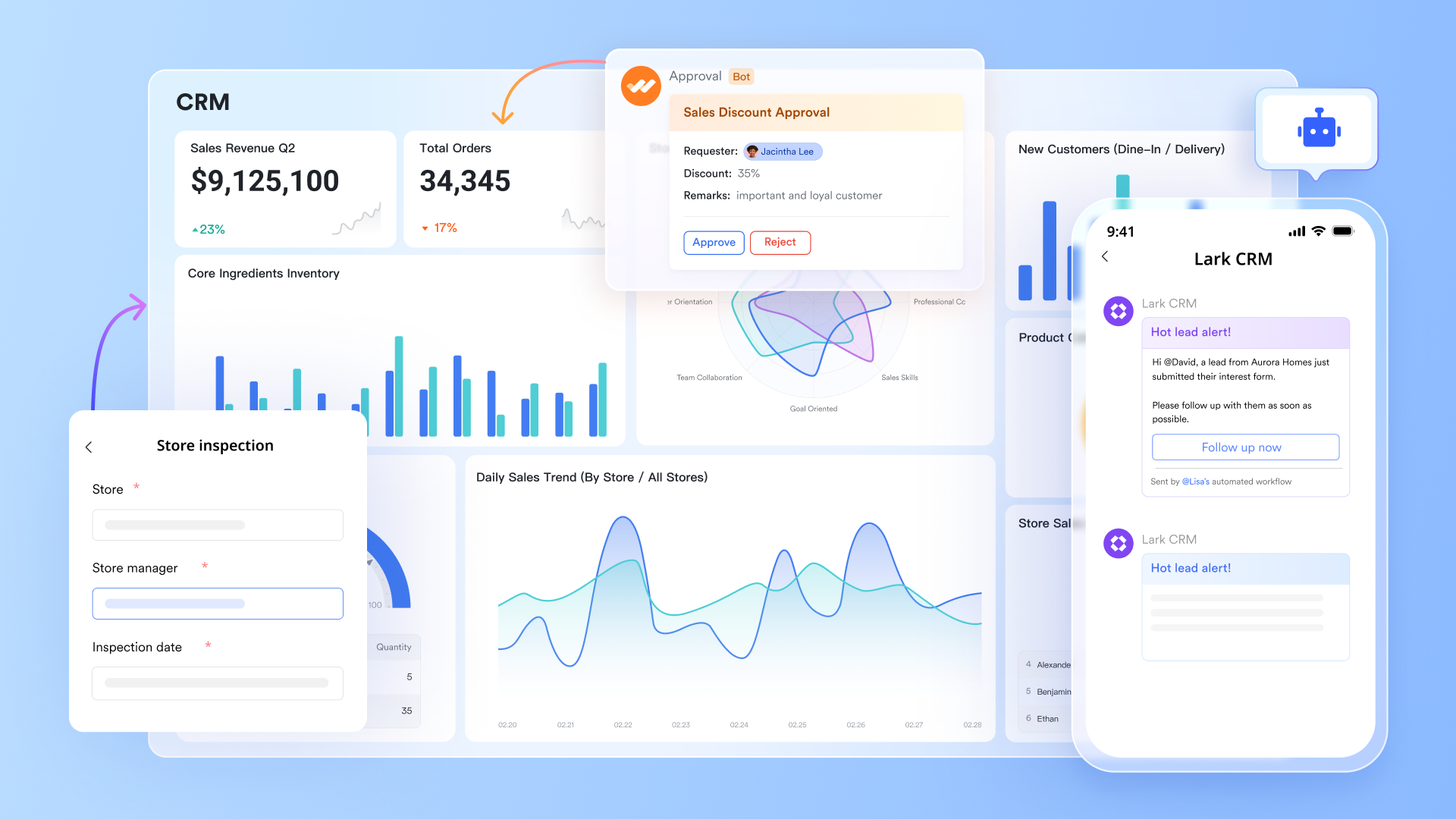
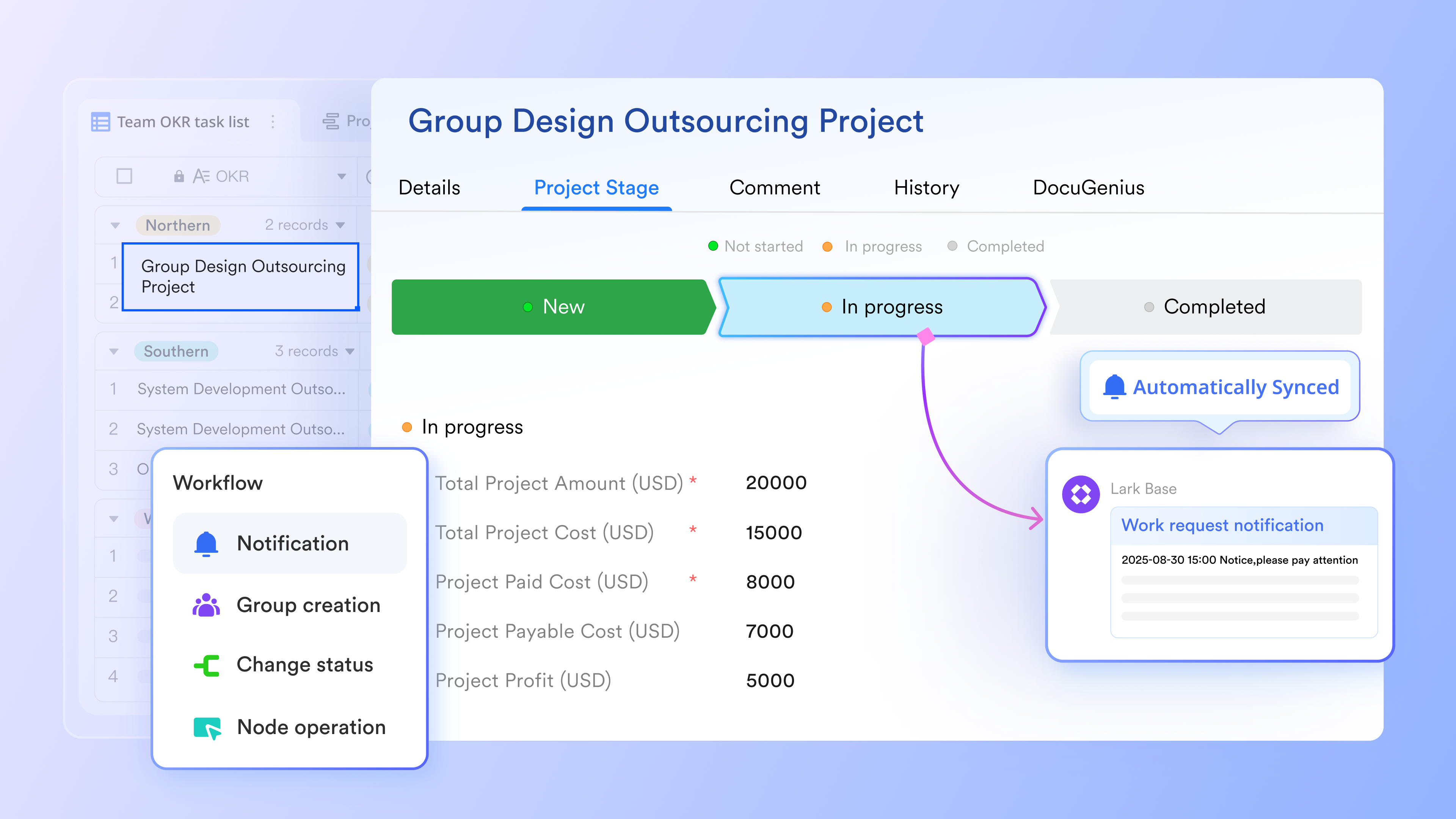
Automated workflow for meeting progress updates and reminders
Lark's automated workflow capabilities help consultants eliminate repetitive manual tasks and stay consistent in their follow-ups. For example, when a meeting is marked as completed, a workflow can automatically update its status, notify the team, and create the next follow-up task. Consultants can also set rules that trigger reminders for overdue proposals, client check-ins, or document submissions. This ensures that no client conversation goes unnoticed, even during busy project cycles. By reducing administrative work, consultants can spend more time on high-value activities like relationship building and strategy consulting.
Dashboard for analyzing performance and client metrics
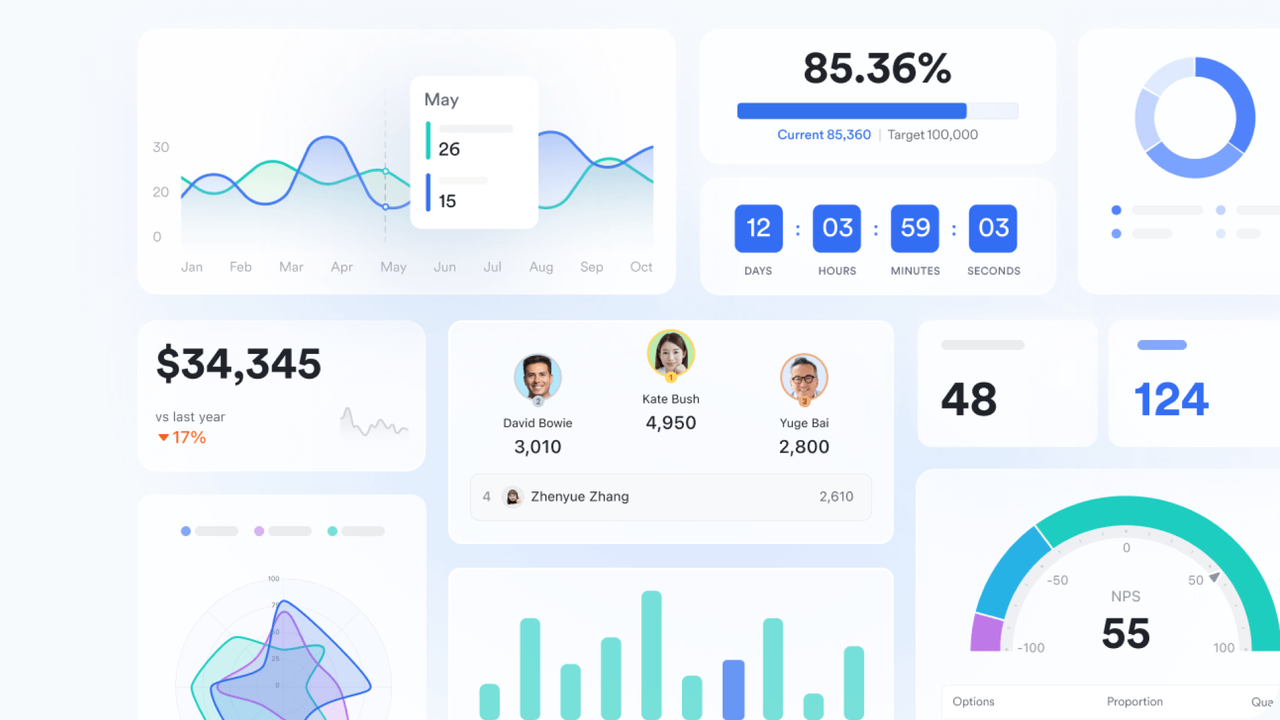
Dashboards in Lark Base allow consultants to monitor sales performance and client trends in a visually rich, real-time environment. Key charts can display metrics such as total deals closed, revenue forecast, proposal success rate, client satisfaction scores, or time spent per engagement. These dashboards become invaluable during monthly reviews or client presentations, where consultants need to showcase progress clearly and confidently. Because the dashboard pulls data from the same workspace where daily activities occur, consultants always work from up-to-date insights. This helps them identify opportunities, spot risks early, and refine their strategy with data-driven clarity.
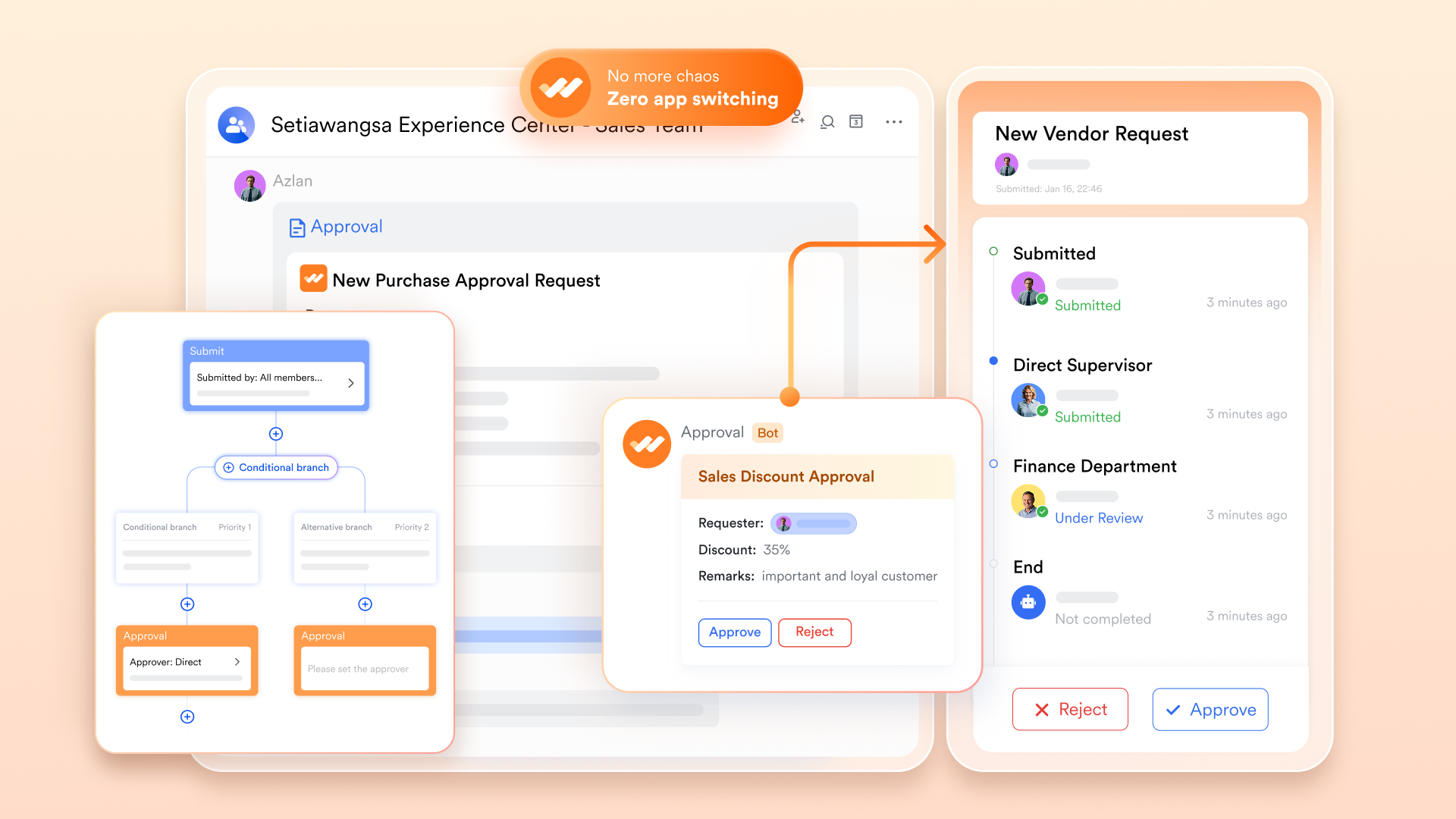
Approval workflows and financial process connection for contract management
Lark's approval system allows consultants to route proposals, contracts, and pricing requests through the proper decision makers without relying on long email threads. When a consultant submits a contract for review, it can move through predefined approval steps, such as legal review, leadership sign-off, or finance validation. For payment collection or invoicing-related tasks, relevant teams can be looped into the same workflow, making the process smoother and more transparent. This reduces delays, ensures compliance with internal policies, and helps consultants close deals faster. With structured approval paths, contract management becomes far more reliable and efficient.
- Starter plan: Free forever plan that includes 11 powerful tools for up to 20 users. It also comes with 100GB of storage, 1000 automation runs, AI translations, and more.
- Pro plan: $12/user/month (billed annually) for up to 500 users. It includes everything in Starter plus group calling for up to 500 attendees, 15TB of storage, 50,000 automation runs, and more.
- Enterprise plan: Contact sales for custom pricing. Supports unlimited users and includes even more automation runs and advanced security, compliance, and management features.
2. Salesforce: Best for large consulting workflows
Salesforce is a powerful enterprise-grade CRM designed for consulting teams managing complex sales cycles, large accounts, and multiple service lines. It offers advanced customization, automation, and analytics, making it ideal for firms with diverse client portfolios. Salesforce's modular setup allows consultants to build custom dashboards, automate proposal workflows, and integrate marketing and finance operations seamlessly. Its AI assistant, Einstein, brings predictive insights into every client conversation, helping consultants make smarter, faster decisions.
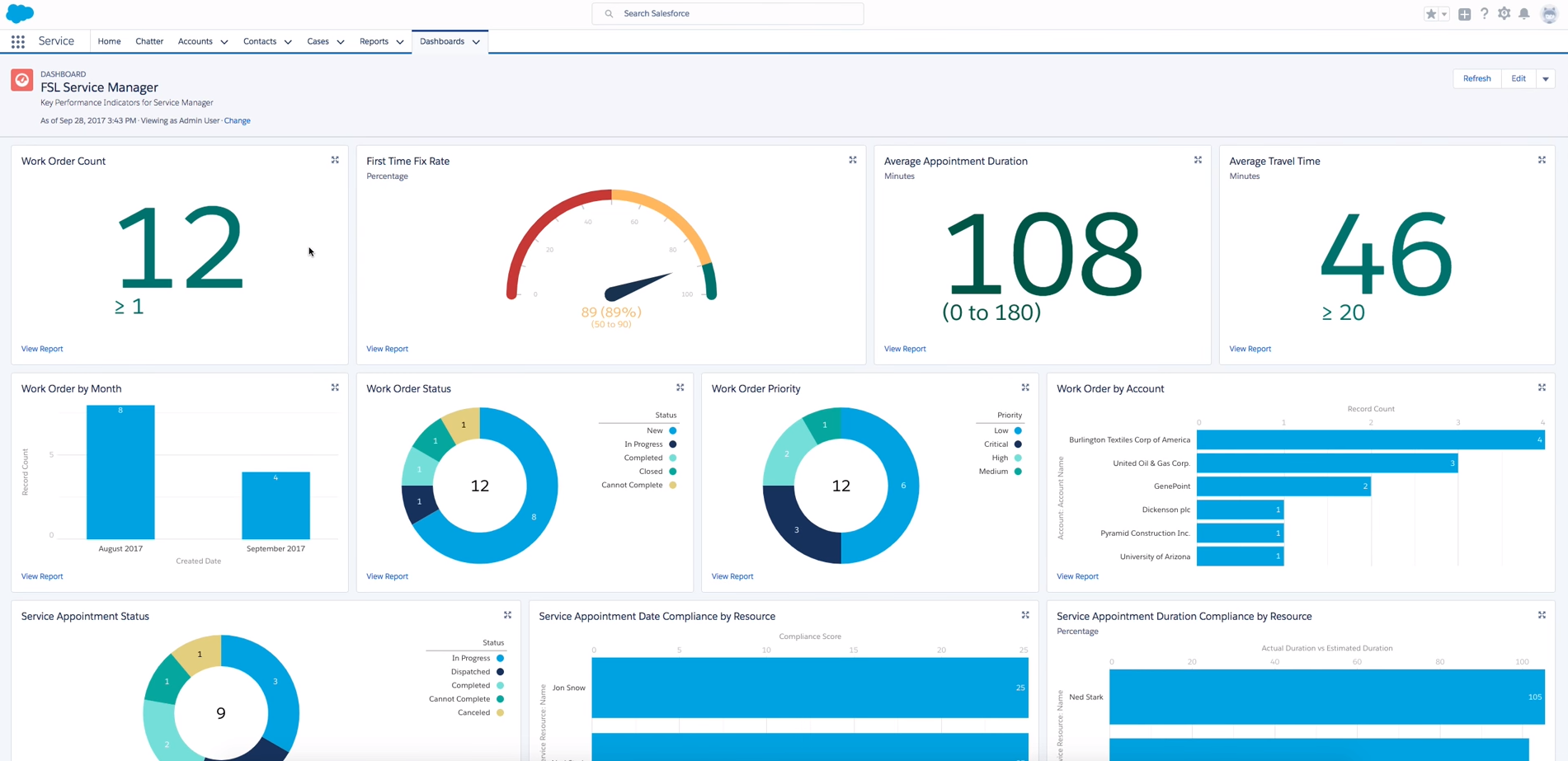
Image source: salesforce.com
Key features:
- Advanced automation: Streamline workflows, approvals, and client updates automatically.
- Einstein AI analytics: Predict deal closures and forecast revenue trends.
- Custom dashboards: Tailored visual reports for team and client performance.
- Multi-channel engagement: Manage emails, calls, and campaigns in one hub.
- Scalable modules: Add marketing, service, and analytics tools as your firm grows.
Strengths:
- Unmatched scalability for enterprise-level consulting operations
- Highly customizable dashboards and workflows
- Excellent third-party app marketplace (AppExchange)
- Strong data governance and compliance controls
Limitations:
- Steeper learning curve for non-technical users
- Expensive implementation for small firms
Pricing:
- Essentials: $25/user/month
- Professional: $75/user/month
- Enterprise: $150/user/month
- Unlimited: $300/user/month
3. HubSpot CRM: Best all-rounder for consultants and agencies
HubSpot Sales Hub is a complete CRM and marketing automation platform built to manage every stage of the sales funnel. It gives teams full visibility into customer interactions, emails, calls, meetings, and campaigns, all in one connected dashboard. With its powerful automation tools, HubSpot helps businesses nurture leads, shorten sales cycles, and boost conversion rates. It's designed for teams that want smarter workflows and data-driven insights. Whether you're a startup or an enterprise, HubSpot scales with your growth.
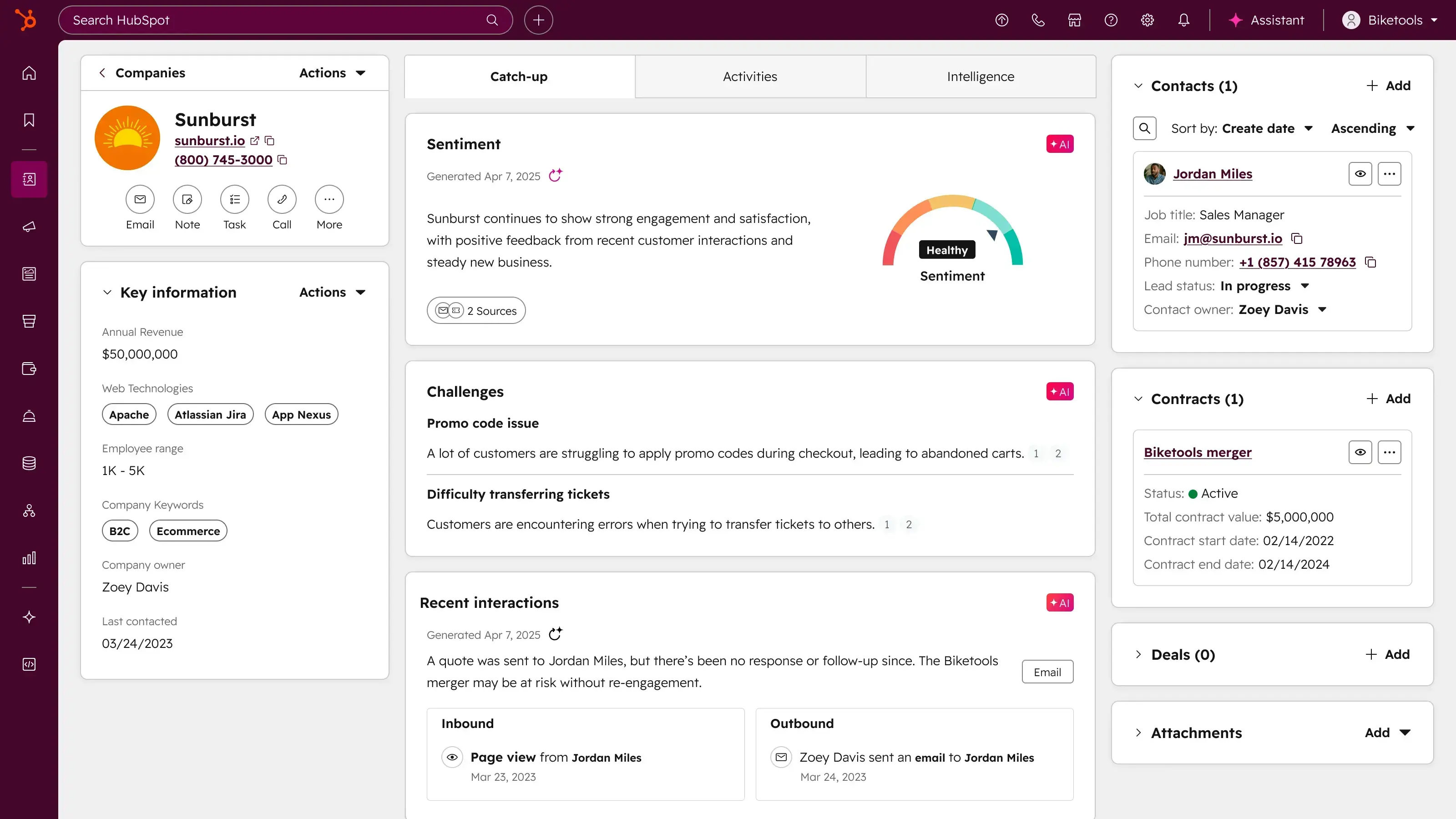
Image source: hubspot.com
Key features:
- Unified CRM: Centralized contact management with deal tracking and communication history.
- Marketing automation: Create workflows, lead scoring, and campaign journeys.
- Analytics & reports: Real-time insights into marketing, sales, and revenue performance.
- Email and chat tools: Engage leads via email, live chat, or sequences.
- Integrations: Works with major apps for marketing, support, and billing.
Strengths:
- Excellent inbound marketing and automation capabilities
- Free CRM with robust starter features
- Expansive integration ecosystem
- Suitable for both small and large teams
Limitations:
- Pricing scales quickly as contacts and tools increase
- Can feel complex for smaller businesses initially
Pricing:
- Free CRM available
- Paid Sales Hub plans from $20/user/month
- Advanced tiers from $890–$3,000/month depending on usage
4. Zoho CRM: Best affordable CRM for consultants
Zoho CRM is a cost-effective yet powerful solution designed for small to mid-sized consulting firms. It combines sales automation, analytics, and multichannel communication in a single interface. Consultants can manage client pipelines, schedule tasks, and monitor performance without high overhead. Zoho's AI assistant, Zia, provides lead scoring and sales predictions, while its customization options make it flexible for different consulting models. It's ideal for teams wanting reliable automation and CRM data quality without breaking the budget.
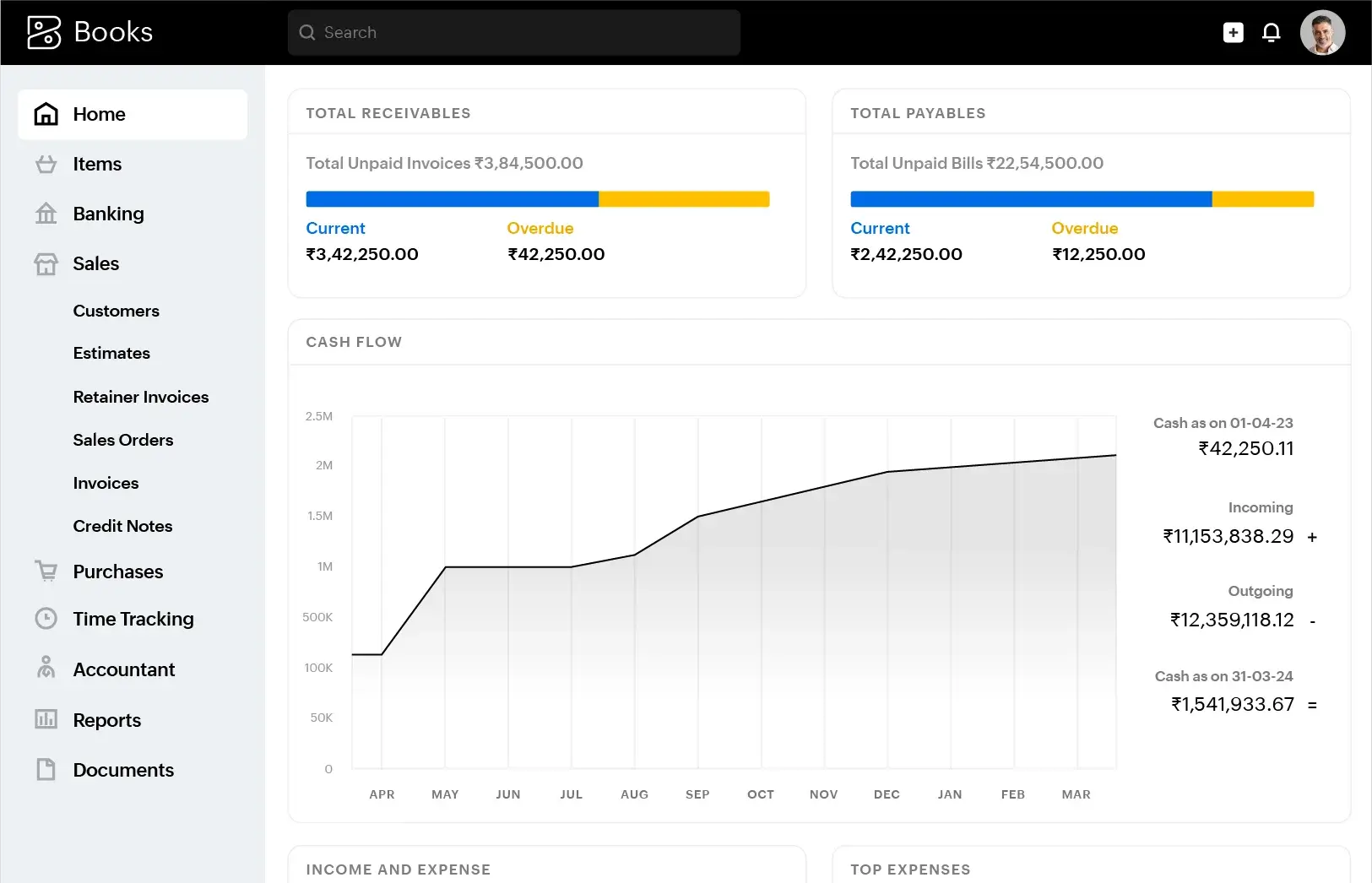
Image source: zoho.com
Key features:
- Pipeline management: Track deals across custom sales stages.
- AI-powered assistant (Zia): Forecast trends and suggest actions.
- Email & telephony integration: Connect with clients directly from CRM.
- Reports & analytics: View performance metrics in real-time.
- Custom modules: Adapt workflows to unique consulting needs.
Strengths:
- Highly affordable for small consulting teams
- Extensive automation and customization options
- Easy to scale as business grows
- Built-in AI and reporting for smarter sales
Limitations:
- Interface feels slightly dated
- Some advanced features require higher-tier plans
Pricing:
- Standard: $14/user/month
- Professional: $23/user/month
- Enterprise: $40/user/month
- Ultimate: $52/user/month
5. Pipedrive: Best pipeline-focused CRM for individual consultants
Pipedrive is designed with simplicity and visual clarity at its core, making it a top choice for solo consultants or small firms. Its intuitive Kanban-style pipeline view helps consultants manage deals and monitor progress effortlessly. The platform emphasizes sales activities, tracking calls, meetings, and tasks, to keep deals moving. With built-in automation and forecasting, consultants can focus more on closing clients rather than updating spreadsheets.
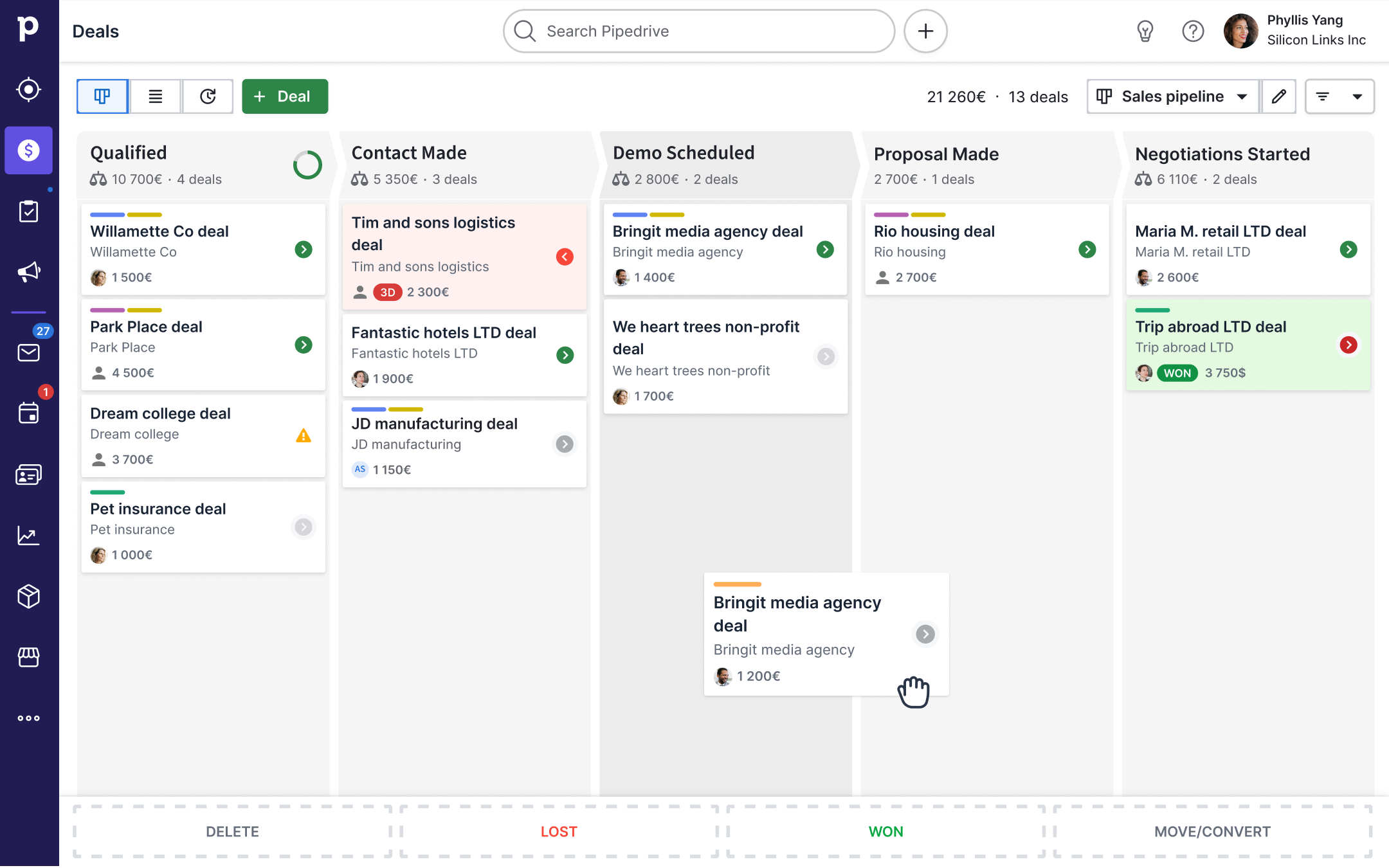
Image source: pipedrive.com
Key features:
- Visual pipeline: Manage deals through drag-and-drop stages.
- Activity tracking: Log calls, tasks, and emails automatically.
- Workflow automation: Automate reminders and follow-ups.
- Reporting: Real-time deal and performance insights.
- Mobile CRM: Manage pipelines on the go.
Strengths:
- Extremely user-friendly interface
- Focused on productivity and deal visibility
- Quick setup and minimal training required
- Great for solo consultants or small teams
Limitations:
- Lacks deep marketing automation features
- Limited customization in lower plans
Pricing:
- Essential: $15/user/month
- Advanced: $29/user/month
- Professional: $59/user/month
- Power: $69/user/month
6. Copper: Best CRM for Google Workspace users
Copper CRM is purpose-built for teams that live inside Google Workspace. It seamlessly connects with Gmail, Calendar, and Drive, eliminating manual data entry. Every email, meeting, and contact syncs automatically into the CRM, giving consultants a clear view of client relationships. Its automation tools help manage pipelines, track deals, and create reports, all without leaving the Google ecosystem. Ideal for consultants who value simplicity and tight integration with familiar tools.
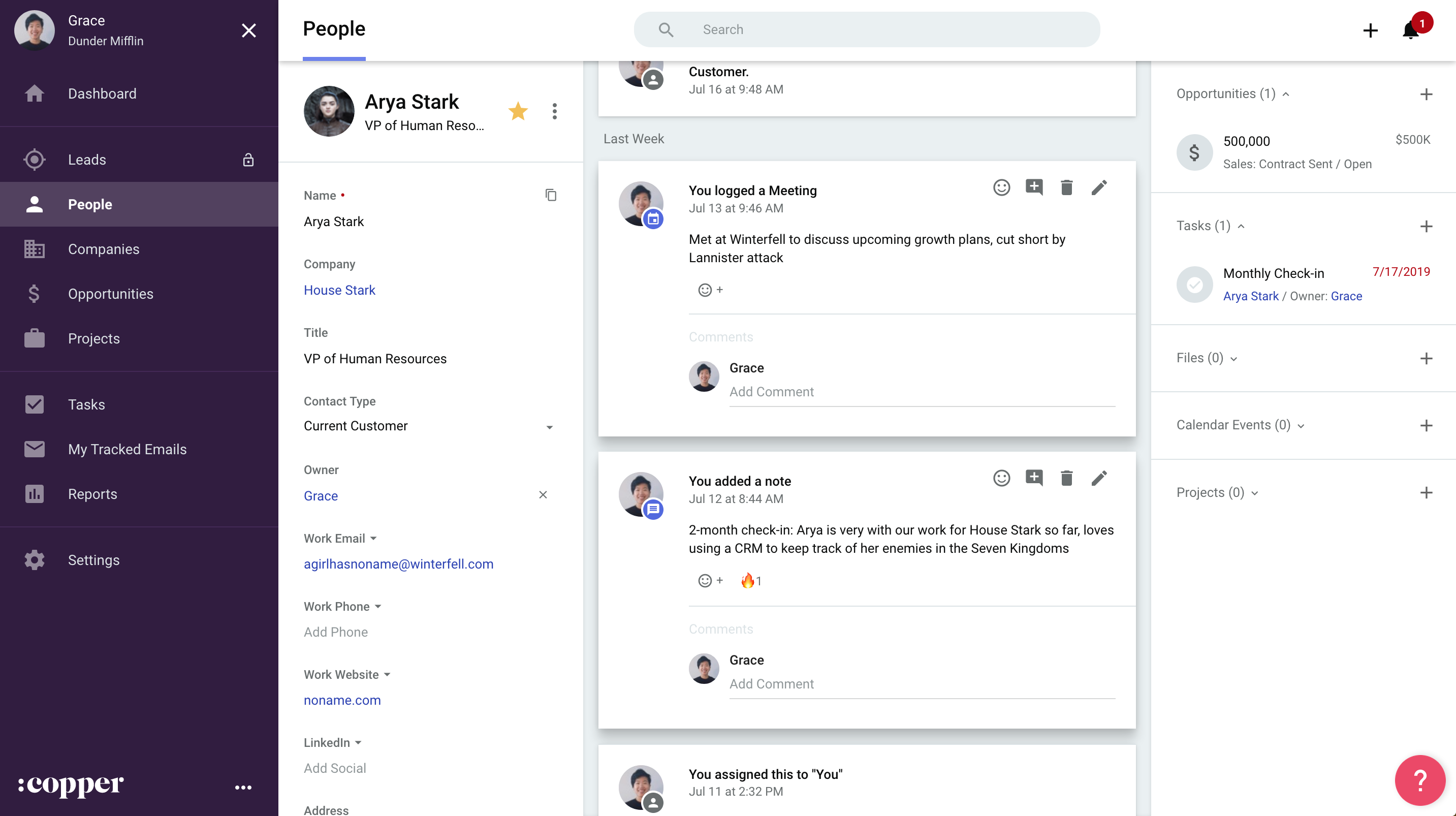
Image source: copper.com
Key features:
- Gmail integration: Manage leads directly from your inbox.
- Contact auto-sync: Automatically logs communication history.
- Pipeline tracking: Visualize deals across stages.
- Task automation: Automate follow-ups and reminders.
- Reports & insights: Generate quick performance snapshots.
Strengths:
- Perfect for Google Workspace users
- Clean, minimal design
- Saves time with auto data entry
- Quick to set up and deploy
Limitations:
- Limited for complex enterprise workflows
- Higher price compared to similar lightweight CRMs
Pricing:
- Basic: $23/user/month
- Professional: $59/user/month
- Business: $99/user/month
7. Freshsales: Best AI-supported CRM for consultants
Freshsales, part of the Freshworks suite, is an AI-powered CRM built for growing consulting firms that rely on data to drive decisions. It combines automation, email tracking, and AI insights in one workspace. Consultants can use "Freddy AI" to score leads, predict outcomes, and get recommendations for next actions. With its built-in phone and chat tools, teams can manage end-to-end client interactions efficiently.
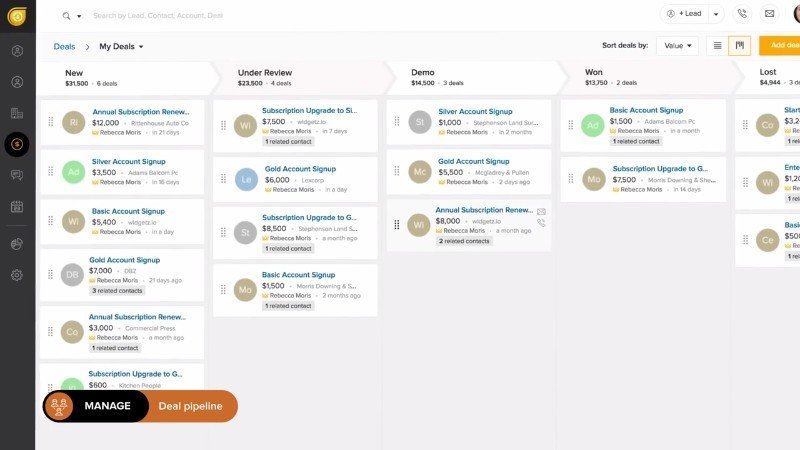
Image source: freshworks.com
Key features:
- Freddy AI: Smart lead scoring and predictive insights.
- Sales automation: Automatically create tasks and follow-ups.
- Email & chat tracking: Monitor all client interactions.
- Customizable dashboards: Visualize performance trends.
- Built-in communication tools: Connect via phone and chat directly.
Strengths:
- Excellent AI-driven recommendations
- Great value with free tier available
- Streamlined workflows for consultants
- Strong mobile app performance
Limitations:
- Interface can feel cluttered at times
- Limited advanced analytics in free plan
Pricing:
- Free plan available
- Growth: $15/user/month
- Pro: $39/user/month
- Enterprise: $69/user/month
8. Capsule CRM: Best simple and lightweight CRM for consultants
Capsule CRM is a straightforward, no-frills CRM perfect for consultants who want efficiency without complexity. It provides essential client tracking, task management, and pipeline visualization in a clean interface. Capsule's focus on simplicity makes it a great fit for solo consultants or small teams managing long-term client relationships. With integrations for email, calendars, and accounting tools, it covers the essentials while staying budget-friendly.
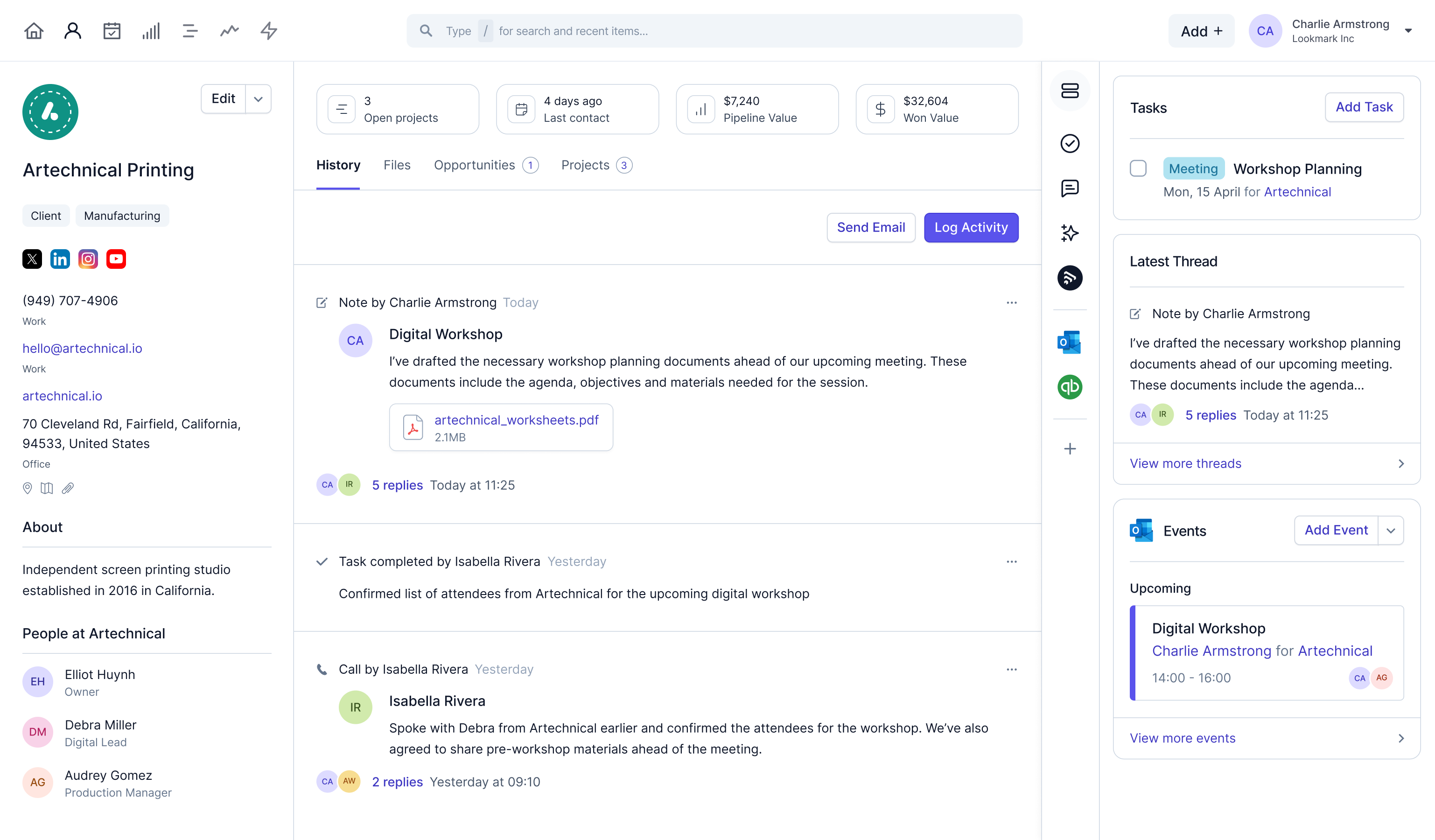
Image source: capsulecrm.com
Key features:
- Contact management: Store and organize client data easily.
- Sales pipeline: Track deal progress visually.
- Task reminders: Stay on top of daily to-dos.
- Reporting: Simple metrics for team and sales performance.
- Integrations: Connect with tools like Xero and Google Workspace.
Strengths:
- Clean, easy-to-use interface
- Affordable and great for small teams
- Fast deployment, minimal setup required
- Reliable for relationship-based consulting
Limitations:
- Basic automation capabilities
- Limited scalability for large organizations
Pricing:
- Starter: $12/user/month
- Growth: $24/user/month
- Advanced: $36/user/month
Why businesses hire CRM consultants
Hiring CRM consultants can dramatically improve how organizations manage customer data, sales processes, and overall efficiency. Whether you're a startup or an established firm, these experts ensure your CRM investment delivers measurable value. Here's how they help:
- Accelerated CRM adoption: Implementing a new CRM can be overwhelming for teams unfamiliar with the platform. CRM software consultants simplify this process through structured onboarding, hands-on training, and tailored workflows. As a result, employees adapt faster, use the system more effectively, and achieve higher productivity from day one.
- Improved data quality and reporting clarity: Many companies struggle with inconsistent or duplicate records. CRM data quality consultants fix these issues by cleansing and organizing data before data migration. Clean, reliable data leads to more accurate reporting and insights, helping businesses make smarter decisions based on real-time customer information.
- Better pipeline management and customer experience: CRM consultants design and optimize sales pipelines that clearly show where each deal stands. This visibility helps teams prioritize leads, reduce bottlenecks, and improve follow-ups. The result is smoother client communication and a more personalized customer experience across every stage of engagement.
- Reducing CRM complexity for small or growing teams: Small teams often find enterprise CRMs too complicated for their needs. CRM for consultants and smaller businesses are customized by experts to simplify dashboards, automate key tasks, and focus only on the most relevant metrics, ensuring usability without overwhelming users.
- Cost savings through optimized workflows: By automating repetitive tasks and streamlining operations, CRM consultants help businesses save both time and money. Optimized workflows reduce manual errors, shorten sales cycles, and improve collaboration, turning your CRM into a true growth engine rather than just another tool.
Common mistakes companies make with CRM consultants
Even with the best intentions, businesses often stumble during CRM implementation because of avoidable missteps. Knowing these pitfalls helps ensure your investment delivers long-term value. Here are the most common CRM consulting mistakes to steer clear of:
- Choosing a consultant without platform expertise: A generalist consultant may not fully understand the nuances of your chosen CRM platform. Without deep platform-specific knowledge, they might miss key features or misconfigure workflows. Always choose someone certified or experienced in the exact CRM you plan to use.
- Ignoring data quality issues before migration: Migrating unclean or duplicate data can cause chaos in your new system. Skipping CRM data cleanup leads to inaccurate reports, cluttered pipelines, and reduced team confidence. Always conduct a full audit, clean, validate, and standardize data before going live.
- Not involving frontline teams in discovery: CRM systems succeed when end users, like sales reps or support agents, find them useful. Failing to include frontline teams during the needs assessment phase often results in low adoption. Engaging these users early helps design workflows that actually support daily operations.
- Over-customizing the CRM: While customization is valuable, too many tweaks can make your CRM complex and hard to maintain. Over-customizing leads to confusion, slower updates, and dependency on consultants for simple changes. Keep configurations lean and focus on the features that drive measurable impact.
- Neglecting ongoing training
- CRM adoption isn't a one-time event; it's an ongoing process. Without continuous training and onboarding, users may revert to manual work or underuse key features. Regular workshops, updates, and support sessions keep your team confident and your CRM performing at its best.
Conclusion
Effective customer relationship management is critical for consulting firms of all sizes. CRM consultants help businesses streamline workflows, improve data quality, and enhance client interactions through platform expertise, automation, and ongoing support. From selecting the right CRM like Salesforce, HubSpot, or Zoho to designing pipelines and training teams, their guidance ensures faster adoption and measurable results.
Avoiding common mistakes such as ignoring data quality or over-customizing the system is essential for success. By choosing the right consultant and tools, firms can save time, reduce complexity, and boost client satisfaction. For teams ready to unify client management and workflows, Lark provides a powerful, all-in-one solution.
FAQs
How much do CRM consultants charge?
CRM consultant rates vary based on experience, project scope, and platform specialization. On average, freelance CRM consultants charge between $50–$200 per hour, while agency or enterprise-level experts may cost more. Fixed-scope projects typically range from $3,000–$25,000, depending on complexity, data migration needs, and post-implementation support requirements.
What is the best CRM for consultants?
The best CRM for consultants depends on team size and project needs. Lark is ideal for unified client and workflow management, HubSpot CRM suits marketing-driven firms, while Salesforce fits large-scale operations. For smaller teams, Zoho CRM, Pipedrive, or Capsule CRM offer simple, cost-effective solutions with strong automation and tracking capabilities.
Can small consulting firms afford CRM consultants?
Yes. Many small consulting firms can afford CRM consultants by opting for short-term engagements or specific project-based support. Freelancers and boutique agencies often offer scalable packages, like setup, data migration, or training, starting around $1,000–$3,000. Choosing affordable CRMs such as Zoho CRM or Lark further reduces total implementation costs.
How long does a CRM implementation project take?
A typical CRM implementation can take anywhere from 2 weeks to 3 months, depending on project size, data volume, and customization needs. Smaller setups with pre-built templates deploy quickly, while enterprise-level projects, especially those involving multiple integrations and automation, require phased rollouts, testing, and user training for long-term success.
Related reading
Table of contents
Start using Lark today

Manage all your work in one place
Boost team efficiency by 10x
Save up to 70% on software costs
Table of contents
Start using Lark today
Manage all your work in one place
Boost team efficiency by 10x
Save up to 70% on software costs
Keep reading









2026 Lark Technologies Pte. Ltd.
Headquartered in Singapore with offices worldwide.






Explore: