Google Forms is often described as a "free" tool for collecting data. For individuals and small teams, that label feels accurate—at least at first. But as usage grows, workflows become more complex, and teams begin to rely on forms for approvals, automation, and reporting, the real cost of Google Forms becomes more nuanced.
This guide breaks down Google Forms pricing, explains what "free" actually includes, highlights hidden costs tied to add-ons and workflows, and explores when teams outgrow the platform. We'll also look at how modern teams approach form-driven workflows differently and why alternatives like Lark are increasingly considered.
What is Google Forms?
is a versatile, web-based survey administration software included as part of the free, web-based Google Docs Editors suite. Designed for simplicity and efficiency, it allows users to build everything from basic polls to complex data collection tools without needing any coding knowledge. By integrating seamlessly with the broader Google ecosystem, Forms automatically captures and organizes responses in real-time, allowing for instant analysis via built-in summaries or detailed processing within Google Sheets. Since Google Forms is closely tied to Google's business ecosystem, it's also helpful to understand when estimating the total cost of ownership.
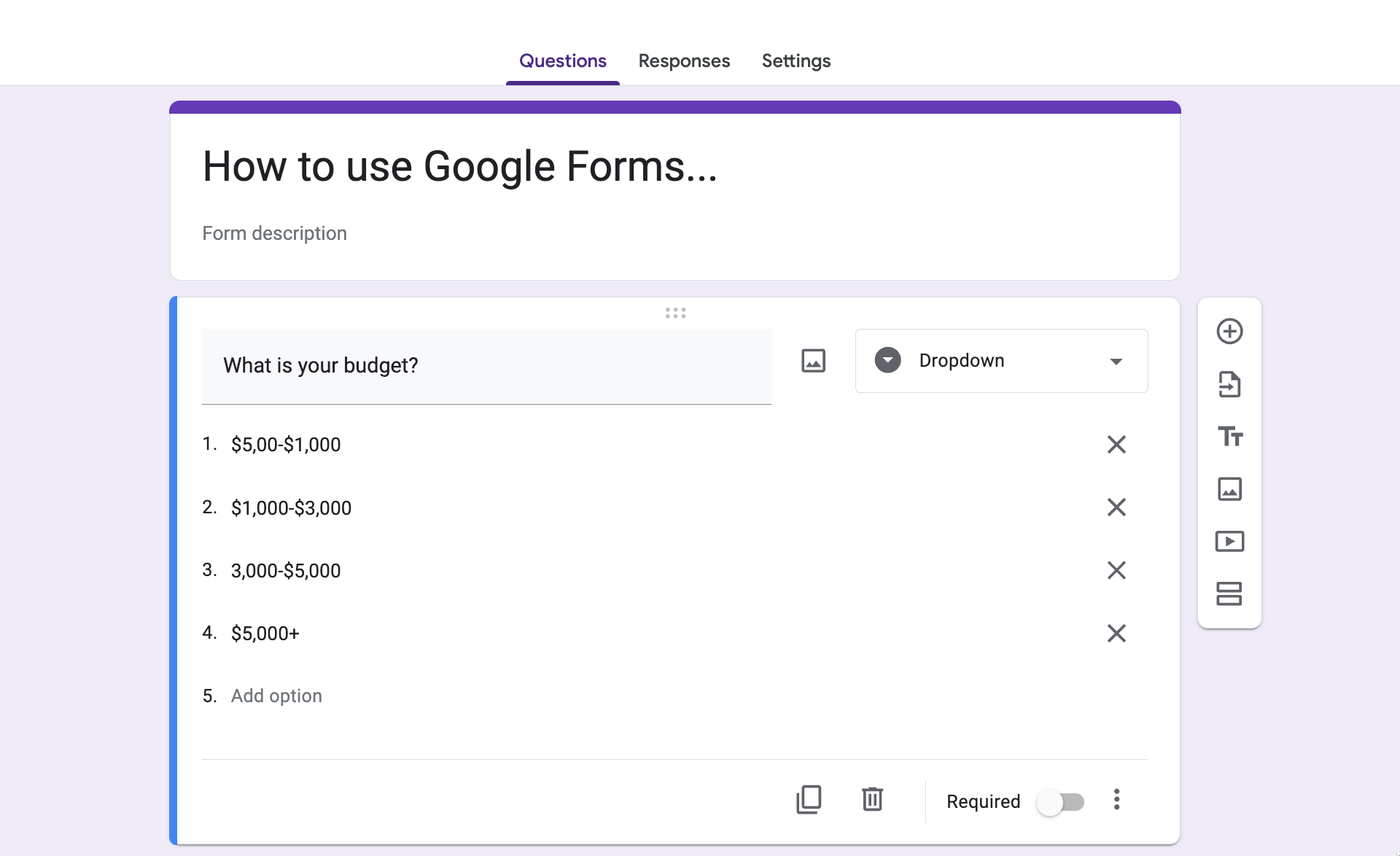
Image source: google.com
Google Forms features you should know before paying
Before assuming Google Forms will scale with your needs, it's worth understanding what it handles well and where its capabilities start to level off.
Core features include:
- Drag-and-drop form creation: Google Forms makes it easy to build forms quickly using a simple . This works well for basic surveys and internal requests but offers limited control over complex form logic.
- Multiple question types: You can choose from text, multiple choice, dropdowns, checkboxes, and file uploads. While flexible for simple data collection, these options don't support advanced conditional flows across multiple stages.
- Basic validation rules: Forms allow simple validation such as required fields or format checks for emails and numbers. More often requires scripts or third-party tools.
- Response collection in Google Sheets: All form responses can be automatically stored in Google Sheets for viewing and analysis. As response volume grows, managing structure, ownership, and historical changes inside sheets becomes increasingly manual.
- Email notifications (limited): Google Forms can send basic email alerts when a response is submitted. Custom routing, approvals, or multi-recipient logic typically depends on add-ons.
- Simple sharing controls: Forms can be shared via links or limited to users within a domain. Granular permissions based on role, workflow stage, or response status are not supported natively.
Google Forms pricing: What's included by default
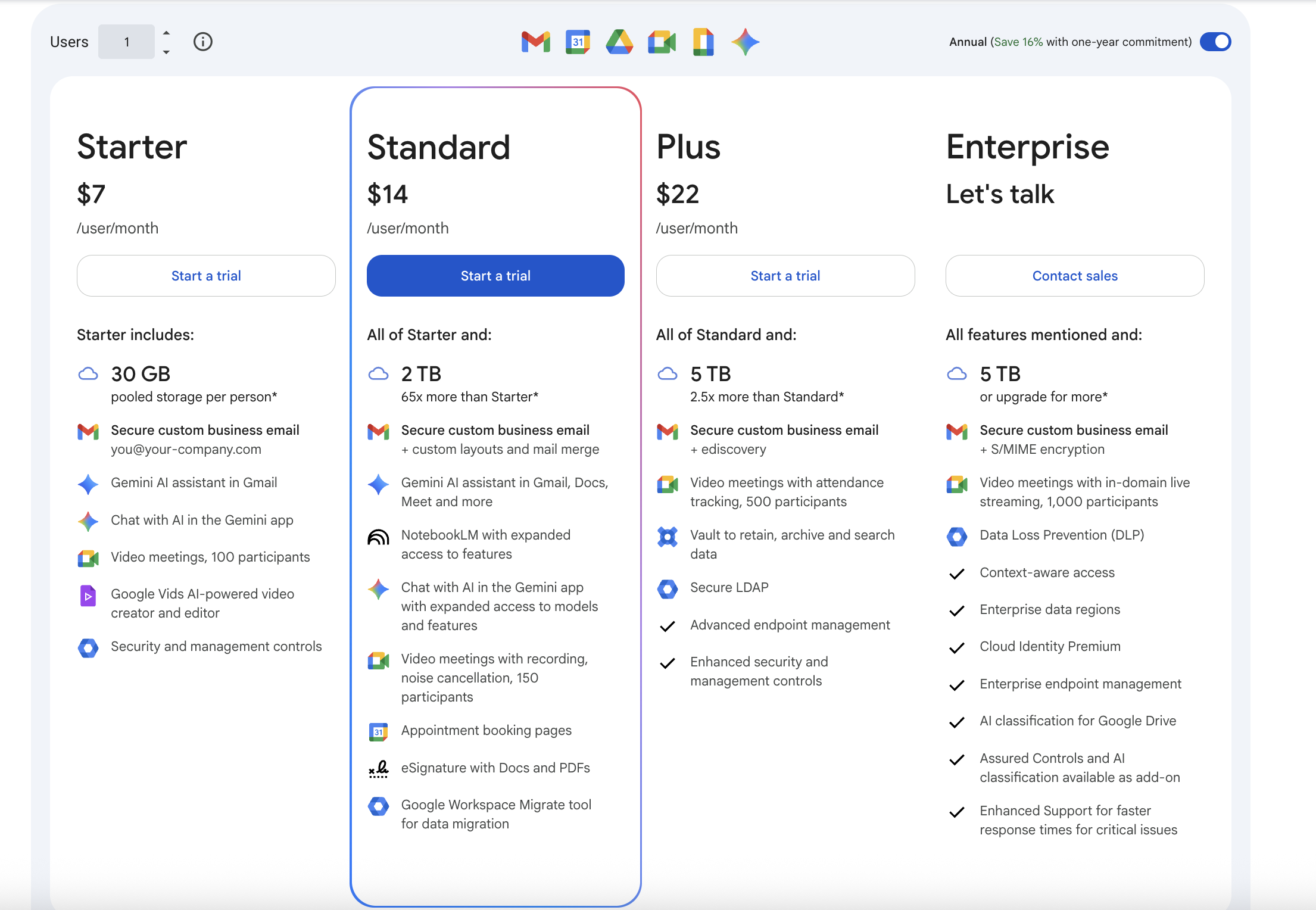
Google Forms is included across all Workspace plans, but what users actually get varies depending on the tier. While the form-building experience remains largely the same, storage, , security, and meeting capabilities increase as plans scale.
Information source: google.com
Update time: 2025-12-29
Note: Pricing and plan details reflect publicly available data as of the update date and may vary based on region, billing cycle, and number of agents.
Google Forms itself is available across all Google Workspace plans, which is why it often appears to be free. However, the value users get from Google Forms is shaped by the Workspace tier supporting it. Lower-tier plans work well for basic data collection, while higher-tier plans add storage, security, compliance, and collaboration features that become essential as forms are used for business-critical workflows. This distinction explains why Google Forms pricing feels simple at first, but increasingly tied to Workspace upgrades as team needs grow.
Google Forms free pricing and possible costs
Google Forms is entirely free for anyone with a Google account, offering unlimited forms, responses, templates, and Google Sheets integration, with no hidden costs for basic use. However, as usage expands, hidden costs begin to surface—not as a direct fee, but through added tools, time, and operational effort.
- Reliance on paid add-ons: Features like approvals, response limits, or conditional notifications are not available natively, pushing teams toward paid extensions and increasing overall Google Forms pricing.
- Manual follow-ups and coordination: Without built-in task assignment or ownership, teams spend extra time tracking submissions, sending reminders, and managing responses manually.
- Limited automation without technical work: Advanced workflows often require , adding setup complexity and ongoing maintenance effort.
- Fragmented data management: Responses stored in spreadsheets can become difficult to organize as volume grows, leading to time-consuming cleanup and a higher risk of errors.
- Reporting and visibility gaps: Real-time insights and status tracking usually require exporting data or building custom views, which adds operational overhead.
- Scalability constraints: As more users and forms are added, limitations around permissions, governance, and security often require Workspace upgrades or additional tools.
These hidden factors are why Google Forms pricing, becomes a practical concern for teams, even when the tool itself remains technically free.
Google Forms free vs paid: Real-world usage comparison
This is where Google Forms pricing free vs paid becomes less theoretical and more operational:
Google Forms API pricing and automation constraints
Understanding Google Forms API pricing is important for teams that rely on automation beyond basic form submissions. While the API doesn't charge a direct fee, real costs emerge through access limits, technical effort, and supporting tools. As needs grow, Google Forms API pricing becomes less about what you pay upfront and more about how much work it takes to keep processes running smoothly.
- No direct API fee, but plan-dependent access: Google Forms APIs don't have a standalone price, but access and capabilities depend on the Google Workspace plan and admin permissions.
- Usage quotas and rate limits apply: API requests are capped, which can restrict how frequently data is read or processed, especially in high-volume or time-sensitive workflows.
- Limited native automation options: Google Forms offers minimal built-in automation after submission, pushing teams toward Google Apps Script or external tools.
- Engineering effort increases over time: Scripts and API-based automations require setup, testing, and ongoing maintenance as forms, fields, or processes change.
- Indirect costs for non-technical teams: Teams without dedicated technical support often rely on third-party automation platforms, adding subscription costs and operational overhead.
- Scaling introduces reliability risks: As usage grows, handling errors, delays, and failed triggers becomes more complex, impacting workflow consistency and reporting accuracy.
Google Forms add-on pricing: Form approvals, limits, and notifications
Google Forms APIs do not come with a direct usage fee, which often leads teams to assume is essentially free. In reality, access to APIs and advanced automation depends on the Google Workspace plan an organization is using, along with administrative permissions that are not always available to every team.
API usage is also governed by quotas and rate limits, which can restrict how frequently data is read, updated, or processed. As form usage scales—especially in high-volume or time-sensitive workflows—these limits can introduce delays or require additional engineering work to manage retries, batching, or alternative processes.
For most non-technical teams, automation rarely happens through APIs alone. Instead, teams rely on Google Apps Script or third-party tools to trigger notifications, route submissions for review, or . This is where form approvals Google Forms add-on pricing becomes a practical consideration, as approval-focused add-ons are typically charged on a per-user or per-form basis and add recurring costs over time.
This is why Google Forms API pricing is less about a visible dollar amount and more about operational complexity. The real cost shows up in the effort required to build, maintain, and scale automations reliably as business needs grow.
Upgrade to a robust alternative at lower pricing
When Google Forms becomes inefficient for teams
Google Forms works well for lightweight data collection, but inefficiencies start to surface as forms become central to how work gets done.
- Forms are mission-critical: When forms are used to drive core processes—such as approvals, intake requests, or compliance tracking—any delay or failure has real consequences. Google Forms lacks built-in safeguards, escalation paths, and workflow visibility, making it risky for high-impact use cases.
- Data must stay structured: As submissions grow, managing responses in flat spreadsheets becomes difficult. Without structured records, teams struggle to track status changes, historical context, and relationships between data points over time.
- Ownership and accountability matter: Google Forms captures information but does not assign responsibility by default. Teams must manually decide who owns each submission, increasing the risk of follow-ups being missed or actions falling through the cracks.
- Reviews and approvals are required: Multi-step reviews, sign-offs, and conditional approvals are not supported natively. Teams often rely on add-ons or manual handoffs, which increases complexity and makes processes harder to audit.
- Reporting must be real-time: When leaders need into submission status, trends, or bottlenecks, static spreadsheets quickly become a limitation. Manual updates and exports introduce delays and inconsistencies in reporting.
At this stage, the challenge is no longer about whether Google Forms is free. It's about how fragmented workflows, disconnected tools, and manual coordination slow teams down—creating a clear need for a more unified approach, such as what Lark offers.
Simplify workflows and turn submissions into action
How Lark offers a more complete forms-based workflow
offers a more complete forms-based workflow by treating forms as just the starting point, not the final destination. Instead of stopping at data collection, Lark connects every form submission to structured data management, , and execution in one workspace. Information gathered through forms can immediately drive discussions, approvals, tasks, and decisions without moving between tools. This approach helps teams turn responses into outcomes faster while maintaining clarity and accountability.
Advanced form design for higher-quality data collection
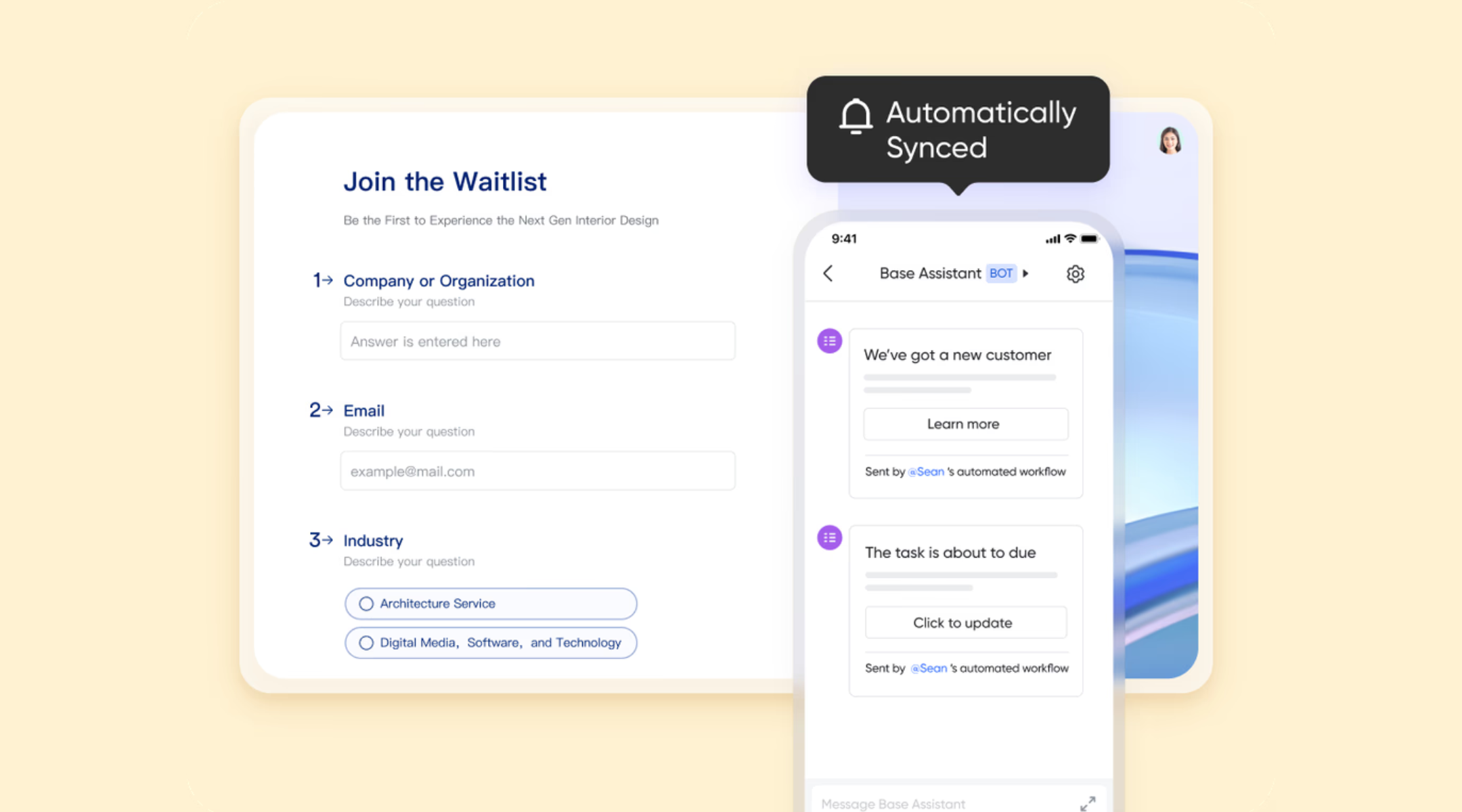
enables teams to design smarter forms that capture more accurate and contextual data from the start. Beyond standard question types, it supports specialized fields such as NPS, Location, Person (linked to the organization structure), and File Uploads, making forms suitable for real business scenarios like feedback analysis, internal requests, and audits. Rich controls such as image-based options, minimum and maximum selection limits, and supplemental text fields help reduce ambiguity and improve response quality, ensuring teams receive data they can confidently act on.
Intelligent logic and validation for a better respondent experience
Lark Forms includes guided display logic that dynamically shows or hides questions based on previous responses. This conditional flow prevents users from answering irrelevant questions, shortens completion time, and increases submission rates. Detailed validation options—such as automatic timestamp capture for date fields or enforced input rules—help maintain data accuracy without relying on manual checks, which is especially valuable for compliance, operations, and time-sensitive workflows. 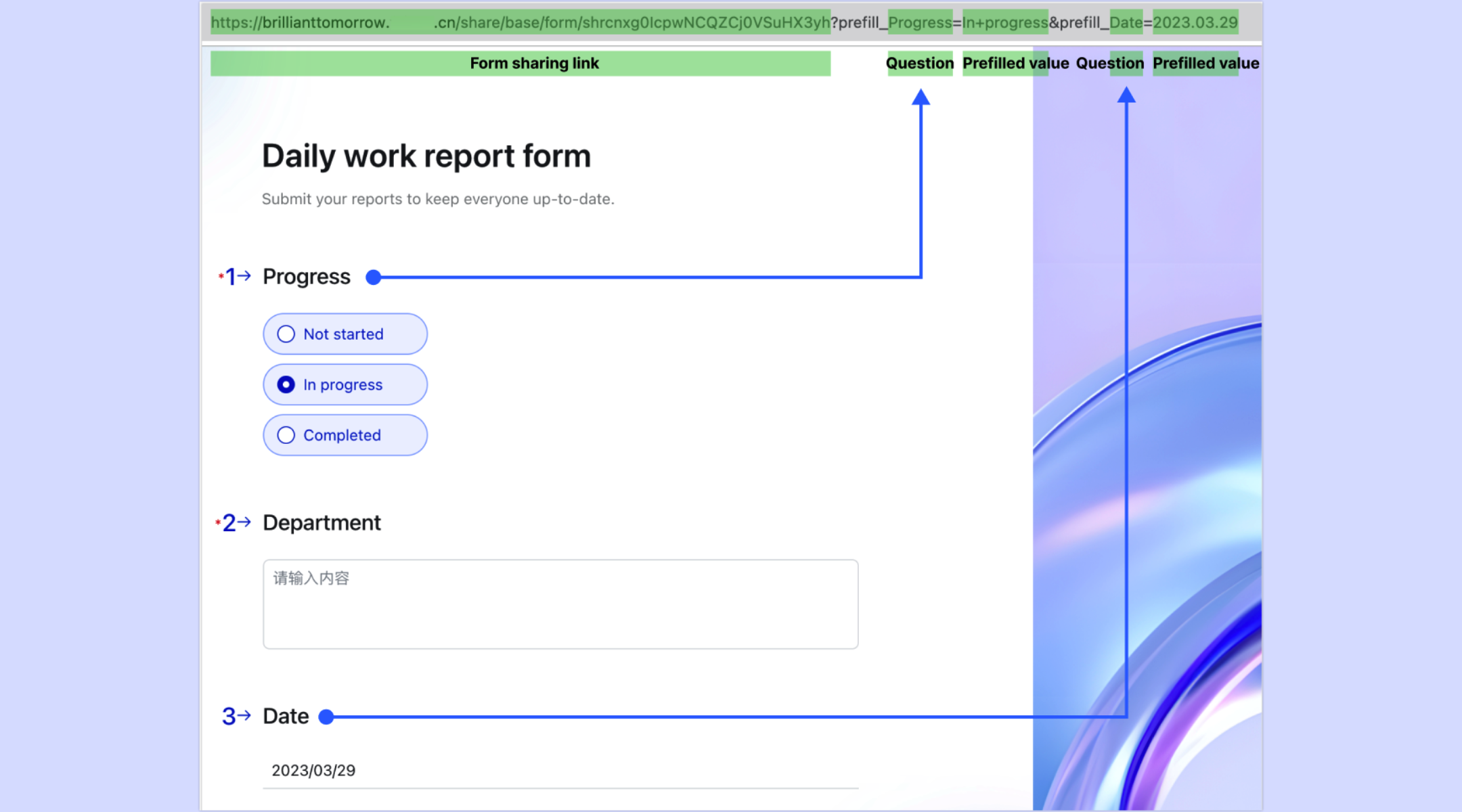
Native connection between forms and structured data
Every Lark Form automatically creates a corresponding table in , turning each submission into a record, and the whole form into a structured table in real time. This eliminates the common problem of forming data living in isolation, as teams can immediately filter, group, sort, and comment on submissions within Lark Base. Sales, product, operations, and leadership teams can work on the same dataset simultaneously, ensuring insights flow smoothly across departments without exports or duplicate files. 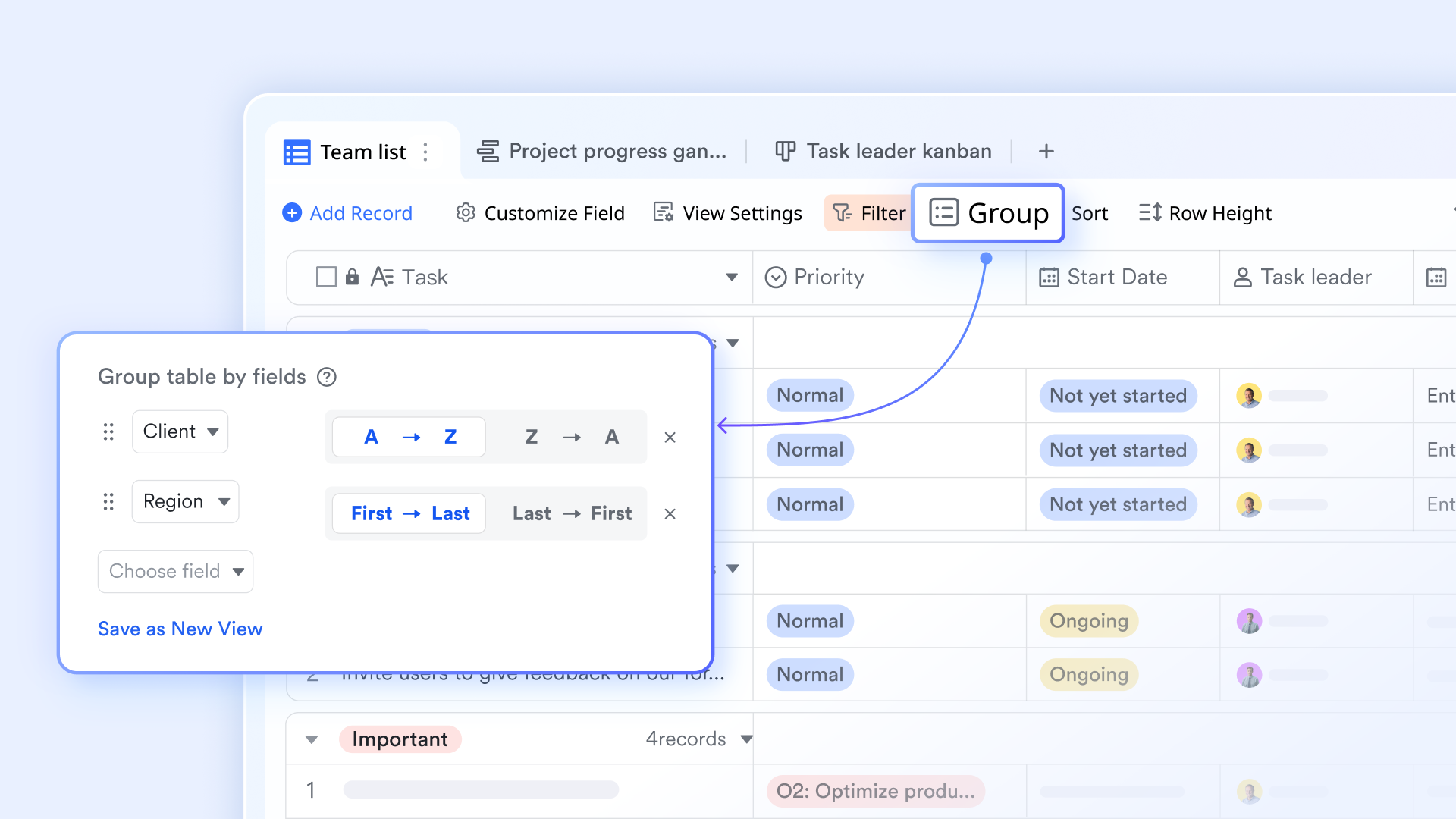
Real-time collaboration and visual insights through dashboards
Lark Forms automatically generates shareable analytics dashboards that visualize responses based on question types, such as charts for single-choice questions or word clouds for open-ended feedback. These dashboards update in real time as new submissions arrive and can be shared with stakeholders instantly. This makes it easier for teams to review trends, discuss findings, and make decisions together, all while staying aligned on the same source of truth. 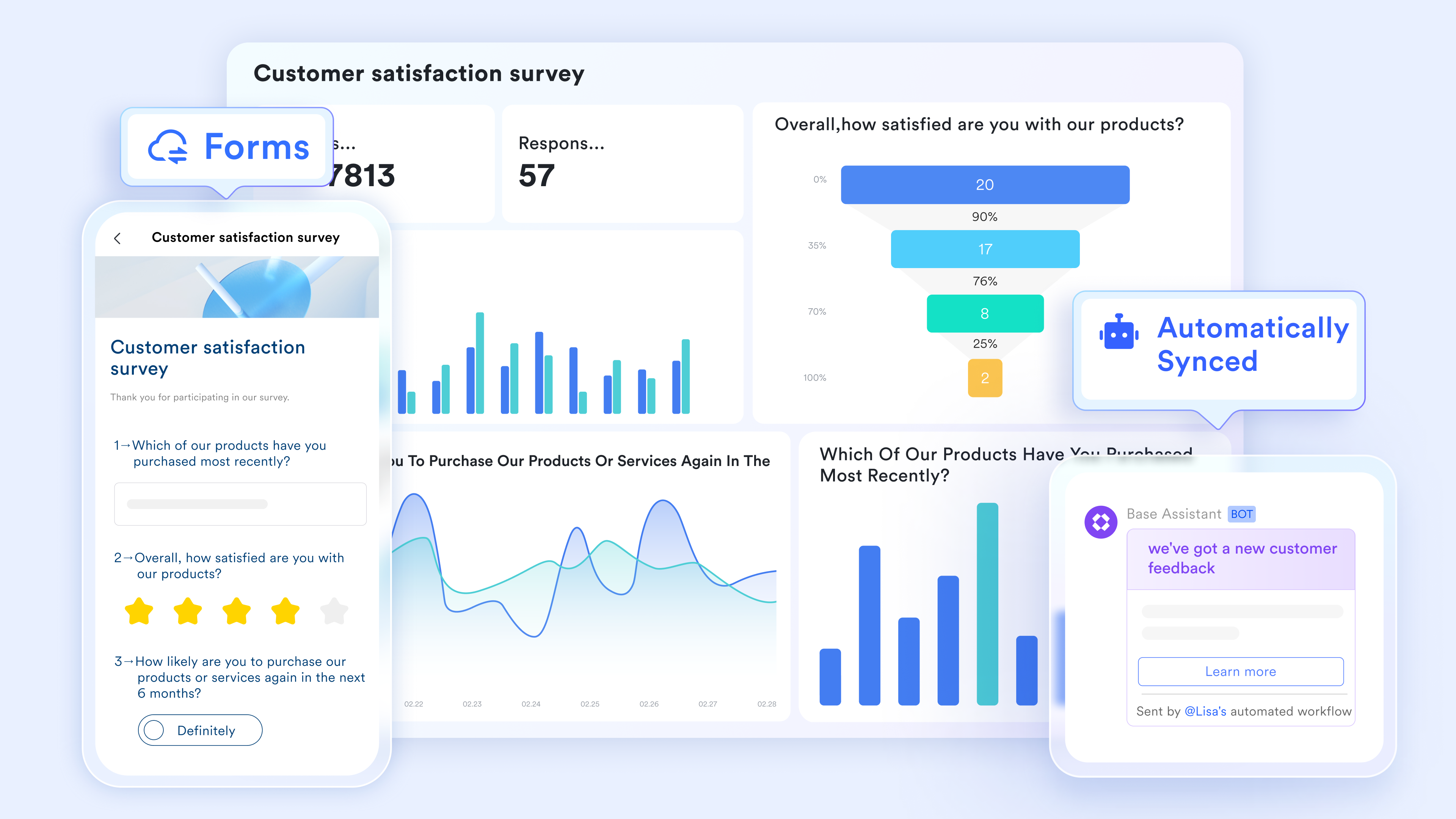
Forms as workflow triggers for execution and follow-through
Lark Forms turns submissions into starting points for action rather than static endpoints. Teams can set submission limits, automate reminders, and use form responses to trigger follow-up workflows such as task creation, approvals, or record updates in Lark Base. Custom result pages and redirect links guide respondents toward next steps, while internal teams benefit from reduced manual coordination and faster execution once data is submitted. 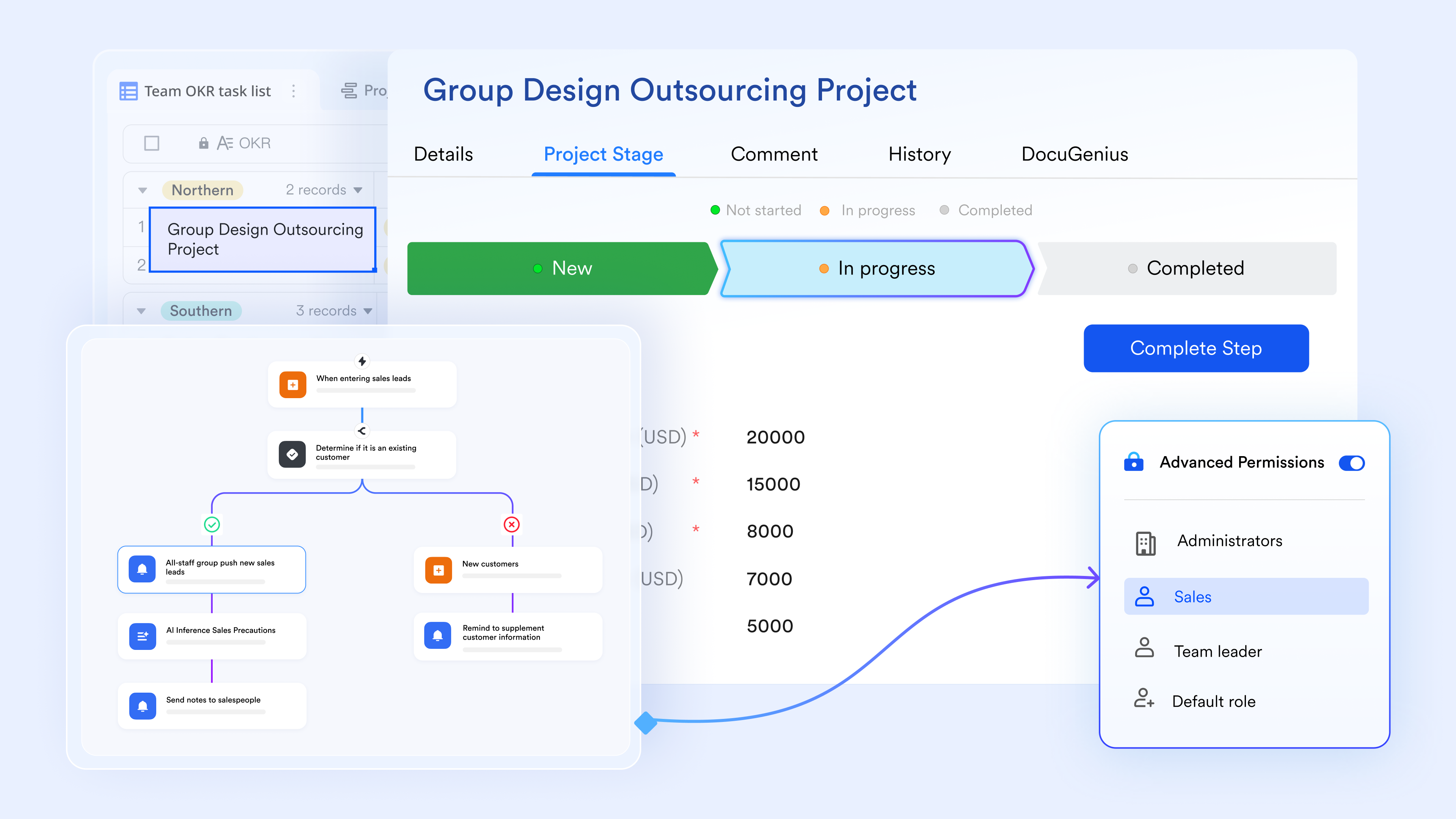
Beyond Lark Forms
It's worth noting that Lark Forms is not a separate product that needs to be purchased or set up on its own. It is built directly into the Lark workspace, so teams can start creating and using fully featured forms as soon as they use Lark.
Because Lark Forms works natively alongside other Lark features such as Lark Base for structured data management, for team communication, for collaborative editing, and for scheduling, form data never sits in isolation. Information collected through forms can be reviewed, discussed, and acted on in the same workspace, eliminating the friction of switching between disconnected tools. Most importantly, teams don't need to pay separately for these capabilities, which helps keep workflows simple and costs predictable as usage grows.
:
- Starter plan: Free forever plan that includes 11 powerful tools for up to 20 users. It also comes with 100GB of storage, 1000 automation runs, AI translations, and more.
- Basic plan: $6/user/month (billed annually) for up to 500 users. It includes everything in Starter plus group calling for up to 500 attendees, 5TB of storage, 1000 automation runs, and more. For more details, please .
- Pro plan: $12/user/month (billed annually) for up to 500 users. It includes everything in Basic plus group calling for up to 500 attendees, 15TB of storage, 50,000 automation runs, and more.
- Enterprise plan: for custom pricing. Supports unlimited users and includes even more automation runs and advanced security, compliance, and management features.
For small teams with simple communication needs

18 months message history
1000 Base automation runs/month
2000 rows per table in Base
Most POPULAR
For companies with comprehensive collaboration and management needs
Unlimited message history
500-participant video meetings
50k Base automation runs/month
20k rows per table in Base
For large companies with advanced security and organizational management needs
Get a personalized demo and pricing
Unlimited message history
500-participant video meetings
15 TB storage + 30 GB storage/user
500k Base automation runs/month
50k Base automation runs/month
Most POPULAR
For companies with comprehensive collaboration and management needs
Unlimited message history
500-participant video meetings
50k Base automation runs/month
20k rows per table in Base
Google Forms vs Lark: Value beyond form creation
Google Forms is designed primarily for simple data collection, making it suitable for surveys and basic intake needs. goes further by connecting forms to structured data, task ownership, collaboration, and automated workflows, . For teams managing ongoing processes rather than one-off forms, the difference shows up in clarity, speed, and accountability.
Features comparisons
Pricing comparison
Choosing the right tool based on scale and complexity
Teams looking for more integrated solutions can also evaluate leading that combine forms, collaboration, and workflow management in one platform. The right forms tool depends less on price and more on how central forms are to your daily operations and decision-making:
Choose Google Forms if
- You need simple surveys: Google Forms works well for one-off questionnaires, feedback collection, or basic information gathering where responses don't require follow-up actions or approvals.
- Your workflows are static: If form submissions are collected, reviewed occasionally, and rarely change in structure or process, Google Forms can handle the job without added complexity.
- Cost sensitivity is extreme: For individuals or very small teams with minimal requirements, the ability to create and share forms at no direct cost can be a practical short-term solution.
Choose Lark if
- Forms trigger work: When a form submission leads to reviews, tasks, or decisions, a tool that connects data to execution becomes essential. Lark supports forms as starting points for workflows, not just data collection.
- Data must stay structured: Lark keeps form responses organized as structured records rather than flat spreadsheets, making it easier to track status, history, and ownership over time.
- Teams collaborate on outcomes: When multiple stakeholders need to discuss, review, and act on submissions, Lark keeps conversations, documentation, and follow-ups connected in one workspace.
- Automation reduces manual effort: For teams aiming to minimize repetitive coordination—such as reminders, status updates, or approvals—Lark reduces manual steps by handling these actions natively as processes scale.
Conclusion
Google Forms remains a practical choice for basic surveys and simple data collection, especially for individuals or small teams with minimal workflow needs. However, as forms become central to approvals, tracking, and decision-making, limitations around structure, automation, and collaboration start to surface. At that stage, teams benefit from a more connected approach—one that keeps data organized, ownership clear, and follow-ups automatic rather than manual. supports this shift by extending forms into structured data, team collaboration, and workflow execution within a single workspace, helping teams move from collecting information to acting on it with confidence.
Move from basic forms to live data charts today
FAQs
Is there a fee to use Google Forms?
Google Forms itself does not charge a direct fee. However, costs can arise through Google Workspace subscriptions, paid add-ons, and the time required to manage advanced workflows.
What are the disadvantages of Google Forms?
Google Forms lacks native approval workflows, structured databases, and built-in task ownership. Teams often rely on third-party tools to fill these gaps, which adds complexity over time.
How secure is Google Forms for internal business data collection?
Security depends largely on the Google Workspace plan in use. While basic protections are included, advanced controls such as data loss prevention and detailed audit logs require higher-tier plans.
What happens to Google Forms data when Workspace plans change?
Data remains accessible, but storage limits, admin controls, and security features may change based on the new plan. Downgrades can affect how data is managed or shared.
Can Google Forms handle multi-step approval workflows natively?
No. Google Forms does not support multi-step approvals out of the box. Teams typically use add-ons or external tools to manage approval processes.
Related reading


















