Efficient data collection is crucial for a wide range of needs, from gathering feedback to planning events and conducting research. In this comprehensive Google Forms review, we explore why this tool has become a popular choice for many users. With its simplicity and effectiveness, Google Forms enables anyone—regardless of technical expertise—to create custom online forms in just a few clicks. Seamlessly integrated into the Google Workspace ecosystem, it offers various features that make it a robust solution for both personal and professional data collection. In this article, we'll delve into the essential features, advantages and disadvantages, and real user experiences to provide a well-rounded understanding of Google Forms.
What is Google Forms?
Google Forms is a web-based application that allows users to create custom online forms for various purposes, such as surveys, quizzes, or registration forms. Launched as part of , it has evolved into a versatile tool that caters to both personal and professional data collection needs.
As a cloud-based service, Google Forms enables users to create, share, and analyze forms effortlessly. With a simple drag-and-drop interface, anyone can create professional-looking forms without any coding experience. This accessibility, combined with its integration with other Google applications like Sheets and Drive, makes Google Forms an excellent choice for users seeking a straightforward yet effective solution for gathering information.
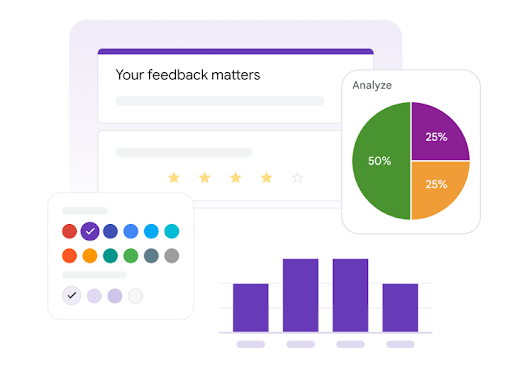
Image source: workspace.google.com
Key features of Google Forms
Google Forms boasts several features that enhance functionality and user experience. Here are the key aspects that make it a popular tool among its users:
User-friendly interface
One of the standout features of Google Forms is its intuitive design. The straightforward layout allows users to create forms quickly and efficiently without needing advanced technical skills. With drag-and-drop functionality, users can rearrange questions with ease. The platform provides helpful prompts and tutorials for new users, making it accessible for anyone, regardless of their prior experience with online form creation.
Moreover, the ability to preview forms in real time adds to the ease of use, allowing creators to see how their participants will experience the form. This user-friendly approach ensures that even those unfamiliar with form design can produce professional-looking surveys effortlessly.
Customization options
Customization is key when it comes to branding forms. Google Forms allows users to personalize their forms with various themes, colors, and images, helping them create visually appealing forms that reflect their brand identity. Users can adjust fonts, add logos, and choose from pre-designed themes to align with specific aesthetics.
While the basic customization tools cater to most needs, Google Forms also includes advanced options for those who want to maintain a professional look, such as the HTML embedding for forms into websites. This flexibility ensures a cohesive brand experience, making forms more engaging for respondents.
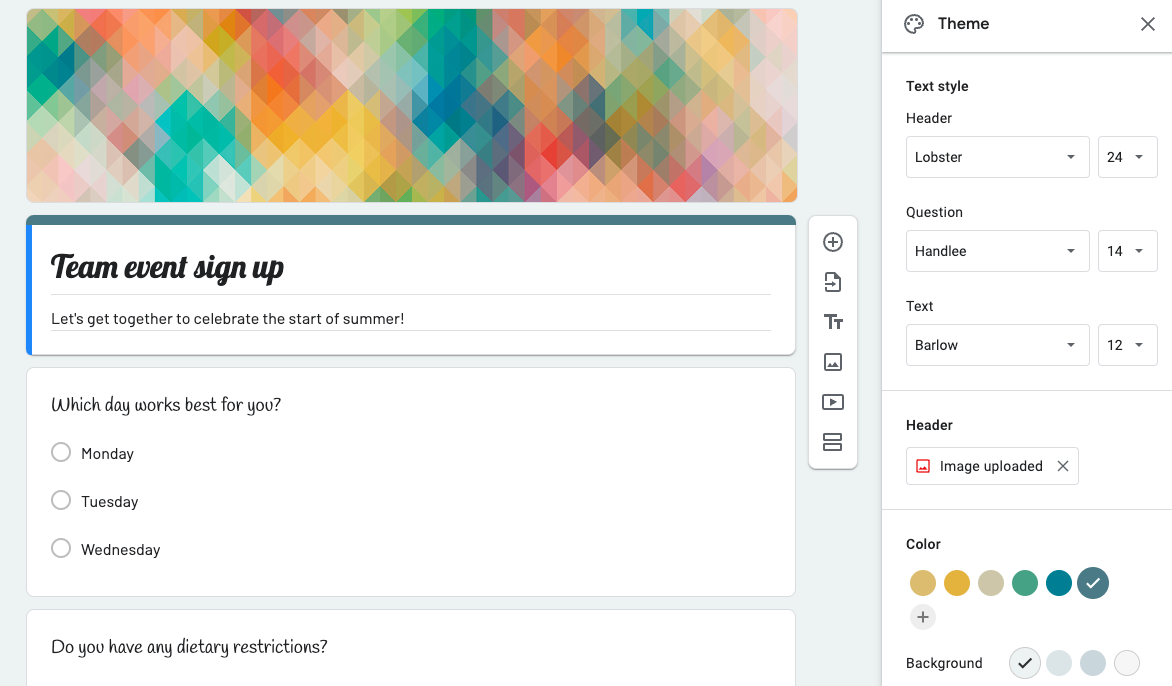
Image source: workspaceupdates.googleblog.com
Collaboration capabilities
Collaboration is crucial for teams, and Google Forms doesn't disappoint. It allows multiple users to , promoting teamwork and facilitating diverse contributions to form content. Team members can leave comments directly on questions and suggest changes, which are particularly useful or when seeking feedback from colleagues.
Additionally, you can set permissions to control who can view or edit the form, ensuring security and integrity throughout the creation process. This collaborative environment is essential for organizations operating in real-time, especially when quick decisions are necessary for project management and data gathering.
Question types and data types
Google Forms offers a wide array of question types, allowing users to choose the format that best suits their objectives. Users can create question formats such as multiple-choice, checkboxes, dropdowns, linear scales, and open-ended text questions, accommodating various data collection scenarios.
This variety is particularly helpful for educators seeking to assess student understanding, as well as for businesses gathering feedback from clients on their products or services. The ability to add images or videos directly into questions further enhances engagement, catering to different learning styles and making forms more interactive and effective.
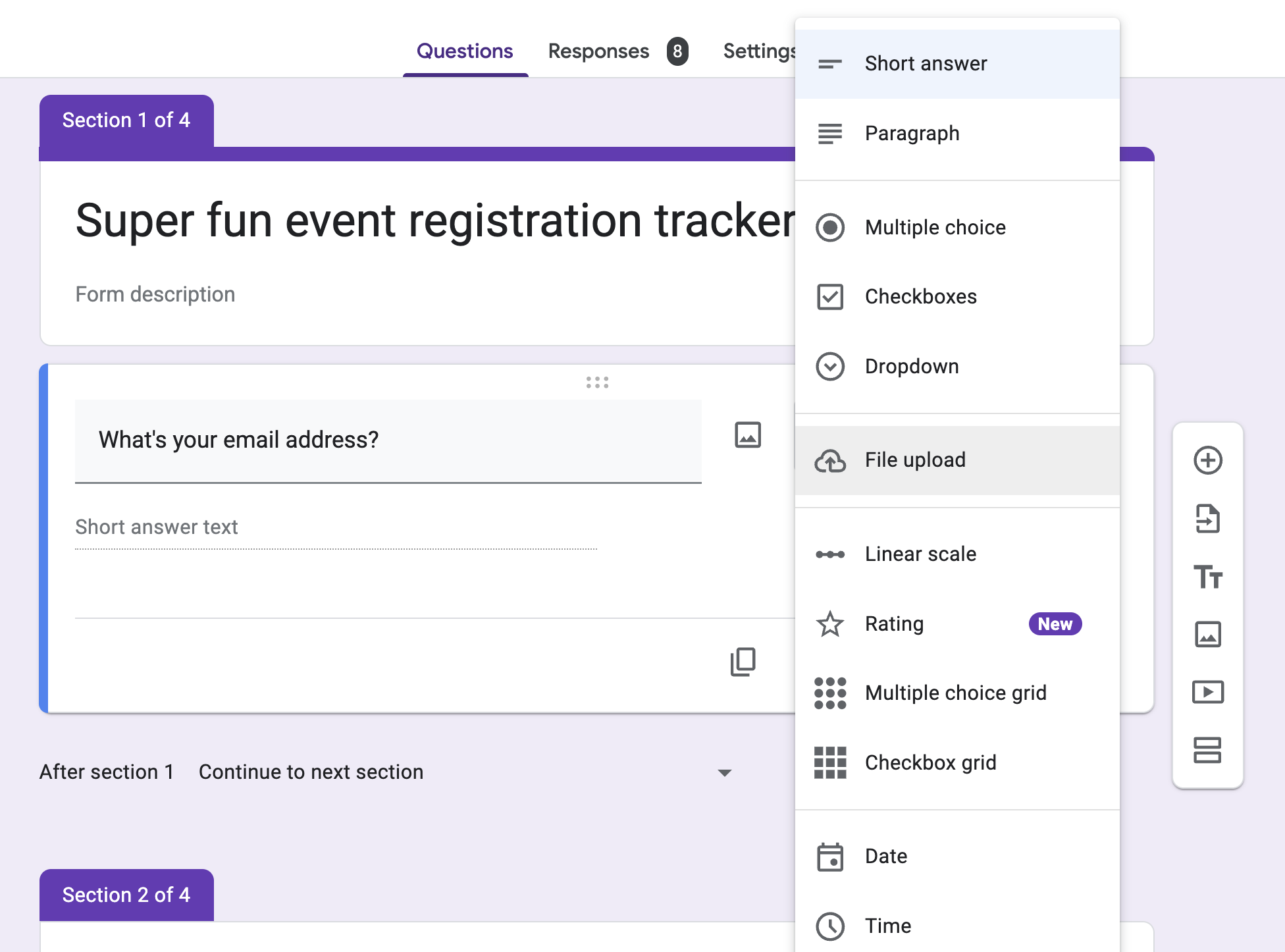
Image source: workspace.google.com
Data collection and analysis
Once data is collected, Google Forms provides efficient methods for analysis. Responses can be automatically compiled into for deeper data analysis, making it easy to visualize results or perform statistical calculations. Built-in analytics features allow users to view response summaries, charts, and graphs directly within Google Forms, providing immediate insights into collected data.
This functionality is particularly beneficial for educators and researchers who need to interpret results quickly and accurately. Additionally, you can set up email notifications for new responses, ensuring timely access to critical information.
Integration with other tools
The power of Google Forms extends beyond its standalone features. It seamlessly integrates with other applications in the Google Workspace suite, such as Google Drive and Google Sheets, enabling users to automate workflows efficiently.
You can also connect Google Forms with various third-party tools like Zapier, which allows for sending responses directly to a database or triggering actions in other apps based on form submissions. Such capabilities are essential for businesses looking to streamline operations, enhance productivity, and reduce the administrative burden associated with data collection. This interconnectedness enhances the overall value of Google Forms as part of a broader digital toolkit.
Pricing structure of Google Forms
Google Forms' pricing leans into accessibility: its core features are 100% free for personal users, while advanced capabilities tie to Google Workspace plans (which currently offer limited-time launch discounts).
Free plan: Zero-cost for everyday use
Any user with a Google Account (Gmail or basic Workspace) can access Google Forms for free:
- No limits on the number of forms created or responses collected.
- 10+ question types, real-time response tracking, Google Sheets data exports, and basic collaborative editing.
- Response data stores in Google Drive, with storage capped at your account's free 15GB quota.
- Perfect for personal surveys, classroom activities, small event sign-ups, or casual project feedback.
Paid plans: Google Workspace (with limited-time discounts)
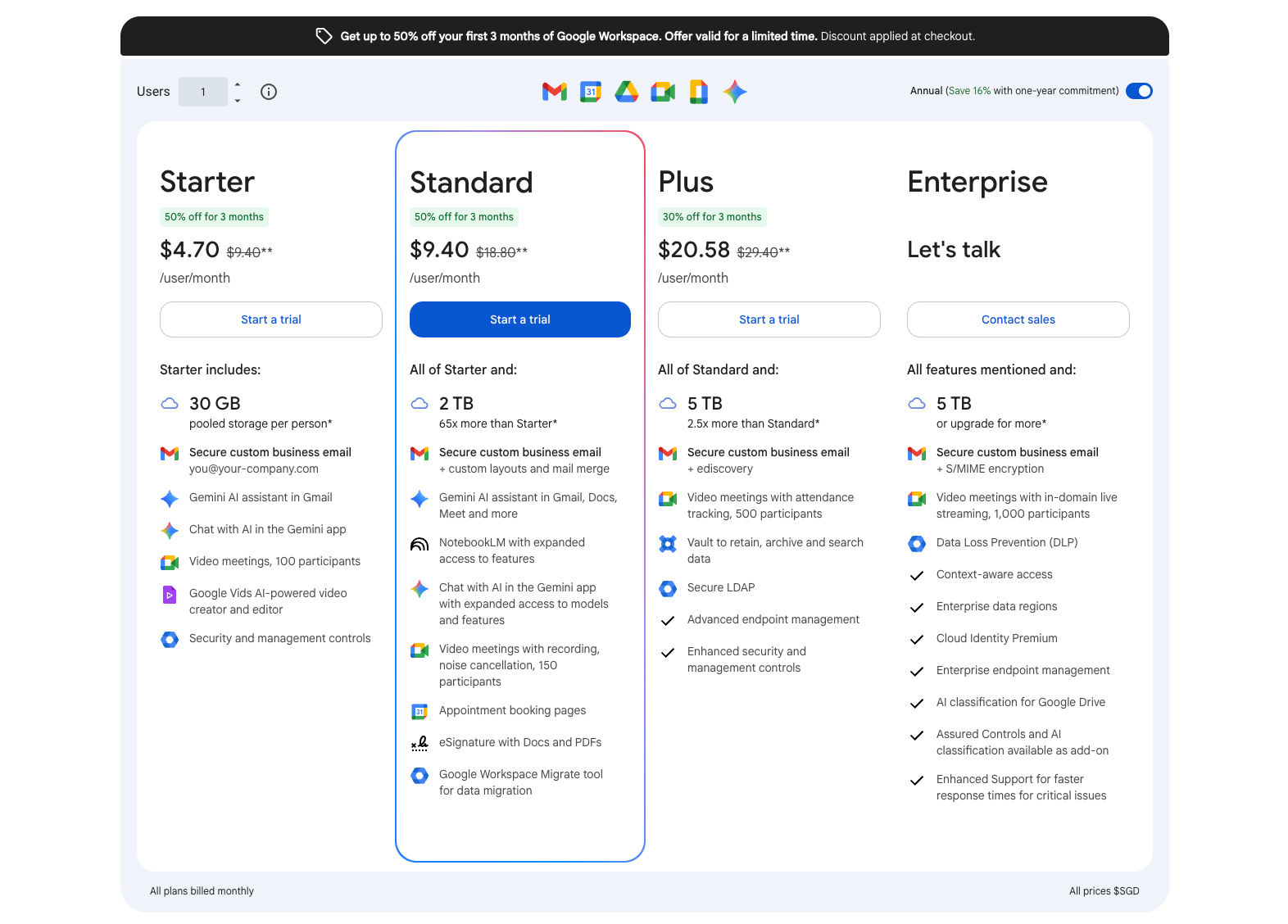
Image source: workspace.google.com
Update time: 2025-12-17
Google Forms' advanced features are bundled into Google Workspace subscriptions (priced per user/month, with annual billing savings). Current limited-time discounts apply to the first 3 months:
- Starter: $4.70/user/month (50% off; original $9.40) – Includes 30GB shared storage, custom business email, Gemini AI assistant in Gmail, 100-person video meetings, and basic security controls.
- Standard: $9.40/user/month (50% off; original $18.80) – Adds 2TB storage, expanded NotebookLM features, 150-person video meetings (with recording), appointment booking pages, Docs/PDF e-signatures, and a data migration tool (on top of all Starter perks).
- Plus: $20.58/user/month (30% off; original $29.40) – Upscales to 5TB storage, 500-person video meetings (with attendance tracking), data archiving/retrieval tools (Vault), and advanced endpoint management (on top of all Standard perks).
- Enterprise: Custom pricing – Offers 5TB+ storage, 1000-person video meetings, S/MIME encryption, data loss prevention, and enterprise-grade compliance tools.
These paid plans boost Google Forms' utility for teams: more storage for large response datasets, better collaboration controls, and security features for sensitive form data.
👉 Know more:
Additional costs to pay attention for
Beyond base plan pricing, keep these potential expenses in mind:
- Post-discount full pricing: After the 3-month promotional period, plans revert to their original rates (e.g., Starter jumps to $9.40/user/month) – set reminders to adjust your plan if needed.
- Over-storage fees: If your team exceeds the plan's storage quota (e.g., Starter's 30GB shared space), you'll need to purchase extra Google One storage (starting at ~$1.99/month for 100GB).
- Third-party add-on fees: Advanced Google Forms plugins (like automated approval workflows or detailed analytics tools) typically cost $2–$100/month, depending on functionality.
- Enterprise custom services: For businesses needing dedicated support, custom integrations, or compliance consulting, these premium add-ons will incur extra (negotiated) costs.
Avoid additional costs with clearer pricing plans
Pros and cons of Google Forms
Like any tool, Google Forms comes with its own set of advantages and disadvantages. Understanding these can help you decide if it's the right solution for your needs.
Advantages of using Google Forms
- User-friendly design: The intuitive interface makes it easy for anyone to create forms without needing technical knowledge. This means you can start collecting data immediately.
- Versatile question types: Google Forms offers various question types, including text, multiple choice, checkboxes, and more. This versatility allows you to customize your forms based on your specific needs.
- Integration with Google Workspace: If you already use Google products like Sheets or Drive, the integration capabilities mean you can easily analyze and manage your data across platforms. For instance, you can utilize the Google Forms performance review template to assess employee feedback directly in your Sheets.
- Real-time collaboration: Multiple users can work on a form simultaneously, which is excellent for teams. You can invite coworkers to contribute their thoughts or make edits, facilitating efficiency in collaborative projects.
- Instant feedback and analytics: Google Forms provides summaries of responses in real time. You can quickly view charts and graphs summarizing data, which saves time and effort in .
Limitations of Google Forms
- Limited design options: While Google Forms allows for some customization, it falls short compared to other form builders regarding design flexibility. If you place a high emphasis on branding, this may be a drawback.
- Advanced features are limited: For users looking for more sophisticated functionalities—such as advanced branching logic or conditional question skipping—Google Forms may not meet all your expectations. Tools like SurveyMonkey offer more advanced features that cater to complex survey needs.
- Potential privacy concerns: As forms gather data online, it's crucial to consider privacy implications. While Google does implement security measures, some users may be hesitant about storing sensitive information with a cloud provider.
- Response limitations in free plans: Though the basic plan is free and allows for unlimited forms, Google does put limits on the volume of responses that can be collected, particularly during high-traffic periods.
- Lack of offline capabilities: Google Forms requires an internet connection for access. This means that if you need to create or share a form in an offline environment, you may need to rely on alternative tools.
Consider a powerful tool to replace Google Forms
Consider the best alternative to replace Google Forms
When looking for an alternative to Google Forms, many users want a tool that is not only powerful but also seamlessly combining existing workflows. is precisely such a product. It goes beyond basic data collection, utilizing deep combinations to transform forms into a core engine that drives team action and decision-making.
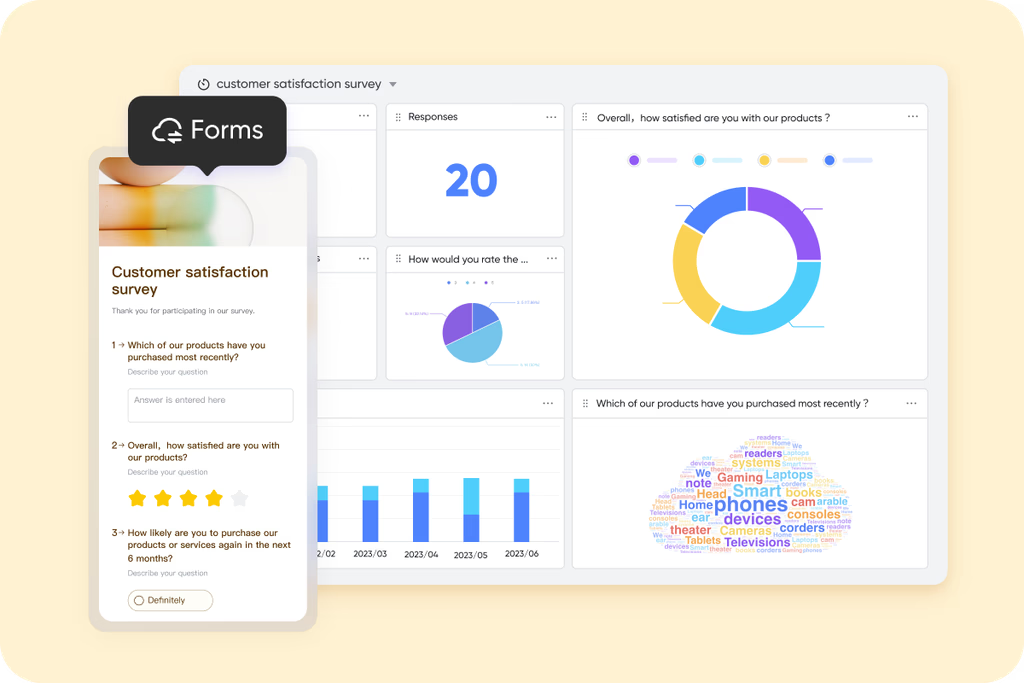
Uncover deeper insights, not just answers
aims to gather higher-quality, more contextual data through finer question design and logical controls, moving beyond simple answer summaries.
Rich question types & advanced settings: In addition to standard question types, Lark Forms offers specialized ones like NPS (Net Promoter Score), Location, Person (selecting from the organizational structure), and File Upload. For multiple-choice questions, you can upload an image for each option to make choices more intuitive. You can even set minimum and maximum selection limits (e.g., "Please choose 2-4 items"), which is very useful in scenarios like voting.
Guided display logic: Using the "Display Logic" feature, you can set conditions for when follow-up questions appear. For example, a question like "Please explain your reason for dissatisfaction" will only show if a user selects a rating "below 3" in a satisfaction survey. This smart branching prevents respondents from answering irrelevant questions, improving the completion experience and data relevance. Detailed controls for data quality: You can add text supplement fields to each option in choice questions, allowing users to provide details when selecting "Other" or a specific choice. For date questions, you can set them to automatically record the time the user opened the form instead of requiring manual entry, ensuring the accuracy of time data.
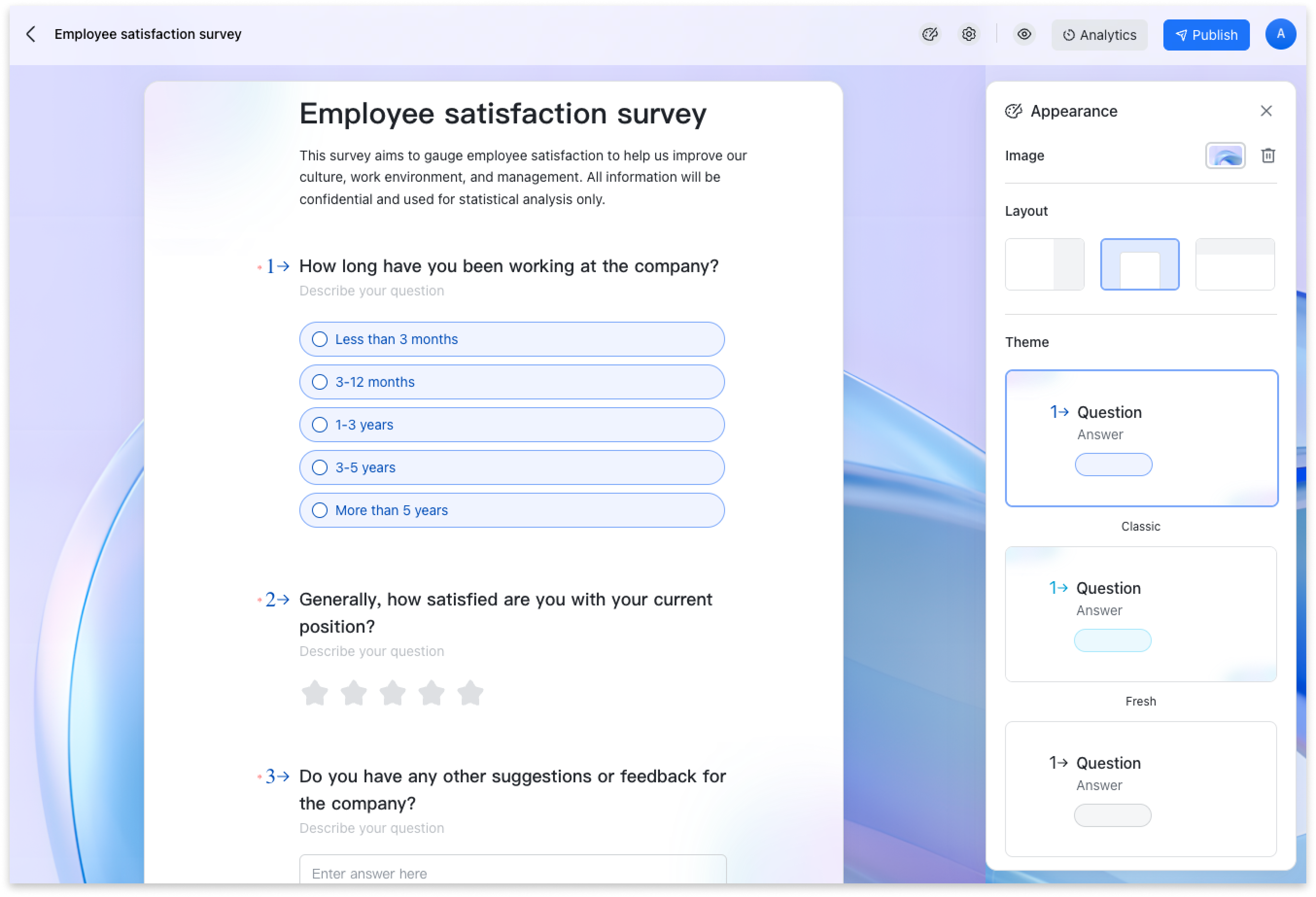
Make data flow and collaborate within your team
The most fundamental advantage of Lark Forms is that it is inherently linked with , completely solving the problem of form data being isolated from other work.
Native database collaboration: Every Form created automatically corresponds to a Lark Base table. Each form submission appears in real-time as a structured record in the Base, with fields matching the questions one-to-one. Instant team collaboration & analysis: Team members can immediately filter, sort, group, and discuss (by @mentioning colleagues to add comments) the collected data within the Base. This means customer needs gathered by the sales team can be instantly viewed by the product team and linked to the product backlog, without any import/export steps.
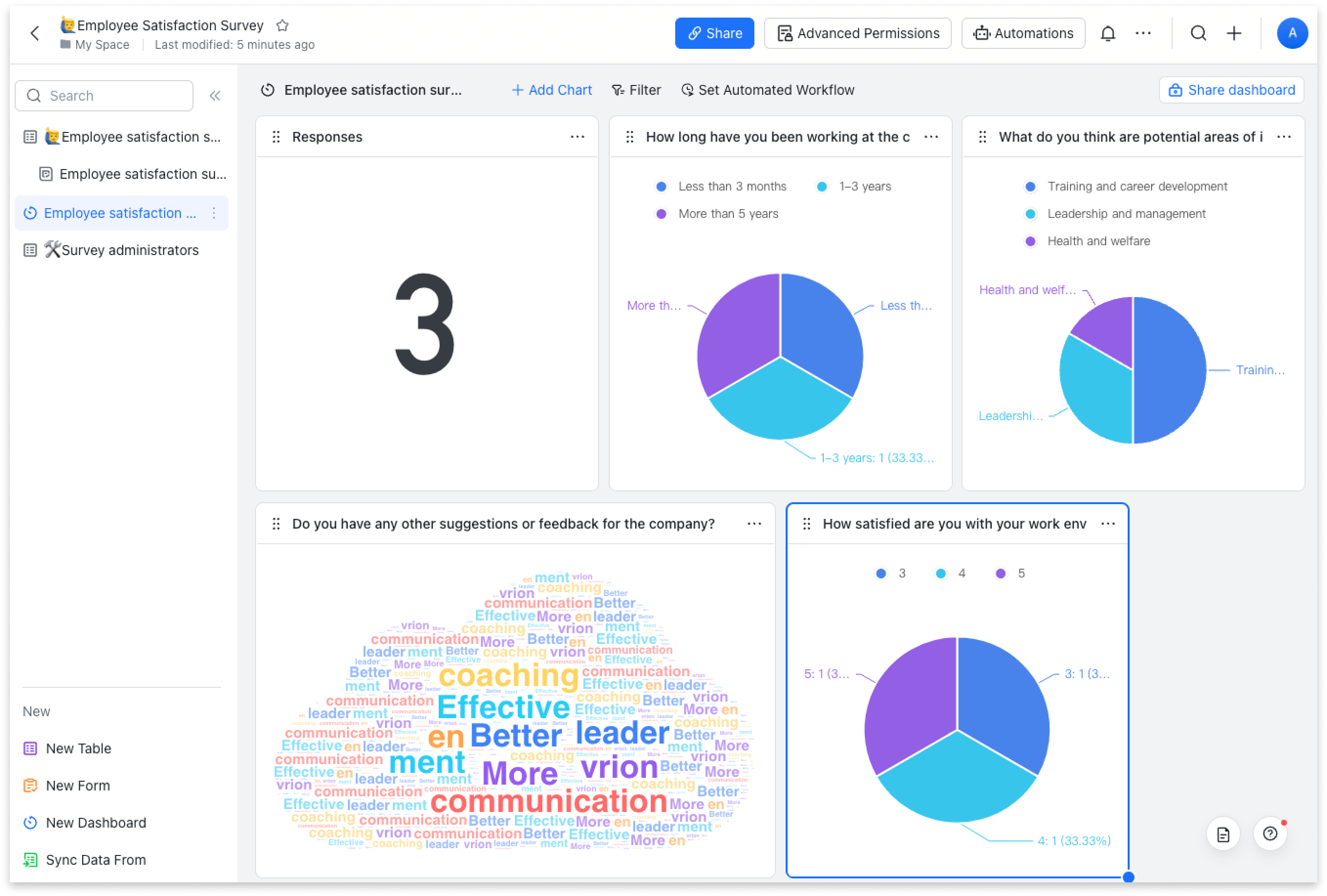
Shareable, dynamic dashboards: Clicking the "Analytics" button in the form automatically generates a dedicated data dashboard that visualizes data based on question type (e.g., pie charts for single-select, word clouds for open-ended questions). This dashboard can be shared with colleagues with one click, allowing everyone to view real-time analysis results and enabling data-driven collaborative decision-making.
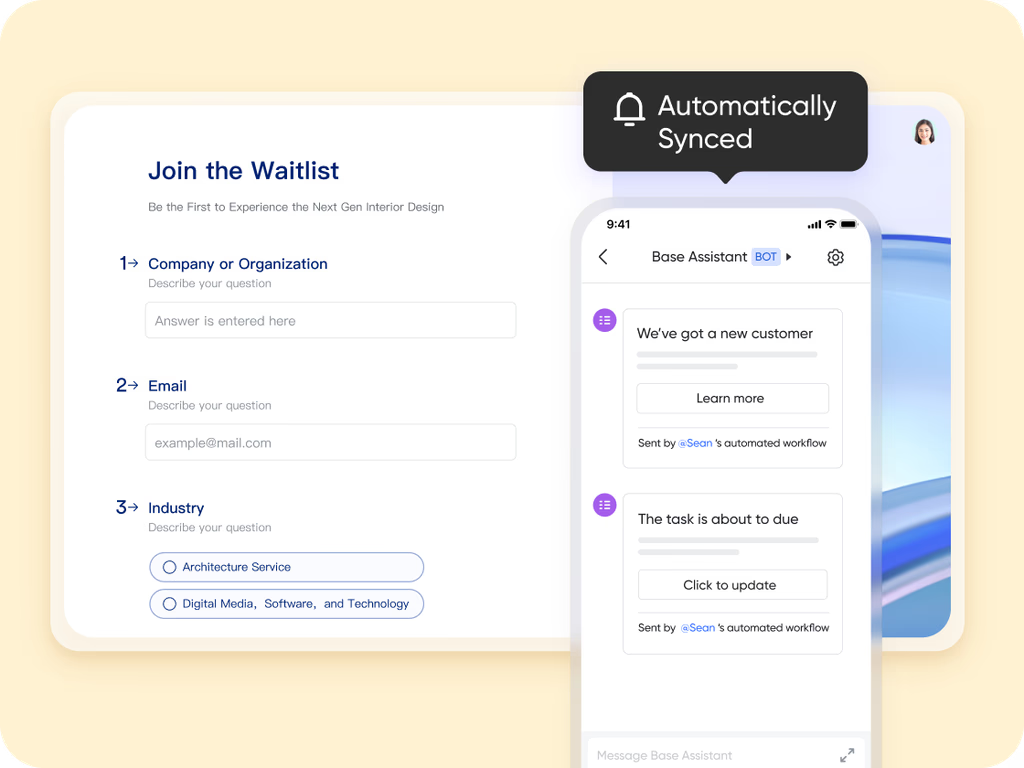
Automate response management and connect business processes
transforms forms from an endpoint for information collection into an automated starting point for business processes.
Intelligent response management: You can set an overall submission limit for the form (e.g., for limited-capacity event registration) or set submission limits per respondent per day/week/month. Combined with the scheduled reminder feature for form completion, this can significantly increase the response rate for important forms.
Triggering follow-up workflows: A form submission itself can act as a trigger. For example, after an "IT Equipment Request Form" is submitted, it can automatically create a "Purchase Task" record in the associated Base, or use Base's automation rules to trigger an approval workflow for the department head. This achieves "submit-and-create-task," turning data directly into action.
Flexible result pages & redirects: After form submission, you can customize the result page's title and description (e.g., informing next steps) and even set a redirect link, so users jump directly to a specific webpage (like the company homepage, event details page) after submitting, guiding them to the next action.
A native feature within Lark
It's important to clarify that Lark Forms is not a standalone tool that requires separate purchase or integration. It is a native feature of the unified Lark platform, built directly into every Lark workspace.
This means that if your team uses , you can immediately create and use the fully functional Lark Forms without any additional cost. It works seamlessly alongside other core Lark features, such as the collaborative for data management, for communication, for co-editing, and for scheduling. This unification ensures that data collected through forms can be easily analyzed, discussed, and acted upon without ever leaving the platform, avoiding the inefficiencies of switching between disconnected apps. More importantly, you don't have to pay additional costs for above features.
Here's Lark's :
- Starter plan: Free forever plan that includes 11 powerful tools for up to 20 users. It also comes with 100GB of storage, 1000 automation runs, AI translations, and more.
- Basic plan: $6/user/month (billed annually) for up to 500 users. It includes everything in Starter plus group calling for up to 500 attendees, 5TB of storage, 1000 automation runs, and more. For more details, please .
- Pro plan: $12/user/month (billed annually) for up to 500 users. It includes everything in Basic plus group calling for up to 500 attendees, 15TB of storage, 50,000 automation runs, and more.
- Enterprise plan: for custom pricing. Supports unlimited users and includes even more automation runs and advanced security, compliance, and management features.
For small teams with simple communication needs

18 months message history
1000 Base automation runs/month
2000 rows per table in Base
Most POPULAR
For companies with comprehensive collaboration and management needs
Unlimited message history
500-participant video meetings
50k Base automation runs/month
20k rows per table in Base
For large companies with advanced security and organizational management needs
Get a personalized demo and pricing
Unlimited message history
500-participant video meetings
15 TB storage + 30 GB storage/user
500k Base automation runs/month
50k Base automation runs/month
Most POPULAR
For companies with comprehensive collaboration and management needs
Unlimited message history
500-participant video meetings
50k Base automation runs/month
20k rows per table in Base
When to choose Google Forms or Lark
Both Google Forms and offer valuable features for data collection, but the best choice for you will depend on your specific needs and circumstances. Understanding the strengths of each platform can help you make an informed decision.
Choose Google Forms if...
- You need a simple, straightforward solution: Google Forms is ideal for users who require a basic tool for creating surveys and data collection forms without the need for advanced functionalities. If you're looking to quickly set up a form and share it within a Google-centric workflow, Google Forms delivers a quick, user-friendly experience.
- You are a casual user: For individuals or small teams that occasionally need to gather feedback or collect information, Google Forms' free version is a solid option. Its straightforward features work well for one-off projects or informal surveys.
- You want basic analytics: If the main priority is collecting data with minimal additional features, Google Forms may suffice. It provides essential summary statistics and can integrate with Google Sheets for more detailed analysis without additional cost.
Choose Lark if...
- You require advanced customization and branding flexibility: If you need forms that not only gather data but also reflect your brand's identity, Lark provides significant advantages with its extensive customization options. You can create visually appealing forms that align with your business image.
- Collaboration is critical for your team: For teams that in developing forms, Lark's real-time collaboration tools allow team members to comment, edit, and refine forms seamlessly. This feature and enhances the overall quality of the final product.
- You need dynamic question logic for personalized data collection: Lark enables you to create forms with dynamic question flows that adapt based on previous answers. This functionality improves user engagement by ensuring that respondents only see relevant questions, which is beneficial for detailed analysis and feedback.
- You want specific analytics and immediate insights: With Lark, you can visualize responses and generate directly within the platform. This streamlined process allows for quicker decision-making and reduces the hassle of exporting data for analysis.
- Security and data privacy are top priorities: If your organization handles sensitive information, Lark's enhanced security features, such as customizable permissions and robust encryption, provide peace of mind that your data is well protected.
- You need to collect data in environments with limited internet access: For field teams or events in remote locations, Lark's offline capabilities allow for uninterrupted data collection. This feature ensures you can gather responses even when connectivity is spotty.
Why Lark is the superior choice
Ultimately, if your needs extend beyond basic data collection or if you anticipate frequent use of forms, , one of the best , stands out as the better choice. Its advanced features not only tackle the limitations of Google Forms but also provide a comprehensive solution that supports evolving business needs. By choosing Lark, you empower your team to succeed with a powerful tool designed to enhance collaboration, customization, and . Whether you're managing projects, gathering feedback, or collecting insights, Lark offers the functionality and flexibility you need to excel.
Enhance your form management now
Conclusion
In summary, while Google Forms serves as a straightforward tool for basic data collection, emerges as a superior alternative that significantly enhances the overall user experience. With its advanced customization options, robust collaboration features, dynamic question logic, and heightened security measures, Lark addresses many of the limitations found in Google Forms. For teams and organizations looking to gather data more effectively and efficiently, Lark is the ideal choice. Don't settle for less—embrace Lark today and unlock the full potential of your forms to drive your projects forward!
FAQs
Is Google Forms any good?
Yes, Google Forms is a reliable tool for creating surveys and collecting data quickly and easily. Its user-friendly interface makes it accessible for everyone, from educators to businesses. However, it may not cater to those who need advanced features or customization options, where alternatives like Lark shine with more versatility and functionality.
What are the disadvantages of Google Forms?
While Google Forms is easy to use, it has some limitations, such as basic design customization, limited advanced features, and potential data privacy concerns. Users seeking dynamic question logic or extensive analytics might find Google Forms lacking compared to more robust platforms like Lark, which offers enhanced collaboration and data security.
Is there a charge for Google Forms?
Google Forms is completely free to use, making it an attractive option for individuals and small teams. However, if you require more advanced features and customization options, you may want to explore Google Workspace, which includes additional capabilities at a cost. Lark, as an alternative, provides a comprehensive suite of features without the associated fees for basic usage.
Is Google Forms really free to use?
Yes, Google Forms is free for all users with a Google account. You can create unlimited forms and gather responses without any financial obligation. For more extensive features, such as enhanced security and collaboration tools, consider Lark, which also offers a free tier, providing a great value for teams looking for a robust form-building solution.
Related reading






























