Google Forms is one of the most popular Google Form makers and survey tools, widely used for quick polls, event registrations, and basic feedback collection. While it’s free and easy to use, many teams soon find its limits—restricted customization, basic logic, lack of branding, and weak offline functionality. That’s why organizations often look for a Google Forms alternative that offers more flexibility, advanced reporting, and better workflow support. In this guide, we’ll explore the pros and cons of Google Forms, answer common questions (like is Google Forms free?), and compare top alternatives:
1. Lark: All-in-one collaboration platform with advanced form capabilities
2. Jotform: Flexible form builder with rich templates and customization
3. Typeform: Conversational form tool for engaging surveys
4. Formstack: Enterprise-grade forms with workflow automation
5. Microsoft Forms: Simple form builder for Microsoft ecosystem users
6. Fillout: Intuitive form builder with powerful logic and flexible design
7. Zoho Forms: Budget-friendly SaaS form builder with automation
8. SurveyMonkey: Market research and advanced survey analytics
9. Cognito Forms: Affordable, logic-heavy form builder
10. Wufoo: Long-standing, simple form builder for basic needs
11. Paperform: Form and landing page hybrid tool
12. Airtable Forms: Database-driven form inputs for structured workflows
13. PandaDoc Forms: Forms integrated with documents and e-signatures
14. Alchemer (SurveyGizmo): Advanced enterprise survey platform
15. Qualtrics: Research-grade survey and feedback platform
16. HubSpot Form Builder: CRM-connected forms for inbound marketing
What is Google Forms & is it free?
Google Forms, available at forms. Google, is a simple online Google Form creator that allows users to build surveys, quizzes, and feedback forms quickly. It’s widely used in schools, small businesses, and organizations because of its simplicity and direct connection to Google Sheets for data storage. Many users ask, “Is Google Forms free?” or “Do you have to pay for Google Forms?” The answer is yes.
Google Forms is free, making it a popular entry-level option. However, its capabilities are limited compared to competitors. There are no advanced design options, automation, or offline functionality. While it works for basic needs, teams seeking deeper features often explore a Google Forms alternative free such as Lark, Jotform, or Typeform. These tools provide conditional logic, branding, reporting dashboards, and —capabilities missing in the free Google Forms maker.
Google Forms pros and cons
Before switching to a Google Forms alternative, it’s important to weigh what the tool does well versus where it falls short. Google Forms is still one of the most accessible Google survey creators, but its simplicity comes with trade-offs in customization, reporting, and offline capabilities. Here’s a closer look at its strengths and weaknesses.
Pros of Google Forms
- Free to use: Google Forms is completely free, making it an attractive option for individuals, schools, and nonprofits that want a no-cost Google Form builder.
- Simple and intuitive: As a Google Form maker, it’s easy to learn, even for users with no technical background. Anyone can create a survey in minutes.
- Seamless integration with Google Sheets: Responses automatically feed into Google Sheets, creating a live tracking spreadsheet for analysis.
- Quick sharing options: Forms can be shared via links, email, or embedded into websites, allowing wide accessibility for respondents.
- Basic collaboration: Multiple users can edit forms together, leveraging the same real-time collaboration Google Docs and Sheets are known for.
Cons of Google Forms
- Basic design limitations: Customization is minimal. You can’t fully brand forms or adjust layouts, which makes it less professional compared to alternatives to Google Forms like Jotform or Typeform.
- Limited conditional logic: While advanced Google Form alternatives offer skip logic and branching, Google Forms only provides basic multiple-choice navigation.
- No advanced reporting: Analytics are limited to raw responses; users often have to export data to Sheets for deeper insights. Tools like SurveyMonkey or Lark provide richer dashboards.
Weak offline support: Google Forms requires internet access. Some free , such as , offer better flexibility, but Google Forms itself doesn’t work effectively offline — a drawback for field surveys or remote environments.
Google Forms comparisons with other tools
Google Forms vs Lark (Forms): Collaboration and workflows vs standalone forms
Google Forms is a standalone—responses feed into Sheets, but it doesn’t connect to broader workflows. , built into , goes much further by linking forms directly with Docs, Sheets, and processes. For example, an form can automatically create tasks for managers, store responses in a database, and trigger approval workflows—all within one platform. This makes Lark not just a free Google Forms alternative, but a smarter all-in-one solution that unifies forms with communication, project management, and automation.
Google Forms vs Jotform: Templates and customization
Google Forms works well for simple surveys, but offers very few templates and limited design options. Jotform, on the other hand, is a flexible Google Forms alternative with thousands of pre-built templates and full design customization. Users can add branding, payment fields, conditional logic, and advanced widgets, making it a stronger choice for professional or customer-facing forms. For example, nonprofits using Jotform can design donation pages with custom logos and automate thank-you messages—something the basic Google Form maker cannot provide.

Google Forms vs Typeform: Conversational UI vs simplicity
Google Forms is known for its simplicity, but it lacks the engaging user experience that tools like Typeform bring. Typeform uses a conversational interface where questions appear one at a time, making surveys feel more interactive and reducing form abandonment. While Google Forms may suit quick internal polls, Typeform is better for marketing surveys, customer feedback, and lead generation, where presentation matters. Many businesses choose Typeform as a better than Google Forms option when engagement is a priority.
Google Forms vs Formstack: Enterprise-grade workflows vs basic setup Google Forms is a lightweight tool, whereas Formstack is an enterprise-ready platform with advanced workflow automation, compliance features, and integrations. For organizations needing -compliant forms, electronic signatures, or complex approval processes, Formstack stands out as a professional alternative to Google Forms. By contrast, Google Forms doesn’t provide enterprise-level features and is limited to basic form submissions. A hospital or HR department managing sensitive data would rely on Formstack, while Google Forms would only work for general surveys.
Brief of Google Forms alternatives
Compare free google forms alternatives
Top 16 Google Forms alternatives reviewed in depth
1. Lark: All-in-one collaboration platform with advanced form capabilities
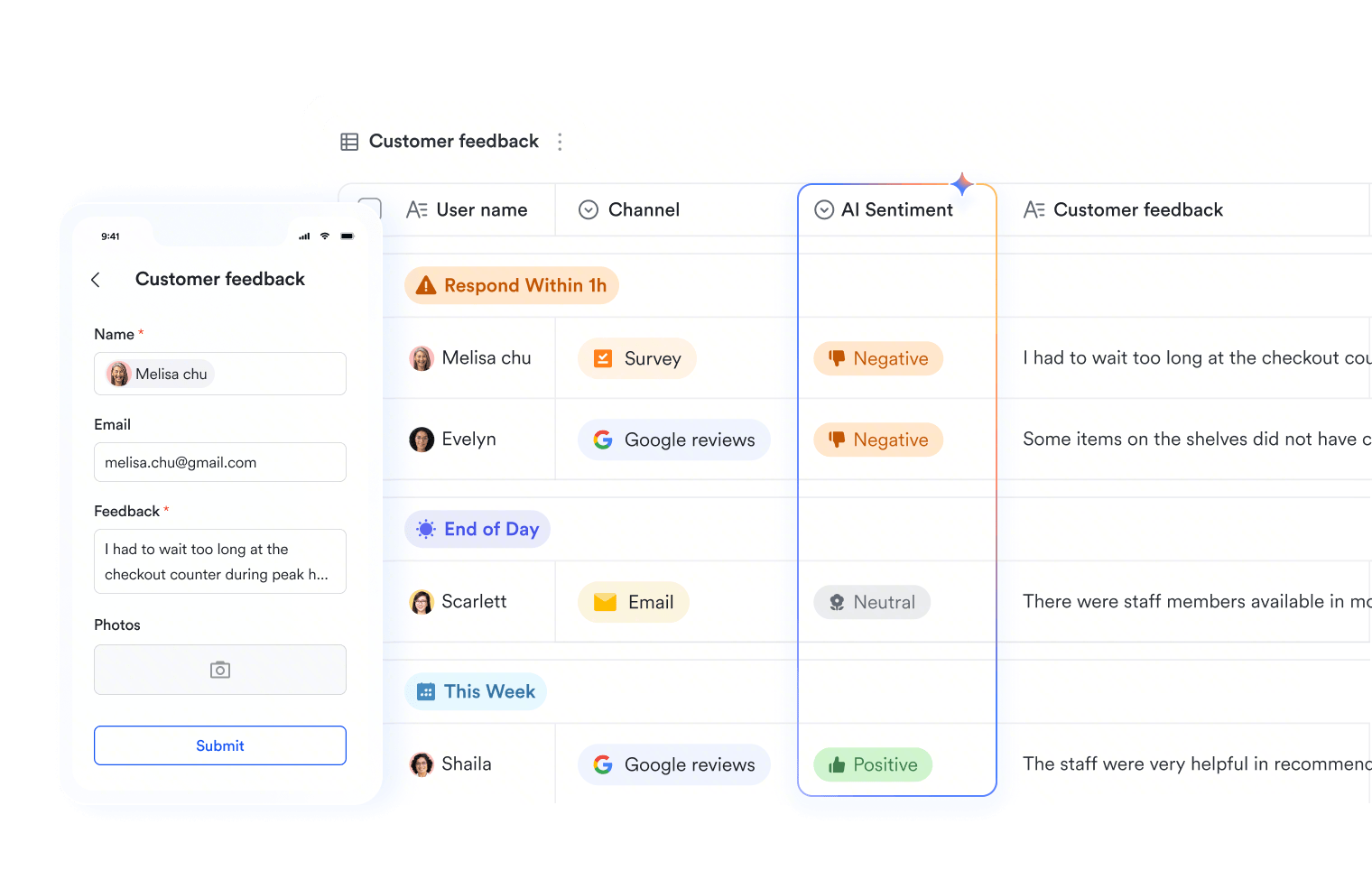
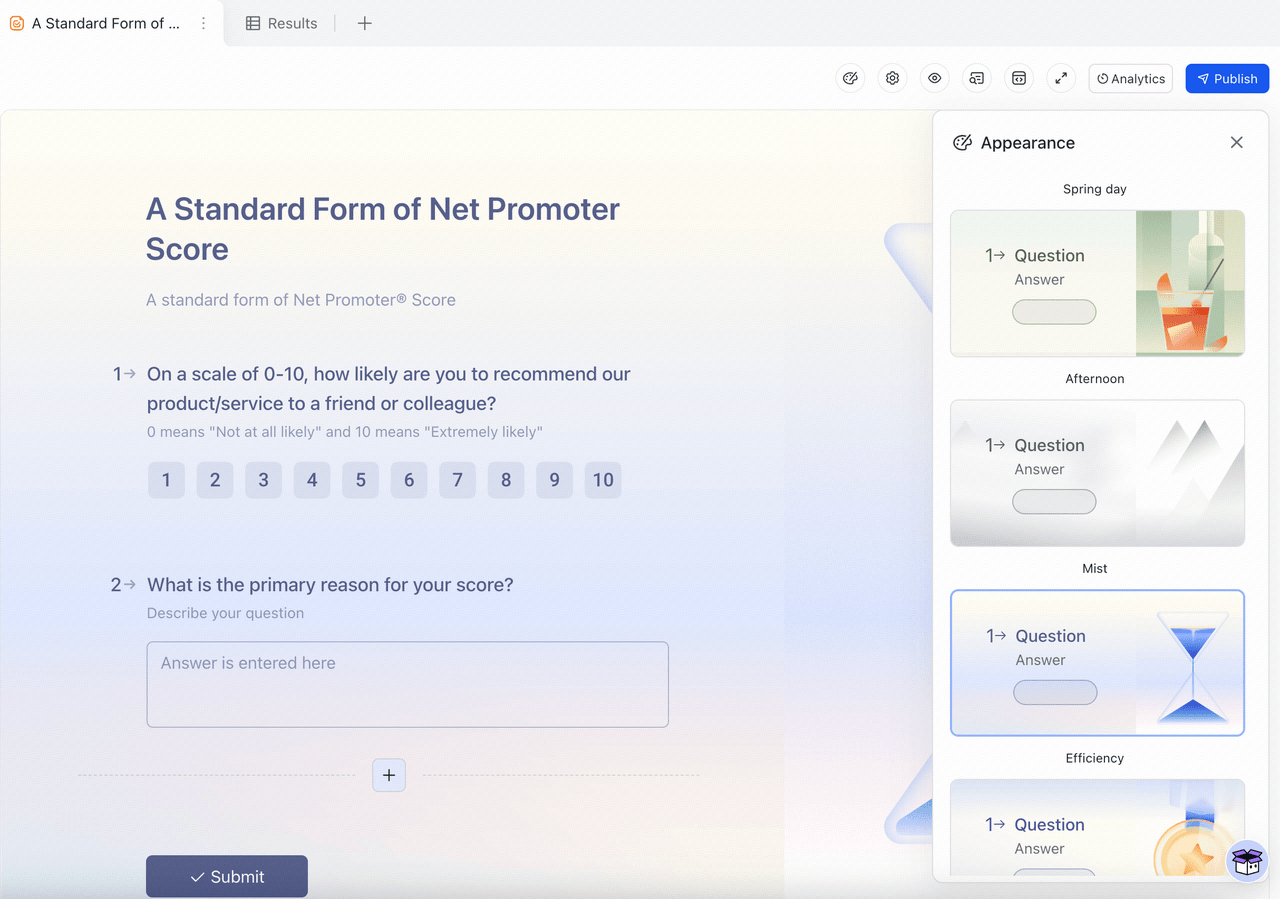
stands out as a powerful Google Forms alternative because it combines advanced form-building with a complete collaboration suite. Unlike Google Forms, which only collects responses, Lark Forms (built on Base) seamlessly integrates with Docs, Sheets, and communication tools—turning forms into part of your workflow rather than isolated data. Teams can create branded forms, automate responses, and sync results across projects without needing third-party tools. Its offline-ready sync makes it more reliable than Google Forms, especially for field surveys or remote teams. For organizations managing HR, fundraising, or customer engagement, Lark brings forms, collaboration, and automation under one roof.
Features: - advanced builder: Built directly on Lark Base, Lark Forms allows teams to design surveys, onboarding forms, and lead capture tools with conditional logic and branching. For example, an HR manager can create an onboarding form where answers trigger different follow-up tasks (like sending training material or creating IT requests). Unlike the basic Google Form maker, responses are automatically stored in structured databases for easy tracking and analysis.
- Connects with , Lark Sheets: Lark goes beyond simple form data capture by linking form submissions with Docs for documentation, Sheets for calculations, and workflow tools for real-time action. Imagine collecting customer feedback through a form: results can instantly appear in a shared Sheet for reporting, while auto-generated Docs keep long-term summaries. This makes Lark more than just a Google survey creator—it’s a full collaboration hub.
- Offline-ready sync for reliability: One of the biggest downsides of Google Forms offline is that it doesn’t work well without internet. Lark solves this with offline-ready sync, allowing field teams, researchers, or remote staff to collect form responses even without stable connections. Data automatically updates once they reconnect, making it a better option for nonprofits running campaigns in low-connectivity regions.
- Lark Base’s Automatic workflows: Lark Base’s Automations feature streamlines form-driven processes, something missing in free Google Forms alternatives. For instance, when a volunteer submits a registration form, Lark can auto-assign them to a manager, send a confirmation message, and add them to a campaign tracker—all without manual effort. This reduces repetitive tasks, helping small teams manage larger projects more effectively.
Use cases: Surveys, HR onboarding, feedback collection, lead forms Lark Forms adapts to multiple nonprofit and business scenarios: HR teams use it for , educators for feedback surveys, and marketing teams for . Because results connect with tasks and dashboards, organizations can turn survey responses into action instantly—something static Google Form alternatives struggle to achieve.
Ideal for: Teams needing an all-in-one platform for forms + collaboration.
Pricing:
- Starter plan: that includes 11 powerful tools for up to 20 users. It also comes with 100GB of storage, 1000 automation runs, AI translations, and more.
- Pro plan: $12/user/month (billed annually) for up to 500 users. It includes everything in Starter plus group calling for up to 500 attendees, 15TB of storage, 50,000 automation runs, and more.
- Enterprise plan: for custom pricing. Supports unlimited users and includes even more automation runs and advanced data security, compliance, and management features.
For small teams with simple communication needs

18 months message history

1000 Base automation runs/month

2000 rows per table in Base
Most POPULAR
For companies with comprehensive collaboration and management needs

Unlimited message history

500-participant video meetings

50k Base automation runs/month

20k rows per table in Base
For large companies with advanced security and organizational management needs
Get a personalized demo and pricing

Unlimited message history

500-participant video meetings

15 TB storage + 30 GB storage/user

500k Base automation runs/month

50k Base automation runs/month
Most POPULAR
For companies with comprehensive collaboration and management needs

Unlimited message history

500-participant video meetings

50k Base automation runs/month

20k rows per table in Base
2. Jotform: Flexible form builder with rich templates and customization
Image source: jotform.com Jotform is one of the most popular Google Forms alternatives, known for its flexibility and drag-and-drop form builder. Unlike the simple Google survey creator, Jotform provides thousands of ready-made templates, advanced design customization, and integration with payment systems. It’s widely used by nonprofits, educators, and businesses to create branded, professional forms without coding. Jotform’s versatility makes it a go-to Google Form maker alternative for teams that need more than just basic data collection.
Key features:
- Drag-and-drop Google Form builder alternative with an intuitive UI
- 10,000+ templates for surveys, registrations, donations, and applications
- Payment collection (PayPal, Stripe, Square, etc.)
- Conditional logic and advanced form fields
- Reports and analytics with real-time updates
Ideal for: Nonprofits, small businesses, and educators needing customizable online forms.
Pricing:
- Paid tiers start from ~$34/month.
3. Typeform: Conversational form tool for engaging surveys
Image source: typeform.com Typeform is a sleek alternative to Google Forms that focuses on conversational, interactive surveys. Rather than showing all questions at once, Typeform presents them one by one, creating a smoother, engaging experience. This approach improves response rates, making it perfect for businesses gathering customer feedback or marketing teams running campaigns. Compared to Google Forms free, Typeform delivers a polished look that’s aligned with modern brand standards.
Key features:
- Conversational interface with one-question-at-a-time design
- Custom branding, images, and videos
- Conditional logic and branching
- Real-time analytics and performance tracking
- Integrations with HubSpot, Zapier, and Mailchimp
Ideal for: Marketers, product managers, and educators wanting engaging surveys.
Pricing:
- paid plans from ~$25/month.
4. Formstack: Enterprise-grade forms with workflow automation
Image source: formstack.com Formstack is a powerful enterprise Google Forms alternative, designed for organizations with complex workflows and compliance needs. It offers HIPAA-ready forms, secure data handling, and end-to-end workflow automation. Unlike Google Forms, Formstack doesn’t just collect data—it connects forms with approvals, payments, and integrations for enterprise productivity. It’s widely used in healthcare, finance, and government sectors.
Key features:
- Enterprise workflow automation and e-signatures
- HIPAA-compliant data collection
- Drag-and-drop form builder with advanced customization
- Payments, approvals, and routing rules
- Analytics dashboards for performance insights
Ideal for: Enterprises, healthcare providers, and regulated industries.
Pricing:
- Paid plans start around $59/month.
5. Microsoft Forms: Simple form builder for Microsoft ecosystem users
Image source: microsoft.com Microsoft Forms is a lightweight Google Forms alternative free tool built into Office 365. It provides similar basic survey and quiz functionality but integrates directly with Microsoft Excel, Teams, and OneDrive. For organizations already invested in the Microsoft ecosystem, it’s a natural choice. While it doesn’t match the advanced features of Jotform or Typeform, it’s a practical tool for internal forms and quizzes.
Key features:
- Simple survey and quiz builder
- Direct integration with Excel and Microsoft Teams
- Auto-grading for quizzes and assessments
- Collaboration features for multiple editors
- Cloud storage with OneDrive
Ideal for: Schools, companies, and teams using Microsoft 365.
Pricing:
- Free with Microsoft 365 subscription.
6. Fillout: Intuitive form builder with powerful logic and flexible design
Image source: fillout.com
is a Google Forms alternative that goes beyond making forms. It lets users collect e-signatures, payments, calendar bookings, file uploads, and more. Built-in workflows and integrations with automation tools like Zapier, Make, and Relay help teams streamline processes. Its powerful logic improves response rates, and the flexible design tools allow forms to fully match your brand.
Key features:
- Drag-and-drop form builder interface
- Advanced form designer for professional branded forms
- Intuitive conditional logic with calculations
- Integrations with work tools like Google Sheets, Google Drive, HubSpot, Airtable, and more
- Built-in features for payment collection, direct calendar bookings, document signing, PDF generation, and more
Ideal for: Businesses needing custom-branded, multi-feature forms
Pricing:
- Paid plan starts at $15 per month
7. Zoho Forms: Budget-friendly SaaS form builder with automation
Image source: zoho.com Zoho Forms is part of the Zoho ecosystem, making it a strong Google Form alternative free option for budget-conscious teams. It offers more customization, automation, and workflow integration compared to forms.Google. Nonprofits and small businesses often use Zoho Forms for data collection, feedback, and approvals, especially when paired with Zoho or other apps.
Key features:
- Drag-and-drop builder with conditional logic
- Workflow automation for approvals and notifications
- Mobile-ready forms with offline mode
- Integration with Zoho CRM and Zoho Desk
- Analytics and reporting dashboards
Ideal for: Nonprofits and small businesses using Zoho ecosystem.
Pricing:
- Starts at ~$10/user/month
8. SurveyMonkey: Market research and advanced survey analytics
Image source: surveymonkey.com SurveyMonkey is one of the most recognized Google survey creator alternatives, especially for teams exploring for market research and detailed analytics. While Google Forms free handles simple data collection, SurveyMonkey enables advanced survey logic, benchmarks, and professional insights. It’s widely used by enterprises, academic institutions, and NGOs that need to gather large-scale, reliable data.
Key features:
- Advanced survey logic and branching
- Extensive template library for research and polls
- Benchmarking tools for comparing responses
- Real-time analytics and exports
- Enterprise-grade compliance and data security
Ideal for: Market research, large organizations, and NGOs.
Pricing:
- Paid plans start at ~$25/month;
- Enterprise plans higher.
9. Cognito Forms: Affordable, logic-heavy form builder
Image source: cognito.com Cognito Forms is an affordable yet powerful alternative to Google Forms, known for its heavy use of conditional logic and advanced features. It supports calculations, payments, and dynamic data handling, making it suitable for nonprofits or small businesses managing more than just simple surveys. Compared to Google Forms cost (free), Cognito adds significant functionality at a reasonable price.
Key features:
- Conditional logic and advanced calculations
- Secure payment collection
- File uploads and digital signatures
- Workflow automation and notifications
- Data export and analytics
Ideal for: Budget-conscious nonprofits and SMEs needing advanced forms.
Pricing:
10. Wufoo: Long-standing, simple form builder for basic needs
Image source: wufoo.com Wufoo, developed by SurveyMonkey, is a long-standing Google Forms alternative known for simplicity. It uses a drag-and-drop interface with templates, making it suitable for quick forms like event registrations or contact pages. Though it lacks the advanced features of Typeform or Lark, it remains a reliable Google Form alternative free for basic use.
Key features:
- Drag-and-drop form builder
- Pre-designed templates for quick setup
- File uploads and custom branding
- Integration with apps like Mailchimp and Salesforce
Ideal for: Users needing a simple, no-frills form builder.
Pricing:
- paid plans from ~$14/month.
11. Paperform: Form and landing page hybrid tool
Image source: paperform.com Paperform is a modern Google Forms maker alternative that combines forms with landing page design. Instead of just asking questions, it lets users create interactive forms with embedded content, making them look like polished web pages. This makes it ideal for businesses, creatives, and nonprofits who want visually appealing experiences.
Key features:
- Form + landing page hybrid design
- Payments, subscriptions, and bookings
- Conditional logic and automation
- Templates for marketing and sales
- Analytics and reporting tools
Ideal for: Creatives, marketers, and online businesses.
Pricing:
- Paid plans start at ~$24/month.
12. Airtable Forms: Database-driven form inputs for structured workflows
Image source: airtable.com Airtable Forms turns data submissions into structured databases, making it a smart alternative to Google Forms for project management and collaboration. Each form feeds directly into an Airtable base, which can then be viewed in grids, calendars, or Kanban boards. This structured approach goes far beyond what forms Google offers.
Key features:
- Form submissions directly linked to databases
- Multiple views: grid, calendar, Kanban, gallery
- Automation with Airtable’s workflows
- File attachments and linked records
Ideal for: Teams needing structured data collection + workflows.
Pricing:
- Paid plans start at ~$12/user/month.
13. PandaDoc Forms: Forms integrated with documents and e-signatures
Image source: pandadoc.com PandaDoc specializes in document workflows, and its form builder is designed for contracts, agreements, and approvals. As a Google Forms alternative free for trials, it combines e-signatures with form fields, making it ideal for businesses requiring legal documents. Unlike Google Form builder, PandaDoc ensures data is tied directly to contracts.
Key features:
- Integrated e-signatures with form submissions
- Secure contract and document workflows
- Payments and invoicing options
- Templates for agreements, proposals, HR docs
- Compliance and audit trails
Ideal for: Businesses handling contracts, HR, and approvals.
Pricing:
- Starts at ~$19/user/month.
14. Alchemer (SurveyGizmo): Advanced enterprise survey platform
Image source: alchemer.com Alchemer, formerly SurveyGizmo, is an advanced enterprise Google Forms alternative focused on detailed analytics and survey customization. It allows organizations to design research-grade forms with flexible logic, branding, and integrations. Unlike Google Forms free, Alchemer caters to large businesses with dedicated insights needs.
Key features:
- Advanced survey logic and branching
- Multi-channel distribution (email, web, social)
- Enterprise analytics and dashboards
- Secure data handling with compliance tools
- API and third-party integrations
Ideal for: Enterprises, academic research, government organizations.
Pricing:
- Paid plans from ~$49/month.
15. Qualtrics: Research-grade survey and feedback platform
Image source: qualtrics.com Qualtrics is one of the most advanced alternatives to Google Forms, widely used for research, customer feedback, and employee engagement. It offers deep analytics and AI-powered insights, making it far more powerful than forms.Google. Large universities and enterprises often use it for official surveys and studies.
Key features:
- Research-grade surveys with advanced logic
- AI-powered data analysis
- Enterprise security and compliance
- Employee and customer experience management
- Robust integration ecosystem
Ideal for: Enterprises, universities, and research teams.
Pricing:
- Custom pricing; typically enterprise-level costs.
16. HubSpot Form Builder: CRM-connected forms for inbound marketing
Image source: hubspot.com HubSpot Form Builder is a Google Forms hubspot integration alternative, offering forms directly connected to HubSpot CRM. It helps businesses capture leads and automatically nurture them through marketing campaigns. Unlike Google Forms cost (free but basic), HubSpot ties form submissions into a full inbound marketing funnel.
Key features:
- CRM-connected forms with automatic lead capture
- Integration with email marketing and workflows
- Custom branding and embedding on websites
- Advanced analytics and tracking
- Nonprofit discounts available
Ideal for: Marketers, nonprofits, and businesses needing CRM-connected forms.
Pricing:
- advanced features via paid hubs starting ~$45/month.
Discover why Lark is better than google forms
Use cases where Google Forms alternatives work better
While Google Forms is a reliable starter tool, there are many scenarios where a Google Forms alternative provides greater value. Tools like Lark, Typeform, Jotform, and Formstack go beyond basic surveys, offering conditional logic, automation, and better collaboration features. Here’s how alternatives outperform Google Forms in common use cases:
Business surveys and customer feedback
For customer-facing forms, branding and advanced features are critical. Alternatives like Lark Forms, Typeform, and Jotform allow custom logos, conditional logic, and automation that elevate feedback collection. For example, a retail brand using Lark can automatically route negative feedback into a dashboard for review while sending positive reviews directly to marketing. Google Forms, by contrast, only captures data without . Event registrations and sign-ups
Managing event registrations requires more than collecting names and emails. Tools such as Lark Forms or Formstack handle payments, approvals, and even sync with calendars. A nonprofit hosting a fundraising gala can use Lark to capture RSVPs, generate follow-up tasks for staff, and store attendee data in Lark Sheets—all from one workspace. Google Forms is limited to simple response collection. Internal workflows and approvals
This is where Lark Forms stands out. Form submissions can connect directly with Docs, Sheets, and workflow tools, making it ideal for HR, IT, and project teams. For instance, an employee submitting a hardware request through a Lark form can trigger an approval workflow, update an asset tracker in Sheets, and notify IT instantly. Google Forms lacks this workflow capability, leaving teams reliant on manual updates.
Educational forms and quizzes
Google Forms is widely used in schools for quizzes, but it has limited grading features. Tools like Microsoft Forms and Zoho Forms offer auto-grading, advanced reporting, and student dashboards. can also be adapted for education—teachers can collect assignments through forms, automatically log submissions in a shared Sheet, and create follow-up tasks for grading, turning simple quizzes into structured learning workflows.
Transform your forms and surveys
Conclusion
Google Forms remains a widely used tool thanks to its simplicity and free access, but its limitations quickly surface when teams need more advanced capabilities. From restricted customization to weak offline support, it often falls short for professional use cases. That’s why many organizations are turning to a Google Forms alternative like Lark, Jotform, or Typeform. Among these, Lark stands out by combining advanced form building with collaboration tools, automation, and offline-ready functionality. It transforms forms from simple data collection into actionable workflows, making it especially powerful for businesses, nonprofits, and schools. If you’re ready to go beyond the basics of Google Forms, choosing a smarter alternative ensures efficiency, professionalism, and long-term scalability.
Go beyond google forms by starting Lark today
FAQs
Is Google Forms free?
Yes, Google Forms is completely free to use, which is why it’s so popular among schools, nonprofits, and small teams. However, its free nature comes with limitations—such as basic design, lack of branding, and no automation. For organizations needing more advanced features without heavy costs, a free Google Forms alternative like Lark offers both forms and collaboration tools in one platform.
Can you use Google Forms offline?
Not effectively. Google Forms requires a stable internet connection to create and collect responses, making it difficult to use in the field or in areas with poor connectivity. By contrast, offline-ready Google Form alternatives like Lark Forms allow data to be captured offline and synced automatically once you’re back online, making them better suited for fieldwork and remote teams.
Which is better: Jotform vs Google Forms?
The main difference between Google Forms vs Jotform is in design and flexibility. Jotform provides thousands of templates, customization options, and integrations that make forms look professional. But if you want more than form-building—like collaboration, workflows, and automation—Lark is the stronger all-in-one option, connecting forms with documents, tasks, and real-time communication.
Which is better: Google Forms vs Typeform?
Google Forms wins on simplicity, while Typeform vs Google Forms highlights engagement. Typeform offers a conversational, one-question-at-a-time format that feels interactive and engaging. However, Lark goes further by turning form responses into actionable workflows—making it more collaborative and practical for teams that need results, not just responses.
What are the pros and cons of Google Forms?
The pros of Google Forms include being free, simple to use, and directly linked with Google Sheets. But the cons are significant: limited customization, weak offline support, and no built-in automation. That’s why many teams switch to Google Forms alternatives like Lark, which combine advanced logic, branding, automation, and real-time workflows for a complete solution.
Related reading