Managing tasks and projects can often feel like juggling too many responsibilities, with traditional methods frequently falling short on clarity and real-time collaboration. If you're seeking more transparent workflows and enhanced team productivity, the kanban method offers a compelling solution. This article dives into the power of a kanboard online to visualize work, limit distractions, and boost efficiency. We'll explore its fundamental principles and guide you through choosing the right kanban board tool, including excellent kanban board free online options for both individual and team use.
What is an online Kanban board?
When we talk about , it's easy to picture a simple board with sticky notes. While that's the visual essence, the kanban method is a sophisticated system built on a few core principles designed to improve flow and deliver value continuously. Originating from Toyota's "just-in-time" production system in the 1940s, kanban has been widely adopted in software development through Agile methodology and is now a ubiquitous tool for any team looking to optimize its workflow. At its heart, kanban asks us to:
- Visualize work: Make all work visible, from start to finish. This usually involves a board divided into columns, representing different stages of a workflow, with individual tasks (cards) moving through them. For example, a common setup might be "To Do," "Doing," and "Done."
- Limit work-in-progress (WIP): This is a crucial principle often overlooked. By setting a maximum number of tasks allowed in any single "Doing" column, teams are forced to focus on completing current tasks before starting new ones. This reduces multitasking, prevents bottlenecks, and helps identify issues earlier.
- Manage flow: Once work is visualized and WIP is limited, the focus shifts to optimizing the flow of tasks through the system. The goal is to move items from "To Do" to "Done" as smoothly and quickly as possible. This constant monitoring helps identify and address inefficiencies.
While a physical whiteboard with sticky notes can certainly serve as a simple kanban board , the advent of digital tools has transformed its capabilities. An online kanban board takes these core principles and supercharges them with features like real-time updates, remote accessibility, and integration with other . This digital evolution is particularly vital for today's remote and hybrid teams, where a shared physical board is no longer practical. It allows for seamless collaboration and ensures everyone is literally on the same page, no matter where they are.
Why choose an online Kanban board?
Moving from physical to online kanban boards offers far more than convenience—it delivers powerful benefits to boost productivity, streamline workflows, and strengthen team collaboration. From my cross-industry project management experience, a well-deployed online kanban board is a true productivity game-changer.
- Enhanced visibility and transparency: It provides a clear, single-screen view of all tasks, their statuses, owners, and next steps. This transparency eliminates guesswork, keeps the team aligned on project health, and highlights bottlenecks (like a stalled "In Review" card) to drive proactive problem-solving.
- Improved : Acting as a single source of truth, it lets team members access, update, and comment on tasks in real time—cutting down on repetitive status meetings. Members can assign work, set deadlines, attach files, and chat within task cards, fostering accountability and alignment across in-office or remote teams.
- Flexibility and accessibility: Accessible from any internet-connected device, it's ideal for remote/hybrid teams: managers check progress from home, teammates update tasks via mobile, and clients can view deliverables with limited access. Its drag-and-drop interface also makes it easy to adapt to workflows like marketing, content creation, or customer support.
- Data-driven insights: Advanced tools offer analytics to , cycle time, and throughput. These metrics help spot inefficiencies (like backlogs in "Testing"), predict project timelines, and drive continuous process improvements.
Experience these benefits now
Getting started with an online Kanban board: A practical walkthrough
The idea of setting up a new system can sometimes feel a bit... overwhelming, right? But adopting an online kanban board doesn't actually have to be daunting. Even if you're completely new to the concept, many kanban board free online tools now offer remarkably intuitive interfaces that make getting started surprisingly straightforward. I've personally seen how a few simple steps can transform chaotic task lists into a clearly navigable workflow. Let's walk through a practical scenario together, vividly illustrating how you can set up a basic kanban board, whether it's primarily for your personal use or for a small, budding team project.
Mini-scenario: Orchestrating a comprehensive marketing campaign
Imagine you're launching a new product and need to manage an entire – from content creation to social media outreach and ad deployment. This complex endeavor is often an absolutely perfect candidate for a simple kanban board to meticulously track every single moving part from conception to completion.
Your initial tool selection
Your initial, crucial decision will be choosing your kanban board tool. Many excellent kanban board free online options exist, or you might opt for the free tier of a more comprehensive solution. For instance, a platform like , with its powerfully adaptable feature, can be cleverly configured to mimic a robust kanban board. It offers extensive functionality, allowing teams to seamlessly unify visual task management with communication and documentation. This step isn't about finding the perfect tool instantly, but rather one that feels comfortable and accessible for your initial foray.
Thoughtfully defining your workflow columns
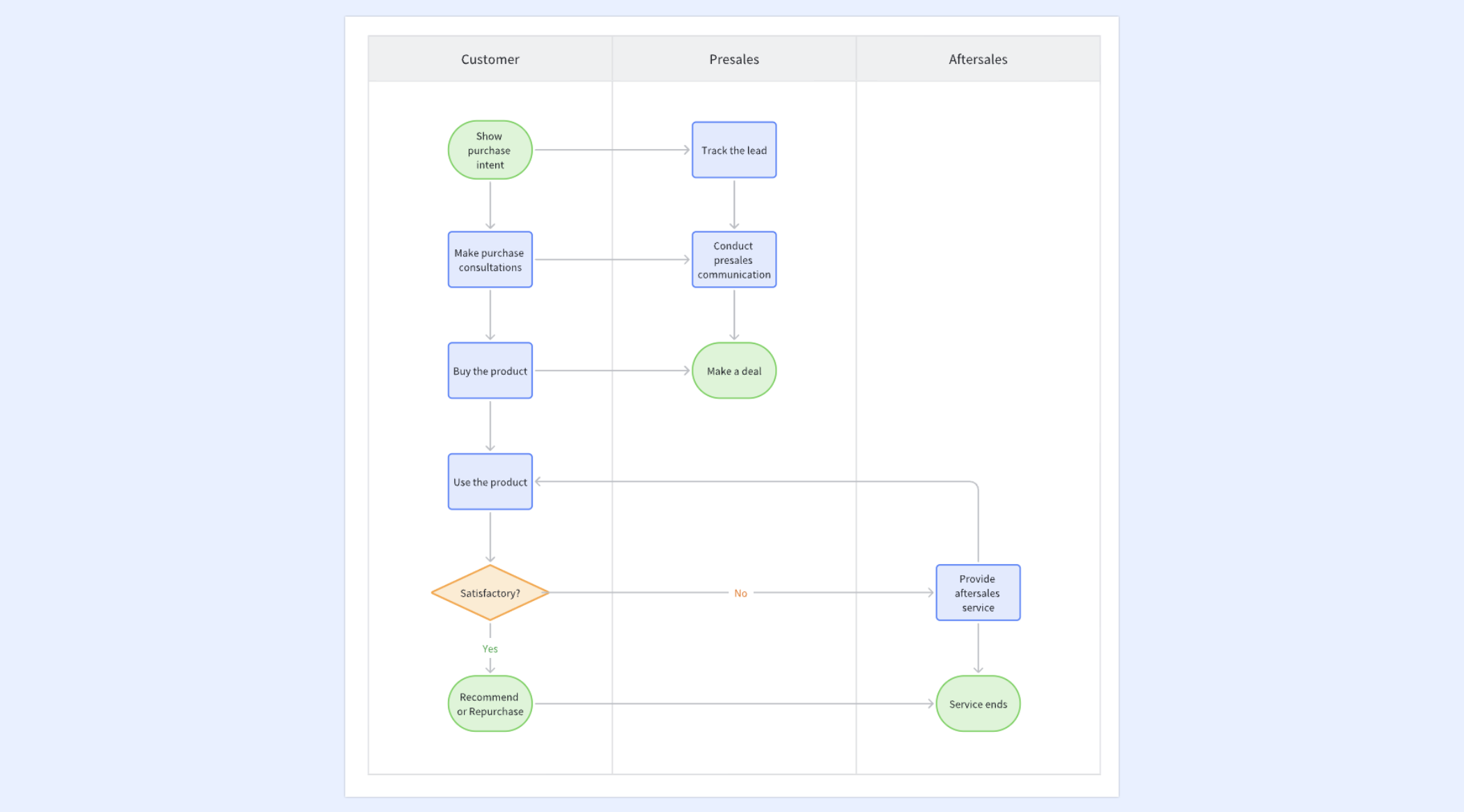
Next, you'll thoughtfully map out the distinct stages of your marketing campaign as "columns" on your board. For this particular scenario, you might meticulously define a path like this:
- Campaign brainstorming: A dedicated space for all initial ideas and concepts.
- Content creation: Where blog posts, ad copy, and social media visuals are actively being drafted.
- Review & approval: Tasks awaiting feedback from stakeholders or legal.
- Scheduling & publishing: Ready-to-go content awaiting its scheduled release.
- Promotion & distribution: Tasks related to sharing published content across various channels.
- Completed: The satisfying final destination for all finished campaign elements.
Crucially, begin quite simply. You can always gradually add more granular columns or horizontal "swimlanes" (for specific product lines or target audiences) as your workflow evolves and demands. Each column should intuitively represent a clear, distinct stage of work.
Meticulously crafting your task cards
With your columns thoughtfully arranged, you'll then meticulously craft individual "cards" for each within your campaign. Each card should instantly convey essential information:
- Title: A clear, concise identifier (e.g., "Draft Blog Post: 'New Product Features'").
- Description: A brief yet comprehensive overview of the task's objectives and key requirements.
- Assignee: Clearly indicate who is primarily responsible for completing this specific piece of work.
- Due date: A precise deadline to ensure timely progress.
- Attachments: Conveniently link to relevant research, design briefs, or content outlines.
- Comments: A dynamic space for ongoing discussions and feedback directly related to this card.
Most online kanban tools easily allow you to customize these fields, adding helpful checklists, color-coded labels, or priority tags, which can be immensely valuable for quick visual cues.
Dynamically managing the flow
Now, for the truly satisfying part: watching your work gracefully progress across your board!
- As you definitively decide to move forward with a campaign idea, you'll effortlessly drag its card from "Campaign Brainstorming" to "Content Creation."
- When the actual drafting begins, you intuitively slide it over to "Review & Approval."
- Once feedback is incorporated, it moves to "Scheduling & Publishing," and finally, post-launch, it proudly lands in "Promotion & Distribution," before ultimately reaching "Completed."
This engaging visual progression instantly shows you and your team the precise status of every single campaign element. If you judiciously apply "limit WIP" rules (e.g., allowing only three pieces of content in "Content Creation" at any given time), it proactively encourages focused completion before pulling in new tasks, thereby preventing burnout and significantly improving overall campaign throughput. This simple, visual mechanism makes managing even incredibly complex marketing pipelines surprisingly efficient.
Start your kanban journey with Lark now
Choosing your online Kanban board: What to look for
With countless kanban board tools available today, deciding on the best kanboard online can feel like a significant decision. To make a truly informed choice, it's helpful to evaluate potential options against a few key criteria, aligning them with your specific needs, whether you're searching for a robust kanban board free online solution or considering a premium investment.
- Prioritize core kanban functionality and an intuitive user experience. Your chosen kanban board tool should offer a fluid drag-and-drop interface, making it effortless to create cards, move them between columns, and update their status. Look for robust card customization options, allowing you to easily add details like assignees and due dates, alongside the crucial ability to set Work-in-Progress (WIP) limits.
- Consider the collaboration and communication features, especially if you're working with a team. An effective online for collaborative environments must facilitate team interaction. Essential features include real-time notifications for updates, clear user permissions, and integrated commenting directly on task cards, ensuring all relevant communication remains in context.
- Evaluate the tool's scalability and advanced capabilities. While a simple kanban board might suffice initially, consider if the tool can effectively grow with your projects or team. Look for multiple board support, and advanced options like reporting, analytics, or automation rules that can streamline repetitive actions and significantly boost productivity.
- Assess the cost-effectiveness and available free options. Many providers offer a kanban board free online version, an excellent starting point for personal use or smaller teams. Carefully compare what's included in free tiers versus paid subscriptions, considering limitations. An integrated platform offering kanban functionality within a broader suite might provide superior long-term value by consolidating multiple tool subscriptions.
Lark: A flexible online Kanban platform built around your workflow
A great online kanban board should do more than just display tasks—it should adapt to how your team actually works. Lark takes kanban beyond simple cards and columns by integrating it with structured data, intelligent automation, and real-time collaboration. Here's how transforms the online kanban experience.
Build a fully customizable Kanban view that matches your workflow
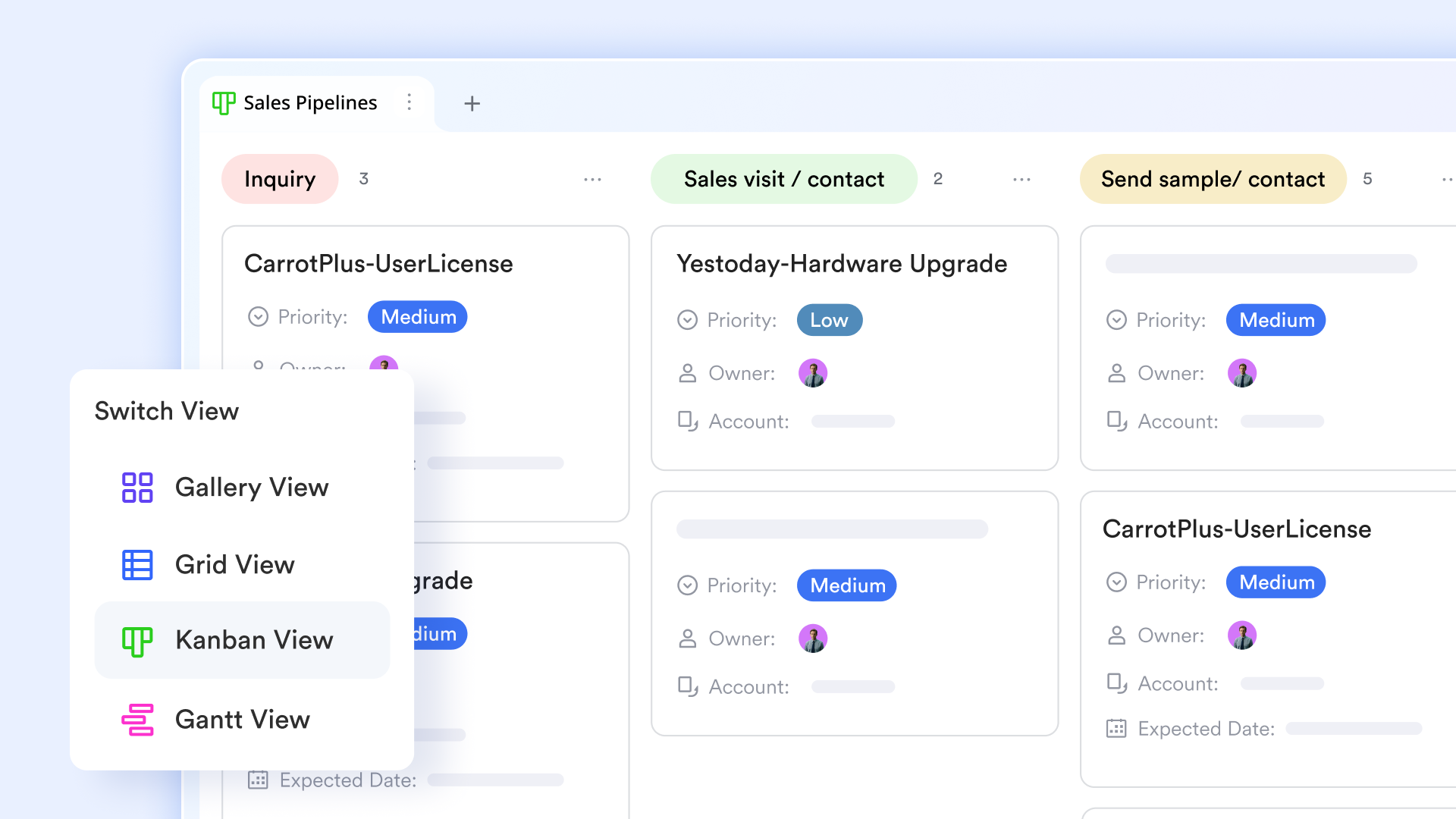
Every team works differently. Generic kanban templates often don't fit your specific process. lets you build kanban views tailored to your own workflow. You can customize columns to represent each stage of your process—like "To Do," "In Progress," "Review," and "Done." Each card can contain detailed task information, including assignees, due dates, attachments, and even links to related records.
You can also use filters and grouping to instantly spot bottlenecks or overdue items. When priorities shift, simply drag tasks to new columns. All updates sync in real time, keeping the whole team aligned without interrupting their workflow.
Focus on your own responsibilities with personal task Kanban
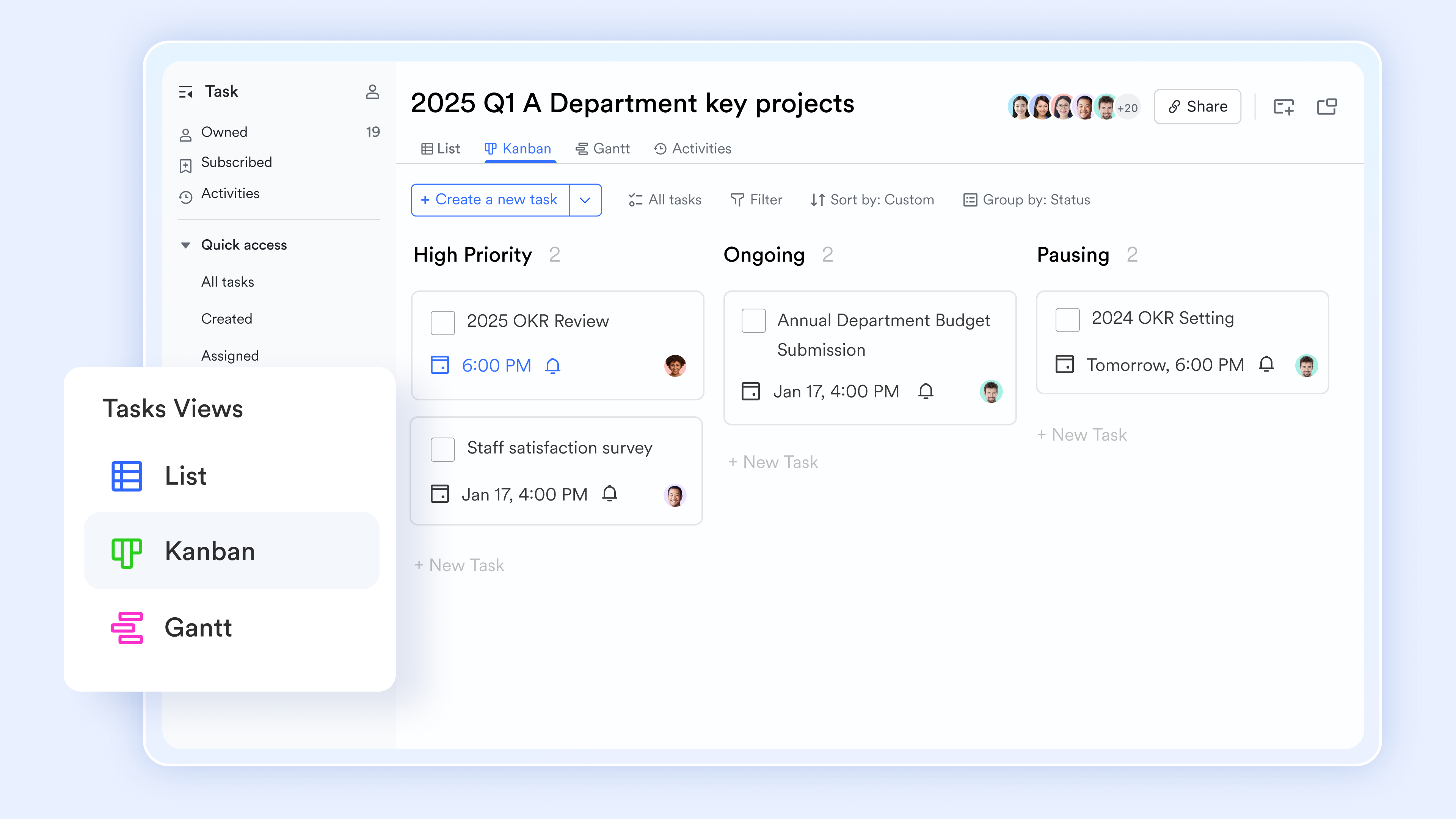
Team kanban boards give you a clear view of project progress, but individuals need to quickly focus on their own tasks. Lark Tasks offers a built-in task kanban view that lets you organize work your way. In the task center, you can switch tasks assigned to you or specific task lists into kanban mode. Tasks can be grouped into columns by different fields—custom groups, due dates, creators, or task sources. You can also use filters to quickly focus on tasks due today or view all to-dos for a specific project. Check the box next to a task to mark it complete, and it automatically moves to your completed list.
Get a big-picture view with visual dashboards
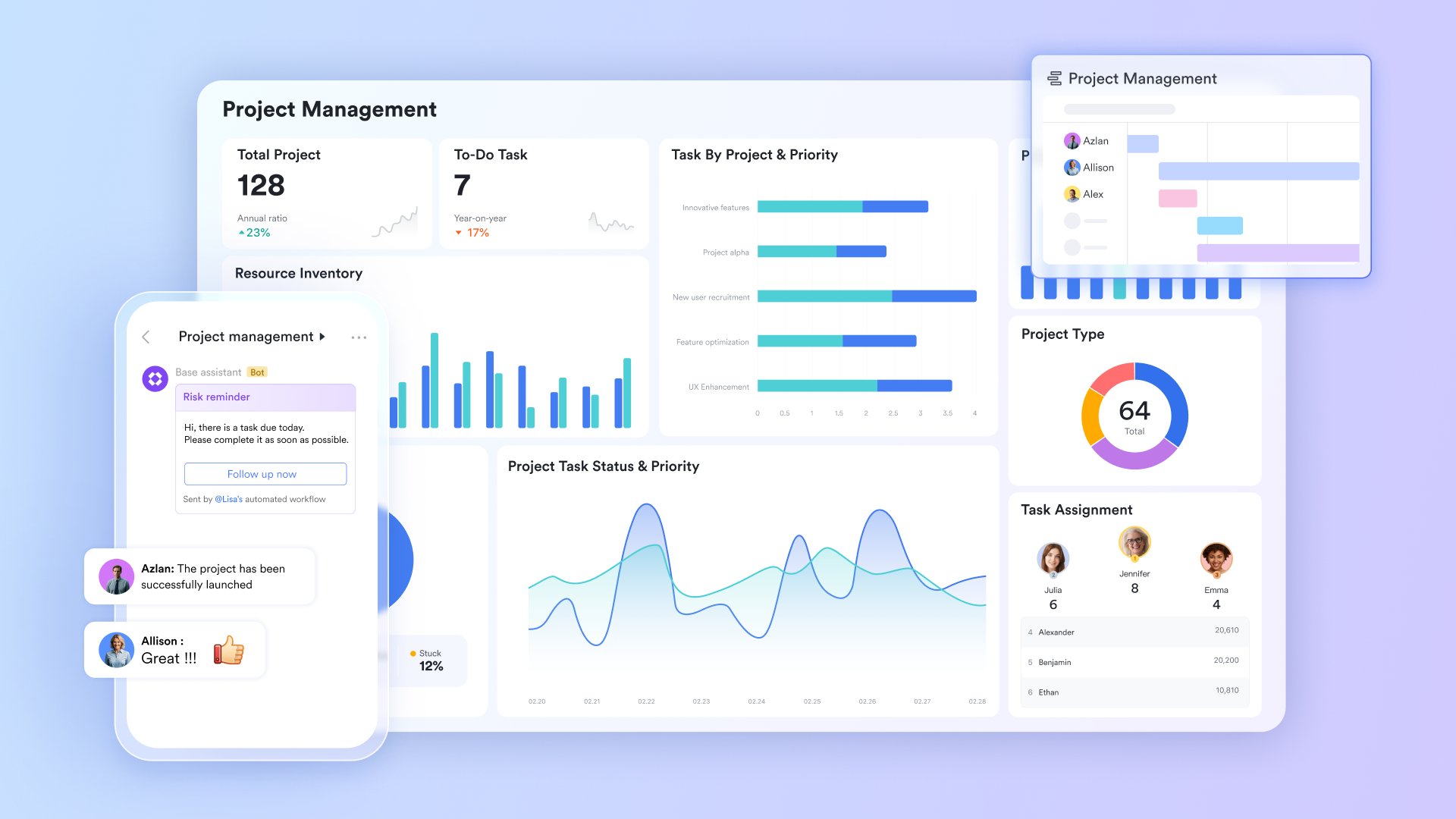
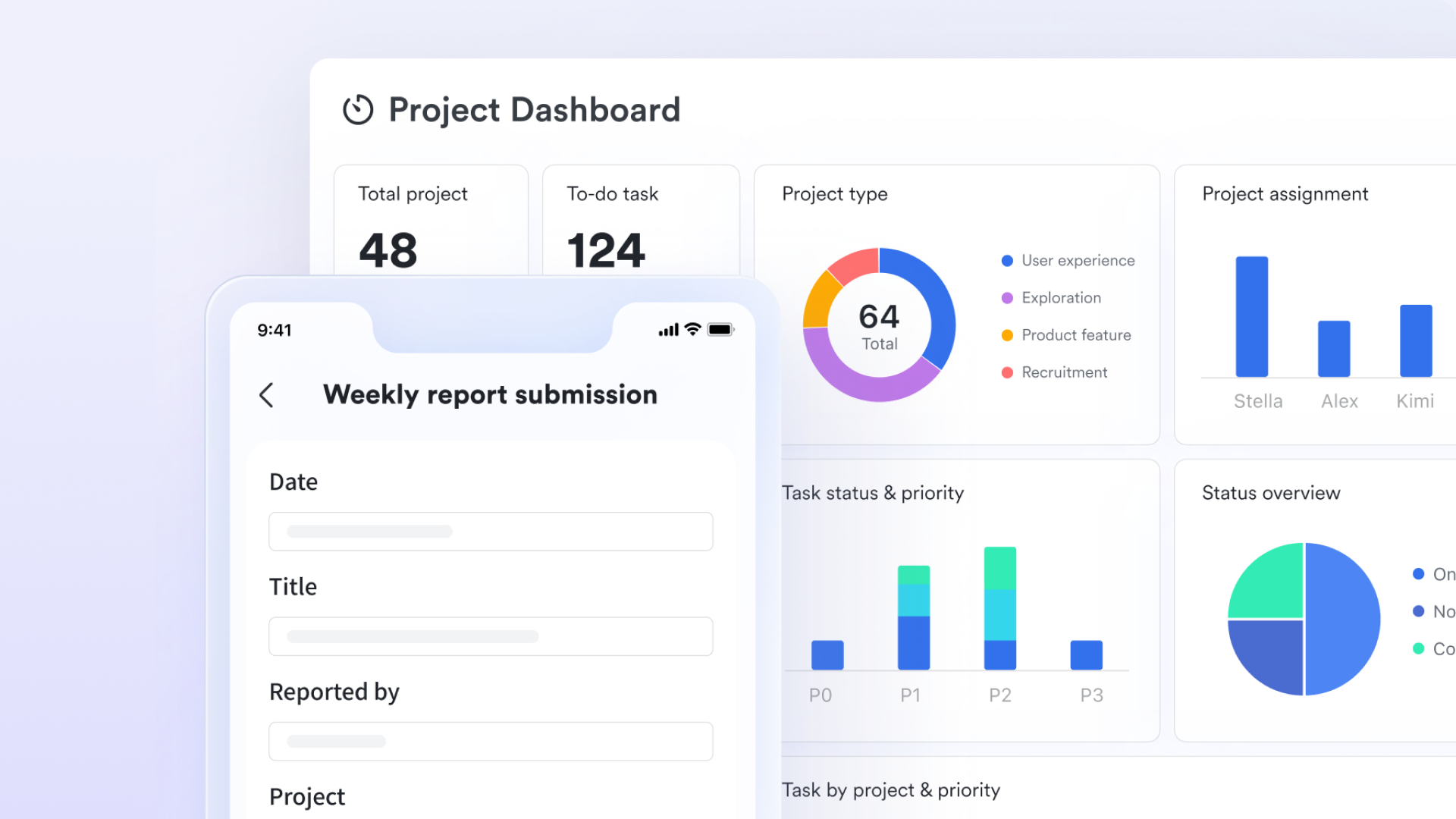
Kanban boards show you where tasks are in your workflow, but team leaders need a higher-level perspective—like overall progress and where bottlenecks are. Lark Base's dashboard makes this data clear at a glance. You can create visual charts based on the data behind your kanban with one click: use a funnel chart to show task distribution across stages, a bar chart to compare task completion, and a line chart to track progress trends. You can also embed kanban view blocks directly in your dashboard, bringing task lists into the same view so all information stays together. Dashboards update automatically as your team moves cards on the kanban, so your stats are always current.
Let automation turn your Kanban into a workflow engine
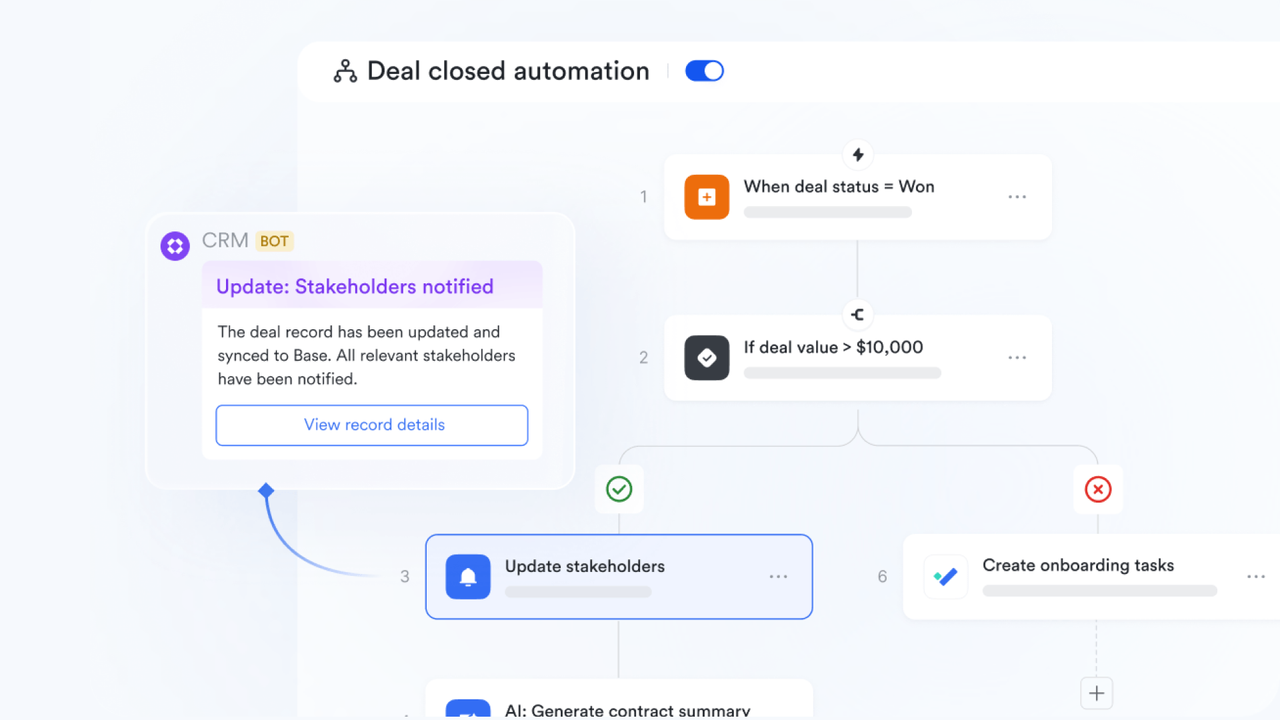
Traditional kanban boards require manual status updates and reminders. These repetitive tasks take time and energy. Lark Base's automation makes your kanban smarter. You can set up rules: when a card is dragged to the "Ready for Testing" column, automatically notify the test lead. These automations eliminate delays and missed steps. Your kanban becomes an engine that drives work forward, not a static board you have to maintain manually.
Turn chat discussions into Kanban cards instantly
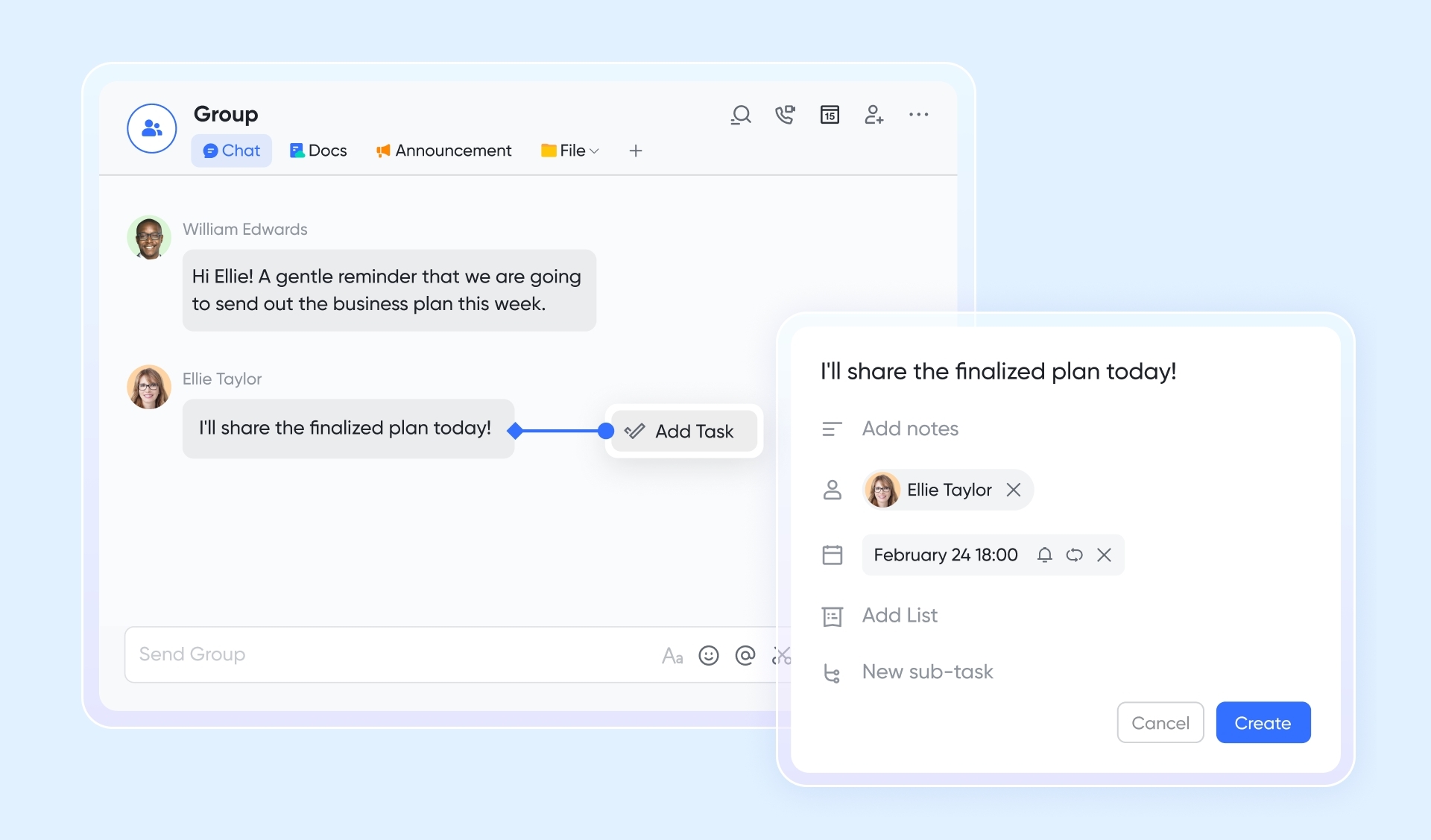
One of the biggest risks with kanban is that tasks get discussed but never created as cards. lets you convert any message into a task with one click, and it appears in your kanban automatically.
When your team discusses a new requirement in a group chat, simply turn that message into a task—assign an owner, set a due date, add details. The task appears automatically in your Lark Tasks kanban and can be linked to your . All discussions, files, and decisions tied to the task stay in one place, ensuring every conversation turns into trackable action instead of getting buried in chat history.
for Lark:
- Starter plan: Free forever plan that includes 11 powerful tools for up to 20 users. It also comes with 100GB of storage, 1000 automation runs, AI translations, and more.
- Pro plan: $12/user/month (billed annually) for up to 500 users. It includes everything in Starter plus group calling for up to 500 attendees, 15TB of storage, 50,000 automation runs, and more.
- Enterprise plan: for custom pricing. Supports unlimited users and includes even more automation runs and advanced security, compliance, and management features.
For small teams with simple communication needs

18 months message history
1000 Base automation runs/month
2000 rows per table in Base
Most POPULAR
For companies with comprehensive collaboration and management needs
Unlimited message history
500-participant video meetings
50k Base automation runs/month
20k rows per table in Base
For large companies with advanced security and organizational management needs
Get a personalized demo and pricing
Unlimited message history
500-participant video meetings
15 TB storage + 30 GB storage/user
500k Base automation runs/month
50k Base automation runs/month
Most POPULAR
For companies with comprehensive collaboration and management needs
Unlimited message history
500-participant video meetings
50k Base automation runs/month
20k rows per table in Base
Common Kanban board templates to get you started
One of the great advantages of `online kanban board` tools, especially those that offer flexible database capabilities like Lark Base, is the ability to quickly adapt existing templates to your specific needs. Instead of starting from scratch, you can leverage pre-designed boards to accelerate your setup process. These templates often embody best practices for various use cases, making it easier to immediately benefit from visual task management.
Kanban board template
It typically provides a fundamental structure for visualizing any project workflow. It's often set up with classic columns like "To Do," "In Progress," and "Done," allowing teams or individuals to swiftly track the progression of tasks. This type of template is perfect for those new to kanban or for managing straightforward projects where the primary goal is clear task flow and visibility.
Priorities Kanban template
When priorities are key, the following template becomes incredibly valuable. This template goes beyond simple task movement by incorporating mechanisms to highlight urgent or important tasks, ensuring that the most critical work receives immediate attention. It might use additional labels, dedicated priority columns, or a swimlane structure to differentiate tasks, helping teams maintain focus on high-impact activities and manage their workload strategically.
Objective management PDCA Kanban template
For structured goal attainment and continuous improvement, this template integrates the Plan-Do-Check-Act (PDCA) cycle directly into the kanban workflow. This template helps teams systematically define objectives, execute plans, monitor progress against targets, and then iterate based on learnings. It's an excellent choice for agile teams or anyone focused on iterative development and ensuring their project work consistently aligns with broader goals and continuous improvement initiatives.
Conclusion
The path from scattered, overwhelming tasks to streamlined project success starts with visualizing your work—and an online kanban board delivers that critical clarity. It turns unmanageable to-do lists into structured, actionable workflows, catering to both individuals managing personal tasks and teams aiming for smooth, coordinated collaboration. By adopting kanban principles via a dedicated tool, you can completely transform your approach to project management.
While free basic kanban tools work for beginners, growing teams gain far more value from unified platforms that merge kanban-style tracking with built-in communication and document tools. The best online kanban solution is the one that aligns with your unique needs, boosts daily efficiency, and cuts down on workflow friction. All-in-one platforms like exemplify how a consolidated digital workspace elevates kanban processes, driving greater productivity for your entire team.
Transform your online Kanban usage today
FAQs
Is Kanban board free?
Many online kanban board tools offer free versions or trial periods, especially for personal use or smaller teams. These often provide core kanban functionalities, allowing you to create a simple kanban board without cost. However, more advanced features, increased user limits, or deeper integrations typically come with paid subscription plans.
What are the six core practices of Kanban?
The six core practices of the Kanban Method are: Visualize Work, Limit Work-in-Progress (WIP), Manage Flow, Make Policies Explicit, Implement Feedback Loops, and Improve Collaboratively, Evolve Experimentally. These practices collectively guide organizations in optimizing their workflows and delivering value more effectively.
Does Microsoft 365 have a Kanban board?
Yes, Microsoft 365 users can access Kanban board functionality through several applications. Microsoft Planner offers simple kanban boards integrated into Microsoft Teams and other M365 apps for task management. For more advanced software development and agile project management needs, Azure DevOps also includes robust Kanban boards.
Is Kanban better than Scrum?
Neither Kanban nor Scrum is inherently "better"; they are different agile frameworks suited for different contexts. Kanban focuses on continuous flow and evolutionary change, ideal for stable processes with unpredictable arrivals of work. Scrum emphasizes iterative development with fixed-length sprints, better suited for complex product development with clear, short-term goals. The "best" choice depends entirely on your team's specific needs and project characteristics.
Related reading



















