


Complete Guide to Pipedrive Pricing 2026: Plan and Feature Breakdown

Benjamin Grant
Lark Content Manager
Aug 5, 2026
Benjamin Grant
Aug 5, 2026

20 min read


Pipedrive is a popular sales-focused customer relationship management (CRM) tool, praised by many for its clean design. Pipedrive pricing starts at $14 per user per month, but there are other costs to consider. In this article, we'll take a thorough look at all the plans as well as add-ons on offer to help you find the right Pipedrive plan.
Key takeaways
- Price range: Four plans, with prices ranging from $14 to $99 per user per month.
- Free trial: 14-day free trial for all the plans, no credit cards needed.
- Free plan: There is no "forever free" plan available, but Pipedrive offers a 14-day free trial to test its features without a credit card.
- Subscription options: Flexible monthly billing or annual billing. Pricing for annual billing can be 42% lower compared to monthly.
- Add-on availability: Five add-ons available for managing leads, projects, campaigns and more. Price ranges from $6.67-$41 per month.
If you prefer a solution that brings all your tools and teams together on a unified platform, Lark CRM may be a better option. Read more below or contact us for a demo!
Pipedrive pricing plans at a glance
Pipedrive CRM pricing comes in four different tiers. Here is an overview of their costs and suitable customers.
Notably, a free version is not available. You can only test the platform through their 14-day free trial, which they offer on all their plans. No credit card is needed either.
What do you actually get in Pipedrive's plans?
To give you a clearer picture, I've compared some of the most important features for any sales team across Pipedrive's different plans, so you won't overpay for features you don't need.
Lite plan
Cost: $24/user/month (monthly), $14/user/month (annual)
As Pipedrive's entry point, the Lite plan offers basic features for sales and lead management. Users can manage leads and track deals through a visual pipeline, and access a basic calendar view. For a solopreneur or a micro-business moving away from manual tracking methods, it’s a good first step, but in my experience, most teams outgrow it within months.
- What you get: The basics are covered with calendar sync, 15 reports, and 30 custom fields.
- What you don't: Critically, this plan lacks email sync and any workflow automations, which are fundamental to modern sales.
Growth plan
Cost: $49/user/month (monthly), $39/user/month (annual)
Given the significant limitations of the Lite plan, the Growth plan is effectively the true starting point for most sales teams. There is a considerable price jump, from $14 per user per month to $39. This tier introduces the essential tools needed for day-to-day productivity, including full two-way email sync, group emailing, and a workflow automation builder. This is where Pipedrive starts to feel like a real CRM.
- Key upgrades: You get full email and calendar sync, group emailing capabilities, and revenue forecasting.
- Automation included: This plan unlocks 50 active automations, allowing your team to finally cut down on repetitive tasks.
- Increased limits: The number of reports and custom fields jumps to 50 and 100, respectively.
Premium plan
Cost: $79/user/month (monthly), $59/user/month (annual)
As Pipedrive's most popular offering, the Premium plan is an advanced plan designed for established teams that need to collaborate more effectively and gain deeper insights. This is where you get access to tools that help close deals, like contracts and e-signatures, and features for managing a growing team, such as a shared team inbox.
- Deal-closing tools: This tier includes contracts and e-signatures, which are essential for a smooth sales process.
- Team collaboration: You get one team inbox to manage shared communication channels.
- More power: Automations are boosted to 150, with reports and custom fields increasing to 250 and 300.
Ultimate plan
Cost: $99/user/month (monthly), $79/user/month (annual)
Geared toward larger organizations, the Ultimate plan is the most expensive plan. It's designed for those that require maximum control, security, and support. It unlocks the highest limits on all features and adds enterprise-grade security and support options.
- Top-tier features: This plan includes everything from fortified account security and a sandbox environment to direct phone support.
- Maximum limits: You get 500 reports, 500 custom fields, 250 automations, and 5 team inboxes.
- Priority support: This is the only plan that offers phone support, a critical feature for large teams that can't afford downtime.
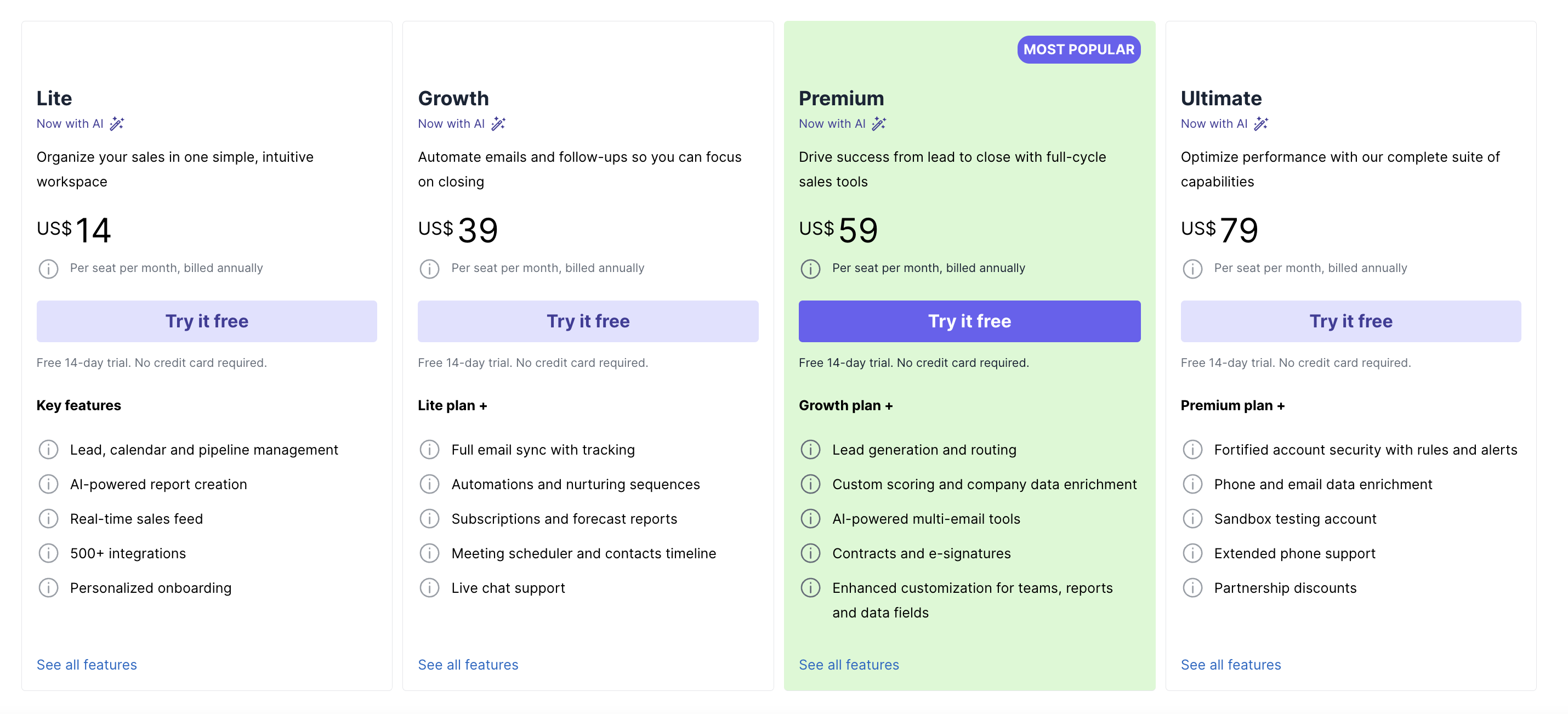
Image source: pipedrive.com
What add-ons does Pipedrive offer?
Pipedrive's pricing model separates core CRM features from specialized tools. While the main plans cover sales pipeline management, optional add-ons are available for functions like lead generation, email marketing, and project management. This allows you to customize your toolkit, but it's important to factor these additional modules into your budget.
Key functions like lead generation from a website, email marketing campaigns, and advanced document management are not included in the standard plans. To access them, businesses must purchase one or more add-ons, each with its own monthly fee.
To illustrate how these costs accumulate, consider a five-person team on the Premium plan (5 users x $59/month = $295). If they need LeadBooster (+$32.50), Smart Docs (+$32.50), and Projects (+$33.35), their total monthly cost becomes $393.35 or $4,720.20 annually. This final price is over 33% higher than the base subscription fee.
This modular approach offers flexibility, but it's important for businesses to factor in the cost of necessary add-ons. When comparing Pipedrive to all-in-one competitors, the total cost of ownership may be higher than the initial per-seat price suggests.
How do I choose between annual vs. monthly billing?
Pipedrive offers a clear trade-off between its billing cycles. Committing to annual billing can result in savings of up to 42%, but it requires a significant upfront payment and a year-long commitment. The monthly price provides the flexibility to cancel at any time, but comes at a considerable premium.
A simple break-even analysis can help determine the best option. For the Lite plan, the annual cost is $168 ($14 x 12). At the monthly rate of $24, a business would pay that same amount in just 7 months. This means the annual plan is better for any business planning to use the platform for more than seven months. Applying the same logic to the other tiers, the break-even point typically falls between 8 to 9 months for the higher-priced plans.
Is Pipedrive worth it?
Pipedrive excels at providing a clean, visual sales experience. For teams focused purely on deal tracking and pipeline visibility, it’s an intuitive tool that gets the job done.
Pros:
- Clean, user-friendly design with strong deal visualization
- 500+ integrations for flexibility
- Excellent for sales-centric workflows
Cons:
- True cost obscured by add-ons and higher-tier dependencies
- Limited automation and support in lower plans
- No free plan, and non-refundable billing
In short, Pipedrive is a capable CRM, but only if you understand what you’re signing up for. Teams should evaluate not just the base plan, but the full cost of essential add-ons before committing.
The better alternative: get more for less with Lark
While Pipedrive's core focus is on sales, Lark CRM takes a broader, more integrated approach. Lark's CRM capabilities are seamlessly connected with chat, meetings, documents, email, calendar, and more on one unified workspace. Your team can easily set up automation to handle repetitive tasks like lead routing and deal tracking, no coding needed.
Lark’s Starter plan is free forever for up to 20 users, and its Pro plan costs just $12 per user per month. You'll get more storage (15TB), videoconferencing, more automation runs, and more with this plan.
To put it into perspective:
- A 5-person team would spend nearly $400/month with Pipedrive once add-ons are included.
- The same team on Lark can pay nothing to get CRM, docs, chat, and more. For $60/month, you get a lot more storage and automation runs. Try our savings calculator.
For teams looking for predictable pricing, cross-team visibility, and seamless collaboration, Lark’s all-in-one model delivers not just lower costs but a simpler, more connected automated approval.
Watch Lark CRM in action:
loading...

FAQs on Pipedrive pricing
Is there a free plan for Pipedrive?
Does Pipedrive offer a free trial?
Yes, Pipedrive offers a 14-day free trial for its plans. This allows you to test the platform's features without the need for a credit card.
What are some alternatives to Pipedrive for CRM?
Common alternatives to Pipedrive include other sales-focused CRM software like HubSpot, Zoho CRM, and Salesforce. For businesses looking for an all-in-one CRM solution that combines customer management with a full suite of collaboration tools, Lark is an excellent alternative.
Is Pipedrive a good CRM for small businesses?
While Pipedrive's sales-focused design is useful, its lack of a free plan can be a hurdle for small businesses. For a more cost-effective start, an all-in-one platform like Lark is often a better choice, as it offers a robust free-forever plan for up to 20 users and more predictable pricing as you grow.
How much does Pipedrive cost?
The Pipedrive pricing per user per month starts at $14 (billed annually) and goes up to $79, depending on the plan. The total cost is influenced by optional add-ons, like the Pipedrive Campaigns pricing which starts at $13.33/month.ClickUp pricing for task management, or reviewing Google Workspace pricing and top Google Workspace alternatives for team email, understanding these Pipedrive add-ons is key to optimizing your total software spend.
How do I choose a CRM solution?
Evaluate your business needs by considering factors like your team's size, the specific features you require, and the total cost, including any potential add-ons. Make sure to select a platform that can scale with your team while meeting your budget goals.
Related reading
Table of contents
Start using Lark today

Manage all your work in one place
Boost team efficiency by 10x
Save up to 70% on software costs
Table of contents
Start using Lark today
Manage all your work in one place
Boost team efficiency by 10x
Save up to 70% on software costs
Keep reading








2026 Lark Technologies Pte. Ltd.
Headquartered in Singapore with offices worldwide.






Explore: