Projects often face unexpected challenges such as delays, shifting dependencies, resource constraints, or unresolved risks. Without a structured system to track and manage these factors, even well-planned initiatives can quickly lose momentum, leading to missed deadlines and reduced efficiency. Small issues can compound over time, creating significant disruptions across teams and deliverables.
A RAID log template helps project managers systematically track Risks, Assumptions, Issues, and Dependencies throughout the entire project lifecycle. By documenting these elements in a centralized, accessible log, teams gain better visibility into potential blockers, improve accountability, and enable faster, more informed decision-making. In this guide, we explore RAID log template examples, formats, and practical uses for modern project management teams.
What is a RAID log template in project management?
A RAID log template in project management is a structured document used to track four critical elements that impact project success: Risks, Assumptions, Issues, and Dependencies. It provides a centralized view of potential threats (risks), conditions believed to be true (assumptions), current problems requiring resolution (issues), and tasks or activities that rely on external factors (dependencies).
Project managers use a RAID log template to proactively identify challenges, monitor ongoing concerns, and ensure accountability by to each entry. It typically includes fields such as description, priority, status, owner, and mitigation actions, helping teams stay organized and aligned.
By maintaining a RAID log, teams improve visibility across stakeholders, reduce surprises, and support better decision-making throughout the project lifecycle. It serves as both a planning and a governance tool, ensuring that no critical factor affecting is overlooked or left unmanaged.
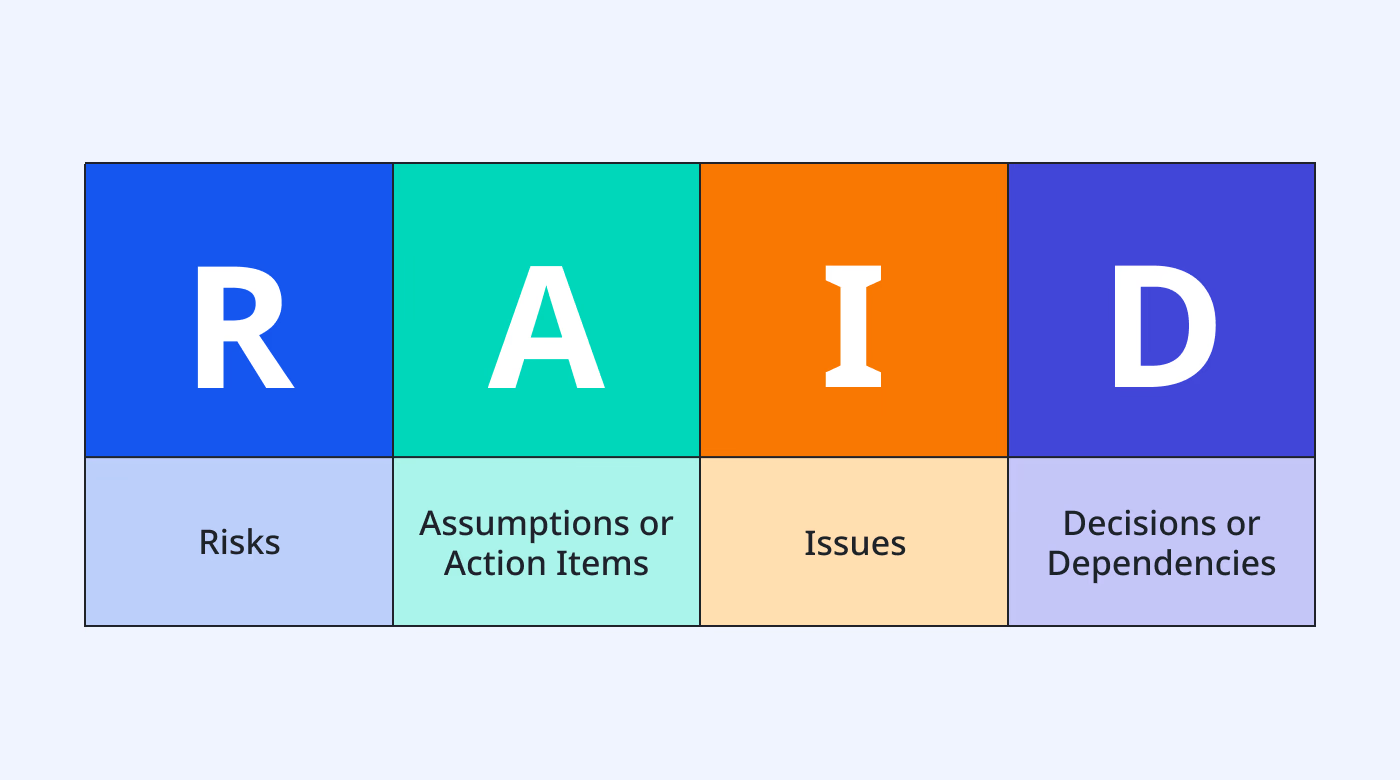
Image source: unsplash.com
Track project risks and manage them without tool sprawl
Notion difference: RAID log vs. risk register vs. issue log
Effective project management requires clear tracking of uncertainties and challenges, but different tools serve different purposes. RAID logs, risk registers, and issue logs are often used together, yet they are not interchangeable. Understanding how they differ helps teams choose the right approach for and governance.
- Scope and coverage: A RAID log provides a comprehensive view by combining risks, assumptions, issues, and dependencies in one place. In contrast, a risk register focuses only on potential future risks, while an issue log tracks problems that are already occurring. This makes the RAID log the most holistic of the three tools.
- Proactive vs reactive approach: Risk registers are primarily proactive, helping teams anticipate and mitigate potential threats before they occur. Issue logs are reactive, documenting and resolving problems that have already impacted the project. RAID logs balance both approaches by tracking risks (future) and issues (present) together.
- Level of detail: Risk registers typically include detailed analyses of probability, impact, and mitigation strategies. Issue logs focus more on resolution steps, ownership, and status tracking. RAID logs offer moderate detail across multiple categories, prioritizing visibility over deep analysis in one area.
- Use in the project lifecycle: Risk registers are most valuable during the planning and early execution phases, when uncertainties are high. Issue logs become more critical during execution as problems arise. RAID logs are used throughout the entire lifecycle, ensuring continuous monitoring of all key project factors.
- Integration and visibility: RAID logs serve as a , improving visibility for stakeholders across all categories. Risk registers and issue logs are often maintained separately, which can create silos. By integrating everything into one structure, RAID logs enhance coordination and decision-making across teams.
5 common categories of RAID log templates
Different projects require different levels of structure, flexibility, and collaboration when managing risks and issues. As a result, RAID log templates are often tailored to suit specific project types, team sizes, and workflows. Choosing the right format ensures better visibility, control, and alignment across stakeholders.
- Simple RAID log template for Excel: A simple RAID log template in Excel is ideal for small teams or short-term projects that need a quick and easy setup. It typically uses a basic table format with columns for risks, assumptions, issues, and dependencies along with owners and statuses. However, it relies heavily on manual updates and lacks , making it less effective as projects grow.
- RAID log template for Smartsheet: Smartsheet RAID log templates offer a more structured, cloud-based approach than Excel. They allow teams to automate alerts, assign tasks, and maintain better visibility across distributed teams. Despite these advantages, deeper integrations and cross-sheet automation often require additional configuration or external tools.
- Agile RAID log template: Agile RAID log templates are designed for iterative project environments where priorities evolve quickly. They align closely with sprint cycles, enabling teams to track risks and issues alongside backlog items and ongoing tasks. This format supports continuous updates and quick decision-making, making it ideal for fast-paced product development teams.
- Enterprise RAID log template: Enterprise RAID log templates are built for large-scale projects involving multiple departments and complex workflows. They include advanced features such as governance layers, reporting dashboards, and multi-level tracking. This structure helps organizations maintain control, ensure compliance, and provide visibility to senior stakeholders.
- Client project RAID log template: Client project RAID log templates focus on transparency and communication with external stakeholders. They clearly define ownership, status updates, and escalation paths to keep clients informed throughout the . This approach helps build trust, reduce misunderstandings, and ensure alignment between internal teams and clients.
13 ready-to-use RAID log and project risk templates
Ready-to-use RAID log and project risk templates help teams skip manual setup and start tracking critical project elements immediately. Instead of building logs from scratch, teams can leverage structured, customizable templates designed for real-world workflows:
Raid log
A raid log template provides a centralized structure for capturing and monitoring risks, assumptions, issues, and dependencies throughout a project. It helps teams maintain visibility into potential blockers while ensuring each item is clearly documented with ownership, priority, and status. By using a raid log, project managers can proactively manage uncertainties, improve accountability, and keep projects on track.
Risk register
A risk register template helps teams systematically identify, assess, and track potential risks that could impact a project. It includes key details such as probability, impact, mitigation plans, and ownership to ensure risks are actively managed. By maintaining a risk register, teams can proactively reduce uncertainty and make more informed project decisions.
Project problem tracker
A project problem tracker template helps teams log, monitor, and resolve issues that arise during . It captures key details such as problem description, priority, owner, status, and resolution steps to ensure accountability. By using a project problem tracker, teams can address issues quickly and minimize their impact on timelines and deliverables.
Delegation of authority matrix
A delegation of authority matrix template defines clear roles, responsibilities, and decision-making powers within a project or organization. It outlines who is authorized to approve actions, allocate resources, or make critical decisions at different levels. By using this template, teams reduce confusion, improve accountability, and ensure faster, more structured decision-making.
Project plan
A project plan template provides a structured roadmap outlining project goals, timelines, tasks, and responsibilities. It helps teams organize workflows, , and track progress against key milestones. By using a project plan, teams can stay aligned, improve coordination, and ensure successful project execution.
Project tracking
A project tracking template helps teams monitor progress, timelines, and task completion throughout the project lifecycle. It provides real-time visibility into performance, allowing managers to identify delays and adjust plans accordingly. By using project tracking, teams can stay on schedule, improve accountability, and ensure smoother project delivery.
Risk matrix
A risk matrix template helps teams evaluate and prioritize risks based on their probability and impact. It provides a to identify which risks require immediate attention and which can be monitored. By using a risk matrix, teams can make more informed decisions and focus on mitigating the most critical threats.
4x4 risk assessment
A 4x4 risk assessment template helps teams evaluate risks using a matrix that maps likelihood against impact across four levels each. It provides a clear visual framework for categorizing risks as low, medium, high, or critical based on severity. By using a 4x4 risk assessment, teams can prioritize mitigation efforts more effectively and focus on the most significant threats to project success.
Outsourcing risk management
An outsourcing template helps teams identify, assess, and monitor risks associated with third-party vendors and external partnerships. It captures key factors such as vendor performance, compliance issues, data security, and contractual dependencies. By using this template, organizations can proactively mitigate risks, ensure accountability, and maintain better control over outsourced operations.
Bug submission and progress management
A bug submission and progress management template helps teams efficiently log, track, and resolve software defects throughout the development lifecycle. It captures key details such as bug description, severity, status, assigned owner, and resolution timeline. By using this template, teams can streamline issue resolution, improve product quality, and ensure transparent communication across developers and stakeholders.
Raid log Excel template
This is a comprehensive, editable MS Excel template designed for project managers to track Risks, Assumptions, Issues, and Dependencies (RAID) within PRINCE2 or Agile frameworks. It is positioned as a high-value tool that "puts the project manager on the front foot with the client.
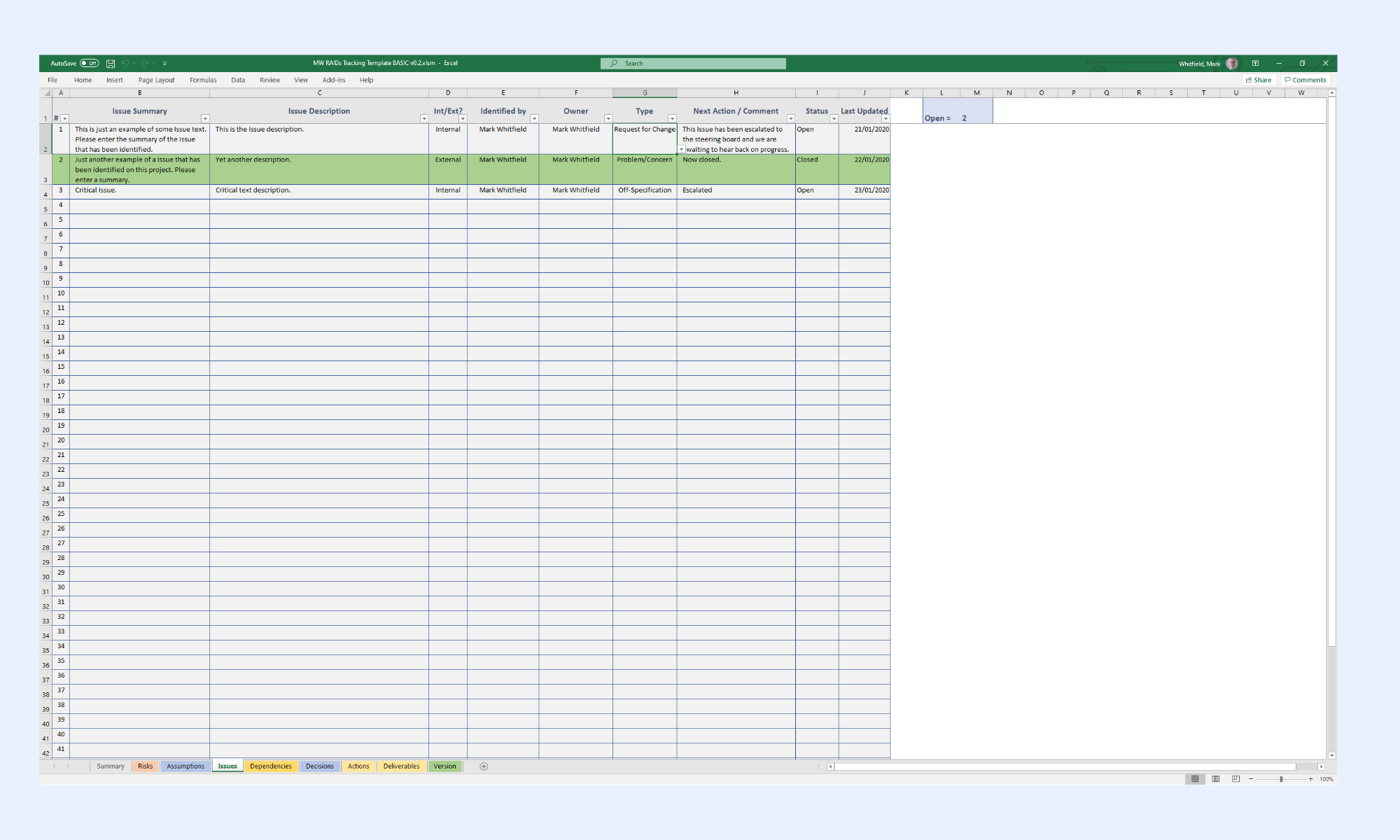
Image source: eloquens.com
Simple raid log Excel template
This template is designed for teams managing changing requirements, sprint planning, or frequent stand-ups. It is designed to be a dynamic document that identifies and manages RAID items throughout the project lifecycle.
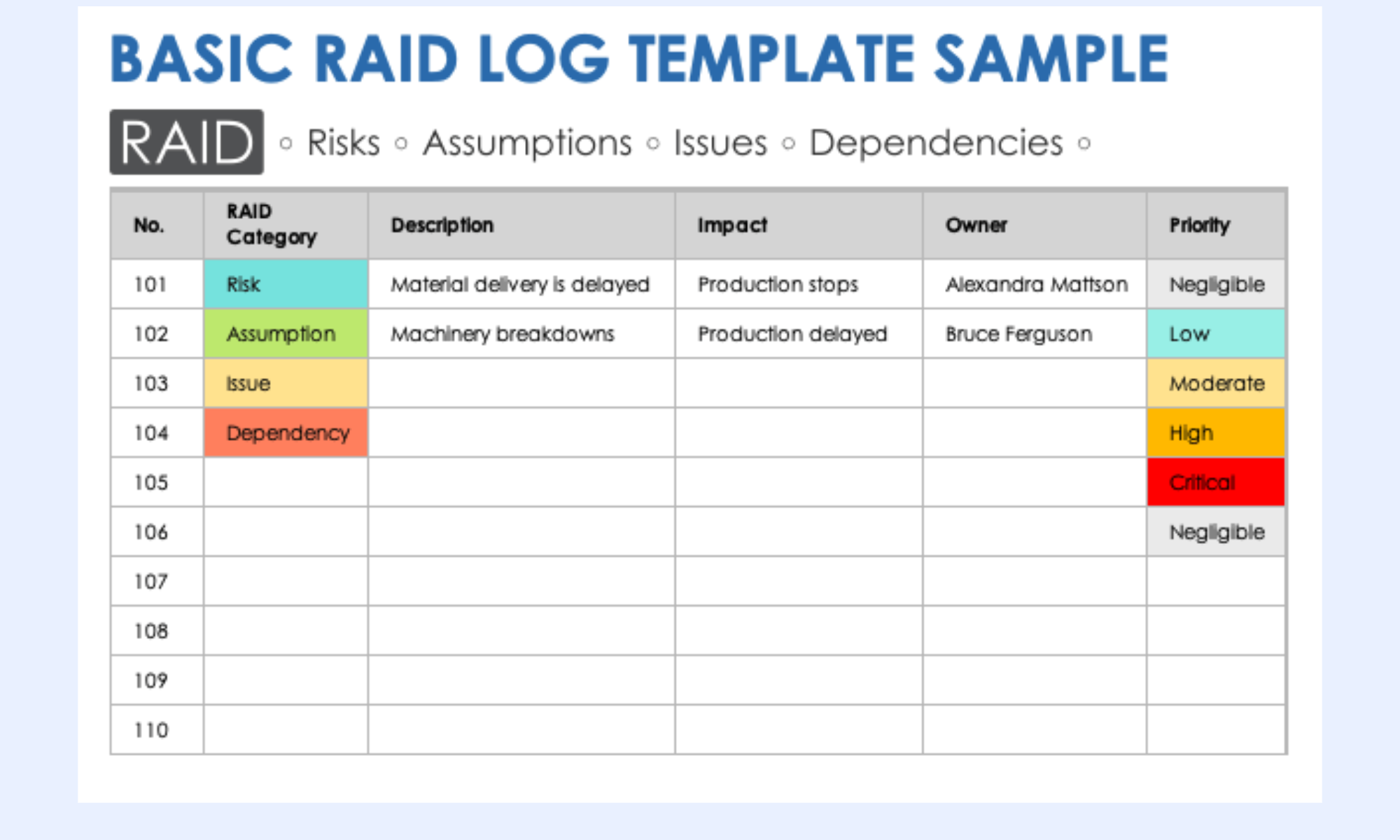
Image source: smartsheet.com
Smartsheet raid log template
This is a versatile, foundational tool intended for early project planning, team check-ins, and stakeholder updates. It provides a simple visual record to help project managers proactively resolve issues and monitor progress.
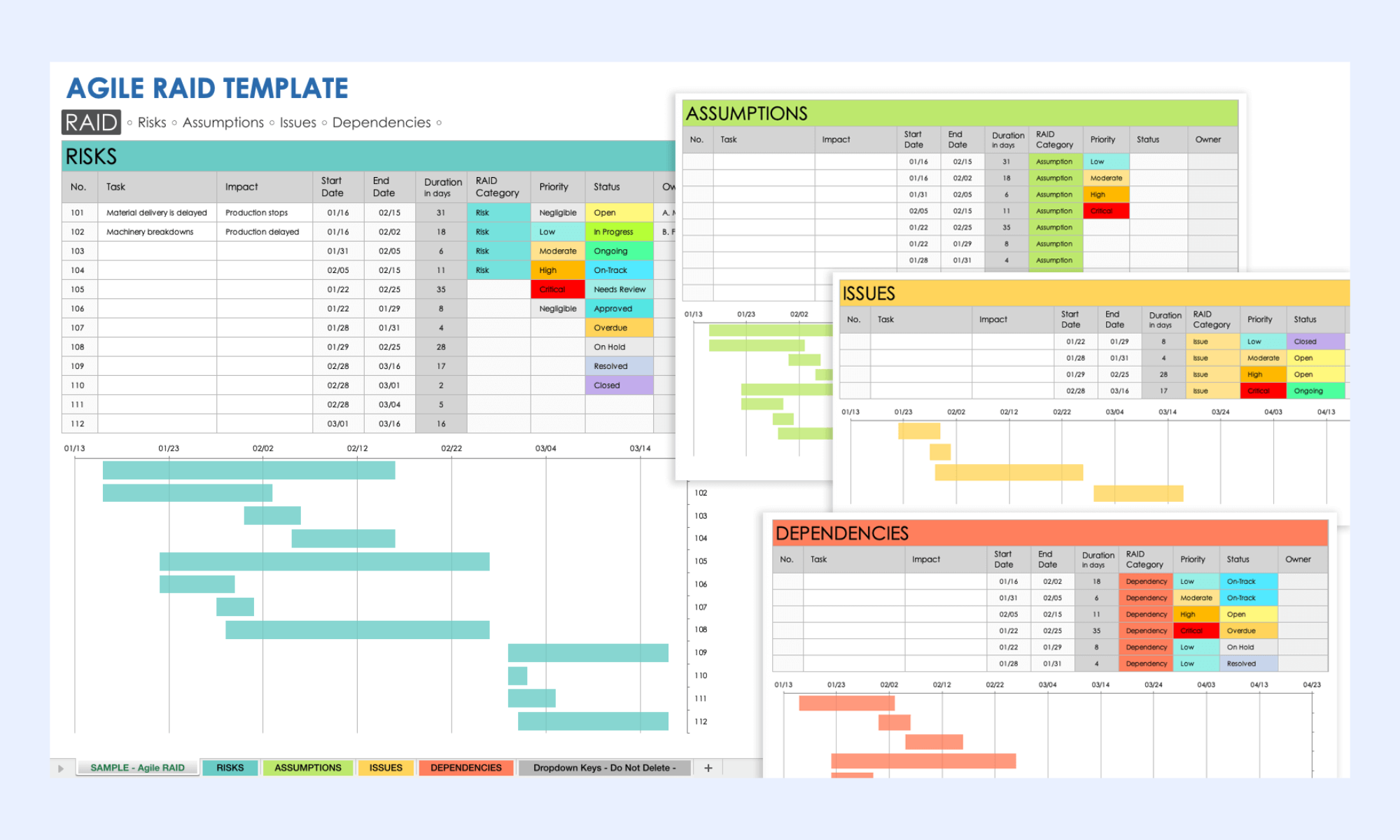
Image source: smartsheet.com
Modern choice: How Lark keeps your RAID log connected to the project
Managing a RAID log is not just about tracking information—it's about keeping that information connected to the broader project workflow. Traditional tools often isolate RAID logs, making it difficult to link risks, issues, and dependencies to actual tasks and decisions. This disconnect leads to delays, missed updates, and reduced visibility across teams.
addresses this challenge by integrating RAID logs directly into a that unifies data, communication, and execution. As a result, teams can respond faster, stay aligned, and maintain full control over project outcomes.
Multidimensional RAID repositories
acts as the central hub for your RAID log, allowing you to move beyond simple lists. You can create a master table with specific field types—such as "Risk Level," "Impact," and "Category"—to organize entries. By switching between for dependencies and Kanban boards for issue resolution, project managers can visualize potential roadblocks in the format that best suits the current project phase.
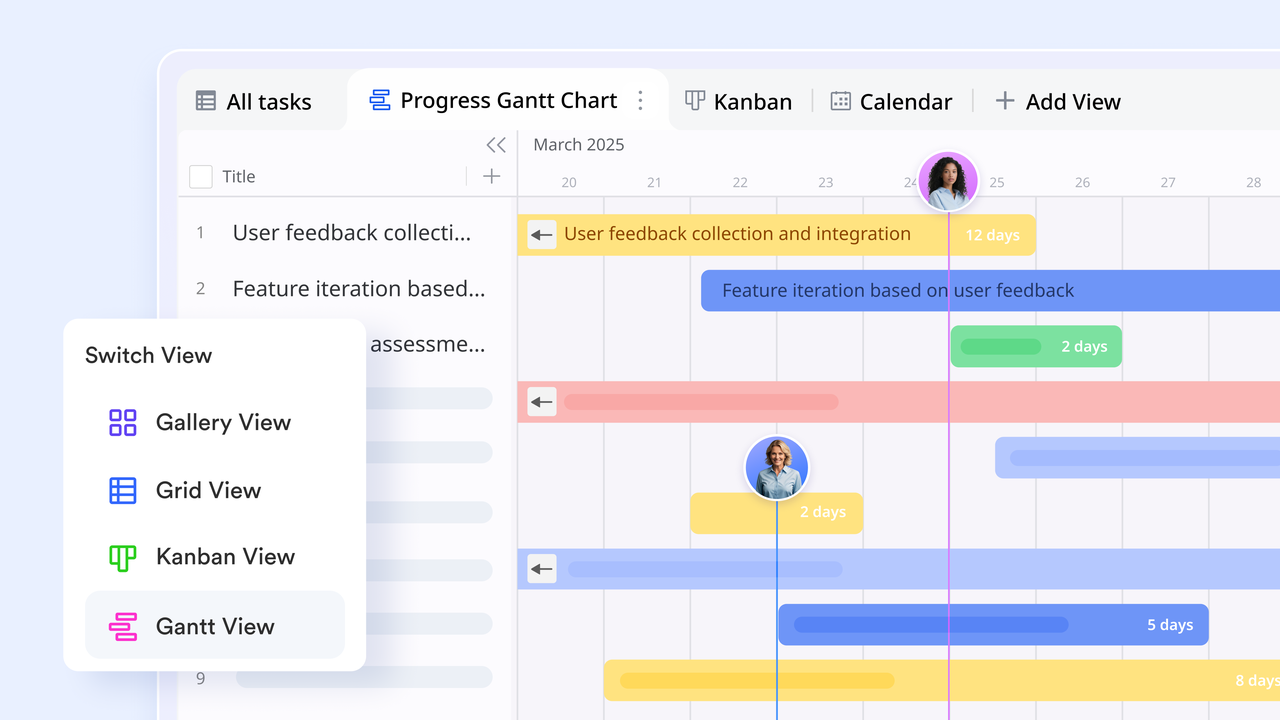
Two-way linking for dependency mapping
A critical part of a RAID log is understanding how one issue affects another. uses "Link Fields" to create two-way connections between different records. For example, you can link a "Risk" (e.g., delayed server delivery) directly to a "Dependency" (e.g., website launch). When the status of the server delivery changes, the dependency , providing real-time visibility into how one delay ripples through the entire project.
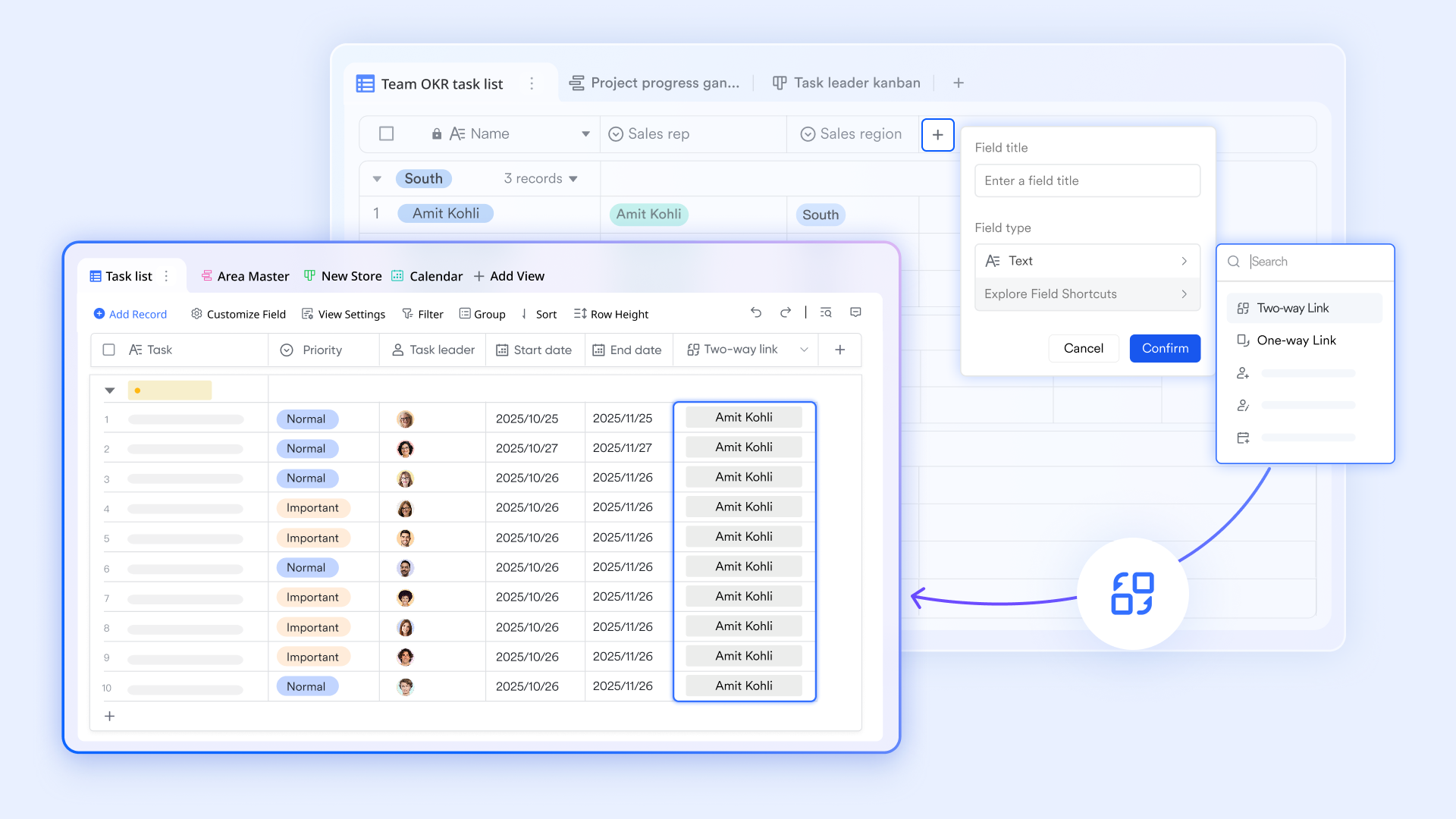
Executive risk heatmaps
Lark Base dashboards transform your raw RAID data into high-level visual intelligence for project sponsors. You can create live "Risk Heatmaps" that plot probability against impact, or pivot tables that show "Open Issues" by department. These as team members update their logs, providing leadership with a "command center" view of the project's health without requiring manual status reports. 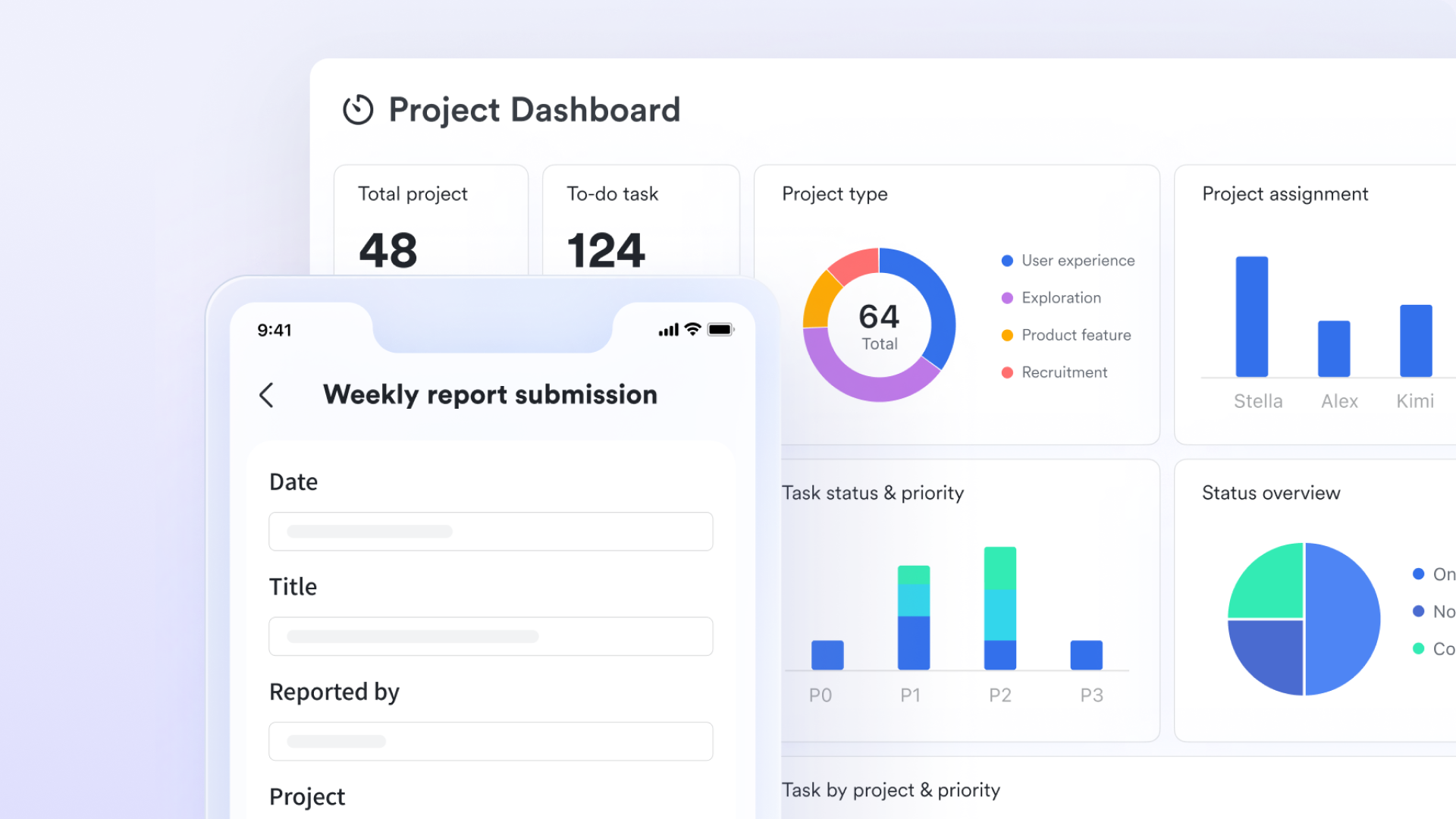
Automated escalation triggers
To ensure that "Issues" and "Risks" aren't ignored, you can set up Lark Base automations that act as a governance layer. For instance, if an Issue's priority is changed to "Critical" or if a mitigation deadline passes, Lark can an urgent notification to the project lead or a specific stakeholder group in Lark Messenger. This ensures that the right people are brought in to solve problems the moment they arise. 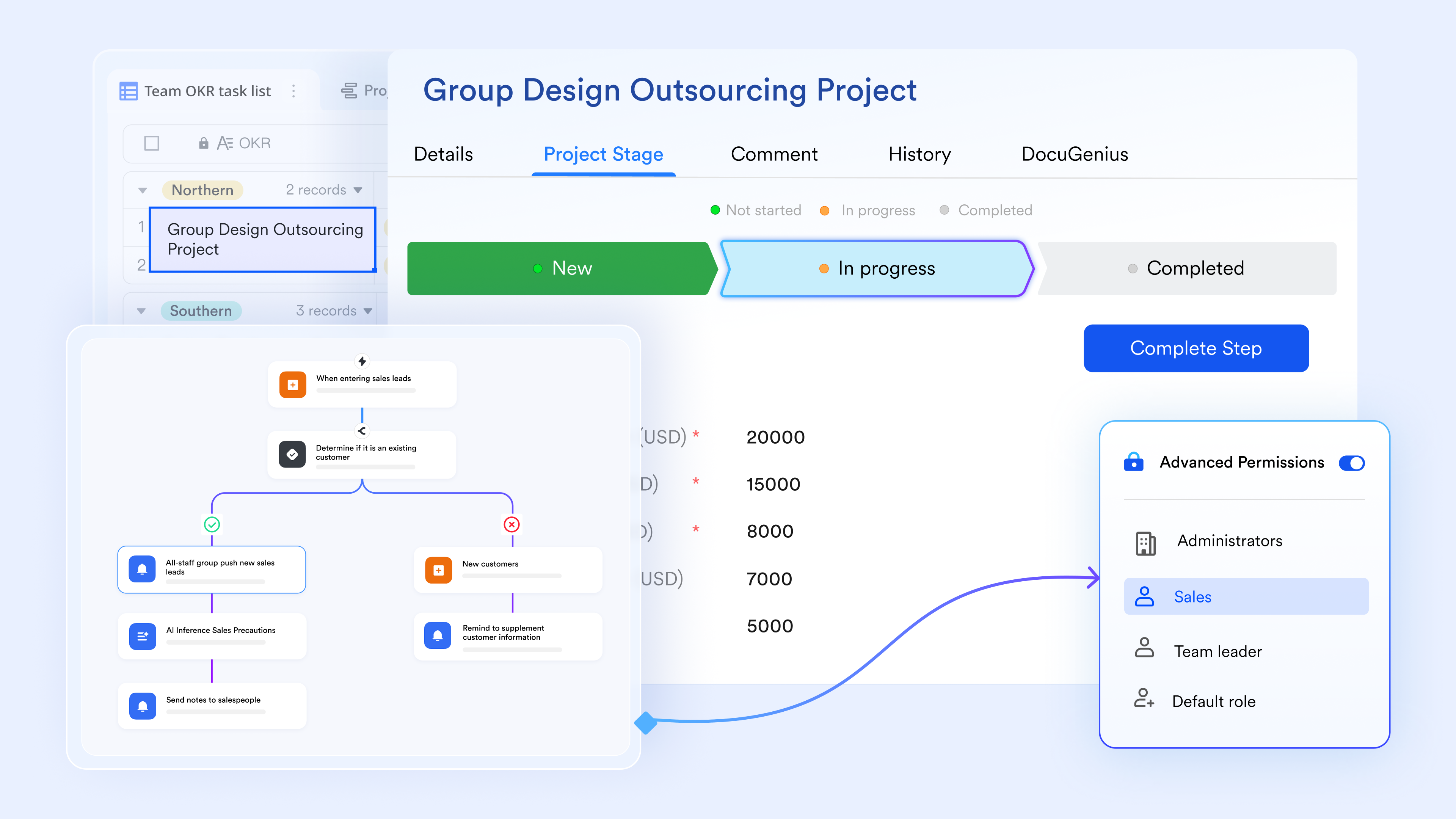
Collaborative mitigation planning
For every high-impact risk identified in your RAID log, you can embed a directly into the record to serve as a deep-dive mitigation plan. Instead of fragmented email chains, all stakeholders can , leave comments, and @mention team members to finalize the strategy. Because the doc is linked to the Lark Base record, anyone reviewing the RAID log has instant access to the full context of the response plan.

:
- Starter plan: Free forever plan that includes 11 powerful tools for up to 20 users. It also comes with 100GB of storage, 1000 automation runs, AI translations, and more.
- Pro plan: $12/user/month (billed annually) for up to 500 users. It includes everything in Starter plus group calling for up to 500 attendees, 15TB of storage, 50,000 automation runs, and more.
- Enterprise plan: for custom pricing. Supports unlimited users and includes additional automation runs, as well as advanced security, compliance, and management features.
For small teams with simple communication needs

18 months message history
1000 Base automation runs/month
2000 rows per table in Base
Most POPULAR
For companies with comprehensive collaboration and management needs
Unlimited message history
500-participant video meetings
50k Base automation runs/month
20k rows per table in Base
For large companies with advanced security and organizational management needs
Get a personalized demo and pricing
Unlimited message history
500-participant video meetings
15 TB storage + 30 GB storage/user
500k Base automation runs/month
50k Base automation runs/month
Most POPULAR
For companies with comprehensive collaboration and management needs
Unlimited message history
500-participant video meetings
50k Base automation runs/month
20k rows per table in Base
Benefits of using digital RAID log tools instead of spreadsheets
Traditional spreadsheets often fall short when managing dynamic, fast-moving projects. Digital RAID log tools provide a more connected, automated, and collaborative approach to tracking project risks and issues.
- Real-time updates across project teams: allow multiple team members to update RAID logs simultaneously without version conflicts. Changes are reflected instantly, ensuring everyone works with the latest information. This improves coordination and reduces delays caused by outdated data.
- Improved transparency for stakeholders: Stakeholders gain clear visibility into project risks, issues, and dependencies through shared dashboards and reports. This openness builds trust and enables faster, more informed decision-making. It also reduces the need for frequent status meetings.
- Easier assignment of risk mitigation tasks: Tasks can be assigned directly within the RAID log, with clear ownership and deadlines. Team members receive notifications and updates, ensuring accountability. This streamlines follow-ups and keeps mitigation efforts on track.
- Workflow automation for issue escalation: can trigger alerts or actions when risks escalate or deadlines are missed. This ensures critical issues are addressed promptly without manual intervention. It also reduces the chances of important items being overlooked.
- Centralized documentation for project governance: All RAID-related data is stored in one accessible location, creating a single source of truth. Teams can easily reference past decisions, updates, and mitigation plans. This supports better governance, audits, and post-project reviews.
Centralize project risks and build your RAID log in Lark
Practical tips for maintaining an effective RAID log
Maintaining an effective RAID log requires consistent updates, clear ownership, and regular team engagement. Without proper upkeep, even the best-structured RAID log can quickly become outdated and ineffective. Following practical best practices ensures the log remains a reliable tool for project governance and .
- Review RAID logs during weekly project meetings: Regularly reviewing the RAID log in weekly meetings keeps risks and issues visible to the entire team. It ensures that updates are discussed, priorities are aligned, and new concerns are captured promptly. Using a project management raid log template helps standardize these reviews and maintain consistency across projects.
- Assign clear owners to every RAID item: Each RAID entry should have a designated owner responsible for monitoring and resolving it. Clear ownership eliminates confusion and ensures that no item is overlooked. Teams using a raid log template on Smartsheet can assign owners and track responsibilities more efficiently.
- Update risk status regularly: Risks evolve as projects progress, so their status should be reviewed and updated frequently. This helps teams reassess priorities and adjust mitigation strategies accordingly. A raid log template in Excel can support regular updates, though it may require manual tracking.
- Prioritize issues based on project impact: Not all issues carry the same level of urgency, so prioritization is essential. Focus on resolving high-impact issues first to minimize disruption to project timelines. A structured raid log Excel template can help teams categorize and rank issues effectively.
- Document mitigation actions for transparency: Recording mitigation plans and actions clarifies how risks and issues are being addressed. It helps stakeholders understand decision-making and . This transparency strengthens accountability and supports better project outcomes.
Conclusion
A well-structured raid log template is essential for managing uncertainties and keeping projects on track. By systematically capturing risks, assumptions, issues, and dependencies, teams gain better visibility into potential challenges and can respond proactively. Throughout this guide, we explored RAID log formats, industry use cases, and step-by-step methods for building and maintaining an effective log. We also highlighted the limitations of traditional tools like Excel and Smartsheet, especially as projects scale and require .
To overcome these challenges, modern platforms offer a more connected and automated approach to RAID log management. brings together data, communication, and workflows in one unified workspace, making it easier to track, update, and act on project insights. If you're looking to streamline project governance and improve team coordination, it's time to move beyond static templates. Start managing your RAID logs more efficiently with Lark today.
Streamline risk management and RAID workflows with Lark
FAQs
How to write a raid log?
To write a RAID log, start by creating sections for risks, assumptions, issues, and dependencies, and add fields like owner, priority, and status. Keep entries clear, actionable, and regularly updated to reflect project changes. Using a raid log Excel template or a tool like Lark can help structure and standardize the process.
What makes a good raid log?
A good RAID log is clear, regularly updated, and assigns ownership to every item for accountability. It prioritizes high-impact risks and ensures transparency across stakeholders. Platforms like Lark enhance this by enabling real-time updates and .
What is the difference between RAID and RAID log?
RAID refers to the concept of tracking risks, assumptions, issues, and dependencies, while a RAID log is the actual document used to record them. The log provides structure and visibility for managing these elements effectively. Tools like Lark make RAID logs more dynamic and connected to project workflows.
Who should maintain the RAID log during a project?
The project manager typically owns the RAID log, but team members contribute updates based on their responsibilities. Shared ownership ensures that all risks and issues are captured accurately. Using Lark allows teams to collaboratively maintain and update the log in real time.
Can RAID logs be automated using project management tools?
Yes, modern tools can automate RAID by triggering alerts, assigning tasks, and updating statuses. This reduces manual effort and ensures critical issues are addressed promptly. Even a simple raid log template in Excel can be enhanced when combined with platforms like Lark for better automation.
Related reading












