














Gantt View Explained: A Guide to Smarter Project Planning

Akhil Nimmathota
Content Specialist
Nov 3, 2026
Akhil Nimmathota
Nov 3, 2026

15 min read
Add to preferred sources


In project management, time is the most valuable resource. Managing complex timelines, dependencies, and deliverables requires clarity that spreadsheets and static charts can't provide. This is where Gantt view transforms how modern teams plan, execute, and deliver. Today's leading platforms have modernized this classic project planning concept. Tools like Asana, Trello, and Lark have reimagined the Gantt view experience to offer interactivity, collaboration, and automation that drive real-time decision-making.
If you're exploring the best project management tools for your organization, the Gantt view should be a key consideration. Considering that, this guide will unveil all the Gantt view secrets and offer the tools you need for it. Let's dive in.

What is the Gantt view?
Gantt view represents project tasks in a visual timeline format, displaying the start and end dates of each activity as horizontal bars. Each bar corresponds to a task, milestone, or deliverable, providing teams with a clear overview of how work progresses over time. By visualizing the entire project at a glance, teams can quickly identify dependencies, overlapping tasks, and potential bottlenecks before they impact delivery.
While the traditional Gantt chart has existed since the early 1900s, Gantt view is its modern, software-enhanced evolution. The difference lies in its interactivity and collaboration features. With Gantt view, teams can drag and adjust timelines, assign ownership, create dependencies, and monitor progress directly within their digital workspace—all in real time.
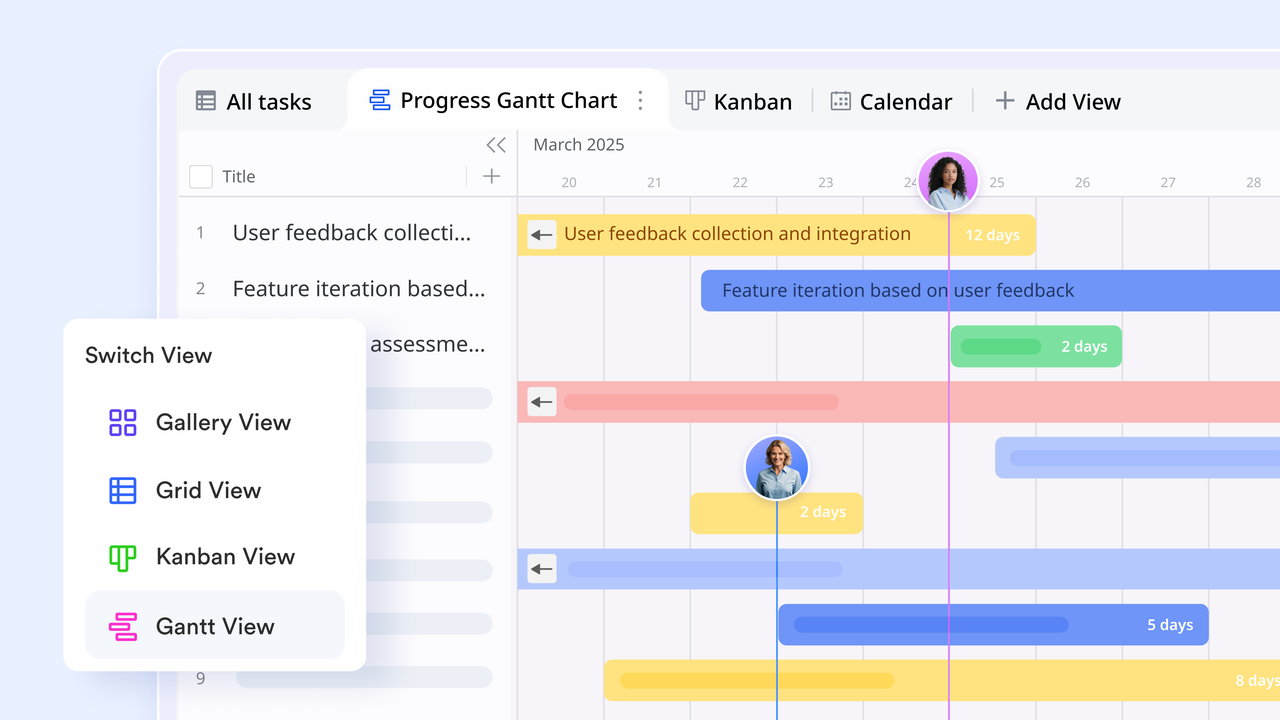
Today, the Gantt view has become a standard feature across leading project management tools. Here are three popular examples that have refined this functionality for modern teams:
- Lark Gantt view
- Asana Gantt view
- Trello Gantt view
Gantt view vs. Gantt chart:
- Traditional Gantt charts are static and designed mainly for reporting.
- Gantt view is interactive it allows task creation, adjustment, and tracking in real time within project management software.
- It bridges the gap between planning and execution by updating automatically as project elements evolve.
Why teams use Gantt view
- To see dependencies clearly and prevent bottlenecks.
- To track progress across departments and project stages.
- To manage resources and workloads efficiently.
- To maintain accountability with transparent timelines.
With remote and hybrid teams becoming the norm, Gantt view helps organizations stay synchronized whether managing software releases, marketing campaigns, or product launches.
How to use Gantt view in project management
Using Gantt view in project management helps teams visualize every stage of work clearly and stay aligned on deadlines. It turns complex timelines into structured, manageable tasks that are easy to track and adjust. Below are key steps to set up and manage gantt view effectively.
Step 1: Setting up tasks, milestones, and dependencies
- Start by defining high-level goals and breaking them into measurable tasks.
- Create milestones to mark key achievements or deadlines.
- Use dependencies to determine the sequence of activities (for example, "task b starts after task a finishes”).
Step 2: Adjusting timelines and balancing workloads
- Modify start or end dates using drag-and-drop functionality.
- Reassign ownership to balance workloads.
- Adjust durations based on resource capacity and changing priorities.
Step 3: Common mistakes to avoid
- Avoid overlinking dependencies that make timelines rigid and hard to update.
- Prevent outdated tasks by ensuring regular progress updates.
- Refrain from creating unclear ownership, which causes accountability gaps.
Comparing popular Gantt Views across tools
Modern project management platforms have customized Gantt view experiences to suit different needs. Below is an overview of Asana, Trello, and Lark Gantt's views on their strengths, ideal users, and unique features.
1. Lark Gantt view
Lark elevates the Gantt view to a fully connected experience. Beyond timeline visualization, it synchronizes project data with communication, automation, and documentation, creating a single workspace for seamless execution.
- Task & timeline management
In the Lark Gantt view, teams can create structured task lists, subtasks, and milestones directly linked to project objectives. Each task bar on the timeline reflects start and end dates, giving managers a clear understanding of workload distribution. The drag-and-drop interface simplifies timeline editing, making it easy to reschedule activities as priorities change.
This feature connects directly with Lark Base, where project data, task attributes, and resource details are stored in organized tables. Teams can link records from Lark Base to their Gantt timeline, ensuring data consistency across systems. Any update in Base, such as a new task owner or a changed deadline, automatically appears in the Gantt view.
- Dependencies & progress tracking
Dependencies are at the heart of any effective Gantt view. In Lark, creating them is effortless so teams can visually link tasks such as "Task B starts after Task A finishes."When one date changes, Lark automatically adjusts dependent tasks to maintain logical flow. This ensures project timelines remain accurate and conflict-free.
Progress tracking is enriched by Lark Docs and Lark Base integration. Teams can attach documentation, meeting notes, or approval sheets directly to tasks. As contributors complete work, progress percentages update automatically in both the Gantt view and linked Base records. This reduces the need for manual reporting and provides real-time visibility into project health.
Through Lark Messenger, managers receive instant notifications when key milestones shift or dependencies change. This immediate feedback helps prevent missed deadlines and ensures quick responses to schedule adjustments.
- Collaboration & communication
Unlike traditional Gantt tools that focus only on schedules, Lark enables real-time teamwork around the plan. Lark's built-in collaboration tools set its Gantt view apart from other project management platforms. Every Gantt task can host real-time discussions through Lark Messenger, where users can comment, tag colleagues, or attach files. These messages remain directly tied to their respective tasks, maintaining a full record of decisions and feedback.
Lark Docs allows teams to co-edit project plans, meeting summaries, or requirement documents alongside the Gantt timeline. Users can embed charts, timelines, or Base tables into Docs to create visual project dashboards that update automatically.
- AI & automation support
Lark uses intelligent automation and AI to make Gantt view smarter and more proactive. Through Lark Base, users can set automation rules that trigger when certain project events occur. For example, automatically updating status fields when a task reaches 100% completion or sending reminders before due dates.
Lark Messenger complements this by delivering AI-generated alerts directly in team chats, reducing the risk of missed updates. For instance, if a dependency shifts or a task deadline is at risk, Lark's smart assistant can notify project members instantly with recommended actions.
- Content management
Managing complex marketing projects requires more than spreadsheets and scattered tools—it demands structure, visibility, and seamless collaboration. Lark's Gantt view and Base integration bring every moving part of your campaign into one synchronized workspace. From task planning and timeline management to dependency tracking and automated updates, teams can coordinate strategy, content creation, and approvals without switching tabs.
- Onboarding
In today's fast-paced workplace, training programs need to move just as quickly and be just as reliable. Lark's Training Management template streamlines every stage of your training lifecycle—from session scheduling and registration to attendance tracking and feedback analysis—so nothing slips through the cracks. With automated reminders, QR-based check-ins, and AI-powered insights, this template gives HR teams and learning & development professionals one unified platform to orchestrate training at scale, reduce administrative burdens, and deliver an exceptional learner experience.
Pros:
- Unified workspace for planning, collaboration, and communication
- Real‑time Gantt chart updates with intuitive drag‑and‑drop scheduling
- Effective milestone and progress visualization to track success
- Automation features minimize routine task management
- Combine chat and video conferencing for faster decision‑making
Cons:
- Advanced features require learning curves, but Help Center provides complete guides.
- Starter plan: Free forever plan that includes 11 powerful tools for up to 20 users. It also comes with 100GB of storage, 1000 automation runs, AI translations, and more.
- Pro plan: $12/user/month (billed annually) for up to 500 users. It includes everything in Starter plus group calling for up to 500 attendees, 15TB of storage, 50,000 automation runs, and more.
- Enterprise plan: Contact sales for custom pricing. Supports unlimited users and includes even more automation runs and advanced security, compliance, and management features.
2. Asana Gantt view
Asana brings simplicity and structure to project planning with its timeline view. Its visual Gantt chart online makes tracking dependencies and deadlines effortless. Ideal for teams focused on clarity, Asana enhances accountability through intuitive design and real-time updates.
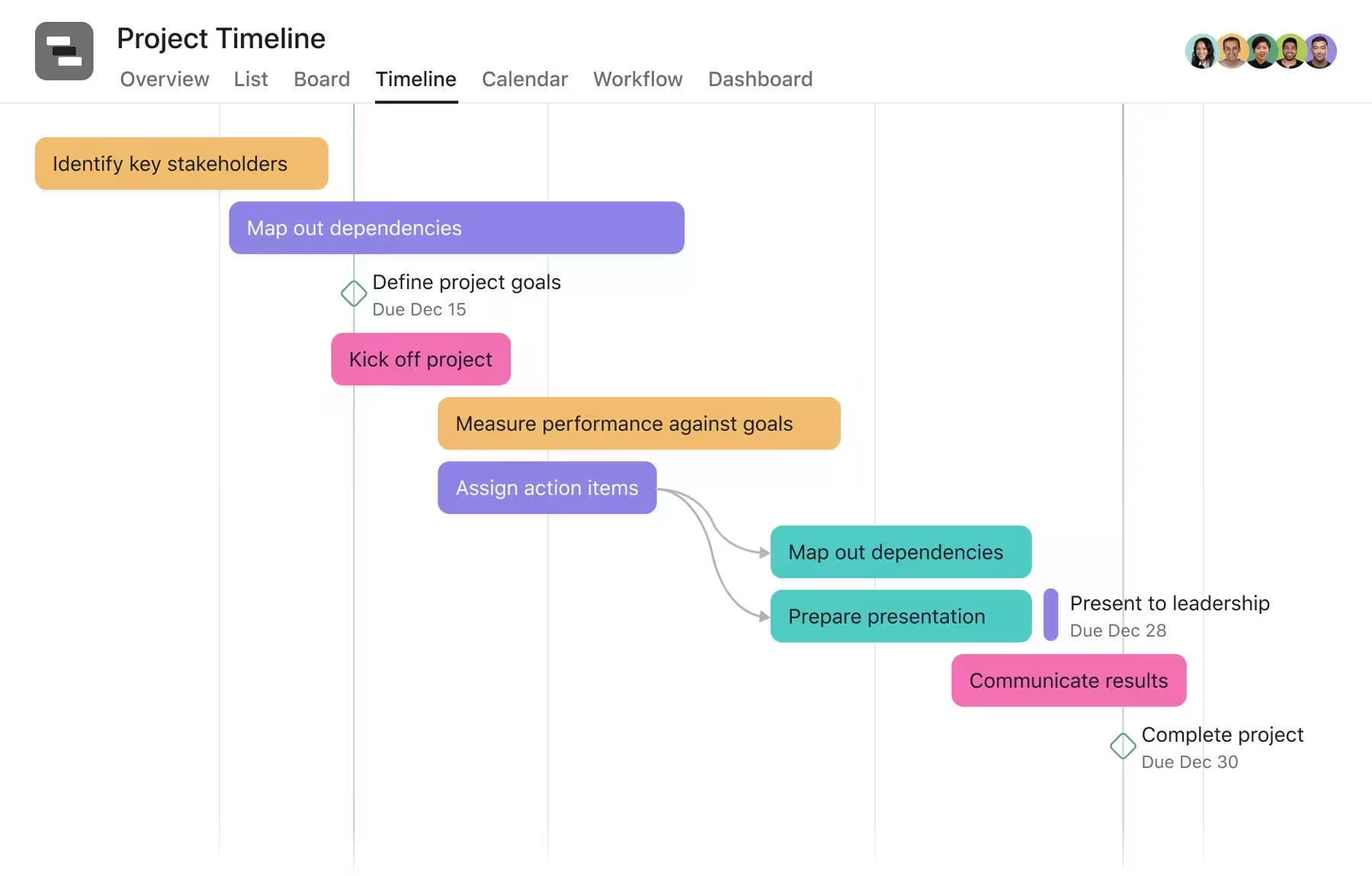
Image source: asana.com
Key features:
- Timeline view with dependencies
- Task and subtask organization
- Workload and portfolio management
- Automation with rules and triggers
- Integration with Slack, Google, and Zoom
Pros:
- Clean, minimalistic interface
- Quick adoption for new users
- Seamless collaboration with notifications
- Excellent task visibility and progress tracking
- Integrates well with other SaaS tools
Cons:
- Limited automation in free plan
- Some features locked behind paid tiers
Best for:
- Teams are already using Asana who want a simple visual extension for project scheduling.
3. Trello Gantt view
Trello offers a straightforward way to manage projects visually, with optional Gantt chart Power-Ups for advanced planning. It's an intuitive online Gantt chart tool perfect for individuals or small teams just starting with project visualization. Its drag-and-drop boards make tracking progress effortless and collaborative.
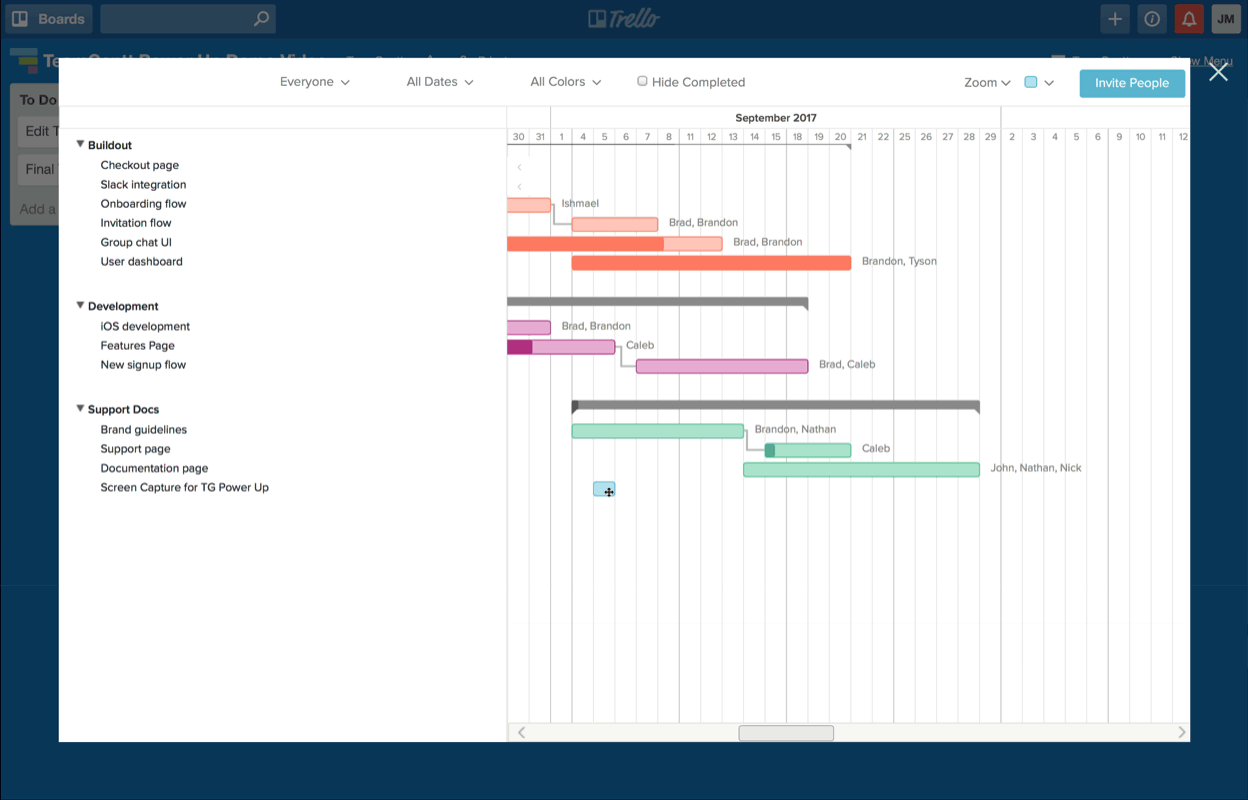
Image source: trello.com
Key features:
- Kanban-style boards with Gantt chart add-ons
- Easy drag-and-drop task management
- Butler automation for workflows
- Integration with Slack, Google Drive, and Jira
- Timeline and calendar views for scheduling
Pros:
- Extremely user-friendly interface
- Quick setup with minimal training
- Flexible integrations for various tools
- Affordable and accessible for startups
- Great visual overview for task tracking
Cons:
- Limited native Gantt chart functionality
- Lacks advanced reporting and analytics
Best for:
- Lightweight project tracking and startups need flexibility without complexity.
Benefits of using Gantt view
Using Gantt view goes beyond visualizing timelines—it brings structure, clarity, and collaboration to every stage of project execution. By connecting schedules, tasks, and dependencies in one place, teams can plan smarter, communicate better, and adapt quickly as priorities shift. Here's how Gantt view helps teams work more efficiently and stay aligned across goals and deadlines.
Visualizing timelines and dependencies
- Displays all project phases, from initiation to delivery, in one view.
- Makes it easy to identify overlapping tasks and critical paths.
- Helps project managers allocate resources more effectively and prevent scheduling conflicts.
Tracking progress in real time
- Automatically reflects task updates and completion percentages.
- Reduces manual status reporting.
- Offers immediate insight into delays or bottlenecks.
Improving collaboration and accountability
- Centralizes all project details, reducing fragmented communication.
- Allows team members to tag colleagues, leave comments, and share files.
- Ensures transparency, keeping everyone aligned with goals and deadlines.
Adapting to agile and hybrid workflows
- Combines the structure of waterfall planning with the flexibility of agile execution.
- Enables teams to visualize sprints, iterations, and release schedules.
When to use Gantt view vs. other views
Every project team works differently, and the ideal view depends on how work is structured and managed. While some teams thrive on flexible, status-based tracking, others need precise timelines and dependency mapping to stay on schedule. Understanding when to use Gantt view versus other visual methods helps teams choose the most efficient way to plan, execute, and monitor their projects.
- Gantt vs. Kanban boards
Use the Gantt view when projects require structured scheduling, detailed timelines, and defined dependencies between tasks. It provides a clear sequence of events, making it ideal for managing complex, multi-phase projects.
Kanban boards, on the other hand, are better suited for tracking progress by status such as "to-do,""in progress," or "done," and work best for teams that prefer visual task flow and flexibility over rigid timelines.
- Gantt vs. Calendar views
Gantt view focuses on long-term planning, helping teams visualize task durations, dependencies, and critical paths across weeks or months. It's particularly effective for projects with multiple milestones or overlapping timelines.
Calendar views are more suitable for short-term scheduling, offering a daily or weekly perspective on deadlines, events, or meetings. Teams often use both together the Gantt for strategic planning and the calendar for execution tracking.
How to choose the right view for your project
The right view depends on the project's structure, complexity, and collaboration needs. The Gantt view is best for projects that demand deadline precision, dependency tracking, and milestone monitoring. For fast-moving tasks or creative workflows with changing priorities, Kanban or calendar views may provide the agility required. Many modern platforms, including Lark, allow teams to switch seamlessly between views, ensuring they always have the best visualization for each project phase.
Best practices for maximizing the Gantt view
Using Gantt view effectively requires more than just plotting tasks on a timeline. To truly get value from this visual planning tool, teams need to adopt structured practices that keep timelines accurate, communication consistent, and progress visible. These best practices help ensure that every project milestone, dependency, and deliverable stays aligned with business goals from initiation to completion.
- Keep tasks and dependencies simple: Overly detailed timelines can cause confusion and delay updates. Focus on key milestones and dependencies that drive project outcomes. Keeping your Gantt view clean ensures clarity and makes it easier for all stakeholders to understand priorities.
- Regularly update progress: Frequent updates help maintain transparency and accountability. Regularly adjusting timelines or completion percentages ensures everyone stays aligned with actual progress. In tools like Lark, these updates sync automatically across all team workspaces for instant visibility.
- Use color-coding and labels: Color-coding tasks by department, priority level, or status enhances readability. It allows project managers to identify bottlenecks or high-impact items at a glance. Visual categorization also simplifies communication during stakeholder reviews and team check-ins.
- Leverage integrations and automations: Automation eliminates manual effort in tracking recurring tasks, sending reminders, and generating progress reports. Using AI-driven recommendations in Lark, teams can optimize workloads, set smart alerts for dependencies, and maintain consistent project momentum with minimal oversight.
- Combine Gantt view with collaboration tools like Lark: For maximum efficiency, use Gantt view alongside built-in chat, docs, and meetings in Lark. This ability keeps all communication and project data in one place, reducing the friction of switching between platforms. Teams can discuss updates, share files, and modify timelines directly within the same workspace, ensuring seamless coordination.
Conclusion
A well-structured Gantt view does more than visualize timelines. It enables teams to manage complexity with precision. By aligning tasks, dependencies, and resources in one connected timeline, organizations gain the clarity needed to execute efficiently and meet strategic goals.
Among the tools that provide this functionality, Lark stands out for unifying Gantt visualization with built-in chat, docs, meetings, and automation. It eliminates the fragmentation of switching between different apps and allows teams to plan, communicate, and execute within a single workspace.
By combining the structure of a Gantt view with the flexibility of Lark's real-time collaboration, teams can move from planning to delivery faster without compromising on transparency or quality. Whether managing a marketing campaign, software rollout, or enterprise initiative, Lark ensures every project remains organized, visible, and on time.
FAQs
Is the Gantt view the same as a Gantt chart?
No. While both display project timelines visually, a traditional Gantt chart is static and typically used for presentation or reporting. Gantt view, on the other hand, is interactive and allows teams to update tasks, dependencies, and deadlines in real time. Tools like Lark enhance this experience by syncing every update across chats, docs, and task lists, ensuring every stakeholder sees the latest version instantly.
Can the Gantt view be used for agile project management?
Yes, absolutely. Gantt view has evolved to support both traditional and agile workflows. Teams can use it to plan sprints, visualize iterations, and align release cycles with broader project timelines. In Lark, Gantt view seamlessly adapts to agile frameworks, allowing managers to toggle between sprint timelines and Kanban views while maintaining full visibility of progress and dependencies.
What are the limitations of the Gantt view in project planning?
The main limitation arises when timelines become too complex or updates are neglected. Without regular maintenance, Gantt views can become outdated and lose their accuracy. However, Lark mitigates these risks with automation features such as smart reminders, AI-driven schedule suggestions, and automatic progress tracking, ensuring that every project timeline remains up to date and actionable.
How do I choose the best tool for a Gantt view?
When selecting a Gantt view platform, consider how well it connects planning with collaboration. While tools like Asana and Trello offer solid visual planning capabilities, Lark goes further by combining communication, documentation, and automation within the same workspace. This integrated environment helps teams not only plan effectively but also execute projects with minimal context switching.
Is the Gantt view free in tools like Asana, Trello, or Lark?
Both Asana and Trello offer Gantt chart functionality through premium plans or add-ons, but their capabilities are limited in the free tiers. Lark, however, provides a fully functional Gantt view as part of its free Starter plan. This includes up to 20 users, real-time collaboration, and automation runs making it a cost-effective option for growing teams that want enterprise-level capabilities without upfront investment.
Related reading
Table of contents
Start using Lark today

Manage all your work in one place
Boost team efficiency by 10x
Save up to 70% on software costs
Table of contents
Start using Lark today
Manage all your work in one place
Boost team efficiency by 10x
Save up to 70% on software costs
Keep reading








2026 Lark Technologies Pte. Ltd.
Headquartered in Singapore with offices worldwide.






Explore: