Fishbowl pricing often looks simple at first glance, but businesses quickly discover that it involves far more than a single number on a pricing page. Fishbowl uses a structured, license-based pricing model that changes depending on product editions, deployment preferences, combinations, and long-term support requirements. For inventory-driven organizations, Fishbowl can deliver meaningful operational control, but the real cost usually extends beyond the headline license fee. As companies grow, many also begin evaluating broader platforms that support collaboration, automation, and cross-functional workflows alongside inventory management.
What is Fishbowl, and who is it built for?
Fishbowl is an inventory management and designed primarily for small to mid-sized businesses. It is commonly used by companies that need advanced inventory tracking, warehouse management, and production workflows. Fishbowl is tightly merged with accounting systems like QuickBooks, which influences Fishbowl's inventory software pricing that QuickBooks users often evaluate. Businesses with physical goods, multiple warehouses, and manufacturing processes gain the most value from Fishbowl.
Fishbowl is best suited for organizations that prioritize inventory accuracy over collaboration features. Teams with dedicated operations or IT staff can manage their setup and maintenance more effectively. Companies seeking all-in-one may find Fishbowl warehouse pricing less aligned with their broader operational needs. Understanding the target audience is critical before evaluating Fishbowl pricing.
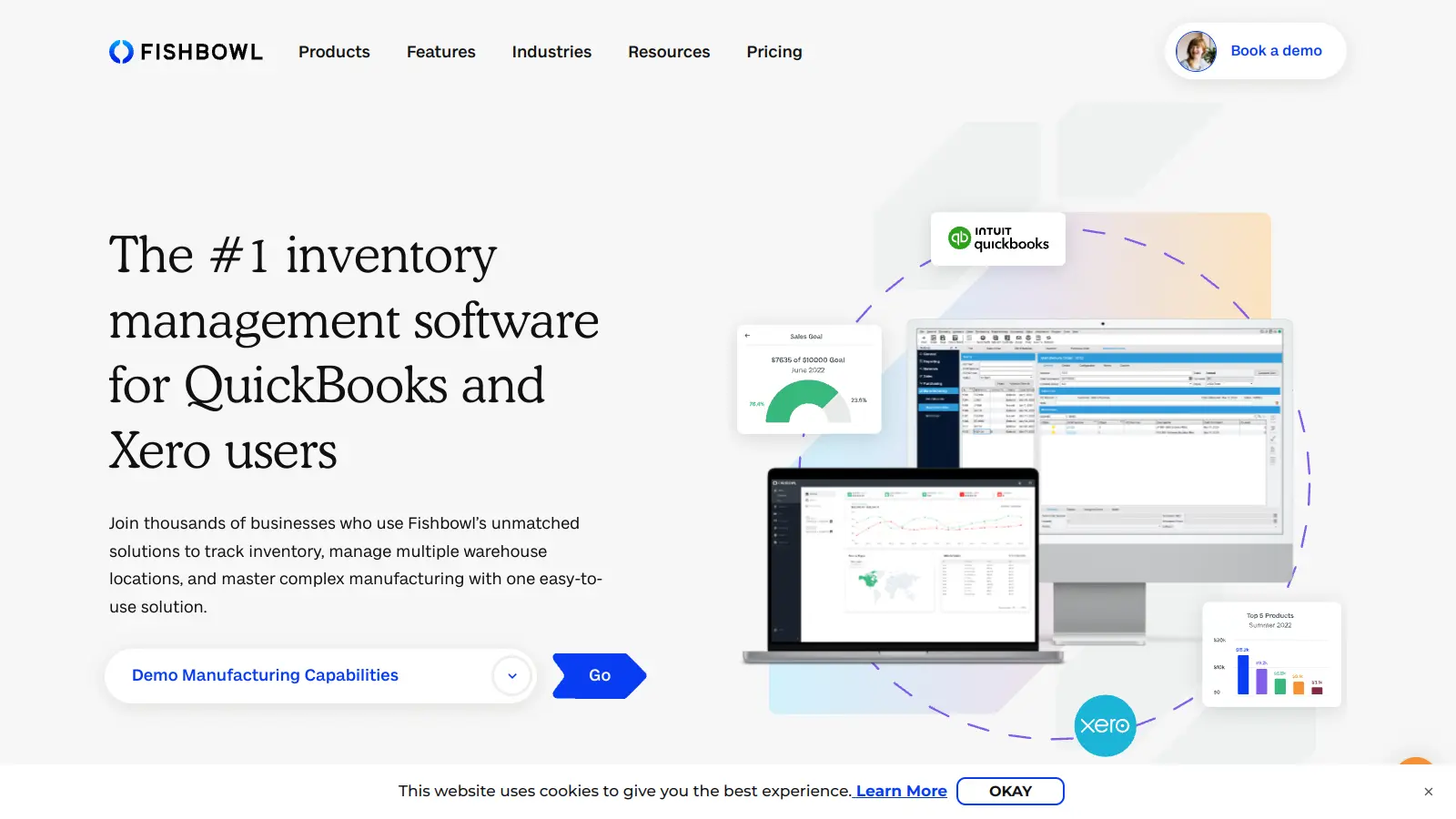
Image source: fishbowlinventory.com
Before pricing: Know what you actually pay for
Before we dive into the pricing, there are some considerations: In Fishbowl, what you actually pay for goes far beyond a single upfront number and requires a deeper look at how costs accumulate over time. While Fishbowl is often marketed as a powerful inventory solution, its pricing structure includes multiple layers that can significantly impact long-term budgets. Understanding these elements upfront helps businesses avoid surprises and make more informed purchasing decisions:
- How Fishbowl pricing is structured (license-based vs subscription): Fishbowl pricing is primarily license-based rather than subscription-based. Customers pay an upfront license fee for the software and then commit to recurring annual maintenance and support costs. This structure means Fishbowl software pricing requires a higher initial investment compared to monthly . While some businesses appreciate owning licenses, others struggle with forecasting costs as their usage evolves. Over time, license-based pricing can feel rigid for growing teams.
- Entry-level pricing expectations: Entry-level Fishbowl inventory pricing typically starts in the several-thousand-dollar range, depending on edition and configuration. This pricing usually includes core inventory functionality but excludes advanced warehouse or manufacturing features. Many buyers assume entry pricing covers all essentials, only to discover additional costs later. Training, setup, and combinations are often separate expenses. Entry-level pricing works best for stable operations with minimal customization needs.
- Differences between Fishbowl Inventory and Fishbowl Warehouse pricing: Fishbowl Inventory pricing focuses on basic , order processing, and accounting synchronization. Fishbowl warehouse pricing increases as businesses add multiple locations, barcode scanning, and advanced picking workflows. Warehouse functionality requires additional licenses and configuration. Businesses with distributed fulfillment operations should expect higher total ownership costs. Choosing the wrong tier early can create expensive upgrade paths later.
- One-time license vs ongoing costs: The one-time license fee represents only a portion of Fishbowl pricing. Annual maintenance, paid upgrades, and optional support packages add recurring expenses. Fishbowl increasingly emphasizes the total cost of ownership rather than upfront fees alone. Over five years, ongoing costs can exceed the initial license investment. Long-term planning is critical.
What features are included in Fishbowl pricing plans
Fishbowl pricing plans are designed to scale alongside a operations become more complex and demanding. Each plan builds on the previous one by adding deeper , advanced reporting, and broader operational capabilities. From basic stock tracking for small teams to enterprise-level customization for large organizations, Fishbowl pricing aligns features with different stages of business growth. Understanding what is included in each plan helps organizations assess whether the cost matches their operational requirements and long-term expansion goals. This breakdown clarifies how Fishbowl pricing translates into real functionality at every tier.
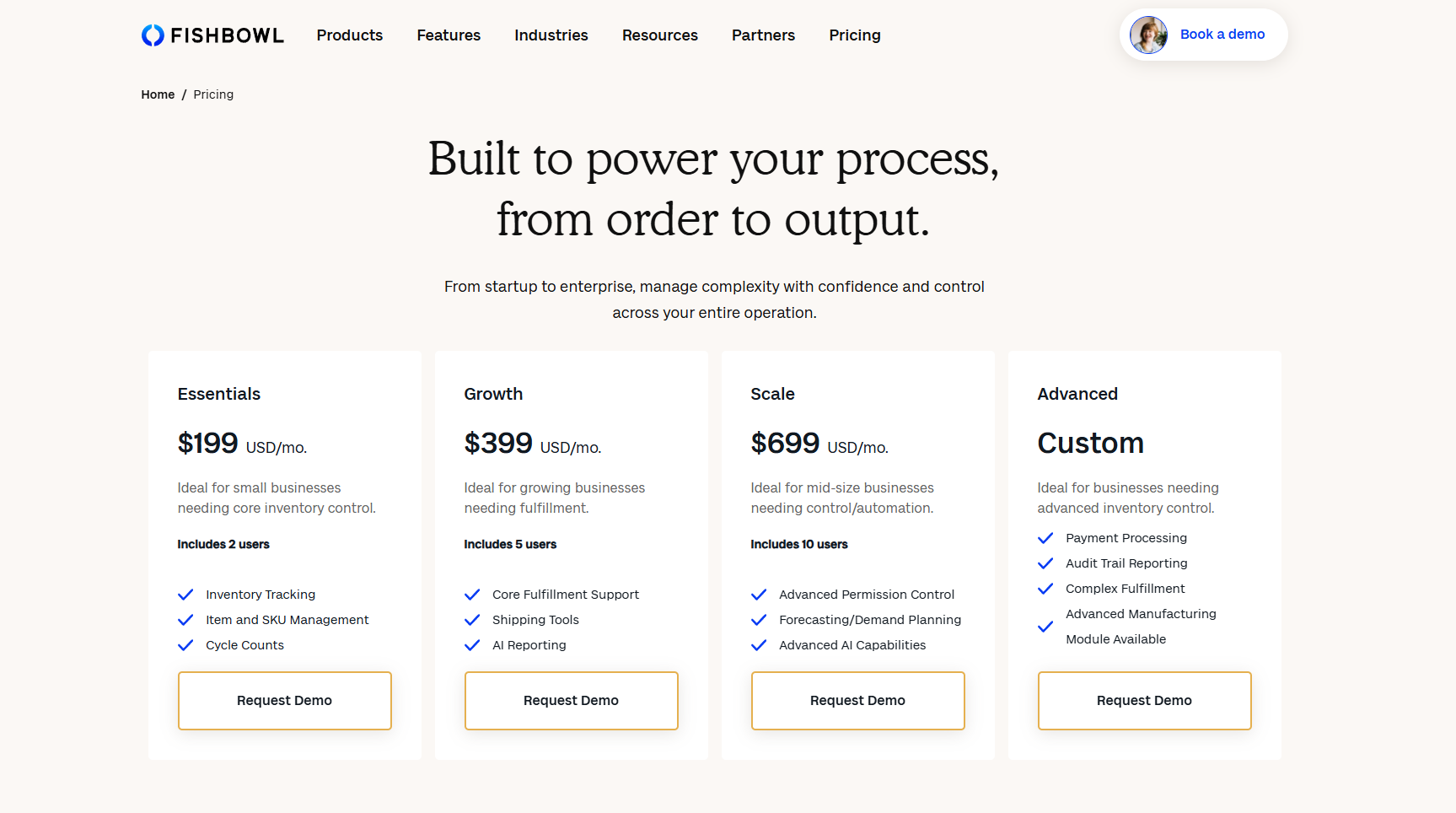
Image source: fishbowlinventory.com
Information source: fishbowlinventory.com
Update time: 2025-12-22
Note: Pricing and plan details reflect publicly available data as of the update date and may vary based on region, billing cycle, and number of agents.
Reduce the costs with a competitive alternative
Fishbowl ERP vs Fishbowl Inventory pricing
Fishbowl ERP pricing and Fishbowl inventory pricing are designed for different stages of , but the line between them is not always obvious to buyers. Many companies start with inventory-focused functionality and later realize they need broader operational coverage. Understanding when inventory pricing is sufficient and when ERP-level pricing becomes necessary helps prevent costly upgrades. This comparison clarifies how pricing, features, and scalability change as businesses grow.
- When Fishbowl Inventory is sufficient: Fishbowl inventory pricing works best for businesses that primarily need accurate stock tracking and order fulfillment. Companies with limited manufacturing complexity and fewer warehouse locations can operate efficiently using inventory-only features. This pricing tier supports essential workflows such as receiving, picking, and syncing with accounting tools. Fishbowl inventory software pricing remains more predictable at this level because customization needs are limited. For stable operations, inventory pricing delivers value without introducing ERP-level costs.
- When businesses upgrade to ERP-level functionality: Businesses typically move toward Fishbowl ERP pricing when operational complexity increases beyond basic . This shift often happens when manufacturing workflows, production planning, or advanced analytics become necessary. ERP-level functionality adds deeper configuration, reporting, and combines capabilities. Fishbowl ERP pricing reflects this expansion with higher license and support costs. The upgrade makes sense for companies managing multi-stage production and complex supply chains.
- Cost implications of scaling from inventory to ERP use cases: Scaling from inventory to ERP use cases significantly increases overall Fishbowl pricing. Additional licenses, advanced modules, and consulting services are becoming more common. Ongoing maintenance and support costs rise as system complexity grows. Fishbowl inventory pricing 2026 discussions increasingly focus on these long-term cost implications. Without careful planning, total ownership costs can exceed initial expectations.
Hidden and indirect costs you should factor in
Fishbowl pricing often appears manageable at first glance, but several indirect costs can impact long-term budgets. These expenses are usually not included in base pricing discussions, yet they play a major role in the total cost of ownership. Understanding these hidden costs helps more accurately. Factoring them early reduces financial surprises during implementation and scaling.
- Implementation and onboarding fees: Implementation and onboarding fees vary depending on data migration, customization, and training requirements. Many businesses underestimate how much time and expertise setup requires. Fishbowl software pricing often excludes these services from the base license. Delays during onboarding can affect productivity and adoption. Proper budgeting for implementation improves rollout success.
- Annual maintenance and support renewals: Annual maintenance and support renewals are required to receive updates and technical assistance. These recurring fees increase the long-term cost of Fishbowl pricing. Businesses using QuickBooks Fishbowl pricing should pay close attention to renewal terms. Support level selection affects response times and issue resolution. Planning for renewals avoids unexpected budget strain.
- Paid combinations and add-ons: Many combinations with e-commerce, shipping, and tools require additional payment. Fishbowl inventory software pricing increases as add-ons are introduced. Third-party connectors may also have their own subscription fees. Managing multiple combinations adds operational complexity. These costs accumulate gradually over time.
- Upgrade and version update costs: Major upgrades or version updates may involve additional fees or consulting services. Custom configurations can make upgrades more time-consuming and expensive. Fishbowl warehouse pricing often increases after major system changes. Businesses must plan upgrade cycles carefully. Skipping upgrades can create security and compatibility risks.
- Internal IT and admin effort: Fishbowl requires ongoing to administer users, updates, and troubleshooting. This effort represents an indirect but real cost. Many teams do not include internal labor when evaluating Fishbowl pricing. As systems grow more complex, the admin workload increases. Resource planning is essential for sustainability.
When Fishbowl starts to feel limiting
Fishbowl delivers strong inventory control but may feel restrictive as business needs evolve. Limitations often surface during periods of rapid growth or organizational change. Understanding these constraints helps teams decide whether to optimize or explore alternatives. Many companies reassess Fishbowl pricing when limitations impact agility.
- Challenges for fast-growing teams: Fast-growing teams often outpace license-based software models. Fishbowl pricing scales with users, warehouses, and features, which can slow expansion. may require additional licenses and training. Performance bottlenecks can appear as usage increases. Growth planning becomes more complex over time.
- Cost scalability issues as users and warehouses increase: Each additional user or warehouse increases Fishbowl warehouse pricing. becomes difficult as expansion accelerates. Businesses may experience uneven cost jumps rather than smooth scaling. Budget overruns are common without detailed planning. Scalability becomes a financial concern.
- Dependency on paid support and plugins: Advanced workflows frequently rely on paid plugins and support packages. This dependency increases long-term costs and vendor reliance. Fishbowl software pricing does not include all advanced capabilities by default. Teams may feel locked into specific vendors. Flexibility decreases as dependency grows.
- Usability and modernization concerns: Fishbowl's interface reflects legacy design principles. Training new users can take longer compared to modern cloud tools. are limited, requiring supplementary platforms. Modernization gaps affect user adoption. These concerns often trigger reevaluation.
Why do teams look for alternatives to Fishbowl?
As operations expand beyond inventory management, many teams reassess their software stack. Fishbowl remains strong for but may not align with broader operational goals. Businesses increasingly seek platforms that offer predictability, collaboration, and flexibility. These factors drive the search for alternatives.
- Need for more predictable pricing: Subscription-based platforms offer clearer cost forecasting. Fishbowl pricing can feel opaque due to licenses and renewals. Budget planning becomes more challenging at scale. Predictable pricing supports long-term strategy. Transparency is a growing priority.
- Desire for cloud-native collaboration: Modern teams expect tools. Fishbowl focuses primarily on inventory workflows rather than teamwork. Cloud-native platforms merge communication and work management. Collaboration gaps become more visible over time. Teams seek unified systems.
- Looking beyond inventory-first tools: Inventory is only one part of business operations. Companies want tools that support projects, sales, and workflows together. Fishbowl inventory pricing may not justify a limited functional scope. Broader platforms deliver cross-functional value. Strategic needs evolve.
- Reducing dependency on legacy systems: Legacy systems require ongoing maintenance and upgrades. Fishbowl reflects earlier software architectures. Cloud-first tools reduce IT overhead. Agility and speed improve. Modernization drives migration decisions.
Enjoy a new way of teamwork and inventory management
Modern choice: Manage inventory and workflows smartly with Lark
As businesses grow beyond inventory-centric operations, their needs often expand into automation, analytics, and . While Fishbowl pricing and features are optimized for structured inventory and warehouse workflows, many modern teams require systems that adapt quickly to changing processes.
This is where Lark stands out by combining databases, workflows, communication, and AI insights in one cloud-native workspace. Instead of forcing teams to fit into rigid operational models, allows organizations to design systems around how work actually happens. For teams seeking flexibility, scalability, and predictable pricing, Lark becomes a natural evolution alongside or beyond traditional inventory tools.
Centralised inventory management hub with barcode tracking
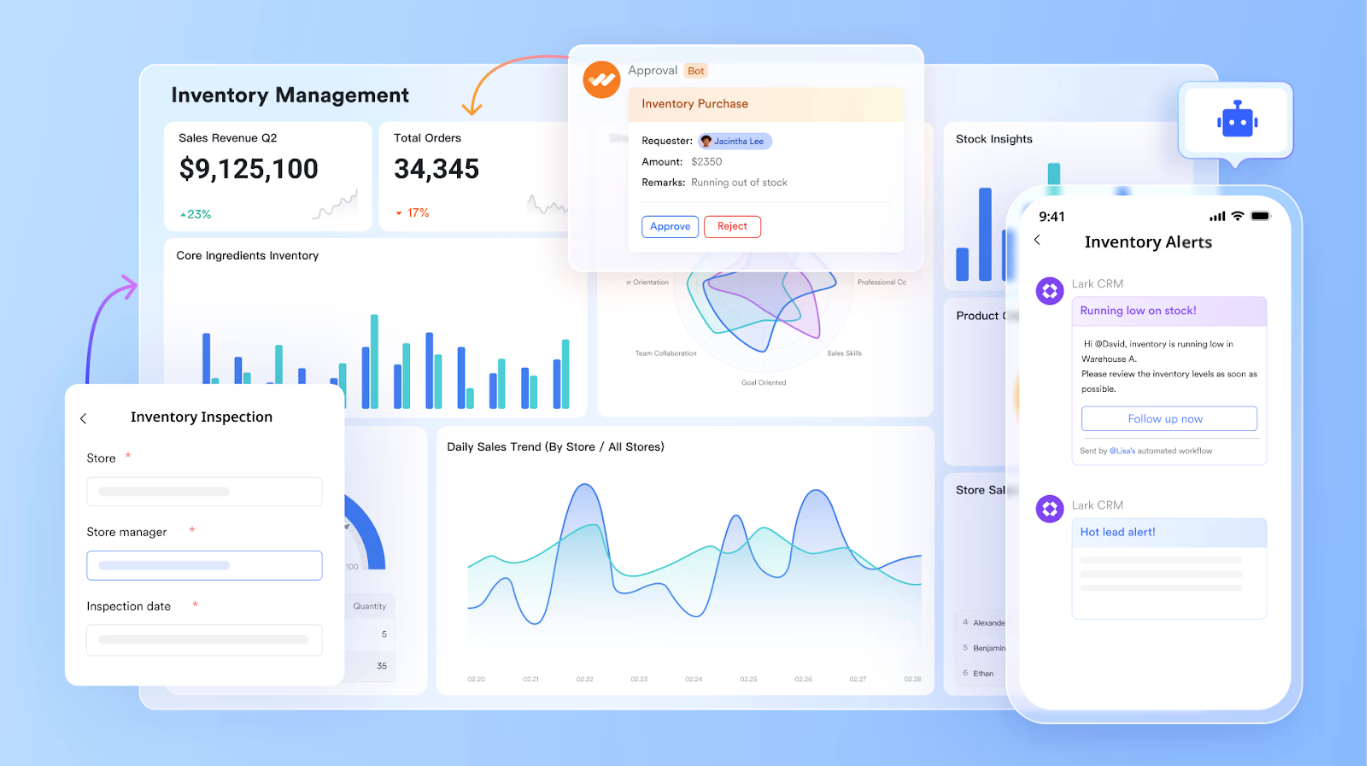
As a centralised inventory management hub and one of the most comprehensive Fishbowl and , includes a native barcode field that lets users scan barcodes or QR codes directly from the Lark mobile app. Each scan populates structured data such as product IDs, serial numbers, links, or text into a record instantly. Teams can enforce data merging by allowing only mobile scans, preventing manual edits. Barcode fields can be combined with numbering fields and formulas to generate unique asset identifiers, then linked to other tables like locations, inspections, or ownership history. Why it excels over Fishbowl: Fishbowl focuses on inventory transactions within a fixed warehouse model. Lark supports broader asset tracking use cases IT equipment, facilities, devices, or shared resources, without forcing teams into a rigid inventory workflow.
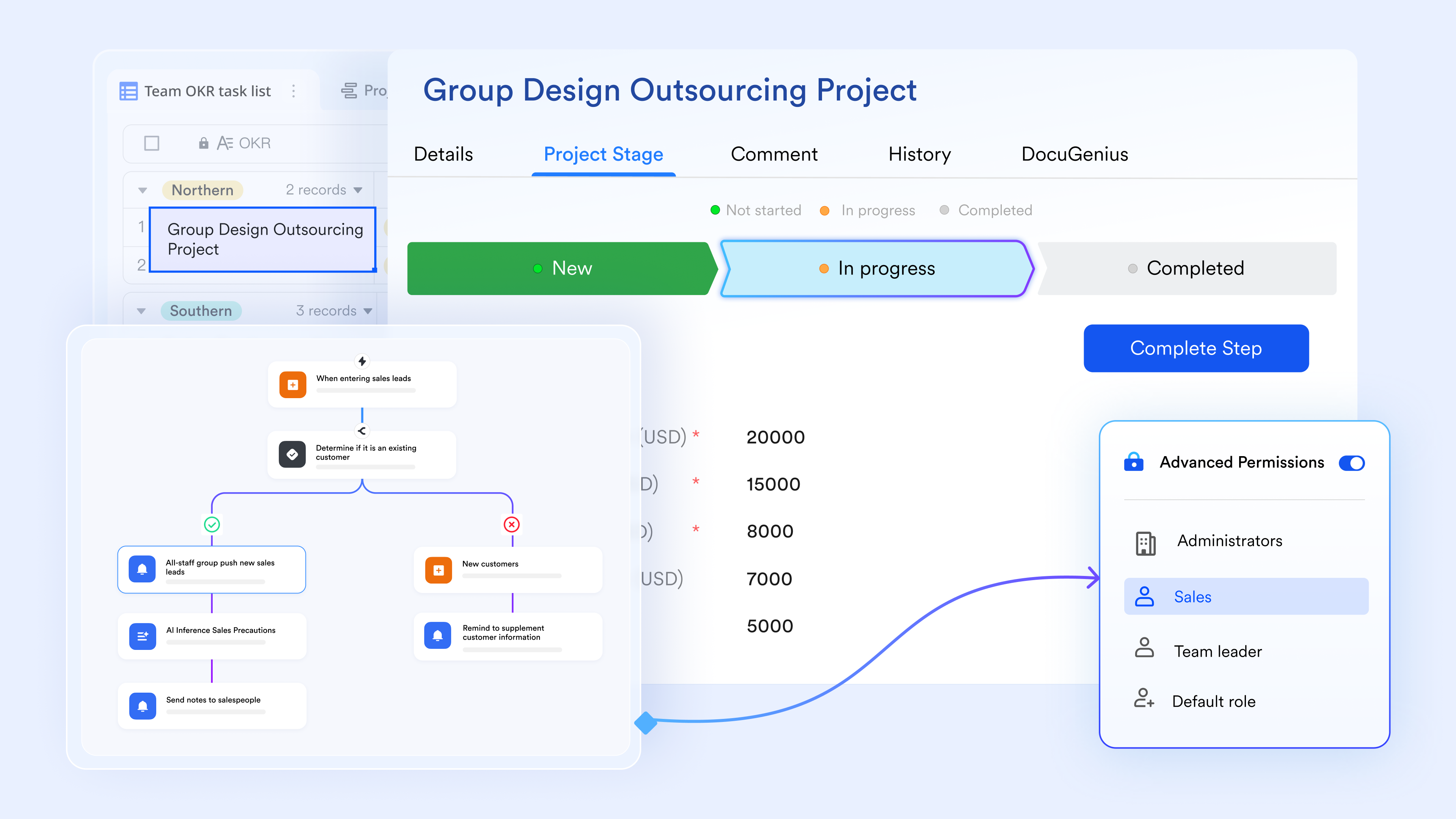
Automated workflows for real operational processes
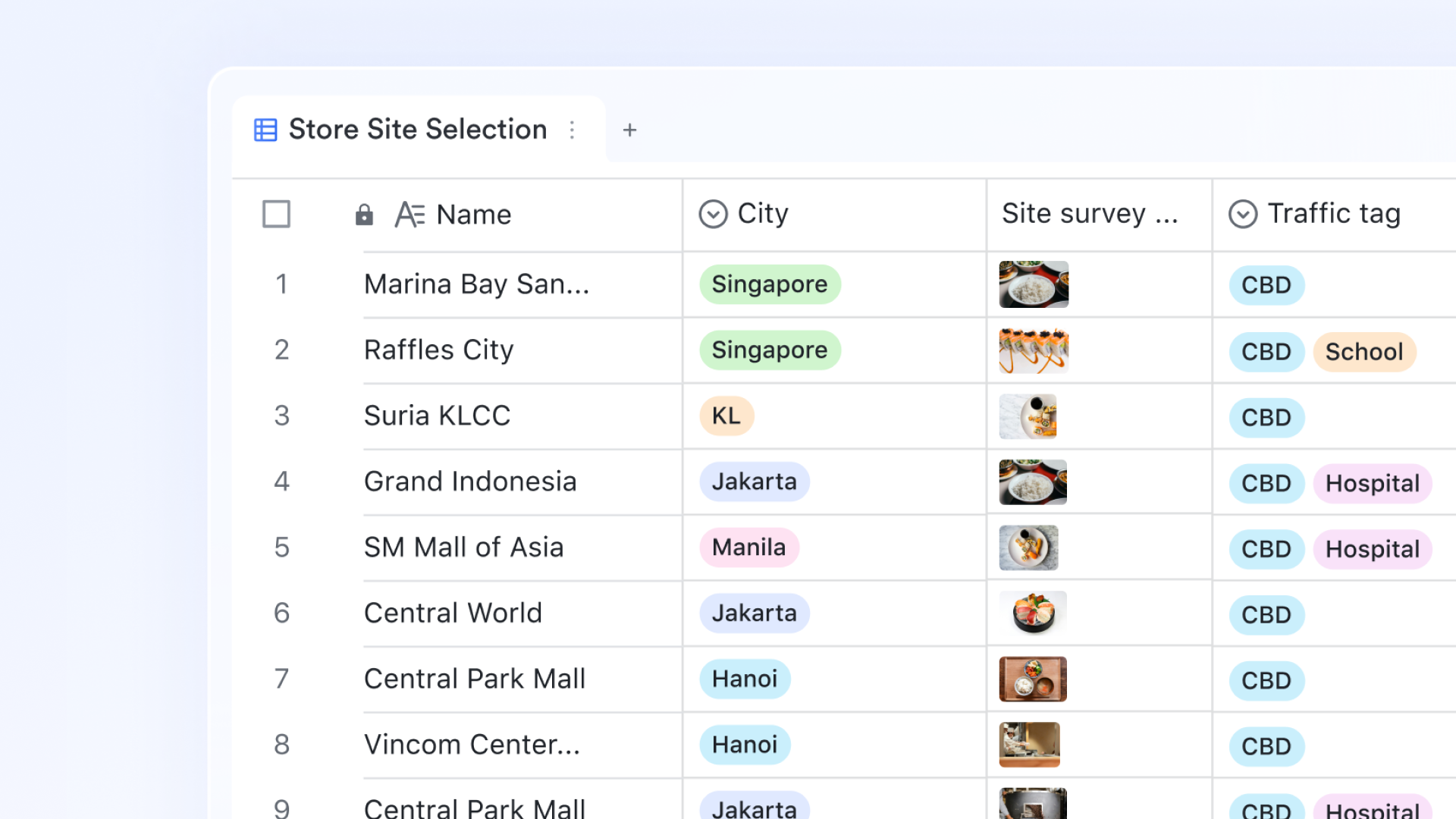
Lark Base supports automated workflows, triggered by events such as record creation, updates, time-based schedules, button clicks, or incoming messages. Workflows allow conditional branching (If/Else), loop nodes, and formulas to calculate values like SLA deadlines, shift assignments, or workload thresholds before actions run. Actions can include updating records, assigning owners, creating tasks, or sending Messenger notifications. Why it excels over Fishbowl: Fishbowl automation is largely transaction-based and inventory-centric. Lark workflows handle complex internal operations where logic varies by department, priority, or timing, making it better suited for cross-team operational execution.
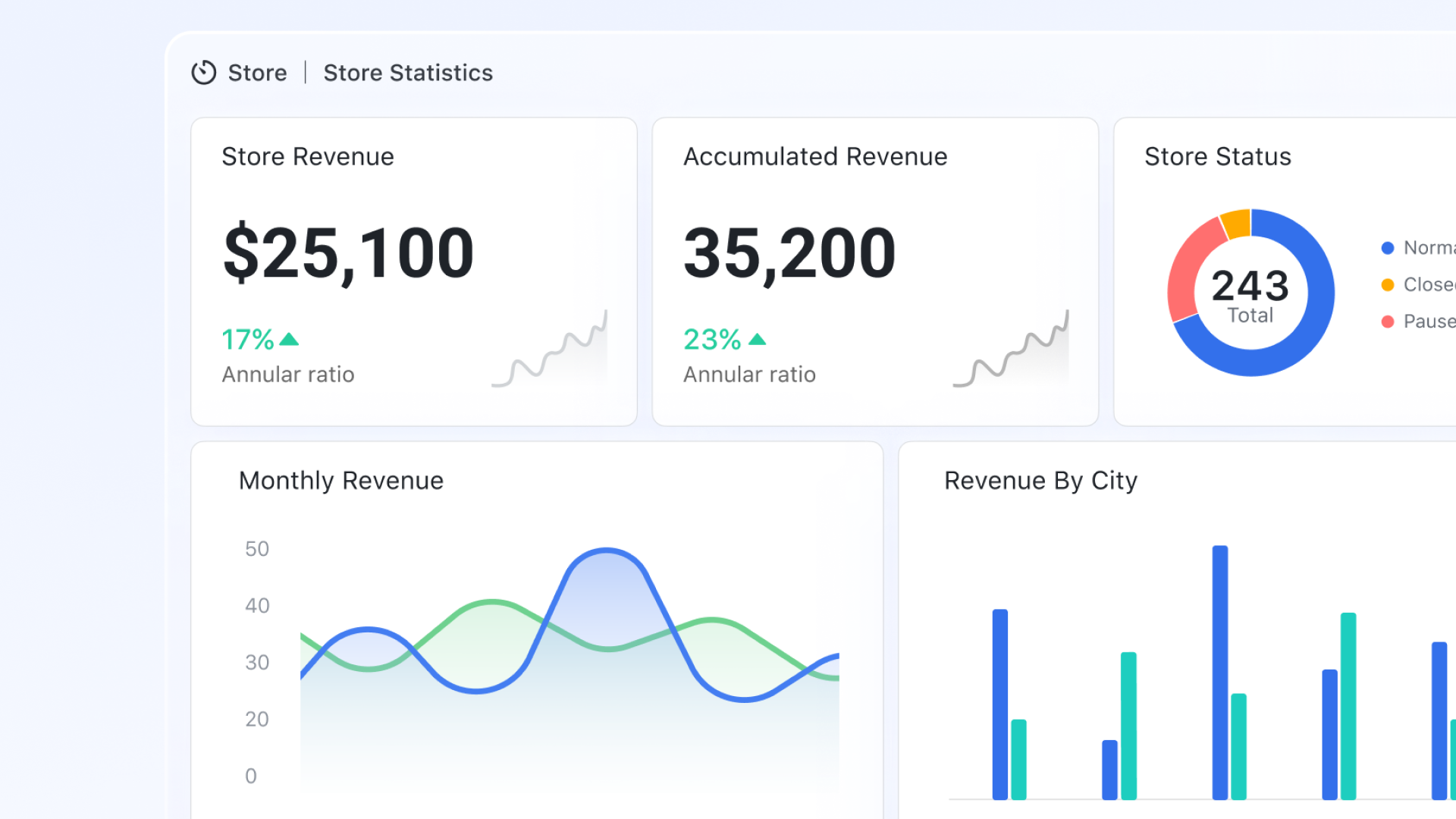
AI-powered analysis and forecasting built into dashboards
Lark Base dashboards support advanced visualization, including pivot tables, slicers, trend charts, and interactive filters. With Smart Analysis, users can generate AI summaries of charts to highlight trends, anomalies, or performance patterns. These AI features can also be sent automatically via workflows, keeping stakeholders informed without manual reporting. Why it excels over Fishbowl: Fishbowl reporting focuses on historical and transactional data. Lark adds AI-driven interpretation, helping teams understand patterns and forecast outcomes directly within their operational workspace.
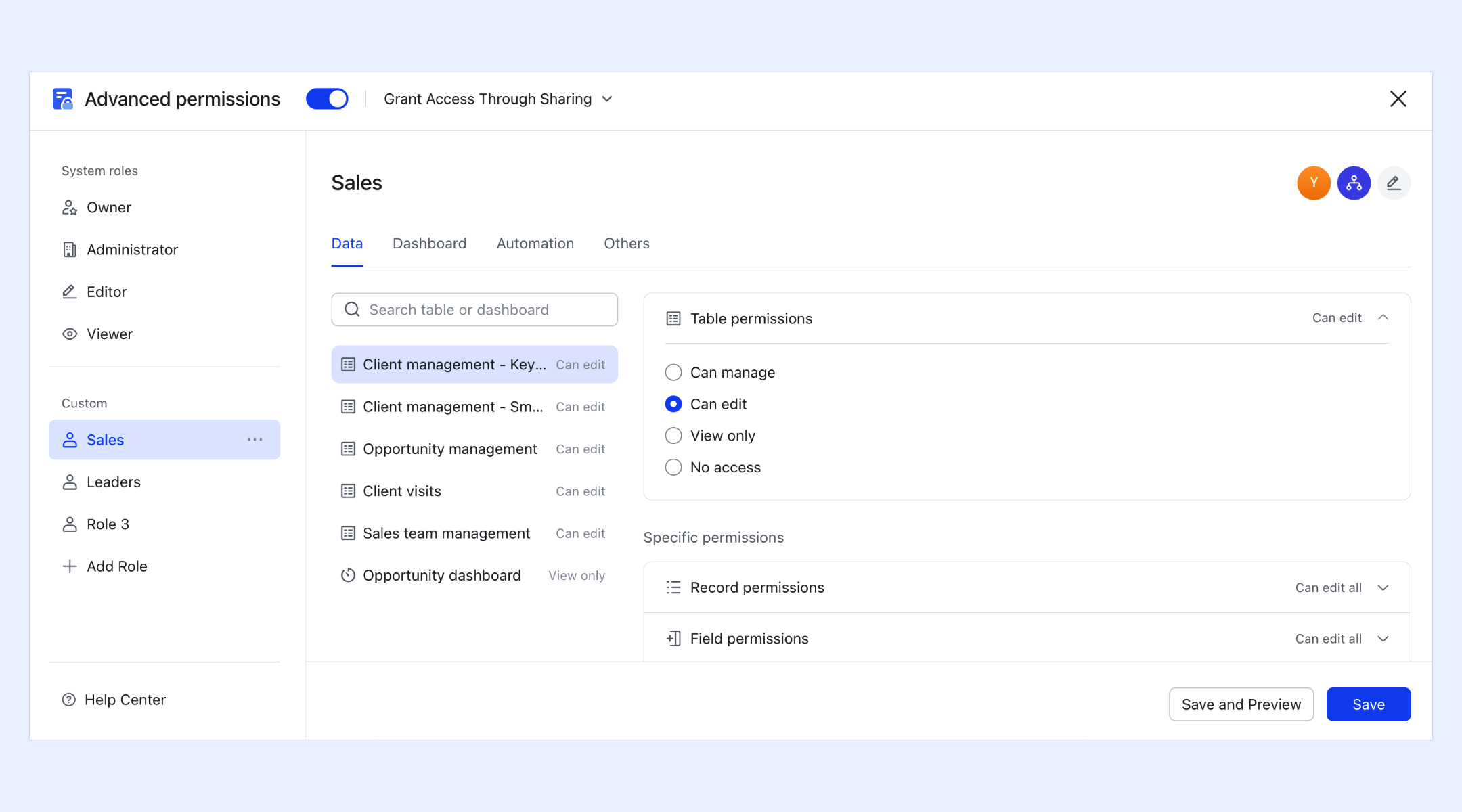
Granular permission control across data, views, and dashboards
Lark Base advanced permissions allow administrators to control access at multiple levels: tables, records (rows), fields (columns), views, forms, and dashboards. Permissions can be configured, so users only see records tied to themselves or their department, while managers retain broader visibility. Dashboard permissions are independent from table permissions, ensuring sensitive data remains protected even in shared reports. Why it excels over Fishbowl: Fishbowl permissions are typically role-based and system-wide. Lark's fine-grained control supports complex organizations where different teams need different visibility into the same operational data.
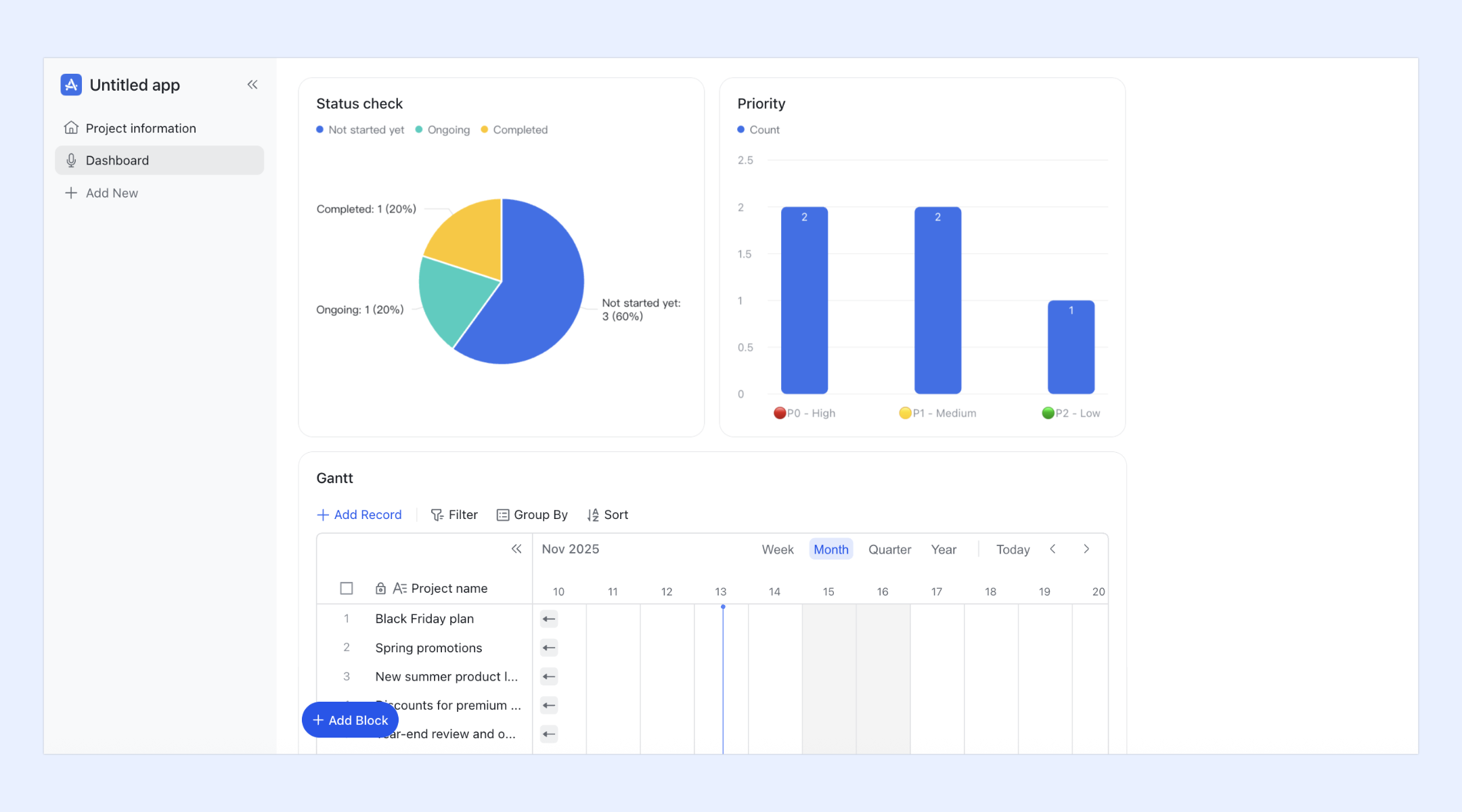
Custom operational systems using Base apps and record layouts
Lark Base apps allow teams to turn databases into interactive operational systems using drag-and-drop components, no technical setup required. Record detail pages can be customized with tabs, sections, buttons, and embedded views, making it easier for users to interact with complex records. Teams can design workflows, dashboards, and forms around how work actually happens, rather than adapting processes to a predefined system. Why it excels over Fishbowl: Fishbowl delivers a structured inventory product. Lark lets teams build flexible systems that span inventory, approvals, tracking, reporting, and collaboration in one workspace, reducing tool sprawl.
:
- Starter plan: Free forever plan that includes 11 powerful tools for up to 20 users. It also comes with 100GB of storage, 1000 automation runs, AI translations, and more.
- Pro plan: $12/user/month (billed annually) for up to 500 users. It includes everything in Starter plus group calling for up to 500 attendees, 15TB of storage, 50,000 automation runs, and more. Businesses comparing custom operational systems often review before making a final decision.
- Enterprise plan: for custom pricing. Supports unlimited users and includes even more automation runs and advanced security, compliance, and management features.
For small teams with simple communication needs

18 months message history
1000 Base automation runs/month
2000 rows per table in Base
Most POPULAR
For companies with comprehensive collaboration and management needs
Unlimited message history
500-participant video meetings
50k Base automation runs/month
20k rows per table in Base
For large companies with advanced security and organizational management needs
Get a personalized demo and pricing
Unlimited message history
500-participant video meetings
15 TB storage + 30 GB storage/user
500k Base automation runs/month
50k Base automation runs/month
Most POPULAR
For companies with comprehensive collaboration and management needs
Unlimited message history
500-participant video meetings
50k Base automation runs/month
20k rows per table in Base
Fishbowl vs Lark: High-level comparison
Choosing between Fishbowl and a modern requires looking beyond surface-level pricing and focusing on how each tool supports long-term business operations. Fishbowl is built primarily for inventory-centric workflows, making it a strong fit for companies that need deep stock, warehouse, and manufacturing controls. However, as teams grow and workflows expand beyond inventory, factors such as collaboration, automation, and pricing predictability become increasingly important. This is where platforms like Lark enter the conversation, offering a broader operational scope alongside transparent pricing.
How to decide if Fishbowl pricing is right for your business
Choosing whether Fishbowl pricing fits your business requires looking beyond surface-level costs and understanding how the pricing model aligns with your long-term operational goals. Fishbowl is designed for inventory-heavy organizations, but its license-based structure can feel complex as teams grow or diversify. Decision-makers should evaluate not only current inventory needs but also how workflows, users, and locations may expand over time. A thoughtful assessment helps ensure Fishbowl pricing supports growth rather than becoming a constraint later.
- Key questions to ask before buying: Before committing to Fishbowl pricing, businesses should ask whether is their primary operational challenge or just one part of a broader workflow. It is important to consider how many users, warehouses, and combinations will be required within the next few years. Buyers should also evaluate whether they have internal IT or operations staff to manage implementation, upgrades, and ongoing maintenance. Understanding how Fishbowl inventory pricing changes with added complexity helps avoid surprises. These questions clarify whether Fishbowl aligns with both short-term needs and long-term strategy.
- Budget planning checklist: A realistic budget for Fishbowl pricing should include more than the initial license or monthly fee. Businesses need to account for implementation and onboarding costs, annual maintenance and support renewals, and potential expenses for paid to combine or add-ons. Planning should also include upgrade and version update costs, as well as internal IT and administrative effort. Modeling multiple growth scenarios helps teams understand how Fishbowl software pricing may scale over time. A complete checklist ensures the total cost of ownership is fully understood.
- Signs you should evaluate Lark instead: If your business requires predictable monthly pricing and faster scalability, it may be time to evaluate alternatives. Teams that rely heavily on collaboration, cross-functional workflows, and automation often find inventory-first tools limiting as they grow. When operational needs extend beyond sales, or real-time communication, broader platforms can offer better alignment. Organizations seeking flexibility and cloud-native collaboration may gradually find solutions like Lark more suitable as their operations evolve.
Conclusion
Fishbowl pricing can be a solid investment for businesses whose core needs revolve around inventory control, warehouse management, and . Its depth in these areas makes it particularly valuable for organizations with stable operations and clearly defined inventory processes. However, Fishbowl pricing is rarely limited to the initial license, and long-term ownership often includes maintenance fees, paid for merging, upgrades, and internal administrative effort. As a result, total costs can become harder to predict as the business scales.
For teams that are expanding beyond inventory-first operations, conversation often shifts toward flexibility, collaboration, and cost transparency. Platforms like appeal to growing organizations because they combine communication, automation, and workflow management into a single cloud-native environment. While Fishbowl remains a strong choice for inventory-driven use cases, businesses seeking predictable pricing and broader operational coverage may find greater long-term value in evaluating modern collaboration platforms.
Build scalable workflows today
FAQs
Does Fishbowl pricing increase as inventory volume grows?
Fishbowl pricing does not usually increase directly based on inventory volume alone, but higher volume often leads to the need for more users, additional , or advanced features, which raise overall costs. As operations scale, businesses typically move into higher tiers of Fishbowl inventory pricing. This makes long-term cost forecasting important for growing teams. Indirect costs often rise alongside operational complexity.
Is Fishbowl pricing negotiable for long-term contracts?
Fishbowl pricing can sometimes be negotiated, especially for long-term contracts or purchases made through authorized resellers. Discounts may apply based on license volume, support packages, or contract length. However, pricing flexibility varies by region and vendor partner. Clear requirements and growth plans improve negotiation outcomes.
How often does Fishbowl update its pricing model?
Fishbowl updates its pricing model periodically based on product changes, support offerings, and market conditions. These updates are not always publicly announced in advance. evaluating Fishbowl inventory pricing 2026 should confirm current terms directly with sales. Regular reviews help avoid unexpected cost changes.
Can Fishbowl replace a full ERP for mid-sized businesses?
Fishbowl can handle many ERP-like functions related to inventory and manufacturing, but it does not fully replace financial, HR, or systems. Most mid-sized businesses use Fishbowl alongside other platforms to fill these gaps. Combining strategies becomes critical at this stage. Fishbowl ERP pricing reflects this partial ERP positioning.
What type of businesses benefit more from Lark than Fishbowl?
Businesses that prioritize collaboration, workflow automation, and predictable subscription pricing often benefit more from Lark. Teams managing projects, sales, and cross-functional processes beyond inventory find cloud-native platforms more flexible. As operational needs expand beyond inventory-first tools, Lark becomes a practical alternative for modern teams.
Related reading






























