














CRM Onboarding Guide: Process, Steps & Best Practices

Ryan Tanner
Product Marketing Specialist
Sep 18, 2026
Ryan Tanner
Sep 18, 2026

20 min read


CRM onboarding is a critical part of successful CRM adoption because it shapes how teams understand, use, and maintain the system from day one. Many organizations focus on purchasing CRM software but do not invest enough effort in structured onboarding, leading to low usage, incorrect data, and unclear workflows that weaken the value of customer management.
The CRM onboarding journey must guide teams from understanding the CRM onboarding definition to executing real tasks that align with business goals. Modern collaboration platforms like Lark are slowly entering this space by providing a connected environment where communication, data structures, onboarding documentation, and workflows work together to reduce confusion and effort during CRM onboarding.

What is CRM onboarding?
CRM onboarding definition refers to the structured set of activities that help users, teams, and departments adopt a new CRM system with confidence, clarity, and readiness. It focuses on preparing users to work with features, workflows, permissions, and data structures that support daily sales, service, and account management activities.
The onboarding CRM approach ensures that teams do not view CRM as just a digital record tool but as a living collaboration environment for customer engagement, opportunity management, and communication tracking. CRM onboarding process success depends on clarity, training depth, workflow familiarity, and how well documentation supports long term usage.
Why CRM onboarding matters for teams and organizations
CRM onboarding plays a critical role in determining whether the CRM will be used actively or ignored after initial setup. Teams need clarity, structure, and contextual training to understand how CRM supports real work instead of becoming an extra reporting burden. When onboarding is done carefully, it builds trust, reduces confusion, and helps users adopt new habits faster. This section highlights how onboarding CRM directly influences business value, forecasting, collaboration, and team performance.
- Improves user adoption and reduces resistance: CRM onboarding builds user confidence and eliminates the fear that new systems will increase workload or require too many steps. Guided training and practical examples show how CRM software saves time through structured updates and accurate record keeping. When employees see personal advantages such as reduced confusion and better visibility, adoption becomes voluntary instead of forced. Motivated adoption increases success across departments.
- Ensures clean, usable customer data: CRM onboarding solutions teach correct data entry standards, naming conventions, required fields, and record maintenance responsibilities. When all users follow the same data structure rules, the CRM database becomes a reliable source for decision making. Clean data prevents duplicated entries, missing fields, and unclear notes that damage forecasting. Good data discipline begins during onboarding CRM and continues through governance planning.
- Shortens the time to full productivity: Users who receive structured onboarding become effective faster because they do not waste time searching for how specific features work. CRM onboarding checklist instructions include role specific examples, which reduces learning stress and dependency on colleagues. When employees perform their tasks confidently, productivity increases without needing additional training cycles. This enables faster operational rhythm and measurable outcomes.
- Standardizes workflows and reduces confusion: Onboarding CRM activities enforce shared rules so that all users follow the same procedure when entering customer details, updating pipeline stages, or managing follow-ups. Standardization prevents chaos caused by personalized methods that differ from user to user. This is especially useful across multi-location teams where uniformity is necessary. Standard workflow rules become long-term organizational knowledge.
- Supports better forecasting and reporting: Reports and dashboards depend on accurate record updates and consistent status tracking. CRM onboarding explains how pipeline stages and field selections influence forecasting numbers. When users fully understand how their actions affect strategic reports, data quality remains high. Leadership benefits from reliable insights backed by consistent usage habits instead of incomplete assumptions.
Core components of an effective CRM onboarding process
A successful CRM onboarding process depends on addressing all foundational elements that influence data accuracy, workflow clarity, training quality, and user accountability. Missing even one core component can weaken adoption, create confusion, or slow down system usage. This section breaks down the essential building blocks required for onboarding CRM success. Each component works together to form a reliable and repeatable onboarding model.
- Data migration & cleanup: Data must be carefully reviewed to remove duplicates, incomplete fields, and outdated entries that undermine reporting accuracy. Homegrown CRM onboarding often includes poorly formatted data because employees maintain records without standard rules, which require cleansing before migration. Correct formatting guidelines are required, so the new CRM database remains usable. Clean data increases trust and reporting value.
- System setup (pipelines, fields, permissions): System setup should include only necessary components, avoiding overly complex structures that confuse new users. Sales pipelines must reflect real customer journeys, using meaningful stage labels that align with operational language. Field selections must balance detail and simplicity to avoid overwhelming entry tasks. Permission rules must allow collaboration while protecting confidential information.
- Workflow and automation setup: Workflows must be documented and matched with actual team actions such as lead qualification, customer proposal handling, service escalation, or renewal activity. Automation must reduce repetitive entry, reminder sending, and status updates so that users spend more time on productive tasks. Onboarding CRM workflow training must include an explanation of why automation exists. Automation increases speed and consistency.
- User roles & mapping: CRM onboarding solutions must include responsibility mapping so that each employee understands which data they own and which activities they must update. Roles determine visibility, field editing access, and collaboration rules. Mapping helps avoid confusion from having too many or too few controls. This supports accountability without overloading users.
- Training and enablement: Training must include real examples and practical tasks instead of only system demonstrations. Training must also be role-specific because sales, support, and leadership require different usage styles. Onboarding CRM training must be supported with visually clear reference material, helping users build a structured record of their activities similar to a professional resume of their CRM experience. Enablement prevents dependency on super users.
- Testing and refinement: Users must test workflows, status updates, field entry, and workflow automation so that any unclear steps are corrected before full launch. Simulation during testing ensures users experience realistic scenarios, so learning becomes practical. Testing helps identify unnecessary fields or confusing process tags. Refinement makes the final system intuitive.
- Launch & support structure: CRM onboarding must not end on the launch day because users need ongoing support as they work in real situations. Support must include help channels, knowledge bases, and system guidance to avoid confusion. Launch success depends on visible guidance, quick assistance, and positive reinforcement. A stable support system builds confidence.
CRM onboarding process step-by-step
CRM onboarding becomes more predictable and successful when guided by a clear step-by-step workflow rather than an unplanned rollout. Teams must follow an ordered sequence that begins with assessment, moves into data preparation, training, workflow setup, and ends with ongoing support. Each stage ensures that users and data are prepared and aligned for sustainable usage. This section presents a structured walkthrough to help teams adopt CRM in a practical, organized manner.
Step 1: Pre-onboarding assessment
This step reviews business goals, user challenges, and workflow expectations to design a meaningful onboarding CRM strategy. Teams must document desired outcomes, integration needs, data sources, reporting expectations, and automation plans. Clarity in requirements prevents future redesign and arguments about workflow direction. Assessment ensures the system fits business reality instead of forcing users to adapt to generic templates.
Step 2: Data preparation (migration + normalization)
This step ensures that the uploaded CRM software data is complete, correct, formatted, and standardized. Data must be cleaned by removing duplicates, correcting spelling, and matching company naming standards. Incorrect data affects trust in the CRM onboarding process because users cannot depend on inaccurate records. Normalized data supports long-term efficiency.
Step 3: CRM configuration
This step configures pipelines, field labels, stages, tags, filters, dashboards, automation, and permission rules based on the actual workflow. Custom CRM onboarding configuration may vary depending on industry or team size. Configuration must be documented to avoid confusion for both new and existing users. Consistent configuration increases adoption comfort.
Step 4: Customizing workflows for teams
This step ensures that CRM onboarding solutions reflect real departmental workflows instead of standard templates. Teams must define how each record moves from one stage to another and how communication logs are stored. Marketing, sales, operations, and service must be aligned to avoid disconnected usage. Workflow customization builds long-term success.
Step 5: User onboarding & role-based training
This step delivers training that matches each user group's function so that employees learn what they need instead of learning irrelevant features. Onboarding CRM training must be structured with guided walkthroughs and scenario-based exercises. Teams must receive step-by-step instructions to reduce confusion. Training must support retention and comfort.
Step 6: Integrating communication, reporting & collaboration layers
This step focuses on combining CRM software with messaging tools, reporting dashboards, knowledge databases, and collaboration spaces to avoid tool sprawl. Users become frustrated if onboarding requires switching products too often. Connected systems help create a fluid working experience and visible updates for all stakeholders. Collaboration becomes natural and efficient.
Step 7: Post-launch support & continuous improvement
This step ensures that onboarding CRM does not stop at launch but continues with improvement cycles. Businesses must gather feedback, update documentation, release new training videos, and adjust processes. Review cycles help identify improvement gaps before they become major issues. Continuous improvement converts onboarding into a long-term advantage.
Common CRM onboarding challenges
Even well-planned CRM (Customer Relationship Management) onboarding efforts face obstacles caused by user behavior, unclear processes, insufficient training, or scattered tools. Challenges become more severe when organizations rush implementation without understanding how users adapt to change. This section highlights the most common barriers that damage onboarding CRM success. Identifying these challenges early allows teams to create preventive strategies instead of reactive fixes.
- User resistance: Employees resist because they fear increased workload or the inability to adapt, especially when communication about purpose is unclear. Clear onboarding CRM communication that explains benefits and real examples increases trust. Leadership must support adoption by showing how CRM software reduces effort. A positive environment encourages user willingness.
- Over-complexity in setup: Complex CRM onboarding process structures with too many fields, stages, and rules create confusion and slow adoption. Systems must start simple and grow gradually as users become comfortable. Unnecessary complexity reduces confidence and promotes shortcut behavior. Simplicity supports quality.
- Poor data quality: Data that is outdated, duplicated, or inconsistent creates weak reporting and misinformed decision-making. Cleaning data before launch is essential to establish trust in the system. CRM onboarding checklist tasks must include field format rules to prevent future corruption. Strong data habits begin with training.
- Lack of documentation: Documentation prevents dependency on a single expert and provides uniform guidance to all new hires. Without documentation, process interpretation varies from user to user, which creates inconsistency. Onboarding CRM documentation must include screenshots and recorded examples to improve clarity. Documentation quality determines repeatability.
- No clear playbook: A playbook defines step-by-step actions for record creation, update rules, handoff processes, and communication logging. Without it, users perform tasks using personal habits which destroys standard workflow objectives. Onboarding CRM success requires visible and user-friendly playbooks. Playbooks protect process discipline.
- Ineffective training: Training must not be limited to instruction slides but must include realistic workflow demonstrations and simulation tasks. Poor training leads to incorrect assumptions and reduced interest in CRM software. Continuous training ensures that learning becomes a habit rather than a single event. Training must be role-oriented.
- Tool sprawl & inconsistent processes: Using many tools confuses users because information becomes scattered and disconnected from CRM software. Consolidation of communication, documentation, and reporting makes onboarding easier. Tool sprawl reduces data accuracy and delays decision-making. Unified digital workspace supports clarity.
Lark: A modern workspace that removes CRM onboarding complexity
Traditional CRM onboarding can become complicated because teams must align with separate tools for data management, communication, documentation, approval workflows, and reporting. Lark solves this by offering a unified workspace where all these functions live together. Instead of onboarding teams to multiple disconnected systems, Lark lets them learn and operate in one cohesive environment, making CRM-style workflows simpler, faster, and more intuitive.
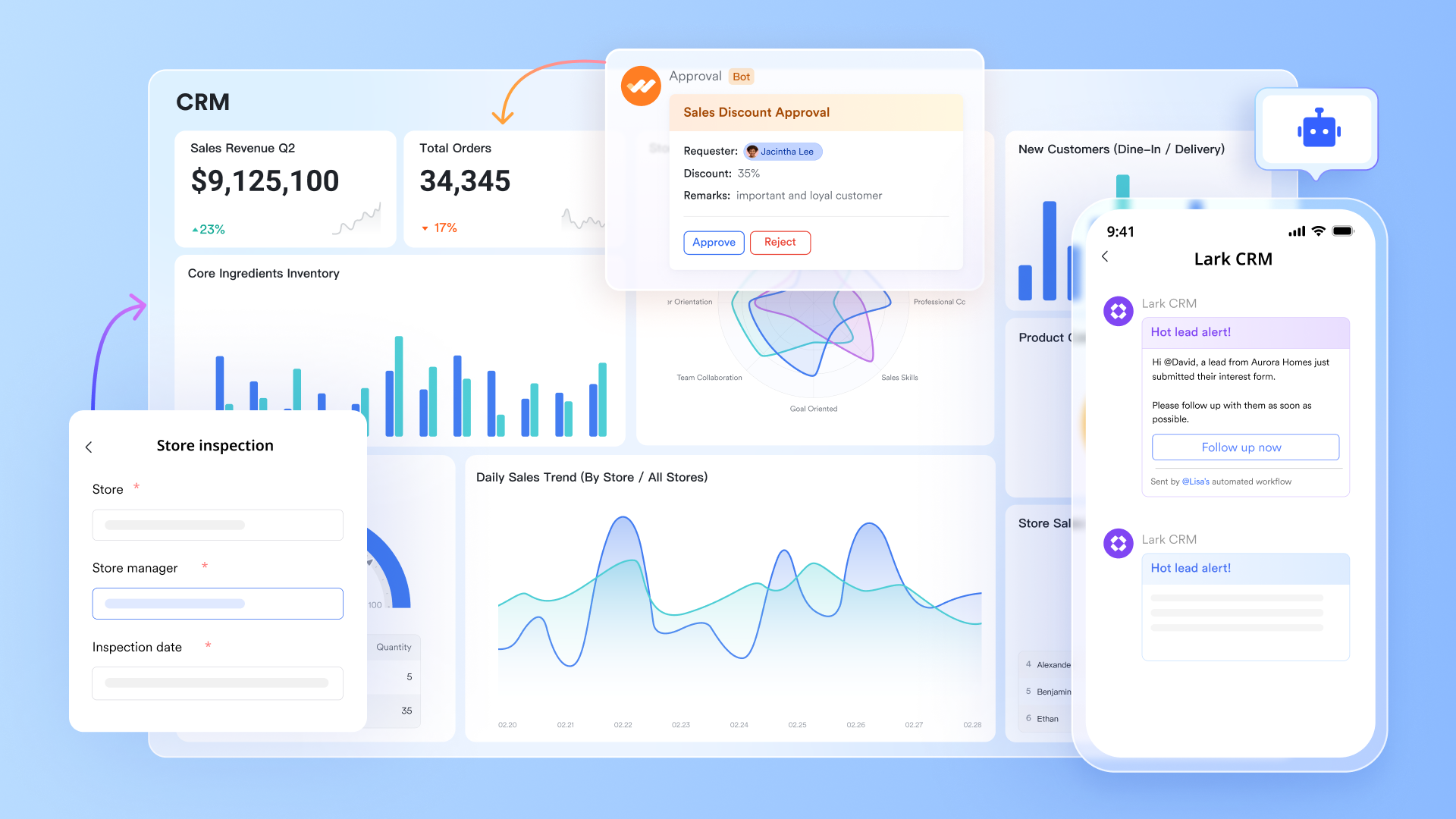
Flexible system to organize CRM data your way
Lark Base allows teams to build customizable CRM-style databases without the rigidity of traditional platforms. Firms can create structured tables for leads, clients, opportunities, projects, communication logs, and more, all tailored to their process. Two-way links keep related records connected across tables, so a client entry can automatically sync with deliverables, project tasks, meeting logs, or renewal timelines. Filters and groups give teams clean ways to segment accounts by owner, priority, timeline, or region. Dashboards built on Base offer instant visibility into pipeline value, onboarding status, or client activity, activity helping teams adopt CRM workflows without the complexity of a conventional system.
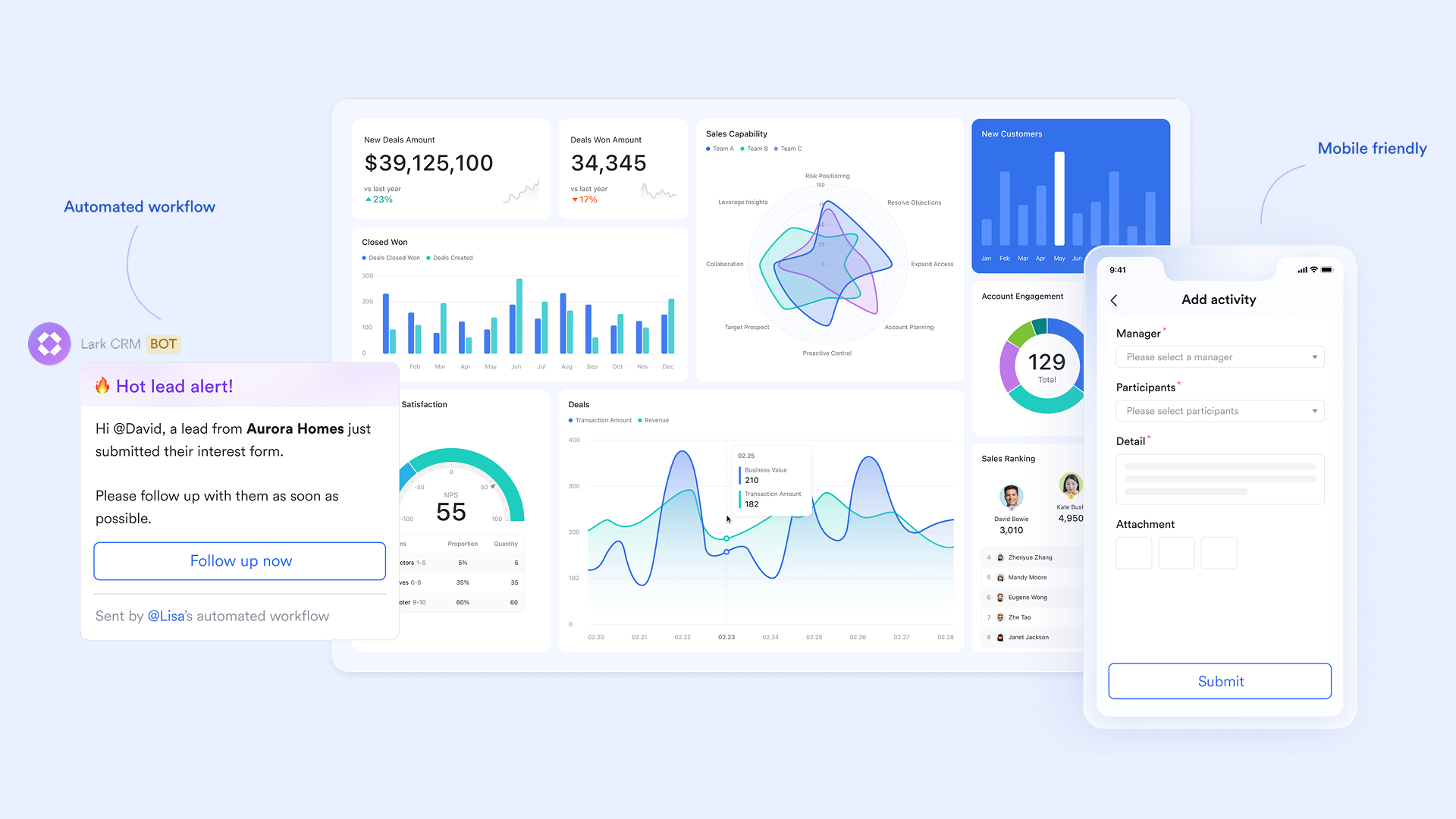
Connected communication hub for seamless onboarding coordination
CRMs often fail because communication still happens in email threads and chat apps that never make their way back into the system. Lark Messenger solves this by keeping conversations connected to the work itself. Teams can attach chat threads to Base entries, Docs, or tasks, so onboarding updates, client discussions, or internal decisions all remain visible in context. Group chat can be created for clients, onboarding flows, account owners, or cross-functional teams, ensuring everyone stays aligned. This reduces onboarding confusion and prevents information from becoming scattered.
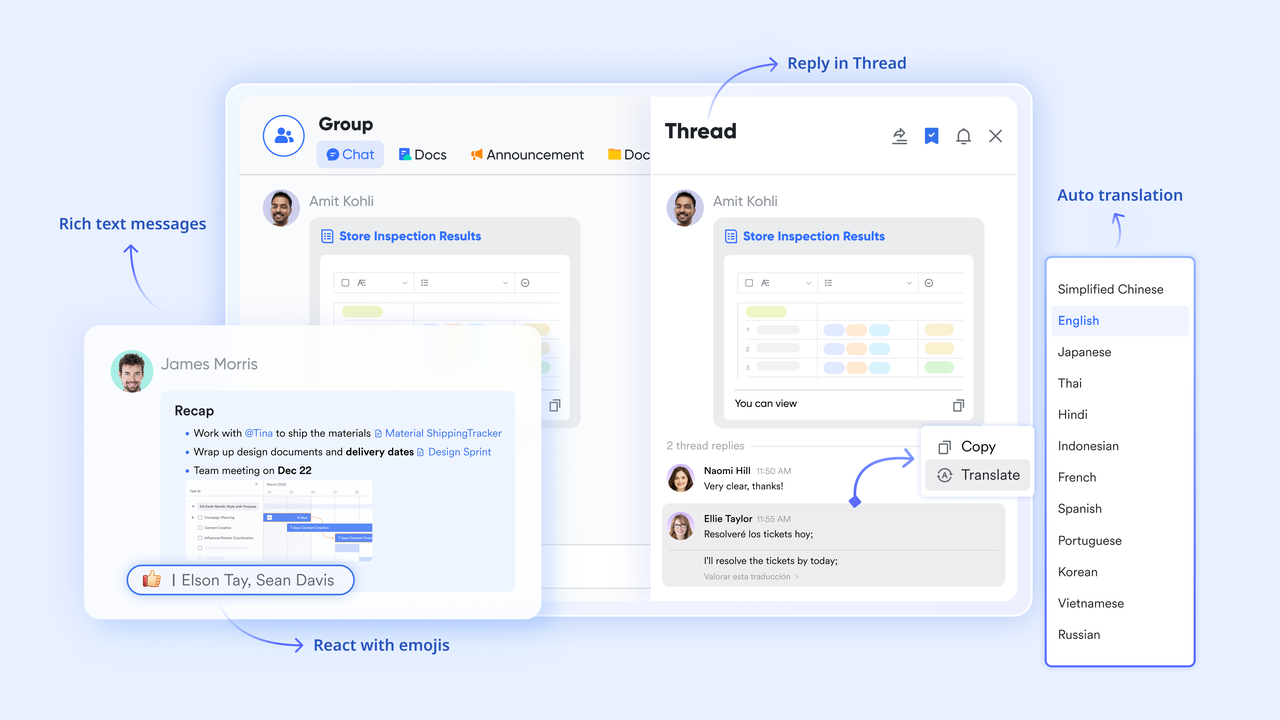
Centralized documentation and training materials for consistent onboarding
CRM onboarding requires process documentation, playbooks, training materials, client handoff forms, checklists, and reference guides. Lark Docs provides a shared environment where teams can co-edit these materials, embed videos, attach files, and link Bases for interactive onboarding content. Lark Sheets complement this by offering familiar spreadsheet-style planning for project timelines, account lists, or activity tracking. Because Docs and Sheets sit inside the same workspace as CRM data, teams never need to switch tools to access or update onboarding resources. This makes training smoother and standardizes workflows across teams.
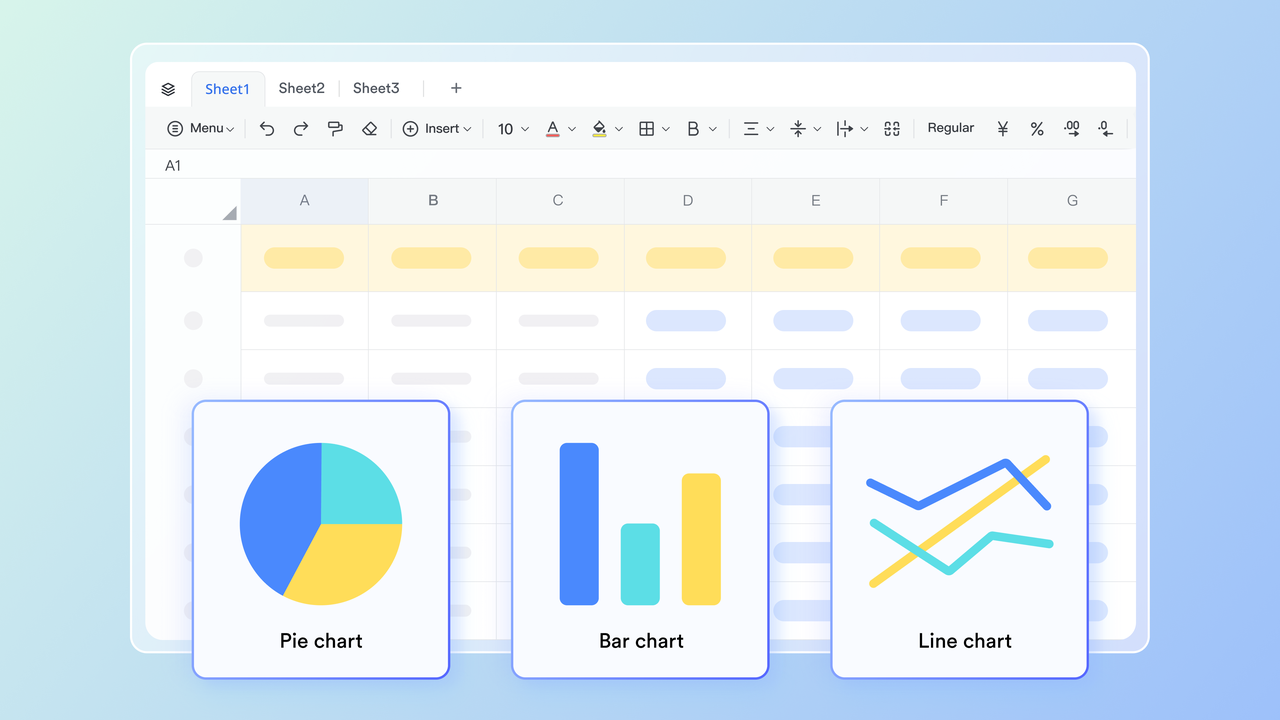
Streamlined way to manage approvals and internal requests
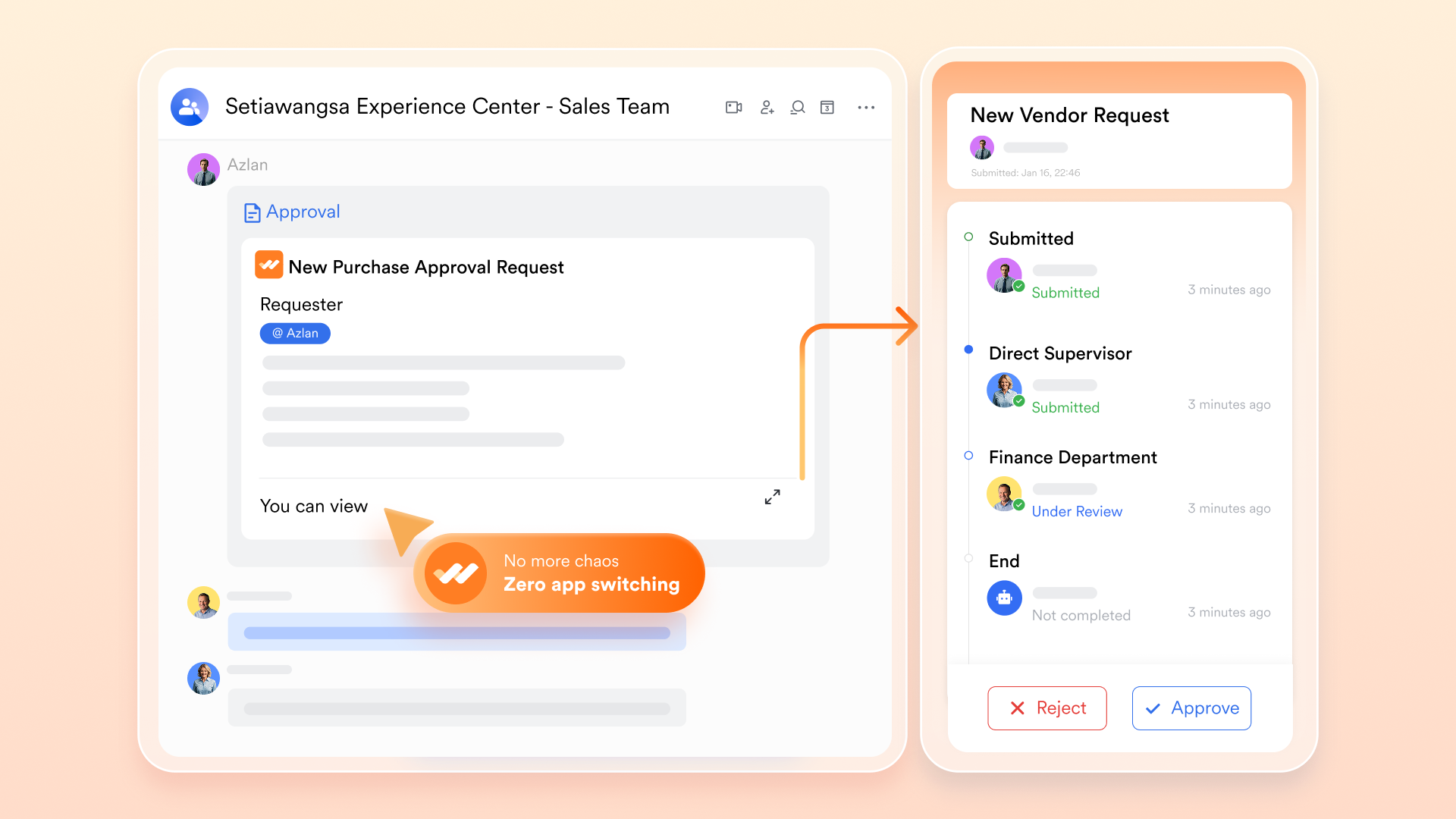
Many onboarding steps, proposal approval, contract sign-off, data validation, and access permissions require repeated manual coordination. Lark Approval helps streamline this by allowing organizations to customize approval forms and workflows to meet their specific needs, ensuring efficient request processing. It syncs CRM approval processes directly with Lark Approval, centralizing lead follow-ups and contract management in one place. The system also automates tasks, such as triggering IT equipment requests when a new hire is approved, reducing manual steps, while ensuring all relevant data (contracts, customer info) is automatically synced with financial systems for a seamless onboarding experience.
Clear timelines and task ownership for onboarding milestones
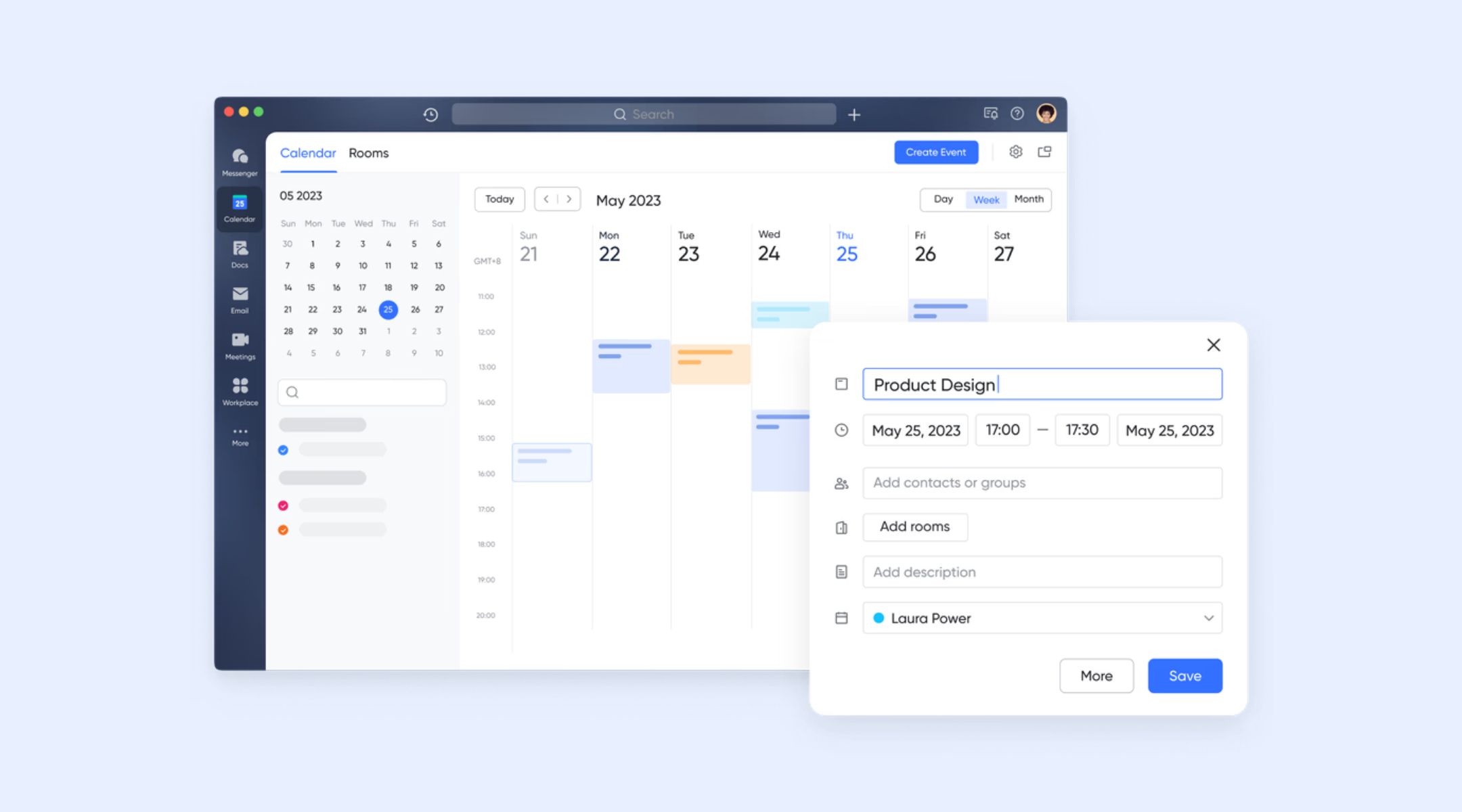
CRM onboarding succeeds when tasks, deadlines, reviews, and client meetings are clearly organized. Lark Calendar centralizes these timelines so teams can schedule client kickoffs, internal onboarding sessions, training workshops, or milestone reviews within one shared view. Tasks give ownership to each onboarding step, with due dates, priorities, and status tracking that keep everyone accountable. Tasks with milestones (such as deadlines) can be displayed and edited in the Calendar if they have at least one milestone set, ensuring all stakeholders stay on one page.
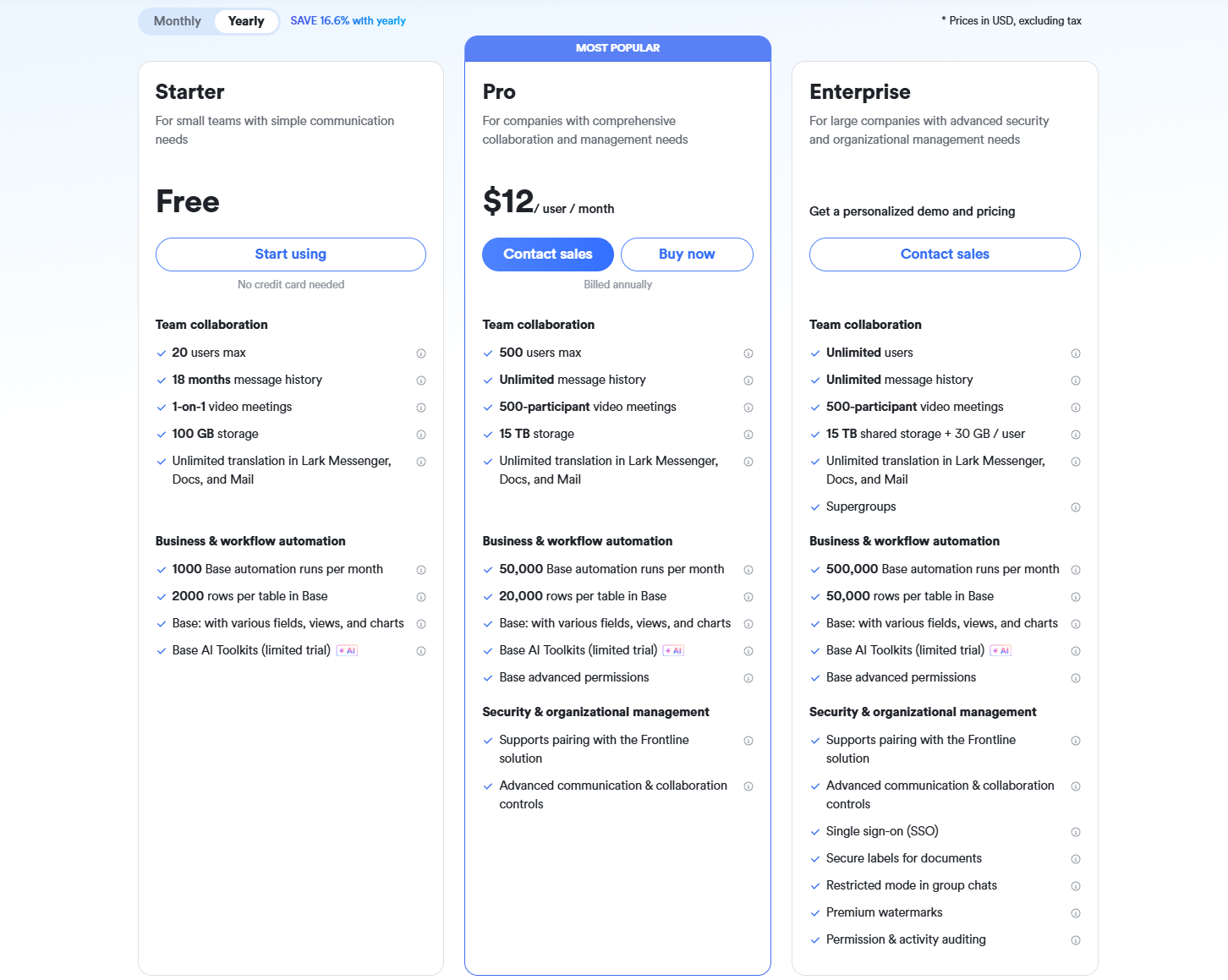
- Starter plan: Free forever plan that includes 11 powerful tools for up to 20 users. It also comes with 100GB of storage, 1000 automation runs, AI translations, and more.
- Pro plan: $12/user/month (billed annually) for up to 500 users. It includes everything in Starter plus group calling for up to 500 attendees, 15TB of storage, 50,000 automation runs, and more.
- Enterprise plan: Contact sales for custom pricing. Supports unlimited users and includes even more automation runs and advanced security, compliance, and management features.
CRM onboarding checklist
A CRM onboarding checklist acts like a quality control tool that prevents important steps from being missed during planning and rollout. It ensures that all responsibilities, documentation, workflows, data preparation, and permissions are ready before full adoption. This section explains the use of a checklist for structured execution. It supports consistency, repeatability, and team accountability.
- Technical setup: Technical setup includes system configuration, pipeline creation, field mapping, automation rules, and dashboard layouts that support real workflow usage. Each element must match daily tasks and reporting requirements to avoid rework after launch. Technical setup must also include account provisioning and device access readiness. Proper setup prevents early user confusion.
- Data readiness: Data readiness ensures that all customer, lead, contact, and history records are cleaned, standardized, formatted, and validated before importing into the CRM. Teams must establish naming rules and mandatory field standards to ensure data remains usable for long-term analytics. Duplicate removal and field normalization must be completed before going live. Proper data readiness strengthens forecasting accuracy.
- Workflow alignment: Workflow alignment verifies that CRM actions match real team processes instead of forcing users to change habits without explanation. Each stage, field, and rule must reflect what employees actually do during customer handling. Cross-functional stakeholders must confirm alignment to avoid future disagreements. Clear workflow paths create confidence.
- Permissions: Permissions define who can access, edit, approve, or view information inside the CRM based on job role and accountability. This prevents accidental modifications and protects sensitive commercial or operational information. Permission rules must be reviewed by management before launch. Clear access control reduces risk and confusion.
- Training sessions: Training sessions must include scenario-based guidance and live usage walkthroughs rather than simple feature explanations. Each role group must learn based on relevance rather than generic system demonstrations. Sessions should include short practice tasks to strengthen memory and confidence. Recorded resources must remain available for reference.
- Testing: Testing ensures that workflows, fields, dashboards, and automation behave as expected when used by real people. Teams must use sample records to simulate everyday tasks, so hidden usability issues can be identified early. Testing must include feedback capture and correction loops. Strong testing avoids user frustration after launch.
- Go-live readiness: Go-live readiness checks whether documentation, communication, support contacts, scheduled training, and data entry rules are fully prepared. Teams must feel confident using the CRM independently without fear of mistakes. Launch announcements must include instructions and help resources. Go-live success depends on emotional and practical preparedness.
- Continuous improvement tasks: Continuous improvement tasks ensure that onboarding does not stop after launch but evolves through updates and refinement. Teams must schedule review cycles to evaluate data quality, automation efficiency, and user comfort. Feedback must be applied promptly to avoid the formation of negative habits. Improvement cycles keep the system relevant and valuable.
Conclusion
Effective CRM onboarding is essential to ensuring long-term adoption, accurate data, and consistent workflow execution across teams. When organizations invest in structured onboarding, employees gain clarity on how the CRM supports real work, not just reporting requirements. Clean data, transparent processes, and role-based training help users build confidence early, reducing resistance and confusion. Modern platforms like Lark further simplify onboarding by unifying communication, documentation, automation, and data management in one connected workspace. With a thoughtful onboarding strategy, teams can fully unlock the value of their CRM, achieve better forecasting, and maintain consistent customer management practices that drive long-term success.
FAQs
How long does CRM onboarding typically take for most teams?
CRM onboarding requires two to eight weeks, depending on data size, workflow maturity, team readiness, and training approach. Smaller teams with simpler workflows complete faster, while large enterprises require a phased rollout for quality. Realistic timelines, combined with proper support, build confidence. Monitoring progress helps maintain momentum. Tools that centralize documentation and communication, like Lark, help keep this timeline consistent
What are the biggest causes of CRM onboarding delays?
Significant delays occur due to missing documentation, unclear decisions, incomplete data preparation, resistance to change, and confusion over tool sprawl. Teams that prepare in advance and provide clear guidance avoid these delays. Onboarding CRM discipline must be visible at the leadership level. Supportive communication helps reduce obstacles. Platforms that unify data and messaging, such as Lark, can mitigate many of these delays.
How can teams measure the success of CRM onboarding?
Success is measured with metrics such as user login frequency, record update completion, data accuracy rate, pipeline consistency, and reporting reliability. Feedback sessions gather user experience insights. Strong outcomes reflect clear training and usage rules. Measurements must be repeated monthly. Using a workspace that supports building dashboards and activity logs, like Lark, makes this evaluation easier.
What should be included in a CRM onboarding checklist?
A checklist must include configuration steps, data checks, a user training schedule, workflow documentation, approval logic, reporting requirements, and support channels. The checklist serves as a quality assurance control document. Visibility ensures nothing is skipped. Checklists protect workflow integrity. Collaborative tools such as Lark make it easier to store, update, and share these checklists across teams.
How do CRM onboarding needs differ for small vs. large teams?
Small teams need fast setup, minimal configuration, and short training cycles due to lower role complexity. Large teams require advanced permission design, departmental workflow mapping, and phased user training groups. Both groups must maintain documentation. Successful onboarding requires context-based adaptation. A flexible workspace like Lark can support both small and large teams by adjusting to their structure and scale.
Related reading
Table of contents
Start using Lark today

Manage all your work in one place
Boost team efficiency by 10x
Save up to 70% on software costs
Table of contents
Start using Lark today
Manage all your work in one place
Boost team efficiency by 10x
Save up to 70% on software costs
Keep reading









2026 Lark Technologies Pte. Ltd.
Headquartered in Singapore with offices worldwide.






Explore: