Choosing the right retail inventory management system supports accurate stock tracking, fast order fulfillment, streamlined purchasing, and smooth collaboration between store teams and warehouses. As retailers expand across online and physical channels, cloud-based platforms now combine inventory tracking with order processing, automation, and reporting. This guide ranks the top retail inventory management systems while highlighting differences in workflow depth, collaboration strength, and scalability.
Key takeaways: Top retail inventory management systems
1. Lark: Workflow-driven retail inventory management
2. Cin7: Omnichannel retail inventory platform
3. Zoho Inventory: SMB online inventory management
4. NetSuite Inventory Management: Enterprise retail ERP
5. Brightpearl: Retail stock and accounting automation
Upgrade store management with the best tool
Overview snapshot of top retail inventory management systems
This comprehensive guide evaluates 10 leading retail inventory management systems, but we start by presenting the top 5 platforms focused on workflow and stock control.
Information source: Official vendor sites
Update time: 2025-12-08
Note: Pricing and plan details reflect publicly available data as of the update date and may vary based on region, billing cycle, and number of agents.
What is a retail inventory system?
A is software that helps stores track, manage, and optimize the flow of products across warehouses, storefronts, and online channels. Unlike generic stock tools, retail inventory management systems capture every movement, from purchasing and receiving to sales, returns, and replenishment, so retailers always know what's available, where it's located, and when to reorder. These platforms reduce manual work by syncing stock levels across POS systems, ecommerce platforms, and multi-location environments in real time.
A modern retail inventory system also improves accuracy through barcode or RFID scanning, automated stock alerts, and consolidated reporting. Features like demand forecasting, , and multi-warehouse visibility help retailers avoid stockouts, control carrying costs, and streamline operations. For growing businesses, advanced inventory management systems for retail connect teams through workflows, approvals, and task automation, ensuring faster shelf replenishment and smoother fulfillment across the entire retail network.
Why are inventory management systems important for retail?
Retailers rely on retail inventory management systems to streamline daily operations and maintain accurate stock levels across stores and warehouses. These tools improve visibility, coordination, and decision-making, helping teams move faster while reducing costly errors.
- Faster fulfillment and shelf replenishment: A modern retail inventory system syncs stock levels in real time, helping teams respond instantly to low-shelf availability or incoming orders. and task routing ensure replenishment is completed without delays. This reduces customer wait time and keeps store shelves consistently stocked.
- Reduced overstock and markdown losses: Retail inventory management systems analyze sales velocity and trends to help retailers order only what they truly need. By preventing excess inventory, stores avoid outdated stock and unnecessary markdowns. This leads to healthier margins and more efficient stock turnover.
- Improved in-store staff coordination: With workflow automation and shared dashboards, staff know exactly which tasks, replenishment, counting, and transfers need priority attention. eliminates misalignment between store teams and warehouses. As a result, operations run smoothly even during peak retail hours.
- Clear purchase-planning visibility: Retailers gain complete insight into supplier performance, incoming shipments, and seasonal demand patterns. Purchase orders can be planned based on accurate, data-driven forecasts rather than guesswork. This ensures stable stock availability and reduces supply chain disruptions.
Choosing between POS-based and workflow-first retail inventory systems
As retailers expand across online and in-store channels, selecting the right type of retail inventory management system becomes critical. The two main categories, and workflow-first systems, offer very different capabilities depending on your operational needs.
- POS-focused tools: Great for checkout operations, but limited workflow coordination: POS-led retail inventory systems are designed primarily for fast and accurate checkout, making them ideal for small stores with simple stock needs. They track basic inventory levels and automatically sync sales, but they offer limited support for . Tasks like replenishment routing, store-to-store transfers, and audit coordination often require manual effort or additional tools.
- Workflow-first systems: Emphasize cross-team execution with task automation and approvals: Workflow-first systems connect inventory tracking with real operational execution, making them powerful for retailers managing multiple teams and locations. They automate tasks such as receiving, transfers, replenishment, and approvals, ensuring every step is documented and assigned. Platforms like Lark unify messaging, forms, and task routing to streamline collaboration from warehouse to storefront.
Elevate retail execution with a modern ops system
Best retail inventory management systems
1. Lark: Workflow-driven retail inventory management system
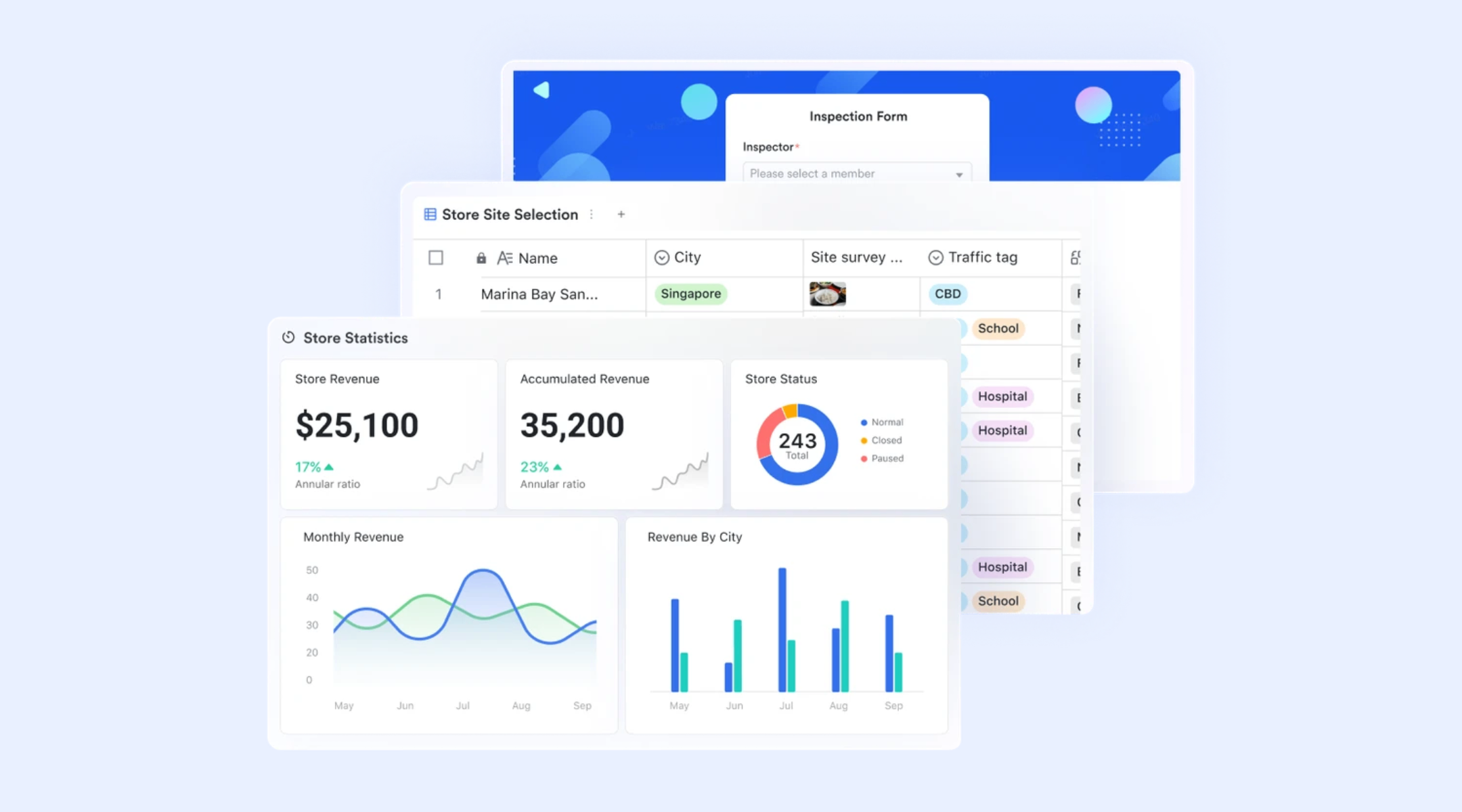
supports collaborative across purchasing, warehouses, storefronts, and fulfillment teams. It enables fast, error-free operations through Barcode fields and instant lookups, while workflows with conditional logic automate stock updates and approvals. Managers gain visual clarity via and dashboards to monitor fulfillment, all supported by contextual, real-time communication via Lark Messenger. With these features, it eliminates silos and drives efficiency in modern retail operations.
Fast product identification and tracking
Lark's barcode fields allow staff to scan barcodes and QR codes directly into the inventory table using mobile devices or scanners. This speeds up receiving, stock counts, transfers, and without manual data entry errors. Scanned codes instantly pull up existing product records or create new entries when needed, ensuring each movement updates live inventory data. Barcode scanning makes in-store operations faster while improving accuracy across warehouses and storefronts. 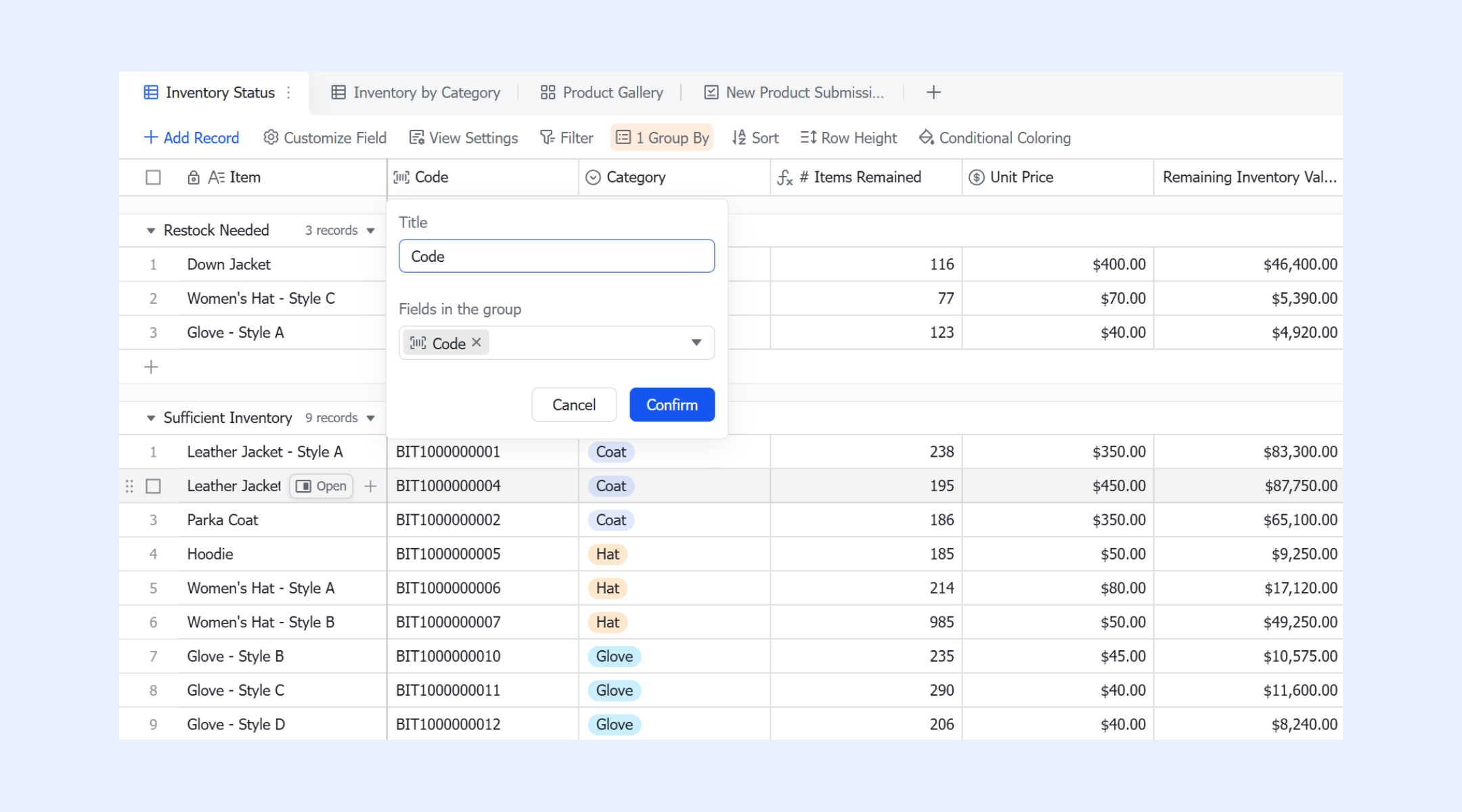
Instant lookup and record updates
The query page provides a simplified search interface for locating products or orders by product number, barcode, or keyword. Staff can update stock counts, correct attributes, or add missing details directly from the search result screen, without navigating large inventory databases. This is especially useful during checkout, replenishment checks, or customer inquiries when quick validation and edits are required in real time. 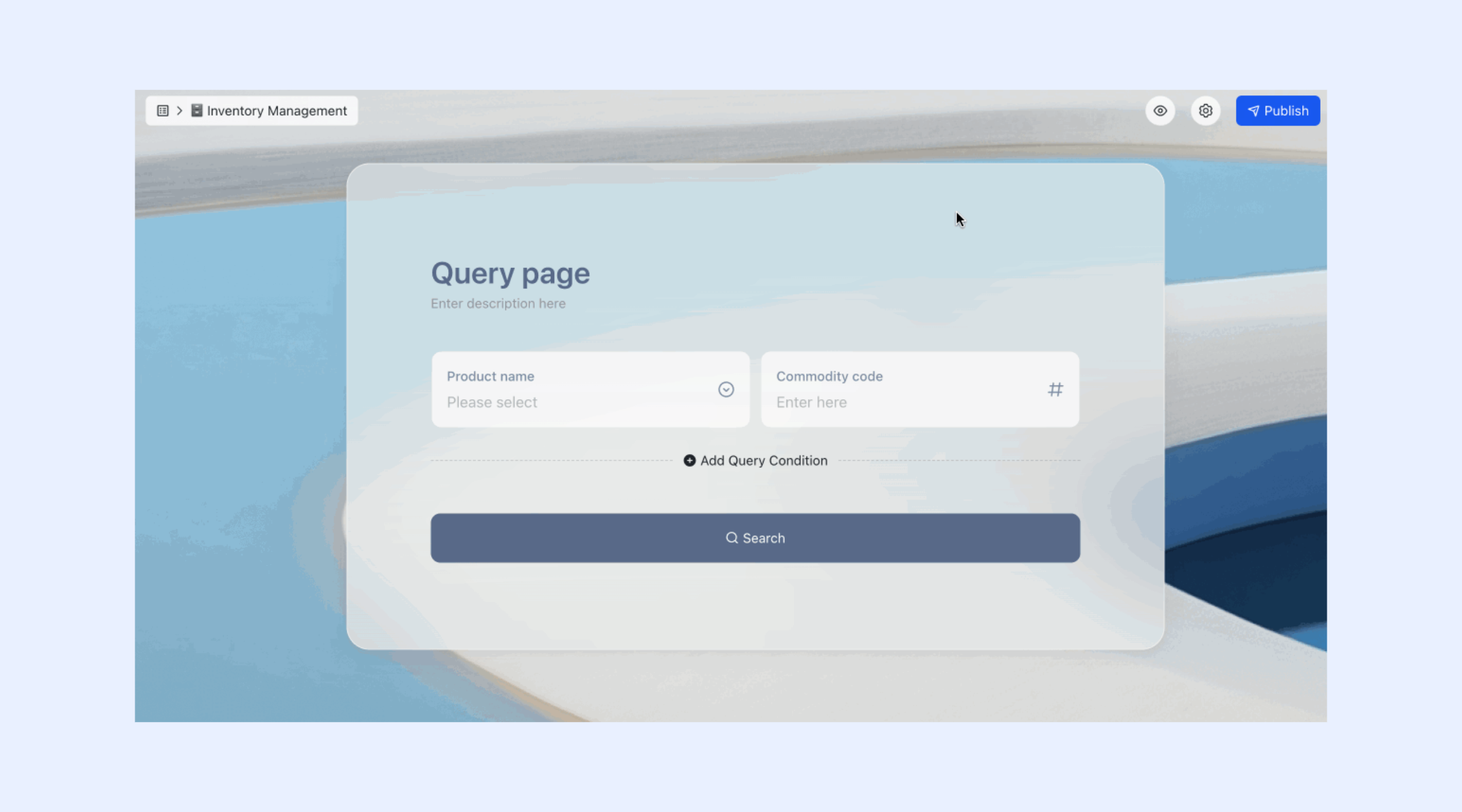
Sales and fulfillment tracking
The records all transaction details, including items sold, quantities, order status, assigned staff, shipping schedules, and completion dates. Managers use this table to monitor pending shipments, , identify fulfillment delays, and correlate order trends with stock movement. By linking orders directly to inventory records, teams maintain accurate stock deductions, revenue tracking, and operational insights.
Visual management and timeline tracking
Lark enables teams to sort inventory records by price, turnover rate, restock urgency, or last update time to prioritize attention. Multiple views transform raw data into actionable dashboards, such as to visualize fulfillment stages or Gantt timeline views to track delivery schedules and replenishment cycles. These views make it easier to spot process irregularities, shipping bottlenecks, or upcoming stock-outs while maintaining a clear overview of ongoing retail operations. 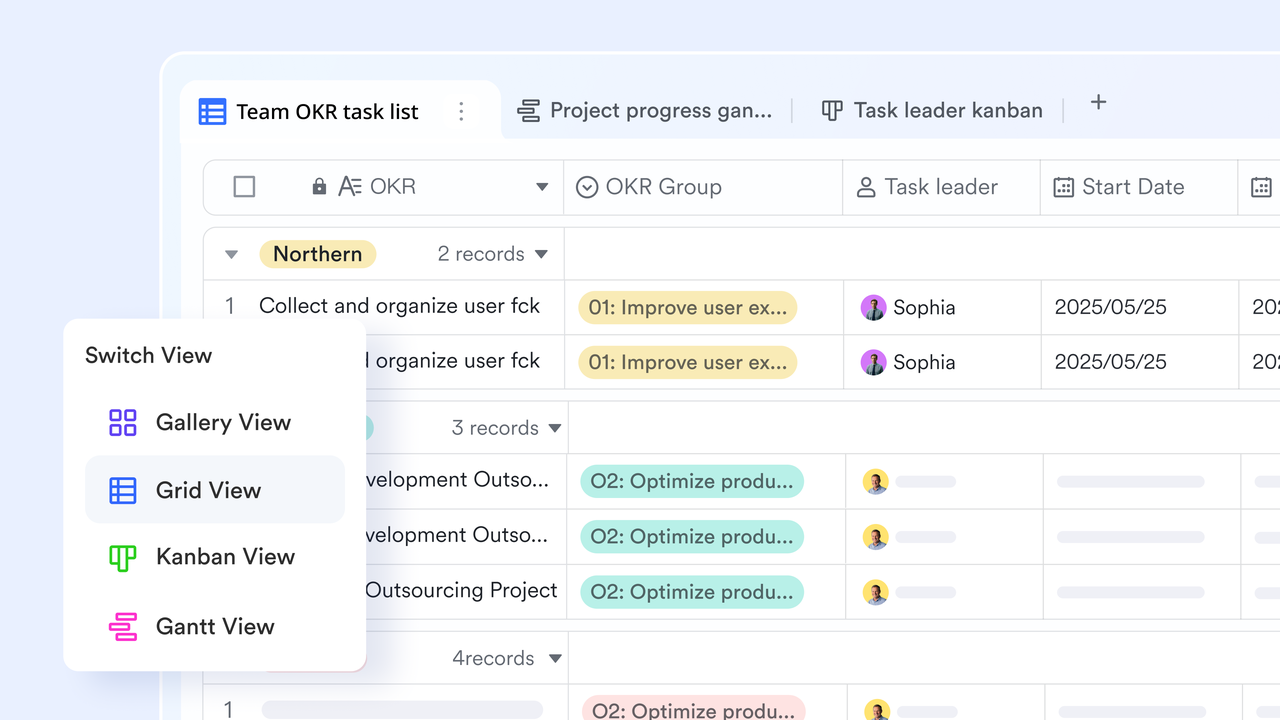
Automated workflows boost stock tracking and updates
Lark Base workflow automates retail inventory management by building intelligent, conditional processes around stock levels and transactions. When goods are received, automations instantly follow your triggers and actions, updating the inventory total via Base records. Technically speaking, workflows use If/Else conditional logic to manage approval requests, automatically approving item requests only if sufficient stock is available, or instantly notifying both the applicant and the inventory manager if the quantity is insufficient. This robust automation can also efficiently transfer and update data between tables and send automated inventory messages or exception summaries. 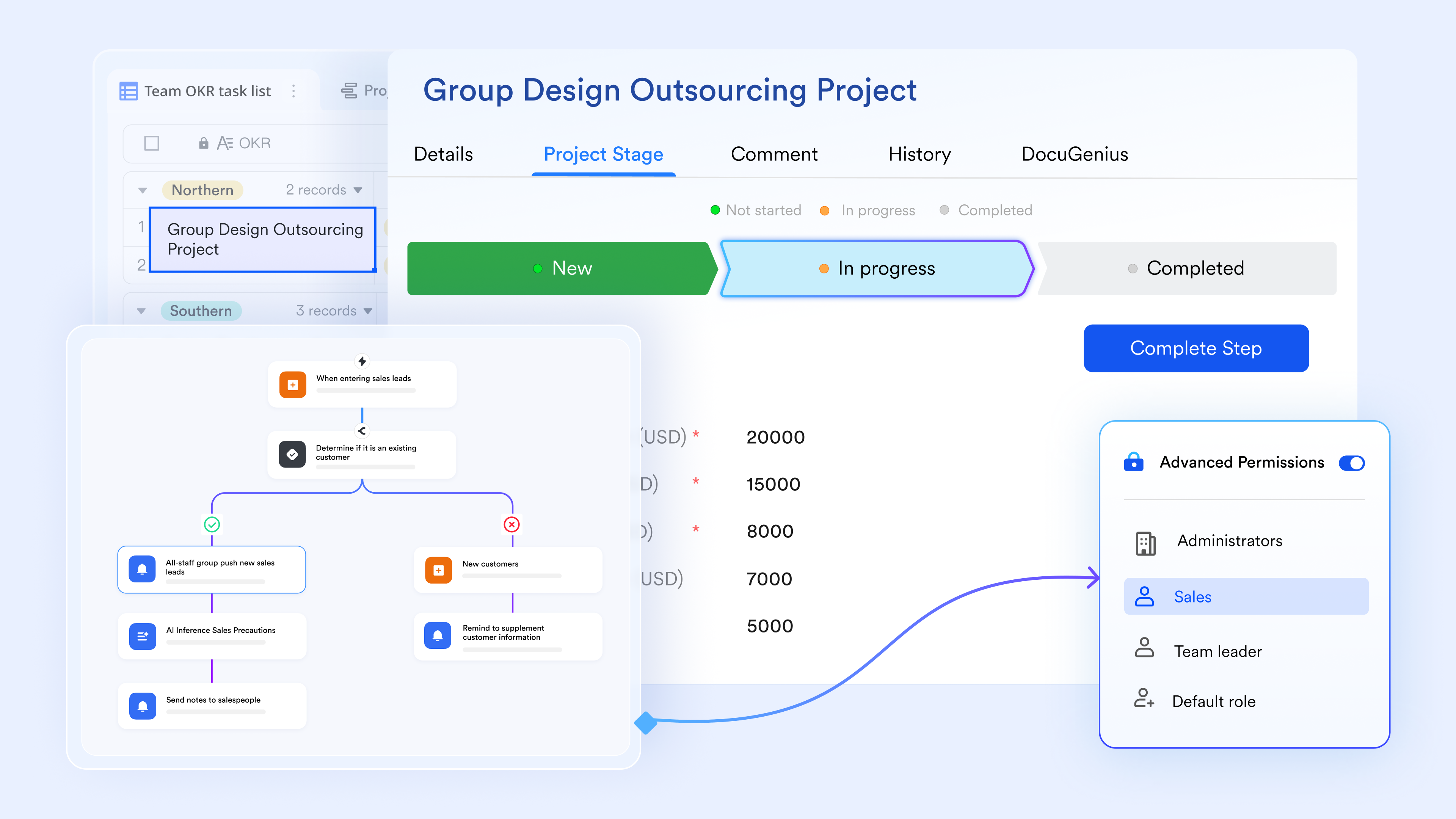
Native messaging hubs foster close collaboration and communication
enhances retail inventory communication by ensuring discussions remain contextual and organized through replying to specific messages. Topic groups centralize discussions for focused knowledge sharing (e.g., stock alerts). Furthermore, by collaborating with Lark Docs and Lark Bases, you can instantly share critical inventory files, such as manifests and count sheets, during conversations, ensuring real-time alignment and accuracy across all retail operations. 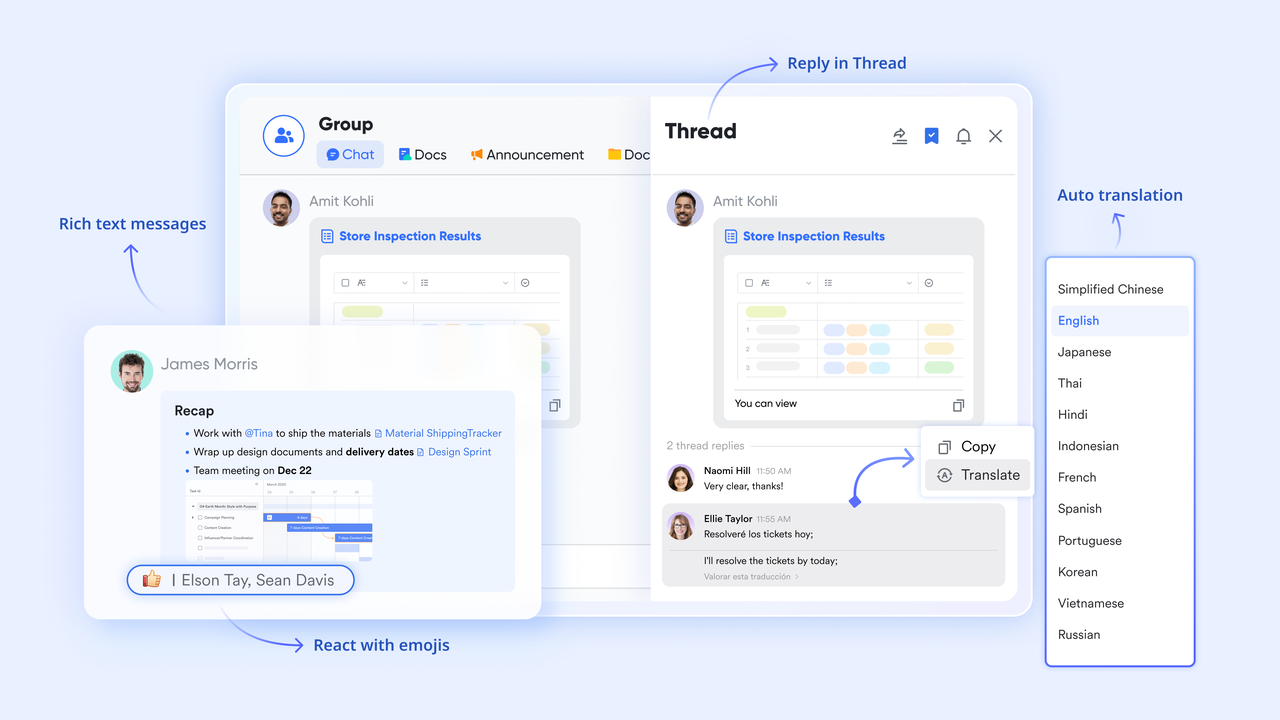
:
- Starter plan: Free forever plan that includes 11 powerful tools for up to 20 users. It also comes with 100GB of storage, 1000 automation runs, AI translations, and more.
- Basic plan: $6/user/month (billed annually) for up to 500 users. It includes everything in Starter plus group calling for up to 500 attendees, 5TB of storage, 1000 automation runs, and more. For more details, please .
- Pro plan: $12/user/month (billed annually) for up to 500 users. It includes everything in Basic plus group calling for up to 500 attendees, 15TB of storage, 50,000 automation runs, and more.
- Enterprise plan: for custom pricing. Supports unlimited users and includes even more automation runs and advanced security, compliance, and management features.
For small teams with simple communication needs

18 months message history
1000 Base automation runs/month
2000 rows per table in Base
Most POPULAR
For companies with comprehensive collaboration and management needs
Unlimited message history
500-participant video meetings
50k Base automation runs/month
20k rows per table in Base
For large companies with advanced security and organizational management needs
Get a personalized demo and pricing
Unlimited message history
500-participant video meetings
15 TB storage + 30 GB storage/user
500k Base automation runs/month
50k Base automation runs/month
Most POPULAR
For companies with comprehensive collaboration and management needs
Unlimited message history
500-participant video meetings
50k Base automation runs/month
20k rows per table in Base
2. Cin7: Omnichannel retail inventory platform
Cin7 is a leading omnichannel inventory management system built for modern retailers that sell across online stores, marketplaces, and physical locations. It centralizes stock, orders, purchasing, and warehouse operations on a single unified platform, helping brands maintain real-time visibility and prevent overselling. Cin7 integrates deeply with ecommerce platforms such as Shopify, Amazon, and eBay, as well as 3PLs, POS systems, and accounting tools. It's ideal for growing retailers that need scalable automation, demand planning, and multi-location inventory control without juggling multiple disconnected systems.
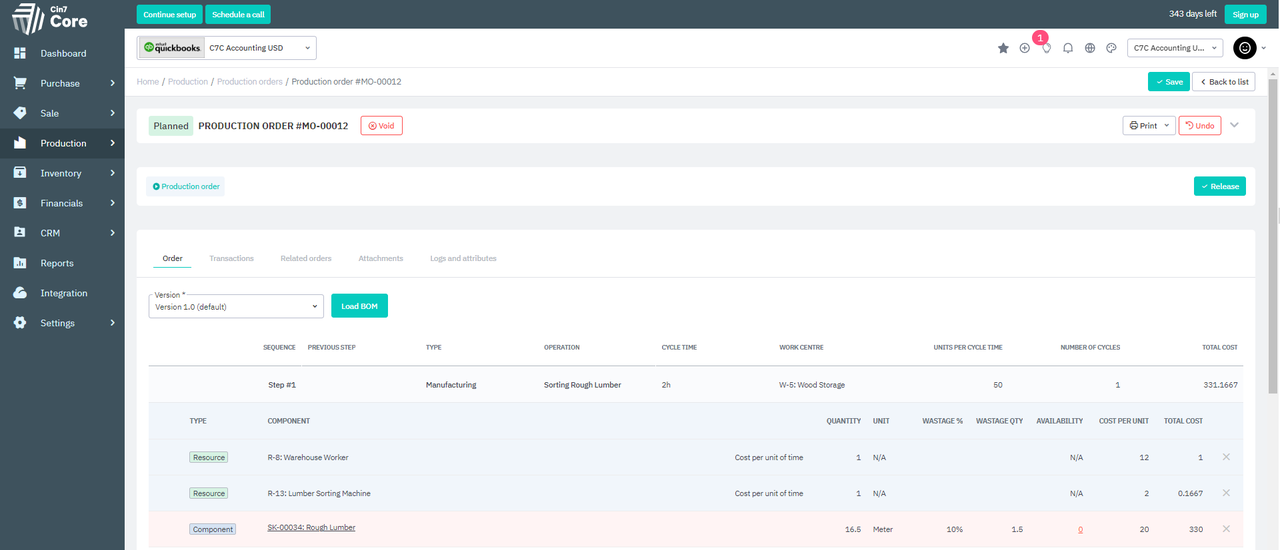
Image source: cin7.com
Key features:
- Omnichannel inventory syncing: Automatically updates stock across online stores, marketplaces, POS systems, and warehouses in real time.
- Order & fulfillment automation: Streamlines picking, packing, shipping, and order routing across multiple sales channels.
- Warehouse management tools: Includes barcodes, stock transfers, cycle counts, and multi-location warehouse controls.
- Built-in POS system: Sell in-store and sync sales instantly with your central inventory.
- Integrations & 3PL support: Connects with major ecommerce platforms, accounting systems, and external warehouses for seamless operations.
Pros:
- Strong omnichannel and multi-location inventory management
- Deep ecommerce and POS integrations
- Automates order routing and fulfillment
- Great for scaling brands
Cons:
- It can be expensive for tiny businesses
- Setup can feel complex due to the breadth of features
Pricing:
- Omni: Contact for pricing
3. Zoho Inventory: SMB online inventory management
Zoho Inventory is a modern online stock management system tailored for small and mid-sized retail businesses that need streamlined control without enterprise overhead. It centralizes orders, products, warehouses, and fulfillment into one connected platform. Retailers can automate stock updates, manage multichannel sales, and sync inventory across online storefronts and marketplaces. With barcode tracking, smart reorders, and built-in shipping integrations, teams reduce manual work and prevent stock discrepancies. Zoho Inventory is ideal for growing retailers who want affordable, accurate, and scalable inventory management.
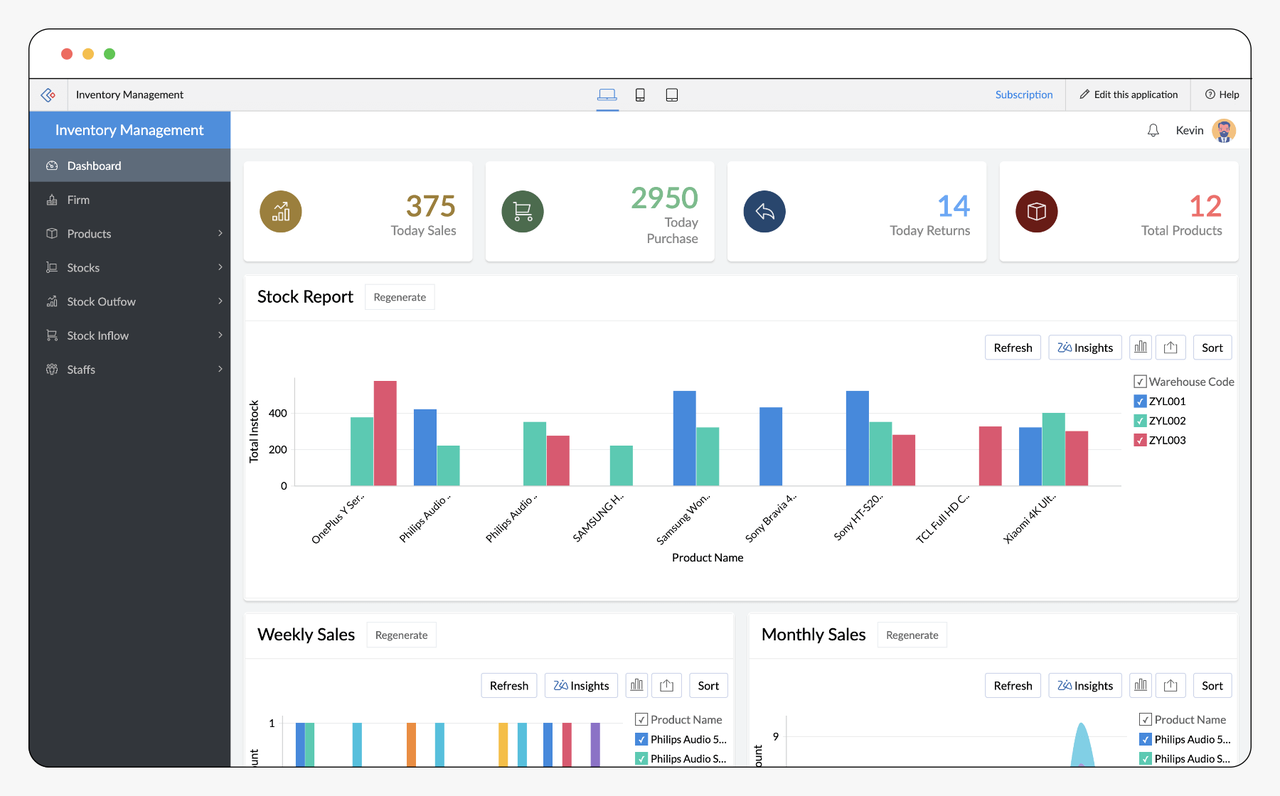
Image source: zoho.com
Key features:
- Multichannel selling: Sync products, orders, and stock across Shopify, Amazon, eBay, and Etsy.
- Order & shipment management: Automates sales orders, purchase orders, and shipment creation with integrated carriers.
- Warehouse management: Track stock across multiple warehouses with batch numbers, serial tracking, and stock transfers.
- Barcode scanning: Speed up picking, packing, and inventory updates using barcode-based workflows.
- Native Zoho ecosystem integration: Works seamlessly with Zoho Books, Zoho CRM, Zoho Commerce, and more.
Pros:
- Very affordable for small businesses
- Easy setup and clean interface
- Strong multichannel support
- Seamlessly integrates with the Zoho suite
Cons:
- Limited advanced forecasting
- Not ideal for high-volume enterprise retailers
Pricing:
- Standard: $11.12 / month
- Professional: $22.23 / month
- Enterprise: $83.38 / month
4. NetSuite Inventory Management: Enterprise retail ERP
NetSuite Inventory Management is a powerful, enterprise-grade solution built for large retailers that need real-time visibility, global inventory control, and advanced financial integration. As part of Oracle NetSuite's unified cloud ERP, it integrates purchasing, warehousing, sales, accounting, and forecasting into a single system. Retailers use NetSuite to centralize stock data across stores, warehouses, and online channels while automating replenishment, improving demand planning, and reducing carrying costs. It's ideal for multi-location, high-volume operations that require precision and scalability.
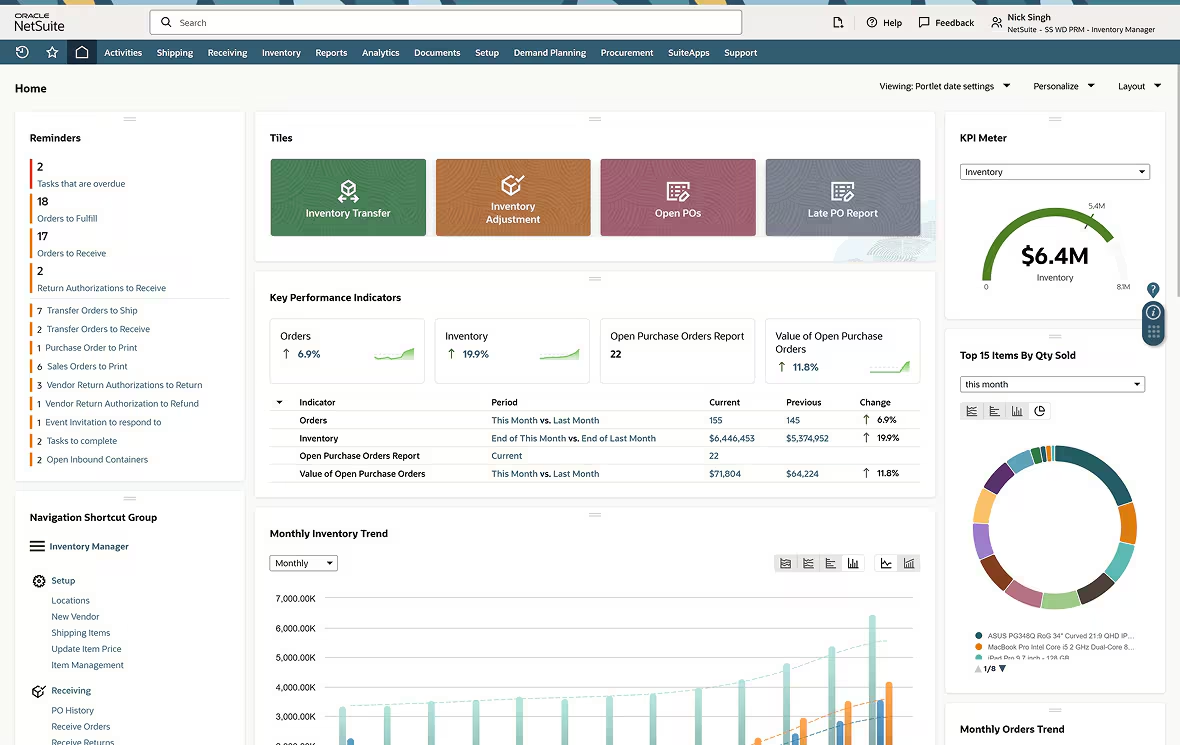
Image source: netsuite.com
Key features:
- Real-time inventory visibility: Track stock across warehouses, stores, and ecommerce channels with accurate, centralized data.
- Automated replenishment: Uses demand, sales velocity, and safety stock levels to trigger timely restocking.
- Demand planning & forecasting: Predict inventory needs using historical trends, seasonality, and AI-driven insights.
- Advanced order management: Streamline picking, packing, shipping, and returns with end-to-end workflow automation.
- Integrated ERP modules: Connect inventory with finance, procurement, CRM, and supply chain in a single platform.
Pros:
- Ideal for enterprise and global retail operations
- Robust forecasting and automation
- Deep ERP-level financial + inventory integration
- Highly customizable and scalable
Cons:
- Requires longer implementation and training
Pricing:
- Small businesses: $15,000–$25,000/year
- Mid-market companies: $40,000–$80,000/year
- Enterprises: $100,000+/year, especially with multiple subsidiaries and global operations
5. Brightpearl: Retail stock and accounting automation
Brightpearl is a retail-focused operations platform built to help modern stores manage inventory, orders, accounting, and fulfillment in one centralized system. Designed for fast-growing omnichannel retailers, it automates back-office tasks, from purchasing to financial reconciliation, so teams can focus on sales instead of admin work. Brightpearl integrates natively with major ecommerce platforms, ensuring accurate stock updates and smooth multi-channel order syncing. Its automation engine reduces manual errors, accelerates shipping, and improves profitability tracking. This makes it especially valuable for D2C brands and retailers scaling across channels.
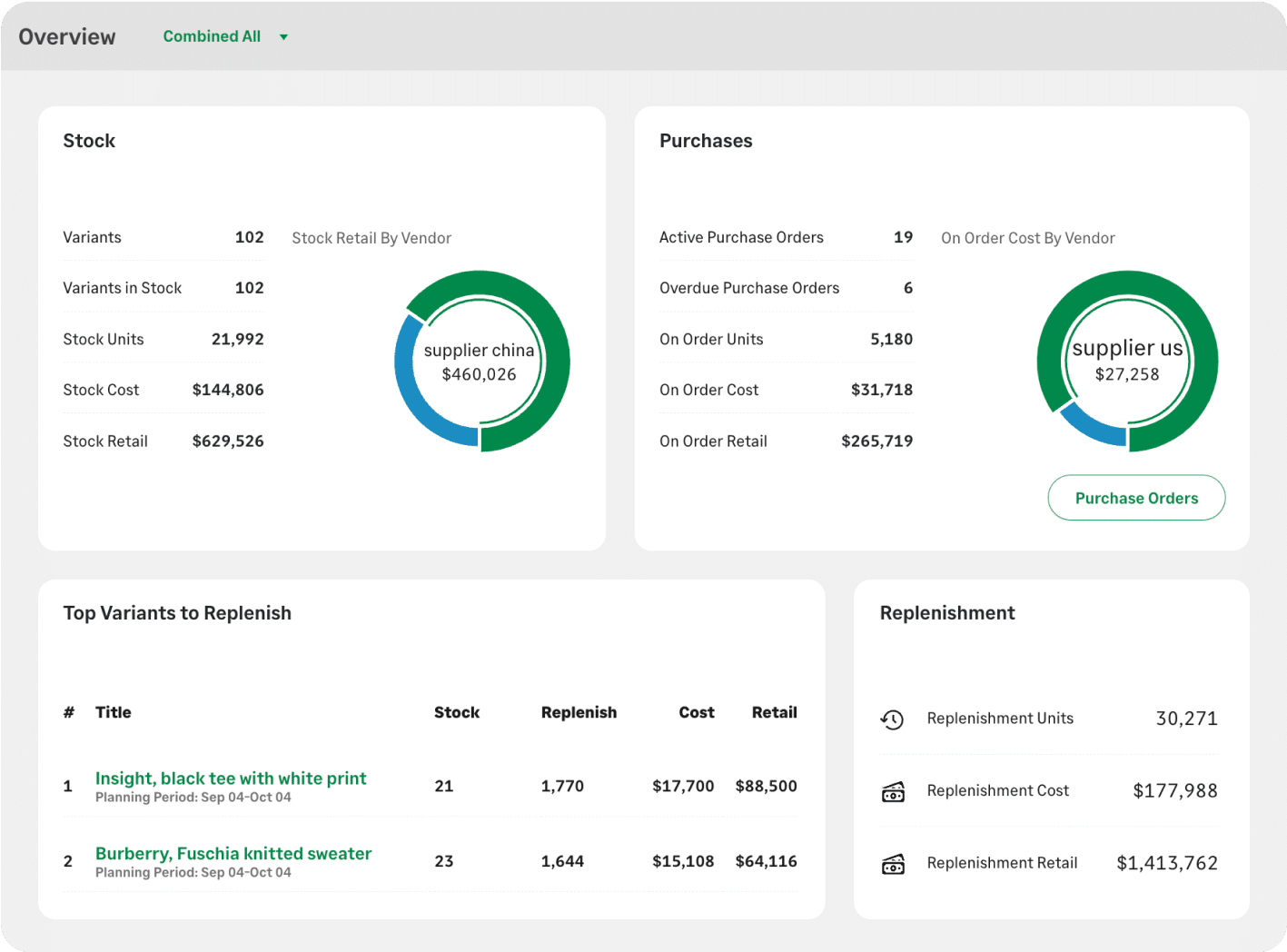
Image source: brightpearl.com
Key features:
- Omnichannel order syncing: Connects POS, ecommerce, and marketplaces for real-time, accurate stock and order visibility.
- Automation engine: Automates picking, packing, shipping, invoicing, and vendor updates to eliminate manual steps.
- Integrated accounting: Combines inventory and finance so retailers can track margins, COGS, and profitability instantly.
- Demand forecasting: Predicts future stock needs based on trends, seasonality, and historical sales data.
- Supplier & purchasing management: Streamlines POs, supplier communication, and restock planning.
Pros:
- Built specifically for retail and ecommerce
- Automation reduces the manual workload significantly
- Strong financial + inventory integration
- Excellent for multi-channel scaling
Cons:
- Higher price points for small retailers
- The feature-rich platform has a learning curve
Pricing:
- Tailored pricing. Contact Sales
6. Lightspeed: POS-based retail inventory tracking
Lightspeed is a POS-driven retail inventory management system built for stores that need fast, accurate stock control across physical locations. It combines checkout, product catalogs, purchasing, and customer data into one platform, giving retailers a real-time view of what's in stock and what's selling. Designed for boutiques, specialty retail, and multi-location stores, Lightspeed simplifies daily operations, from receiving shipments to tracking product variants and reorder levels. Its analytics and POS-first approach make it ideal for retailers who want unified sales and inventory insights without juggling multiple tools.
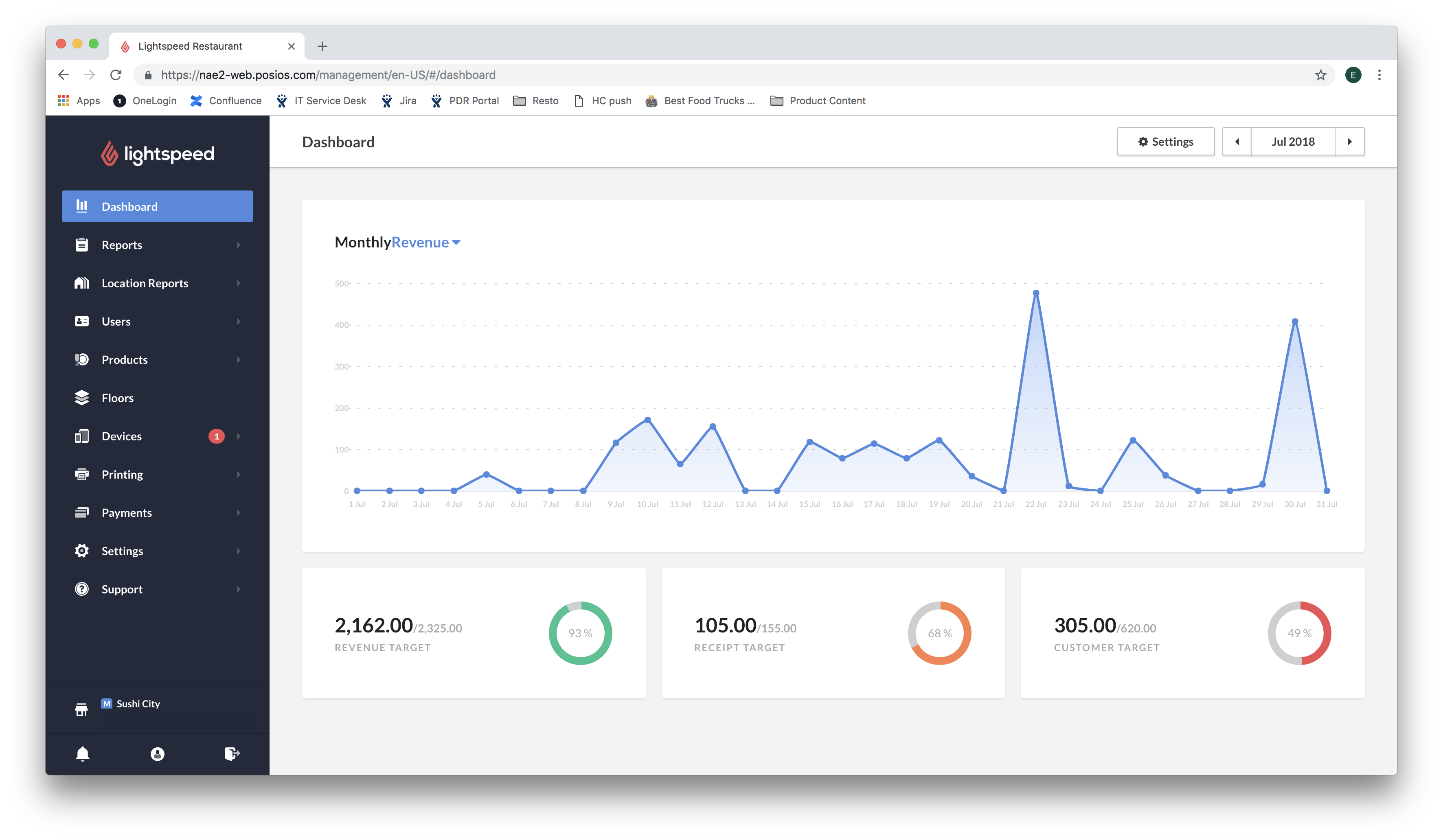
Image source: lightspeedhq.com
Key features:
- POS-integrated inventory: Syncs sales and stock in real time, so teams always know what's available across locations.
- Variant & bundle management: Handles size, color, style variations, and product kits for retailers with complex catalogs.
- Purchase ordering & receiving: Helps stores reorder efficiently, track shipments, and manage supplier relationships.
- Customer insights: Links sales history to customer profiles to support loyalty programs and targeted selling.
- Multi-location management: Centralizes stock, transfers, and reporting across multiple stores or warehouses.
Pros:
- Excellent for retailers who rely heavily on POS
- Strong multi-location management
- Easy to use with a clean, modern UI
- Great variant and catalog management
Cons:
- Advanced reporting may require add-ons
- More expensive than basic POS systems
Pricing:
7. Shopify POS: Omnichannel product inventory management
Shopify POS is designed for retailers who sell both online and in-store, offering a unified platform that syncs products, stock levels, and sales data across all channels. It gives merchants real-time visibility into inventory, whether items are sold through a website, mobile app, or physical store. Shopify POS supports easy catalog management, fast checkout, and centralized fulfillment tools, making it ideal for modern retailers who want seamless omnichannel operations. Its tight integration with Shopify's ecommerce engine makes it one of the strongest solutions for hybrid retail businesses.
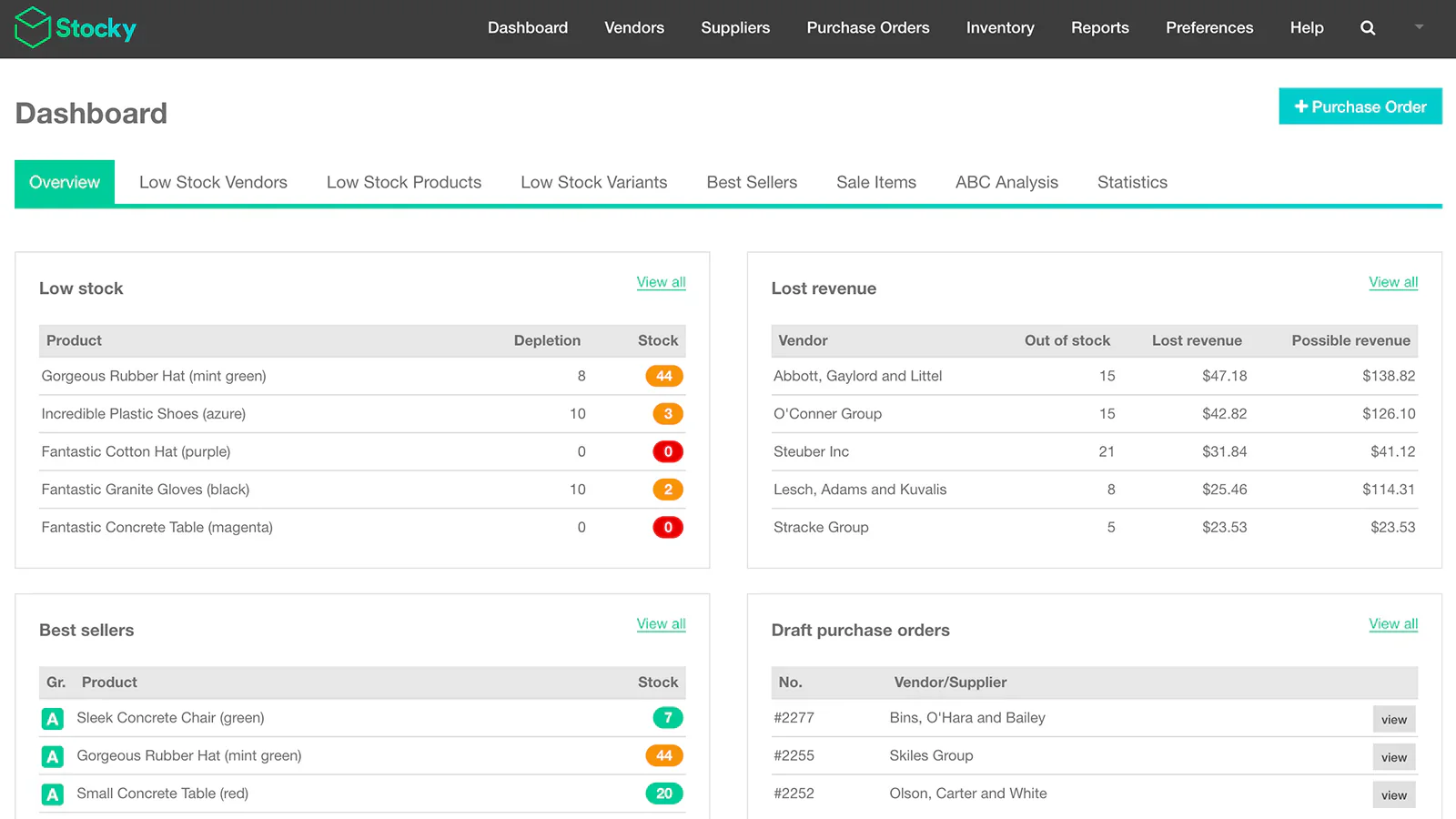
Image source: shopify.com
Key features:
- Unified online + in-store inventory: Automatically syncs stock across ecommerce, mobile, and POS, so retailers avoid overselling.
- Smart product catalog: Manage variants, collections, and categories with support for extensive, fast-changing inventories.
- Omnichannel fulfillment tools: Enable buy-online-pickup-in-store (BOPIS), local delivery, and ship-from-store options.
- Customer profiles & loyalty: Centralize customer data for personalized marketing and rewards programs.
- Multi-location stock tracking: View, transfer, and forecast inventory across multiple stores or warehouses.
Pros:
- Best-in-class omnichannel capabilities
- Easy integration with Shopify's ecommerce tools
- Fast, user-friendly POS interface
- Supports flexible fulfillment workflows
Cons:
- Offline functionality is limited
- Some advanced features require additional apps
Pricing:
- Advanced: ~$251.48/month
8. Vend by Lightspeed: Boutique retail stock control
Vend by Lightspeed is a retail inventory management system tailored for boutique and specialty stores that need simple, reliable stock tracking without enterprise-level complexity. It focuses on easy POS operations, intuitive inventory tools, and clean product catalogs, making daily store management effortless. Vend helps retailers keep shelves stocked, manage variants, run promotions, and track customer purchases, all from a centralized dashboard. Its cloud-based design supports multi-location growth, while its user-friendly interface makes it ideal for independent retailers looking to modernize their operations. With strong reporting and POS integration, Vend is a dependable choice for small to mid-sized retail brands.
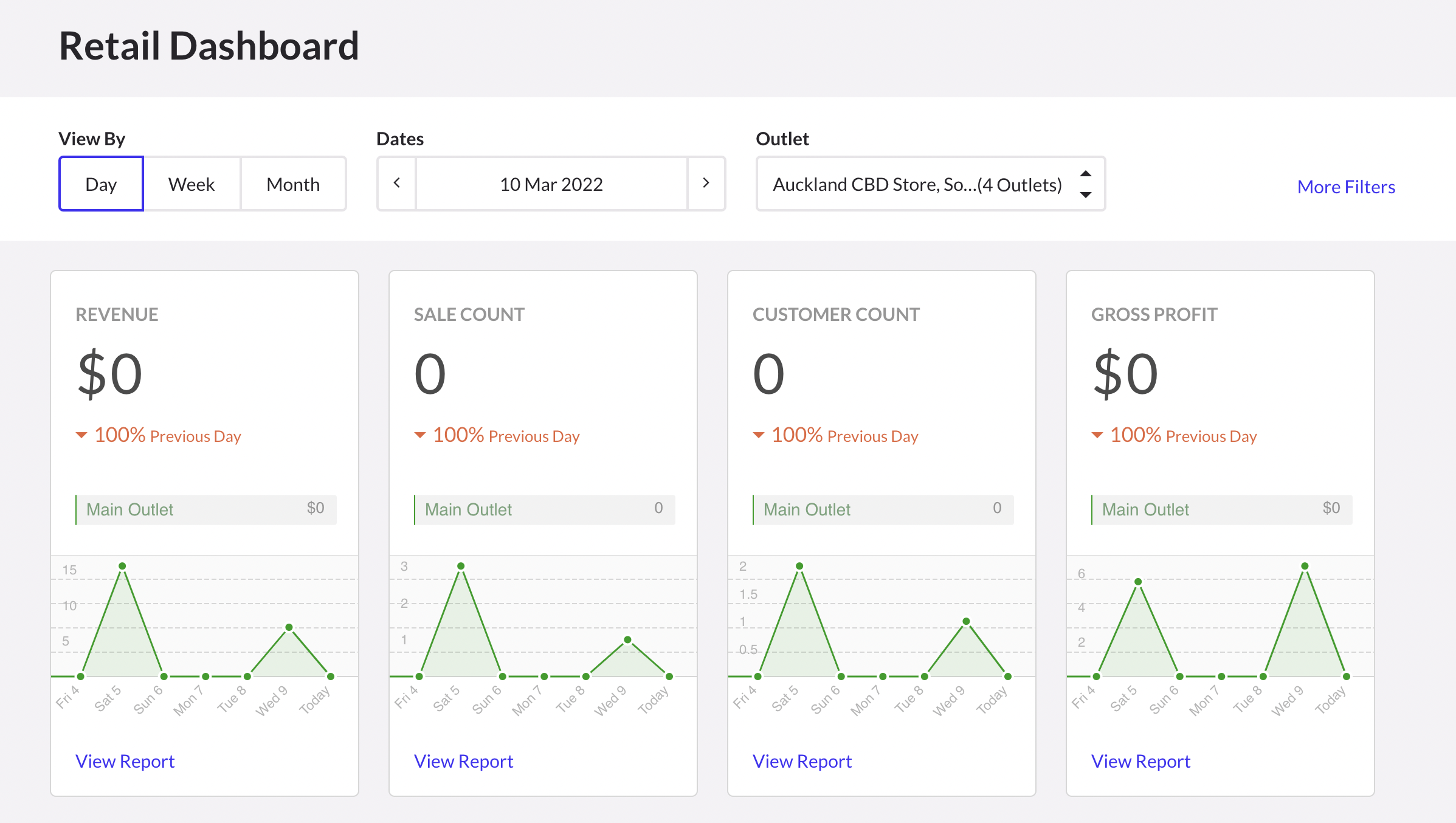
Image source: lightspeedhq.com
Key features:
- Easy product and variant management: Create and manage SKUs, variants, and collections without complexity.
- POS-integrated inventory: Syncs sales and stock levels instantly across 1 or 100 store locations.
- Supplier & purchase order management: Streamlines reordering, receiving, and supplier coordination.
- Customer tracking & loyalty tools: Build customer profiles and launch reward programs directly from POS.
- Real-time reporting: Access insights on sales trends, stock movement, and store performance.
Pros:
- Very easy to use for boutique retailers
- Strong POS + inventory integration
- Good multi-store scalability
- Helpful loyalty and promotion tools
Cons:
- Advanced analytics require upgrades
- Limited customization for complex retail setups
Pricing:
- Tailored pricing. Contact Sales
9. StockIQ: Retail demand forecasting software
StockIQ is a specialized inventory planning and demand forecasting platform built for retailers, distributors, and supply-chain teams that need deeper visibility into future stock requirements. Unlike basic inventory systems, StockIQ focuses on predictive analytics, helping businesses avoid stockouts, reduce excess inventory, and optimize replenishment cycles. It analyzes historical sales, supplier performance, seasonality, and trends to generate accurate forecasts. Retailers use StockIQ to make smarter purchasing decisions, balance inventory levels, and ensure the right products are available at the right time. It's ideal for fast-growing retail operations that rely heavily on data-driven planning.
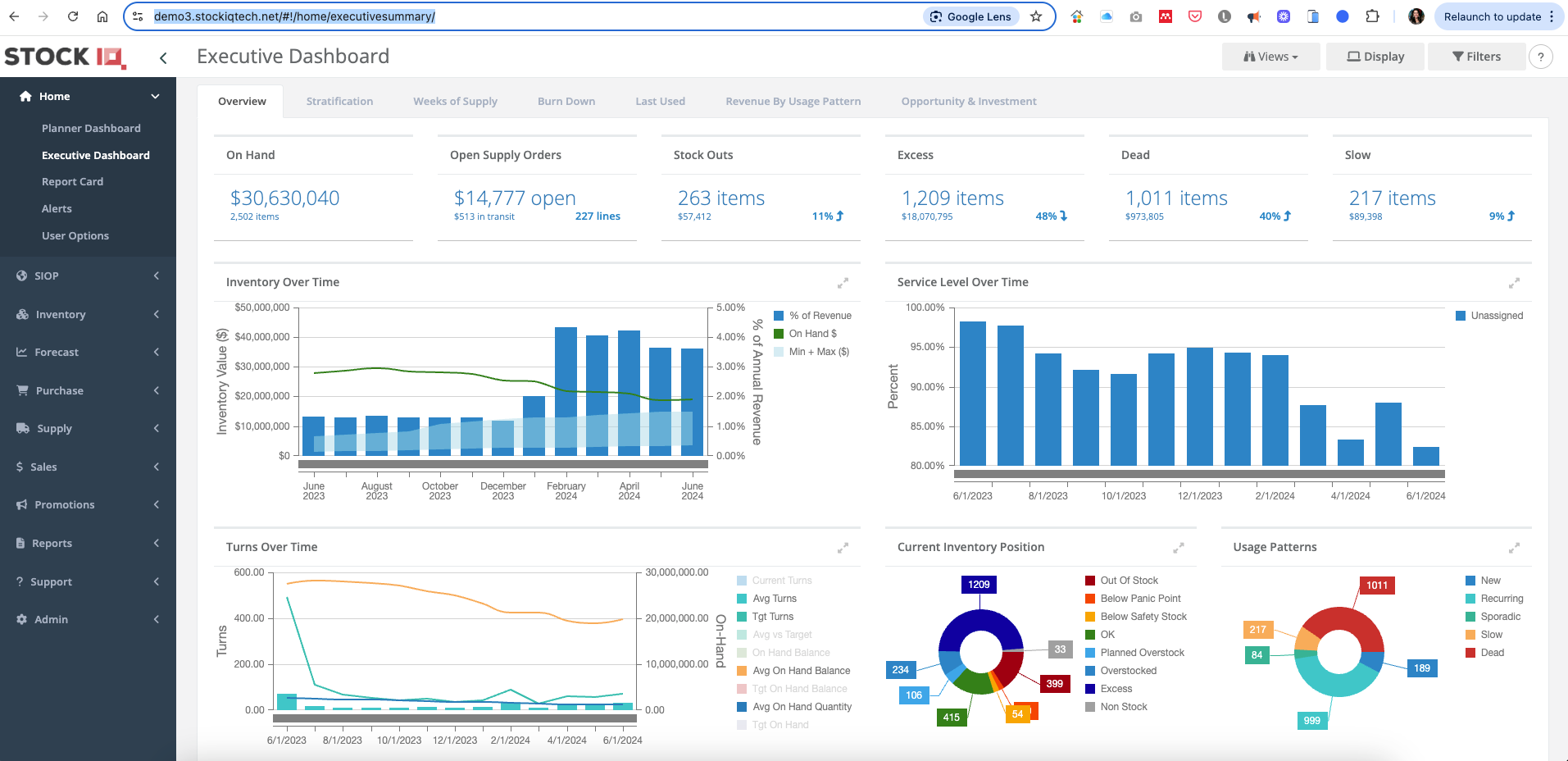
Image source: stockiqtech.com
Key features:
- Demand forecasting engine: Uses sales history, seasonality, and trends to predict future product demand.
- Replenishment planning: Suggests optimal reorder quantities and timing to prevent stockouts and overstock.
- Supplier performance tracking: Evaluates vendor reliability, lead times, and delivery accuracy.
- Inventory optimization tools: Provide insights to reduce carrying costs and improve stock turnover.
- Multi-location analytics: Forecasts and manages demand across warehouses, stores, or channels.
Pros:
- Excellent for data-driven forecasting
- Reduces overstock and stockout risks
- Strong replenishment and vendor analytics
- Ideal for multi-location retail networks
Cons:
- Not a full POS or retail management suite
- Higher learning curve for non-analytical users
Pricing:
Starting price: $750/month
10. inFlow Inventory: Warehouse stock management software
inFlow Inventory is a powerful stock management system designed for retailers, wholesalers, and warehouse-driven businesses that need tight control over products, orders, and fulfillment. It helps teams track inventory across multiple locations, manage purchase orders, and streamline picking, packing, and shipping. With barcode scanning, real-time stock visibility, and strong reporting tools, inFlow makes warehouse operations faster and more accurate. It's beneficial for growing retailers who need a system that bridges warehouse workflows with sales, ecommerce, and B2B ordering. Its intuitive interface and hardware-friendly features make it ideal for both small and mid-sized operations.
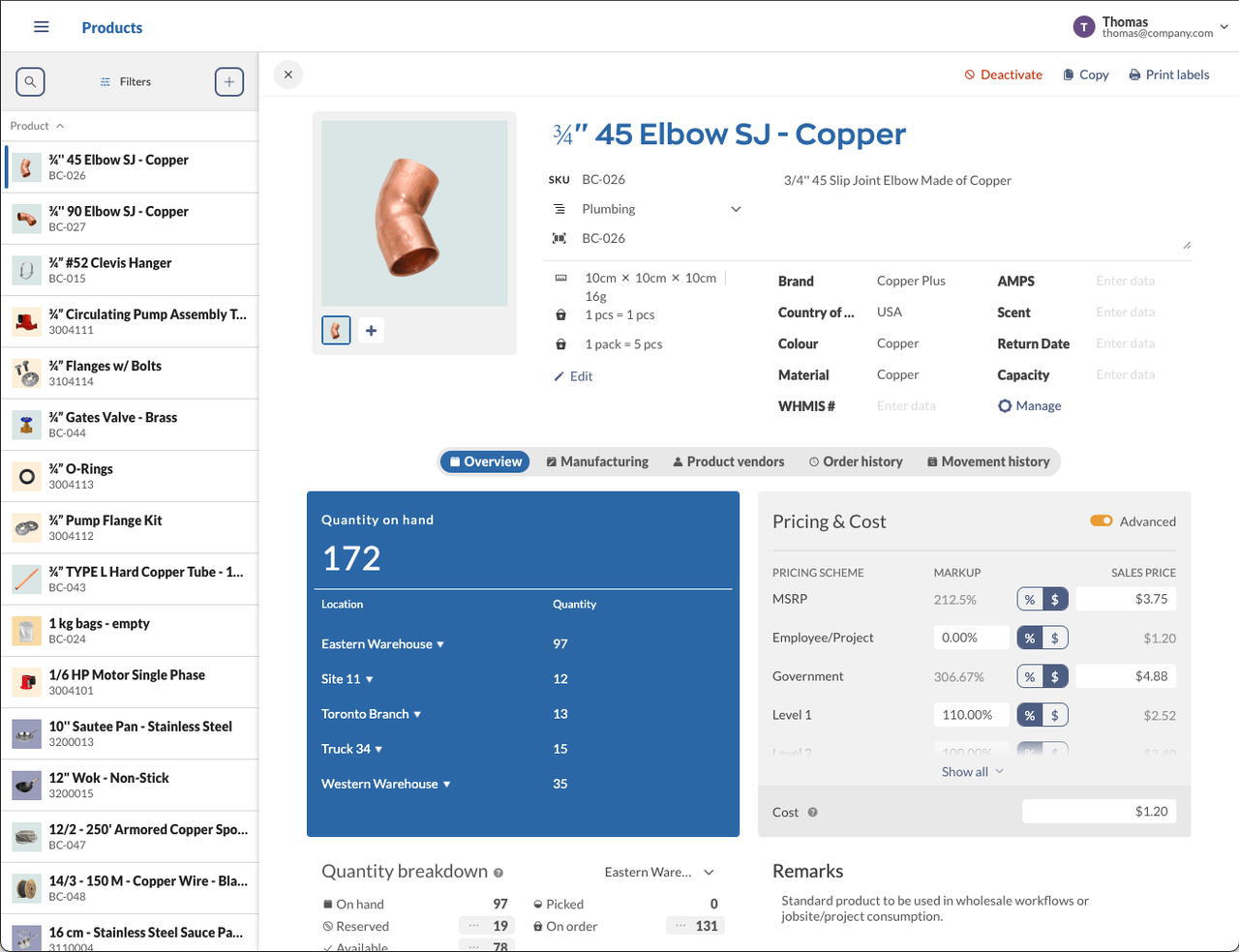
Image source: inflowinventory.com
Key features:
- Barcode scanning & mobile picking: Speeds up receiving, stock counts, and order fulfillment using barcode-enabled workflows.
- Multi-location inventory tracking: Monitor stock levels across warehouses, retail stores, and offline storage in one system.
- Order & purchase management: Create invoices, sales orders, POs, and supplier records while keeping stock synced.
- Manufacturing & kitting support: Build assemblies, bundles, and custom kits for product-based businesses.
- Real-time reporting: Gain insights into stock turnover, order accuracy, and warehouse efficiency.
Pros:
- Strong warehouse-focused features
- Easy barcode and scanner integration
- Great for wholesalers and multi-location retailers
- Clean interface with excellent reporting
Cons:
- Limited advanced ecommerce features
- Higher tiers required for multi-user setups
Pricing:
- Entrepreneur: Starts at $129/mo (billed annually)
- Small Business: Starts at $349/mo (billed annually)
- Mid-Size: Starts at $699/mo (billed annually)
- Enterprise: Talk to Sales
How retail inventory systems prevent stockouts
Modern retail inventory management systems help retailers prevent stockouts by ensuring complete visibility and tighter operational control across every sales channel. These systems automate the flow of information and tasks so teams can respond before shelves run empty.
- across stores and sales channels: Inventory updates instantly whenever a sale, return, or transfer happens, keeping data accurate across POS, ecommerce, and marketplace platforms. This prevents overselling and gives teams a unified view of stock availability. Retailers can serve customers confidently, knowing every channel reflects actual inventory levels.
- Automated low-stock alerts and reorder triggers: The system monitors stock thresholds and notifies teams when items reach reorder points, preventing last-minute shortages. Automated purchase or transfer suggestions help buyers respond faster. This proactive approach ensures the right products remain in circulation at all times.
- Task routing for pickup and replenishment execution: When shelves run low, or orders arrive, assigns the right actions to the correct team, whether warehouse pickers, store staff, or fulfillment handlers. This removes manual coordination and reduces delays. As a result, replenishment happens quickly and consistently.
- Multi-warehouse availability allocation: Retailers can view inventory across all warehouses and stores, allowing them to allocate stock based on demand, location, or fulfillment speed. This ensures orders are routed from the best source while maintaining balanced stock levels. Strategically distributing inventory helps minimize shipping costs and improve delivery times.
To effectively address these inventory management challenges, choosing a single all-in-one platform that centralizes data management, team collaboration, and workflow automation can dramatically improve operational efficiency. For businesses focused on preventing stockouts and maintaining smooth fulfillment, Lark offers a streamlined, scalable solution to modern inventory management.
Conclusion
A strong retail inventory management system gives modern retailers the visibility, accuracy, and coordination needed to operate confidently across stores, warehouses, and online channels. By centralizing stock data, automating replenishment, and streamlining cross-team workflows, these platforms reduce errors, prevent stockouts, and improve customer satisfaction. The best systems also support advanced features such as forecasting, barcode scanning, and multi-warehouse management to keep operations agile at a business scale. For retailers seeking both inventory accuracy and seamless execution, workflow-first platforms offer the greatest impact. brings this approach together, connecting tracking, communication, and task automation into a single, collaborative retail operations hub.
Automate inventory tasks with a smarter retail hub
FAQs
How long does it take to migrate data into a new retail inventory system?
Data migration into a usually takes from a few days to several weeks, depending on catalog size, data quality, and integration needs. Most inventory management systems for retail offer import templates or assisted onboarding to speed up the process. The top retail inventory management systems also provide automated mapping tools that reduce manual cleanup.
Can retail inventory systems automatically support multiple tax jurisdictions?
Yes, a modern retail inventory system can automatically apply tax rules across regions, channels, and product categories. Advanced inventory management systems for retail include built-in tax engines or integrations for compliance automation. The top retail inventory management systems update jurisdiction rules in real time, helping retailers stay compliant while reducing manual configuration and billing errors.
How do inventory platforms handle the reconciliation of incoming damaged stock?
A retail inventory system logs damaged items during receiving and routes them for return, write-off, or supplier credit. Most for retail support barcode scanning, image uploads, and reason codes for accurate documentation. The top retail inventory management systems also offer approval workflows that ensure damaged stock is reconciled consistently across warehouses.
What compliance requirements apply to retail supply chain software?
A retail inventory system must align with standards such as data security (ISO/IEC 27001), tax and invoicing regulations, and industry-specific labeling or traceability rules. Modern inventory management systems for retail also support audit logs and permission controls. The top retail inventory management systems ensure that retailers seamlessly meet regional privacy laws and supply chain documentation requirements.
Which systems support RFID inventory tracking?
RFID capabilities are increasingly common in a modern retail inventory system, especially for large product catalogs or multi-store environments. Many inventory management systems for retail integrate directly with RFID scanners to automate counts and movement tracking. The top retail inventory management systems use RFID to enable real-time visibility, faster audits, and highly accurate replenishment workflows.
Related reading