Asana is widely used by teams to organize work, assign ownership, and manage deadlines across projects. As teams become more familiar with its structure, many start extending it beyond task management to support sales activities and customer tracking. In this context, Asana CRM refers to using Asana’s projects and tasks to represent pipelines, deals, and customer relationships.
This approach can work well for early-stage sales efforts where processes are simple and lightweight. Over time, however, customer management introduces different needs such as accurate reporting, long-term account history, and automation. This article explores how teams set up Asana CRM workflows, where this approach works well, where it falls short, and what alternative solutions teams often evaluate, including connected workspaces like Lark.
See flexible CRM workflows for teams
What is Asana, and is Asana a CRM?
Asana is a project management platform designed to help teams plan work, assign tasks, and track progress across projects. It is built around execution, deadlines, and accountability rather than long-term customer records. Because of this, Asana is not designed as a dedicated CRM, even though some teams adapt it for basic .
When teams ask whether Asana can function as a CRM, the practical answer is that it can support limited CRM-style workflows. Asana focuses on tasks and projects, not persistent customer data, which is why many teams rely on Asana CRM integration to extend its capabilities.
Using Asana as a CRM usually means treating projects as sales pipelines and tasks as leads or deals. This approach works for early experimentation and simple processes. Over time, teams often connect a CRM that integrates with Asana to manage customer data more effectively. These integrations highlight gaps in native CRM concepts such as customer entities, account hierarchies, and .
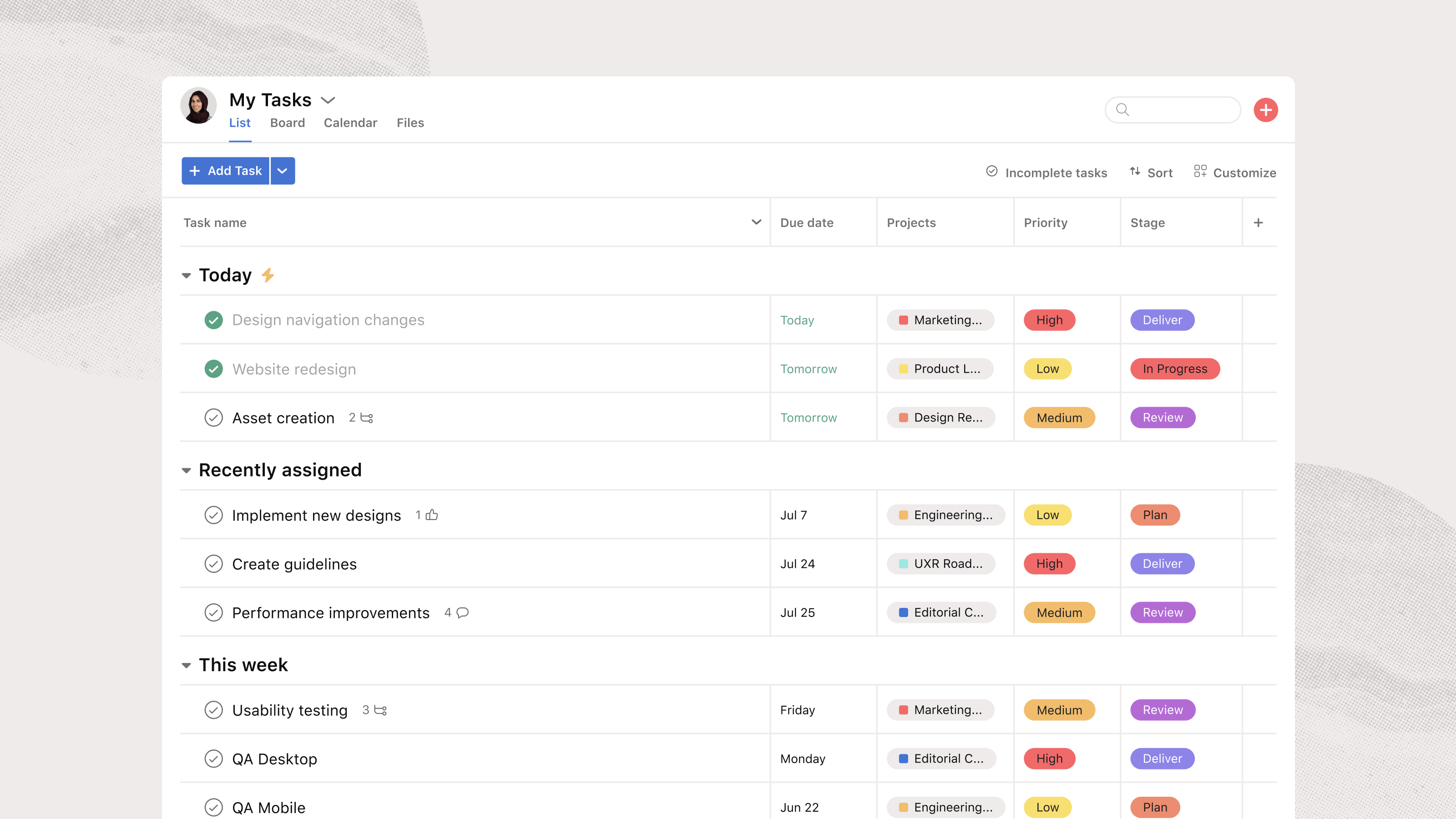
Image source: asana.com
What CRM features does Asana actually offer
Asana provides several features that resemble CRM functionality when adapted creatively. These features explain why teams attempt to use Asana as a CRM before investing in dedicated tools.
- using projects: Asana projects are often used to represent sales pipelines. Sections or columns act as deal stages. Each deal exists as a task that moves across stages manually. This works for simple pipelines but does not scale well for long-term CRM needs.
- Custom fields for basic CRM data: Custom fields store deal value, owner, priority, and close dates. These fields add structure and allow basic filtering. However, they do not support complex relationships between contacts, companies, and deals. This limits CRM accuracy as pipelines grow.
- Task assignments and follow-up management: Asana excels at assigning owners and deadlines. Follow-ups are tracked through tasks and subtasks. Accountability improves at the individual level. Over time, customer activity becomes scattered across many tasks.
- Comments for communication and activity logs: Teams log calls and notes in task comments. Mentions help involve teammates. As histories grow, comment threads become difficult to scan. Important customer context is easily buried.
- Automation rules for sales workflows: Asana rules and field updates. These rules reduce manual effort. They remain limited to task events and lack CRM-specific logic like inactivity detection.
- Basic reporting and dashboards: Dashboards show task counts and field summaries. Managers track workload and pipeline volume. Reporting remains task-centric rather than customer-centric. Revenue forecasting is difficult.
- Integrations with external CRM tools: Many teams rely on CRM integration with Asana to fill gaps. Data syncs between systems require maintenance. Visibility becomes split, increasing operational overhead.
How to set up Asana as a CRM tool
Most Asana CRM setups follow similar patterns. Teams gradually layer CRM behaviors into project management workflows. These steps highlight both the flexibility and the friction involved.
Step 1: Create a project to act as the sales pipeline
Teams usually start by creating a single Asana project to represent their CRM pipeline. Each column or section is labeled as a deal stage, such as Lead, Contacted, Demo Scheduled, Proposal Sent, and Closed. This gives a quick visual overview of deal progress, similar to a Kanban board. At this stage, Asana feels workable because pipelines map neatly to project sections. 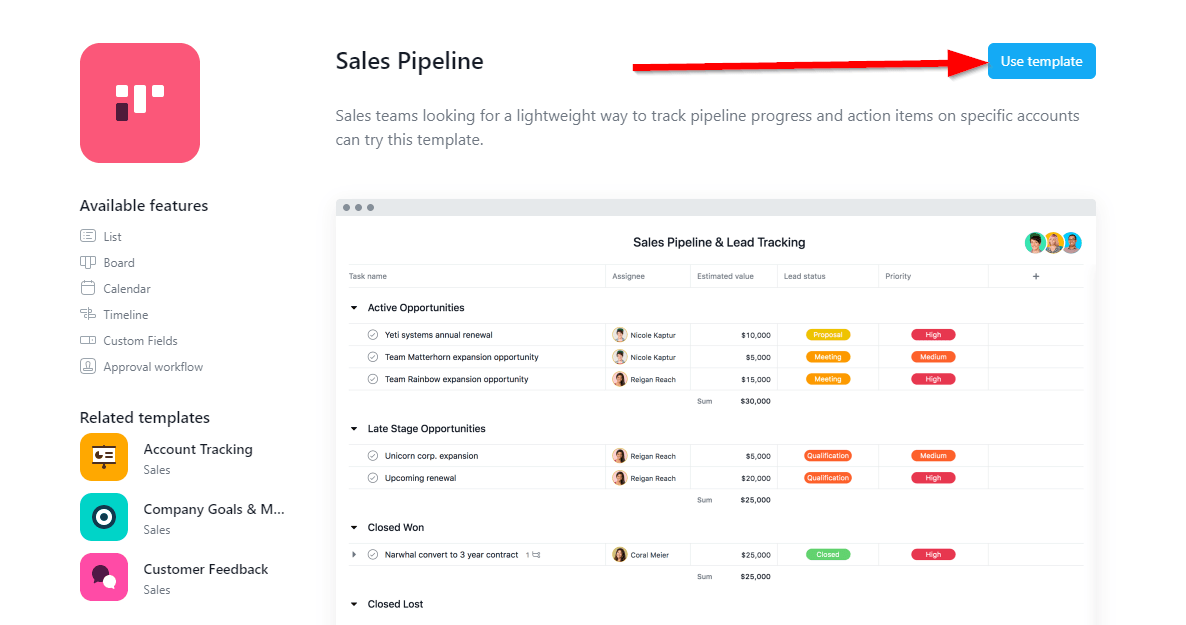
Image source: asana.com
Step 2: Treat each task as a lead or deal
Every lead or opportunity is added as an individual task within the pipeline project. The task title typically contains the company or contact name. Custom fields are added for deal value, priority, close date, and owner. While this works for basic tracking, customer data quickly becomes fragmented across tasks.
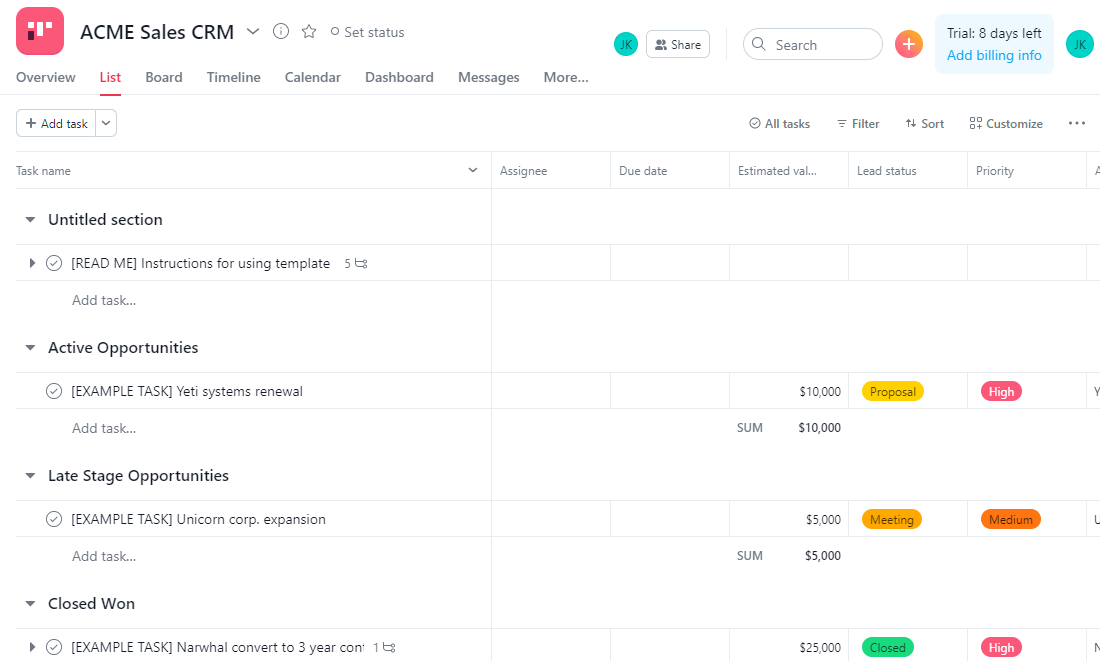
Image source: asana.com
Step 3: Use comments to log communication and notes
Teams rely on task comments to record call notes, email summaries, and internal updates. Mentions are used to loop in teammates when decisions are needed. Over time, these comment threads grow long and hard to scan, making it difficult to get a clear customer history at a glance.
Step 4: Assign follow-ups as subtasks and due dates
Follow-ups, demos, and next steps are created as subtasks with due dates under each deal task. This helps enforce accountability and reminders for individual reps. However, once deals involve multiple stakeholders or ongoing customer work, subtasks become cluttered and difficult to manage.
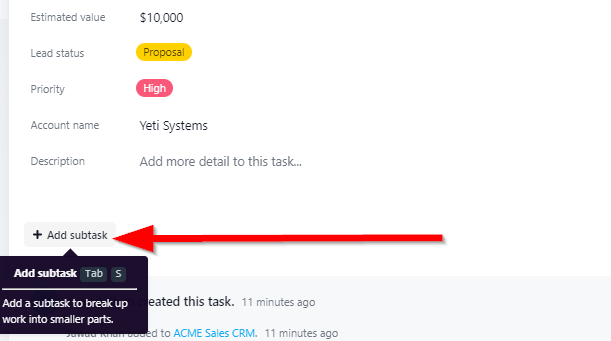
Image source: asana.com
Step 5: Build basic reports using project views and filters
Managers use , filters, and dashboards to track deal status and workload. Reporting is usually limited to task completion and field summaries. As pipelines grow, teams struggle to answer CRM-level questions like customer lifetime activity, renewals, or cross-team ownership.
Popular Asana CRM templates
Asana offers several templates that teams often adapt for . These templates are designed primarily for task and project management rather than long-term customer data. As a result, they focus more on execution and visibility than on customer lifecycle tracking. Understanding what each template emphasizes helps teams set realistic expectations. It also clarifies where manual work is required.
Sales pipeline template
The sales pipeline template is built around visualizing deal progress using project sections or columns. Each section represents a stage, and deals move manually as tasks. This works well for early-stage sales tracking and simple pipelines. Reporting is limited to task status and field summaries. Long-term customer history is not preserved once deals close.
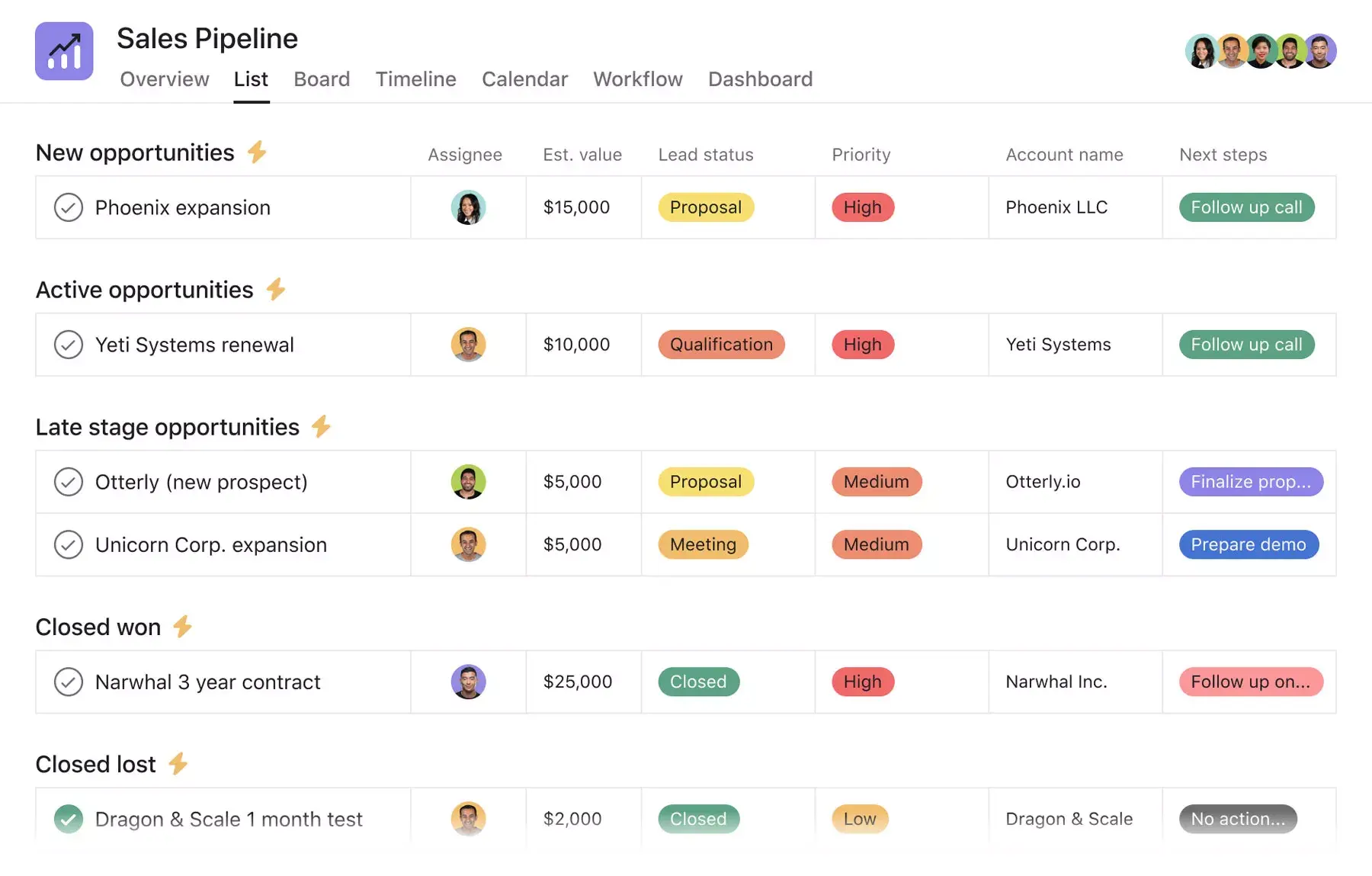
Image source: asana.com
Account tracking template
The account tracking template focuses on organizing work related to individual customer accounts. Teams use tasks to represent accounts and log actions as comments or subtasks. This approach supports basic visibility into ongoing activity. Relationships between multiple deals or contacts are difficult to model. As account volume grows, scaling becomes challenging.
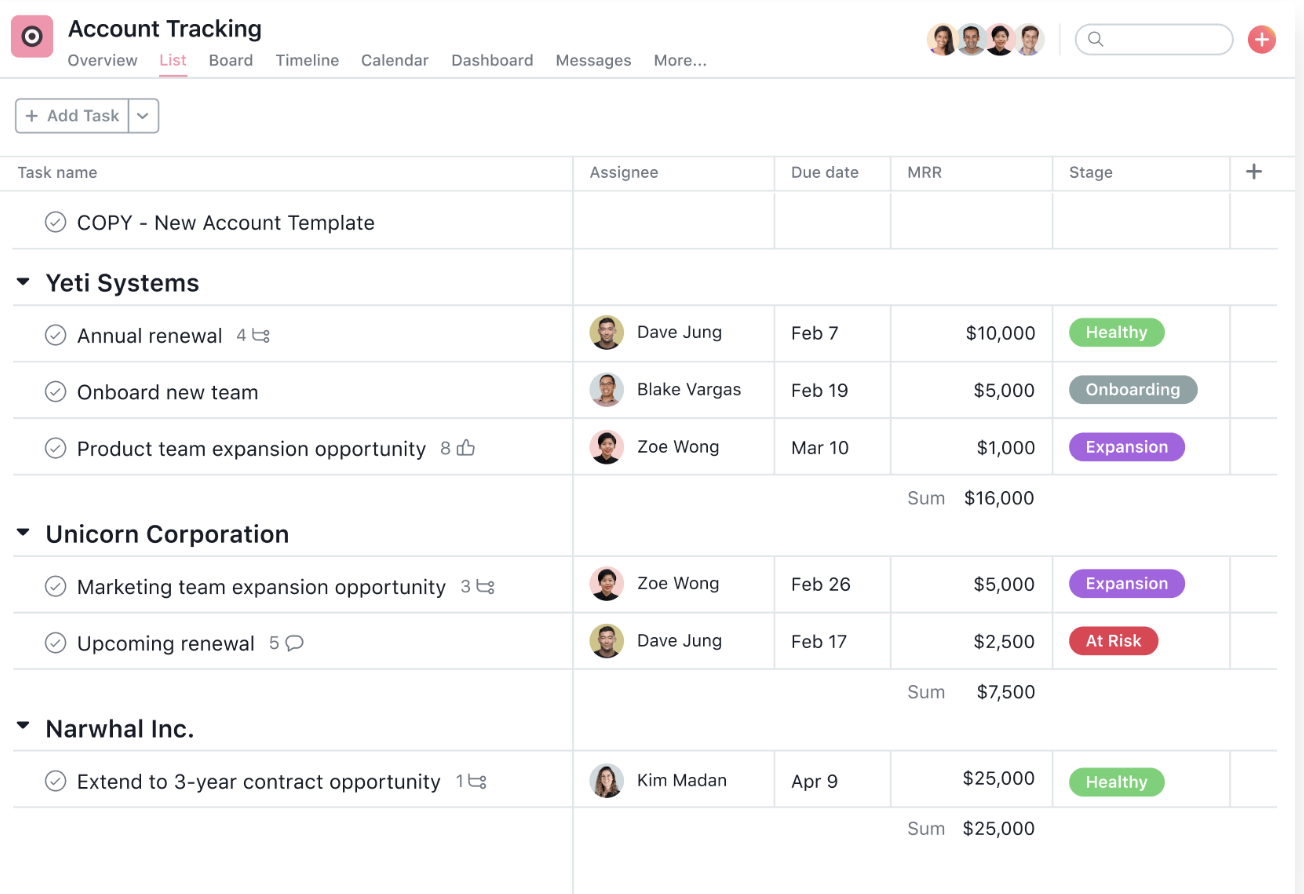
Image source: asana.com
Pre-sales deal support template
The pre-sales deal support template is designed to manage internal preparation work such as demos, proposals, and approvals. It helps teams coordinate tasks and deadlines across stakeholders. CRM data, like customer history and deal context, remains secondary. Information is often spread across multiple projects. This reduces visibility as complexity increases.
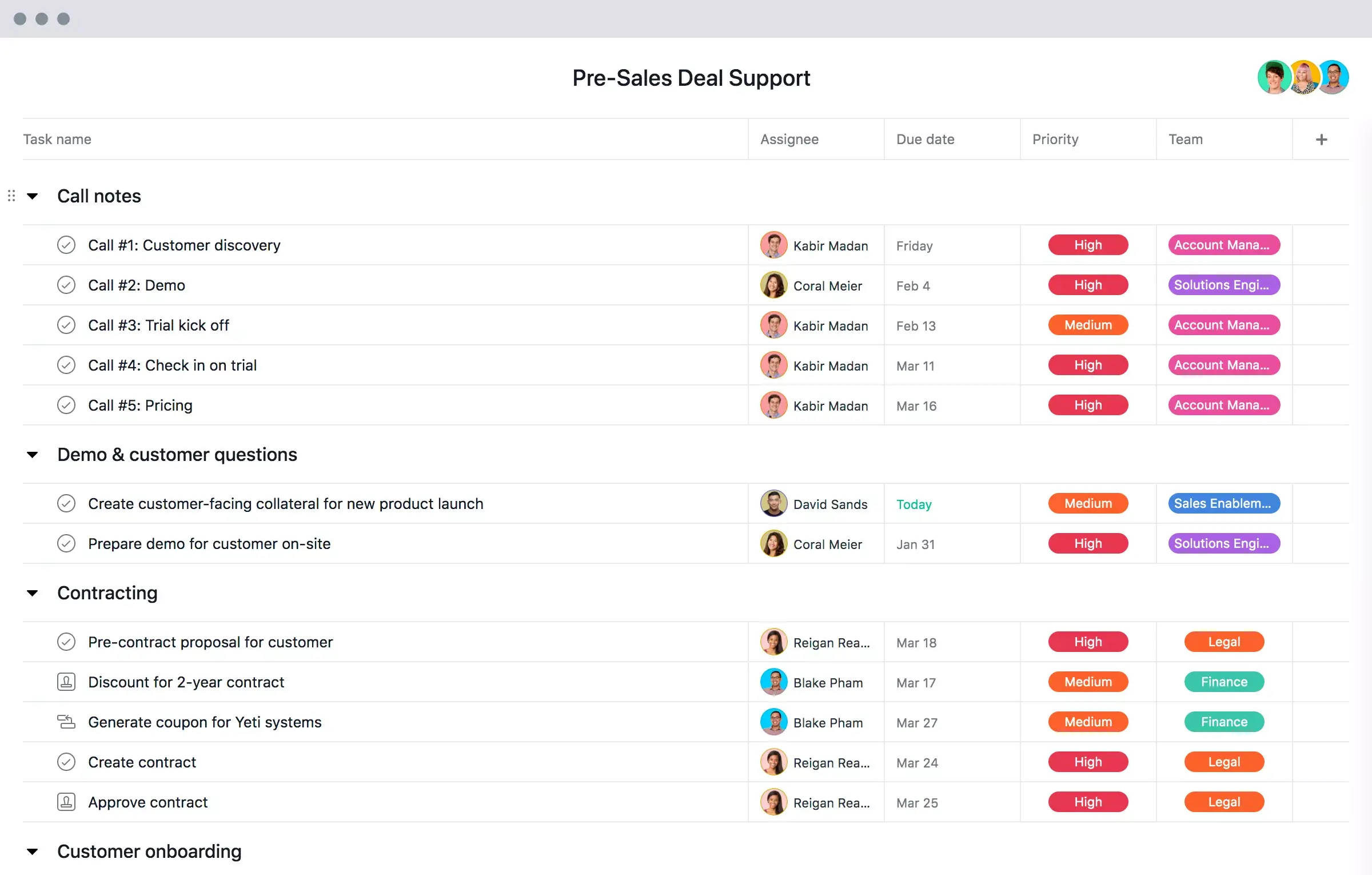
Image source: asana.com
Post-sales handoff template
The post-sales handoff template supports transitions from sales to delivery or onboarding teams. It helps ensure tasks are assigned and deadlines are clear. Execution improves during handoff phases. Customer data continuity across sales and delivery remains manual. Long-term CRM visibility is limited.
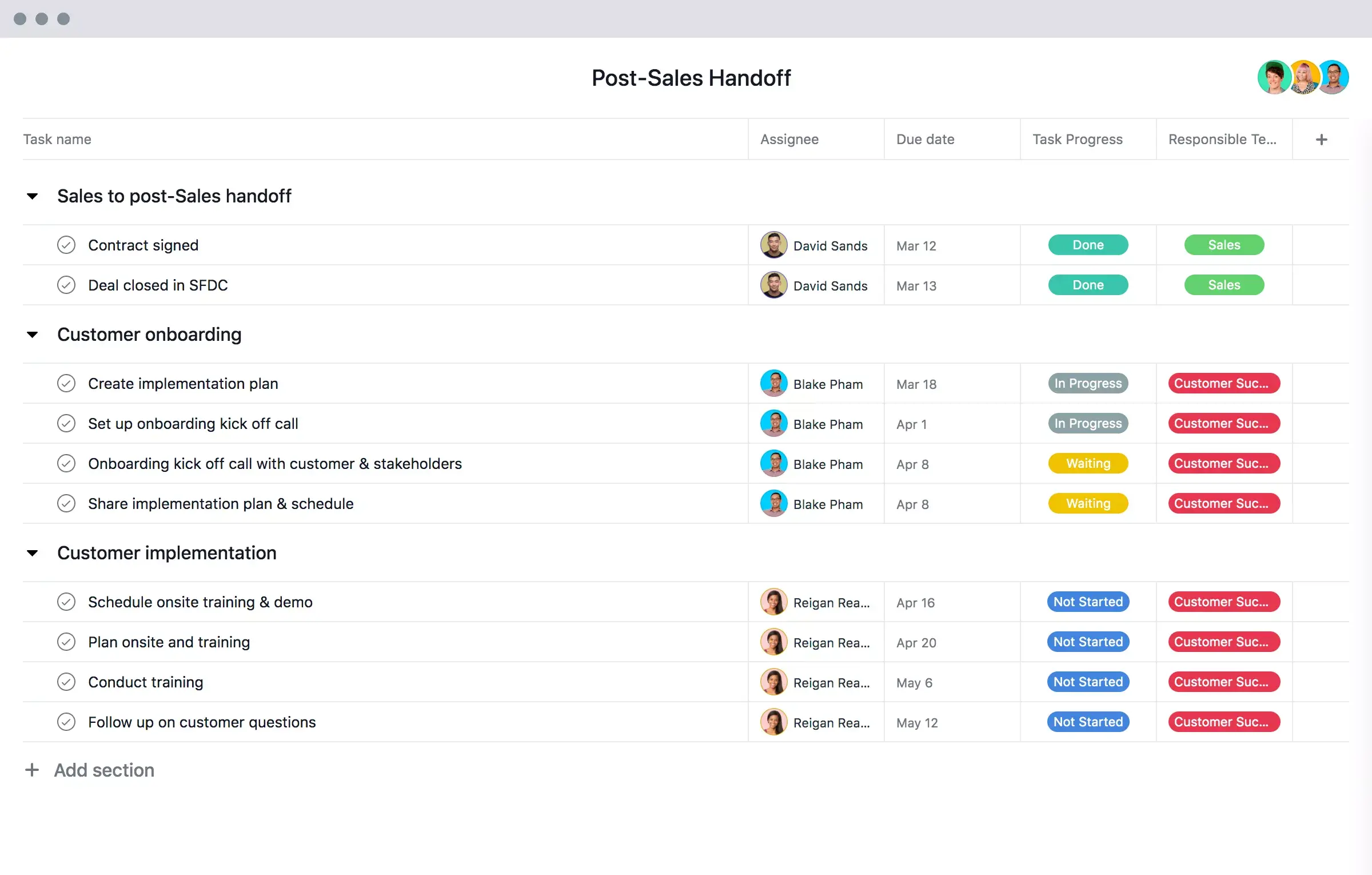
Image source: asana.com
CRM integration with Asana: How teams try to bridge the gaps
This section explains how teams attempt to extend Asana's CRM capabilities by connecting it with external CRM tools. Most teams use third-party connectors to sync deals, contacts, or activities into Asana tasks, so sales reps can continue working in a . Common use cases include creating Asana tasks when deals change stage, pushing reminders for follow-ups, or syncing customer names and values into custom fields.
While this approach adds visibility, it often results in partial data syncs and fragmented workflows. Customer records still live in the CRM, while execution happens in Asana, forcing teams to switch contexts to get a full picture. As pipelines grow, maintaining these connections becomes harder and reporting remains split across systems.
This limitation is why many teams look beyond CRM integration with Asana and move toward platforms like Lark, where , tasks, communication, and automation live in one workspace, reducing operational overhead and improving execution clarity.
Structural limitations of using Asana for CRM
As pipelines expand, deeper limitations begin to surface in Asana CRM setups. These issues are rooted in design rather than configuration choices. They become more noticeable as customer data, users, and workflows increase. Understanding these constraints helps teams assess long-term fit.
- Weak data relationships: Asana does not support native links between customers, accounts, and deals. All CRM information lives at the task level. As projects multiply, customer context fragments. Reconstructing relationships becomes time-consuming.
- Limited reporting depth: CRM metrics such as pipeline value and conversion rates are difficult to calculate. Reporting relies on manual filters and custom fields. Forecasting accuracy declines as data volume grows. Strategic insights remain limited.
- Manual : Deal stages and customer status depend on manual updates. Inactivity and stalled deals are not detected automatically. Teams must review pipelines manually. Risk often goes unnoticed until it is too late.
- No persistent customer record: Once a project is completed, customer history spreads across archived work. Long-term CRM continuity is difficult to maintain. Historical context is easily lost. This limits strategic customer management.
While Asana excels at task tracking, its structural limitations as a project management tool often hinder long-term CRM success. The absence of native data relationships causes customer context to fragment, while manual reporting and lifecycle management make accurate forecasting difficult as pipelines expand. Without a persistent customer record, historical insights are easily lost once projects are archived. To scale effectively, teams need a workspace that moves beyond these task-based silos to ensure data continuity and automated execution. Keep scrolling and check what the choice CRM teams usually take.
Construct a real CRM system for long-term use and growth
How Lark approaches CRM differently from Asana
As mentioned, due to the limitations of Asana, some teams move beyond task-based systems as customer data and workflows become more complex. For these needs, approaches CRM by centering on structured records instead of individual tasks. , workflows, and collaboration live in one connected environment. This makes it easier to manage without fragmenting context across tools.
Granular customer data access without duplicating projects
supports role-based access control down to the row and field level, allowing teams to decide exactly who can view or edit specific customer records and data points. Sales reps can be limited to their own accounts, managers can see the full pipeline, and sensitive fields such as pricing or contracts can be restricted to leadership. These permissions apply across all views and dashboards automatically, keeping one source of truth intact. In Asana, access is controlled at the project level, which often forces teams to split CRM data across multiple projects just to manage visibility. 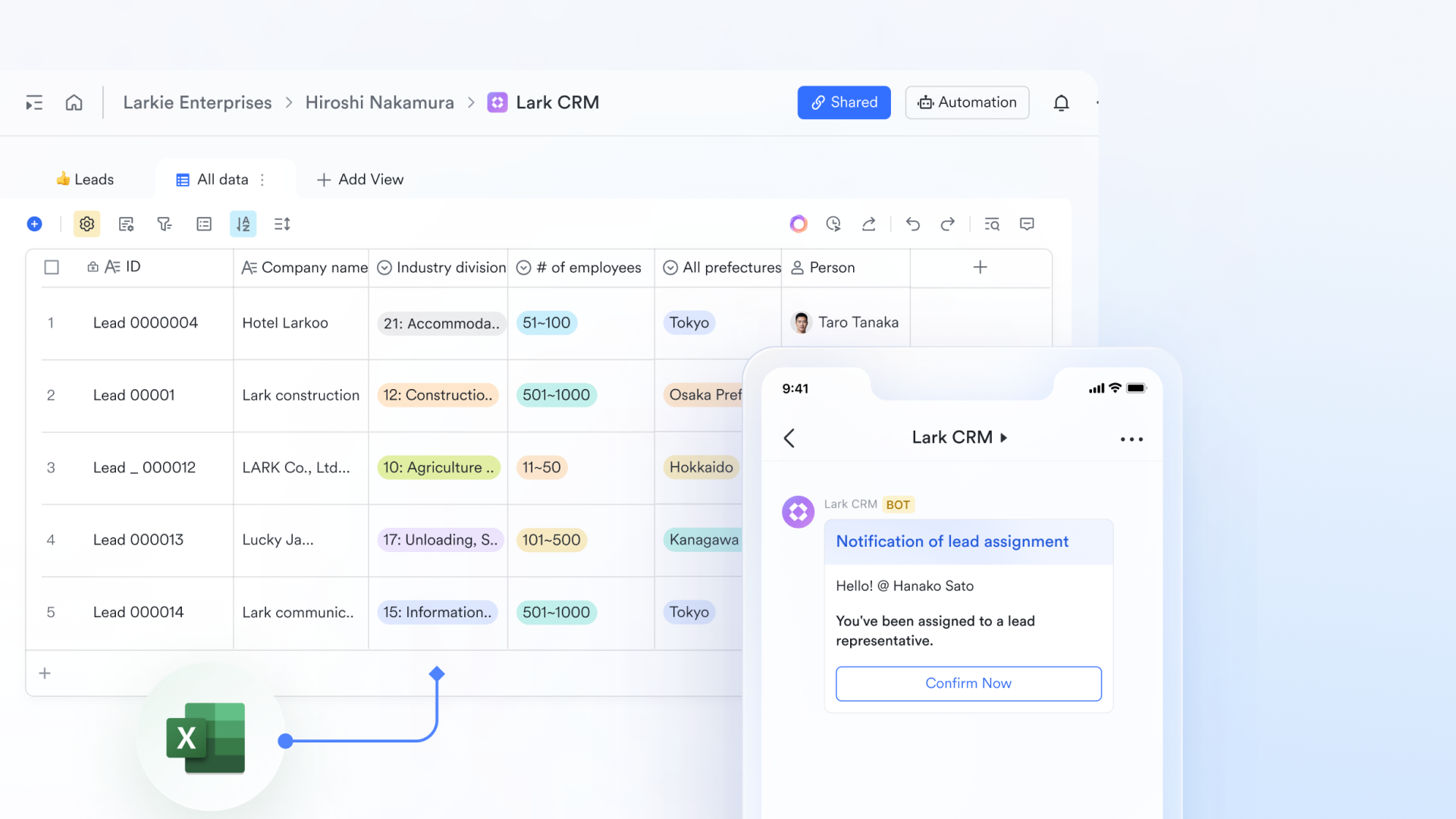
Role-specific CRM views from a single dataset
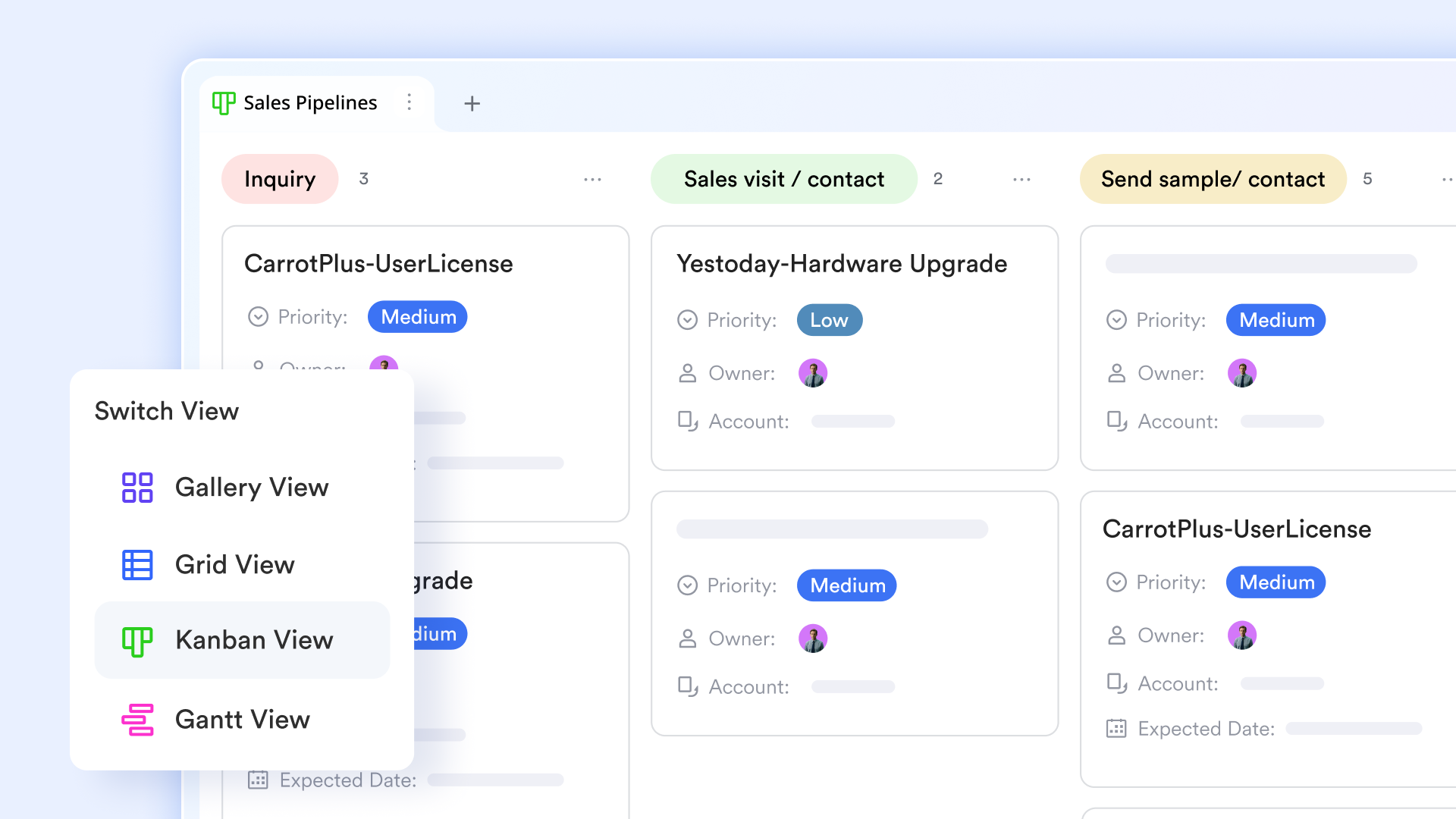
enables multiple teams to work from the same CRM data using customized views tailored to their needs. For example, sales teams can use the to focus on pipeline stages and deal value, finance can use the grid view to review billing and revenue fields, and customer success teams can use the to focus on onboarding and renewals, all without duplicating records. Every view stays synced in real time. Asana projects are isolated by design, which often leads teams to create separate boards for each function and lose a unified customer view.
Proactive risk detection with time-based automation
Lark Base automations can monitor CRM records for inactivity, stalled deal stages, or overdue follow-ups using time-based triggers. When thresholds are reached, the system can automatically notify managers, assign escalation tasks, or update deal status. This helps teams intervene before opportunities go cold. Asana automation is largely event-based and limited in handling inactivity logic, leaving risk detection dependent on manual reviews. 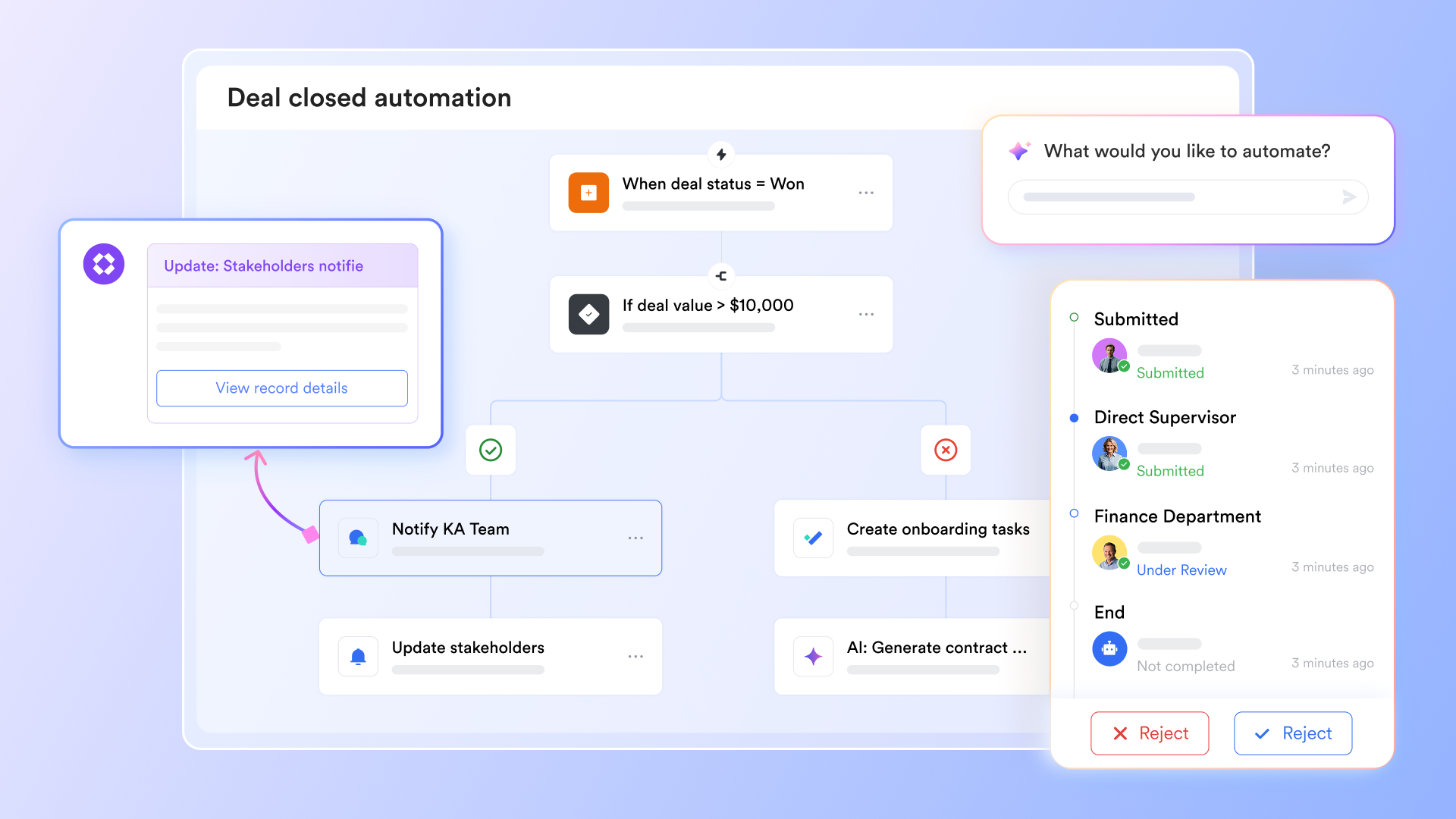
Live CRM dashboards provide data insights
Lark dashboards support real-time data monitoring and provide first-glance insights across fronts. With 36 types of blocks and charts, data updates automatically as CRM records change, ensuring discussions are based on live data rather than static snapshots. Also, it can be embedded directly into documents used for pipeline reviews, weekly updates, or leadership reports. Teams can review performance and make decisions without switching tools. Asana dashboards live separately from documentation, which often causes insights to be overlooked or reviewed out of context. 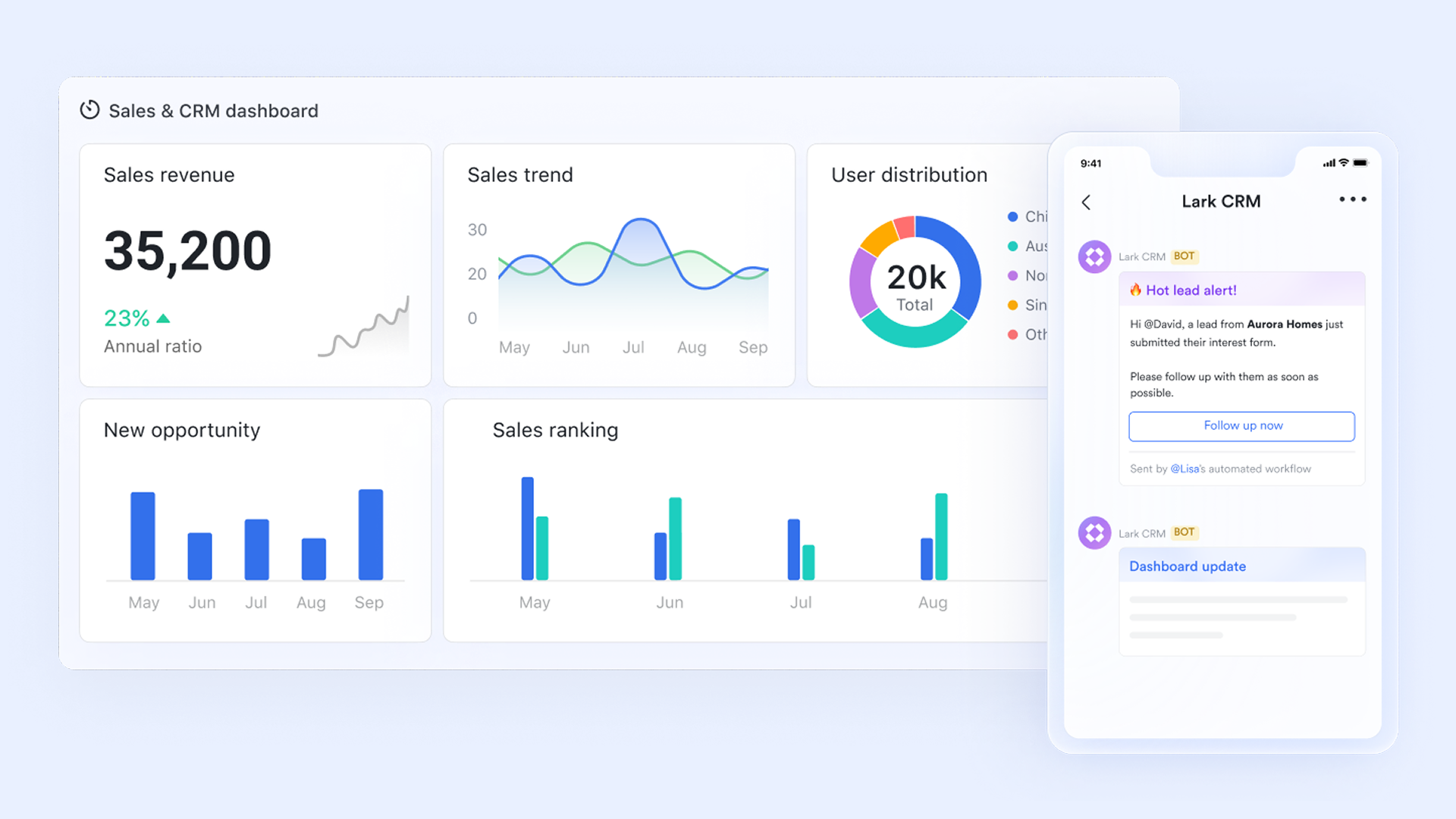
Structured CRM intake using controlled forms
Lark Forms provides structured entry points for capturing leads, renewals, referrals, and customer updates. Forms enforce required fields, dropdowns, and validation rules, so data is clean and consistent from the moment it enters the system. Submissions flow directly into Lark Base tables and can trigger follow-up tasks or notifications automatically. Asana typically relies on manual task creation or loosely structured forms, which results in inconsistent CRM data and additional cleanup work. 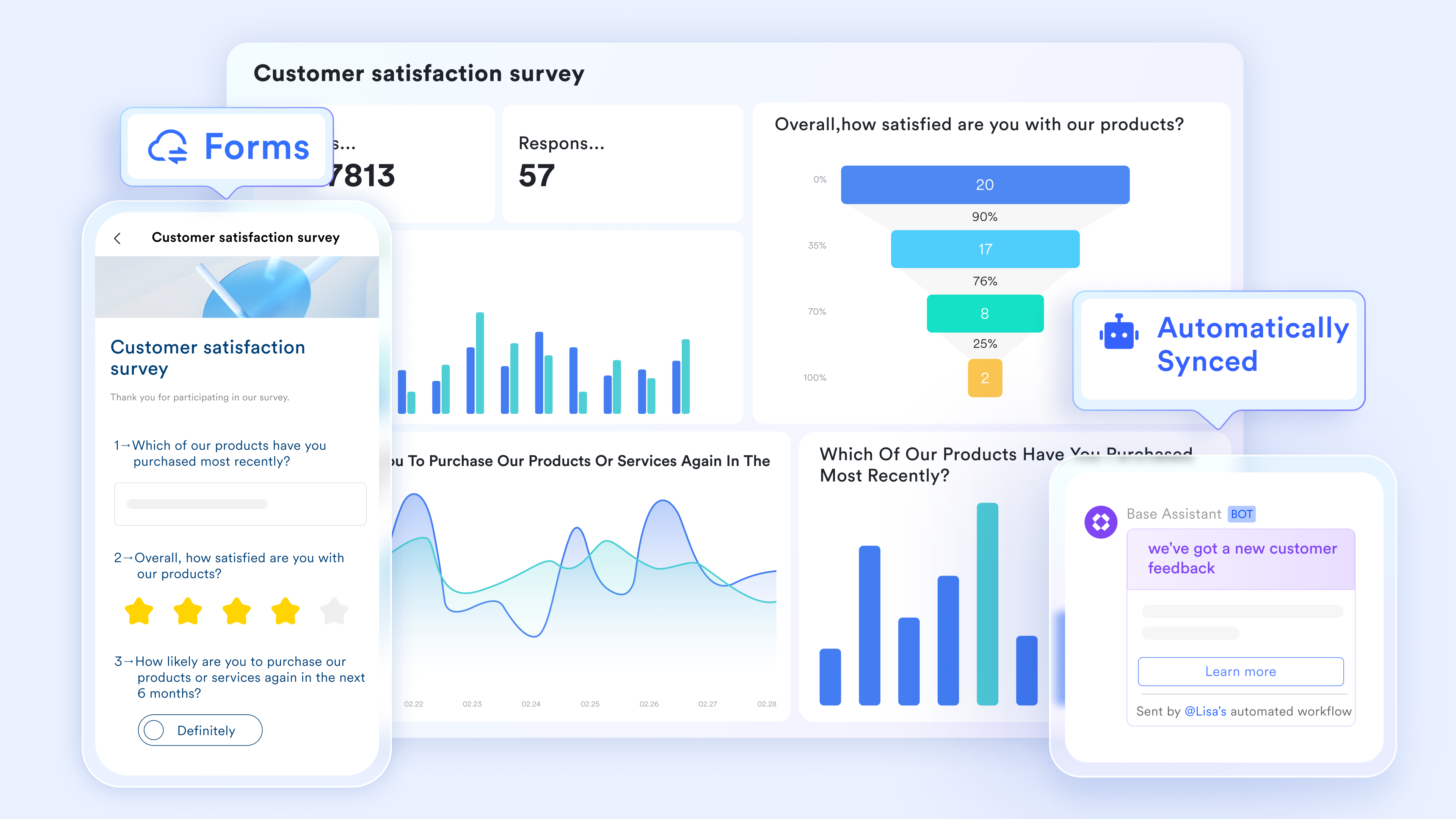
Embedded approvals for pricing and contract decisions
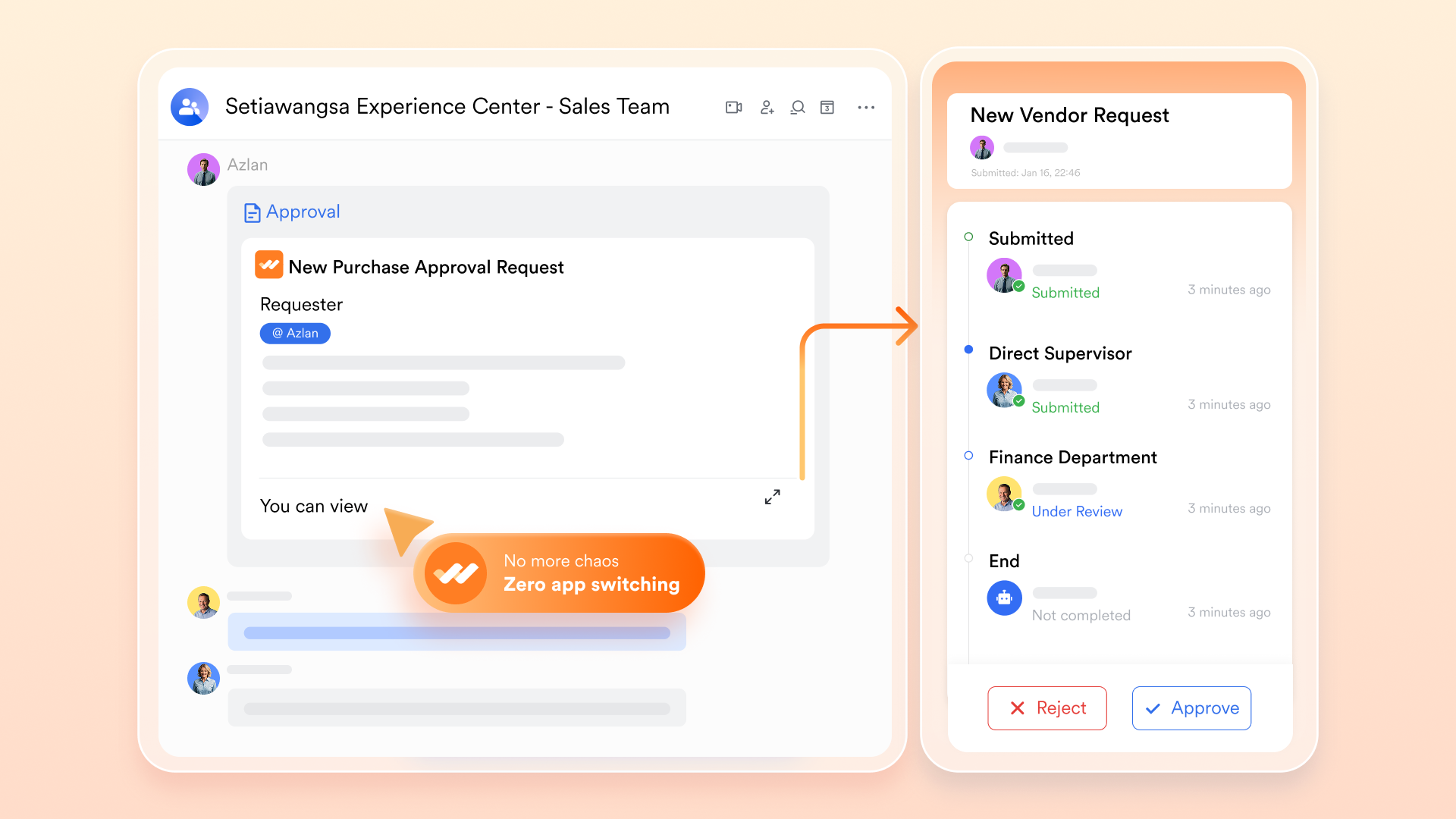
Lark allows teams to build workflows directly into CRM records for scenarios such as discount requests, contract exceptions, or special pricing.can be configured as single-step or multi-step flows with clear approvers, status tracking, and automatic updates once decisions are made. This creates a visible audit trail inside the customer record itself. In Asana, approvals are usually handled through comments or basic rules, making them easy to miss and difficult to track over time.
:
- Starter plan: Free forever plan that includes 11 powerful tools for up to 20 users. It also comes with 100GB of storage, 1000 automation runs, AI translations, and more.
- Pro plan: $12/user/month (billed annually) for up to 500 users. It includes everything in Starter plus group calling for up to 500 attendees, 15TB of storage, 50,000 automation runs, and more.
- Enterprise plan: for custom pricing. Supports unlimited users and includes even more automation runs and advanced security, compliance, and management features.
For small teams with simple communication needs

18 months message history
1000 Base automation runs/month
2000 rows per table in Base
Most POPULAR
For companies with comprehensive collaboration and management needs
Unlimited message history
500-participant video meetings
50k Base automation runs/month
20k rows per table in Base
For large companies with advanced security and organizational management needs
Get a personalized demo and pricing
Unlimited message history
500-participant video meetings
15 TB storage + 30 GB storage/user
500k Base automation runs/month
50k Base automation runs/month
Most POPULAR
For companies with comprehensive collaboration and management needs
Unlimited message history
500-participant video meetings
50k Base automation runs/month
20k rows per table in Base
Comparisons between Asana and Lark when used for CRM
Asana is often adopted as a practical way to manage early customer activity within a familiar project management environment. For small teams with simple sales processes, this approach can be sufficient and easy to maintain. Asana works well when customer interactions closely resemble task execution and when reporting needs remain lightweight.
However, as customer data grows and workflows become more complex, differences between Asana CRM and more structured become clearer. in Asana can require frequent manual updates, which increases the risk of inconsistencies over time. Reporting often reflects activity rather than customer history, and becomes harder to coordinate across multiple projects.
In comparison, platforms like Lark are designed around persistent customer records, shared visibility, and connected workflows. While they may require more upfront setup, they support structured data, automation, and collaboration at scale. At this stage, teams typically evaluate whether continuing with Asana CRM meets their needs or whether a more purpose-built CRM foundation like Lark offers better long-term support for growth.
Conclusion
Asana CRM works best when customer tracking closely resembles task execution. For early pipelines and simple follow-ups, using Asana as a CRM can feel efficient and familiar. Teams benefit from strong task ownership and collaboration during initial growth.
As customer data grows in volume and importance, limitations around reporting, lifecycle management, and automation become harder to ignore. This is often when teams begin evaluating more flexible that combine structure with collaboration. Platforms like offer one such path by unifying CRM data, execution, and communication. The right choice depends on whether CRM remains a task-based workaround or becomes a core operational system.
Build scalable CRM workflows for teams
FAQs
Can Asana handle renewals and long-term account management?
Asana can track renewal-related tasks using projects and due dates, but it does not maintain a persistent customer record over time. Renewal context often lives across multiple projects and comments. This makes it harder to see a complete account history. As complexity grows, some teams begin evaluating platforms like Lark that support long-term customer lifecycle tracking.
How do teams track customer history over multiple projects in Asana?
Teams typically rely on naming conventions, links, and manual references between projects. Customer information is spread across tasks, comments, and archived work. Over time, assembling a full history becomes time-consuming. This challenge often leads teams to look at connected workspaces such as Lark that centralize customer records.
What happens to reporting accuracy as CRM data grows in Asana?
As CRM data increases, reporting accuracy in Asana often declines. Dashboards focus on tasks rather than or revenue metrics. Manual updates introduce inconsistencies over time. Some teams later explore tools like Lark that provide structured CRM reporting as data scales.
Is Asana suitable for sales and customer success working together?
Asana supports collaboration at the task level, which helps during handoffs between sales and customer success. However, shared customer context is fragmented across projects. This makes harder to maintain. Teams sometimes consider platforms like Lark to keep customer data and execution aligned.
How do teams migrate from Asana CRM-style setups without losing context?
Most teams export tasks, comments, and custom fields before rebuilding CRM structures elsewhere. Mapping customer data requires careful planning to preserve history. Context can be lost if records are fragmented. Some teams choose platforms like Lark to consolidate data during migration and reduce rework.
Related reading


















