














CRM Processes: Steps, Functions & Modern Best Practices

Ryan Tanner
Product Marketing Specialist
Sep 18, 2026
Ryan Tanner
Sep 18, 2026

20 min read


Customer relationships don't grow by accident, they grow through structured, repeatable, and data-driven processes. As markets become more competitive and sales cycles more complex, teams increasingly rely on defined CRM processes to manage leads, build trust, nurture opportunities, and retain customers. A strong CRM workflow ensures that every touchpoint is intentional, every follow-up happens on time, and every decision is supported by clean and reliable data. Whether you're building your first CRM framework or optimizing a mature system, understanding these processes is essential for predictable growth.
This guide explains what CRM processes are, why they matter, the steps from lead capture to renewal, core CRM functions, modern automation best practices, and how a unified platform like Lark supports end-to-end workflows, even for teams that don't use a traditional CRM tool.

What are CRM processes?
CRM processes are the structured steps a business follows to manage customer relationships across the entire lifecycle, from lead capture to qualification, nurturing, sales, onboarding, and retention. When people ask "what is CRM processes?", it refers to repeatable workflows, data flows, and activities that ensure every customer interaction is timely, consistent, and well-documented. These workflows standardize how teams prioritize leads, deliver follow-ups, and move opportunities through the pipeline, creating predictable growth.
Strong CRM functions and processes include contact management, pipeline tracking, task management, reporting, and workflow automation. Together, they improve collaboration, reduce errors, and enhance decision-making. Compared to CRM vs manual processes, CRM-driven workflows eliminate missed follow-ups and inconsistent data.
By organizing actions, storing clean records, and automating reminders, a CRM improves sales processes through shorter cycles, more personalization, and clearer accountability, making every customer touchpoint more effective and measurable.
Core CRM process steps
Effective CRM processes follow a structured, repeatable path from first contact to long-term retention. These steps help teams standardize how leads are managed, how deals progress, and how customer relationships grow.
- Lead capture: This step brings new leads into the system through forms, ads, chat, email, or offline sources. A CRM centralizes all incoming data, so nothing is lost or tracked manually. Clean and consistent capture builds the foundation for accurate crm functions and processes.
- Lead qualification: Qualification determines whether a lead is ready for sales based on need, fit, and intent. Automated scoring helps reps prioritize the most valuable opportunities. This reduces wasted outreach and speeds up response times.
- Lead nurturing: Nurturing keeps prospects engaged through timely messages, education, and personalized content. CRM workflows automate touchpoints so leads don't go cold. Strong nurturing increases conversion rates and shortens sales cycles.
- Sales pipeline management: Opportunities move through defined stages, each with clear actions and expected outcomes. Pipeline visibility helps teams identify bottlenecks and forecast accurately. This structured flow reflects how a CRM improves sales processes.
- Closing the deal: This stage includes negotiation, approvals, contracting, and final alignment with the customer. Standardized steps ensure nothing is overlooked and that decisions move quickly. A consistent closing process reduces errors and increases win rates.
- Customer onboarding: Once the deal is won, onboarding introduces customers to the product or service. Tasks, checklists, and timelines help teams deliver a smooth experience. Effective onboarding is essential for long-term retention.
- Customer support & retention: Support teams resolve issues, answer questions, and maintain customer satisfaction. CRM-driven visibility helps track history, preferences, and risks. Consistent engagement increases loyalty and renewal likelihood.
- Data analysis & continuous improvement: Analytics highlight trends, gaps, and opportunities across the entire customer journey. Automated dashboards reduce reporting time and errors. These insights help optimize CRM processes and strengthen overall performance.
Strong CRM functions that support these processes
Strong CRM functions and processes give teams the structure they need to manage every interaction across the customer lifecycle. These features turn raw data, scattered tasks, and manual follow-ups into a streamlined, predictable workflow that drives revenue and retention.
- Contact & account management: Centralizes all customer details, names, roles, communication history, notes, and company information, in one place. This eliminates the confusion of scattered spreadsheets or chat logs. Clean records strengthen personalization and improve every stage of crm processes.
- Opportunity & pipeline tracking: Tracks deal through defined stages, giving teams real-time visibility into progress, blockers, and revenue forecasts. Clear pipelines help leaders predict outcomes more accurately. This is a core pillar of crm features for managing sales processes.
- Task & activity management: Assigns owners, due dates, and priorities to calls, emails, proposals, demos, and follow-ups. Activity logs ensure every interaction is captured and traceable. This prevents the missed steps that commonly occur in CRM vs manual processes.
- Marketing automation: Automates nurturing workflows, email sequences, segmentation, and lead scoring based on behavior and intent. Consistent automation improves engagement without increasing workload. It also helps optimize lead follow-up processes with timely, targeted messaging.
- Customer service tools: Support teams can manage tickets, track issues, log resolutions, and monitor SLAs in one system. A full history of interactions helps agents respond faster and more accurately. This consistency directly improves satisfaction and long-term retention.
- Reporting & analytics: Dashboards reveal trends in conversions, cycle length, rep performance, revenue, and customer health. Automated analytics reduce reporting errors and save hours of manual analysis. These insights power smarter decisions across all crm processes.
- Workflow automation: Rules trigger actions like follow-up reminders, lead routing, field updates, or task creation. Automating these repetitive steps ensures consistency and reduces human error. This dramatically enhances how a CRM improves sales processes.
- CRM vs manual processes: Manual tracking often leads to missed follow-ups, inconsistent data, and fragmented communication. A CRM centralizes information, enforces structure, and automates routine tasks. The result is higher efficiency, better clarity, and stronger customer experience.
Ideal results: How CRM improves sales processes
A well-structured CRM framework transforms how sales teams work by reducing friction, improving clarity, and ensuring every action is backed by clean data. Here's how CRM processes directly enhance sales performance and drive predictable revenue.
- Shorter sales cycles: A powerful crm software streamlines qualification, automate reminders, and keep deals moving through defined stages. Reps waste less time on admin and more on high-value conversations. This efficiency is a key example of how a CRM improves sales processes.
- Stronger personalization: With detailed contact and account records, reps can tailor messages, demos, and proposals to each buyer's context. Centralized history ensures continuity even when ownership changes. Personalization increases engagement and conversion rates.
- Fewer missed follow-ups: Task management and automated reminders prevent opportunities from being forgotten. Every lead and deal has a clear next step assigned to an owner. This closes the gaps that often appear in CRM vs manual processes.
- Clear accountability: CRM systems assign responsibilities, deadlines, and activity logs to specific reps. Leaders gain visibility into who owns each step and where deals are stuck. This clarity improves discipline and accelerates deal progress.
- Unified communication across leads, deals, and accounts: All conversations, files, and notes are tied to the correct customer record. Teams avoid information silos and can see the full context instantly. This unified flow improves collaboration between marketing, sales, and success.
- Better rep performance tracking: Dashboards show activity levels, win rates, conversion stages, and cycle times at both individual and team levels. Leaders can coach more effectively using data instead of guesswork. Consistent tracking strengthens overall sales execution.
Key tech: Automating analytics processes in CRM
CRM analytics transforms scattered data into insights that teams can act on instantly. With automation handling heavy lifting, businesses gain accuracy, speed, and clearer decision-making across every stage of the customer lifecycle.
- Automated reporting: Automated CRM reporting compiles real-time customer and sales data without manual effort. Teams get instant dashboards that update as records change. This ensures consistent visibility across performance, pipeline, and customer behavior.
- Trend identification: CRM systems highlight patterns in lead behavior, deal movement, and retention signals. Automated trend detection helps teams predict shifts before they become problems. It turns raw data into proactive decision-making opportunities.
- Customer health scoring: Health scoring uses CRM data to rate customer engagement, product usage, and risk factors. Teams immediately see which accounts need attention. It strengthens retention by focusing efforts where they matter most.
- Forecasting models: CRM forecasting uses historical data, deal stages, and performance trends to predict future revenue. Automated models provide more consistent projections. This helps leaders plan resources, targets, and strategies with confidence.
Why automation reduces reporting errors
Manual data entry introduces inconsistencies, delays, and human mistakes. Automation removes repetitive steps, ensuring every report is built from accurate, up-to-date records. This leads to cleaner insights and trustworthy metrics.
Action time: Use Lark to streamline and upgrade CRM processes
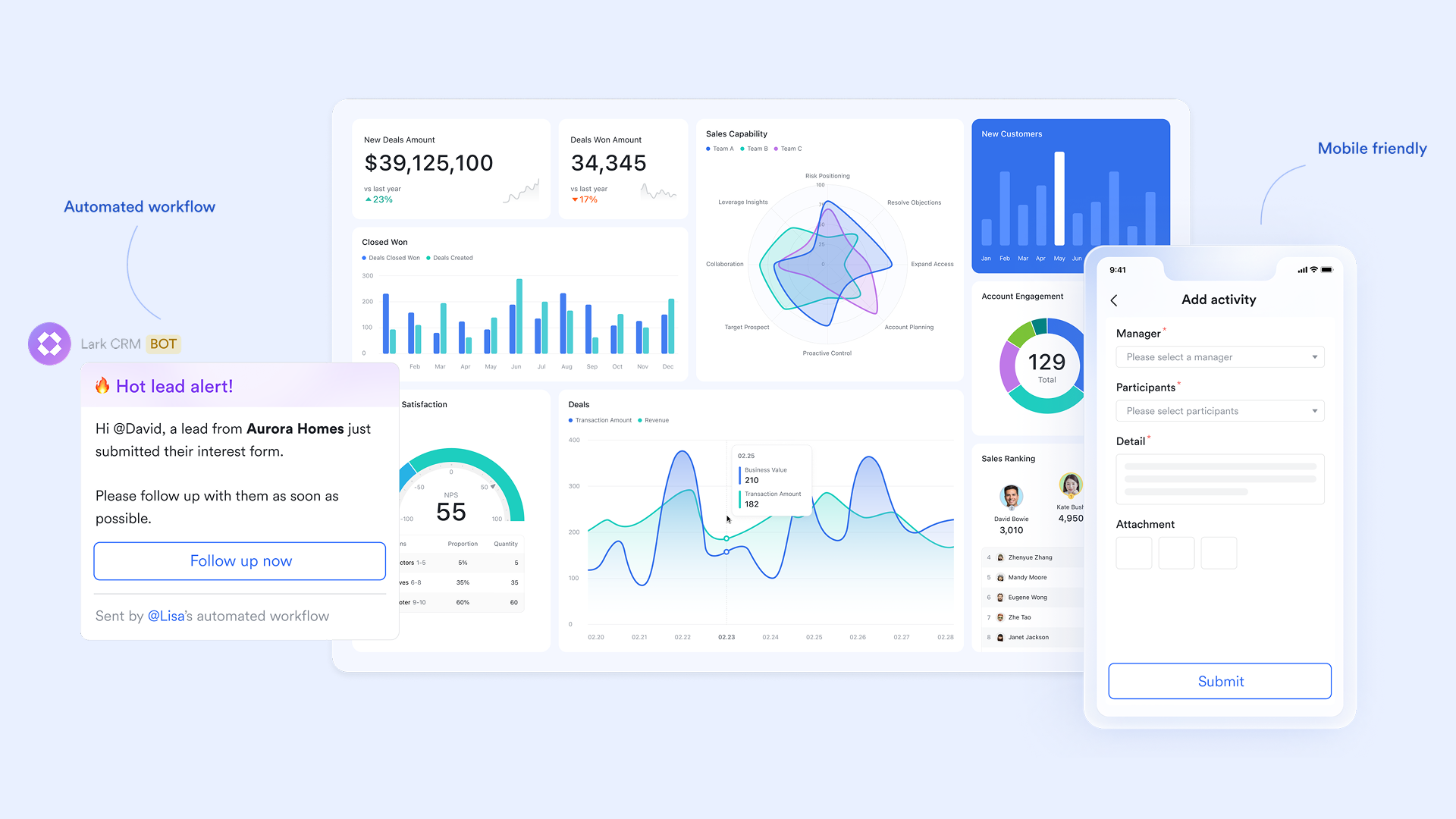
Lark acts as a unified workspace where teams can run CRM processes from lead capture to customer success, all in one place. Instead of juggling disjointed tools, teams manage data, communication, tasks, and workflows seamlessly. Via a structured CRM database, every customer engagement, information update, or action stays connected and visible. This creates a smooth, end-to-end customer journey without switching platforms.
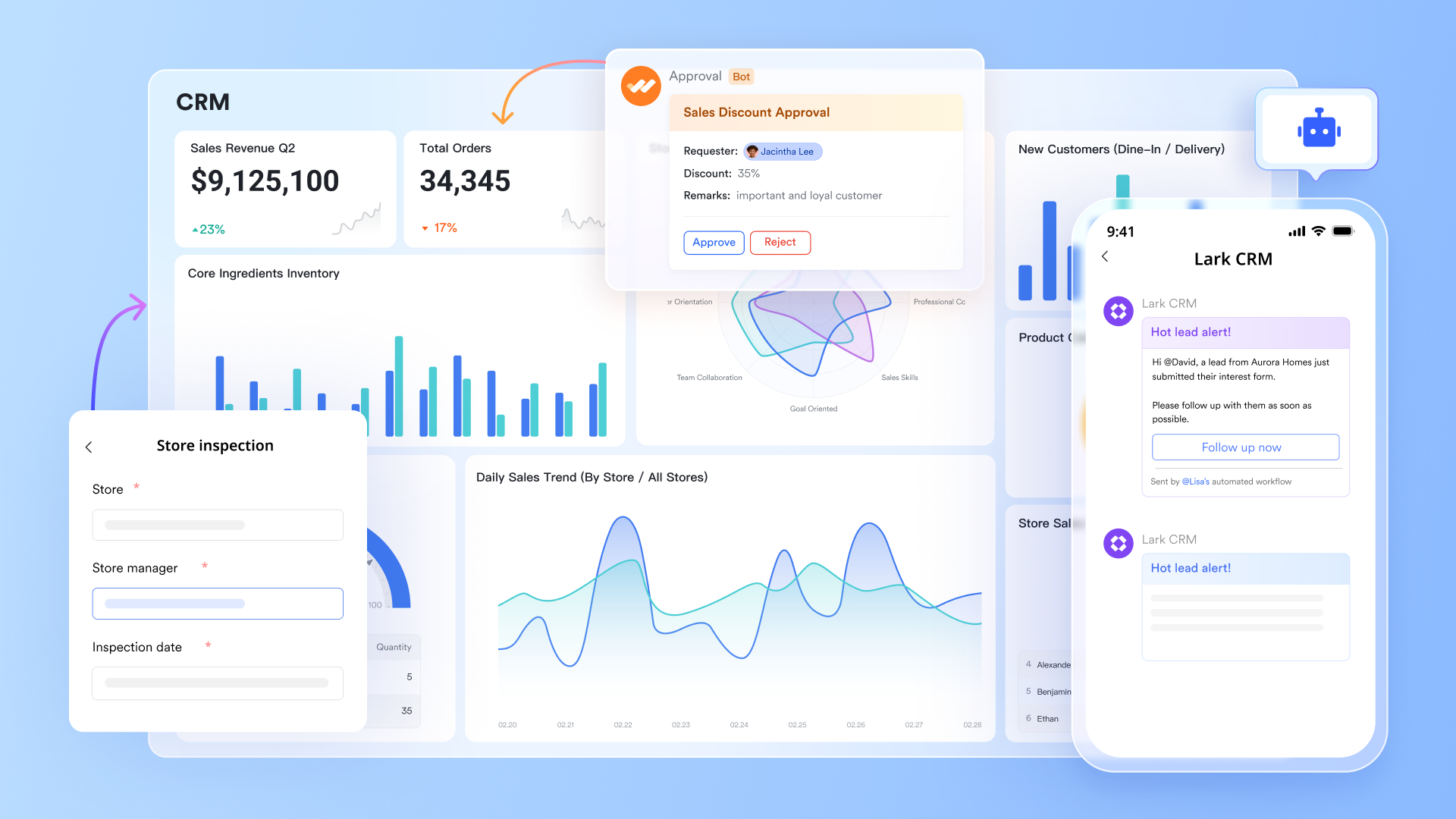
Lark Base: Organize customer and pipeline data
Lark Base is a flexible, structured database that acts as the single source of truth for leads, accounts, deals, and opportunity details. You can create custom tables for contacts, companies, opportunities, and activities, then add fields for stage, close date, ARR, priority, and any bespoke metadata your sales process needs. Multiple views (grid, Kanban, Gantt, dashboards) let reps and leaders see the pipeline from different angles: a Kanban board for deal progression, a Gantt for complex renewals or onboarding timelines, and dashboards for roll-up KPIs. Two-way links keep related records synchronized (for example, linking a company to its open deals), reducing duplicate data and manual updates. Automation rules in Base can trigger tasks, notifications, an automated approval, or field updates when stages change, ensuring that the right follow-ups happen without admin overhead.
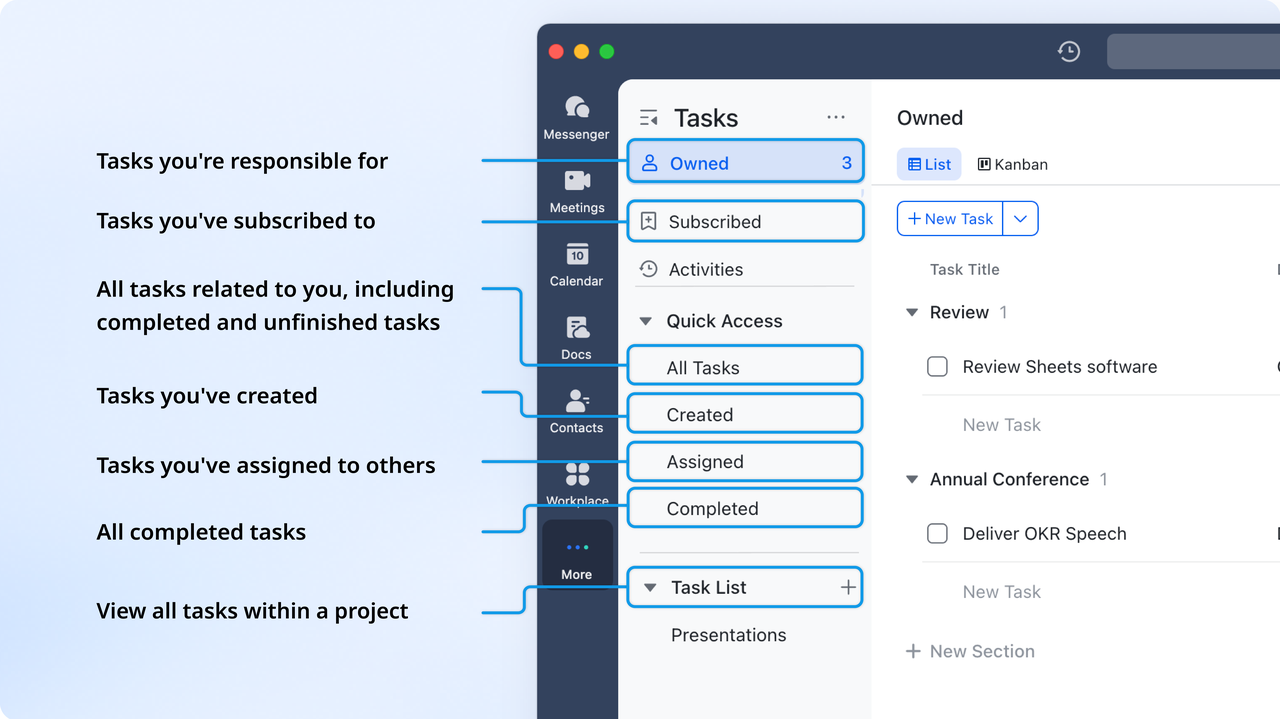
Lark Tasks: Maintain accountability across the sales cycle
Lark Tasks turns pipeline actions into owned, trackable work items so nothing falls through the cracks. Assign demos, follow-ups, proposal revisions, and renewal reminders to specific reps with due dates, priorities, and subtasks; tasks stay visible on personal. Managers can view workload distribution, overdue items, and completion rates to balance capacity and coach where needed. Tasks update in real time across the workspace. This creates a clear, auditable trail from lead capture to close and handoff to customer success.
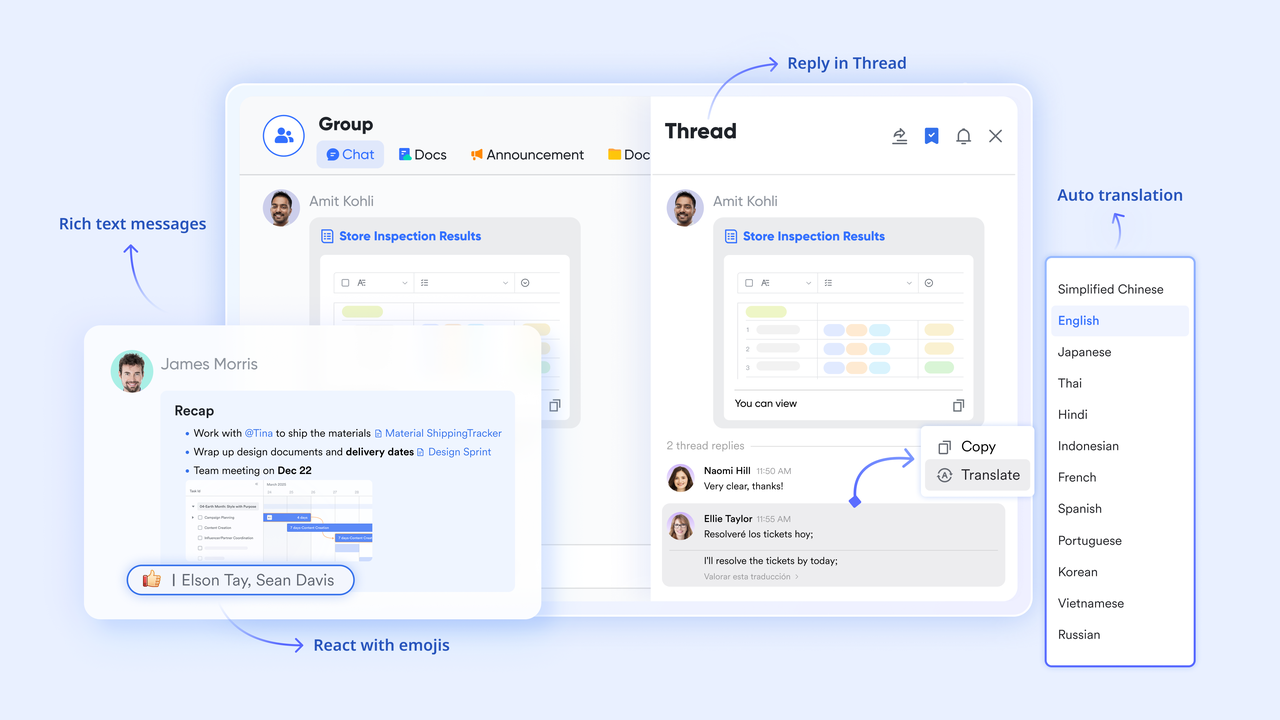
Lark Messenger: Contextual communication
Lark Messenger keeps conversations tied to the work they reference so context never gets lost in siloed chats or email threads. Create group chats for accounts, deals, or strategic initiatives and drop Base records, Docs, or Tasks directly into the conversation so everyone has instant access to the same materials. Quick polls, mentions, and replies make coordination simple during live deal pushes, while pinned messages preserve key decisions and action owners. Because chats and records live in the same workspace, a rep can reference prior discovery notes or the latest proposal without switching apps, which reduces friction and speeds up response times. Searchable history ensures that prospect context and attachments are always discoverable for handoffs and audits.
Lark Docs & Lark Wiki: Shared sales playbooks and customer files
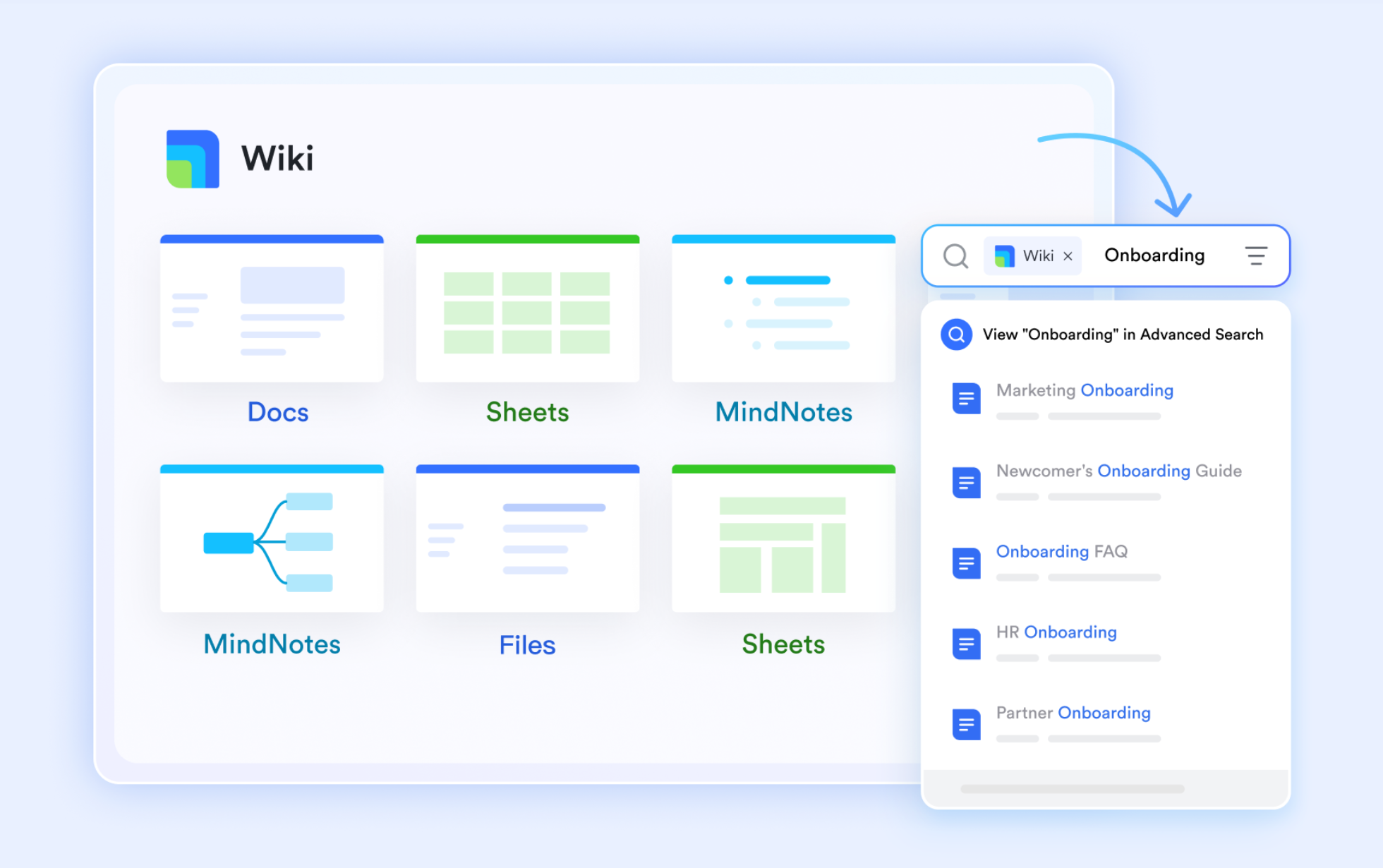
Lark Docs is where teams create and co-edit proposals, discovery notes, playbooks, and account plans in real time, while Lark Wiki provides a structured library for repeatable knowledge such as pricing guidelines, objection handling scripts, and onboarding checklists. Docs can embed Base tables, Tasks, and charts so documents reflect live pipeline data rather than static exports. Version history and inline comments let managers review changes, provide feedback, and approve copy before it goes to prospects. For example, a salesperson can draft a tailored proposal in Docs, link the associated deal from Base, keeping the entire content lifecycle visible and auditable. This centralization reduces rework, preserves institutional knowledge, and speeds proposal turnaround.
Lark Calendar & Lark Meetings: Schedule demos and capture call notes
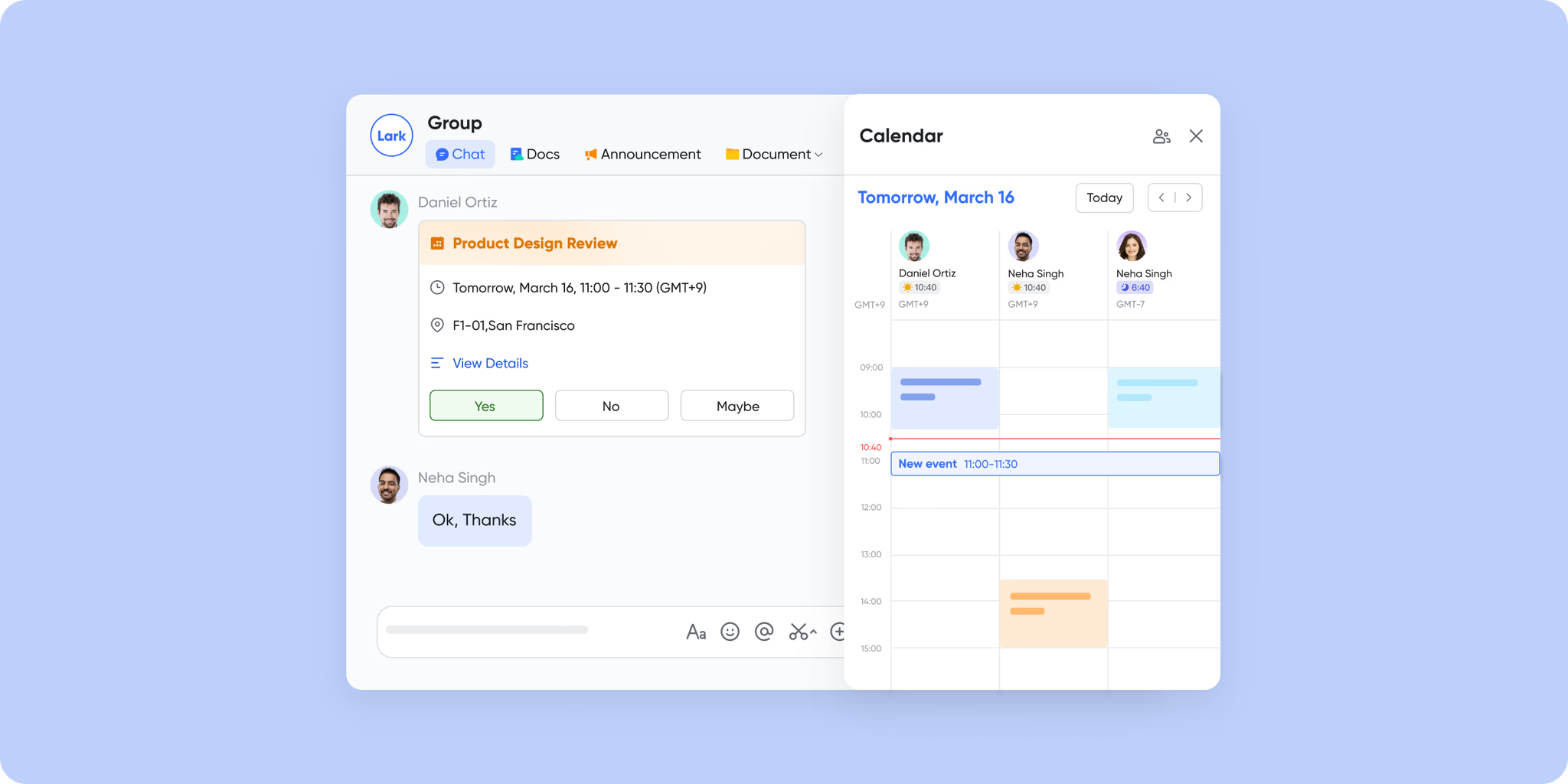
Lark Calendar shows team availability and helps schedule demos, discovery calls, and internal prep sessions with minimal back-and-forth; events can be linked to Base records or Docs so meeting context travels with the appointment. During a meeting, Lark Meetings supports screen sharing, co-editing of Docs, and live chats, while AI Meeting Notes capture the discussion, highlight action items, and summarize next steps automatically. Those summaries and any generated tasks can be attached back to the relevant deal or account record, ensuring follow-ups are assigned and visible. Time zone handling and calendar import help distributed teams coordinate across regions without scheduling errors.
Lark Approval: Smooth deal-level decision flows
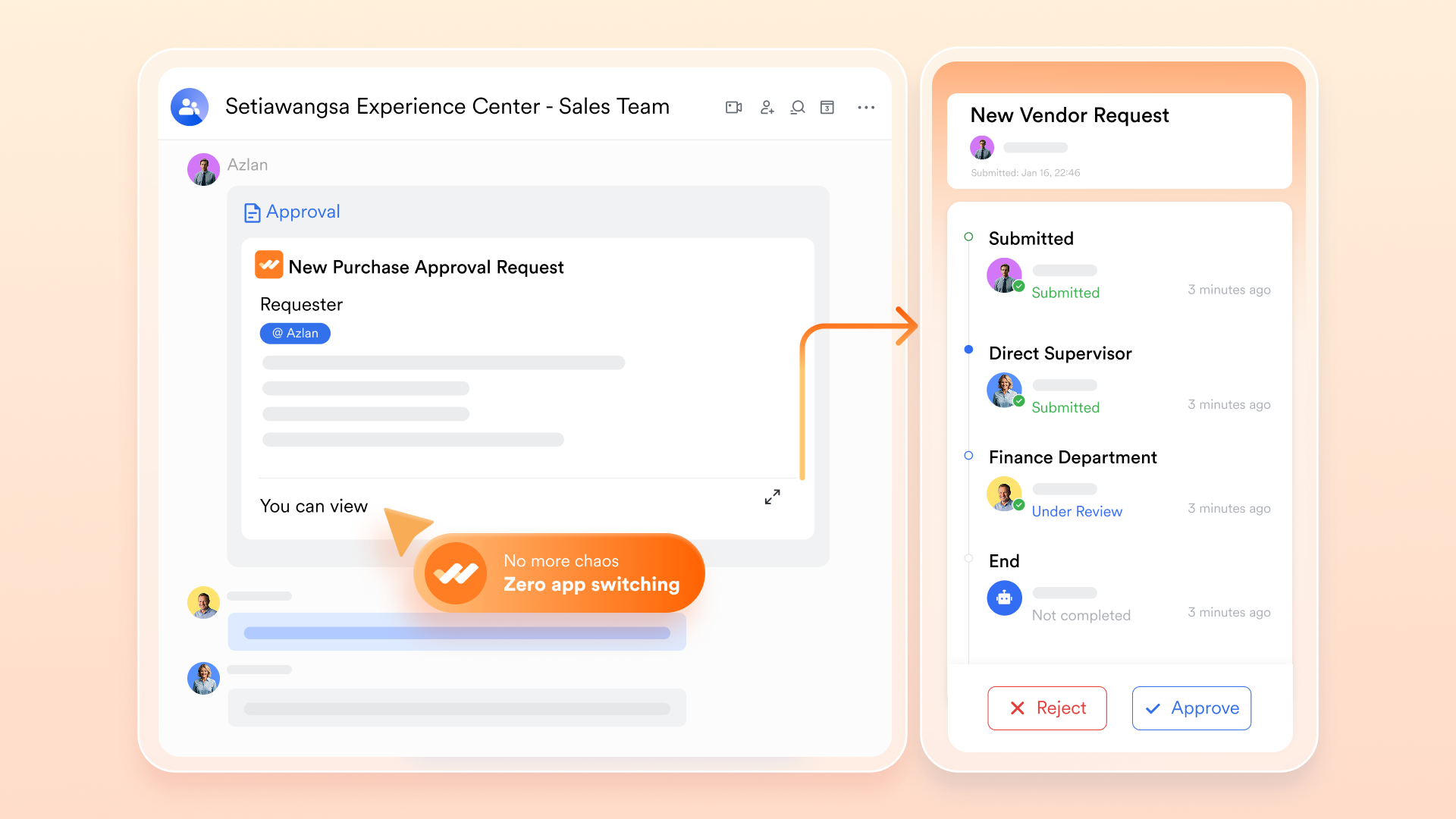
Lark Approval standardizes and speeds up decision workflows such as discount approvals, contract sign-offs, and special pricing requests. Create configurable approval templates with defined reviewers, escalation rules, and conditional logic so a pricing exception, for example, follows the exact path required for compliance. Approvals surface in a central queue, notify reviewers via Messenger or email, and completion can automatically update Lark Base records or create implementation tasks. Because approvals are logged and auditable, finance and legal teams gain visibility into decisions and histories without separate ticket systems. This reduces manual chasing, shortens approval cycles, and ensures consistent governance over deal exceptions.
- Starter plan: Free forever plan that includes 11 powerful tools for up to 20 users. It also comes with 100GB of storage, 1000 automation runs, AI translations, and more.
- Pro plan: $12/user/month (billed annually) for up to 500 users. It includes everything in Starter plus group calling for up to 500 attendees, 15TB of storage, 50,000 automation runs, and more.
- Enterprise plan: Contact sales for custom pricing. Supports unlimited users and includes even more automation runs and advanced security, compliance, and management features.
Why CRM processes are important
A well-defined set of CRM processes helps teams manage customer interactions with clarity, consistency, and speed. By replacing manual work with structured workflows, businesses improve accuracy, collaboration, and overall customer experience.
- Better lead prioritization and faster follow-ups: Strong CRM functions and processes help teams score, route, and prioritize leads based on intent and fit. Automated reminders ensure follow-ups happen on time instead of slipping through the cracks. This creates a smoother experience for prospects and supports higher conversion rates.
- Data consistency and cleaner customer records: Standardized fields and required inputs prevent incomplete or duplicated entries. Clean data enables accurate reporting and segmenting across the customer lifecycle. With reliable information, teams make decisions faster and avoid the confusion common in CRM vs manual processes.
- Predictable sales cycles: A structured project pipeline helps reps move opportunities through clear, repeatable stages. Leaders can forecast more accurately because deals follow a consistent pattern. This predictability directly supports how a CRM improves sales processes by reducing uncertainty.
- Improved collaboration across teams: Centralized customer data ensures marketing, sales, support, and operations work from the same source of truth. Teams can view updates, notes, and next steps without switching tools. This alignment eliminates siloed communication and speeds up handoffs.
- Higher retention and customer satisfaction: CRM workflows guide onboarding, support, and renewal activities so customers receive timely help. Personalized communication and fast issue resolution strengthen trust and long-term loyalty. Visibility into customer health helps teams proactively address risks.
- Automation for repetitive tasks: Automated workflows handle admin tasks like status updates, reminders, routing, and reporting. This reduces manual errors and gives reps more time for relationship-building. Automation also generates more consistent outcomes across stages of the customer journey.
Best practices to optimize CRM processes
Strong CRM processes rely on disciplined execution. These practices help teams maintain accuracy, accelerate conversions, and ensure every customer interaction moves smoothly through the pipeline.
- Standardize your sales stages: Define clear, consistent stages, so every rep follows the same path from lead to close. Standardization improves forecasting accuracy and visibility. It also removes ambiguity and speeds up decision-making.
- Keep your CRM database clean: Regularly update, validate, and remove outdated contact or deal information. A clean CRM ensures accurate reporting and better lead routing. It also prevents pipeline clutter that slows down sales teams.
- Automate repetitive tasks: Use CRM automation to handle follow-ups, reminders, data entry, and handoffs. Automation frees reps from admin work and ensures nothing falls through the cracks. This boosts productivity and improves customer response times.
- Align marketing and sales pipelines: Create shared definitions for lead quality, deal readiness, and handoff rules. When both teams work from the same CRM data, conversions improve. This alignment reduces friction and builds a unified growth engine.
- Measure process performance routinely: Track KPIs like conversion rate, stage velocity, win rate, and follow-up speed. Routine measurement highlights bottlenecks early. It helps teams refine workflows and improve overall CRM performance.
Common challenges in CRM process management
Even the strongest CRM strategy can fail if foundational issues aren't addressed. These common challenges create friction, slow down sales velocity, and weaken customer experience.
- Dirty or inconsistent data: When data is outdated, duplicated, or incomplete, CRM insights become unreliable. Reps struggle to trust records, which hurts follow-ups and forecasting. Clean, consistent data is the backbone of every effective CRM process.
- Poor adoption: If teams don't actively use CRM, it loses its value. Low adoption leads to missing updates, lost deal context, and scattered communication. Clear training and simple workflows improve daily usage.
- Overcomplicated workflows: Too many steps, fields, or approvals slow down productivity. Complex workflows frustrate reps and reduce efficiency. Streamlined processes help teams stay focused on selling, not admin work.
- Missing visibility: When teams can't see deal stages, next steps, or ownership, progress stalls. Limited visibility causes delays, duplicate work, and miscommunication. Centralized CRM data keeps everyone aligned and accountable.
- Lack of cross-team alignment: Marketing, sales, and support needs shared goals and definitions. Without alignment, leads fall through the cracks and customer journeys break. A unified CRM process ensures smooth handoffs and consistent experiences.
Conclusion
Effective CRM processes bring structure, clarity, and consistency to every customer touchpoint. By standardizing sales stages, keeping data clean, improving collaboration, and using automation to reduce errors, businesses build stronger pipelines and deliver smoother customer journeys. Addressing common challenges like poor adoption or missing visibility further strengthens performance. With the right CRM practices, teams achieve faster follow-ups, better forecasting, and higher retention. And for companies ready to simplify workflows, centralize information, and accelerate execution from one unified workspace, Lark makes it easier to turn CRM strategy into real, day-to-day impact.
FAQs
How does CRM improve lead follow-up processes?
A CRM improves lead follow-up by organizing contacts, capturing every interaction, and setting automated reminders, so no lead is missed. Reps can see where each lead stands, prioritize based on engagement, and respond faster with relevant information. This consistency shortens response times, increases conversions, and ensures every lead moves smoothly through the pipeline.
Which CRM features support sales optimization?
Key CRM features that optimize sales include pipeline tracking, contact management, automated follow-up reminders, task assignments, and lead scoring. Sales dashboards highlight bottlenecks, while activity logs help reps stay organized. Together, these tools boost efficiency, improve forecasting accuracy, and give teams complete visibility to close deals faster and more predictably.
What is the difference between CRM processes and CRM tools?
CRM processes are the workflows, like lead nurturing, follow-ups, and onboarding that guide how teams interact with customers. CRM tools are software systems that support those processes by storing data, automating tasks, and improving visibility. Processes define what teams must do; tools provide how they execute those steps efficiently and consistently.
How do automated workflows enhance CRM processes?
Automated workflows handle repetitive tasks such as follow-ups, data updates, notifications, and approvals. This reduces errors, removes delays, and ensures every step happens on time. Automation keeps pipelines moving consistently, gives teams more time for high-value conversations, and makes CRM processes smoother, faster, and far more predictable.
How can teams track CRM processes without a traditional CRM tool?
Teams can track CRM processes using spreadsheets, task managers, shared databases, or collaborative workspaces. These tools allow teams to log leads, assign tasks, monitor follow-ups, and centralize communication. While less powerful than a full CRM, structured templates and automation-friendly platforms still help maintain visibility and keep processes organized.
What is the role of analytics in CRM?
Analytics turns CRM data into insights that guide decisions. It highlights trends in lead behavior, deal movement, rep performance, and customer retention. With dashboards, forecasting, and segmentation, teams understand what drives conversions and where bottlenecks exist. Analytics ultimately strengthens strategy and supports continuous CRM improvement.
What CRM helps optimize lead follow-up processes?
A CRM that improves lead follow-up provides clear pipelines, automated reminders, activity timelines, and fast access to customer history. It should help reps prioritize leads, send timely responses, and track every interaction in one place. Platforms like Lark offer tools that streamline follow-ups through centralized data, task automation, and seamless team communication.
Related reading
Table of contents
Start using Lark today

Manage all your work in one place
Boost team efficiency by 10x
Save up to 70% on software costs
Table of contents
Start using Lark today
Manage all your work in one place
Boost team efficiency by 10x
Save up to 70% on software costs
Keep reading









2026 Lark Technologies Pte. Ltd.
Headquartered in Singapore with offices worldwide.






Explore: