Understanding how Bitrix24 pricing works is essential for teams comparing CRM, collaboration, and project management tools. Bitrix24 pricing includes free, cloud, and self-hosted editions, each packaged with different feature bundles that influence total cost. Many growing teams begin exploring these plans as they evaluate scalability and long-term suitability. Many teams also consider and when assessing the value of alternative workplace solutions.
While comparing platforms, some teams start noticing how other modern tools behave, and this is where a solution like Lark, one of the best Bitrix24 and , takes a different approach to combining communication and structured work. By learning the basics of Bitrix24 pricing, decision makers can better understand what they are paying for and what trade-offs exist before selecting the right tier.
What is Bitrix24?
Bitrix24 is a platform designed to help businesses manage , communication, collaboration, and project execution within one ecosystem. The all-in-one approach appeals to teams that want several business functions combined, although the experience often varies across modules. As companies adopt the platform, they explore how each module contributes to their operational workflow and how pricing changes when they need more capabilities. Understanding these elements helps organizations form a clearer picture of whether Bitrix24 pricing aligns with their long-term needs.
Bitrix24 provides CRM tools, communication channels, features, and workspace organization within a multi-section interface. Each module functions independently, and users often navigate several components to complete daily work. This modular setup is one reason Bitrix24 pricing can feel more complex compared to other tools. Businesses evaluating the platform look at how operate, how collaboration takes place, and whether the free edition offers enough power for early-stage operations. Over time, many teams end up comparing Bitrix24 pricing with alternatives to determine which system offers better clarity, predictability, and ease of use.
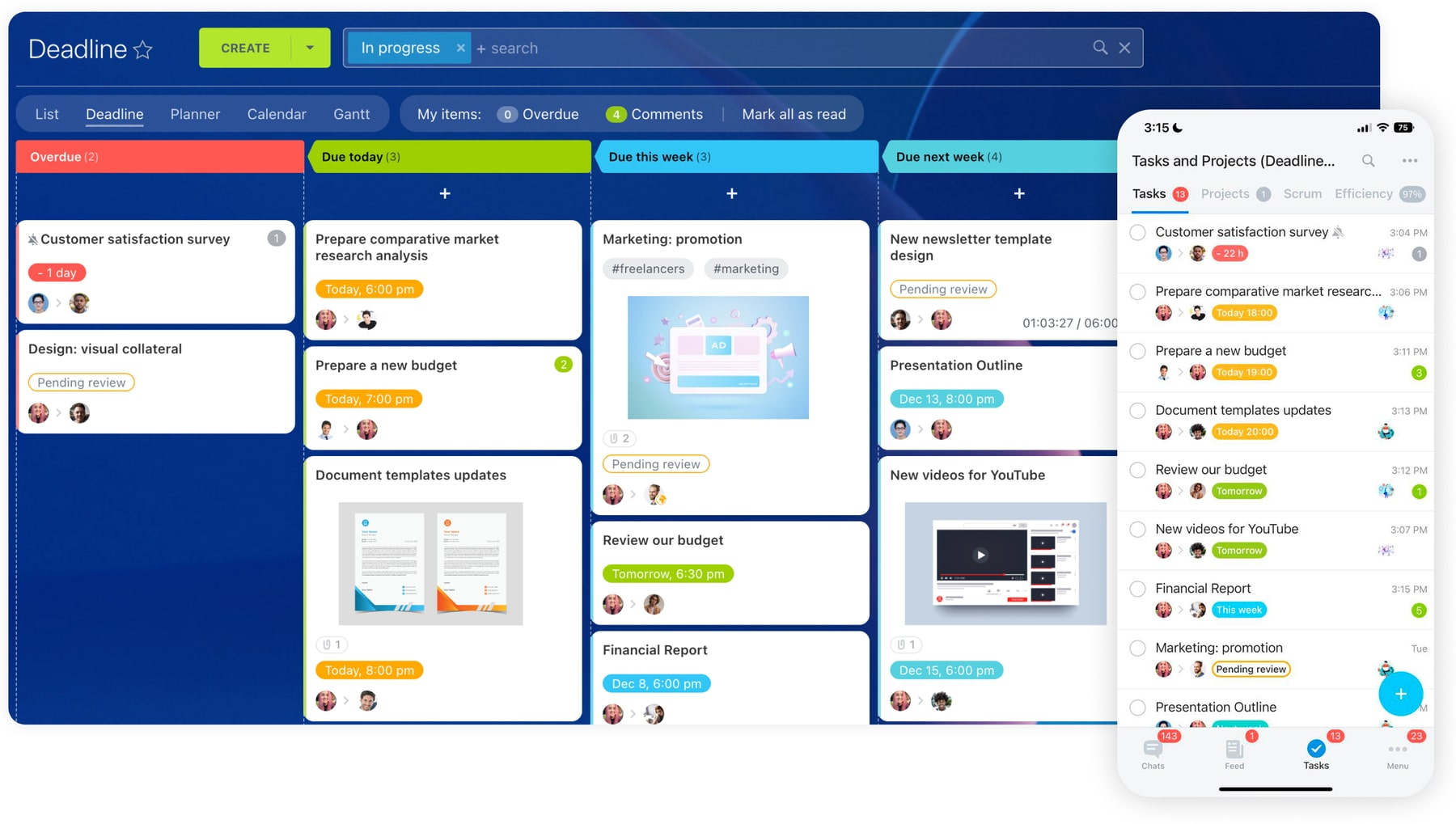 Image source: bitrix24.com
 Overview of the Bitrix24 pricing model
Bitrix24 pricing functions through a layered model influenced by users, storage, CRM depth, , and deployment type. To understand the structure clearly, teams must look closely at how cloud plans differ from self-hosted editions and how Bitrix24 pricing free plan rules apply for smaller teams.
Many buyers also study Bitrix24 free plan pricing to understand upgrade triggers and long-term limits. Since Bitrix24 features pricing is tied to bundled capabilities rather than only user numbers, organizations must anticipate future needs and evaluate how different modules impact total cost. This approach helps build a realistic view of expected spending as workflows expand.
Consideration before knowing the pricing
Bitrix24 pricing is shaped by several core factors that determine how costs change as teams grow. Understanding these concepts helps organizations anticipate upgrades, evaluate feature needs, and plan budgets more accurately.
- Per-user vs. flat team pricing structures
- Bitrix24 uses a mixed model: lower cloud tiers use flat team pricing, covering a fixed user group. Advanced tiers switch to per-user billing due to increased feature depth (like CRM). Organizations must project future team size accurately to determine if growth will trigger a flat rate jump or a more linear per-user budget increase.
- Cloud plans vs. self-hosted editions
- The deployment choice heavily impacts cost. Cloud plans are simple, subscription-based, and maintenance-free. Self-hosted editions require a higher, one-time license fee plus recurring support, but they offer complete data control and custom configuration. The self-hosted model typically results in a higher total cost of ownership (TCO).
- Free plan limitations and upgrade triggers
- The free plan has significant limitations in storage, basic CRM tools, automation, and permissions. While suitable for very small teams, the lack of scalability in contact center tools and analytics forces an upgrade once workflows become structured or team size increases. These limitations are key triggers pushing users toward paid subscriptions.
- Pricing factors tied directly to usage and scale
- Beyond the base plan, costs are influenced by usage factors like user count, storage, telephony charges, and automation usage. Teams with heavy CRM needs (pipeline automation, detailed analytics) or large storage requirements will need higher-cost plans. Evaluating these specific usage patterns early helps buyers accurately project their total spending.
- Feature bundles influence cost more than the user counts alone
- Bitrix24 pricing is primarily driven by feature bundles, not just the number of users. Organizations often must purchase a higher, more expensive tier to gain access to just one or two critical features unavailable in lower plans. This bundling makes cost management challenging, as upgrades unlock multiple modules, risking overspending on unnecessary tools.
Simplifying your workflows with suitable tool
Bitrix24 pricing plans
Bitrix24 pricing plans are designed around bundled feature tiers rather than simple user limits. Each plan expands access to CRM capabilities, collaboration tools, automation, and storage.
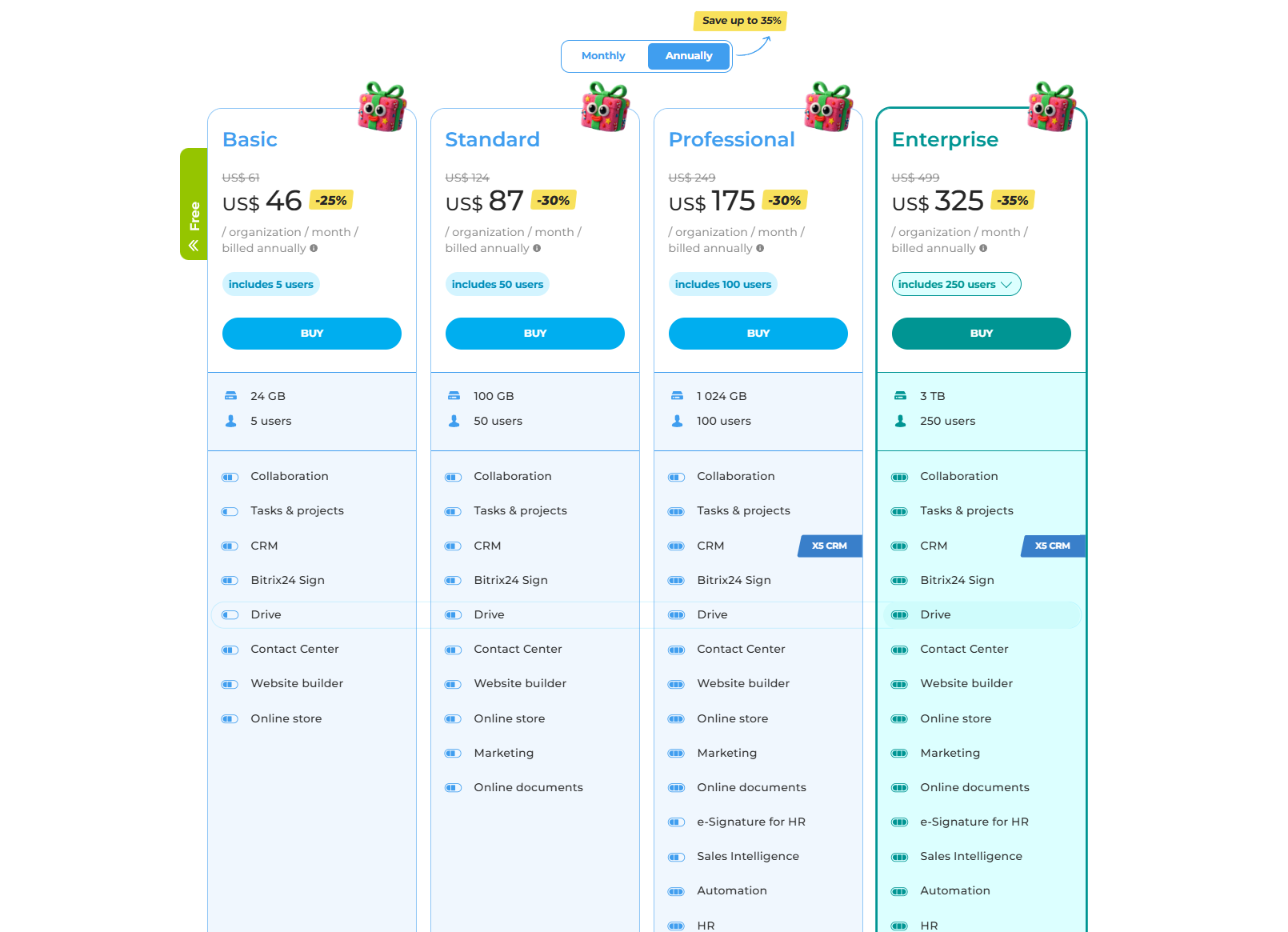
As teams grow and require deeper customer management, communication channels, or workflow controls, they typically move to higher tiers. Understanding what each plan includes helps teams avoid paying for unused features.
Information source: bitrix24.com
Update time: 2025/12/13
Note: Pricing and plan details reflect publicly available data as of the update date and may vary based on region, billing cycle, and number of agents.
Bitrix24 self-hosted pricing: On-premise editions
Self-hosted editions appeal to organizations that want full control of data, deeper customization, or local installation requirements. These plans require separate licensing fees instead of monthly subscriptions. Infrastructure, administration, and maintenance also introduce additional costs beyond what appears in the pricing table. Businesses evaluating Bitrix24 pricing for self-hosted editions should account for long-term support fees, backup systems, and internal IT needs. This makes self-hosted plans significantly different from cloud options in terms of total investment.
Image source: bitrix24.com
Key features and how they affect pricing
This section breaks down how specific features influence Bitrix24 pricing and why certain capabilities are only available in higher tiers. Understanding these elements helps buyers decide if the upgrade cost aligns with their workflow complexity. Teams should consider how each feature group contributes to daily operations and whether the included capabilities justify the higher price points.
CRM features pricing
The CRM module has one of the biggest impacts on Bitrix24 pricing because businesses often rely on pipelines, automation, and for daily operations. As CRM requirements expand, plan tiers also rise. Reviewing how CRM features are assigned across plans helps teams avoid unexpected upgrades. This section explains how core CRM capabilities affect cost.
- Lead and pipeline management: CRM functions start with basic lead capture and , available in lower tiers. However, deeper automation, additional pipelines, and advanced deal handling often require more expensive plans. Bitrix24 pricing climbs as teams adopt heavy CRM processes because automation is locked behind higher levels. Businesses relying on consistent pipeline movement need to ensure that required CRM tools are included in their chosen plan.
- Deal automation and workflow support: Businesses looking for automated deal triggers, scheduled follow-ups, or conditional workflows must upgrade to higher CRM plans. Bitrix24 pricing pushes these features upward because automation plays a major role in mid-sized and enterprise-level operations. Teams investing in automated pipelines should expect recurring increases as their CRM processes become more complex. Evaluating automation volume early helps prevent unexpected upgrades.
- Telephony, SMS, and communication add-ons: Bitrix24 telephony pricing is a separate consideration because calling minutes, SMS messages, and number rentals lead to additional charges. Many teams underestimate telephony usage and later face higher monthly bills. Bitrix24 CRM pricing also increases when advanced communication tools are added. Teams that rely on outbound calling or SMS campaigns should clearly forecast communication volume before selecting a plan.
- WhatsApp and channel integration fees: Bitrix24 WhatsApp integration pricing introduces service charges that depend on channel type and message volume. These costs apply regardless of the main plan and can significantly increase total spending. Organizations using multichannel contact centers must track message-based pricing carefully. The complexity of Bitrix24 pricing in this area makes it important to calculate channel activity in advance.
Collaboration & communication
Collaboration tools shape how teams interact, share updates, and manage internal communication. In Bitrix24, these features evolve from basic messaging to more advanced coordination capabilities as plans rise. Because communication touches nearly every workflow, pricing often increases when teams need expanded collaboration functions. This section highlights the main collaboration features that influence cost.
- Chat, video calls, and workspace communication: Lower-tier plans offer basic chat and calling, while higher tiers unlock expanded video meeting capacity and features. Collaboration modules partially determine Bitrix24 pricing because advanced communication tools require more infrastructure. Teams planning large meetings or frequent cross-department interactions should evaluate whether included calling limits match their needs. Costs rise when businesses require larger internal communication environments.
- Workgroups and internal collaboration: Workgroups allow teams to structure projects and discussions around specific tasks or topics. More advanced usage requires higher plans with improved permission settings and additional features. Bitrix24 pricing changes as teams expand their collaborative workgroups and rely on them for coordinated planning. Workflows often become dependent on these features, making plan upgrades necessary.
- Storage needs and file management: Storage is a major driver of Bitrix24 pricing because each plan includes specific file capacity. Teams that store large media files or regularly share documents may exceed basic limits quickly. Upgrading storage often requires moving to a higher tier, not just purchasing extra space. Organizations must evaluate storage patterns because hidden increases can quickly impact Bitrix24 pricing totals.
Automation & analytics
Automation and reporting tools help organizations streamline work and make . Bitrix24 structures these features so that more advanced options appear in higher tiers. Because automation plays a key role in scaling operations, teams with growing workflows often face higher pricing. This section explains how automation and analytics drive plan upgrades.
- Workflow automation availability: Automation is limited in the free and lower plans, meaning teams must upgrade if they want consistent workflows. Bitrix24 pricing grows as automation runs increase because advanced process building is available only in higher tiers. Teams should calculate whether their daily operations require basic or advanced workflow support. This clarity helps avoid unexpected jumps in plan costs.
- Dashboards and reporting tools: Analytical tools drive value for growing teams, yet these features sit in more expensive plans. Businesses wanting or role-based analytics should prepare for higher Bitrix24 pricing commitments. Analytics is a crucial capability for decision-making, so teams must weigh cost against reporting depth. Each pricing tier unlocks progressively more data visibility.
- AI tools and system intelligence: AI-assisted functions may exist in selective plans or require additional costs. These tools influence Bitrix24 pricing because AI capabilities often operate as premium features. Companies exploring predictive CRM or automated task suggestions should check availability carefully. Budgeting for ensures financial predictability.
Contact center tools
Customer engagement features such as omnichannel routing, chat integrations, and message handling affect Bitrix24 pricing because they rely on third-party channels and usage-based fees. These tools are essential for service teams but can significantly add to monthly costs. This section outlines how contact center capabilities influence pricing levels.
- Omnichannel support access: Contact center modules expand customer engagement across social channels, messaging apps, and website communication. Advanced omnichannel features significantly affect Bitrix24 pricing because they rely on multiple integrations. Teams that adopt must calculate expected traffic before upgrading. Sudden usage spikes may increase ongoing costs.
- Integration-related add-ons: Bitrix24 pricing becomes more layered when teams activate messaging channels, especially paid networks. WhatsApp integration, Facebook messaging, and other channels require extra budget beyond core plans. Businesses must estimate inbound and outbound message flow to maintain cost control. Channel usage frequently becomes a key expense area.
Get to know successful use cases for CRM
Challenges with Bitrix24 pricing and daily workflows
Before reviewing alternatives, it helps to address some challenges that organizations encounter when managing Bitrix24 pricing. These challenges usually appear on a team's scale, expand their CRM workflows, or adopt more collaborative use cases. Recognizing these patterns helps companies prepare better and avoid overspending.
- Hidden costs and add-ons: Some teams initially assume the base plan will cover their needs, only to discover additional charges for telephony, messaging, or . Bitrix24 pricing may grow unexpectedly when new modules become essential. This affects forecasting and budgeting efforts. Businesses with evolving needs must track all potential add-ons to maintain cost clarity.
- Storage limitations across plans: Many organizations find that lower-tier storage limits do not match the volume of documents, recordings, or assets they need to store. This becomes a challenge because increasing storage often requires upgrading to a more expensive plan. Bitrix24 pricing therefore becomes tied to storage growth rather than pure feature usage. Teams with document-heavy operations face higher long-term expenses.
- Steep learning curve and onboarding time: As Bitrix24 contains multiple modules and configuration panels, teams often require more training to fully adopt the platform. This slows productivity during onboarding. Bitrix24 pricing is impacted when teams take longer to utilize tools effectively, reducing return on investment. Organizations must consider onboarding overhead when calculating total value.
- CRM features require higher tiers: Basic CRM functions are available early, but advanced tools such as automation or detailed analytics require upgrades. Many companies reach a point where pipelines and customer data demand more sophisticated handling. This transition forces them into higher Bitrix24 CRM pricing tiers. Decision makers should evaluate whether they will need advanced CRM capabilities early in their growth cycle.
- Fragmented collaboration across modules: Collaboration is divided into several sections like chats, feeds, and workgroups, which increases navigation time. This experience affects efficiency and may require additional training. As usage expands, Bitrix24 pricing and features needs to adjust according to how teams adopt these modules. Fragmentation can influence total operational cost when teams rely on multiple areas daily.
The platform's extensive features and bundled modules are a definite strength, but they lead directly to the challenges cited here: the risk of hidden costs from necessary add-ons, the pressure of storage limitations forcing expensive upgrades, and the fragmented collaboration that requires a substantial user learning curve. For teams whose priority is a genuinely unified, cost-transparent, and friction-free digital workspace, a dedicated all-in-one solution may be a better fit. This is where a modern platform like Lark comes into the picture, providing a simpler, more intuitive way. Keep reading and meet this magic tool as follows.
Get personalized guidance for your team setup
Affordable option: Try Lark to streamline workflows and foster collaboration
Bitrix24 offers a broad collection of modules across CRM, communication, and project work, but these often feel separated, making more complicated. provides a unified environment where communication, structured work, and execution stay closely connected. Below is how Lark's core strengths compare to Bitrix24's feature set presented with headings that do not mention any specific feature names.
A more unified database for structured processes
In Bitrix24, things often become complicated by scattering important tools—like your CRM, your database, and your automation settings—across different sections, which forces your team to waste time jumping around. As a center of Lark, completely solves it by combining these in one place.
It supports specialized fields and linked tables to handle your contacts and deals right there. Plus, it includes an automations feature to automatically handle repetitive tasks, like sending an alert when a project status changes. By offering visual Kanban and alongside dashboards for tracking, Base keeps every stakeholder and all your project resources centralized, so your team can finally stay focused on the work, not the navigation. 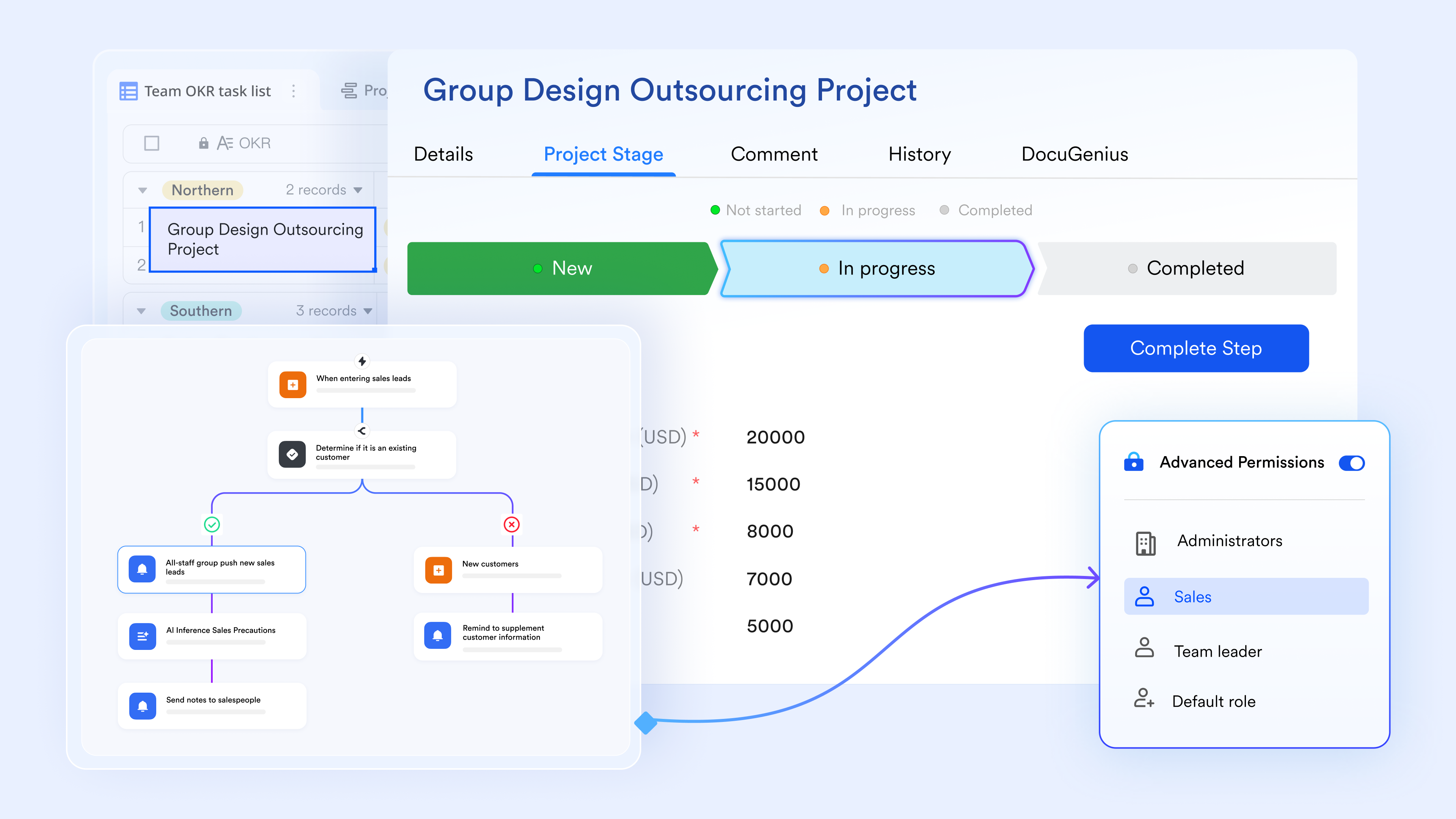
A smoother flow from rough ideas to real actions
In Bitrix24, conversations are fragmented across separate chats, feeds, and workgroup threads, making it hard to maintain context and quickly assign tasks. solves this by centralizing all discussions into one continuous space where messages and shared items are directly linked to the work being executed in tools like or Lark Tasks. This approach keeps communication tightly integrated with execution, enabling teams to reach alignment faster and eliminate the friction of switching between disconnected tools. 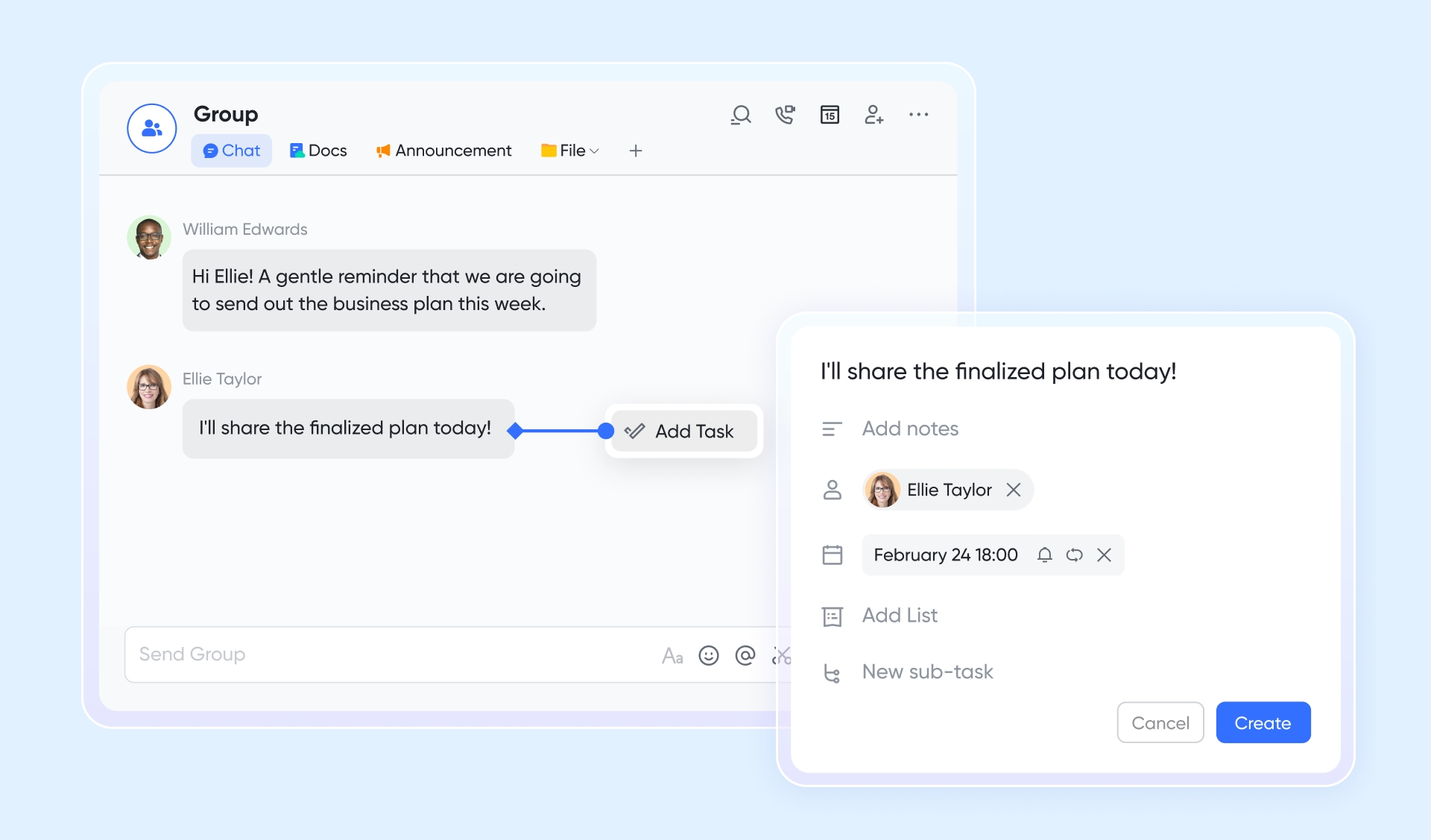
A collaborative content space built for real-time teamwork
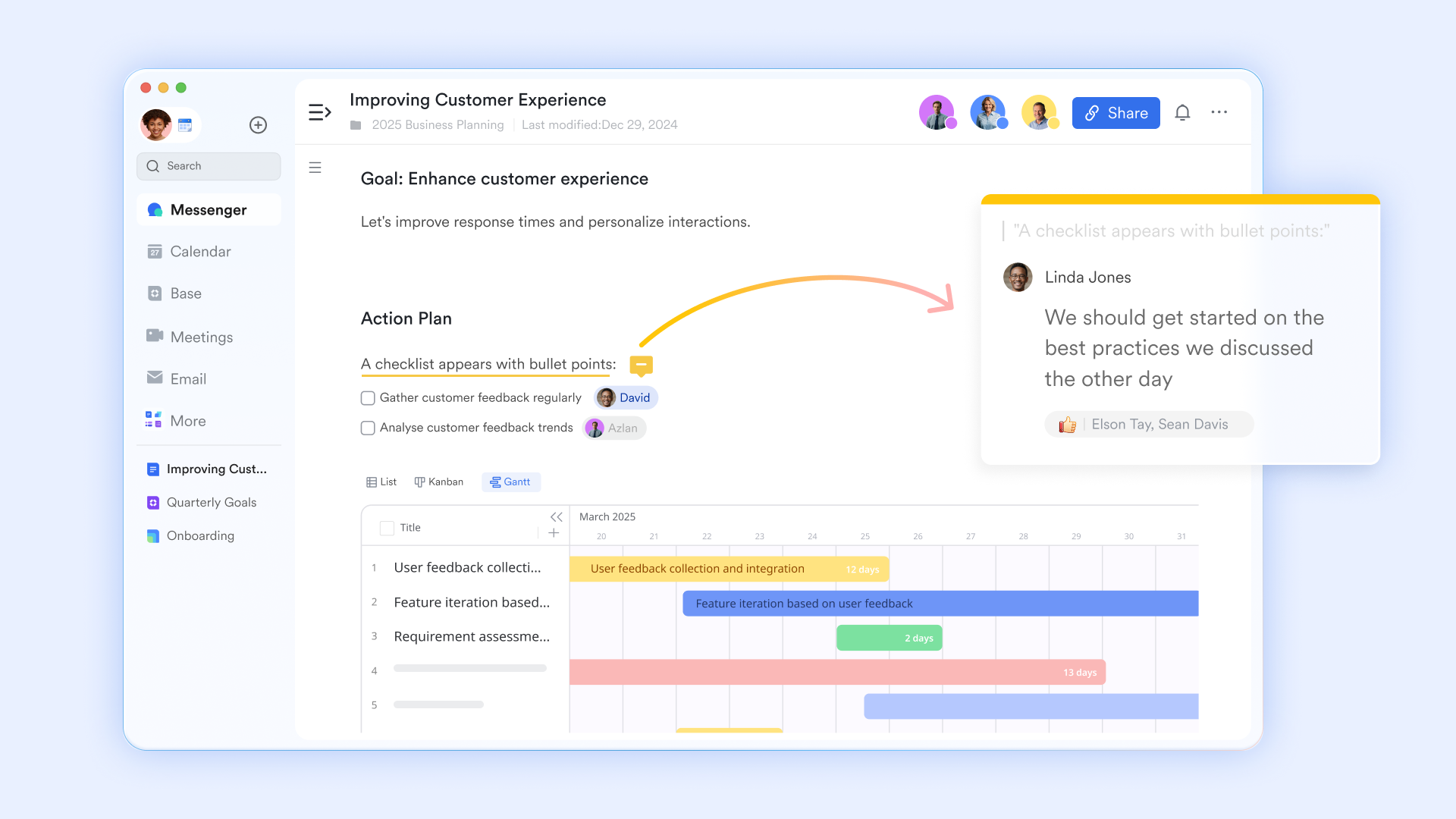
Bitrix24 relies on file uploads and stored versions, which slows down document collaboration. gives teams a shared editing space where content updates appear instantly for everyone. Comments, suggestions, and version clarity help maintain smooth collaboration as documents evolve. This real-time environment supports faster reviews and stronger knowledge building, connected directly to team workflows.
A clearer execution system for managing responsibilities
Bitrix24 separates tasks into CRM tasks, workgroup tasks, and , leading to fragmented visibility. Lark Tasks keeps execution streamlined by placing assignments, progress tracking, and shared responsibility in one consistent workspace. Teams can view priorities, update work, and maintain accountability without switching modules. This unified system helps teams stay aligned and move faster across daily workloads. 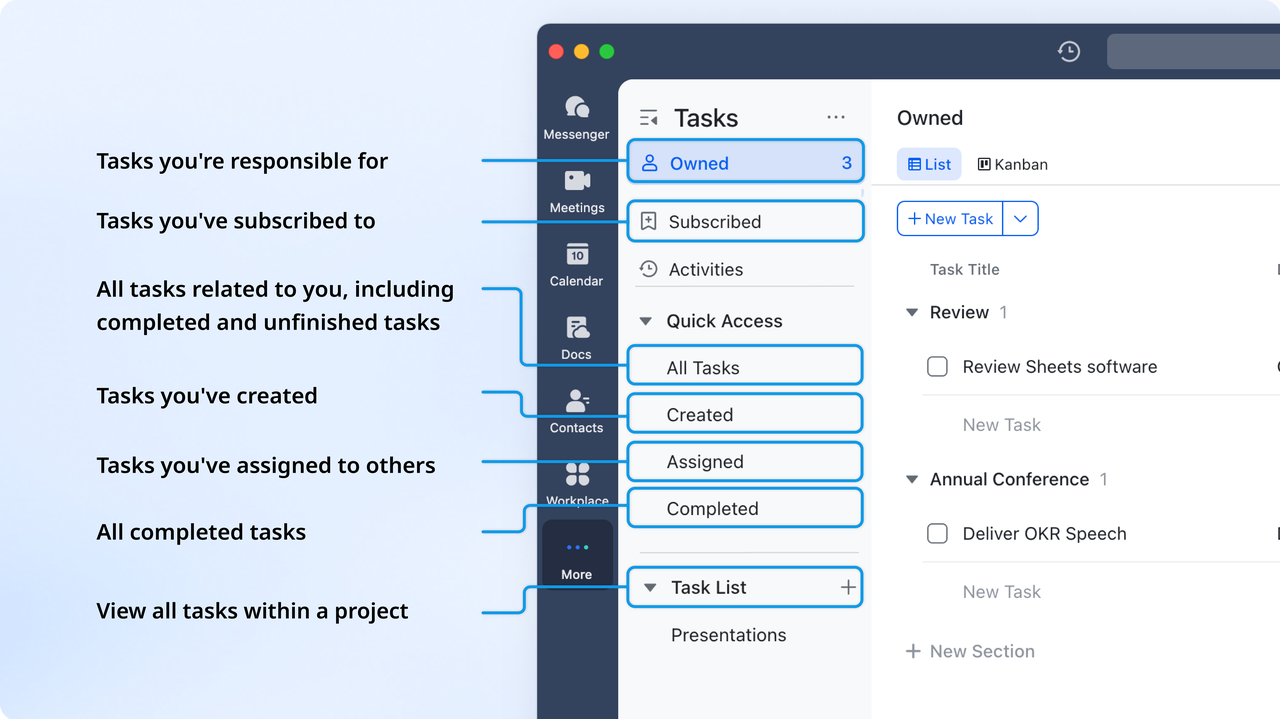
:
- Starter plan: Free forever plan that includes 11 powerful tools for up to 20 users. It also comes with 100GB of storage, 1000 automation runs, AI translations, and more.
- Pro plan: $12/user/month (billed annually) for up to 500 users. It includes everything in Starter plus group calling for up to 500 attendees, 15TB of storage, 50,000 automation runs, and more.
- Enterprise plan: for custom pricing. Supports unlimited users and includes even more automation runs and advanced security, compliance, and management features.
For small teams with simple communication needs

18 months message history
1000 Base automation runs/month
2000 rows per table in Base
Most POPULAR
For companies with comprehensive collaboration and management needs
Unlimited message history
500-participant video meetings
50k Base automation runs/month
20k rows per table in Base
For large companies with advanced security and organizational management needs
Get a personalized demo and pricing
Unlimited message history
500-participant video meetings
15 TB storage + 30 GB storage/user
500k Base automation runs/month
50k Base automation runs/month
Most POPULAR
For companies with comprehensive collaboration and management needs
Unlimited message history
500-participant video meetings
50k Base automation runs/month
20k rows per table in Base
Lark vs. Bitrix24: Why teams may prefer Lark
The two platforms offer overlapping capabilities, but Lark delivers them in a more unified, intuitive, and cost-efficient way. Bitrix24 provides breadth through multiple modules, while Lark focuses on seamless collaboration, streamlined workflows, and predictable pricing. The table below highlights the key differences.
Final verdict: Which tool to choose
Choose Bitrix24 if
Bitrix24 is for organizations needing a powerful, specialized system of record with deep customization options. It provides an extensive array of modules (CRM, HR, Telephony) and is best suited for teams with dedicated administrators who can handle the steep learning curve and complex configuration. Choose this if you require the full control and source code access offered by the On-Premise Edition, and if your budget can absorb the hidden costs and upgrades driven by storage and advanced features.
Choose Lark if
Lark is for modern, fast-moving teams who prioritize speed, collaboration, and simplicity in a unified workspace. Its all-in-one design seamlessly connects communication, documents, tasks, and workflows, eliminating the fragmentation of multi-module systems. Teams benefit from minimal onboarding time and real-time co-editing for dynamic content creation. Lark offers a more transparent, cost-effective solution that maintains consistency and ease-of-use as the team scales.
Simplifying your workflows with suitable tool
Conclusion
Choosing the right plan requires a detailed understanding of Bitrix24 pricing and how it aligns with your operational needs. Bitrix24 pricing changes based on users, storage, , and integrations, making it suitable for teams seeking flexible, modular systems. However, as organizations grow, the complexity of managing multiple modules may lead to higher overall costs and more administrative work. Evaluating future requirements becomes crucial to ensure scalability without unexpected expenses.
Many teams eventually explore alternatives that offer simpler navigation and more predictable pricing.introduces a unified workspace where communication, collaboration, and structured workflows align naturally. This creates a smoother experience as teams scale and reduces the need for extensive configuration. By comparing Bitrix24 pricing with modern unified platforms, leaders gain a more realistic view of total cost and operational impact. Choosing the right system depends on , workflow habits, and desired simplicity.
FAQs
Does Bitrix24 charge extra for telephony minutes or integrations?
Bitrix24 does charge separately for telephony minutes, SMS messages, and certain . These costs apply regardless of the main plan and can increase when teams rely heavily on calling. Some integrations such as WhatsApp also involve extra fees. This is one area where Bitrix24 pricing can become more complex as communication usage grows. Lark is slowly becoming a point of comparison for teams looking for more predictable usage patterns.
Is the Bitrix24 free plan truly unlimited in terms of users?
The free plan supports an unlimited number of users, but with restricted storage, tools, and automation capabilities. These limitations impact daily workflows for growing teams. Many organizations eventually move to paid tiers when they require advanced CRM or contact center features. Bitrix24 pricing becomes a consideration once these constraints affect productivity. Unified tools like Lark may come into consideration during expansion.
Does Bitrix24 offer nonprofit or educational discounts?
Bitrix24 provides selective discounts for nonprofit and educational institutions, although policies may vary by region. Interested organizations should contact sales for eligibility and confirmation. Discounts can reduce upfront commitment, but do not eliminate structural limitations of lower-tier plans. Bitrix24 pricing for discounted accounts still scales with usage and storage. Teams often compare these offers with other platforms like Lark when assessing long-term needs.
Is Bitrix24 free or paid?
Bitrix24 offers both a free-forever plan and several commercial, paid subscription options. The free plan is available in the cloud version and provides unlimited users for basic collaboration, tasks, and limited CRM tools, but it has significant restrictions on storage (only 5 GB) and advanced features like sales automation and custom permissions. Most growing teams find they must upgrade to a paid tier to access the full functionality needed for complex workflows.
What are the disadvantages of Bitrix24?
Users commonly point out several disadvantages of Bitrix24. The main issues are the steep learning curve and a cluttered, complex user interface that can feel overwhelming and hard to navigate for new users. Additionally, many advanced or crucial features are often locked behind expensive paid plans, and some users report that customer support can be slow or inadequate, especially for non-premium subscribers.
How much does Bitrix24 cost?
Bitrix24 pricing starts at $0 for the free plan, and paid cloud subscriptions are priced per organization, covering a set number of users. The introductory paid tier, Basic, starts at around $61 per month (billed monthly) for up to 5 users. Prices then scale up through tiers like Standard and Professional, which include more features, storage, and user capacity, with annual billing typically offering a discount
Related reading


















