Choosing the right collaboration platform is more important than ever. Teams today need more than simple documents. They rely on flexible workspaces that support planning, documentation, workflows, and automation in one place. Coda positions itself as precisely that, offering a document-centric system where teams can write, organize data, and build lightweight processes without coding. But how well does it perform in real-world scenarios, and where does it fall short as teams scale?
In this guide, we provide a clear, unbiased Coda review covering its features, pricing, pros, cons, use cases, and how it compares to a modern alternative.
Boost team efficiency from this moment
What is Coda?
Coda is a flexible, that blends text, spreadsheets, and lightweight databases into a single interactive workspace. Unlike traditional tools that separate docs, sheets, and apps, Coda brings everything together so teams can write, track data, automate workflows, and build custom tools without coding. At its core, Coda is a powerful document that can transform into a task tracker, , knowledge base, or project hub, depending on how it's structured.
Many teams exploring Coda for the first time describe it as a mix of Notion, Airtable, and Google Docs, making it popular in discussions of Coda software reviews. With features like packs, automations, formulas, and linked tables, Coda gives users control to build their own internal systems. However, as we'll explore in this Coda review, its doc-centric approach is most effective for smaller, data-driven workflows rather than for large-scale Coda .
Who is Coda best suited for?
As we explore in this Coda review, the platform isn't designed for every team, but it excels in environments that value flexibility and . Coda works best when teams need a balance of documents, structured data, and light automation without relying on full-scale project management tools.
- Teams needing flexible documents with structured data: Coda is ideal for teams that want to combine notes, tables, and workflows inside a single document. Its relational tables and views allow teams to manage structured information without adopting a complex database. This makes it easy to turn simple documents into adaptable operational hubs.
- Early-stage startups replacing spreadsheets: Many startups choose Coda when spreadsheets become too limiting, but complete enterprise tools feel unnecessary. With customizable tables, formulas, and views, Coda functions as a for tracking work. It supports rapid experimentation and quick iteration, perfect for lean teams.
- Product teams building internal tools: Coda is frequently used by product managers who want to develop wikis, roadmaps, feature trackers, and release workflows. The platform's formulas, Packs, and automations allow product teams to centralize key information. This helps them replace scattered spreadsheets with one structured workspace.
- Creators building dashboards, trackers, and templates: Coda's visual tools make it appealing for creators building dashboards or personal systems. Templates can be shared, duplicated, or sold, creating an ecosystem of customizable workflows. Creators appreciate how Coda combines design flexibility with basic database logic.
Coda features review: What the platform does well?
Coda brings together documents, spreadsheets, databases, and automation into one flexible system. Its biggest strength lies in how easily teams can shape a doc into a workflow that fits their needs, whether they're building , wikis, dashboards, or lightweight internal tools. Below is a detailed breakdown of the core features that make Coda stand out in many Coda software review discussions.
Document-based structure that adapts to different workflows
Coda begins as a simple document, but it doesn't stay that way. The canvas lets users combine text, tables, embeds, media, and interactive components in one place. This adaptability makes it possible to turn a single doc into a project hub, meeting space, or . Teams can start small and scale their workflows gradually as complexity grows, all within the same interface.
Tables, views, and relations for lightweight database use
Coda's tables behave like a blend of spreadsheets and relational databases. Users can link data across pages, create filtered views, connect rows, and apply formulas that work like more intuitive versions of spreadsheet functions. This makes Coda a strong choice for teams that want more structure than Excel or Google Sheets without moving into complete database tools like Airtable.
Buttons, automations, and Packs for custom logic
Coda's interactivity comes from features that let users build logic into documents. Buttons perform actions like adding rows, sending updates, or resetting fields. Automations trigger workflows based on conditions, time schedules, or data changes. Packs extend functionality by connecting the doc to external apps such as Slack, Notion, Google Calendar, Jira, or GitHub. These elements turn Coda into a customizable mini-application builder for teams that want to streamline internal processes.
For more Google Workspace's information, you can refer to and .
Templates for product, marketing, sales, and HR operations
Coda offers a rich template gallery that accelerates setup for common workflows. Product teams can use roadmaps and ; marketing teams can adopt content calendars and campaign boards; sales teams can build lead trackers; HR teams can create onboarding flows and performance logs. These templates save time and help users understand how to structure their docs effectively.
Collaborative editing with comments and version history
Coda supports , making it easy for teams to edit documents together. Users can leave threaded comments on specific sections or tables, tag teammates, and track decisions. Version history allows users to roll back changes or review how the document evolved. These features help reduce miscommunication and ensure that teams always work on the latest information.
Coda pricing review: What each plan includes
Understanding Coda's pricing structure is essential before adopting the platform, especially for growing teams. Unlike tools that charge per user seat, Coda's plans are tiered by features, automations, and creator limits. Each plan unlocks progressively more power, but costs can rise quickly as complexity increases. Below, we break down what each tier offers.
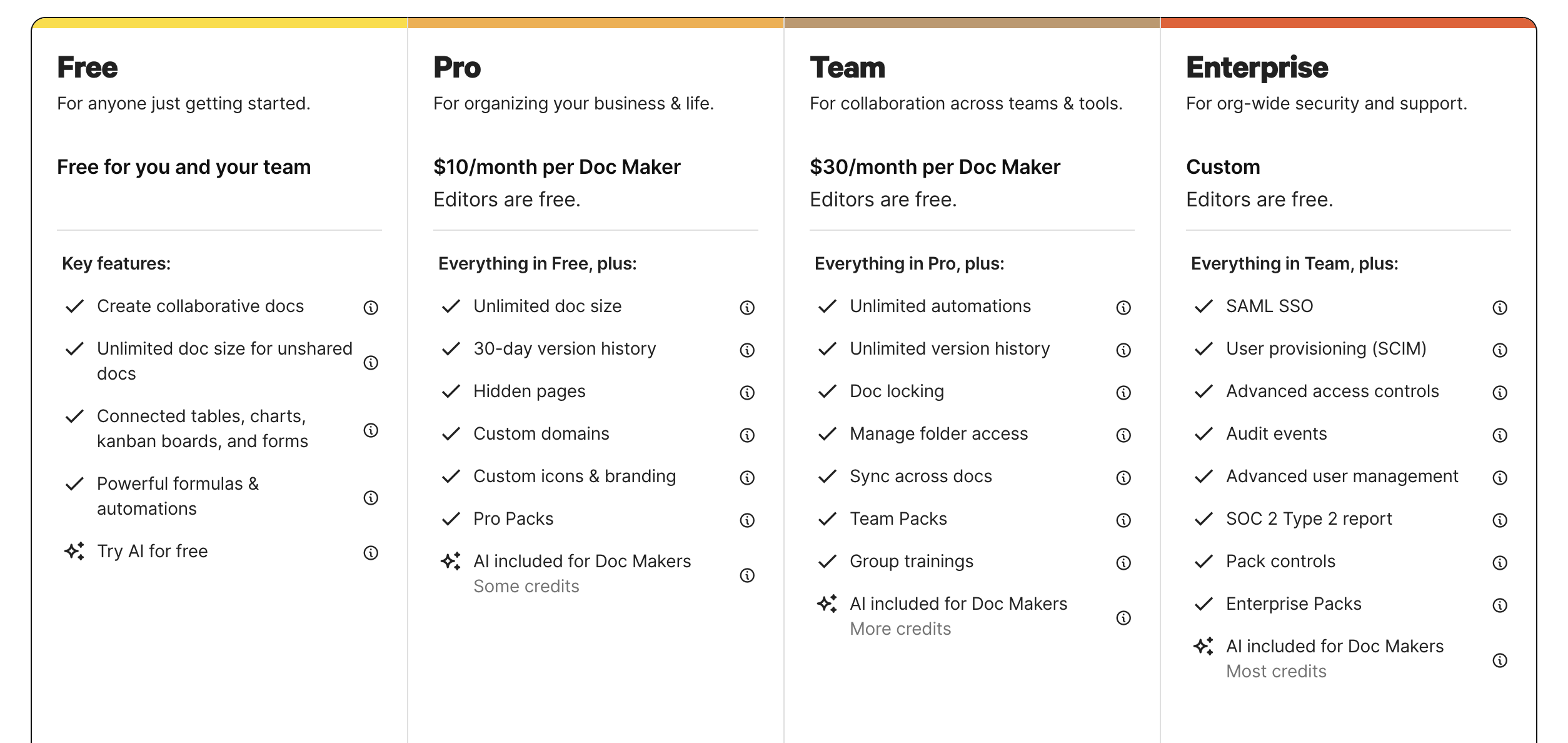
Image source: coda.io
Information source: coda.io
Update time: 2025-12-09
Note: Pricing and plan details reflect publicly available data as of the update date and may vary based on region, billing cycle, and number of agents.
Coda limitations you should know before adopting it
Even though Coda is powerful and flexible, it comes with constraints that become more noticeable as teams grow and workflows become more complex. In this Coda review, it's important to highlight these limitations so teams can make an informed decision before committing deeply to the platform.
- Heavy docs become slow at scale: As tables grow and automations multiply, Coda documents can slow down significantly. This affects load times and performance, especially for teams working in thousands of rows. Large, multi-layered docs may require splitting into smaller parts to stay usable.
- Hard for non-technical users to manage complex logic: Coda formulas resemble spreadsheet logic but often require platform-specific functions. For non-technical users, building or troubleshooting workflows can become overwhelming. This creates dependency on power users who understand Coda deeply.
- Limited (compared to full PM platforms): Coda offers basic Kanban, table, and calendar views, but lacks more advanced project management features. There are no native Gantt charts, workload views, or dependency mapping. Teams running complex projects often need to supplement Coda with other PM tools.
- Automation limits for large datasets: Coda's automation quotas reset monthly, which can restrict scaling heavy workflows. High-frequency triggers, bulk updates, or data-heavy processes can quickly hit these limits. For teams relying on , this becomes a bottleneck over time.
- Packs require technical configuration: While Packs unlock powerful integrations, many require API keys and deeper technical setup. Maintaining these integrations can be challenging for non-technical teams. As workflows expand, packs may require ongoing troubleshooting to remain stable.
While Coda presents a powerful, flexible environment, its limitations—such as performance degradation with heavy documents, the steep learning curve for non-technical users facing complex logic, and restricted features like the lack of native Gantt charts—create noticeable bottlenecks as teams attempt to scale. This is where moving to a platform like Lark becomes essential, as it offers a fundamentally more robust foundation specifically engineered to handle scale
Experience smarter collaboration in one platform
New option: Use Lark to streamline your workflows and reduce tool sprawl
Like what we discussed, modern teams need more than disconnected docs and workflows; they need a unified workspace where communication, collaboration, and data flow effortlessly. brings chat, meetings, docs, sheets, approvals, and together in one seamless platform. Built for speed, clarity, and scale, exactly what fast-moving teams need, Lark reduces friction and keeps teams aligned in real time.
A full suite instead of a single doc-centric tool
Coda centers its experience around documents, whereas Lark delivers a fully connected workspace that supports planning, communication, execution, and review in one place. Teams can manage documents, spreadsheets, structured project data, schedules, tasks, messaging, and meetings without switching tools. This creates a seamless flow from ideation to delivery, reducing fragmentation and allowing every team, from marketing to operations, to stay aligned and work faster. 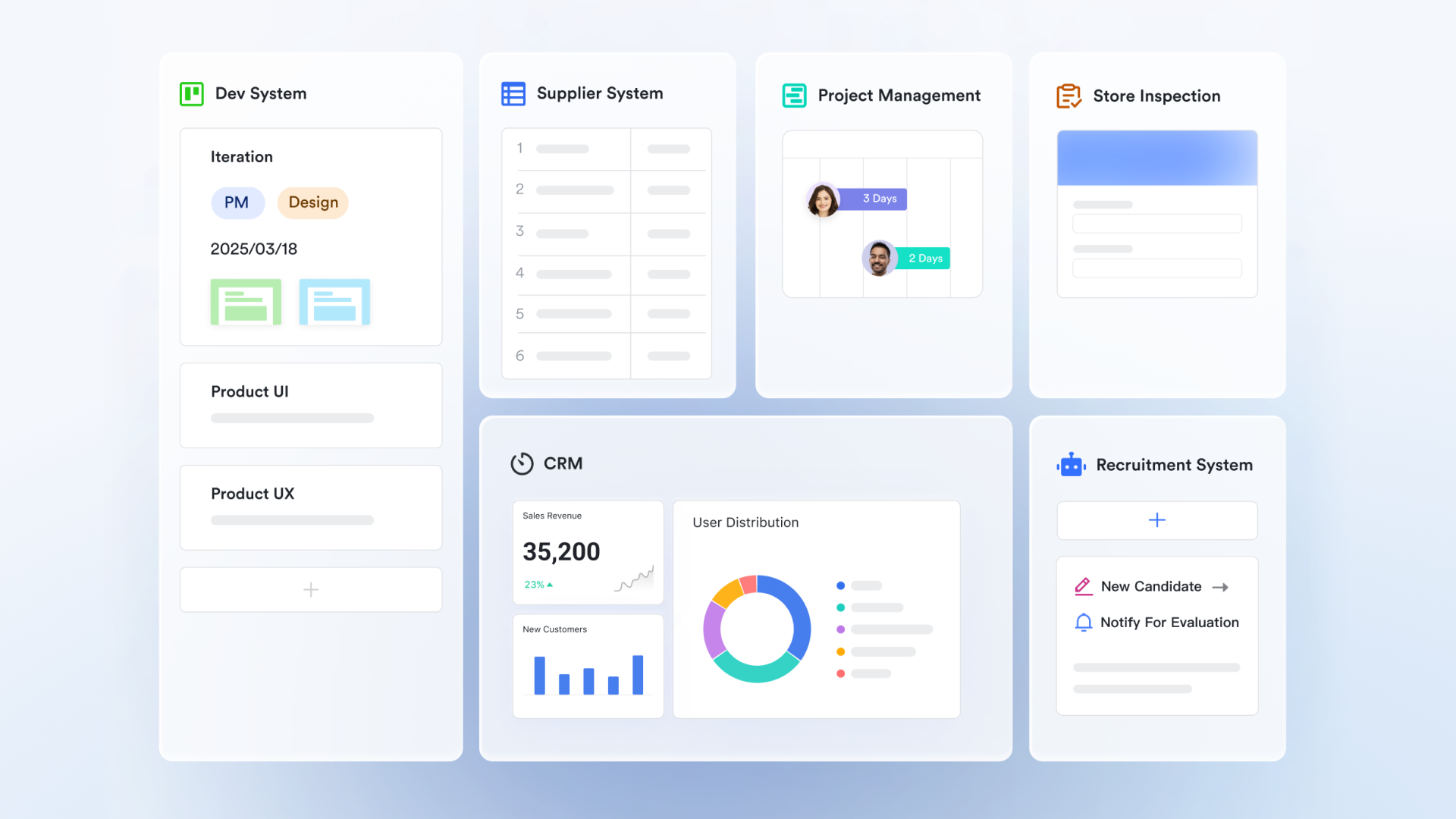
More robust workflows for complex, multi-step processes
Where Coda requires heavy configuration to support sophisticated workflows, Lark offers structured systems that make it easier to design and maintain complex operations. Teams can build interconnected databases, with Kanban and , and track parent–child relationships across workstreams with clarity. These visual and relational tools make Lark better suited for , cross-functional initiatives, and operational workflows that grow in complexity over time. 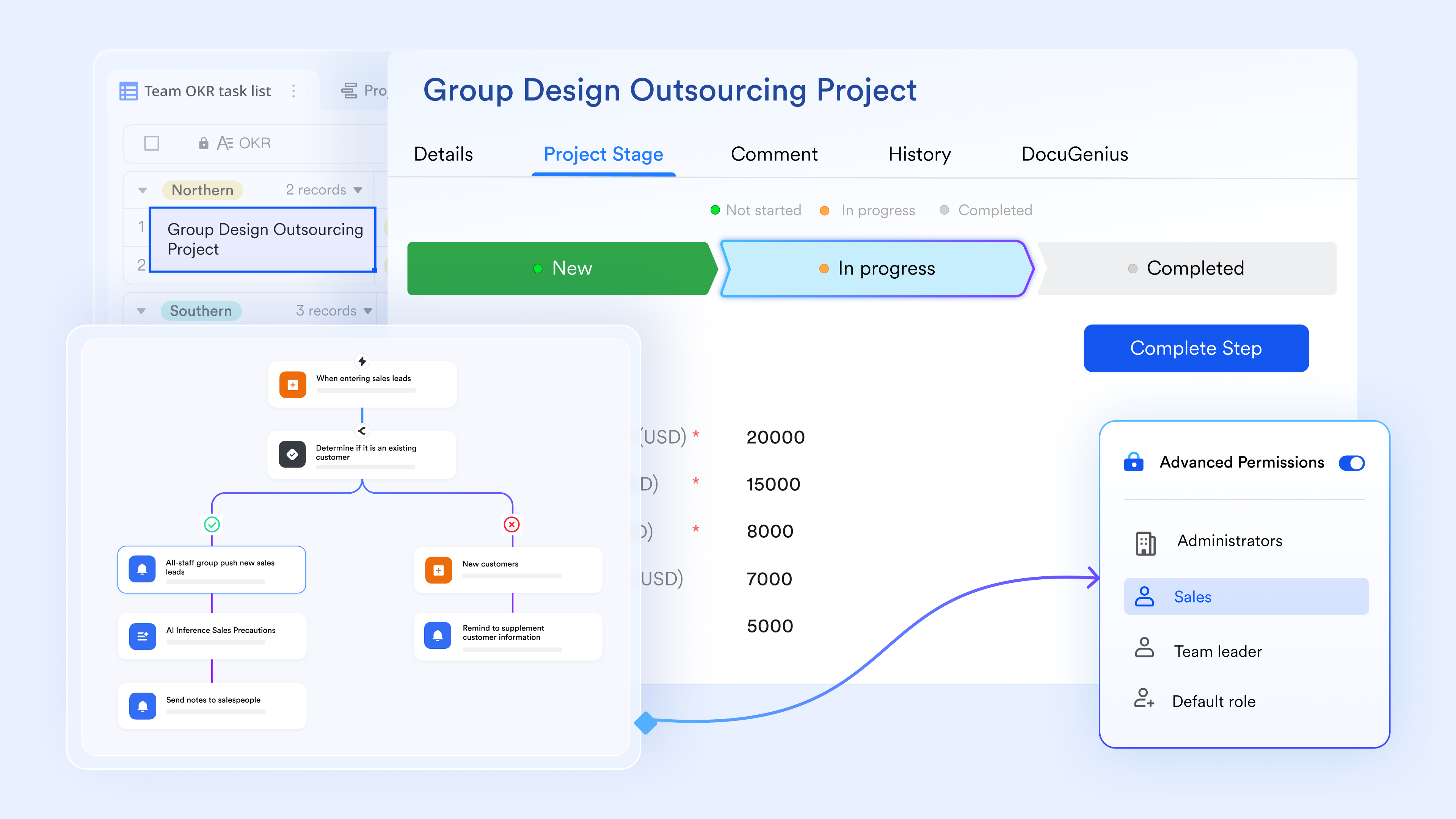
Built-in communication that keeps work and discussion together
Coda relies on external messaging tools, but Lark brings directly into the workspace. Teams can discuss updates, ask questions, share voice notes, or follow ongoing conversations, all linked to the actual work items they reference. By keeping collaboration tied to documents, tasks, and project records, teams eliminate tool switching, reduce miscommunication, and speed up decision cycles. 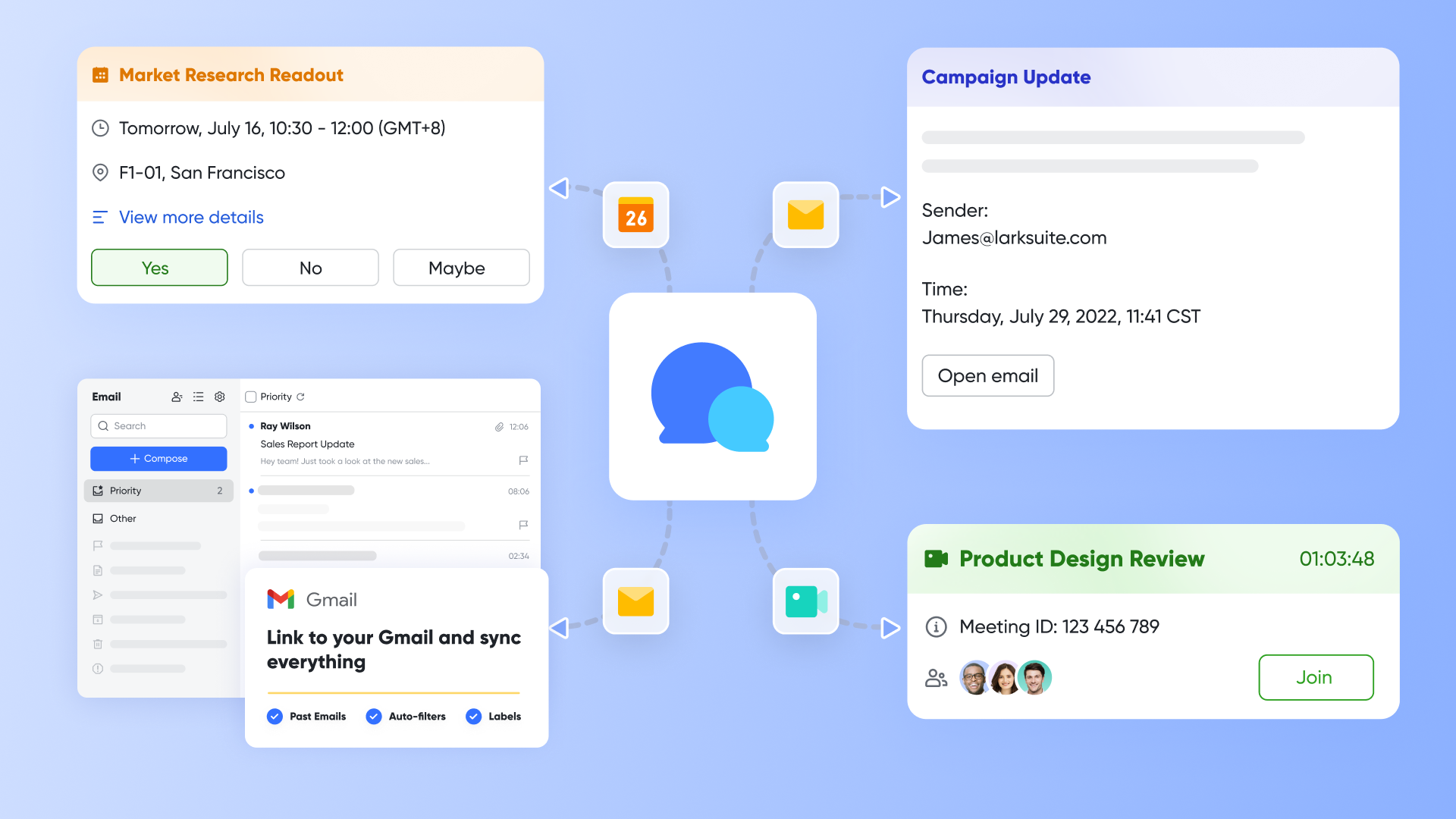
More innovative automation for cross-team coordination
Automation in Lark extends across data records, tasks, approvals, and communication, enabling workflows that support entire departments rather than just document-level triggers. Teams can use automation to move work through stages, assign responsibilities, update statuses, send notifications, and ensure consistent without manual intervention. This makes operational execution more scalable and reduces the administrative overhead that slows growing teams. 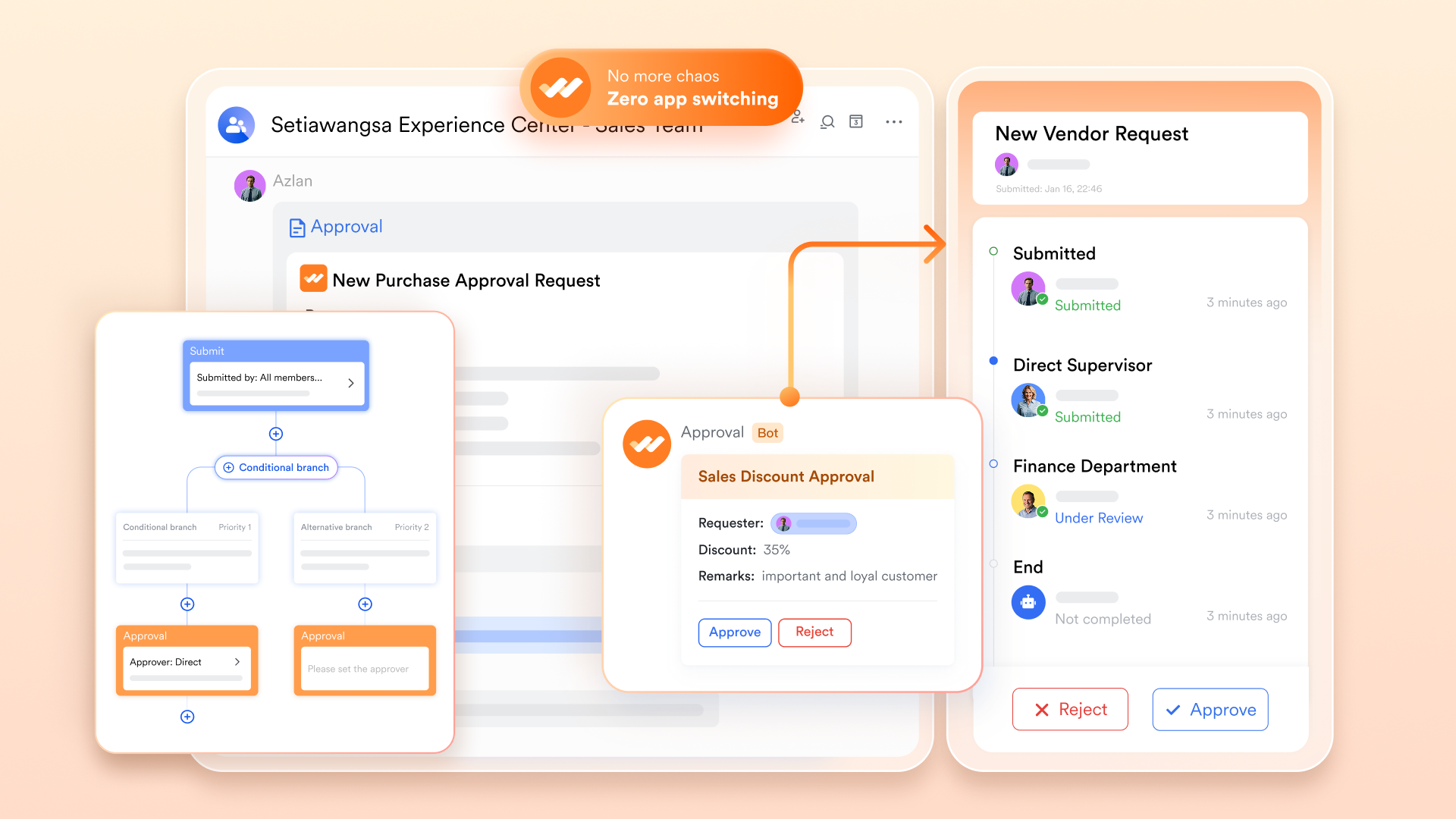
Lower total cost with one unified platform
Coda becomes increasingly expensive as teams add more collaborators, creators, or supplementary tools for communication, meetings, or . Lark consolidates all of these capabilities into a single platform, reducing the need for extra software subscriptions. For scaling teams, this unified approach offers far better cost efficiency, without sacrificing power, collaboration, or structure.
:
- Starter plan: Free forever plan that includes 11 powerful tools for up to 20 users. It also comes with 100GB of storage, 1000 automation runs, AI translations, and more.
- Basic plan: $6/user/month (billed annually) for up to 500 users. It includes everything in Starter plus group calling for up to 500 attendees, 5TB of storage, 1000 automation runs, and more. For more details, please .
- Pro plan: $12/user/month (billed annually) for up to 500 users. It includes everything in Basic plus group calling for up to 500 attendees, 15TB of storage, 50,000 automation runs, and more.
- Enterprise plan: for custom pricing. Supports unlimited users and includes even more automation runs and advanced security, compliance, and management features.
For small teams with simple communication needs

18 months message history
1000 Base automation runs/month
2000 rows per table in Base
Most POPULAR
For companies with comprehensive collaboration and management needs
Unlimited message history
500-participant video meetings
50k Base automation runs/month
20k rows per table in Base
For large companies with advanced security and organizational management needs
Get a personalized demo and pricing
Unlimited message history
500-participant video meetings
15 TB storage + 30 GB storage/user
500k Base automation runs/month
50k Base automation runs/month
Most POPULAR
For companies with comprehensive collaboration and management needs
Unlimited message history
500-participant video meetings
50k Base automation runs/month
20k rows per table in Base
Final check: Lark vs Coda
Choosing between Lark and Coda depends entirely on the scale and complexity of your required workflows, especially concerning cross-functional collaboration and data volume.
Coda is excellent for scenarios where a lightweight, flexible, and document-centric approach is most beneficial. It is the ideal choice for personal trackers, team wikis, , and internal tools. These use cases work well because they emphasize simple, self-contained systems where customizable layouts and document-based views are prioritized over handling massive data loads or intricate, multi-departmental coordination. As long as the scope remains small and focused, Coda's tables and views operate smoothly without hitting significant performance limits.
Lark becomes the superior choice when your workflows involve large datasets, complex cross-departmental processes, or require real-time, mission-critical coordination. It is the better fit for organizations like construction teams, operations-heavy industries, and customer-facing workflows. These situations demand a robust architecture that maintains fast performance at scale, requires native advanced project management views (like and dependency mapping), and needs a transparent, complete communication layer that can handle handoffs across multiple departments seamlessly.
Conclusion
Coda is a flexible, customizable platform that works well for teams who want documents, data, and light automation in one space. As highlighted throughout this Coda review, it excels at small-scale workflows, internal hubs, and personal or team-based tracking systems. However, its performance limitations, steep learning curve, and doc-centric structure make it less suited for large projects or cross-departmental operations. For teams that need deeper workflow visibility, stronger automation, and built-in communication tools, a fully collaborative workspace may be a better long-term fit. This is where many modern teams ultimately find more scalability and efficiency with .
Try the all-in-one workspace for faster teamwork
FAQs
Can Coda replace a full project management tool for large teams?
In most Coda software review discussions, users agree that Coda can support basic tracking but cannot fully replace robust platforms for large teams. Its document-first structure lacks advanced features like workload charts, dependencies, and detailed timelines. For complex coda needs, teams often outgrow Coda and shift to dedicated PM tools with stronger visualization and scalability.
How does Coda handle capacity planning or workload management?
Coda offers tables and formulas that teams can customize for light workload tracking, but it lacks native capacity and resource management views. This limitation is frequently noted in Coda project management reviews. While power users can build custom systems, they become complex and challenging to maintain. As highlighted in many Coda software review threads, scaling this manually is difficult.
Is Coda suitable for enterprise-level documentation and compliance?
Coda supports version history and permissions, but enterprises often need stricter controls, compliance standards, and audit-ready documentation. In many coda software review discussions, users note gaps in governance compared to . While it works for internal wikis, it's less ideal for regulated industries where structured approval flows and formal documentation systems are essential.
What are the performance limits of Coda tables and automations?
Performance issues are a common theme in Coda software review feedback. Large tables with thousands of rows or complex formulas slow down significantly. Automations also have monthly run limits, making high-volume workflows difficult. For lightweight coda project management needs, this may be fine, but any data-heavy operation will quickly hit noticeable performance constraints.
How does Coda manage version control for large, multi-team documents?
Coda provides document-level version history, but it isn't granular enough for multi-team environments that require detailed change logs or branching. Many coda software review summaries mention challenges tracking edits in extensive, shared docs. Because Coda ties everything to a single canvas, version control becomes harder as Coda project management workflows grow more complex and collaborative.
Related reading

















