Inventory tracking has become essential for companies managing stock across warehouses, retail locations, or online channels. A reliable inventory tracking system helps reduce errors, streamline operations, and keep stock availability accurate in real time. As businesses adopt digital tools, the need for combined solutions that connect tracking, communication, and workflow execution continues to grow. Modern platforms like Lark slowly appear as useful options by offering communication, records, and coordination in one workspace. This introduction outlines why inventory tracking matters and how choosing the right system supports operational efficiency.
Key takeaways: Best inventory tracking system
1. Lark: All-in-one workspace for inventory management and tracking system
2. NetSuite Inventory Management: Enterprise-grade inventory automation
3. Unleashed Software: Inventory control for manufacturers & wholesalers
4. Zoho Inventory: Cloud-based inventory and order management
5. Cin7: Smart inventory software for product-based businesses
Track inventory smarter today
Overview snapshot of the best inventory tracking system
Understanding the inventory tracking system landscape helps businesses compare capabilities quickly before diving into detailed reviews. This snapshot highlights the top 5 tools' strengths, best use cases, and starting prices to give teams a fast reference, and we will fully explore the 10 tools in the following parts. Check the list and choose your tool, whether it is suited for , warehouses, real-time monitoring, or .
Information source: Official vendor sites
Update time: 2025-12-07
Note: Pricing and plan details reflect publicly available data as of the update date and may vary based on region, billing cycle, and number of agents.
Explore the best tools for stock control
What is an inventory tracking system?
An is a tool that helps businesses monitor stock levels, item movement, and product availability across warehouses, stores, or online channels. It replaces guesswork with structured tracking, so teams always know what is in stock, what needs replenishment, and what is selling quickly. The system records every item using identifiers such as barcodes, QR codes, or RFID tags, allowing companies to accurately update stock counts accurately as products move through procurement, storage, and sales. This helps avoid errors caused by manual tracking and improves day-to-day operational efficiency.
An inventory tracking system also provides real-time visibility for planning and decision-making. It helps teams analyze demand trends, reduce overstocking, prevent shortages, and understand how stock flows across locations. When connected with POS systems, online stores, email providers, SMS platforms such as , or warehouse tools, it keeps every update synchronized automatically. This makes the inventory scanning system helpful for small businesses and larger warehouses alike. With the right setup, organizations gain better financial control, smoother workflows, and a more reliable view of their supply operations.
Types of inventory tracking systems
Businesses can choose from several types of inventory tracking systems based on size, workflow, and complexity. Small teams often start with a or manual spreadsheets, while growing companies adopt an automated inventory scanning system for better accuracy. Retailers and warehouses rely on barcode or RFID tools to build a strong warehouse inventory tracking system. Cloud-based and real-time inventory tracking system options improve visibility across stores and warehouses. These options help businesses choose the right inventory tracking system for small businesses or enterprise operations.
1. Manual (spreadsheets, paper records): Manual systems use spreadsheets or physical records to track stock entries. They work for very small businesses with low transaction volume. However, they rely heavily on human accuracy, which increases the risk of errors or outdated counts. Manual tracking lacks real-time updates and becomes slow as operations scale. Businesses often outgrow this method quickly when product volume increases.
2. Automated barcode systems: Barcode systems allow teams to scan items using labels printed with UPC, EAN, or custom barcodes. Automated scanning reduces data entry mistakes and speeds up receiving and shipping tasks. These systems store updates instantly in an inventory database. They are cost-effective and widely used across retail and warehousing. Barcode automation forms the foundation for most modern workflows.
3. RFID-based systems: RFID systems use radio frequency tags and readers to track inventory without line-of-sight scanning. This allows bulk scanning of items on shelves, pallets, or bins. RFID improves accuracy and speed, making it ideal for large warehouses or high-value goods. Technology requires upfront investment in hardware and tags. Businesses choose RFID when they need precise, real-time tracking across large facilities.
4. Cloud-based inventory tracking: Cloud-based systems store inventory data online, allowing teams to access stock levels from any device. They sync updates across warehouses, stores, and ecommerce channels. Cloud solutions support automation, reporting, and combining without requiring on-premises servers. This makes them suitable for and remote teams. Cloud tracking improves flexibility and reduces IT maintenance costs.
5. Real-time stock tracking system: A real-time inventory tracking system updates stock levels instantly as transactions occur. These tools work with scanners, barcode apps, or RFID to reflect changes without delay. Real-time visibility helps prevent stockouts and overstock situations. Businesses rely on these systems for fast decision-making in operations and procurement. Real-time tracking is essential in fast-moving industries like retail and e-commerce.
6. Warehouse inventory tracking system: manage storage locations, picking routes, replenishment tasks, and bin-level accuracy. They support barcode scanning, pallet tracking, and staff assignments. These systems help reduce misplaced items and speed up warehouse workflows. They combine with shipping tools to ensure orders are fulfilled correctly. Warehouse systems are designed for high-volume operations with structured layouts.
7. ERP-based inventory tracking: ERP inventory modules combine stock tracking with finance, sales, purchasing, and production. They offer full operational visibility for enterprises with complex workflows. ERP systems support multi-warehouse operations and advanced forecasting. They help align inventory decisions with the broader business ecosystem. These tools are ideal for enterprises requiring an end-to-end process combination.
8. Inventory tracking mobile apps: Mobile apps allow staff to scan items, view stock, and update records directly from phones or tablets. They are popular among small businesses and field teams. Mobile-based tracking improves flexibility because it does not require expensive hardware. Apps support simple inventory tracking system processes with easy interfaces. Many cloud platforms include mobile apps to extend accessibility.
Top 10 inventory tracking systems
The top 10 inventory tracking systems offer businesses dependable ways to manage stock accurately and keep daily operations running smoothly. These tools help companies move beyond manual by providing , barcode or RFID scanning, and centralized databases that keep product information updated across locations. Whether a business manages a small retail store or a large warehouse network, the right system can reduce stockouts, prevent overordering, and improve operational efficiency. This section introduces the leading platforms available and explains how each one supports different inventory workflows.
1. Lark: All-in-one workspace for inventory management and tracking system
provides a unified workspace that connects inventory tracking with orders, tasks, approvals, documents, and in one platform. Instead of managing stock across disconnected spreadsheets and tools, teams can centralize all product and order data within structured databases that update in real time. keep quantities accurate, trigger low-stock alerts, and route approvals without manual follow-ups. Built-in collaboration features allow sales, warehouse, and procurement teams to work from a shared source of truth. This end-to-end setup makes Lark ideal for businesses that need flexible yet reliable inventory management at scale.
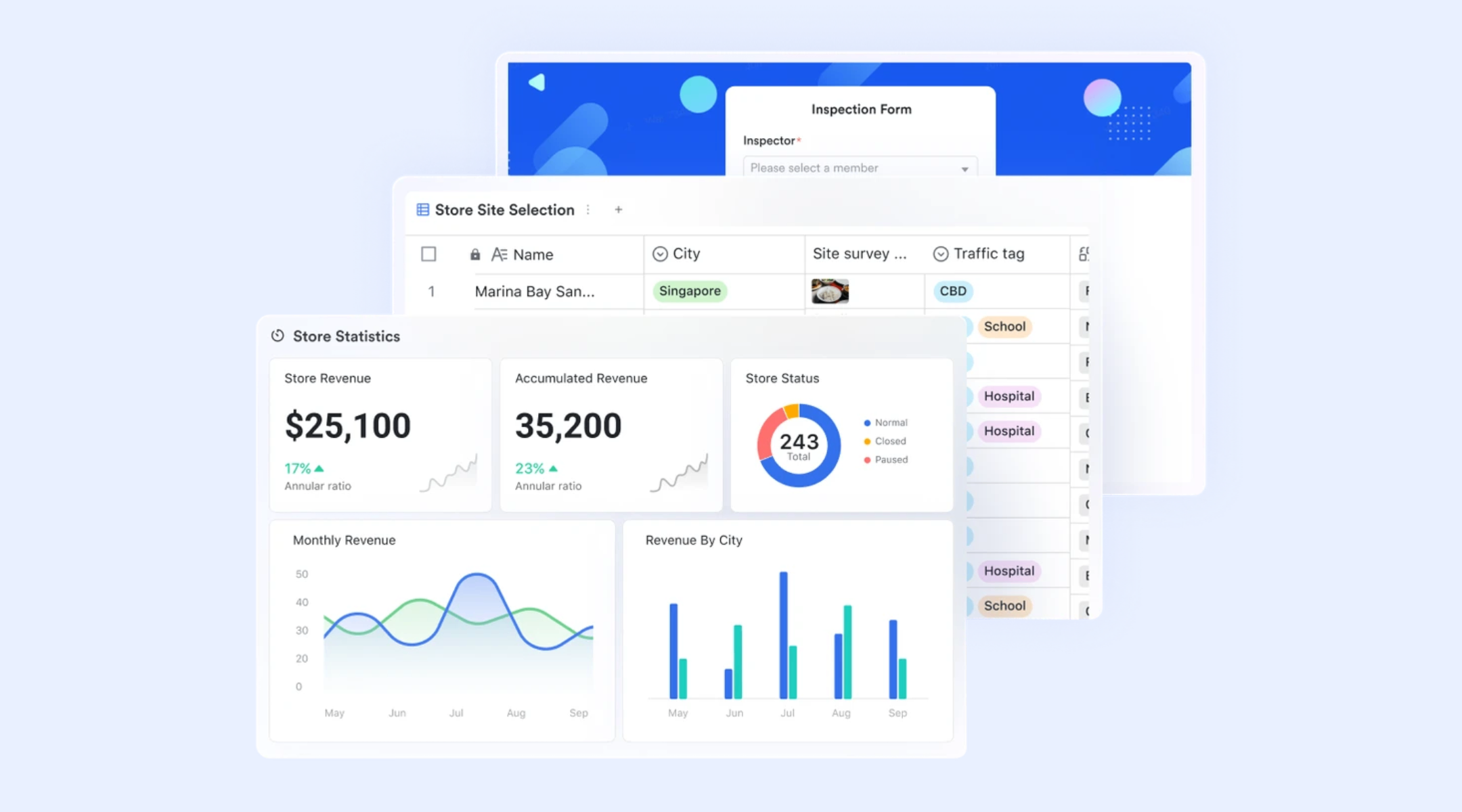
Centralized product record hub
acts as the main database for all product information. Each row represents a single item, and fields can store details such as product name, barcode, category, cost and sale price, current stock level, photos, and the assigned contact person or supplier owner. Teams can filter and sort by category, availability, or location to see exactly what is in stock at any moment. Because everyone works from the same live table, sales, warehouse, and procurement teams share a single source of truth for product data instead of juggling multiple spreadsheets.
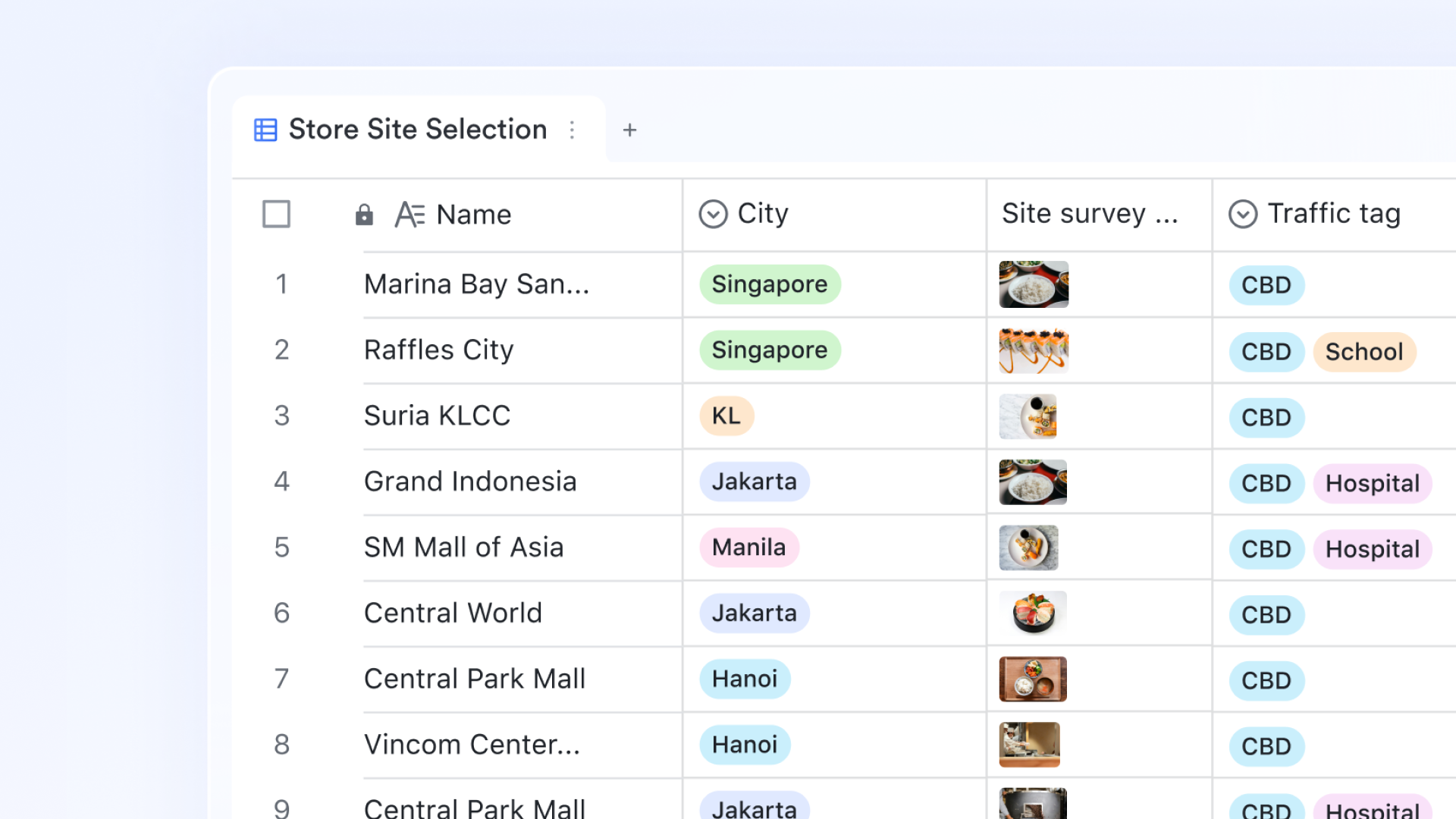
Clean and data-based visual overview
The Lark Base dashboard, provides a comprehensive visual overview to manage inventory and orders effectively. It uses "metrics blocks" to track key performance indicators (KPIs) such as current stock totals, average costs, and consumption rates. Users can leverage various charts (e.g., line, column) to visualize inventory trends over time or compare categories. Pivot tables help extract valuable insights by calculating sums, counts, and averages from complex raw inventory records. 
Workflow automation: Smart rules for inventory actions
Workflow automation in uses IF/ELSE nodes to apply business rules automatically to inventory data. For example, if an order would push stock below zero, the workflow can prevent the update, flag the record, and notify a manager. When stock falls below a reorder point, the system can create a replenishment Lark Task or send a message to procurement. Workflows can also update quantities across related tables, change order statuses, or log audit trails whenever adjustments happen. This rule-based automation removes repetitive manual work and ensures inventory policies are followed consistently across the team. 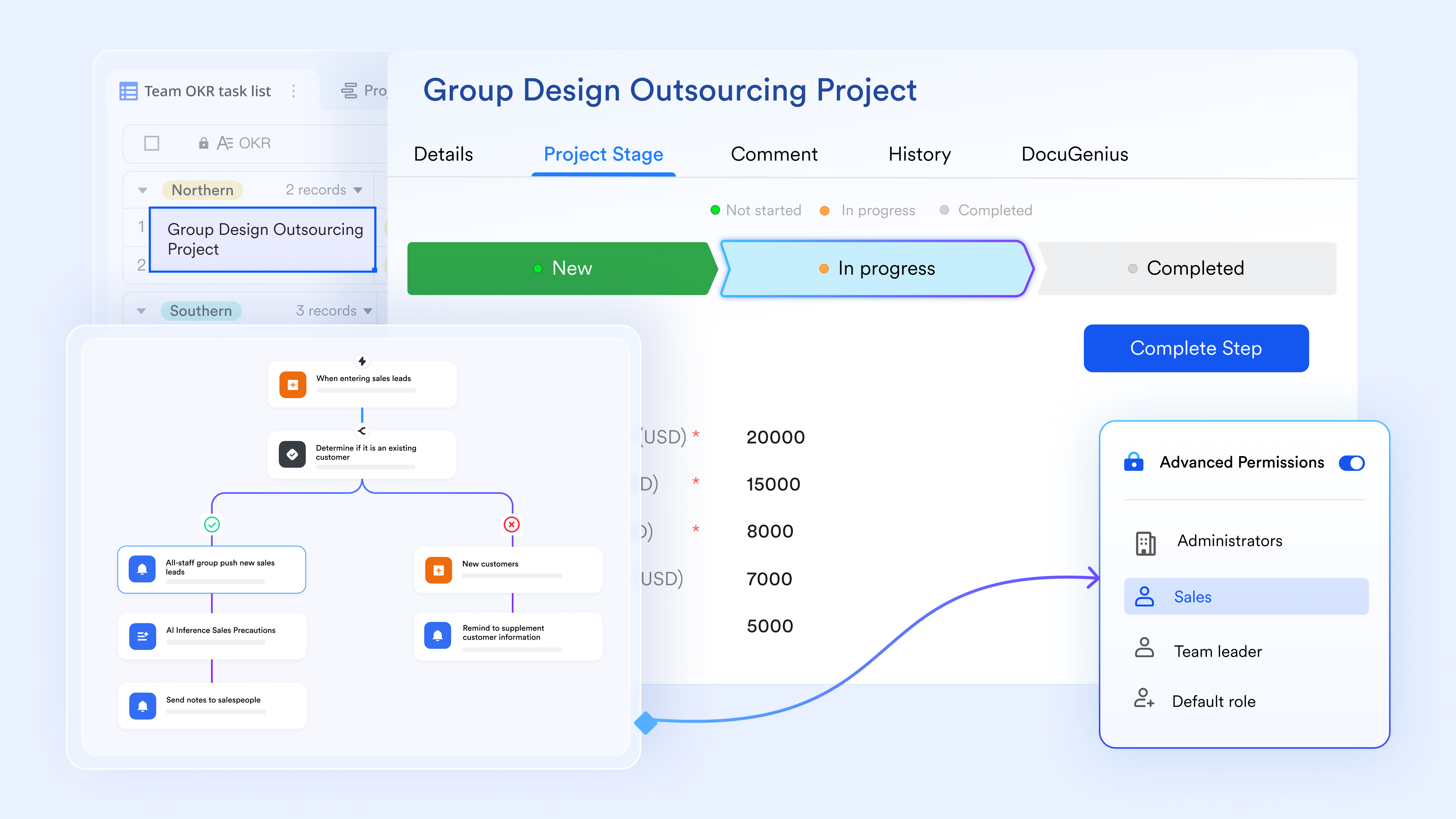
Fast search and update workspace
The query page gives teams a focused interface for searching and updating records without scrolling through large tables. Users can type a product number, barcode, or order ID to instantly pull up the matching record, then adjust fields such as status, quantity, or price. This is especially useful for front-line staff handling customer inquiries, stock checks, or corrections during busy periods, where quick lookups can be essential before or after a discussion. By turning complex tables into a simple search-and-edit page, Lark reduces errors and speeds up everyday inventory and order lookups. Order management table: End-to-end order visibility
The order management table records each order as a structured entry, including order number, items purchased, order status, customer name, assigned sales rep, quantity, price, and order date. Teams can view open, fulfilled, or cancelled orders at a glance and filter by customer, time period, or status to understand pipeline health, often linked to an process. Because orders and inventory live in related tables within , it becomes easier to trace which orders impacted stock, check profitability, and review the full history of each customer transaction. Pros:
- Unified workspace for inventory, orders, tasks, and team communication.
- Centralizes data in real-time structured databases (Lark Base).
- Automatic stock level calculation prevents overselling and stockouts.
- Workflow automation ensures consistent policy enforcement and task creation.
- Query Page allows fast searching and updating by front-line staff.
Cons:
- Advanced features require learning curves, but its provides comprehensive guidance.
:
- Starter plan: Free forever plan that includes 11 powerful tools for up to 20 users. It also comes with 100GB of storage, 1000 automation runs, AI translations, and more.
- Basic plan: $6/user/month (billed annually) for up to 500 users. It includes everything in Starter plus group calling for up to 500 attendees, 5TB of storage, 1000 automation runs, and more. For more details, please .
- Pro plan: $12/user/month (billed annually) for up to 500 users. It includes everything in Basic plus group calling for up to 500 attendees, 15TB of storage, 50,000 automation runs, and more.
- Enterprise plan: for custom pricing. Supports unlimited users and includes even more automation runs and advanced security, compliance, and management features.
For small teams with simple communication needs

18 months message history
1000 Base automation runs/month
2000 rows per table in Base
Most POPULAR
For companies with comprehensive collaboration and management needs
Unlimited message history
500-participant video meetings
50k Base automation runs/month
20k rows per table in Base
For large companies with advanced security and organizational management needs
Get a personalized demo and pricing
Unlimited message history
500-participant video meetings
15 TB storage + 30 GB storage/user
500k Base automation runs/month
50k Base automation runs/month
Most POPULAR
For companies with comprehensive collaboration and management needs
Unlimited message history
500-participant video meetings
50k Base automation runs/month
20k rows per table in Base
2. NetSuite Inventory Management: Enterprise-grade inventory automation
NetSuite Inventory Management is designed for enterprises that need advanced automation, multi-warehouse visibility, and complete supply chain control. It is widely used in manufacturing, wholesale, retail, and global operations that require deep forecasting and real-time adjustments. The system supports companies with complex stock structures that include lot tracking, serial numbers, and multi-currency vendors. NetSuite helps businesses manage procurement, production, fulfillment, returns, and financial reconciliation in one environment.
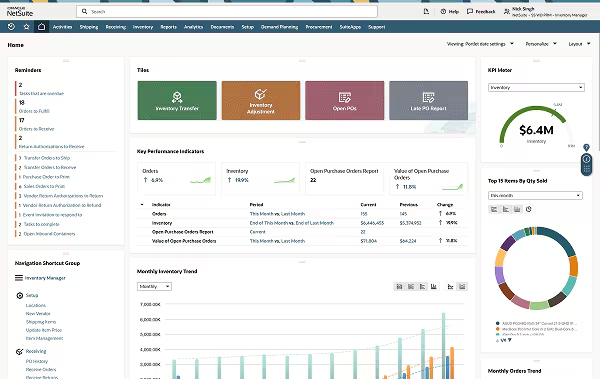
Image source: netsuite.com
Key features:
- Real-time stock visibility across warehouses and bin locations.
- Automated demand planning based on sales trends and forecasting.
- Built-in barcode workflows for faster warehouse operations.
- Unified data flows through full NetSuite ERP connectivity.
- Native support for lot, serial, assembly, and kitting management.
Pros:
- Strong all-in-one ERP environment that centralizes finance, inventory, and operations.
- Highly scalable for global companies handling high transaction volumes.
- Advanced forecasting reduces stockouts and optimizes inventory flow.
- Barcode workflows support warehouse speed and accuracy.
- Real-time dashboards help leaders monitor stock performance across multiple locations.
Cons:
- Expensive for small businesses with simple inventory needs.
- Set up and implementation require specialists and long onboarding cycles.
- Customization can be difficult without technical support.
- Mobile scanning features require additional modules.
- Overkill for companies that need a simple inventory tracking system.
Pricing:
- Base platform license: $999/month
- Pricing is customized based on each business.
3. Unleashed Software: Inventory control for manufacturers & wholesalers
Unleashed Software is built for product-based businesses that require precise stock control, manufacturing support, and real-time insights across sales channels. It helps wholesalers, distributors, and manufacturers maintain visibility over raw materials, finished goods, and production assemblies. The system works especially well for businesses needing multi-warehouse support and detailed costing. This introduction explains why Unleashed is ideal for mid-sized companies needing an advanced but user-friendly inventory scanning system.
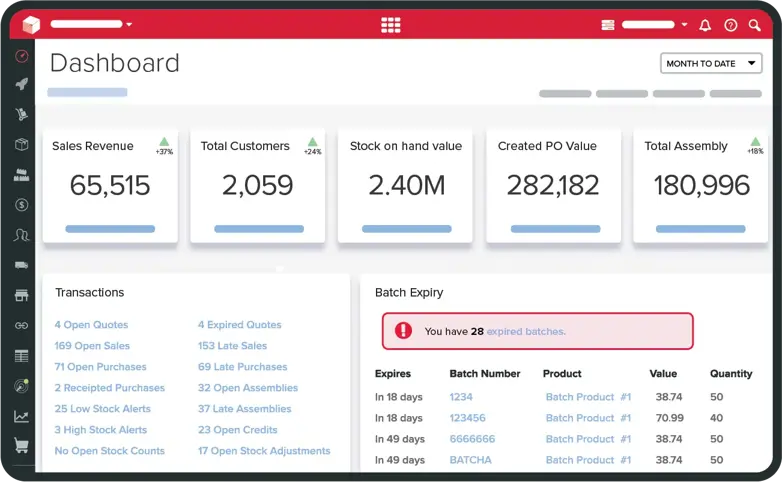
Image source: unleashedsoftware.com
Key features:
- Real-time stock monitoring across multiple warehouses with clear visibility of quantities, allocations, and reorder status.
- Bill of materials (BOM) features help manufacturers assemble products accurately and maintain consistent costs.
- Combines with accounting platforms such as Xero and QuickBooks to connect financial records with stock movements.
- Detailed batch and serial tracking allow teams to manage expiration dates and high-precision items.
- Powerful reporting tools show margins, stock turnover, and demand trends to guide smarter planning.
Pros:
- Intuitive interface that suits both warehouse teams and management.
- Strong manufacturing support for businesses processing raw materials.
- Clear batch tracking reduces risk in quality control audits.
- Real-time visibility helps prevent stockouts and backlog issues.
- Combines smoothly with popular accounting and eCommerce tools.
Cons:
- Pricing increases quickly as teams scale up.
- Limited native automation compared to larger ERP systems.
- No built-in CRM or project management modules.
- Requires external tools for barcode scanning hardware.
- Not suitable for enterprises needing deep supply chain workflows.
Pricing:
- Medium plan: $410/month (Includes 3 users)
- Large plan: $785/month (Includes 8 users)
- Large Plus plan: $1,188/month (Includes 20 users)
- Additional user cost: $79–$109/month (Depending on the base plan tier)
4. Zoho Inventory: Cloud-based inventory and order management
Zoho Inventory is a simple inventory tracking system for small business teams that need stock management, order processing, and warehouse tools. It supports multi-channel selling by connecting sales orders from Amazon, eBay, Shopify, and other platforms. Zoho Inventory works well for businesses needing an easy-to-adapt cloud-based environment without steep learning curves. It demonstrates how well-liked Zoho Inventory is among small retailers and distributors.
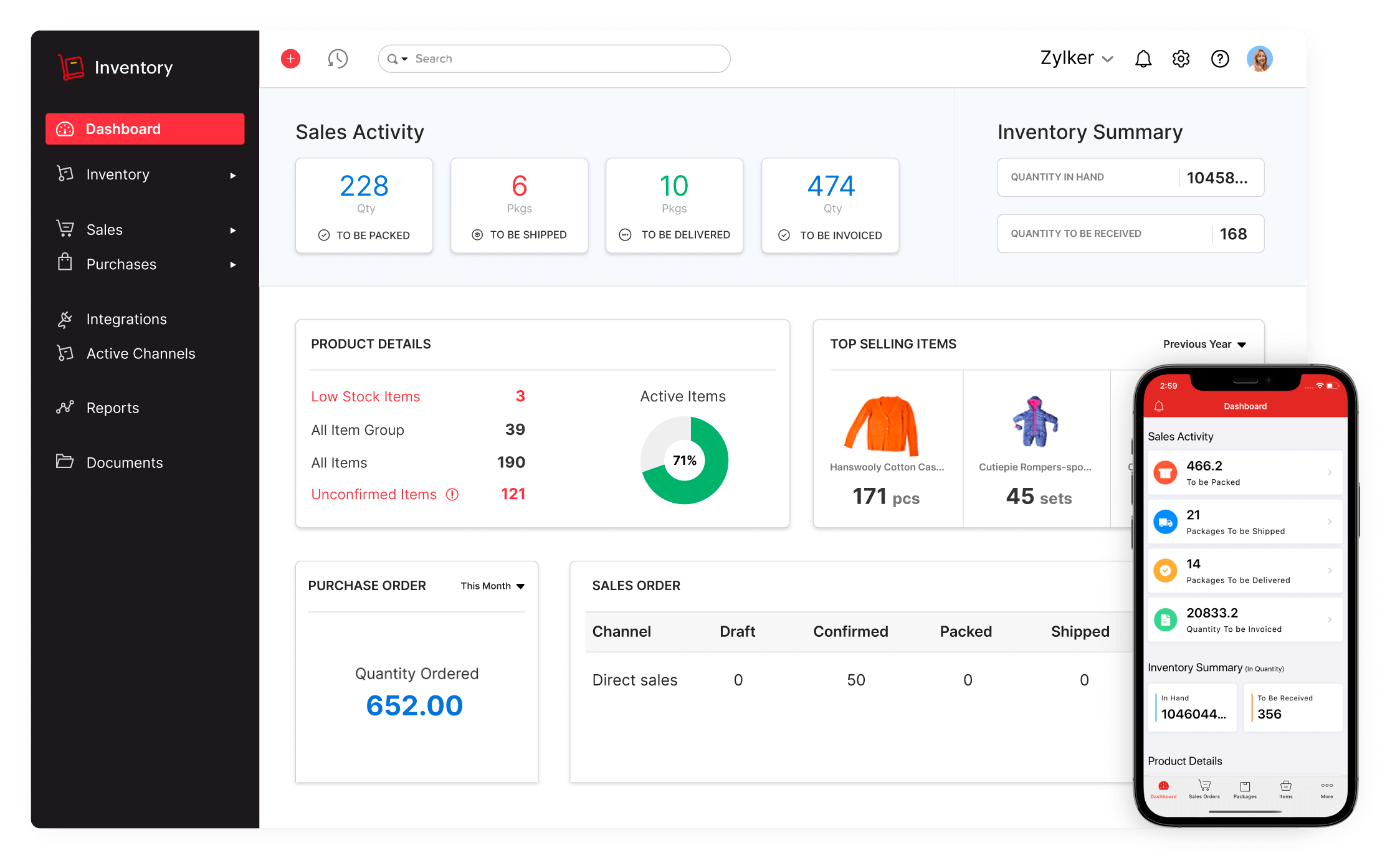
Image source: zoho.com
Key features:
- Automated stock updates across online stores, POS systems, and marketplaces for real-time accuracy.
- Barcode scanning support helps speed up receiving, packing, and auditing workflows.
- Multi-warehouse tracking enables teams to monitor stock distribution across locations.
- Powerful order management tools connect sales orders, purchase orders, invoicing, and shipments.
- Combines with Zoho ecosystem tools such as Zoho Books and Zoho CRM for unified operations.
Pros:
- Affordable for small businesses beginning digital inventory tracking.
- Easy to learn with a clean interface and fast setup.
- Useful barcode scanning support improves speed.
- Strong multi-channel order syncing reduces manual entry.
- Works well within the unified Zoho ecosystem.
Cons:
- Limited reporting depth compared to enterprise tools.
- No advanced manufacturing features for complex production planning.
- Automation rules are basic and may feel restrictive.
- Requires Zoho Books for a full financial combination.
- Free plans have strict limits on transactions.
Pricing:
- Free plan: Available with limited orders.
- Standard plan: $59/month
- Professional plan: $99/month
- Premium tier: $159/month
5. Cin7: Smart inventory software for product-based businesses
Cin7 combines inventory management, POS, and warehouse tools into one platform designed for brands, wholesalers, and retail operations. It is known for combining deeply with eCommerce platforms and providing automated workflows for order fulfillment. Cin7 also supports barcode, batch, and serial tracking, making it suitable for companies with complex stock needs. It explains why Cin7 is regarded as one of the top inventory monitoring system software choices for expanding companies.
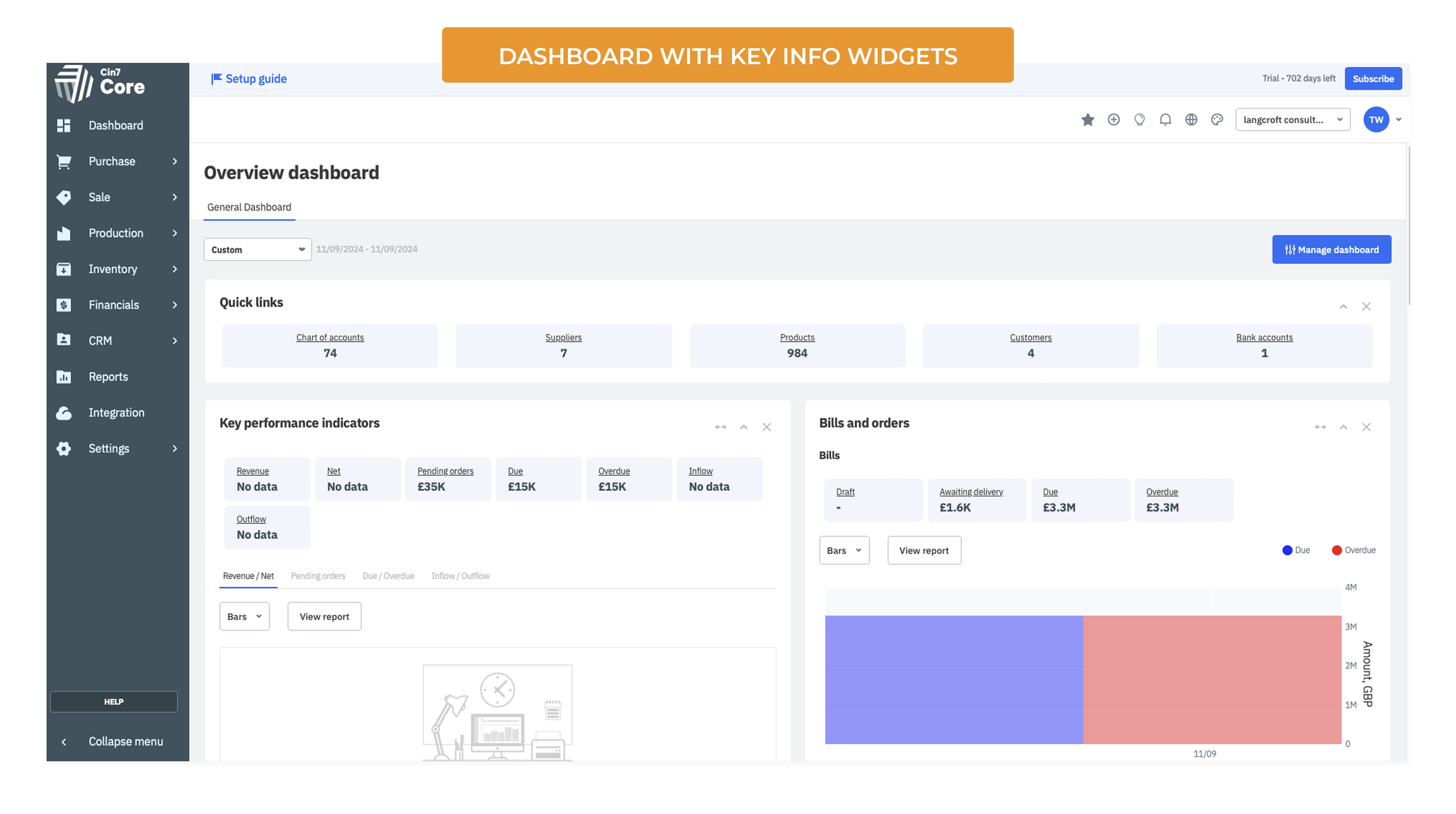
Image source: cin7.com
Key features:
- Built-in POS system for hybrid retailers managing online and in-store sales.
- Automation engine syncs stock across channels to prevent overselling.
- Supports advanced warehouse features such as wave picking and automated replenishment.
- combines with over 700 eCommerce, logistics, and marketplace tools.
- Batch and serial tracking help manage product traceability.
Pros:
- Ideal for brands selling across multiple online platforms.
- Reduces overselling through real-time channel sync.
- Strong warehouse tools for scaling fulfillment operations.
- Broad combined ecosystems support smooth automation.
- Well-suited for medium-sized retail and wholesale companies.
Cons:
- Pricing is high for small businesses.
- Setup requires onboarding assistance due to system complexity.
- The interface can feel heavy for basic use cases.
- Additional fees apply for more combined users.
- Some features vary between plans.
Pricing:
- Enterprise plan: Custom pricing for high-volume brands.
6. SOS Inventory: Inventory tracking designed for QuickBooks users
SOS Inventory is built for businesses that rely heavily on QuickBooks for accounting but need a more advanced inventory tracking system. It supports inventory, order management, and light manufacturing processes in one connected workspace. The platform is ideal for small and mid-sized companies looking for stronger operational control without moving to a full ERP. SOS Inventory provides barcode options, multi-location production-focused tracking, and real-time stock visibility. It helps bridge the gap between accounting and operational workflows.
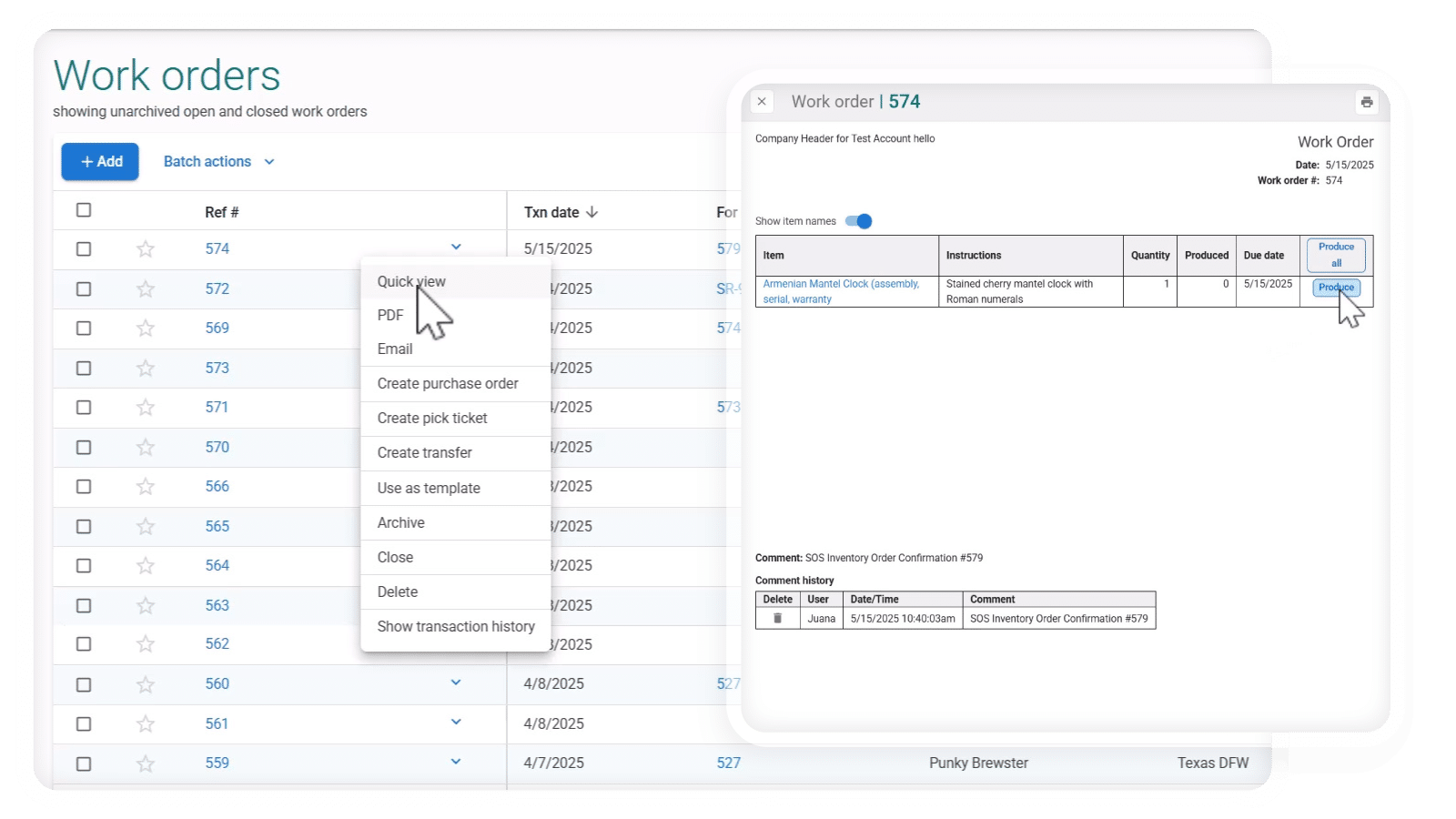
Image source: sosinventory.com
Key features:
- Syncs inventory and orders with QuickBooks for accurate financial tracking.
- Supports multi-location stock monitoring for warehouses and stores.
- Provides barcode scanning to improve accuracy for receiving and picking.
- Offers light manufacturing features such as work orders and assemblies.
- Includes reporting tools for stock levels, valuation, and performance.
Pros:
- Works well for businesses already using QuickBooks.
- Simple to adopt for teams moving from spreadsheets.
- Supports stock tracking across multiple locations.
- Improves accuracy through barcode use.
- Suitable for small manufacturing operations.
Cons:
- Limited customization compared to larger inventory systems.
- Not ideal for complex manufacturing workflows.
- The interface feels outdated.
- Reporting features are basic.
- Pricing increases with order volume.
Pricing:
- Starter plan: $39/month.
- Advanced plan: $129/month.
7. Katana: Real-time inventory for manufacturing workflows
Katana is a modern manufacturing inventory solution designed for production focused businesses that need real-time stock visibility. It is widely used by makers, direct-to-consumer brands, and small factories managing materials, assemblies, and finished goods. Katana helps teams align purchasing, production, and sales in one workflow. It combines with e-commerce tools, accounting platforms, and shipping systems. Katana delivers a visual, easy-to-understand approach to manufacturing inventory.
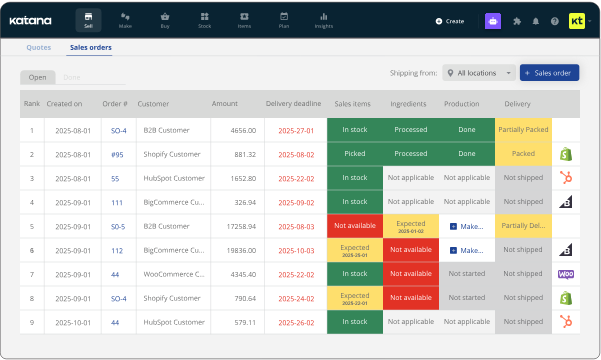
Image source: katanamrp.com
Key features:
- Tracks materials, work in progress, and finished goods in real time.
- Automatically allocates materials to production orders.
- Connects with e-commerce tools for synced order intake.
- Offers shop floor tools for task tracking and production steps.
- Provides visual scheduling to manage production timelines.
Pros:
- Easy for small manufacturers to adopt.
- Offers strong visibility into stock and production.
- combines well with e-commerce and accounting tools.
- Visual dashboards support faster decisions.
- Works well for small to mid-size production teams.
Cons:
- Limited support for advanced manufacturing planning.
- It can become expensive as operations scale.
- Not suited for large, complex factories.
- Workflow automation depth is limited.
- Custom reporting requires extra tools.
Pricing:
- Essential plan: $179/month.
- Standard plan: $349/month.
- Professional plan: $799/month.
8. Odoo Inventory: Modular inventory system for flexible operations
Odoo Inventory is a highly flexible inventory tracking system that forms part of the larger Odoo ERP ecosystem. It supports warehouse operations, order management, and automated stock movement in customizable modules. Odoo fits businesses that want a modular system capable of growing with their needs. It is used by companies in retail, wholesale, logistics, and production. Odoo offers advanced automation features that streamline inventory management across multiple channels.
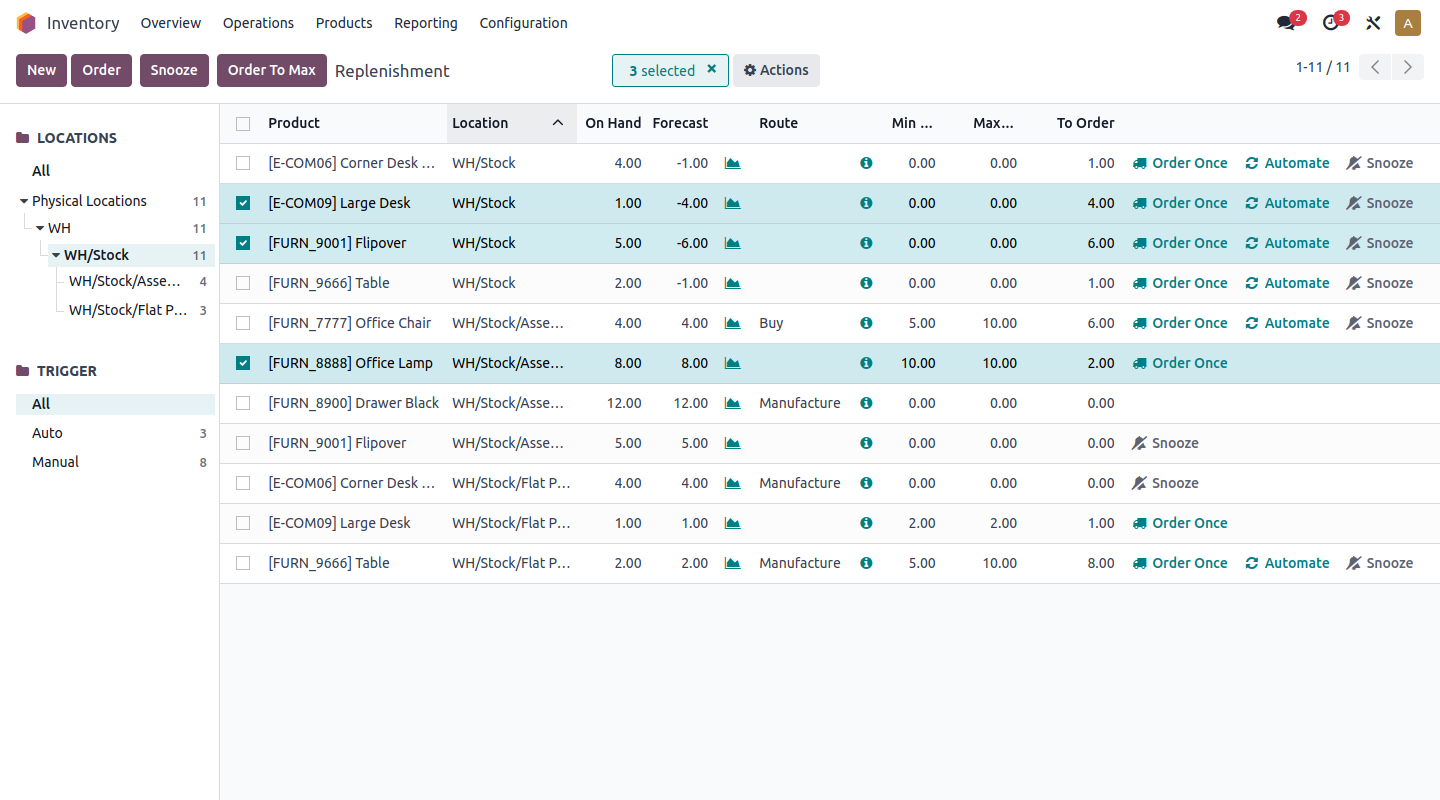
Image source: odoo.com
Key features:
- Supports multi-warehouse tracking with automated stock routes.
- Offers barcode and RFID scanning for accurate operations.
- Automates reordering based on demand and minimum levels.
- combines with Odoo apps for sales, purchasing, and manufacturing.
- Provides dashboards for real-time stock visibility.
Pros:
- Highly customizable for different industries.
- Modular design grows with business needs.
- Strong automation tools reduce manual work.
- Works well as part of a full ERP system.
- Cost-effective for mixed operational needs.
Cons:
- Setup requires technical expertise.
- The interface can feel overwhelming for beginners.
- Some features require paid modules.
- Customization may require developers.
- Hosting and maintenance add extra costs.
Pricing:
- Standard plan: $25/month.
- Enterprise plan: Tiered pricing available.
- Addon modules and implementation support are priced separately.
9. Sortly: Simple visual inventory tracking for small businesses
Sortly is designed for small businesses that need a simple inventory tracking system without technical complexity. It focuses on visual cataloging, QR codes, and easy mobile scanning. It is ideal for teams needing a simple inventory tracking system that is easy to set up and maintain. It supports basic inventory tracking, equipment logs, and asset management. Sortly works for offices, field teams, agencies, and small retail shops.
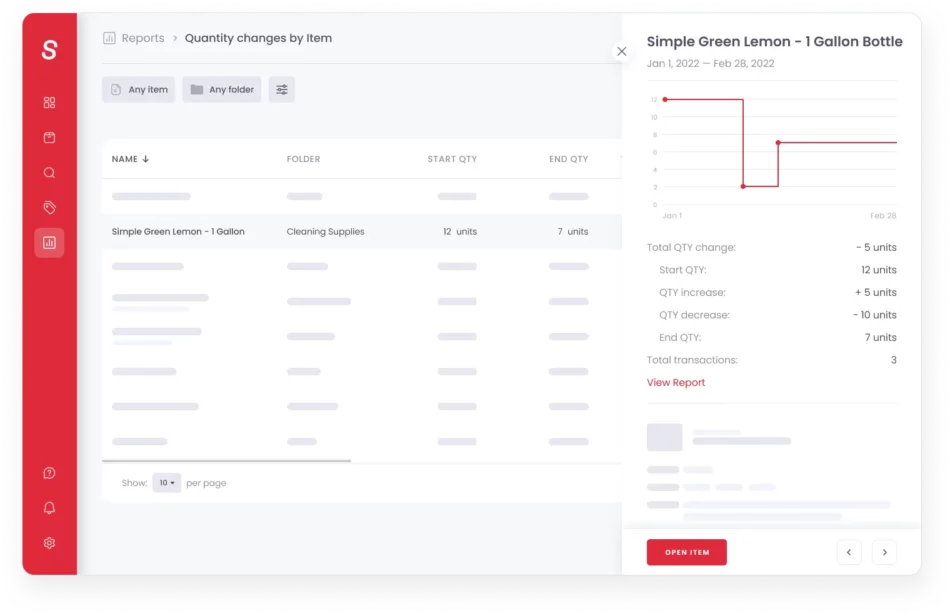
Image source: sortly.com
Key features:
- Let's teams create a visual catalog with photos and custom fields.
- Supports QR and barcode scanning through mobile devices.
- Syncs inventory across devices in real time.
- Sends low stock alerts to prevent shortages.
- Tracks items across multiple locations easily.
Pros:
- Very simple for small teams to use.
- Visual layout helps users identify items quickly.
- Affordable mobile scanning with no hardware needed.
- Great for offices, agencies, and field teams.
- Works well as a starter inventory system.
Cons:
- Not suited for large warehouses.
- Offers limited automation features.
- Reporting tools are basic.
- Few combine with accounting tools.
- Cannot manage complex workflows.
Pricing:
- Standard plan: Free plan available.
- Advanced plan: $49/month.
- Enterprise plan: Custom pricing available.
10. Finale Inventory: Scalable inventory management for growing warehouses
Finale Inventory is a cloud-based warehouse inventory tracking system designed to support businesses scaling rapidly. It focuses on high-volume operations, barcode workflows, and powerful order management. Finale is popular among e-commerce companies, wholesale distributors, and fulfillment centers. The platform helps teams maintain real-time stock accuracy across multiple channels and warehouse locations.
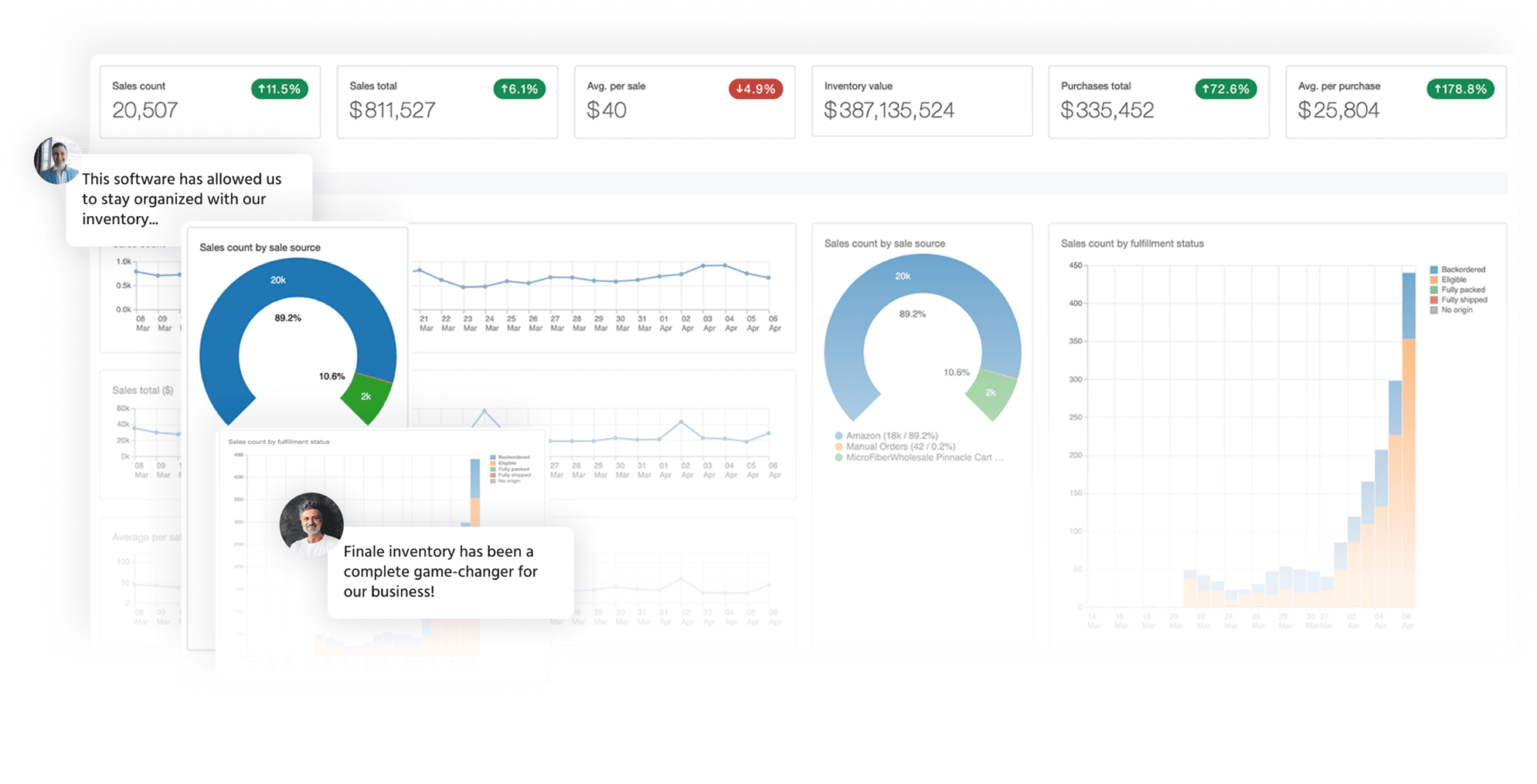
Image source: finaleinventory.com
Key features:
- Tracks inventory across multiple warehouses with real time updates.
- Supports barcode scanning for picking, packing, and stock counts.
- combines with ecommerce channels for synced orders.
- Automates replenishment based on stock thresholds.
- Provides reports on stock performance and order trends.
Pros:
- Great for fast growing ecommerce and warehouse teams.
- Handles high order volumes smoothly.
- Barcode workflows increase speed and accuracy.
- combines with shipping, ecommerce, and accounting tools.
- Scales well as warehouse operations expand.
Cons:
- The interface is less modern than newer tools.
- Setup requires training for advanced workflows.
- Not suitable for manufacturing needs.
- Limited custom reporting options.
- Pricing increases with warehouse count.
Pricing:
- Starter plan: $75/month.
- Growth plan: $199/month.
- Premium plan: $399/month.
- Enterprise plan: Custom pricing available for large operations.
Benefits of inventory tracking systems
Inventory tracking systems offer significant advantages for businesses by improving accuracy, speed, and operational control across . These systems help teams avoid overstock and stockouts by providing real-time visibility into item quantities and automating reorder alerts. They also reduce shrinkage by creating clear movement logs and enabling precise scanning through barcodes or RFID. With better data and faster warehouse processes, companies can manage cash flow more effectively, streamline daily activities, and enhance productivity across departments. Overall, the right inventory tracking system strengthens decision-making and builds a more efficient, reliable supply chain.
- Reduce overstock and stockouts: An inventory tracking system helps teams monitor stock levels in real time so items never exceed safe limits or run out unexpectedly. Automated alerts notify managers when products reach reorder points, keeping procurement aligned with demand. This reduces carrying costs associated with excess stock while preventing lost revenue from unavailable items. The system also enables better forecasting for future demand. Businesses maintain smoother inventory flow with fewer disruptions.
- Prevent theft and shrinkage: Inventory scanning systems and digital tracking reduce unknown shrinkage caused by loss, theft, or incorrect handling. Detailed logs show when and where items were moved, creating accountability within teams. RFID or barcode scanning systems add extra accuracy during stock audits and cycle counts. Real-time tracking also helps managers spot unusual inventory patterns early. This protects business assets and reduces preventable losses.
- Improve cash flow: Accurate inventory records help businesses avoid excess spending on unnecessary stock. Real-time tracking ensures that capital is invested only in required items based on actual demand. This supports healthier cash flow management by reducing tied-up inventory costs. Teams also plan purchases more efficiently through detailed stock insights. Better cash flow allows businesses to reinvest in growth opportunities.
- Faster warehouse operations: A improves picking, packing, replenishment, and auditing tasks. Scanning reduces the time spent searching for products and minimizes human error. Automated updates help warehouse teams work quickly without stopping for manual paperwork. The system also organizes stock by bin, lot, or category to shorten retrieval time. This accelerates daily operations and supports higher-order throughput.
- Real-time reporting: A generates reports that reflect stock quantity, movement trends, and performance metrics instantly. Managers use these reports to make decisions about purchasing, warehousing, and pricing strategies. Real-time data also helps identify slow-moving items and seasonal demand patterns. With accurate reporting, teams eliminate guesswork. Reporting improves strategic planning and operational stability.
- Higher productivity: Inventory automation reduces manual tasks, allowing staff to focus on customer service, sales, or operational improvements. Barcode or RFID systems streamline repetitive scanning tasks. Cloud platforms make collaboration faster by giving teams shared visibility across locations. Productivity increases because workflows no longer depend on manual counting or spreadsheet updates. The entire organization benefits from reduced administrative workload.
How inventory tracking works
Understanding how an inventory tracking system works is essential for keeping stock records accurate and ensuring products move smoothly across retail, warehouse, and online operations. It begins by identifying each item through barcodes, QR codes, or RFID tags, followed by scanning and updating records in a centralized database. These updates sync across POS systems, online stores, and warehouse tools to maintain real-time visibility. A well-structured and tracking system reduces errors and supports better stock planning for businesses of all sizes.
- Identification (barcode/QR/RFID): Inventory starts with unique identifiers assigned to every item, such as barcodes, QR codes, or RFID tags. These identifiers help track individual units or product batches through the supply chain. Teams use printed labels or embedded RFID chips, depending on business size and accuracy needs. Identification ensures every movement is recorded properly. It also reduces confusion between similar items.
- Scanning: Scanning captures during receiving, picking, packing, and shipping. Warehouse teams scan codes using handheld devices, mobile apps, or RFID readers. Each scan updates the system instantly, so all product locations and quantities remain accurate. Scanning prevents manual entry mistakes and speeds up daily operations. This step strengthens visibility across all inventory activities.
- Centralized database: A centralized database stores all inventory details such as quantities, lot numbers, serial numbers, and storage locations. It updates with every transaction and acts as the single source of truth for the organization. Teams across warehousing, finance, purchasing, and sales rely on the same real-time information. This reduces misalignment and ensures decisions are fact-based. A centralized system is essential for scaling operations.
- Sync with POS, online store, warehouse: connect with POS systems, ecommerce stores, and warehouse tools. This ensures stock data stays accurate even when multiple sales channels are active. Syncing prevents overselling by updating stock counts immediately after purchases. It also supports accurate order fulfillment by reflecting real warehouse conditions. For omnichannel businesses, this step is critical for customer satisfaction and operational stability.
How to choose the best inventory tracking system
Choosing the best inventory tracking system requires evaluating how well a tool fits your , data needs, and long-term growth plans. Different businesses handle stock differently, so the right system must match your daily processes, team structure, and sales model. Considering these factors helps avoid overspending, prevents workflow disruptions, and ensures accurate, real-time inventory control.
- Budget: Your budget determines the type of inventory tracking system you can realistically adopt, especially when factoring in long-term costs. Subscription fees, user licenses, barcode hardware, and storage upgrades contribute to total expense. Cheaper tools may lack automation, while premium systems may include advanced features your team does not need yet. Aim for a platform that provides essential functions without unnecessary complexity. A balanced investment ensures sustainability as your stock volume grows.
- Scale of business: Business size heavily influences the level of automation and data tracking required. Small businesses can often rely on a simple inventory tracking system, while larger operations need advanced reporting, multi-warehouse visibility, and real-time syncing. A scalable system prevents disruptions when your catalog expands or your order volume increases. Evaluate whether the tool can manage future growth without performance drops. A flexible solution ensures long-term operational stability.
- Industry: Inventory needs vary across industries, making industry alignment essential. Manufacturers require systems that support production runs, material tracking, and fulfillment workflows. Retailers depend on POS sync, reorder alerts, and multi-store inventory. Warehouses need barcode scanning, batching, and strict location mapping. Choosing a system tailored to your industry ensures smoother onboarding and more accurate processes. Specialized tools reduce the need for customization later.
- Warehouse vs retail: Warehouse operations focus on movement, storage, receiving, and dispatching goods, requiring tools that support scanning, labeling, and location-level tracking. environments need real-time stock visibility, multichannel syncing, and fast replenishment alerts. A warehouse inventory tracking system prioritizes precision and logistics, while retail systems emphasize sales alignment and customer demand. Matching the system to your setting minimizes errors and improves day-to-day efficiency.
- Cloud vs on-premise: Cloud inventory systems offer accessibility from any device, automatic updates, and smoother collaboration across locations. They suit teams that operate remotely or manage multiple warehouses. On-premises systems offer stronger internal control, offline capability, and customizable security settings. Your choice depends on IT policy, data sensitivity, and operational flexibility. Understanding these differences helps teams pick a deployment model that supports long-term workflows.
- Compatibility with tools: An effective inventory tracking system must easily connect with your existing ecosystem, including , accounting tools, ecommerce stores, and . Smooth compatibility reduces manual entry and eliminates the risk of inconsistent data across platforms. Combining allows automatic stock updates, faster reporting, and streamlined reordering. Choosing a system that works well with your current tools supports tighter operations. This also simplifies onboarding and minimizes training time.
Conclusion
Inventory tracking systems help businesses manage stock with greater accuracy, speed, and control. These tools support daily operations by reducing manual errors, improving visibility, and keeping product movement synchronized across , online stores, and retail locations. The right system also helps teams plan better by offering real-time insights into demand patterns, replenishment cycles, and stock health. As businesses scale, inventory software becomes essential for preventing shortages, avoiding overstock, and maintaining strong customer service levels.
Modern solutions also support multi-channel tracking and mobile scanning, which creates smoother workflows for distributed teams. Platforms that bring communication, data, and automation into one workspace, such as , gradually fit into this landscape by supporting collaboration around stock updates and operational tasks. Choosing a connected inventory tracking system strengthens efficiency and keeps teams aligned as they manage growing product volumes.
Upgrade your stock processes with smarter digital workflows
FAQs
What is the difference between inventory tracking and inventory management?
Inventory tracking focuses on monitoring item quantities, movement, and availability across locations. Inventory management includes wider responsibilities such as , purchasing, supplier control, and operational planning. Tracking provides the data foundation while management uses that information to guide decisions. Both functions support business accuracy and efficiency. Some teams also benefit from tools like Lark when they need shared views for discussions around stock decisions.
Do small businesses really need an automated inventory tracking system?
Small businesses benefit from automation because it reduces manual counting and prevents costly stock mistakes. Automated tools help teams know what is available without constant checks. They also save time during purchasing and customer order processing. Even simple systems provide major advantages. As teams grow, platforms that combine communication and tracking, such as Lark, can support smoother coordination.
Is barcode or RFID better for tracking inventory?
Barcodes work well for most small and medium businesses because they are affordable and easy to scan. RFID is faster and does not require line of sight, which helps large warehouses track items at scale. RFID also supports batch scanning for quicker updates. The right choice depends on budget and operational volume. Many companies start with barcodes and upgrade later when workflows expand.
Can inventory tracking systems work without the internet?
Some systems offer offline scanning and local syncing so teams can continue working in warehouses or remote areas. Data updates are stored on the device and pushed to the system when internet access returns. Not every platform supports offline mode, so teams must check before choosing a tool. Connected workspaces such as Lark support online collaboration but can complement offline processes through structured documentation and shared updates.
How long does it take to implement a new inventory tracking system?
Implementation time varies depending on business size, the number of products, and the required system combination. Small teams may complete setup within a few days, while larger operations might need several weeks. Clean data and clear workflow planning help speed up onboarding. As teams coordinate during rollout, communication tools such as Lark can help maintain alignment across departments.
Related reading