Understanding QuickBase pricing is essential for teams evaluating no-code and low-code platforms to manage their workflows. Quickbase is known for its flexibility and customization, but its pricing can vary widely based on team size, feature needs, and automation usage. For growing businesses, balancing cost with usability becomes a key concern—especially when scaling collaboration or data management.
In this guide, we'll break down Quickbase's plans, features, and costs, and compare their value across different business sizes. For teams seeking a more affordable, all-in-one workspace, offers a connected alternative that combines workflow tracking, communication, and automation—without the enterprise price tag.
Start streamlining workflows today
Quickbase pricing overview
Information source: quickbase.com
Update time: November 2025
Note: The pricing information above is based on publicly available data from Quickbase’s official website. Actual costs may vary depending on user count, storage, and automation usage.
What is Quickbase?
Quickbase is a no-code application platform that enables teams to build custom workflows, , and centralize operational data without traditional software development. It is commonly used by operations, finance, supply chain, and teams to design internal tools tailored to their processes. With visual builders, customizable data tables, and workflow logic, Quickbase helps organizations replace spreadsheets and manual task management with scalable digital systems. While it offers flexibility and deep integration capabilities, effective use often requires structured setup and ongoing administrative oversight—especially as workflows expand or .
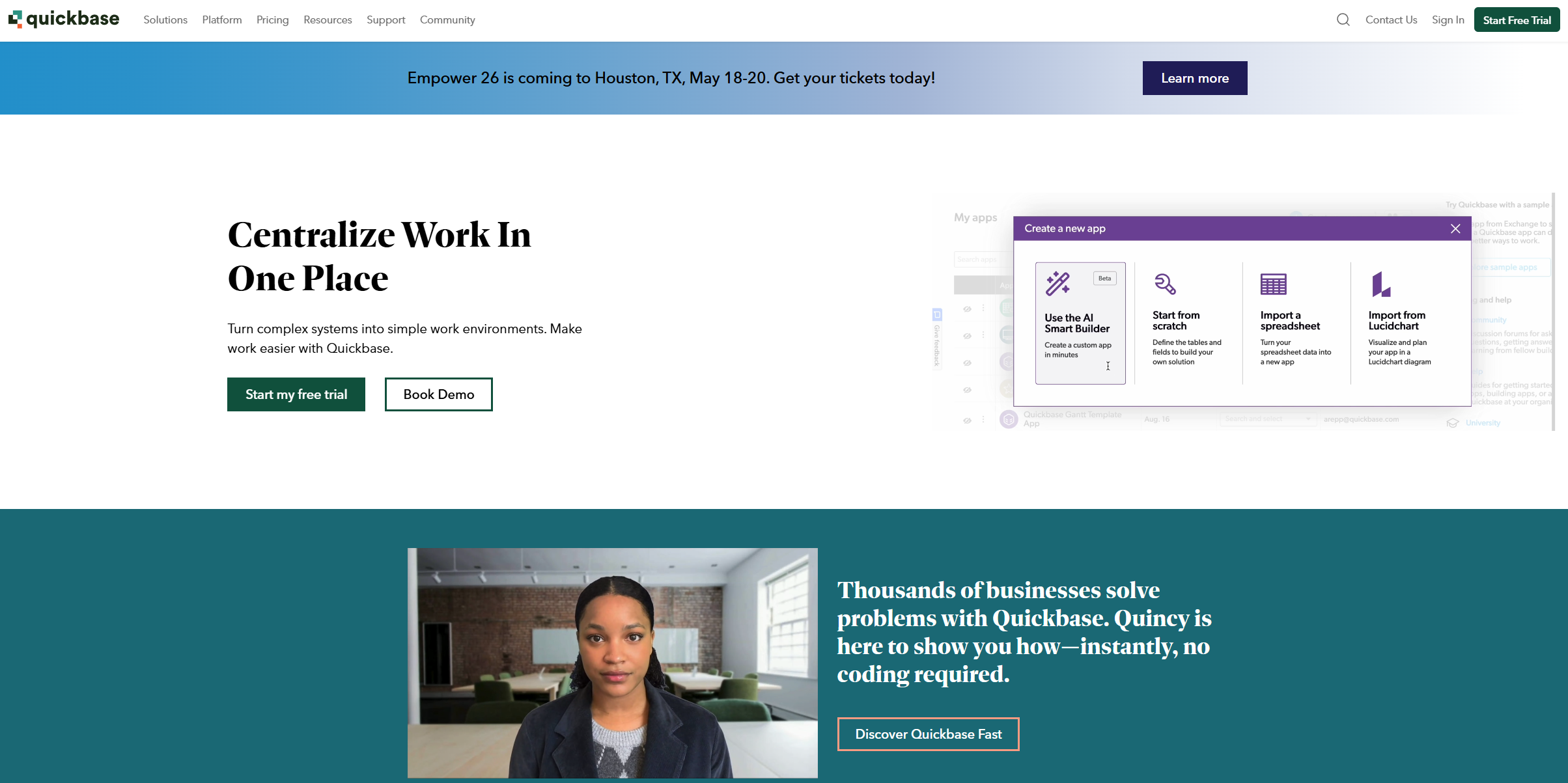
Image source: quickbase.com
Key features
- Custom app building without coding: Quickbase allows users to build and customize applications visually, without writing code. Teams can structure data, define workflows, and create forms and interfaces suited to their exact operational needs. This enables faster deployment of internal tools and reduces reliance on IT development cycles. It makes Quickbase particularly useful for organizations with evolving processes that need adaptable systems.
- Real-time dashboards and reports: Quickbase consolidates data from multiple workflows into real-time dashboards that offer visibility into performance, bottlenecks, and outcomes. These automatically refresh as data updates, making it easier for teams to make decisions based on current information. Users can filter data, create reports, and customize visualizations to match their priorities. The result is clearer insight into ongoing operations and progress.
- Data governance and role-based access: Quickbase includes strong governance controls that allow teams to manage how data is accessed and shared. Administrators can apply role-based permissions, ensuring that users only see and edit information relevant to their responsibilities. This helps maintain data integrity and protects sensitive business information. It also supports compliance needs in organizations with strict audit and oversight requirements.
- API connections for enterprise integrations: Quickbase supports integrations with enterprise software such as ERP systems, CRMs, BI tools, and third-party applications through APIs and connectors. This enables seamless data exchange and allows workflows to extend across the broader technology ecosystem. Integrations help reduce manual data entry, synchronize system updates, and keep teams aligned across platforms. As businesses scale, these integrations play a key role in simplifying system complexity.
What's included in each Quickbase plan
Quickbase offers multiple pricing tiers designed to support different stages of workflow maturity, from small process teams to large enterprises with complex operational requirements. While all plans provide access to the core no-code app builder, the depth of , storage, governance controls, and integration capabilities increases significantly across plans. As teams scale workflows or expand user access, the total cost can grow quickly, especially when advanced automation pipelines and enterprise-grade compliance become necessary.
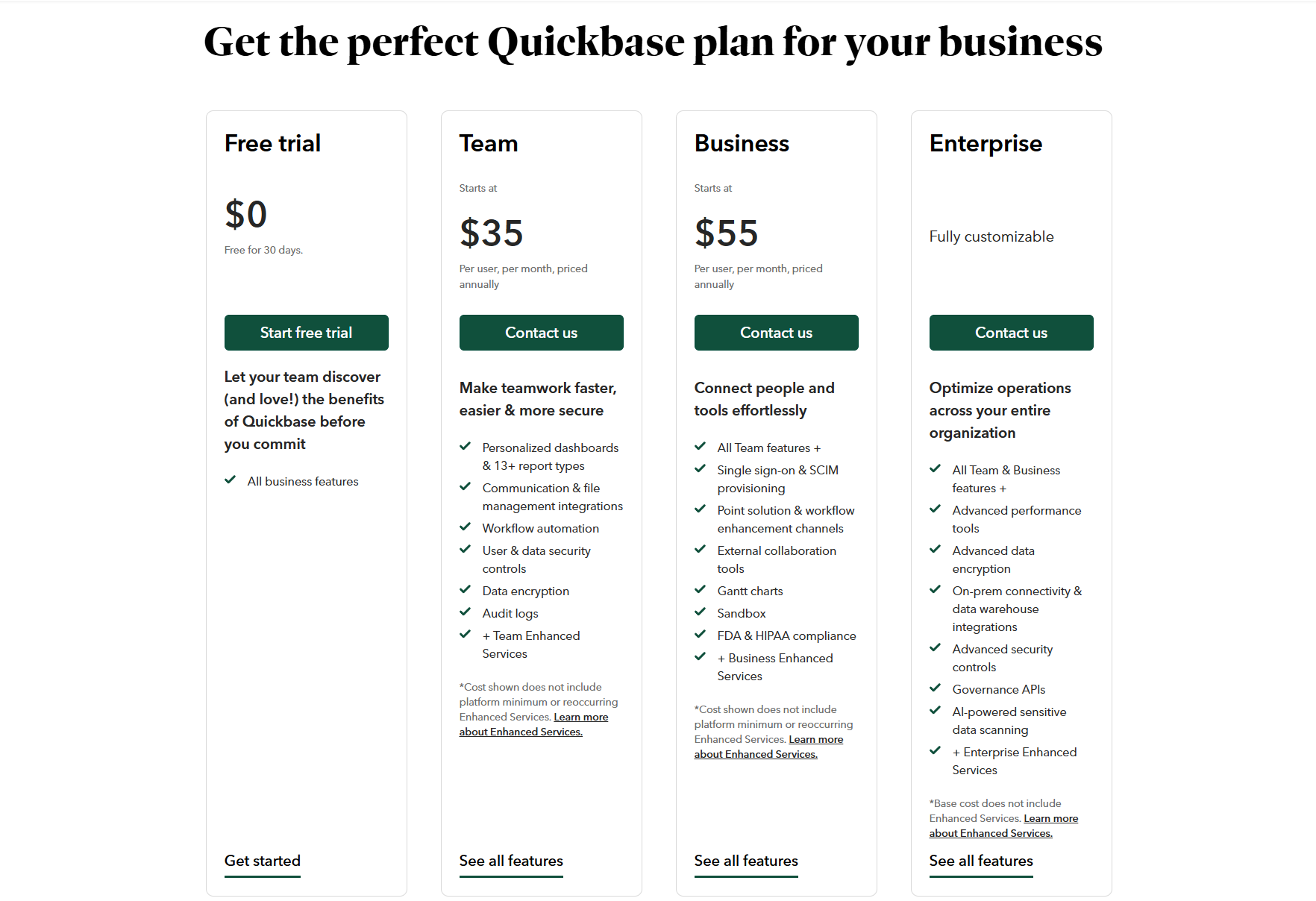
Image source: quickbase.com
Team
Starting at $35, this plan includes basic app-building tools, , dashboard creation, and limited user and permission controls. It suits smaller teams that are just beginning to digitize processes or replace spreadsheets. However, it has limitations in automation and customization depth as workflows expand.
Pros:
- Easy entry points for new users.
- Allows quick deployment of small internal tools.
- Simple data tracking and dashboarding.
Cons:
- Limited automation capabilities.
- Costs increase quickly as more users are added.
Business
Starting at $55, The Business plan expands access to automation pipelines, offers increased storage capacity, and enables API-based integration with external systems. It supports larger, cross-functional workflows that require between multiple departments and data environments.
Pros:
- Advanced automation options for complex workflows.
- Unlimited apps for broader operational coverage.
- Integration with CRMs, ERPs, and project systems.
Cons:
- Requires more administrative oversight.
- Greater learning curve for non-technical users.
Enterprise
Based on custom quota, this plan is designed for organizations operating at scale. It adds governance controls, compliance frameworks, app sandboxing, audit logs, and . It ensures enterprise-level reliability and data protection across teams.
Pros:
- Strong compliance and security management.
- Scales efficiently across global or large organizational structures.
- Dedicated support, SLAs, and advanced administration tools.
Cons:
- Custom pricing can be significantly higher.
- Implementation and long-term management may require IT involvement.
Quickbase pricing comparison: Is it worth it?
When evaluating Quickbase, cost becomes a core factor in determining long-term fit. While its platform is highly capable for custom workflow design, the pricing model scales quickly as teams grow, workflows expand, and automation demands increase. Many organizations start with a small deployment and later find that additional users, integrations, or compliance needs significantly raise overall expenses. For teams focused on collaboration, predictable cost, and ease of use, these pricing considerations often drive the search for more unified, .
- For small to mid-sized teams, Quickbase's pricing often becomes a barrier due to user-based billing and enterprise add-ons. As team size increases, the per-user pricing model leads to rapidly escalating costs, especially when additional features like automation pipelines or advanced governance controls are required.
- While powerful, many organizations find they use only a fraction of their automation potential. Quickbase provides extensive automation capabilities, but many teams use it primarily for basic workflow management and data tracking. Advanced often requires dedicated setup expertise, which smaller teams may not have.
- The hidden costs—training, implementation, and add-on licensing—can raise total ownership significantly. Beyond subscription fees, Quickbase deployments often require onboarding support, internal administrators, external consultants, or additional integration tools.
- Businesses seeking flexibility and collaboration often turn to alternatives that offer simpler, all-in-one solutions at predictable costs. Organizations that prioritize seamless teamwork, , and connected task execution often benefit from platforms that bundle collaboration and workflow in one place.
Beyond Quickbase: Why teams look for Quickbase alternatives
As organizations scale their workflows and add more users, the initial appeal of Quickbase's flexibility can be offset by rising costs and increasing setup complexity. Many teams start with simple process tracking needs, only to discover that expanding automation, collaboration, and data access requires multiple additional tools and configurations. This adds both financial and operational overhead, making it harder to maintain a environment. As a result, businesses often evaluate alternatives that offer unified, easy-to-manage platforms that support collaboration and workflow execution in one place.
- High pricing tiers: Quickbase becomes significantly more expensive as new team members or departments need access to apps and dashboards. Because pricing is tied to the number of users, scaling operations can lead to unpredictable and steep cost increases. For growing organizations, this often makes budgeting difficult and pushes them to evaluate alternatives with more predictable pricing models.
- Complex setup: Although Quickbase offers a no-code environment, many use cases still require technical skills to build and effectively. Teams frequently rely on specialized administrators or consultants to manage configurations, integrations, and data structure changes. This technical dependency introduces delays and ongoing costs that reduce the speed and agility expected from a no-code platform.
- Limited built-in collaboration: Quickbase is primarily focused on workflow automation and data management, not real-time teamwork. Teams often need separate platforms for discussions, document co-editing, and , causing work to scatter across tools. This fragmentation disrupts context and slows decision-making because conversations and tasks are not located in the same workspace.
- Multiple tool dependency: To achieve full operational functionality, organizations commonly integrate Quickbase with chat apps, document suites, project trackers, and scheduling platforms. While possible, this creates a complex tool ecosystem that requires ongoing IT oversight and additional subscription costs. As these systems multiply, teams experience increased friction and reduced clarity about where work actually happens.
Adopt a simpler workflow platform for the team
New option: Try Lark as a modern, comprehensive platform
As teams outgrow rigid, high-cost workflow builders, they increasingly look for tools that balance customization, collaboration, and cost efficiency. That's where Lark stands out. It brings together workflow tracking, automation, documentation, and communication—all in one connected workspace. Unlike Quickbase, which requires separate setup for collaboration, automation, and reporting, Lark provides these capabilities natively, ensuring every process flows seamlessly from to execution—without switching platforms or paying extra per feature.
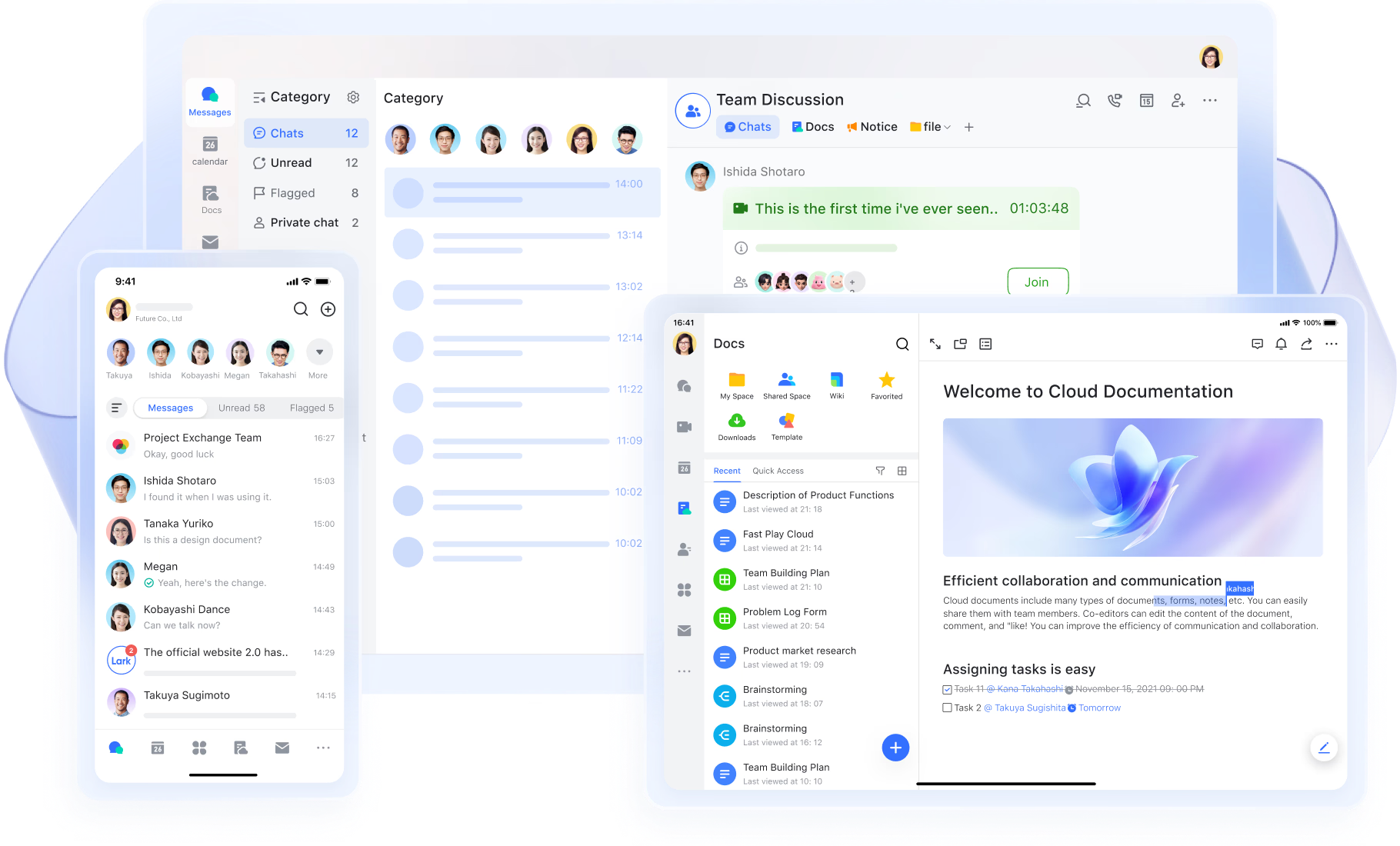
Lark Base: Customizable workflow hub for every team
acts as the heart of your operations, replacing Quickbase's app builder with a simpler, no-code environment for data organization. Teams can create structured tables to track projects, requests, budgets, or client records—all connected through dynamic dashboards and automated updates. Each record supports fields for owners, status, deadlines, and dependencies, giving you complete visibility without extra configuration. Example: A marketing operations team creates a Base to track campaign requests. When a campaign is approved, Base automatically changes its status to "In Progress," assigns tasks to relevant team members, and updates the performance dashboard in real time.
Lark Base gives you the flexibility of Quickbase—with none of the complexity or cost barriers.
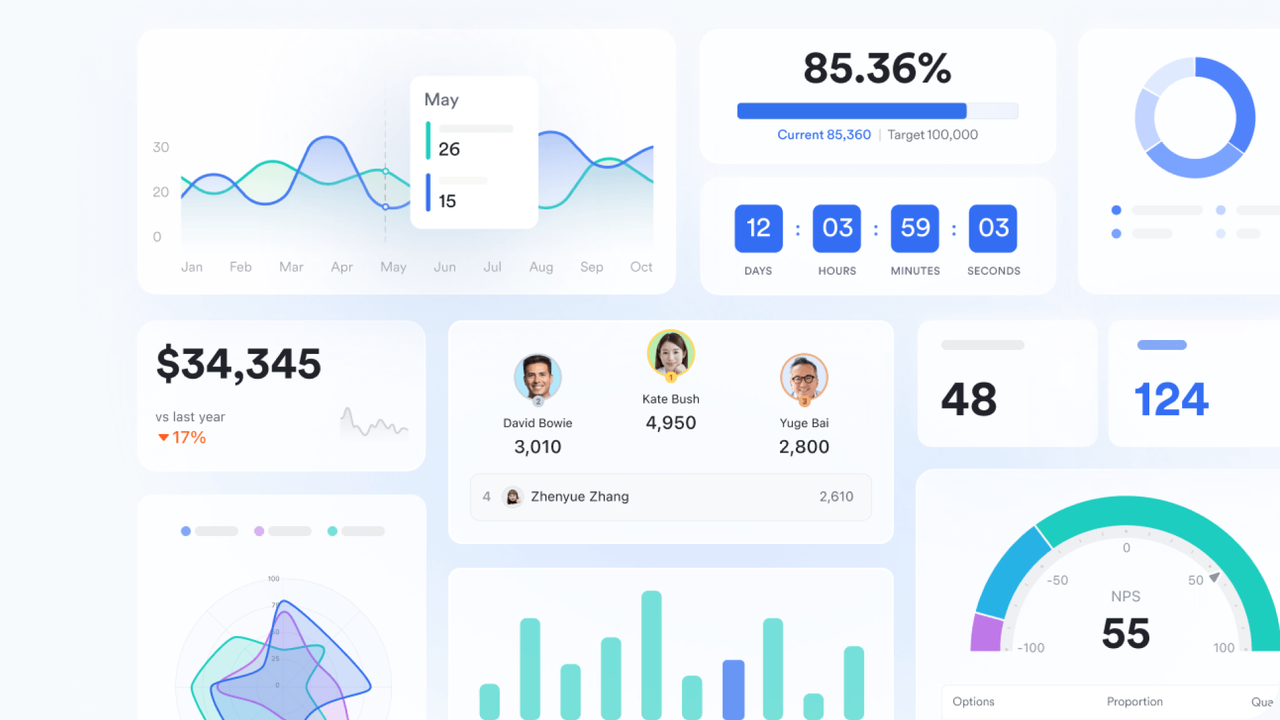
Lark Docs: Real-time collaboration and process documentation
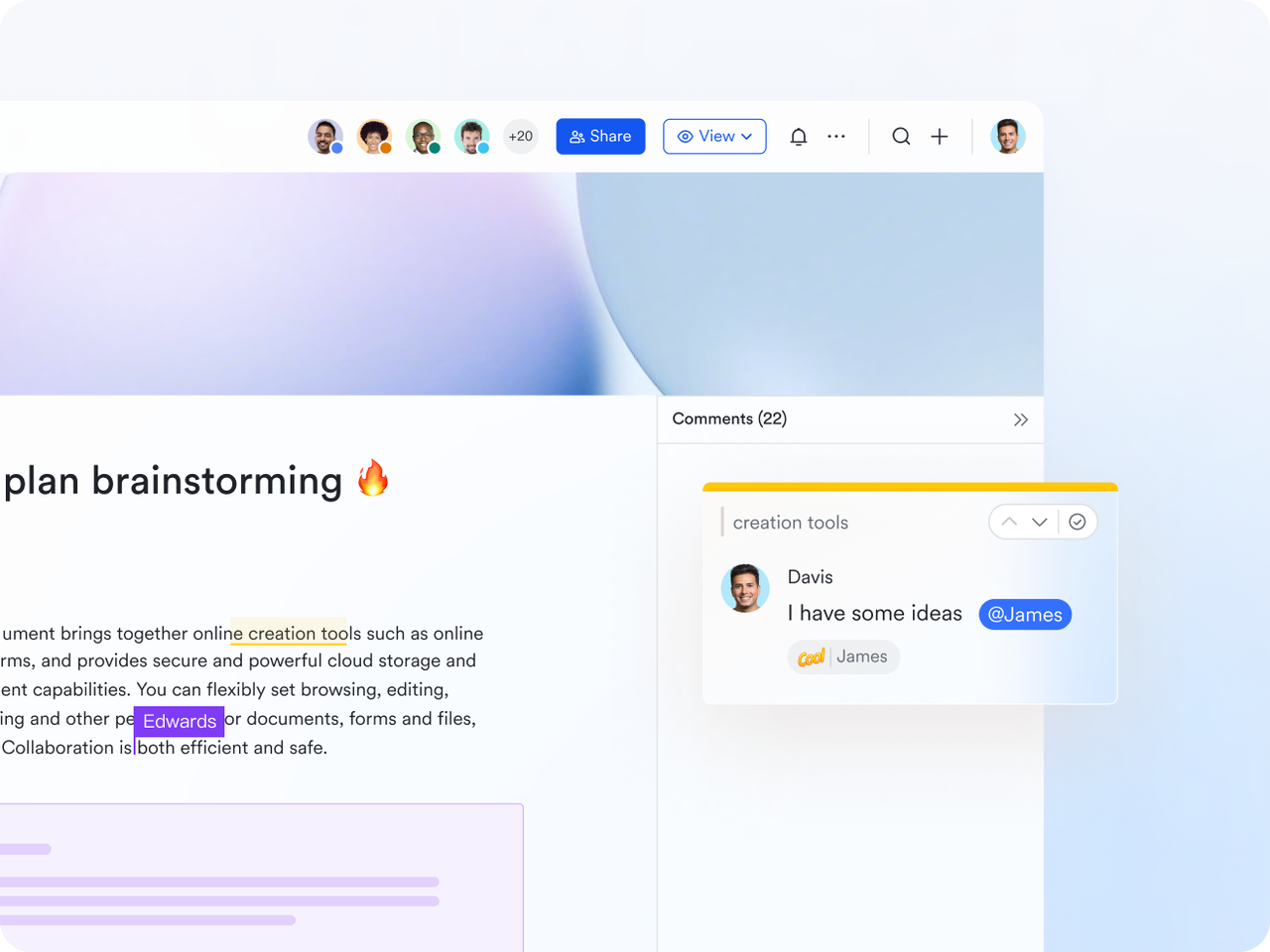
transforms how teams capture and share information. Instead of storing workflows, SOPs, or requirements in separate tools, Docs lets everyone co-edit live documents directly within the workspace. You can embed Base tables, charts, and task summaries inside a Doc to make them interactive and data-driven. Version history and in-line comments ensure transparency and continuous improvement during reviews.
Example: A product team drafts a requirements document in Lark Docs, embedding a Base table of feature priorities. Developers and QA teams comment on criteria in real time, ensuring everyone stays aligned before implementation begins.
Where Quickbase relies on static documentation or linked files, Lark keeps your data and discussions in sync within one source of truth.
Lark Tasks: Streamline execution with accountability
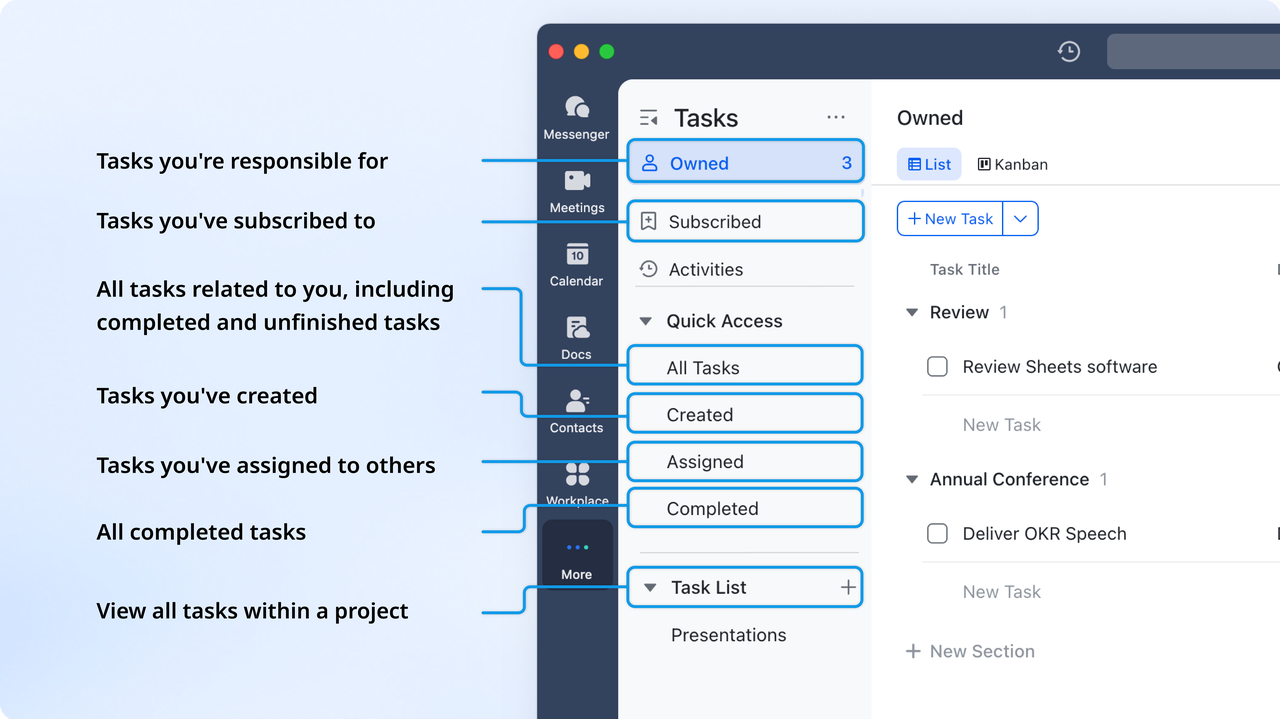
Lark Tasks bridges planning and execution: it allows teams to organize, assign, and track tasks with details like due dates, assignees, and progress. Tasks can be created and managed, and changes are synced in real time between documents and Tasks, all visible within the same project environment. Example: When a client request is approved in Base, you can set up related tasks for design, content, and review teams. Each task owner receives notifications and status reminders until completion.
Unlike Quickbase, where tasks often live as database entries or require integrations for follow-ups, Lark makes accountability built-in and visible for everyone.
Lark Messenger: Connected communication where work happens
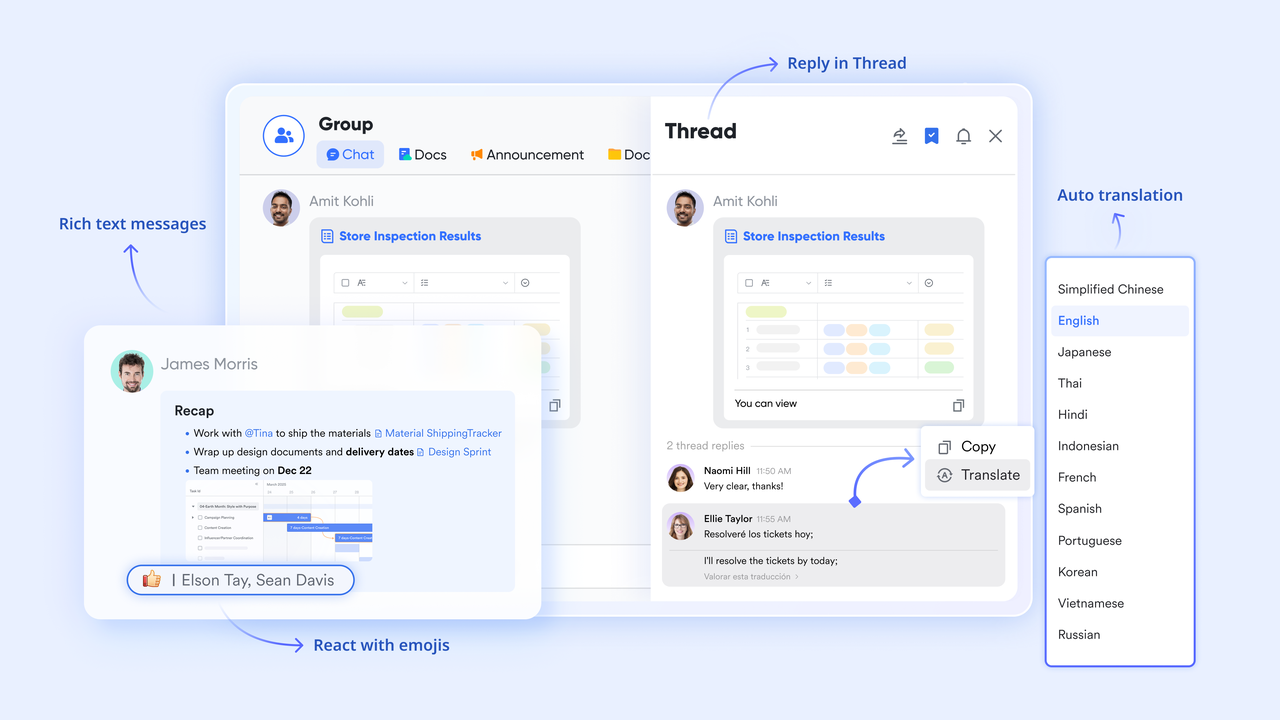
With , team communication stays contextual, not scattered. Messenger supports files, links, voice messages, and even quick polls to streamline decisions. You can flag important messages for easy access, pin tomorrow's task in chat, and use group chats and private chats to keep communication organized and contextual.
Example: When someone replies in a thread, Lark Messenger will alert the person who has subscribed to the thread, by providing all the necessary context. They discuss mitigation steps directly in the chat thread, tag action owners, and link follow-up tasks—all without leaving the workspace.
Lark eliminates the disconnect between workflow updates and communication that often exists in tools like Quickbase paired with Slack or email.
Lark Meetings: Discuss, decide, and document outcomes instantly
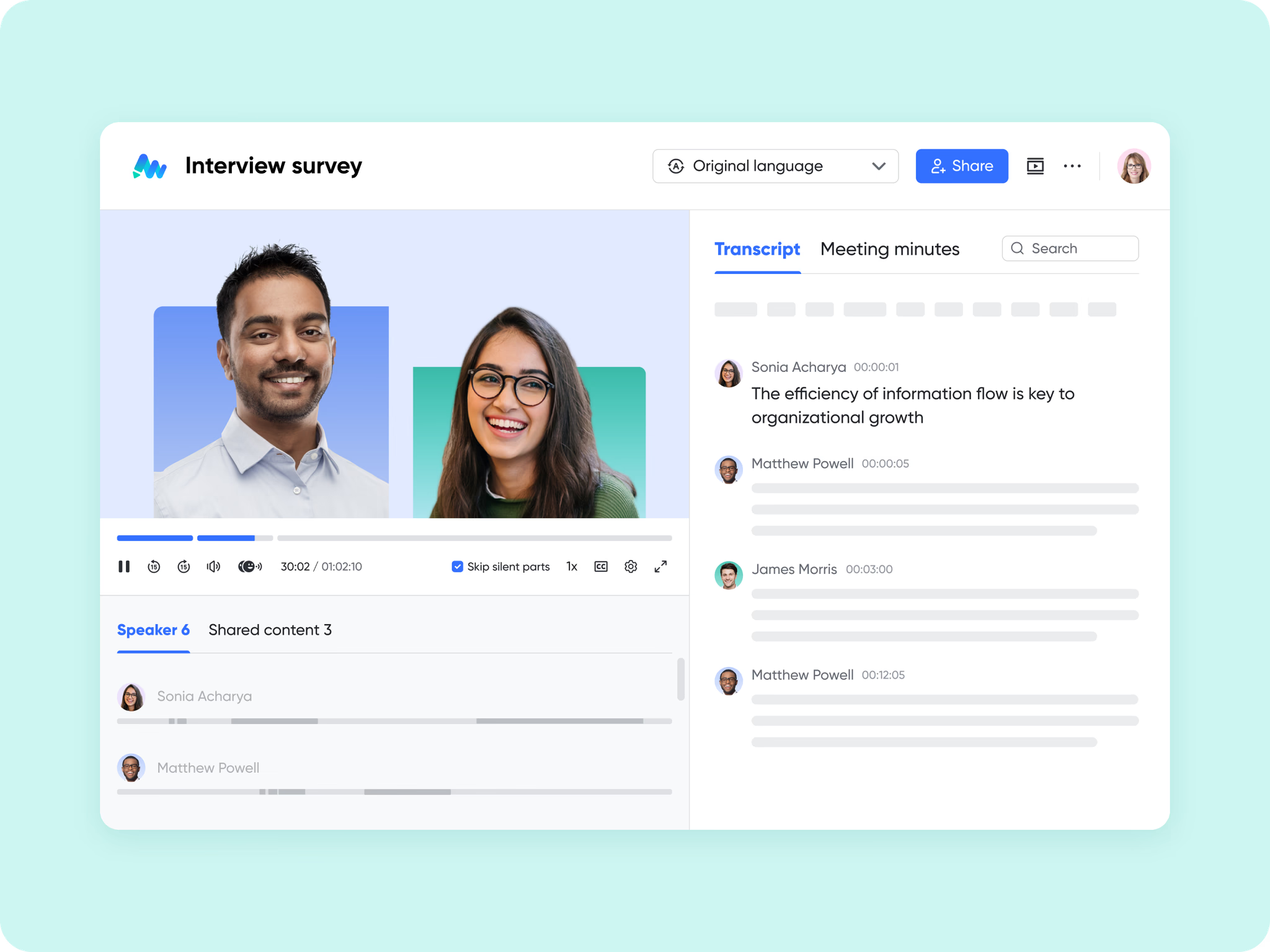
turns conversations into actionable outcomes by connecting live discussions with live data. You can pull spreadsheets, Base dashboards, Docs, or task lists directly into the meeting interface—so everyone discusses the same, most current information. With AI Meeting Notes, live transcription, task assignment, and document generation just happen right in front of your eyes.
Example: During a quarterly review, department heads open a Base dashboard showing project ROI and performance metrics. Decisions made—like reallocating budgets or updating deadlines—are recorded instantly in the meeting summary, linked to Base, and assigned as tasks automatically.
Lark replaces the need for multiple disconnected systems (Quickbase + Zoom + Docs) with one smooth experience from review to execution.
:
- Starter plan: Free forever plan that includes 11 powerful tools for up to 20 users. It also comes with 100GB of storage, 1000 automation runs, AI translations, and more.
- Basic plan: $6/user/month (billed annually) for up to 500 users. Includes everything in Starter plus unlimited message history, 5TB storage, 1,000 automation runs, and more. Some users may need to contact sales to purchase.
- Pro plan: $12/user/month (billed annually) for up to 500 users. It includes everything in Basic plus group calling for up to 500 attendees, 15TB of storage, 50,000 automation runs, and more.
- Enterprise plan: for custom pricing. Supports unlimited users and includes even more automation runs and advanced security, compliance, and management features.
For small teams with simple communication needs

18 months message history
1000 Base automation runs/month
2000 rows per table in Base
Most POPULAR
For companies with comprehensive collaboration and management needs
Unlimited message history
500-participant video meetings
50k Base automation runs/month
20k rows per table in Base
For large companies with advanced security and organizational management needs
Get a personalized demo and pricing
Unlimited message history
500-participant video meetings
15 TB storage + 30 GB storage/user
500k Base automation runs/month
50k Base automation runs/month
Most POPULAR
For companies with comprehensive collaboration and management needs
Unlimited message history
500-participant video meetings
50k Base automation runs/month
20k rows per table in Base
: Switching to Lark's Pro plan can lead to significant cost savings— for example, a 100-employee company using Slack, Google Workspace, and Airtable could save approximately $25,200 annually by consolidating their tools with Lark.
For more Google Workspace's information, you can refer to and .
When to choose Lark over Quickbase
Quickbase is strong for workflow automation, but many teams need a platform that also supports seamless collaboration, communication, and . Lark combines these capabilities into a single workspace, reducing the need for multiple external tools. This simplifies onboarding, keeps information centralized, and helps teams operate more efficiently without technical overhead. For organizations focused on agility, , and cost efficiency, Lark often becomes the more practical choice.
- You need connected tools without complex setup: Lark brings chat, docs, tasks, meetings, and automation into one unified environment, so teams don't need to piece together or maintain multiple software solutions. Because everything works together natively, setup is quick and doesn't require technical administrators. This allows teams to start collaborating immediately and reduces the friction associated with integrating separate tools.
- You want collaboration, automation, and data tracking in one platform: Lark centralizes communication and workflow execution so teams can discuss tasks, create documents, and automate processes in the same space where work happens. , forms, and approval workflows can be built directly into collaborative channels. This creates transparency and alignment, helping teams move faster while reducing information silos.
- You prefer predictable, affordable pricing that scales with your team: Unlike Quickbase's user-based and add-on-heavy pricing, Lark offers straightforward plans that scale as organizations grow, without additional charges for automation or integration. This makes budgeting simpler and reduces the financial barriers to expanding usage across teams. As a result, organizations can grow without worrying about sudden cost escalations.
- You value real-time updates, co-editing, and built-in communication: Lark enables teams to co-edit documents, chat, and hold all in real-time within the same platform. This reduces delays caused by switching between apps and ensures everyone stays aligned. The built-in communication layer ensures decisions are faster, discussions are contextual, and collaboration happens continuously.
- You're looking to replace multiple tools (Quickbase + Slack + Docs + Zoom) with one ecosystem: Lark consolidates communication, collaboration, and workflow management into one ecosystem, allowing organizations to streamline their tool stack. This reduces subscription costs, simplifies , and prevents work from being scattered across different platforms. Teams benefit from a unified environment where discussions, documents, and tasks remain connected.
Conclusion
Quickbase is a powerful platform for organizations that need custom workflow automation and structured data management, but its high pricing tiers, technical setup requirements, and reliance on external collaboration tools can make it challenging for many teams to adopt at scale. As businesses grow, the need for seamless communication, real-time collaboration, and predictable pricing becomes just as important as process automation. This is where stands out. By bringing chat, meetings, docs, project tracking, and automation together in one unified workspace, Lark reduces complexity and removes the need to switch between multiple tools. Teams can move faster, stay aligned, and collaborate more naturally — all within a single connected ecosystem.
If you're looking for a simpler, scalable, and more cost-efficient way to run your daily operations, Lark offers a modern alternative designed for high-performance teams.
Get ready to enhance your team's workflow
FAQs
How does Lark compare to Quickbase for automation?
Lark provides built-in workflow automation that works seamlessly across chats, tasks, docs, and bases, reducing the need for complex configuration. Unlike Quickbase, which often requires setting up Pipelines and custom logic, Lark automations are simpler to trigger and manage. Teams can automate approvals, reminders, and data updates directly in their workspace context. This makes automation more intuitive and accessible for both technical and non-technical users.
Is Quickbase free or does it have a trial?
Quickbase does not provide a fully free version, but it does offer a limited trial period for new users to test its core capabilities. The platform's pricing is based primarily on the number of users and application usage, which can become costly as organizations scale. Many advanced features like enterprise automation and integration require higher-tier plans. The trial is commonly used by teams to evaluate whether the tool's complexity and pricing align with their workflow needs.
Can small teams use Lark as a Quickbase alternative?
Yes, Lark is a strong fit for small teams because it's easy to adopt and does not require dedicated system administrators or technical setup. The platform consolidates collaboration, documentation, communication, and workflow management into one workspace. This reduces tool fragmentation and ensures teams stay aligned without switching platforms. As a result, small teams benefit from faster onboarding, smoother collaboration, and lower software costs.
What's included in Lark's free plan?
Lark's free plan includes real-time messaging, video meetings, cloud-based document collaboration, workflow tools, and shared task management for up to 20 users. Teams can co-edit documents, manage discussions, and organize projects without relying on external apps. The plan also provides generous cloud storage and essential automation capabilities to support everyday work. This allows teams to build a productive foundation at no cost while maintaining room to scale as needed.
Related reading


















