


Standard Operating Procedure (SOP): Definition, Templates & How to Create One

Ryan Tanner
Product Marketing Specialist
Aug 5, 2026
Ryan Tanner
Aug 5, 2026

23 min read


Every successful organization relies on consistency. Whether it's onboarding a new employee, processing an invoice, or managing a marketing campaign, efficiency depends on everyone following the same steps. That's where a Standard Operating Procedure (SOP) comes in.
A standard operating procedure (SOP) is a documented process that outlines the exact steps needed to complete recurring tasks safely, efficiently, and consistently. It turns complex processes into repeatable, measurable workflows that help teams stay aligned.
In this guide, we'll explore what an SOP is, why it matters, the key components that make one effective, and how tools like Lark help teams build, share, and automate SOPs with ease. You'll also find ready-to-use SOP templates to help you get started.

What is a standard operating procedure (SOP)?
A standard operating procedure (SOP) is a structured document that provides clear, step-by-step instructions for completing a specific process or task.
The goal of an SOP is to standardize how work gets done so that every employee, department, or branch performs the same process in the same way—ensuring consistency, safety, and compliance.
For example:
- A finance SOP might define the steps for approving expense reports.
- An HR SOP could detail the onboarding process for new hires.
- A marketing SOP may explain how to launch a campaign or approve content.
An SOP bridges the gap between strategy and execution. It provides employees with a reference point that removes ambiguity and helps maintain high-quality standards.
Why SOPs are essential for modern organizations
Running a business without clear processes is like navigating without a map. A standard operating procedure (SOP) provides that map—helping teams execute tasks with consistency, accountability, and precision across the organization.
Here's why SOPs have become a cornerstone of modern organizational success:
- Consistency: Standardizes recurring tasks across teams. When every department follows the same documented process, outcomes become predictable and reliable. SOPs eliminate guesswork by defining exactly how each task should be performed. This ensures that whether it's HR onboarding or finance approvals, the results stay uniform across teams and time zones.
- Compliance: Helps meet regulatory and audit requirements. A standard operating procedure (SOP) acts as a compliance framework, providing auditors and regulators with proof that processes are being followed correctly. It reduces the risk of non-compliance penalties by maintaining a clear record of how each critical activity is executed and approved.
- Efficiency: Reduces confusion and rework by defining responsibilities. Clear SOPs minimize delays caused by uncertainty or duplicated efforts. When roles, responsibilities, and steps are outlined in detail, employees know exactly what to do and when to do it. This clarity streamlines operations, leading to faster turnaround times and higher productivity.
- Training: Accelerates onboarding with ready-to-follow procedures. New employees often struggle to learn processes informally. SOPs solve this by offering step-by-step instructions that act as instant training manuals. A well-crafted standard operating procedure helps new hires understand workflows quickly and confidently, reducing the burden on senior staff.
- Scalability: Enables teams to replicate processes as they grow. As organizations expand, maintaining quality and consistency across multiple locations or teams becomes a challenge. SOPs make scaling easier by serving as repeatable blueprints for success. Teams can replicate proven methods seamlessly without reinventing the process each time.
- Accountability: Makes ownership visible and measurable. Every effective SOP clarifies who is responsible for each step of a process. This visibility promotes accountability, reduces bottlenecks, and ensures that deliverables don't fall through the cracks. With defined checkpoints, managers can track progress and performance more effectively.
Key components of an effective SOP
A well-structured standard operating procedure (SOP) ensures that every process is easy to understand, execute, and audit. Each component plays a critical role in maintaining clarity, accountability, and compliance throughout the workflow.
- Purpose statement: The purpose statement defines why the SOP exists and what it aims to achieve. It connects the procedure to a larger business goal—whether improving quality, ensuring safety, or maintaining consistency. A clear purpose helps users understand the value and relevance of following the process.
- Scope: The scope section outlines the boundaries of the standard operating procedure (SOP)—including the departments, processes, and conditions it covers. This ensures employees know exactly when to apply the SOP and prevents overlap or confusion with other operational guidelines.
- Roles & responsibilities: An SOP should clearly identify who is responsible for each part of the process. This includes task owners, reviewers, and approvers. By defining accountability, organizations minimize miscommunication and ensure every step has a designated point of contact.
Procedural steps: Clear, step-by-step actions to complete the process
Every standard operating procedure (SOP) is only as strong as its procedural steps. This section transforms a process from theory into practice—providing clear, sequential instructions that ensure accuracy, accountability, and repeatability across teams.
Here's how to build effective procedural steps that make your SOP truly actionable:
- Prepare and verify prerequisites: Before beginning the procedure, ensure all required tools, documents, and permissions are in place. This step reduces errors caused by missing inputs and sets the stage for smooth execution. It's the foundation of process readiness in any SOP.
- Start the process or trigger the task: Define the exact action that begins the workflow—whether it's opening a form, submitting a request, or creating a record. By clarifying the initiation point, team members know when the procedure officially starts, improving traceability and consistency.
- Assign responsibilities: Identify who is responsible for each step of the process. This avoids confusion and overlap, ensuring that tasks are completed by the right person at the right time. Role clarity also makes it easier to track accountability and performance.
- Gather required information: List all necessary inputs—data, files, or approvals—needed to perform the task effectively. Collecting this information upfront minimizes back-and-forth communication and ensures that the workflow proceeds without unnecessary interruptions.
- Perform the core actions: This is the heart of every standard operating procedure (SOP)—the actual tasks that must be completed to reach the desired outcome. Break each step into short, action-oriented instructions, so even new employees can execute them accurately.
- Conduct decision points or conditional checks: Some workflows depend on specific outcomes or yes/no conditions. At each decision point, define what to check and how to proceed based on the result. This reduces ambiguity and ensures consistent decision-making across users.
- Review and approve outputs: Every SOP should include a quality control step. Assign reviewers or approvers to validate results before finalizing them. This not only ensures compliance but also prevents errors from propagating to the next stage.
- Implement corrections if needed: If issues or deviations are found during review, document the corrective actions clearly. Define who will address them and how they'll be verified. Continuous feedback and corrections keep your SOPs reliable and effective over time.
- Finalize and document completion: Once the process is finished, document the outcome and mark the task as complete. Attach relevant records or outputs to the SOP for reference. This creates a clear audit trail and helps teams track process completion.
- Archive and review: After the procedure is completed, ensure all related files, approvals, and results are archived in the designated system or Lark Wiki. Schedule periodic reviews to keep the SOP updated with current practices and compliance standards.
Resources & tools: Links to required files, software, or forms
A standard operating procedure (SOP) is only effective if employees have access to the right project management tools and documents. This section ensures that all necessary resources are clearly identified and easily accessible, enabling teams to follow the process efficiently and consistently.
Here are the key resources and tools typically included in an SOP:
- Templates: Templates provide a pre-defined structure for forms, reports, or documents that need to be completed. By standardizing the format, templates reduce errors and save time while ensuring consistency across the organization. Employees can focus on the content instead of formatting.
- Forms: Forms capture essential data required to complete the process, such as request forms, approval forms, or checklists. Including these directly in the SOP ensures team members submit the correct information in a uniform format, reducing miscommunication and rework.
- Databases: Databases store critical process information, records, or historical data that employees need to reference or update. Linking relevant databases in the SOP helps teams quickly access information without wasting time searching multiple systems, supporting faster and more accurate decision-making.
- Work management tools: Work management tools automate or facilitate specific steps in a procedure, such as CRM platforms, project management apps, or analytics dashboards. Clearly indicating which tools to use, along with links or login instructions, ensures smooth task execution and reduces process delays.
- Checklists: Checklists break down tasks into smaller, verifiable steps to ensure nothing is missed. Providing checklists within the SOP improves accuracy, promotes accountability, and allows employees to track progress as they complete each step.
- Reference documents: Reference documents include manuals, guidelines, policies, or prior reports that support the SOP. By linking these resources, employees can consult relevant background information without leaving the workflow, ensuring compliance and adherence to organizational standards.
- Communication channels: Teams may need specific channels to collaborate or report issues, such as chat groups, email templates, or project boards. Including these within the SOP ensures employees know exactly where and how to communicate updates or escalate problems efficiently.
Revision & approval log: Tracks updates and authorized changes
Every standard operating procedure (SOP) must be regularly reviewed and maintained to stay accurate and compliant. The revision and approval log provides a clear record of all updates and authorized changes, ensuring accountability throughout the process.
This section documents who made each change, the date of the update, and the approver responsible for validating it. By maintaining a detailed log, organizations promote transparency, enforce version control, and meet compliance standards, especially in regulated industries. Keeping this log up to date ensures that team members are always following the most current procedures.
Types of SOPs
A standard operating procedure (SOP) can take different forms depending on the complexity and requirements of the workflow. Choosing the right type ensures clarity, efficiency, and effective process execution across teams.
- Step-by-step SOP: This type provides linear, sequential instructions for simple workflows. Each action is listed in order, making it easy for employees to follow without confusion. Step-by-step SOPs are ideal for routine tasks that do not involve conditional decisions.
- Hierarchical SOP: Hierarchical SOPs break down complex procedures by adding substeps under main actions. This structure allows teams to handle detailed processes while maintaining clarity. It is especially useful for multi-stage workflows that involve several departments or roles.
- Flowchart-based SOP: Flowchart SOPs visualize decision points and conditional paths in a process. They help employees understand alternative steps based on different outcomes. This type is effective for processes that require frequent decision-making or branching actions.
- Checklist SOP: Checklist SOPs are designed for repeatable tasks that require verification at each step. They ensure consistency and reduce the risk of missing critical actions. This type is commonly used in quality control, safety checks, and compliance procedures.
- Hybrid SOP: Hybrid SOPs combine documents, tables, and automation to manage advanced workflows. They allow teams to integrate multiple tools, track progress, and centralize resources. This type is ideal for organizations that need a flexible yet comprehensive approach to SOP management.
Try SOP on your own: Create, share, and automate SOPs in Lark
Managing standard operating procedures (SOPs) becomes more efficient and collaborative when teams use a connected platform. Lark enables organizations to document, automate, and track SOPs seamlessly across departments, turning static procedures into dynamic workflows.
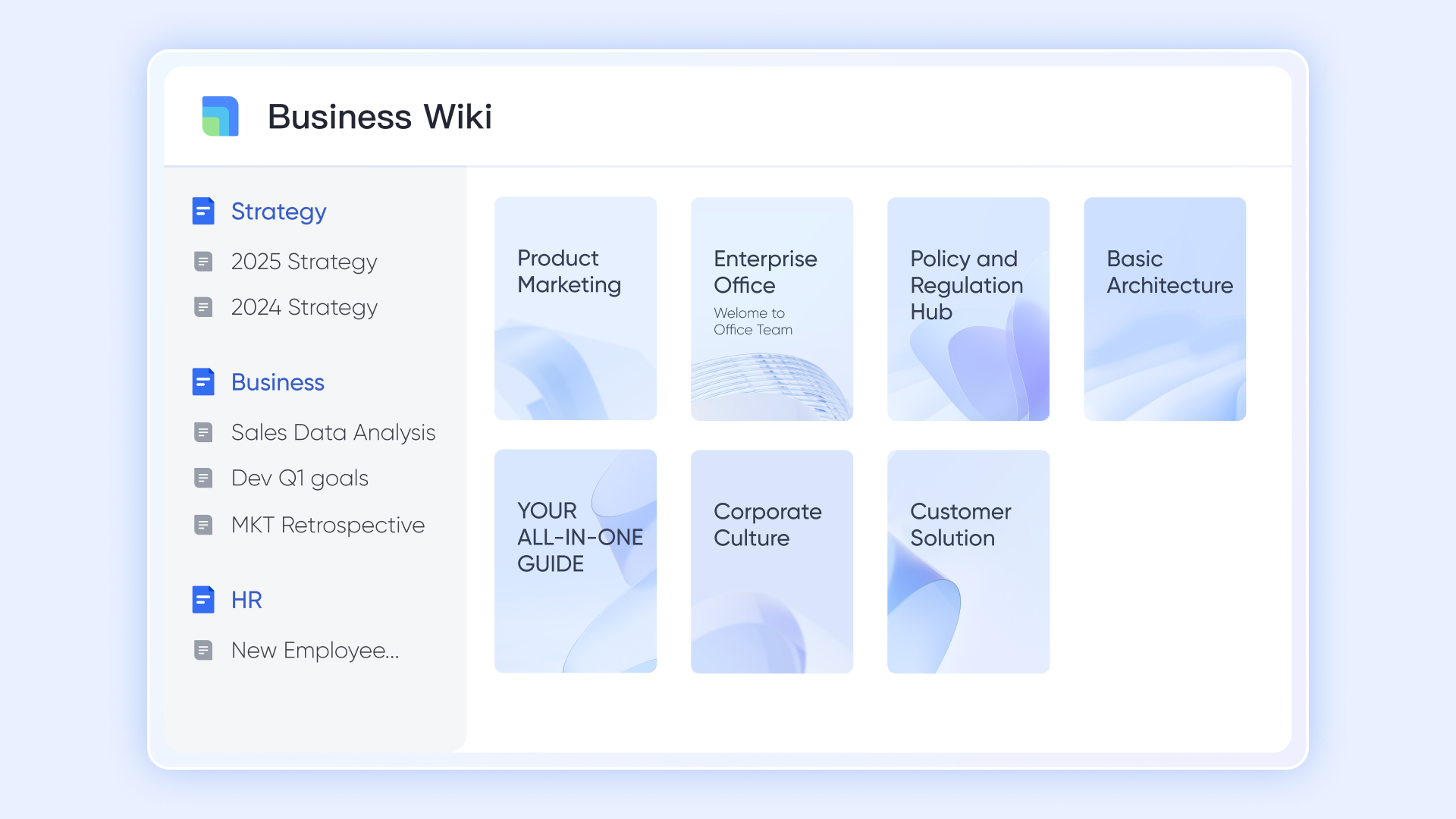
Lark Docs & Lark Wiki: Document and centralize procedures
- How it works: Co-edit SOPs with team members and managers in real time. Add links to forms, tasks, or approvals directly within Docs. Use Wiki to create a searchable, categorized SOP library.
- Example: The HR team stores all onboarding and compliance SOPs in Wiki, giving employees easy access to the latest procedures.
- Additional features: Embed multimedia, create linked SOP libraries, and categorize content for quick search and retrieval.
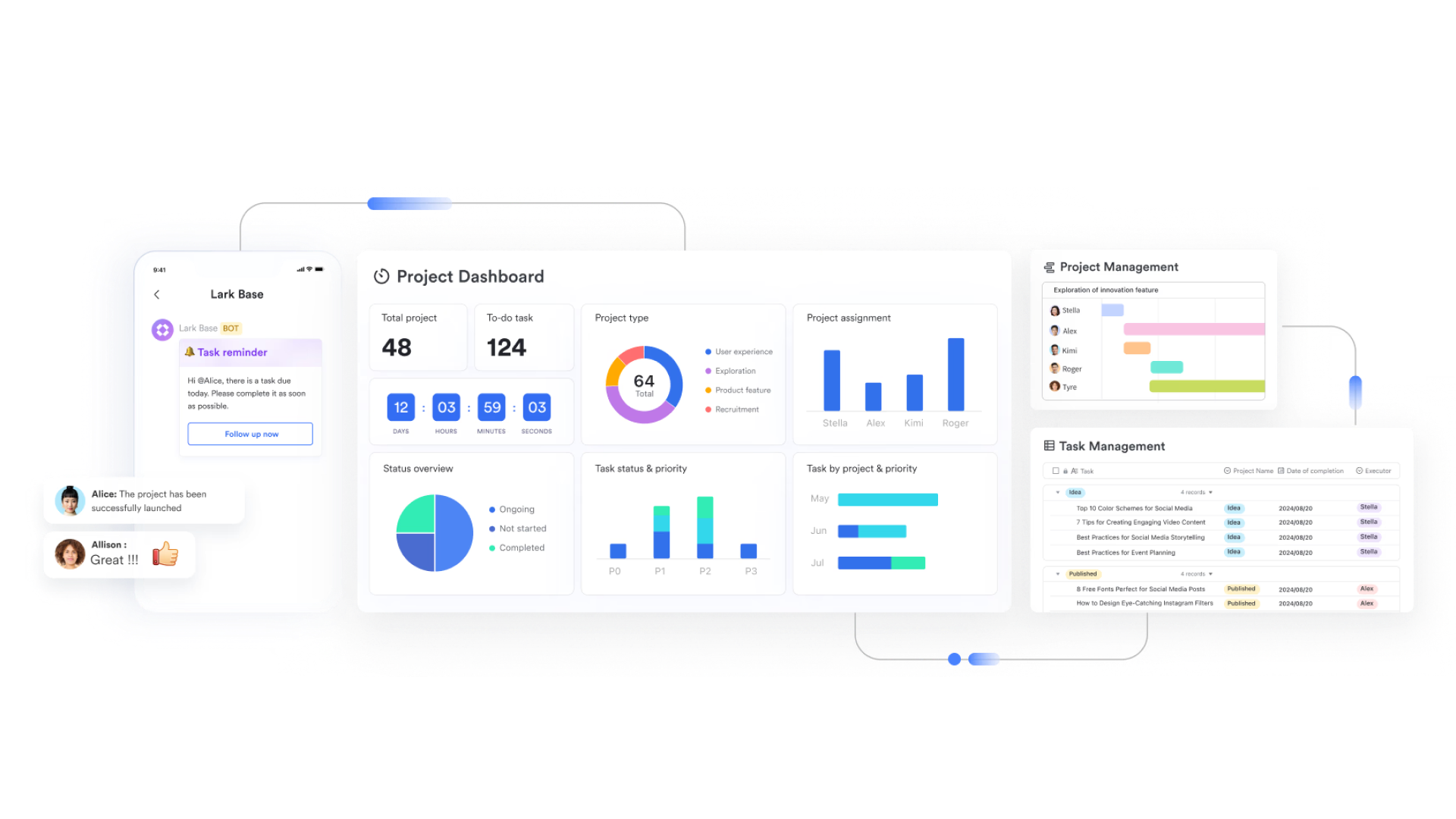
Lark Base: Turn SOPs into data-driven workflows
- How it works: Create tables with fields like "Process Step," "Owner," "Timeline," "Status," and "Linked Project Goal." Updates automatically roll up to give managers a consolidated view.
- Example: Operations teams log safety check SOPs with status tracking (“Pending → In Progress → Approved”) to see progress in real time.
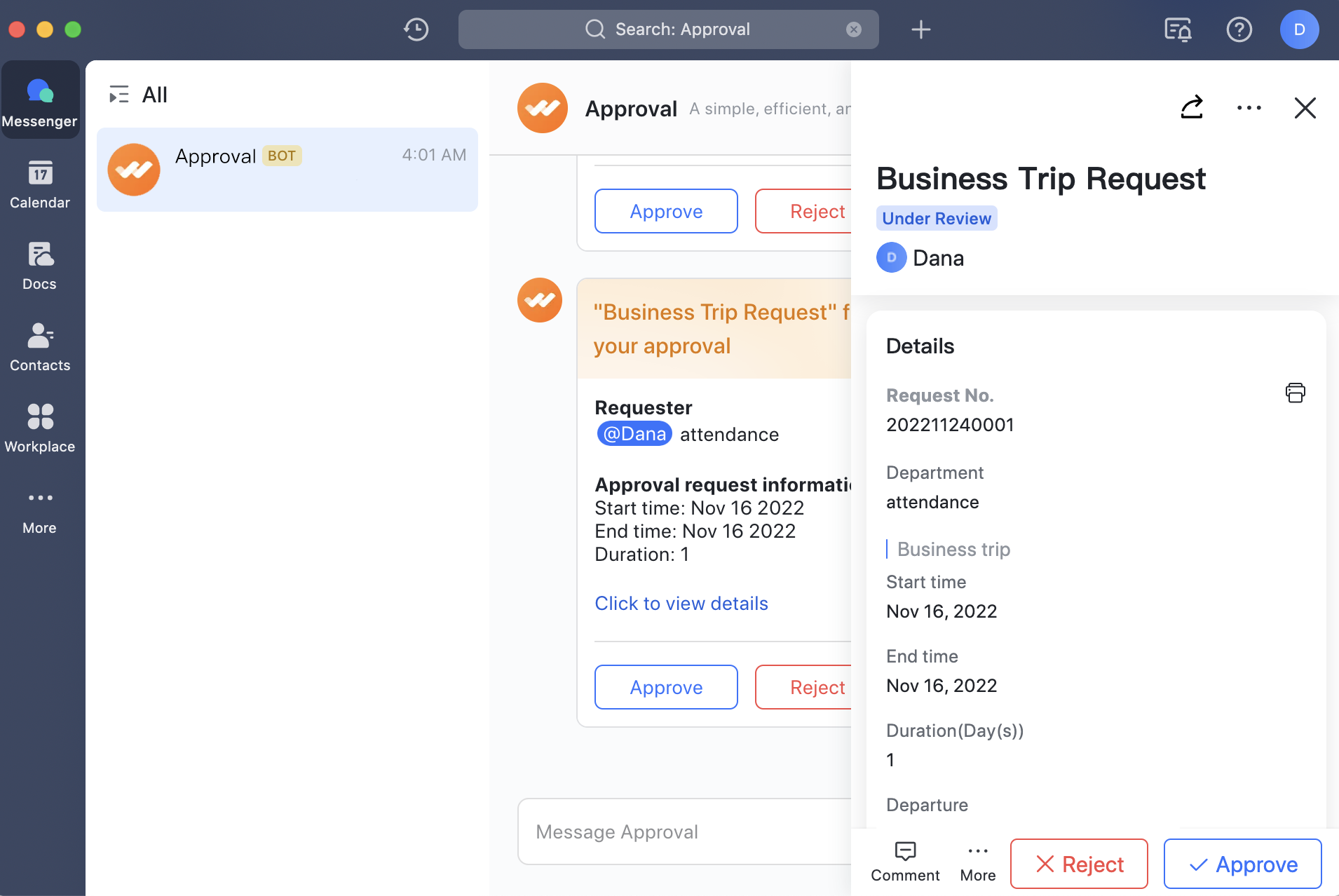
Lark Approval: Automate review and sign-off workflows
- How it works: Route new or updated SOPs through multi-level approvals and log reviewer comments and timestamps. Track who has approved or requested changes.
- Example: A finance SOP automatically routes to department heads for approval whenever revisions are made, reducing manual oversight.
- Additional features: Customize approval paths, set automated reminders, and maintain audit-ready approval histories.
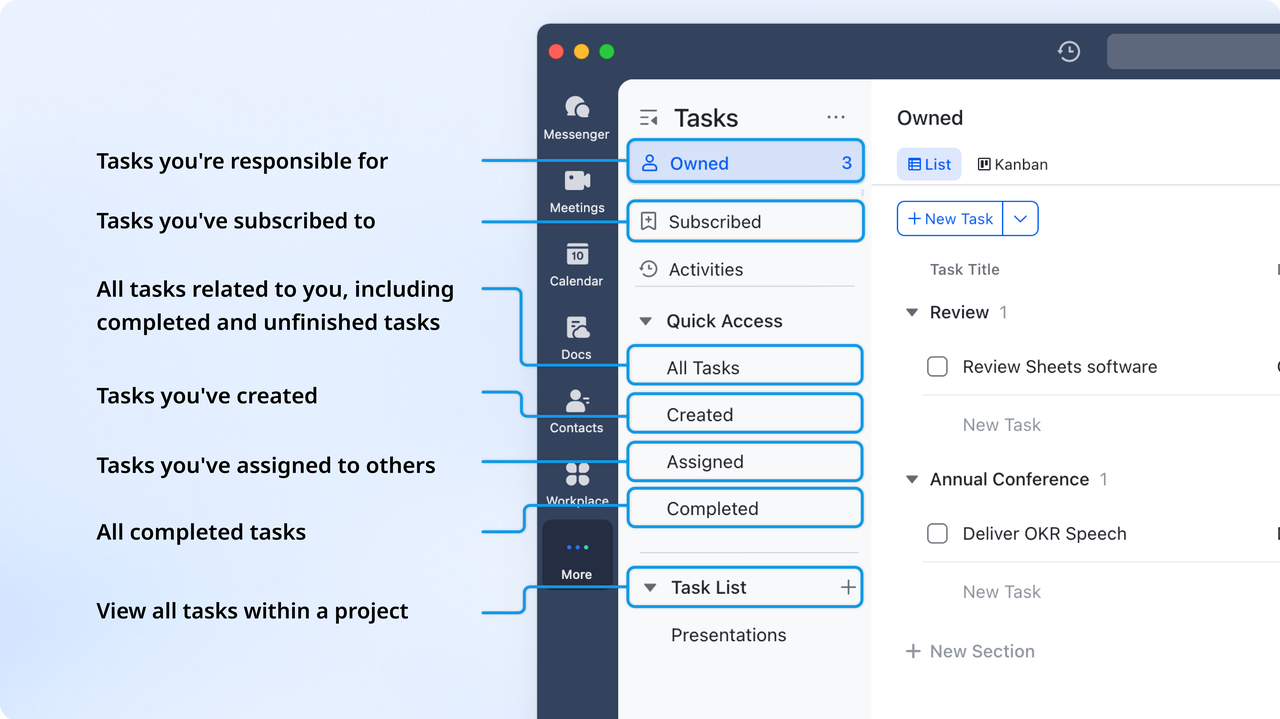
Lark Tasks: Assign and track SOP execution
- How it works: Convert SOP steps into tasks assigned to specific team members, with due dates and notifications. Track task completion in real time.
- Example: A “New Hire SOP” assigns individual setup tasks to HR, IT, and Admin automatically, ensuring all onboarding steps are completed efficiently.
- Additional features: Set dependencies, create recurring tasks, and generate progress reports for managers.
Lark Sheets: Measure SOP performance and compliance
- How it works: Track adoption metrics such as completion rates, overdue reviews, or training compliance. Monitor real-time execution across teams.
- Example: HR monitors onboarding SOP completion rates in Sheets dashboards to identify gaps and improve compliance.
- Additional features: Automate data updates, create visual dashboards, and filter metrics by department, role, or process.
Lark SOP templates you can use today
- Employee onboarding SOP template
Streamline your new hire experience with Lark’s employee onboarding SOP template. It helps HR teams organize every step—from document collection to training schedules—in one place. Keep tasks, checklists, and approvals transparent, so every new employee feels guided and supported from day one.
- Expense approval SOP template
Simplify finance workflows with this expense approval SOP template. From submission to reimbursement, every step follows a clear approval path, reducing errors and delays. Managers can review, approve, or reject requests directly in Lark—keeping your expense process efficient and compliant.
- Marketing campaign SOP template
Plan and execute campaigns seamlessly with the marketing campaign SOP template. Track content tasks, deadlines, budgets, and approvals all in one shared workspace. This template helps marketing teams maintain visibility, align cross-functional efforts, and deliver campaigns on time with consistent quality.
- Purchase order request SOP template
Standardize procurement operations using the purchase order request SOP template. It allows teams to log purchase needs, route approvals, and track order status easily. With automated reminders and clear visibility, finance and operations teams can manage purchase workflows faster and more accurately.
- IT access request SOP template
Ensure secure and efficient access management with the IT access request SOP template. Employees can request system access while IT teams review and approve permissions seamlessly. Centralized tracking and documentation reduce manual effort and maintain compliance across your organization.
Benefits of managing SOPs in Lark
Managing standard operating procedures (SOPs) effectively is critical for maintaining consistency, efficiency, and compliance across teams. Lark helps organizations transform SOPs from static documents into dynamic, manageable workflows that improve collaboration and performance.
- Centralized, always up-to-date documentation: Lark keeps all SOPs in a single, central repository, ensuring team members access the most current version at any time. This eliminates confusion caused by outdated files stored across different systems. By centralizing documentation, teams save time, reduce errors, and maintain consistent standards.
- Easy collaboration with version control and commenting: Teams can co-edit SOPs in real time and leave comments directly within the document. Version control ensures that every change is tracked and previous versions are accessible. This fosters collaboration, reduces miscommunication, and allows multiple contributors to refine processes seamlessly.
- Automated approval and tracking: Lark's approval workflows route SOP updates to the right stakeholders automatically. Managers can track who has approved or reviewed each procedure, reducing delays and ensuring accountability. Automated tracking ensures compliance and prevents bottlenecks in process updates.
- Real-time visibility into who's following which procedure: Lark provides insights into SOP adoption and execution across teams. Managers can see which employees have completed or are pending specific steps. This visibility helps identify gaps, enforce compliance, and optimize workflows for better operational performance.
- Flexible templates for every department: Lark offers ready-to-use SOP templates tailored for different departments, from HR and finance to IT and operations. Teams can customize templates to suit specific workflows without starting from scratch. This flexibility accelerates SOP creation, ensures consistency, and simplifies process standardization across the organization.
Conclusion
Standard operating procedures bring structure, consistency, and quality to every process, but in fast-moving organizations, they must evolve to stay effective. A well-designed standard operating procedure (SOP) ensures teams follow best practices while reducing errors and maintaining compliance.
With Lark, SOPs are more than static documents—they become dynamic systems that connect people, processes, and performance in real time. Teams can collaborate, track execution, automate approvals, and measure adoption effortlessly. By turning SOPs into living workflows, Lark helps organizations scale efficiently, improve operational visibility, and ensure every process delivers reliable, high-quality outcomes.
FAQs
What is a standard operating procedure (SOP)?
A standard operating procedure (SOP) is a documented set of step-by-step instructions that guides employees on how to perform specific tasks consistently and efficiently. It ensures that processes are executed accurately, reduces errors, and maintains quality across teams. SOPs serve both as a reference tool for daily operations and as a training resource for new employees, helping organizations standardize workflows and achieve predictable results.
What are the main components of an SOP?
An SOP includes a purpose statement, scope, roles and responsibilities, detailed procedural steps, and a resources section linking necessary tools or forms. It also contains a revision and approval log to track updates. These components ensure consistency, accountability, and compliance across operations while helping teams follow clear, standardized processes.
How often should SOPs be reviewed or updated?
SOPs should be reviewed annually or whenever processes, regulations, or structures change. Regular reviews keep procedures accurate, relevant, and compliant. Updated SOPs help prevent inefficiencies, errors, and miscommunication while ensuring that employees follow the latest best practices and maintain consistent operational quality across teams and departments.
What are the benefits of using digital SOP templates?
Digital SOP templates offer ready-to-use, standardized formats that simplify documentation and collaboration. Teams can co-edit in real time, maintain version control, and quickly adapt procedures for different departments. They reduce manual effort, speed up onboarding, and ensure consistency across workflows, helping organizations maintain efficiency and compliance.
How does Lark help manage and automate SOPs?
Lark helps teams create, share, and automate SOPs through Docs, Wiki, Base, and Tasks. SOPs become dynamic workflows with real-time editing, centralized storage, and automated approvals. Lark also tracks progress, adoption, and compliance, turning routine procedures into efficient, collaborative, and transparent processes for modern organizations.
Related reading
Table of contents
Start using Lark today

Manage all your work in one place
Boost team efficiency by 10x
Save up to 70% on software costs
Table of contents
Start using Lark today
Manage all your work in one place
Boost team efficiency by 10x
Save up to 70% on software costs



2026 Lark Technologies Pte. Ltd.
Headquartered in Singapore with offices worldwide.






Explore: