Scattered to-do lists, missed deadlines, and fragmented tools across email, chat, and spreadsheets drain productivity from even the best teams. Task tracker templates solve this by providing pre-built structures—typically Excel or Google Sheets layouts—that standardize how tasks, owners, and deadlines are captured. This guide compares daily, weekly, monthly, and project-focused templates with concrete examples and use cases for remote and hybrid teams. We'll also explore how Lark Suite offers an all-in-one alternative to juggling standalone trackers and chat apps.
What task tracker templates are and when to use them
Task tracker templates are reusable layouts designed to capture essential task details consistently. They include fields like task name, owner, status, priority, dates, and notes across different timeframes—whether you need a daily checklist or a multi-month project tracker.
Teams typically use these templates in several formats:
- Excel task tracker templates: Desktop files with tabs for tasks, sometimes including dashboards and macros for automation.
- Google Sheets task tracker templates: Cloud-hosted layouts with live collaboration, version history, and easy sharing.
- Platform-native templates: Built-in structures within tools like Lark, Notion, or Asana that combine task tracking with communication.
A static template works well when you're working solo, managing small projects, or handling simple daily routines where tasks rarely change owners. You can organize tasks efficiently without complex workflows.
However, you outgrow spreadsheets when version conflicts appear regularly, task ownership becomes unclear, you need approval workflows, or you're managing multiple projects simultaneously. These triggers signal it's time to consider a collaborative workspace that integrates your task tracking with communication and automation.
Track your tasks with Lark's streamlined workflows
Core elements every task tracker template should include
Before downloading or building a template, ensure it includes the essential fields that make tracking effective. Missing key elements creates gaps that undermine the whole system.
Every task tracker should contain these foundational columns:
- Task ID: A unique identifier that helps with referencing and dependency tracking.
- Task title and description: A concise summary plus detailed context or acceptance criteria.
- Assignee: The task owner responsible for completion, with optional backup contacts.
- Start date and due date: Time boundaries that enable scheduling and overdue detection.
- Status: Clear indicators like Not started, In progress, Blocked, and Complete.
- Priority: A simple scale—High, Medium, Low—to help prioritize tasks effectively.
- Estimated and actual effort: Useful for project templates tracking time spent against predictions.
- Notes and attachments: Space for important details, links, or proof of completion.
Keep your status and priority scales simple. Three to five status options and three priority levels prevent ambiguity. Overly granular scales confuse team members and lead to inconsistent usage.
Including both start date and due date enables workload projection and helps identify overdue items. For daily task tracker Google Sheets templates, you might also add target completion times or hourly slots to support time blocking.
Design your template for filtering by owner, due date, and priority. This lets team members quickly triage their workload and gives project managers a clear overview of all your tasks without scrolling through irrelevant rows.
Benefits of using task tracker templates instead of starting from scratch
Building a task management system from scratch consumes hours that could go toward actual work. Pre-built templates eliminate this overhead while establishing consistent standards.
Here's why templates outperform blank spreadsheets:
- Reduced setup time: Pre-built task tracker Excel templates and Google Sheets variants let teams start tracking in minutes rather than designing layouts from scratch.
- Consistency and standards: Standardized fields for status, priority, and owner create a shared language across departments, reducing misinterpretation when managing tasks across teams.
- Lower cognitive load: Using the same template structure daily or weekly reduces decision fatigue—you focus on doing the work rather than figuring out where to record it.
- Better reporting and visibility: Consistent templates enable dashboards and charts that track progress across projects, making it easier to monitor progress and migrate data into comprehensive tools later.
When your whole team uses identical templates, comparing project health across initiatives becomes straightforward. You can aggregate data, identify bottlenecks, and generate reports without reconciling different formats.
Types of task tracker templates by time horizon
Task trackers serve different planning needs depending on how far ahead you're looking, and pairing them with a structured makes longer-term schedules and milestones easier to manage. Understanding these categories helps you select the right template for each situation, or even a more comprehensive that spans multiple timeframes.
- Daily focus: Templates for managing what must happen today, often with time blocks or hourly slots, suited for operations staff, support teams, or anyone with daily to dos requiring real time tracking.
- Weekly planning: Higher-level views that balance workload across days, align deep work with meeting schedules, and support follow ups on recurring tasks, often supported by structured .
- Monthly and quarterly planning: Templates for tracking recurring cycles like reporting, billing, campaign milestones, or maintenance schedules that repeat each period.
- Project and program tracking: More complex layouts spanning weeks or months, combining tasks, dependencies, milestones, and resource management into a master tracker.
The following sections provide detailed template patterns for each time horizon, with practical examples you can adapt to your workflow, and you can also explore a broader set of to cover more specialized needs.
Task tracker templates
A variety of templates are designed to enhance task management, each catering to different team needs and project complexities. These templates leverage different features to provide a comprehensive and collaborative workspace for task tracking.
Task management
This task tracker template is designed to boost productivity and improve time management by offering a clear overview of all tasks, their priorities, and progress, similar in spirit to a . It enables better collaboration by ensuring everyone knows their responsibilities and deadlines, which helps in efficient task completion. By centralizing task tracking, this template reduces the stress of managing multiple tasks and provides users with full control to add, modify, or remove tasks as needed, ultimately enhancing efficiency in keeping track of assignments.
Employee task allocation and tracking
The Employee Task Allocation and Tracking template offers numerous benefits for teams and organizations in managing their workload. It improves productivity by providing a clear overview of tasks and deadlines, allowing team members to manage their time effectively. This template serves as a single source of truth, enhancing communication and reducing the need for extensive emails and meetings regarding task status. With a built-in Gantt chart, it facilitates better planning and increases accountability through clear task assignments. Managing all tasks in one centralized location also saves significant time and effort in monitoring progress.
Simple version - task management (with automatic reminder)
Managing multiple tasks becomes effortless with the Simple Version - Task Management (with Automatic Reminder) template. Its primary benefit is streamlined task management, consolidating all tasks in one accessible location. The automatic reminder feature ensures deadlines are never missed, promoting timely task completion. Users can fully customize the task tracker by creating new views, configuring cards, filtering, and sorting tasks to match their preferences. This template also includes visual aids for easier use and significantly boosts efficiency and productivity in task oversight.
OKR task management
For teams using OKRs to align goals, a dedicated framework such as an can clarify how task trackers support meaningful objectives and key results.
The OKR Task Management template in Lark offers several advantages for organizations in tracking their Objectives and Key Results, especially when paired with dedicated . It enhances organization by centralizing all OKR-related tasks, simplifying progress tracking and ensuring timely completion. Collaboration is significantly improved as the template allows for assigning task leaders and involving team members in the OKR process, fostering better teamwork and communication. Customizable views cater to individual team members, allowing them to focus on their specific tasks while keeping everyone informed of overall progress. The template also integrates seamlessly with other Lark tools for an efficient workflow, ultimately saving time and boosting productivity in achieving OKRs.
Project tracker
This project tracker template is a versatile solution for managing various project needs, including Gantt charts, project tracking worksheets, and organized task management, making it a strong companion to a . It is ideal for agile teams seeking a project management tool that integrates with other applications, offers real-time dashboards, and provides customizable views for monitoring project progress. Whether for individuals managing personal to-do lists, teams ensuring projects stay on track, or project managers organizing important tasks, this template supports clear task assignments, deadlines, and dependencies. It’s also suitable for team leaders, freelancers, and projects of any scale, from small to large-scale campaigns, helping maintain organization and track milestones effectively.
Implementing a task tracker in Lark
While a traditional task tracker provides a solid structural foundation, collaborative teams often outgrow static spreadsheets. Moving to a dynamic platform like brings your daily task management, team communication, and progress visualization together in one connected workspace.
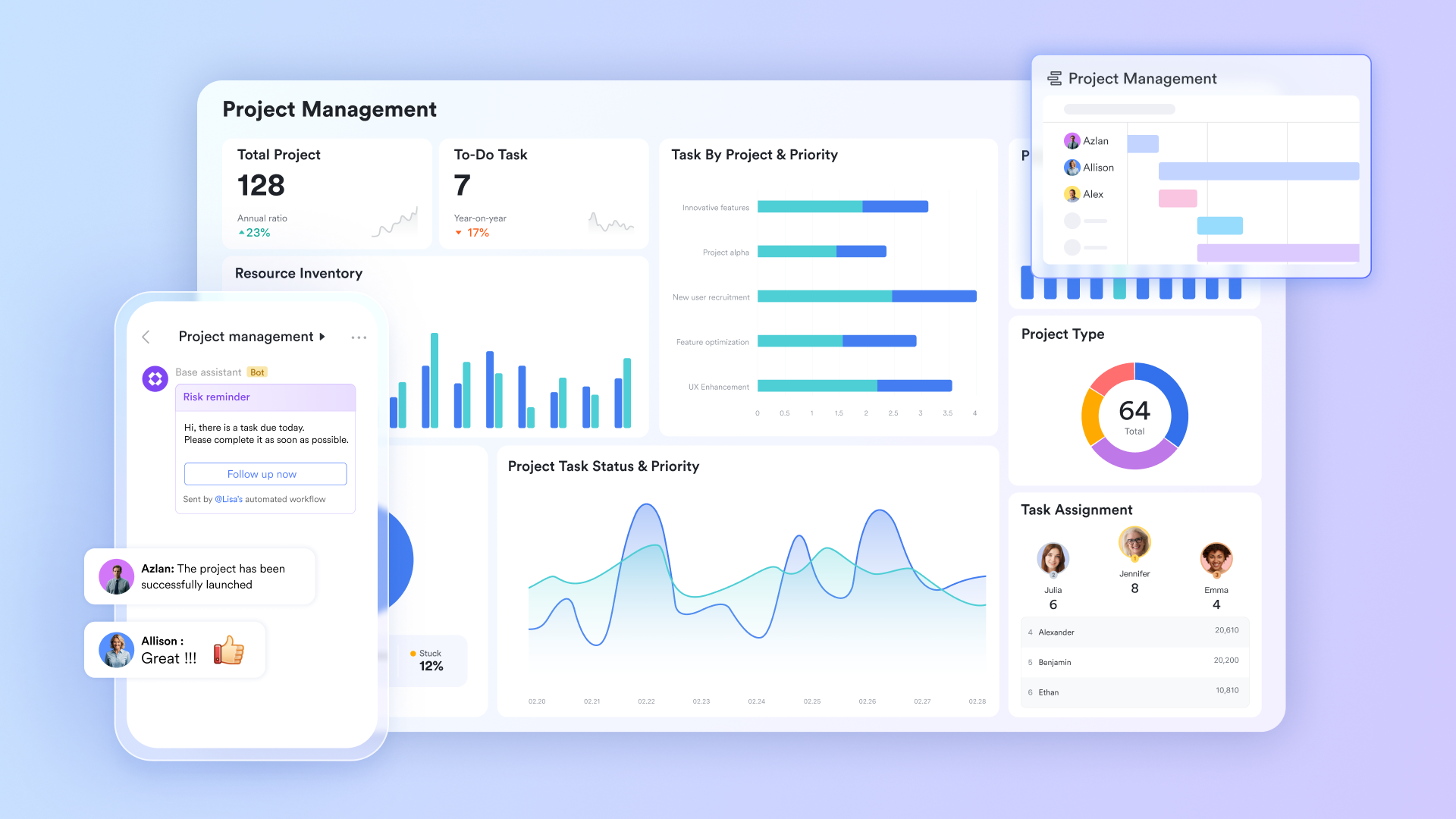
Unified engine for multidimensional tracking
Instead of being locked into standard spreadsheet rows and columns, acts as a flexible database for your daily work. It allows you to switch instantly between a familiar grid view for quick data entry and highly visual formats like or . Because it features highly customizable fields, you can easily adapt the tracker to show specific statuses, priority levels, or assignees without needing to write complex spreadsheet formulas.
Trackable execution and accountability
Lark Tasks excels at breaking down larger team goals into clear, actionable items. You can easily set up sub-tasks, assign owners, and establish hard deadlines to maintain momentum. A major advantage over an isolated spreadsheet is its seamless integration with your chat tools; a quick decision made during a conversation can be converted into a tracked task with a single click, ensuring no critical action items are lost in the chat history. 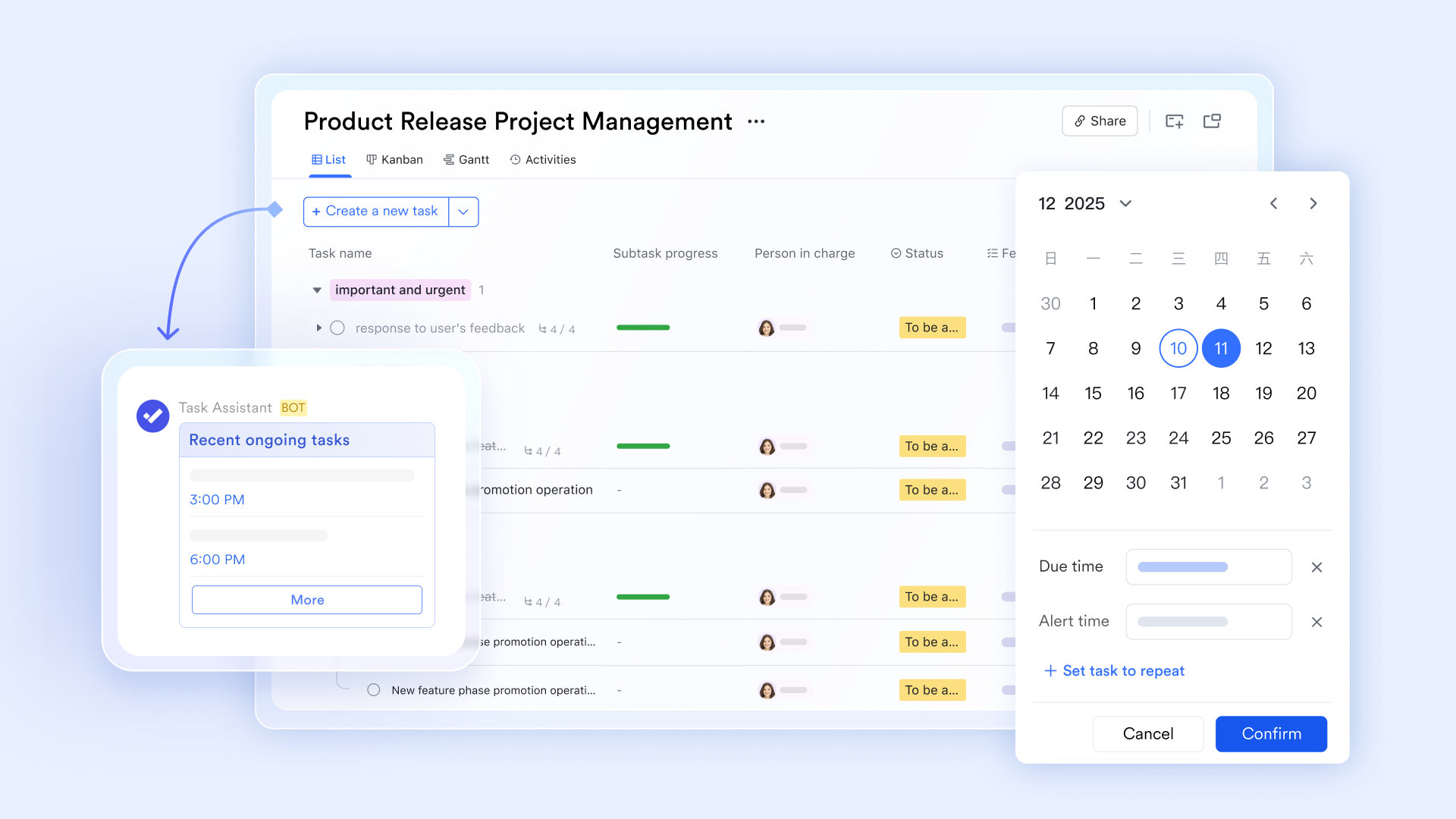
Task-specific communication groups
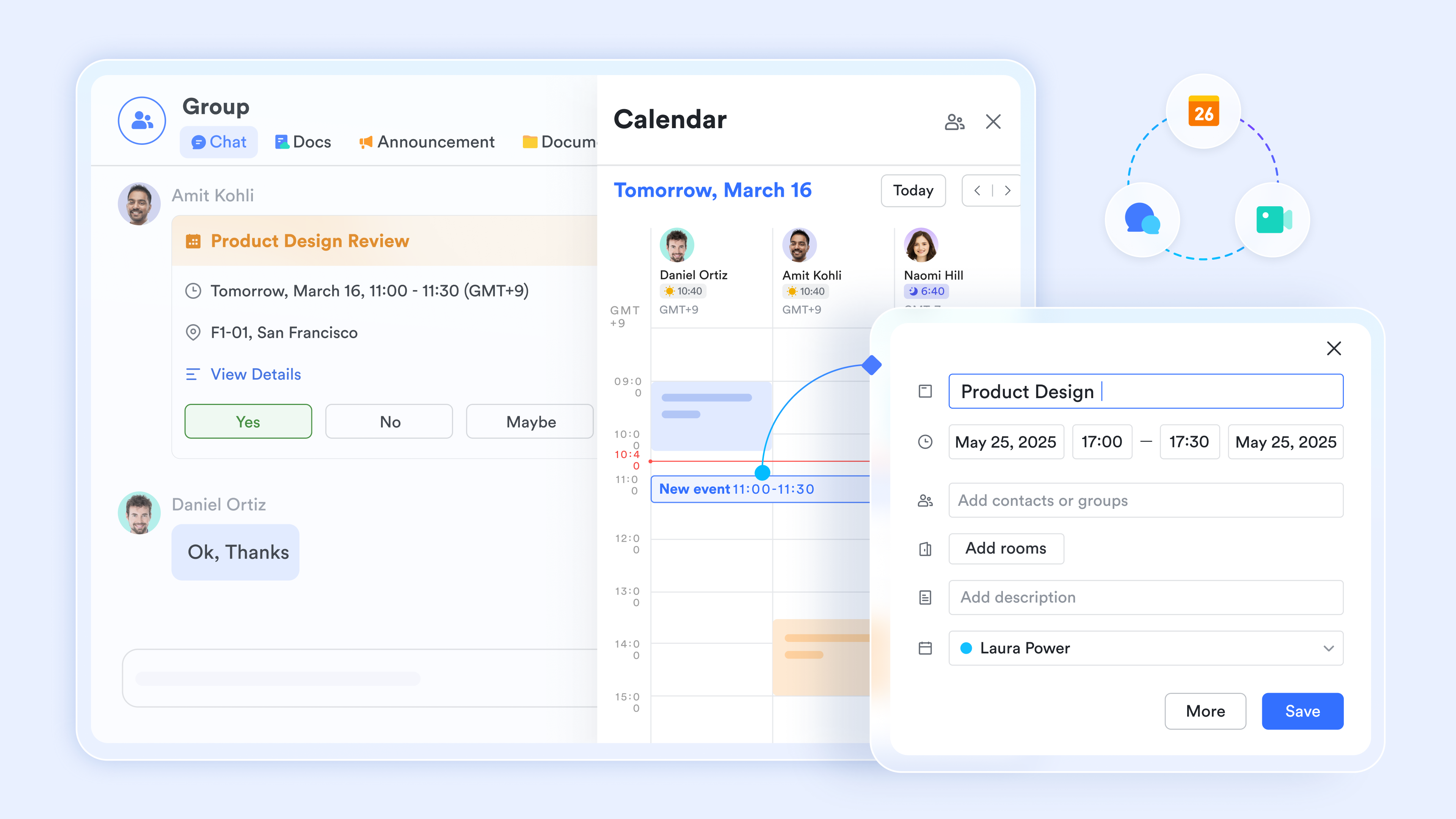
One common struggle with an offline tracking system is the disconnect between the to-do list and team discussions. solves this by allowing you to create dedicated communication groups linked directly to your specific initiatives. Automated updates notified the group immediately when a task status changed, keeping everyone fully aligned without requiring them to manually refresh a shared sheet.
Collaborative living documents
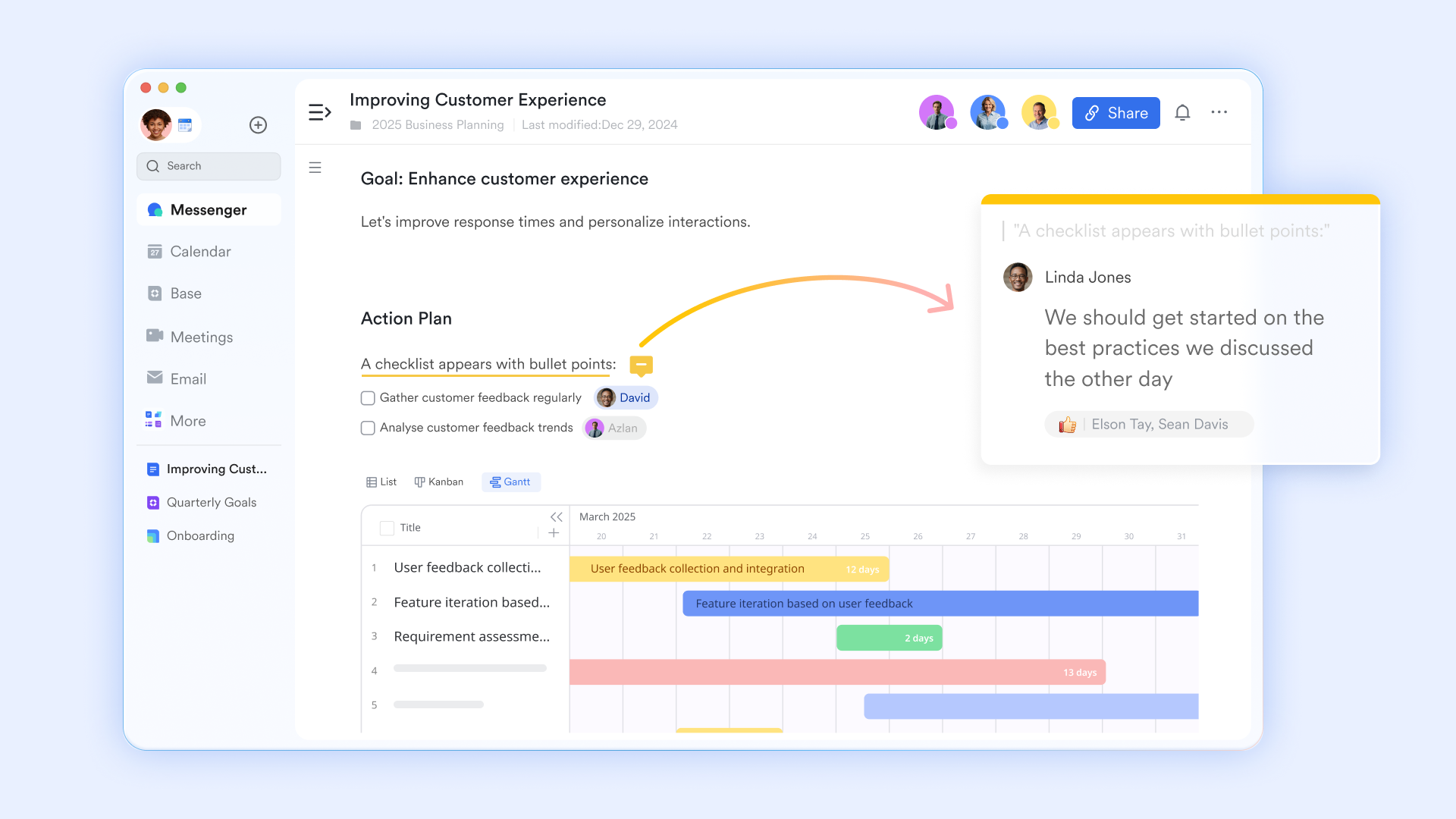
transforms how teams interact with their daily priorities by creating dynamic, living pages rather than static files. You can embed your task trackers or specific database views directly into a shared document, such as weekly meeting notes or strategy briefs. This means stakeholders and team members can view real-time task progress and update their items without ever leaving the page.
:
- Starter plan: Free forever plan that includes 11 powerful tools for up to 20 users. It also comes with 100GB of storage, 1000 automation runs, AI translations, and more.
- Pro plan: $12/user/month (billed annually) for up to 500 users. It includes everything in Starter plus group calling for up to 500 attendees, 15TB of storage, 50,000 automation runs, and more.
- Enterprise plan: for custom pricing. Supports unlimited users and includes even more automation runs and advanced security, compliance, and management features.
For small teams with simple communication needs

18 months message history
1000 Base automation runs/month
2000 rows per table in Base
Most POPULAR
For companies with comprehensive collaboration and management needs
Unlimited message history
500-participant video meetings
50k Base automation runs/month
20k rows per table in Base
For large companies with advanced security and organizational management needs
Get a personalized demo and pricing
Unlimited message history
500-participant video meetings
15 TB storage + 30 GB storage/user
500k Base automation runs/month
50k Base automation runs/month
Most POPULAR
For companies with comprehensive collaboration and management needs
Unlimited message history
500-participant video meetings
50k Base automation runs/month
20k rows per table in Base
How to choose the right task tracker template for your team
Selecting the right template matters more than downloading everything available, even if you have access to many or a wide range of . The best template matches your team's size, work complexity, and collaboration needs.
Evaluate templates across dimensions like team size, regulatory requirements, and tool preferences (Excel versus Google Sheets versus Lark), and consider whether a or a broader is a better long-term fit. Different roles need different views—individual contributors need daily focus, while project managers need portfolio-level visibility.
Teams typically start simple, then evolve toward more sophisticated templates as processes mature. Avoid over-engineering early; add complexity only when you outgrow simpler formats.
Questions to ask before picking a template
- What time horizon matters most: Clarify whether you need daily execution, weekly planning, or long-term project visibility as your primary view.
- How many collaborators are involved: Solo users can rely on simple spreadsheets, while cross-functional teams need shared workspaces.
- What level of detail is required: Determine if you need just task titles and due dates, or granular data like effort, dependencies, and costs.
- How often tasks change: Fast-moving environments benefit from flexible templates integrated with chat and notifications.
- Regulatory or audit needs: Some industries require documented history, approvals, and clear ownership—favoring platforms like Lark.
Aligning templates with your workflow and tools
- Start simple, then extend: Begin with a minimal daily or weekly tracker and add project or time-tracking templates only when needed.
- Keep one source of truth: Decide where the master task list lives to avoid parallel templates and confusion.
- Integrate communication: Favor templates hosted where conversations happen, such as Lark workspaces with embedded sheets and docs.
- Review and refine regularly: Set monthly reviews to drop unused fields, improve labels, and streamline layouts.
- Plan for scalability: Choose structures that grow with additional projects and contributors without becoming unmanageable.
Conclusion
Well-chosen task tracker templates simplify daily execution, weekly planning, and project coordination—whether they live in Excel, Google Sheets, or a unified platform like Lark. The key is moving from static documents to collaborative, continuously updated systems connected to communication and approvals.
Recreate your favorite Excel or Google Sheets templates inside Lark Docs and Lark Sheets to centralize work, communication, and tracking in one place. Sign up for 's free Starter plan to experiment with daily, weekly, and project task tracker templates plus automation—no credit card required.
Start managing projects smarter with Lark today
FAQs
How do I customize task tracker templates without breaking them?
Customization should focus on adding or renaming columns and adjusting status lists while avoiding changes to core formulas that calculate progress or dates. Before experimenting, make a copy of the original template to preserve a clean master version. Test changes on sample data first, and document any modifications so team members understand the updated structure.
Should I use Excel or Google Sheets for my first task tracker?
Choose Excel task tracker templates if you need offline access, advanced formulas, or work primarily solo. Choose Google Sheets task tracker templates when real-time collaboration and easy sharing matter most. Both formats can migrate into Lark later, or you can explore , so start with what feels comfortable and focus on establishing consistent tracking habits.
What is the difference between daily and project task tracker templates?
Daily templates focus on what must get done today or this week, typically with fewer fields like task, priority, and status. Project templates track many tasks over longer periods, including owners, dependencies, milestones, and percent complete. Daily templates support execution, while project templates support planning and coordination across team members.
How do I know it is time to move from spreadsheets to Lark?
When evaluating this shift, it can help to compare leading so you understand how integrated platforms differ from basic spreadsheets.
Consider switching when version conflicts appear regularly, multiple overlapping sheets cause confusion, task ownership remains unclear, or you need integrated chat, approvals, and automation. If you're spending more time managing your tracker than completing tasks, a unified platform like Lark can eliminate friction and enhance productivity.
Related reading












