














9 Best Google Sheets Alternatives for Your Team in 2026

Benjamin Grant
Lark Content Manager
Sep 18, 2026
Benjamin Grant
Sep 18, 2026


Google Sheets alternatives at a glance

Why teams look for Google Sheets alternatives
- Cumbersome sharing and collaboration can slow teamwork and introduce errors.
- No built-in automation for recurring tasks forces manual updates, wasting time.
- Advanced AI features require high-tier plans or external integrations, making analysis more complicated.
- Risk of formula errors and messy charts can disrupt workflows and reduce productivity.
Top 9 Google Sheets alternatives in 2026
1. Lark: Advanced data analysis on spreadsheets and relational databases
Key features
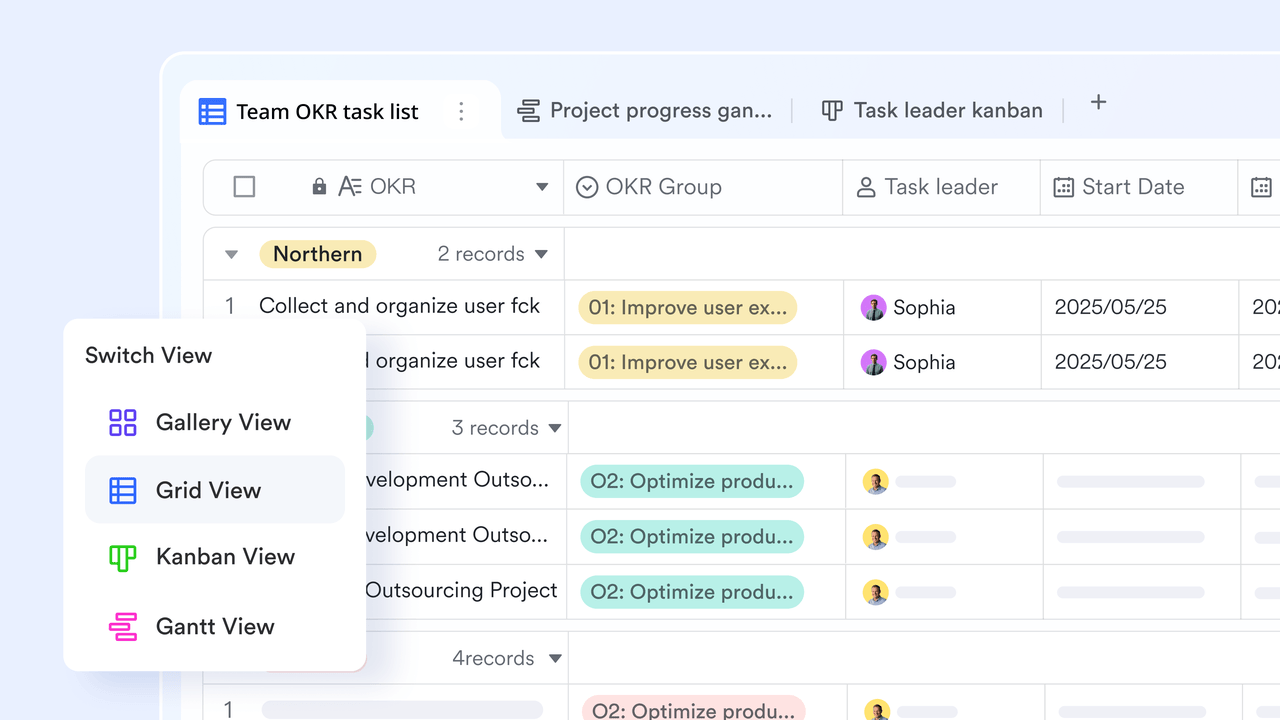
- Multidimensional data views: Instantly switch your data between multiple visual formats, including Grid, Kanban, Gantt, Gallery, and Calendar, to suit any project or workflow.
- Rich field types: Go beyond text and numbers with specific data types like attachments, ratings, progress bars, and linked records, ensuring cleaner data and improved data integrity.
- Built-in relational database: Easily link information across different tables (sheets) to create powerful, cross-referenced data models without writing complex formulas or VLOOKUPS.
- Contextual collaboration: Discuss data directly on a specific row or cell using integrated Lark Messenger threads, keeping all decision history tied to the record.
- No-code automation: Set up automated workflows instantly (e.g., auto-notify a teammate when a status changes, or send reminders before a deadline) without relying on third-party tools or coding.
- Granular Permission Control: Secure your sensitive data with advanced controls, including field-level permissions to hide specific columns from different user groups.
Pros
- Easily import data from CSV and Excel files.
- Access to advanced features such as pivot tables, data validation, and conditional formatting.
- Make spreadsheets available offline, and enable editing without an internet connection.
- Create graphs and charts to build live dashboards for data visualization.
- Intuitive features that automate workflows eliminate the need to handle repetitive tasks, thereby improving accuracy and productivity.
- Offers both traditional spreadsheet functions and modern data management capabilities on a single platform.
- Access from mobile, desktop, or web, enabling productivity anywhere at any time.
- Generous free plan and affordable paid plans make it accessible for teams of all sizes and budgets.
Cons
- Advanced features may take some time to learn through the Lark YouTube Channel or Help Center.
Ratings
- G2: 4.5/5
Pricing
- Starter plan: Free forever plan that includes 11 powerful tools for up to 20 users. It also comes with 100GB of storage space, 1000 automation runs, AI translations, and more. No credit card needed.
- Basic plan: $6/user/month (billed annually) for up to 500 users. It includes everything in Starter and unlimited message history, 5TB of storage space, 1,000 automation runs, and more. Some users may need to contact sales to purchase this plan.
- Pro plan: $12/user/month (billed annually) for up to 500 users. It includes everything in Basic plus group calling for up to 500 attendees, 15TB of storage space, 50,000 automation runs, and more.
- Enterprise plan: Contact sales for custom pricing. Supports unlimited users and includes even more automation runs and advanced security, compliance, and management features.
Starter
For small teams with simple communication needs
$0
/ user / month

Pro
For companies with comprehensive collaboration and management needs
$12
/ user / month
Enterprise
For large companies with advanced security and organizational management needs
Get a personalized demo and pricing
Pro
For companies with comprehensive collaboration and management needs
$12
/ user / month
2. Microsoft Excel: Best for data analysis & financial modeling
Key features
- Access a vast library of functions, including modern dynamic arrays for complex calculations.
- Use PivotTables and Power Query to summarize and analyze huge datasets without a database.
- Automate nearly any task with Visual Basic for Applications (VBA) and integrated Python.
- Create a wide variety of charts and graphs to visualize data trends and patterns.
- Integrate deeply with other Microsoft 365 apps and collaborate in real-time on the web.
Pros
- Enjoy unmatched calculation power and functional depth for virtually any data task.
- Broad file compatibility and a large user base.
- Utilize extremely powerful built-in data analysis tools like PivotTables and Power Query.
- Experience seamless integration with the wider Microsoft 365 ecosystem.
Cons
- Real-time collaboration is not as fluid as on cloud-native platforms.
- Performance can slow significantly when working with very large datasets.
- Mastering advanced features like VBA and Power Query requires a steep learning curve.
- The tool is often overly complex for straightforward task and project management.
Ratings
- G2: 4.7/5
Pricing
- Free: A web-based version with limited functionality is available with a free Microsoft account.
- Microsoft 365 Personal: $99.99 per year for one person.
- Microsoft 365 Family: $129.99 per year for up to six people.
- Microsoft 365 Business Plans: Various tiers are available, starting from $6 per user/month.
3. Airtable: Best for building custom database applications
Key features
- Create connections between different data sets using linked records.
- Visualize data in numerous ways, including Grid, Kanban, Gallery, and Gantt charts.
- Build custom, interactive dashboards and interfaces for collaborators without code.
- Streamline workflows with a native automation builder and popular tool integrations.
- Use an integrated AI assistant to help build applications and analyze data.
Pros
- Adapt the highly flexible and customizable platform to a wide array of business needs.
- Grasp complex database concepts easily with the visually intuitive interface.
- Create relational data structures that are impossible in a traditional spreadsheet.
- Streamline workflows with robust automation and integration capabilities.
Cons
- Face a steep learning curve if you are unfamiliar with database principles.
- Pricing can become expensive for larger teams due to per-user costs and usage limits.
- Native reporting and charting features are less powerful than some dedicated tools.
- The platform offers fewer native integrations compared to some project management competitors.
Ratings
- G2: 4.6/5
Pricing
- Free: Includes unlimited bases, up to 1,000 records per base, and 1GB of attachments.
- Team: $20 per user/month (billed annually), increasing limits to 50,000 records per base, 20GB of attachments, and 25,000 automation runs.
- Business: $45 per user/month (billed annually), with 125,000 records per base, 100GB of attachments, and 100,000 automation runs.
- Enterprise Scale: Custom pricing for advanced needs.
4. Zoho Sheet: Best for teams that are already in Zoho’s ecosystem of apps
Key features
- Use over 350 functions, pivot tables, and more than 35 chart types.
- Get automated data cleaning and chart generation from Zoho's AI assistant.
- Benefit from real-time co-editing, cell-specific comments, and granular user permissions.
- Scan printed tables and automatically convert them into editable spreadsheet data.
- Connect effortlessly with other Zoho apps like Forms, Writer, and CRM.
Pros
- Use the application completely free as a standalone product.
- Receive automated data analysis and insights from the powerful AI assistant.
- Enjoy unbeatable integration with the extensive Zoho ecosystem of business apps.
- You can use strong real-time collaboration features with great permission controls.
Cons
- The user interface can feel dated compared to modern competitors.
- Performance may lag when working with very large or complex spreadsheets.
- Users have reported inconsistent quality from customer support channels.
- Its value is significantly diminished for teams that do not use other Zoho applications.
Ratings
- G2: 4.5/5
Pricing
- Free plan available
- Paid plans start from $3 per user/month as part of Zoho Workplace.
5. Smartsheet: Best for project management on a spreadsheet-like interface
Key features
- Use advanced tools including Gantt views, critical path analysis, and resource management.
- Create complex workflows with conditional logic to handle alerts and approvals.
- Build real-time dashboards and roll-up reports for high-level visibility.
- Benefit from robust security, governance, and administrative controls.
- Connect with essential enterprise tools like Microsoft 365, Salesforce, and Jira.
Pros
- Manage large-scale, complex projects and entire portfolios effectively.
- Streamline repetitive processes with robust automation capabilities.
- Provide excellent visibility for leadership with powerful reporting and dashboards.
- Lower the initial adoption barrier for teams with a familiar spreadsheet-like interface.
Cons
- The platform can feel rigid and inflexible, often described as a "glorified Excel".
- Mastering advanced features and automation rules involves a steep learning curve.
- The expensive and restrictive licensing model can hinder widespread team collaboration.
- The user interface for creating dashboards is often described as clunky and lacking customization.
Ratings
- G2: 4.4/5
Pricing
- Free: A limited free plan is available for a single user and up to two editors.
- Pro: $9 per user/month (billed annually), for up to 10 users.
- Business: $32 per user/month (billed annually), includes unlimited automations and user management.
- Enterprise: Custom pricing for enterprise-grade features and security.
6. monday.com: Best for visual workflow and project management
Key features
- Visualize work in multiple ways, including Kanban, Calendar, Timeline, and Gantt charts.
- Tailor boards to fit specific team needs with a simple drag-and-drop interface.
- Use a no-code automation builder and over 200 native integrations with popular tools.
- Build custom, real-time dashboards with over 30 different widgets to track key metrics.
Pros
- Adopt the extremely intuitive and visually engaging user interface with ease.
- Adapt the highly customizable platform to almost any type of workflow or project.
- Collaborate effectively with clear visibility into task ownership and status.
- Configure powerful automations and integrations easily.
Cons
- The pricing structure can be confusing and costly with a minimum of three user seats.
- Key features like time tracking and private boards are restricted to more expensive plans.
- Mastering the full range of advanced features can present a learning curve.
- The platform lacks a native, built-in chat tool for real-time team communication.
Ratings
- G2: 4.7/5
Pricing
- Free: $0 for up to 2 seats, with limited features.
- Basic: $9 per user/month (billed annually), with a 3-user minimum.
- Standard: $12 per user/month (billed annually), with a 3-user minimum. Includes timeline & Gantt views.
- Pro: $19 per user/month (billed annually), with a 3-user minimum. Includes private boards and time tracking.
- Enterprise: Custom pricing for advanced security and support.
7. ClickUp: Best for general work management
Key features
- Organize work logically with a flexible hierarchy of Spaces, Folders, and Lists.
- Visualize work in over 15 ways, including List, Board, Gantt, and Mind Map views.
- Enable or disable specific features at the workspace level to avoid a cluttered interface.
- Use built-in Docs, Whiteboards, and a real-time Chat view to reduce external app needs.
Pros
- Benefit from an exhaustive feature set that aims to be a true all-in-one solution.
- Adapt the platform to virtually any workflow with an extremely high level of customization.
- Utilize one of the most generous free plans on the market with unlimited users and tasks.
- Access paid plans that are very affordably priced compared to direct competitors.
Cons
- The user interface can feel cluttered and complex to navigate for beginners.
- Users frequently report performance issues and slow loading times with large projects.
- The mobile app experience is often cited as less powerful than the desktop version.
Ratings
- G2: 4.7/5
Pricing
- Free Forever: $0 for unlimited members, with 60MB of storage and some feature limitations.
- Unlimited: $7 per user/month (billed annually), with unlimited storage, integrations, and Gantt charts.
- Business: $12 per user/month (billed annually), adding Google SSO, unlimited teams, and advanced automations.
- Enterprise: Custom pricing for advanced permissions and dedicated support.
8. Baserow: Best for open-source, self-hosted database building.
Key features
- Gain complete control over your data and infrastructure with the self-hosted version.
- Use an intuitive, spreadsheet-like interface to easily create and manage databases.
- Visualize data with essential views like Grid, Gallery, Kanban, and Calendar.
- Integrate with any tool via the API and create custom plugins to extend functionality.
Pros:
- Enjoy unparalleled flexibility and control with the open-source model.
- Benefit from a cost-effective and scalable self-hosting option with unlimited rows.
- Maintain complete data ownership, which is ideal for security-conscious organizations.
- Adopt the clean and familiar user interface easily if coming from spreadsheet tools.
Cons:
- The self-hosted version requires technical expertise for setup and maintenance.
- It has fewer native integrations and pre-built templates compared to competitors.
- Advanced features like role-based permissions are only available in paid tiers.
- Support for the free version is primarily community-driven, which may not suit enterprise needs.
Ratings
- G2: 4.8/5
Pricing (Cloud-Hosted)
- Free: $0, includes 3,000 rows per workspace and 2GB of storage.
- Premium: $10 per user/month (billed annually), includes 50,000 rows per workspace, 20GB of storage, and additional views like Kanban and Calendar.
- Advanced: $18 per user/month (billed annually), includes 250,000 rows per workspace and role-based permissions.
9. Rows: Best for integrating web data and building interactive reports
Key features
- Connect to over 50 native integrations to import and refresh data automatically.
- Use a powerful AI assistant to clean data, generate formulas, and summarize insights.
- Share spreadsheets as clean, mobile-friendly web pages or embed them into other tools.
- Connect to any REST API and parse JSON data directly within cells for advanced use cases.
Pros
- Eliminate the need for external automation tools with powerful native integrations.
- Create beautiful and engaging reports with a modern interface and innovative sharing options.
- Make complex data analysis more accessible to all users with the AI Analyst feature.
- Get started with a generous free plan that includes unlimited spreadsheets and members.
Cons
- The platform may lack some niche functions that power users of Excel rely on.
- The integration-first approach can present a learning curve for some users.
- It may struggle to perform well on very large, static datasets compared to desktop apps.
Ratings
- G2: 4.9/5
Pricing
- Free: $0, includes unlimited spreadsheets and members, with limited AI prompts and integration tasks.
- Plus: $8 per user/month (billed annually), with unlimited AI prompts and daily automated data refreshes.
- Pro: $79 per month base fee + $8 per user/month (billed annually), with per-minute automation and more guest users.
- Enterprise: Custom pricing.
What to look for in Google Sheets alternatives
- Collaboration features: Since no one works in isolation, a strong alternative must support real-time editing, comments, permissions, and multi-user access. Version history and mobile access are also vital for collaboration.
- Automation & integrations: How the spreadsheet program integrates with your other tools is crucial to team productivity. Built-in automation that is easy to set up can slash manual work. Meanwhile, integrations with your communication, CRM, project management, calendar, and other tools can make or break your workflow.
- Value for money: Is the Google Workspace pricing fair for the features offered? Some free versions are too limited for real work, while expensive plans don't always provide much better features. The best options offer a robust free plan and meaningful upgrades for paid plans.
- User experience & learning curve: A great tool should be intuitive enough for spreadsheet users while providing advanced capabilities for power users, ensuring a smooth transition for both technical and non-technical users in your team.
- Use cases: Perhaps what your team needs is not a more powerful spreadsheet but something else entirely. Therefore, we also looked at database apps, project management apps, and no-code app builders.
Conclusion
FAQs
What are some free alternatives to Google Sheets?
Are there any open-source spreadsheet software?
Why should I consider switching from Google Sheets?
What can Google Sheets do that Excel can't do?
Is Google Sheets good for business?
Why do businesses switch from Google Sheets?
Related readings

Start using Lark today

Manage all your work in one place
Boost team efficiency by 10x
Save up to 70% on software costs
Start using Lark today
Manage all your work in one place
Boost team efficiency by 10x
Save up to 70% on software costs
Keep reading



Lark recognized in 2023 Gartner® Collaborative Content Workspaces and Meeting Solutions reports





2026 Lark Technologies Pte. Ltd.
Headquartered in Singapore with offices worldwide.





