Despite the rise of specialized project management software, countless teams still rely on Excel for planning complex initiatives. The reason is simple: Excel is already on nearly every work computer, requires no learning curve, and offers enough flexibility to adapt to almost any project type. A work breakdown structure template excel transforms this familiar tool into a powerful scope management asset, turning an overwhelming project into a clear hierarchy of manageable tasks.
This article is a step-by-step template guide designed to walk you through downloading, building, customizing, and scaling a work breakdown structure template in Excel. Whether you start with a free template or create one from scratch, you will learn how to adapt it for your methodology, link it to timelines and budgets, and eventually transition to cloud-based collaboration in tools. If you are a project manager, PMO leader, or team lead in an SME or enterprise—especially one managing remote or hybrid teams—this guide is for you.
What is a work breakdown structure and why Excel is still popular
Before diving into templates, it helps to understand what a work breakdown structure actually does and why Excel remains a go-to tool for creating one.
Core definition
A is a hierarchical decomposition of the total scope of work required to complete a project. According to PMI's PMBOK framework, it organizes the project's deliverables into smaller, more manageable pieces called work packages. Each work package represents a tangible output that can be estimated, assigned, scheduled, and tracked.
Think of it as building an outline for everything your project must produce. At the top sits the final deliverable or project name. Below that, you decompose into major deliverables or phases, then sub-deliverables, and finally individual work packages. This structure ensures nothing essential gets overlooked and provides a clear map for your project team.
Visual vs tabular WBS
There are two common formats for presenting a WBS:
- Tree or diagram format: This looks like an organizational chart, with boxes connected by lines showing parent-child relationships. It is ideal for stakeholder presentations and high-level overviews.
- List or tabular format: This uses outline numbering (1, 1.1, 1.1.1) with rows representing each element. It is better suited for detailed planning, cost tracking, and schedule integration.
Excel supports both approaches. You can build a tabular WBS in a standard worksheet, or create a visual WBS diagram using SmartArt or embedded shapes. Many teams use both: a detailed task list for planning and a simplified diagram for executive communication.
Benefits for projects
Using a WBS delivers several key benefits:
- : By decomposing deliverables systematically, you ensure nothing essential is omitted and reduce the risk of scope creep.
- Improved estimating: Smaller work packages are easier to estimate for labor, materials, and duration than large, vague activities.
- Better : Each work package can have a clear owner, making accountability visible across the project team.
- Stronger change control: When change requests arise, you can trace their impact to specific WBS elements rather than guessing at ripple effects.
Why Excel is widely used
Despite the availability of specialized project management software, Excel remains popular for WBS development for several reasons:
- Ubiquity: Excel is present in nearly every organization, often already licensed as part of Microsoft 365.
- Low barrier to entry: Most team members already know how to use Excel, eliminating training time.
- Flexibility: You can customize columns, add formulas, use conditional formatting, and adapt the template to your specific process.
- Easy sharing: Excel files can be emailed, stored on shared drives, or uploaded to cloud platforms without requiring recipients to have specialized tools.
- Offline access: Unlike some cloud-native tools, Excel works without an internet connection.
Key components of a work breakdown structure template in Excel
A strong work breakdown structure template in Excel must mirror how professionals think about scope. It is not just a random list of tasks but a structured representation of what the project must deliver.
Levels of hierarchy
Most WBS templates use multiple levels of hierarchy:
- Level 1: The overall project or final deliverable (e.g., "Mobile App Launch Q2 2027")
- Level 2: Major deliverables or phases (e.g., "UX Design," "Backend Development," "Testing")
- Level 3: Sub-deliverables within each major area (e.g., "User Research," "Wireframes," "Prototypes")
- Level 4 and beyond: Detailed work packages (e.g., "Conduct 10 user interviews," "Create low-fidelity wireframes for 5 screens")
How deep you go depends on project complexity. Too shallow and you miss critical details; too deep and the template becomes unwieldy.
Typical columns
Most work breakdown structure excel templates include these core columns:
- WBS code: A hierarchical identifier (1, 1.1, 1.1.1) used for sorting, filtering, and reporting.
- Task name: The description of the deliverable or work package.
- Level or indent: Indicates where this element sits in the hierarchy.
- Owner: The person responsible for completing or overseeing this work.
- Duration: How long the work package is expected to take.
- Start date: When work is planned to begin.
- End date: When work is expected to complete.
- Estimated cost: Budget allocated to this element.
- Status: Current state (not started, in progress, completed).
- Dependencies: Which tasks must finish before this one can start.
- Notes: Additional context, assumptions, or references.
Deliverable vs phase-based views
Templates can be organized in two primary ways:
- Deliverable-based: Structure organized around outputs or products. Level 2 might include "Mobile App," "Backend API," "Admin Dashboard." This approach emphasizes what you are building and aligns naturally with core .
- Phase-based: Structure aligned with project lifecycle phases. Level 2 might include "Initiation," "Planning," "Execution," "Closing." This approach emphasizes when work happens.
Many teams use a hybrid, with phases at Level 2 and deliverables at Level 3. The right choice depends on how your organization thinks about projects and how you plan to report progress, especially if you rely on a for oversight.
Numbering logic
WBS codes follow common outlining conventions:
- Level 2: 1.1, 1.2, 2.1, 2.2
- Level 3: 1.1.1, 1.1.2, 1.2.1
Some templates, like the Vertex42 version, use formulas to generate WBS codes automatically based on the level column. This keeps numbering consistent as you add or remove elements.
Formatting conventions
Good formatting makes a WBS easier to read and navigate:
- Bold fonts: Use for Level 1 and Level 2 elements to distinguish them from detail rows.
- Indentation: Indent task names to visually represent hierarchy.
- Shading: Apply light background colors to phase or deliverable rows.
- Frozen header row: Keep column headers visible as you scroll through long lists.
- Conditional formatting: Highlight overdue tasks, critical path items, or high-cost elements.
Plan, track, and manage your WBS seamlessly with Lark
How to create a work breakdown structure in Excel using built-in features
Excel includes features that make structuring and visualizing a WBS easier than manual typing alone. Here is how to leverage them.
Using outline and grouping
Excel's Data > Group function lets you collapse or expand levels, representing WBS hierarchy without separate sheets:
- Select all Level 3 rows under a Level 2 parent.
- Go to Data > Group > Group.
- Click the minus sign in the margin to collapse that section.
This creates an expandable outline where stakeholders can view just the high-level phases or drill into details as needed.
Using SmartArt for a WBS diagram
For visual presentations, create a WBS diagram using SmartArt:
- Go to Insert > SmartArt.
- Choose a Hierarchy layout (Organization Chart or similar).
- Enter your Level 1 project name at the top.
- Add Level 2 and Level 3 elements as child boxes.
This works well for steering committee meetings or executive briefings where a visual hierarchy is more effective than a spreadsheet, especially when paired with for timeline visualization.
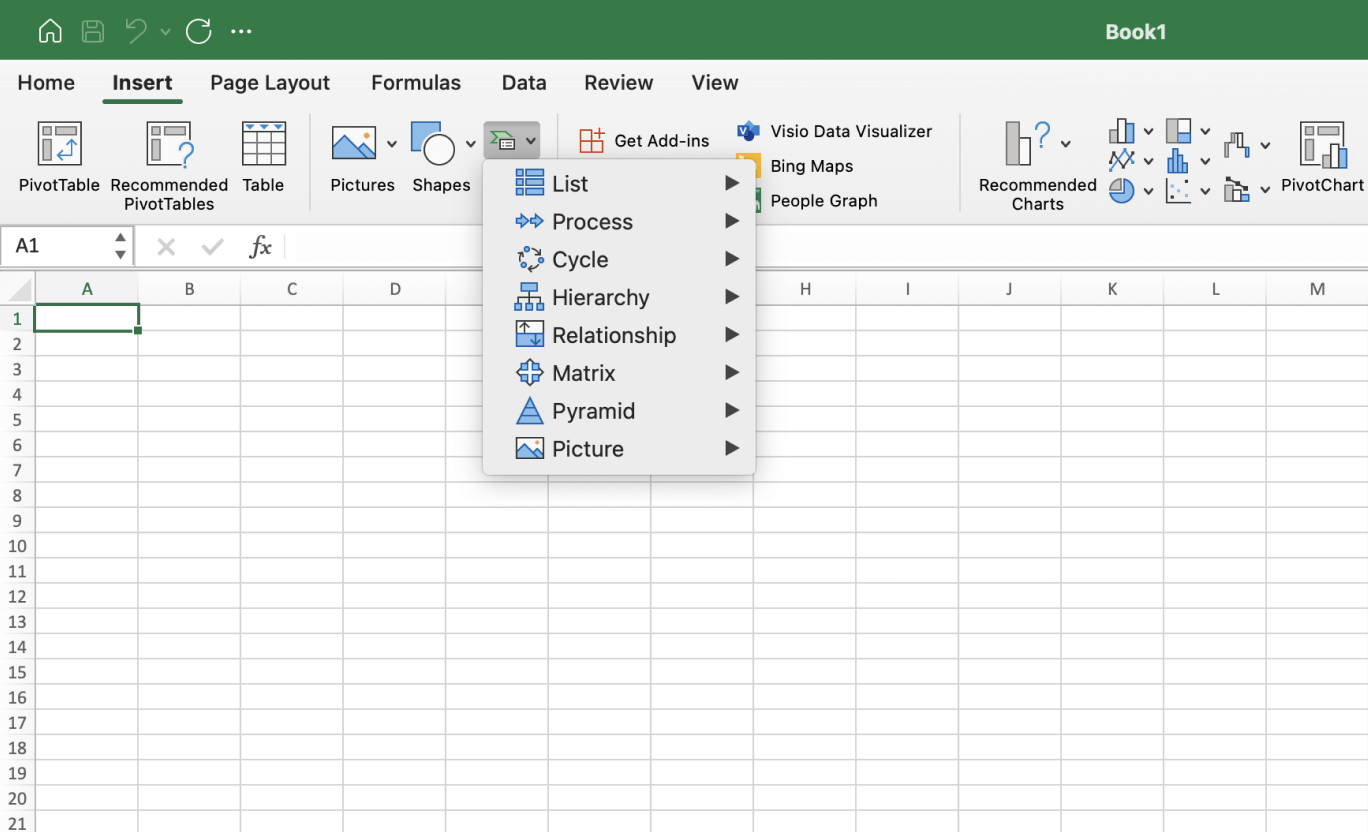
Image source: microsoft.com
Linking SmartArt with the table
Unfortunately, Excel does not automatically sync SmartArt diagrams with tabular data. You must manually update the diagram when the table changes. To minimize confusion, consider keeping the diagram on a separate sheet labeled "WBS Diagram" and noting the date of last update.
Using formulas for WBS codes
For automatic WBS numbering, you can build a formula that concatenates parent codes with a counter. A simplified approach:
- Use a helper column to track the parent WBS code.
- Use COUNTIF to count siblings at the same level above the current row.
- Concatenate the parent code with the sibling count plus one.
This requires some Excel proficiency, but templates like Vertex42 include pre-built formulas you can study and adapt.
Using templates from Excel's library
Microsoft 365 offers WBS-related templates that you can access via File > New and searching for "project" or "WBS." These provide a starting point, but generic templates rarely match your specific governance or methodology needs. You can also draw inspiration from tailored for different use cases. Treat them as inspiration rather than final solutions.
Work breakdown structure template: Detailed guide
Work breakdown structure
This particular blueprint empowers teams to systematically break down larger projects into distinct, manageable deliverables, subordinate assignments, and discrete work units. It establishes a well-defined hierarchical framework, significantly enhancing the efficiency of strategic planning, task delegation, and progress oversight. Project groups can readily adapt this tool to accommodate diverse project scales and a wide array of industrial applications.
ProjectManager WBS template
The ProjectManager WBS template assists in structuring the project's entire scope into organized collections of work units and expected deliverables. It lets users build a dynamic work breakdown structure that can be managed online with an interactive Gantt chart or spreadsheet. Assign WBS codes, create dependencies, find the critical path, attach files and more. It grants teams the ability to visually grasp task hierarchies and intelligently allocate resources across different project phases. Utilizing this tool cultivates clarity in foresight and allows for the close monitoring of execution across interconnected activities.
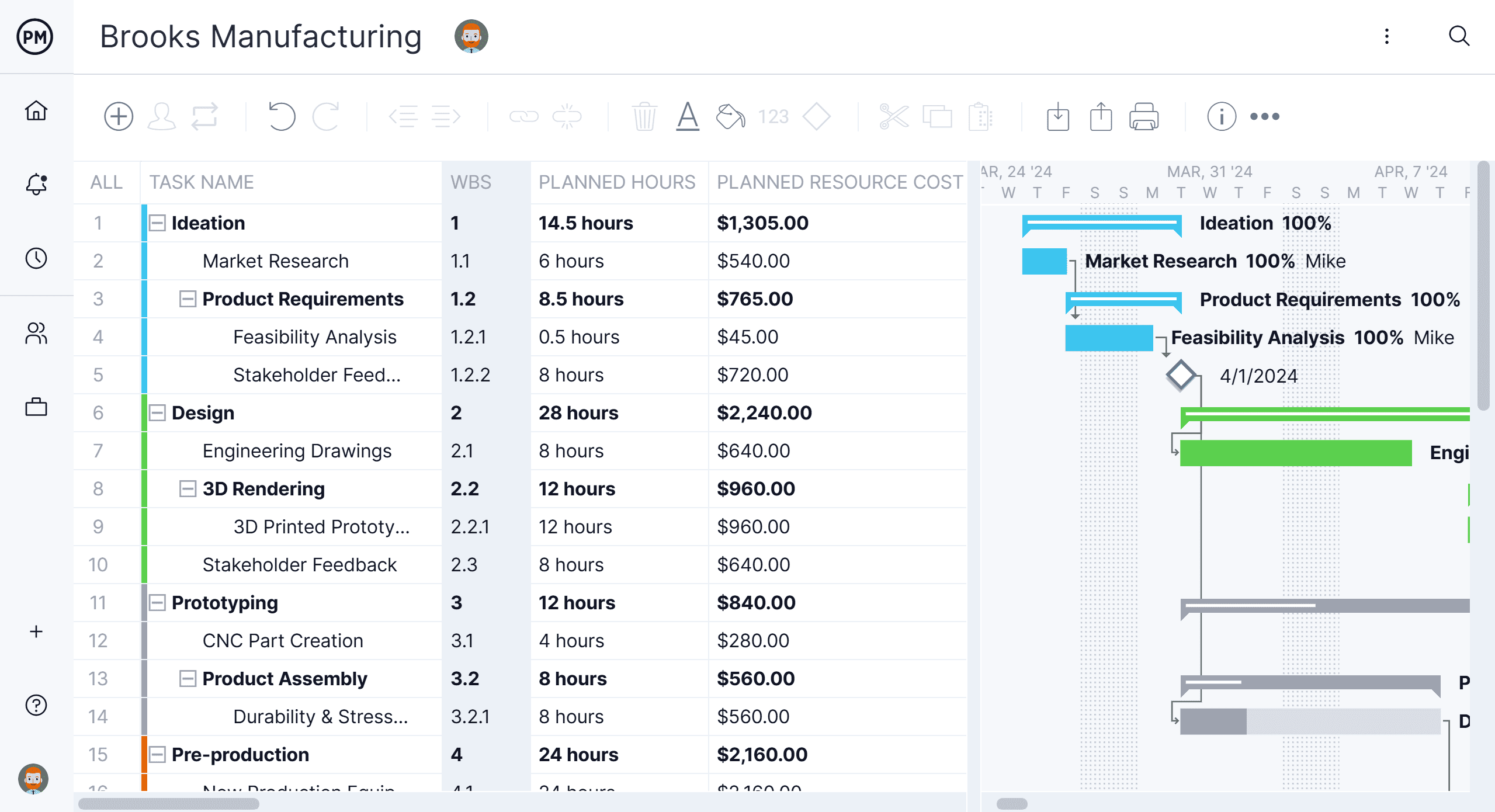
Image source: projectmanager.com
Smartsheet Gantt chart WBS template
The Smartsheet WBS template with Gantt chart combines task hierarchy, duration, ownership, and status into one visual layout, making it easy to coordinate and execute projects with clarity. It's ideal for teams that need both a structured work breakdown and a clear schedule, all in one view, especially when they also understand .
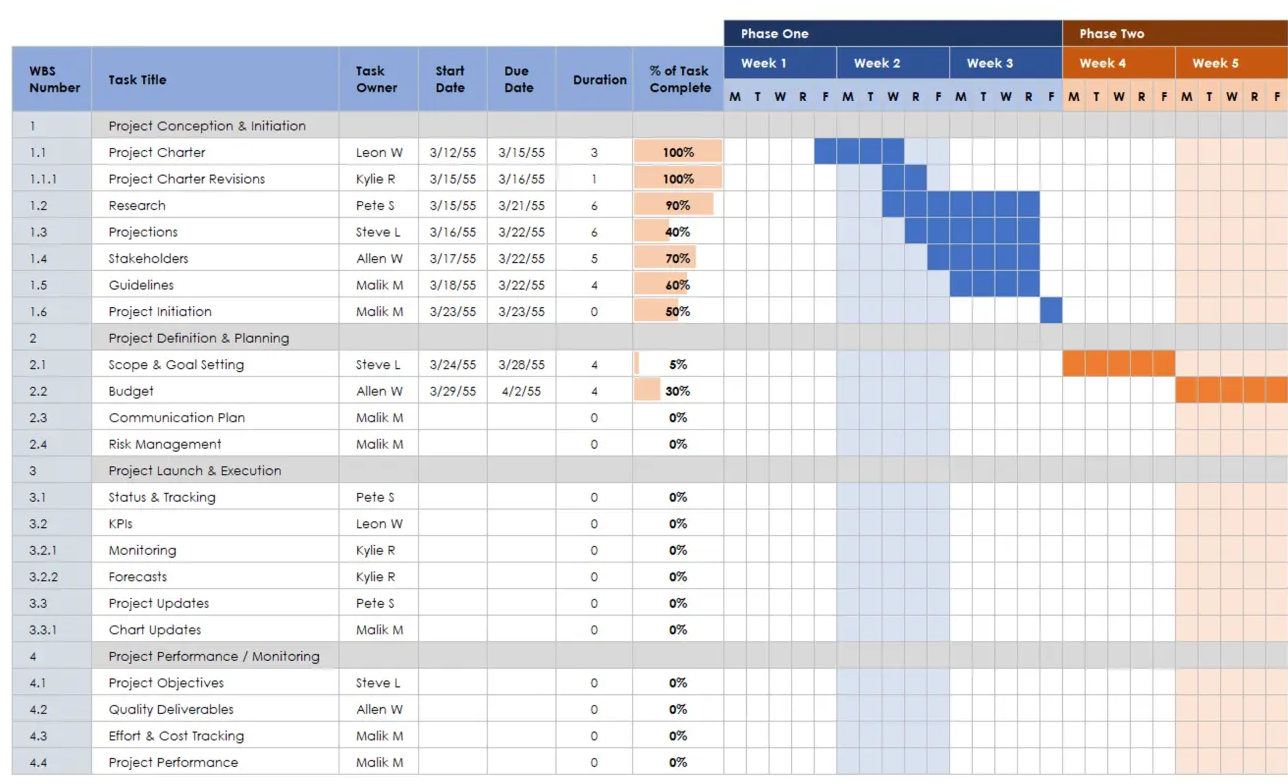
Image source: smartsheet.com
Multi-task WBS template
This Multi-task WBS template is an invaluable asset for teams navigating projects characterized by parallel operations and multiple end-products. It facilitates the partitioning of tasks across various project intervals while preserving transparency regarding dependencies and individual responsibilities. Employ this template to orchestrate sophisticated workflows and meticulously track advancement along divergent execution pathways.
GanttPro WBS template
This is a simple worksheet with minimal fields: WBS code, task name, level, and duration. It avoids complexity in favor of clarity, making it ideal for small teams, pilot projects, or situations where you want to focus on structure before adding scheduling details. The simplicity also makes this template easy to import into more sophisticated tools like GanttPRO when you are ready to add dependencies, resources, and timeline visualization. Teams using this as a starting point can add columns incrementally as project needs evolve. The limitation is that it lacks built-in cost tracking, status management, or dependency modeling.
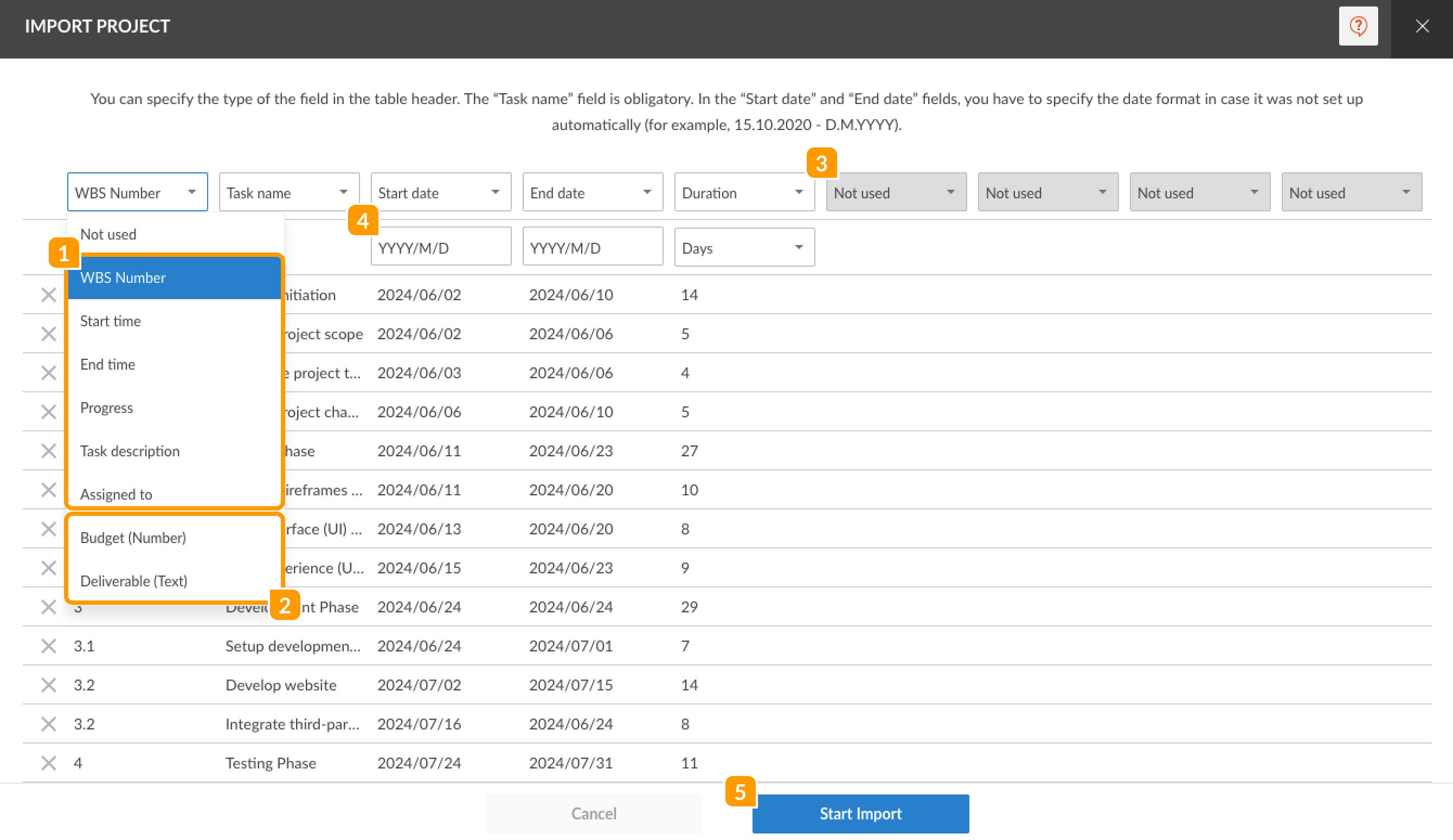
Image source: ganttpro.com
Template.net WBS template
Template.net provides a library of WBS templates tailored to specific industries: software development, marketing campaigns, event planning, construction projects, and more. Each template includes pre-populated deliverables relevant to that domain.
The advantage is faster setup time—you start with a structure that reflects common deliverables in your industry rather than building from scratch. Many templates include branding options (logo placement, color schemes) that make them suitable for client presentations. Some templates also include WBS dictionary sections and approval columns. The trade-off is that some premium templates require a subscription, and generic industry templates may still need significant customization for your specific project.
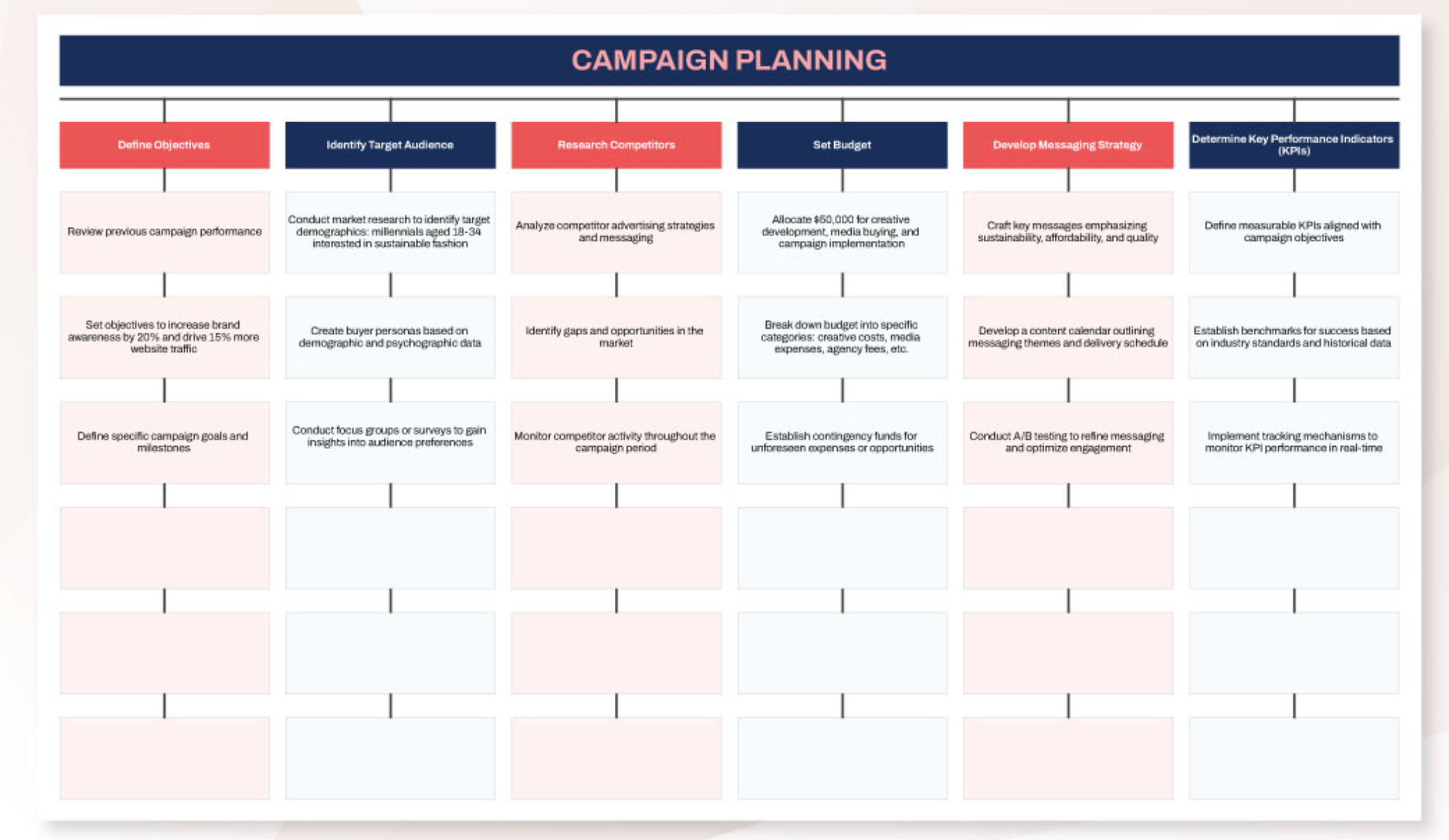
Image source: template.net
From Excel to modern tools: Using Lark with your work breakdown structure Excel template
While an Excel work breakdown structure template is a good starting point, collaboration and real-time updates often require cloud-native tools. Here is how can extend your WBS workflow.
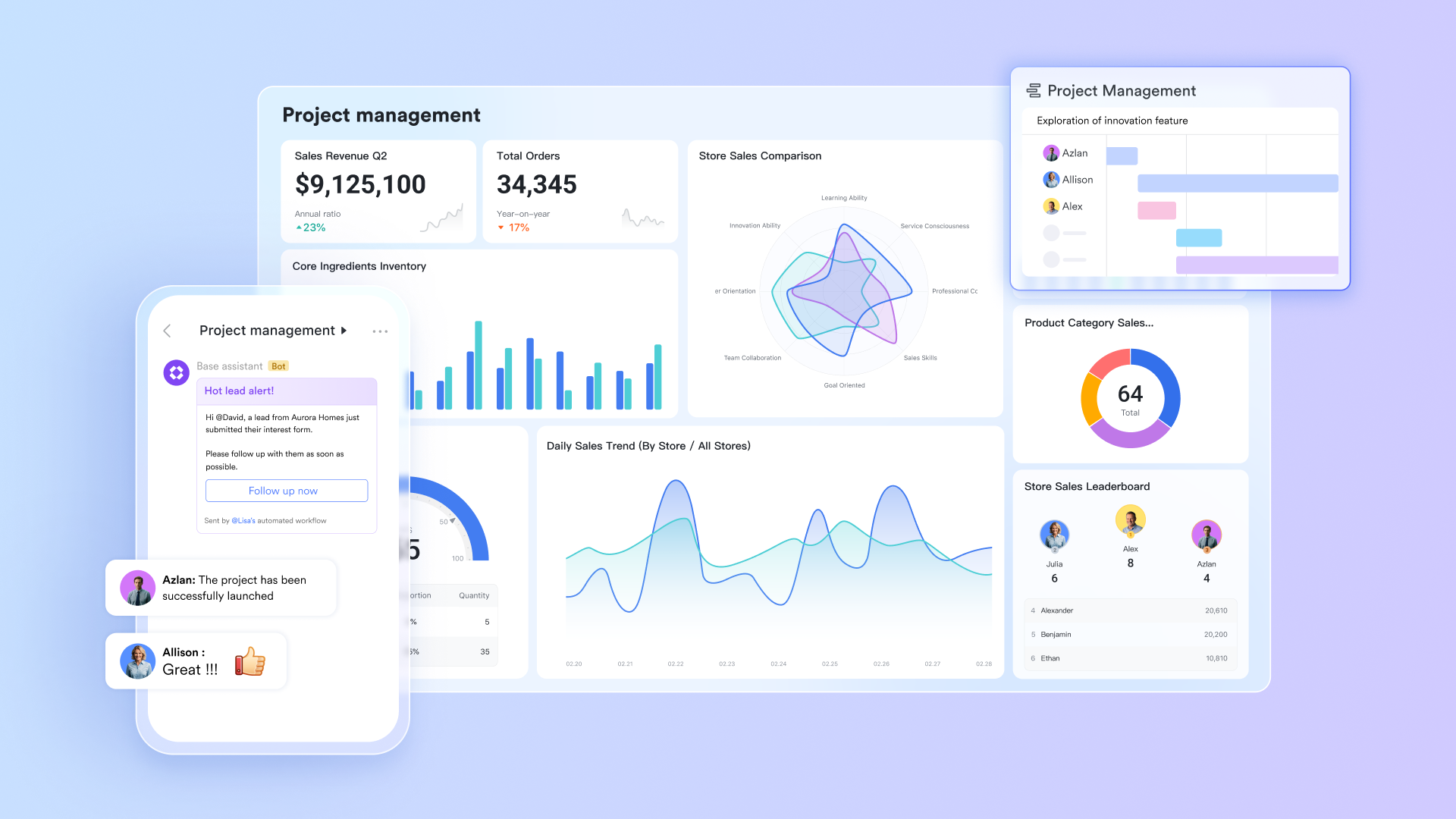
Transforming WBS elements into relational project data & visual insights
serves as the fundamental bedrock for establishing a Work Breakdown Structure, enabling teams to systematically organize deliverables, work packages, and sub-tasks into structured, interlinked data tables. Each WBS component can be enriched with dedicated fields for scope parameters, assigned owners, anticipated timelines, estimated costs, and critical dependencies, thereby ensuring that every constituent is precisely delineated. Through a variety of visualization options—such as Grid, Kanban, Gallery, and Timeline views—teams gain the capacity to intuitively perceive how overarching deliverables cascade into discrete, actionable work items. Interconnected records meticulously preserve parent-child relationships, ensuring that crucial links across project phases remain unbroken.
Furthermore, Lark Base dashboards ingeniously transmute the raw WBS data from Base into crisp, visually compelling , offering teams and stakeholders an immediate grasp of project health. Users can readily generate charts illustrating completion percentages broken down by WBS level, the inventory of outstanding tasks, budget consumption metrics, or risk indicators directly tied to specific deliverables. Crucially, Dashboard elements undergo automatic updates in tandem with changes to Base records, thereby obviating the necessity for laborious manual reporting. This real-time observational capability empowers project managers to pinpoint potential bottlenecks, vigilantly monitor scope adherence, confirm that work packages remain on course, and articulate progress with utmost clarity during reviews or status briefings. 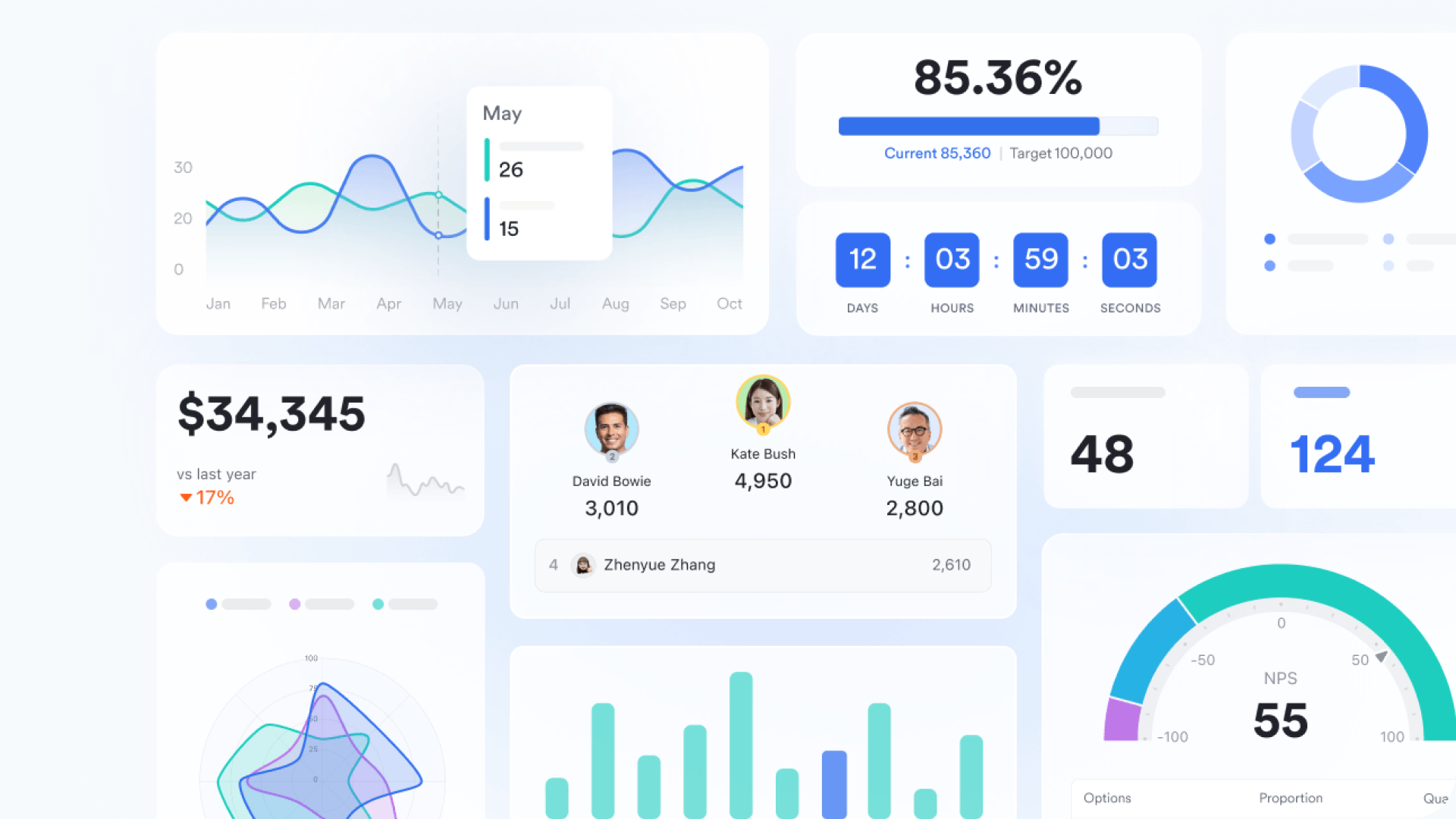
Lark Base workflow capabilities enhance WBS management by and ensuring each work package consistently aligns with overall project advancement. Configurable workflows can autonomously trigger the generation of new tasks upon deliverable approval, dispatch notifications when a work package transitions between stages, or seamlessly update relevant fields such as progress, priority, or ownership. Conditional logic empowers these workflows to dynamically adapt based on the specific state of each WBS element, thereby averting overlooked handoffs or scheduling discrepancies. This automation significantly alleviates the burden of manual tracking and guarantees the real-time accuracy of each WBS level's status, even across extensive or multi-team project endeavors. 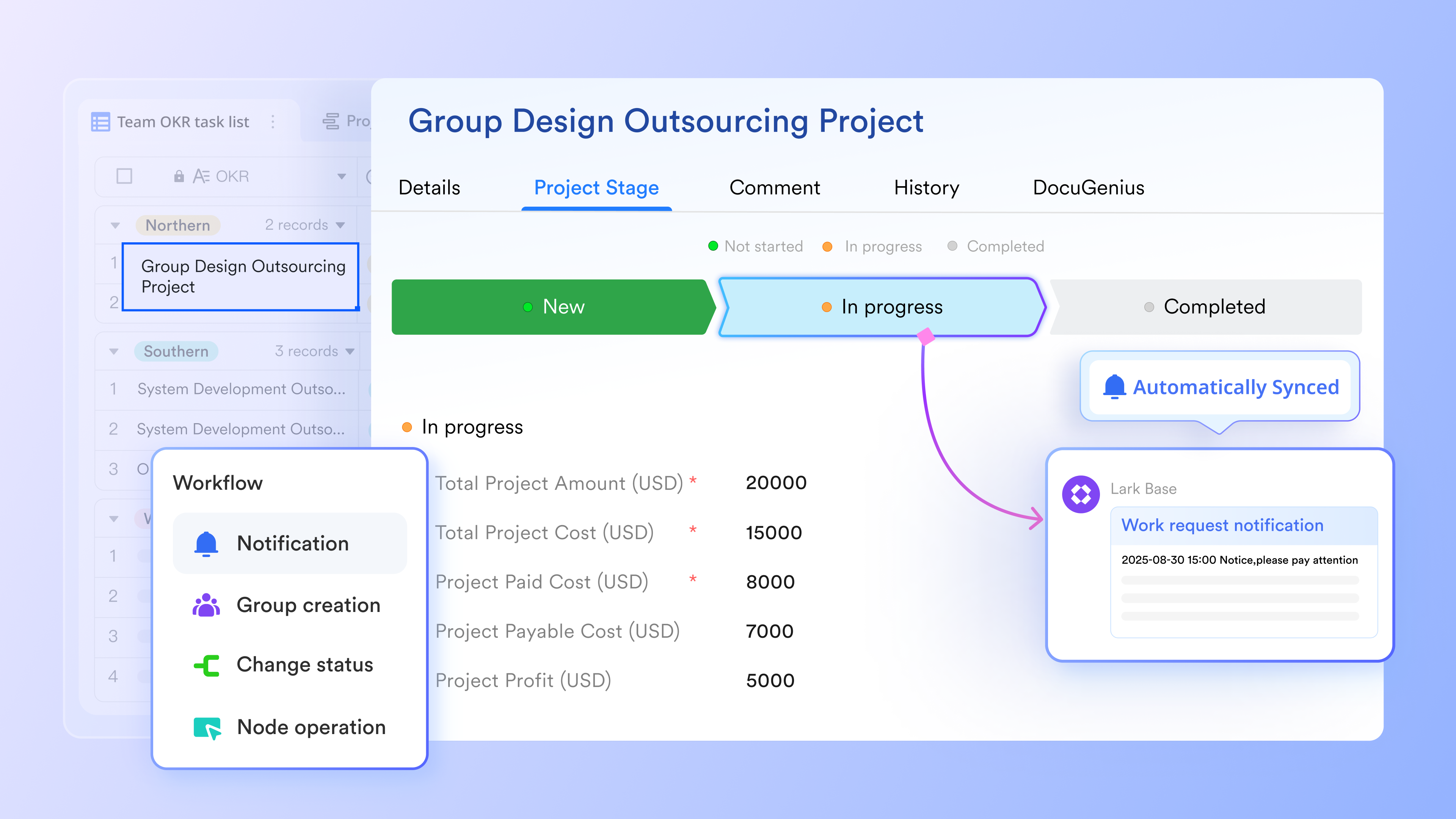
Collaborative workspace for WBS frameworks and project records
Within , teams discover a shared environment for constructing their Work Breakdown Structures. This platform facilitates the collective refinement of project scope, the initial sketching of deliverables, and the meticulous recording of underlying assumptions, all before these elements are systematically arranged within Lark Base. Project managers can leverage Lark Docs' extensions and panels to compose comprehensive WBS dictionaries, append detailed elaborations for each work package, and annotate prerequisites using structured tables, checklists, bullet points, or integrated diagrams. Contextual comments and @ feature ensure that discussions remain tethered to specific WBS constituents, while a robust version history guarantees transparent tracking of scope or deliverable modifications over time. 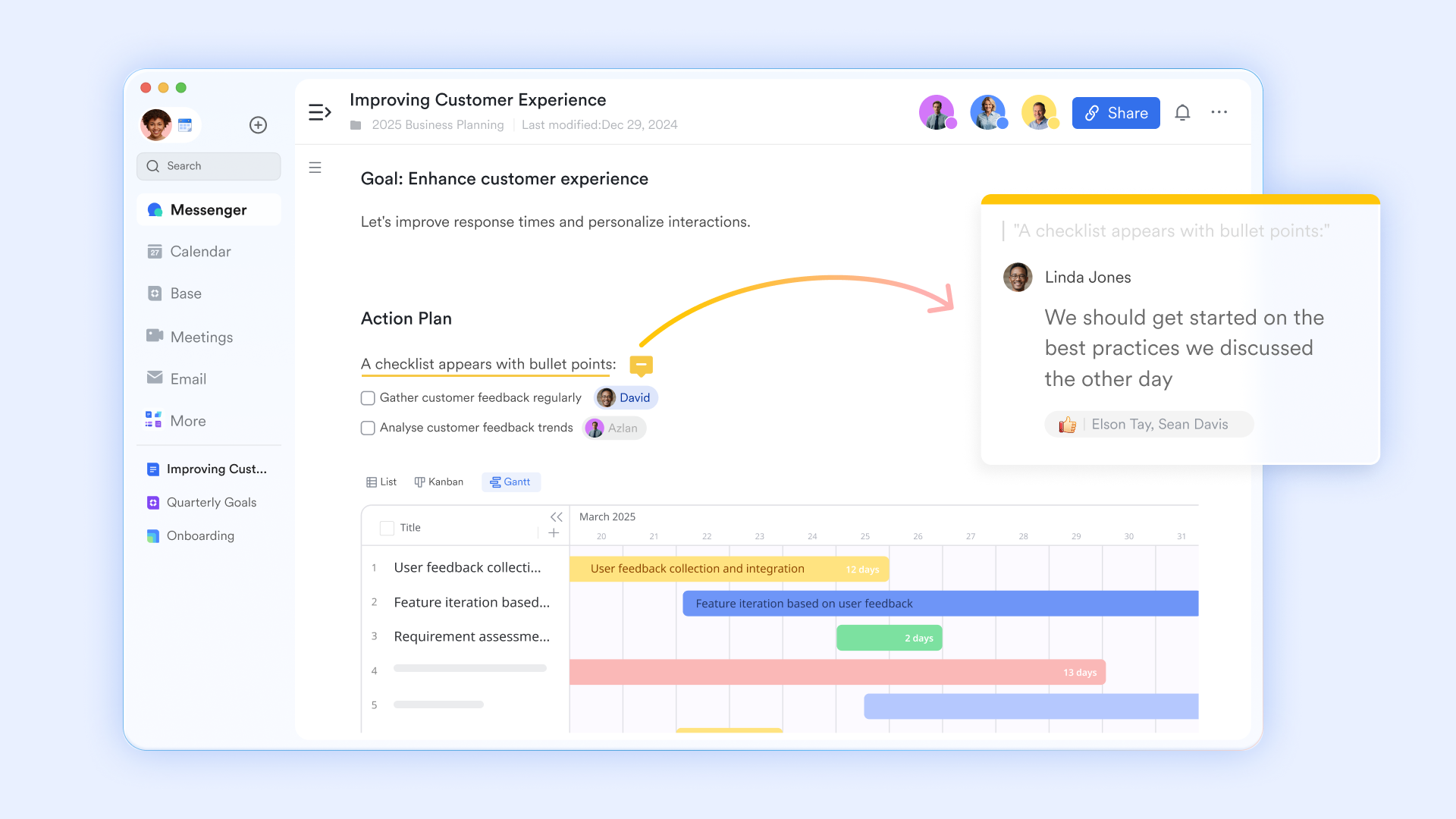
Executing work packages with defined accountability and tracking
Lark Tasks facilitates the conversion of WBS work packages into tangible, trackable assignments, complete with specified owners, firm deadlines via , and designated priorities. Teams can further disaggregate each work package into smaller tasks or subtasks, establish dependencies to accurately reflect sequencing, and visualize execution using diverse List, Board, or Calendar interfaces. Tasks maintain linkages back to their corresponding Base records, ensuring contextual consistency with the overarching WBS structure. Features such as proactive reminders, precise progress percentages, and comprehensive workload visibility instill disciplined and transparent execution, allowing all contributors to comprehend their individual responsibilities within the broader WBS framework. 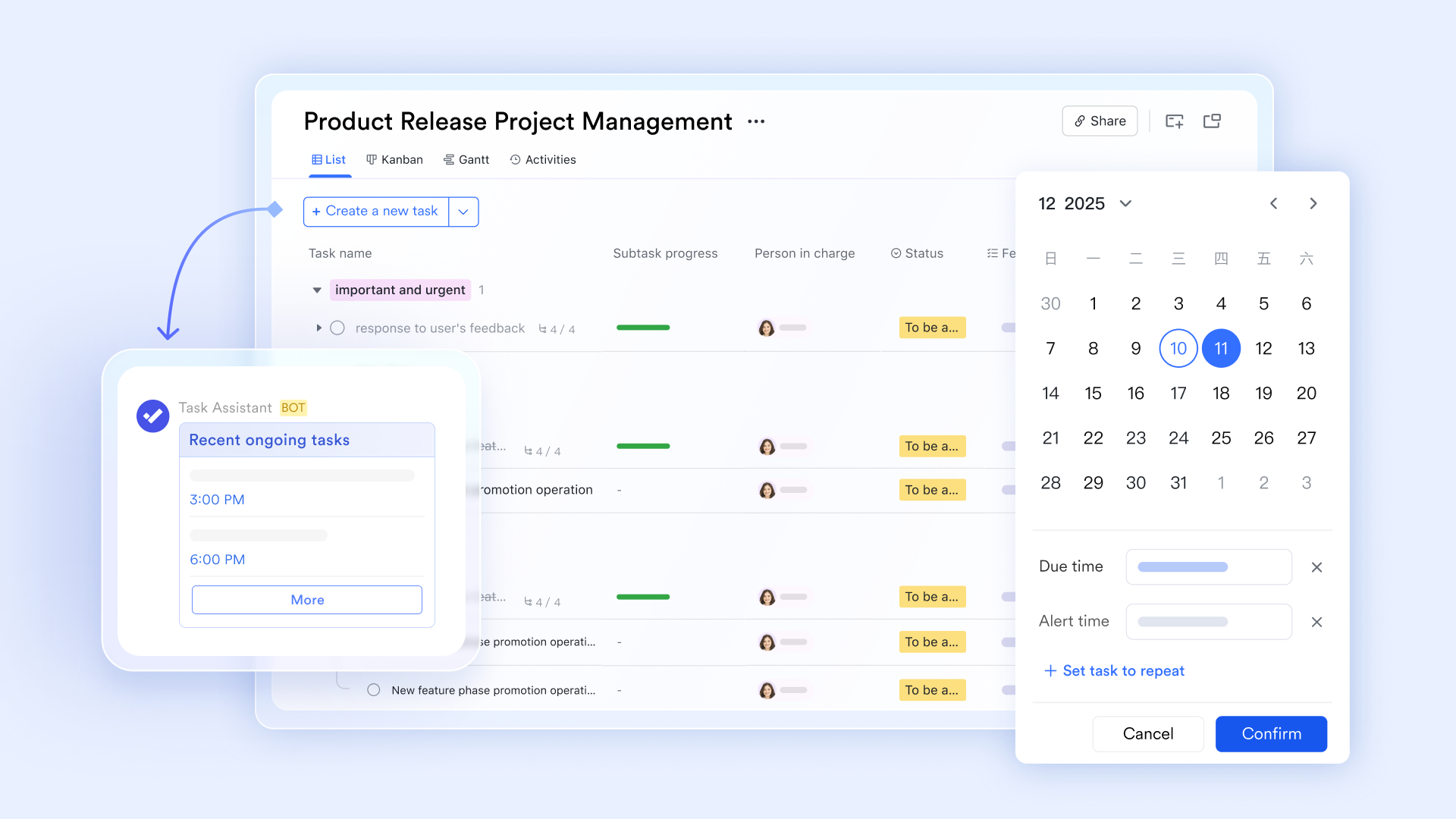
:
- Starter plan: Free forever plan that includes 11 powerful tools for up to 20 users. It also comes with 100GB of storage, 1000 automation runs, AI translations, and more.
- Pro plan: $12/user/month (billed annually) for up to 500 users. It includes everything in Starter plus group calling for up to 500 attendees, 15TB of storage, 50,000 automation runs, and more.
- Enterprise plan: for custom pricing. Supports unlimited users and includes even more automation runs and advanced security, compliance, and management features.
For small teams with simple communication needs

18 months message history
1000 Base automation runs/month
2000 rows per table in Base
Most POPULAR
For companies with comprehensive collaboration and management needs
Unlimited message history
500-participant video meetings
50k Base automation runs/month
20k rows per table in Base
For large companies with advanced security and organizational management needs
Get a personalized demo and pricing
Unlimited message history
500-participant video meetings
15 TB storage + 30 GB storage/user
500k Base automation runs/month
50k Base automation runs/month
Most POPULAR
For companies with comprehensive collaboration and management needs
Unlimited message history
500-participant video meetings
50k Base automation runs/month
20k rows per table in Base
Best practices for getting the most from a work breakdown structure template in Excel
Here are practical habits that turn a static template into a central tool for project success, reinforced by from different industries and by broader .
Start early in planning
Use the WBS template at project initiation to shape scope and expectations as part of a broader and detailed . Trying to retrofit a WBS after work has started creates gaps and resistance. Early WBS development forces clarity on what the project will and will not include.
Co-create with stakeholders
Hold collaborative WBS workshops using the template on a shared screen or shared Lark Sheet. Capture collective understanding of what needs to be delivered. This builds buy-in and surfaces assumptions before they become problems.
Traceability to objectives
Link each WBS element back to specific project objectives, KPIs, or OKRs, ideally documented in a broader . This ensures nothing on the template is "orphaned work" without a clear purpose and also supports healthier . When stakeholders question why certain work is included, you can point to the objective it supports.
Version control and baselines
Save baseline versions of the WBS template at each major approval point. Track changes against the baseline to measure scope evolution. In Lark, version history is automatic, making this discipline easier to maintain.
Use color and grouping wisely
Apply subtle color coding for phases, owners, or risk levels. Avoid over-decorating the sheet—too many colors create visual noise that obscures rather than clarifies. Use Excel's grouping feature to collapse sections when viewing high-level summaries.
Prepare for reuse
After closing a project, refine the WBS template based on lessons learned. Note which work packages were underestimated, which were unnecessary, and which were missing, and capture these insights in a and your documented . Store the improved template centrally for future initiatives of similar type.
Learn more about Lark's work breakdown practices
Advanced tips: Linking your work breakdown structure Excel template to scheduling and reporting
Mature teams treat their WBS as the backbone of scheduling, cost control, and reporting, combining it with proven and domain-specific when building digital products. Here is how to extend your template's value.
Mapping WBS to the timeline
Translate WBS work packages into tasks and milestones on a project timeline using a :
- Export your WBS to a scheduling tool (or Lark's task system).
- Add dependencies between work packages.
- Assign resource capacity and level workloads.
- Generate a Gantt chart showing the critical path.
The WBS provides the "what"; the schedule adds the "when" and "who," especially when visualized through .
Using WBS codes for reporting
WBS codes serve as filters or grouping keys in reporting:
- Build pivot tables that summarize cost by WBS branch.
- Create dashboards showing progress by phase (Level 2) or deliverable (Level 3).
- Use WBS codes in status reports so executives can drill into specific areas.
Connecting to risk and issues logs
Reference WBS codes in your risk and issue registers. When you identify a risk to "CMS Migration" (WBS 1.3), link mitigation actions to the affected work packages. This traceability helps ensure risk responses are targeted and complete.
Feeding data into Lark dashboards
WBS-based data stored in Lark Sheets can be aggregated into visual reports and integrated into a . Share dashboards with leadership via Lark Docs, combining narrative context with live data from your WBS structure.
Supporting Earned Value-like tracking
While full Earned Value Management requires specialized tools, you can track planned vs. actual effort or cost by WBS element in Excel or Lark Sheets, surfacing that information in a or even evaluating which best support this level of tracking. Add columns for planned cost, actual cost, and variance. Roll up variances by WBS branch to identify problem areas early.
Conclusion
A work breakdown structure template Excel helps teams clarify scope, estimate reliably, and communicate work structure to stakeholders. The hierarchical decomposition transforms an overwhelming project into manageable chunks that can be assigned, tracked, and controlled.
But the real value comes when the template is kept up to date, linked to timelines and budgets, and shared with the entire team. A static file gathering dust in someone's downloads folder does not help anyone. A living WBS, maintained collaboratively and integrated with your project workflows, becomes the backbone of project success. Upload your existing free work breakdown structure template excel into Lark. Collaborate in real time with your team, eliminate version confusion, and centralize communication around your WBS.
Boost team clarity with structured planning
FAQs
Does Excel have a WBS template?
While Excel doesn't have a built-in, dedicated WBS template, it is highly suitable for creating one. The provided document highlights Excel's accessibility, user familiarity, and flexibility, making it an excellent tool for project managers to design custom Work Breakdown Structure templates. This allows for detailed task organization, resource allocation, and project tracking, leveraging Excel's versatile spreadsheet features.
What are the 5 phases of work breakdown structure?
The document describes the WBS as separating a project into manageable tasks through a hierarchical breakdown into phases, deliverables, and work packages. While it doesn't explicitly list "5 phases" of WBS, the structure typically involves defining the main project, then progressively breaking it down into major phases, key deliverables within those phases, and finally into individual work packages or activities. This hierarchical decomposition ensures all project components are identified and organized.
What is the 100% rule in WBS?
The 100% rule in WBS dictates that the Work Breakdown Structure must encompass all the work defined by the project, including all deliverables and project management work. It ensures that the sum of all work at each level of the WBS completely accounts for the work at the preceding level, leaving no omissions. This principle helps eliminate ambiguity, minimizes the risk of scope creep, and ensures that all project components are fully covered.
Is WBS free?
The concept and methodology of a Work Breakdown Structure itself are free. It's a project management tool and technique that can be implemented using various resources. While specialized project management software exists that can help create a WBS, you can also create a WBS using readily available and often free tools like Microsoft Excel, as highlighted in the provided document. This makes WBS a cost-effective approach to project planning and organization.
Related reading












