Need a free Gantt chart template to streamline your project planning?
Whether you are launching a product, coordinating a construction build, or managing daily project tasks, a Gantt template gives your team a shared, visual timeline that keeps everyone aligned. Staying organized is crucial for project success, but you don’t need expensive software—reusing a pre-built, free Gantt chart template saves hours of manual formatting, allowing project managers to assign tasks and track progress instantly.
In this ultimate guide, we’ve compiled 13 of the best free Gantt templates for Excel, Google Sheets, and Lark, so you can easily track your projects without the hassle of building one from scratch.
What is a Gantt chart?
A is a visual tool used for project planning that allows you to track tasks, timelines, and dependencies.
The chart displays tasks as horizontal bars, with the length of each bar representing the duration of the task. This provides an immediate visual timeline of your entire project, helping you see not only what needs to be done but also when and in what order.
Benefits of using a Gantt chart template
Why struggle with creating a Gantt chart from scratch when you can use a Gantt chart that’s already set up for you? Here’s why Gantt templates are a game changer:
Time-Saving
A Gantt chart template eliminates the need to create charts from scratch. Instead of spending hours figuring out how to structure your project timeline, you can simply add your tasks and dates into the template.
Customizable
Every project is unique, along with its specific requirements. A Gantt chart template allows you to tailor the chart to your needs—whether it’s adding custom milestones, adjusting task dependencies, or changing the design.
Whether you're managing a marketing campaign or a product launch, templates allow you to tweak timelines, task details, and dependencies to fit your workflow perfectly.
Collaboration-friendly
Gantt chart templates provided by collaboration platforms like go beyond static charts. Using templates in Lark, you can set up AI automation, enable real-time updates, and synchronize information with your team. This ensures everyone stays aligned and up-to-date, making collaboration seamless.
Versatility
Gantt chart templates aren’t limited to a specific industry or project type. From construction to event planning to software development, these templates provide a universal framework that can be tailored for a variety of tasks.
Free to use
One big benefit for your team is that some Gantt chart templates are free to use. This makes them an excellent choice for startups, small businesses, or teams working with limited budgets. Platforms like Lark provide free, high-quality templates with advanced features, giving you access to powerful without additional costs.
Discover the Gantt chart expert
Key features to look for in a Gantt chart template
Not every Gantt template is created equal. Before you commit to one for your project, ensure it includes these four essential elements:
- Essential columns: At a minimum, your template must contain fields for task name, assignee/owner, start date, end date, and task duration.
- Task dependencies: A great template allows you to link dependent tasks. This ensures that if one task slips, downstream dates can automatically adjust, surfacing potential bottlenecks early.
- Visual progress markers: Look for color-coded task bars (ideally updating based on status like "In Progress" or "Late"), milestone diamonds, and a vertical "Today" line.
- Collaboration features: If you are working in Google Sheets or Lark Base, ensure team members can leave comments and @mention assignees directly inside the Gantt view to eliminate context-switching.
Free Gantt chart templates for your work
These templates are free to download or free to use online, helping you get started with your next project.
1. Basic Gantt chart template for Lark Sheets
The template is perfect for project managers and team leaders to plan, track, and manage tasks and deadlines. Ideal for projects of any size, helping you stay organized and on schedule.
2. Simple Gantt chart template for Microsoft Excel
The Excel template helps you easily plan, track, and share project schedules. Ideal for teams collaborating on business plans, project management, or task assignments.
3. Simple Gantt chart template for Google Sheets
This Google Sheets template is an excellent option if you need a fast way to generate a Gantt chart. Its simple design means you can use it right away.
4. Project management Gantt chart template for Google Sheets
This template from (DPM) is effective for organizing project timelines and ensuring tasks stay on schedule. With its stacked bar chart format, it visually represents the progress of all project tasks clearly.
5. Employee task tracker Gantt template for Lark Base
This employee task tracker template offers a ready-to-use Gantt chart for monitoring task progress, along with a Kanban board for task leaders and customizable filters for task lists. You can easily adjust fields and add records to meet your specific needs.
6. Project planner Gantt template for Microsoft Excel
This Excel template serves as an effective project planner, enabling you to track and coordinate project activities. Based on the traditional Gantt chart model, it visually represents project timelines, allowing you to input start dates, durations, and task statuses.
7. OKR Gantt template for Lark Base
This OKR Management template assists in managing your objectives and key results throughout the year. It provides a structured approach to track annual goals, including their priority, status, and start and end dates.
8. Web design & development Gantt template for Lark Base
This Web Design & Development template encompasses every stage of a website project, from design and coding to content creation. It ensures that all requirements are met while keeping the project organized and on schedule.
9. Podcast content management Gantt template for Lark Base
This Podcast Content Management template simplifies the process of creating a podcast. It enables you to track and manage your podcast production schedule while customizing fields to fit your needs.
10. Social media marketing plan Gantt template for Canva
This Social Media Marketing Canva template offers a visually appealing Gantt chart that allows stakeholders to visualize timelines and tasks. Crafted by Canva design experts, it allows for easy customization to fit your brand and project needs, ensuring a professional look.
11. Recruitment and onboarding Gantt template for Lark Base
This Recruitment and Onboarding template is designed to help HR professionals manage recruitment and onboarding processes efficiently. It provides a structured format to track the progress of each candidate through the recruitment process, from the first round of interviews to the final selection.
12. Training plan Gantt template for Excel and Sheets
This template is designed to enhance your training programs. It provides a clear framework for organizing courses, schedules, and key milestones, facilitating effective learning journeys.
13. Content calendar Gantt template for Lark Base
This Content Calendar template allows you to keep track of all your content in one place, with fields for campaign names, content format, progress, and associated events.
How to choose a Gantt chart template for your work
Selecting the right template depends on several factors:
- Project type: Consider the complexity of your project. For larger, more intricate projects, opt for templates with dependency tracking and milestones.
- Team size: Collaborative templates like are ideal for larger teams that need real-time updates.
- Preferred format: Do you prefer to work on Excel or Google Sheets? Alternatively, you can use Gantt charts in collaboration software such as Lark.
- Customization needs: If you require specific workflows or branding, look for templates that give you more room for customization.
Use the best templates on the best platform
Build Gantt charts and manage projects in Lark
While templates are incredibly useful, the platform you use to manage them plays a crucial role in your project’s success. stands out as the best tool for Gantt chart management due to its powerful combination of features designed to simplify collaboration, communication, and project tracking.
- Real-time collaboration: Teams can update tasks and timelines simultaneously, ensuring seamless communication and progress tracking.
- Integrated communication: Share files, chat, and hold video calls all within the same platform, making project management more efficient.
- Customizable templates: Lark offers a wide range of project management templates tailored to different industries and project types.
- Cross-platform access: Whether on desktop, mobile, or web, your project is always within reach, ensuring flexibility for your team.
- Free to use: Lark offers a that includes a variety of free templates.
In addition, working on Lark gives you access to , an advanced no-code project management tool, which is part of Lark’s collaboration suite.
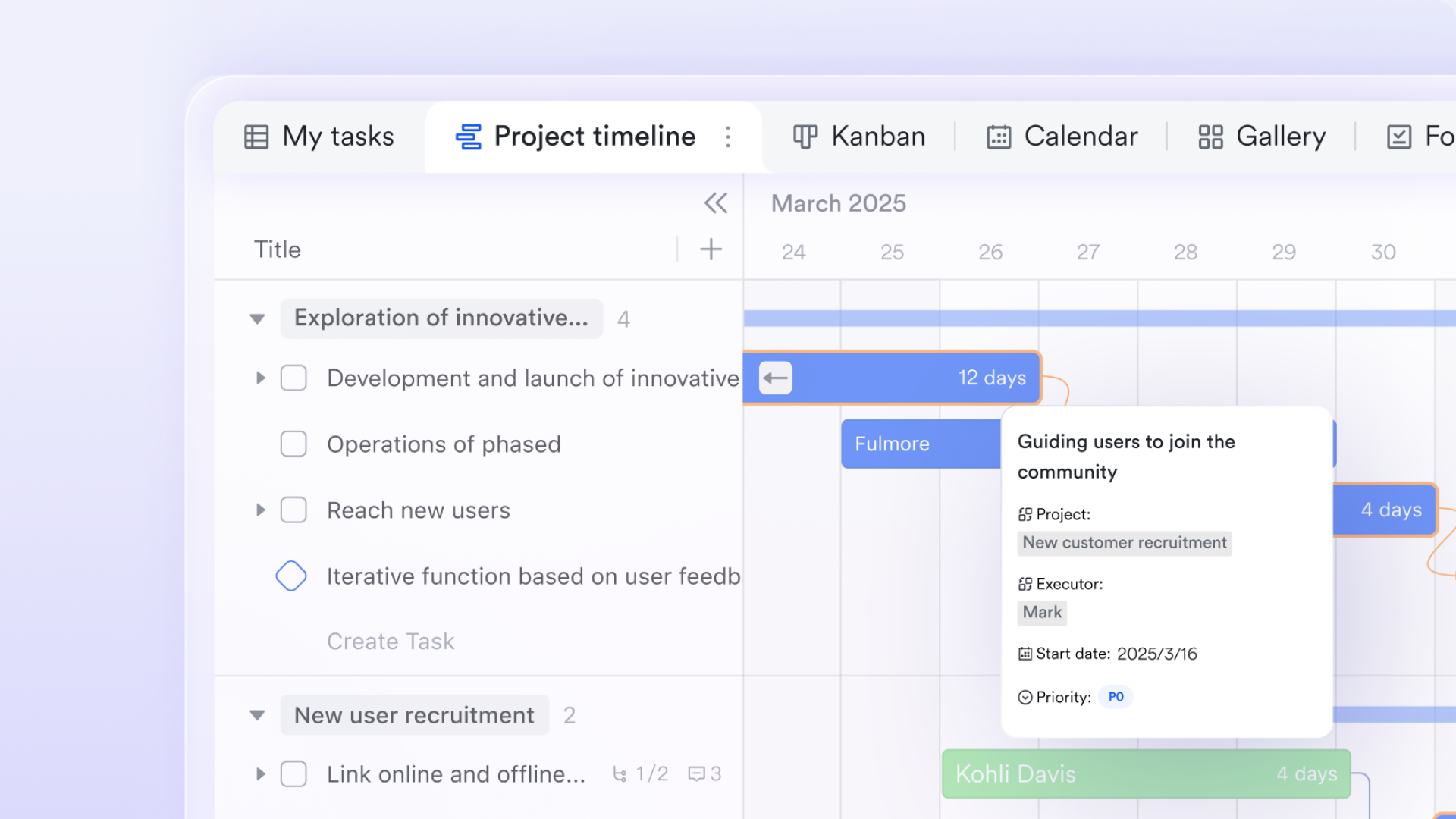
provides an intuitive, flexible platform for managing your Gantt charts and project workflows. Here’s why Base is the perfect tool for teams of any size:
Simple project planning for small teams
For smaller teams, Lark's free plan includes Base, offering a user-friendly interface that integrates with essential tools like chat, calendar, and task management. With Lark Base, teams can create Gantt charts, dashboards, and visual workflows, ensuring streamlined project tracking and progress monitoring.
Additionally, your charts can be embedded directly in documents for real-time collaboration, ensuring that everyone is on the same page.
Enhanced collaboration for large teams
As Base is integrated with ’s other products, it excels in facilitating cross-departmental communication. For larger teams, its integration with chat, meetings, and task management tools keeps everyone connected, informed, and aligned.
Base’s Gantt chart capabilities support complex project tracking, and its flexibility allows for customization to fit the specific needs of your team. Automated Gantt chart creation
includes a feature that generates time bars based on data from date fields. This eliminates manual input, saving time and improving accuracy. Additionally, Base supports formula-based date calculations, automatically adjusting start and end times for your tasks.
Drag-and-drop editing
Editing your Gantt chart is simple with ’s drag-and-drop functionality. You can adjust the start and end times of tasks with ease, and all changes sync automatically across views. The one-click option to expand or collapse task details further simplifies navigation, making it easier to manage complex projects.
Data filtering and grouping
With Base, you can easily group and filter data using grouping and filtering functions. This allows you to focus on the most important tasks and improve your team's ability to prioritize work effectively. Color-coding for easy tracking
makes it easy to visually track progress with color-coded time bars. Different tasks or categories can be highlighted in distinct colors, providing an at-a-glance view of project milestones. You can also customize colors based on field values, making it easier to distinguish between different task types or priorities.
For most teams, the Gantt chart is just the beginning.
Once your timeline lives in the same place as your messages, your docs, your meetings, and your data, something clicks. You stop juggling tools. You stop copying and pasting status updates. And you start building workflows that actually fit how your team works.
Don't just take our word for it. Here's what one team discovered after moving to Lark:

"Lark transformed our business. We were able to replace over 8 different collaboration tools with just one app. The best part is how customizable it is: we've built our own personalized dashboards, workplace structure, and automation tools, to specifically cater to our business needs. Our team management has never been this easy, fast, and productive than now."

Alexei Dela Cuesta
CEO at Surgo Media
Learn more about the of Lark:
- Starter plan: that includes 11 powerful tools for up to 20 users. It also comes with 100GB of storage space, 1,000 automation runs, AI translations, and more. No credit card needed.
- Basic plan: (billed annually) for up to 500 users. It includes everything in Starter and unlimited message history, 5TB of storage space, 1,000 automation runs, and more. Some users may need to to purchase this plan.
- Pro plan: (billed annually) for up to 500 users. It includes everything in Basic plus group calling for up to 500 attendees, 15TB of storage space, 50,000 automation runs, and more.
- Enterprise plan: for custom pricing. Supports unlimited users and includes even more automation runs and advanced security, compliance, and management features.
For small teams with simple communication needs

18 months message history
1000 Base automation runs/month
2000 rows per table in Base
Most POPULAR
For companies with comprehensive collaboration and management needs
Unlimited message history
500-participant video meetings
50k Base automation runs/month
20k rows per table in Base
For large companies with advanced security and organizational management needs
Get a personalized demo and pricing
Unlimited message history
500-participant video meetings
15 TB storage + 30 GB storage/user
500k Base automation runs/month
50k Base automation runs/month
Most POPULAR
For companies with comprehensive collaboration and management needs
Unlimited message history
500-participant video meetings
50k Base automation runs/month
20k rows per table in Base
How to fill out a basic Gantt chart template step-by-step
Once you have downloaded your preferred Gantt chart Excel template or cloned a Lark Base view, follow these six steps to set up your project timeline:
1. List all tasks (Work breakdown structure): Break down your entire project scope into small, actionable tasks.
2. Group by project phases: Organize your tasks under phases like "Planning," "Execution," and "Review" to keep the visual timeline clean.
3. Estimate durations: For each task, define start and end dates. The template will automatically generate the task bars.
4. Define task dependencies: Identify other tasks that must complete before a subsequent task can start.
5. Set project milestones: Mark zero-duration key dates (e.g., "Client Sign-off") to act as visual anchors.
6. Track project progress: Update the percentage complete weekly to keep the chart honest and useful.
Final thoughts on Gantt chart templates
Gantt chart templates are a great starting point, but you need the right platform to maximize their potential. Lark offers customizable, free Gantt chart templates along with powerful tools for real-time collaboration and project tracking. With intuitive drag-and-drop editing, automated task creation, and seamless integrations, Lark keeps teams aligned—no matter where they work. Its real-time communication and project management features make it ideal for teams of any size. Try today and unlock your team's full potential.
See how much you can save by switching to Lark today
FAQ About Gantt template
What is a Gantt chart template?
A Gantt chart template is a pre-built visual project management tool that displays tasks, timelines, start and end dates, task dependencies, and milestones along a horizontal timeline bar. It helps project managers plan, schedule, and track progress without building a chart from scratch.
Where can I find a free Gantt chart template?
You can download a free Gantt chart template from multiple sources: Microsoft Excel, Google Sheets, Smartsheet, and Lark Base. This article compiles 13 free Gantt chart templates covering construction, marketing, software development, and event management use cases.
Is there a free Excel Gantt chart template?
Yes. The Excel Gantt chart template remains one of the most widely used options because most teams already have Microsoft 365. You can use the built-in stacked bar chart method or download a pre-formatted template from this collection and start customizing immediately.
Can I create a Gantt chart in Google Sheets?
Yes. A Google Sheets Gantt chart uses the same stacked bar chart technique as Excel, with the advantage of real-time collaboration. Simply enter task names, start dates, and durations, then insert a stacked bar chart and format it to show timeline bars.
How does a Lark Base Gantt chart compare to Excel or Google Sheets?
Lark Base goes beyond static spreadsheets by combining Gantt views with automated workflows, real-time collaboration, cross-table references, and customizable dashboards. It's ideal for teams that need dynamic project tracking rather than manual chart updates.
What should a good Gantt chart template include?
A quality template should cover: task names, start/end dates, duration, task dependencies (FS, SS, FF, SF), the critical path, milestones, resource assignments, and progress tracking. Templates with a WBS (Work Breakdown Structure) hierarchy provide even better task organization.
Which Gantt chart template is best for construction projects?
Construction projects benefit from templates that include critical path analysis, subcontractor timelines, material delivery schedules, and phase-based milestones. Look for a construction-specific Gantt chart template with dependency linking and resource allocation columns.
Can I customize these Gantt chart templates?
Absolutely. All 13 free templates in this collection are fully editable. You can adjust dates, add or remove tasks, modify milestones, change colors, and tailor columns to fit your specific project management workflow — whether in Excel, Google Sheets, or Lark Base.
Related Reading






























