


Business Process Automation Services: Top Tools and Guide

Ryan Tanner
Product Marketing Specialist
Aug 5, 2026
Ryan Tanner
Aug 5, 2026

25 min read


Modern companies run on speed, accuracy, and consistent execution. But as teams scale, manual tasks create delays, errors, and operational friction. A business process automation service helps eliminate this burden by standardizing workflows, streamlining approvals, and connecting systems across the organization. Instead of switching between spreadsheets, emails, and siloed apps, teams can automate repetitive work and operate with greater predictability.
In this guide, we'll break down how BPA services work, where they deliver the most value, and how leading platforms, such as Lark, Pipefy, Kissflow, Microsoft Power Automate, Appian, and others, compare in terms of workflow depth and real-world use cases.

Comparison snapshot: Top business process automation services
Here's a quick comparison of the top business process automation services to help you choose the right fit. This snapshot highlights each platform's strengths, workflow style, collaboration capabilities, and automation depth. Whether you're a small team or a large enterprise, this comparison will clarify where each tool shines. Use it as a guide to align your automation strategy with your business needs.
Information source: Official vendor sites
Update time: 2025-11-23
Note: Pricing and plan details reflect publicly available data as of the update date and may vary based on region, billing cycle, and number of agents.
What is a business process automation service?
A business process automation service is a cloud-based platform that helps organizations streamline and automate repetitive, manual, or rule-based workflows across departments. Instead of relying on emails, spreadsheets, or fragmented tools, businesses use automation to route tasks, trigger actions, update data, and ensure every process follows a consistent path. Modern platforms, often delivered as business process automation as a service (BPAaaS), combine workflow design, integrations, analytics, and governance into a single system.
These services can support everything from field service business process automation, such as work order routing and technician dispatch, to internal operations, including onboarding, procurement, and compliance reviews. They also play a key role in process automation business service management, giving teams visibility into workflows, performance, and bottlenecks. By creating structured, automated processes, companies reduce errors, accelerate cycle times, and improve coordination across HR, finance, IT, operations, and customer-facing teams.
Business process automation as a service: How it works
A modern business process automation service works by combining infrastructure, prebuilt logic, and intelligent engines that execute workflows reliably at scale. These components enable businesses to automate processes quickly without excessive technical complexity.
- Cloud automation platforms: These platforms host workflows in the cloud, eliminating the need for on-premise servers or manual maintenance. They provide secure, scalable environments where automations run in real time. Teams can access and modify workflows from anywhere, ensuring consistency across distributed operations.
- Prebuilt workflows: Vendors offer ready-made templates for standard processes like onboarding, procurement, and service requests. These templates reduce setup time and help teams follow proven best practices. They also ensure organizations can launch automation quickly, even without internal technical expertise.
- Managed setup + ongoing support: Some platforms provide onboarding specialists who assist with workflow design, data structures, and process mapping. Ongoing support ensures automation stays optimized as business needs evolve. This reduces IT workload and improves long-term workflow stability.
- API-connected automation hubs: APIs allow the platform to connect with CRMs, HRIS, ERP systems, and custom apps. Data flows automatically between systems, eliminating duplicate entry and manual updates. This creates unified, end-to-end workflows across the entire business ecosystem.
- AI-driven workflow engines: AI enhances automation with intelligent routing, predictive insights, and automated data interpretation. These engines can identify anomalies, suggest process improvements, or handle unstructured information. The result is more brilliant, faster workflows that adapt to real-world scenarios.
Which processes benefit the most from BPA services?
A business process automation service can support nearly every department, but some workflows achieve greater efficiency due to their volume, complexity, or cross-team dependencies. Below are the areas where automation delivers the highest impact.
Field service business process automation
Field operations rely on speed, coordination, and accuracy, making them ideal candidates for automation. Field service business process automation centralizes scheduling, technician movement, equipment usage, and job completion workflows.
- Work order routing: Automation assigns work orders based on technician location, skill set, urgency, or availability. This removes manual scheduling and reduces response times. Real-time routing ensures the right technician is always matched to the right job.
- Technician dispatch: Automated triggers notify technicians instantly when new tasks are assigned or when job statuses change. Dispatch becomes streamlined, reducing delays and improving customer service timelines.
- Asset tracking: BPA connects field teams with real-time asset status, inventory, tools, spare parts, or equipment health. Updates sync automatically, preventing shortages, misplacements, or inaccurate records.
- Mobile approvals: Field technicians can complete approvals, submit documents, or update job statuses directly from their devices. Managers receive automated notifications, allowing faster decision-making without waiting for office-based reviews.
Business service automation for internal teams
Internal operations often suffer from repetitive manual tasks and compliance-heavy workflows. A business process automation service helps standardize and accelerate these internal processes.
- Employee onboarding: Automation connects HR, IT, and finance to complete onboarding tasks in sequence, account setup, equipment allocation, policy sign-offs, and training assignments. New hires experience a smoother, more organized start.
- Budget approvals: Instead of emails or spreadsheets, automated approval chains route budget requests to the right approvers. Escalations, deadlines, and notifications ensure budgets move quickly without bottlenecks.
- Compliance checks: BPA enforces rules automatically, ensuring documents are submitted, policies are acknowledged, and audit-ready records are maintained. This reduces compliance risk and eliminates manual follow-ups.
- Vendor management: Vendor onboarding, contract renewals, and performance tracking can all be automated. Data is centralized, approvals follow structured flows, and timelines stay on track.
Cross-department business workflows
Many of the most critical workflows span multiple teams. Automation eliminates confusion, inconsistent communication, and delays caused by unclear handoffs.
- HR + IT + finance coordination: For processes like onboarding, offboarding, or role changes, automation aligns all teams. IT provisions accounts, HR completes documentation, and finance updates payroll, triggered from a single workflow with clear accountability.
- Procurement + legal + operations timelines: Procurement requests automatically move through review, contract checks, and final approval without manual chasing. Legal reviews are logged, operational requirements are verified, and stakeholders get real-time visibility.
Types of business process automation services
Modern BPA services come in multiple forms, each designed to automate a different layer of work, from data-heavy back-office tasks to customer-facing operations. These service models help businesses scale faster, reduce manual effort, and maintain consistent process execution across teams.
AI-powered workflow automation services
These BPA services use machine learning to optimize processes in real time. They enable predictive routing, ensuring tasks automatically reach the right person or system based on historical patterns. They also support automated data processing and conversational workflows, allowing AI assistants to collect inputs, resolve queries, and trigger actions across business systems.
Rule-driven BPA service platforms
These platforms operate on if–then logic and conditional flows, making them ideal for structured, repeatable processes. They help teams run multi-step approvals, escalate delays, and enforce policies automatically. They also handle backend tasks, such as data updates, ensuring accuracy and compliance across systems.
Document-centered automation services
Designed for paperwork-heavy operations, these services use OCR to extract data, eliminating manual data entry. Teams can manage digital signatures, automate content routing, and streamline contract approvals from intake to completion. This reduces processing time and ensures document accuracy.
Customer service and operations automation
These BPA services streamline client-facing and operational workflows. Chatbots handle routine inquiries, while ticket workflows route issues based on urgency or category. Automated case follow-ups ensure no customer requests are forgotten and that SLAs are consistently met.
Low-code workflow automation services
Perfect for organizations without large development teams, these platforms allow users to build workflows with drag-and-drop tools. They reduce engineering dependency while enabling quick iteration. Teams can launch automation fast, test processes, and scale without writing code.
Core components of an effective BPA service
A full BPA service goes beyond building workflows. It provides businesses with a structured, repeatable, and scalable automation framework. Here's what most end-to-end BPA service providers deliver:
- Process assessment and mapping: Teams analyze existing operations, identify bottlenecks, and outline the ideal future-state workflows. This ensures automation is built on accurate, streamlined processes rather than replicating inefficient ones.
- Workflow templates: Ready-to-use templates help organizations launch faster. These include approval flows, onboarding sequences, procurement cycles, or service request paths that reduce configuration time.
- Data structure design: BPA specialists define how information should be captured, stored, and related across systems. Clean, consistent data models enable accurate reporting and seamless automation.
- Automation orchestration: The service manages how tasks, triggers, and actions move across systems. Orchestration ensures every step is executed in the correct order with explicit dependencies and error handling.
- Integrations with CRM/HRIS/Finance: Providers connect automation to your core business tools, such as Salesforce, Zoho, BambooHR, NetSuite, or SAP, so data flows smoothly across the organization without manual syncing.
- Analytics and service dashboards: Real-time dashboards show workflow performance, bottlenecks, SLA risks, and automation ROI. This helps teams continuously optimize processes.
- Support and governance: Ongoing administration ensures workflows stay up to date as policies change, and governance guards against breakage, unauthorized access, and inconsistent execution of processes.
Top business process automation services & platforms
1. Lark: Unified workflow & collaboration automation
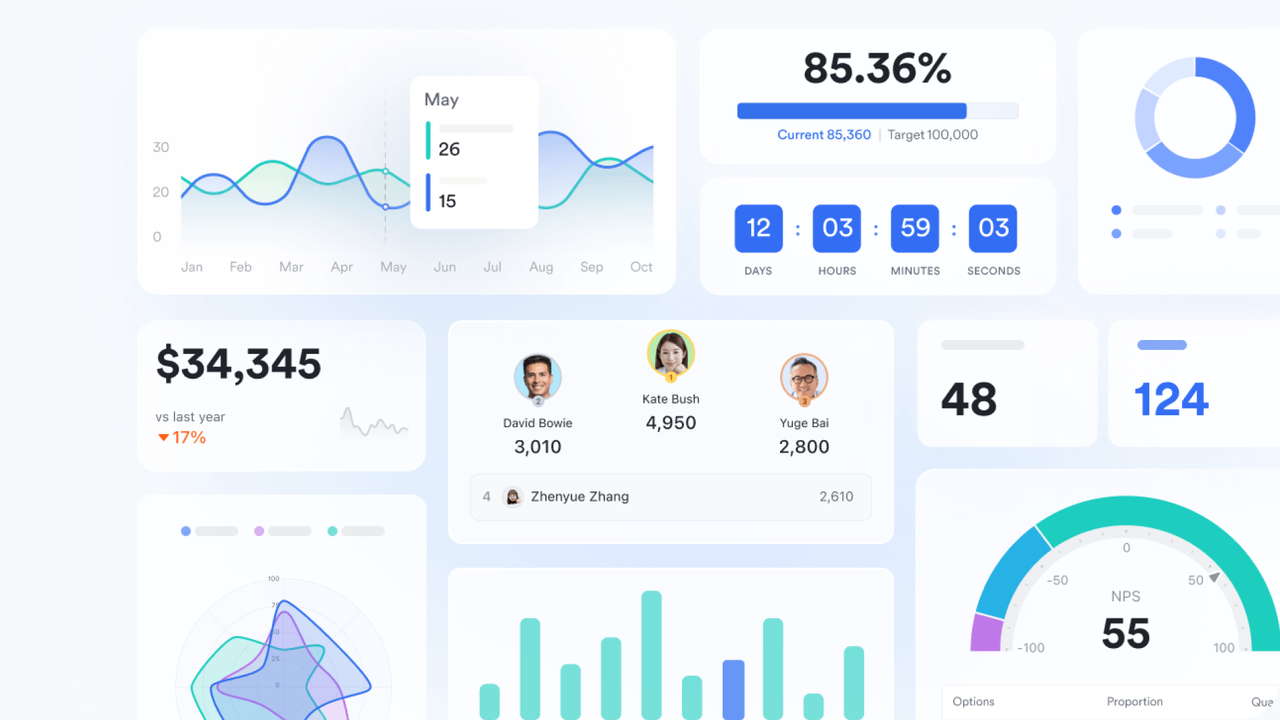
Lark combines workflow automation and team collaboration in a single platform. It helps organizations streamline processes, reduce manual effort, and maintain consistency across departments. With integrated tools for approvals, tasks, docs, and communication, teams can automate repetitive work while staying connected in real time. Lark is designed to support both operational efficiency and cross-team collaboration.
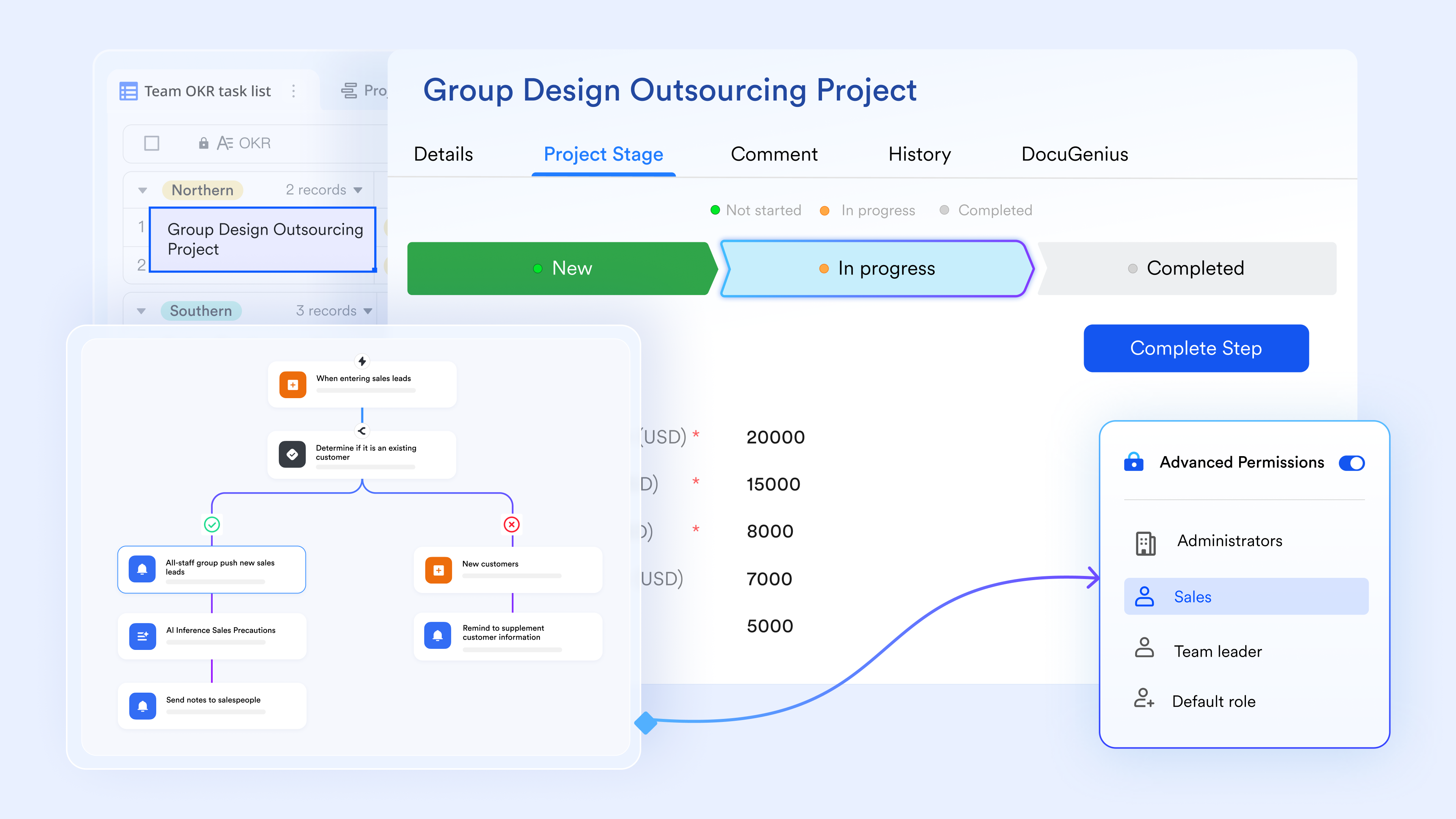
Workflow automation via Lark Base
Lark Base is a flexible, no-code database system that lets teams build custom tables, forms, and views (grid, kanban, calendar) to manage structured workflows. You can attach triggers and actions directly to Base: when a record is updated (e.g., a form is submitted), it can automatically spawn tasks, send notifications, or trigger approval flows. This enables automation of many operational tasks, onboarding, approvals, resource booking, and more, without needing a separate BPM engine.
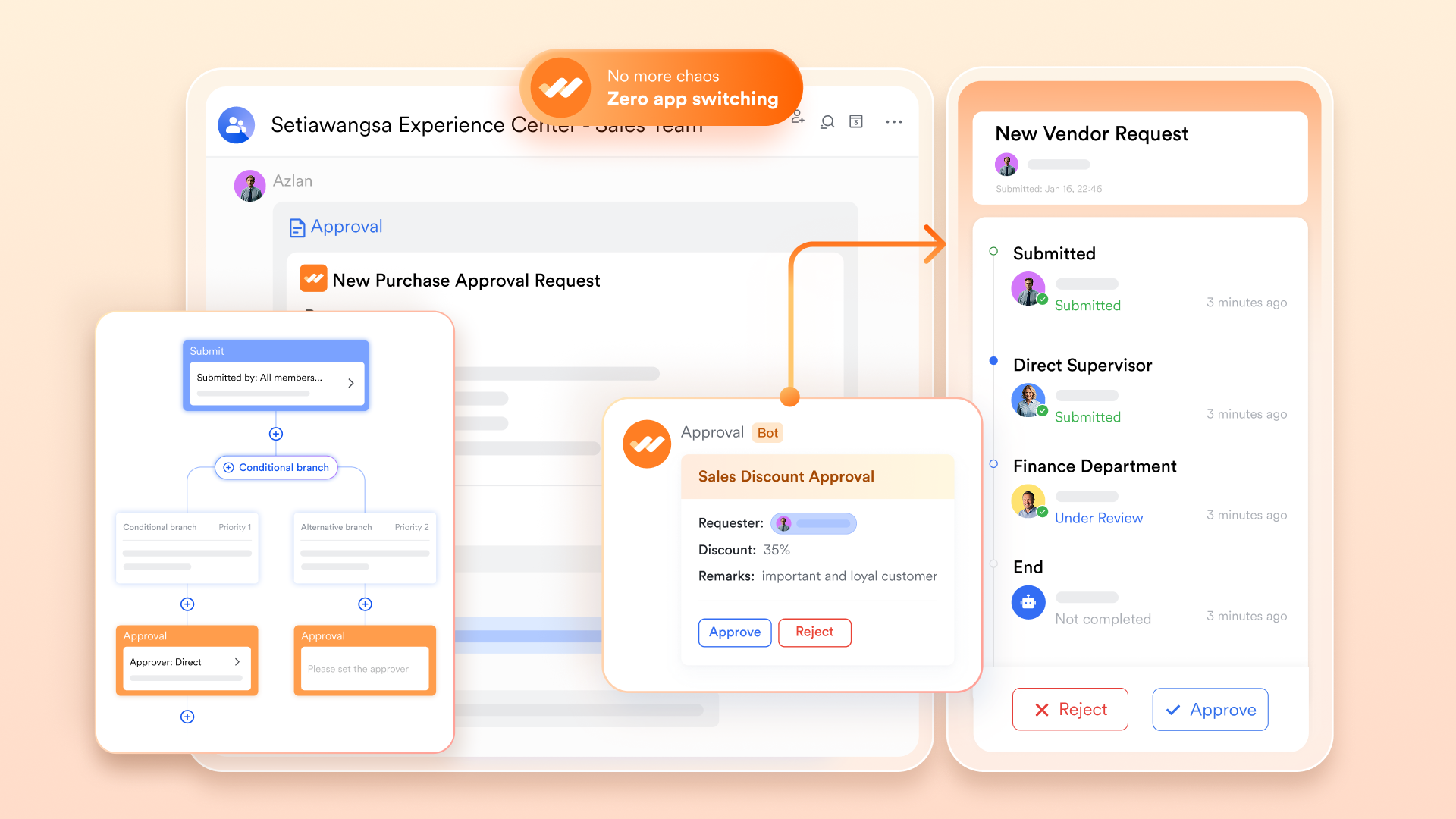
Approval workflows (Lark Approval)
Lark's built-in Approval module provides form-based submission and then routes them through multi-step approval chains. Managers and stakeholders are automatically notified when there's something to review; once approved, downstream actions can be triggered (such as record updates or task creation). All decisions and approvals are logged, providing transparency, an audit trail, and governance, a key part of process automation business service management.
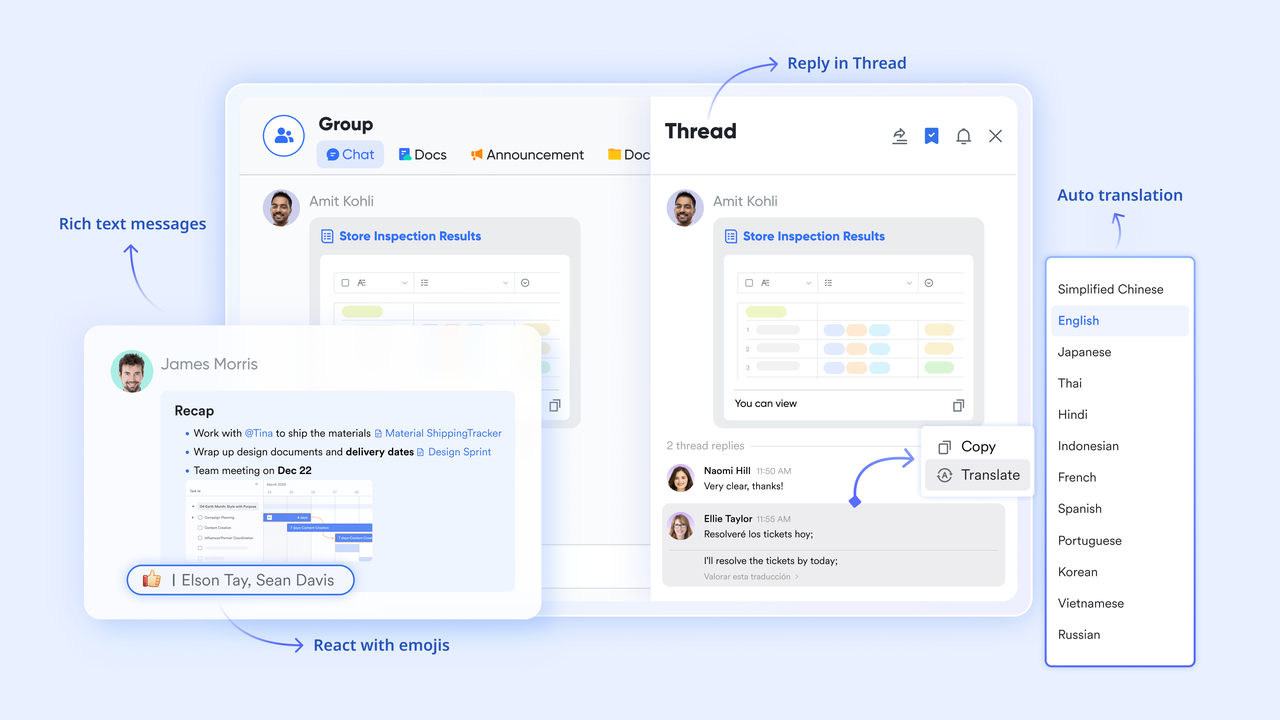
Communication & collaboration
Lark Messenger (chat) is deeply integrated with Base, Docs, Tasks, and Calendar: teams don't need to switch apps to discuss process steps or follow up on tasks. Real-time collaborative documents (Lark Docs) support commenting, @mentions, and version tracking, helping teams coordinate process-related work. Lark Calendar syncs with workflows, enabling automated scheduling, reminders, and meeting coordination within business processes.
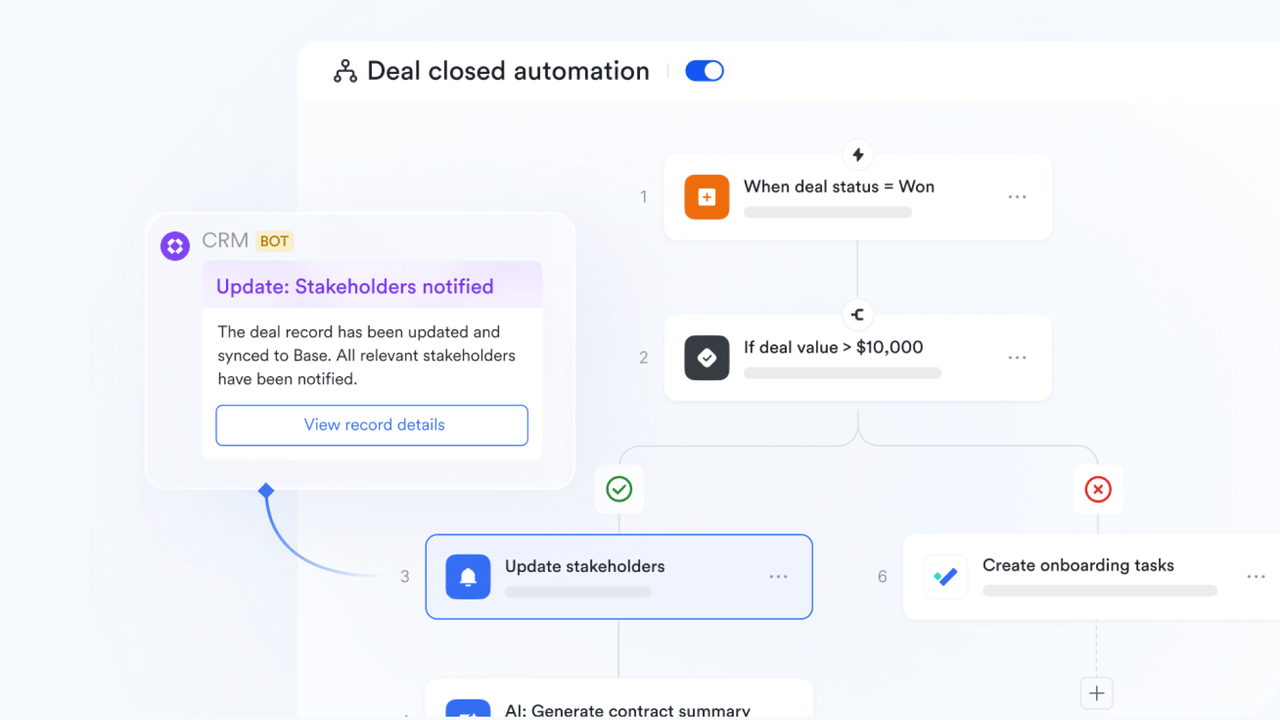
Governance & visibility
Dashboards in Lark Base allow teams to monitor process volume, status, and bottlenecks. With approval logs and automated tracking, decision-making becomes transparent, traceable, and auditable. This combination helps organizations maintain strong governance while enabling decentralized teams to run their workflows efficiently.
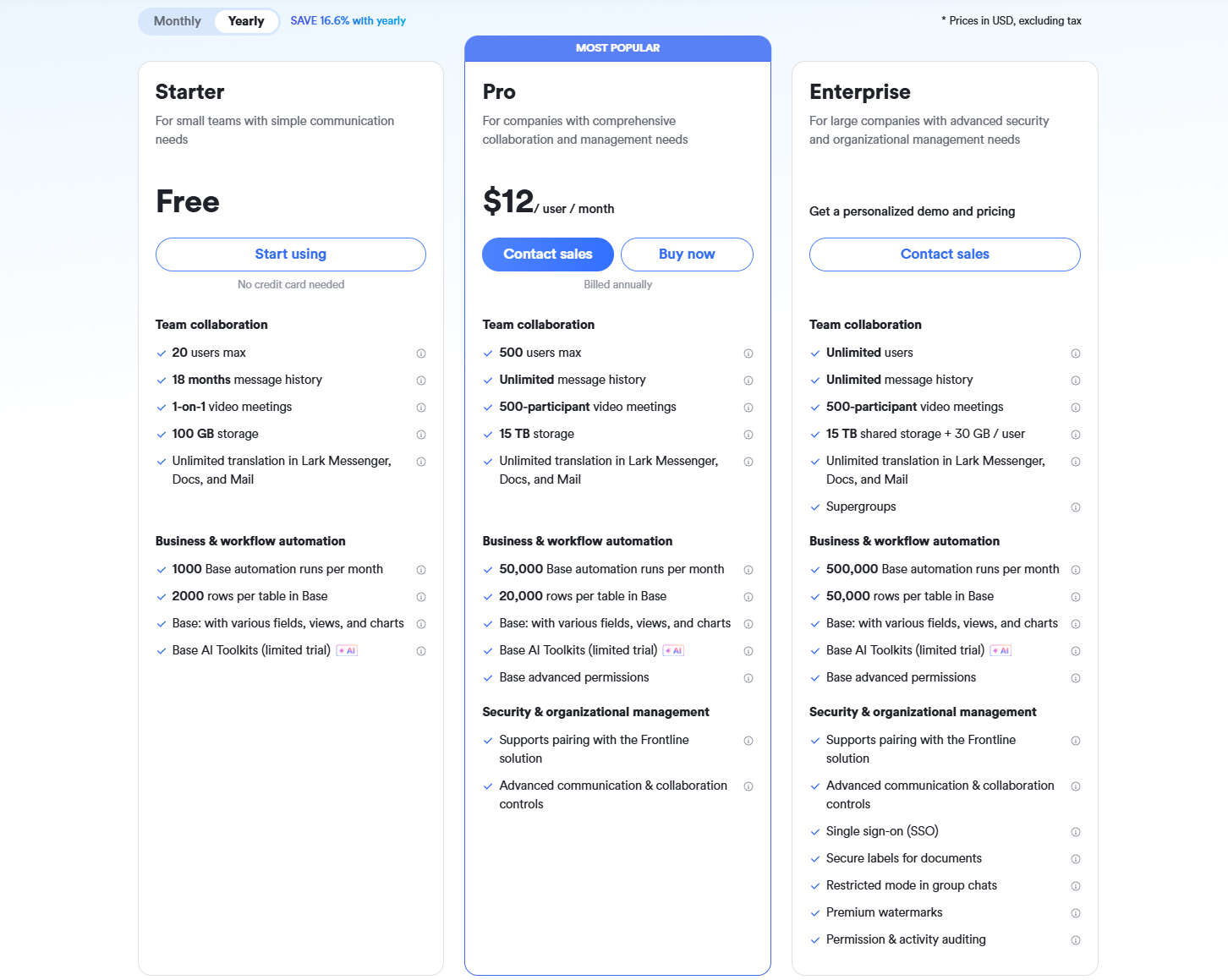
- Starter plan: Free forever plan that includes 11 powerful tools for up to 20 users. It also comes with 100GB of storage, 1000 automation runs, AI translations, and more.
- Pro plan: $12/user/month (billed annually) for up to 500 users. It includes everything in Starter plus group calling for up to 500 attendees, 15TB of storage, 50,000 automation runs, and more.
- Enterprise plan: Contact sales for custom pricing. Supports unlimited users and includes even more automation runs and advanced security, compliance, and management features.
2. Pipefy: Process-orchestration and no-code workflows
Pipefy is a powerful business process automation (BPA) platform built to help teams design, manage, and optimize workflows without relying on IT. It replaces scattered spreadsheets, emails, and manual task handoffs with structured, automated processes. From procurement and HR to finance and customer operations, Pipefy helps organizations standardize approvals, streamline requests, and enforce compliance. With its drag-and-drop interface and customizable workflow templates, teams can build end-to-end processes that improve visibility, reduce errors, and accelerate execution.
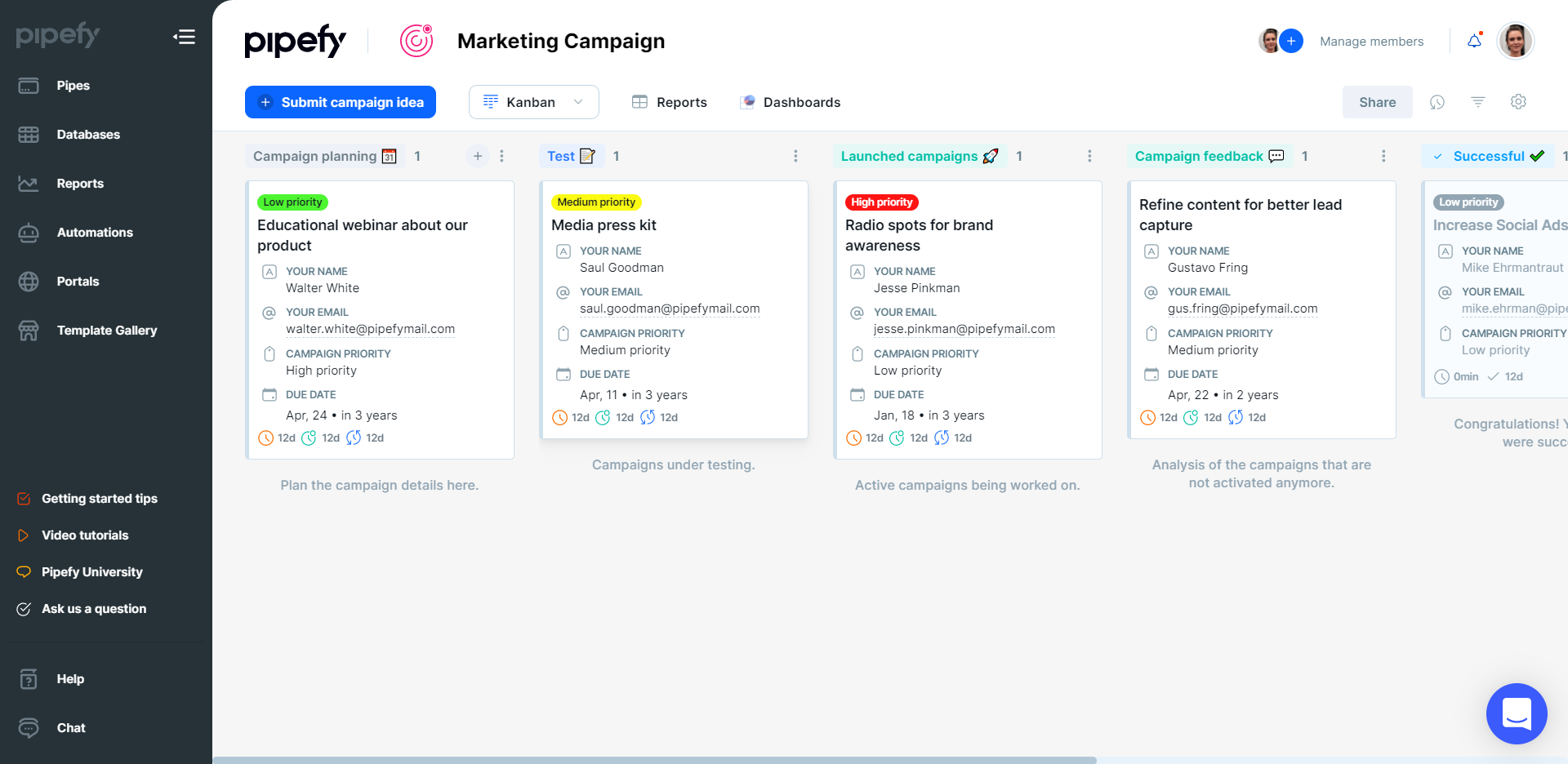
Image source: pipefy.com
Key features:
- No-code workflow builder: Create structured workflows in minutes using an intuitive drag-and-drop interface, ideal for improving efficiency without developer support.
- Workflow automation rules: Automate repetitive steps such as approvals, notifications, task assignments, and SLA alerts to eliminate manual follow-ups.
- Form-based request intake: Standardize how teams receive requests with customizable forms that ensure accurate, complete data every time.
- Integrations & API: Connect Pipefy with CRMs, ERPs, HR systems, and finance tools for seamless cross-departmental automation.
- Process analytics: Track cycle time, bottlenecks, performance metrics, and team productivity to continuously improve processes.
Pros:
- Easy no-code process building for non-technical teams
- Strong intake forms for standardized request management
- Flexible workflows suitable for multiple departments
- Robust automation rules to reduce manual work
Cons:
- Limited advanced automation compared to enterprise platforms
- UI can get complex when scaling extensive workflows
Pricing:
- Starter: $24/user/month
- Business: $34/user/month
- Enterprise: Custom pricing
- Free trial available
3. Kissflow: Low-code process automation for citizen developers
Kissflow is a low-code business process automation platform designed for teams that want to build, automate, and optimize workflows without heavy IT involvement. It empowers non-technical users, "citizen developers", to create structured processes using drag-and-drop builders, form designers, and visual workflow mapping. Kissflow is ideal for organizations managing HR, finance, procurement, and operational workflows that need customization, transparency, and faster approval cycles. With strong governance features and enterprise-grade scalability, it supports both simple and complex end-to-end processes.
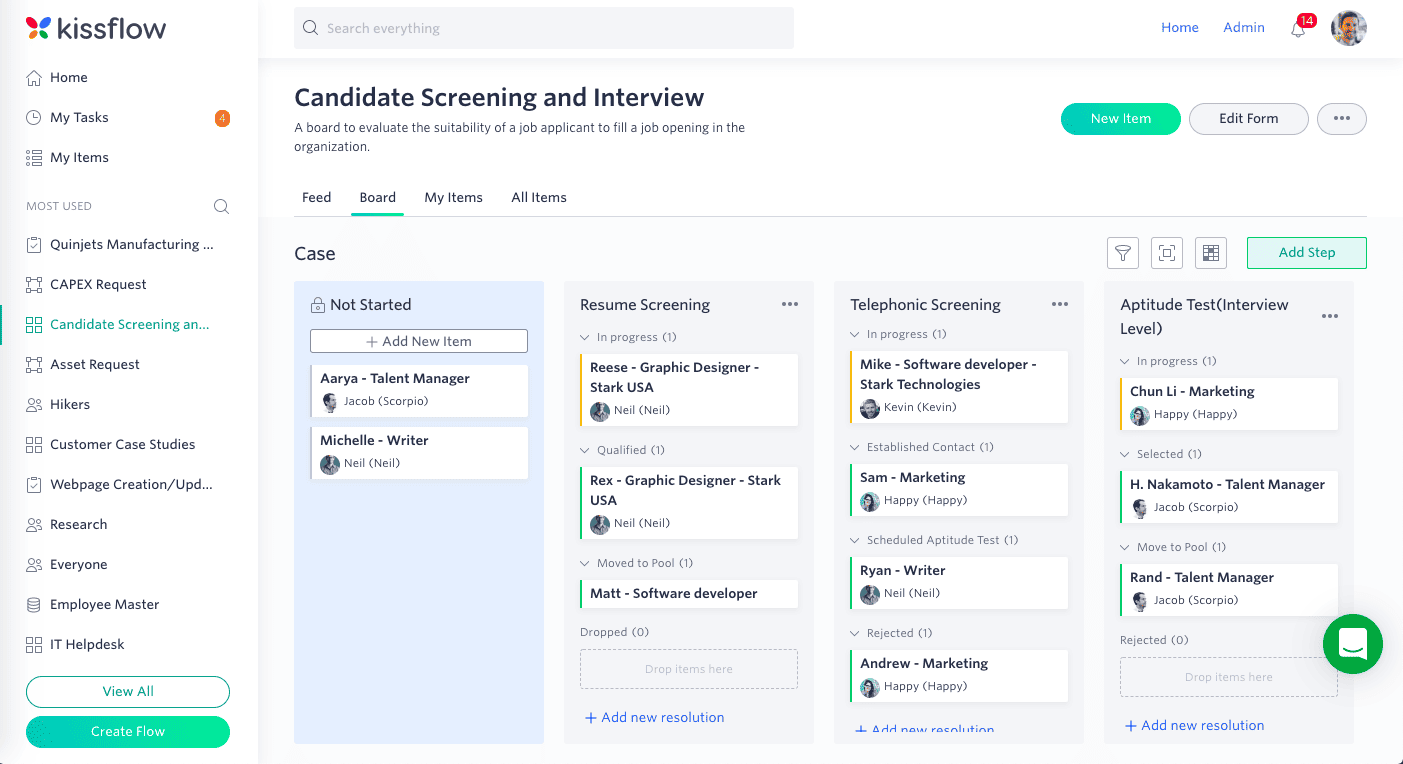
Image source: kissflow.com
Key features:
- Low-code workflow designer: Build automated processes using visual drag-and-drop tools, ideal for non-technical teams creating custom workflows.
- Form creation & data capture: Design dynamic forms with rules, validations, and conditional fields to standardize request intake across departments.
- Workflow automation engine: Automate approvals, notifications, SLA reminders, routing rules, and escalations to reduce delays and bottlenecks.
- Process intelligence & analytics: Track process performance, cycle time, workload distribution, and compliance metrics for continuous improvement.
- Integration suite: Connect with ERP, CRM, HRIS, and productivity tools using APIs, connectors, and webhook triggers.
Pros:
- Excellent for teams without technical expertise
- Highly customizable workflows and forms
- Strong reporting and compliance tracking
- Scales smoothly from small teams to enterprise
Cons:
- The interface may feel overwhelming for beginners
- Pricing becomes higher when scaling users
Pricing:
- Basic: $15/user/month
- Advanced: $25/user/month
- Enterprise: Custom pricing
- Free trial available
4. Microsoft Power Automate: Enterprise process automation on the Microsoft stack
Microsoft Power Automate is a powerful automation platform designed for businesses already using Microsoft 365, Dynamics 365, or Azure. It enables teams to automate repetitive tasks, orchestrate multi-step workflows, and integrate hundreds of apps, both inside and outside the Microsoft ecosystem. With robotic process automation (RPA), AI Builder, and deep SharePoint/Teams/Dynamics integration, Power Automate is a leading choice for enterprise-wide digital process automation.
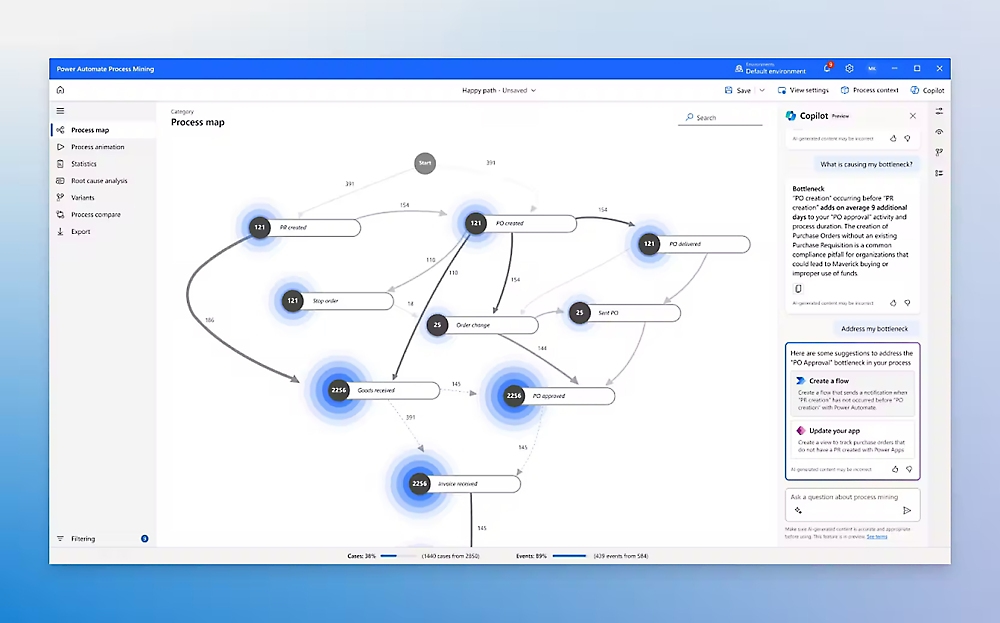
Image source: microsoft.com
Key features:
- Cloud flows: Automate tasks across Teams, SharePoint, Outlook, Dynamics, PowerApps, and more.
- Robotic Process Automation (RPA): Use desktop flows to automate legacy or manual on-screen tasks.
- AI Builder: Add document processing, prediction models, sentiment analysis, and object detection to workflows.
- Hundreds of connectors: Integrate Microsoft and third-party applications seamlessly.
- Process insights & governance: Track usage, performance, and compliance with centralized admin controls.
Pros:
- Best automation tool for businesses using Microsoft 365 or Dynamics
- Combines workflow automation + RPA + AI
- Strong enterprise governance and security
- Massive library of connectors and templates
Cons:
- It can become complex for non-technical users
- The licensing structure can be confusing
- Performance varies depending on workflow load
Pricing:
- Cloud flows: $15/user/month
- RPA (attended): $40/user/month
- Unattended RPA: $215/month per bot
- AI Builder add-ons are priced separately
- Free trial available
5. Appian: Low-code + RPA for enterprise workflows
Appian is a leading enterprise-grade low-code automation platform that unifies process automation, robotic process automation (RPA), and AI-assisted decisioning in one environment. It's designed for large organizations that manage complex, high-volume workflows across operations, finance, HR, customer service, and regulated industries. With its drag-and-drop builder, scalable architecture, and governance tools, Appian helps enterprises digitize processes end-to-end, from data collection to workflow routing to automated actions. It's especially powerful for teams needing secure, compliant, and deeply integrated business process automation services.
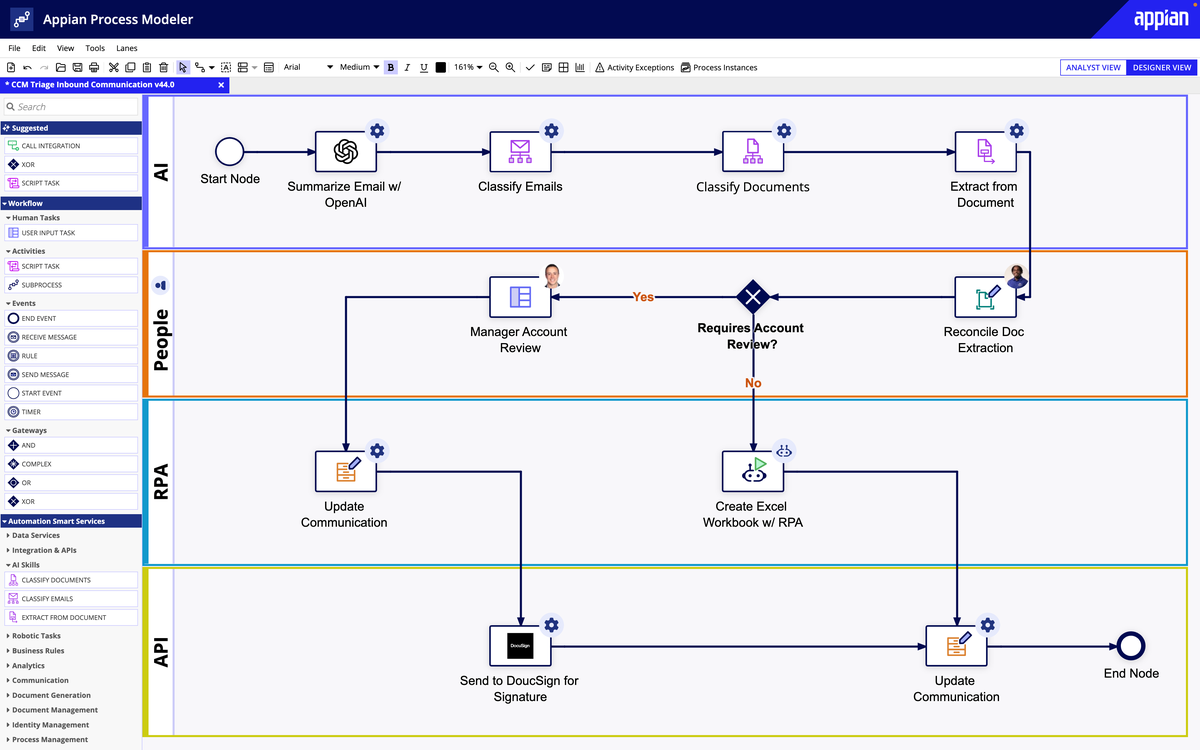
Image source: appian.com
Key features:
- Low-code workflow builder: Build enterprise-grade workflows with visual modeling, reusable components, and minimal coding, ideal for fast deployment and iteration.
- Unified automation (RPA + AI): Combine bots, AI models, and rules-based automation to handle both repetitive tasks and complex decision-making.
- Enterprise data fabric: Connect data from multiple systems (ERP, CRM, custom apps) into one unified layer without heavy integrations.
- Robust case management: Manage approvals, escalations, investigations, and multi-team processes with complete audit trails and compliance controls.
- End-to-end process orchestration: Design, run, monitor, and optimize processes across departments using real-time analytics and insights.
Pros:
- Highly scalable for enterprise and mission-critical workflows
- Strong governance, security, and compliance features
- Combines low-code, RPA, and AI in one platform
- Excellent for cross-department and multi-system automation
Cons:
- More expensive than SMB-focused tools
- Steeper learning curve compared to simple no-code builders
Pricing:
- Application plan: Custom pricing
- Platform license: Custom pricing
- Unlimited automation package: Custom pricing
- Free trial available for enterprises
6. Bizagi: Cloud-native process automation and application lifecycle
Bizagi is a cloud-native business process automation platform designed to help organizations map, model, automate, and continuously improve their workflows. Known for its intuitive process modeling environment, Bizagi enables businesses to build digital workflows and low-code applications that integrate seamlessly with existing systems. It supports the full application lifecycle from design to automation to optimization, making it a strong choice for enterprises seeking modern, scalable, and collaborative BPA services without extensive development work.
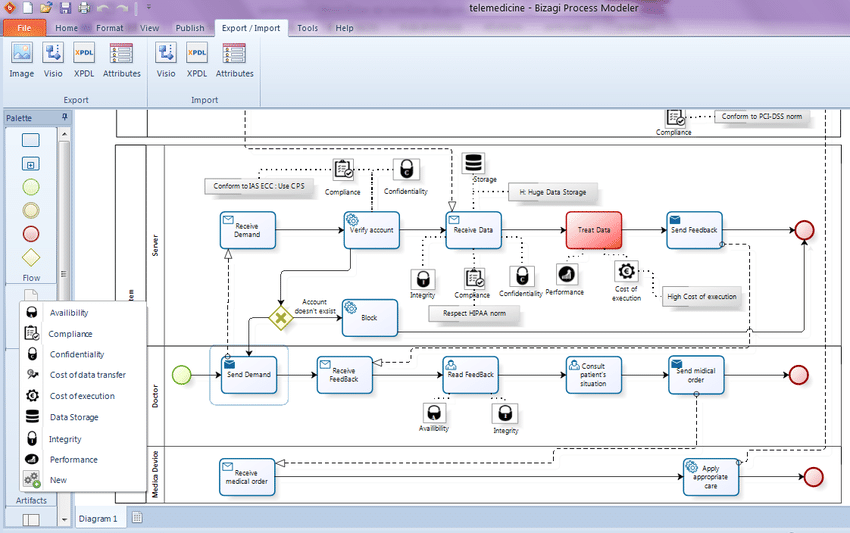
Image source: bizagi.com
Key features:
- Visual process modeler: Easily map out business processes using BPMN-based diagrams that help teams standardize and optimize workflows before automating them.
- Low-code application builder: Create digital forms, workflow apps, and automated processes without deep engineering resources, ideal for modernization projects.
- Cloud-native architecture: Deploy scalable, secure workflow automation in the cloud with built-in performance monitoring and governance.
- Integration capabilities: Connect workflows with ERPs, CRMs, databases, and third-party systems using APIs, connectors, and Bizagi's integration layer.
- Process lifecycle management: Design, execute, analyze, and continuously optimize workflows with real-time performance dashboards and compliance tools.
Pros:
- Intuitive process modeling with BPMN standards
- Strong integration capabilities for enterprise systems
- Supports the entire application lifecycle from design to optimization
- Ideal for large organizations undergoing digital transformation
Cons:
- Not as simple for non-technical users compared to no-code tools
- Pricing can be high for small or early-stage businesses
Pricing:
- Modeler: Free
- Studio: Free
- Automation (Cloud): Custom enterprise pricing
- Offers free trials for modeling and design tools
7. Camunda: Process orchestration engine for complex workflows
Camunda is a powerful process orchestration platform built for companies that need to automate, monitor, and optimize highly complex, mission-critical workflows. Unlike no-code BPA tools, Camunda offers a developer-friendly environment with BPMN, DMN, and workflow automation engines that can handle sophisticated, end-to-end processes across distributed systems. It's ideal for enterprises in finance, insurance, logistics, telecom, and SaaS that require advanced workflow logic, human-task coordination, microservices orchestration, and straight-through processing at scale.
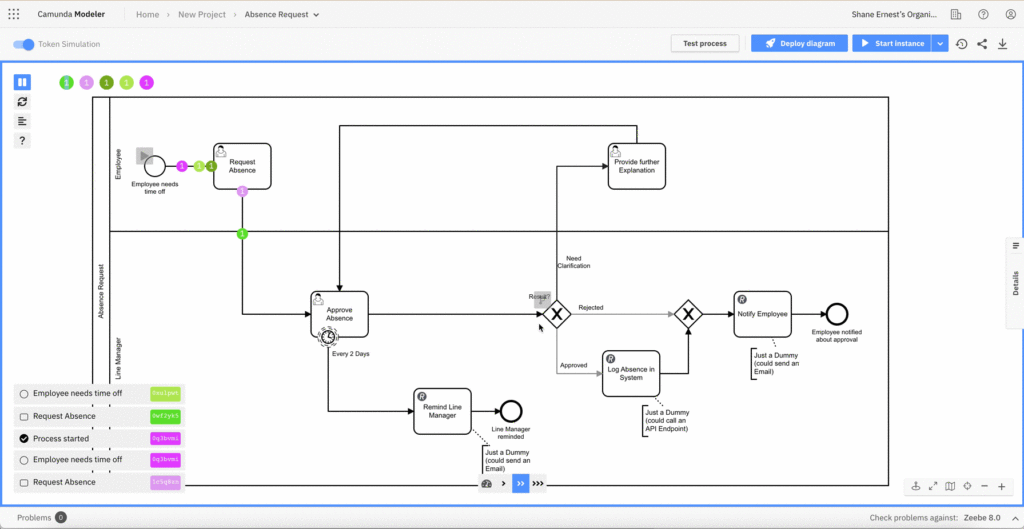
Image source: camunda.com
Key features:
- BPMN & DMN standards: Model workflows and decision rules using industry-standard visual notations for clarity and consistency.
- Process orchestration for microservices: Coordinate complex backend systems, APIs, and event-driven services.
- Human task workflows: Combine automated processes with assigned human approvals when needed.
- High-performance workflow engine: Execute long-running, multi-step processes with scalability and reliability.
- End-to-end monitoring & optimization: Use Cockpit and Optimize for real-time tracking, insights, and process improvement.
Pros:
- Best-in-class for complex, enterprise-level workflows
- Extremely scalable and reliable for high-volume automation
- Developer-friendly with open architecture
- Strong monitoring and optimization dashboards
Cons:
- Requires technical expertise, not beginner-friendly
- Setup and orchestration can be time-consuming for small teams
Pricing:
- Self-Managed: Custom pricing
- SaaS (Camunda 8): Custom pricing
- Free open-source version available with limited features
How to choose a business process automation service
Selecting a business process automation service requires looking beyond features and understanding how well the platform fits your operational needs. These evaluation factors help you choose a solution that scales with both your teams and your processes.
- Evaluate domain-specific vs. cross-functional workflows: Some BPA services specialize in areas such as HR, finance, or field service, while others support end-to-end, cross-department workflows. Choosing the right fit ensures you don't outgrow the platform. Consider whether you need deep functionality within a single domain or broad orchestration across teams.
- Check how automation handles exceptions: Real-world operations rarely follow a perfect path, so exception handling is critical. Look for BPA platforms with conditional branches, escalation rules, fallback logic, and error notifications. Strong exception management prevents workflow breakdowns and keeps processes moving.
- Consider operational ownership (business vs. IT): Some automation tools are user-friendly for business users, while others rely heavily on IT teams. If you need agility, low-code configurations empower departments to manage workflows independently. If you require strict control, IT-owned governance may be the right approach.
- Examine collaboration support within workflows: The best BPA services enable comments, task mentions, file attachments, and team visibility directly within workflows. This reduces back-and-forth communication and centralizes context. Strong collaboration features improve decision-making speed and transparency.
- Compare template availability: Prebuilt template libraries significantly accelerate deployment. Look for templates covering onboarding, procurement, field operations, approvals, and compliance. Robust template options help teams automate faster without having to build every workflow from scratch.
Benefits of using business process automation services
A strong business process automation service delivers value far beyond simple task automation. These platforms help organizations reduce operational friction, improve consistency, and scale processes without heavy engineering effort.
- Faster deployment with prebuilt workflow packs: Most platforms offer templates for onboarding, procurement, approvals, and service requests. These ready-made workflows drastically shorten implementation time. Teams can go live in days rather than months, accelerating ROI.
- Vendor-managed updates and scaling: The platform provider handles all infrastructure, versioning, and performance optimization. As workflow volumes grow, the system automatically scales to meet demand. This ensures long-term reliability without manual intervention.
- Lower maintenance overhead for internal IT teams: IT teams no longer need to build or troubleshoot every process. Business users can manage workflows through low-code builders while IT focuses on higher-value initiatives. This reduces ticket volume and operational burden.
- Consistent process governance: Every workflow follows predefined rules, routing, and approval paths. Automated logs and audit trails help maintain compliance across departments. This reduces risk and improves accountability.
- Ability to automate without large dev budgets: Low-code/no-code capabilities make automation accessible to non-technical teams. Organizations avoid the cost of custom development or specialized engineering resources. This democratizes automation across business.
- Reduced operational fragmentation: Automation unifies tasks previously scattered across emails, spreadsheets, and disconnected tools. Teams share the same data, follow the same workflows, and operate with real-time visibility. This results in smoother handoffs and better coordination.
Conclusion
A strong business process automation service helps companies replace manual effort with structured, scalable, and error-free workflows. From field operations to HR, finance, and customer support, BPA services streamline approvals, accelerate handoffs, and keep data consistent across systems. This guide covered the core components of automation, the types of BPA services available, and how to evaluate the right platform for your needs. As businesses look to improve efficiency in 2025, choosing flexible, AI-ready automation becomes a strategic advantage. And for teams seeking unified workflows, collaboration, and integrated automation in a single workspace, Lark brings it all together seamlessly.
FAQs
Do business process automation services require technical teams to maintain workflows?
Most platforms minimize IT dependence by providing low-code tools that enable business teams to update workflows without engineering support. However, technical teams may assist with advanced integrations or governance. Modern business process automation as a service model reduces maintenance overhead by providing vendor-managed updates, ensuring workflows stay reliable, scalable, and aligned with evolving business requirements.
How do BPA services handle data security and compliance requirements?
BPA platforms use encryption, access controls, audit trails, and policy-based permissions to protect sensitive information. In the process automation business service management space, providers also support compliance frameworks such as GDPR, SOC 2, and ISO standards. These controls ensure automation remains secure across HR, finance, and field operations without exposing data to unnecessary risk.
Can BPA services integrate with legacy systems or on-premise data?
Yes, many BPA tools offer connectors, APIs, middleware, and secure gateways to bridge cloud automation with older or on-premise systems. This is especially important for field service business process automation, where asset data or service history may still reside in legacy databases. Integration layers ensure workflows stay unified without requiring a complete system replacement.
How do companies measure ROI from BPA service adoption?
Organizations track improvements in cycle times, error reduction, employee productivity, SLA compliance, and operational cost savings. With process automation business service management, analytics dashboards show how automation reduces manual work and accelerates business outcomes. ROI also increases through better resource utilization and faster customer response times across departments.
Are BPA services suitable for small businesses, or are they only for enterprise teams?
BPA tools serve both small businesses and large enterprises. Cloud-based business process automation as a service platform offers scalable pricing, templates, and low-code builders ideal for smaller teams. Meanwhile, advanced features support enterprise-level governance and integrations. Even SMBs benefit from automation, especially in invoicing, onboarding, and field service business process automation.
Related reading
Table of contents
Start using Lark today

Manage all your work in one place
Boost team efficiency by 10x
Save up to 70% on software costs
Table of contents
Start using Lark today
Manage all your work in one place
Boost team efficiency by 10x
Save up to 70% on software costs
Keep reading






2026 Lark Technologies Pte. Ltd.
Headquartered in Singapore with offices worldwide.






Explore: