Freshworks has long been regarded as one of the top CRM tools for customer management. Its suite of products—like Freshdesk, Freshsales, and Freshservice—help teams streamline service operations and connect with customers more efficiently. Yet as business models evolve, so do the expectations of today's teams. Many now seek platforms as Freshworks alternatives for small businesses or large enterprises that integrate communication, collaboration, and automation under one roof.
I've noticed that companies increasingly look for alternatives to Freshworks that can reduce tool fragmentation and improve flexibility. Emerging platforms such as Lark, Zendesk, or Zoho Desk offer hybrid approaches that combine real-time collaboration with automation. This article explores what makes Freshworks valuable, why some users explore Freshworks CRM alternatives, and which tools might better fit modern organizations' needs.
Key takeaways: Top 5 Freshworks alternatives at a glance
What is Freshworks and what does it offer?
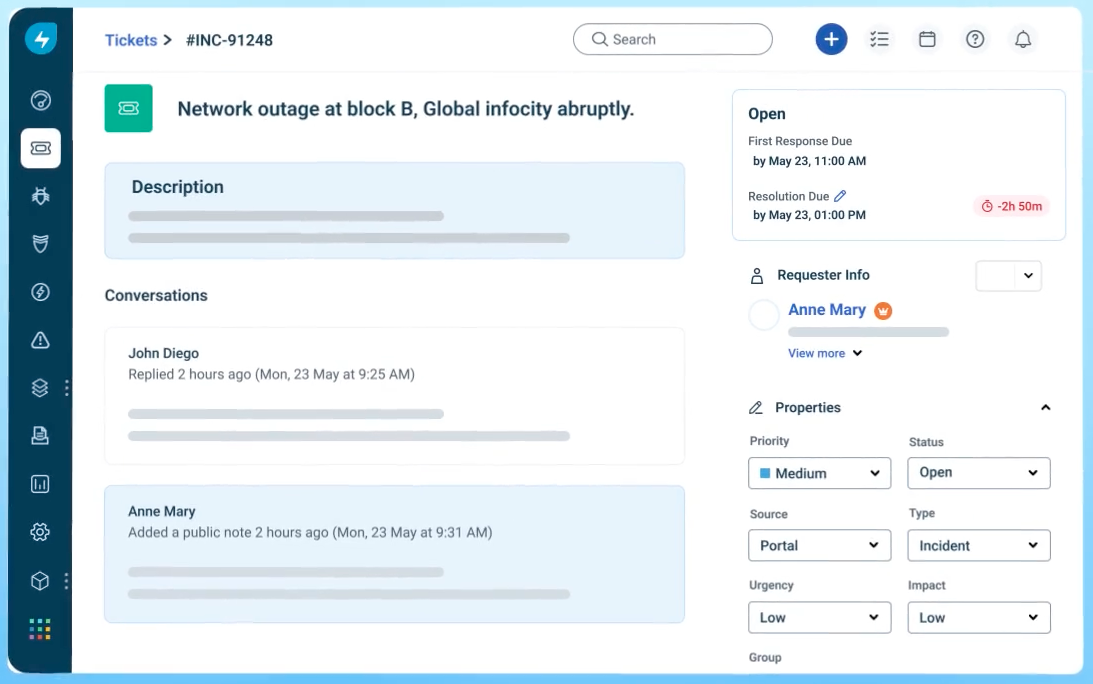
Image source: freshworks.com
Freshworks is a ecosystem and customer service platform built to simplify customer support, sales, and IT operations. Its core value lies in helping teams manage client and internal interactions through intuitive interfaces and built-in automation. The company offers several distinct products, each covering a different part of the customer and business management process:
- Freshdesk — A customer support and helpdesk software focused on ticketing, live chat, and self-service.
- Freshservice — An that assists IT teams in handling incidents, changes, and requests.
- Freshsales — A CRM that supports , email tracking, and lead management.
- Freshmarketer — Marketing automation tools aimed at improving customer engagement and conversion tracking.
The Freshworks ecosystem is designed to scale from small businesses to enterprises. Its approach is modular — teams can adopt a single product, such as Freshdesk for customer support, or integrate multiple products through shared data infrastructure. This flexibility has attracted organizations across sectors ranging from technology to healthcare. Freshworks emphasizes ease of use, AI-powered assistance, and automation to reduce repetitive tasks and enhance productivity. It also continues to invest in features through its developer API, extensive integration marketplace, and focuses on . However, not all teams benefit equally from these features — which leads some users to evaluate alternatives to Freshworks that may better align with their structure or budget.
Why find alternatives: Disadvantages of Freshworks
While Freshworks delivers strong performance across various business functions, several factors often motivate users to consider alternatives. Understanding these limitations helps clarify why businesses look beyond the Freshworks ecosystem for collaboration or .
Fragmented product experience
Each Freshworks product—whether Freshdesk, Freshsales, or Freshchat—operates as a separate application. Teams that manage multiple workflows must frequently switch between platforms or purchase separate licenses. This segmentation can slow down collaboration and complicate data visibility across departments.
Limited customization flexibility
Certain configurations—especially in automation logic or advanced branding—are locked to higher-priced plans. This limits flexibility for teams that want to design fully customized workflows without paying enterprise-level rates.
Integration and scalability challenges
While Freshworks provides multiple integrations, some users encounter friction when connecting the platform to custom systems like or nonstandard CRMs. Scaling workflows across global or hybrid environments can demand additional setup and support.
Analytics and reporting constraints
Compared to competitors like HubSpot or Zendesk, Freshworks' reporting dashboards can feel more restrictive. Teams seeking granular insights or cross-app data views often find themselves exporting manually into third-party BI tools.
Customer support and onboarding
Feedback across the Freshworks careers and community ecosystem occasionally reflects inconsistent implementation support, particularly for larger accounts that require tailored onboarding.
Pricing escalation with growth
Many small or mid-sized businesses initially choose Freshworks for its competitive entry tiers. However, costs grow quickly as agent seats, automation features, or custom integrations increase. Over time, maintaining the full suite can become costly compared with newer or consolidated options such as Lark or Zoho CRM Desk.
- To know Freskworks' pricing in detail, see
- Businesses comparing collaboration platforms often review and before making a final decision.
For these reasons, many organizations now explore Freshworks CRM alternatives that integrate collaboration, automation, and analytics digital channels into . The next section explains what features to prioritize when choosing a new platform that's flexible, connected, and built for modern teams.
Try an alternative that makes up every disadavantage
Key things to look for in a Freshworks alternative
Before exploring specific products, it's important to understand what criteria make a Freshworks alternative truly valuable. Businesses switch platforms not just for new features, but to gain better control, scalability, and connected workflows. When selecting the right solution, teams should evaluate the following dimensions:
Ease of onboarding and use
The platform should provide intuitive onboarding flows, minimal setup time, and accessible support resources. Many alternatives to Freshworks strive to deliver a simplified interface where users can start creating tickets, tracking leads, or without heavy training.
Collaboration and communication
In today's environment, customer support, sales, and IT teams need to stay connected. Platforms that combine help desk management with messaging, documentation, or —such as Lark or Monday—simplify teamwork while cutting subscription costs.
Customization and integration ecosystem
The ideal Freshworks CRM alternative integrates seamlessly with existing tools like Google Workspace, Slack, Salesforce, or internal business systems. Custom APIs and app marketplaces extend platform utility far beyond standard ticketing.
Pricing transparency and scalability
Cost predictability is essential, especially for growing organizations. Choose a solution that scales fairly with team size and doesn't gate productivity features behind premium tiers.
Performance analytics and insights
The best platforms provide real-time, that visualize support efficiency, sales activity, or service-level performance—making optimization continuous and data-driven.
With these elements in mind, let's examine ten well-regarded Freshworks alternatives for 2025, each offering distinct advantages depending on business needs and size.
Top 10 Freshworks alternatives for 2026
1. Lark: The all-in-one collaboration and automation hub
is a unified digital workspace that merges chat, video conferencing, documents, and workflow automation under a single platform. Designed to minimize fragmentation, it allows teams to communicate, manage projects, and run service operations without switching between multiple apps.
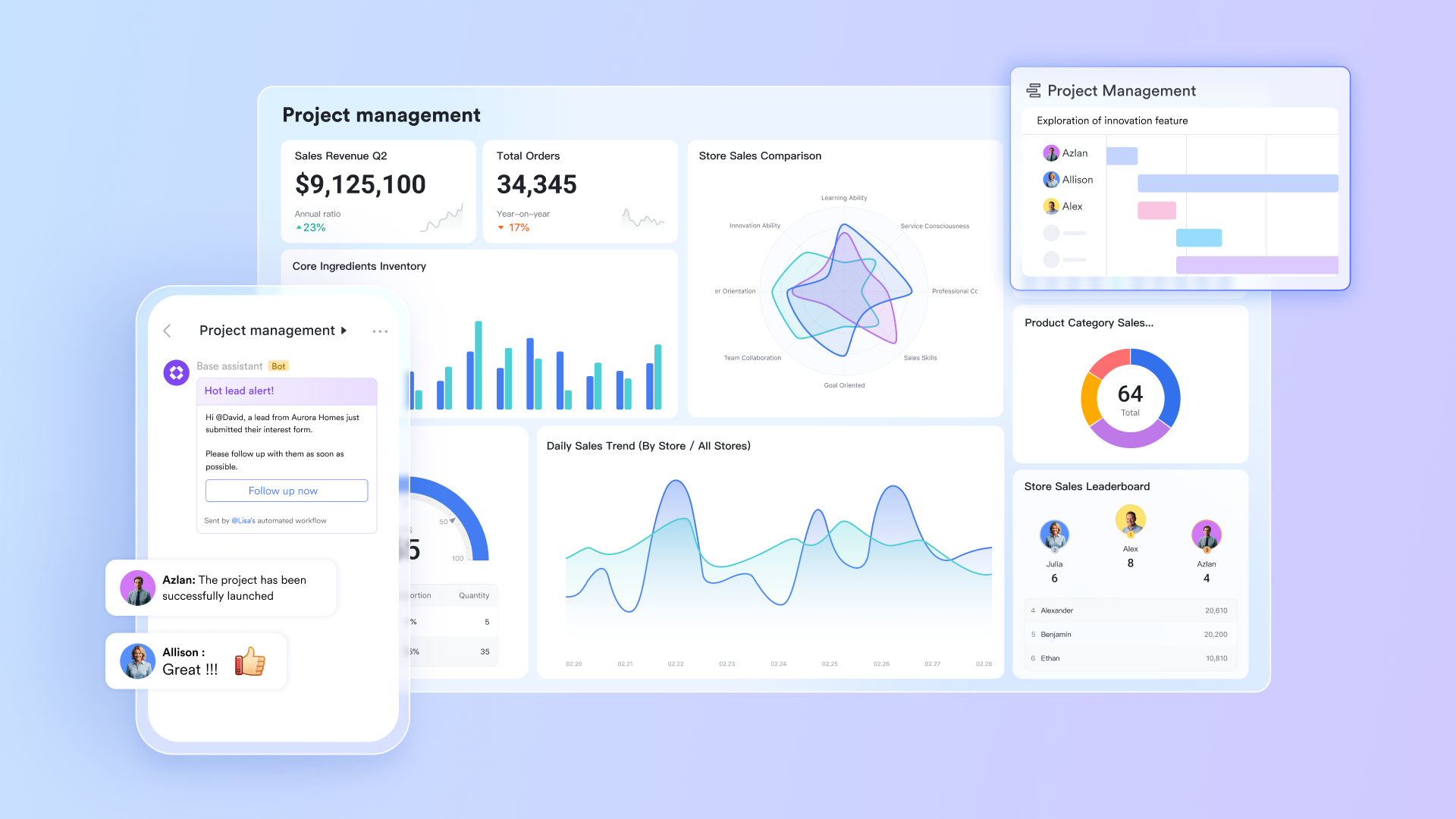
Key features
Lark Base: The system's flexible core
is much more than a table — it's a powerful no-code database with advanced features and app builder that serves as the backbone for process automation and business intelligence. Its versatility allows teams to design ticketing, CRM, and customized to their workflows — all within one workspace, combining functions of Freshdesk, Freshsales, Freshmarketer, and Freshservice, allowing CRM data management, ticketing management, . Base also provides multi-dimensional data views and fine-grained permission control, helping manage tickets, project timelines, forecasting, and service tasks dynamically. 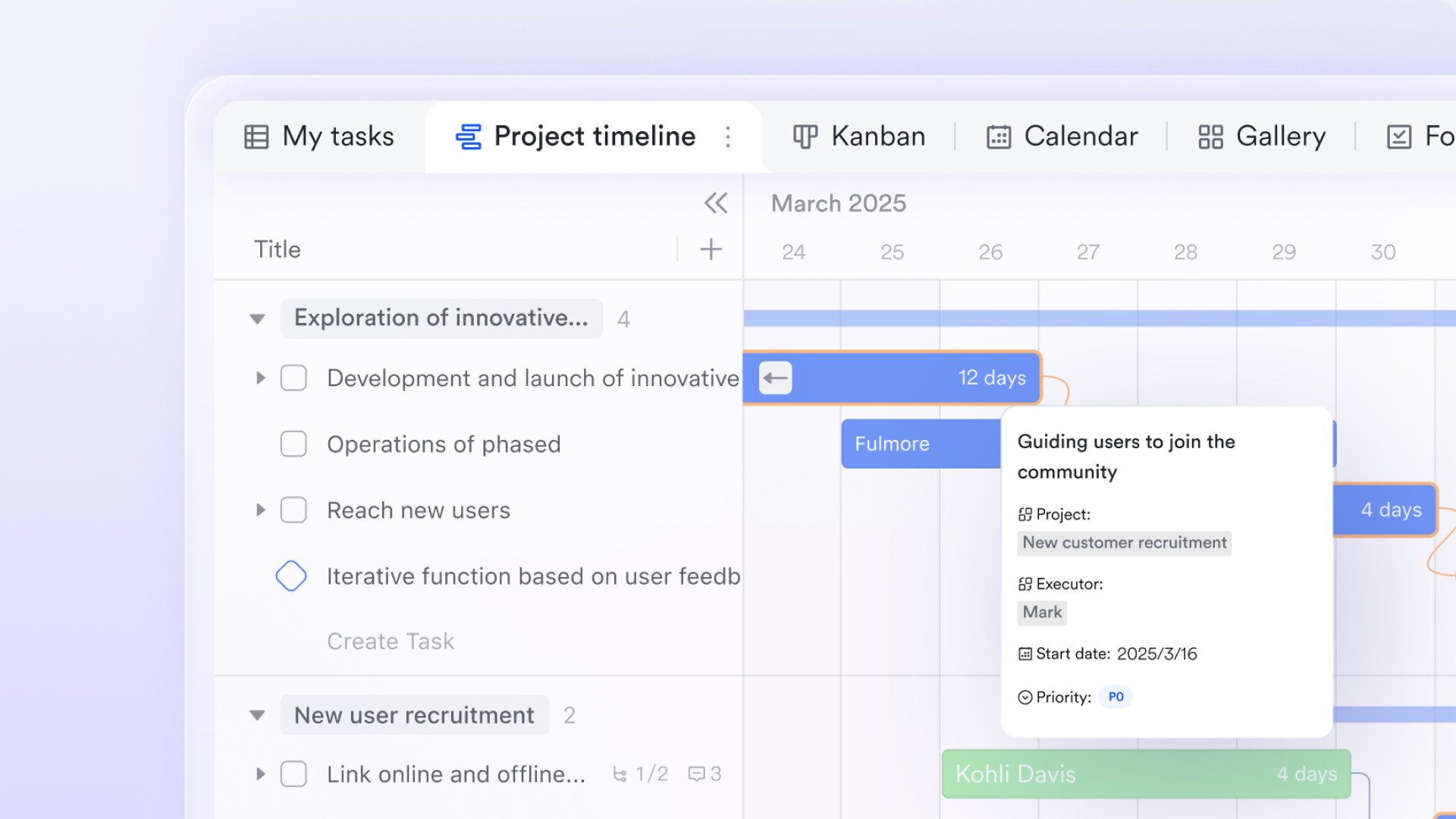
Lark Base supports rule-based . You can define trigger conditions (e.g., when a record's status changes or a date is reached) and automated actions (e.g., send a notification, update a field, or create a new record). For example, when a new customer record status changes to “Confirmed”, Lark Base can trigger an automated email or alert.
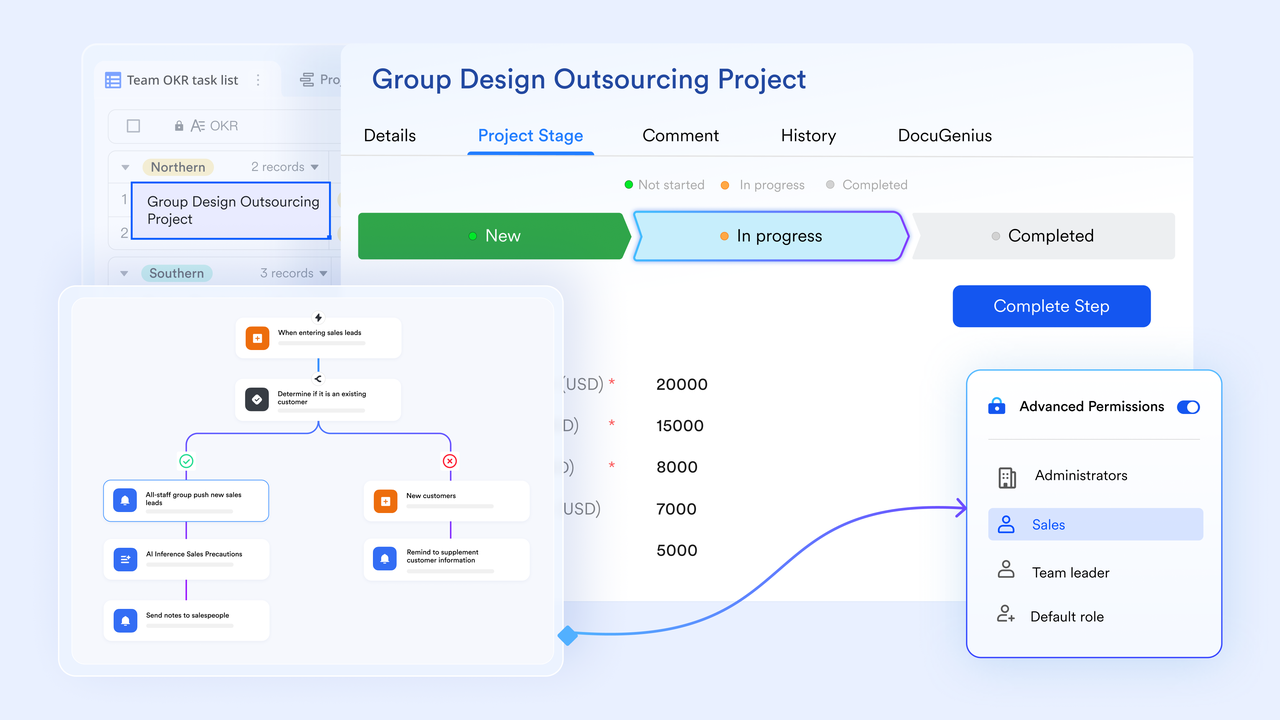
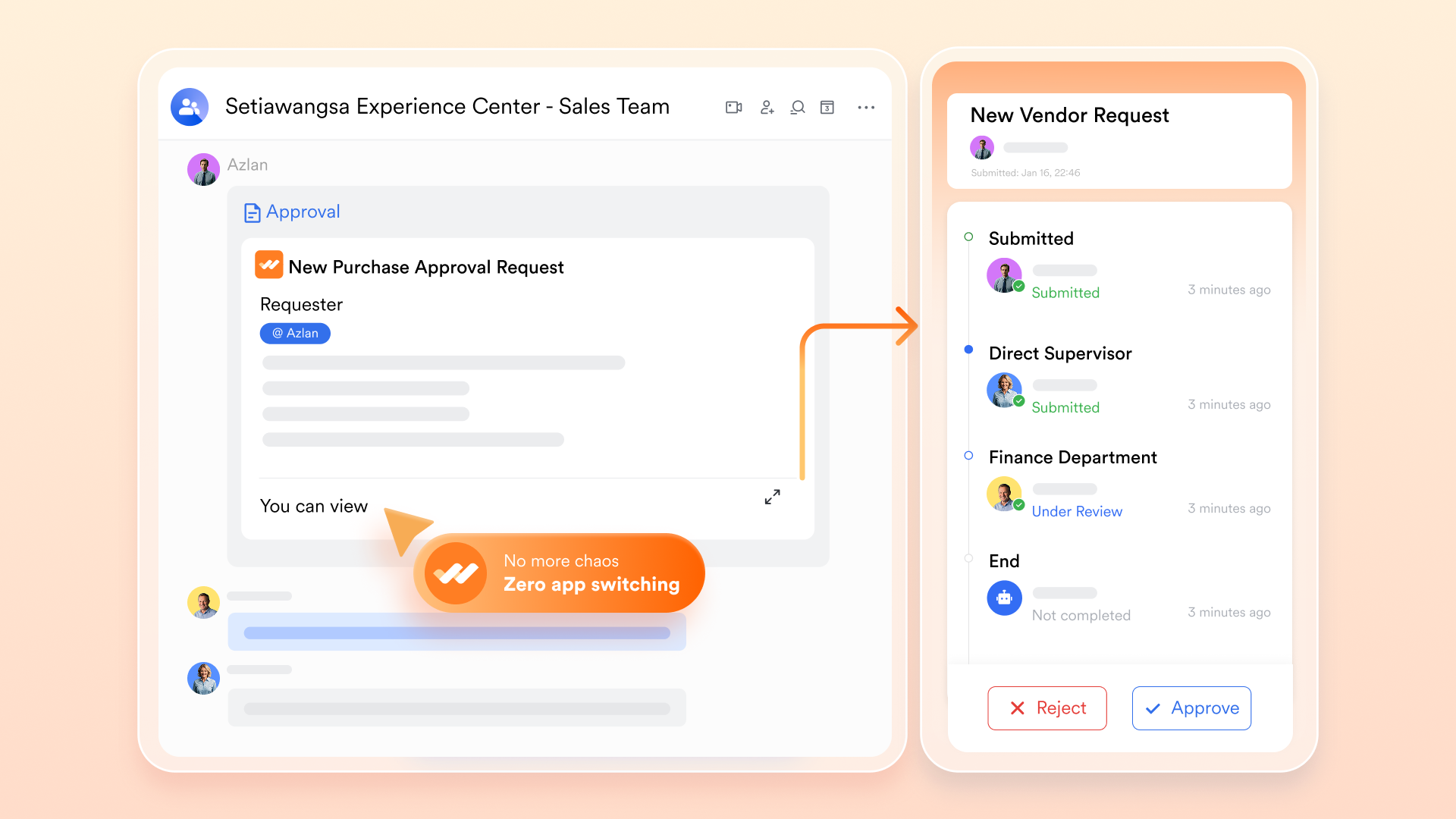
Lark Approval: The workflow automation engine
standardizes and automates repetitive business processes — from HR and finance to IT service requests. Automation and trigger rules can be set to save time in the . Besides, every request is logged for audit readiness and compliance, and relevant material like a file can be attached to the process.
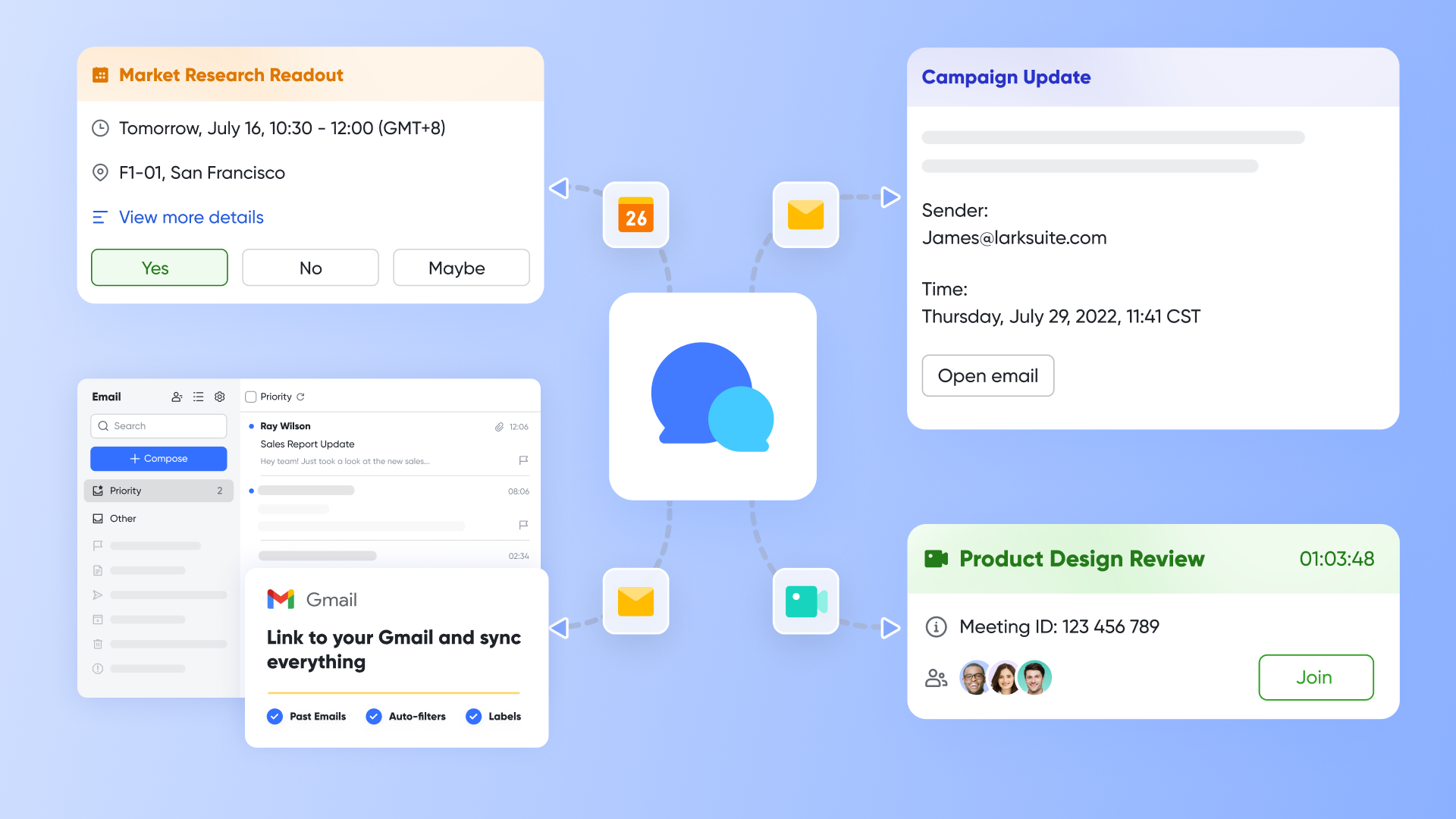
Lark Anycross for integration: Bridging external systems
Lark acts as a connectivity hub for external tools and workflows through rich APIs and automation triggers. Anycross makes deep third-party integration possible: Sync with Gmail, Outlook, Slack, or Teams. Automatically create records in Lark Base from incoming messages or tickets. Other built-in features: Seamless work experience
Lark's ecosystem eliminates the productivity loss caused by switching between apps. As a unified platform, Lark combines these with chat, meetings, and OKRs — ensuring all progress, feedback, and decisions live in one place.
For example, & serve well for collborative doucmentation. Lark Tasks can turn any chat or document discussion about to-dos into a traceable task with assignees and due dates. Lark Calendar and Lark Meetings help team members schedule, brainstorm, and catch up seamlessly with shared visual calendar and agenda reminder via bot in .
How does Lark compare to Freshdesk?
While Freshdesk focuses primarily on customer support ticketing, Lark emphasizes internal collaboration and . It can replicate some IT operations and service automation functions that Freshservice provides, but within a real-time collaboration environment. This makes Lark especially attractive to teams seeking unified operations for both function of CRM and project management rather than multiple specialized tools. User experience & interface
The user friendly interface is modern, intuitive, and responsive across desktop, web, and clients. Conversations flow directly into tasks or documents, minimizing clunky ticket handoffs. Lark's multilingual support and customizable workspaces make it a fit for global, distributed teams, helping teams get better and faster customer interactions.
Lark's simpler and affordable tiers:
- Starter plan: Free forever plan that includes 11 powerful tools for up to 20 users. It also comes with 100GB of storage, 1,000 automation runs, AI translations, and more. No hidden fees. For small businesses seeking a tool, a Stater plan is worth a try.
- Basic plan: $6/user/month (billed annually) for up to 500 users, including everything in Starter plus 1-on-1 video meetings, 5TB of storage, 1,000 automation runs, and more. To know more about Basic plan, .
- Pro plan: $12/user/month (billed annually) for up to 500 users. It includes everything in Starter plus a group calling for up to 500 attendees, 15TB of storage, 50,000 automation runs, and more.
- Enterprise plan: for custom pricing. Supports unlimited users and includes even more automation runs and advanced security, compliance, and management features.
For small teams with simple communication needs

18 months message history
1000 Base automation runs/month
2000 rows per table in Base
Most POPULAR
For companies with comprehensive collaboration and management needs
Unlimited message history
500-participant video meetings
50k Base automation runs/month
20k rows per table in Base
For large companies with advanced security and organizational management needs
Get a personalized demo and pricing
Unlimited message history
500-participant video meetings
15 TB storage + 30 GB storage/user
500k Base automation runs/month
50k Base automation runs/month
Most POPULAR
For companies with comprehensive collaboration and management needs
Unlimited message history
500-participant video meetings
50k Base automation runs/month
20k rows per table in Base
: Switching to Lark's Pro plan can lead to significant cost savings— for example, a 100-employee company using Slack, Google Workspace, and Airtable could save approximately $25,200 annually by consolidating their tools with Lark.
2. Zendesk: A mature help desk platform handles customer interactions
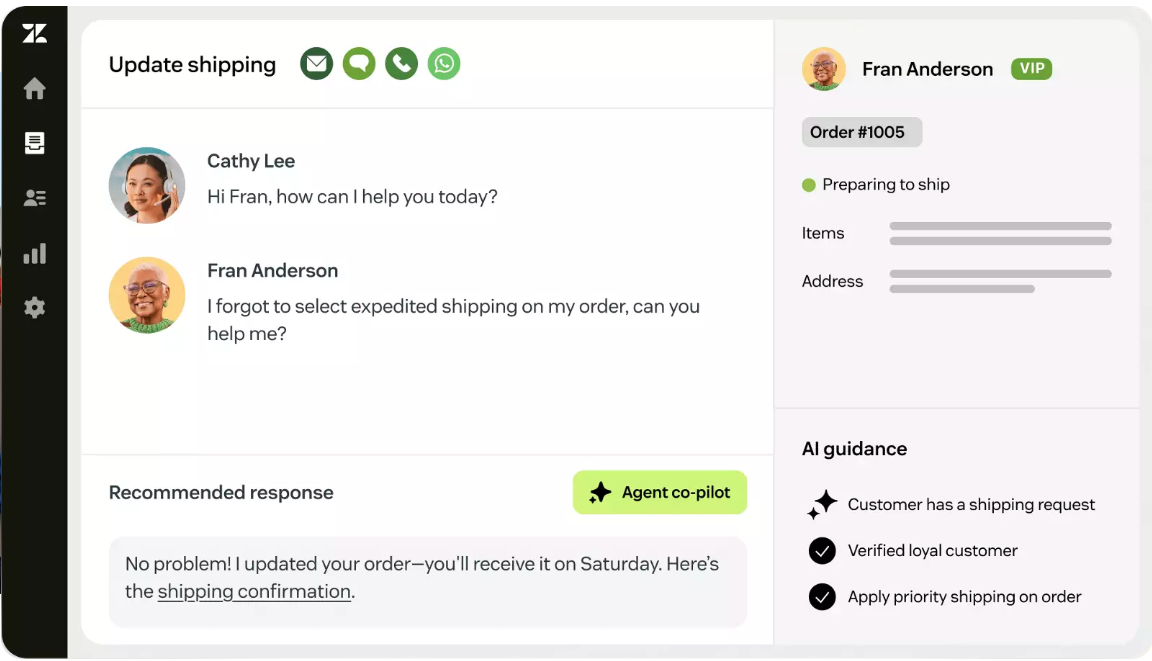
Image source: zendesk.com
Zendesk remains one of the most recognized help desk and customer experience systems in the world. It provides a modular environment for managing cross-channel customer interactions while maintaining enterprise-grade performance and reliability.
Key features
- Omnichannel support across email, chat, voice, and social media.
- Smart ticket routing and AI-assisted responses using Zendesk AI.
- Robust analytics with custom dashboards for measuring service metrics.
- Extensive integration marketplace covering CRM, ERP, and e-commerce platforms.
How does Zendesk compare to Freshdesk?
Zendesk and Freshdesk share many similarities, including ticketing and automation tools. However, Zendesk often outperforms in scalability and analytics depth, supporting large enterprises with complex service ecosystems. Freshdesk, by contrast, offers simpler usability and lower entry pricing for smaller teams.
User experience & interface
Zendesk's user friendly interface has evolved into a streamlined, polished console that allows quick navigation between customer profiles and team queues. Agents can customize their workspace layouts, and the analytics visualizations are particularly user-friendly for management dashboards.
Pricing (billed annaully)
- Support Team: $19/agent/month
- Suite Team: $55/agent/month
- Suite Professional: $115/agent/month
- Suite Enterprise: $169/agent/month (or talk to sales)
3. Zoho Desk: A budget-friendly yet scalable support platform
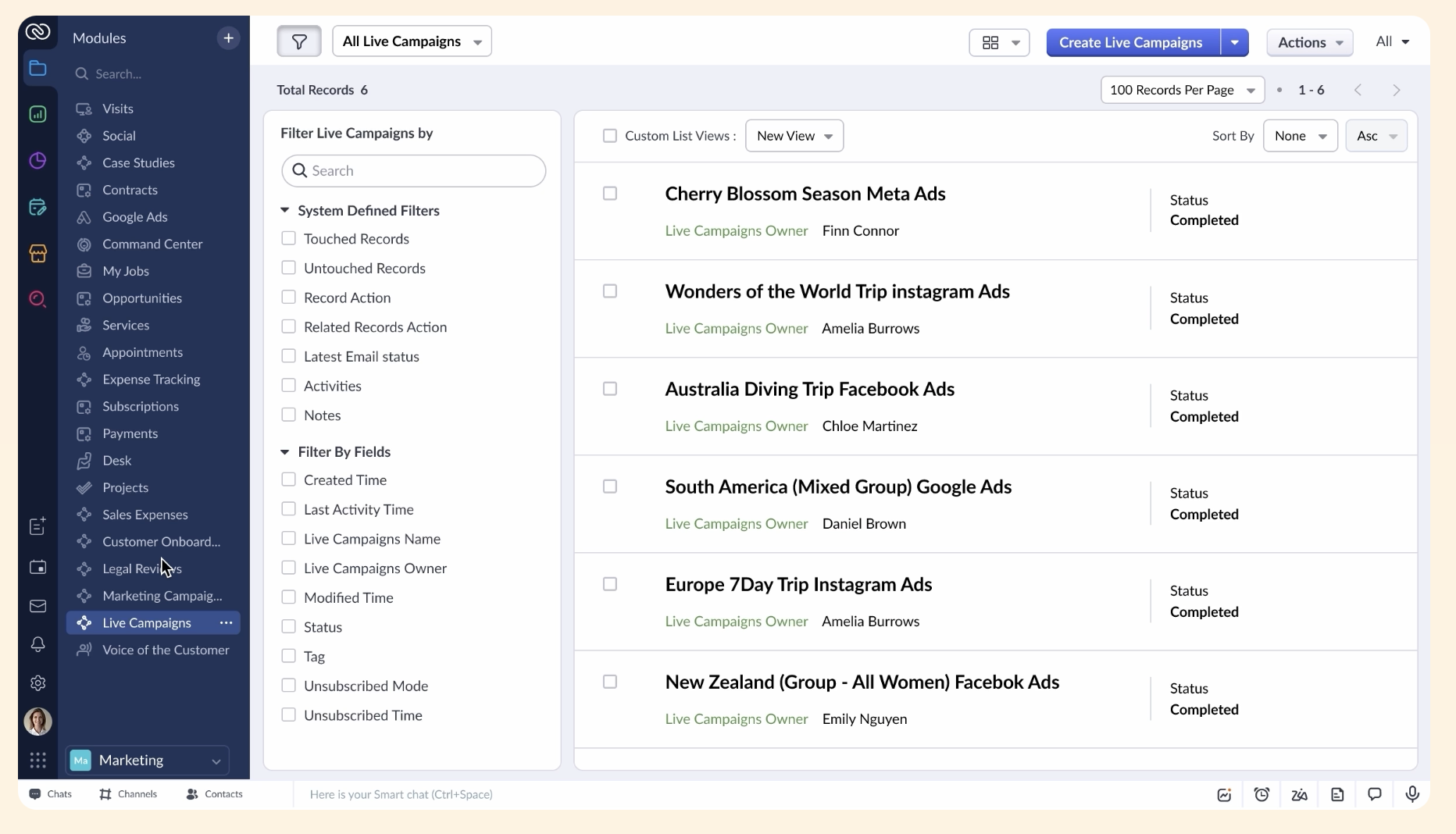
Image source: zoho.com
Zoho Desk is part of the larger Zoho CRM software suite, offering affordable yet feature-rich service desk solutions. Its emphasis lies in workflow automation, omnichannel service, and context-based customer insights.
Key features
- Intelligent ticket automation using AI assistant "Zia" for prioritization and resolution prediction.
- Omnichannel support across emails, phone calls, and social media.
- Customizable dashboards and in-depth reports.
- Seamless integration with other Zoho applications, especially Zoho CRM.
How does Zoho Desk compare to Freshdesk?
Zoho Desk is one of the most affordable and accessible alternatives to Freshworks, offering nearly the same ticketing and automation depth at lower cost. Integration with Zoho CRM provides a consistent experience across sales and support, whereas Freshdesk might require external CRMs to achieve similar cohesion.
User experience & interface
Zoho Desk features a simple, clutter-free design suitable for small businesses to mid-sized teams. The interface centers on user context—agents can see ticket histories, communication threads, and CRM details on a single screen, streamlining workflows.
Pricing(billed annaully)
- Standard: $14/user/month
- Professional: $23/user/month
- Enterprise: $40/user/month
4. HubSpot Service Hub: Where CRM and customer service converge
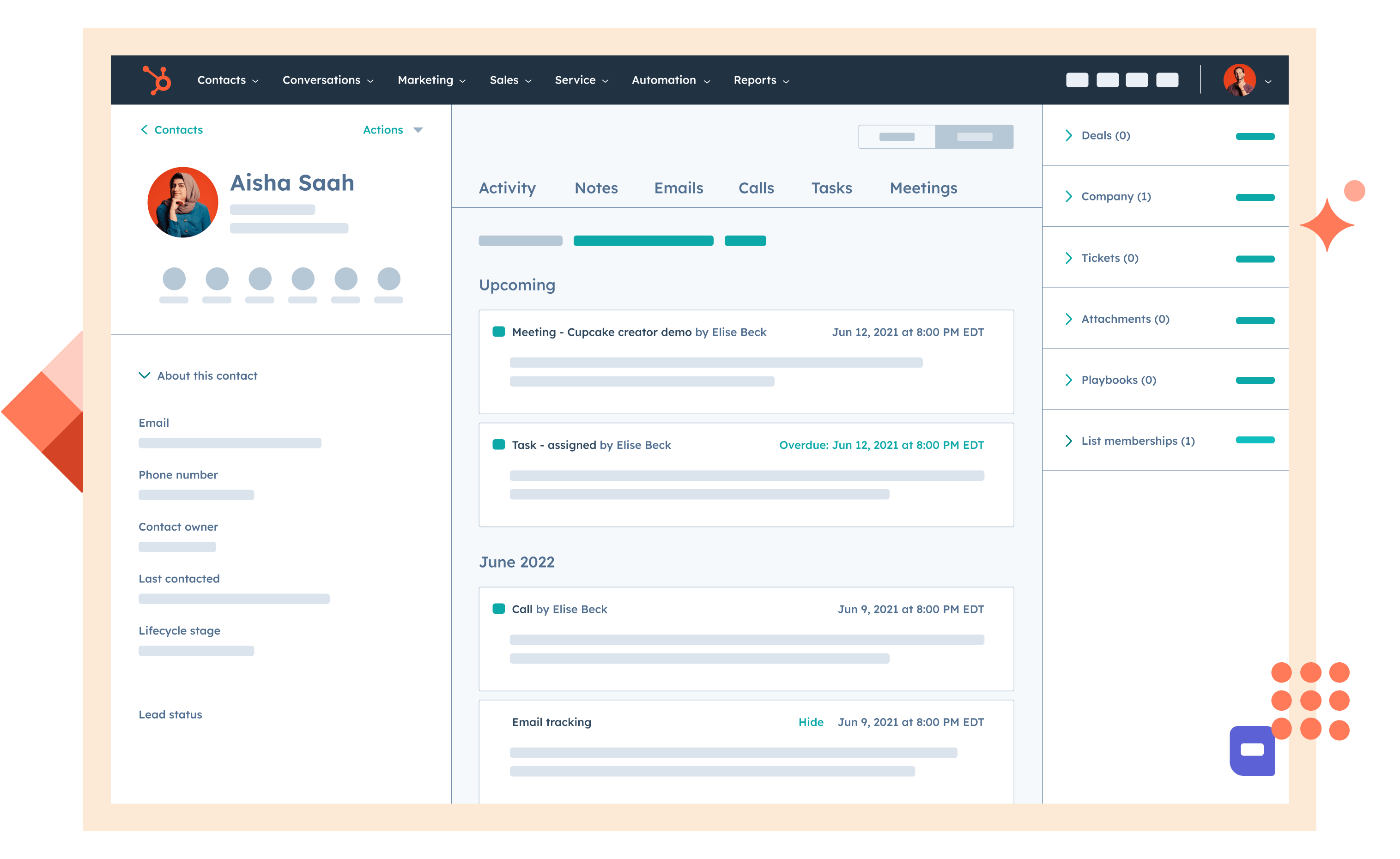
Image source: hubspot.com
HubSpot's Service Hub combines robust CRM functionality with customer support tools, allowing businesses to manage every touchpoint through connected data. It appeals to teams that want a unified view of both client support and marketing interactions.
Key features
- Shared inbox and support pipelines integrated with CRM records.
- Built-in knowledge base, surveys, and automation workflows.
- Integration with HubSpot's marketing and sales hubs for better alignment across departments.
- Customizable reports and dashboards that track satisfaction, response time, and resolution rates.
How does HubSpot compare to Freshdesk?
Both solutions focus on customer experience, but their foundations differ. Freshdesk specializes in ticket-oriented service workflows, whereas HubSpot offers a CRM-native help desk—merging data with shared inbox from sales, marketing, and support. For small teams and large enterprises seeking CRM and service under one roof, HubSpot is often a more unified solution.
User experience & interface
HubSpot maintains a reputation for elegant and coherent design. The drag-and-drop workflow builder simplifies automation setups, and its CRM dashboard provides immediate visibility into customer context, giving teams and market leaders better oversight.
Pricing (billed annaully)
- Free: Up to 2 users with limited functions
- Starter: $9/mo/seat (Free tools with increased limits)
- Professional: $90/mo/seat
- Enterprise: $150/mo/seat
5. ServiceNow: Enterprise-grade ITSM and automation
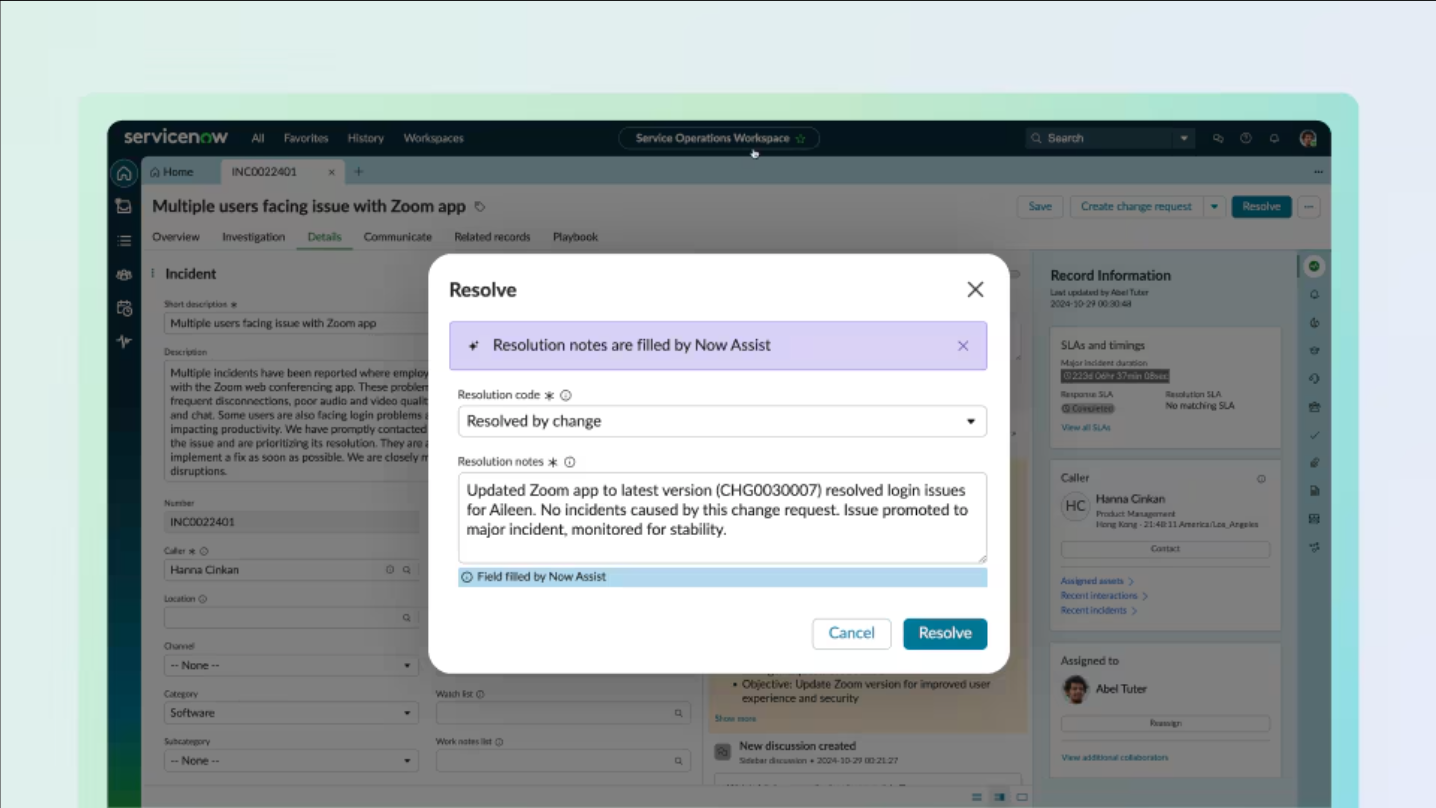
Image source: servicenow.com
ServiceNow is an enterprise platform focused on digital workflows, ITSM, and business operations across large organizations. It's known for its configurability and automation depth.
Key features
- Comprehensive IT, HR, and customer workflow management.
- Predictive AI for incident and service request resolution.
- Service catalog and asset management modules.
- Strong compliance and governance tools suited for regulated sectors.
How does ServiceNow compare to Freshdesk?
ServiceNow is significantly more enterprise-oriented. While Freshdesk suits SMBs, ServiceNow scales to thousands of users across global operations. It surpasses Freshdesk in process automation and compliance, though at a higher implementation cost.
User experience & interface
Recent ServiceNow updates deliver a slick, modern console with configurable dashboards and mobile app support. For IT professionals, the experience is technical yet powerful once customized.
Pricing: ServiceNow provides custom enterprise pricing upon request
6. Jira Service Management: DevOps-oriented service desk for agile teams
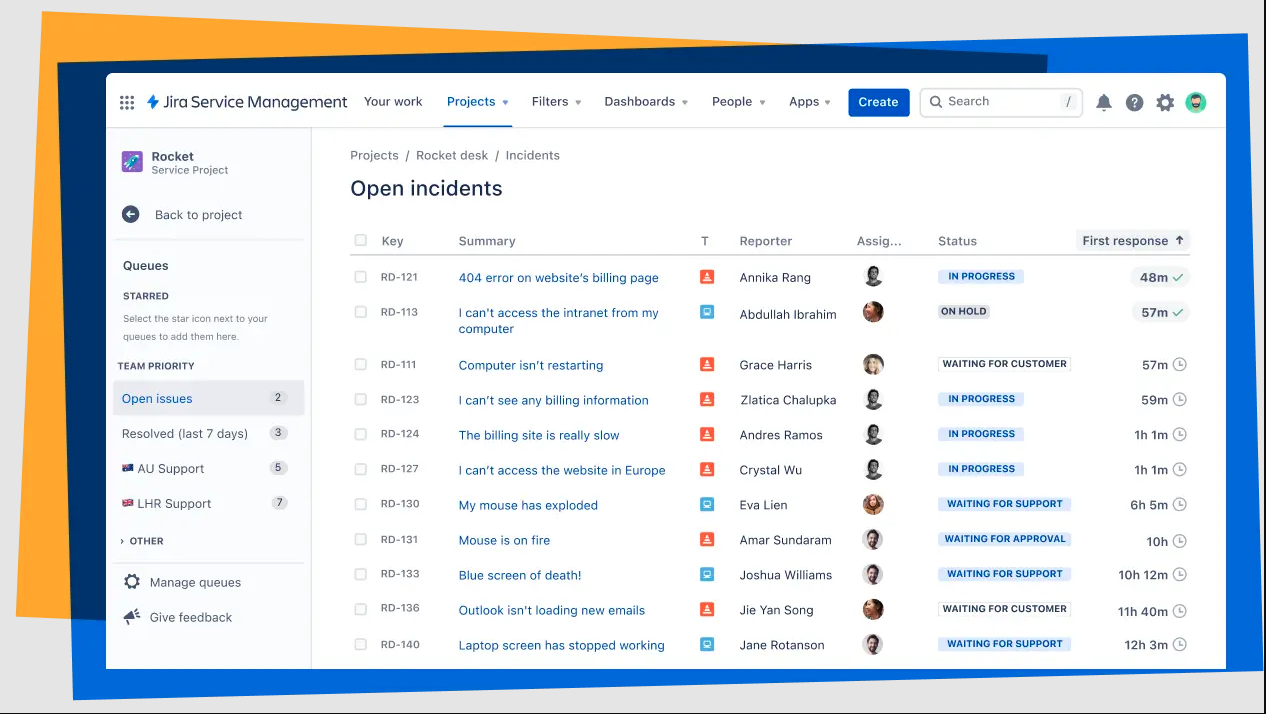
Image source: atlassian.com
Jira Service Management, developed by Atlassian, bridges the gap between IT operations and software development. It's built on the same foundation as Jira Software, allowing support and engineering teams to collaborate more effectively on service requests, incidents, and system updates.
Key features
- Integrated issue tracking for ITSM, incidents, and change management.
- Customizable automation rules to streamline ticket routing and approvals.
- Built-in connection with Jira Software and Confluence for knowledge sharing.
- Real-time status panels and SLA tracking for operational visibility.
How does Jira compare to Freshdesk?
While Freshdesk targets customer-facing support scenarios, Jira Service Management focuses on internal IT service and DevOps collaboration. Its strength lies in linking support tickets to development sprints or bug fixes. Organizations with heavy software or technical infrastructure benefit from this deeper workflow integration.
User experience & interface
Jira Service Management's easy-to-use interface reflects Atlassian's product design philosophy—functional, slightly technical, but highly customizable. Once configured, teams can visualize requests in Kanban or list views, and use automation-driven triggers to maintain service continuity.
Pricing (billed annaully)
- Free tier: Up to 3 agents
- Standard: $20/agent/month
- Premium: $51.42/agent/month
- Enterprise: Custom pricing
7. InvGate Service Desk: Streamlined IT service platform with intuitive design
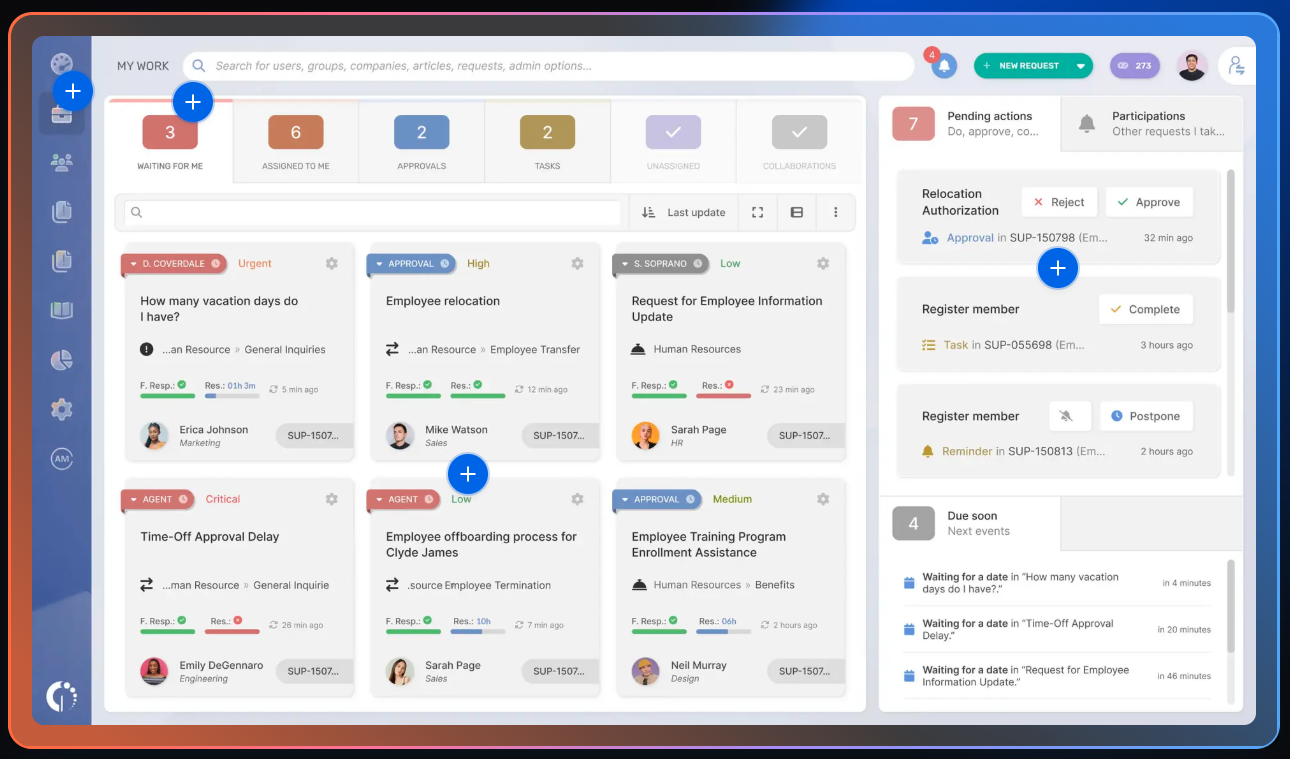
Image source: invgate.com
InvGate Service Desk is an ITSM-focused solution that appeals to organizations prioritizing simplicity, visual workflow management, and ITIL-aligned processes without overwhelming complexity.
Key features
- Drag-and-drop workflow builder for requests, incidents, and approvals.
- ITIL-certified modules for service catalog, asset configuration, and problem tracking.
- Built-in reporting and satisfaction survey tools.
- Integration-ready with existing identity and asset management systems.
How does InvGate Service Desk compare to Freshdesk?
Compared to Freshdesk, InvGate targets internal IT service automation rather than customer-facing help desks. Its clear, visual interface makes IT process mapping easier, while Freshdesk tends to lean more toward client communication and ticketing volume.
User experience & interface
InvGate emphasizes usability — a straightforward dashboard lets managers oversee ticket lifecycles and service-level compliance. The UI's simplicity suits enterprises aiming for efficient adoption without the learning curve typical of heavyweight ITSM solutions.
Pricing
- No free plan; free trial only
- Starter: Up to 5 agents. $17/agent/month, $999 billed annaually
- Pro: 6-50 agents. $40/agent/month, billed annually
- Enterprise: Custom pricing
8. Monday Service: Flexible workflow and service management
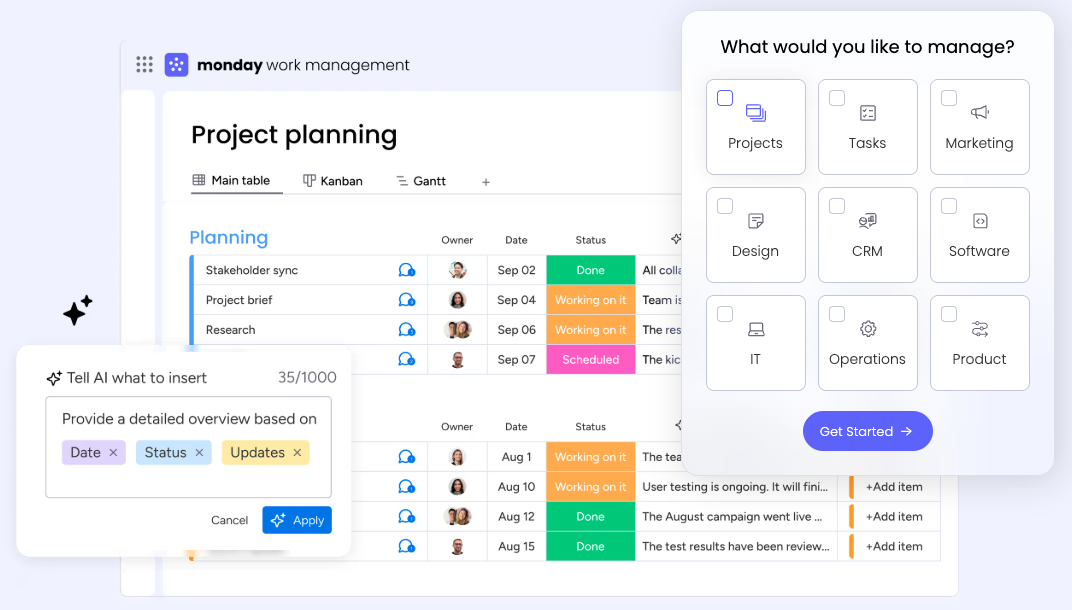
Image source: monday.com
Part of the broader Monday.com ecosystem, Monday Service combines help desk capabilities with visual project and workflow management. Its flexibility allows teams to create custom service processes aligned with broader business operations.
Key features
- Visual boards for service requests, task management, and ticket tracking.
- Workflow automation for repetitive updates and request triage.
- Integration with collaboration platforms like Slack, Gmail, and Teams.
- Advanced filtering and dashboard options for analytics visualization.
How does Monday compare to Freshdesk?
Monday Service offers a work management–first approach, while Freshdesk specializes in structured customer support. Monday's strength lies in its flexibility — allowing teams to design processes around internal support, HR requests, or cross-department operations, not just client tickets.
User experience & interface
The interface is one of Monday's hallmarks — bright, visual, and minimalistic. Teams can instantly see ticket status or project progress, making it welcoming for non-technical departments needing light service automation.
Pricing
Monday Service provides a free trial without advanced features. Paid plans scale by user count and unlock automations, dashboards, and integrations at competitive per-seat pricing, so there might be rising costs as the business grow. For example, for a team of 10 seats, it costs total $260/month (billed annaully) for Standard plan, total $380/month (billed annaully) for Pro plan.
9. Ringy CRM: Sales and communication automation platform
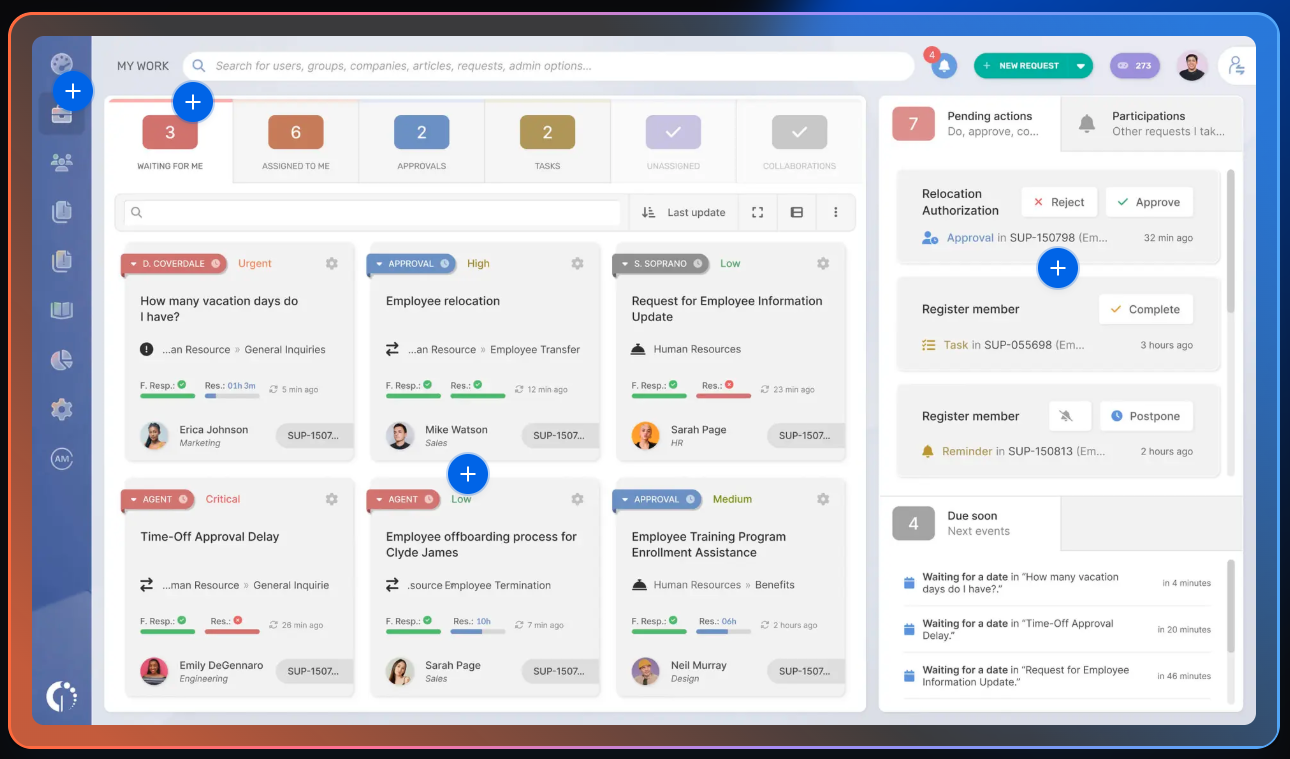
Image source: ringy.com
Ringy CRM targets businesses looking to unify lead management, contact management, and communication automation. It combines calling, SMS, and email campaigns into a cohesive sales enablement environment, saving marketing efforts.
Key features
- Unified calling and texting systems integrated directly into CRM.
- Automated follow-ups, lead nurturing, and campaign tracking.
- Dashboard reporting for performance metrics and conversion pipelines.
- Cloud accessibility for remote and hybrid sales teams.
How does Ringy CRM compare to Freshdesk?
While Freshdesk manages customer service tickets, Ringy supports sales-oriented relationship management. It fits as a Freshworks CRM alternative, especially for revenue-focused teams that want calling and texting automation alongside CRM workflows.
User experience & interface
Ringy's layout is straightforward and communication-first — users switch smoothly between calls, messages, and pipeline views. It's designed for quick engagement rather than data-heavy configurations.
Pricing
- No free plan. Free trial only
- Flat-tier plan: $109/month
10. Appy Pie Automate: No-code automation and integration tool
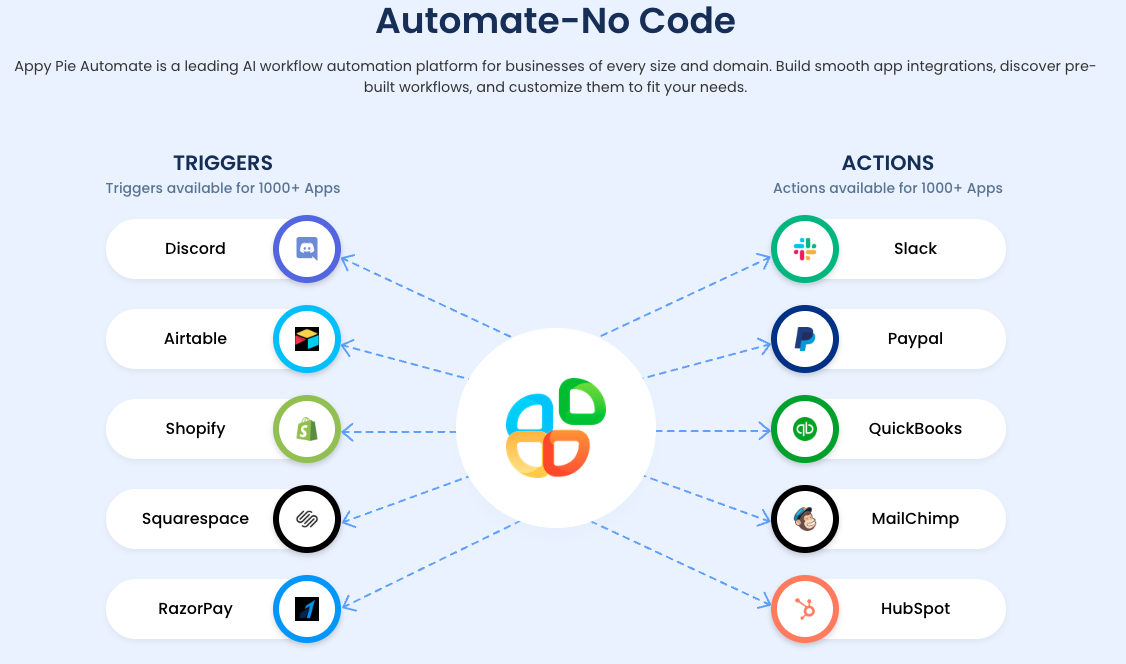
Image source: appypieautomate.ai
Appy Pie Automate is a no-code platform that allows businesses to connect different apps and automate workflows without writing code. It's ideal for organizations seeking affordable, lightweight automation in place of complex integration tools.
Key features
- Visual workflow designer linking apps like Freshdesk, Slack, CRMs, and email tools.
- Triggers and actions for hundreds of platforms to eliminate manual data transfers.
- Templates for repetitive business processes (e.g., ticket creation or follow-ups).
- Excellent accessibility for non-technical teams.
How does Appy Pie Automate compare to Freshdesk?
Rather than replacing Freshdesk, Appy Pie Automate enhances it — or substitutes parts of it in basic support setups. It allows users to replicate automation like ticket routing or notification alerts without deep technical setup. As a lightweight alternative to Freshworks, it provides small teams with flexibility at minimal cost.
User experience & interface
As a easu to use platfor, it uses a drag-and-drop logic builder with clear visual layouts. Users can create connections between apps within minutes, and its guided setup makes automation accessible even for first-time users.
Pricing
- No free plan; 7 day free trial only
- Standard: $12/user/month
- Professional: $30/user/month
- Business: $80/user/month
- Enterprise: Custom pricing
Choose the best Freshworks that meets your need
Which Freshworks alternative is best for your organization
The best Freshworks alternative for your team depends on your company's goals, size, and level of technical maturity. Some teams want to simplify communication, others need deep . Ultimately, the right choice balances collaboration, automation, and scalability—three areas where modern platforms like Lark increasingly stand out.
SMBs, startups, or growing businesses: Lark, Zoho Desk, and Appy Pie Automate
Emerging and fast-scaling businesses often prioritize ease of use, , and adaptability. They need fewer disconnected systems and more unified operations from the start.
- Lark is ideal for small and growing teams that want to merge chat, video meetings, project tracking, and . Instead of managing multiple tools for support and communication, teams can handle everything within one connected environment—reducing overhead, improving internal coordination and enhancing project management.
- Zoho Desk provides a budget-friendly help desk with CRM integration, making it great for startup service teams.
- Appy Pie Automate enhances efficiency through no-code workflows that connect common tools like Gmail, Slack, or CRMs without complex setup.
Together, these platforms represent a new era of lightweight, scalable alternatives to Freshworks, helping small teams grow efficiently while staying collaborative.
Customer support teams: Zendesk, HubSpot Service Hub, and Lark
Customer service–focused organizations thrive when their tools blend help desk management with customer visibility and collaborative execution.
- Zendesk specializes in robust ticketing and customer experience workflows, offering advanced analytics and automation for service-heavy operations.
- HubSpot Service Hub connects service desks directly to CRM data, ensuring that support teams understand the full customer lifecycle—from marketing to post-sale care.
- Lark, though not a traditional help desk, provides a more agile take on customer support. Teams can automate internal ticket approvals, handle live communication instantly, and collaborate on solution documents or responses—all in one interface. This makes Lark particularly useful when support requires cross-departmental coordination, such as between service, sales, and operations.
All three solutions improve how teams interact with customers, but Lark stands apart by turning customer service into a collaborative, connected process—rather than a closed support queue.
IT-heavy needs: ServiceNow, Jira Service Management, and Lark
IT and operations teams demand highly structured service management, automation, and compliance workflows. While enterprise-grade remain indispensable, newer platforms can complement them with greater agility.
- ServiceNow continues to lead complex enterprises that need extensive governance, auditability, and automation across IT and administrative workflows.
- Jira Service Management integrates tightly with Jira Software, bridging IT metrics and development pipelines—essential for DevOps environments.
- Lark now appeals to IT leaders looking for a simpler, more collaborative way to manage internal requests and service operations. Lark's unified workspace save time for their communication, and automation ability helps manage simple works, saving time for complex coding.
For organizations that want strong IT processes without over-engineering, Lark offers an elegant balance: automation, team communication, and in one dynamic workspace.
Empower your project management with professionals
Conclusion
As teams grow more distributed and digital workflows evolve, businesses increasingly look beyond Freshworks for solutions that unify communication, service, and automation. The best Freshworks alternatives don't just replace existing processes—they redefine how teams collaborate and deliver value. Tools like Zendesk, HubSpot, and Zoho Desk specialize in customer management, while Jira Service Management and ServiceNow excel in IT operations. Yet, the most transformative shift is happening around platforms that merge work and collaboration in real time. embodies this new generation of integrated workplaces. By combining messaging, meetings, documents, and workflows in one space, it helps teams eliminate silos, speed up decisions, and stay connected from anywhere. For organizations seeking to modernize their service and communication ecosystems, Lark isn't just an alternative to Freshworks—it's an evolution beyond it.
FAQs
Who does Freshworks compete with?
Freshworks competes with other CRM, help desk, and IT service management providers such as Zendesk, Zoho, HubSpot, Salesforce, and ServiceNow. These companies operate in overlapping segments like customer experience, automation, and CRM integration.
Is Zoho better than Freshworks?
That depends on your needs. Zoho offers strong value for smaller teams, combining CRM and service management tools at a lower cost. Freshworks, however, provides a broader modular ecosystem for IT support and sales automation.
What is better than Freshdesk?
Alternatives like Zendesk, Lark, and HubSpot Service Hub often provide deeper integration and collaboration capabilities. Lark in particular stands out for blending communication and automation within a single workspace, which Freshdesk handles through separate modules.
How does Freshworks compare to Salesforce?
Freshworks is more approachable and affordable for small to mid-sized businesses, whereas Salesforce focuses on enterprise-grade customization and scale. Both offer CRM and automation capabilities, but Salesforce generally suits complex sales ecosystems.
What are the best Freshworks alternatives in 2026?
Top contenders include Lark, Zendesk, Zoho Desk, HubSpot Service Hub, and ServiceNow. Each targets a different need—Lark for unified collaboration, Zendesk for enterprise-scale service, and Zoho for accessible CRM and support management.
Related reading


















