














Top 10 Agile Project Management Tools: Free, Online, and Open Source

Nidhi
Freelance Content Writer
Nov 3, 2026
Nidhi
Nov 3, 2026

16 min read
Add to preferred sources


Agile project management empowers teams to adapt quickly, deliver faster, and stay aligned through continuous Agile project management helps teams stay flexible, improve collaboration, and deliver results faster. The right agile project management tool turns Agile principles into daily execution — enabling sprint planning, backlog tracking, and transparent communication. With today’s range of free, online, and open-source options, agile workflows are accessible to teams of all sizes. In this guide, we’ll explore the top 10 agile project management tools to consider in 2025 — including Lark, Jira, ClickUp, and Trello — comparing their key features, pros, and pricing so you can find the best fit for your team’s goals and working style.
- Lark: All-in-one workspace for agile teamwork
- Jira: Enterprise-ready tool for software development
- Trello: Simple, visual boards for task tracking
- Wrike: Work management platform for scaling projects
- ClickUp: Highly customizable productivity platform
- Asana: Collaboration tool for cross-functional teams
- Monday.com: Visual project hub with flexible workflows
- Zoho Sprints: Budget-friendly agile planning tool
- OpenProject: Open-source solution for secure project management
- Taiga: Lightweight open-source platform for agile teams

What is an agile project management tool
An agile project management tool is software designed to help teams apply agile principles in their daily workflows. Unlike traditional project management systems, these tools focus on flexibility, adaptability, and continuous delivery. Core features usually include backlog management for organizing tasks and user stories, sprint planning to structure work into iterations, visual task boards for tracking progress, reporting dashboards to measure performance, and integrations with communication or development platforms. An online agile project management tool enables distributed teams to collaborate in real-time. In contrast, a free agile project management tool like Lark makes agile practices accessible to even startups with limited budgets. For large enterprises, such tools scale effectively across multiple teams, improving coordination. For smaller groups, they simplify planning and boost productivity without unnecessary complexity.
Benefits of using agile project management tools
Adopting an agile project management tool can significantly improve the way teams collaborate, track progress, and deliver results. These tools provide a range of benefits that enhance efficiency and adaptability across different industries:
- Improved team collaboration: Agile project management tools create a shared workspace where team members can communicate, assign tasks, and provide updates in real-time. This reduces silos and ensures that everyone is aligned with project goals. For example, a software development team using an online agile project management tool can easily collaborate across time zones without missing essential updates.
- Enhanced visibility and tracking: These tools offer dashboards and task boards that clearly display project status at a glance. Managers can see which tasks are pending, in progress, or completed, enabling faster decision-making. In industries such as marketing, this transparency allows for the effective tracking of campaigns and ensures that deadlines are met.
- Faster project delivery and adaptability: By breaking projects into sprints and prioritizing work, teams can deliver results quickly and respond to changes seamlessly. A free agile project management tool can help startups pivot when client requirements shift. In healthcare, for instance, agile tools have enabled teams to roll out digital patient portals in record time.
- Reduced manual work with automations: Modern agile tools automate repetitive tasks, including task assignment, notifications, and reporting. This saves valuable time and minimizes errors caused by manual updates. For example, an e-commerce company might automate inventory alerts and marketing campaign tracking to keep projects on schedule.
Comparison of top agile project management tools
Detailed overview of top agile project management tools
With numerous options available, selecting the right agile project management tool can be overwhelming for teams of any size. Each platform offers its own strengths, whether it's advanced sprint planning for software developers, visual task boards for creative teams, or automation features for operations. Understanding the unique features, pros, cons, and pricing of each tool is essential to making an informed decision. By comparing them side by side, organizations can identify which solution best aligns with their workflows and goals. Here's a detailed breakdown of the top agile project management tools you should consider:
1. Lark: All-in-one agile collaboration platform
Lark is a comprehensive agile collaboration platform designed to streamline workflows and boost team productivity. It contains chat, video conferencing, docs, and project management within the same ecosystem, reducing the need for multiple apps. This unified workspace enables seamless transitions between communication and work management, keeping projects aligned and on track. Lark is especially useful for distributed teams looking for transparency and real-time collaboration.
Key features
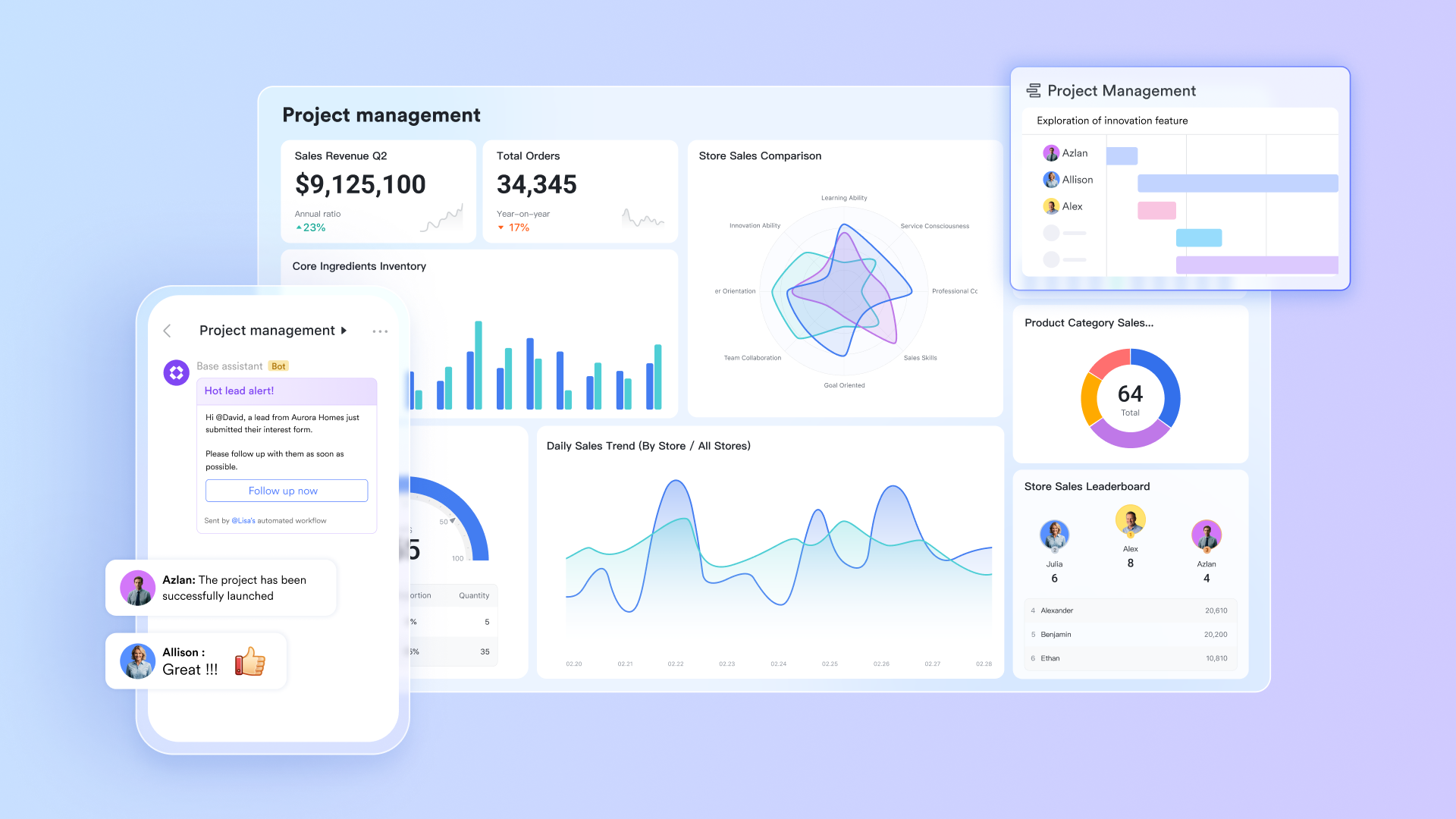
- Task and project boards in Base
Agile teams need transparency and an easy way to visualize workflows. With Lark Base, teams can build customizable Kanban or Scrum boards that organize tasks, set priorities, and track progress in real time. Boards can be viewed in different formats—list, calendar, or gallery—so every member can choose the view that suits their style. This flexibility ensures everyone has clarity, whether they're sprint planning or tracking progress mid-cycle.
Example: A product development team can set up a Kanban board where each task card represents a user story or bug. Cards move through columns like "To Do,” "In Progress," and "Complete," making progress visible at a glance. By setting Work in Progress (WIP) limits, the team prevents overload and focuses on finishing tasks before starting new ones, which keeps the workflow smooth and efficient.
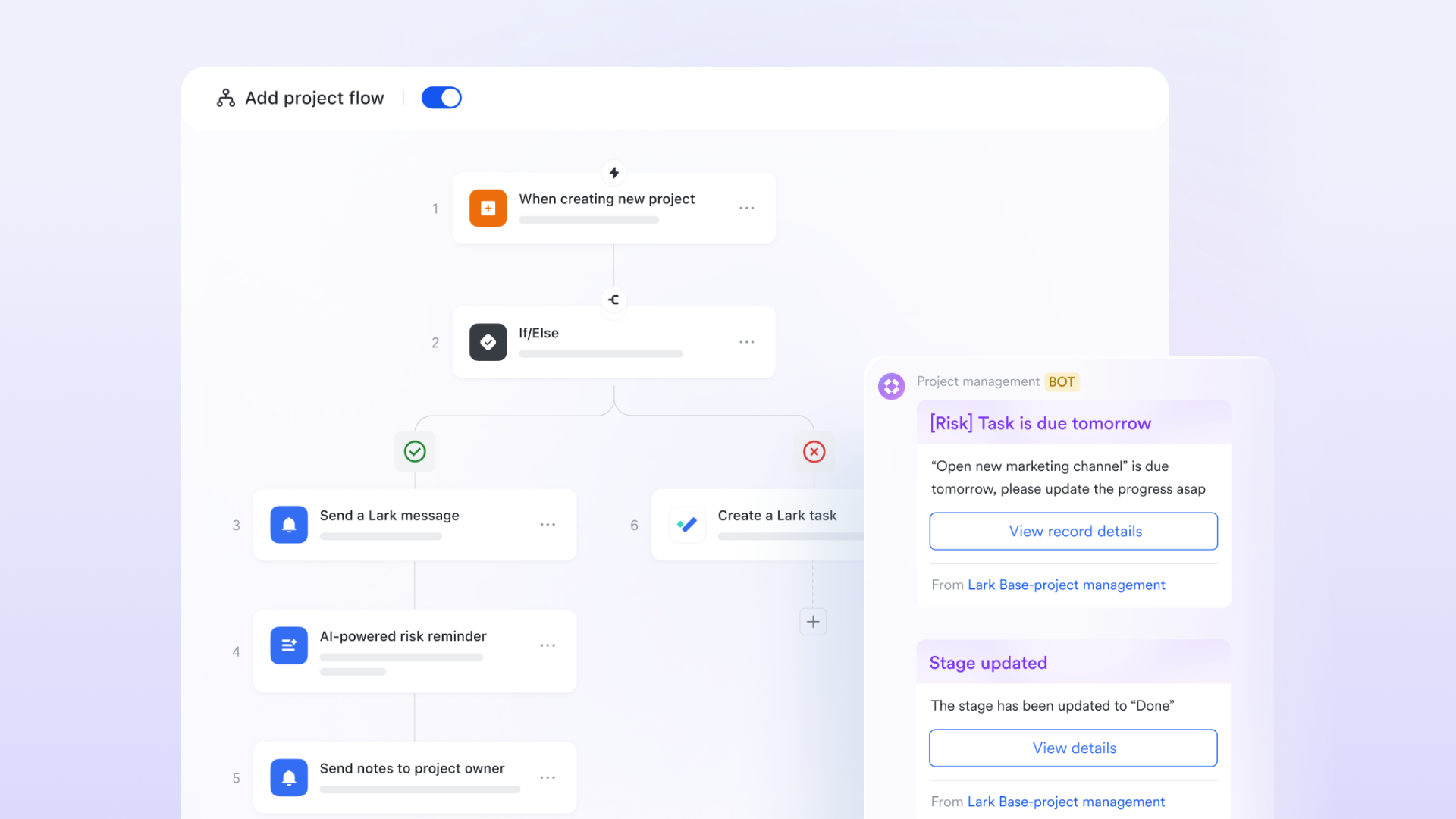
- Workflow & Automations
Repetitive manual tasks often slow down Agile teams and create friction in fast-moving projects. Lark's Workflow and Automations feature, powered by Lark Base, streamline these processes. Teams can set up rules to automatically trigger notifications, approvals, or status changes, reducing errors and keeping projects moving forward. This ensures time is spent on meaningful work instead of routine admin.
Example: Suppose a new bug is logged during a sprint. Automation can instantly notify the Scrum Master in Lark Messenger and route the task for approval. Once the designated reviewer signs off in Lark Approval, the task status updates to "Approved" automatically. This eliminates manual handovers, ensures transparency, and keeps the sprint running without delays.
- Docs and Sheets collaboration
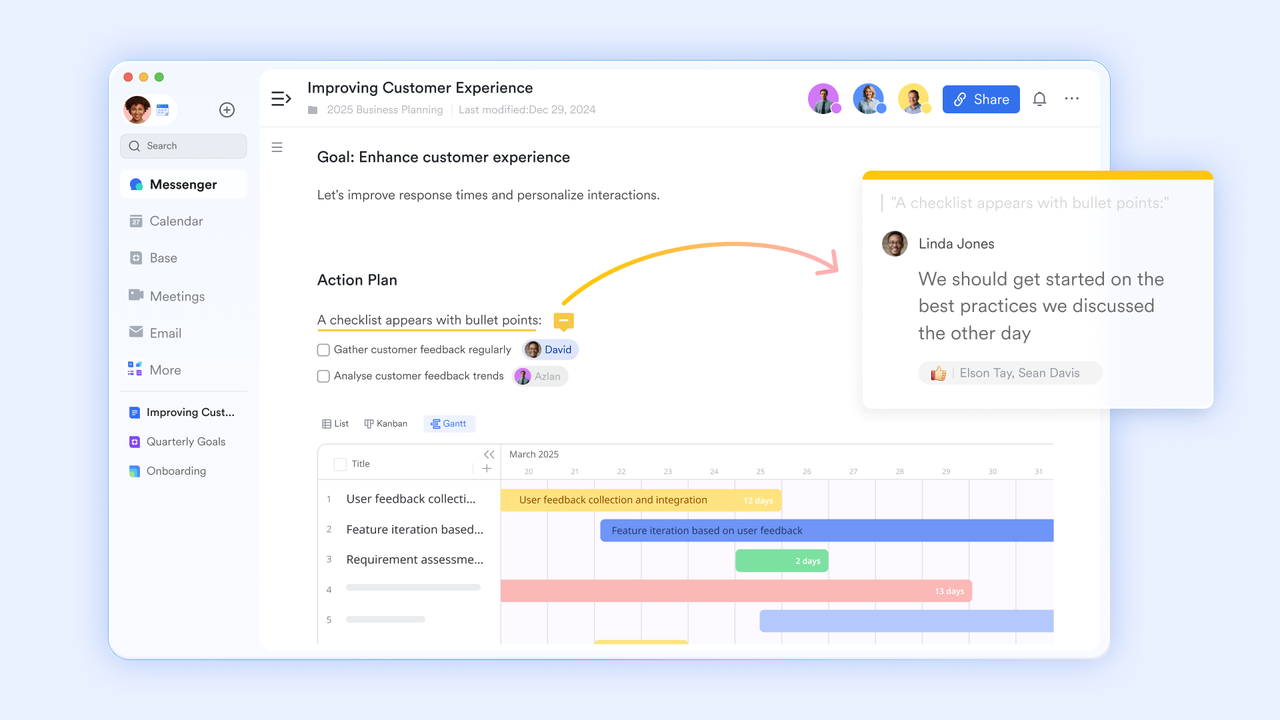
Agile projects require a single, reliable source of truth for planning, documentation, and data. With Lark Docs and Sheets, teams can co-author content in real time, ensuring everyone works from the most up-to-date version. Tasks, mentions, and links can be embedded directly into documents, turning discussions into actionable work. This improves transparency and prevents the confusion of multiple document versions.
Example: During sprint planning, a team can co-edit a Doc to capture user stories and acceptance criteria. Each user story can be linked to a task card, while team members are tagged with responsibilities using mentions (@). This document then becomes a living sprint plan that evolves as the sprint progresses—easy to update, accessible to all, and free from version chaos.
- Built-in chat and video meetings
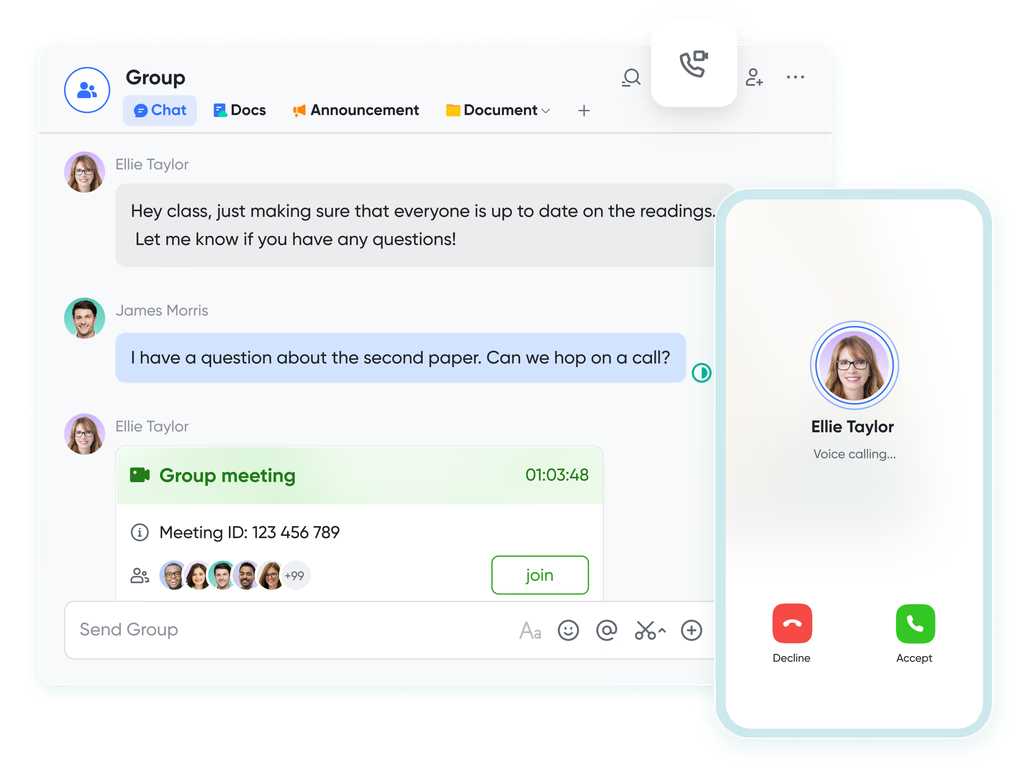
Agile values "individuals and interactions over processes and tools," and Lark brings this principle into everyday workflows. With Messenger and Meetings, teams can communicate instantly without leaving the platform. Stand-ups, sprint reviews, or quick syncs can move from chat to video call in seconds. This seamless integration reduces context switching and ensures communication stays connected to the work.
Example: A development team can run their daily stand-up in a group chat, with each member quickly sharing progress and blockers. If a blocker requires further discussion, the team can initiate a quick video meeting directly from Messenger. Meanwhile, relevant files or Docs are accessible in the same space, so discussions turn into solutions instantly.
- AI assistance
AI features can save Agile teams time by automating repetitive mental tasks and surfacing key insights. Lark's AI assistant helps summarize meetings, suggest next steps, and organize notes or tasks. Instead of spending extra time formatting or documenting, teams get an intelligent helper that keeps workflows lean and efficient. This supports Agile's focus on sustainable pace and continuous improvement.
Example: After a sprint retrospective, the AI assistant can generate a summary highlighting key decisions, blockers, and agreed action items. It can also structure these notes directly into a Doc for the team to review later. This ensures lessons learned are never lost and can be carried into future sprints without adding to the team's workload.
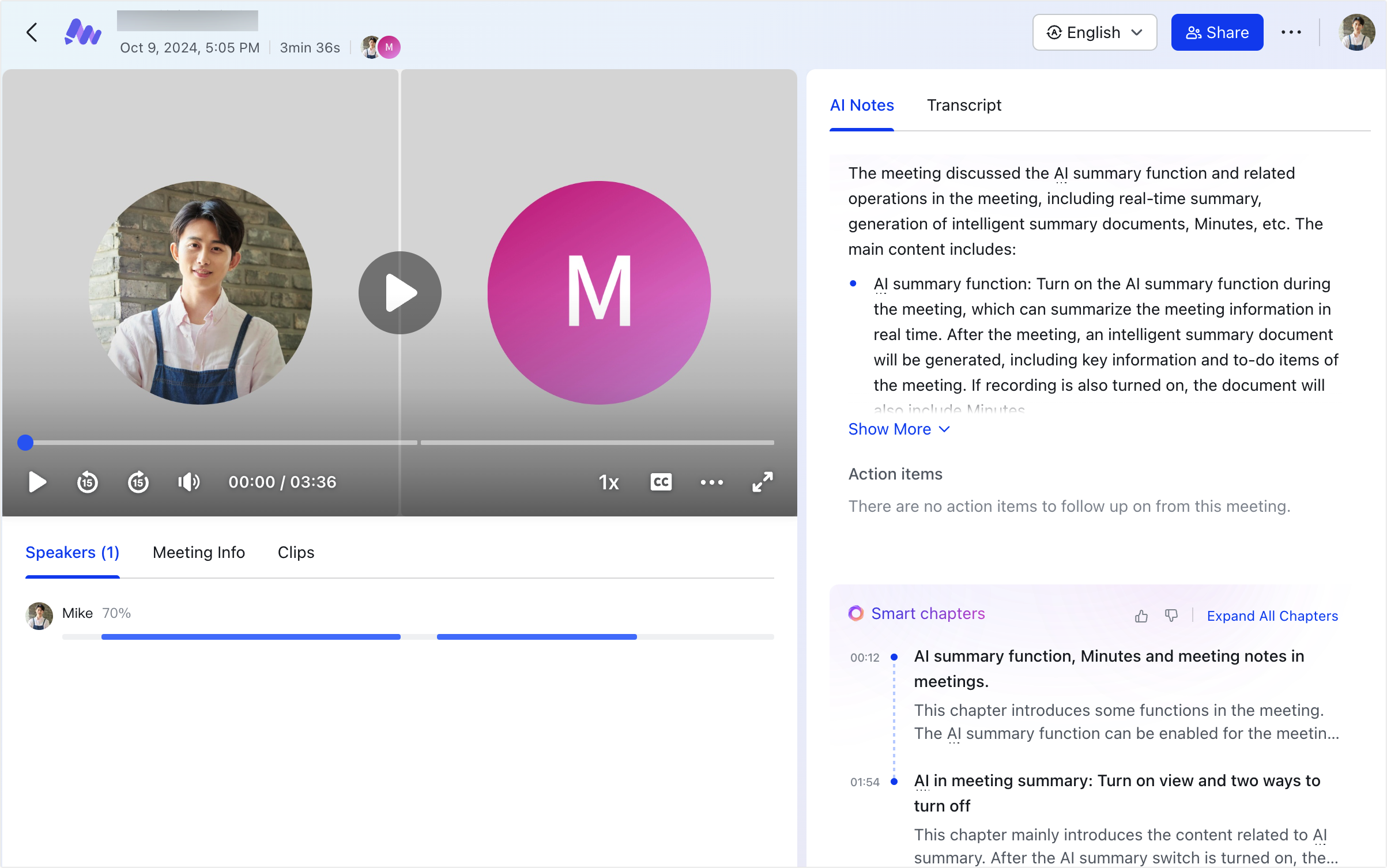
- Customizable templates
Adopting Agile practices can feel daunting for new teams, and this is where templates provide a head start. Lark offers pre-built templates for sprints, retrospectives, and project tracking, which can be customized to fit specific team needs. These templates provide structure while leaving room for flexibility, helping teams establish workflows quickly.
Example: A new Agile team could start with the "Goal Setting For Agile Teams" template in Lark Base. The template provides pre-structured fields for Goal Type, Category, Status, Priority, etc. The team can then adapt it by adding custom fields or automation rules, creating a tailored Agile system without needing to build from scratch.
Pros
- Reduces tool sprawl with an all-in-one approach.
- Intuitive interface makes onboarding easy.
- Automation features save time and minimize errors.
- Cost-effective for growing teams.
Cons
- It can feel overwhelming at first with too many advanced features, but its Help Center offers friendly guides, and the AI Assistant can quickly respond with desired answers.
- Starter plan: Free forever plan that includes 11 powerful tools for up to 20 users. It also comes with 100GB of storage, 1000 automation runs, AI translations, and more.
- Pro plan: $12/user/month (billed annually) for up to 500 users. It includes everything in Starter plus group calling for up to 500 attendees, 15TB of storage, 50,000 automation runs, and more.
- Enterprise plan: Contact sales for custom pricing. Supports unlimited users and includes even more automation runs and advanced security, compliance, and management features.
2. Jira: Robust software project management tool
Jira, developed by Atlassian, is one of the most widely used agile project management tools, particularly in the software development industry. It supports both Scrum and Kanban methodologies, making it highly adaptable for agile teams. Its strong issue-tracking capabilities, customizable workflows, and deep integration with Atlassian's ecosystem make it the industry standard. From startups to enterprises, Jira is trusted for managing complex product development cycles.
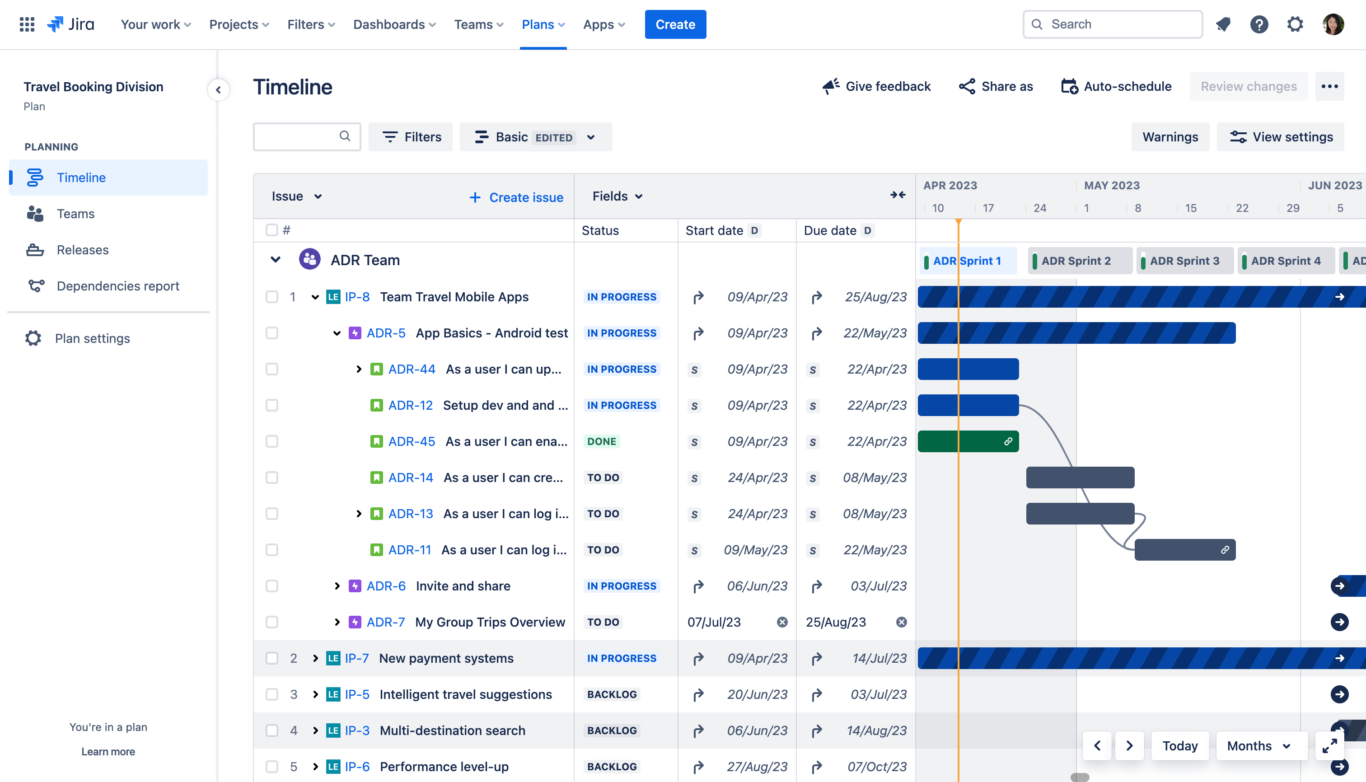
Image source: jira.com
Features
- Agile boards: Scrum and Kanban boards for visualizing workflows.
- Custom workflows: Build workflows tailored to your team's processes.
- Issue and bug tracking: Central hub for tracking tasks, defects, and epics.
- Reporting tools: Burndown charts, velocity charts, sprint reports, and more.
- Backlog management: Organize and prioritize user stories effectively.
Pros
- Extremely powerful for agile project tracking.
- Highly customizable for diverse workflows.
- Excellent issue and bug tracking system.
- Integrates seamlessly with Confluence and other Atlassian tools.
Cons
- Steep learning curve for new users.
- A complex setup requires time and effort.
- The interface can feel cluttered for small teams.
Pricing
- Free: Up to 10 users.
- Standard: $7.16/user/month (billed annually, 5-seat minimum).
- Premium: $14.33/user/month (billed annually).
- Enterprise: Custom pricing.
3. Trello: Visual Kanban boards for task tracking
Trello is a lightweight, visually engaging agile project management tool built around Kanban boards. It uses boards, lists, and cards to provide clarity on project status, making it accessible even for non-technical teams. Trello is particularly popular with creative teams and small businesses due to its simplicity and flexibility. With its drag-and-drop interface and add-ons, Trello adapts easily to a variety of workflows.
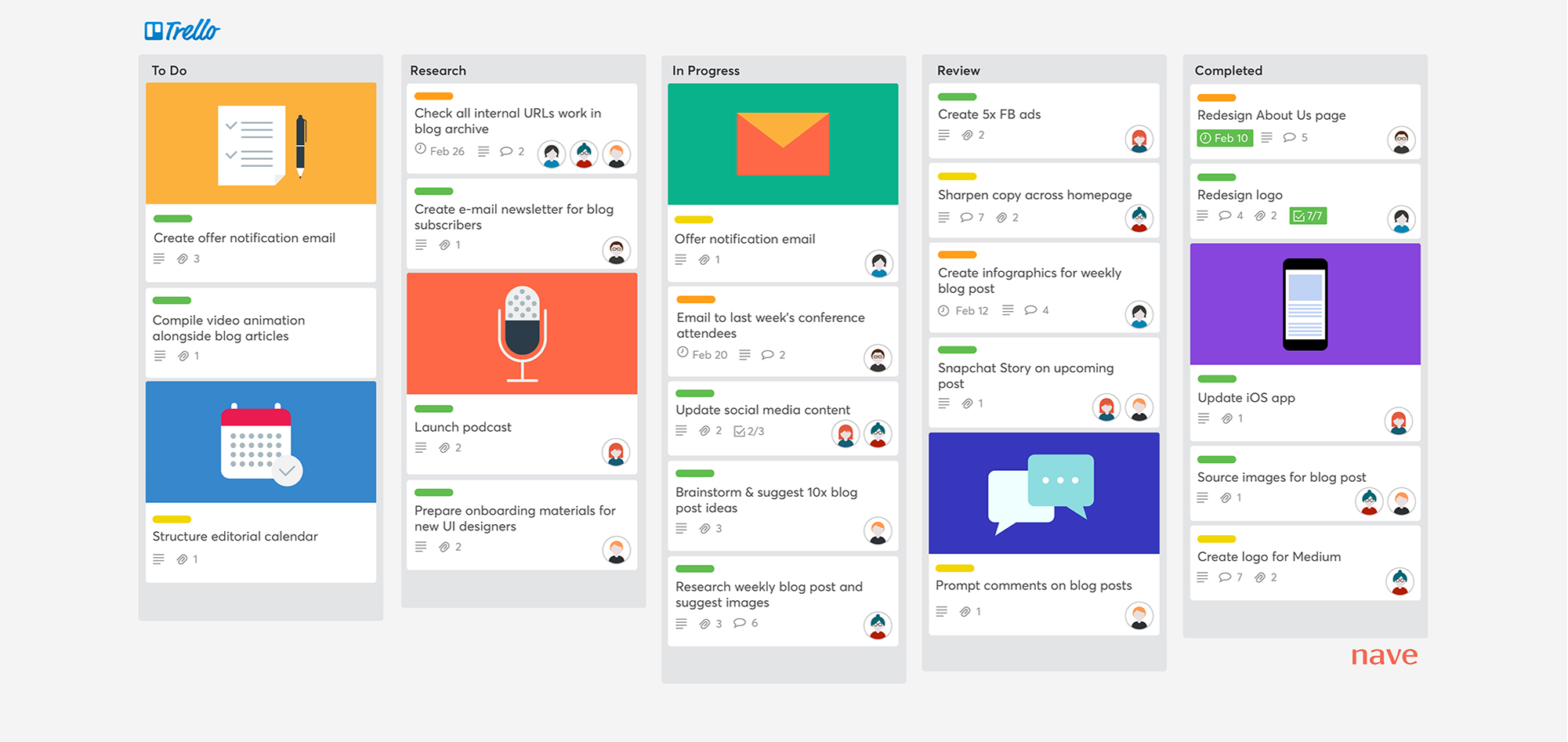
Image source: trello.com
Features
- Boards and cards: Visualize projects, tasks, and progress stages.
- Drag-and-drop interface: Move tasks between lists effortlessly.
- Checklists and due dates: Break down tasks and set deadlines.
- Labels and Attachments: Organize tasks with color-coded labels and file uploads.
- Power-Ups: Extend functionality with add-ons like Gantt charts and integrations.
Pros
- Very easy to learn and adopt.
- Clear, visual representation of task progress.
- Highly flexible for different workflows.
- Affordable and suitable for small teams.
Cons
- Limited advanced reporting features.
- Simplicity doesn't scale well for complex projects.
- Reliance on Power-Ups for extended functionality.
Pricing
- Free: For individuals and small teams.
- Standard: $ 5 per user per month (billed annually).
- Premium: $10/user/month (billed annually).
- Enterprise: $17.50/user/month (billed annually).
4. Wrike: Versatile work management solution
Wrike is a powerful and adaptable platform suitable for both agile and non-agile teams. It offers multiple views—like Kanban boards, Gantt charts, and tables—to support diverse project needs. Its AI-powered insights and proofing tools make it especially valuable for marketing, IT, and creative teams. Wrike is designed to help organizations streamline workflows, enhance collaboration, and make better decisions with data.
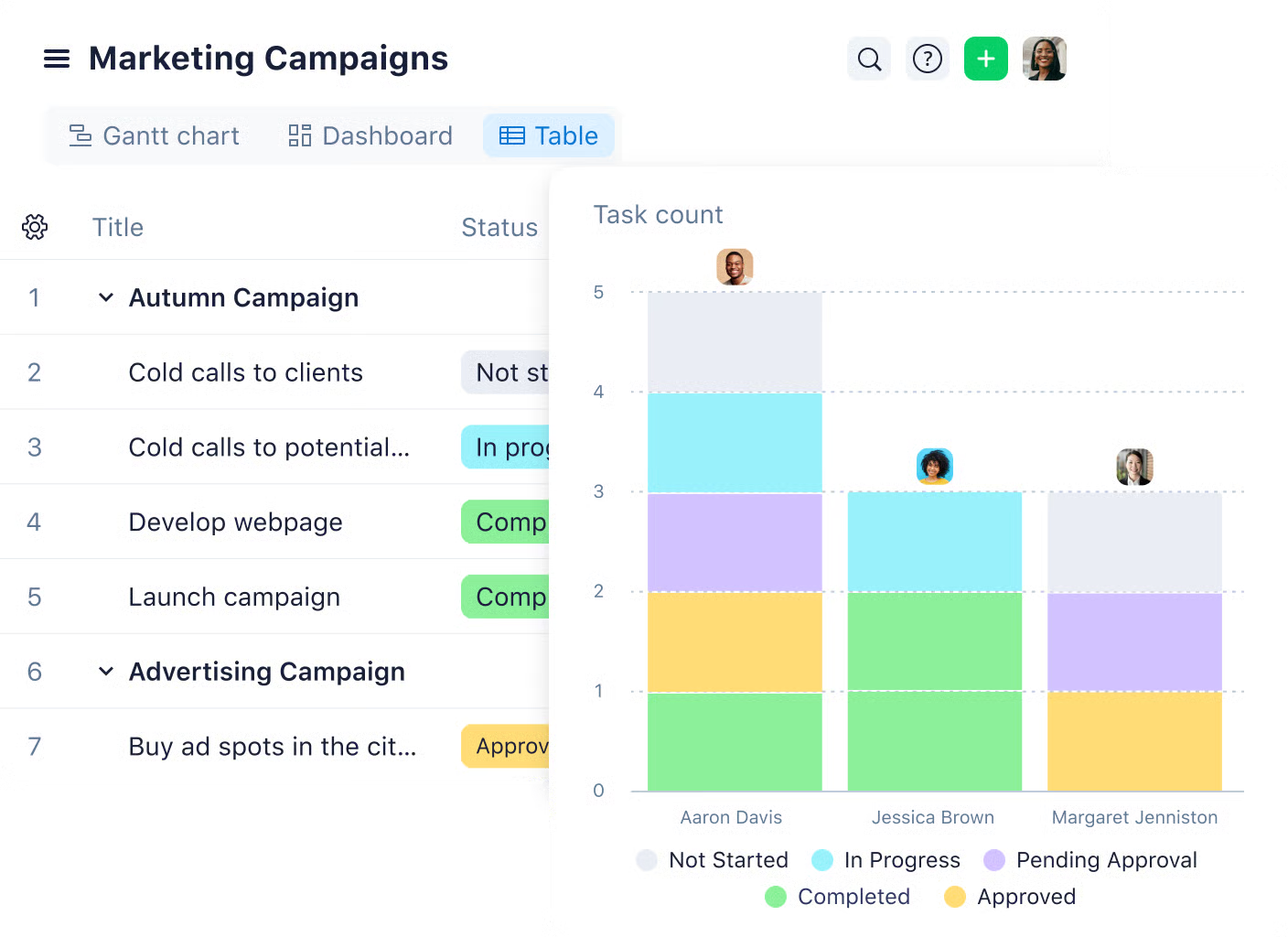
Image source: wirke.com
Features
- Multiple project views: Kanban, Gantt, table, and calendar options are available.
- AI-powered insights: Predict risks and prioritize tasks automatically.
- Proofing tools: Review and annotate creative files directly.
- Custom workflows: Build forms and workflows tailored to processes.
- Time tracking: Monitor work hours and manage timesheets.
Pros
- Balanced mix of functionality and usability.
- AI features are included in all plans.
- Proofing tool simplifies creative reviews.
- Strong integrations with popular apps.
Cons
- Advanced features, such as two-factor authentication (2FA), are exclusive to Enterprise.
- Some integrations add extra costs.
- It can feel overwhelming for even the simplest projects.
Pricing
- Free: Unlimited users.
- Team: $10/user/month (billed annually).
- Business: $24.80/user/month (billed annually).
- Enterprise: Custom pricing.
5. ClickUp: Customizable project management platform
ClickUp is a highly flexible project management platform designed to replace multiple workplace apps in one. It caters to freelancers, startups, and enterprises by offering a wide range of agile and traditional project management features. Its versatility lies in providing everything from task management and automations to collaboration and reporting—all in a single dashboard. Teams across industries rely on ClickUp for its adaptability and ability to fit unique workflows.
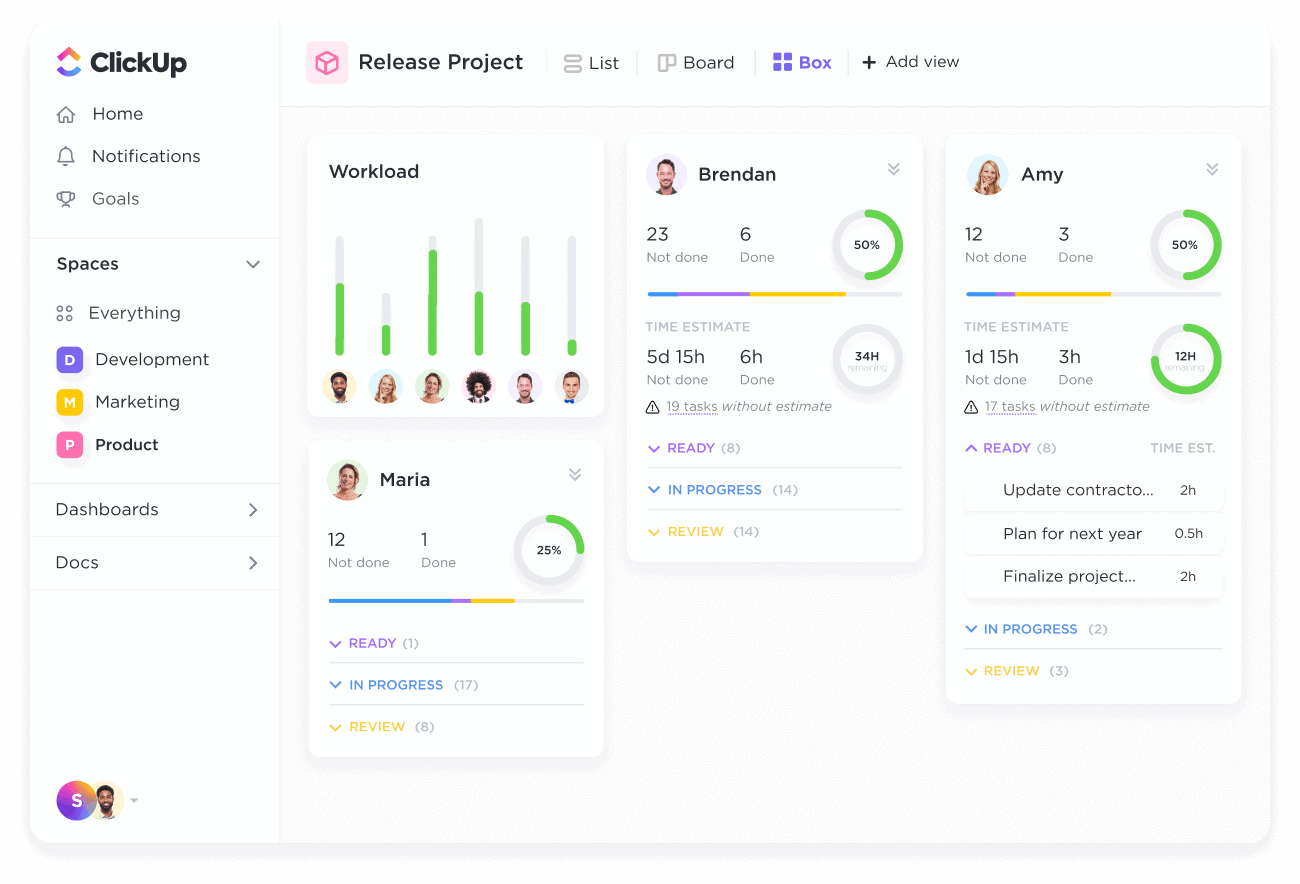
Image source: clickup.com
Features
- Multiple views: Kanban boards, Gantt charts, workload views, and more.
- Task hierarchies: Organize work with subtasks, checklists, and dependencies to streamline workflow.
- Automations: Reduce manual effort by automating repetitive processes.
- Real-time collaboration: Commenting, mentions, and live document editing.
- Custom dashboards: Widgets for team workload, timelines, and task tracking.
Pros
- Robust free plan with many features.
- Highly customizable to any workflow.
- A wide range of project and task tools in one place.
- Affordable pricing for its feature depth.
Cons
- Feature overload creates a steep learning curve.
- Occasional performance lags in larger workspaces.
- The free plan limits automations and integrations.
Pricing
- Free Forever: Unlimited members, basic features.
- Unlimited: $10/user/month (billed annually).
- Business: $19/user/month (billed annually).
- Enterprise: Custom pricing.
6. Asana: Streamlined task and workflow management
Asana is a popular agile project management tool recognized for its simplicity and robust workflow management capabilities. It allows teams to create, assign, and track tasks with ease, making it useful for marketing, product development, and operations. With flexible views, such as lists, boards, and timelines, Asana provides clarity and coordination across projects. Its automation and collaboration features also reduce repetitive work and improve efficiency.
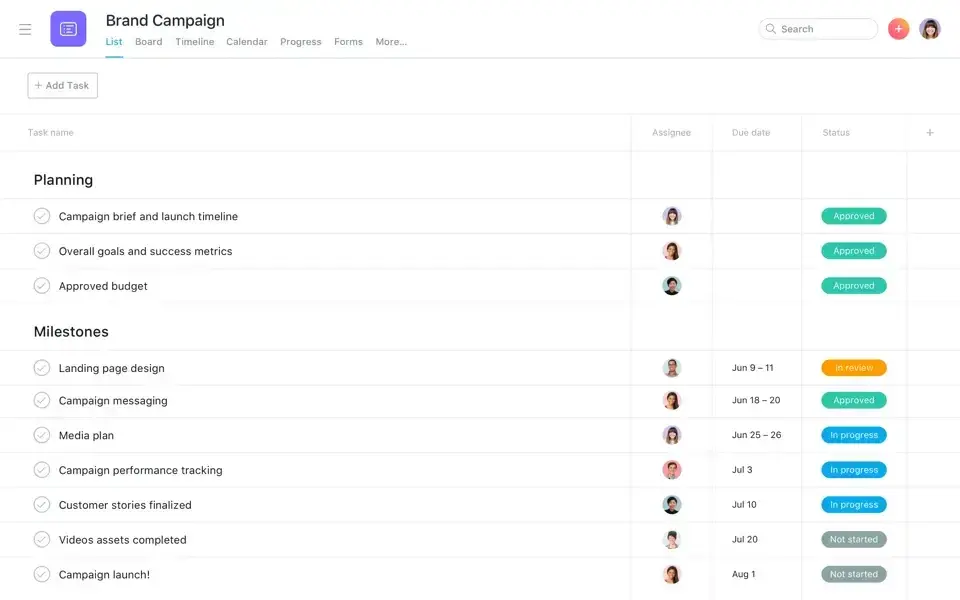
Image source: asana.com
Features
- Task creation and tracking: With due dates, assignees, and priorities.
- Multiple project views: Boards, lists, and timelines for different workflows.
- Dependency mapping: Identifying Bottlenecks in Complex Projects.
- Automations: Streamline repetitive tasks.
- Team collaboration: Message boards, comments, and mentions.
Pros
- Intuitive, beginner-friendly interface.
- Strong collaboration tools for teams.
- Flexible customization of workflows.
- The free plan works well for small teams.
Cons
- Notifications can be excessive.
- It can feel overwhelming even for the most straightforward projects.
- Lacks built-in time tracking (requires integrations).
Pricing
- Free: Limited features.
- Starter: $10.99/user/month (billed annually).
- Advanced: $24.99/user/month (billed annually).
- Enterprise: Custom pricing.
7. Monday: Flexible team project management
Monday.com is a highly visual project management platform often referred to as a "Work OS." It allows teams to create customized workflows for projects of any complexity. Its intuitive interface, color-coded boards, and automation builder make it easy for teams to adapt it to their processes. Monday.com is particularly well-suited for cross-functional collaboration across various industries, including marketing, HR, and product development.
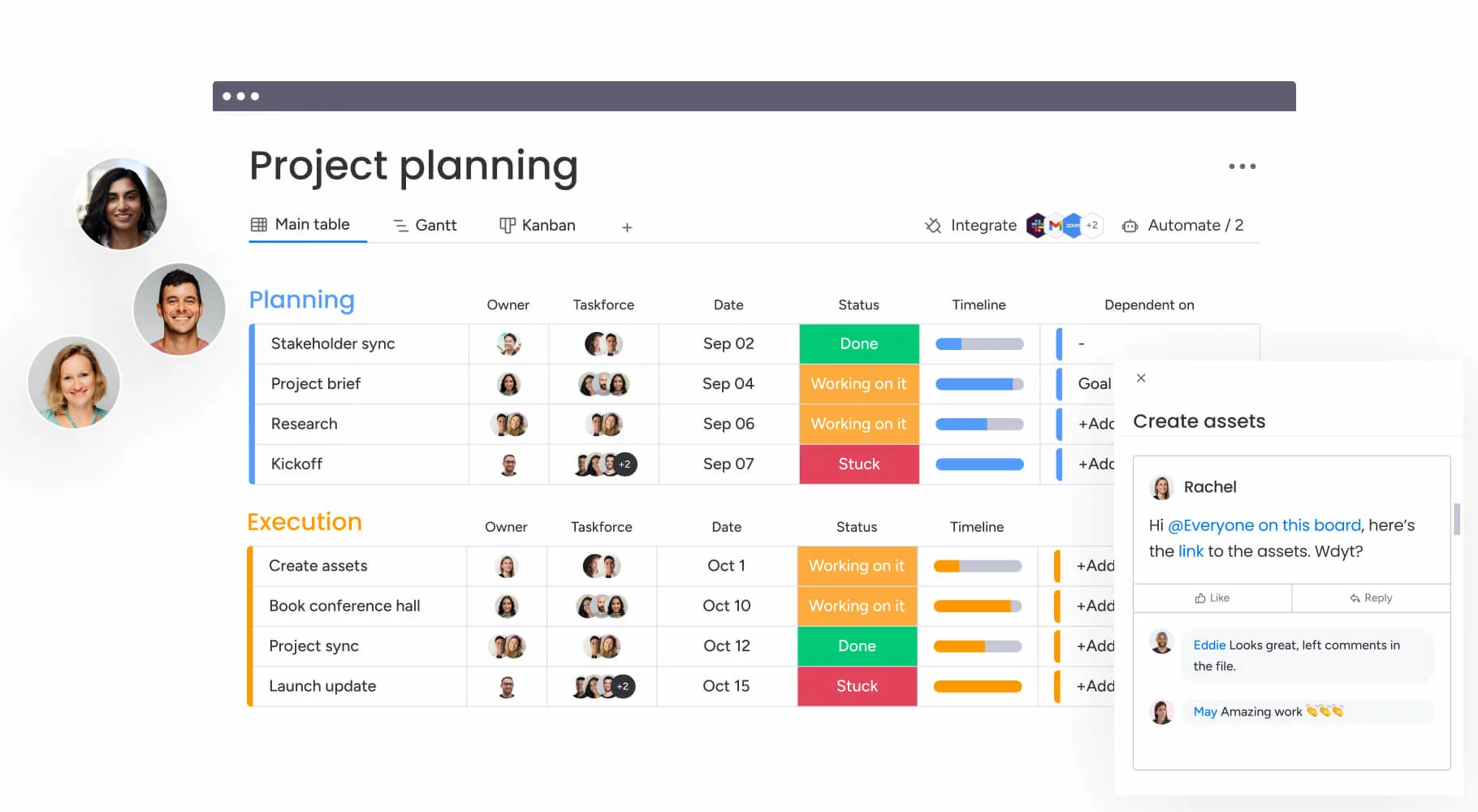
Image source: monday.com
Features
- Customizable boards: Track tasks with flexible columns and views.
- Automation builder: Create custom task rules without coding.
- Multiple views: Kanban, Gantt charts, and calendar.
- Integrations: Connect with Slack, Zoom, Salesforce, and more.
- Collaboration tools: File sharing and task updates in real time.
Pros
- Very flexible and customizable workflows.
- Intuitive, user-friendly interface.
- Large integration library.
- Simple automation setup.
Cons
- "My Work" dashboard is limited.
- Task filtering can feel restrictive.
- The Gantt view is less effective for complex projects.
Pricing
- Free: Up to 2 users.
- Basic: $9/seat/month (billed annually).
- Standard: $12/seat/month (billed annually).
- Pro: $19/seat/month (billed annually).
- Enterprise: Custom pricing.
8. Zoho Sprints: Agile-focused sprint planning tool
Zoho Sprints is an agile project management tool tailored for teams practicing Scrum. Its clean, simple interface makes it accessible for small teams and startups. With features like backlog management, Scrum boards, and reports, Zoho Sprints supports iterative project delivery. It's beneficial for development teams that want affordability combined with core agile capabilities.
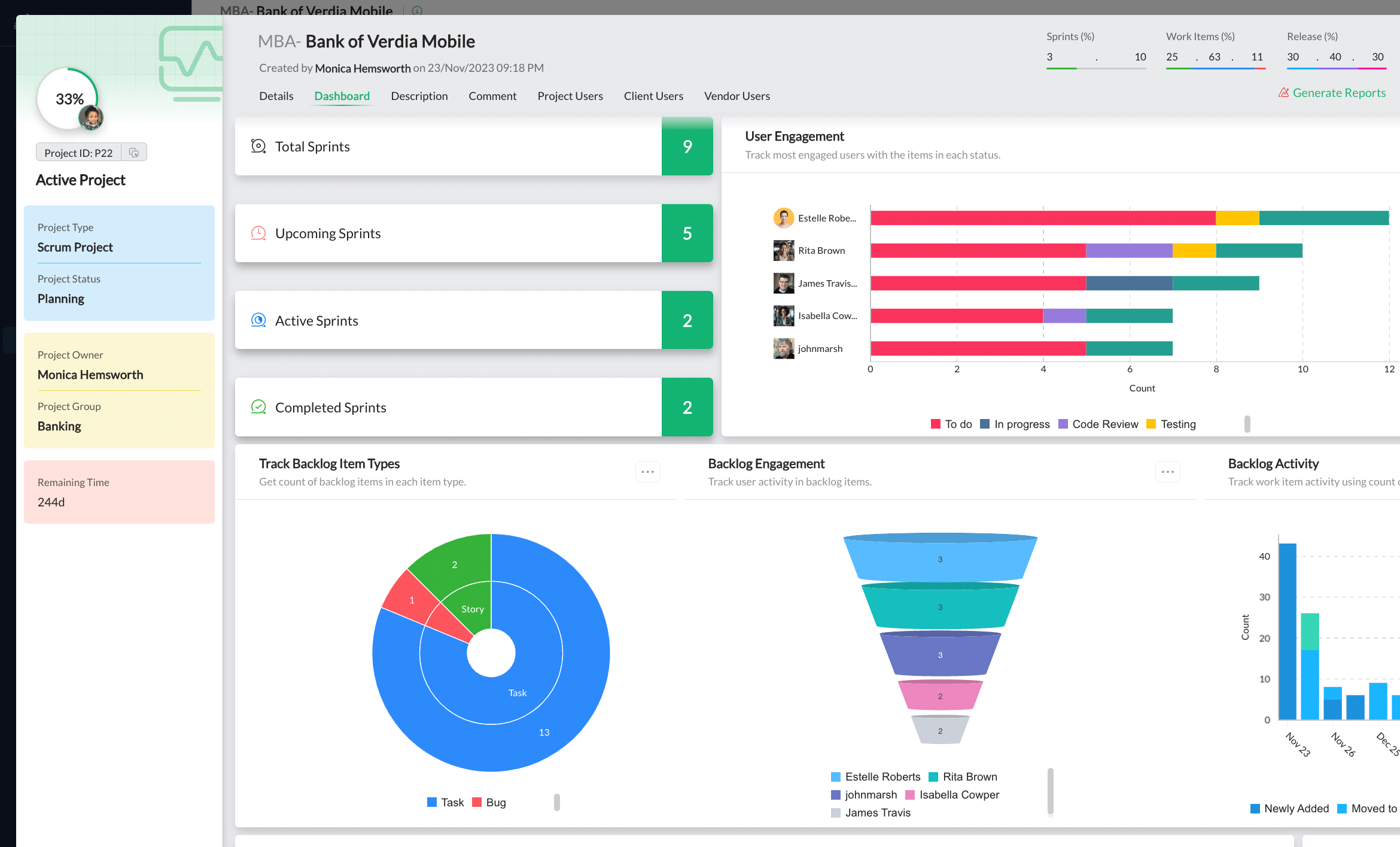
Image source: zoho.com
Features
- Backlog management: Organize and prioritize user stories and tasks.
- Scrum boards: Plan sprints and track progress toward goals.
- Reports and charts: Burndown and velocity charts for progress tracking.
- Epics: Manage larger features by grouping related stories.
- Timesheets: Log work hours for accurate reporting.
Pros
- Simple, intuitive design.
- Focused on core Scrum and agile practices.
- Visual reports for performance insights.
- Free plan available for small teams.
Cons
- Limited integrations compared to bigger tools.
- Support response times can be slow.
- Slight learning curve for agile newcomers.
Pricing
- Free: $0/user/month.
- Starter: $ 1 per user per month (billed annually).
- Elite: $2.50/user/month (billed annually).
- Premium: $ 5 per user per month (billed annually).
- Enterprise: Custom pricing.
9. OpenProject: Open-source project management software
OpenProject is a powerful open-source tool that offers flexibility and control for agile teams. Supporting Scrum, Kanban, and hybrid methodologies, it's ideal for organizations that want transparency and customization. With full access to the source code, teams can adapt it to their unique workflows and security needs. OpenProject appeals to companies that prefer self-hosted or open-source solutions over proprietary platforms.
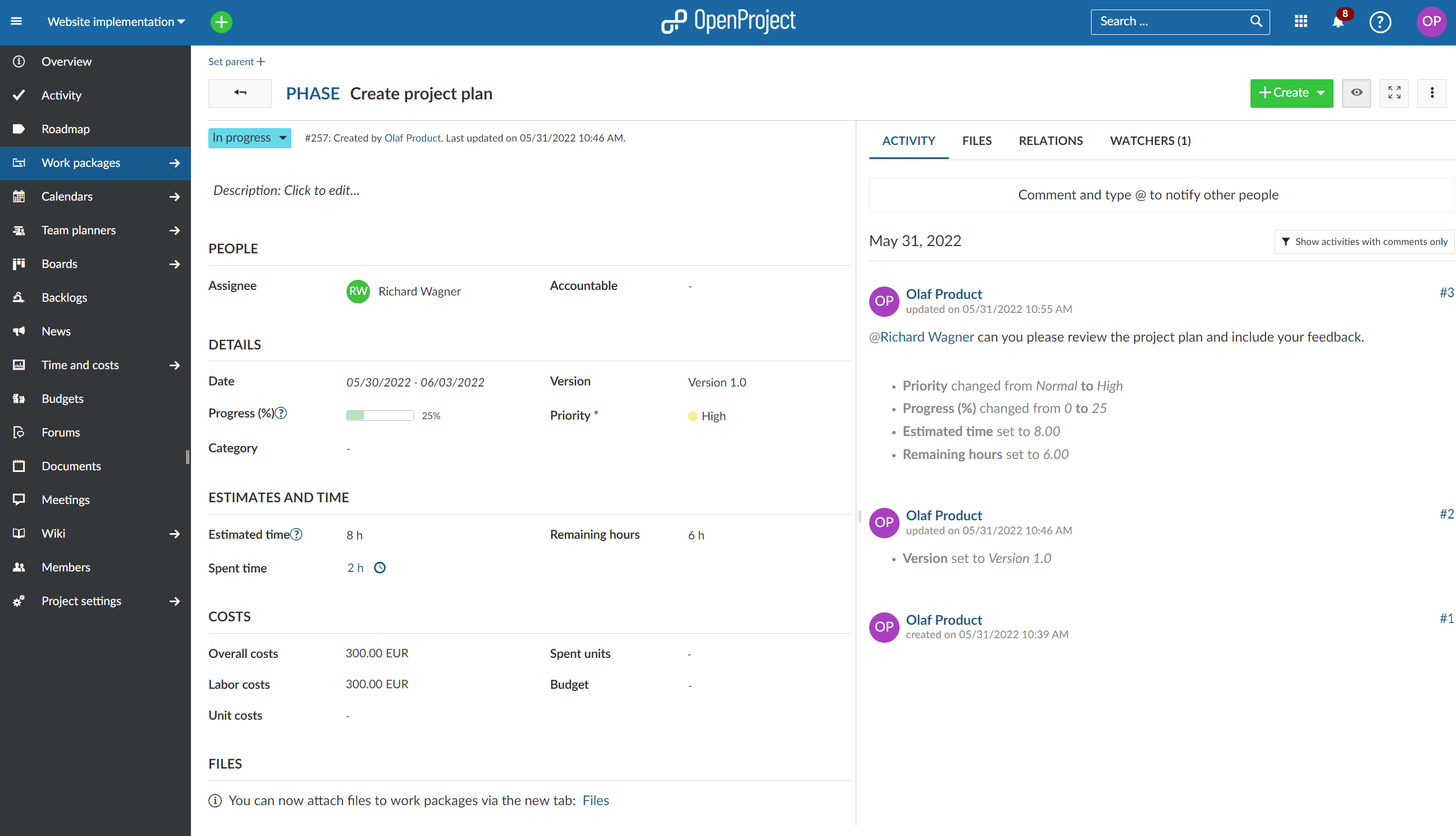
Image source: openproject.com
Features
- Agile boards: Scrum and Kanban boards with advanced options.
- Product backlog: Manage and prioritize stories and sprints.
- Time Tracking: Log Hours and Manage Billing.
- Workflows: Create tailored workflows for tasks.
- Integrated modules: Bug tracking, roadmaps, and task management.
Pros
- Fully customizable with open-source code.
- Enhanced security and transparency.
- Supports multiple agile methodologies.
- Free self-hosted option available.
Cons
- Limited official documentation for non-technical users.
- No dedicated technical support is available in the free version.
- The adoption rate is lower compared to mainstream tools.
Pricing
- Self-hosted: Free open-source version.
- Cloud edition: Commercial pricing with hosting and support (custom).
10. Taiga: Simple agile tool for small teams
Taiga is a lightweight, open-source agile tool built with simplicity in mind. It's designed for small teams that need core Scrum or Kanban features without overwhelming complexity. Its straightforward interface makes it easy for developers, designers, and managers to collaborate. Taiga is ideal for those who want a no-frills solution with essential agile functions.
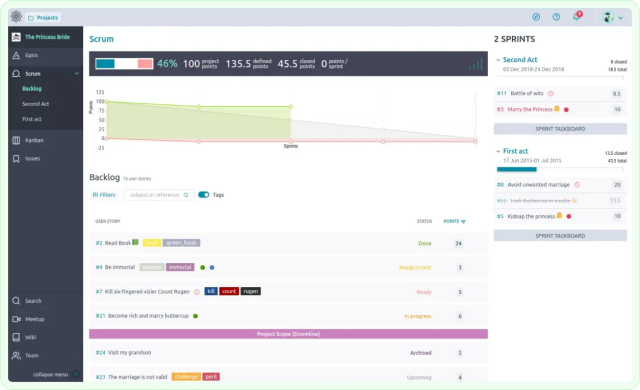
Image source: taiga.com
Features
- Scrum and Kanban boards: Manage sprints and workflows.
- Task and bug tracking: Capture issues and assign responsibilities to ensure effective management.
- Time tracking and reporting: Monitor work hours and generate basic reports.
- Customization: Adjust boards and workflows to fit preferences.
- Wiki pages: Build internal knowledge bases within projects.
Pros
- Easy to use with a minimal learning curve.
- Open-source flexibility for customization.
- Focused on core agile practices without bloat.
- Excellent usability with fast setup.
Cons
- Limited reporting and analytics.
- Few integrations with external apps.
- Setup can be tricky for non-technical users.
Pricing
- Free: For public projects.
- Premium: $7/ 7/month.
- Enterprise: Custom pricing.
Use cases by industry
Agile project management tools are not limited to software teams—they have evolved into versatile platforms that support a wide range of industries. From planning sprints and tracking bugs in tech to coordinating campaigns in marketing, these tools seamlessly integrate with various workflows. They also bring value to construction projects where documentation and scheduling are critical, and to HR operations where onboarding and approvals must run smoothly. By combining collaboration, visibility, and automation, agile tools offer scalable solutions that cater to diverse organizational needs. Here's how different industries are using them effectively:
- Software development: Agile project management tools are widely used in software teams for sprint planning, backlog management, and bug tracking. For example, a startup building a mobile app might rely on Jira or OpenProject to manage user stories, track bugs, and release updates on time. These tools help developers collaborate more efficiently and ensure faster product delivery.
- Marketing team : Marketing departments use agile tools to organize campaigns, manage content calendars, and track deliverables. A digital marketing agency, for instance, could utilize Trello or Monday.com to plan social media campaigns, assign tasks to designers and copywriters, and monitor progress in real-time. This improves visibility and ensures deadlines aren't missed.
- Construction and project management: In industries such as construction, agile tools are utilized for task tracking, milestone reporting, and document sharing. A construction firm might utilize Wrike to manage subcontractor schedules, securely share blueprints, and generate reports for stakeholders. This keeps large, complex projects on track and reduces miscommunication.
- HR & Operations: Human resources and operations teams use agile project management software for onboarding, approvals, and workflow automation. For example, an HR department could adopt Lark to streamline employee onboarding, manage document submissions, and automate approval chains. This reduces manual work and creates a smoother employee experience.
These examples demonstrate the versatility of agile project management tools across various industries, proving that they're not just for software teams, but for any organization that values collaboration, adaptability, and efficiency.
Tips for adopting agile tools successfully
Implementing a new agile project management tool can transform the way teams collaborate, plan, and deliver work. However, successful adoption requires more than just choosing the right platform—it depends on how it's introduced and integrated into daily workflows. Teams often face resistance to change, technical challenges, or a lack of training if the rollout isn't carefully managed. To maximize the value of agile tools, organizations should follow a structured approach that encourages adoption and continuous improvement. Below are key tips to ensure a smooth and effective implementation:
- Start with pilot projects: Instead of rolling out a new agile project management tool across the entire organization at once, begin with a small pilot project. This allows teams to get familiar with the interface, workflows, and features without overwhelming them. Lessons learned during the pilot can then be applied to larger rollouts.
- Train team members and encourage adoption: Proper onboarding and training sessions are key to successful adoption. Encourage team members to explore the tool, ask questions, and share feedback. The more confident your team feels about using the tool, the more value it will bring to your projects.
- Integrate with existing tools and workflows: An agile project management tool works best when it fits into your team's ecosystem. Look for integration with communication apps, file storage, and development platforms your team already uses. This ensures smooth workflows and minimizes the need for switching between tools.
- Regularly monitor performance and adjust processes: Agile thrives on iteration. Utilize reporting dashboards, velocity charts, and performance metrics within your tool to track and evaluate progress. Be ready to refine workflows or adjust sprint practices based on data and team feedback.
- Leverage templates and automations to reduce repetitive work: Most modern agile platforms offer pre-built templates and automation features. Use them to standardize processes like sprint planning, approvals, or task assignments. This minimizes repetitive manual work, freeing up more time for high-value activities.
Conclusion
Agile project management tools enable teams to work more efficiently, collaborate more effectively, and remain adaptable in dynamic environments. They simplify sprint planning, backlog management, reporting, and automation, making them valuable across various industries, including software, marketing, construction, and HR. The right agile project management tool not only boosts productivity but also enhances visibility and reduces manual work.
Lark stands out as an all-in-one solution that combines chat, video meetings, docs, and task boards into a single platform. Its AI-powered features and automation help teams stay focused on delivery rather than juggling multiple apps. By streamlining collaboration and project tracking, Lark makes agile adoption simple and effective.
FAQs
What is the difference between agile and traditional project management?
Traditional project management often follows a linear, sequential process, such as the Waterfall method, where phases are completed in a step-by-step manner. Agile project management, in contrast, emphasizes flexibility, iterative progress, and continuous feedback, allowing teams to adapt quickly to changes and deliver value incrementally.
Can small teams benefit from paid agile tools?
Yes, small teams can gain significant advantages from paid agile project management tools. While free versions cover basic needs, paid plans often unlock advanced features such as detailed reporting, automations, integrations, and enhanced security that help even small teams scale efficiently.
Are open-source agile tools secure for enterprise use?
Open-source agile tools can be secure if implemented with proper governance and oversight. Since the source code is publicly available, enterprises can customize and audit the software for vulnerabilities. However, professional support, regular updates, and dedicated security practices are essential for enterprise-grade reliability.
How do I migrate from one agile tool to another?
Migration requires a phased approach: export existing data, clean and organize it, and import it into the new tool with structured mappings. Running a pilot project in the new environment helps teams adapt smoothly to the new environment. Training, documentation, and phased rollouts reduce disruption during the transition.
Can agile tools be integrated with CRM and communication platforms?
Absolutely. Most modern agile project management tools support integrations with CRM systems, such as Salesforce or HubSpot, as well as communication apps like Slack, Microsoft Teams, or Zoom. These integrations create seamless workflows, reduce duplication of effort, and ensure that collaboration and customer data stay connected.
Related reading
Table of contents
Start using Lark today

Manage all your work in one place
Boost team efficiency by 10x
Save up to 70% on software costs
Table of contents
Start using Lark today
Manage all your work in one place
Boost team efficiency by 10x
Save up to 70% on software costs
Keep reading








2026 Lark Technologies Pte. Ltd.
Headquartered in Singapore with offices worldwide.






Explore: