


IT Project Management Software: Top 10 Tools and Key Features

Ryan Tanner
Product Marketing Specialist
Aug 5, 2026
Ryan Tanner
Aug 5, 2026

21 min read


Managing IT projects can get complicated fast, especially when teams handle multiple tasks, tight deadlines, and constant technical updates. The right IT project management software helps you organise work, track progress, and keep everyone aligned without slowing things down. Today's tools, such as Lark, Jira, Asana, ClickUp, and Trello, offer clear planning features, smooth collaboration, and automation that saves time. Whether you're running Agile sprints, managing client work or coordinating large development projects, choosing the right platform makes all the difference.
1. Lark: Best for unified IT workflows and cross-functional coordination
2. Jira: Best for software development teams
3. Asana: Best for cross-team IT collaboration
4. Monday.com: Best for customizable IT workflows
5. Wrike: Best for enterprise-grade IT project management
6. ClickUp: Best for teams needing flexibility and large feature sets
7. Trello: Best simple board-based system for small IT teams
8. Smartsheet: Best spreadsheet-style environment for technical teams
9. Accelo: Best for IT service delivery and client projects
10. Zoho Projects: Best affordable platform for small IT teams

IT project management software: Quick overview snapshot
The best IT project management software brings tasks, timelines, and automated workflows into one place so teams can plan, track, and deliver work more efficiently. Here's a quick snapshot of what these tools offer.
Information source: Official vendor sites
Update time: 2025-11-13
Note: Pricing and plan details reflect publicly available data as of the update date and may vary based on region, billing cycle, and number of agents.
What is IT project management software?
IT project management software is a tool that helps teams plan, organise, and track technology-related projects from start to finish. It centralises tasks, timelines, resources, and communication software, so developers, engineers, and managers can work in sync, resolve issues faster, and project time management.
IT teams work with complex systems, so they need tools that can handle technical details without causing confusion. These tools help teams manage dependencies between tasks, track bugs or incidents, and keep up with change requests. They also support agile and hybrid work methods, making it easier to plan sprints, update backlogs, and work in short cycles.
Specialised tools also improve communication between technical and non-technical team members by giving everyone a clear view of progress. They keep all documentation, specifications, and project details in one place, which reduces mistakes and saves the project timeline. With better visibility and more organised workflows, IT teams can deliver projects faster and with fewer issues.
Key features to look for in IT project management software
The right project management software for IT teams should make planning, tracking, and collaboration easier. Here are the key features that help teams work faster and stay organised.
- Task and sprint management: This helps teams break projects into smaller tasks, assign work, and track sales progress. Sprint management supports agile cycles, making it easy to plan, run, and review sprints.
- Roadmaps and timeline planning: Roadmaps show long-term plans and upcoming milestones. Timeline tools help teams see how tasks connect and identify possible delays before they happen.
- Issue tracking and bug reporting: This keeps bugs, incidents, and technical problems in one place. Teams can log issues, set priorities, and fix them faster without losing visibility.
- Resource and workload visibility: These features show who is working on what and how busy each team member is. It helps prevent overload and improves planning.
- Documentation and knowledge management: This allows teams to store all important information such as requirements, specifications, guides and notes in one organised space that everyone can access.
- Collaboration and communication tools: Comments, mentions, shared boards and group chats integrations help teams communicate quickly. It keeps conversations tied to work instead of scattered across multiple apps.
- Automation and workflow rules: These reduce manual effort by automating routine tasks like status changes, notifications or task assignments. It keeps work moving without constant checking.
- Reporting and analytics: Dashboards and reports show project progress, risks and team performance. They help managers make smarter decisions and adjust plans when needed.
10 best IT project management software
There is a lot of project management software for it companies built to help IT teams stay organised and deliver projects on time. Here's a quick look at the 10 best options worth considering.
1. Lark: Best for unified IT workflows and cross-functional coordination
Lark gives IT managers an integrated workspace to manage projects, documentation, and communication in one platform. It keeps everyone aligned, makes collaboration easier, and provides visibility into progress across teams. By centralizing work and communication, Lark reduces confusion, speeds up decision-making, and ensures that IT projects stay on track from start to finish.
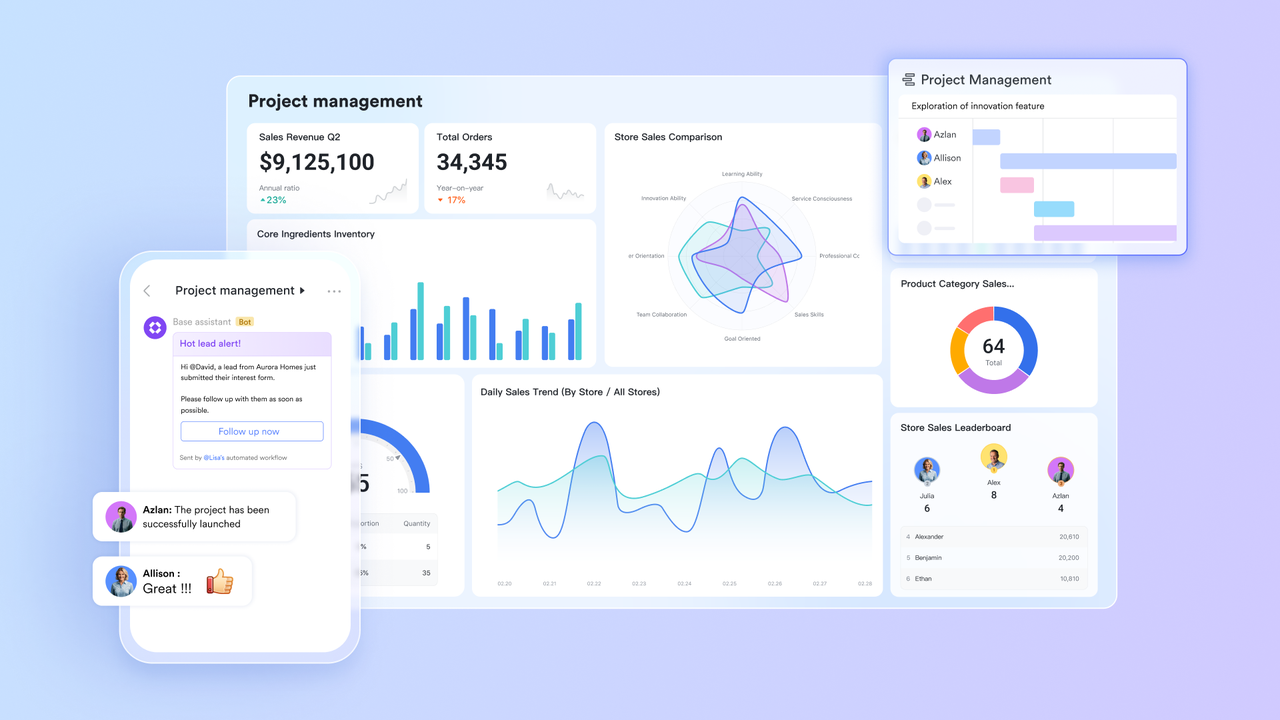
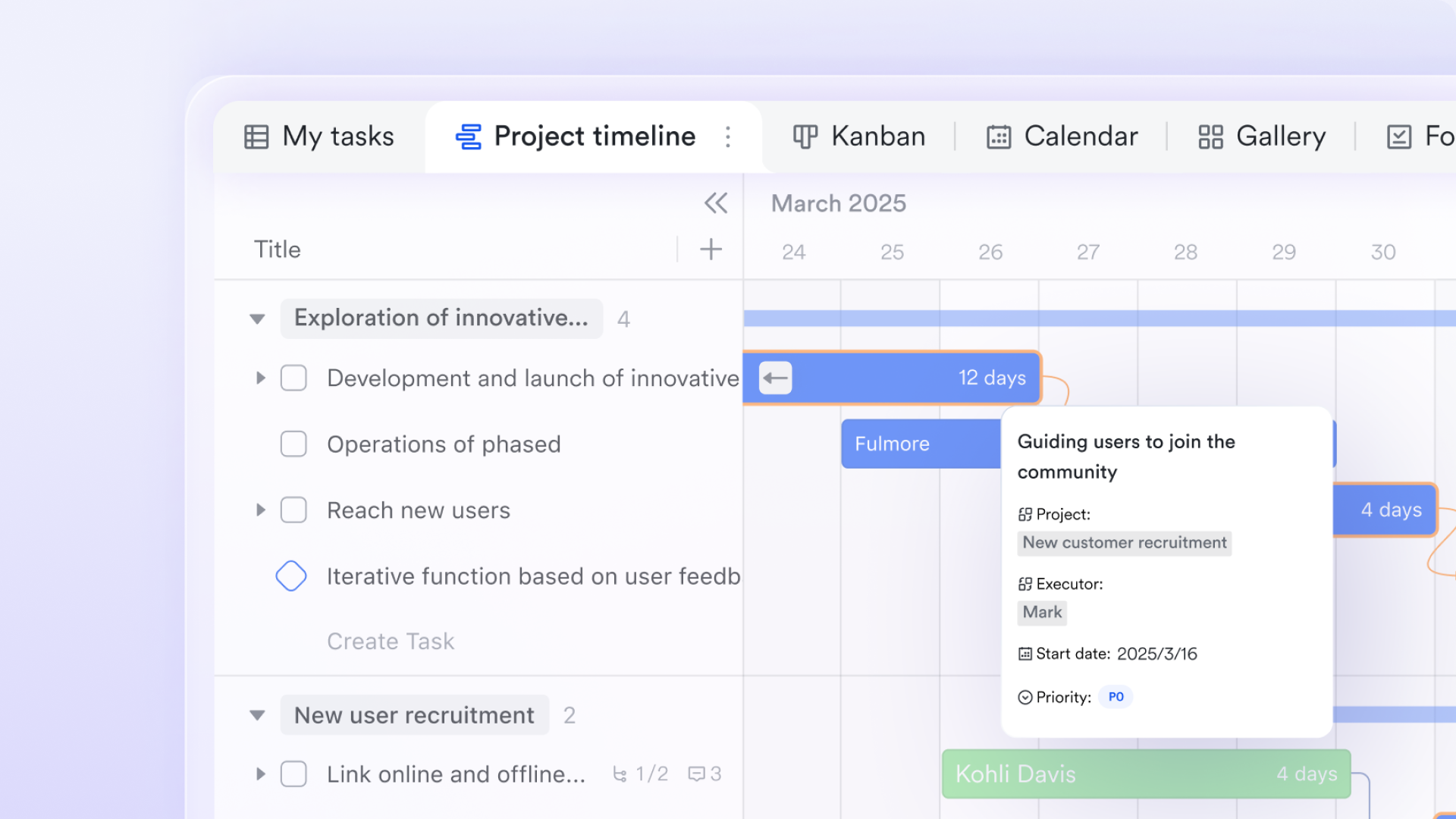
Lark Base: Structure IT projects with tables, Kanban, Gantt, and two-way links
Lark Base provides IT teams with a flexible workspace that enables them to design project structures tailored to their workflows. Separate tables can be created for tasks, team members, components, change requests, bugs, sprints, or release cycles. IT managers can use Kanban view to track tickets across stages like "Backlog," "In Development," "Testing," and "Ready for Deployment," making it useful during sprint reviews. For long-term planning, the Gantt view provides a timeline of dependencies, ideal for mapping release schedules, maintenance windows, and infrastructure upgrade milestones.
Two-way links keep information synchronized across tables: if a task owner or component status changes in one table, related records update automatically. For example, linking an "API Module" in the Components table to a set of tasks ensures all dependent tickets reflect the latest status. This creates a reliable, single-source project environment that IT teams can trust.
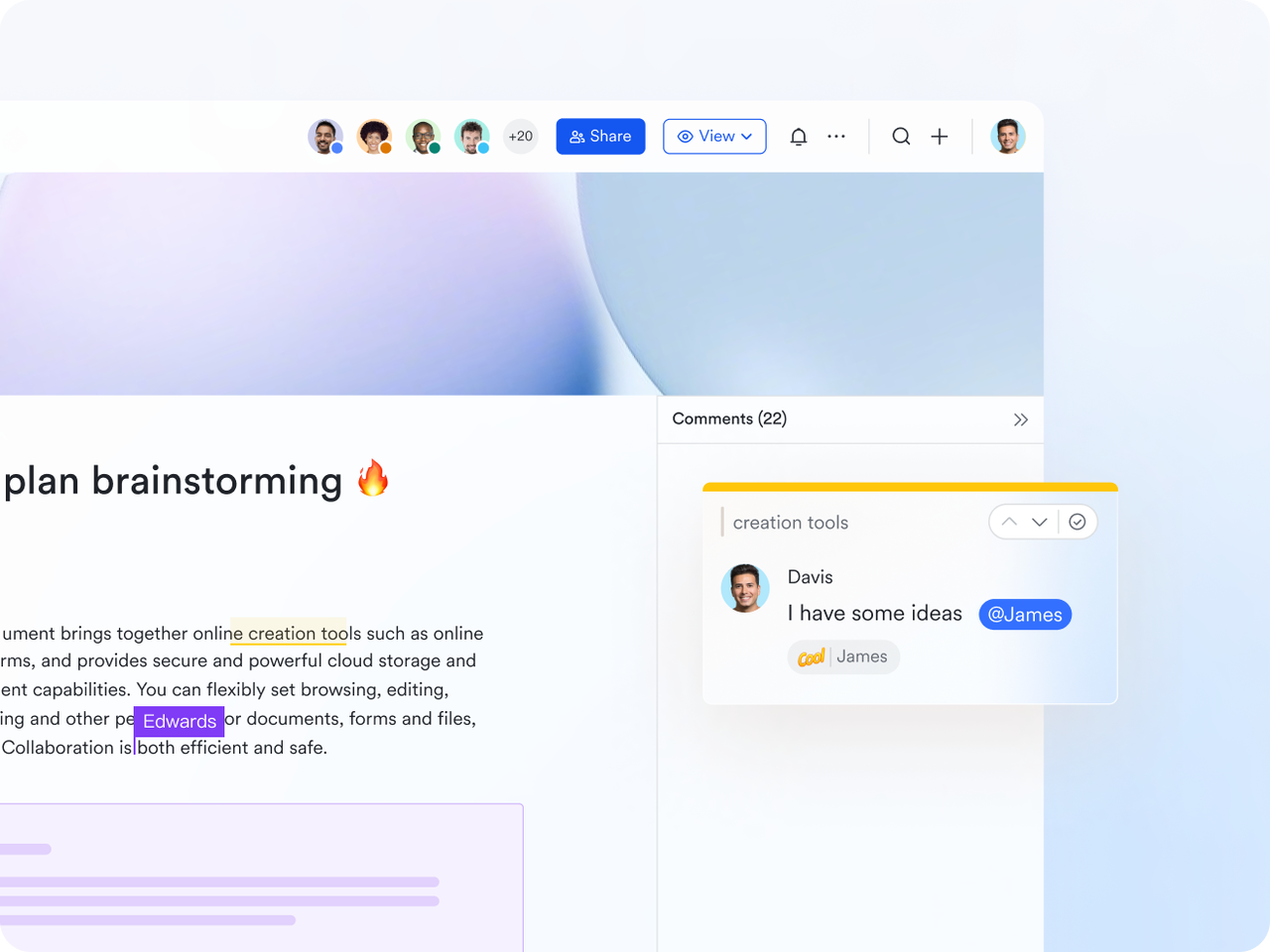
Lark Docs: Collaborate on requirements, technical specs, and project plans
Lark Docs serves as a central knowledge hub where IT teams can document everything from product requirements to system architecture. With support for text, images, diagrams, videos, Sheets, and MindNotes, teams can build detailed documents that support complex IT projects.
For instance, a backend engineer can embed an API schema diagram, attach a data flow chart, and link to a sprint's task table—all inside the same doc. Product managers and developers can comment directly on requirements, ensuring discussions stay tied to the relevant section. This eliminates scattered documents and helps keep specs, SOPs, incident logs, and configuration notes aligned throughout the project lifecycle.
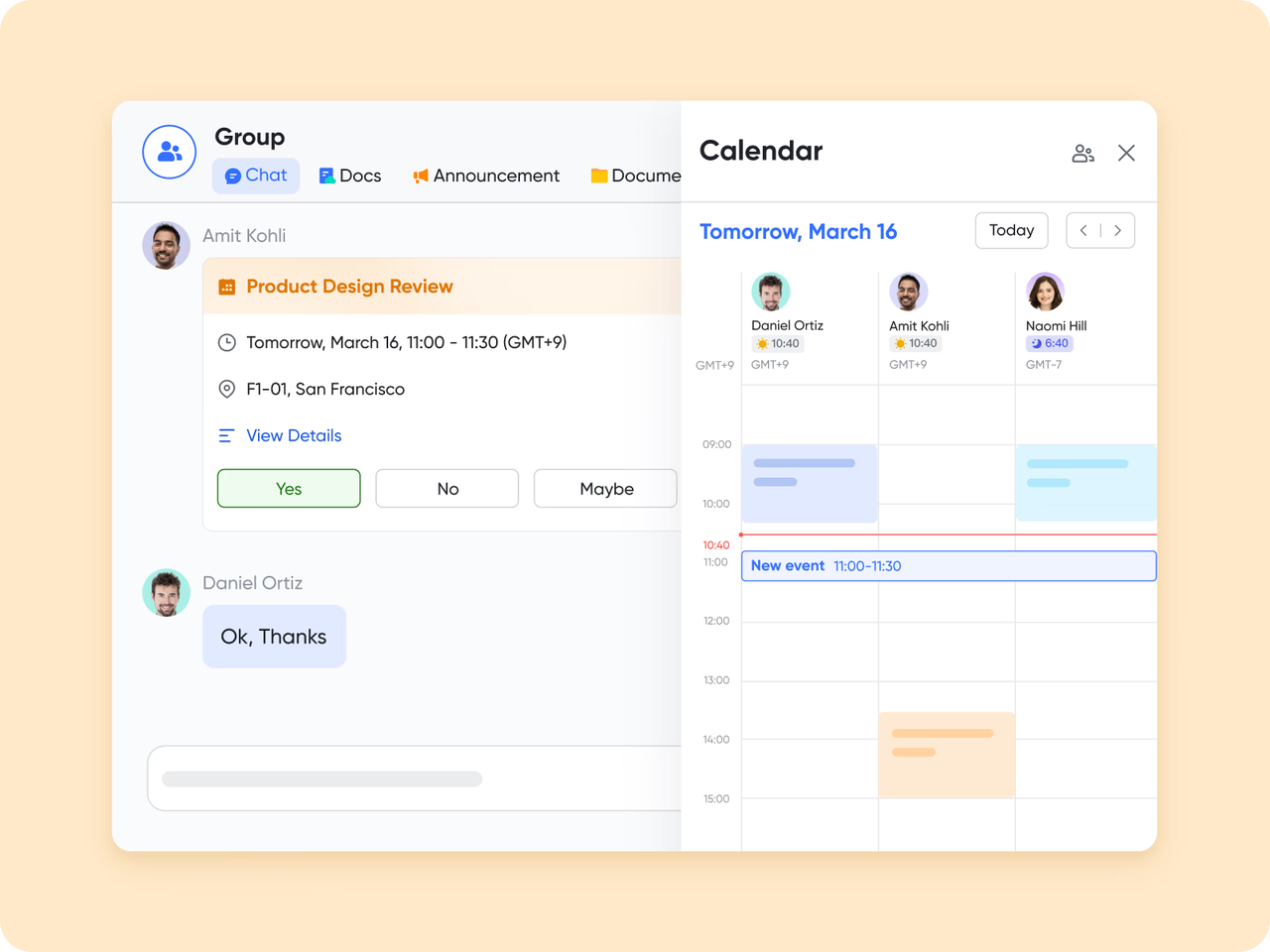
Lark Calendar: Plan milestones, deadlines, and deployment schedules
The Lark Calendar tool helps IT teams coordinate important timelines across multiple projects and environments. Milestones such as release dates, QA cycles, code freeze windows, and client demos can be scheduled clearly.
For example, a DevOps engineer might schedule a deployment for Friday night, block the time as "Busy," and add a reminder for the team to review logs one hour after deployment. Because events are shared, everyone understands when changes will occur—reducing the risk of overlapping updates or miscommunication during tight delivery cycles.
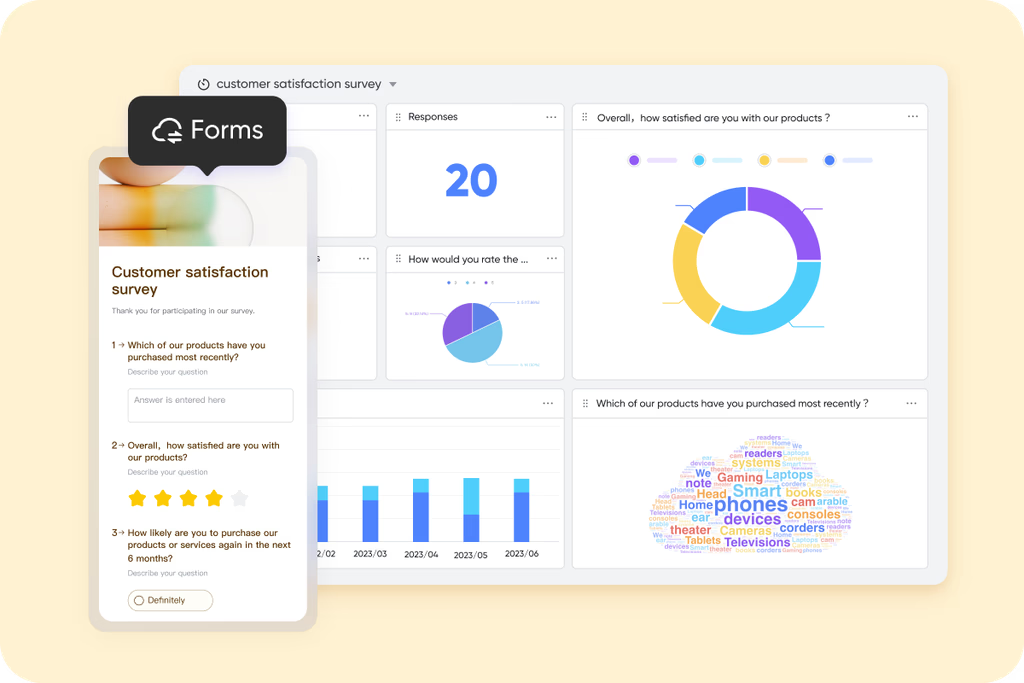
Lark Forms: Streamline reporting and track work on the go
Lark Forms allow teams to gather structured information quickly—perfect for progress updates, incident reports, change requests, or hardware requisitions. Field engineers or remote developers can submit updates directly through the mobile app, ensuring project data is captured even when team members are away from their desks.
For example, an on-site technician could fill out a form to report server room inspection results, attach a photo, and submit it instantly. The form response can automatically create tasks or notify the operations team, keeping workflows smooth and responsive.
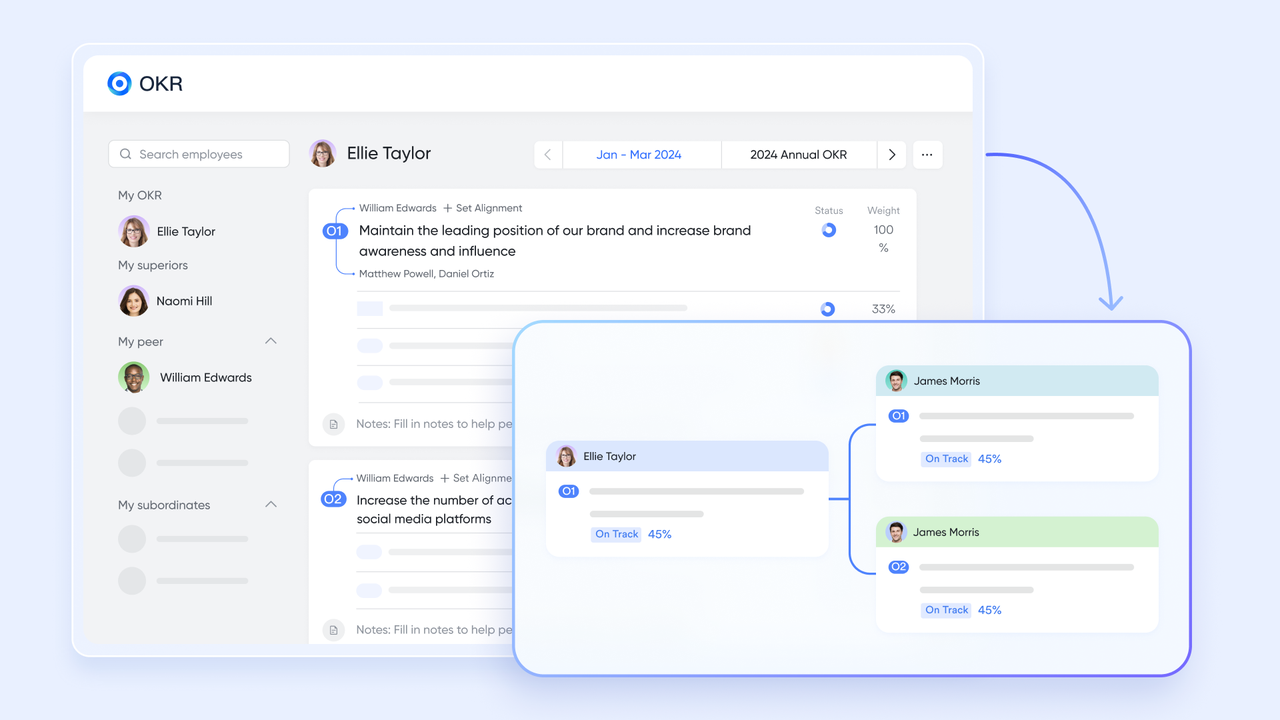
Lark OKR: Align IT project goals with measurable outcomes
Lark OKR helps IT teams define objectives and break them down into measurable results. This is especially useful when managing long-term initiatives like system migrations, infrastructure modernization, or performance optimization.
For example, an IT department may set an OKR such as "Improve system stability." Key results could include reducing incident frequency by 20%, improving deployment success rate to 98%, and cutting average bug resolution time by 30%.
- Starter plan: Free forever plan that includes 11 powerful tools for up to 20 users. It also comes with 100GB of storage, 1000 automation runs, AI translations, and more.
- Basic plan: $6/user/month (billed annually) for up to 500 users. It includes everything in Starter plus group calling for up to 500 attendees, 5TB of storage, 1000 automation runs, and more. Some users may need to contact sales to purchase.
- Pro plan: $12/user/month (billed annually) for up to 500 users. It includes everything basic plus group calling for up to 500 attendees, 15TB of storage, 50,000 automation runs, and more.
- Enterprise plan: Contact sales for custom pricing. Supports unlimited users and includes even more automation runs and advanced security, compliance, and management features.
2. Jira: Best for software development teams
Jira is one of the most widely used tools for managing software development and IT engineering projects. Designed by Atlassian, it helps teams plan sprints, track bugs, and manage complex workflows with precision. Its flexible setup allows engineers to use Agile methodologies like Scrum or Kanban while maintaining complete visibility over tasks, deadlines, and dependencies. Jira's strength lies in its customization—teams can adapt it to their unique processes, from coding and QA to deployment and maintenance.
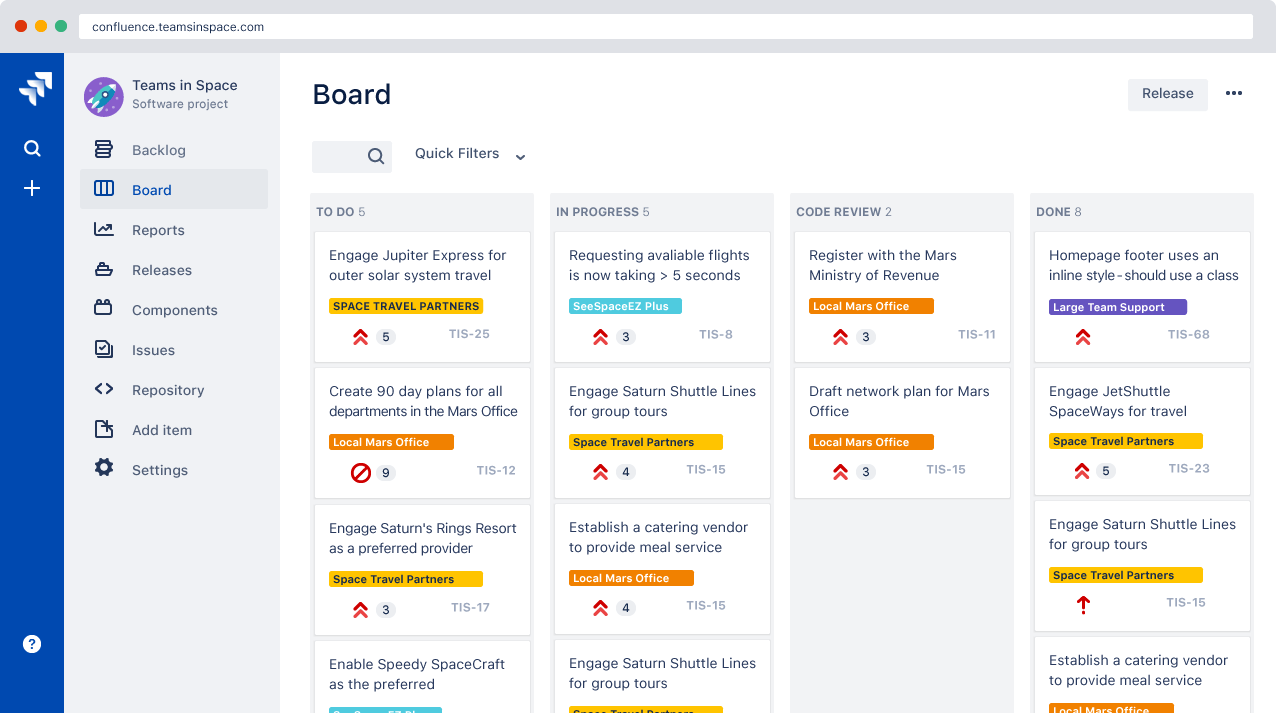
Image source: jira.com
Key features:
- Agile project management with Scrum and Kanban boards
- Customizable workflows for issue tracking and release cycles
- Sprint planning, backlog management, and performance reporting
- Automation for repetitive development and testing tasks
- Integrations with GitHub, Bitbucket, Jenkins, and other dev tools
Pros:
- Excellent for software and IT engineering teams using Agile frameworks
- Powerful tracking and reporting for bugs, features, and performance metrics
- Highly customizable workflows for different engineering processes
- Strong integration ecosystem with development and CI/CD tools
Cons:
- Complex setup for non-technical users
- Can feel overwhelming for small teams needing simple task tracking
Pricing:
- Free: Free plan available (limited to 10 users)
- Standard: $8.60/user/month
- Premium: $17/user/month
3. Asana: Best for cross-team IT collaboration
Asana is a versatile project management tool that helps engineering teams organize workflows, set milestones, and stay aligned across every stage of a project. Its clean interface and flexible task structure make it ideal for tracking complex engineering processes without losing sight of priorities or dependencies. Teams can map out timelines, assign responsibilities, and monitor progress in real time, making Asana one of the most approachable yet powerful platforms for structured project coordination.
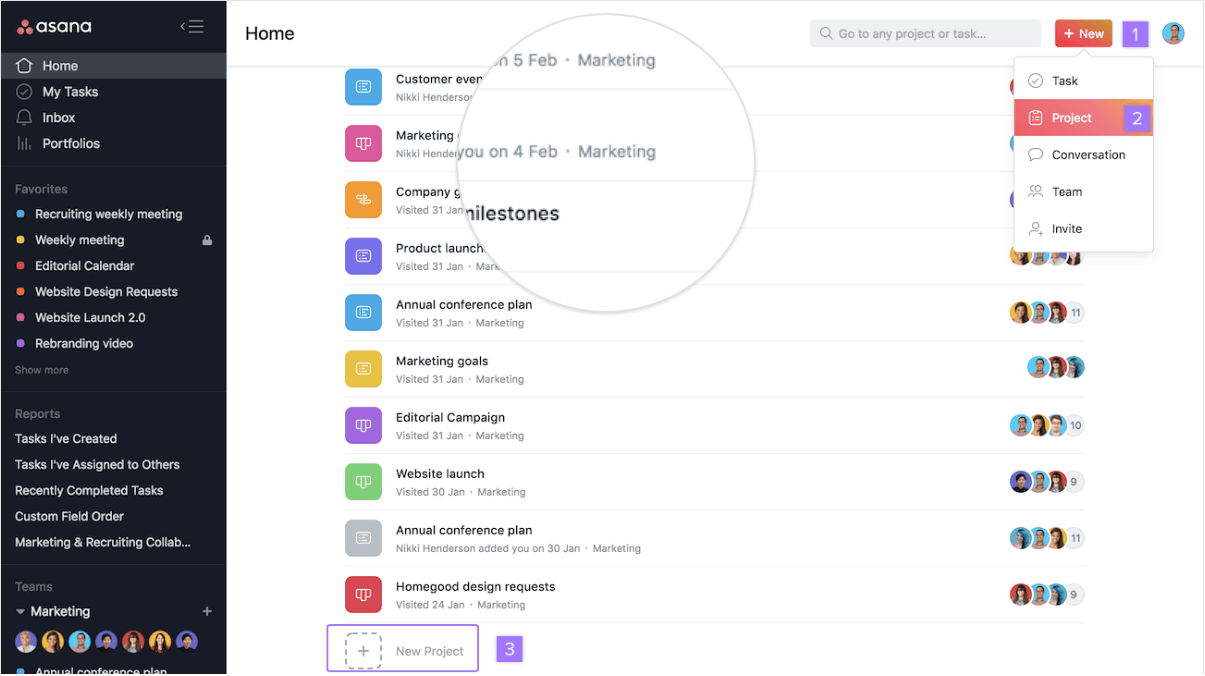
Image source: asana.com
Key features:
- Timeline and milestone tracking for structured project delivery
- Task dependencies and priority setting for clear accountability
- Real-time collaboration with comments, attachments, and updates
- Customizable project templates for engineering workflows
- Integration with Slack, Google Drive, and cloud modeling tools
Pros:
- Simple interface suited for both technical and non-technical team members
- Excellent visibility into project timelines and dependencies
- Helps manage multi-phase engineering projects with defined milestones
- Highly adaptable to various engineering disciplines
Cons:
- Limited resource management compared to enterprise tools
- May require integrations for advanced reporting or version control
Pricing:
- Free: Free plan available (limited to 10 people)
- Starter: $10.99/user/month (annual billing)
- Advanced: $24.99/user/month (annual billing)
4. Monday.com: Best for customizable IT workflows
Monday.com is a popular work management platform that helps teams plan, track, and automate their workflows. With its colorful boards and flexible layouts, it's designed to give everyone a clear view of project progress in real time. The platform supports multiple views, including timelines, Gantt charts, and calendars, allowing teams to visualize tasks the way they prefer.
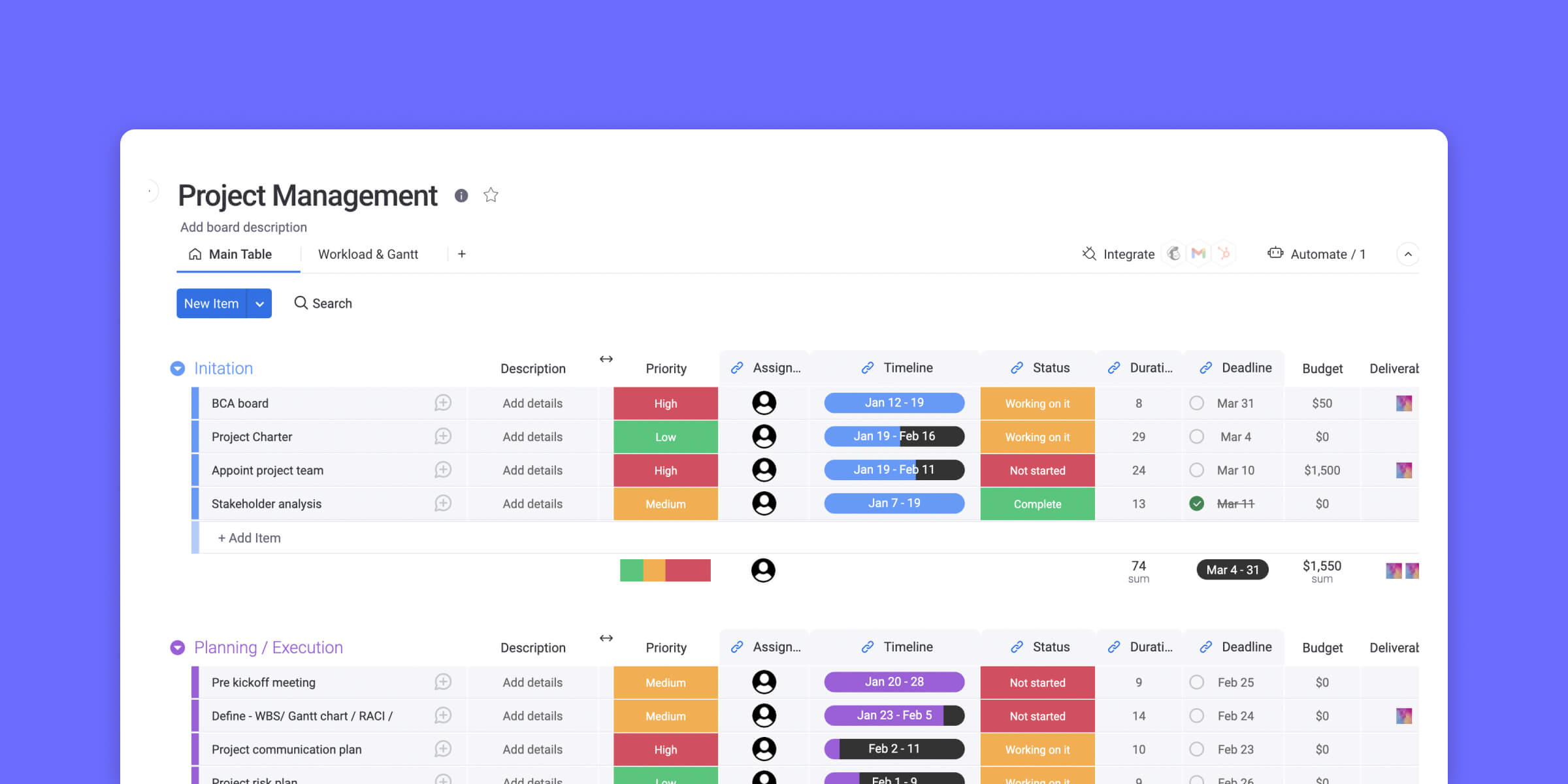
Image source: monday.com
Key features:
- Visual project boards for easy task tracking
- Workflow automation to save time and reduce manual work
- Customizable dashboards for better visibility
- Integrations with popular tools like Slack, Google Drive, and Zoom
- Real-time collaboration and progress updates
Pros:
- Intuitive and highly visual interface
- Flexible layouts to match your workflow
- Excellent automation and integration options
- Great for managing multiple projects in one place
Cons:
- Can feel overwhelming for smaller teams
- Pricing increases quickly as the team size grows
Pricing:
- Starter: $12/user/month
5. Wrike: Best for enterprise-grade IT project management
Wrike is a powerful project management platform designed to handle the complexity of large-scale engineering projects. It offers a flexible workspace where teams can plan, track, and execute tasks while maintaining complete visibility over timelines, budgets, and resources. Ideal for engineering firms that manage multiple projects simultaneously, Wrike supports detailed task dependencies, workload balancing, and progress tracking. Its structured dashboards and automation tools make it easy to coordinate between design, development, and production teams.
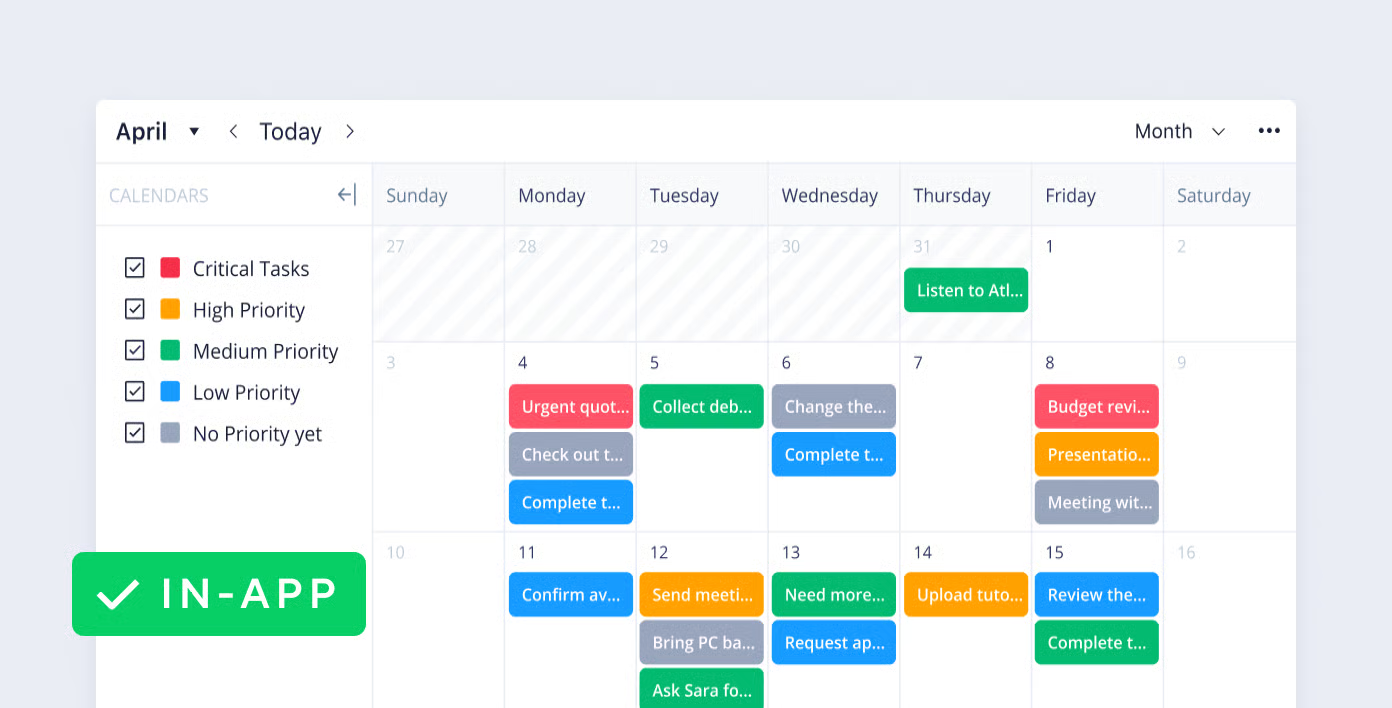
Image source: wrike.com
Key features:
- Advanced Gantt charts and Kanban boards for visual project planning
- Resource management tools for workload and capacity tracking
- Real-time collaboration with document sharing and comments
- Custom workflows for design review and approval cycles
- Integration with CAD, BIM, and cloud storage tools
Pros:
- Excellent for managing large, resource-intensive engineering projects
- Customizable dashboards offer strong visibility and control
- Built-in automation reduces manual updates and status checks
- Ideal for multidisciplinary teams working on complex deliverables
Cons:
- Steeper learning curve for new users
- Can feel overwhelming for smaller engineering teams
Pricing:
- Free: Free plan available
- Team: $9.80/user/month (annual billing)
- Business: $24.80/user/month (annual billing)
6. ClickUp: Best for teams needing flexibility and large feature sets
ClickUp is a highly flexible platform built to support a wide range of workflows—including those common in engineering teams. It allows teams to structure their projects with a hierarchy of spaces, folders, and lists, and offers custom task fields and automations so you can tailor the system to your engineering processes. Highly flexible tool that lets engineering teams build tailored workflows, automate updates, and visualize progress in multiple views.
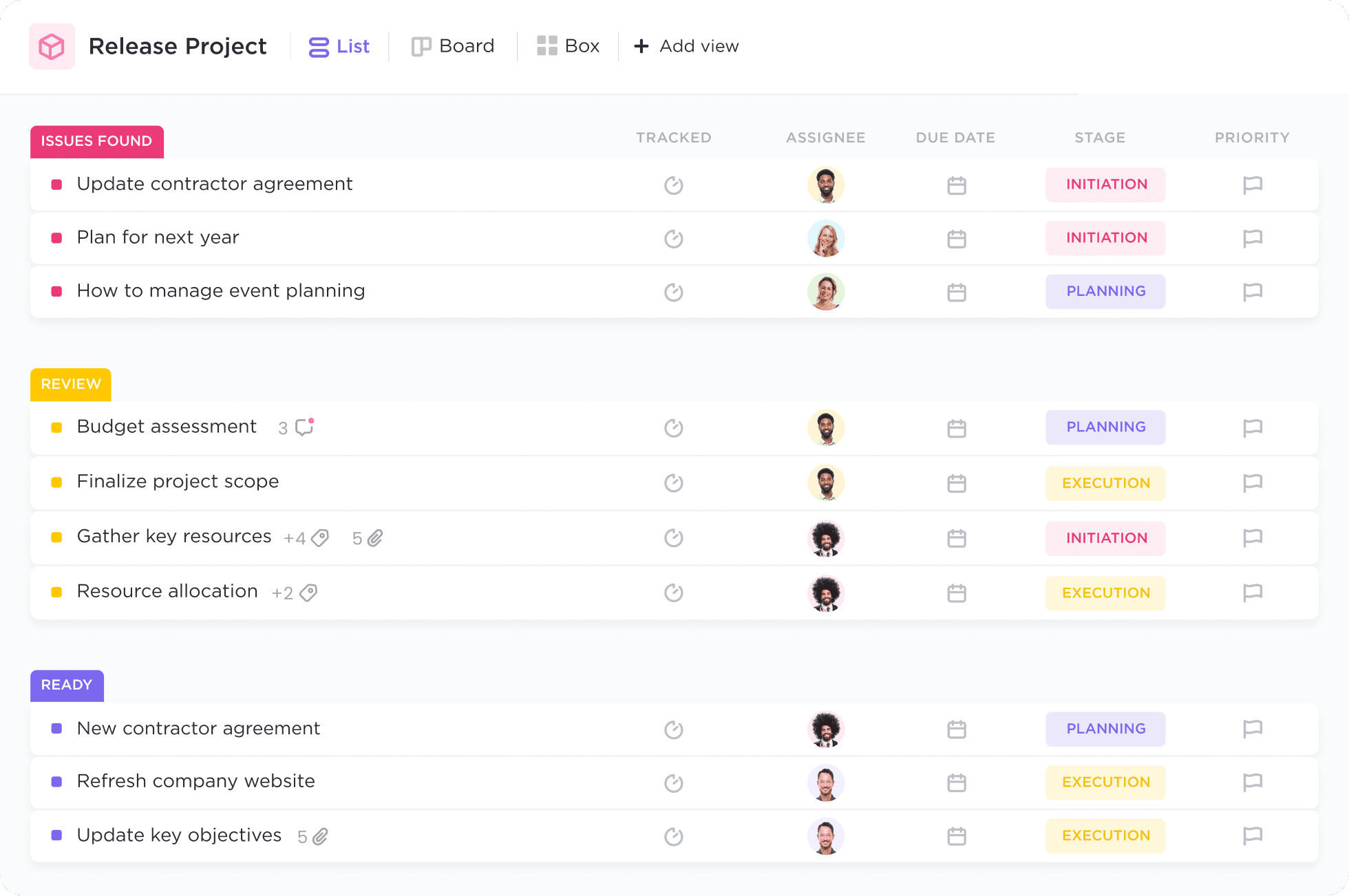
Image source: clickup.com
Key features:
- AI-powered writing, task generation, and project summarization
- Customizable dashboards, lists, boards, and goal tracking
- Workflow automation with conditional triggers
- Built-in chat, docs, and whiteboards for seamless collaboration
- Integrations with Slack, Google Drive, Zoom, and more
Pros:
- Highly customizable for different team structures and industries
- AI boosts productivity through automation and instant insights
- Centralized workspace reduces tool-switching
- Great balance between flexibility and ease of use
Cons:
- Feature-rich interface can feel overwhelming for new users
- Some advanced AI capabilities are limited to higher-tier plans
Pricing:
- Free: Free plan available
- Unlimited: $7/user/month (annual billing)
- Business: $12/user/month (annual billing)
7. Trello: Best simple board-based system for small IT teams
Trello is a simple yet effective tool for engineering teams that prefer a visual, lightweight approach to project management. Built around Kanban boards, it helps teams organize tasks, track progress, and maintain clarity across projects at a glance. Each task is represented as a card that can be moved through different workflow stages—ideal for smaller engineering teams or those managing straightforward processes without heavy documentation or resource tracking.
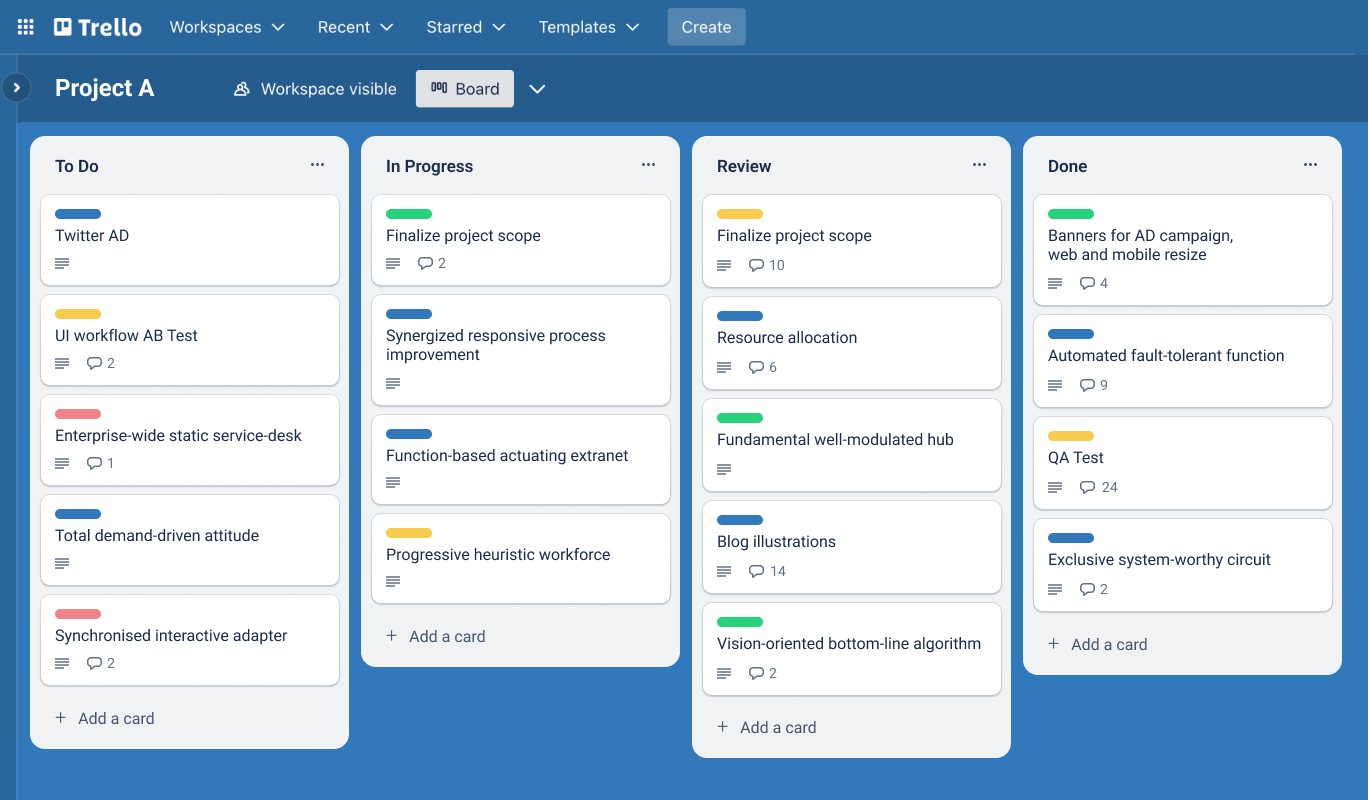
Image source: trello.com
Key features:
- Kanban-style boards for visual task organization
- Customizable lists, labels, and checklists for workflow management
- Real-time collaboration with file sharing and comments
- Power-Ups for integrations with tools like Slack, Google Drive, and Jira
- Automation through Butler for recurring tasks and reminders
Pros:
- Extremely easy to set up and use for quick project visibility
- Great for small to mid-sized engineering teams
- Highly visual and intuitive interface
- Flexible customization with Power-Ups and templates
Cons:
- Limited reporting and analytics for complex engineering projects
- Lacks built-in resource management or advanced scheduling features
Pricing:
- Free: Free plan available (limited seats)
- Business-class: $10/user/month
8. Smartsheet: Best spreadsheet-style environment for technical teams
Smartsheet brings the familiarity of spreadsheets into modern project management, making it a great fit for engineering teams that prefer a structured, data-driven approach. It combines grid-based task tracking with powerful automation, dashboards, and collaboration tools. Engineering teams can use Smartsheet to manage project timelines, track resource allocation, and maintain visibility across multiple workflows—all within a layout that feels intuitive and flexible.
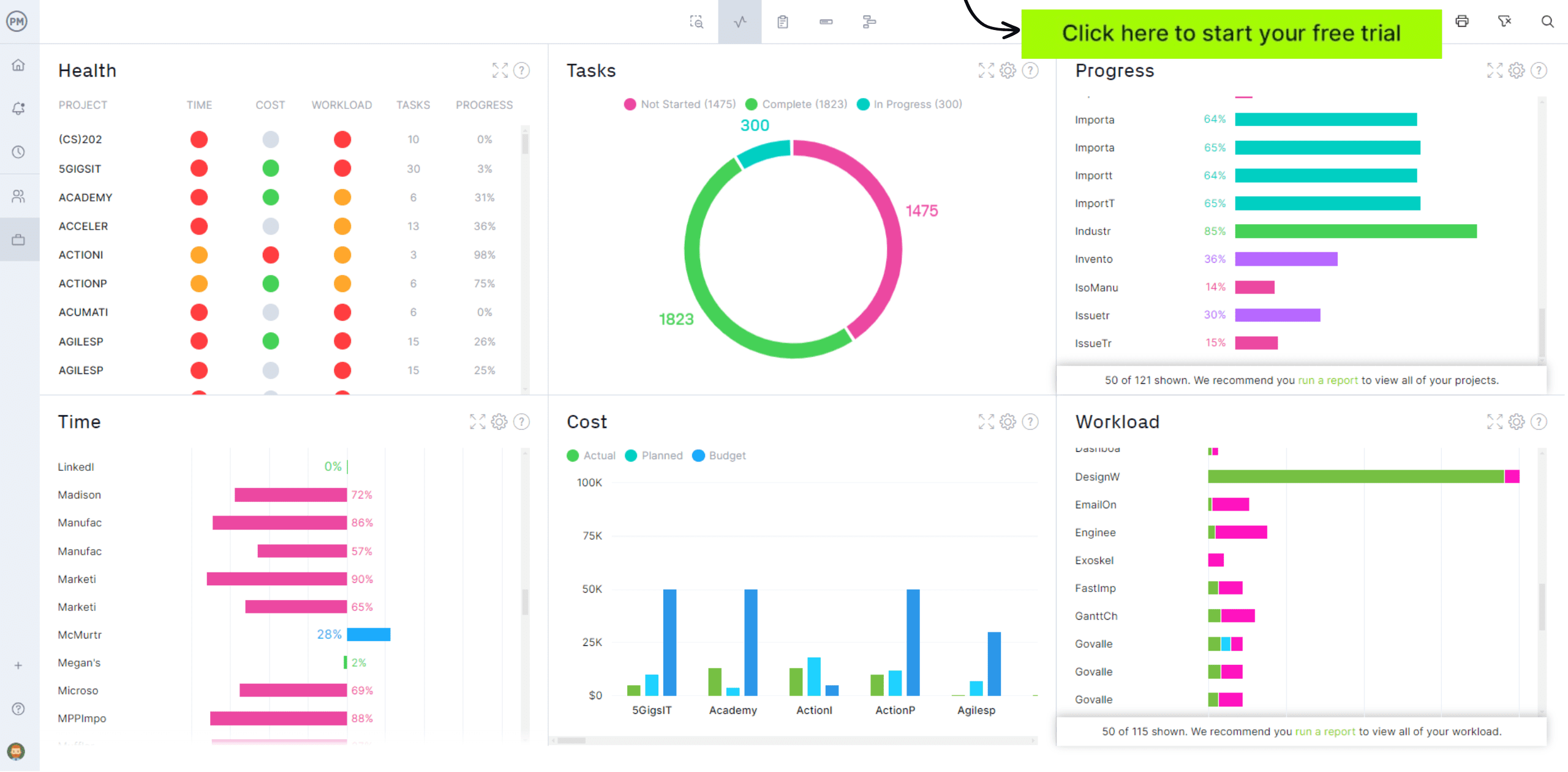
Image source: smartsheet.com
Key features:
- Spreadsheet-style interface with Gantt, Kanban, and calendar views
- Automated workflows and alerts for status updates and approvals
- Centralized dashboards for project performance and reporting
- Real-time collaboration with file attachments and comments
- Integrations with Microsoft 365, Google Workspace, and design tools
Pros:
- Easy transition for teams used to Excel or Google Sheets
- Strong automation and dashboard capabilities for complex engineering projects
- Great visibility into project progress and budgets
- Highly scalable for large organizations with multiple concurrent projects
Cons:
- Can be overwhelming for small teams or simple projects
- Some advanced features require higher-tier subscriptions
Pricing:
- Pro: $9/user/month (when billed annually)
- Business: $19/user/month (annual billing)
- Enterprise: Contact sales
9. Accelo: Best for IT service delivery and client projects
Accelo is a powerful project management and service automation platform tailored for IT service providers, consultancies, and managed service firms. It combines project tracking, client relationship management (CRM), time tracking, and billing into one unified system. Designed to streamline the entire client delivery lifecycle—from proposal to payment—Accelo helps IT teams manage complex service operations with greater transparency and efficiency.
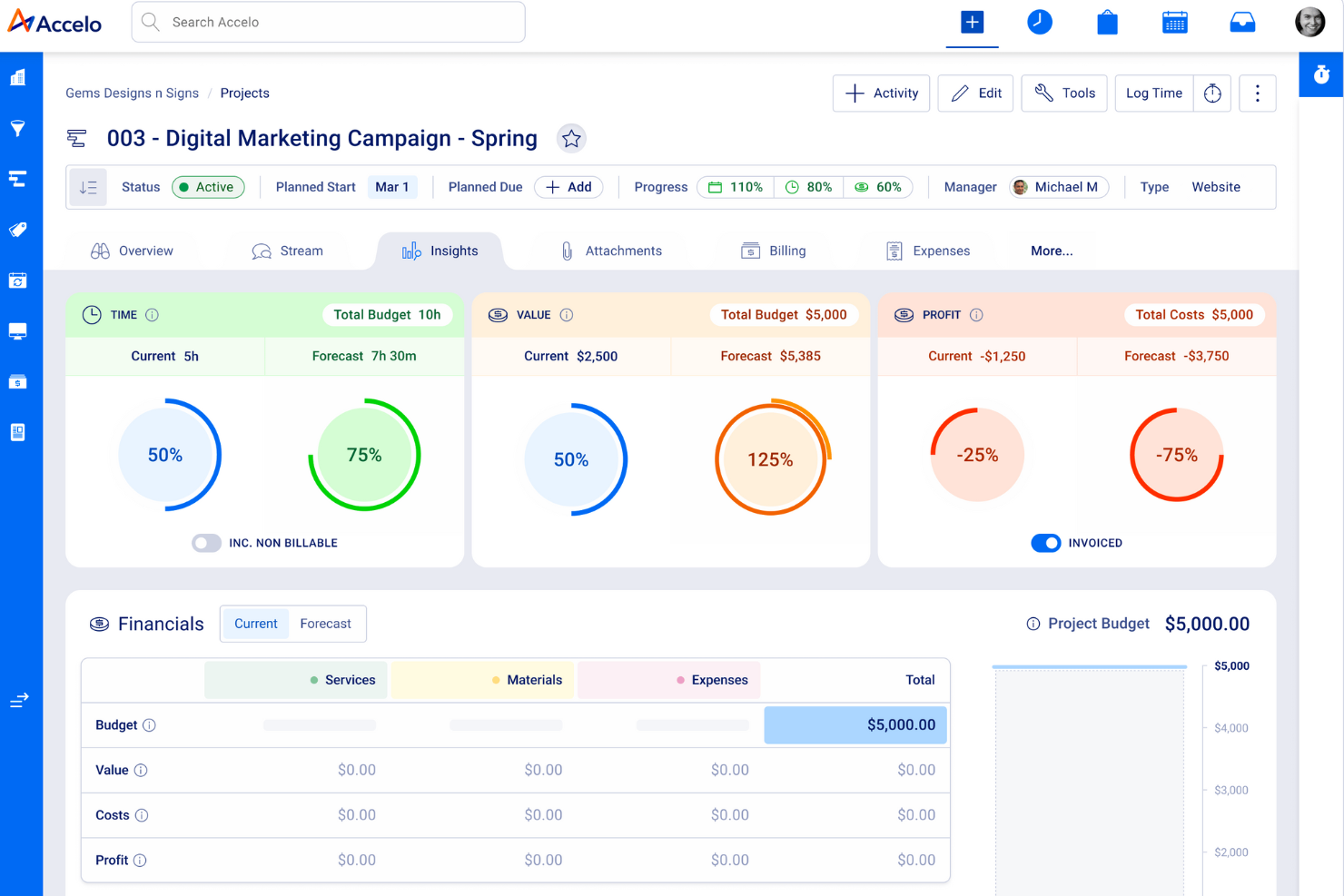
Image source: accelo.com
Key features:
- End-to-end service delivery management with integrated CRM
- Automated time tracking and billing for client projects
- Real-time project visibility through Gantt charts and progress dashboards
- Smart task automation and workflow templates
- Built-in client communication tools for collaboration and updates
Pros:
- Ideal for IT service teams managing multiple client projects
- Strong automation features reduce manual administrative work
- Comprehensive reporting and profitability tracking
- Scalable for both small agencies and mid-sized IT firms
Cons:
- Slight learning curve due to its wide range of modules
- Pricing may be higher than basic project management tools
Pricing:
- Pro: $24/user/month (when billed annually)
- Enterprise: Contact sales
10. Zoho Projects: Best affordable platform for small IT teams
Zoho Projects is a cost-effective project management solution designed to help engineering teams organize tasks, collaborate efficiently, and monitor progress without breaking the budget. It offers a full suite of features, including task tracking, time management, automation, and reporting—all within an easy-to-navigate interface. For engineering teams looking for balance between functionality and affordability, Zoho Projects delivers strong value while supporting complex workflows.
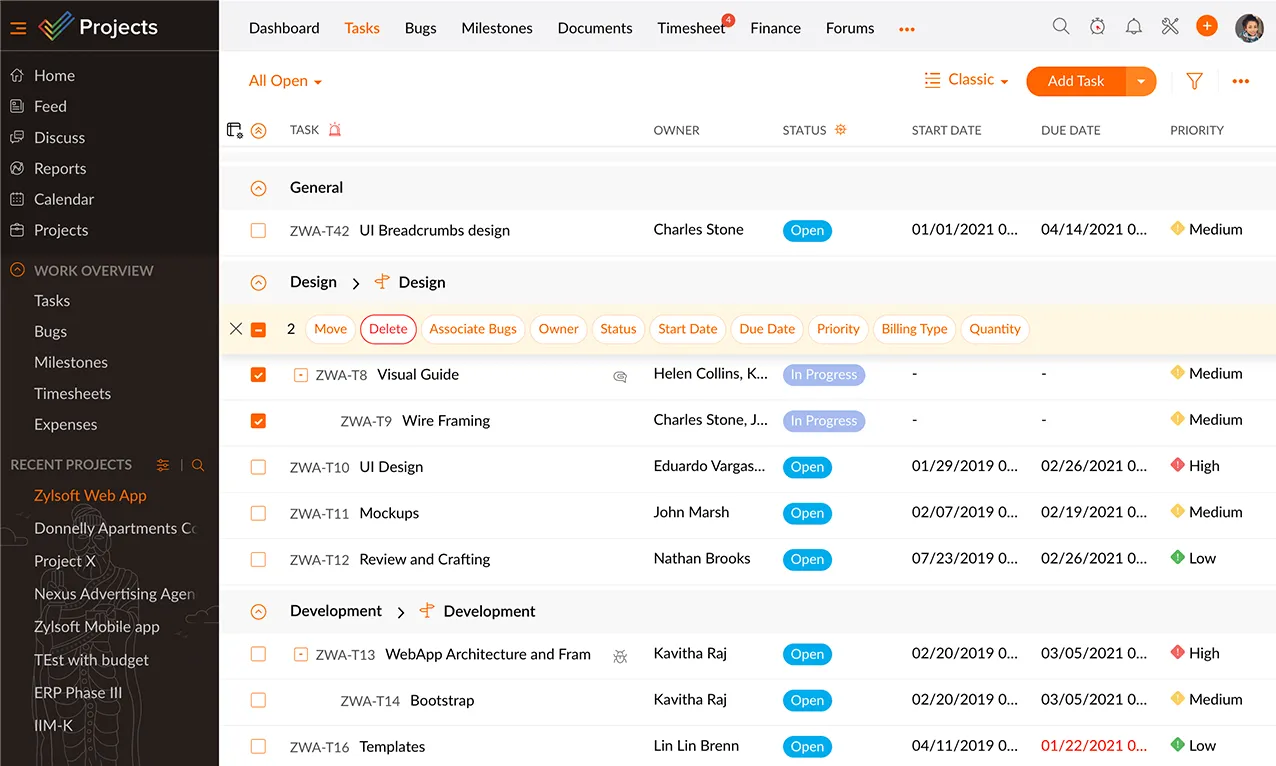
Image source: zoho.com
Key features:
- Task and milestone tracking with Gantt and Kanban views
- Built-in time tracking and timesheet management
- Workflow automation for approvals and recurring processes
- Resource utilization charts for capacity planning
- Integrations with Zoho ecosystem tools, Google Workspace, and Microsoft apps
Pros:
- Affordable option with features comparable to premium tools
- User-friendly interface suited for technical and non-technical users
- Scalable for small to mid-sized engineering firms
- Strong time tracking and reporting capabilities
Cons:
- Limited customization for highly complex engineering workflows
- Interface can feel less polished compared to enterprise-grade tools
Pricing:
- Free: Free plan available (3 users/projects)
- Basic/Standard: $4/user/month (annual billing)
- Pro: $9/user/month (annual billing)
Benefits of using IT project management software
Using IT project management software offers a range of benefits that enable IT teams to work more efficiently and stay aligned. From improving communication to enhancing planning and visibility, these tools streamline workflows and support better project outcomes. Key advantages include:
- Faster delivery: Teams work more efficiently when tasks, timelines and updates are all in one organised system.
- Improved cross-team alignment: Everyone stays on the same page, reducing confusion between developers, designers, QA and other teams.
- Reduced risk of errors or miscommunication: Clear and automated workflows and structured communication platforms help avoid mistakes and missed details.
- More accurate time and cost estimates: Real-time data and better planning tools make estimates more reliable.
- Centralized documentation: Specs, requirements and project notes stay in one accessible place.
- Better sprint predictability: Teams can track progress, manage backlogs and plan sprints more accurately.
- Stronger visibility for engineering leaders: Leaders get a clear view of workload, progress, risks and overall project health.
How to choose the right IT project management software
Selecting the right IT project management software requires evaluating several key factors, including team size, workflow complexity, and documentation needs. Budget, reporting requirements, and compatibility with development or DevOps tools are also important. Considering these aspects helps ensure you choose a solution that aligns with your team's processes and supports efficient, well-coordinated project execution:
- Team size and structure: Match the tool to how many people will use it and how your teams are organised.
- Complexity of IT workflows: If your work management involves many dependencies, integrations or technical handoffs, you'll need a more robust tool.
- Need for documentation and approvals: If you require formal approvals, detailed specs or heavy documentation, choose software with strong governance features.
- Budget: Align your selection with the budget you have for licenses, training, and ongoing support.
- Required reporting depth: Determine how much detail you need in task dashboards and reports—simple status updates or deep analytics.
- Development or devOps compatibility: If you work with code repositories, CI/CD pipelines, or DevOps workflows, pick a tool that integrates well with your development stack.
Conclusion
A strong IT project management tool can make a big difference in how smoothly your team delivers work. The right platform helps you organise tasks, track progress, manage issues and keep documentation in one place. It also supports better communication, clearer planning and more predictable outcomes. With so many options available, including all-in-one collaboration platforms like Lark, the best choice depends on your team's size, workflow and technical needs. Once you match the tool to your processes, you'll notice faster delivery, fewer bottlenecks and better visibility across every stage of your projects.
FAQs
Can IT teams use general project management tools?
Yes, IT teams can use general project management tools like Lark, Trello, Asana, or Monday.com, but specialized best project software for it service management offers better features for tracking technical tasks, change requests, and incident management.
Is there free IT project management software?
Yes, many IT project portfolio management software offer free versions. Popular options include Lark, ClickUp, Jira, and OpenProject. These free plans typically include task tracking, collaboration features, and limited automation capabilities.
What features do IT project managers need most?
Key features include issue tracking, sprint planning, Gantt charts, automation, resource management, and integrations with development tools like GitHub or Jenkins. Real-time reporting and time tracking are also essential for IT teams.
What is IT project portfolio management?
IT project portfolio management (IT PPM) is the process of overseeing multiple IT projects to align them with business goals. It helps prioritize initiatives, allocate resources efficiently, and track performance across the organization.
How do IT teams handle documentation inside project tools?
Most IT services project management software include built-in documentation spaces or integrate with tools like Confluence or Notion. This allows teams to store requirements, technical specs, and process documentation alongside active projects for easy access.
Related reading
Table of contents
Start using Lark today

Manage all your work in one place
Boost team efficiency by 10x
Save up to 70% on software costs
Table of contents
Start using Lark today
Manage all your work in one place
Boost team efficiency by 10x
Save up to 70% on software costs
Keep reading







2026 Lark Technologies Pte. Ltd.
Headquartered in Singapore with offices worldwide.






Explore: