If you are reading this, your browser probably has twenty tabs open, your calendar looks like a complex game of Tetris, and you have at least three different teams waiting for your approval. Managing multiple projects is a common reality for modern leaders, but it rarely feels easy. The constant pull between overlapping deadlines, sudden client requests, and internal roadblocks can quickly lead to burnout.
However, surviving this juggling act requires more than simply working longer hours. It demands a shift from reacting to fires to proactively managing capacity. In this guide, I will walk you through practical strategies and the best tools for managing multiple projects without losing your mind.
What is multi-project management?
Multi-project management is the practice of coordinating, several concurrent projects that often share the same pool of resources, budgets, or overarching business goals.
A common trap for new leaders is treating multi-project management simply as "doing more things at once." In reality, it is a fundamentally different discipline. Managing a single project is about optimizing a specific timeline and ensuring a checklist gets completed. Managing multiple projects simultaneously is about optimizing an entire ecosystem.
You can think of it like the difference between playing an instrument and conducting an orchestra. The conductor does not play the notes; their job is to ensure the brass section does not overpower the strings, cueing different groups at exactly the right moment so the entire performance succeeds. In a business context, this means shifting your focus away from granular task completion and toward high-level capacity planning, cross-functional alignment, and portfolio health.
Why managing multiple projects feels so overwhelming
Even with a strong understanding of the challenges, the day-to-day reality of juggling several initiatives can still drain your energy. This overwhelming feeling usually stems from three specific systemic failures rather than a lack of personal effort:
- The cognitive tax of constant context switching: Every time you jump from reviewing a creative brief to troubleshooting a technical bug, your brain takes time to recalibrate. When this happens across five or six active projects, you rapidly deplete your mental energy just trying to remember where you left off. You are not simply doing more work; you are forcing your brain to constantly stop, load a completely different set of project parameters, and restart, which leaves you feeling exhausted before the day is even half over.
- The daily friction of a fragmented tool stack: The modern workplace is cluttered with specialized apps, creating a chaotic environment where your live in one platform, team chat in another, and client documents in a third. This fragmentation forces you to act as a human router, constantly copying and pasting context between tabs just to keep everyone aligned. When the basic act of finding the latest update requires searching across three different software subscriptions, managing multiple projects feels less like strategic leadership and more like tedious administrative maintenance.
- Chronic anxiety from capacity blind spots: When you lack a unified view of your team's total workload, you are essentially flying blind, turning every new deadline into a guessing game. You might know exactly what your specific project schedule dictates, but if you cannot easily see that your lead engineer is secretly drowning in requests from two other departments, you will inevitably assign them work they cannot deliver. This lack of cross-team visibility means you are never quite sure if your timelines are realistic, leaving you with a constant, lingering fear of an impending scheduling disaster.
Stop context switching with a unified platform
Choosing the right methodology for concurrent projects
When managing a single project, standard methodologies like pure or strict work perfectly fine. However, applying these rigid frameworks across multiple overlapping projects often causes systems to break down.
For instance, if a developer is assigned to three different projects simultaneously, they cannot reasonably attend three separate daily stand-ups, three sprint planning sessions, and three retrospectives. The administrative overhead of pure Scrum will consume their actual working hours.
Instead of forcing a single methodology, successful multi-project managers often adopt a hybrid or Kanban-based approach. A works exceptionally well for shared resources. By visualizing the entire team's workflow on a single, consolidated board, team members can simply "pull" the next highest-priority task across any project when they have capacity. This reduces the pressure of arbitrary sprint deadlines and ensures that resources are always working on what matters most for the broader portfolio, rather than rigidly adhering to one project's methodology at the expense of another.
Core strategies for managing multiple projects simultaneously
To regain control of your project portfolio, you need to establish ground rules that apply across every initiative you run. Simply working harder or putting in longer hours will not scale when you have six overlapping deadlines. Surviving this requires building better systems. Here are the foundational strategies my team relies on to keep work moving forward.
Establish a single source of truth to kill context switching
Every project—no matter how small—must live in a centralized hub. The moment you let a project timeline exist in a personal spreadsheet while the lives in an isolated email thread, you lose control. A single source of truth ensures that anyone can find the latest updates, documents, and task statuses without having to tap a project manager on the shoulder.
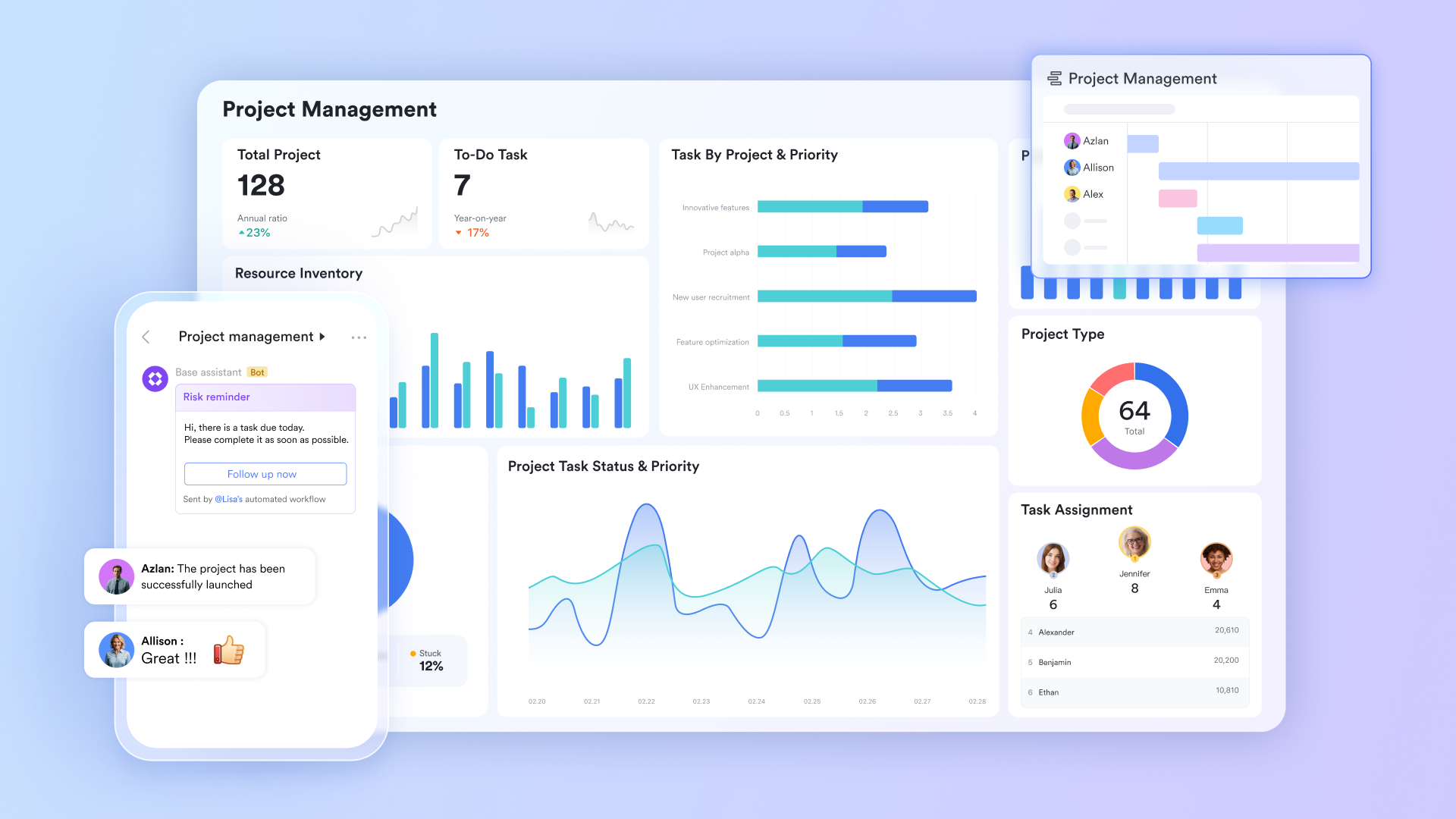
This is where consolidating your software stack pays massive dividends. For instance, if you use a unified workspace like , you can send your project tracker () directly into a team chat group or a live cloud document. Instead of forcing your team to log into a separate project management app just to check off a task, the actual work and the conversation about the work happen in the exact same window. This dramatically reduces the mental fatigue of context switching.
Shift from task management to capacity management
When managing a single project, you manage tasks. When simultaneously, you manage bandwidth. A common mistake managers make is fixating on checklists rather than looking at the people executing them.
If an engineer or a lead designer is critical to both Project A and Project B, their availability is your primary constraint. I recommend adopting a "triage" approach to your portfolio. Review the combined workload of your team weekly across all active boards. If you spot a bottleneck where one person is overallocated, you must be willing to temporarily pause a low-impact project. You cannot safely steer multiple projects if your core team is constantly running at 110% capacity.
Standardize your intake and approval workflows
Chaos often starts before the project even officially begins. If sales reps are requesting new marketing collateral via casual direct messages, and executives are sending new product ideas via email, you have no way to measure or prioritize these requests against existing work. Unseen work will quietly derail your official schedule.
To fix this, force all new project requests through a single, standardized funnel. Require stakeholders to fill out a brief intake form that outlines the goal, the hard deadline, and the required resources. You can easily tie this to an —routing the request to the necessary department heads for a quick "yes" or "no." By doing this, no new project enters your team's pipeline without explicit leadership sign-off, protecting your team from sudden scope creep.
Put these strategies into action with Lark
Resource allocation: Balancing team capacity without burnout
The fastest way to stall a portfolio of projects is to overcommit your team. Proper resource allocation is the engine that keeps multiple timelines running smoothly.
Map out cross-project dependencies
A delay in one area often creates a domino effect. If the copywriter falls sick, the website redesign is delayed, which means the ad campaign cannot launch, which means the sales team misses their targets.
You need to identify where resources overlap. Look for "bottleneck" roles—individuals whose specific skills are required across multiple active projects. Once identified, you can stagger project start dates so that these key individuals are never hit with three major deadlines in the same week.
Build buffer time into overlapping schedules
Things will go wrong. , vendors will be late, and team members will take time off. When planning out your timelines, never schedule your team at 100% capacity.
A strong rule of thumb is to plan for 80% utilization. That remaining 20% serves as a critical buffer to absorb the unexpected shocks that inevitably occur when managing multiple projects simultaneously. If the week goes perfectly, your team has time for strategic thinking or professional development. If a crisis hits, you have the bandwidth to solve it without missing your core deliverables.
What makes the best tool for managing multiple projects?
A common mistake I see leaders make is throwing a basic to-do list application at a complex resource allocation problem. While simple checklists work well for personal productivity, they break down when you introduce cross-functional teams, external clients, and overlapping dependencies.
The best tool for managing multiple projects isn't just a place to store tasks; it is a unified environment that centralizes context.
We often assume that having a dedicated app for every single function—a chat app, a video meeting app, a document app, and a —is the standard way to work. However, this creates an enormous "context switching tax." When your team has to constantly jump between windows to match a chat conversation with a project deliverable, they lose momentum. The most effective tools today focus on consolidation rather than separation. This is exactly why unified workspaces like are replacing traditional, fragmented software stacks. By bringing messaging, cloud-native documents, and into a single platform, Lark ensures that the discussion about the work happens right next to the work itself, completely eliminating the friction of scattered information.
Experience the ultimate unified workspace right now
Lark: A unified hub for managing multiple projects
Juggling multiple projects at once is a common reality for teams. The challenge isn't just tracking tasks—it's keeping context from getting lost, preventing priorities from colliding, and ensuring nothing falls through the cracks when your attention is divided. provides an integrated environment where all your projects coexist, connected by shared communication, documentation, and visibility. Here's how Lark helps you manage the complexity of multiple projects without losing your sanity.
See your projects from different angles with multiple views
When you have many projects, information gets scattered. One project's requirements sit in folder A, another project's timeline lives in an Excel file, and a third project's discussions are buried in a chat group. You end up jumping between tools just to piece together the full picture.
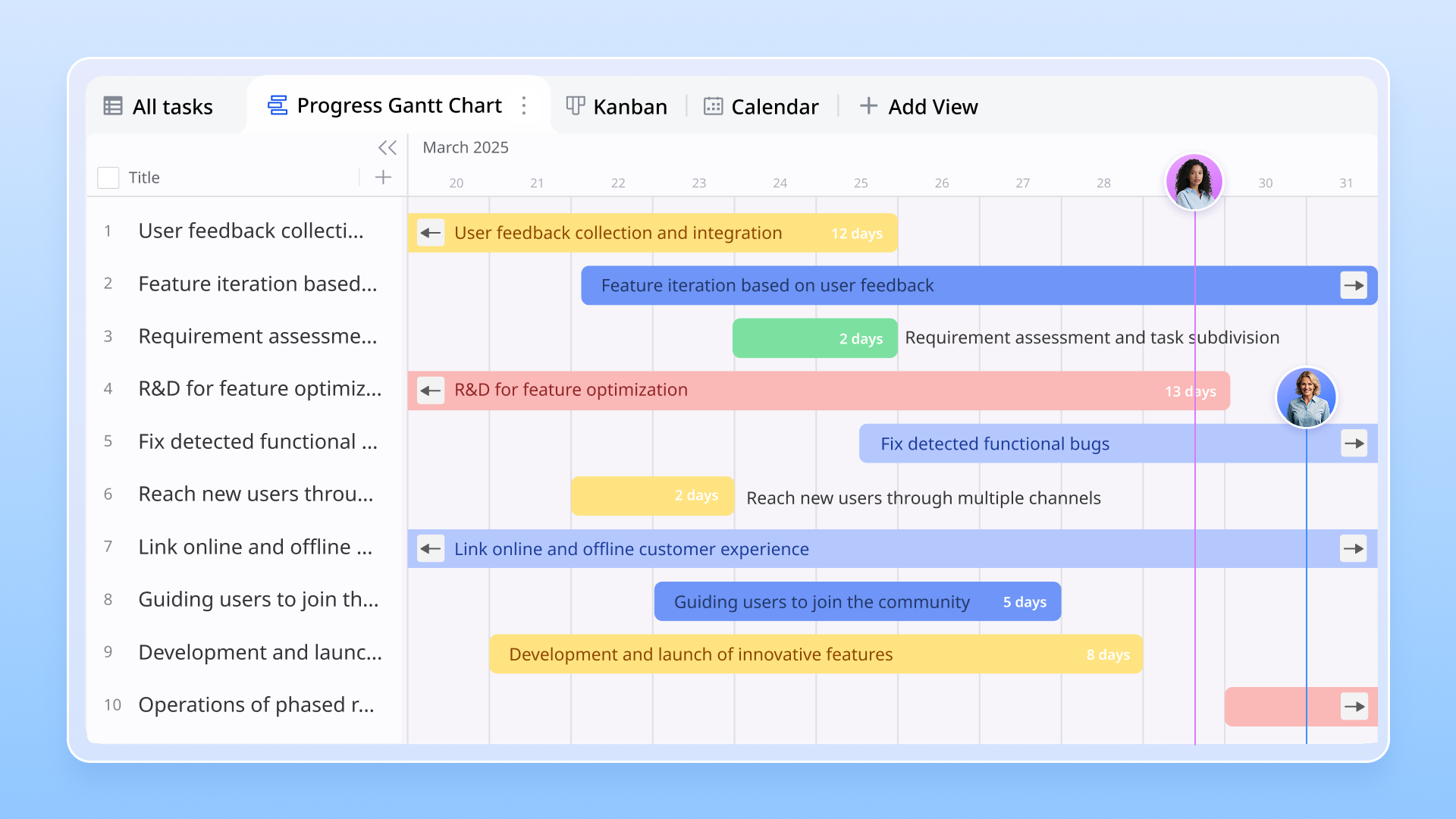
lets you build a flexible data core for each project, then use multiple views to manage it from different angles. Use the table view to record basic task info—assignee, due date, priority, status. When you need a quick look at progress, switch to Kanban view grouped by stages like "To Do," "In Progress," and "Done." When it's time to report to leadership, switch to to clearly show timelines, task dependencies, and key milestones. This means your development team can focus on dragging cards in Kanban while your project manager tracks everything from the Gantt view.
Get a big-picture view of all your projects with dashboards
Kanban shows where tasks are in a single project, but when you're managing multiple projects, you need a higher-level perspective—overall health, risks across projects, and how resources are balanced.
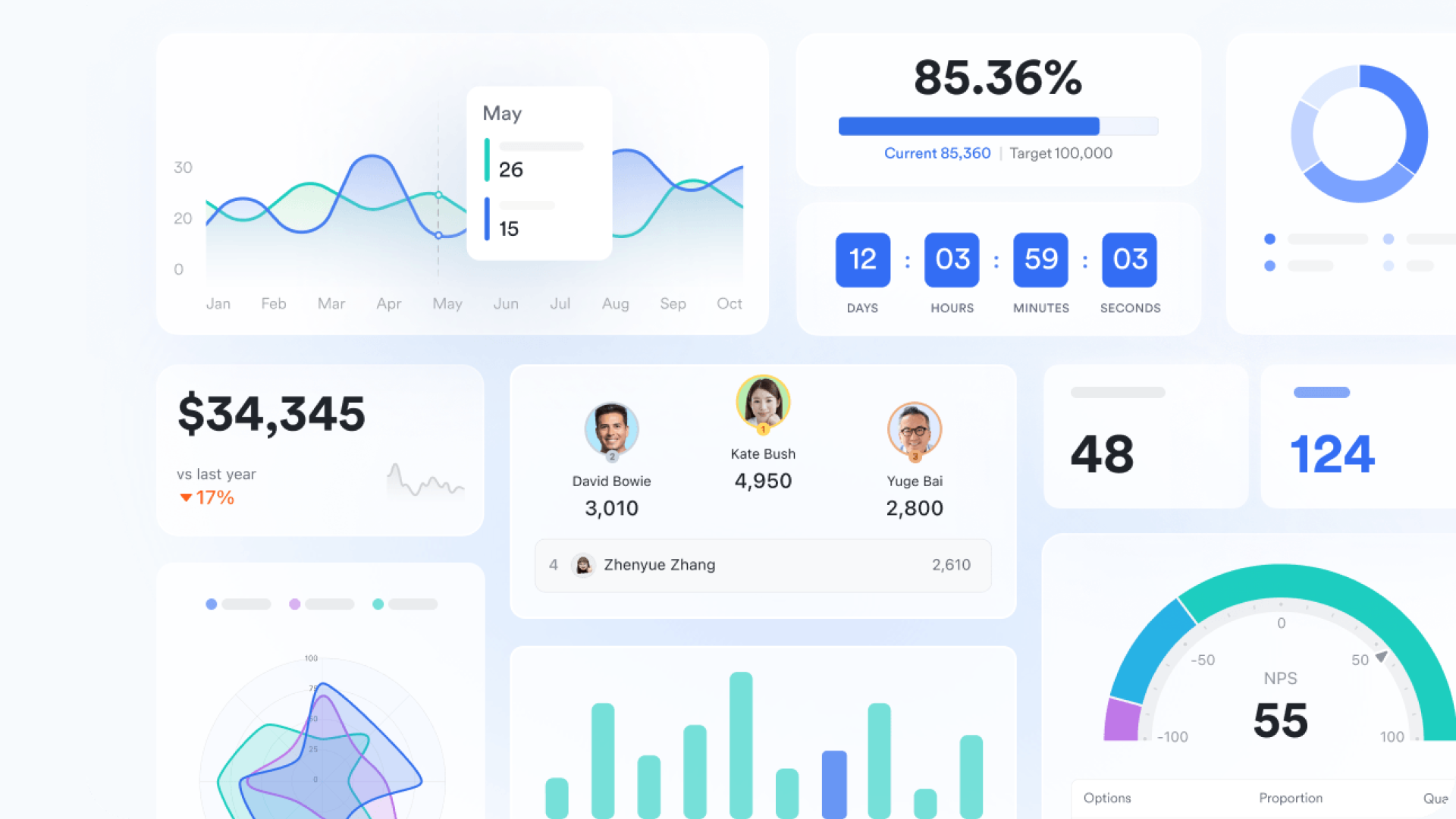
Lark Base dashboard lets you pull data from multiple tables and build a cross-project view. You can create a "Project Overview" dashboard with charts showing completion rates, risk status, and resource distribution across all your projects. The dashboard supports multiple data sources, so you can combine task tables from different projects to analyze the big picture. This unified view helps you spot which projects need your attention first without leaving Lark. 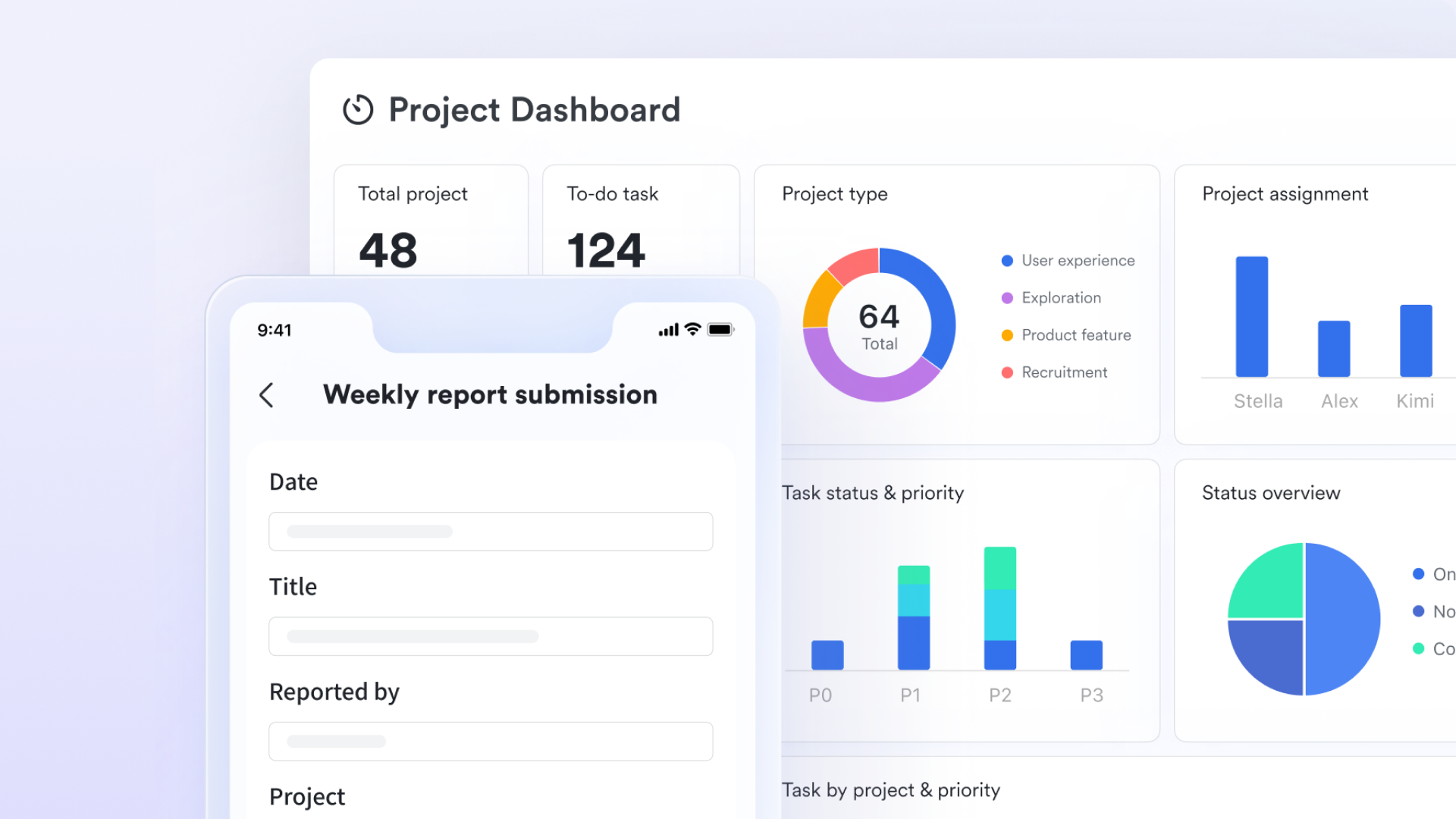
Focus on your personal responsibilities with a unified task hub
When you're involved in several projects, your personal task list gets crowded. Design tasks from project A, review tasks from project B, documentation tasks from project C all mixed together. It's hard to see priorities and easy to miss important items.
Lark Tasks gives you a unified task hub that brings tasks from all your projects together in one place. In your task list, you can sort and filter by due date, assignee, or custom groups. When you need a more visual view, switch to Kanban or Gantt view to clearly see task distribution and timelines across your projects. 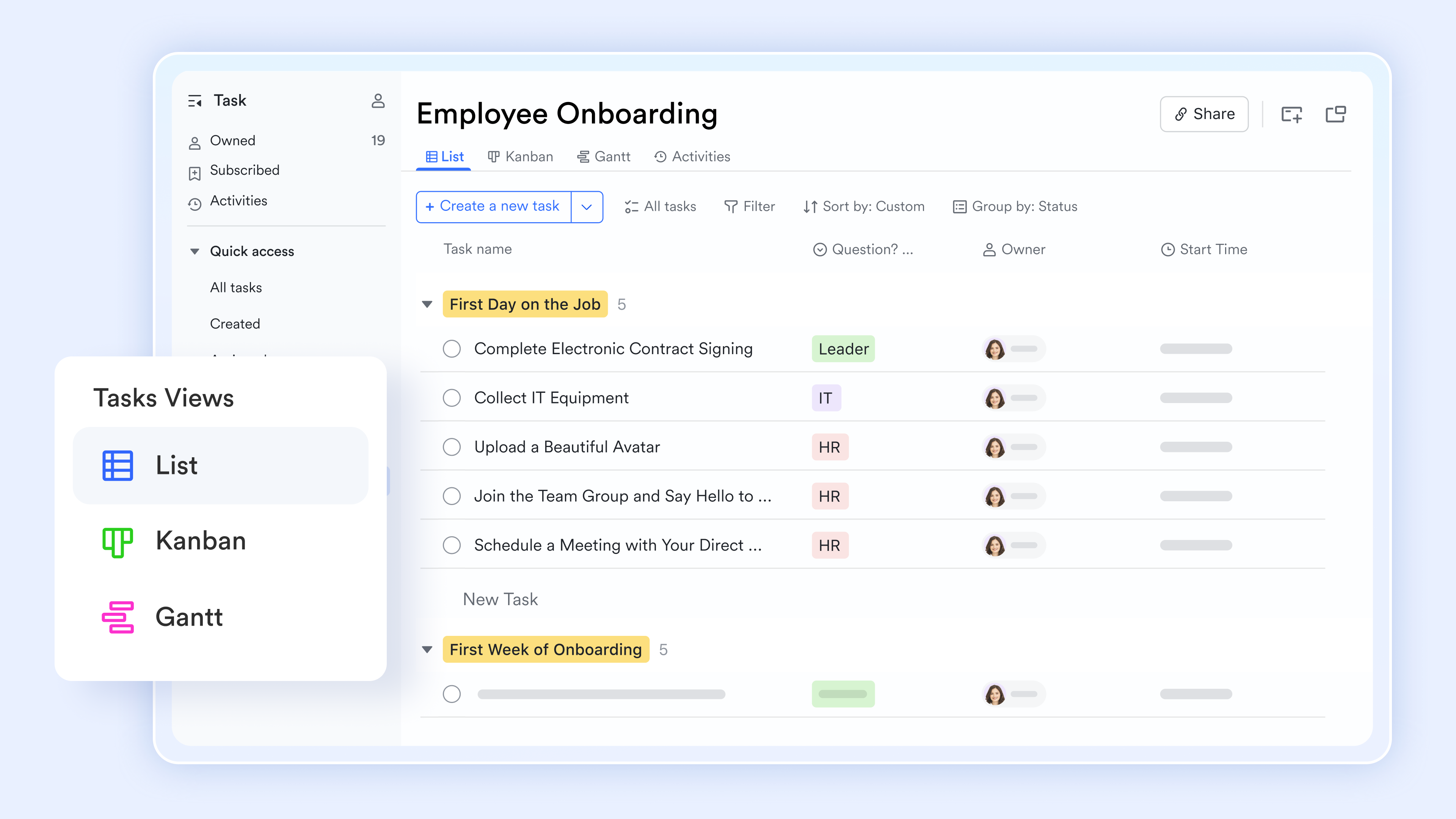
Keep communication and tasks together in one space
When you manage many projects, conversations get scattered, too. Project A discussions happen in chat group 1, project B in chat group 2, and cross-project coordination often happens in direct messages. When you need to go back to a decision, you end up searching across multiple chat histories.
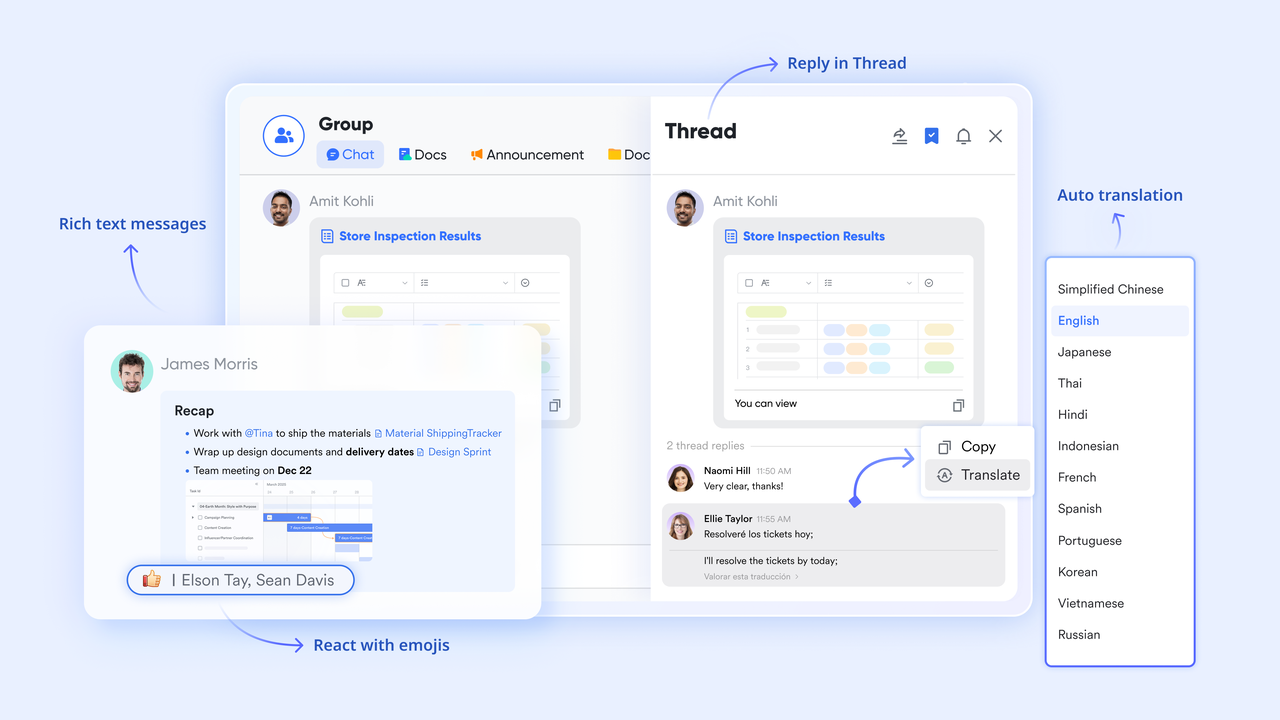
lets you create dedicated group chats for each project and link them to the project's Base. All discussions, files, and decisions related to that project stay in one space. Lark Messenger also supports real-time translation. When team members speak different languages, messages are automatically translated into each person's native language, removing language barriers. Threaded replies let multiple topics run in parallel within the same chat without getting mixed up. When you need to find information, you can search within the project space instead of jumping between different chat windows.
for Lark:
- Starter plan: Free forever plan that includes 11 powerful tools for up to 20 users. It also comes with 100GB of storage, 1000 automation runs, AI translations, and more.
- Pro plan: $12/user/month (billed annually) for up to 500 users. It includes everything in Starter plus group calling for up to 500 attendees, 15TB of storage, 50,000 automation runs, and more.
- Enterprise plan: for custom pricing. Supports unlimited users and includes even more automation runs and advanced security, compliance, and management features.
For small teams with simple communication needs

18 months message history
1000 Base automation runs/month
2000 rows per table in Base
Most POPULAR
For companies with comprehensive collaboration and management needs
Unlimited message history
500-participant video meetings
50k Base automation runs/month
20k rows per table in Base
For large companies with advanced security and organizational management needs
Get a personalized demo and pricing
Unlimited message history
500-participant video meetings
15 TB storage + 30 GB storage/user
500k Base automation runs/month
50k Base automation runs/month
Most POPULAR
For companies with comprehensive collaboration and management needs
Unlimited message history
500-participant video meetings
50k Base automation runs/month
20k rows per table in Base
Common challenges of managing multiple projects
While the structural issues of context switching and fragmented tools cause daily friction, the actual mechanics of running several initiatives side-by-side introduce specific managerial hurdles. If you do not anticipate these roadblocks, they will quickly derail your portfolio.
Prioritization paralysis
When you are running one project, the priority is obvious: finish the project. When you are managing five projects, everything often gets labeled as "Priority 1." If a critical server goes down for the just as the marketing team needs engineering help to launch a campaign, who gets the resources? Without a clear, pre-established hierarchy of business goals, managers waste hours negotiating and fighting political battles over shared resources.
The domino effect of scope creep
In a vacuum, agreeing to add a "small extra feature" to a client deliverable might only cost two extra days of work. However, in a multi-project environment, interdependencies are the silent killer. Those two extra days mean your lead designer cannot start their next assignment on time. That delay pushes back a completely separate project, causing a ripple effect that angers a different stakeholder who had nothing to do with the original scope change.
Stakeholder reporting fatigue
Different projects mean different sponsors, clients, or executives who need regular updates. A massive challenge of managing multiple client projects is the sheer volume of reporting required. If you lack an automated system, you will easily spend your entire Friday manually copying and pasting statuses from various trackers into separate email updates or presentation decks. By centralizing your project data in a platform like , you can replace those manual reports with live dashboards, allowing stakeholders to see real-time progress without eating into your actual management time.
Process inconsistency across teams
When coordinating initiatives that span different departments, you often run into a clash of working styles. The engineering team might work in rigid, two-week sprints, while the creative team uses a flexible, visual board. If teams use completely disconnected apps, aggregating data to see the overall health of your combined projects becomes nearly impossible. You need a platform that is flexible enough to handle different working styles—like using to give the creative team their Kanban boards and the engineers their sprint trackers—while still feeding all that information into one unified, company-wide capacity metric.
Conclusion
Mastering the art of running concurrent initiatives isn't about extending your workday; it's about fundamentally changing how your organization interacts with information. The friction that derails overlapping timelines rarely comes from a lack of skill—it almost always stems from disconnected communication, scattered data, and invisible resource bottlenecks. By standardizing your intake processes, establishing a transparent master schedule, and ruthlessly prioritizing capacity over individual task completion, you can eliminate the administrative chaos that leads to team burnout.
If you are tired of losing critical project updates between endless browser tabs and disjointed software subscriptions, it is time to simplify your tech stack. Experience a smarter way to work by trying today, and bring your team's chats, meetings, documents, and project databases together into one unified, friction-free platform.
Manage multiple projects effortlessly with Lark today
FAQs
How do you manage multiple projects at the same time?
Managing multiple projects requires shifting your focus from individual tasks to overall team capacity. You must establish a single source of truth to prevent context switching and prioritize ruthlessly based on business goals. Using a unified workspace like Lark helps immensely, as it combines your team chat, project trackers, and documents into one platform. This ensures you can monitor project health and communicate updates without constantly jumping between different apps.
What is the 80/20 rule for project managers?
The 80/20 rule, also known as the Pareto Principle, suggests that 80% of your project's value often comes from just 20% of the work. For project managers, this means identifying and focusing intensely on the critical tasks that drive the most impact, rather than getting bogged down in minor administrative details. It is also useful in risk management, as 80% of project delays are typically caused by just 20% of the identified risks.
What is the rule of 7 in project management?
The rule of 7 generally refers to the ideal size for a highly effective project team, often cited as seven people (plus or minus two). Keeping a core team small minimizes communication overhead and prevents meetings from becoming unproductive. When teams grow much larger than seven, the number of cross-communication channels multiplies rapidly, making it much harder to keep everyone aligned and slowing down the decision-making process.
What is the 15 15 rule in project management?
The 15/15 rule is an early warning metric indicating that if a project falls more than 15% behind schedule or goes 15% over budget, it will likely not recover without significant intervention. When you hit this 15% variance threshold, you cannot simply hope the team will work harder to catch up. It requires an immediate pause to reassess the project scope, adjust the timeline, or negotiate new resources with stakeholders.
Related reading












