Customer relationship management platforms help organizations organize customer interactions, track sales opportunities, and improve marketing performance. Businesses rely on CRM systems to maintain accurate customer records and support collaboration among sales, marketing, and service teams. NetSuite customer relationship management is designed as part of a larger ERP ecosystem that connects customer data with financial and operational systems.
Organizations exploring CRM platforms often compare enterprise systems with collaboration-driven tools that improve team coordination. While NetSuite customer relationship management ERP focuses on integrating customer insights with financial processes, modern collaboration platforms like Lark help teams coordinate sales activities and communication in a unified workspace. Understanding these different approaches helps organizations select the right CRM strategy for their operations.
This guide reviews NetSuite customer relationship management features, use cases, pricing considerations, and alternatives for modern teams.
Key takeaways
- NetSuite customer relationship management combines CRM functionality with ERP-level operational visibility.
- Organizations use the NetSuite customer relationship management service to track leads, manage customer interactions, and support sales teams.
- NetSuite marketing automation helps marketing teams run campaigns, track engagement, and score leads.
- Businesses frequently compare NetSuite CRM vs Salesforce and NetSuite CRM vs HubSpot when evaluating CRM platforms.
- Platforms that combine CRM style pipelines with collaboration workflows help teams coordinate sales activities more effectively.
What is NetSuite customer relationship management?
NetSuite customer relationship management is a cloud-based designed to manage sales activities, customer interactions, and marketing campaigns. It operates within the broader NetSuite ERP ecosystem, allowing organizations to connect customer data with financial operations, order management, and business analytics.
The platform provides tools for , tracking opportunities, analyzing sales performance, and supporting customer service teams. Because the NetSuite customer relationship management ERP integrates with financial systems, businesses gain visibility into customer relationships and revenue performance from a single environment.
Companies that adopt the NetSuite service often seek to align their sales processes with accounting data, inventory management, and operational reporting. This integration allows organizations to track the full customer lifecycle from lead acquisition to post-sale support.
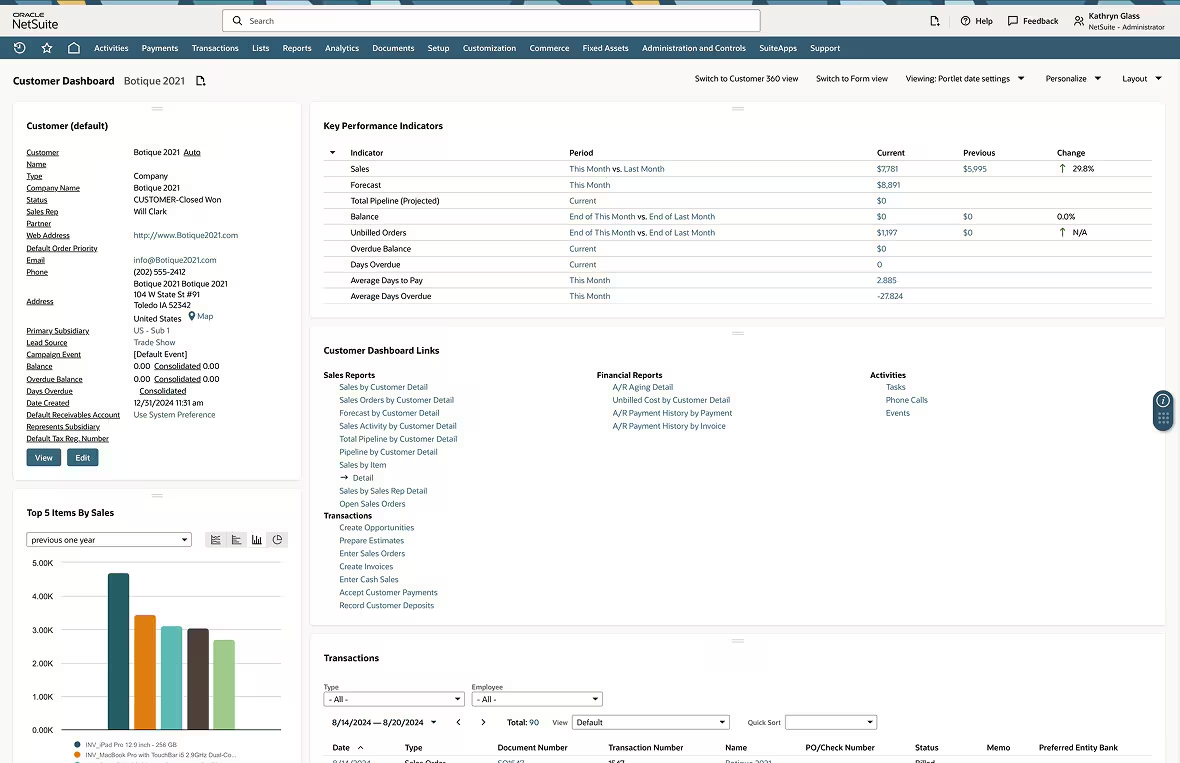
Image source: netsuite.com
Core features in NetSuite customer relationship management
NetSuite CRM includes several capabilities that help organizations manage customer relationships throughout the sales cycle. These features support sales, marketing, and customer service teams.
Sales force automation capabilities
Sales force automation tools help sales teams manage leads, opportunities, and revenue forecasts. These features improve pipeline visibility and help managers track deal progress.
- and opportunity management: Sales teams capture and organize leads through centralized CRM records. The NetSuite customer relationship management service allows representatives to track prospect interactions, monitor deal progress, and convert leads into opportunities. By maintaining accurate records, teams improve visibility across the sales pipeline.
- : Forecasting features help sales leaders analyze expected revenue based on pipeline data. The NetSuite customer relationship management ERP aggregates deal information, allowing managers to evaluate sales performance and predict revenue trends.
- Pipeline visibility and reporting: CRM dashboards provide real-time insights into sales performance. Sales managers can monitor pipeline stages, track team productivity, and analyze deal conversion rates. This visibility supports data-driven sales strategies.
Customer support and case management
Customer support teams rely on CRM systems to track service requests and maintain consistent communication with clients.
- Ticket tracking for : Support teams use NetSuite case Management tools to record service requests and track issue resolution. Each case includes customer information, communication history, and status updates.
- Customer interaction history: CRM platforms maintain a record of interactions between customers and service teams. NetSuite case Management ensures support agents can quickly review previous communications and understand customer needs.
- Support case prioritization: Customer service teams often manage multiple service requests simultaneously. NetSuite case Management features allow organizations to categorize and prioritize cases based on urgency and customer impact.
Marketing automation with NetSuite
Marketing teams use CRM platforms to run campaigns, track engagement, and manage leads.
- Email campaign management: NetSuite marketing automation allows marketers to design and send email campaigns targeting specific audience segments. Campaign tools help teams deliver personalized communication to prospects and customers.
- Lead scoring and segmentation: NetSuite marketing automation helps teams evaluate lead quality by analyzing customer engagement and behavior. Marketing teams can prioritize high-value leads and route them to sales representatives.
- : Analytics dashboards measure campaign performance by tracking open rates, conversions, and engagement metrics. These insights help marketing teams refine strategies and improve ROI.
Customer analytics and reporting
Customer analytics tools help organizations evaluate customer behavior and sales performance.
- Sales dashboards and reports: CRM dashboards provide real-time visibility into sales performance and pipeline activity. Managers can monitor team productivity and evaluate revenue trends.
- Revenue forecasting insights: Analytical tools help organizations estimate future revenue based on historical data and pipeline forecasts. These insights support strategic decision-making.
- Customer lifecycle analysis: CRM analytics help organizations understand how customers move through the sales cycle. Businesses can analyze acquisition, retention, and expansion patterns.
NetSuite CRM within the ERP ecosystem
One of the most distinctive aspects of NetSuite CRM is its integration with ERP systems.
- CRM integrated with finance and accounting data: The NetSuite customer relationship management ERP connects customer interactions with financial data. Sales teams can view billing information, invoices, and payment status directly within CRM records.
- visibility: Integration with inventory systems enables sales teams to view product availability and manage customer accounts.
- Customer purchase history insights: CRM records include purchase history that helps sales teams identify upsell opportunities.
- Unified operational reporting: Organizations can generate reports combining financial and customer data, improving decision-making across departments.
Real-world use cases for NetSuite CRM
Organizations use NetSuite CRM to support multiple operational workflows across sales, marketing, and customer service.
Sales pipeline management
allows teams to track deals from initial contact to final closing. Sales representatives monitor opportunities through CRM dashboards and update deal progress during each stage. The NetSuite customer relationship management service provides visibility into pipeline activity, so managers can evaluate performance and forecast revenue accurately.
Marketing campaign tracking
Marketing teams rely on NetSuite to measure campaign effectiveness. Marketers track engagement metrics such as open rates and conversions. These insights help teams refine campaign strategies and improve lead generation performance.
Customer support workflows
Support teams manage customer inquiries using NetSuite's case management features. Service agents create support tickets, monitor case status, and coordinate resolution efforts. CRM records ensure that support teams maintain a complete history of customer interactions.
Financial and customer data alignment
ERP connectivity enables organizations to combine customer information with financial data. The NetSuite customer relationship management ERP provides unified insights into revenue, orders, and customer activity. This alignment supports better decision-making across departments.
NetSuite CRM pricing and considerations
is typically structured as part of the broader NetSuite ERP licensing model, which means organizations rarely purchase the CRM module as a standalone product. Instead, the CRM functionality is bundled within the NetSuite ecosystem and priced based on several factors, including company size, number of users, and the specific modules required.
Key considerations
- ERP-based licensing model: NetSuite CRM pricing is tied to the overall NetSuite platform subscription. Businesses subscribe to the core ERP system and then add modules such as CRM, financial management, or . This bundled approach allows organizations to unify customer data with operational and financial processes.
- Implementation-based CRM costs: The cost of the CRM module can vary depending on the implementation scope. Companies may require customized workflows, integrations with external systems, or specialized reporting dashboards. These requirements influence the total CRM investment beyond the standard subscription fee.
- Enterprise-level custom pricing: NetSuite does not publish fixed pricing for its CRM platform. Instead, businesses receive customized quotes based on user licenses, company size, industry needs, and the complexity of their ERP deployment. Enterprise organizations often negotiate pricing packages that include multiple modules and service tiers.
- Implementation and customization expenses: Beyond the subscription fee, companies should consider implementation costs, including onboarding, configuration, data migration, and employee training. Businesses may also invest in additional customization, third-party integrations, and consulting services to tailor the CRM system to their operational workflows.
Overall, organizations evaluating NetSuite CRM should view pricing as part of a total ERP investment, which includes licensing, deployment, and long-term customization costs.
Pros and limitations of NetSuite CRM
Organizations evaluating CRM platforms should consider both the advantages and limitations of each solution. Here are the detailed breakdowns of the pros and cons of NetSuite CRM:
Pros
- ERP-connected customer insights: The NetSuite CRM integrates customer data with financial systems, providing comprehensive operational visibility by allowing sales teams to see real-time order history and credit limits directly within a lead's profile.
- Strong enterprise reporting capabilities: allow organizations to generate detailed reports across sales, marketing, and finance operations, enabling leaders to forecast revenue based on actual pipeline health and historical trends.
- Unified financial and customer data: Integration between CRM and ERP systems helps businesses maintain consistent records across departments, ensuring that marketing campaigns are targeted based on actual purchase behavior rather than just
Cons
- Complex implementation: Deploying NetSuite CRM often requires extensive configuration and technical expertise, typically involving third-party consultants to ensure the workflows align with specific business logic.
- Higher cost compared with standalone CRM tools: The NetSuite CRM service is typically bundled with ERP modules, which increases the overall investment and may feel prohibitive for companies not utilizing the full suite.
- Requires ERP ecosystem adoption: Organizations must adopt the NetSuite platform to fully utilize CRM functionality, which can lead to "vendor lock-in" where switching any single part of the stack becomes a massive undertaking.
While NetSuite is a powerhouse for structured financial reporting, its heavy reliance on complex configurations and its rigid ERP ecosystem can often feel like a "data tax" on your team. When implementation becomes a months-long technical project, and costs climb due to bundled modules you may not fully utilize, the friction can start to outweigh the visibility. This is where Lark changes the game: By swapping rigid menus for flexible, no-code "Bases" and integrated chat, Lark lets you maintain organized customer records without structural complexity. Let's take a closer look at this emerging tool.
Avoid data tax and streamline data management today
New alternative: Use Lark to manage your entire sales cycle with ease
For customer relationship management, provides a unified workspace: it enables teams to coordinate sales operations and manage sales pipelines while maintaining cross-departmental communication. By connecting collaboration tools to , Lark helps teams manage customer relationships and improve operational coordination.
Unified database for CRM and workflows
functions as a powerful, no-code CRM that centralizes lead and opportunity tracking. Teams define custom fields for contact data, deal stages, and expected values. By using Kanban and Grid views, sales representatives can visualize the entire funnel in real-time, while automated triggers send instant notifications to stakeholders whenever a deal moves to a new stage. 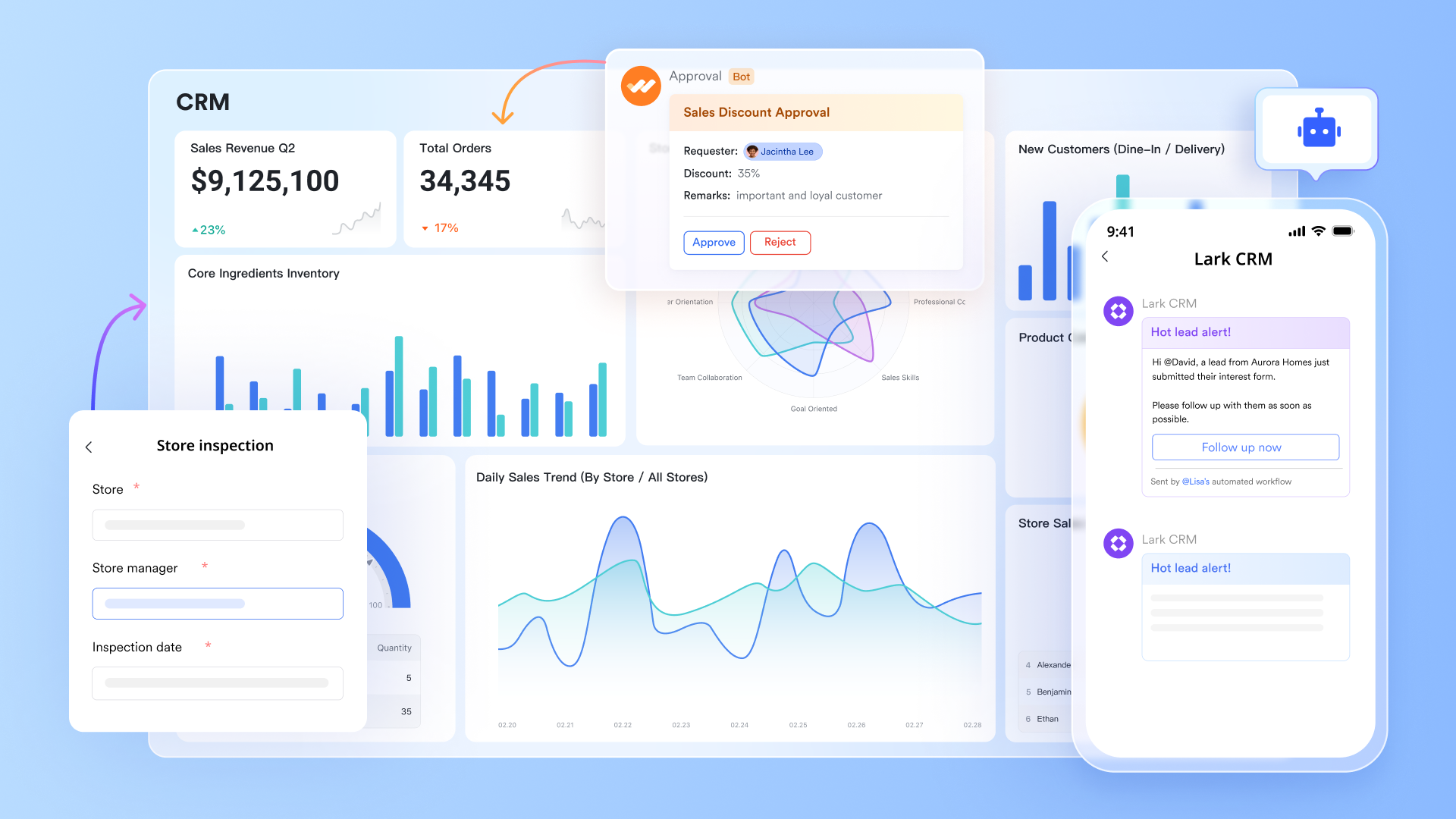
Customer information documentation
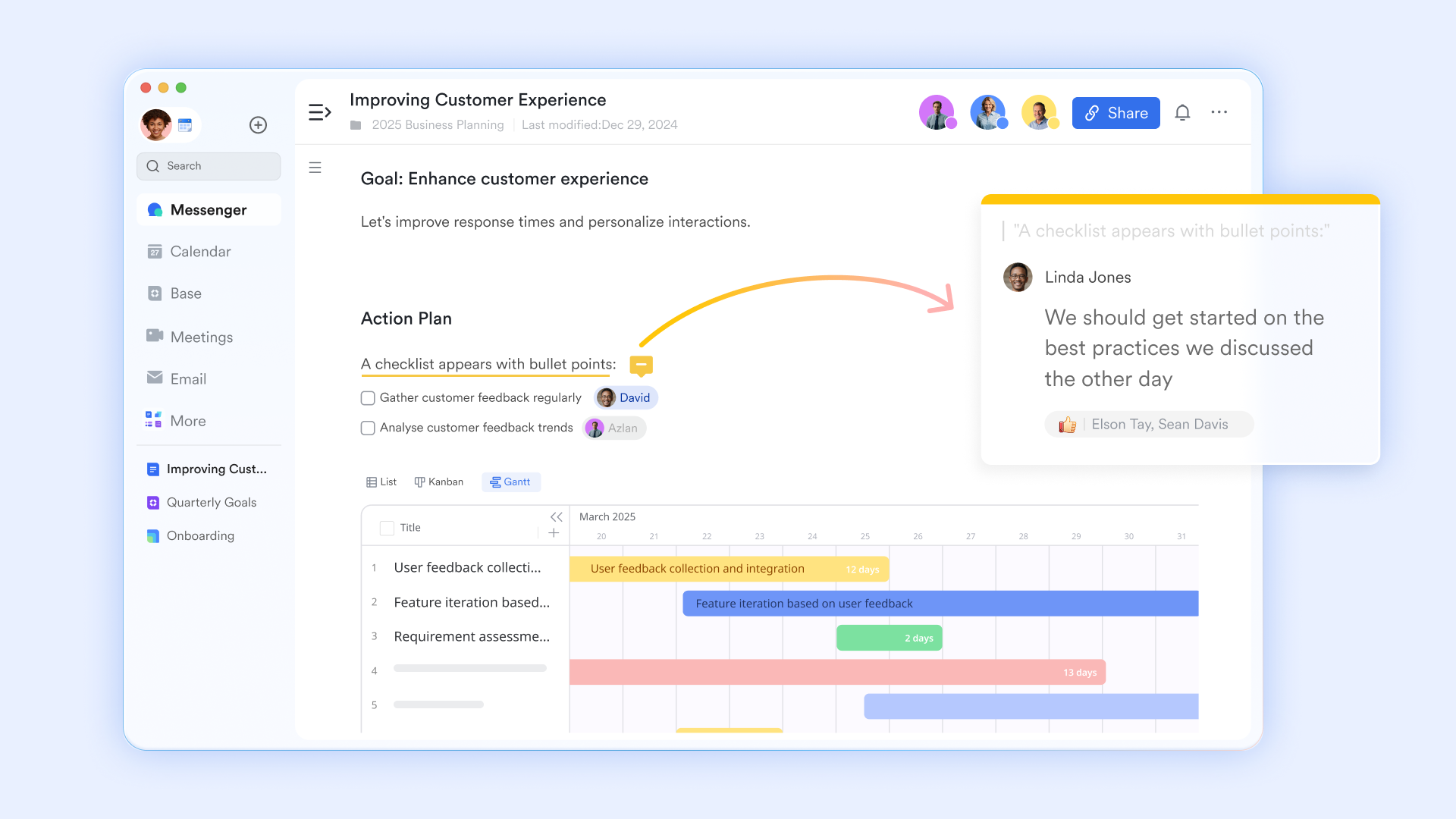
acts as a secure, shared repository for all sales-related collateral, including proposals, contracts, and meeting notes. Because it supports real-time co-authoring and granular permission settings, can collaborate with legal or management on sensitive documents. This centralized approach ensures that the most recent version is always accessible, eliminating versioning conflicts.
Task tracking for sales activities
Lark Tasks provides a structured system to manage follow-ups, client meetings, and complex deal milestones. By assigning owners, setting hard deadlines, and utilizing subtasks, sales reps maintain rigorous accountability. Because tasks link directly to Base records and Messenger chats, teams can without ever losing critical context. 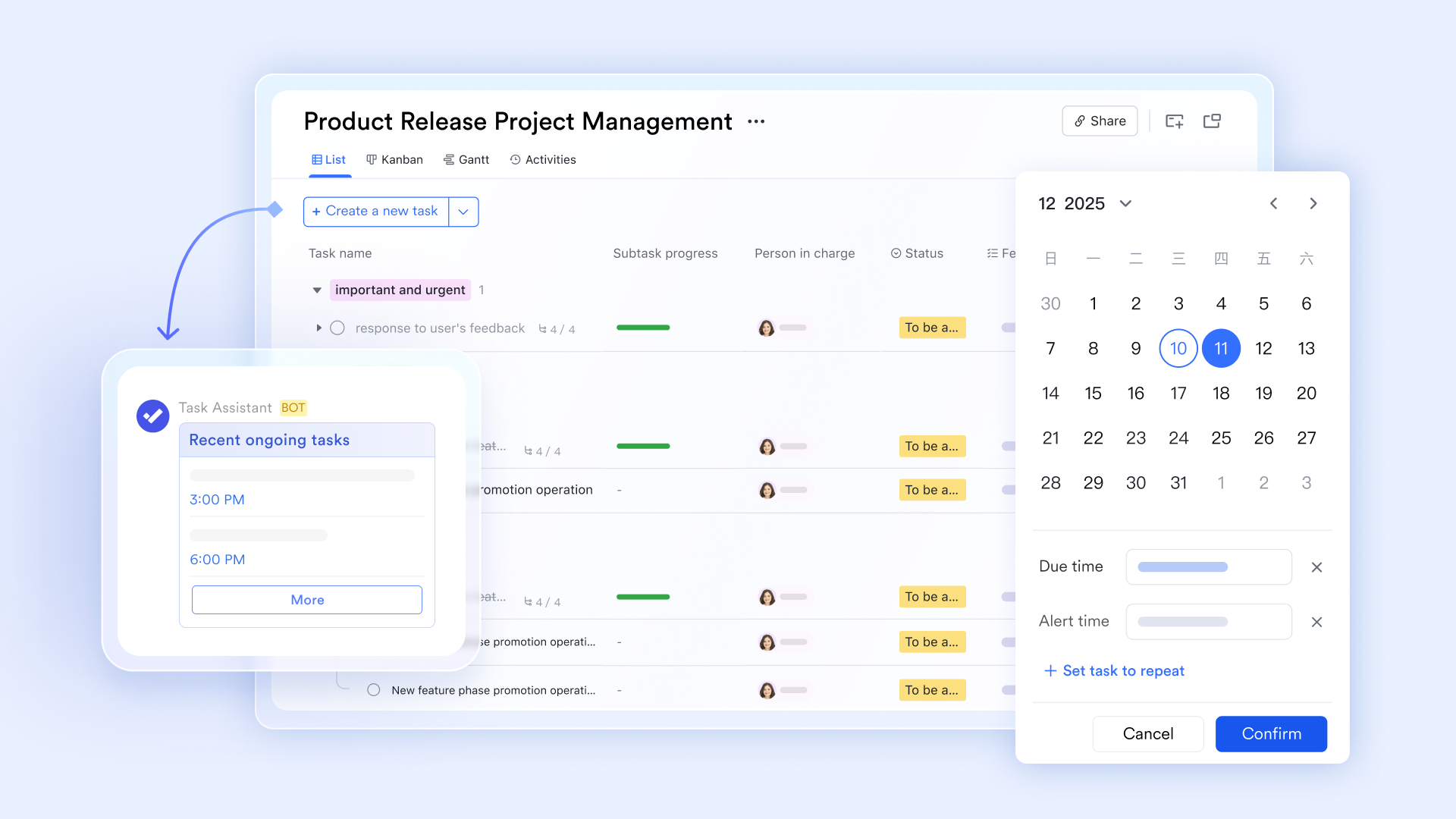
Cross-team communication
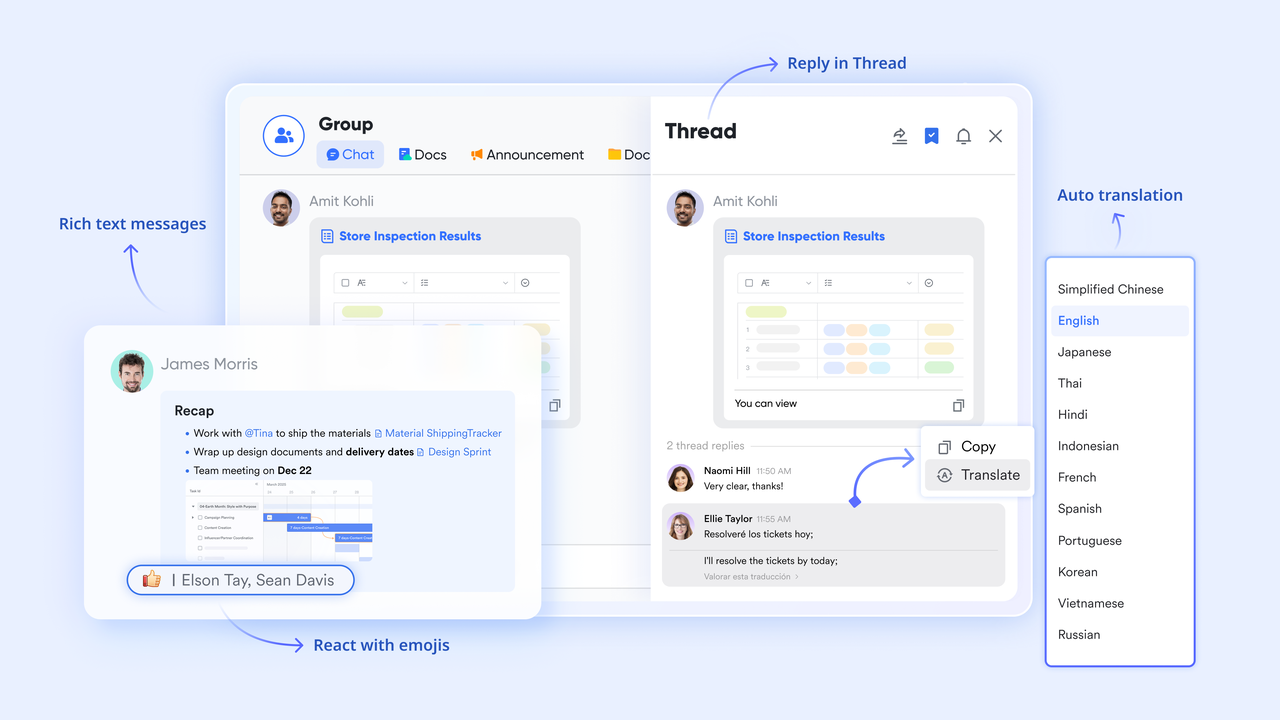
serves as the primary communication hub for . By creating topic-based groups and utilizing threaded replies, teams share key insights and coordinate strategy without cluttering their inboxes. The ability to link Docs, Tasks, and Base records directly into the chat ensures that every conversation remains relevant, actionable, and searchable.
:
- Starter plan: Free forever plan that includes 11 powerful tools for up to 20 users. It also comes with 100GB of storage, 1000 automation runs, AI translations, and more.
- Pro plan: $12/user/month (billed annually) for up to 500 users. It includes everything in Starter plus group calling for up to 500 attendees, 15TB of storage, 50,000 automation runs, and more.
- Enterprise plan: for custom pricing. Supports unlimited users and includes even more automation runs and advanced security, compliance, and management features.
For small teams with simple communication needs

18 months message history
1000 Base automation runs/month
2000 rows per table in Base
Most POPULAR
For companies with comprehensive collaboration and management needs
Unlimited message history
500-participant video meetings
50k Base automation runs/month
20k rows per table in Base
For large companies with advanced security and organizational management needs
Get a personalized demo and pricing
Unlimited message history
500-participant video meetings
15 TB storage + 30 GB storage/user
500k Base automation runs/month
50k Base automation runs/month
Most POPULAR
For companies with comprehensive collaboration and management needs
Unlimited message history
500-participant video meetings
50k Base automation runs/month
20k rows per table in Base
NetSuite CRM vs Lark: Comparing CRM and collaboration workflows
Organizations evaluating NetSuite CRM often compare it with platforms that support collaborative sales workflows. While NetSuite focuses on enterprise CRM connected to ERP systems, Lark emphasizes unified collaboration, workflow automation, and . The table below highlights key differences between the two approaches.
In a nutshell, NetSuite is designed for organizations deeply invested in ERP-driven operations, while Lark provides a flexible collaboration environment for sales workflows, documentation, communication, and task execution.
Conclusion
NetSuite customer relationship management provides a powerful CRM platform for organizations operating within the NetSuite ERP ecosystem. By connecting , marketing campaigns, and customer service with financial systems, the platform delivers comprehensive visibility into customer relationships and revenue performance.
Businesses evaluating CRM solutions often compare NetSuite CRM vs Salesforce and NetSuite CRM vs HubSpot to determine which platform aligns best with their operational needs. While NetSuite excels in ERP integration and enterprise reporting, its implementation complexity and pricing structure may not suit every organization.
Many modern teams also require collaboration-driven tools that connect CRM activities with communication and workflow coordination. Platforms like help teams manage pipelines, coordinate tasks, and share documents within a single workspace. By combining CRM style tracking with collaboration tools, organizations can create more transparent and efficient sales workflows.
Manage sales operations and drive success with Lark today
FAQs
What are the 4 types of CRM?
The four common types of CRM systems are operational CRM, analytical CRM, collaborative CRM, and strategic CRM. Operational CRM focuses on sales and service activities. Analytical analyzes customer data to improve decision-making. Collaborative CRM supports communication across teams. Strategic CRM emphasizes long-term customer relationships. Platforms such as Lark support collaborative CRM workflows by connecting communication and task management with customer records.
Is NetSuite CRM part of NetSuite ERP?
Yes, the NetSuite customer relationship management ERP is integrated within the NetSuite ERP platform. This connection allows businesses to link CRM data with financial operations, order management, and reporting systems. The NetSuite customer relationship management service provides unified visibility across departments. Organizations that rely on ERP-driven workflows often adopt NetSuite CRM to maintain consistent operational data.
How does NetSuite CRM compare with Salesforce?
When evaluating NetSuite CRM vs Salesforce, the primary difference is platform focus. NetSuite CRM integrates directly with ERP systems, allowing businesses to connect sales data with accounting and inventory management. Salesforce focuses primarily on CRM functionality and offers a large ecosystem of integrations. Companies comparing NetSuite CRM vs Salesforce often evaluate operational integration requirements and implementation complexity.
Does NetSuite include marketing automation tools?
Yes, NetSuite marketing automation tools allow organizations to manage campaigns, track engagement, and analyze lead behavior. NetSuite marketing automation features include , segmentation, and performance tracking. These tools help marketing teams generate leads, measure campaign effectiveness, and maintain CRM records.
What alternatives exist to NetSuite CRM?
Organizations exploring alternatives often compare NetSuite CRM vs HubSpot or other standalone CRM platforms. HubSpot focuses on marketing automation and user-friendly CRM tools, while NetSuite provides ERP integration. Some organizations also use collaboration-driven platforms such as Lark to manage CRM style pipelines alongside communication, documentation, and workflow automation.
Related reading




















