














NetSuite CRM vs Salesforce: Which CRM Fits Your Business Best?

Ryan Tanner
Product Marketing Specialist
Sep 18, 2026
Ryan Tanner
Sep 18, 2026

20 min read


The CRM (Customer Relationship Management) market is crowded with solutions that promise to transform how businesses manage customers, sales, and operations. Yet, the two names consistently dominate enterprise discussions—NetSuite CRM and Salesforce. Both platforms offer advanced capabilities, but they serve distinct organizational priorities. While Salesforce is known for its customer-first, sales-driven flexibility, NetSuite CRM excels in financial integration and operational depth.
This guide compares NetSuite CRM vs Salesforce across every key dimension—usability, automation, analytics, scalability, and pricing—helping you choose the right platform for your business. Finally, we'll explore how Lark provides a simpler, connected alternative that unites data, collaboration, and automation in one workspace.

Overview: NetSuite CRM and Salesforce in brief
Before diving into detailed comparisons, it's important to understand the core identity of each platform. Both NetSuite CRM and Salesforce are leaders in customer relationship management but serve distinct business needs. NetSuite CRM, part of the Oracle ecosystem, focuses on integrating front- and back-office operations—ideal for finance-heavy or product-centric organizations. Salesforce, built as a pure cloud-first CRM, empowers sales and service teams with flexibility, automation, and scalability. The table below outlines their core purposes and strengths at a glance:
Feature comparison: NetSuite CRM vs Salesforce
Choosing between NetSuite CRM and Salesforce often comes down to your business priorities — operational integration or sales-driven flexibility. Both platforms deliver robust CRM functionality, but their strengths differ significantly. Here's a detailed look at how their key features compare across usability, automation, analytics, and more.
Core CRM functions
NetSuite CRM: NetSuite CRM is built as part of Oracle's ERP ecosystem, so its CRM core revolves around managing customer relationships within broader financial and operational systems. It covers lead and opportunity management, sales forecasting, partner relationship tracking, and order management.
The biggest advantage is that customer data, inventory, billing, and sales records exist in one unified environment — making it ideal for product-based or finance-driven businesses that want direct links between CRM and back-office operations. However, its CRM features can feel rigid compared to standalone CRMs, as they are tightly coupled with ERP workflows.
Salesforce: Salesforce, by contrast, was designed as a pure CRM-first platform and later expanded into marketing, service, and analytics. Its CRM functions span everything from lead tracking to omnichannel customer engagement. Teams can manage sales pipelines, marketing campaigns, service cases, and customer analytics under one interface.
It's highly customizable for any sales model—B2B, B2C, or hybrid—and offers dedicated modules like Sales Cloud, Service Cloud, and Marketing Cloud.
Conclusion: Salesforce excels at front-end customer engagement, while NetSuite integrates deeper with backend processes.
Automation & workflows
NetSuite CRM: NetSuite's automation runs within its ERP logic—meaning triggers and workflows often connect sales activities with accounting, invoicing, or fulfillment. For instance, closing a deal can automatically generate an invoice or update inventory records.
While this level of automation benefits businesses with complex financial operations, it's less flexible for marketing or customer engagement automation. Most workflow customization requires scripting through SuiteScript or admin setup, which increases dependency on developers.
Salesforce: Salesforce is known for its Workflow Rules, Process Builder, and Flow Builder—allowing teams to create powerful automations visually without coding. You can automate lead assignments, follow-ups, deal escalations, approvals, and notifications across departments.
For example, when a deal moves to a new stage, Salesforce can automatically trigger an approval request, send an email, or update multiple records.
Conclusion: Salesforce offers greater flexibility for sales and marketing workflows, whereas NetSuite focuses on operational consistency across finance and fulfillment.
Analytics & reporting
NetSuite CRM: NetSuite offers integrated dashboards tied closely to its ERP data, which is great for financial and order-related insights. Teams can access customer transaction histories, revenue forecasts, and profit margins directly from the CRM. However, its analytics lean toward operational and financial reporting rather than predictive customer insights. Creating custom visual dashboards or marketing analytics often requires additional configuration or external BI tools.
Salesforce: Salesforce provides real-time, AI-driven reporting and analytics through Salesforce Reports, Dashboards, and Einstein Analytics (Tableau CRM). Users can visualize pipeline health, conversion rates, forecast accuracy, and sales rep performance at any moment. Predictive AI even recommends next steps or highlights at-risk deals.
Conclusion: Salesforce is more dynamic for data-driven sales teams, while NetSuite remains stronger for organizations needing CRM data aligned with accounting and logistics.
Third-party apps
NetSuite CRM: NetSuite integrates mainly with applications inside the Oracle ecosystem—like NetSuite ERP, SuiteCommerce, and Oracle Analytics. External integration options exist via SuiteCloud or third-party connectors, but often require technical setup. The limited app marketplace can restrict flexibility for teams wanting to connect marketing automation, email platforms, or collaboration tools easily.
Salesforce: Salesforce offers one of the largest integration ecosystems in the world through AppExchange, featuring over 3,000 pre-built apps covering sales, marketing, HR, analytics, and service functions. Teams can extend CRM capabilities instantly by connecting tools like HubSpot, Slack, Zoom, Asana, or Zendesk — often without code.
Conclusion: Salesforce is far more ecosystem-friendly, ideal for organizations that already use diverse SaaS platforms or plan to scale rapidly.
Ease of use
NetSuite CRM: NetSuite's interface prioritizes data depth and ERP alignment rather than simplicity. While powerful, it can be overwhelming for non-technical users. Navigation across modules (CRM, finance, inventory) requires training, and customization often involves developer assistance. It's best suited for teams that already rely on Oracle systems and value having all departments—from sales to accounting—in a single environment.
Salesforce: Salesforce offers a more intuitive, drag-and-drop interface with dashboards, customizable views, and guided onboarding. However, as organizations add modules and integrations, the system can become complex to manage. However, as organizations add modules and integrations, the system can become complex to manage. Smaller teams might find Salesforce initially easy but later resource-intensive as workflows scale.
Conclusion: Salesforce is easier to start, but NetSuite may feel more seamless for businesses already deep in Oracle's ecosystem.
Pricing
NetSuite CRM: NetSuite pricing is quote-based and tied to Oracle's ERP licensing. Businesses typically pay for bundled solutions, not just the CRM module. This makes NetSuite more expensive upfront but comprehensive in the long term—ideal for large enterprises needing full ERP + CRM functionality.
Implementation costs, customization, and admin training often add significantly to the total.
Salesforce: Salesforce uses a transparent, tier-based pricing model starting from Essentials ($25/user/month) up to Enterprise ($165/user/month). Each tier unlocks additional automation, customization, and analytics. While this modular approach gives flexibility, costs can escalate quickly once teams add Marketing Cloud, Service Cloud, or AppExchange apps.
(Pricing may vary by region and licensing model.)
Conclusion: Salesforce remains more accessible for startups and mid-sized businesses, while NetSuite targets enterprise clients with complex financial workflows. For a broader cost comparison, it's helpful to examine the latest Google Workspace pricing structure.
Strengths and limitations of each platform
NetSuite CRM
Strengths:
- Deep ERP and financial workflow connection: One of NetSuite CRM's biggest advantages lies in its native integration with Oracle NetSuite ERP. Unlike standalone CRMs that primarily handle sales and customer data, NetSuite CRM is part of a unified platform that manages accounting, inventory, order fulfillment, procurement, and finance. This means every customer interaction — from lead generation to invoicing — is automatically reflected across your operational systems. For example, when a sales order is confirmed in the CRM, it instantly updates the ERP's billing and inventory modules.
- Ideal for accounting and order-based businesses: NetSuite CRM is purpose-built for product-based and financial process–heavy organizations, such as manufacturers, wholesalers, and service providers that rely on complex order cycles. Because it's connected to NetSuite's ERP backend, businesses can track every stage of a transaction — from quote to cash — within the same system. Sales teams gain immediate visibility into product availability, pricing, and customer credit limits, while finance departments can forecast revenue and manage collections without toggling between multiple tools.
- Unified system for back-office and front-office functions: Traditional CRMs focus on the "front office" — managing customer relationships, leads, and opportunities. NetSuite bridges the gap between the front office (sales, marketing, and customer service) and the back office (finance, operations, and supply chain). Every department works off the same data source, so there's no delay or misalignment between what's promised to customers and what's delivered operationally. For instance, customer service can view billing histories and shipment details directly within the CRM, while finance can access sales forecasts to plan cash flow. This unified data environment ensures consistent information across departments, improves collaboration, and enhances overall customer satisfaction.
Limitations
- Steep learning curve: Because NetSuite CRM is part of a comprehensive ERP ecosystem, its interface and workflow logic are far more complex than typical standalone CRMs. New users — especially those without ERP experience — often find navigation, form layouts, and configuration options overwhelming. Setting up dashboards, creating workflows, or generating reports usually requires training or support from NetSuite-certified administrators. This can slow down user adoption and increase the total cost of ownership during early implementation phases.
- Less flexible for standalone sales or marketing teams: NetSuite CRM's strength in ERP alignment can also be a weakness for teams that operate independently of finance or supply chain functions. Its workflow design and automation logic are primarily geared toward processes that tie back to financial data, such as order management, billing, or fulfillment. As a result, marketing and sales teams looking for lightweight, customizable tools for campaign management, lead nurturing, or multichannel engagement may find NetSuite restrictive.
- Add-on pricing tied to ERP modules: NetSuite CRM is not sold as a fully standalone product. It's bundled within the broader Oracle NetSuite ecosystem, which includes ERP, accounting, inventory, and commerce modules. This pricing model means businesses often pay for features beyond their immediate CRM needs. Expanding functionality — for example, adding advanced analytics, marketing automation, or custom dashboards — may require additional ERP licenses or SuiteApps. For smaller organizations or those seeking only CRM capabilities, this bundled structure can become cost-prohibitive, especially when compared with modular platforms like Salesforce or HubSpot, where teams can purchase only what they need.
Salesforce CRM
Strengths
- Extremely customizable workflows and dashboards: Salesforce's greatest strength is its unmatched flexibility. The platform allows organizations to tailor nearly every aspect of the CRM — from data models and workflow automations to user interfaces and reporting dashboards. Using its low-code tools like Flow Builder and custom object creation, businesses can adapt Salesforce to any process, whether it's complex enterprise lead routing or a specialized approval chain. Dashboards and reports can be designed to surface the exact KPIs each department needs, with real-time data drawn from sales, service, or marketing pipelines. This makes Salesforce highly effective for large, multi-layered teams that need CRM logic aligned precisely with their internal operations.
- Rich third-party ecosystem and partner network: Salesforce has cultivated one of the largest CRM ecosystems in the world through its AppExchange marketplace and global consulting partner network. AppExchange hosts thousands of certified add-ons for everything from email marketing and customer support to project management and data enrichment. This extensive ecosystem enables businesses to extend Salesforce's capabilities without custom development, while still maintaining system compatibility and data integrity. Additionally, the global community of Salesforce administrators, developers, and solution partners means organizations can easily access implementation support, industry-specific templates, and ongoing optimization guidance.
- Strong AI, analytics, and automation: Salesforce continues to push the boundaries of CRM intelligence with Einstein AI, its embedded analytics and automation suite. Einstein provides predictive lead scoring, opportunity insights, forecast recommendations, and even generative AI–driven email and content assistance. Combined with Salesforce Data Cloud, it helps businesses unify customer data across multiple sources to deliver personalized engagement at scale. Automation tools such as Salesforce Flow and Process Builder, further streamline manual work — from follow-ups and approvals to data updates — freeing sales and service reps to focus on relationship-building rather than repetitive admin tasks.
Limitations
- Cost grows rapidly with scale and add-ons: Salesforce's flexibility and ecosystem come at a premium. While entry-level plans may seem competitive, the total cost of ownership often increases significantly as businesses expand or adopt advanced features. Critical capabilities like advanced analytics, automation, AI, and premium support are typically packaged as add-ons or higher-tier editions. Additionally, integrating third-party tools through AppExchange can introduce further subscription costs.
- Requires admin expertise or consultants: Salesforce's power and customizability can also make it administratively demanding. Setting up complex workflows, data hierarchies, or security models often requires certified Salesforce administrators or consultants. Even basic configuration changes — such as modifying record types or validation rules — can have cross-system impacts if not managed carefully. Larger organizations often employ full-time Salesforce admins to maintain data quality, handle automation requests, and ensure system governance. While this ensures long-term scalability, it also increases overhead for companies seeking a simpler CRM deployment.
- Overpowered for smaller teams needing simplicity: For small businesses or teams that prioritize simplicity and speed, Salesforce can feel too heavy and complex. Its vast range of features, terminology, and configuration layers can overwhelm users who only need straightforward contact tracking or pipeline management. Even with guided setup tools, achieving a clean, minimal CRM experience in Salesforce often requires customization — the very thing small teams are trying to avoid.
Choosing the right CRM for your business
Salesforce and NetSuite CRM cater to distinct business needs despite both being enterprise-grade platforms. Salesforce is best suited for sales- and service-driven teams that prioritize deep customization, scalability, and a strong ecosystem for growth. It excels in building tailored workflows and data models that adapt to complex customer engagement processes.
NetSuite CRM, on the other hand, fits finance- and operations-heavy organizations that need tight ERP and accounting alignment. Its unified data structure supports quote-to-cash visibility and operational accuracy across departments. Both systems, however, require dedicated setup, user training, and administrative expertise to deliver full value. Before choosing, evaluate your team's technical capacity, workflow sophistication, and integration needs. For growing teams seeking agility, a connected workspace like Lark offers a more balanced approach—bringing data, communication, and workflows together seamlessly without switching between multiple platforms.
Alternative: How Lark offers a simpler, connected CRM workspace
In the NetSuite CRM vs. Salesforce comparison. Both platforms excel at enterprise-scale operations—but they often require heavy setup, administrative effort, and multiple tools for complete visibility. Lark, one of the best Google Workspace alternatives, redesigns this experience by combining CRM database, team communication, and automation in one seamless workspace.
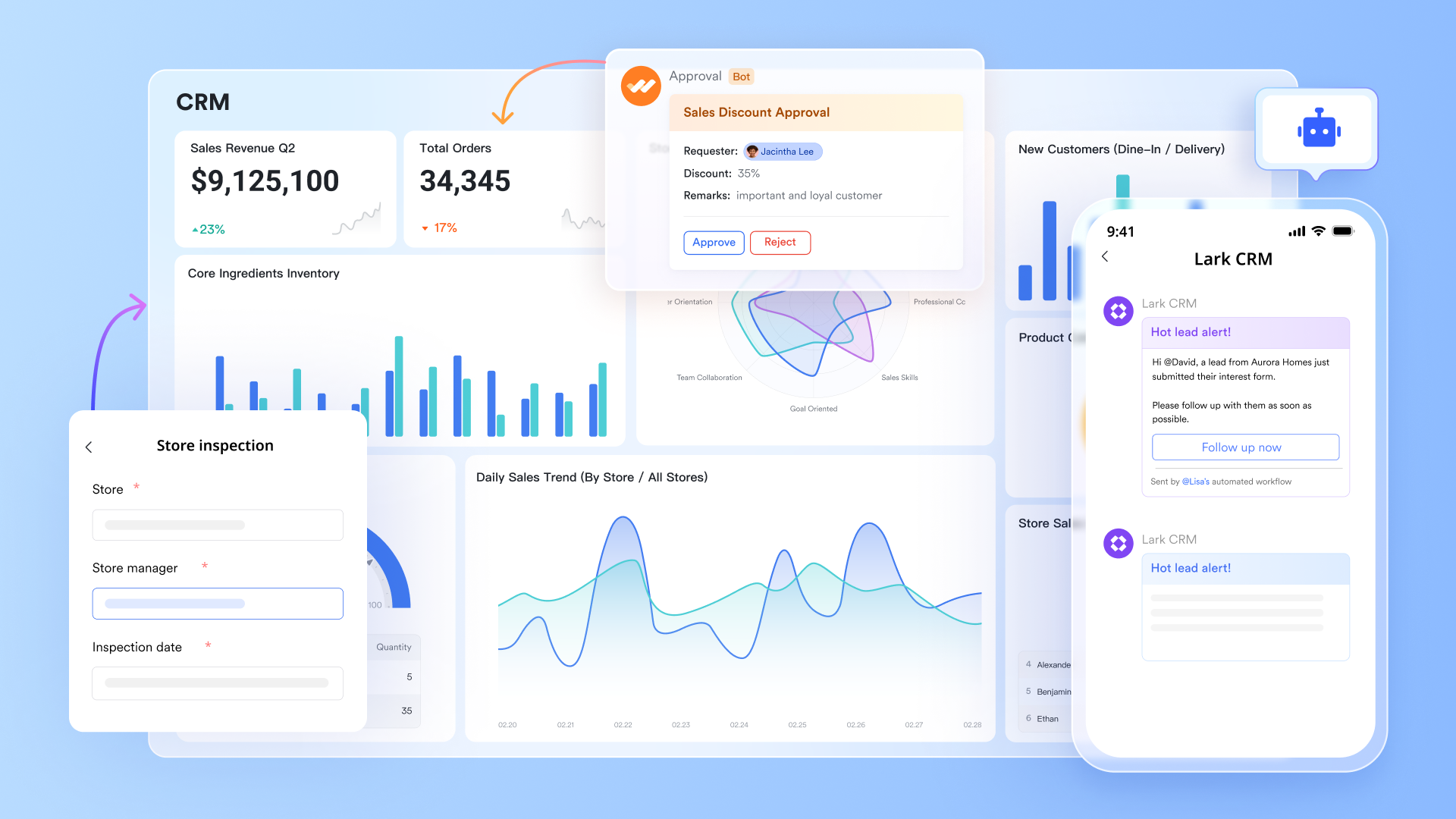
Lark Base: CRM and data tracking made easy
While Salesforce and NetSuite CRMs focus on complex database structures and multi-step configuration, Lark Base simplifies how teams capture and manage CRM data—without losing depth. Base functions as a flexible database, allowing teams to record leads, clients, deals, and campaigns in fully customizable tables. You can add relational fields like lead source, deal stage, region, pipeline owner, or revenue projection.
What makes it different is how automation and collaboration are built in. You can set triggers that automatically update deal stages, assign follow-up tasks, or alert team members in Lark Messenger when a lead progresses or stalls.
Example: A sales manager logs new leads in Base, grouped by "Prospect," "Negotiation," and "Won." When a deal moves to "Negotiation," Base automatically notifies the assigned rep, updates the expected revenue in Sheets, and creates a follow-up Task for a demo call.
Unlike NetSuite's ERP-tied structure or Salesforce's admin-heavy setup, Base gives growing businesses a lightweight yet powerful CRM foundation that's ready to use and easy to evolve—no developers required.
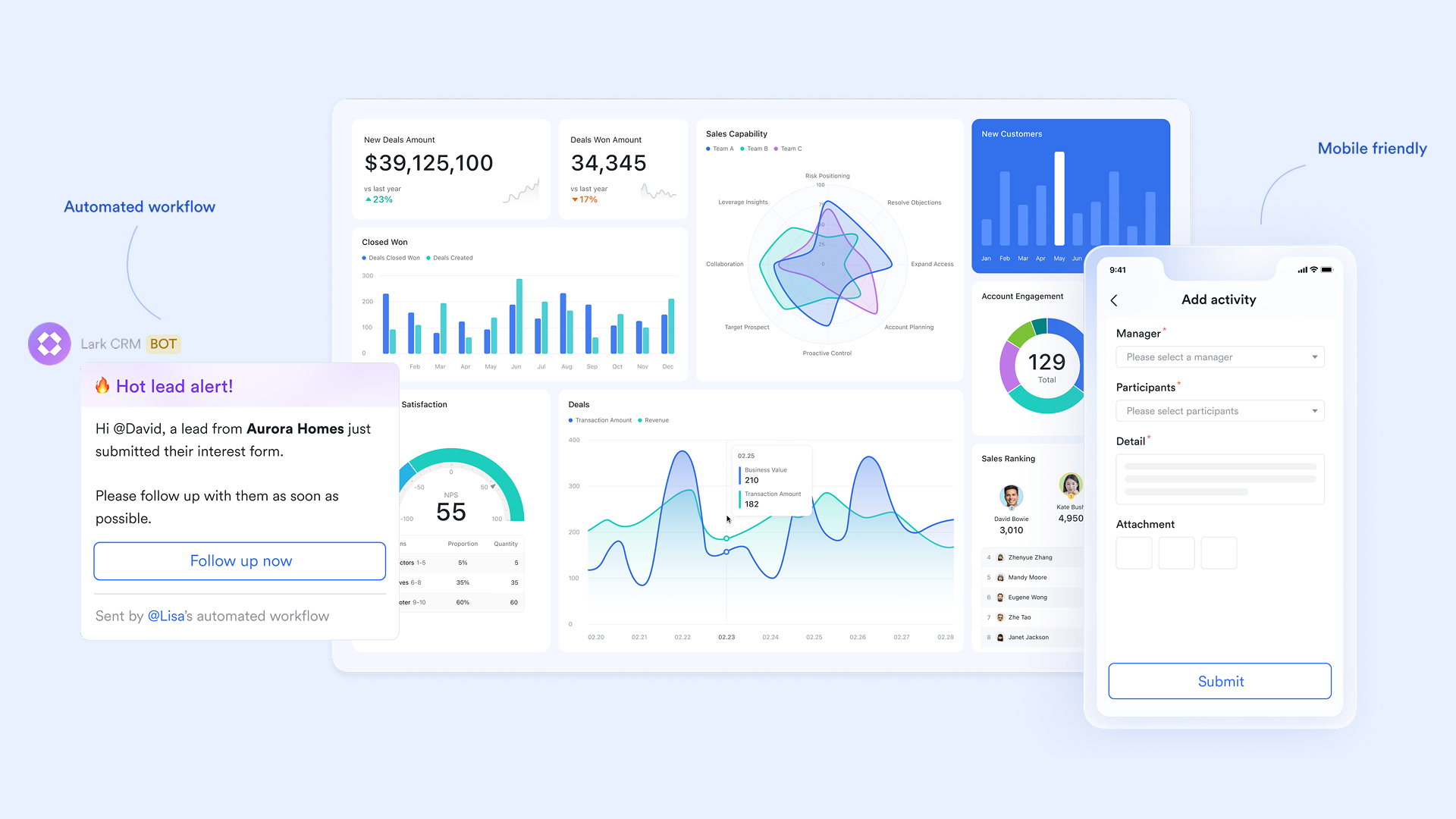
Lark Docs: Centralize proposals, strategies, and playbooks
Documentation is where most CRMs fall short. While NetSuite and Salesforce store data efficiently, teams often end up creating proposals, case studies, or playbooks elsewhere—losing visibility and version control.
Teams can co-create sales proposals, onboarding guides, or campaign strategies in Docs, with full commenting, editing, and version history. You can embed live data from Base (like deal lists or client profiles) and insert visual dashboards from Sheets for real-time context.
Example: A sales rep creates a proposal in Lark Docs for a potential client. It includes a live table from Base showing client history and pricing tiers, plus a chart from Sheets summarizing ROI projections. The document stays dynamic—when data updates in Base, the proposal reflects it automatically.
Unlike Salesforce's static notes or NetSuite's internal document uploads, Lark Docs turns documentation into a living part of your CRM—not a detached file. It keeps sales, marketing, and operations aligned around shared insights.
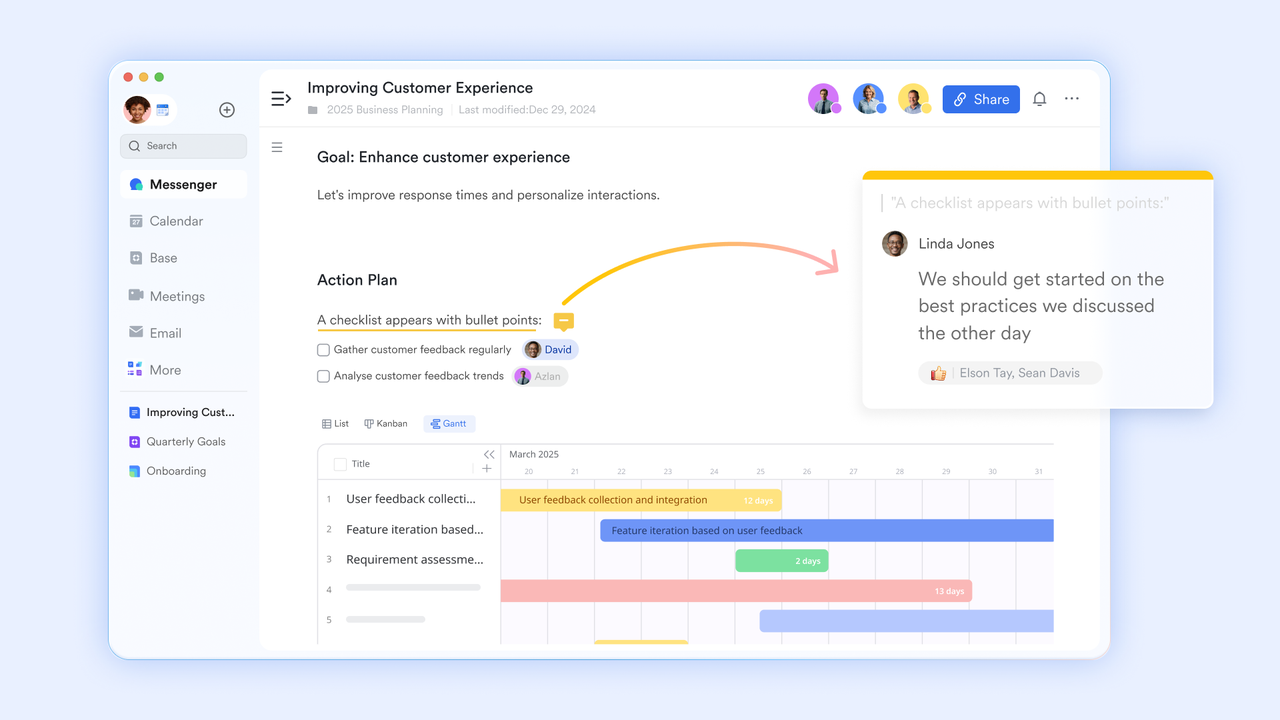
Lark OKR: Maximize team alignment and reach the goal
Lark OKR empowers teams to collaborate effectively. It enables organizations to set distinct OKR cycles for groups, customize stage settings, and facilitate leader confirmation for prioritizing work.
With its OKR dashboard, teams can track progress, set reminders, and maintain accountability. Customizable permission settings allow administrators to control visibility, giving the right access to the right people while keeping sensitive OKRs secure.
Example: When a team sets quarterly goals, Lark OKR lets them create objectives and key results in the dashboard. Team members can track progress, leave comments, and get automated reminders—all in one place.
Lark OKR centralizes objectives, key results, and progress tracking in one platform. Unlike Salesforce add-ons or NetSuite workarounds, it turns goal management into real-time collaboration—keeping teams aligned, accountable, and connected
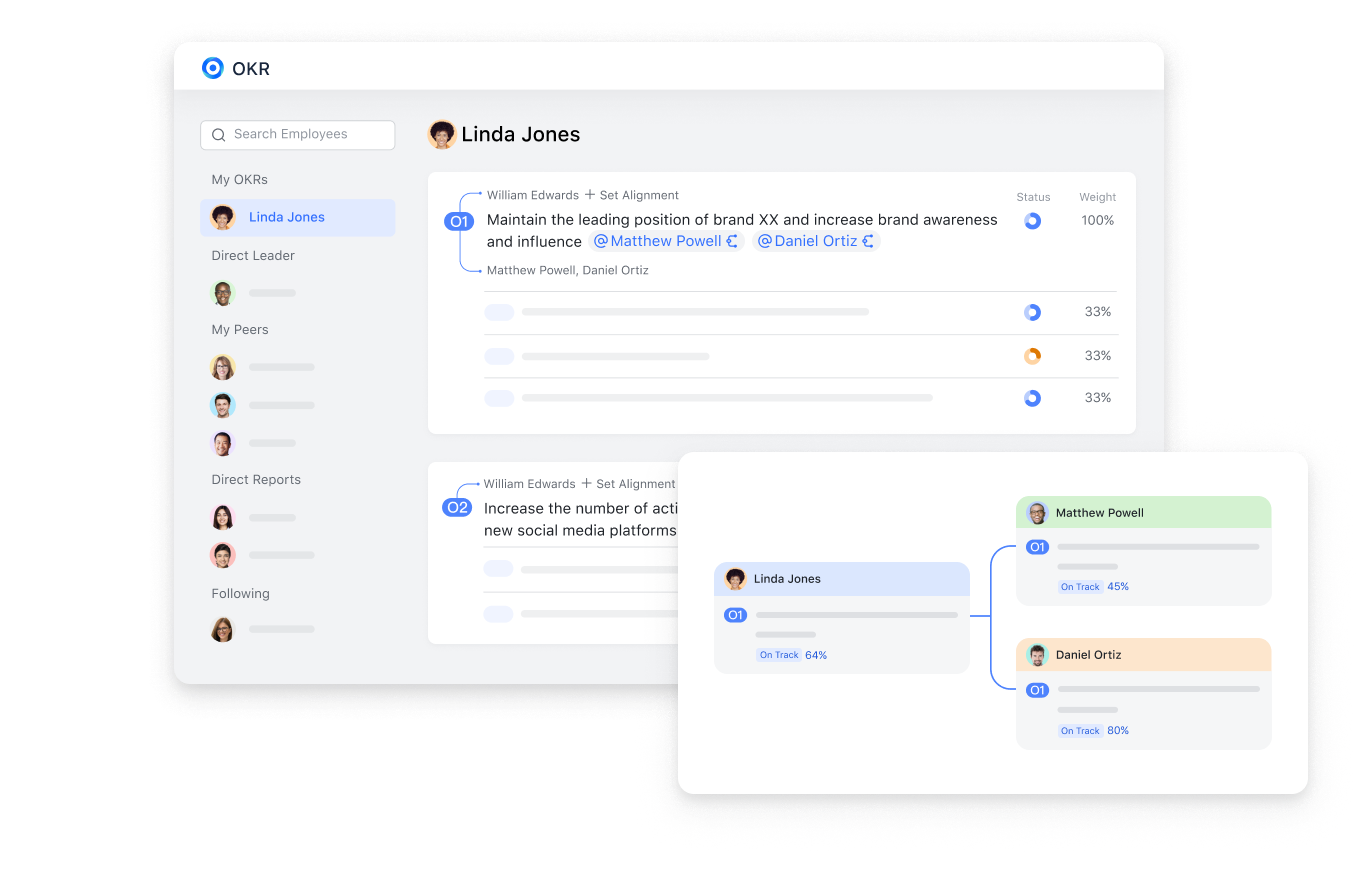
Lark Messenger: Instant, contextual collaboration
In traditional CRMs, communication often happens outside the system—via email or external chat tools—leading to delays and context loss. Lark Messenger changes that by placing real-time communication directly next to your data.
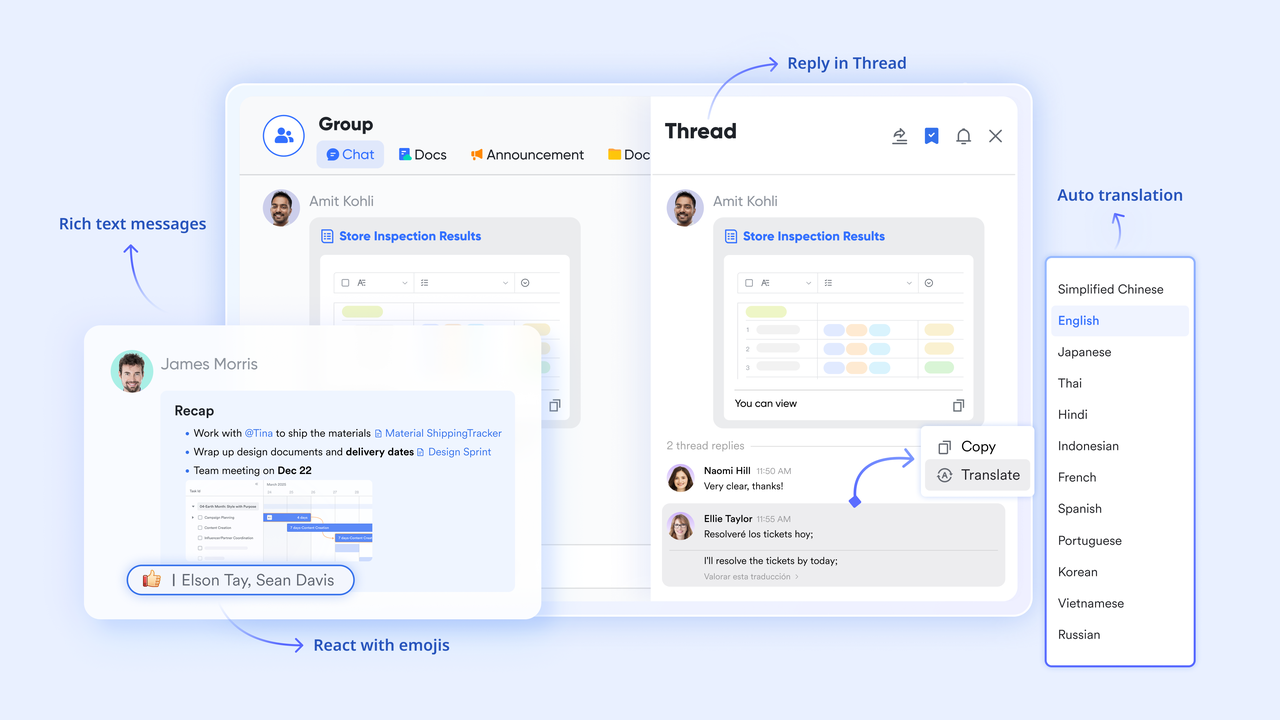
Teams can create group chats for each client, campaign, or pipeline stage. You can share Base links, Sheets dashboards, or Docs directly within a conversation, keeping discussions linked to their original source information.
Example: When a client requests a change to their contract, the account manager shares the updated proposal Doc and deal record from Base in the "Client-X Sales Channel." The finance and legal teams review and comment instantly—no email threads, no attachments, no waiting.
Salesforce's Chatter and NetSuite's internal notes are structured but isolated. Lark Messenger transforms CRM communication into fluid, real-time collaboration—connecting every team around live data and shared goals.
Lark Tasks: Drive accountability and follow-ups
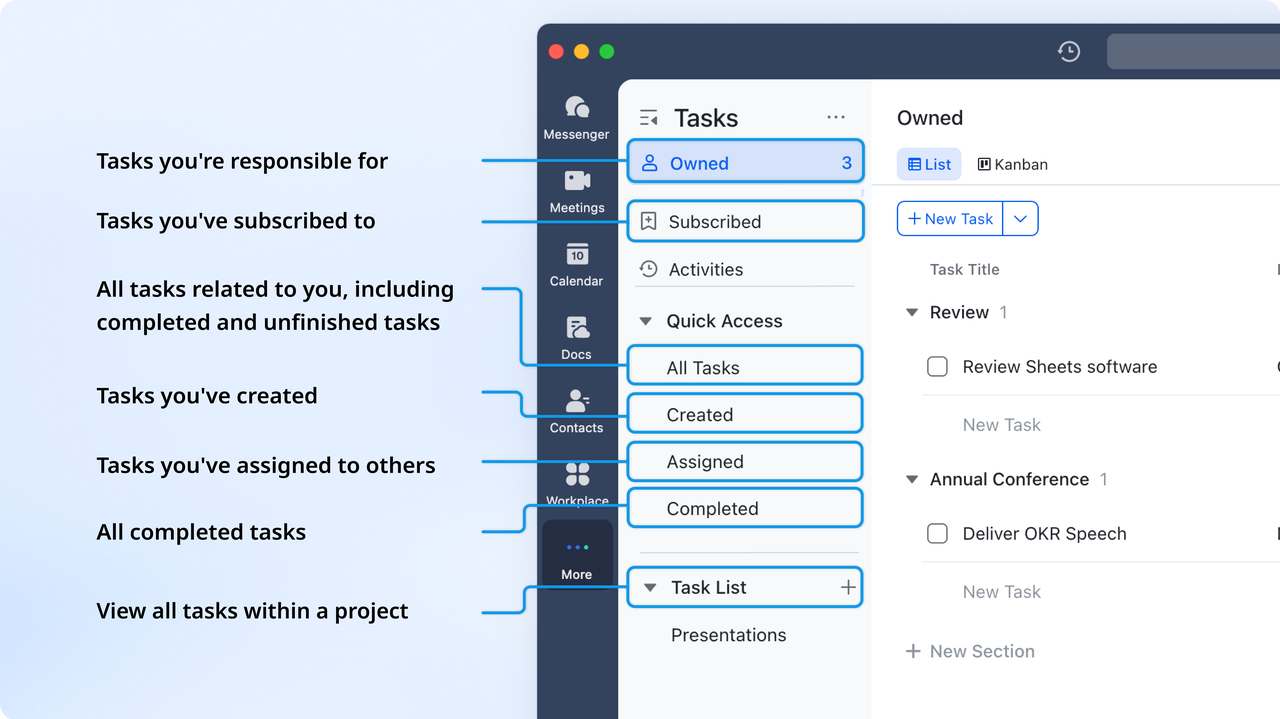
CRM insights only matter when they lead to action. Lark Tasks ensures that every opportunity, escalation, or client request becomes a visible, trackable responsibility.
Tasks can be created manually or automatically from Base workflows—each with owners, due dates, and progress updates. The visual Kanban and timeline views make it easy to manage the sales pipeline or marketing campaigns collaboratively.
Example: When a lead reaches the "Proposal Sent" stage in Base, an automated Task is generated for the assigned sales rep to follow up within 48 hours. If the Task isn't completed, Lark can send reminders or escalate it to a manager automatically.
Salesforce and NetSuite offer task management as modules—often disconnected from everyday collaboration. Lark Tasks weaves accountability into every layer of the CRM process, turning insights from data into clear, team-owned actions without extra software.
- Starter plan: Free forever plan that includes 11 powerful tools for up to 20 users. It also comes with 100GB of storage, 1000 automation runs, AI translations, and more.
- Pro plan: $12/user/month (billed annually) for up to 500 users. It includes everything in Starter plus group calling for up to 500 attendees, 15TB of storage, 50,000 automation runs, and more.
- Enterprise plan: Contact sales for custom pricing. Supports unlimited users and includes even more automation runs and advanced security, compliance, and management features.
Comparison summary: NetSuite vs Salesforce vs Lark
Choosing the right CRM depends on your business priorities—whether it's financial integration, sales enablement, or collaborative efficiency. NetSuite CRM excels for enterprises needing tight ERP and accounting alignment. Salesforce leads in sales automation and scalability for customer-centric teams. Lark, meanwhile, bridges data and communication for modern, agile organizations. Below is a quick comparison of their ideal use cases, key strengths, and limitations to help you decide which best fits your business goals.
Conclusion
Both NetSuite CRM and Salesforce stand out as powerful platforms designed for different business priorities—NetSuite for finance-driven, ERP-aligned operations, and Salesforce for sales-focused, customer-centric growth. However, their complexity, cost, and setup demands can challenge smaller or fast-moving teams. That's where Lark offers a refreshing alternative—a unified workspace that combines CRM-style data management, automation, analytics, and communication in one platform. With Lark Base, Sheets, Docs, Tasks, and Messenger, teams can collaborate seamlessly, manage clients effectively, and act on insights instantly—all without switching tools. It's modern CRM reimagined for agile, connected organizations.
FAQs
Which CRM is better for small businesses?
For small businesses, Salesforce often proves more practical than NetSuite CRM due to its flexible pricing and modular structure. It's easier to deploy, requires less technical setup, and scales gradually with team growth. NetSuite, while powerful, is more suited to enterprises with integrated ERP and financial systems rather than startups or lean sales teams.
Can Lark replace traditional CRMs for startups?
Yes—Lark offers startups a connected, lightweight alternative to traditional CRMs like Salesforce or NetSuite. With tools such as Lark Base, Tasks, and Messenger, teams can manage leads, automate follow-ups, and collaborate seamlessly without coding or complex setup. It's ideal for early-stage companies needing agility, affordability, and unified data workflows.
How do NetSuite and Salesforce pricing models differ?
NetSuite CRM follows a quote-based pricing model tied to Oracle's ERP licenses, making it costlier and suited for enterprises. Salesforce, however, uses a transparent, tier-based approach—from $25/user/month (Essentials) to $165/user/month (Enterprise). This flexibility allows smaller teams to start affordably and expand as needed, though add-ons can increase costs significantly.
What's the best CRM for cross-department collaboration?
While Salesforce and NetSuite focus on data and automation, Lark excels in real-time collaboration. It combines CRM-like data management (Base), analytics (Sheets), and communication (Messenger) in one platform. Teams across sales, finance, and operations can work on shared data, documents, and tasks simultaneously—reducing silos and improving decision-making across departments.
Related reading
Table of contents
Start using Lark today

Manage all your work in one place
Boost team efficiency by 10x
Save up to 70% on software costs
Table of contents
Start using Lark today
Manage all your work in one place
Boost team efficiency by 10x
Save up to 70% on software costs
Keep reading



Lark recognized in 2023 Gartner® Collaborative Content Workspaces and Meeting Solutions reports
Lark, the global superapp for productivity, is delighted to announce it receives recognition in the Gartner's 2023 Innovation Insight for Collaborative Content Workspaces and Market Guide for Meeting Solutions.





2026 Lark Technologies Pte. Ltd.
Headquartered in Singapore with offices worldwide.






Explore: