If you manage an engineering team, you already know the frustration of watching a simple feature rollout turn into a logistical nightmare. A developer updates a ticket in one app, QA misses the notification in another, and product marketing is left relying on an outdated spreadsheet to plan the launch.
Finding the right project management software for software development isn't just about tracking sprints; it is about keeping your entire organization aligned without slowing down your engineers. In this guide, I will break down the top tools available this year, exploring how to eliminate tool fatigue and build a workflow that actually supports your development cycle. And here, I listed the three best project management software for software development for you to have a quick view:
🏅 Lark: An all-in-one productivity powerhouse for teams
🥈 Smartsheet: Highly customizable spreadsheet-style project management
🥉 Wrike: Versatile project management for enterprise scaling
What is project management software for software development?
for software development is a specialized operational hub designed to handle the complex reality of shipping code. Unlike generic task trackers that treat work as a simple checklist, these platforms manage the entire product lifecycle—from drafting product requirements documents (PRDs) and planning sprints to triaging bugs and executing code reviews.
For a marketing team, checking a "done" box might be enough. But for an engineering team, a completed task often requires pull request approvals, QA staging gates, and automated deployment checks.
Whether your team uses strict Agile sprints or a continuous , this software acts as the connective tissue between your code repositories and your broader business operations. It ensures that product managers, designers, and customer success teams stay aligned on release schedules without dragging developers into endless status meetings.
Key features to look for in agile project management for software development
Choosing the right platform means looking past basic Kanban boards and focusing on features that genuinely accelerate product delivery. When evaluating agile project management for software development, keep these core capabilities in mind:
- Unified context and collaboration: The best platforms bridge the gap between where work is discussed and where it is tracked. You want a tool that allows developers to reference architecture documents, chat with QA, and update ticket statuses within the same window.
- Native : Manual data entry kills momentum. Look for software that can automatically assign reviewers when a code branch is ready, or trigger an approval workflow the moment a sprint finishes.
- Integrated (Wikis): Software development generates a massive amount of documentation—from API specs to release notes. A built-in wiki ensures that your technical documentation is easily searchable and tied directly to the relevant project tasks.
- Scalability for hybrid work: With teams distributed globally, your tool needs reliable, low-latency performance. Real-time document co-editing and built-in video conferencing are critical for spontaneous pair programming or quick bug triage sessions.
Explore all these features in Lark
Top 10 project management software for software development
Navigating the market requires understanding that no two engineering teams work exactly alike. Based on industry data and hands-on evaluations, here are the top 10 platforms tailored for modern development workflows.
1. Lark: An all-in-one productivity powerhouse for teams
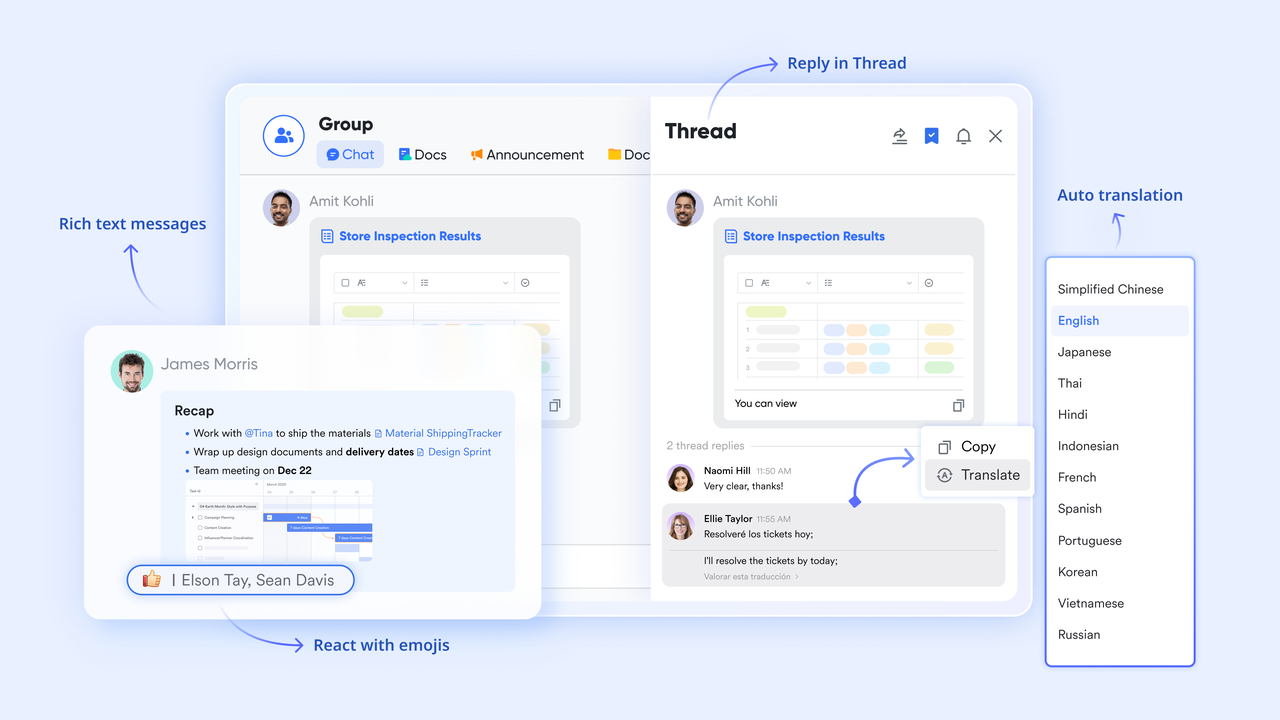
Software development teams frequently suffer from the friction of fragmented tool stacks, relying on separate apps for chat, code documentation, and issue tracking. When a critical bug is discovered, developers lose valuable time jumping between a messaging app to discuss the issue, a wiki to check the product specs, and an isolated agile board to update the ticket status. acts as an all-in-one super app that brings messaging, video calls, document collaboration, , and AI-powered workflows into a single platform. For project management software for software development, Lark helps by utilizing to track sprints and bugs, while built-in approval workflows ensure deployment sign-offs happen right inside the chat window. This unified approach eliminates context switching and keeps your engineering pipeline moving swiftly.
Pros:
Use visual kanban and sprint planning to control development rhythm
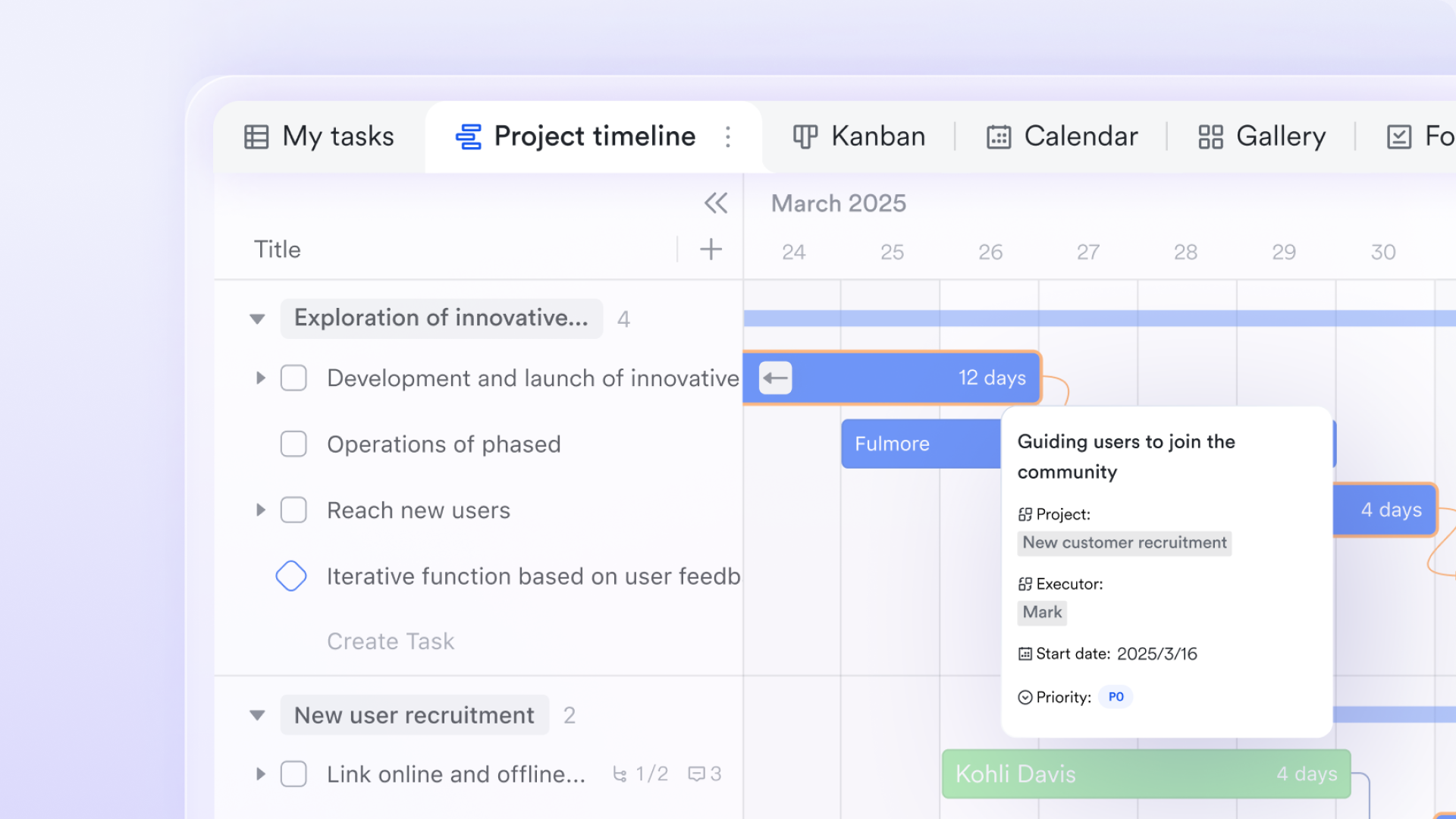
Iteration rhythm is at the heart of agile development. 's Kanban view makes the task flow clear for each sprint. You can group by status—Backlog, In Progress, Code Review, Testing, Done—so the team can see where every task sits at a glance. When it's time to plan a new sprint, you can create a fresh Kanban view and drag tasks from the backlog to get started quickly. For teams that need detailed timeline management, Lark Base's Gantt view shows task timing and the critical path. The same project data can switch seamlessly between views—developers focus on their current work in Kanban while tech leads track the big picture in Gantt.
Get real-time team insights with dashboards
Software development teams need to keep an eye on key metrics—sprint burndown speed, defect trends, and feature throughput. Lark Base dashboard lets you generate these insights from your task data in real time. You can create dashboards with charts showing each sprint's completion rate, defect creation versus fix trends, and task distribution across team members. Dashboards sync live with your data, so when developers update task status, charts refresh automatically. These insights help teams identify improvement opportunities during retrospectives and keep refining their development process. 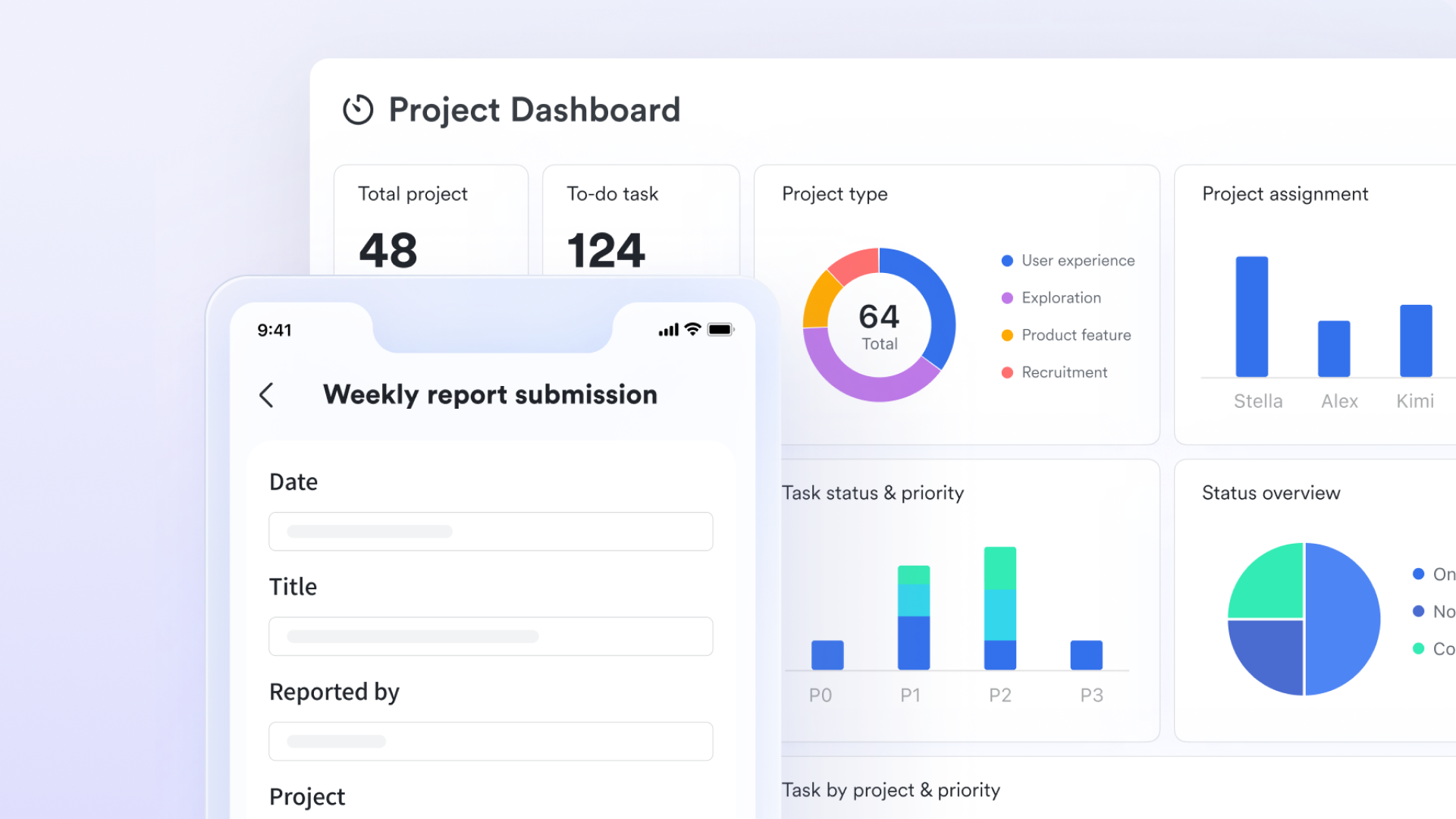
Connect development workflow steps with automation
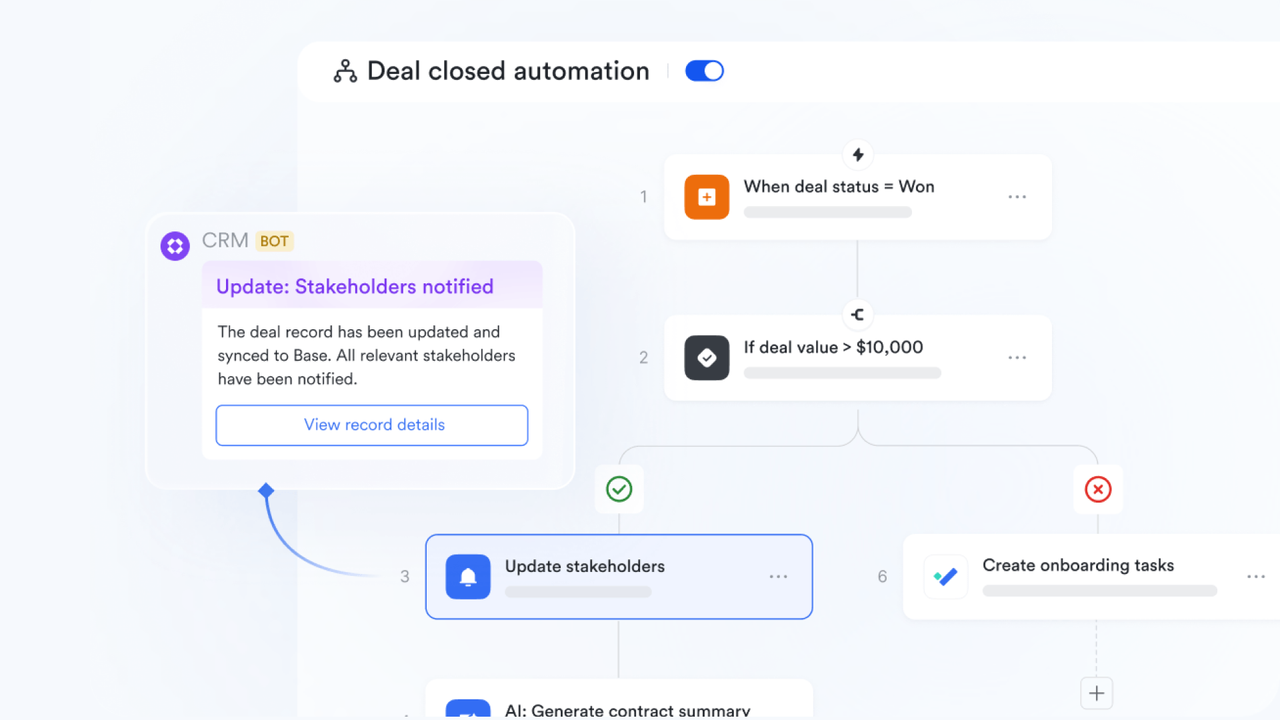
Development workflows are full of repetitive actions—assigning owners after task creation, updating status after code review, notifying QA after a bug fix. Doing these manually takes time, and things get missed. automation handles these steps for your team. You can set rules: when a bug status changes to "Fixed," automatically send a validation reminder to the QA group chat. These automations mean critical steps don't depend on anyone remembering to follow up. Every part of the workflow moves forward on time.
Keep technical Docs connected to development tasks
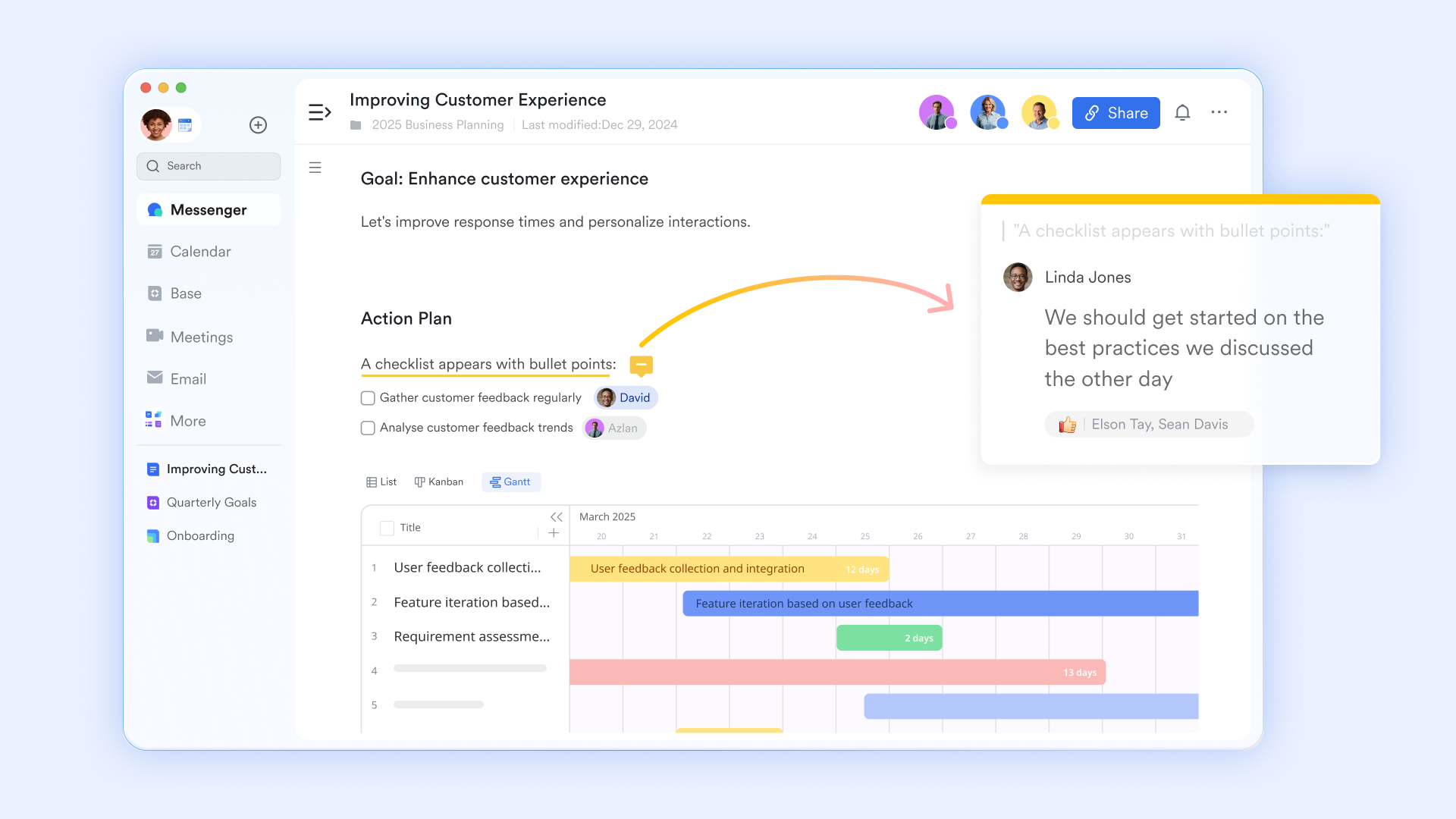
Software development relies on technical documentation—architecture designs, API specs, deployment guides. These docs often sit separately from tasks, so developers end up hunting for them when they need to get work done. can be embedded directly into each task record in Lark Base. When a developer picks up a requirement, the related technical design docs and API documentation are right there in the task detail page. Comments and discussions in the docs stay linked to the task too, so all decision context lives in the same space.
Bring code discussions together with task management
Development conversations—code review comments, technical design discussions, root cause analysis—often happen in code hosting platforms or chat tools, disconnected from task management. Lark Messenger keeps these discussions connected to your tasks. You can create a dedicated group chat for each requirement or bug in , keeping all related conversations in one place. When an issue comes up during code review, you can turn a chat message into a task and link it to the bug record right away. Lark Messenger also supports message threads, so technical discussions can stay focused on specific topics without getting lost in the group chat stream.
Cons:
- Advanced customization and features may require initial learning, though guidance is available through the Lark Help Center.
The verdict: Lark is the ideal choice for growing SMEs and large enterprises, especially remote or hybrid teams exhausted by context switching. It stands out by successfully bridging the gap between highly technical engineers and business stakeholders in one cost-efficient environment.
- Starter plan: Free forever plan that includes 11 powerful tools for up to 20 users. It also comes with 100GB of storage, 1000 automation runs, AI translations, and more.
- Basic plan: $6/user/month (billed annually) for up to 500 users. It includes everything in Starter plus group calling for up to 500 attendees, 5TB of storage, 1000 automation runs, and more. For more details, please .
- Pro plan: $12/user/month (billed annually) for up to 500 users. It includes everything in Basic plus group calling for up to 500 attendees, 15TB of storage, 50,000 automation runs, and more.
- Enterprise plan: for custom pricing. Supports unlimited users and includes additional automation runs, as well as advanced security, compliance, and management features.
For small teams with simple communication needs

18 months message history
1000 Base automation runs/month
2000 rows per table in Base
Most POPULAR
For companies with comprehensive collaboration and management needs
Unlimited message history
500-participant video meetings
50k Base automation runs/month
20k rows per table in Base
For large companies with advanced security and organizational management needs
Get a personalized demo and pricing
Unlimited message history
500-participant video meetings
15 TB storage + 30 GB storage/user
500k Base automation runs/month
50k Base automation runs/month
Most POPULAR
For companies with comprehensive collaboration and management needs
Unlimited message history
500-participant video meetings
50k Base automation runs/month
20k rows per table in Base
2. Smartsheet: Highly customizable spreadsheet-style project management
Managing complex software deployments often outgrows standard task boards, leaving teams wrestling with rigid software that cannot handle deep data manipulation. When enterprise teams need cross-departmental reporting, traditional agile boards fail to provide the overarching financial and resource views required by executives. Smartsheet resolves this by providing a highly customizable spreadsheet-like interface that scales into a powerful project management tool for software development. Its customizable dashboards give engineering directors real-time visibility into sprint progress while automatically syncing data across grid, Gantt, and card views, translating raw data into actionable deployment strategies.
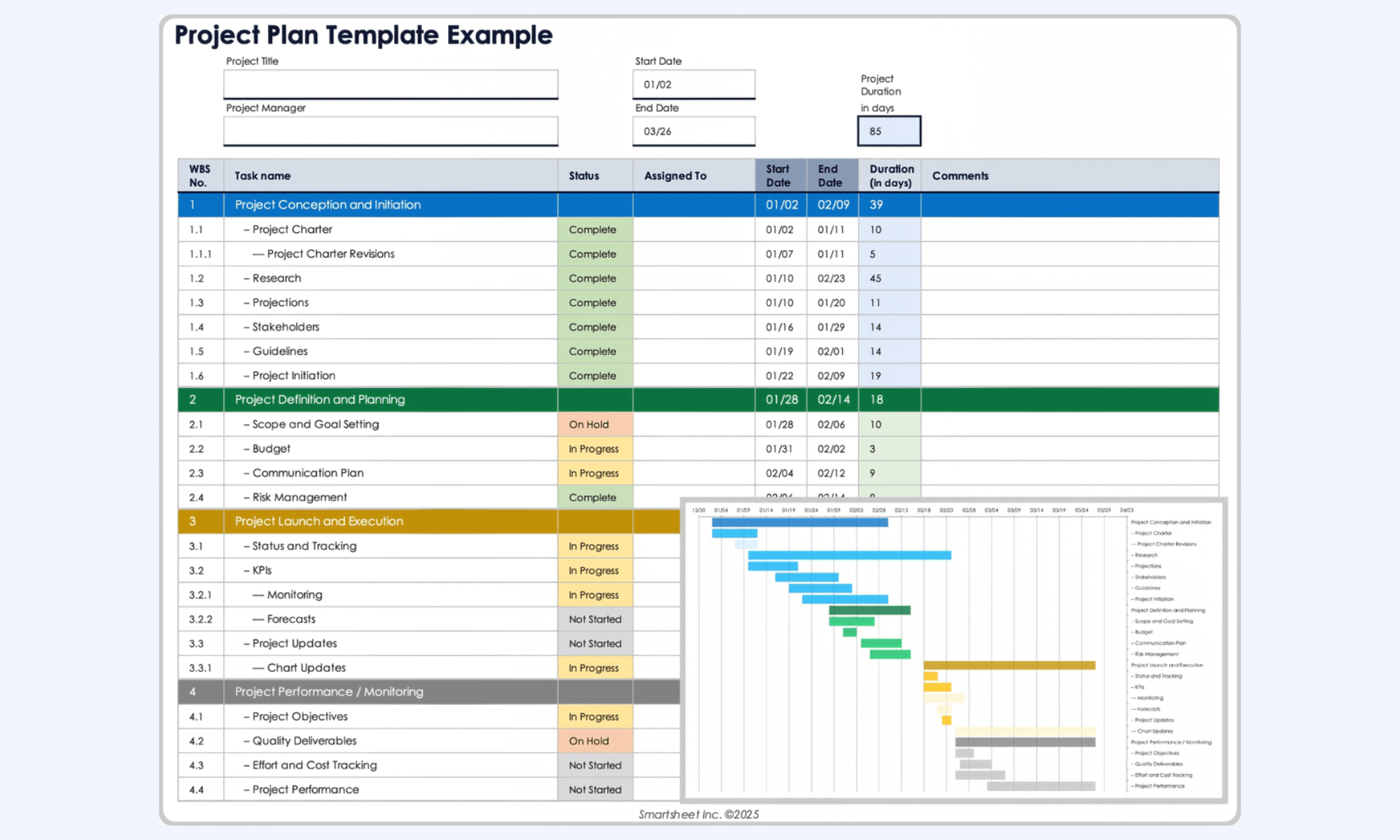
Image source: smartsheet.com
Pros:
- Familiar spreadsheet-style interface reduces the initial barrier to entry for administrative staff.
- Advanced customizable dashboards are excellent for high-level executive reporting.
- Powerful automation workflows streamline task handoffs between QA and developers.
- Strong enterprise-grade security and permission controls protect sensitive product roadmaps.
- Exceptional capability for managing large-scale, concurrent project portfolios.
Cons:
- The interface can feel overly clinical and dense for purely creative or agile-focused teams. However, utilizing the card (Kanban) view helps bridge the gap for daily standups.
- Setting up advanced formulas and cross-sheet references requires a steep learning curve. The robust template library helps new users get started without building entirely from scratch.
The verdict: Smartsheet is best for enterprise teams that require deep data manipulation, resource tracking, and executive-level reporting. It excels in environments where standard agile boards are too simple for complex organizational needs.
Pricing:
- Business: $19/member/month
- Enterprise: Custom pricing
3. Wrike: Versatile project management for enterprise scaling
As software companies grow, coordinating between engineering, product marketing, and legal becomes increasingly chaotic. Tool silos mean marketing is often blind to software release delays, causing mismatched launch campaigns and wasted ad spend. Wrike serves as a highly versatile workspace that handles both agile sprints and cross-functional enterprise workflows. By utilizing its custom request forms and automated cross-tagging, an engineering ticket can exist in both the developer backlog and the marketing launch folder simultaneously. This ensures that when a deployment is delayed, the marketing timeline automatically shifts, keeping all departments perfectly aligned.
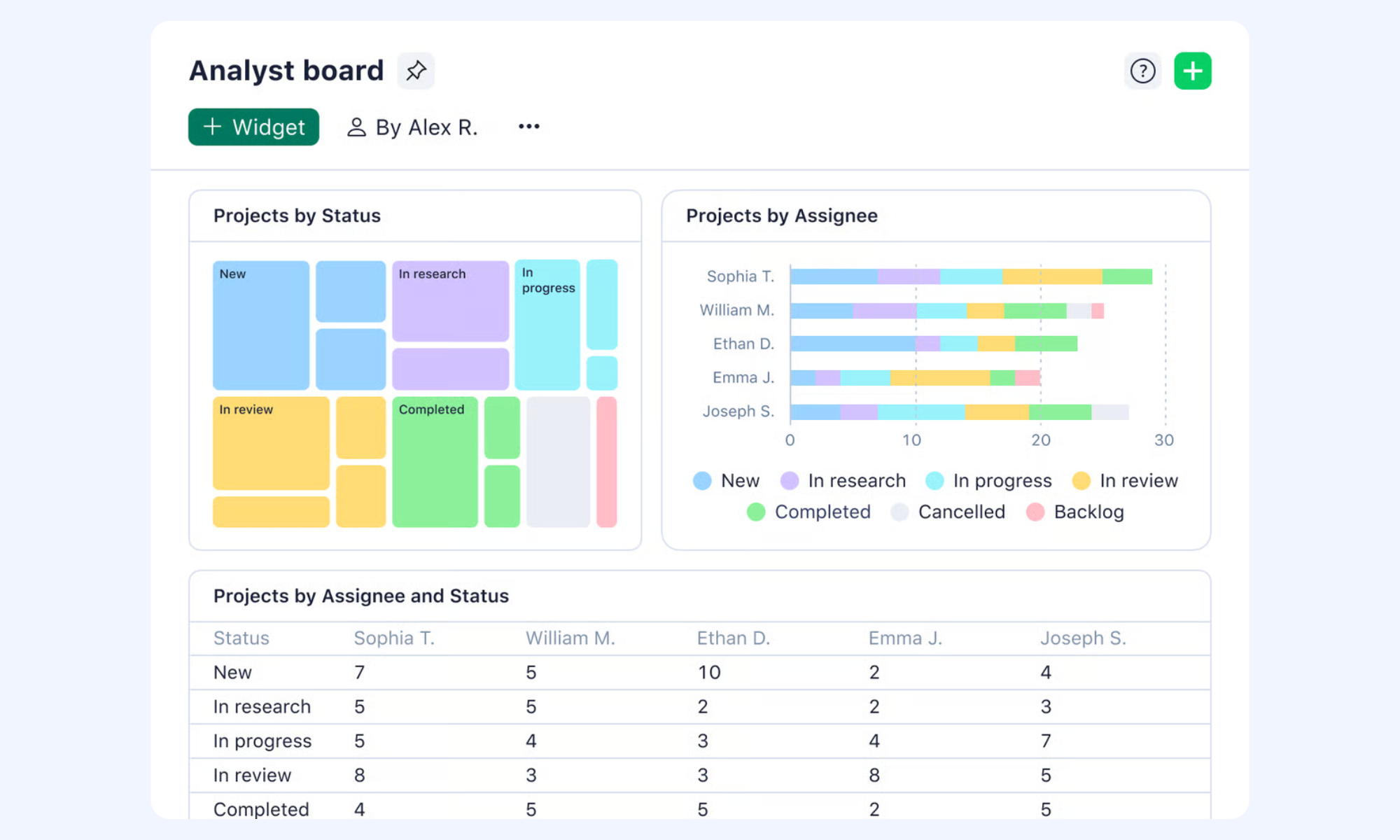
Image source: wrike.com
Pros:
- Exceptional versatility for accommodating multiple project management styles simultaneously.
- Custom request forms streamline the intake of bug reports and internal feature requests.
- Robust resource management features prevent developer burnout during critical sprints.
- Cross-tagging allows one task to live in multiple departmental folders without duplicating data.
- Enterprise-grade reporting provides clear portfolio visibility across the entire company.
Cons:
- The sheer volume of features makes the initial workspace setup complex and time-consuming. Relying on their implementation specialists usually smooths out this process significantly.
- The interface can feel slightly dated compared to modern startup tools. Focusing on its powerful functional capabilities helps teams look past the aesthetic layer.
The verdict: Wrike is ideal for large, cross-functional organizations that need to align software development with enterprise-wide marketing and operations. It stands out for its structural flexibility and robust portfolio reporting capabilities.
Pricing:
- Business: $25/user/month
4. Jira: The industry standard for agile teams
Software teams running strict Scrum methodologies quickly break the limits of basic task checklists. Without granular control over story points, sprint backlogs, and code repositories, technical debt accumulates and release cycles become highly unpredictable. Jira provides the heavy-duty infrastructure required for rigorous agile project management for software development. Its deep issue-tracking capabilities and native integrations with developer environments mean that code commits automatically update ticket statuses. This translates raw coding activity into clear sprint metrics, keeping the engineering pipeline visible and strictly organized.
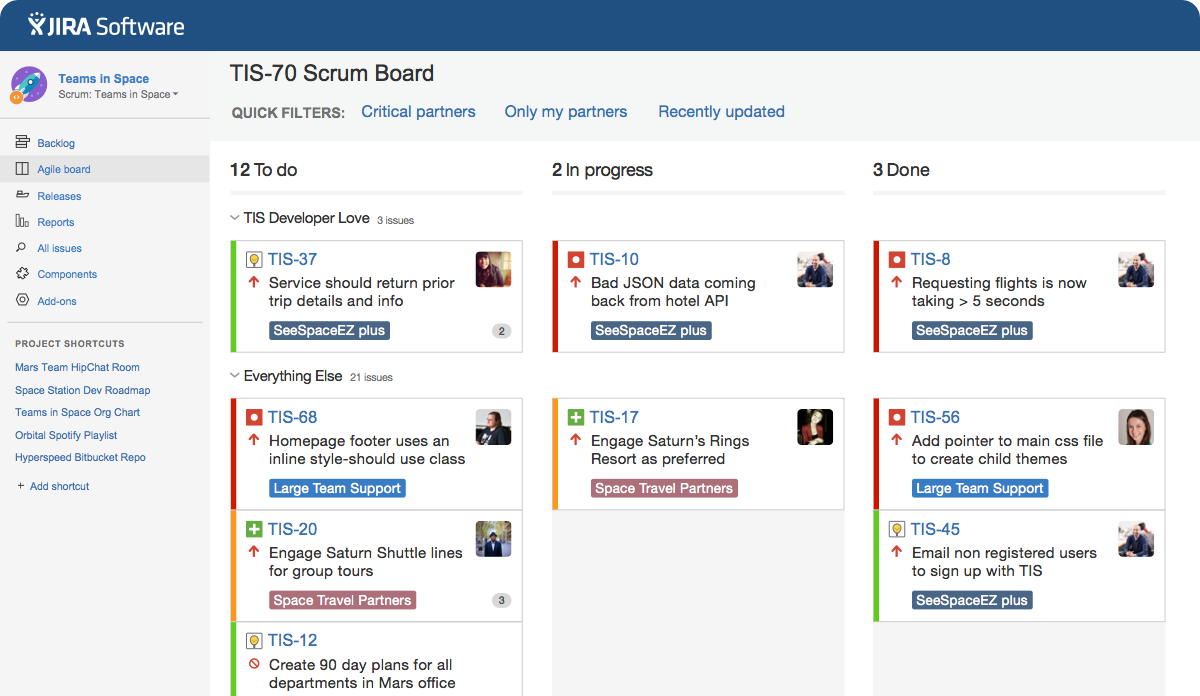
Image source: atlassian.com
Pros:
- Deeply customizable workflows tailored specifically for software engineering processes.
- Exceptional, industry-leading support for strict Scrum and Kanban methodologies.
- Massive ecosystem of developer tool integrations (including GitHub and Bitbucket).
- Advanced agile reporting features, including velocity charts and sprint burndowns.
- Granular permission settings secure complex, multi-tiered team structures.
Cons:
- The platform is notoriously complex and difficult for non-technical teams to navigate. Creating simplified dashboards for external stakeholders mitigates this cross-functional friction.
- It forces developers to switch contexts for chat and documentation. Integrating it closely with your central communication platform helps keep conversations attached to the work.
The verdict: Jira remains the powerhouse choice for pure engineering and product teams prioritizing strict agile compliance. It stands out through its unmatched depth in issue tracking and developer-native ecosystem.
Pricing:
- Free: Free forever for 10 users
- Standard: $7.91/user/month for 300 users
- Premium: $14.54/user/month for 300 users
- Enterprise: Contact sales
5. Monday.com: Highly visual workflows and powerful automation
Highly technical project boards often alienate the non-technical stakeholders who desperately need visibility into the product roadmap. When marketing or customer success teams refuse to use the dev tool, information silos form, and launch dates get miscommunicated. Monday.com bridges this gap by offering a vibrant, visual interface paired with an advanced automation engine. Engineering teams can manage coding sprints using specialized views, while built-in workflow automations instantly notify marketing via chat or email when a feature is marked ready for release. This ensures that everyone stays perfectly aligned without forcing marketers to decipher complex technical backlogs.
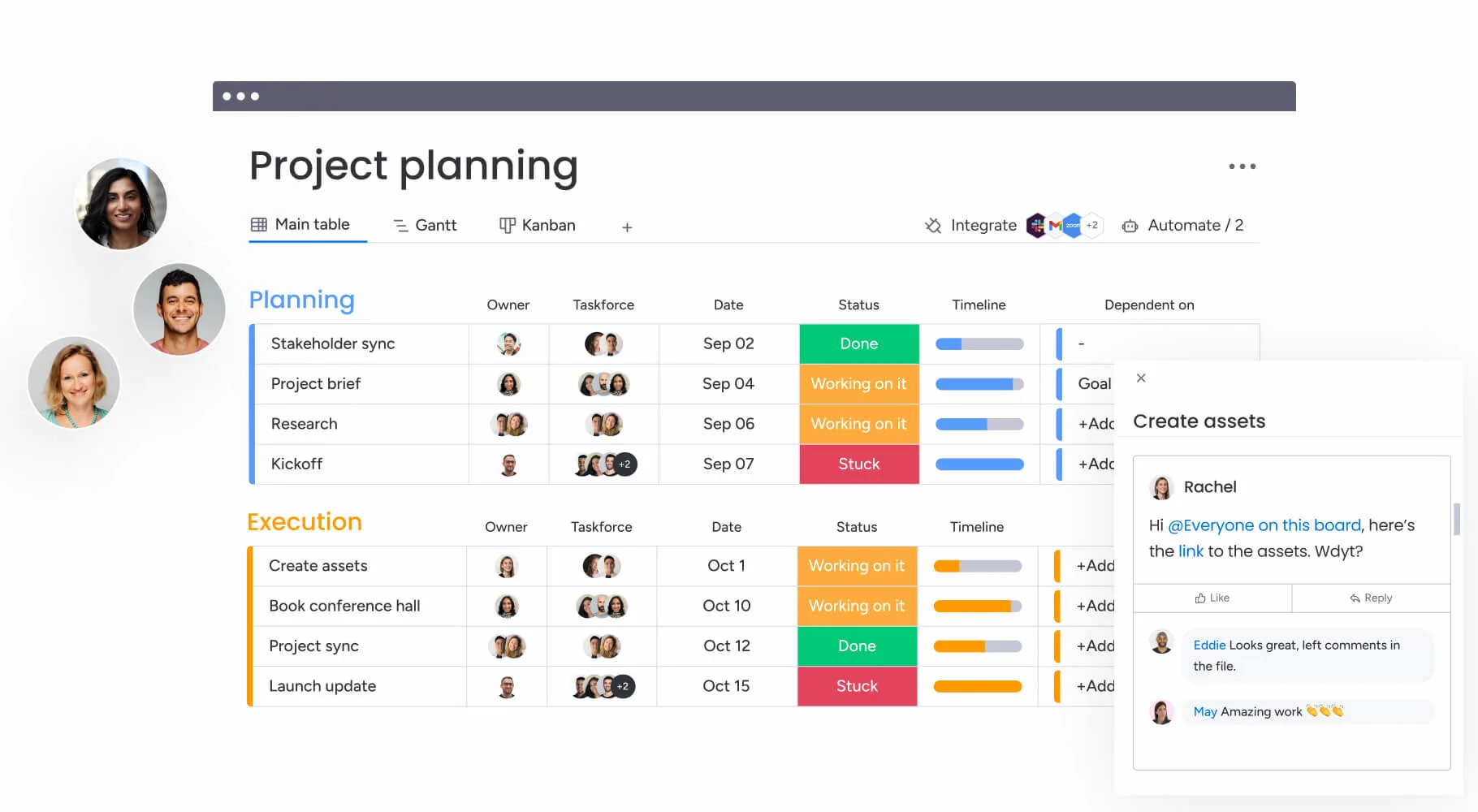
Image source: monday.com
Pros:
- Intuitive, visual interface encourages exceptionally high adoption rates across the entire company.
- Advanced automation engine significantly reduces manual ticket updates and data entry.
- Highly customizable boards adapt easily to both coding sprints and marketing campaigns.
- Excellent pre-built templates accelerate the initial workspace setup process.
- Strong integration capabilities connect smoothly with existing communication tools.
Cons:
- Boards can become cluttered and slow if teams add too many custom columns. Establishing strict governance over board creation keeps the workspace clean and performant.
- Advanced integrations and automations are gated behind higher pricing tiers. Carefully mapping out your expected automation usage beforehand helps avoid surprise operational costs.
The verdict: Monday.com is the best option for companies needing a balance between software development tracking and cross-functional usability. Its visual nature and automation capabilities make it a highly effective all-rounder.
Pricing:
- Free: $0 free forever (up to 2 seats)
- Standard: $12/seat/month
6. ClickUp: Deep task hierarchy for complex projects
Large software deployments often involve intricate dependencies where front-end work cannot begin until backend APIs are finalized and documented. Simple task boards flatten these relationships, making it difficult to see which delayed task will bottleneck the entire release. ClickUp tackles this through its incredibly deep task hierarchy, acting as a robust project management tool for software development. Engineering managers can break down massive epics into folders, lists, tasks, and nested subtasks. By utilizing its native resource management features, you can ensure no developer is over-allocated during a crucial sprint, effectively preventing burnout and missed deadlines.
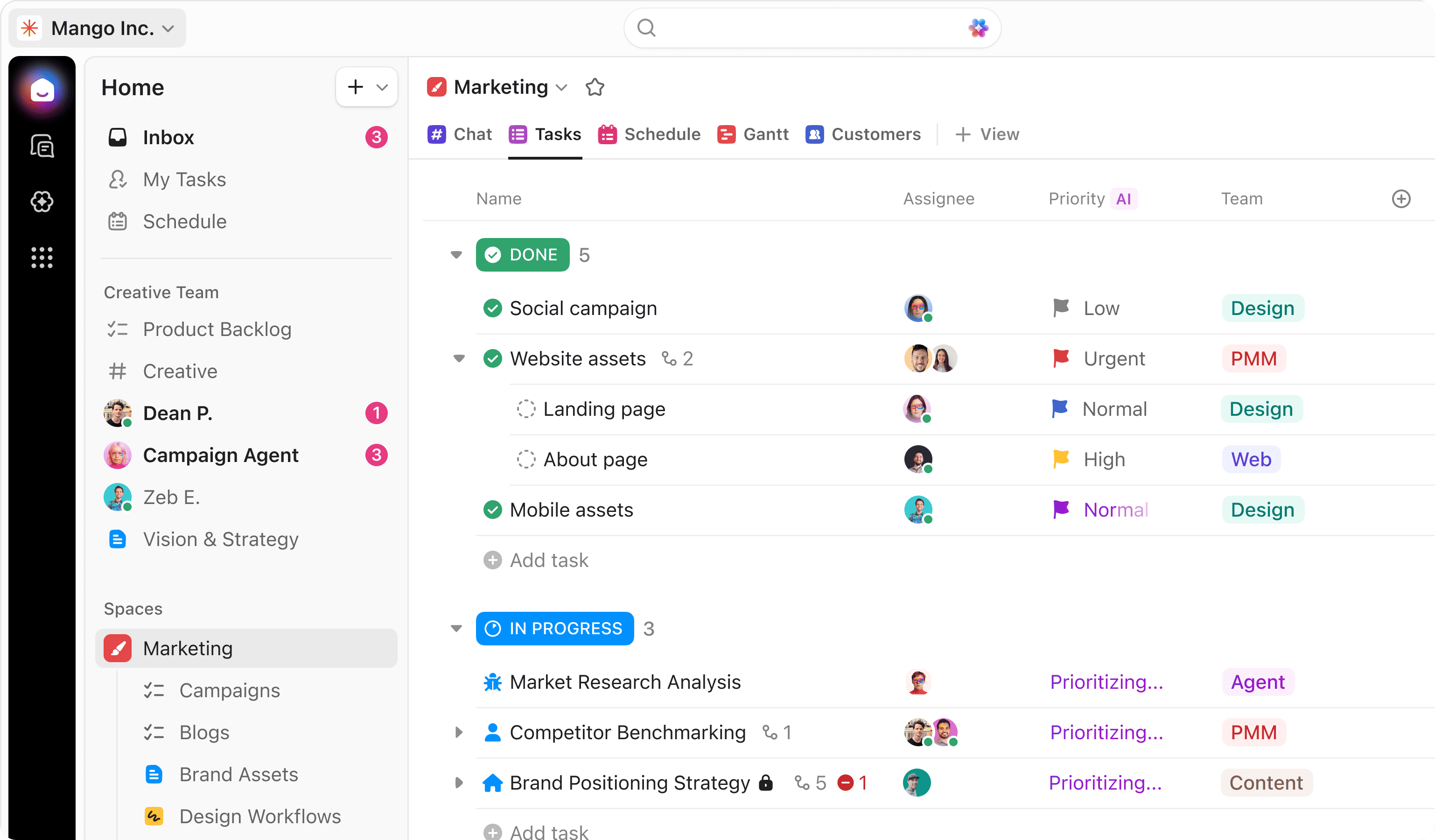
Image source: clickup.com
Pros:
- Exceptional task hierarchy allows for precise breakdown of complex software epics.
- Built-in resource management effectively tracks team bandwidth and billable hours.
- Offers a wide variety of customizable views (List, Board, Gantt, Box) for different roles.
- Native document creation keeps PRDs attached directly to the relevant coding tasks.
- Highly competitive starting price makes it incredibly attractive for budget-conscious startups.
Cons:
- The sheer volume of configuration options can overwhelm new users, causing initial confusion. Starting with their pre-built software development templates helps flatten the learning curve substantially.
- The platform can occasionally experience lag when loading extremely large, complex project boards. Regularly archiving completed tasks ensures optimal browser performance.
The verdict: ClickUp is perfect for detail-oriented engineering managers who need granular control over task dependencies and team workload. It stands out by offering an immense, highly customizable feature set at a very accessible price point.
Pricing:
- Unlimited: $7/user/month
- Business: $12/user/month
- Enterprise: Contact sales
7. Basecamp: Simplified project management and team communication
Many development agencies suffer from "tool bloat," spending more time managing their complex agile software than actually writing code. When every bug fix requires updating five different custom fields and a burndown chart, developers lose their momentum and become frustrated administrators. Basecamp strips away the noise by offering a refreshingly simple approach to project management. Instead of complex agile metrics, it organizes work into individual "Projects," combining a message board, to-do lists, schedule, and document storage in one clean view. This setup ensures that client-facing dev agencies keep all project conversations and files easily accessible without getting bogged down in agile bureaucracy.
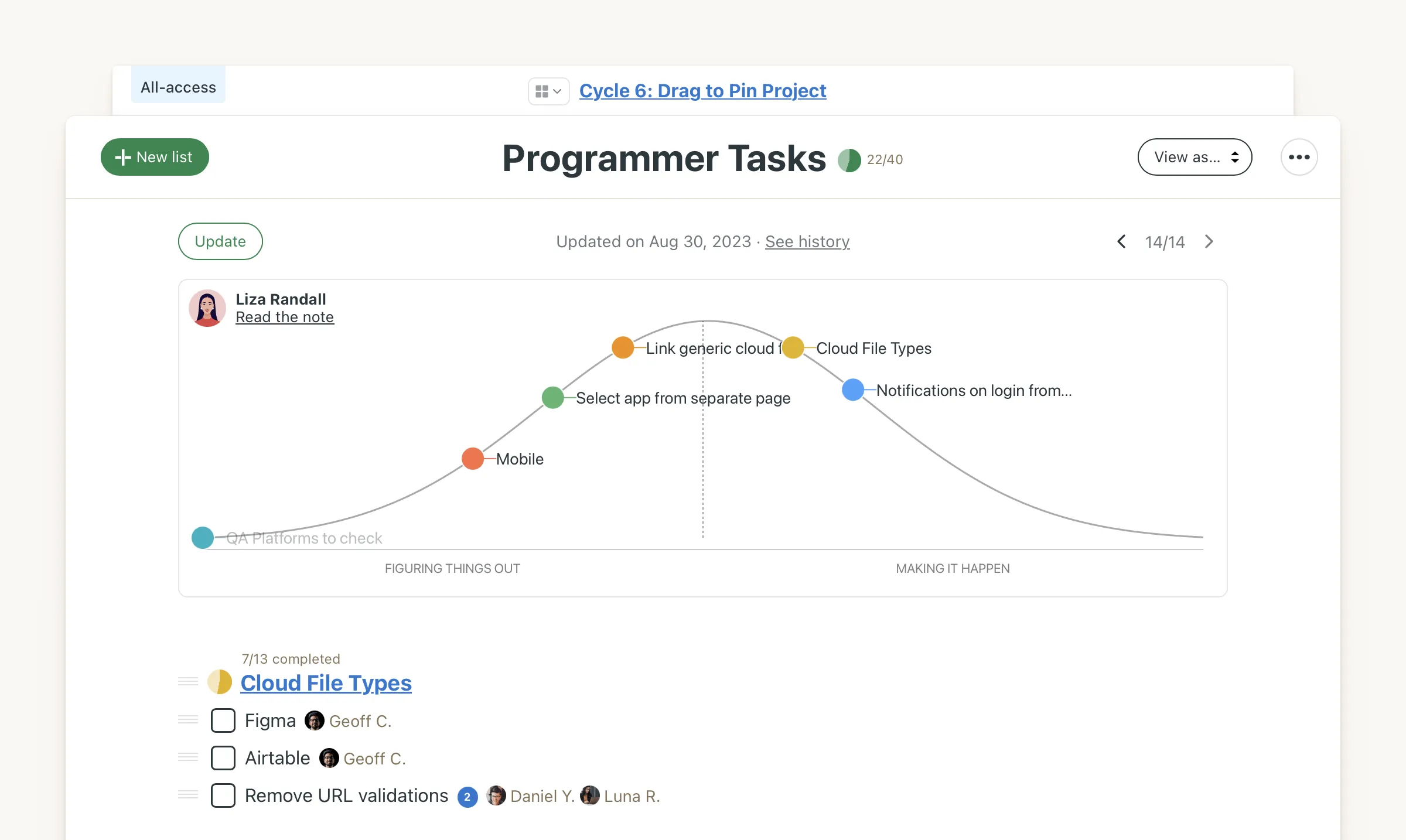
Image source: basecamp.com
Pros:
- Extremely straightforward interface requires virtually no onboarding time for new hires or clients.
- Replaces separate chat and task apps by combining them directly within each project space.
- Predictable flat-rate pricing is highly cost-effective for rapidly growing development agencies.
- Built-in automatic check-ins reduce the need for disruptive daily standup meetings.
- Excellent client access portals make external collaboration safe and transparent.
Cons:
- Lacks the advanced agile features (like sprint planning or velocity tracking) required by strict engineering teams. Using third-party integrations can supplement these gaps if absolutely necessary.
- The task management capabilities are basic, offering simple to-do lists rather than complex dependencies. Breaking large projects down into smaller, distinct Basecamp boards helps maintain necessary organization.
The verdict: Basecamp is ideal for software development agencies and small teams that value simplicity and direct client communication over rigid agile frameworks. Its flat pricing structure makes it highly attractive for scaling businesses.
Pricing:
- Basecamp free: Free forever
- Basecamp Pro Unlimited: $299/month (billed annually)
- Basecamp plus: $15/user/month
8. Asana: User-friendly task tracking and milestone visualization
Transitioning a company from scattered spreadsheets to dedicated project management software often fails due to low employee adoption. If the new tool requires formal training, busy developers and designers will simply revert to their old, uncoordinated habits. Asana combats this with an exceptionally clean, user-friendly interface that focuses on visual timeline tracking. By mapping out software releases on its intuitive Gantt-style timelines, product managers can easily define dependencies and milestones. This translates complex technical roadmaps into highly readable schedules, ensuring that the whole team understands the project trajectory without needing a technical manual.
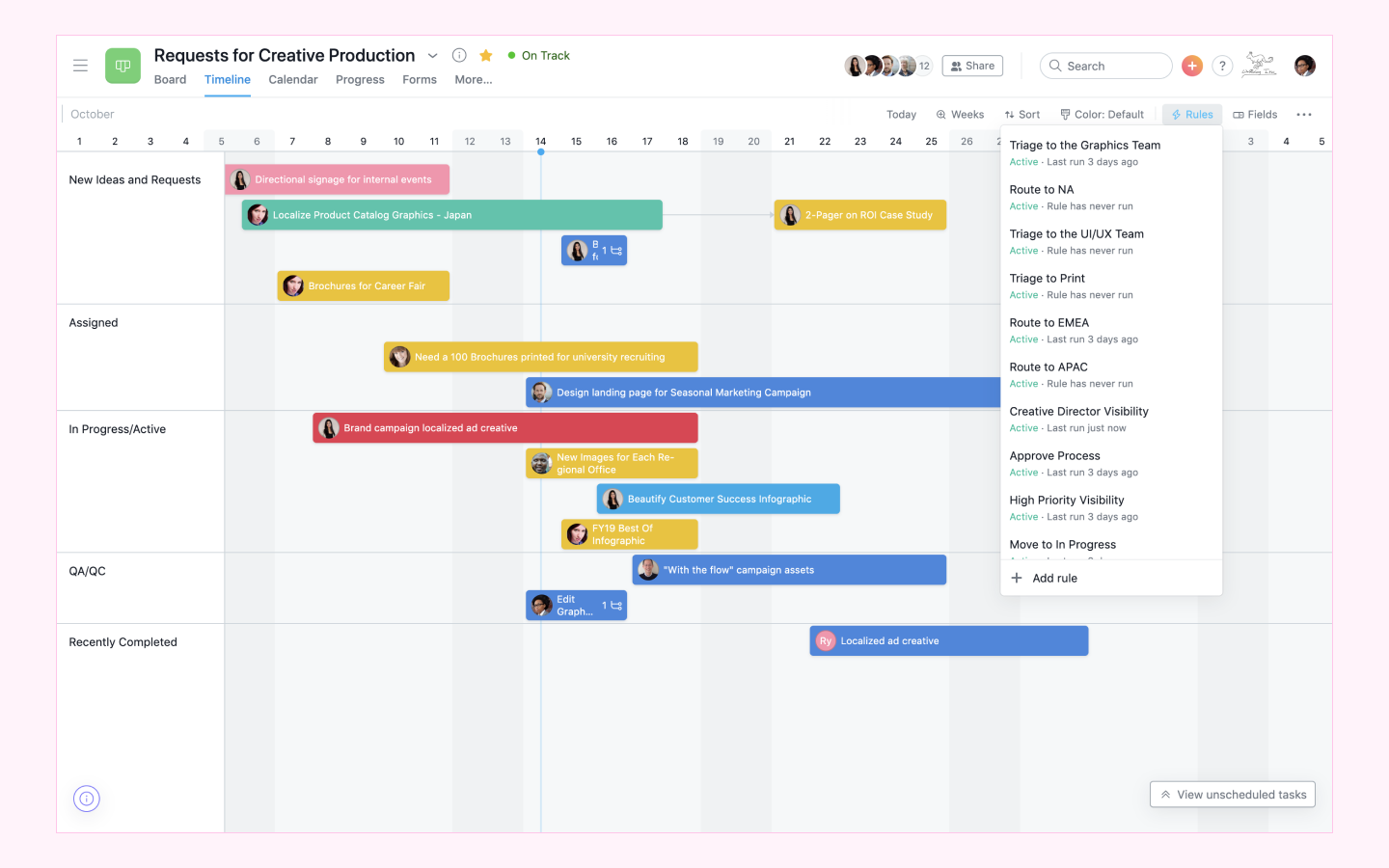
Image source: asana.com
Pros:
- Clean, intuitive UI guarantees high adoption rates across both technical and non-technical staff.
- Excellent timeline and milestone features are perfect for visual roadmap planning.
- Strong ecosystem of integrations connects easily with popular developer tools like GitHub.
- Flexible custom fields allow teams to adapt the tool for basic agile tracking.
- Workload management features help balance team assignments effectively across sprints.
Cons:
- It is not inherently designed for strict Scrum workflows out of the box. Adapting its custom fields and utilizing specific agile templates helps bridge this structural gap effectively.
- Advanced features like task dependencies and timelines are locked behind higher-priced tiers. Carefully evaluating which tier your workflow requires before committing is highly recommended.
The verdict: Asana is best for teams that prioritize visual roadmapping and ease of use over deep, technical issue tracking. It is a highly effective tool for aligning the broader company around major software launch goals.
Pricing:
- Starter: $10.99/user/month
- Advanced: $24.99/user/month
- Enterprise: Contact sales
9. Celoxis: Comprehensive project portfolio and resource management
Mid-to-large software consultancies constantly struggle to balance client project delivery with internal resource constraints and budget caps. Using a standalone agile board tracks the code well enough, but it completely fails to track the financial health and billable hours of the project, leading to costly overruns. Celoxis steps in as a comprehensive project portfolio management solution that tracks both the technical execution and the financial metrics. It provides deep resource management and simplified planning workflows, allowing engineering leads to see not just when a feature will be built, but exactly how much that development time is costing the business in real-time.
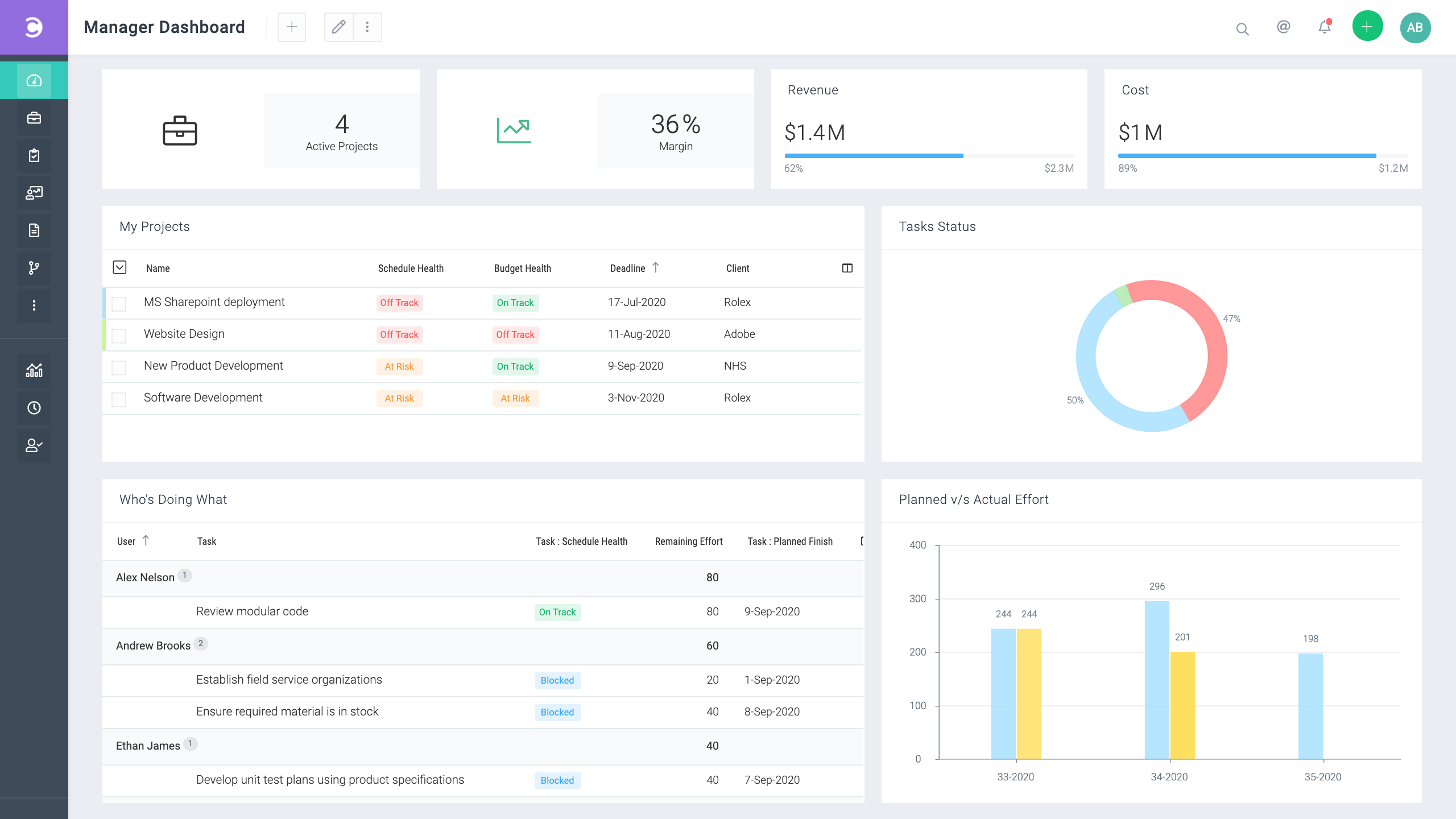
Image source: celoxis.com
Pros:
- Excellent for managing complex project portfolios alongside strict financial budgets.
- Advanced resource management prevents overallocation across multiple concurrent projects.
- Strong financial tracking features are tied directly to project timelines and milestones.
- Highly customizable reporting dashboards offer unparalleled executive oversight.
- Offers both cloud-based and on-premise deployment options for strict security compliance.
Cons:
- The interface is highly functional but lacks the modern, intuitive feel of newer software. Focusing on its deep analytical capabilities makes the learning curve worthwhile.
- Geared more toward traditional project management, requiring adaptation for pure agile workflows. Utilizing their flexible custom apps and workflows helps tailor the experience to dev teams.
The verdict: Celoxis is highly recommended for mid-sized enterprises and software consultancies that need tight integration between technical project execution, resource allocation, and real-time financial tracking.
Pricing:
- Essentials: $25/standard user, $18/team-member user, $12/timesheet user
- Professional: $35/standard user, $24/team-member user, $12/timesheet user
- Business: $45/standard user, $29/team-member user, $14/timesheet user
- Enterprise: Contact sales
10. Hive: Collaborative project management built for hybrid teams
Hybrid teams often struggle to consolidate their feedback loops, resulting in scattered communications across emails, chats, and ticket comments. When a designer updates a UI mockup but the frontend developer misses the email notification, the resulting rework burns valuable sprint time. Hive addresses this by placing native collaboration directly at the center of its project management approach for software development. It features a built-in messaging system and robust proofing tools, ensuring that when an asset is updated, the approval process and associated conversations happen directly within the action card, keeping everyone perfectly synced.
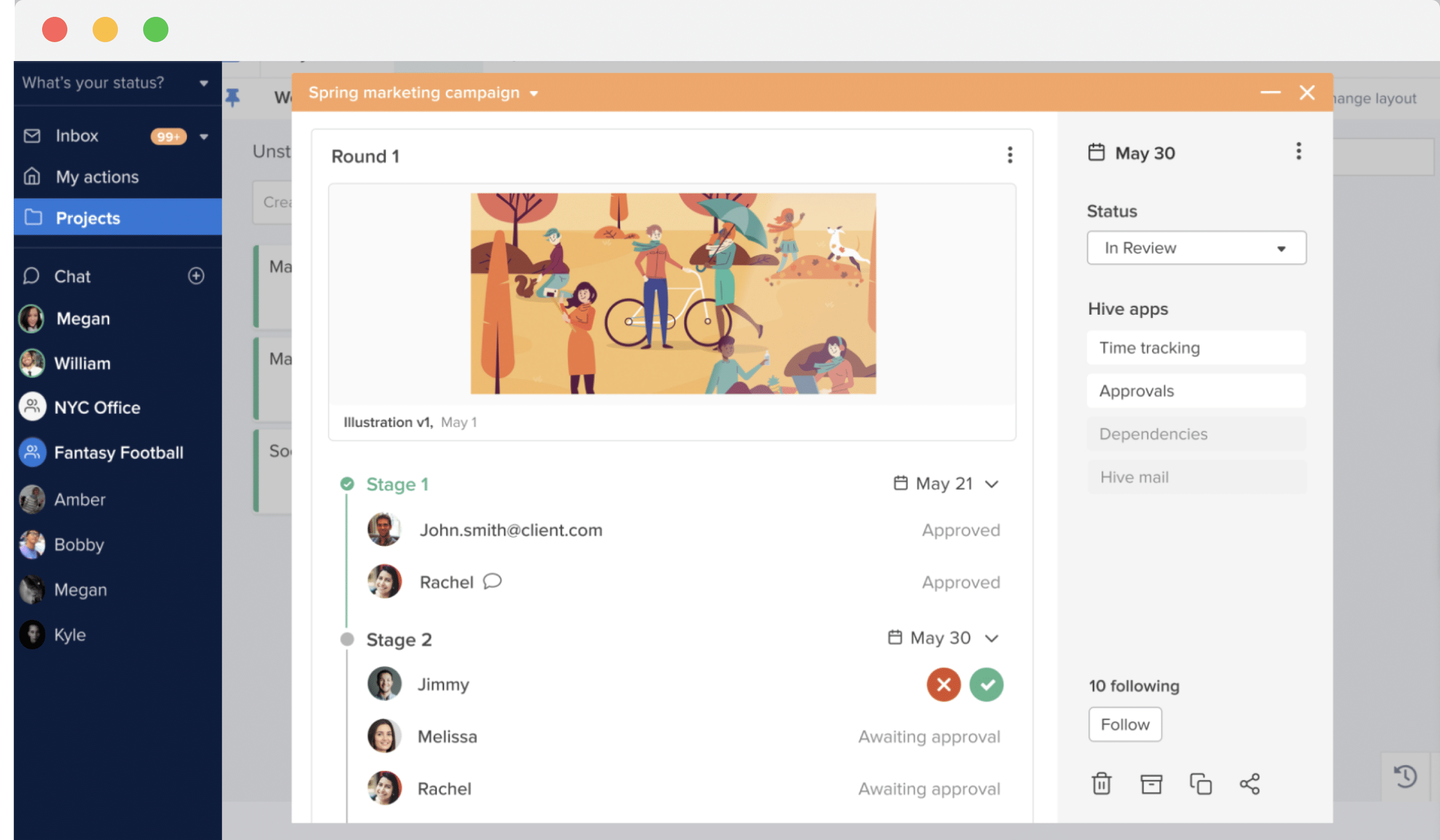
Image source: hive.com
Pros:
- Strong built-in messaging features reduce reliance on external, disconnected chat applications.
- Excellent proofing and approval workflows for creative assets and UI/UX designs.
- Flexible project views (Kanban, Gantt, Table) allow users to toggle their preferred layout individually.
- Hive Automate offers deep, customizable connections to thousands of external applications.
- Native time tracking helps engineering managers measure sprint velocity accurately.
Cons:
- The mobile application does not possess the full functionality of the desktop version. It is best used for quick communication updates rather than heavy sprint planning.
- The sheer number of notifications can be overwhelming initially. Customizing the notification settings immediately after setup ensures a focused, quiet workspace.
The verdict: Hive is a strong contender for hybrid teams that blend software development with heavy UI/UX design, thanks to its powerful native communication and visual proofing tools.
Pricing:
- Starter: $1/user/month (billed annually)
- Teams: $3/user/month (billed annually)
- Enterprise: Custom pricing
Stop comparing and use the best tool right now
How to choose the right project management tool for software development
When evaluating the best project management software for software development, it is tempting to just adopt whatever the largest tech companies use. However, the right choice depends entirely on where your specific operational bottlenecks lie. I recommend walking through a structured evaluation process before committing to an annual contract.
- Identify your core methodology first: Are you running strict two-week sprints, or do you rely on a continuous Kanban flow for daily bug fixes? If your team follows a highly structured agile project management for software development approach, you need a platform that natively supports story points, backlog grooming, and sprint velocity tracking. If your workflow is more fluid, forcing your team into a rigid sprint framework will only create administrative drag.
- Audit your current tool stack for context switching: Look at a standard developer's workflow. Are they jumping between a code repository, a separate chat application, an isolated wiki, and a standalone task board? If so, prioritize an . Reducing the number of apps your team uses lowers your software licensing costs and keeps engineers focused on writing code rather than hunting down product requirement documents.
- Evaluate cross-functional usability: This is where many engineering-heavy tools fail. Mini-scenario: Your backend team finishes a critical API update and marks it "done" in their developer-centric issue tracker. However, the customer success team has no idea that the fix shipped because they find the engineering tool too complex to navigate.
- Run a live pilot with a sample project: Never commit to a platform based purely on a well-designed sales demo. Instead, build a sample for software development directly in the trial version of the tool. Invite three developers, a QA tester, and a product manager to run a mock two-week sprint. Track how long it takes to create a bug ticket, attach a screenshot, and assign it to a reviewer. If the team finds updating the software more frustrating than doing the actual work, it is not the right fit for your organization.
How to build a sample project management plan for software development
Having the right tool is only half the equation; structuring your workflow correctly dictates your success. Rather than speaking in abstract agile theories, let’s walk through a concrete setup. If you need to build a sample project management plan for software development, I recommend structuring it around three core operational pillars.
- and sprint goals: Begin by linking high-level business objectives directly to your project boards. In a unified suite like , you can document the quarterly OKRs in a central Wiki and link specific database tasks (epics) directly to those goals. When a developer starts working on a new authentication feature, they should be able to click a link and instantly see the business rationale behind it.
- Set up and QA gates: Do not rely on verbal confirmations or buried email threads to move code to production. Build strict, automated gates. Mini-scenario: Configure your board so that when a developer moves a ticket to "Ready for QA," the system automatically pings the QA channel with a link to the staging environment. Once QA approves, an automated workflow triggers an approval request to the product manager. This keeps the pipeline moving while maintaining a clear audit trail.
- Automate reporting to keep stakeholders informed: Engineers hate writing status updates, and stakeholders hate being kept in the dark. Use your tool’s dashboard capabilities to auto-generate reports. Set up a weekly automated message that pulls the number of completed story points and resolved bugs directly from your sprint board, posting a summary into the general project chat. This provides visibility to marketing and sales without forcing engineers to stop coding to write a summary.
Conclusion
The landscape of software engineering in 2026 demands more than just basic issue tracking; it requires seamless alignment across every department. When your developers, designers, and product managers are isolated in separate applications, shipping speed inevitably slows down due to communication silos. The most successful organizations treat their tool stack as a strategic advantage, moving away from fragmented systems toward unified environments. Finding a platform that natively combines deep technical planning with intuitive, company-wide collaboration is the key to unlocking true agile efficiency. If you are tired of paying for a dozen disconnected apps and losing hours to context switching, it is time to upgrade your workspace. Try today to bring your engineering sprints, product wikis, and team chats into one powerful, cost-effective platform, and watch your development lifecycle accelerate.
Transform your software development with Lark today
FAQs
What is the best project management methodology for software development?
There is no single "best" methodology; it depends entirely on your team's product cycle. Agile (specifically Scrum) is the most common approach because it breaks development down into manageable 1-to-4-week sprints, allowing teams to adapt to user feedback quickly. Kanban is another excellent methodology for maintenance teams handling continuous bug fixes, as it limits work-in-progress and focuses on a continuous flow of tasks rather than rigid sprint deadlines.
How can the right software reduce overall development costs?
The highest hidden cost in development is the "integration tax"—paying separate licensing fees for chat apps, video calls, wikis, and issue trackers. By switching to a unified workspace like Lark, you can consolidate these overlapping subscriptions into one platform. This not only lowers your monthly software bill but also drastically reduces the hours IT spends troubleshooting broken API connections between fragmented tools.
What is the most critical feature in a project management tool for software development?
Aside from basic task tracking, native workflow automation is arguably the most critical feature to look for. Developers should not have to manually ping QA or update a spreadsheet every time they finish a coding task. Look for software that automatically triggers approval requests and status updates, allowing your engineers to stay focused on writing code rather than doing administrative clerical work.
Can AI project management tools actually speed up software development?
Yes, provided the AI is used to handle administrative friction rather than core engineering logic. Modern tools use AI to summarize lengthy bug report threads, auto-translate product requirement documents for global teams, and draft instant meeting notes during a sprint retrospective. Platforms like Lark integrate these AI capabilities directly into the workspace, saving managers hours of manual documentation each week.
Related reading

















