As Shopify stores grow from a single sales channel into multi‑storefront, multi‑warehouse operations, order management quickly becomes the backbone of the entire business. What starts as a handful of simple orders can turn into a complex web of inventory, routing rules, and fulfillment partners across e-commerce and retail. This guide walks through what a Shopify order management system is, where it shines, and where it can struggle, then explores how to extend it with the right tools and collaboration layer so your operations stay scalable, connected, and resilient.
What is Shopify order management system?
A Shopify (OMS) is the backbone that connects your orders, inventory, and fulfillment into one consistent workflow. Instead of juggling spreadsheets, emails, and separate tools, a OMS gives you a central place to track every step in the order lifecycle. From the moment a customer places an order on your online store, at a retail location, or through a marketplace, the system records it, assigns it to stock, and prepares it for fulfillment in a structured, repeatable way.
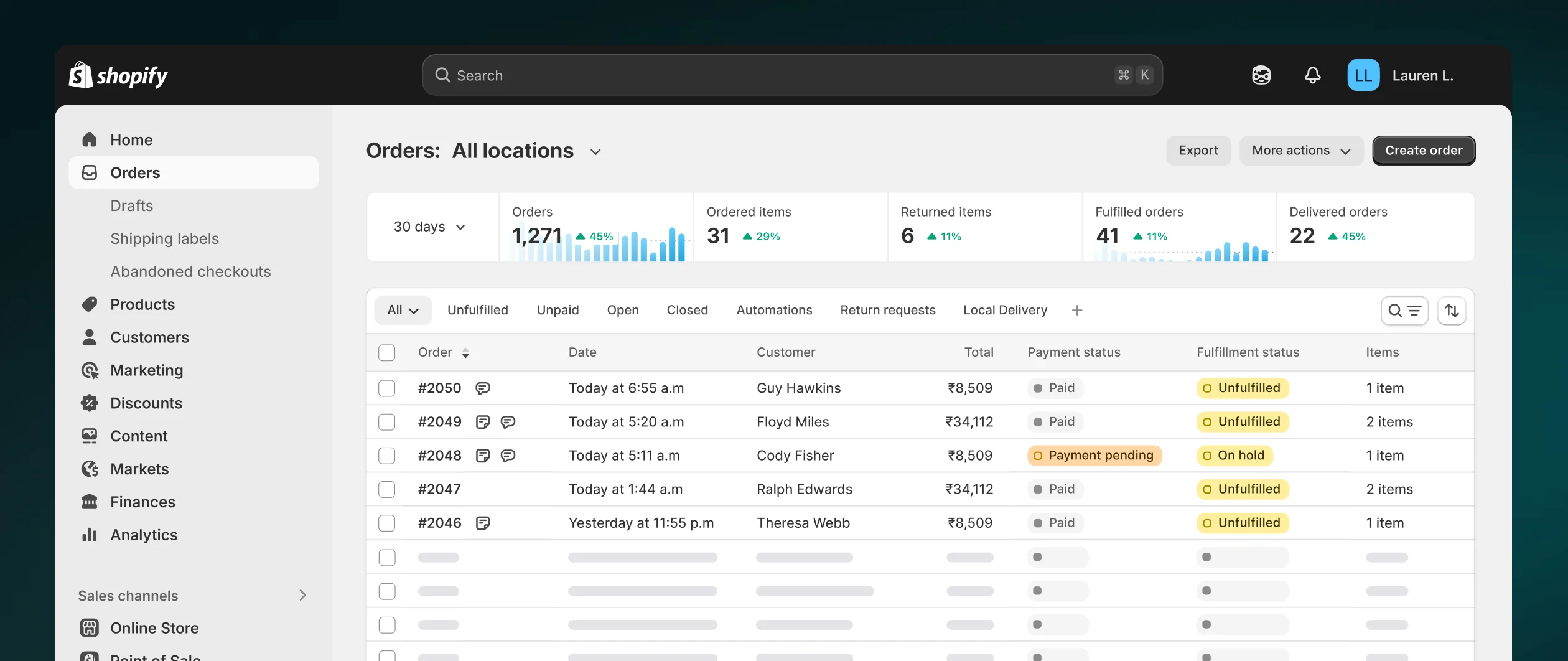
Image source: shopify.com
At its core, an helps you track sales, orders, inventory levels, and shipping activities across multiple channels. A Shopify order management system takes that a step further by being embedded directly in the platform you already use to sell. It consolidates order data from your Shopify store, point‑of‑sale devices, and connected marketplaces so you can review, prioritize, and process everything from a single dashboard. That unified view is key to avoiding overselling, missed orders, or inconsistent customer experiences.
A Shopify OMS also coordinates what happens after an order is placed. It supports tasks like across locations, routing orders to the most suitable fulfillment center, and generating the details needed for shipping. Behind the scenes, the order management system for Shopify keeps stock levels in sync as orders are packed, shipped, or returned. This real‑time connection between orders and inventory makes it easier to manage multi‑location operations, work with third‑party logistics partners, and maintain reliable delivery promises.
Because Shopify is an all‑in‑one , its built‑in OMS is designed to handle modern, multichannel retail from day one. You can manage orders from various sales channels in one place, track fulfillment status at a glance, and support workflows like local delivery, in‑store pickup, and returns or exchanges. When combined with other tools in your tech stack—such as shipping solutions, warehouse systems, and collaboration platforms—a Shopify order management system becomes the central layer that keeps your entire e-commerce operation organized, responsive, and ready to scale. For businesses looking to create a seamless and visually appealing shopping experience, collaborating with skilled ensures that your OMS integrates smoothly with an attractive, user-friendly storefront.
Key features of Shopify OMS
The built‑in Shopify order management system comes with a focused set of features designed to keep your orders, inventory, and fulfillment tightly connected. Below are the key capabilities that make Shopify OMS a solid foundation for day‑to‑day e-commerce operations.
- Centralized order management across channels: A modern Shopify OMS pulls every order into one organized place, no matter where it comes from. Orders from your online store, retail locations, social channels, and connected marketplaces all appear in a single dashboard inside the Shopify admin. From there, you can filter by fulfillment status, , shipping method, or sales channel to decide what needs attention first. Tags, internal notes, and saved views help different teams focus on their own workflows, whether that's international orders, high‑value customers, or time‑sensitive shipments.
- Smart fulfillment and routing tools: As volume grows, assigning and fulfilling orders manually quickly becomes a bottleneck. The Shopify order management system supports smart order routing, automatically sending orders to the most appropriate fulfillment location based on rules you set and available inventory. You can also use bulk actions to fulfill many orders at once, generate packing slips, and print multiple shipping labels in a few clicks. Customizable order views let warehouse and operations teams see the details that matter most, so they can process orders quickly and consistently, even during peak periods.
- Real‑time, multi‑location inventory management: Accurate stock data is essential for any e-commerce order management system. Shopify OMS is tightly linked to your product catalog and sales channels, so inventory levels update automatically when orders are placed, returns are processed, or new stock arrives. You can track inventory across multiple locations, such as warehouses and stores, and transfer items between them when needed. Bulk editing tools make it easier to adjust stock for many SKUs at once, and you can mark quantities as reserved or unavailable when they are damaged or under review, reducing overselling and stockouts.
- Integrated shipping and delivery workflows: Shipping and delivery are built directly into the for Shopify, so you can configure shipping rates, fulfillment locations, and service levels in one place. Within the admin, merchants can purchase and print shipping labels, generate packing slips, and attach tracking details that customers see in their order notifications. Presets and saved packaging preferences keep your shipping process consistent. Whether you offer standard shipping, local delivery, or in‑store pickup, these options tie back into the same Shopify order management workflow, helping you maintain a clear, end‑to‑end view of every shipment. To further reduce delivery friction, many merchants evaluate the best sms alert vendors for urgent transaction messages to automate order confirmations, payment updates, and real-time shipping notifications tied directly to their Shopify workflows.
- Returns and exchanges handled in one system: Returns and exchanges are a core part of the e-commerce order lifecycle, and Shopify OMS is designed to support them. Customers can often start returns online, depending on your setup, which reduces friction for both shoppers and support teams. In the Shopify admin, you can review and approve return requests, track items coming back, , and issue full or partial refunds. When customers prefer an exchange, you can manage it in the same system, keeping the sale while maintaining a smooth experience. Central rules for return windows, eligibility, and fees help you apply consistent policies across all your sales channels.
Master order management with a smart tool
Pros & cons of Shopify OMS
Pros
It's helpful to understand where it delivers the most value for e-commerce brands. In many cases, its built‑in capabilities are more than enough to support a growing business without introducing extra complexity.
- Accuracy and efficiency in daily operations: The Shopify OMS shines when it comes to basic order accuracy and operational efficiency. Because orders, payments, and fulfillment are managed in one platform, many error‑prone steps can be standardized or automated. Features like unified order views, editable orders, and clear status updates reduce the chance of missed orders or incorrect shipments. For most growing e-commerce businesses, this makes Shopify OMS a reliable foundation for handling routine order processing without needing a separate, standalone system.
- Faster fulfillment and simplified shipping: Another clear benefit of a Shopify OMS is how it helps teams pick, pack, and ship faster. Smart routing rules can direct orders to suitable fulfillment locations based on stock and destination, while bulk actions allow you to process many orders at once. Shipping integrations inside the Shopify admin let you buy and print labels, generate , and attach tracking numbers without leaving the platform. This streamlines the e-commerce order management workflow and is especially helpful during peak seasons, when speed and accuracy are most critical.
- Centralization, visibility, and : Shopify's multichannel capabilities mean its OMS naturally centralizes orders and inventory from your online store, POS, social commerce, and marketplaces. Having all order data in a single dashboard improves customer service, because support teams can quickly see what was ordered, where it is in the fulfillment process, and how it was paid for. At the same time, this consolidated data helps with inventory planning and demand forecasting, since you can analyze sales trends and product performance across channels without stitching together reports from multiple systems.
Cons
To balance the discussion, it's also important to look honestly at where the Shopify OMS might fall short, especially as your operations become more complex or your tech stack grows.
- Integration and complex : On the downside, integration can become a challenge as your tech stack grows more complex. Connecting a Shopify order management system to legacy ERPs, custom management tools, or highly specialized finance systems is not always straightforward. If data does not synchronize consistently across platforms, you may face issues like mismatched stock levels, duplicated records, or delays in updating financial information. In those cases, merchants often need middleware, custom development, or specialist partners to keep their broader order management ecosystem working smoothly.
- , customization, and advanced workflows: Scalability and customization are also important considerations. While Shopify OMS covers a wide range of standard e-commerce order management needs, very advanced requirements—such as complex workflows, deeply customized products, or intricate approval steps—may push beyond what the native tools handle comfortably. Brands operating across many regions and logistics partners sometimes outgrow the default configuration and look to dedicated enterprise OMS solutions, using Shopify primarily as the commerce front end. For these merchants, Shopify OMS remains valuable, but often as part of a larger, more specialized order management architecture rather than the single system of record.
Overcome all these shortcomings in a powerful tool
Lark: Closing the collaboration gap your OMS can't fix
Even when the technical side of your Shopify order management system looks solid, the human side can still be messy. Order issues get discussed across email, chat, and spreadsheets with no single source of truth, and context is easily lost between teams. That's where a collaboration hub like comes in: Not to replace Shopify OMS, but to connect people, conversations, and operational knowledge around it, so decisions get made faster and with fewer mistakes. Lark helps you layer collaboration, documentation, and visibility on top of your existing e-commerce and order management tools.
Turn Shopify OMS into an operations hub with Lark
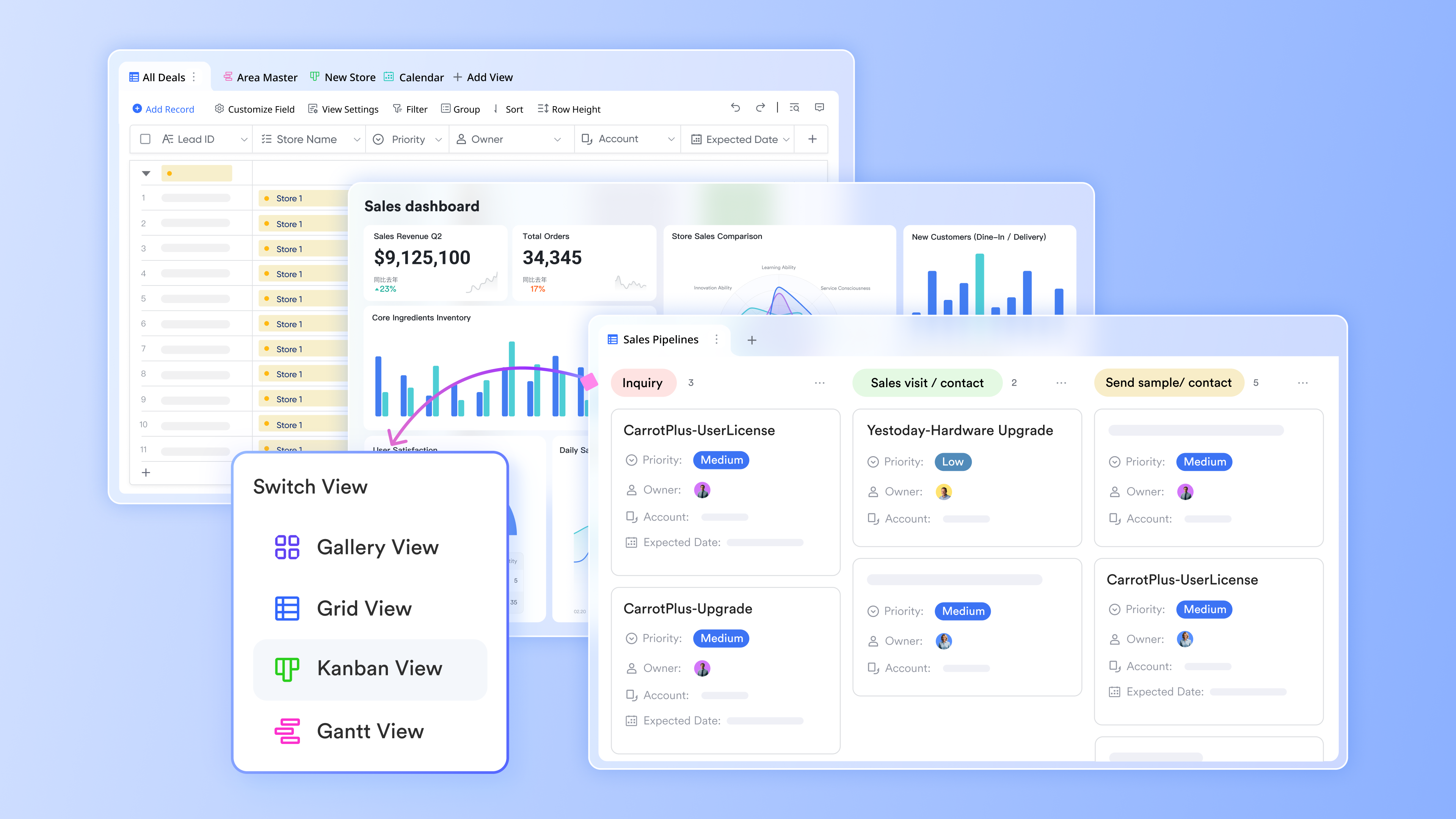
Most e-commerce brands don't need another order management system—they need a better way to orchestrate the people and workflows that sit around Shopify OMS. Lark helps by turning your order management stack into a single operations hub, where , , , and live side by side. A practical approach is to create a dedicated "Order operations space" in Lark, with focused channels like #order-exceptions, #returns-and-refunds, and #inventory-planning, plus pinned docs and dashboards. Instead of jumping between apps, your team can review order exceptions, discuss edge cases, and align on fulfillment decisions in one shared space. Within this central workspace, Lark's all‑in‑one environment reduces friction in daily e-commerce operations. Inventory planners can comment directly on replenishment reports, customer service can escalate tricky orders into the same channel where operations leads are already working, and finance can follow the thread without asking for forward chains or screenshots. Automation can deliver periodic dashboards or Shopify‑linked reports straight into space, so order management remains transparent and actionable for everyone involved in fulfillment, logistics, customer support, and finance. The result is an operations hub that wraps around your OMS rather than competing with it. Run your order playbooks as living docs and tables
An OMS is only as strong as the processes people follow, and those processes rarely live inside Shopify itself. and give you a place to turn static procedures into living order management playbooks that evolve with your e-commerce business. You can document core SOPs: Picking and packing steps, return and refund policies, fraud review workflows, and peak‑season preparation—in Lark Docs, where teams can comment, suggest edits, and keep a single up‑to‑date version instead of scattered PDFs. This makes onboarding faster and reduces the risk of inconsistent handling of orders across locations or shifts.
Alongside these docs, Lark Base acts as a flexible layer for operational queues and tracking tables that complement your Shopify OMS. You might maintain a "High‑risk orders queue," a "VIP customer order follow‑up" table, or a "Return cases by reason" database, each with fields for order ID, channel, owner, next step, and SLA. Base supports filtering, grouping, and multiple views such as Kanban or calendar, helping teams slice data by priority, warehouse, or customer segment and manage e-commerce exceptions in real time. Rather than exporting spreadsheets from your OMS and emailing them around, these shared tables stay current and collaborative, turning your playbooks into tools that teams genuinely use every day. 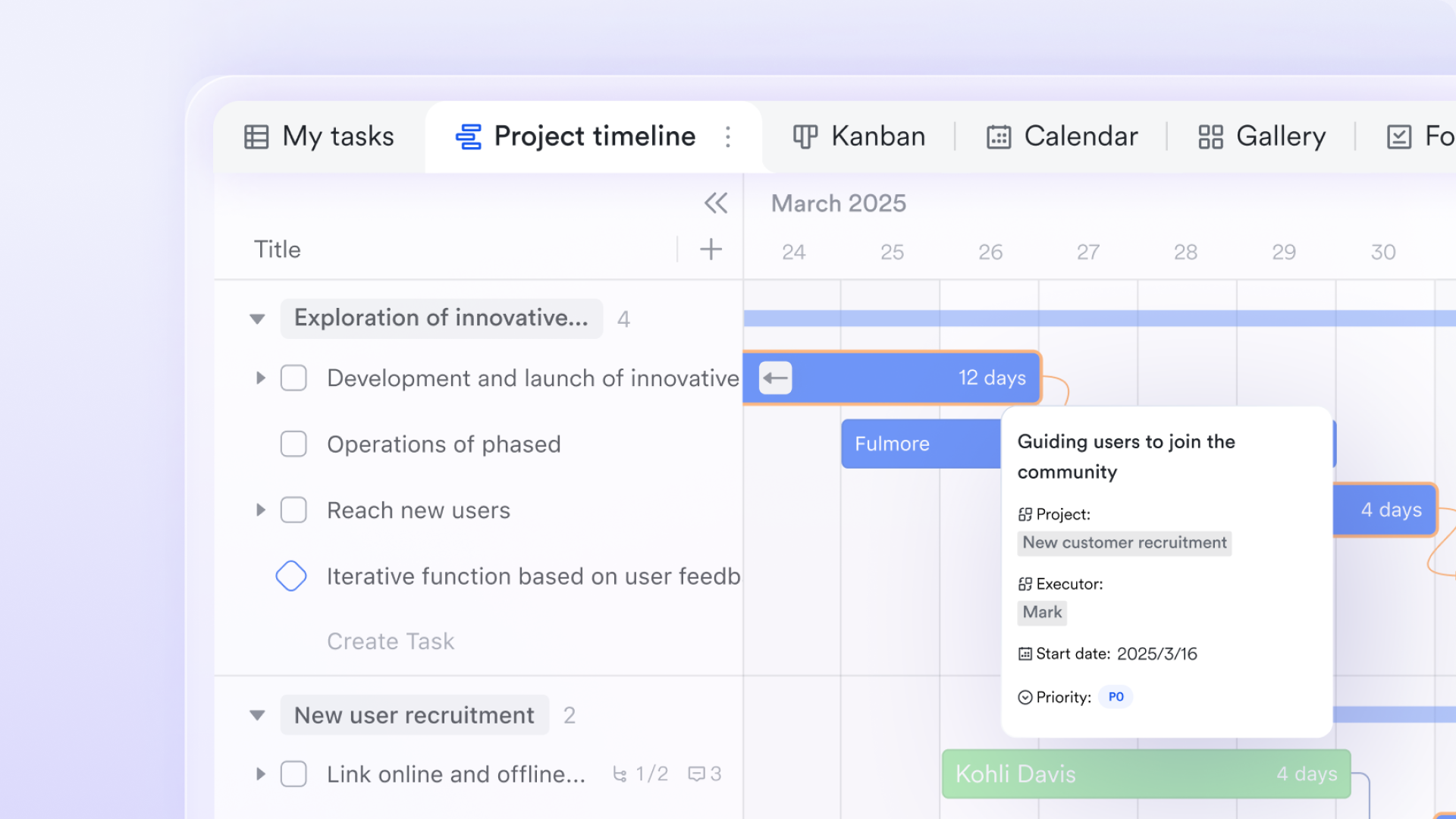
Connect Shopify and OMS events into Lark with integrations
Even the best OMS can bury important events in dashboards that busy teams don't have time to monitor constantly. By connecting Shopify and other order management tools to Lark via integrations, webhooks, or workflow automation, you can bring critical signals directly into the conversations where people are already working. Typical triggers include high‑risk orders, unusually large orders, low‑stock alerts, or fulfillment errors, all pushed into dedicated channels with key fields attached: Order number, customer, order value, risk level, status, and direct links back to the e-commerce admin. From there, you can design lightweight playbooks that turn these notifications into coordinated action. For example, when an order is both high‑risk and above a certain value, a bot can route it into #order-review and ping the risk and support owners for a quick decision. Each morning, automation can post a summary of the previous day's orders, shipments, and exceptions into #ops-daily, giving leaders and operators a shared snapshot without logging into multiple analytics tools. Lark doesn't try to replace your Shopify order management system; it makes sure the right people see and act on the most important OMS events without living inside the admin all day. Align remote and multi‑location teams in real time
As e-commerce scales across warehouses, partners, and remote teams, the hardest part of order management becomes alignment, not configuration. Lark helps you keep distributed operations in sync with real‑time messaging, channels organized by region or warehouse, and instant video meetings when written messages aren't enough. You can create channels for each location or logistics partner, routing location‑specific inventory questions, routing conflicts, or carrier issues directly for the people who can resolve them, instead of losing time in long email threads and fragmented chats. During major campaigns or peak seasons, many brands set up a "war room" in Lark: A central group chat powered by group video calls, shared dashboards, and real‑time collaborative docs for decision logs. When performance spikes or a warehouse hits capacity, the team can jump into a call, adjust routing rules, pause specific shipping methods, and document the temporary OMS strategy in the same space. This style of collaboration turns your Shopify OMS from a static backend tool into a dynamic operations command center, where decisions about order prioritization, cut‑off times, and inventory allocation happen in minutes instead of hours. 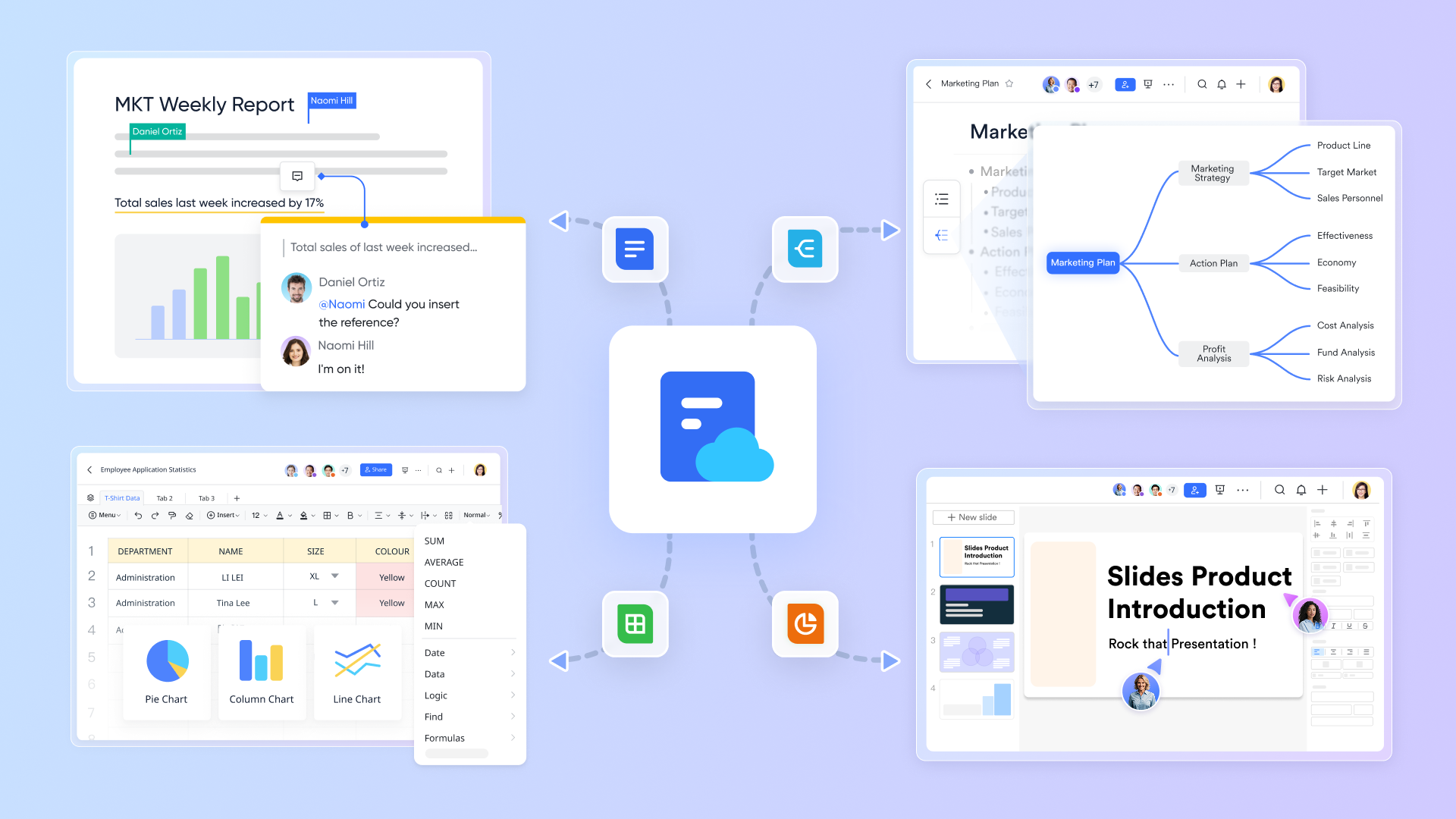
Keep sensitive order data and conversations secure
Order management workflows touch sensitive customer and revenue data, so collaboration around your OMS has to be secure and well‑governed. Lark is designed as an enterprise‑grade collaboration suite, which means unified account management, organizational structure, and access controls are built in from the start. Admins can define which teams see which order‑related spaces and limit access to channels or documents that contain high‑value orders, customer information, or financial details, helping e-commerce operations stay compliant with internal policies and external regulations.
Granular permissions extend down to specific docs, tables, and even views, so different roles see the level of detail appropriate to their work. Operations managers might edit the full "order exceptions" base, while leadership gets a summarized dashboard view, and external partners only see a curated subset. Combined with encryption and centralized administration, this approach lets you centralize OMS‑related collaboration in Lark without sacrificing control. As your Shopify store grows into a larger e-commerce operation, you retain both the agility to move quickly on order issues and the governance needed to protect customer trust. 
:
- Starter plan: Free forever plan that includes 11 powerful tools for up to 20 users. It also comes with 100GB of storage, 1000 automation runs, AI translations, and more.
- Pro plan: $12/user/month (billed annually) for up to 500 users. It includes everything in Starter plus group calling for up to 500 attendees, 15TB of storage, 50,000 automation runs, and more.
- Enterprise plan: for custom pricing. Supports unlimited users and includes even more automation runs and advanced security, compliance, and management features.
For small teams with simple communication needs

18 months message history
1000 Base automation runs/month
2000 rows per table in Base
Most POPULAR
For companies with comprehensive collaboration and management needs
Unlimited message history
500-participant video meetings
50k Base automation runs/month
20k rows per table in Base
For large companies with advanced security and organizational management needs
Get a personalized demo and pricing
Unlimited message history
500-participant video meetings
15 TB storage + 30 GB storage/user
500k Base automation runs/month
50k Base automation runs/month
Most POPULAR
For companies with comprehensive collaboration and management needs
Unlimited message history
500-participant video meetings
50k Base automation runs/month
20k rows per table in Base
How to choose your OMS
Selecting an order management system is less about chasing features and more about finding a platform that matches how your business actually works. A good OMS should simplify your operations today while giving you room to scale across new sales channels, fulfillment models, and markets.
- Clarify goals and map current workflows: Start by defining what you actually need an order management system to achieve. Bring together stakeholders from operations, e-commerce, finance, IT, and customer support to map your existing order management workflow from checkout to returns. List the pain points: Manual tasks, data inconsistencies, slow fulfillment, or poor inventory visibility. From there, separate must‑have requirements (for example, multichannel order management or real‑time stock updates) from nice‑to‑have features. Keep scalability in mind so your chosen OMS can support future expansion into new sales channels, markets, or product lines.
- Turn requirements into a clear brief or : Once your priorities are clear, translate them into a structured brief or request for proposal. Give potential OMS vendors a concise but concrete picture of your business: Typical order volume, product catalog complexity, number of fulfillment locations, and key sales channels. Outline your existing e-commerce platform, , , accounting tools, and any partners. Include expectations around implementation timelines, onboarding, and training. A detailed RFP helps vendors show how their order management software will integrate with your tech stack and where custom configuration, APIs, or middleware may be needed.
- Shortlist vendors and test real scenarios: With responses in hand, create a shortlist of order management solutions to evaluate in more depth. Arrange demos or trials that use realistic scenarios from your day‑to‑day operations, such as split shipments, backorders, returns, or multi‑warehouse fulfillment. As you compare systems, verify that each OMS supports automation for recurring tasks, multichannel order management, multi‑location inventory, and real‑time stock updates. Check whether the platform provides robust reporting and forecasting tools so you can identify issues early and make informed inventory planning decisions rather than relying on guesswork.
- Assess integrations, flexibility, and scalability: A modern OMS should sit comfortably at the center of your commerce operations. Evaluate how well each option integrates with your e-commerce platform, warehouse management, shipping carriers, accounting, and broader supply chain partners. Look for flexible , support for , and a track record of ongoing product development. Consider whether the OMS can adapt to more advanced workflows over time—such as B2B ordering, complex routing rules, or multiple regions—without forcing a complete system replacement as you scale.
- Consider partnership and long‑term fit: The final decision goes beyond a checklist of features. Pay attention to the quality of vendor support, documentation, and onboarding resources, as these strongly influence how smoothly your order management implementation will run. Evaluate how responsive their teams are, how clearly they communicate limitations, and whether their roadmap aligns with modern e-commerce trends. The right OMS partner helps reduce manual work, improves operational visibility, and gives your team confidence that orders, inventory, and fulfillment can keep pace with your growth across channels and markets.
Keep your OMS collaboration scalable
Conclusion
A Shopify order management system gives you a strong foundation for multichannel commerce, but the real advantage comes from how you extend and operate around it. By understanding Shopify OMS features and limitations, choosing complementary tools, and using a hub like Lark to connect people, workflows, and data, you turn a solid system into a flexible operations engine. As your order volume, locations, and sales channels expand, this combination helps you maintain accuracy, visibility, and speed—so your team can focus less on firefighting and more on delivering a consistently great customer experience.
FAQs
Does Shopify have an order management system?
Yes. Shopify includes a built‑in order management system that lets you capture, edit, fulfill, refund, and track orders across channels. You can manage payments, shipping labels, basic inventory, and customer communication from the Shopify admin. For more advanced needs—like complex routing rules, multi‑warehouse orchestration, or deep B2B workflows—merchants often extend Shopify OMS with third‑party apps, 3PLs, ERPs, or a collaboration layer like Lark to coordinate teams, exceptions, and analytics around those orders.
How do you manage orders on Shopify?
You manage orders in the Orders section of the Shopify admin. From there, you can review new orders, capture payments, edit items, apply discounts, create shipping labels, and mark orders as fulfilled. Tags, filters, and views help you organize workflows such as "unfulfilled," "high‑risk," or "ready to ship." Many merchants also connect fulfillment apps, 3PL services, or warehouse systems, and use automation rules and notifications to streamline picking, packing, returns, and customer updates.
What is the disadvantage of Shopify?
A common disadvantage is that advanced operations can outgrow Shopify's native capabilities. Complex inventory, multi‑warehouse routing, B2B pricing, or custom order workflows often require multiple apps or external systems. This can lead to fragmented data, overlapping subscriptions, and more time spent integrating tools. Shopify is extremely strong as a commerce engine, but brands with intricate supply chains or specialized order management needs usually need additional OMS, WMS, or collaboration platforms to fill the gaps.
What is the best fulfillment app for Shopify?
There's no single "best" fulfillment app for every Shopify store; the right choice depends on your products, regions, and service model. Many brands use Shopify's own fulfillment options or well‑known 3PL and shipping apps that integrate directly with Shopify for labels, tracking, and inventory sync. When evaluating apps, focus on reliability, carrier coverage, automation features, support quality, and how well they integrate with your broader order management, warehouse, and collaboration stack.
Related reading












