Managing projects today requires more than task lists and timelines. Teams need visibility, accountability, and tools that adapt as work becomes more collaborative. As interest in a detailed Zoho Projects review and alternatives continues to grow, many teams are evaluating whether Zoho Projects can support both structured planning and day-to-day execution. Zoho Projects positions itself as a comprehensive project management tool within the broader Zoho ecosystem. This guide explores how Zoho Projects performs in real workflows, where it delivers value, and where teams begin to look beyond traditional project tools toward connected workspaces like Lark as complexity increases. This review Zoho Projects article is written to help teams evaluate real-world usability, scalability, and long-term fit.
Understand how modern teams manage projects
What are Zoho Projects?
Zoho Projects is a cloud-based designed to help teams plan, track, and deliver work using structured tools. It is part of the larger Zoho project management ecosystem and closely combines with products like Zoho CRM, Zoho One, and Zoho People. The platform emphasizes task hierarchy, timelines, and reporting. Its design suits teams that prefer detailed planning and defined processes. Access to all features begins from the Zoho Projects login, which also serves as the entry point to the broader Zoho ecosystem for existing users.
Zoho Projects is commonly used by managing client work, internal initiatives, or cross-department projects. Agencies, , and service-based organizations often adopt it to bring structure to recurring work. Teams already using other Zoho tools find it easier to adopt due to the ecosystem combination. However, its depth can feel heavy for teams seeking lightweight execution.
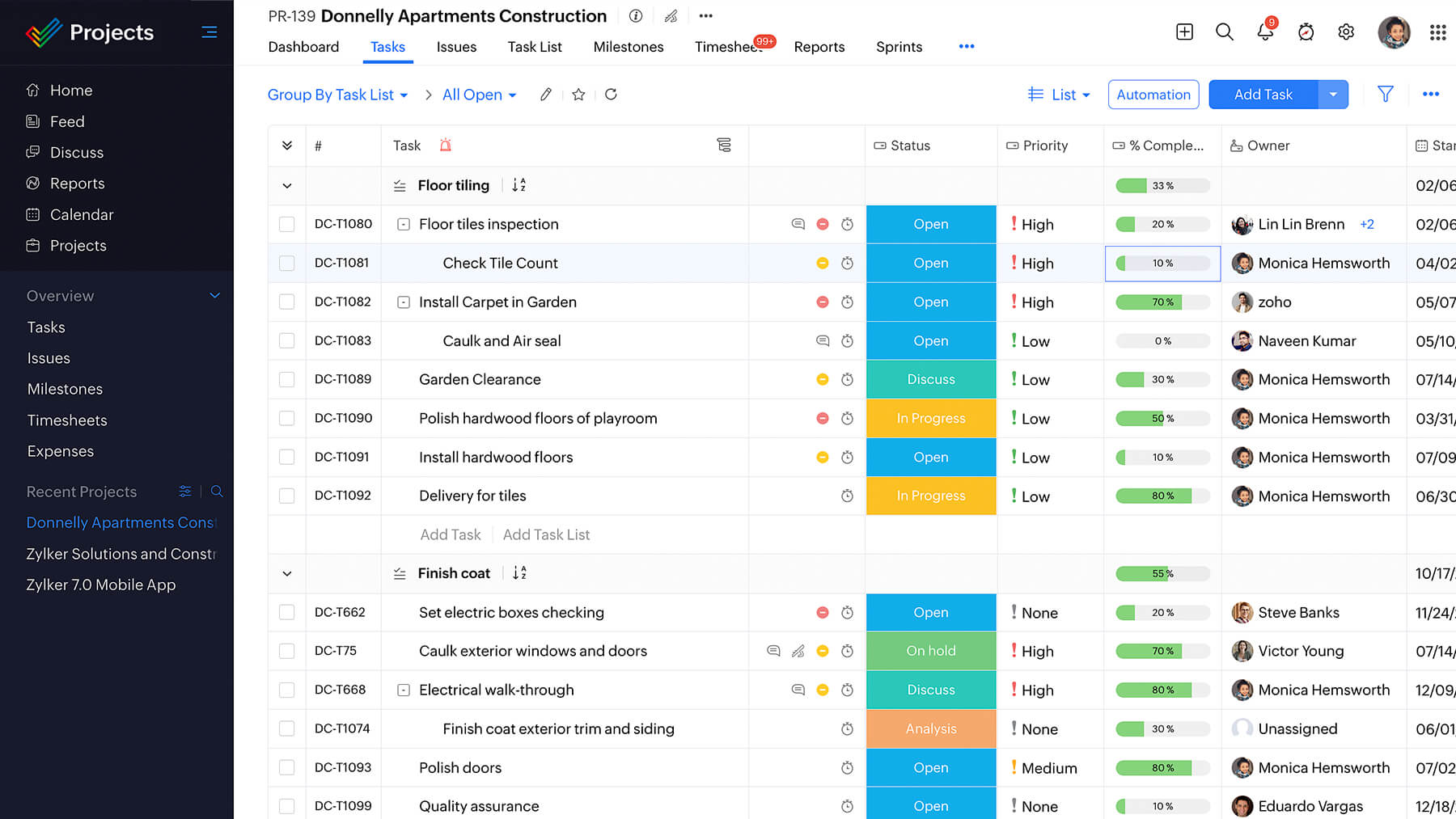
Image source: zoho.com
Feature reviews of Zoho Projects
Zoho Projects is built around structured project planning and detailed execution tracking. Its core features focus on breaking work into and visualizing progress over time. These tools are designed for teams that value predictability, defined workflows, and clear sequencing. Understanding how each feature works in practice helps teams assess whether Zoho Projects matches their daily project needs.
Task hierarchies, milestones, and dependencies
Zoho Projects allows teams to organize work using tasks, subtasks, and task lists, creating clear hierarchies within each project. Milestones help define major delivery points and provide checkpoints for progress tracking. Dependencies ensure tasks follow a logical order and prevent work from starting prematurely. This structure supports complex project plans. However, managing deep hierarchies requires consistent upkeep from project managers.
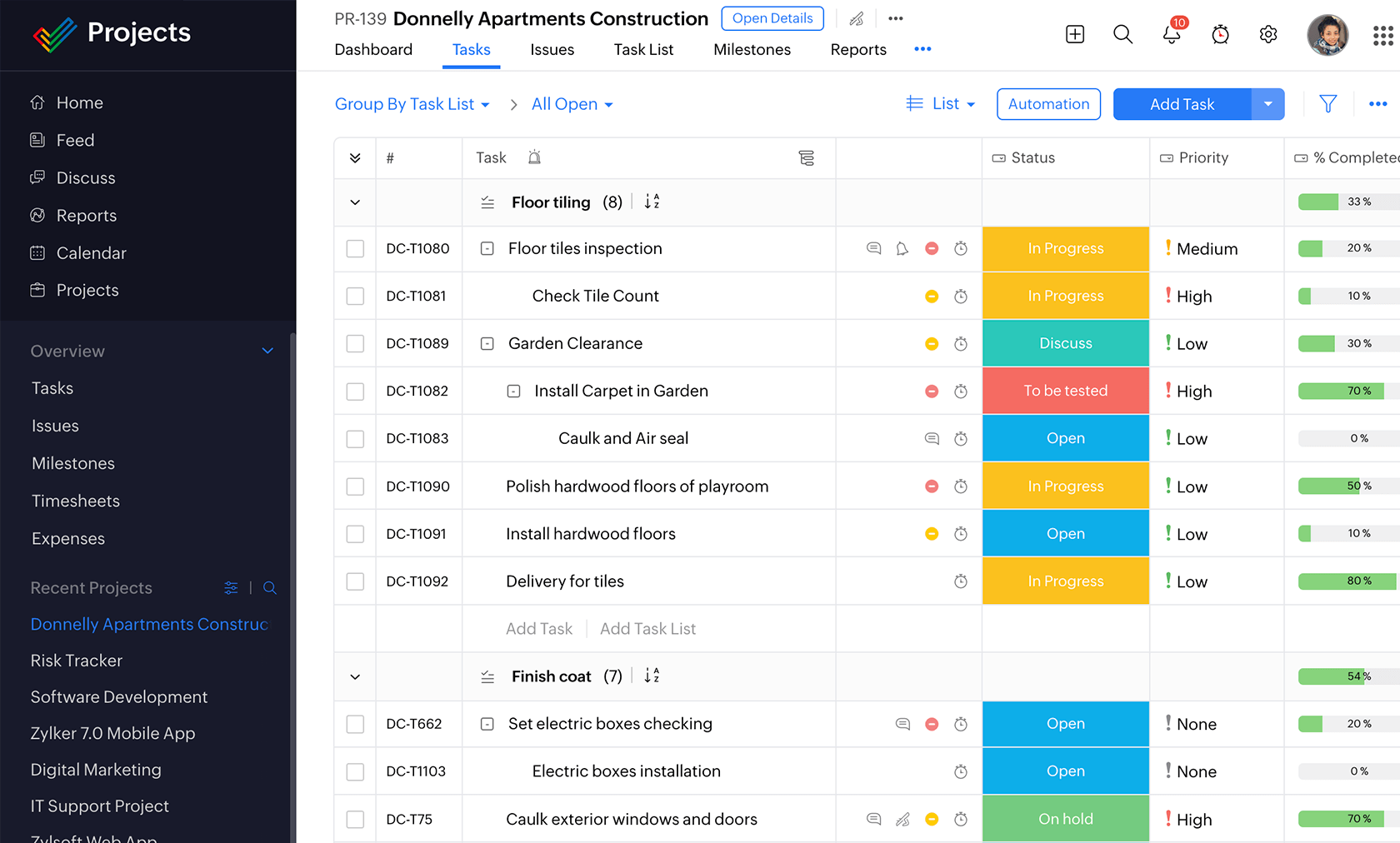
Image source: zoho.com
Gantt charts and timeline-based planning
are a central planning tool in Zoho Projects, offering a visual view of task schedules and dependencies. Teams can adjust timelines by dragging tasks and immediately see the impact on overall schedules. This is especially useful for long-term planning and stakeholder updates. Gantt charts work best for structured projects. They are less effective for fast-changing or informal workflows.
Workload views and resource allocation
Zoho Projects includes workload views that show how tasks are distributed across team members. Managers can identify overutilized or underutilized resources and rebalance work accordingly. This helps prevent burnout and missed deadlines. Resource allocation tools are useful for planning capacity. Accuracy depends on tasks being updated regularly.
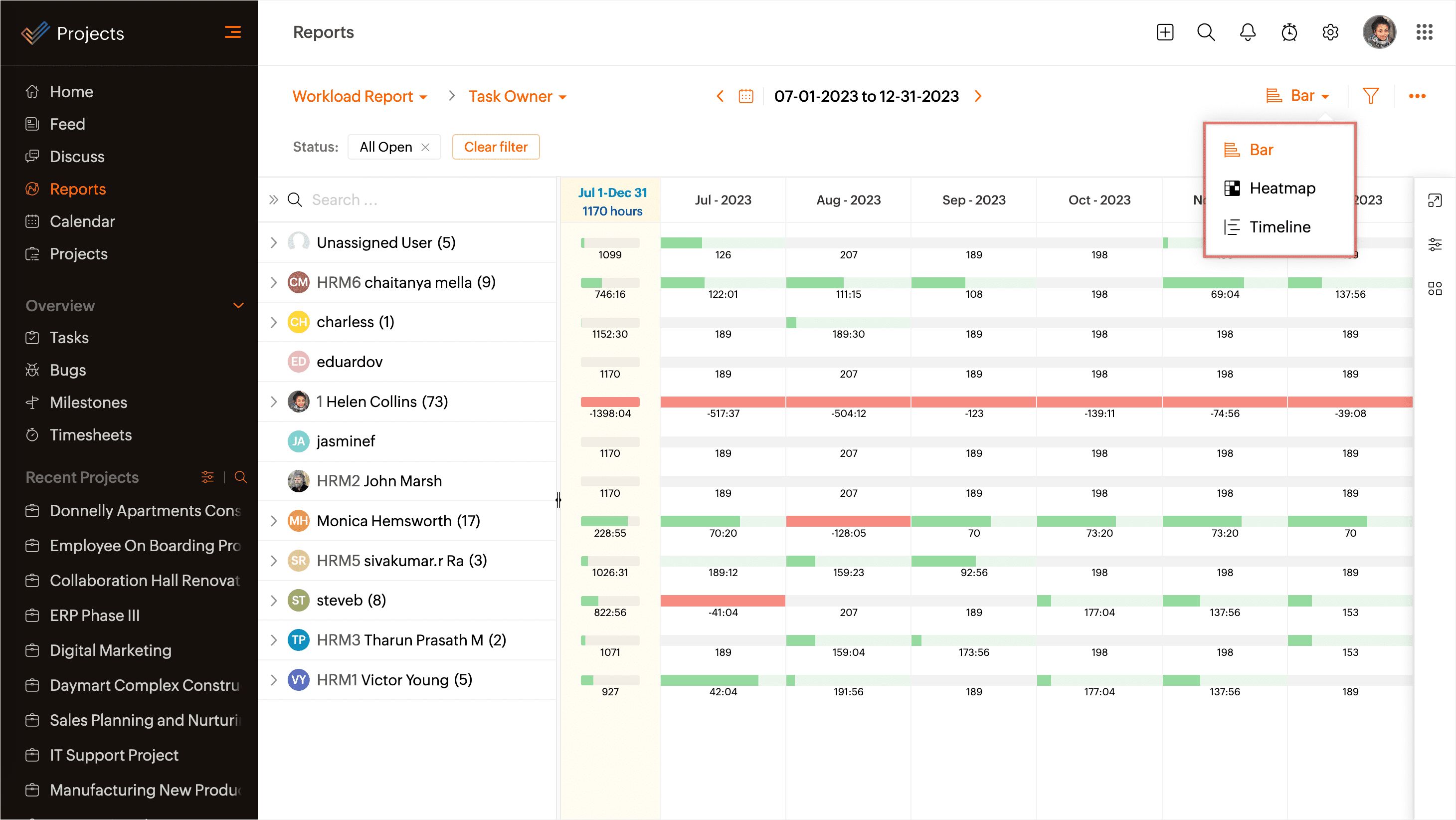
Image source: zoho.com
Time logs and timesheet tracking
Time logging allows team members to record hours spent on tasks and projects. Timesheets provide visibility into effort distribution and support billing or internal reporting. This feature is particularly valuable for agencies and service-based teams. Reports can be generated to analyze productivity trends. Consistent usage is required for reliable insights.
Custom workflows and task statuses
Zoho Projects enables teams to customize task statuses to reflect their internal processes. Workflows can be designed to match approval steps or delivery stages. This flexibility helps teams align the tool with existing methods. Customization improves clarity and accountability. However, initial setup requires planning and administrative effort.
Zoho Projects pricing explained in real-world terms
Zoho Projects pricing is designed to scale gradually as teams move from basic task tracking to advanced project governance. Each plan unlocks a different level of , reporting, and resource management. Understanding how these tiers work in practice helps teams avoid overpaying or underutilizing features. Real-world value depends on team size, project complexity, and combination needs. This breakdown explains what each plan delivers beyond the price tag.
Information source: zoho.com
Update time: 2025-12-18
Note: Pricing and plan details reflect publicly available data as of the update date and may vary based on region, billing cycle, and number of agents.
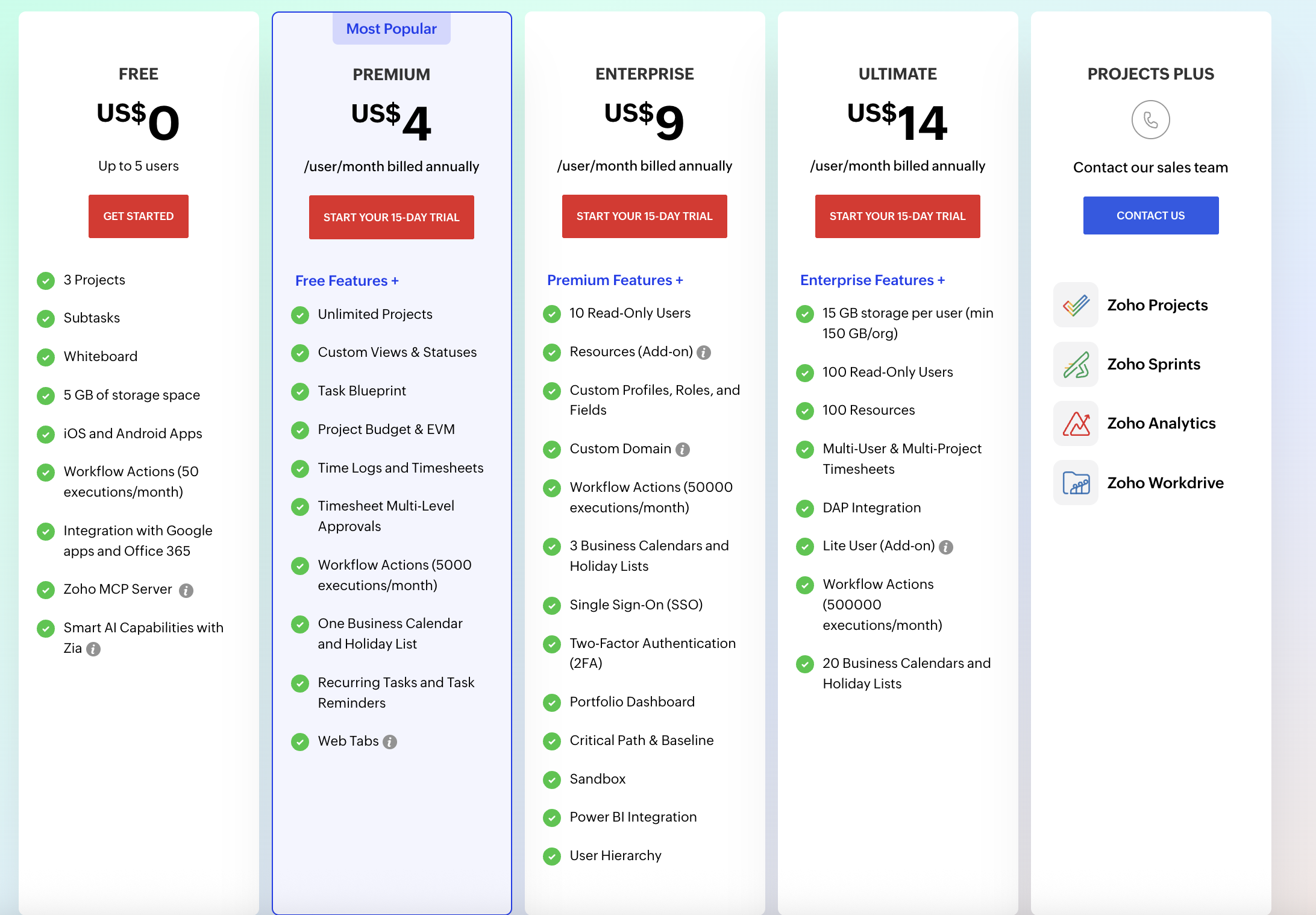
Image source: zoho.com
Zoho Projects Reddit feedback: Voices from forums
Users on Zoho Projects Reddit often praise the platform for its extensive feature set and integration within the broader Zoho ecosystem. Many contributors highlight the value of detailed , Gantt charts, and for structured project work. Teams that already use Zoho CRM, Zoho One, or Zoho People report that smooth data flow between systems improves overall visibility. Positive feedback also frequently notes that Zoho Projects provides strong reporting capabilities and customizable views once configured properly, making it a reliable choice for planning and governance.
At the same time, Zoho Projects Reddit threads also reflect recurring complaints related to usability and real-time collaboration. Several users mention that the learning curve can be steep, especially for teams transitioning from simpler tools, and that onboarding requires effort. Collaboration features, such as in-tool discussions and document linkage, are seen as limited compared to modern workspaces, often requiring external messaging or file apps to fill gaps. As a result, some teams actively search for a that offers tighter collaboration and execution visibility.
Pros and Cons of Zoho Projects
Zoho Projects offers a designed to support structured project planning and delivery. Like any project management platform, it comes with clear strengths as well as trade-offs that affect day-to-day usage. Evaluating both pros and cons helps teams understand where Zoho Projects performs best and where limitations may appear as workflows evolve. This balanced view supports more informed decision-making.
Pros
- Strong structure for traditional project management: Zoho Projects excels at organizing work through milestones, task hierarchies, dependencies, and timelines. This structure helps teams manage complex projects with clear sequencing and accountability. It is especially effective for long-term, deadline-driven initiatives where planning accuracy matters.
- Powerful Gantt charts and reporting capabilities: The platform's Gantt charts, workload views, and dashboards provide deep visibility into schedules and progress. Project managers can forecast delays, rebalance resources, and report status to stakeholders with confidence. These tools support governance and decision-making.
- Deep combination with the Zoho ecosystem: Seamless connections with Zoho CRM, Zoho One, and Zoho People make Zoho Projects more valuable for teams already using Zoho products. Data flows smoothly across tools, reducing duplication. This ecosystem approach strengthens operational consistency.
- Competitive pricing for feature depth: Compared to many , Zoho Projects offers robust functionality at a relatively affordable price. Teams gain access to advanced planning, , and automation without enterprise-level costs. This makes it attractive for growing organizations.
Cons
- Steep learning curve and heavy configuration: Zoho Projects requires time to set up and learn, especially for new users or non-technical teams. Its depth can feel overwhelming at first. Without proper onboarding, adoption may be slow and inconsistent across teams.
- Limited and execution flow: While task comments and attachments exist, real-time communication and document collaboration feel disconnected. Teams often rely on external chat or meeting tools. As work becomes more collaborative, this separation can reduce execution speed and clarity.
- Fragmented architecture and information silos: Even though Zoho offers many apps, they often feel like separate products acquired over time rather than a single, unified platform. This leads to a lack of a common database or user interface across the suite, which can create information silos and communication issues if the integration is not perfectly set up.
- Limited "out-of-the-box" functionality: Many users feel that Zoho's native features are too limited for complex needs. To unlock its full power, you are often required to learn deluge (Zoho's proprietary scripting language) to write custom functions and automate workflows, which adds a significant technical burden to the team.
- Inconsistent app quality: Within the Zoho ecosystem, quality varies widely across applications. While some apps are robust and modern, others feel like they were "developed in the 90s" and haven't been updated since, making for a disjointed user experience when switching between projects, crm, and other tools.
While Zoho Projects offers deep functionality, the reality for many teams is a steep learning curve, fragmented apps that feel like separate products, and a heavy reliance on complex scripting just to get basic automation working. This lack of a unified flow often forces people to jump between disconnected tools, creating information silos and slowing down real-time collaboration. If you're tired of wrestling with a "90s-style" interface and technical hurdles, Lark offers a much more natural way to work by pulling your chat, meetings, and project data into a single, seamless experience.
Explore a more connected project execution approach
Meet Lark: A modern choice for project management and collaboration
is a unified work platform that brings , team communication, and documentation into a single environment. Instead of separating chat, tasks, meetings, and files across different tools, as Zoho Projects often does. Lark keeps everything connected in one place. This design helps teams directly alongside discussions, reducing context switching and making collaboration more natural for fast-moving teams.
A flexible command center for managing projects
Zoho Projects relies heavily on fixed structures like milestones and task lists. In contrast, gives teams the freedom to design project systems that match how they actually work. Using a no-code database approach, teams can define their own records and fields such as assignees, dates, progress indicators, and linked references to reflect real project needs.
What sets Lark apart is how easily this data can be visualized. The same project information can be viewed instantly as a grid, Kanban board, calendar, or Gantt-style timeline, without rebuilding anything. This makes it easier for different stakeholders, contributors, managers, or leaders to view the same project from perspectives that matter to them. 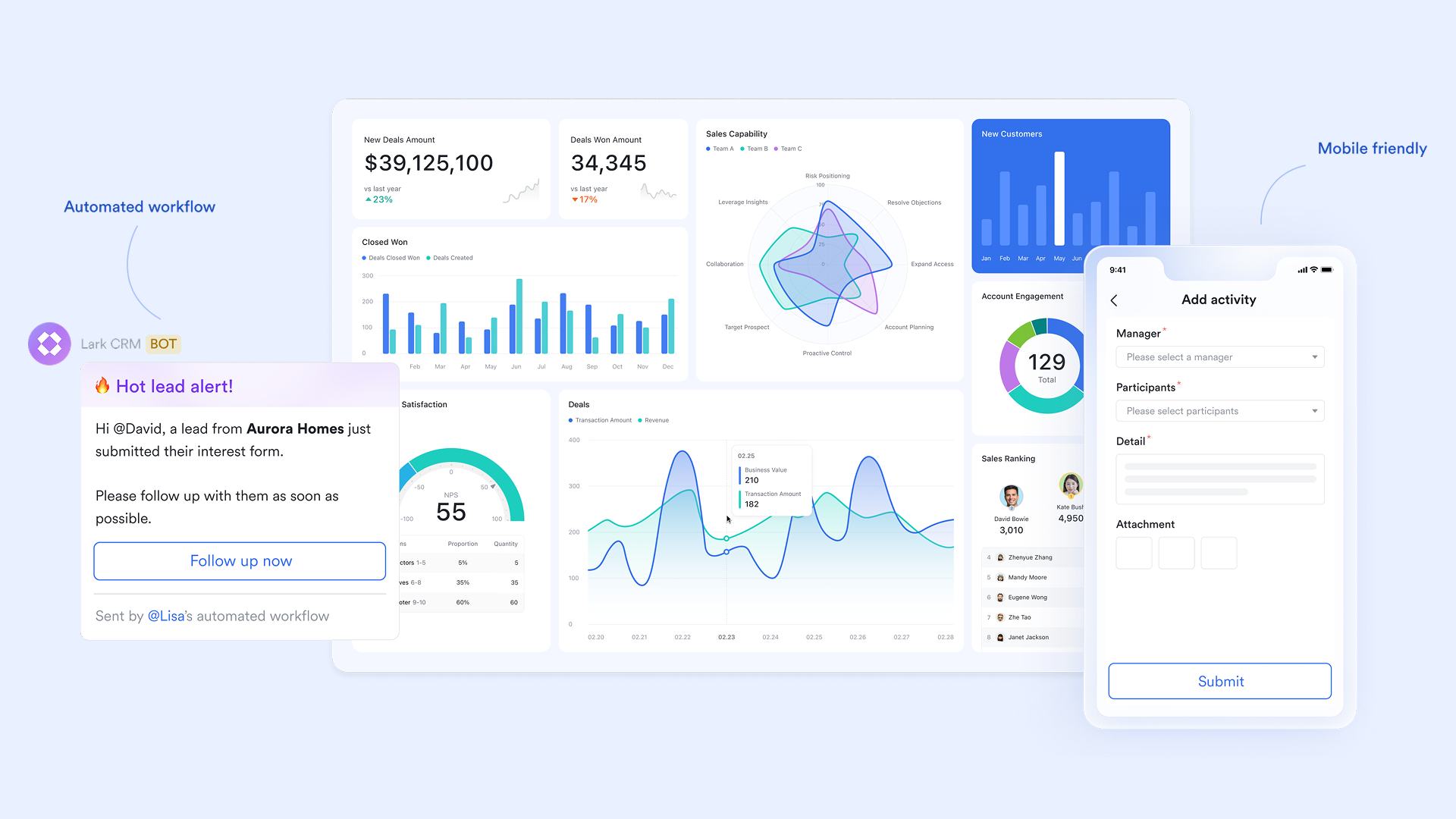
Workflow automation that reduces manual coordination
includes built-in automation that helps teams move work forward without constant follow-ups. Teams can define triggers such as a status change or record update, and automatically run actions like sending notifications, creating tasks, or updating related records.
Unlike simpler rule-based automations, Lark Base workflows support conditional logic and formulas. This allows teams to handle different project scenarios dynamically, calculate values like total effort or cost, and keep data consistent without manual input. Compared to Zoho's more segmented automation approach, Lark's workflows operate directly within the same workspace where projects, chats, and tasks already live. 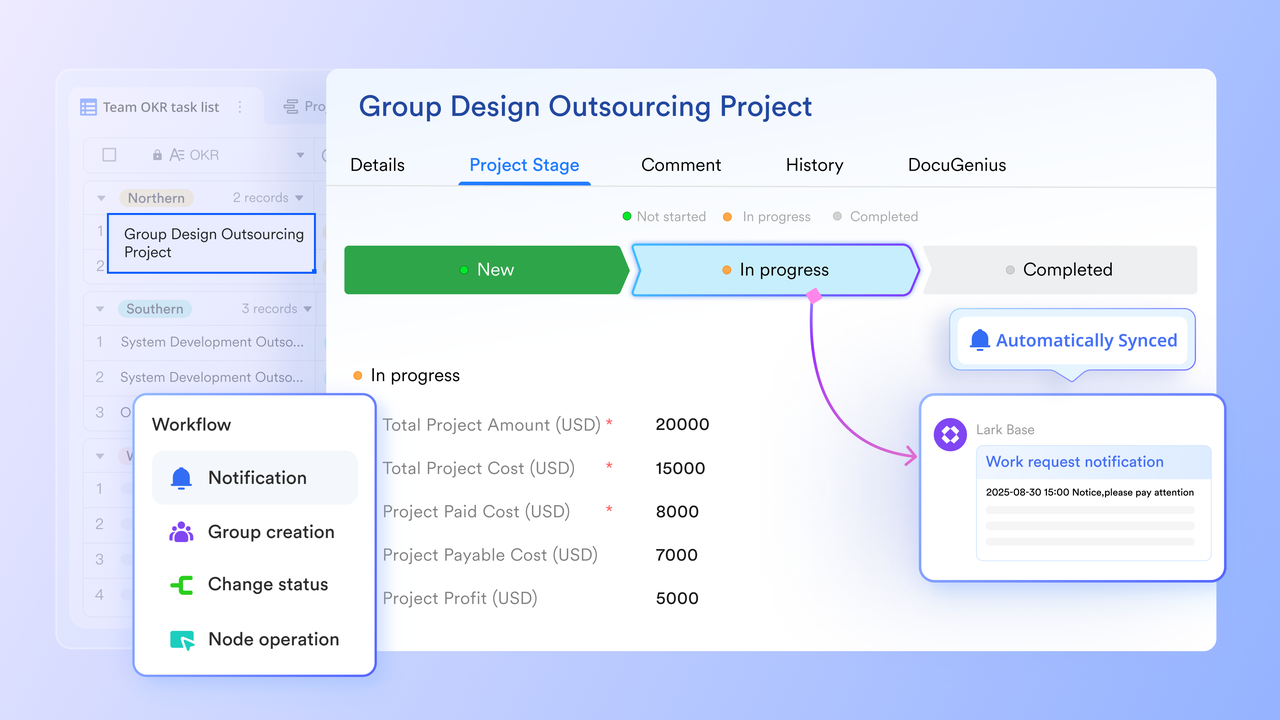
Clear task ownership from planning to delivery
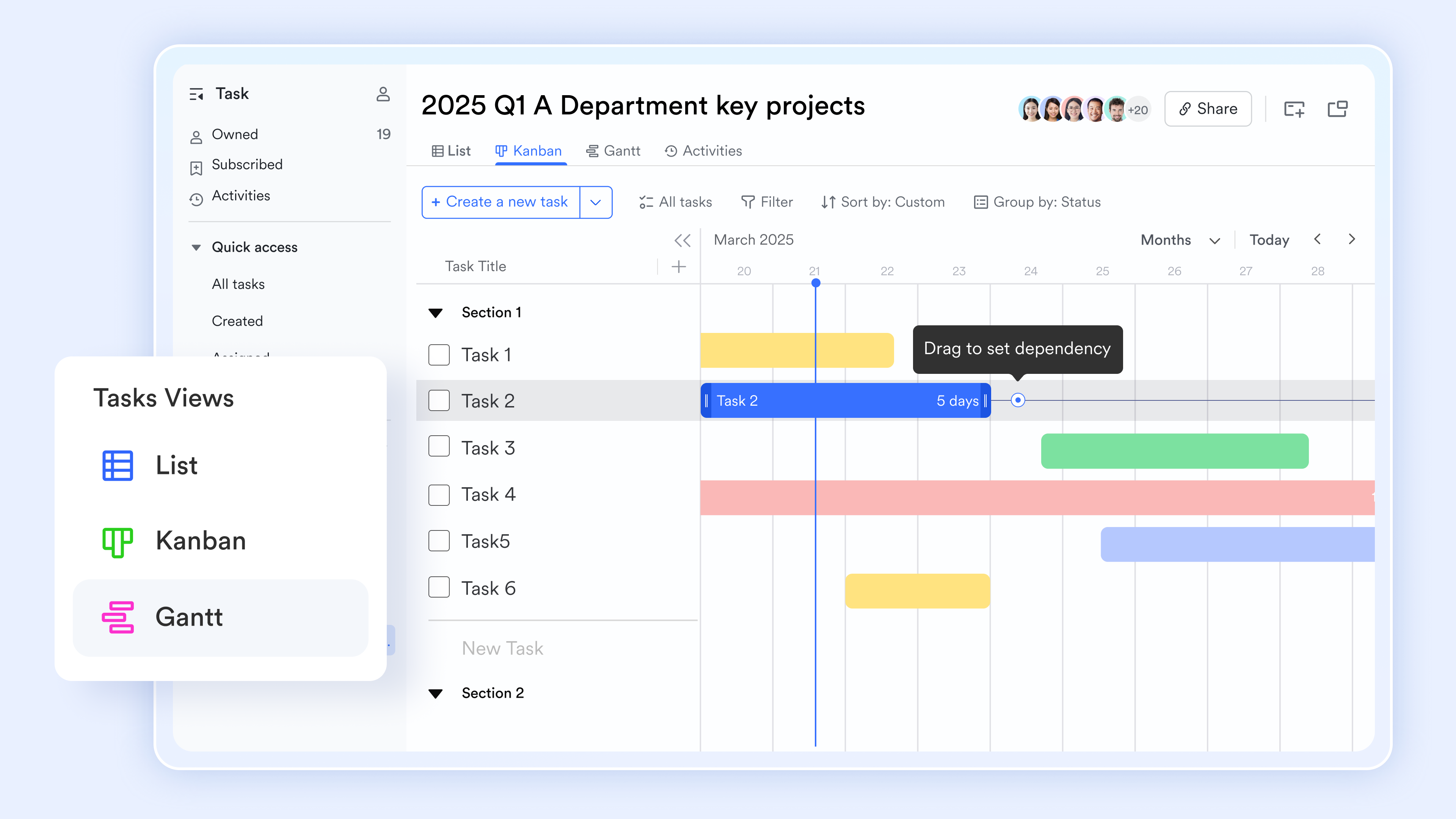
While Zoho Projects emphasizes timelines, Lark Tasks focuses on execution clarity. Tasks can be broken down into sub-tasks, assigned to specific owners, and tracked with priorities and due dates. Subscribers can follow tasks to stay informed without being responsible for execution. Task progress automatically reflects across related views such as , Kanban, and grid view—so teams always see the current state of work. This tight connection between tasks and project data helps close the gap between planning and actual delivery.
Documents that work like live project spaces
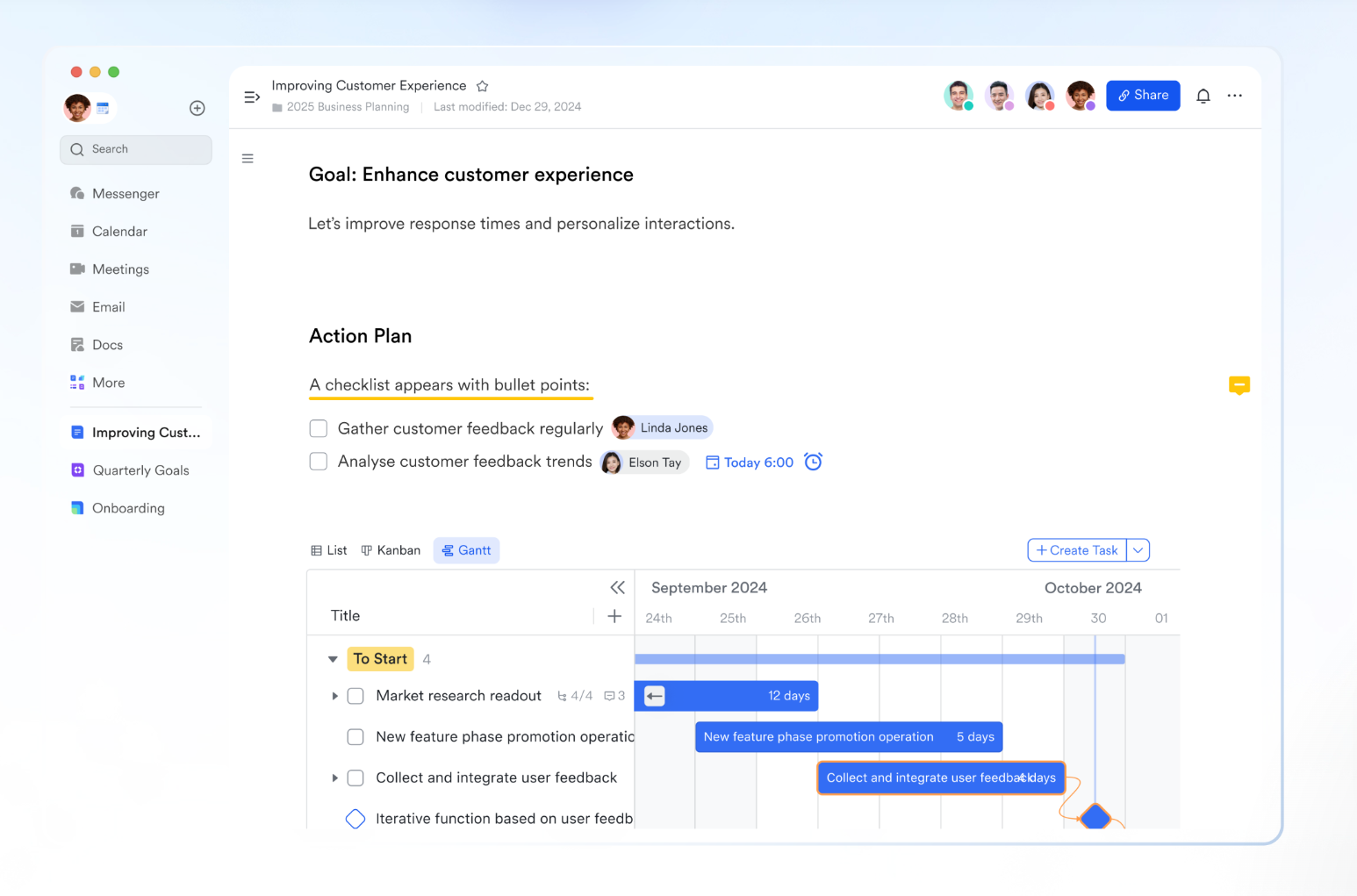
functions as more than a text editor. Documents can include interactive elements such as tables, checklists, polls, embedded timelines, videos, and code blocks-turning each doc into a live project workspace rather than a static file.
Beyond these basic building blocks, you can use "@" mentions to link specific team members, other documents, or even directly within the text, ensuring that the right people and context are always just a click away. For data-heavy projects, you can insert Lark Base views or charts that update in real-time, allowing stakeholders to see live progress without ever leaving the document.
Conversations that stay connected to work
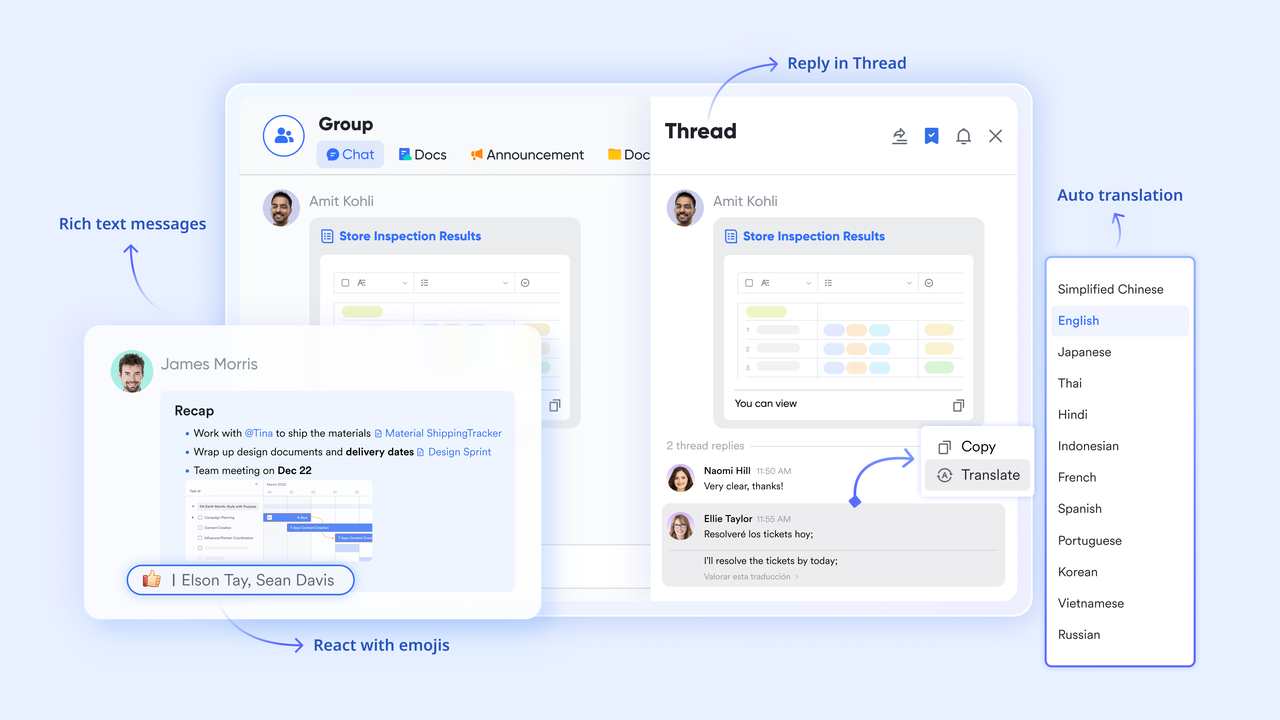
is designed to keep discussions tied to action. Messages can be turned into tasks, polls can be launched directly in chats, and documents or project records can be shared without losing context. Threaded conversations help keep complex discussions organized, while priority notifications ensure urgent issues reach the right people quickly. Compared to Zoho's split between chat and project tools, Lark's communication layer acts as the connective tissue between people, tasks, and data, so nothing important gets buried or disconnected.
Automatic meeting notes that drive follow-ups
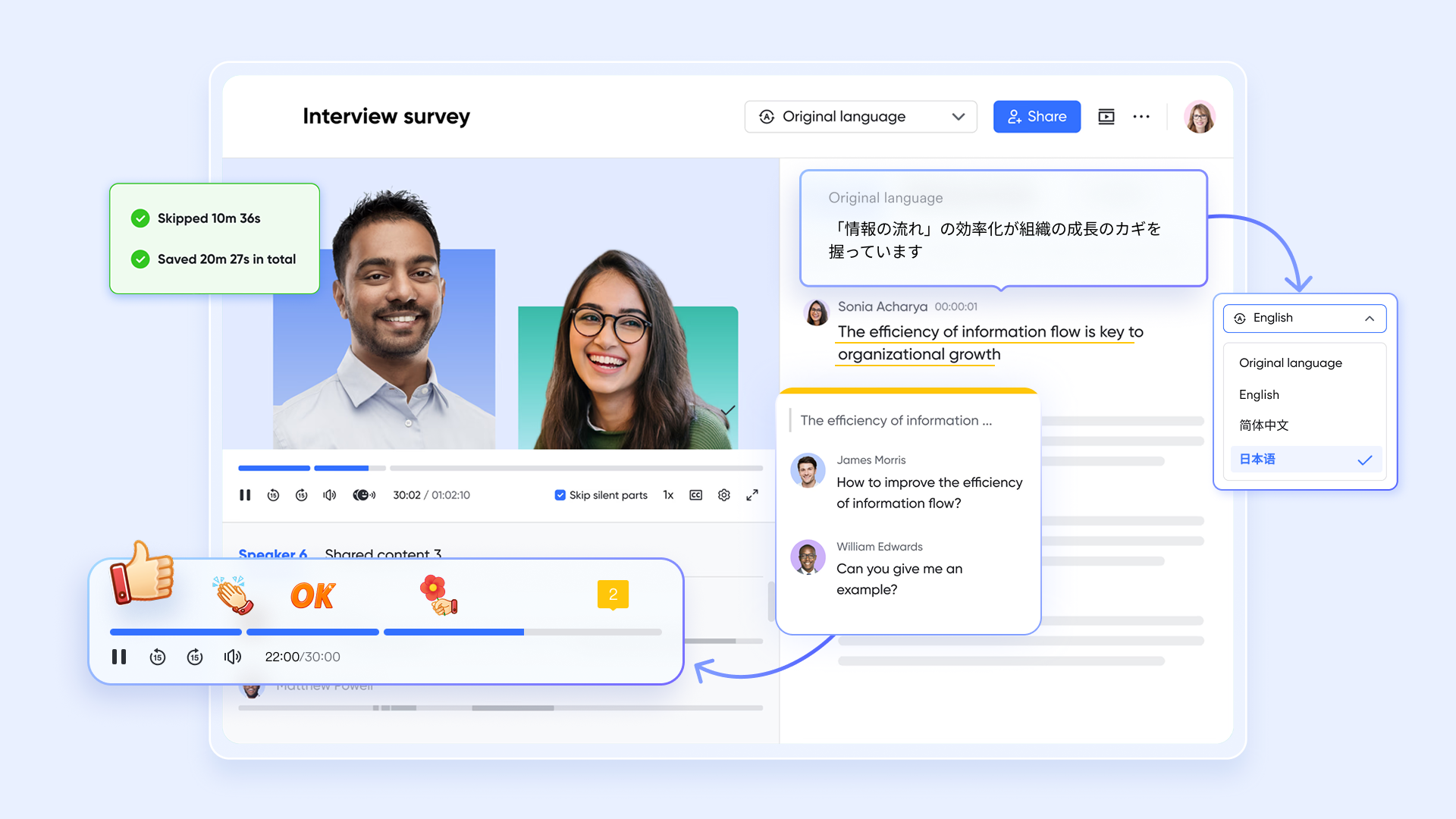
and reduce the burden of manual note-taking. After you hit the recording button, meetings can be recorded with one click, generating searchable transcripts that distinguish speakers. During live meetings, can produce real-time summaries and highlight action items as discussions unfold.
After the meeting, notes and recordings can be attached to the calendar events and shared with participants, ensuring everyone stays aligned even if they couldn't attend. This combined approach goes beyond Zoho's more siloed meeting tools and helps teams turn conversations into documented outcomes faster.
:
- Starter plan: Free forever plan that includes 11 powerful tools for up to 20 users. It also comes with 100GB of storage, 1000 automation runs, AI translations, and more.
- Basic plan: $6/user/month (billed annually) for up to 500 users. It includes everything in Starter plus group calling for up to 500 attendees, 5TB of storage, 1000 automation runs, and more. For more details, please .
- Pro plan: $12/user/month (billed annually) for up to 500 users. It includes everything in Basic plus group calling for up to 500 attendees, 15TB of storage, 50,000 automation runs, and more.
- Enterprise plan: for custom pricing. Supports unlimited users and includes even more automation runs and advanced security, compliance, and management features.
For small teams with simple communication needs

18 months message history
1000 Base automation runs/month
2000 rows per table in Base
Most POPULAR
For companies with comprehensive collaboration and management needs
Unlimited message history
500-participant video meetings
50k Base automation runs/month
20k rows per table in Base
For large companies with advanced security and organizational management needs
Get a personalized demo and pricing
Unlimited message history
500-participant video meetings
15 TB storage + 30 GB storage/user
500k Base automation runs/month
50k Base automation runs/month
Most POPULAR
For companies with comprehensive collaboration and management needs
Unlimited message history
500-participant video meetings
50k Base automation runs/month
20k rows per table in Base
Zoho Projects vs Lark: Key differences that matter
Choosing between Zoho Projects and Lark depends on whether teams prioritize structured planning or connected execution. Zoho Projects is built around traditional project management principles. Lark approaches work as , documents, and tasks. The differences become more visible as teams scale. Understanding these contrasts helps teams select tools aligned with how they actually work.
Who should choose Zoho Projects?
Zoho Projects is a strong fit for teams that rely on detailed planning, formal timelines, and milestone-based delivery. Traditional project managers who prefer , structured task hierarchies, and predefined workflows will feel comfortable using it. Teams already invested in the Zoho ecosystem benefit from seamless combinations with Zoho CRM, Zoho One, and Zoho People. Agencies and service organizations that track time and bill clients also gain value from its built-in timesheets and reporting. Zoho Projects works best when project structure and governance are the primary focus rather than rapid collaboration.
Who benefits more from Lark?
Lark benefits teams that need execution, communication, and collaboration to happen in one connected workspace. Cross-functional teams managing ongoing work across sales, operations, and delivery gain visibility when tasks, documents, chats, and meetings stay linked. Lark suits teams that move quickly and prefer fewer tools rather than rigid planning layers. As projects become more dynamic, ownership and follow-ups remain clearer. For teams scaling beyond , Lark supports collaboration without added complexity.
Conclusion
Zoho Projects delivers strong value for teams that prioritize structured , detailed timelines, and governance. Its task hierarchies, Gantt charts, and reporting tools make it suitable for traditional project management environments. Teams already using Zoho CRM or Zoho One as their primary gain additional efficiency through the ecosystem combination. For well-defined projects with predictable workflows, Zoho Projects remains a reliable option.
However, as work becomes more collaborative and less linear, planning tools alone are often not enough. Teams increasingly need conversations, documents, tasks, and decisions to stay connected in real time. This is where platforms like add value by turning execution into a shared, visible process. Instead of managing work across multiple disconnected tools, teams gain clarity through one unified workspace.
Simplify project execution across your teams
FAQs
Can Zoho Projects be used effectively without other Zoho apps?
Zoho Projects can operate as a standalone project management tool with core capabilities like task tracking, Gantt charts, and reporting. For teams focused on structured project delivery, this is often sufficient. However, without Zoho CRM or Zoho One, workflows around documentation, shared context, and approvals can feel disconnected. Knowledge sharing is limited to task-level information rather than a centralized knowledge base. Teams often later introduce platforms like Lark to create a more searchable workspace with structured documentation. How difficult is it to migrate projects from Zoho Projects to another platform like Lark?
difficulty depends on the complexity of task hierarchies, timelines, and attached files. Projects with deep dependencies require careful mapping to preserve content hierarchy and ownership. Many teams choose a phased approach, keeping archived projects in Zoho Projects while moving active work gradually. Documentation and comments may need restructuring into a shared context. Lark supports incremental migration by turning live projects into connected records.
Does Zoho Projects support cross-department workflows outside project teams?
Zoho Projects is primarily designed for project-centric teams rather than organization-wide collaboration. Cross-department workflows often rely on combined or separate Zoho tools. This can fragment communication and dilute shared context across teams. Knowledge tends to stay locked within individual projects instead of a unified content structure. Teams needing broader visibility often explore platforms like Lark that combine execution with organization-wide.
What are the long-term costs of scaling Zoho Projects across multiple teams?
User-based pricing scales predictably, but long-term costs include training, customization, and . As more teams join, maintaining consistent workflows and documentation becomes harder. Tool sprawl may increase as teams add separate chat, file storage, and knowledge base tools. Managing a fragmented content hierarchy adds overhead. Some organizations adopt Lark to unify tasks, documents, and knowledge in one searchable workspace.
Is Zoho Projects suitable for non-technical or client-facing teams?
With onboarding, non-technical users can use Zoho Projects for task updates and tracking. However, the interface and depth can feel heavy for client-facing roles that need quick access to shared documentation. Collaboration lacks a natural Wiki or structured knowledge base for client information. Content often lives inside tasks rather than reusable documents. Lark provides a more way to manage client-facing knowledge and shared context.
Related reading


















