Choosing the right CRM platform today goes far beyond tracking leads and closing deals. Modern teams expect their CRM to connect sales data with collaboration, automation, reporting, and daily execution. That's why comparisons like Bitrix24 vs Salesforce are so common. Both platforms aim to manage customer relationships effectively, but they take very different approaches to doing so. Bitrix24 focuses on bundling CRM with broader business tools, while Salesforce is widely known for its depth in enterprise-grade CRM.
In this guide, we compare Bitrix24 vs Salesforce across features, usability, pricing, scalability, and real-world fit to help teams understand which platform aligns best with their size, complexity, and growth goals.
Bring sales, chat, and workflows together
What Bitrix24 is designed to do
Bitrix24 is built as an that combines CRM, collaboration, communication, and project management in a single platform. Unlike Salesforce, which focuses primarily on CRM, Bitrix24 emphasizes accessibility for small and mid-sized teams that want multiple tools without juggling separate applications. Its CRM capabilities cover lead and , contact tracking, pipelines, and basic automation, making it suitable for teams that need a practical, easy-to-deploy solution.
In addition, Bitrix24 offers features such as document storage, task management, and a customer portal, giving businesses a unified environment for internal operations and client interactions. When comparing Bitrix24 CRM vs Salesforce, Bitrix24 offers a more predictable pricing model and bundled features.
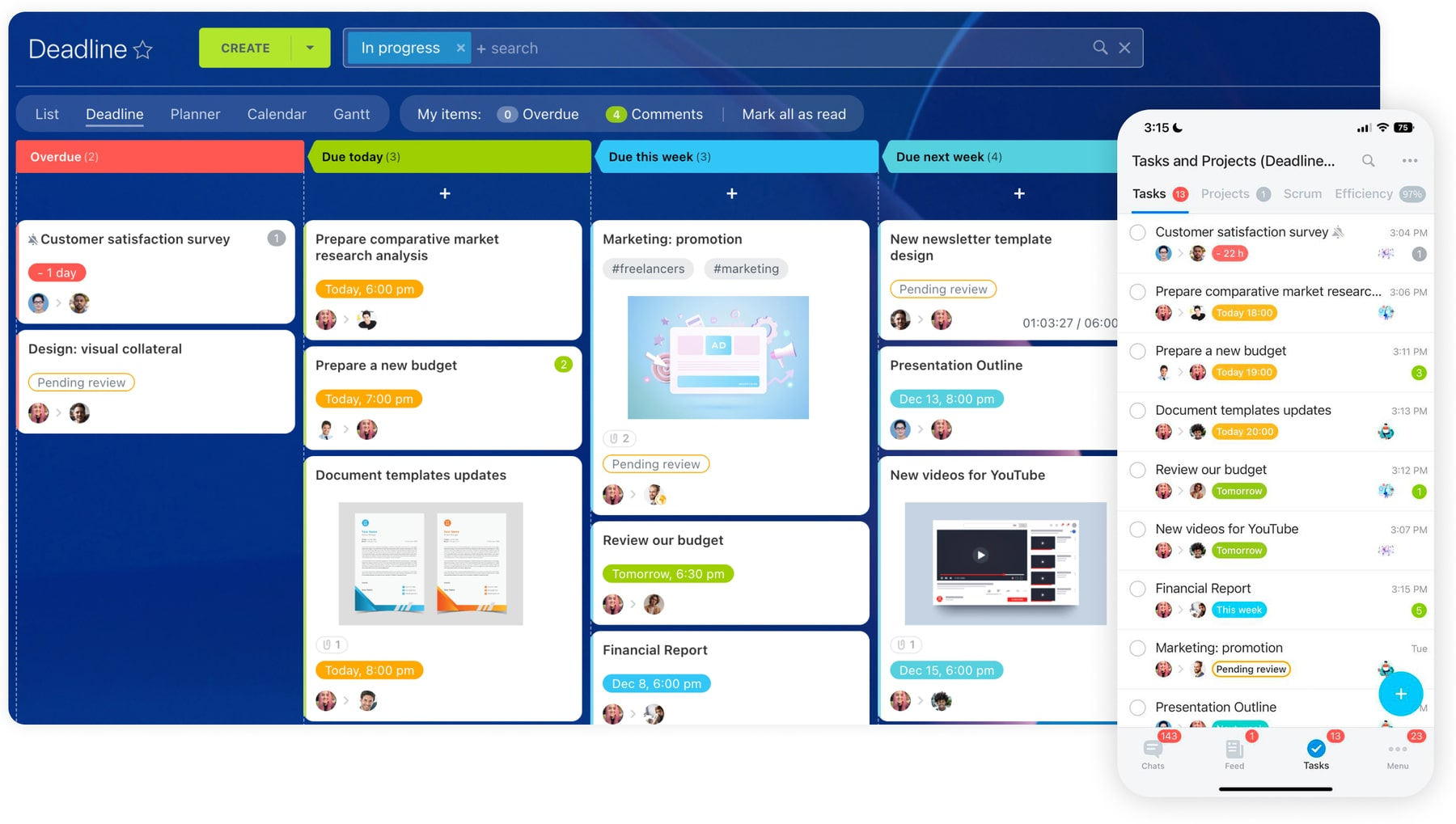
Image source: bitrix24.com
What Salesforce is built for
Salesforce is designed as a dedicated, enterprise-grade , focused on helping organizations manage complex sales processes, customer relationships, and business data at scale. Unlike Bitrix24, which combines CRM with collaboration and communication tools, Salesforce prioritizes depth and flexibility in CRM. It offers advanced , customizable pipelines, detailed contact and account hierarchies, and automation through Flow and Apex.
For teams evaluating Bitrix24 vs Salesforce, Salesforce is ideal for organizations that need precise control over sales workflows, forecasting, and analytics. Its Salesforce Sales Cloud vs Bitrix24 comparison often highlights the platform's ability to support multi-region teams, global customer bases, and enterprise-level reporting. Salesforce also provides advanced features like integration with external tools, complex permission structures, and highly configurable dashboards.
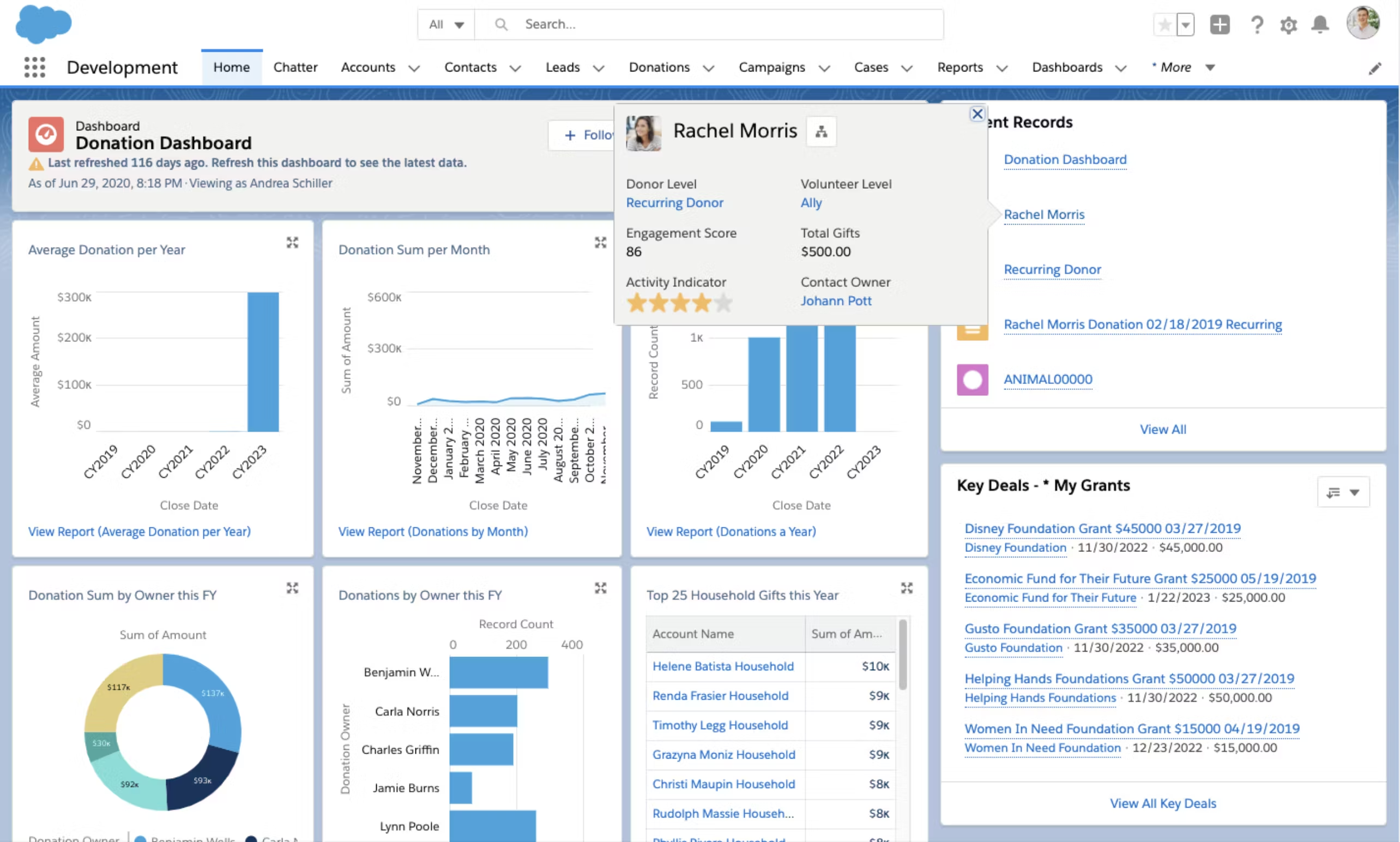
Image source: salesforce.com
Bitrix24 CRM vs Salesforce CRM: Core capability comparison
Bitrix24 is positioned as a broad business platform that covers communication, , and collaboration in addition to CRM. Salesforce, on the other hand, is primarily used as a , with many products and plans built around sales, service, and customer data. While Salesforce offers a wide range of plans and clouds, this comparison focuses only on core CRM capabilities, since CRM is the main reason most teams evaluate Salesforce.
Usability and setup effort: Salesforce Sales Cloud vs Bitrix24
When comparing Salesforce Sales Cloud vs Bitrix24, usability and setup are key differentiators. Bitrix24 is designed for speed and simplicity. Teams can set up the CRM quickly, , manage leads, and track contacts with minimal administrative effort. Its intuitive interface makes onboarding easier, especially for small and mid-sized teams that want to adopt CRM alongside collaboration and communication tools.
Salesforce, in contrast, offers unparalleled depth and customization, but that comes with a steeper learning curve. Implementing Salesforce CRM vs Bitrix24 often requires dedicated admins or technical expertise to configure objects, workflows, and dashboards. While this setup effort enables highly and complex reporting, smaller teams may find it time-consuming.
Ultimately, Bitrix24 prioritizes quick deployment and ease of use, whereas Salesforce is built for organizations that need advanced configuration, enterprise-level control, and scalable processes across departments or regions.
Customer portal experience: Bitrix24 vs Salesforce
The customer portal experience is an important factor when evaluating Bitrix24 vs Salesforce, as it directly impacts and support. Bitrix24 offers a built-in customer portal that allows clients to track tasks, submit requests, and communicate with teams within the same workspace. This approach makes it easy for small and mid-sized teams to provide visibility and self-service options without adding extra tools.
Salesforce, on the other hand, provides a more advanced portal experience through its Customer Community and Service Cloud offerings. While powerful, Salesforce vs Bitrix24 customer portal setups often require configuration and ongoing administration to manage permissions, workflows, and integrations. Salesforce portals excel in enterprise scenarios with complex account hierarchies, multiple regions, and detailed case management, but smaller teams may find the setup effort significant.
In short, Bitrix24 focuses on simplicity and ease of access for clients, whereas Salesforce prioritizes scalability, customization, and .
Pricing comparison: What you pay vs what you unlock
When comparing Bitrix24 vs Salesforce, pricing isn't just about the number on a page, it's about what you actually get for that cost and how each platform scales as your team grows.
Bitrix24 pricing overview
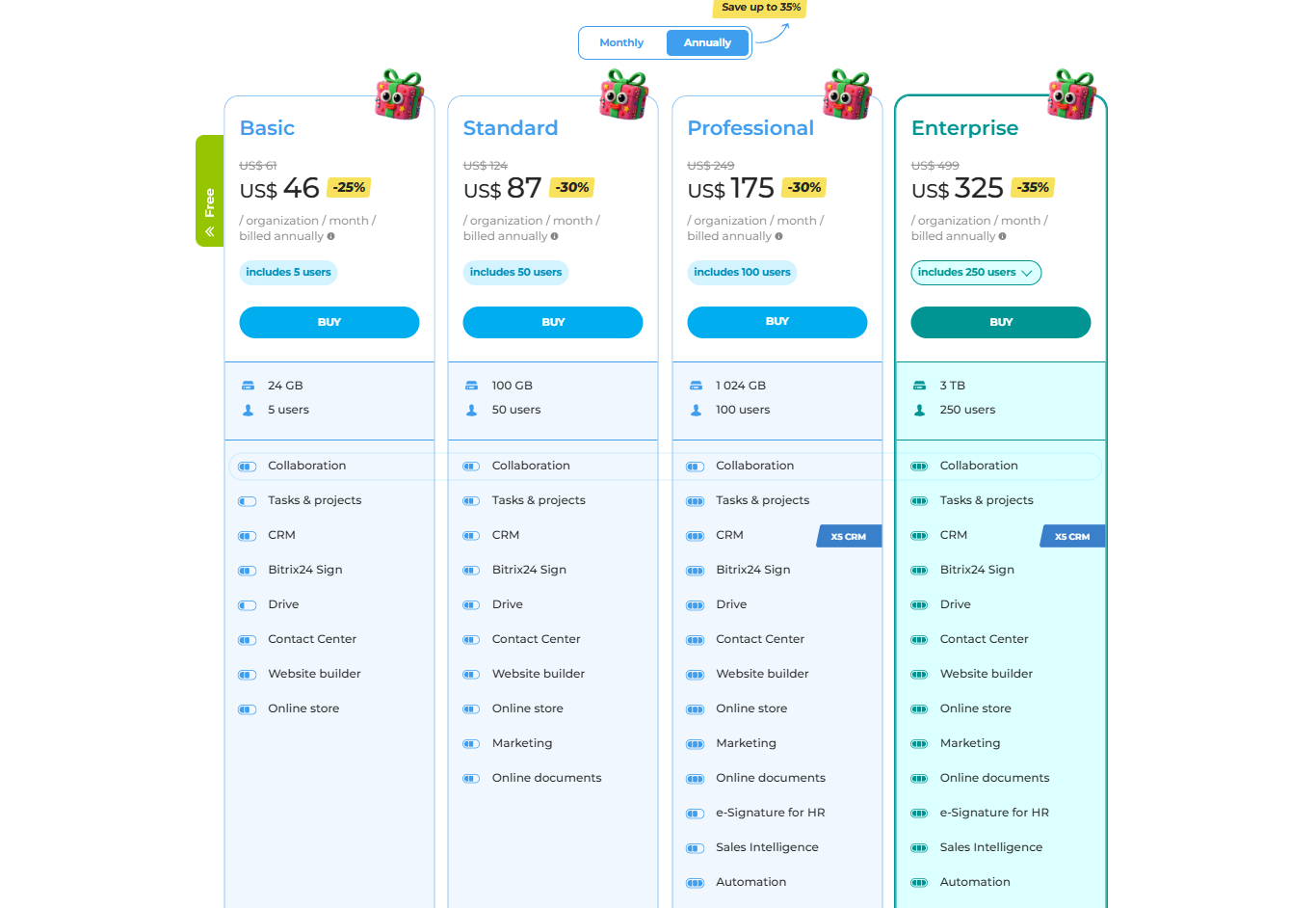
Understanding pricing is key when comparing Bitrix24 vs Salesforce, as the cost structure directly affects ROI and scalability. Bitrix24 offers bundled plans that include CRM alongside collaboration, communication, and . This all‑in‑one approach can deliver strong value for small to mid‑sized teams. In the section below, we break down what you pay for and what you unlock.
Information source: bitrix24.in
Update time: 2025-12-22
Note: Pricing and plan details reflect publicly available data as of the update date and may vary based on region, billing cycle, and number of agents.
Salesforce Sales Cloud pricing overview
Pricing is a critical factor in any Salesforce vs Bitrix24 comparison, especially as costs can scale with users and features. Salesforce Sales Cloud pricing reflects its enterprise‑grade CRM capabilities and customization depth. Plans vary significantly based on functionality and deployment needs. Below, we outline key pricing tiers and what each unlocks for sales teams.
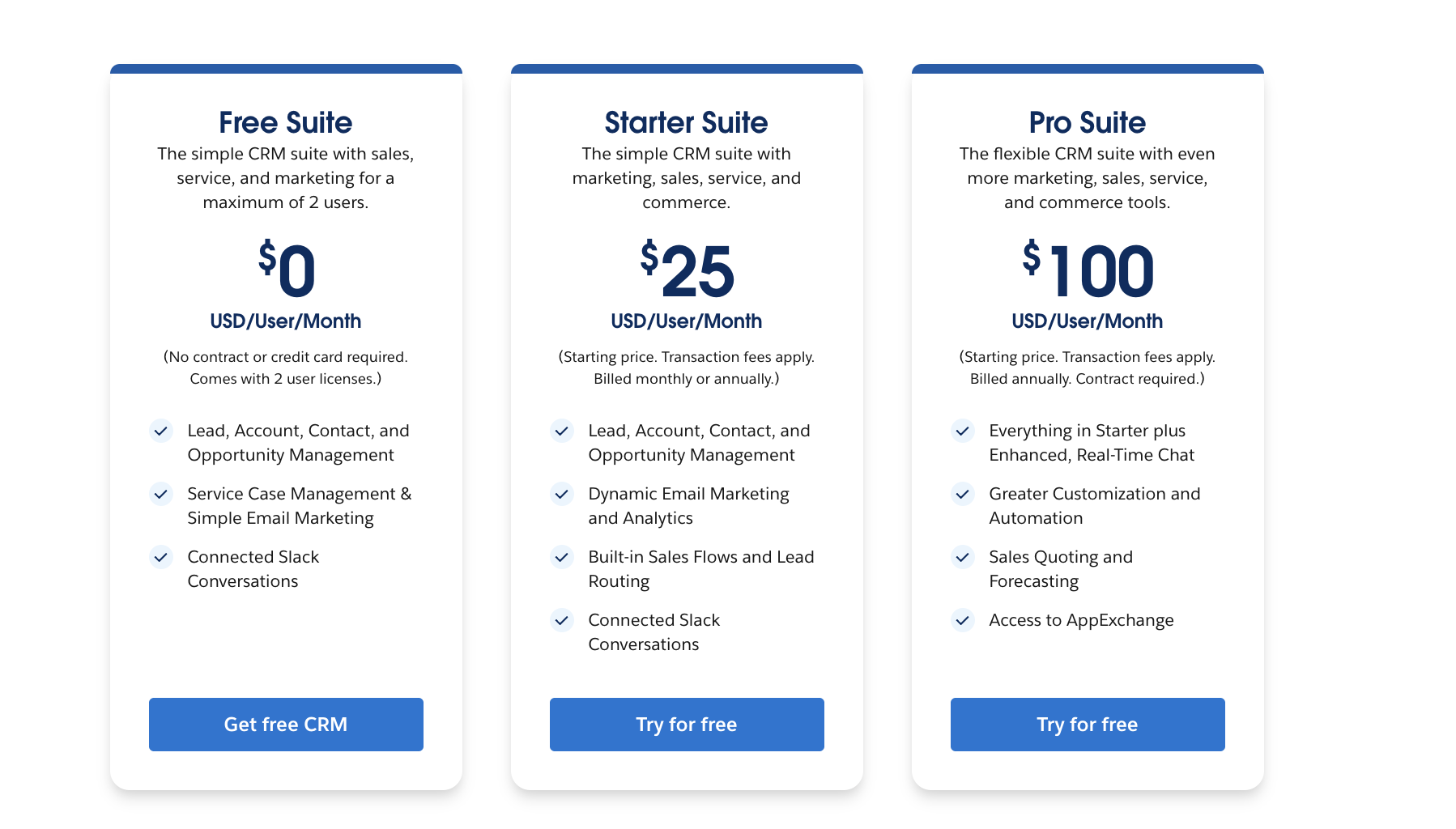
Image source: salesforce.com
Choosing between Bitrix24 and Salesforce often comes down to whether you want an "everything-in-one-box" toolkit or a highly specialized, industry-standard CRM. Here is a breakdown of ideal uses of them both:
- Bitrix24 offers a range of plans that bundle CRM with communication, tasks, , and collaboration tools. Even at entry-level tiers, users get access to basic CRM functions alongside other business tools, which can make the total value feel high for small to mid-sized teams.
- Salesforce, in contrast, is primarily a CRM-focused platform. Its pricing plans vary widely because CRM is just one piece of a larger product ecosystem that includes service clouds, marketing clouds, and analytics tools. Even within CRM, higher-tier Salesforce plans unlock deeper automation, customization, and advanced analytics, but at a significant step-up in price per seat compared to entry-level options.
In practical terms:
- You pay less upfront with Bitrix24 and get CRM plus a suite of business tools included, making it easier to adopt and use CRM in context with daily workflows.
- Salesforce CRM plans can unlock deeper enterprise-grade capabilities, but only if you're ready to invest in higher-tier plans and the ongoing admin effort to manage them.
Note: Salesforce offers a wide range of products and pricing plans across Sales Cloud, Service Cloud, Marketing Cloud, and more. In this comparison, we focus only on Salesforce CRM (Sales Cloud) plans, since Salesforce is primarily evaluated as a CRM. Depending on your business needs, you may need additional Salesforce plans or add-ons to access broader capabilities beyond core CRM functionality, which can increase total cost.
Scaling challenges teams encounter over time
Even the best CRM platforms have limits depending on team size, complexity, and growth. In the context of Bitrix24 vs Salesforce, understanding where each platform starts to strain helps teams plan for long-term scalability and .
- When Bitrix24 starts to feel limited: Bitrix24 works well for small and mid-sized teams, but as processes become more complex, its CRM customization options and automation depth may feel constrained. Multi-branch operations, , or highly tailored workflows can be difficult to implement. Teams may need workarounds or additional tools to fill gaps.
- When Salesforce starts to feel heavy: Salesforce provides extensive customization and enterprise-grade features, but this can become overwhelming for smaller teams. High administrative overhead, complex setup, and constant maintenance can slow down adoption. The platform can feel bulky when daily operations don't require full enterprise functionality.
- Hidden costs beyond subscriptions: While subscription fees are clear, both platforms can incur extra costs for add-ons, integrations, additional users, or advanced support. In bitrix24 crm vs salesforce, hidden expenses often appear when teams scale, requiring premium features or technical implementation services. Proper planning is essential to avoid budget surprises.
As teams grow, both Bitrix24 vs Salesforce reveal limitations, Bitrix24 can feel constrained, while Salesforce may become heavy and costly. Understanding these scaling challenges is essential when evaluating long-term CRM strategy. This is where alternative platforms like Lark come into play. Lark offers a flexible, unified workspace that addresses these gaps without the overhead of traditional CRMs.
Get CRM clarity without admin overload
Meet Lark: Unified workflow and collaboration with easy setup
While Bitrix24 vs Salesforce comparisons highlight trade-offs between breadth and depth, many teams fall in between these extremes. offers a unified platform that combines , collaboration, and without heavy setup. It balances flexibility with simplicity, making structured work accessible for teams of all sizes. In this section, we explore why Lark can be a practical alternative.
A flexible foundation for structured work
At the core of are tables that let teams organize CRM data in a structured yet flexible way. Each table represents a dataset, such as , deals, or accounts, while records act as individual items you track. Unlike Bitrix24, where CRM data is spread across predefined modules, Lark Base lets teams design structures that match how they actually work. Compared to Salesforce, which offers deep customization but often requires admin expertise, Lark Base makes structured data accessible without technical overhead. 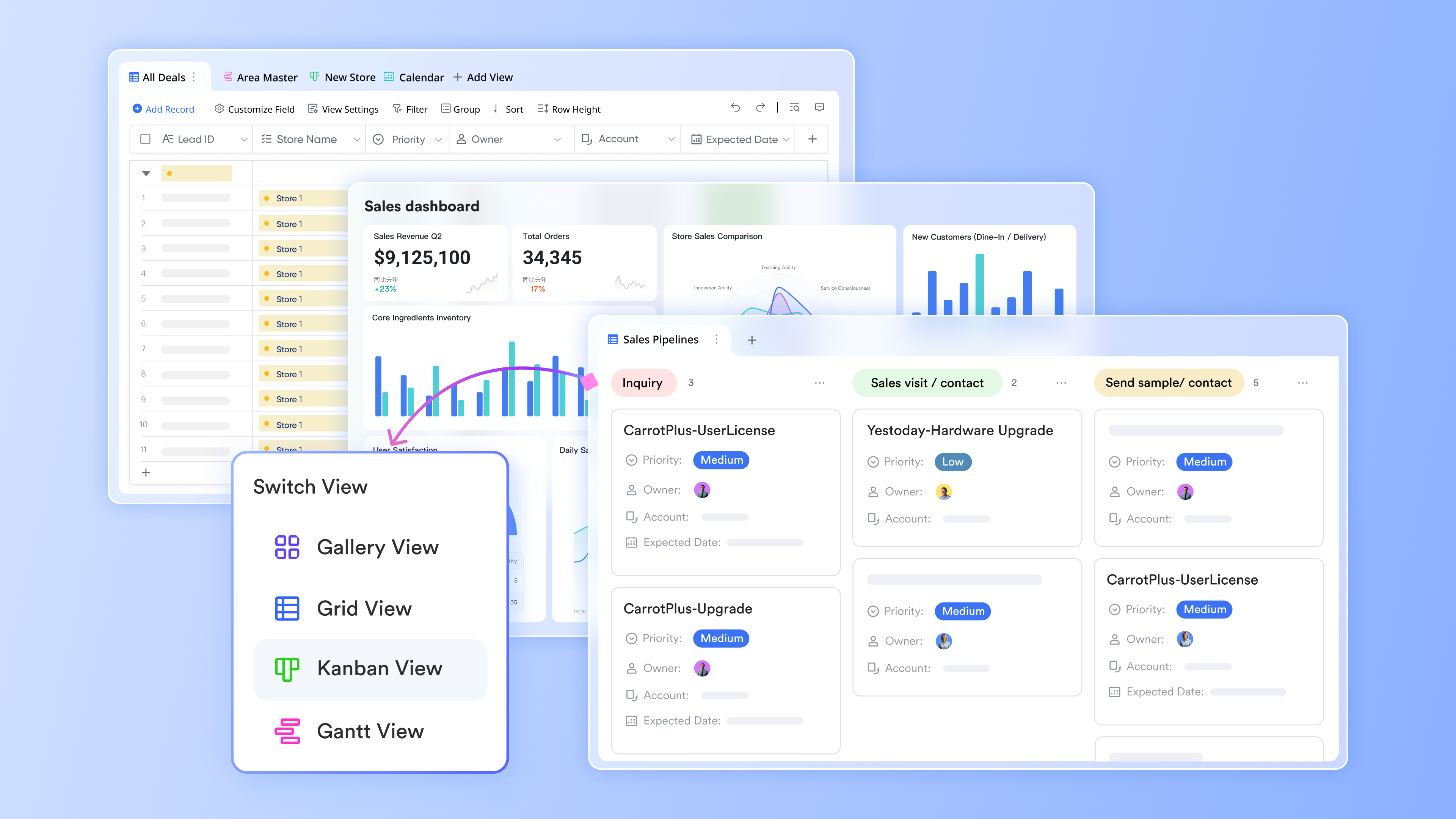
Clean, consistent data through custom fields
With fields acting as columns, Lark Base controls what type of data can be captured in each record, dates, numbers, text, owners, or status values. This ensures consistency across CRM data while allowing teams to adapt fields as processes evolve. Bitrix24 supports custom fields but often within tighter constraints, while Salesforce allows extensive field customization at the cost of complexity. Lark Base enables teams to refine data capture quickly without breaking workflows or depending on admins. 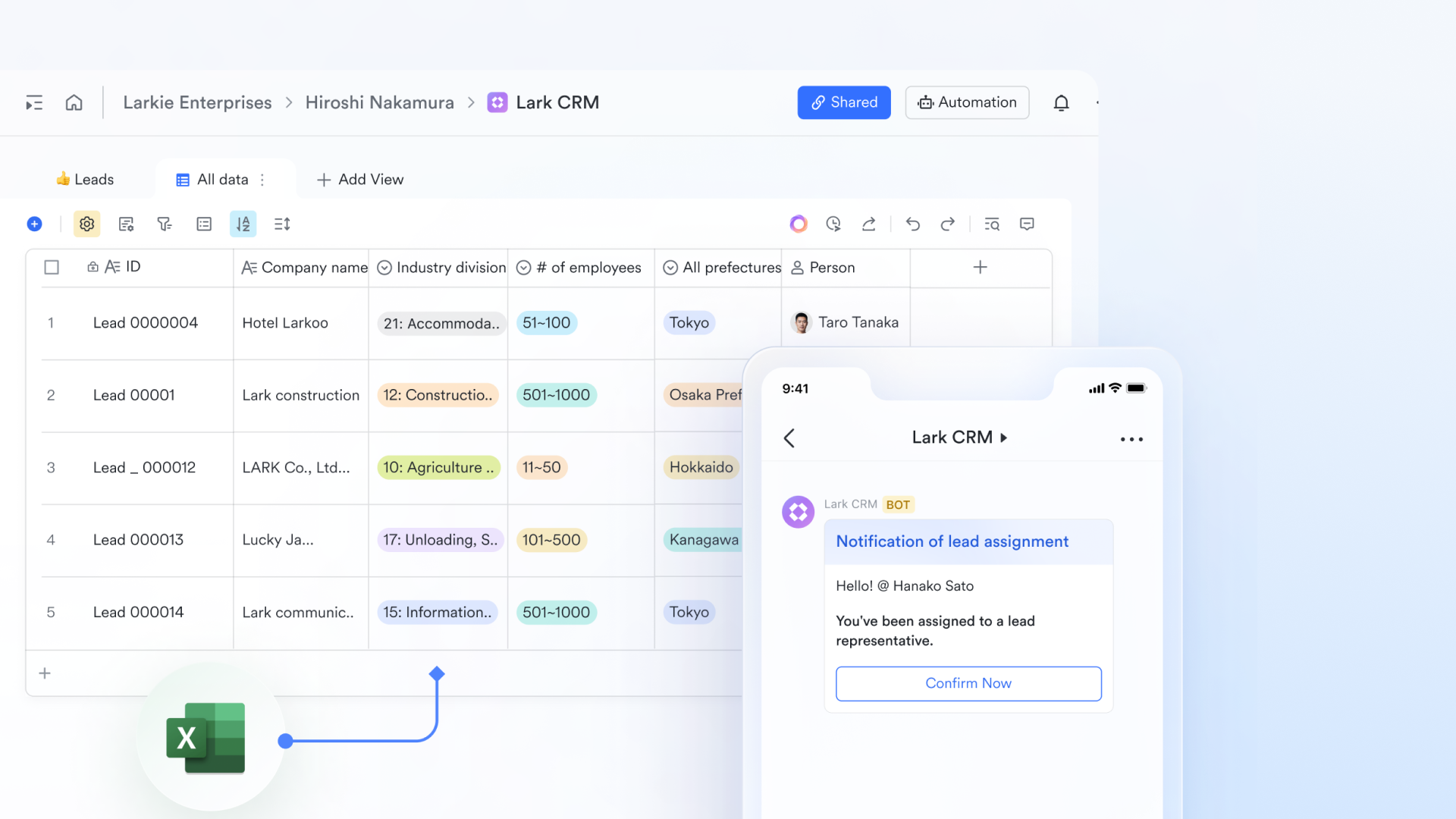
Multiple perspectives from the same data
Lark Base allows the same table to be viewed in different ways using multiple views, such as Kanban boards, Gantt view, or Grid views, helping teams switch between high-level overviews and focused breakdowns instantly. Sales managers can scan pipeline status while reps focus on their assigned records, all from the same dataset. Bitrix24 provides standard list and pipeline views but offers limited flexibility beyond preset layouts. Salesforce delivers powerful reporting views, but configuring them can be time-consuming. Lark Base balances clarity and speed, making data easy to explore for every role. 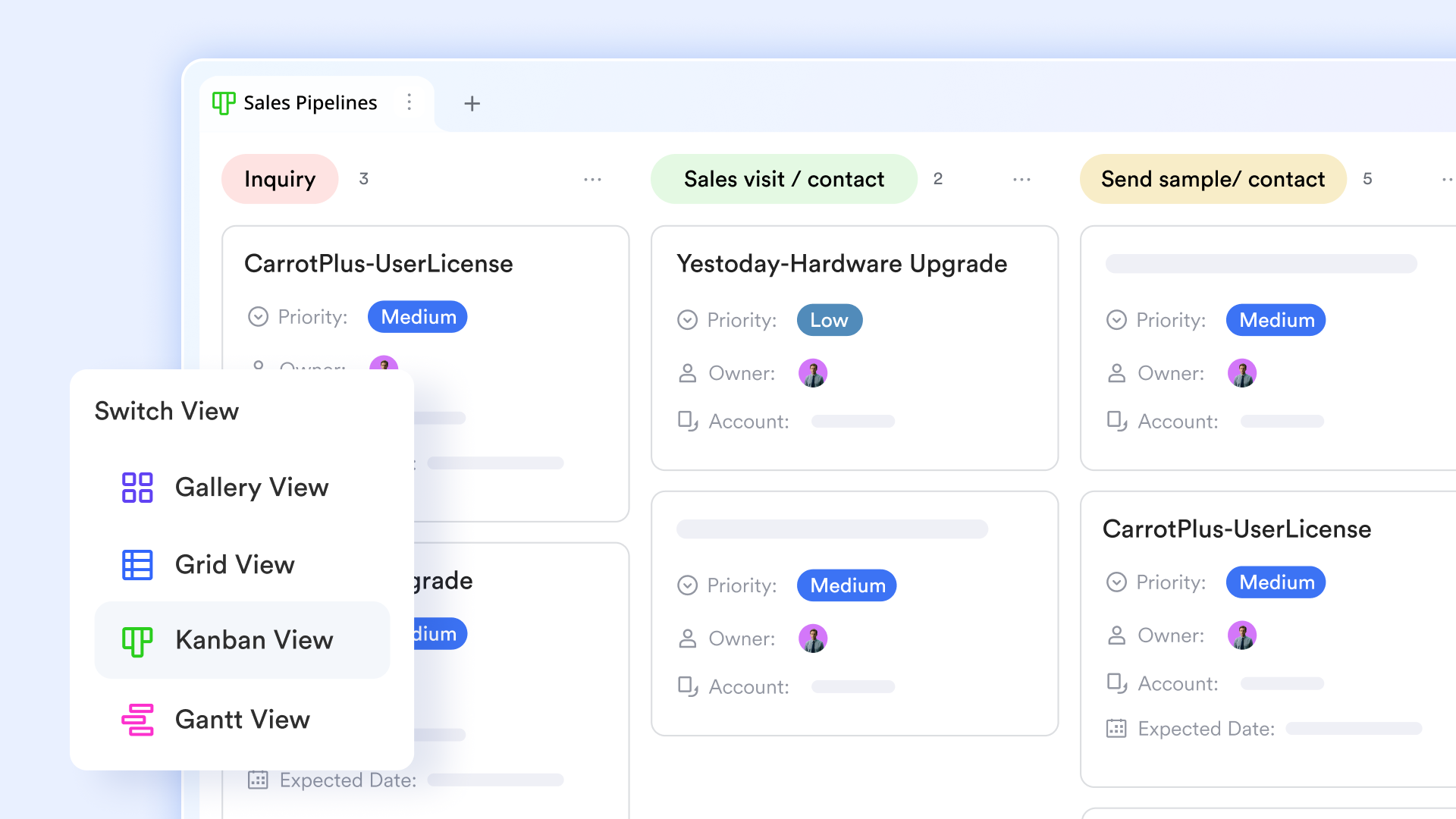
Automated workflow with low-code setup
Lark Base workflow reduces manual CRM effort by automations with conditional branching and multi-step logic. It eliminates repetitive data entry by automatically assigning leads, updating deal statuses, and triggering instant notifications to the sales team based on specific customer actions. By utilizing IF/Else and Loop nodes, teams can handle diverse customer journeys within a single workflow. In this way, Lark Base provides a visual, low-code workflow canvas, far more easily than Salesforce's technical "Flow Builder." While Bitrix24 offers deep legacy automation, Lark reduces manual effort by triggering these processes directly. 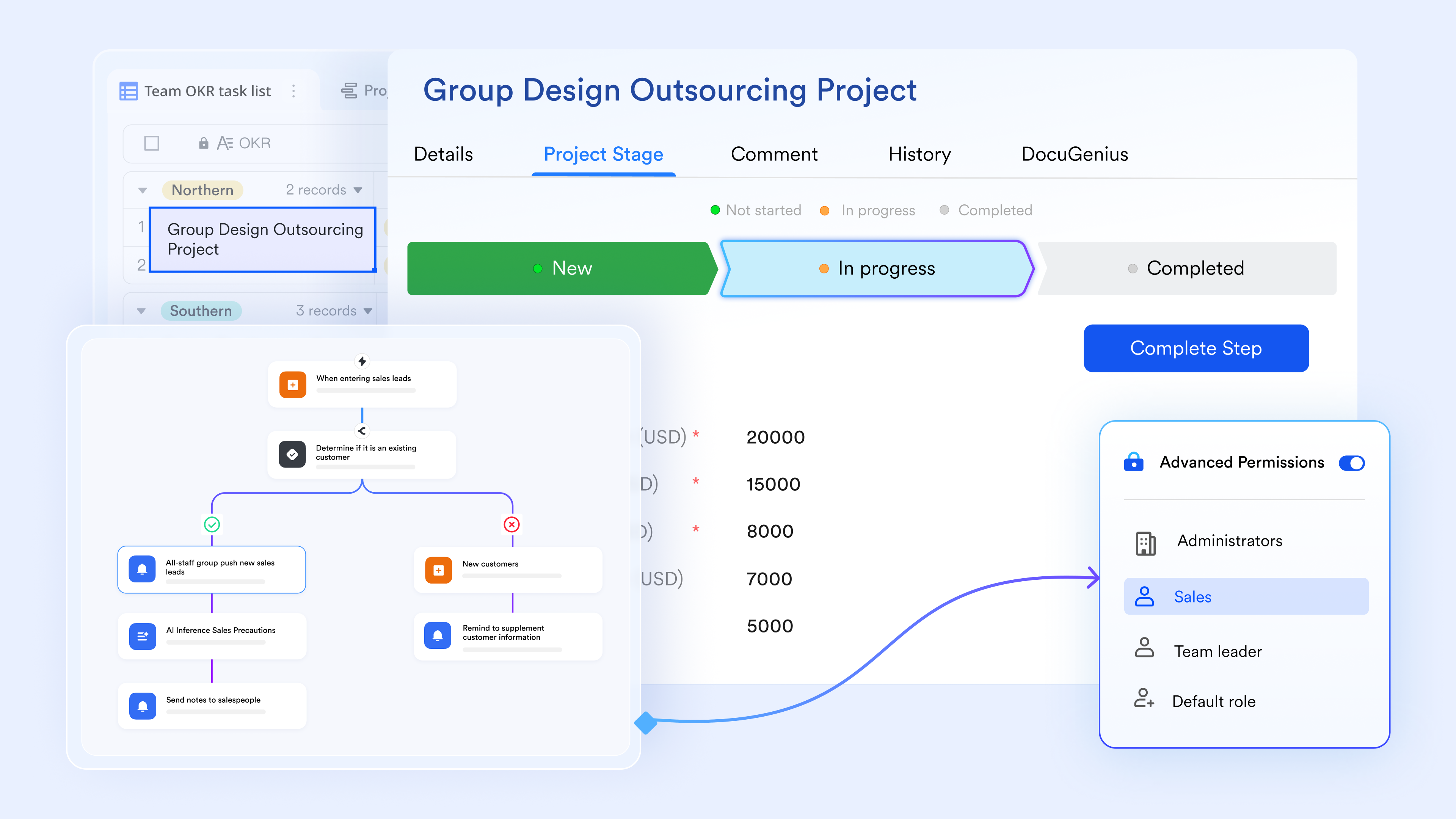
Dashboards that surface what matters
Lark Base brings data together through dashboard that reflect real-time information from tables and views. Teams can track , workload distribution, or progress at a glance without building complex reports. Bitrix24 dashboards are useful but less flexible when working with , and Salesforce dashboards, while powerful, often require setup expertise. Lark Base makes dashboards easier to create and adjust, ensuring insights stay aligned with how teams actually operate. 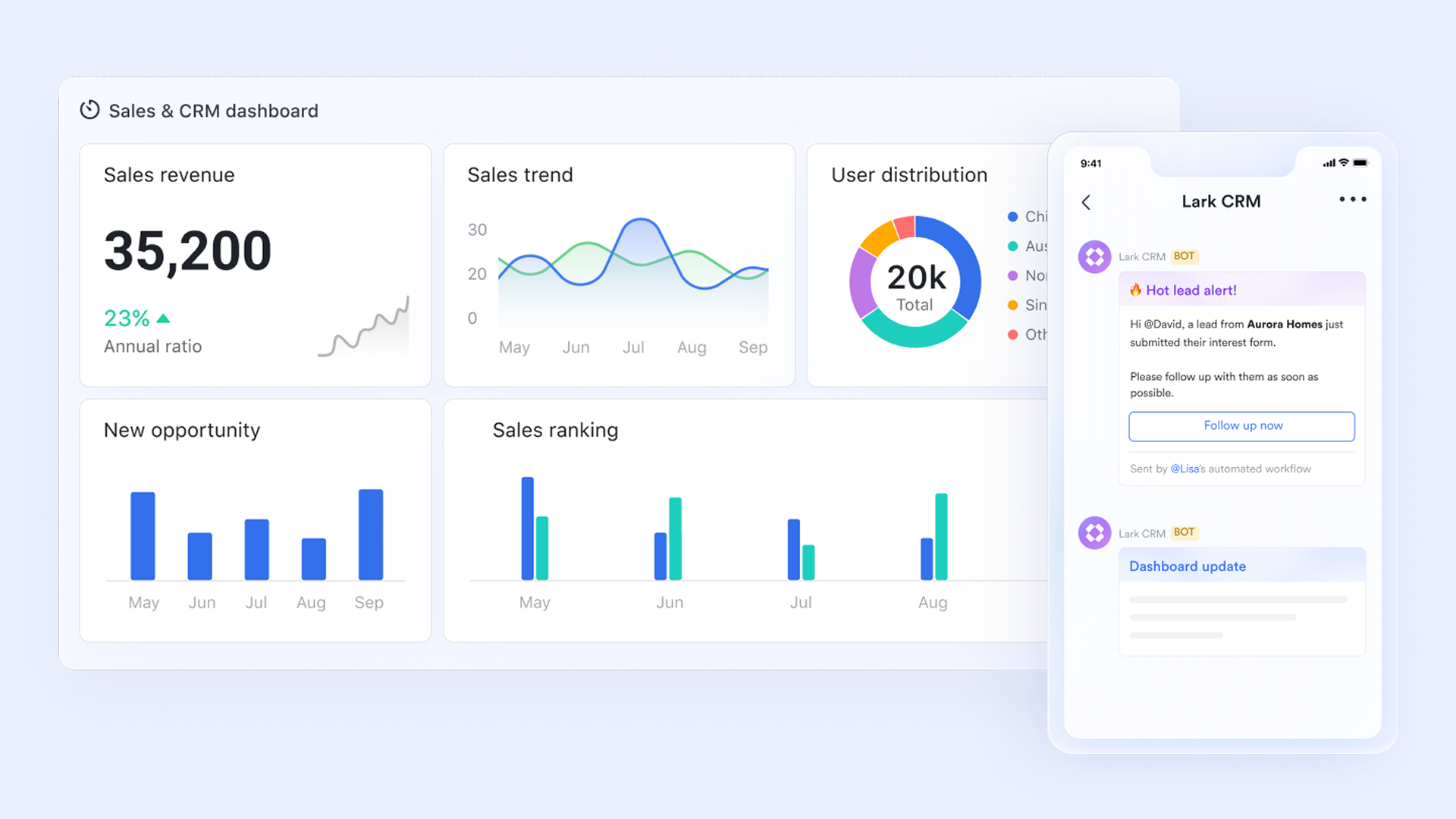
Native communication hub for all teams
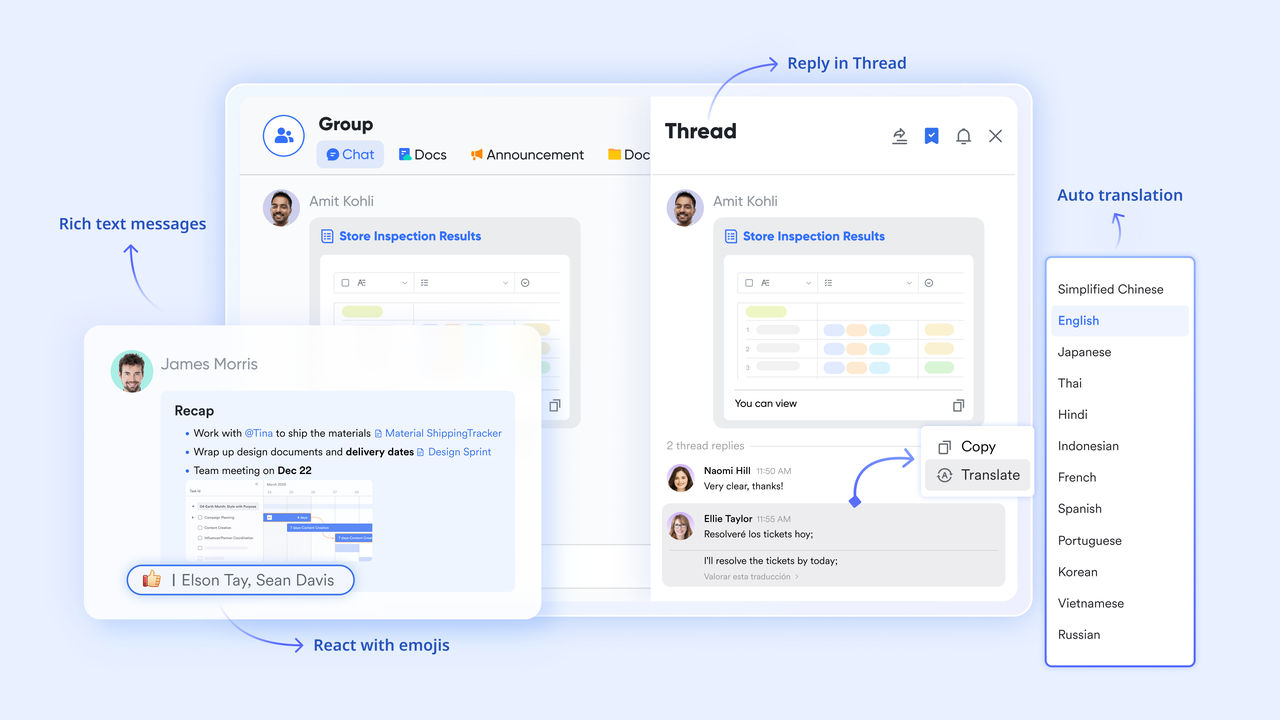
serves as the main chatting hub for CRM communication, bridging the gap between static lead data and active team collaboration. It transforms customer records into actionable discussions by allowing teams to share Lark Base CRM entries and documents directly within chat threads, where they can be @mentioned and co-edited in real-time. It also offers threaded conversations, flags, and pins for urgency, ensuring that sales reps stay aligned without switching apps.
:
- Starter plan: Free forever plan that includes 11 powerful tools for up to 20 users. It also comes with 100GB of storage, 1000 automation runs, AI translations, and more.
- Pro plan: $12/user/month (billed annually) for up to 500 users. It includes everything in Starter plus group calling for up to 500 attendees, 15TB of storage, 50,000 automation runs, and more.
- Enterprise plan: for custom pricing. Supports unlimited users and includes even more automation runs and advanced security, compliance, and management features.
For small teams with simple communication needs

18 months message history
1000 Base automation runs/month
2000 rows per table in Base
Most POPULAR
For companies with comprehensive collaboration and management needs
Unlimited message history
500-participant video meetings
50k Base automation runs/month
20k rows per table in Base
For large companies with advanced security and organizational management needs
Get a personalized demo and pricing
Unlimited message history
500-participant video meetings
15 TB storage + 30 GB storage/user
500k Base automation runs/month
50k Base automation runs/month
Most POPULAR
For companies with comprehensive collaboration and management needs
Unlimited message history
500-participant video meetings
50k Base automation runs/month
20k rows per table in Base
Which platform fits which type of organization
Different CRMs serve different business needs, and evaluating Bitrix24 vs Salesforce helps teams match features to organizational requirements.
- Small and mid-sized teams focused on cost and speed: Bitrix24 is ideal for teams that need a practical CRM without heavy setup or high per-user costs. Its all-in-one workspace, including communication, tasks, and basic automation, allows fast deployment and immediate productivity.
- Enterprises needing deep customization and governance: Salesforce excels for large organizations that require , advanced reporting, and strict data governance. Salesforce CRM vs Bitrix24 shines in multi-region, multi-department scenarios where enterprise-level control and customization are essential.
- Teams that need CRM plus collaboration in one workspace: Organizations that want CRM integrated with communication, , and document collaboration benefit from Bitrix24's bundled approach. It provides a single environment for managing both sales and operational work efficiently.
Final verdict: Bitrix24 vs Salesforce vs Lark
There's no single "best" CRM, only the right fit for your team's size, complexity, and workflow needs. Bitrix24 vs Salesforce highlights a clear trade-off between all-in-one affordability and enterprise-grade depth. Many teams, however, sit between these two extremes. In this final comparison, we look at where Bitrix24, Salesforce, and Lark each make the most sense.
Conclusion
Choosing between Bitrix24 vs Salesforce depends on team size, complexity, and priorities. Bitrix24 offers an affordable, all-in-one workspace that combines CRM with collaboration, tasks, and communication, making it ideal for small to mid-sized teams. Salesforce delivers deep CRM customization, advanced automation, and enterprise-grade scalability for organizations that can support administrative overhead and higher costs. For teams that fall between these extremes, needing structured workflows, flexible CRM-style processes, and seamless collaboration, provides a balanced alternative. It combines clarity, speed, and control, helping teams manage sales and operations effectively without the complexity of heavyweight CRM platforms or the compromises of broader, shallow toolsets.
Upgrade from siloed tools to one workspace
FAQs
Is Bitrix24 or Salesforce easier to migrate existing CRM data into?
When evaluating bitrix24 vs salesforce, Bitrix24 generally allows faster CRM data migration for small to mid-sized teams due to simpler structures and fewer dependencies. Salesforce, especially in Salesforce Sales Cloud vs Bitrix24, offers powerful migration tools but requires more planning and expertise. Teams with complex datasets often find salesforce vs bitrix24 migrations more involved but highly customizable.
How do Bitrix24 and Salesforce handle CRM permissions and access control?
In bitrix24 crm vs salesforce, Bitrix24 offers straightforward role-based permissions suited for small teams, while Salesforce provides granular access controls for complex hierarchies. Comparing bitrix24 vs salesforce customer portal, Salesforce enables detailed portal-specific permissions, ideal for multi-department or multi-region setups. Salesforce vs Bitrix24 excels in enterprise governance but with higher configuration effort.
Can Bitrix24 or Salesforce support multi-region or global sales teams effectively?
For salesforce sales cloud vs bitrix24, Salesforce is better suited for multi-region and global sales operations, offering advanced territory management and localization. Bitrix24 vs Salesforce supports distributed teams but may encounter limitations in automation and reporting at scale. In bitrix24 crm vs salesforce, organizations requiring robust global deployment often favor Salesforce.
How reliable are Bitrix24 and Salesforce for long-term CRM data storage and performance?
When considering bitrix24 vs salesforce, both platforms provide cloud-based data storage, but Salesforce offers enterprise-grade performance and uptime guarantees. Bitrix24 vs Salesforce customer portal reliability is adequate for SMBs, though large-scale analytics may strain the system. Salesforce vs Bitrix24 typically ensures better long-term stability for mission-critical CRM operations.
Which platform adapts better when sales processes change frequently?
In bitrix24 crm vs salesforce, Bitrix24 allows quick adjustments to pipelines and automation for agile teams. Salesforce, as seen in Salesforce Sales Cloud vs Bitrix24, supports highly complex process changes but may require admin involvement. Bitrix24 vs Salesforce highlights a trade-off: speed and simplicity versus deep configurability for evolving sales workflows.
Related reading


















