


16 Business Workflow Tools: Transform Chaos Into Productivity

Ryan Tanner
Product Marketing Specialist
Aug 5, 2026
Ryan Tanner
Aug 5, 2026


Key takeaways: Top 5 tools for business workflow management
Overview: Top 5 platforms for business workflow management

What is a business workflow management tool?
Advantages of using a business workflow automation tool
- Reduced manual work and errors: Automation eliminates repetitive tasks such as data entry, follow-ups, and status updates, reducing the likelihood of human error. Teams can rely on predefined workflows to ensure consistency across processes. A workflow tool business setup helps free up time for more strategic work.
- Faster approvals and decision-making: Automated routing ensures that requests reach the right stakeholders instantly without delays. A business workflow approvals tool keeps approval chains transparent and trackable. This speeds up decision-making and prevents bottlenecks in critical processes.
- Improved team collaboration: Workflow tools centralize communication, tasks, and updates, making it easier for teams to stay aligned. Everyone has visibility into progress and responsibilities, reducing confusion. A business process tool workflow approach ensures smoother cross-functional coordination.
- Better process visibility and control: Managers gain real-time insights into workflow progress, helping them identify inefficiencies and optimize operations. Dashboards and reports provide clarity on performance and bottlenecks. This improves accountability across teams.
- Scalability and consistency: Automated workflows ensure that processes are followed consistently, even as teams grow. Businesses can scale operations without losing control or quality. Standardized workflows make onboarding and expansion more efficient.
Top 16 tools for business workflow automation
1. Lark: All-in-one business workflow management tool for teams
- Combines messaging, docs, approvals, and automation in one platform, reducing tool switching and improving overall workflow efficiency across teams.
- No-code workflow builder enables teams to automate processes quickly without technical expertise, making it accessible and scalable for growing organizations.
- Strong integration capabilities and cross-product automation ensure seamless data flow and collaboration across departments, improving visibility and operational alignment.
- Initial setup and customization may take time for teams unfamiliar with all-in-one platforms and workflow automation concepts.
- Advanced features and automation limits may require upgrading to paid plans, potentially increasing costs for larger teams over time.
- Starter plan: Free forever plan that includes 11 powerful tools for up to 20 users. It also comes with 100GB of storage, 1000 automation runs, AI translations, and more.
- Basic plan: $6/user/month (billed annually) for up to 500 users. It includes everything in Starter plus group calling for up to 500 attendees, 5TB of storage, 1000 automation runs, and more. For more details, please contact sales.
- Pro plan: $12/user/month (billed annually) for up to 500 users. It includes everything in Basic plus group calling for up to 500 attendees, 15TB of storage, 50,000 automation runs, and more.
- Enterprise plan: Contact sales for custom pricing. Supports unlimited users and includes additional automation runs, as well as advanced security, compliance, and management features.
Starter
For small teams with simple communication needs
$0
/ user / month

Pro
For companies with comprehensive collaboration and management needs
$12
/ user / month
Enterprise
For large companies with advanced security and organizational management needs
Get a personalized demo and pricing
Pro
For companies with comprehensive collaboration and management needs
$12
/ user / month
2. Monday.com: Visual business workflow tool for cross-team planning
- Highly customizable boards allow teams to design workflows suited to different projects, departments, and processes with flexible views and structured data organization.
- Visual dashboards and timeline views provide real-time insights into project progress, helping teams track performance, deadlines, and dependencies more effectively.
- Automation features reduce repetitive tasks by triggering actions like notifications, status updates, and task assignments based on predefined workflow conditions.
- Integrates with multiple tools like Slack, Google Workspace, and CRM systems, enabling seamless data flow and collaboration across existing business applications.
- User-friendly interface with drag-and-drop functionality makes it easy for teams to adopt and manage workflows without extensive training or technical expertise.
- Strong visualization capabilities help teams quickly understand project status, improving communication, planning accuracy, and overall workflow transparency across departments.
- Flexible customization options allow teams to tailor workflows to specific business needs, supporting diverse use cases from marketing campaigns to product development.
- Pricing can increase significantly as team size grows or advanced features are required, making it less cost-effective for larger organizations over time.
- Over-customization options may overwhelm new users, leading to longer setup times and potential complexity in maintaining consistent workflows across teams.
- Basic plan: $9/user/month (billed annually).
- Standard plan: $12/user/month (billed annually).
- Pro plan: $19/user/month (billed annually).
- Enterprise plan: Custom pricing.
3. ClickUp: Business process workflow tool for tasks and automations
- Combines tasks, docs, chat, and goals into a single platform, allowing teams to centralize workflows and reduce dependence on multiple tools.
- Offers multiple views, including list, board, calendar, and Gantt charts, to visualize workflows and manage projects from different perspectives.
- Built-in automation engine enables teams to create triggers, dependencies, and recurring tasks, reducing manual work and improving workflow efficiency.
- AI-powered features assist with content generation, task summaries, and workflow optimization, helping teams make faster and smarter decisions.
- Highly customizable platform allows teams to design workflows tailored to specific business needs, making it suitable for diverse industries and use cases.
- All-in-one functionality reduces the need for multiple tools by combining project management, collaboration, and automation features in a single workspace.
- Competitive pricing with a free plan and affordable paid tiers makes it accessible for startups, small teams, and growing businesses.
- An extensive feature set can feel overwhelming for new users, requiring time to learn and properly configure workflows for effective usage.
- Interface performance may occasionally slow down with heavy usage or complex workflows, affecting user experience in larger or more demanding projects.
- Unlimited plan: $7/user/month (billed annually).
- Business plan: $12/user/month (billed annually).
- Enterprise plan: Custom pricing.
4. Asana: Business workflow tool for structured task management
- Workflow builder and automation rules allow teams to automate repetitive tasks, assignments, and updates without coding, improving efficiency and reducing manual effort.
- Multiple project views, including list, board, timeline, and calendar, help teams visualize workflows and manage tasks from different perspectives effectively.
- Custom fields, forms, and templates standardize processes, ensuring consistent data capture and streamlined workflow execution across teams and projects.
- Integrates with 270+ apps, enabling seamless data flow and automation across tools, supporting connected workflows across different business systems.
- Clean and intuitive interface makes it easy for teams to adopt structured workflows and manage tasks without steep learning curves or complexity.
- Strong task management and dependency tracking ensure better organization, helping teams stay aligned and complete projects efficiently on schedule.
- Robust automation and reporting features improve workflow consistency, visibility, and decision-making across teams and departments.
- Limited customization compared to highly flexible tools may restrict teams with complex or unique workflow requirements and advanced process needs.
- Advanced features such as approvals, portfolios, and AI automation are available only on higher-tier plans, increasing costs for growing teams.
- Starter (premium) plan: $10.99 per user per month (billed annually).
- Advanced (business) plan: $24.99 per user per month (billed annually).
- Enterprise & enterprise+ plans: Custom pricing.
5. Wrike: Enterprise business workflow management tool for complex teams
- Advanced workflow customization with custom fields, request forms, and automation rules enables teams to design processes tailored to complex business requirements.
- Resource and capacity planning tools help allocate workloads efficiently, track team availability, and ensure optimal project execution across departments.
- Real-time dashboards and reporting provide 360-degree visibility into workflows, enabling better decision-making and performance tracking across multiple projects.
- Built-in AI and automation capabilities streamline repetitive tasks, predict risks, and improve workflow efficiency across large-scale enterprise operations.
- Enterprise-grade features such as budgeting, resource planning, and advanced reporting make it ideal for managing complex workflows and large-scale team operations.
- Highly scalable platform supports teams of different sizes, allowing businesses to expand workflows without compromising performance or control.
- Strong automation and integration capabilities reduce manual work and seamlessly connect workflows across multiple tools and systems.
- Higher-priced tiers may be less suitable for small teams or startups with limited budgets than simpler workflow tools.
- Initial setup and customization can be complex, requiring time and effort to fully optimize workflows for enterprise-level usage.
- Team plan: $9.80/user/month (billed annually).
- Business plan: $24.80/user/month (billed annually).
- Enterprise plan: Custom pricing.
6. Jira: Agile business process workflow tool for dev and tech teams
- An advanced issue and bug tracking system allows teams to log, prioritize, and resolve tasks efficiently within structured agile workflows and development cycles.
- Supports Scrum and Kanban boards, enabling teams to manage sprints, backlogs, and workflows with clear visibility into progress and task status.
- Workflow automation rules trigger updates, assignments, and notifications, reducing manual work and ensuring consistency across development and operational processes.
- An extensive integration ecosystem connects with tools like GitHub, Slack, and CI/CD pipelines, enabling seamless collaboration and continuous delivery workflows.
- Highly effective for agile teams, offering deep support for Scrum, Kanban, and hybrid methodologies tailored to software development workflows.
- Robust customization options allow teams to design workflows, fields, and issue types aligned with specific development and operational requirements.
- Strong reporting and analytics features provide insights into sprint performance, team velocity, and workflow efficiency for continuous improvement.
- Steeper learning curve for non-technical users, making it less suitable for teams unfamiliar with agile frameworks or complex workflow configurations.
- Interface and setup complexity may require time and training, especially for organizations implementing customized workflows at scale.
- Standard plan: $23,500/year (billed annually).
- Premium plan: $43,500/year (billed annually).
- Enterprise plan: Custom pricing.
7. Notion: Flexible business workflow tool for docs and databases
- Combines documents, databases, and task management in one workspace, enabling teams to design flexible workflows and centralize information efficiently.
- Customizable templates and drag-and-drop blocks allow users to build workflows suited to different processes, from content planning to project tracking.
- Real-time collaboration features enable teams to edit, comment, and share updates seamlessly within a unified workspace environment.
- Integrates with tools like Slack, Google Drive, and GitHub, supporting connected workflows across multiple platforms and team functions.
- Highly flexible and customizable structure allows teams to design workflows exactly as needed without rigid system limitations or predefined templates.
- Clean and minimal interface makes it easy for teams to adopt and organize information without overwhelming complexity or steep learning curves.
- Combines multiple use cases like documentation, task tracking, and knowledge management into one platform, reducing dependency on separate tools.
- Limited advanced automation and workflow capabilities compared to dedicated business workflow automation tools, restricting use for complex processes.
- Performance may slow down with large databases or heavy usage, impacting efficiency for teams managing extensive or data-heavy workflows.
- Plus plan: $8/user/month (billed annually).
- Business plan: $15/user/month (billed annually).
- Enterprise plan: Custom pricing.
8. Smartsheet: Spreadsheet-style business process workflow tool
- Grid-based interface mimics spreadsheets while adding workflow automation, enabling teams to manage projects, tasks, and processes in a familiar structured format.
- Automation rules trigger alerts, approvals, and updates, reducing manual work and ensuring workflows progress efficiently across different stages and stakeholders.
- Real-time dashboards and reporting tools provide visibility into project status, performance metrics, and workflow progress for better decision-making.
- Integrates with tools like Microsoft 365, Google Workspace, and Salesforce, enabling seamless data synchronization and connected business workflows.
- Familiar spreadsheet-like interface reduces the learning curve, making it easier for teams to adopt workflow management without requiring extensive training or onboarding.
- Strong automation and reporting capabilities help teams streamline processes, track performance, and maintain visibility across complex workflows and projects.
- Scalable platform supports growing teams and enterprise use cases, enabling organizations to manage workflows across multiple departments and operations efficiently.
- Interface may feel outdated or less intuitive compared to modern visual workflow tools, impacting user experience for some teams.
- Advanced features and automation capabilities are available only in higher-tier plans, increasing overall cost for businesses with complex workflow needs.
- Pro plan: $7/user/month (billed annually).
- Business plan: $25/user/month (billed annually).
- Enterprise plan: Custom pricing.
9. Airtable: Database-style business workflow tool for flexible teams
- Combines spreadsheet-like grids with relational database capabilities, enabling teams to manage complex workflows, link data, and organize information efficiently.
- Multiple views, like grid, Kanban, calendar, and gallery, help teams visualize workflows and manage projects from different perspectives effectively.
- Built-in automation allows teams to trigger actions, send notifications, and update records based on workflow conditions, reducing manual effort significantly.
- Integrates with tools like Slack, Google Workspace, and Zapier, enabling seamless data flow and connected workflows across different business applications.
- Highly flexible platform allows teams to customize workflows and data structures, making it suitable for diverse use cases across departments and industries.
- User-friendly interface with visual elements makes it easy to manage workflows, even for non-technical users working with structured data.
- Strong collaboration features enable teams to share updates, comment, and work together efficiently within a centralized workflow environment.
- Limited scalability for extremely large datasets or highly complex enterprise workflows, which may require more advanced database or workflow solutions.
- Advanced features like automation limits and integrations are restricted to higher-tier plans, increasing costs for growing teams and organizations.
- Team plan: $20/user/month (billed annually).
- Business plan: $45/user/month (billed annually).
- Enterprise/scale plan: Custom pricing.
10. Trello: Simple visual business workflow tool for small teams
- Kanban-style boards with cards and lists allow teams to organize tasks visually, track progress, and manage workflows in an intuitive format.
- Drag-and-drop functionality makes it easy to update task status, assign responsibilities, and adjust workflows quickly without technical complexity or setup.
- Power-Ups extend functionality by integrating tools like Slack, Google Drive, and calendars, enhancing workflow capabilities and team collaboration.
- Basic automation with Butler allows teams to create rules, triggers, and scheduled actions, reducing manual work and improving workflow efficiency.
- An extremely easy-to-use interface makes it ideal for beginners and small teams looking for a simple workflow management solution without steep learning curves.
- Visual task management improves clarity and transparency, helping teams quickly understand workflow status and priorities across projects and tasks.
- Flexible and adaptable for various use cases, from personal task tracking to small team project management and simple workflow processes.
- Limited advanced workflow automation and reporting capabilities compared to more robust business workflow management tools for complex processes.
- May become cluttered and less efficient when managing large projects or teams with multiple workflows and dependencies.
- Standard plan: $5 per user per month (billed annually).
- Premium plan: $10 per user per month (billed annually).
- Enterprise plan: $17.50 per user per month (billed annually).
11. Cflow: An AI-powered approval workflow automation platform that simplifies business processes with no-code automation
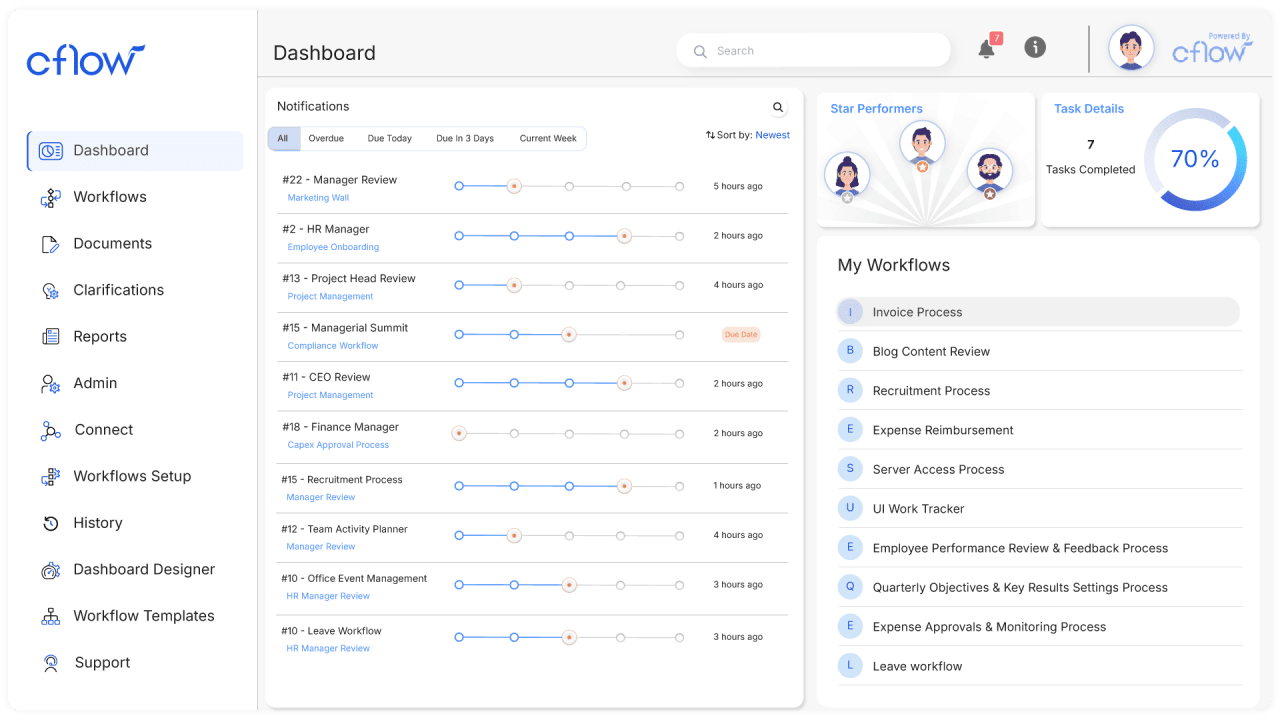
- Visual no-code workflow builder enables teams to design and automate approval workflows using drag-and-drop functionality, conditional logic, and multi-level routing without technical expertise.
- AI-powered automation and intelligent document processing help extract data, automate document-centric tasks, reduce manual effort, and accelerate business processes.
- Custom forms, workflow tracking, and real-time dashboards provide complete visibility into process status, approvals, bottlenecks, and performance for better operational control.
- Integrates with over 1,000 business applications through Zapier, including Slack, Google Workspace, Salesforce, and Microsoft 365, ensuring seamless workflow automation across existing systems.
- User-friendly no-code interface allows business users to build and modify workflows without relying on IT teams.
- AI-powered approval automation improves process efficiency, reduces manual errors, and accelerates decision-making across departments.
- Flexible workflow customization supports diverse business functions, including finance, HR, procurement, IT, and operations.
- Scalable platform adapts to organizations of different sizes while integrating easily with existing business applications.
- Organizations requiring advanced ERP, procurement, or industry-specific capabilities may need additional specialized software alongside Cflow.
- Highly complex enterprise workflows may require additional planning and customization during implementation.
- Joy Plan: Starts at $11/user/month
- Bliss Plan: Starts at $16/user/month
- Zen Plan: Custom pricing for enterprise requirements.
12. Zapier: No-code business workflow automation tool for teams
- Connects over 5,000+ apps, enabling seamless data transfer and workflow automation between different tools without requiring coding or complex integrations.
- Zap builder allows users to create multi-step workflows with triggers and actions, automating processes like data entry, notifications, and task updates.
- Supports conditional logic and filters, enabling more advanced workflows that adapt based on specific conditions and business requirements.
- Offers pre-built templates for common workflows, helping teams quickly set up automation without starting from scratch or designing processes manually.
- No-code interface makes it accessible for non-technical users to automate workflows across multiple applications quickly and efficiently.
- Extensive integration ecosystems allow businesses to connect and automate workflows across almost any tool they already use in operations.
- Scalable automation capabilities support both simple and complex workflows, making it suitable for small teams as well as growing organizations.
- Costs can increase quickly as task volume grows or more advanced automation features are required, impacting budget for scaling teams.
- Limited real-time processing in some cases may cause slight delays in workflow execution, depending on plan and automation complexity.
- Professional plan: $19.99/month (billed annually).
- Team plan: $69/month (billed annually).
- Enterprise plan: Custom pricing.
13. Process Street: Business process workflow tool for recurring procedures
- Checklist-based workflows allow teams to standardize recurring processes, ensuring tasks are completed consistently and accurately across different operations and departments.
- Automation features trigger actions, approvals, and task assignments, reducing manual effort and keeping workflows moving efficiently without delays.
- Conditional logic enables dynamic workflows that adapt based on inputs, allowing teams to handle complex processes within structured procedures.
- Integrates with tools like Slack, Zapier, and Google Workspace, enabling connected workflows and seamless communication across platforms and teams.
- Ideal for managing recurring workflows and SOPs, ensuring consistency and compliance across processes in operations, HR, and customer service teams.
- An easy-to-use interface makes it simple for teams to create, manage, and execute workflows without requiring technical expertise or a complex setup.
- Strong automation and tracking features improve accountability, visibility, and efficiency across repeatable business processes and workflows.
- Limited flexibility for highly dynamic or creative workflows compared to more customizable workflow management platforms with broader use cases.
- Advanced automation and integrations are available only in higher-tier plans, which may increase costs for growing teams and organizations.
14. Kissflow: Low-code business workflow management tool for operations
- Drag-and-drop workflow builder allows users to design processes, forms, and applications quickly without coding, enabling faster deployment and operational efficiency.
- Workflow automation and approval routing streamline business processes, ensuring tasks move efficiently across stakeholders with minimal manual intervention and delays.
- Low-code application builder enables teams to create custom internal tools, dashboards, and process systems tailored to specific business requirements.
- Integration capabilities connect multiple business systems, allowing seamless data flow and unified workflows across departments and operational tools.
- User-friendly no-code and low-code interface makes workflow automation accessible to non-technical users, reducing dependency on IT teams for process setup.
- Strong customization and flexibility allow businesses to design workflows tailored to their unique processes and operational requirements effectively.
- Helps streamline workflows and improve efficiency by reducing manual tasks, improving visibility, and enabling better coordination across teams.
- Pricing can be relatively high, especially for smaller teams, with plans starting at a significant monthly cost compared to competitors.
- Limited advanced features in areas like reporting, APIs, and customization may restrict usage for highly complex enterprise workflows.
- Basic plan: $2500/month (billed annually).
- Enterprise plan: Custom pricing.
15. Zoho Flow: Cloud-based business workflow automation tool for app integration
- Connects 1,000+ apps, including CRM, finance, and collaboration tools, enabling seamless integration and automated data flow across business systems.
- Visual workflow builder allows users to create multi-step automations with triggers, actions, and conditional logic without requiring coding expertise.
- Pre-built templates help teams quickly set up workflows for common business processes, reducing setup time and improving efficiency across operations.
- Centralized dashboard and flow history provide visibility into workflow performance, helping teams monitor, troubleshoot, and optimize automated processes.
- No-code automation makes it easy for non-technical users to build and manage workflows across multiple applications and business processes.
- Strong integration ecosystems enable seamless connectivity between tools, improving efficiency and reducing manual data handling across systems.
- Cost-effective compared to many competitors, offering flexible pricing and scalable automation for small to mid-sized businesses.
- Limited advanced error-handling and rollback capabilities may impact reliability in highly complex or mission-critical workflows.
- Some integrations and features require higher-tier plans, which can increase costs as workflow complexity and usage grow.
- Standard plan: $25/month (billed annually).
- Professional plan: $41/month (billed annually).
16. Pipefy: Scalable business process workflow tool for team operations
- No-code workflow builder allows teams to design, automate, and deploy processes quickly without technical expertise or reliance on IT resources.
- Kanban-style workflow visualization helps teams track tasks across different stages, improving clarity, accountability, and process management efficiency.
- Automation and AI capabilities streamline repetitive tasks, approvals, and data transfers, reducing manual work and improving operational speed.
- Built-in forms and data capture tools enable teams to collect, manage, and transfer information seamlessly across workflow stages without duplication.
- Easy-to-use no-code interface enables business teams to build and manage workflows independently, reducing dependency on technical teams and resources.
- Strong automation and process standardization improve efficiency, helping organizations run up to 85% of workflows without external support.
- A scalable platform supports multiple departments, such as HR, finance, and operations, enabling centralized workflow management across the organization.
- Advanced features and integrations are limited to higher-tier plans, which can increase overall costs as workflow complexity grows.
- Reporting and analytics capabilities may be less robust than those of some enterprise workflow tools, limiting deep performance insights.
What makes a great business process workflow tool?
- Ease of use and adoption: A good workflow tool should have an intuitive interface that teams can quickly understand and use without extensive training. Simple navigation and clear workflows reduce resistance to adoption. This ensures teams can start automating processes without delays or confusion.
- Automation capabilities: Strong automation features allow teams to eliminate repetitive tasks and streamline processes efficiently. The ability to set triggers, conditions, and actions ensures workflows run smoothly. This reduces manual effort and improves overall productivity across teams.
- Customization and flexibility: Every business has unique processes, so a great tool should allow customization of workflows, fields, and views. Flexible configurations help teams tailor the system to their needs. This ensures the tool adapts to the business, not the other way around.
- Integration with other tools: A powerful workflow tool should integrate seamlessly with existing systems like CRM, communication, and project management platforms. This ensures smooth data flow across applications. Integration eliminates silos and improves overall operational efficiency.
- Visibility and reporting: Real-time dashboards and reporting features help teams track progress, identify bottlenecks, and measure performance. Clear visibility improves decision-making and accountability. This allows businesses to continuously optimize and improve their workflows.
How AI is changing business workflow automation
- Intelligent task automation: AI enables workflows to go beyond basic rule-based automation by understanding context and making decisions. It can automatically categorize tasks, assign priorities, and trigger actions. This reduces manual intervention and improves efficiency across processes.
- Predictive decision-making: AI analyzes historical data to predict outcomes, identify risks, and recommend next steps within workflows. Teams can act proactively instead of reactively. This helps prevent delays and improves overall workflow performance.
- Smart data processing: AI can extract, analyze, and structure data from unstructured sources like emails, documents, and forms. This eliminates the need for manual data entry and processing. It ensures faster and more accurate workflow execution.
- Personalized workflow experiences: AI adapts workflows based on user behavior, preferences, and roles within the organization. It can recommend actions, automate repetitive patterns, and optimize task sequences. This creates a more efficient and user-friendly workflow experience.
- Continuous optimization: AI continuously monitors workflows, identifies inefficiencies, and suggests improvements over time. It learns from patterns and performance data to refine processes. This ensures workflows become more efficient and scalable as businesses grow.
Conclusion
FAQs
Can workflow automation tools integrate with existing software?
How long does it take to implement a workflow management tool?
What is the difference between a workflow tool and a project management tool?
Are business workflow automation tools secure enough for sensitive processes?
Related reading
Top 16 tools for business workflow automation

Start using Lark today

Manage all your work in one place
Boost team efficiency by 10x
Save up to 70% on software costs
Start using Lark today
Manage all your work in one place
Boost team efficiency by 10x
Save up to 70% on software costs
Keep reading







2026 Lark Technologies Pte. Ltd.
Headquartered in Singapore with offices worldwide.





