ClickUp CRM has become a popular option for teams that want to experiment with customer relationship management without committing to a traditional CRM platform. Many growing teams are drawn to ClickUp because it promises flexibility, customization, and quick setup using familiar task-based workflows. Instead of forcing teams into rigid sales structures, ClickUp allows users to shape their own CRM logic using tasks, fields, and views. This freedom works well early on, especially for small or operationally focused teams.
This guide takes a deep look at how ClickUp CRM works in practice, where it delivers value, where it introduces friction, and why some teams eventually move toward more execution-focused CRM platforms like Lark.
Flexible CRM setups for growing teams
What is ClickUp CRM?
ClickUp CRM is not a purpose-built . Instead, it is a highly customizable task and that teams adapt to behave like a CRM. In this setup, contacts, leads, accounts, and deals are usually represented as tasks, with custom fields used to store customer data. This approach gives teams the freedom to design workflows that match their internal processes rather than conforming to predefined CRM rules.
ClickUp CRM works best when teams have simple sales cycles and limited customer volume. Because there is no native CRM engine enforcing lifecycle rules, every part of the system must be defined and maintained manually. This includes ownership rules, stage progression, reporting logic, and historical tracking. While this flexibility is empowering at first, it also means that structure depends entirely on how consistently users follow internal standards.
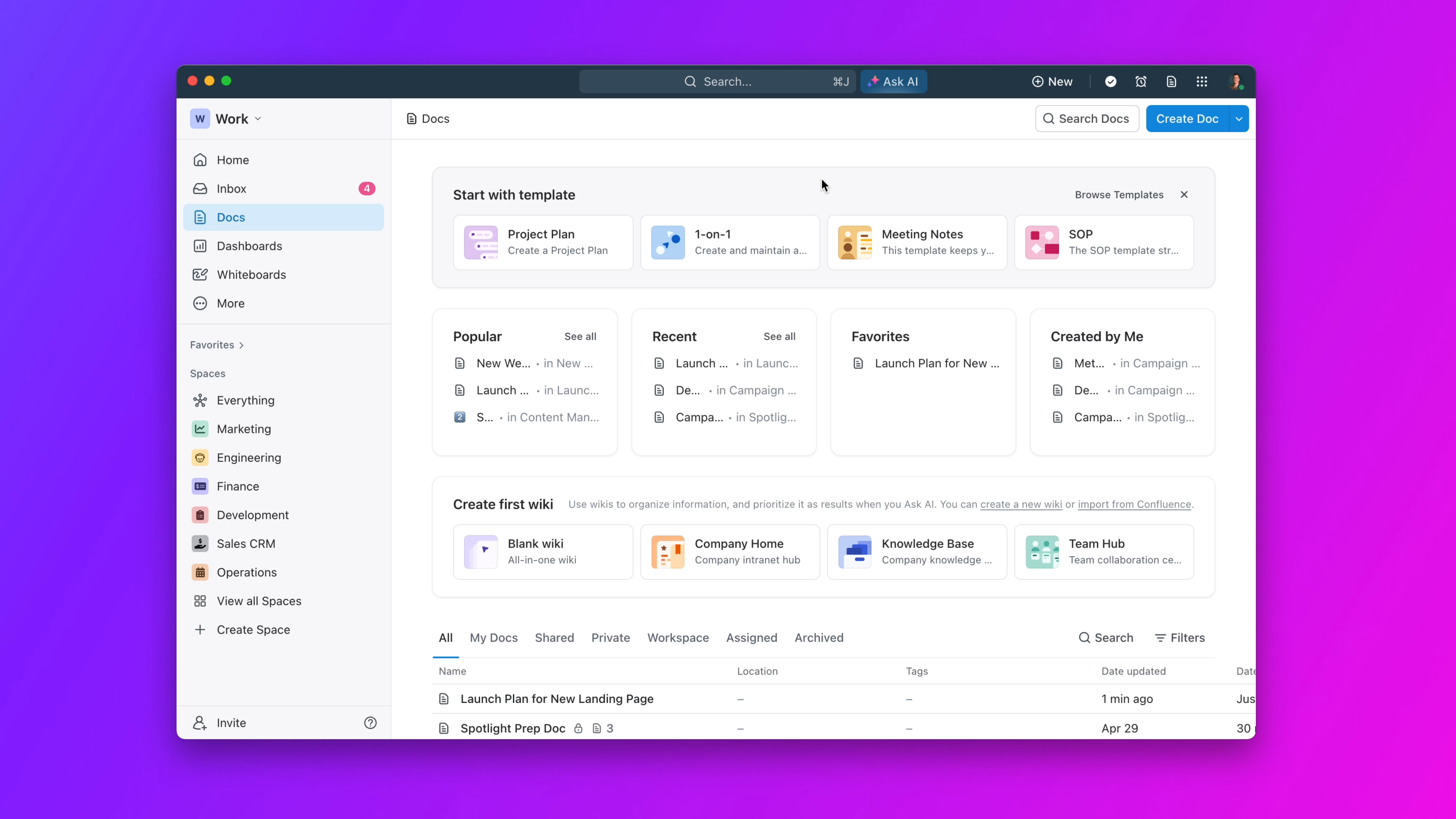
Image source: clickup.com
Clickup CRM features teams rely on
ClickUp CRM functionality is created by adapting core task and into customer-facing workflows. Rather than offering native CRM logic, ClickUp gives teams building blocks that they assemble into a CRM-like system. This approach works well for teams that value flexibility and experimentation over rigid structure. However, because these features were not originally designed for CRM use, they rely heavily on user discipline and consistent setup. Understanding how teams actually use these features helps clarify where ClickUp CRM performs well and where limitations begin to surface as teams grow.
- Custom fields for contacts and deal data: Custom fields form the backbone of any ClickUp CRM setup and are used to store contact information, deal values, lead sources, industries, and expected close dates. These fields allow teams to treat tasks as customer records and group or filter them for reporting and views. Over time, teams often add many custom fields to capture nuanced sales data, which increases flexibility but also complexity. Because fields are optional by default, data accuracy depends on users filling them in consistently. As more people contribute, incomplete or outdated fields become harder to manage and correct.
- Statuses and views for pipeline tracking: ClickUp statuses are commonly repurposed to represent sales stages such as Lead, Qualified, Negotiation, and Closed. Board views then display these statuses as columns, creating a visual pipeline that resembles a traditional CRM. This setup provides quick visibility into deal progress and bottlenecks. However, statuses were originally designed to track task completion rather than customer lifecycle movement. This can create confusion when a deal appears "complete" even though the relationship is ongoing or requires follow-up actions.
- Dashboards for basic visibility: Dashboards give managers a high-level view of CRM activity by summarizing deal counts, pipeline stages, and custom field values. Widgets can display charts, tables, and task lists to monitor progress and performance. These are useful for basic reporting and weekly reviews. However, they require manual configuration and ongoing maintenance. As CRM data spreads across multiple lists, folders, or spaces, dashboards become more complex to manage and can lose accuracy if not actively maintained.
Automations tied mainly to task activity: ClickUp automations help reduce manual work by triggering actions when task conditions change, such as updating statuses, assigning owners, or sending notifications. In CRM setups, teams often use to move deals through stages or remind reps to follow up. While helpful, these automations remain task-centric rather than lifecycle-driven. More advanced CRM scenarios, such as multi-stage or cross-team handoffs, often require layered rules that become difficult to audit and maintain over time.
How much does ClickUp cost?
is attractive for teams experimenting with because it starts low and scales gradually. Plans are priced around productivity features rather than CRM maturity, which makes ClickUp accessible early on. As teams rely more on automations, permissions, and reporting, they typically need to upgrade to higher tiers. Understanding pricing in real-world terms helps teams estimate when costs rise alongside complexity.
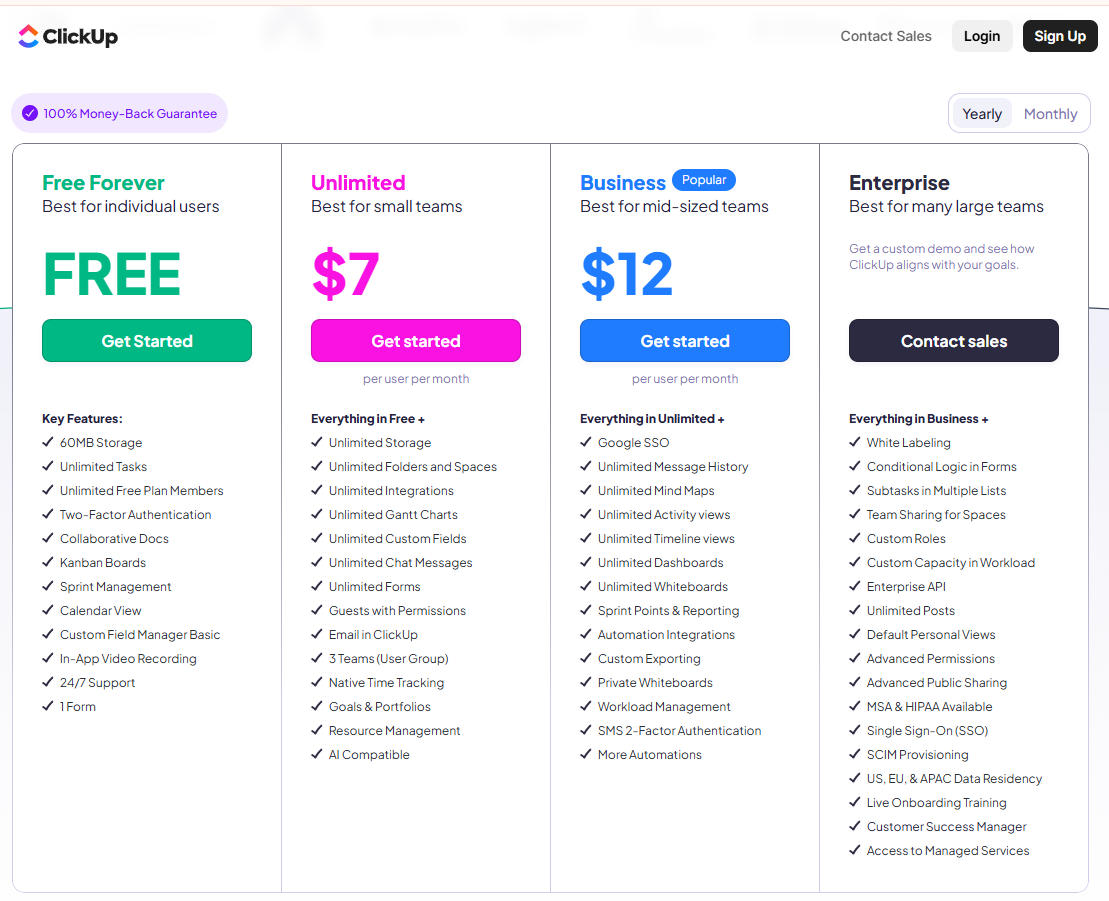
Information source: clickup.com
Update time: 2025-12-21
Note: Pricing and plan details reflect publicly available data as of the update date and may vary based on region, billing cycle, and number of agents.
How to make a CRM in ClickUp
Building a CRM in ClickUp is a manual but flexible process that requires intentional structure and ongoing governance. Teams must define how customer data is stored, how deals move, and how reporting works. While setup is straightforward, long-term success depends on consistency and maintenance.
Step 1: Start with ClickUp's CRM template
Begin by adding ClickUp's prebuilt CRM template to your workspace. You can place it inside an existing space (such as sales or customer service) or create a new one. Using a template saves time by giving you a ready-made structure that you can refine later instead of building everything from scratch.
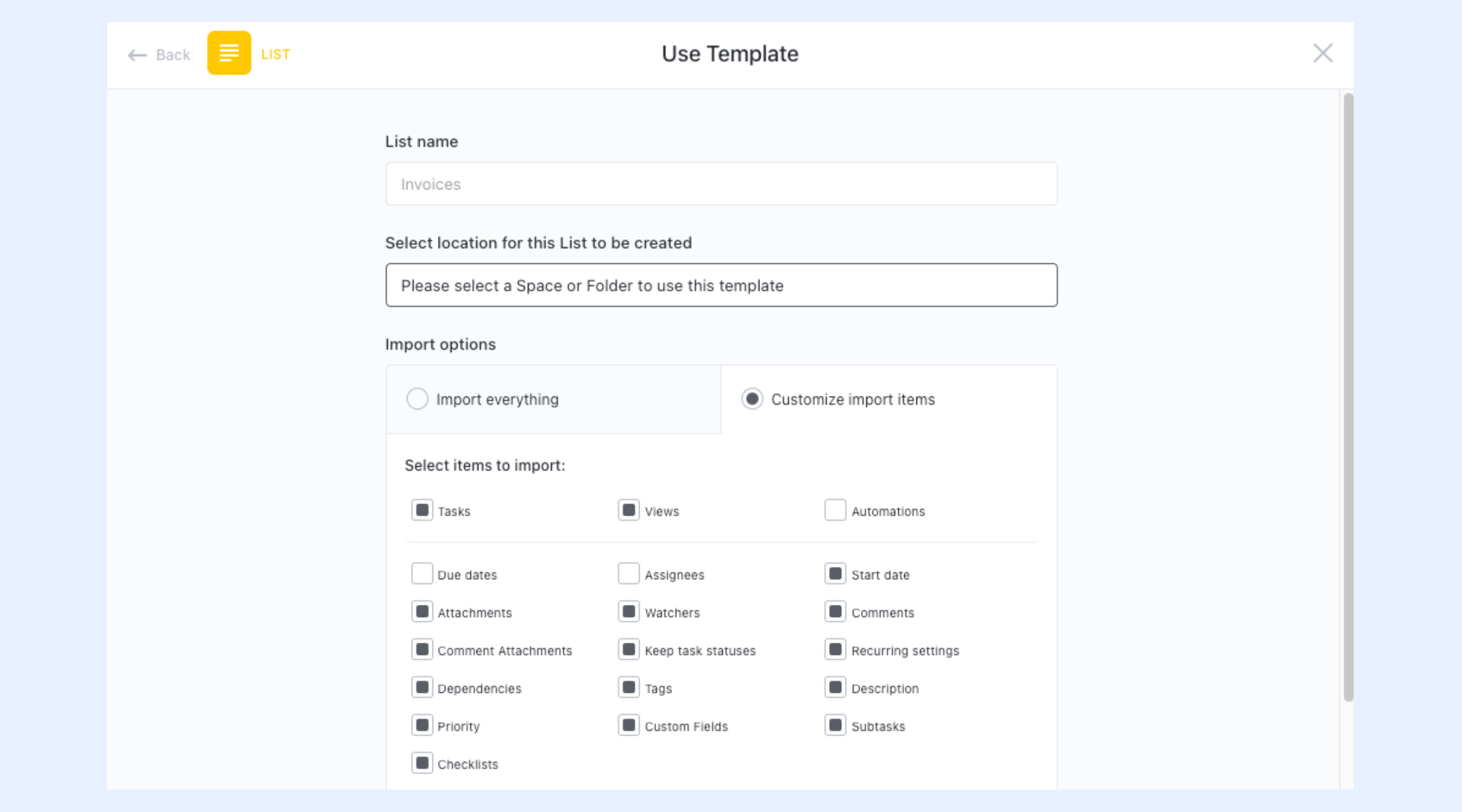
Image source: clickup.com
Step 2: Set up views to manage contacts and deals
Before adding real data, explore the default sample tasks to test different views. ClickUp lets you switch between List, Board, Calendar, and Table views, each offering a different way to manage leads and accounts. This helps you decide how you want to track pipelines, meetings, and follow-ups without risking sensitive data.
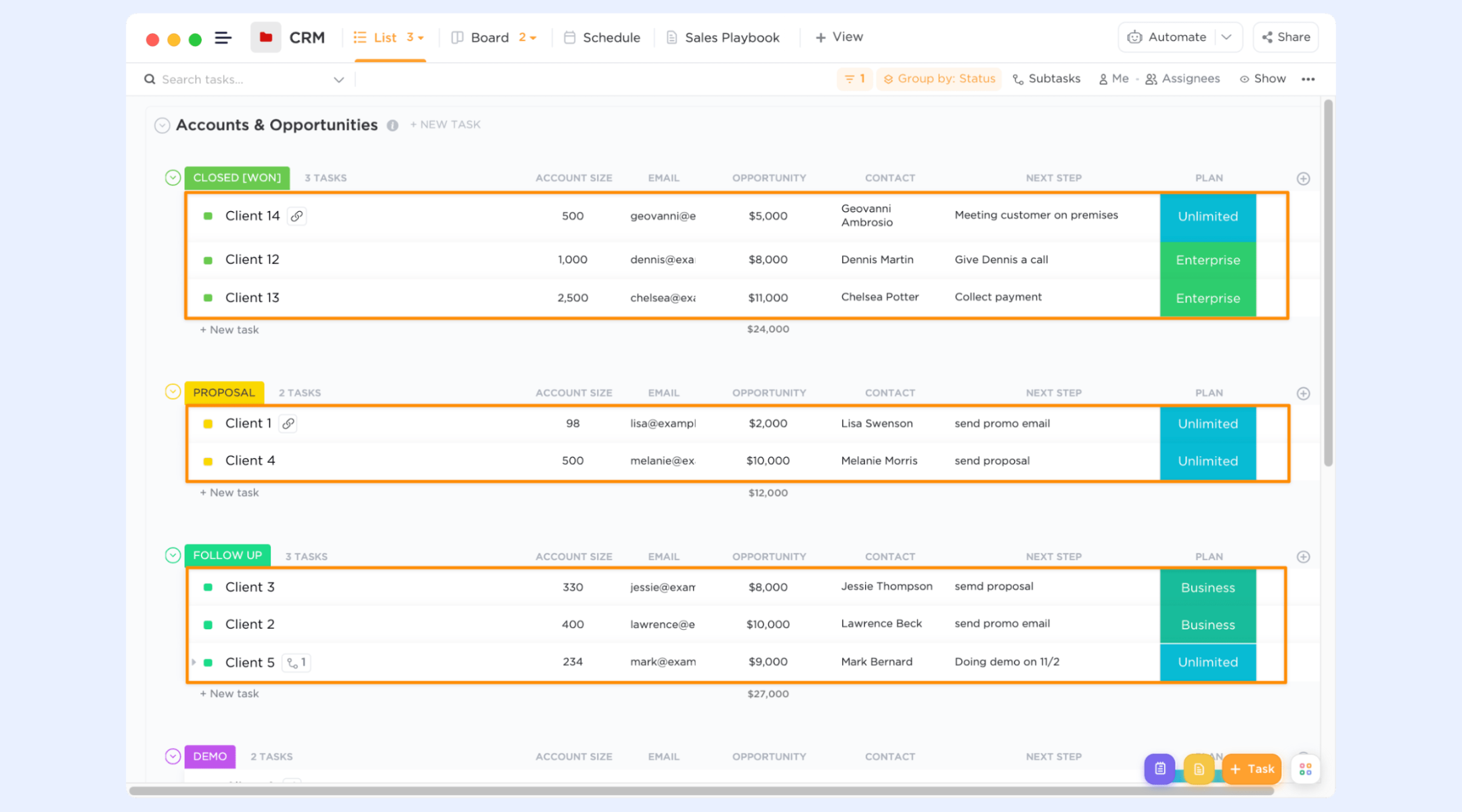
Image source: clickup.com
Step 3: Customize statuses to match your sales workflow
Custom statuses define how deals move through your pipeline. You can edit existing statuses or create new ones to reflect stages like Lead, Contacted, Negotiation, or Closed. Clear statuses make it easier to understand progress at a glance and improve reporting on bottlenecks and cycle time.
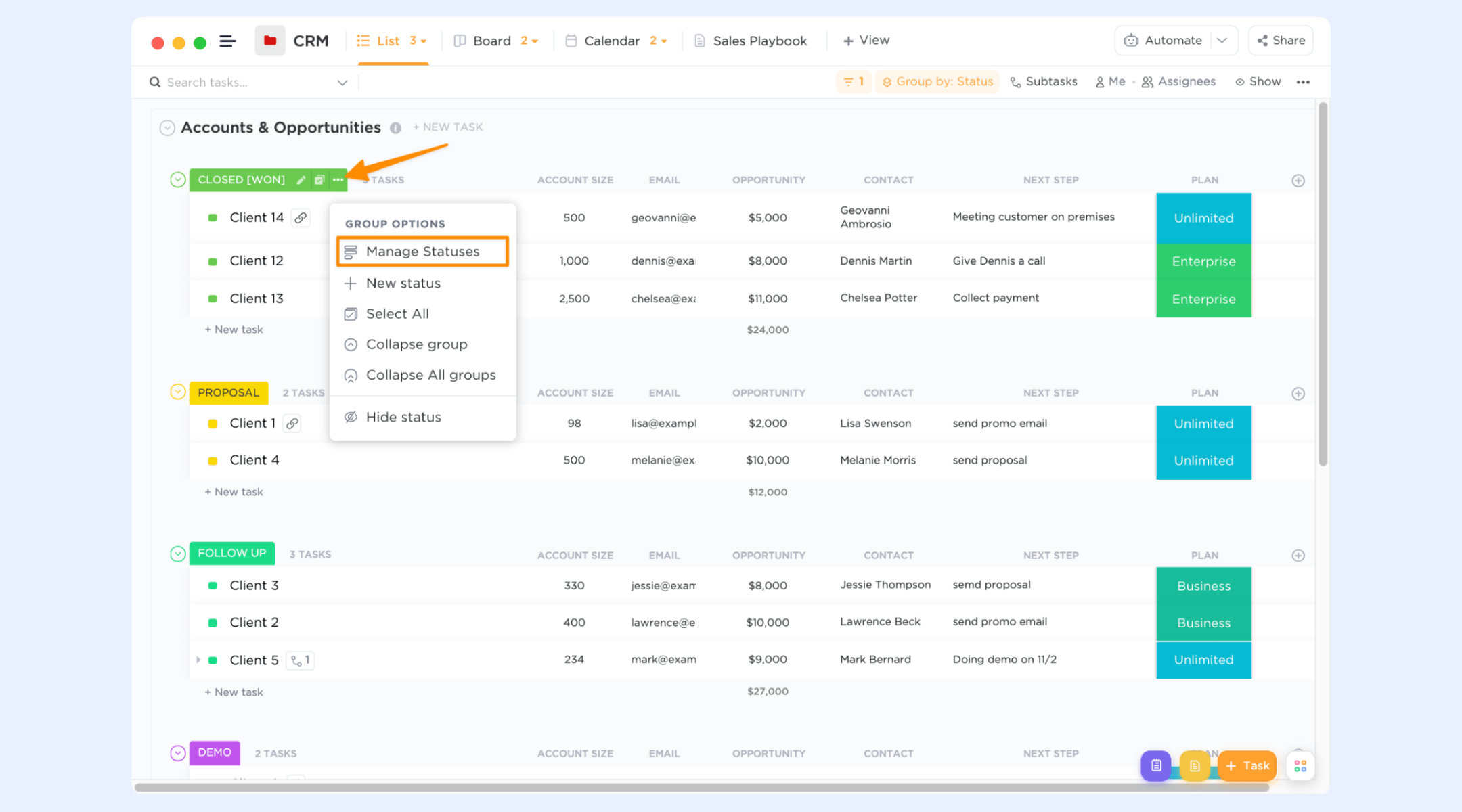
Image source: clickup.com
Step 4: Add custom fields for key CRM data
Custom Fields allow you to store important information directly on each task, such as email, phone number, deal value, lead temperature, or company size. Once added, these fields can be shown directly in view, so you don't need to open individual tasks to find critical details.
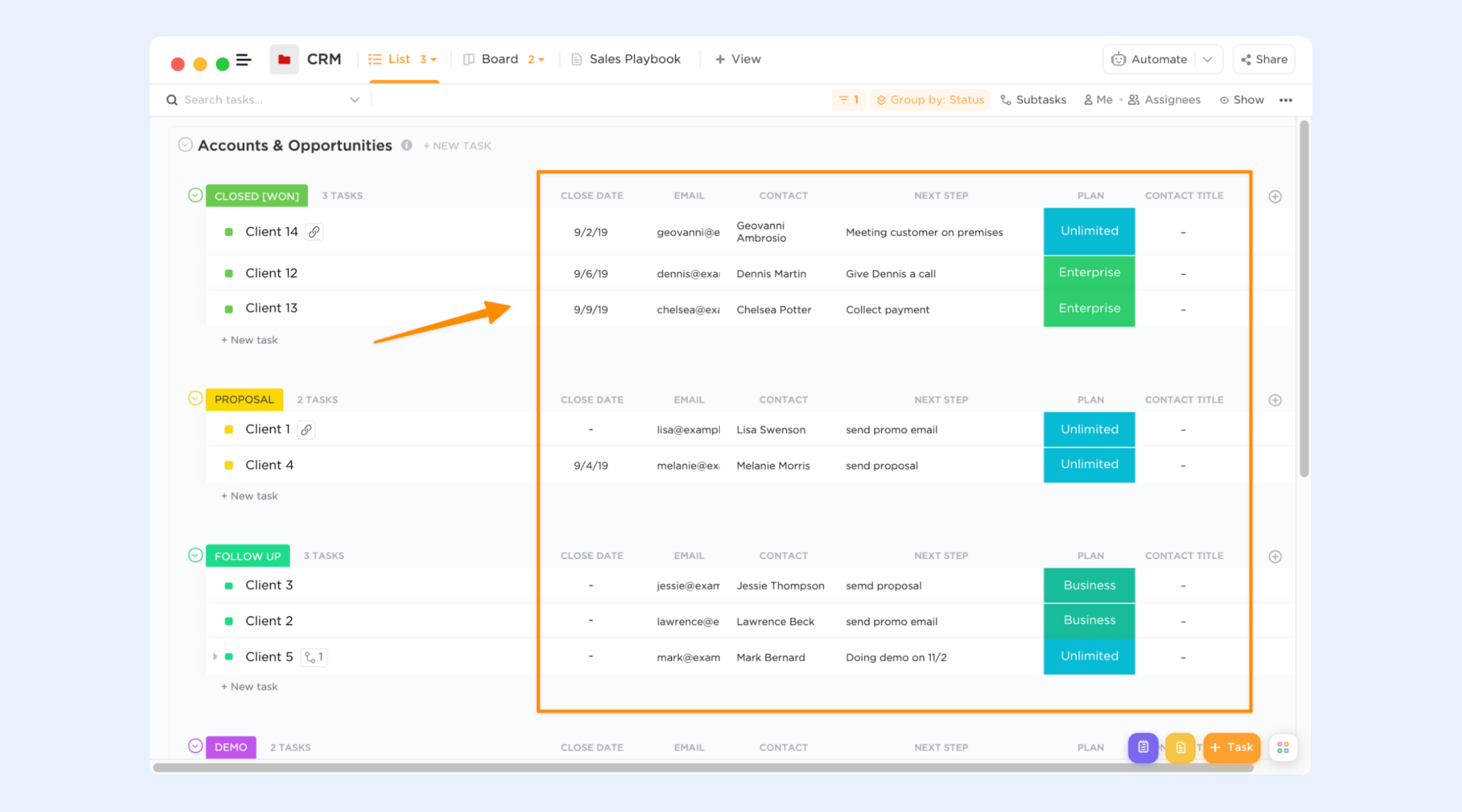
Image source: clickup.com
Step 5: Create or import tasks with real data
Each lead, account, or opportunity is represented as a task. You can create tasks manually, use keyboard shortcuts, or import data from spreadsheets or other tools. Take time to review and clean your data so your CRM starts with accurate, usable records.
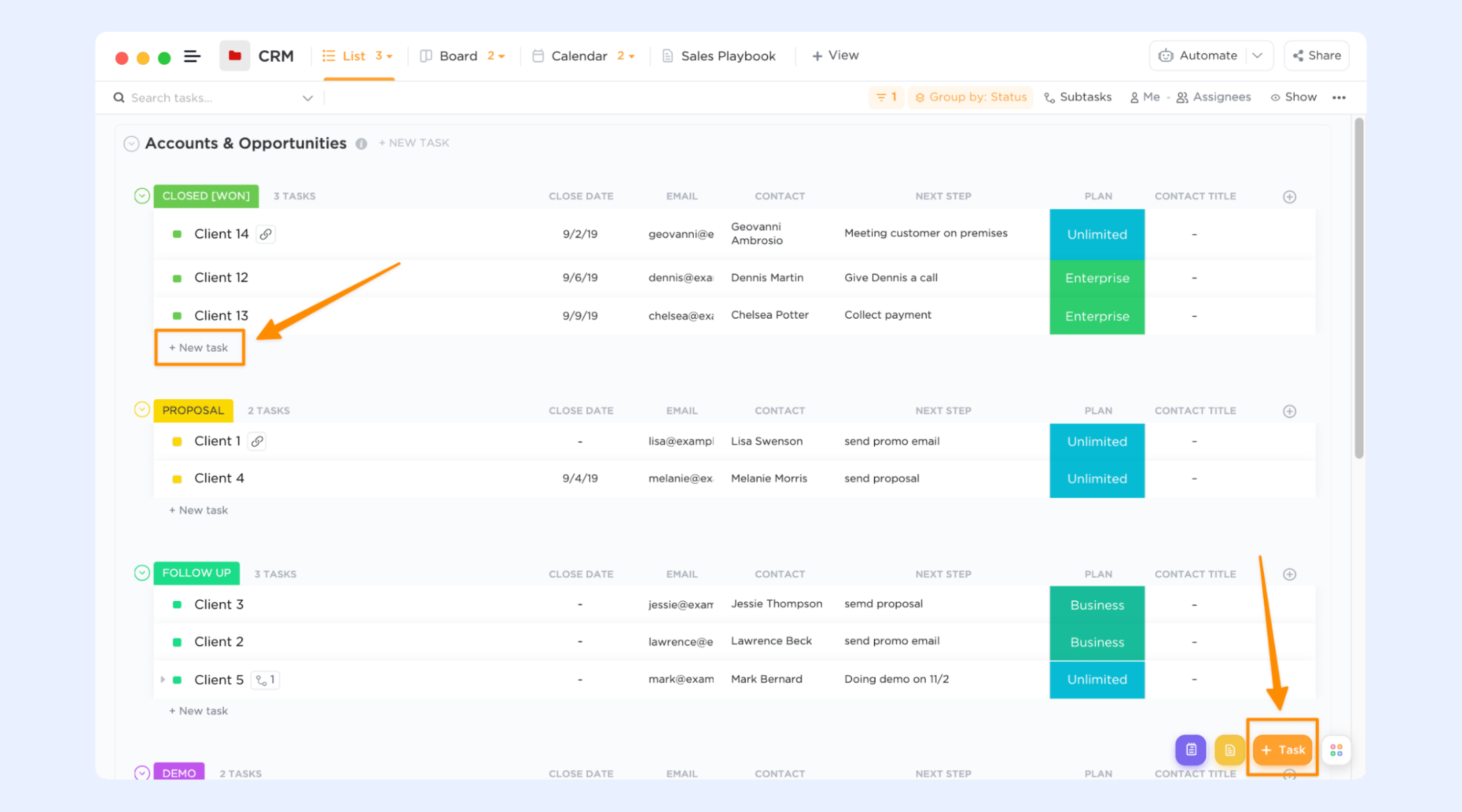
Image source: clickup.com
Step 6: Link records using relationships
To go beyond a basic CRM, use ClickUp Relationships to connect related tasks across lists, such as linking contacts to accounts or opportunities. This creates a simple relational database where you can move between related records easily, adding more structure than a traditional spreadsheet.
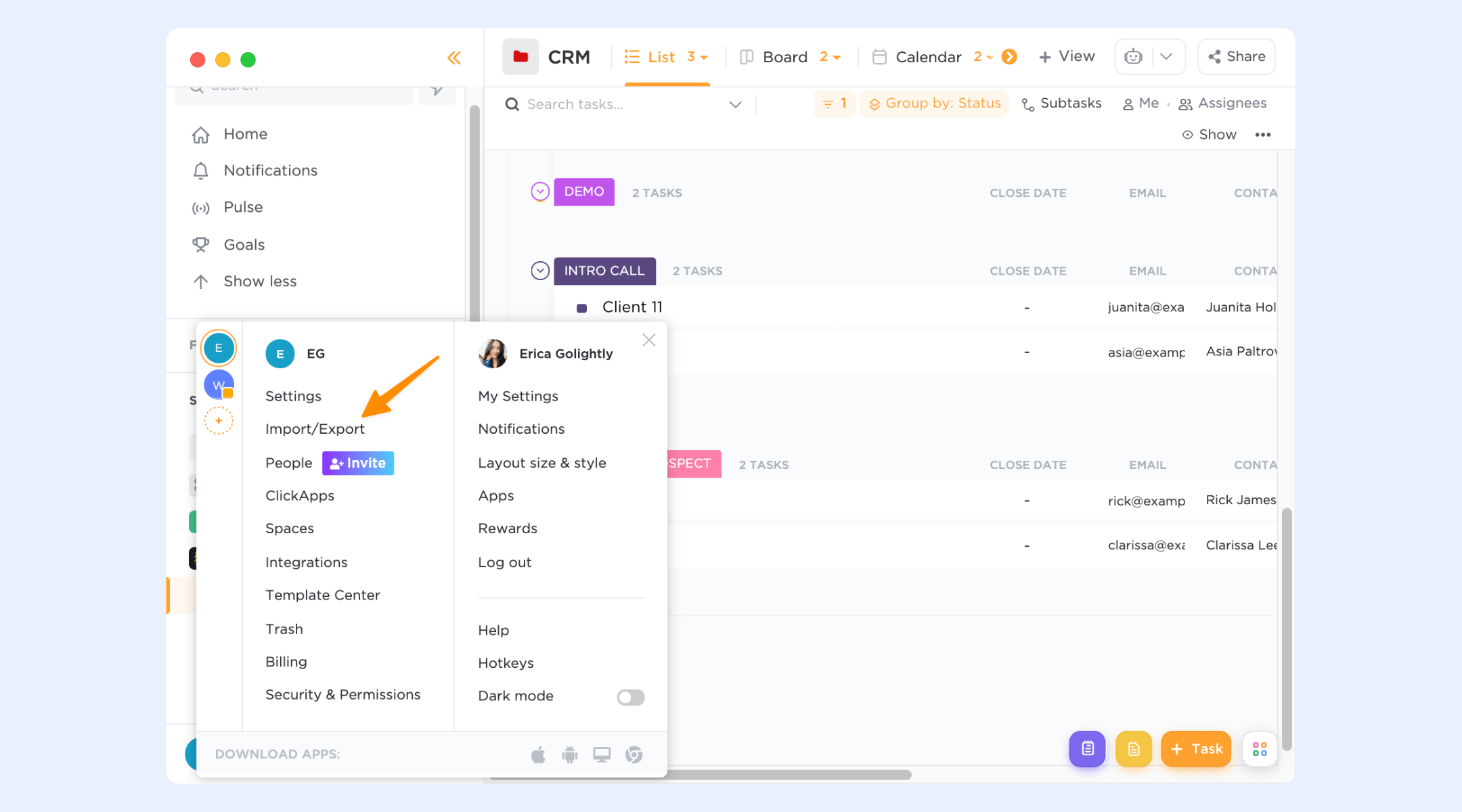
Image source: clickup.com
When teams outgrow ClickUp CRM
ClickUp CRM works well in the early stages when sales activity is simple and deal volume is manageable. As teams grow, sales cycles become longer, and CRM usage expands beyond a single list or team. What once felt flexible can begin to feel fragile, especially when multiple people rely on the same . This stage often reveals structural gaps that ClickUp was not designed to handle as a CRM at scale.
- Growing pipelines and longer sales cycles: As deal volume increases, pipelines become harder to manage within task-based structures. often span weeks or months, but tasks in ClickUp are optimized for short-term completion rather than long-running customer journeys. Deals can be accidentally closed, archived, or deprioritized as tasks move through unrelated workflows. Over time, this creates blind spots for forecasting and pipeline health. Teams struggle to maintain a clear picture of which opportunities are active and which require follow-up.
- per account: Larger deals usually involve more stakeholders, decision-makers, and internal collaborators. Representing all of these relationships within a single task becomes limiting. Notes, comments, and attachments grow cluttered and difficult to navigate. Without native account-level views, teams lose visibility into the full relationship history. This makes coordination harder and increases the risk of miscommunication across sales, marketing, and customer success teams.
- Need for clearer ownership and lifecycle tracking: As teams scale, ownership and accountability become critical. ClickUp allows task assignment, but it does not enforce CRM ownership rules across deal stages. Deals can move forward without clear responsibility for next steps or follow-ups. Lifecycle tracking relies on manual updates, which are easy to miss under pressure. Over time, this leads to stalled deals and inconsistent customer experiences.
The hidden friction of using ClickUp as a CRM
Many teams do not notice ClickUp CRM friction immediately because it builds gradually. As more lists, spaces, and workflows are added, CRM data becomes fragmented. What starts as a flexible setup can quietly turn into a system that requires constant manual coordination. These challenges often surface when teams attempt to standardize processes or onboard new users.
- Tasks vs customer records mismatch: ClickUp treats tasks as the primary unit of work, but customers are not tasks. A single customer relationship may involve multiple conversations, deals, renewals, and support requests over time. Modeling all of this through tasks creates confusion and duplication. Teams often create multiple tasks for the same customer, losing the ability to see a unified history. This mismatch becomes more pronounced as customer relationships grow more complex.
- Difficulty maintaining a single customer view: Because CRM data can live across multiple lists and spaces, maintaining a single source of truth is challenging. may be updated in one place but outdated in another. Dashboards attempt to bridge this gap but rely on consistent structure and naming conventions. As more people edit records, inconsistencies multiply. This makes reporting less reliable and decision-making slower.
- CRM data scattered across lists and spaces: Different teams often build their own CRM views inside ClickUp, leading to parallel systems that do not fully align. Sales, marketing, and operations may each track differently. Reconciling these views requires manual effort and constant communication. Over time, this scattered data undermines trust in the CRM and increases operational overhead instead of reducing it.
As teams grow beyond lightweight CRM setups, the challenge is no longer just tracking information but ensuring that customer data actively drives work forward. The friction that emerges in ClickUp CRM is not due to a lack of flexibility, but because are forced to live inside task structures that were never designed for lifecycle ownership, accountability, or long-term visibility. When pipelines grow, stakeholders multiply, and follow-ups become time-sensitive, teams begin searching for a system where CRM data, collaboration, and execution are inherently connected. That's where Lark comes as a competitive alternative. Come close and check where it makes a difference.
Execution needs exceed task-based CRM
How Lark approaches CRM differently
Lark approaches CRM as a core execution system rather than an adaptation of . Instead of asking teams to build CRM logic from scratch, Lark provides a connected workspace where customer records, , communication, documents, and automation are designed to work together from the start. in Lark is not isolated from daily work; it lives alongside conversations, meetings, tasks, and decisions, ensuring that every update leads to action. By treating CRM as part of how teams actually operate day to day, enables organizations to move beyond tracking interactions and toward reliably executing customer relationships at scale.
Customer-first records with rich data structure
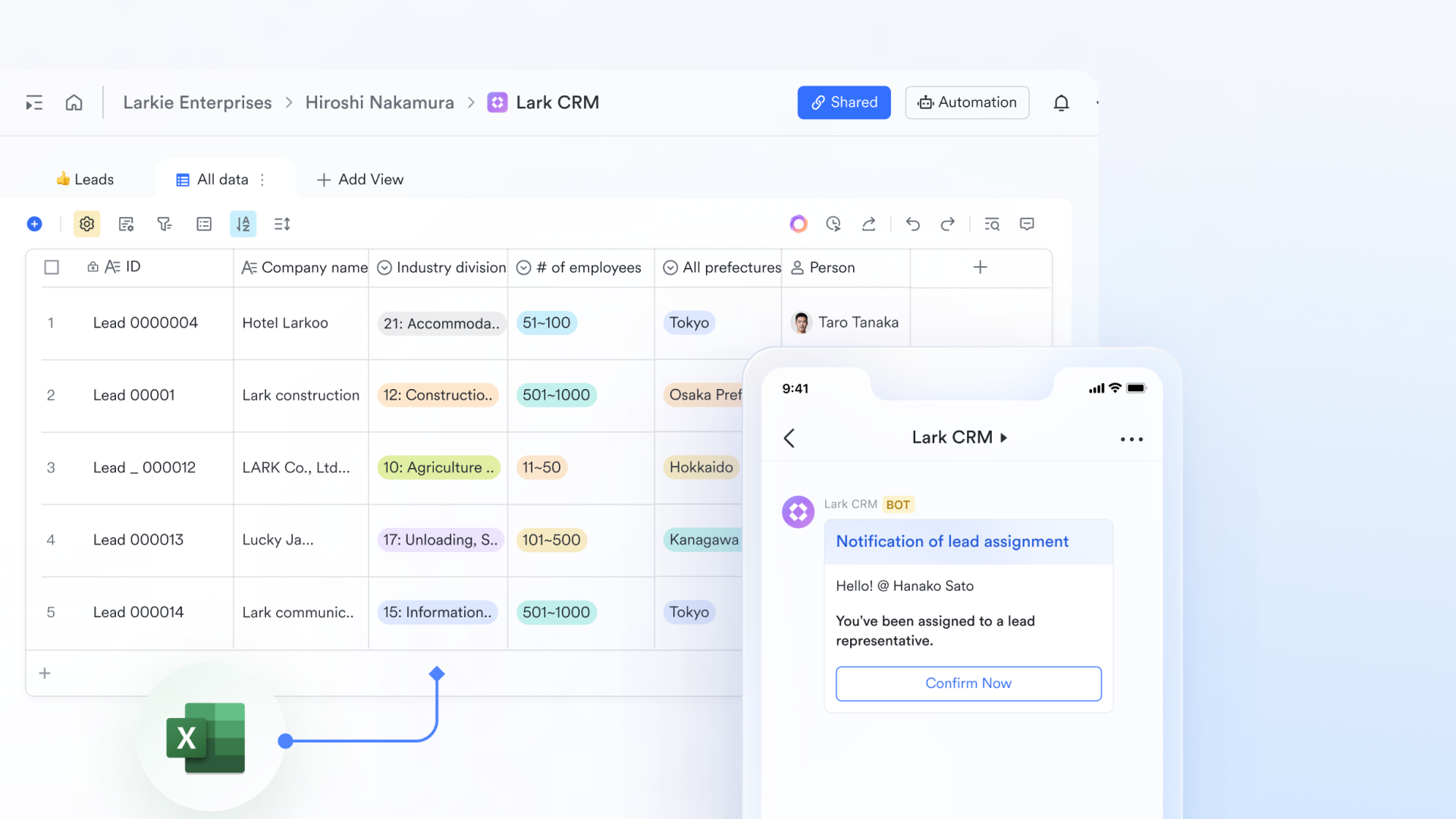
functions as a true CRM database where every lead, contact, account, and deal is stored as a distinct record with formula fields designed for customer workflows. These fields go beyond basic labels, owners, lifecycle stages, revenue values, and priority flags. Relationship links and custom data points can also be clearly defined and consistently enforced. Base lets you set required fields, control access permissions, and build relational links between tables (for example, connecting contacts to companies and deals). Unlike ClickUp, where CRM data lives as tasks and often gets mixed with operational work, Lark Base keeps customer data clean, consistent, and easy to query. This design ensures that teams are always working with accurate CRM records, not task artifacts, making pipelines and reporting far more reliable as volume grows.
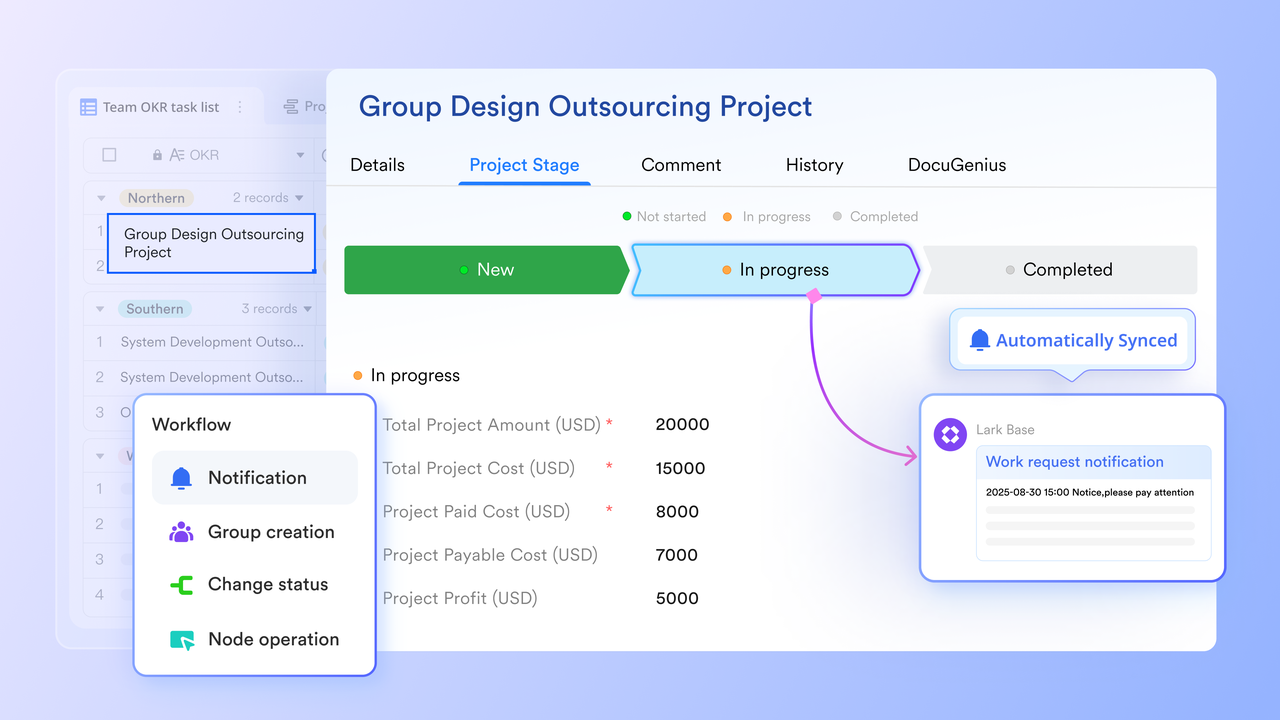
CRM workflows that reflect true lifecycle progression
In Lark Base, workflows aren't just visual status tags; they are logic engines that map directly to real customer lifecycles. When a deal moves from one stage to another (such as Lead → Qualified → Negotiation → Won), the system can automatically trigger predefined actions like assigning a new group owner, updating related fields, or notifying teammates in Messenger. These lifecycle workflows can be tailored to reflect your actual sales process rather than generic task progressions. Because they are tied to CRM records, not merely what checkbox is ticked on a task, workflows provide consistency across teams and reduce manual coordination. This contrasts with ClickUp's task status system, which often conflates task progress with customer stages, making it harder to enforce structured CRM behavior across a growing team.
Native dashboard for CRM data monitoring and insights
Lark Base dashboards support CRM by turning messy data into a clear, visual command center. Instead of digging through chat histories, you get high-level insights using advanced logic filters that can instantly flag high-value deals or stalled leads. You can mix and match over 36 different blocks or charts—like , progress bars, and combo charts—to see exactly how your team is performing at a glance. On the other hand, its built-in smart analysis feature can interpret your charts for you, surfacing hidden trends and outliers that might be missed in raw data. In ClickUp, you often have to navigate away from the dashboard back into specific Lists or Tasks to actually do the work. Lark Base basically bridges the gap between seeing a problem and fixing it, making your customer data much more actionable. 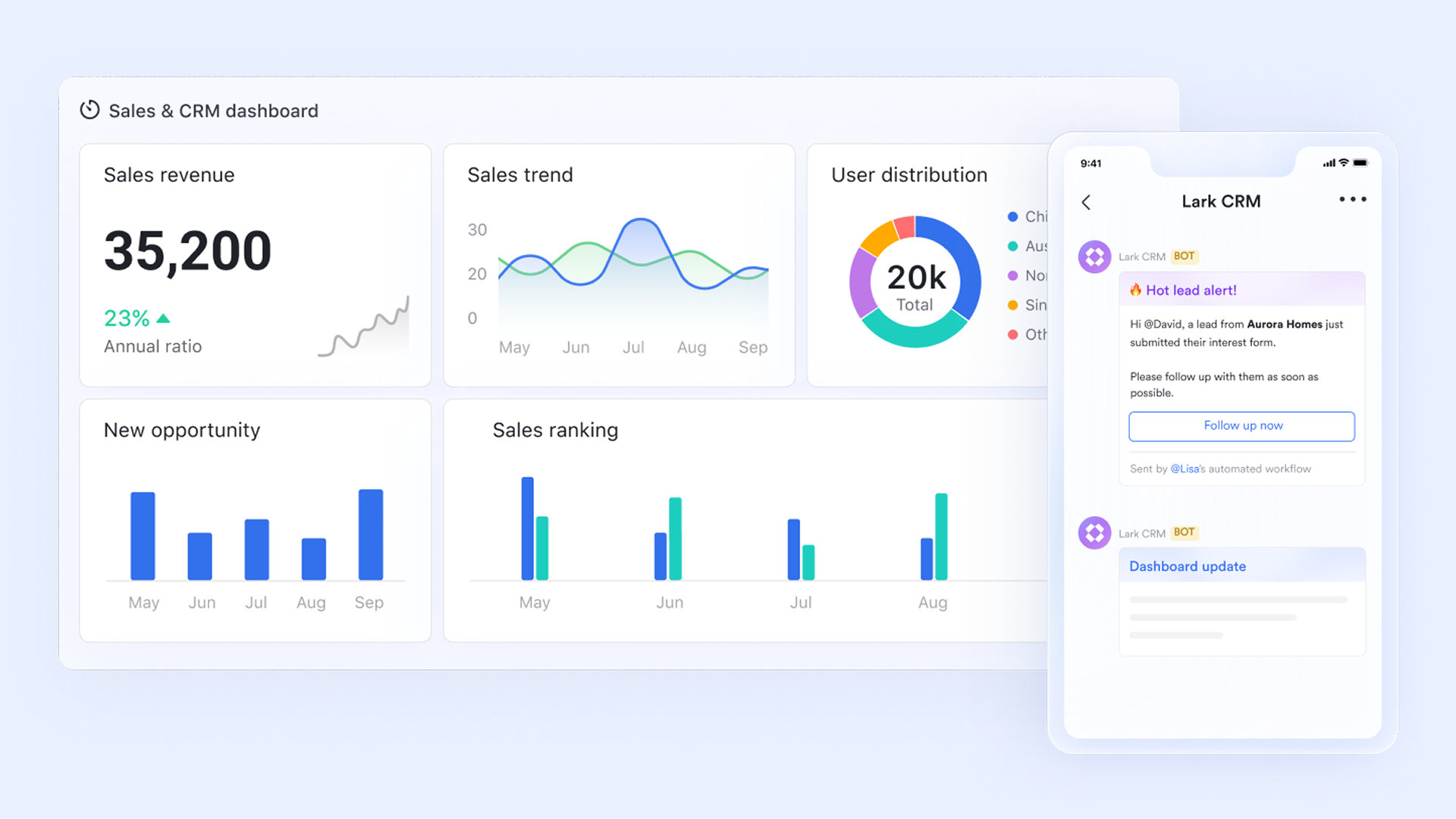
Contextual collaboration built into CRM workflows
Instead of storing conversations in isolated places, Lark embeds collaboration directly into CRM contexts. With , teams can create dedicated chats linked to specific customer records or deals, share live links to CRM data, and discuss updates in real time without losing context. allows teams to co-create proposals, strategy documents, onboarding guides, or sales playbooks right beside the CRM data they reference.
These Docs can include live base tables or sheet dashboards, and edits are versioned, so nothing gets lost. This seamless merging ensures that communication and documentation are always linked to the right customer context, unlike ClickUp, where comments live within tasks, often scattered across lists and requiring extra effort to connect to broader CRM conversations. 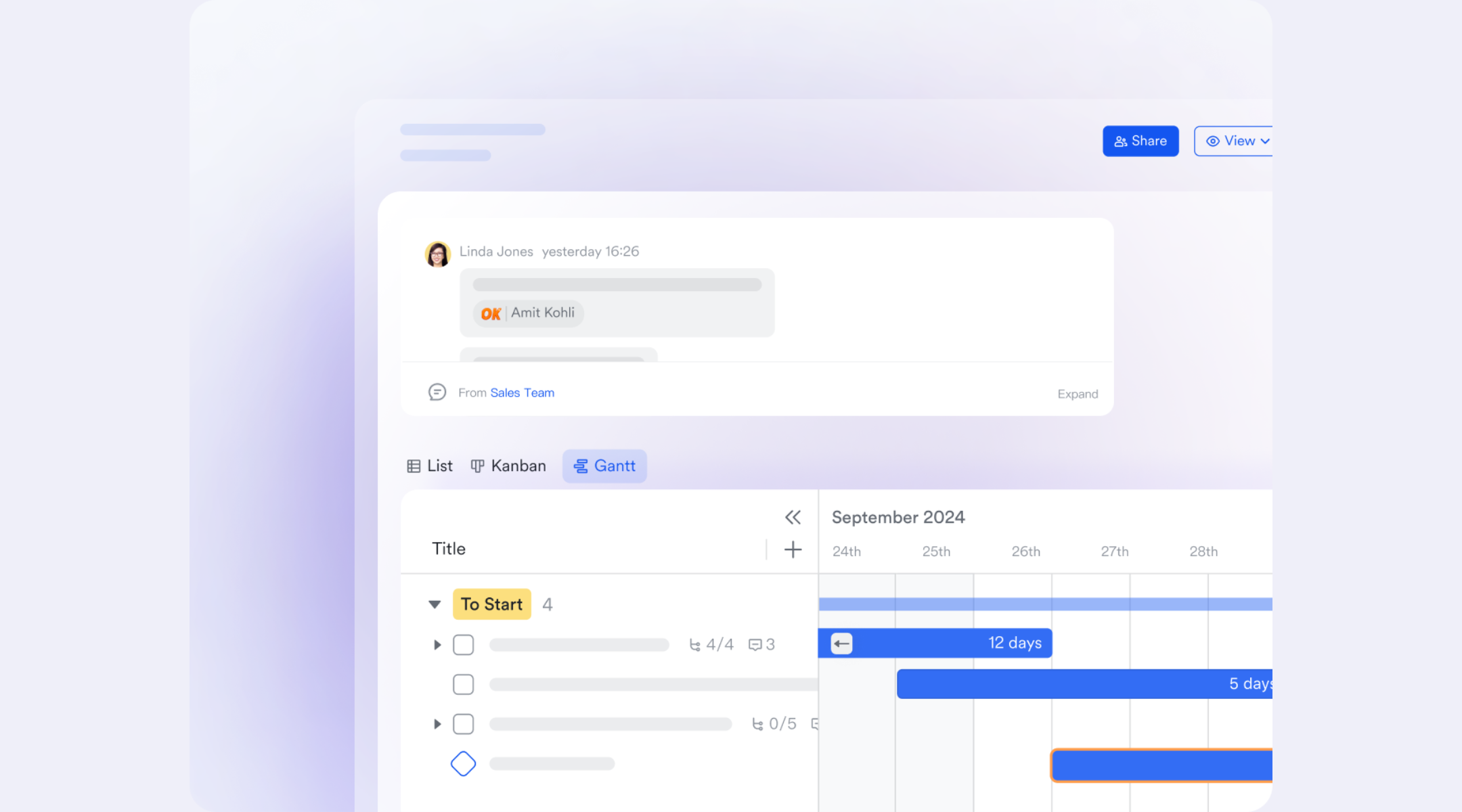
Templates that accelerate CRM adoption and maintain best practices
Lark offers CRM templates built around real team workflows, not just isolated fields and views. These templates are designed as custom templates that provide a ready-made structure for CRM data, pipelines, and execution from day one. They include standard sales pipelines, automation triggers, clear collaboration patterns, and built-in dashboards that help teams track progress without manual setup. Teams can adapt these templates to their industry needs while keeping core workflow logic intact through linked records, required fields, and structured permissions. This approach reduces onboarding friction, maintains consistency, and helps teams scale without rebuilding their CRM repeatedly. In ClickUp, CRM templates offer an initial framework, but achieving the same level of reliability for complex or growing use cases often requires heavy customization and ongoing maintenance.
:
- Starter plan: Free forever plan that includes 11 powerful tools for up to 20 users. It also comes with 100GB of storage, 1000 automation runs, AI translations, and more.
- Pro plan: $12/user/month (billed annually) for up to 500 users. It includes everything in Starter plus group calling for up to 500 attendees, 15TB of storage, 50,000 automation runs, and more.
- Enterprise plan: for custom pricing. Supports unlimited users and includes even more automation runs and advanced security, compliance, and management features.
For small teams with simple communication needs

18 months message history
1000 Base automation runs/month
2000 rows per table in Base
Most POPULAR
For companies with comprehensive collaboration and management needs
Unlimited message history
500-participant video meetings
50k Base automation runs/month
20k rows per table in Base
For large companies with advanced security and organizational management needs
Get a personalized demo and pricing
Unlimited message history
500-participant video meetings
15 TB storage + 30 GB storage/user
500k Base automation runs/month
50k Base automation runs/month
Most POPULAR
For companies with comprehensive collaboration and management needs
Unlimited message history
500-participant video meetings
50k Base automation runs/month
20k rows per table in Base
ClickUp CRM vs Lark CRM for scaling teams
As teams grow, CRM requirements shift from simple contact tracking to structured execution, visibility, and accountability across sales, delivery, and operations. Many organizations compare ClickUp CRM and Lark CRM at this stage because both promise flexibility and scalability, but they approach CRM from different lenses:
While Lark and ClickUp both offer robust features, your choice should depend on whether you prioritize unified action or granular management: Opt for Lark if you want a "control center" where data flows seamlessly into conversation, or choose ClickUp if you require highly complex, customized reporting for deep project tracking.
Conclusion
works best for teams that prioritize customization and are comfortable building their own CRM logic on top of tasks, views, and automations. It offers flexibility and powerful configuration options, but this freedom often comes with trade-offs in consistency and long-term clarity. As pipelines grow and more teams interact with customer data, maintaining a single source of truth can require ongoing manual discipline and admin effort. For teams that enjoy tailoring systems and have the capacity to manage complexity, ClickUp can remain effective.
takes a different path by designing CRM as an execution layer rather than a task adaptation. Customer records, workflows, conversations, documents, meetings, and automation are tightly connected, reducing the need to stitch tools together. This makes Lark especially strong for scaling teams that want speed, shared context, and accountability without increasing operational overhead. Instead of optimizing individual workflows, Lark supports how modern teams actually work across functions, helping CRM activity turn into coordinated action as the organization grows.
Embrace a brand new approach to CRM today
FAQs
Can ClickUp CRM support multi-pipeline sales teams cleanly?
ClickUp CRM can support multiple pipelines by using different lists, spaces, or custom views, but this structure relies heavily on manual setup. Pipelines are not enforced by default, so depends on how carefully teams follow internal rules. As more pipelines are added, reporting and coordination become harder to maintain. Admin oversight is often required to keep data aligned across teams. At this stage, some teams begin exploring more execution-oriented CRM setups like Lark.
How reliable is ClickUp CRM for long-term customer history tracking?
Customer history in ClickUp CRM is stored within tasks, comments, and activity logs rather than dedicated CRM records. Over time, this history can fragment as tasks are closed, archived, or reorganized. Important context may become harder to trace, especially when teams change or grow. Maintaining a clean historical view often requires manual habits. This is where teams start to value platforms that preserve customer context more natively, such as Lark.
What happens to CRM clarity when tasks are closed or archived?
When tasks double as CRM records, closing or archiving them can reduce visibility into ongoing or future customer relationships. Teams must decide whether to reopen tasks or create new ones for renewals and follow-ups. This can blur lifecycle tracking and increase duplication. Over time, CRM clarity depends more on process discipline than system design. Some teams eventually look toward tools like Lark that separate customer records from task completion states.
Can ClickUp CRM handle renewals and expansions well?
and expansions in ClickUp CRM typically require creating new tasks or duplicating existing ones. Relationships between original deals and follow-on activity are not automatically enforced. Tracking account-level history across multiple deal cycles can become manual and inconsistent. Teams often add custom fields or linked tasks to bridge the gap. As this complexity grows, many start considering CRM approaches like Lark that treat accounts as long-lived records.
How do teams avoid CRM data sprawl inside ClickUp?
Avoiding data in ClickUp requires strict conventions around where CRM data lives and how tasks are created. Teams often need regular audits, admin checks, and training to maintain structure. Without this effort, customer data can spread across lists and spaces, reducing visibility. As organizations scale, this operational burden increases. At that point, teams frequently evaluate more centralized CRM workspaces such as Lark that are designed to scale cleanly.
Related reading


















